5 Best Dash Cams for Honda Ridgeline in 2026: 4K Video, STARVIS 2 Sensors & Hidden OEM Looks
If there’s one thing long-time Honda Ridgeline owners tend to appreciate, it’s how easy this truck is to live with every day. Whether you’re driving a 2017 model with over 100,000 miles on the clock or a brand-new 2026 Ridgeline fresh off the lot, the truck’s quiet cabin, wide windshield, and car-like ride quality make it a surprisingly good platform for a dash cam. The problem is that those same traits also make poor cameras easier to spot. Weak night vision, windshield reflections, unreliable parking mode, and blurry license plate capture become obvious very quickly.
That’s why we didn’t build this list around marketing claims or spec-sheet hype. Instead, we focused on the features that actually matter in a Ridgeline: reliable license plate readability, strong low-light performance, stable parking surveillance, clean installation options, and video quality that still holds up when reviewing footage weeks or months later. We also considered compatibility across the entire 2017–2026 Honda Ridgeline lineup, since many owners plan to keep these trucks for years rather than replacing them every few seasons.
Some buyers want the absolute best image quality available today. Others want an OEM-style setup that looks like it came from the factory. A few simply want dependable front-and-rear coverage without spending a fortune. The dash cams below stand out because they solve those real-world needs better than the dozens of generic models currently flooding online marketplaces.
Best Honda Ridgeline Dash Cams: Top Choices for Front-Rear Coverage, GPS & Night Vision
#1. VIOFO A229 Plus Dash Cam Front and Rear
Best Honda Ridgeline Dash Cam for Crystal-Clear Night Recording, Dual STARVIS 2 Sensors and Long-Term Ownership Confidence
#2. Fitcamx Front 4K + Rear 1080P Dash Cam
Best OEM-Style Dash Cam for Honda Ridgeline 2017–2026 With Factory-Look Installation and Hidden Wiring Design
#3. ROVE R2-4K DUAL Dash Cam Front and Rear
Best Front and Rear Dash Cam for Honda Ridgeline Owners Seeking 4K Clarity, Fast WiFi and Strong Everyday Value
#4. Z-Edge T4 Dash Cam Front and Rear
Best 4K Dash Cam for Honda Ridgeline Drivers Wanting Large Storage Support and Budget-Friendly Dual Coverage
#5. Cobra RAD 700i Radar Detector & SC 201 Dash Cam Bundle
Best Honda Ridgeline Dash Camera and Radar Detector Combo for Highway Drivers Looking for Two Devices in One Package
Expert Tip From a Ridgeline Owner’s Perspective
One mistake we see repeatedly is people focusing almost entirely on resolution numbers. A 4K badge on the box looks impressive, but in the real world, sensor quality matters far more than raw resolution. A well-tuned STARVIS 2 camera recording at night will often capture license plates, road signs, and vehicle details more clearly than a cheaper 4K model using an average sensor.
If your Ridgeline spends nights in a driveway, apartment lot, work site, or public parking area, prioritize parking mode reliability and image sensor quality before anything else. Most owners never need footage from their daily commute. The footage that ends up mattering is usually recorded when the truck is parked and nobody is inside.
How We Chose These Dash Cams for Honda Ridgeline Owners
There are hundreds of dash cams available today, but the reality is that most of them never made it onto our shortlist.
The Honda Ridgeline presents a unique challenge. It has a large windshield, a relatively quiet cabin, and many owners keep their trucks for years rather than trading them in every few seasons. Because of that, we looked beyond marketing claims and focused on the things that continue to matter long after the excitement of a new purchase wears off.
We Prioritized Video Quality That Holds Up in Real Situations
Many dash cams look impressive during daylight product demos. The real test comes after sunset.
We gave significant weight to cameras that use premium imaging hardware, particularly models with proven low-light performance. The reason is simple: accidents, hit-and-runs, parking lot damage, and insurance disputes rarely happen under perfect lighting conditions.
That is one reason the VIOFO A229 Plus ranked so highly. Its dual STARVIS 2 sensors address a problem many cheaper cameras still struggle with: producing usable footage when lighting conditions are far from ideal.
We Looked for Features Ridgeline Owners Actually Use
A long feature list means very little if owners never touch half of those features.
Instead of rewarding gimmicks, we focused on practical benefits such as:
- Reliable front and rear coverage
- Stable parking surveillance
- Accurate GPS logging
- Fast wireless footage transfers
- Consistent recording performance
- Clear license plate capture
Every model on this list brings at least one of those strengths to the table.
Installation Experience Was a Major Factor
Not every Ridgeline owner wants cables hanging across the windshield.
That is why the Fitcamx earned a top position despite competing against cameras with stronger specifications on paper. Its integrated factory-style appearance solves a real-world problem many owners care about every single day. Once installed, it looks remarkably close to something Honda could have included from the factory.
For many buyers, that clean OEM appearance is worth more than an extra line of specifications.
We Considered Long-Term Ownership, Not Just First Impressions
A dash cam might look great during the first week.
The bigger question is whether it will still be dependable after months of summer heat, winter mornings, vibration, daily driving, and countless recording cycles.
Products that demonstrated stronger reliability, better storage support, dependable app performance, and mature feature sets naturally moved higher in our rankings.
We Didn’t Choose Products Solely Based on Price
The cheapest option is rarely the best value.
At the same time, the most expensive option isn’t automatically the right choice either.
That is why this list includes different types of recommendations. Some Ridgeline owners want the absolute best image quality available today. Others want a factory-style installation. Some simply want dependable front-and-rear protection without overspending.
Rather than forcing every buyer into one category, we selected products that solve different needs while still meeting the standards we would expect for a truck many owners plan to keep well beyond 100,000 miles.
At the end of the process, only the cameras that delivered a meaningful advantage in video quality, parking protection, installation experience, or everyday usability remained on the list. Those are the products you see ranked above.
#1. VIOFO A229 Plus Dash Cam Front and Rear
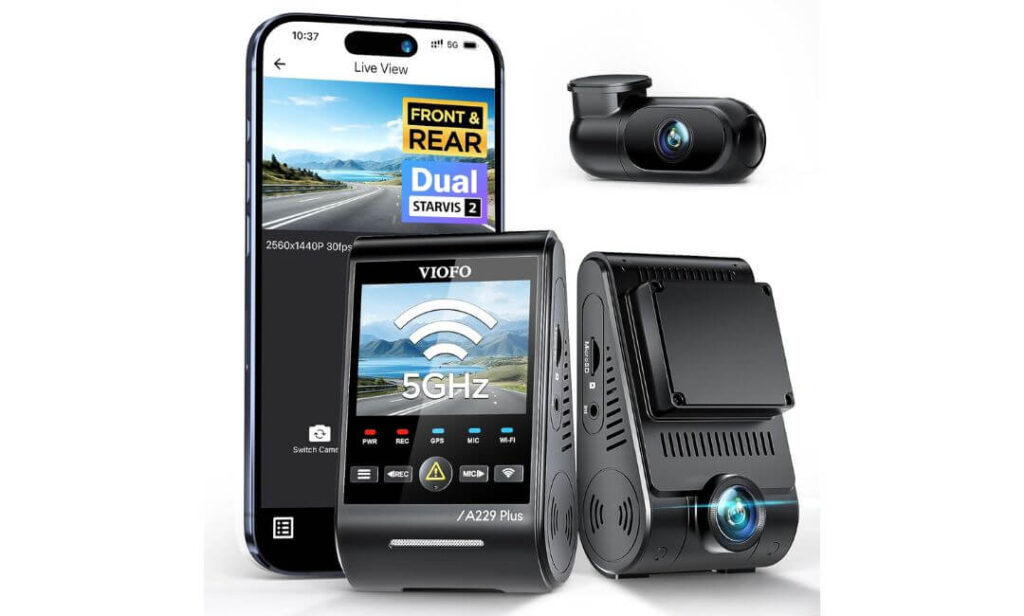
Quick Specs:
- Dual Sony STARVIS 2 IMX675 image sensors
- True 1440P Front + 1440P Rear recording
- Dual-channel HDR processing
- Up to 60fps front recording
- Quad-mode GPS (GPS, GLONASS, Galileo, BeiDou)
- Ultra-fast 5GHz WiFi
- Voice control with 12 commands
- Three dedicated parking surveillance modes
- Compact front and rear camera design
- Supports up to 512GB microSD cards
The first thing that stands out here isn’t the resolution number. It’s the hardware behind it.
Most dash cams look good when conditions are perfect. Wide daylight, clean roads, no shadows. The moment you throw in rain, glare, dark highways, parking garages, or a pickup truck pulling out in front of you at dusk, that’s where weaker cameras start falling apart. This setup uses dual STARVIS 2 sensors on both cameras, which is still one of the biggest upgrades a driver can make if clear evidence matters more than marketing buzzwords.
For Honda Ridgeline owners specifically, the combination works exceptionally well. The truck’s large windshield and elevated seating position already provide a strong viewing angle. Pairing that with dual HDR processing and 1440P recording front and rear creates footage that remains surprisingly usable when reviewing incidents later. Small details that often disappear on lesser cameras—road signs, lane markings, vehicle colors, even plate characters—remain easier to identify.
What ultimately pushed this model ahead of the competition was balance. Fast 5GHz wireless transfers, highly accurate GPS tracking, reliable parking protection, voice commands that actually save time, and image quality that doesn’t depend on ideal weather conditions. Nothing here feels like filler.
(If your goal is simply buying one dash cam and not wondering later whether you should have spent a little more, this is the model that consistently makes the strongest case for itself.)
Highlights That Made Our Shortlist
- Dual STARVIS 2 sensors instead of mixing a strong front camera with a weaker rear unit
- Excellent low-light performance without excessive image noise
- HDR available on both cameras for difficult lighting situations
- Highly accurate multi-satellite GPS tracking
- Fast wireless downloads that don’t feel frustrating to use
- Parking surveillance options suitable for long-term truck ownership
One Thing Worth Knowing
- A memory card is not included, so you’ll need to add a quality high-endurance card separately.
Honda Ridgeline Compatibility Notes
One reason this model continues to perform well across the Ridgeline lineup is its flexible installation design. The adhesive windshield mount works cleanly on both earlier and newer model years, while the included rear camera cable provides enough length to route through the cabin without feeling stretched or improvised.
Drivers who park outside regularly can also add the optional hardwire kit to unlock full-time parking monitoring. For many Ridgeline owners who keep their trucks for years, that’s often more valuable than an extra jump in resolution.
The Insider Pro-Tip
A surprising number of buyers focus entirely on the front camera and barely think about the rear unit.
In reality, some of the most expensive insurance claims involve rear-end impacts, parking lot damage, or situations where another vehicle leaves the scene. That’s one reason this dual-STARVIS setup stands out. You’re not getting a premium front camera paired with an afterthought rear camera. You’re getting strong imaging hardware at both ends of the truck, which is exactly what a well-rounded dash cam system should look like.
#2. Fitcamx Front 4K + Rear 1080P Dash Cam
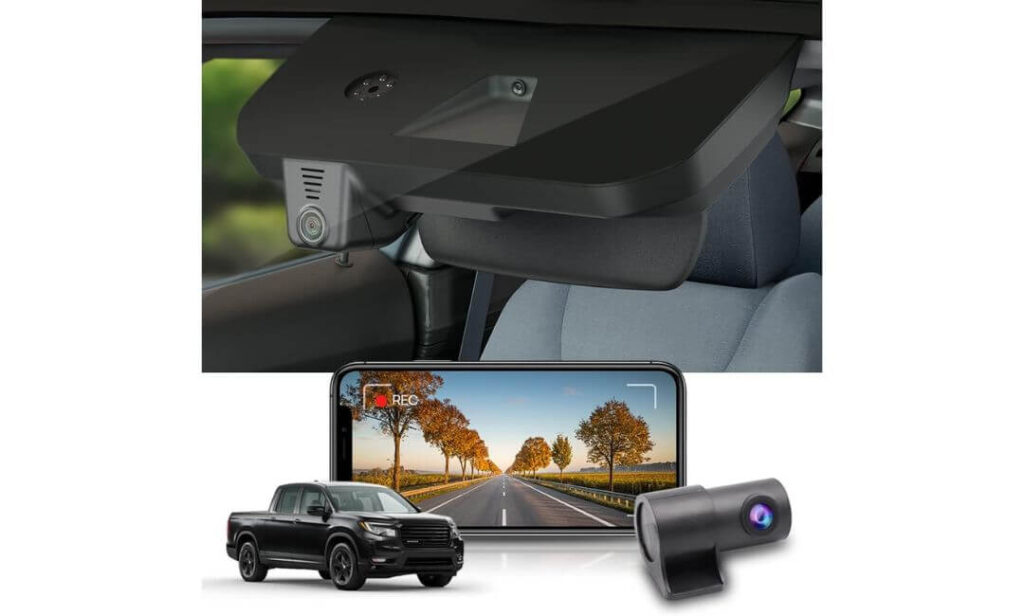
Quick Specs:
- Vehicle-specific design for Honda Ridgeline 2017–2026
- Integrated OEM-style housing
- Front 4K (2160P) recording
- Rear 1080P recording
- Wide 170° viewing angle
- Built-in WiFi and FITCAMX mobile app
- Includes 128GB memory card
- Rearview mirror cover installation
- G-Sensor incident protection
- Loop recording support
- Operating temperature up to 185°F (85°C)
Let’s be honest for a second.
Most dash cams—even expensive ones—still look like aftermarket accessories stuck onto the windshield. Wires, mounts, dangling cables, blinking lights. Some owners don’t care. Many Ridgeline owners do.
That’s where this setup separates itself from almost everything else in the category. Instead of looking like an add-on, it blends directly into the factory mirror assembly. Once installed, most passengers won’t even notice it’s there unless you point it out. That matters more than many buyers realize because a camera you barely see quickly becomes a camera you stop thinking about.
The recording quality is equally practical. The front camera captures in 4K while the rear records in 1080P, giving drivers solid coverage from both directions without adding visual clutter to the cabin. The included 128GB card is another welcome touch because the system is essentially ready to start recording the day it arrives rather than requiring additional purchases before installation.
Perhaps the biggest compliment we can give this model is that it feels like something Honda could have engineered themselves. It doesn’t try to overwhelm buyers with endless features. Instead, it focuses on integration, simplicity, and clean execution—three things that often matter more during ownership than an extra specification buried on a product page.
(For Ridgeline owners who value a factory appearance just as much as video quality, few options on the market feel this purpose-built.)
Standout Qualities That Impressed Us
- Designed specifically around the Ridgeline’s interior layout
- Factory-style appearance with no windshield clutter
- Front 4K recording for enhanced detail capture
- Includes a 128GB memory card in the box
- Simple WiFi video access through the mobile app
- Clean mirror-mounted installation without visible hardware
One Thing Worth Knowing
- Because this model prioritizes factory-style integration, it focuses more on simplicity and seamless installation than on advanced enthusiast features like voice commands or premium multi-satellite GPS tracking.
Why Ridgeline Owners Often Gravitate Toward This Setup
This isn’t a universal dash cam trying to fit hundreds of vehicles.
The housing, mounting approach, and overall design were built specifically around the Honda Ridgeline platform, which immediately removes many of the installation headaches that come with traditional dash cameras. No guessing where to place the camera. No trying to hide a bulky body behind the mirror. No compromise between appearance and functionality.
For owners who chose the Ridgeline because it feels more refined than a traditional midsize pickup, this camera follows that same philosophy. It delivers protection without changing the character of the cabin.
The Insider Pro-Tip
Many buyers spend hours comparing resolution numbers and completely overlook something they will see every single day: the installation itself.
A camera with slightly better specifications won’t feel like the better purchase if you’re constantly noticing exposed wiring or a bulky device hanging below the mirror. Long-term owners often appreciate solutions that disappear into the vehicle rather than drawing attention to themselves.
That’s exactly why this model earned such a high position on our list. The video quality is important. The factory-like integration is what makes people keep recommending it years after installation.
#3. ROVE R2-4K DUAL Dash Cam Front and Rear
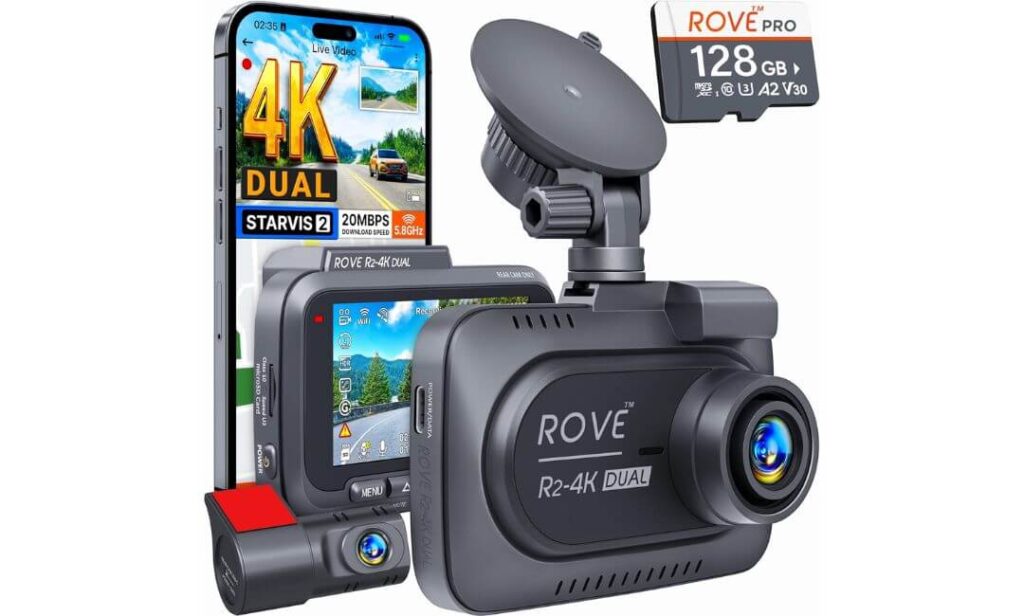
Quick Specs:
- Front 4K Ultra HD (2160P) recording
- Rear 1080P Full HD recording
- Sony STARVIS 2 IMX675 image sensor
- Ultra-fast 5GHz + 2.4GHz WiFi
- Download speeds up to 20MB/s
- Built-in GPS tracking
- Includes 128GB microSD card
- Supports storage up to 1TB
- 150° front and 140° rear viewing angles
- Supercapacitor design for heat and cold resistance
- Three dedicated parking surveillance options
Here’s what makes this camera interesting.
Most buyers shopping in this price range usually end up making a compromise somewhere. They either get strong video quality but a mediocre app. Great features but expensive storage upgrades. Fast connectivity but average night footage.
This model avoids most of those trade-offs.
The first thing that stands out is how complete the package feels right out of the box. The included 128GB card, built-in GPS, dual-channel recording, STARVIS 2 imaging sensor, and extremely fast wireless transfers eliminate several common frustrations that buyers often discover after purchasing a dash cam. There is very little “extra shopping” required afterward.
The video performance is equally impressive for Honda Ridgeline owners. The combination of a 4K front camera, Full HD rear camera, wide viewing angles, HDR processing, and the STARVIS 2 sensor creates footage that remains detailed across a wide range of driving conditions. Highway commutes, rural roads, late-night drives, parking lots, and poor weather are exactly where this camera begins to justify its position in the rankings.
What ultimately separates it from many similarly priced competitors is convenience. Fast downloads matter. Reliable GPS matters. Voice guidance matters. Long-term durability matters. This camera combines those small everyday advantages into one package that simply feels easy to live with.
(Some dash cams impress during installation day. This one tends to impress six months later when you’re still enjoying features that actually save time.)
Reasons It Made Our Final Cut
- Sony STARVIS 2 sensor delivers strong low-light performance
- Ultra-fast WiFi transfers reduce waiting time significantly
- Built-in GPS records speed and route data automatically
- Includes a 128GB memory card from day one
- Supports extremely large storage capacities up to 1TB
- Supercapacitor design handles temperature extremes better than many battery-based alternatives
One Thing Worth Knowing
- Drivers who specifically want a factory-integrated appearance may prefer a dedicated OEM-style option, as this model follows a traditional windshield-mounted design.
Why It Works So Well in a Honda Ridgeline
The Ridgeline is often used as a daily driver, weekend road-trip vehicle, work truck, and family hauler all at the same time.
That versatility makes a feature-rich camera especially valuable. The included 6.5-meter rear cable provides enough length for a clean front-to-rear installation, while the wide viewing angles help maximize coverage around the truck without requiring complicated positioning.
For owners who spend a lot of time on highways or regularly travel long distances, the combination of GPS tracking, high-capacity storage support, and fast video retrieval becomes genuinely useful rather than simply sounding good on a specification sheet.
The Insider Pro-Tip
One feature buyers consistently underestimate is download speed.
It sounds boring when you’re shopping. It becomes extremely important the first time you need footage quickly.
Whether you’re sharing evidence after an accident, reviewing a parking incident, or sending footage to an insurance company, waiting several minutes for large video files gets old fast. The unusually fast wireless transfer speeds offered here solve a problem most buyers don’t think about until months after installation.
That’s one reason this camera continues to earn loyal owners. The image quality gets attention first. The everyday usability is what keeps people happy long after the purchase is made.
#4. Z-Edge T4 Dash Cam Front and Rear
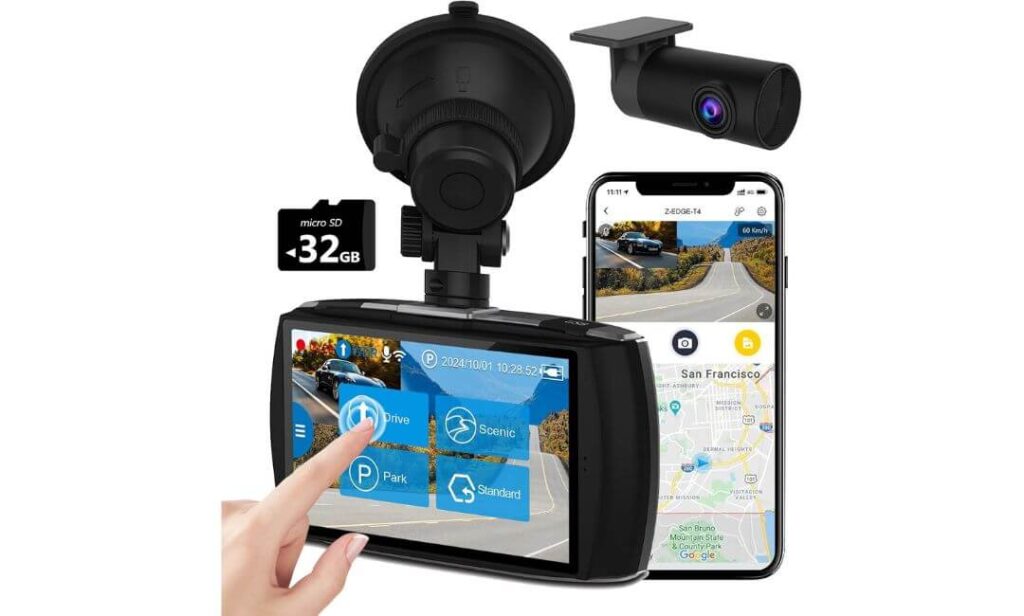
Quick Specs:
- Front 4K Ultra HD recording
- Dual-channel 1440P + 1080P recording
- Dual 155° wide-angle coverage
- Built-in WiFi connectivity
- Large 4-inch touchscreen display
- WDR night vision technology
- Loop recording support
- G-Sensor impact detection
- 24-hour parking surveillance support
- Supports memory cards up to 512GB
- Front and rear camera system included
Here’s something many buyers discover only after living with a dash cam for a while: convenience matters.
Not every owner wants to spend time learning voice commands, studying app menus, or adjusting dozens of settings. Sometimes you simply want a camera that records clearly, gives you a large screen, and makes everything feel straightforward from day one.
That’s exactly where this setup earns its place.
The combination of 4K front recording, Full HD rear coverage, wide viewing angles, and a responsive 4-inch touchscreen creates an experience that feels refreshingly simple. Need to review footage? Tap the screen. Need to lock a clip? Tap the screen. Need to adjust settings? Everything is right in front of you. For many Honda Ridgeline owners, that ease of use ends up being more valuable than features they may never use.
Video quality is stronger than the price category suggests. During daytime driving, the 4K front camera captures impressive detail, while the rear camera helps cover traffic approaching from behind. The WDR processing also does a respectable job balancing shadows, bright sunlight, headlights, and reflective surfaces that commonly challenge entry-level cameras.
What really surprised us was how balanced the overall package feels. Nothing about it screams premium flagship. Instead, it focuses on delivering the features most drivers actually use every day—and does so without making ownership complicated.
(Some products win people over with specifications. This one wins people over by being easy to live with.)
Strengths That Earned It a Place on This List
- Sharp 4K front recording for daily driving
- User-friendly touchscreen interface
- Wide viewing angles reduce blind spots
- Built-in WiFi for quick footage access
- Strong value relative to its feature set
- Supports large-capacity storage up to 512GB
One Thing Worth Knowing
- While night performance is solid thanks to WDR technology, drivers who spend most of their time on very dark rural roads may benefit from stepping up to one of the STARVIS 2-equipped options higher on this list.
Why It Fits the Honda Ridgeline So Well
The Ridgeline attracts a wide range of owners. Some use it for commuting, others for weekend projects, family travel, road trips, or outdoor adventures.
That versatility pairs nicely with a dash cam designed around simplicity. The large display makes operation easy, while the dual-camera setup helps cover both ends of the truck without requiring a complicated installation process.
For owners who want dependable front-and-rear protection without moving into premium pricing territory, this remains one of the more sensible choices available today.
The Insider Pro-Tip
One feature that often gets overlooked is screen usability.
A lot of drivers assume they’ll control everything from a smartphone app. In reality, many people end up using the dash cam itself far more often than expected—especially when reviewing a recent recording, adjusting a setting, or confirming that everything is working correctly.
That’s where a large, responsive touchscreen becomes surprisingly valuable. It removes friction from everyday use, and small conveniences like that tend to matter more over years of ownership than most buyers initially realize.
#5. Cobra RAD 700i Radar Detector & SC 201 Smart Dash Cam Bundle
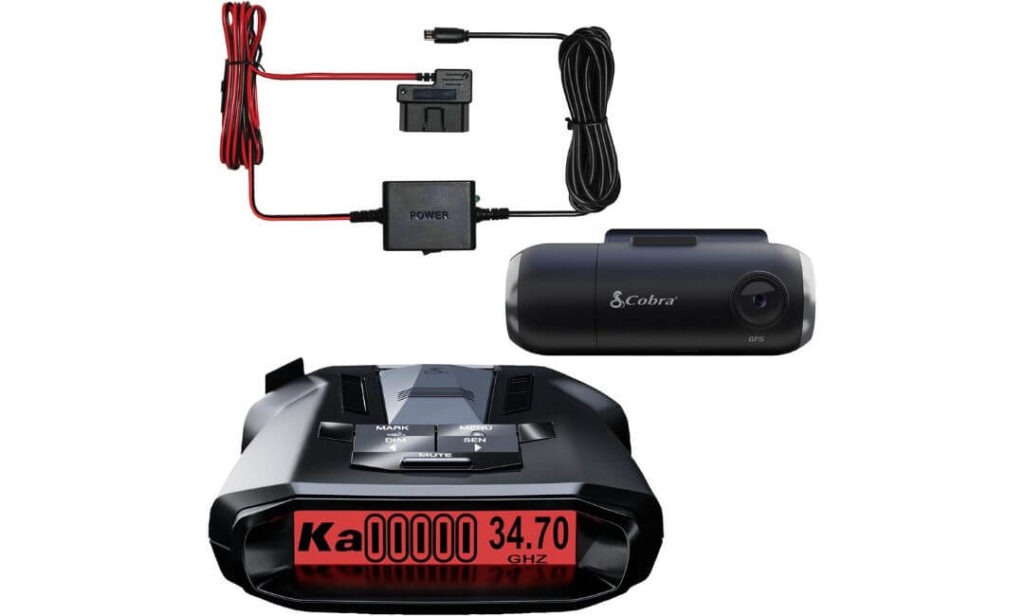
Quick Specs:
- Full HD 1080P dash camera
- Dedicated radar detector included
- Long-range radar and laser detection
- Detection for X, K, Ka, and M bands
- Built-in GPS tracking
- Built-in WiFi connectivity
- Included OBD hardwire kit
- AutoLearn false-alert filtering
- Cloud video management support
- Includes 16GB microSD card
- OLED display interface
Let’s approach this one differently.
If you’re shopping purely for the highest-resolution dash cam available, there are stronger options above it. That’s not why this product earned a place on the list.
This recommendation exists for a very specific type of Honda Ridgeline owner: someone who spends serious time on highways.
Long interstate drives, multi-state road trips, weekend towing trips, long-distance work routes—those are the situations where this package starts making a lot more sense than it initially appears. Instead of purchasing a dash cam and a radar detector separately, you’re getting both pieces of equipment in a single package designed to work together.
The radar detector is the real attraction here. Cobra’s updated antenna platform, digital signal processing, and AutoLearn filtering system focus on delivering earlier alerts while reducing many of the repetitive false warnings that can make some detectors annoying to live with. Over time, the system learns commonly encountered signals and becomes less distracting during everyday driving.
Meanwhile, the included SC 201 dash cam quietly handles recording duties in the background. Built-in GPS, WiFi connectivity, cloud functionality, and included storage mean you have evidence available if needed while still benefiting from the detector’s long-range awareness capabilities.
(For the right buyer, this isn’t a dash cam purchase. It’s a road-trip companion that happens to include a dash cam.)
Reasons We Included It in the Rankings
- Combines two useful driving tools into one package
- Long-range radar detection capabilities
- GPS data logging built directly into the system
- AutoLearn technology helps reduce unnecessary alerts
- Included hardwire solution supports cleaner installation
- Strong fit for drivers who spend extensive time on highways
One Thing Worth Knowing
- Buyers whose primary goal is maximizing video quality alone will likely be better served by one of the dedicated 4K-focused options ranked higher on this list.
Why Some Ridgeline Owners Will Prefer This Setup
The Honda Ridgeline has always attracted drivers who use their trucks for travel just as much as utility.
Whether it’s hauling equipment, towing recreational gear, covering long distances for work, or heading out on extended road trips, many owners spend significant time on open highways. That’s where this package begins to separate itself from traditional dash cams.
The included OBD hardwire solution also simplifies installation compared with piecing together multiple accessories from different brands, making the overall setup feel more complete right out of the box.
The Insider Pro-Tip
Most buyers evaluate this product from the wrong perspective.
They compare it against dedicated premium dash cams and immediately focus on video resolution. The better comparison is actually the total cost of purchasing a quality dash cam, a quality radar detector, separate mounting hardware, wiring accessories, and GPS functionality individually.
When viewed as a complete driving-awareness package rather than a standalone camera, the value proposition becomes much easier to understand—especially for Ridgeline owners who regularly rack up highway miles throughout the year.
Best Honda Ridgeline Dash Camera Picks Compared Side by Side
Buying Guide: Features That Actually Matter When Choosing a Dash Cam for a Honda Ridgeline
The Honda Ridgeline occupies a unique space in the truck market. It delivers the practicality of a pickup while maintaining much of the comfort, refinement, and daily usability people typically associate with an SUV. Because of that, choosing a dash cam for a Ridgeline isn’t quite the same as choosing one for every other truck on the road.
A camera that works perfectly in one vehicle may not necessarily be the best fit here. Cabin layout, windshield angle, parking habits, daily driving conditions, and even how long you plan to keep the truck should influence your decision.
The sections below cover the features that genuinely deserve your attention before spending money on any Honda Ridgeline dash cam.
4K Resolution vs. 1440P: Which One Makes More Sense?
Resolution is usually the first specification buyers notice, but it shouldn’t be the only factor driving the decision.
A quality 4K camera generally captures more detail during daylight driving. License plates, road signs, vehicle markings, and distant objects often appear sharper, particularly when footage is paused and reviewed later. That’s one reason products like the ROVE R2-4K DUAL and Fitcamx continue attracting buyers who prioritize image detail.
However, resolution alone doesn’t tell the whole story.
A well-engineered 1440P camera with superior image processing and premium sensors can often outperform an average 4K model once lighting conditions become challenging. That’s exactly why the VIOFO A229 Plus remains one of the strongest recommendations in this guide despite not chasing the highest resolution numbers available.
For most Ridgeline owners, the real question is simple:
If your priority is maximum daytime detail, 4K is worth considering. If your priority is balanced performance across daytime, nighttime, bad weather, and long-term reliability, sensor quality deserves equal attention.
STARVIS 2 Sensors: The Upgrade Most Drivers Notice After Dark
Many buyers focus on resolution and completely overlook the image sensor.
In reality, the sensor is often more important.
Sony’s STARVIS 2 technology has become one of the most meaningful advancements in consumer dash cams because it significantly improves low-light performance. Better light sensitivity means less image noise, better contrast, improved shadow detail, and a greater ability to identify important information after sunset.
This matters because many real-world incidents happen when lighting conditions are far from ideal.
Parking lot scrapes, early morning commutes, nighttime highway driving, severe weather, poorly lit intersections, and underground parking structures all place greater demands on a camera than a sunny afternoon drive.
That’s why the STARVIS 2-equipped VIOFO A229 Plus and ROVE R2-4K DUAL ranked so highly in our recommendations. The improvement isn’t something you’ll appreciate only in a laboratory test. It’s something you’ll notice every time the sun goes down.
Hidden OEM Looks: Why Installation Matters More Than Most Buyers Expect
A surprising number of owners regret purchasing bulky dash cams after living with them for a few months.
At first, the camera feels exciting.
Eventually, many people become more aware of dangling cables, windshield clutter, visible mounts, and hardware that never quite looks like it belongs inside the vehicle.
This is where OEM-style solutions become appealing.
Products like the Fitcamx were designed specifically around the Honda Ridgeline’s interior architecture. Instead of attaching a visible device below the mirror, the camera integrates directly into the surrounding trim, creating an appearance that feels factory-installed.
For owners who value a clean cabin, this can become a bigger advantage than any individual specification listed on a product page.
Front and Rear Dash Cam Setups: Why Dual Cameras Usually Win
Single-camera systems still have a place, but dual-channel setups are becoming increasingly difficult to ignore.
A front-facing camera captures what’s happening ahead of your truck, which is obviously important. However, many insurance claims involve rear-end collisions, parking lot impacts, hit-and-run incidents, or situations where another driver approaches from behind.
Without rear coverage, important evidence can simply disappear.
For that reason, every top-ranked recommendation in this guide uses a front-and-rear configuration. The added protection generally outweighs the additional installation effort, particularly for drivers who plan to keep their Ridgeline for many years.
Think of the rear camera as insurance for the incidents you never expect to happen.
Parking Mode: One Feature Many Owners End Up Appreciating Most
Ask experienced dash cam owners which feature proved most valuable over time, and parking mode often enters the conversation surprisingly quickly.
The reason is simple.
Most vehicles spend far more time parked than moving.
A dash cam equipped with parking surveillance can monitor activity while your Ridgeline sits in a driveway, apartment complex, parking garage, workplace lot, shopping center, or trailhead parking area.
Different systems approach this differently.
Some record continuously at a reduced bitrate. Others activate when motion is detected. Some save footage only after sensing an impact. More advanced systems combine multiple approaches depending on the situation.
If your truck regularly sits unattended in public areas, parking mode deserves far more attention than most buyers initially give it.
Night Vision, HDR, and WDR: The Features Behind Usable Footage
Terms like HDR and WDR are often buried deep inside specification sheets, but they play a major role in footage quality.
Modern roads present difficult lighting conditions constantly.
Headlights, LED signs, reflective surfaces, streetlights, tunnels, dark roads, and bright sunlight can all appear within the same frame at the same time.
Without proper exposure control, important details can become washed out or hidden in shadows.
HDR (High Dynamic Range) and WDR (Wide Dynamic Range) help cameras manage those situations more effectively by balancing bright and dark areas within the image.
The result is footage that remains easier to interpret when conditions become challenging—which is exactly when dash cam footage matters most.
Installation Considerations for Honda Ridgeline Owners
Installation is often overlooked during the buying process, yet it can significantly affect long-term satisfaction.
The easiest approach is using the included 12V power adapter. Most owners can complete installation quickly without modifying anything inside the vehicle.
However, drivers interested in parking mode usually need a constant power source.
That’s where hardwire kits enter the picture.
A properly installed hardwire kit connects the camera directly to the vehicle’s electrical system while incorporating voltage protection designed to prevent excessive battery drain. Some systems use traditional fuse taps, while others utilize OBD-based solutions.
Fortunately, the Ridgeline’s layout generally accommodates both approaches well.
The key is choosing a setup that matches your comfort level. Some owners prefer plug-and-play simplicity. Others prefer a cleaner hardwired installation that fully unlocks advanced parking surveillance features.
Either approach can work well when installed correctly.
The Bottom Line
The best Honda Ridgeline dash cam isn’t necessarily the one with the longest feature list.
It’s the one that fits how you actually use your truck.
For some owners, that means prioritizing STARVIS 2 image quality. For others, it’s a factory-style installation that disappears into the cabin. Some drivers simply want dependable front-and-rear coverage with strong parking protection.
Understanding which features genuinely matter to your driving habits is ultimately what separates a purchase you’ll appreciate for years from one you’ll replace far sooner than expected.
Honda Ridgeline Dash Cam Installation Guide: Best Practices for a Cleaner, More Reliable Setup
Buying a quality dash cam is only half the equation.
The installation itself often determines whether you’ll love the camera for years or become frustrated every time you get behind the wheel. Even the best dash cam can feel like a poor purchase if cables are visible, the camera blocks part of your view, or the installation creates rattles, loose trim pieces, or inconsistent power delivery.
Fortunately, the Honda Ridgeline is one of the easier trucks to work with when it comes to dash cam installation. The windshield design, headliner layout, mirror area, and cabin dimensions provide several opportunities for clean routing and discreet camera placement.
The goal should always be the same: maximize coverage while making the camera feel like it belongs in the vehicle.
Choosing a Mounting Position That Stays Out of Your Way
One of the most common installation mistakes is placing the camera too low on the windshield.
Many first-time owners mount the dash cam where it’s easy to reach, only to realize later that it occupies a noticeable portion of their forward view. Over time, that becomes surprisingly annoying.
For most Ridgeline owners, the ideal location is directly behind or slightly below the rearview mirror. This position allows the camera to capture a wide view of the road while remaining largely hidden from the driver’s seat.
There are additional benefits as well:
- Less visual distraction while driving
- Reduced windshield clutter
- Better protection from direct sunlight
- Improved factory-style appearance
- Cleaner cable routing options
This is one reason OEM-style systems such as the Fitcamx have become increasingly popular among Ridgeline owners. Once installed, the camera effectively disappears into the mirror area rather than drawing attention to itself.
Routing Cables the Right Way
Cable management is often what separates a professional-looking installation from one that feels temporary.
For front-only cameras, routing is usually straightforward. Most owners can tuck the power cable behind the headliner, continue down the A-pillar, and route it toward the power source without leaving anything visible inside the cabin.
Dual-channel systems require more planning because the rear camera cable must travel the length of the vehicle.
A clean routing path typically follows:
- Front windshield area
- Headliner edge
- Upper door trim sections
- Rear cabin trim
- Rear window mounting location
Taking a few extra minutes during installation usually pays off significantly. Properly hidden wiring not only improves appearance but also reduces the likelihood of cable movement, rattles, or accidental damage over time.
The good news is that most of the top-ranked dash cams in this guide include rear-camera cables long enough to comfortably accommodate the Ridgeline’s cabin dimensions.
Understanding Your Power Options
Before installation begins, it’s worth deciding how you want the camera powered.
The simplest solution is using the included 12V accessory outlet adapter. This approach requires no vehicle modifications and works well for drivers who primarily want recording while the engine is running.
However, many owners eventually become interested in parking mode.
That’s where hardwiring becomes important.
A hardwire kit connects the camera directly to the vehicle’s electrical system and allows certain dash cams to continue monitoring activity after the engine is turned off. Depending on the camera, this can enable:
- Motion-triggered recording
- Impact-triggered recording
- Low-bitrate continuous recording
- Time-lapse surveillance
- Buffered event recording
For owners who regularly leave their truck in parking lots, apartment complexes, job sites, or public areas, hardwiring often provides significantly more value than expected.
Fuse Box Access and Hardwire Considerations
The Honda Ridgeline’s interior fuse box layout makes hardwire installations relatively straightforward for those comfortable with basic vehicle electronics.
Most quality hardwire kits include low-voltage protection designed to prevent excessive battery discharge while maintaining parking surveillance functionality. This protection becomes especially important if the truck remains parked for extended periods.
If you’re unfamiliar with fuse taps or vehicle electrical systems, professional installation is often a worthwhile investment. A properly installed hardwire setup can look completely factory-original while unlocking some of the most useful features modern dash cams offer.
The objective isn’t simply getting power to the camera.
The objective is creating a reliable system that functions consistently for years.
Preserving Factory-Like Appearance
Many Ridgeline owners choose the truck specifically because it feels more refined than a traditional pickup.
A poorly installed dash cam can undermine that feeling surprisingly quickly.
When possible, hide excess cable length behind trim panels rather than bundling it near the windshield. Avoid routing wires across visible interior surfaces. Keep mounting hardware centered and aligned. Take time to verify camera positioning before permanently attaching adhesive mounts.
Small details make a noticeable difference.
The best installations are often the ones passengers never notice.
When done correctly, the dash cam becomes another integrated component of the vehicle rather than an aftermarket accessory hanging from the windshield.
Firmware Updates: The Maintenance Step Most Owners Forget
Once the camera is installed, many owners never think about firmware again.
That can be a mistake.
Manufacturers regularly release updates that improve stability, fix bugs, optimize image quality, enhance parking mode behavior, and improve overall reliability.
Checking for firmware updates a few times per year takes only a few minutes and can help ensure your camera continues performing at its best.
This is particularly important for WiFi-enabled models that receive periodic software improvements after launch.
Taking Care of Your Memory Card
A dash cam writes data continuously.
Unlike a typical memory card used in a camera or smartphone, dash cam storage experiences far heavier workloads.
Over time, every memory card eventually wears out.
A few simple habits can significantly improve reliability:
- Use high-endurance cards whenever possible
- Format the card periodically
- Replace aging cards proactively
- Avoid extremely low-quality storage media
- Monitor for recording or card-related warnings
Many dash cam problems blamed on the camera itself are actually caused by failing memory cards.
Preventative maintenance is much easier than discovering a recording issue after an incident has already occurred.
Keeping the Lens Clean
This sounds obvious, yet it is routinely overlooked.
Dust, fingerprints, road film, interior haze, and windshield residue can gradually reduce image quality without owners realizing it.
Every few weeks, inspect both the windshield area in front of the camera and the camera lens itself.
A quick cleaning can restore sharpness, improve nighttime visibility, reduce glare, and help preserve the image quality you paid for in the first place.
Final Installation Advice
The best Honda Ridgeline dash cam installation is rarely the fastest one.
Take time to plan cable routing, verify camera placement, test recording quality, confirm GPS functionality, and ensure the power source behaves exactly as expected before finishing the job.
A well-installed dash cam should feel invisible during daily driving, remain reliable during long trips, and be ready whenever you need it most.
When installation is done correctly, you stop noticing the camera altogether—which is usually the strongest sign that everything was done right.
Real-World Scenarios: Why a Dash Cam Makes More Sense in a Honda Ridgeline Than Many Owners Realize
Most people don’t buy a dash cam because they expect something bad to happen.
They buy one because modern driving creates situations where having reliable video evidence can save time, reduce stress, and sometimes prevent thousands of dollars in unnecessary expenses.
The Honda Ridgeline is often used differently than many other vehicles. Some owners commute daily. Others tow trailers on weekends. Some use their truck for family road trips, outdoor adventures, home improvement projects, or job-site transportation. That variety creates several situations where a dash cam can become surprisingly valuable.
Below are some of the most common real-world scenarios Ridgeline owners encounter.
When a Parking Lot Incident Becomes a “Your Word Against Theirs” Situation
Imagine returning to your parked truck and finding damage on a bumper, fender, door, or bedside.
Nobody leaves a note.
Nobody witnessed what happened.
The other driver is gone.
Unfortunately, this situation happens every day.
A quality parking mode system can often provide exactly what insurance companies want to see: a timestamped recording showing what occurred, when it happened, and which vehicle was involved.
This is one reason many experienced owners eventually view parking mode as more important than another jump in video resolution.
The truck spends far more time parked than driving.
When Another Driver Changes Their Story
Not every accident is dramatic.
In fact, many insurance disputes begin with relatively minor incidents.
A driver drifts into your lane.
Someone backs into your vehicle.
A car cuts across multiple lanes and causes sudden braking.
An intersection misunderstanding leads to a collision.
At first, everyone seems cooperative.
Then statements change.
Without independent evidence, determining fault can become difficult.
Video footage often removes uncertainty because it captures events exactly as they occurred rather than relying on memory, assumptions, or conflicting recollections.
Highway Travel Creates More Exposure Than Most Drivers Think
Many Honda Ridgeline owners spend significant time on highways.
Whether it’s commuting, towing equipment, family vacations, camping trips, or work-related travel, highway miles add up quickly.
High-speed environments create unique risks:
- Debris entering the roadway
- Sudden lane changes
- Tire failures from other vehicles
- Aggressive driving behavior
- Chain-reaction braking events
- Unsafe merging situations
The higher the speed, the more valuable accurate documentation becomes.
A few seconds of recorded footage can often provide clarity that would otherwise be impossible to reconstruct afterward.
Hit-and-Runs Are More Common Than Most People Expect
Few drivers expect to become victims of a hit-and-run.
Unfortunately, they happen regularly.
Parking lots, fuel stations, apartment complexes, shopping centers, and public garages all present opportunities for vehicle damage when nobody is around to witness what happened.
Modern dual-channel dash cams help address this problem by recording both the front and rear surroundings of the truck.
For many owners, that additional camera becomes valuable only once.
But when that one moment arrives, it often justifies the entire purchase.
Weather Conditions Can Change Everything
Rain, fog, snow, dust, and low-light conditions create challenges for drivers and insurance investigators alike.
After an incident, memories fade quickly.
Road conditions change.
Traffic patterns disappear.
Physical evidence may no longer be available.
Video footage preserves the conditions exactly as they existed at the time.
This can become particularly important when weather contributes to an accident and multiple parties disagree about what occurred.
Road Trips Often Produce Unexpected Situations
One reason many owners choose the Ridgeline is versatility.
The truck works equally well as a commuter vehicle and long-distance travel companion.
Long road trips naturally increase exposure to unfamiliar roads, construction zones, aggressive traffic, unexpected detours, and distracted drivers.
Most trips end without incident.
A few do not.
Having continuous video coverage provides peace of mind that becomes more valuable as distance traveled increases.
New Drivers and Family Members Behind the Wheel
Many households share vehicles.
Sometimes a spouse drives the truck.
Sometimes a son or daughter borrows it.
Sometimes another family member uses it for a weekend trip.
A dash cam doesn’t just record accidents.
It can also provide reassurance that the vehicle is being used responsibly and help explain events if questions arise later.
For families, that added layer of visibility is often an overlooked benefit.
When You Need Evidence Months Later
One of the biggest misconceptions about dash cams is that footage only matters immediately after an accident.
That’s not always true.
Insurance investigations, claims reviews, and legal questions can sometimes take weeks or months to resolve.
Accurate GPS data, timestamps, route information, and recorded video provide objective records that remain available long after memories have faded.
This is one reason higher-quality systems with reliable storage management and GPS functionality continue to outperform cheaper alternatives over the long term.
The Bottom Line
The value of a dash cam is rarely measured by how often you use it.
It’s measured by whether it’s there when you need it.
For Honda Ridgeline owners, the combination of daily commuting, highway travel, parking lot exposure, road trips, towing duties, and long-term ownership creates numerous situations where reliable video evidence can prove useful.
Most days, you’ll probably forget the camera is even there.
The goal is that on the one day it truly matters, it captures exactly what happened.
FAQs About Honda Ridgeline Dash Cam
Is a premium dash cam actually worth it for a Honda Ridgeline, or will a cheaper model record the same evidence?
This is probably the wrong question—and that’s exactly why so many buyers end up replacing their first dash cam.
Most budget cameras can record video. The real difference appears when conditions stop being perfect. Night driving, heavy rain, parking garages, bright headlights, dark rural roads, and fast-moving highway traffic expose weaknesses that spec sheets rarely mention.
For a Honda Ridgeline owner who plans to keep the truck for years, the value of a premium dash cam usually comes from four things:
- Better license plate readability
- More reliable parking surveillance
- Stronger low-light performance
- Higher long-term reliability
The footage you care about most is rarely recorded on a sunny afternoon. It’s usually captured during the exact situations where higher-quality hardware begins separating itself from cheaper alternatives.
Which Honda Ridgeline owners benefit most from a front-and-rear dash cam instead of a front-only setup?
Drivers who spend most of their time thinking about front-end collisions often underestimate how many incidents happen behind the vehicle.
A rear camera becomes especially valuable if your Ridgeline regularly encounters:
- Public parking lots
- Apartment complexes
- School pickup areas
- Job sites
- Highway commuting
- Trailer towing situations
In fact, some owners never use their rear footage for an actual driving incident. Instead, it becomes useful after discovering unexplained damage while parked.
That’s one reason every top-ranked recommendation in this guide includes rear coverage. The additional protection often proves valuable long before most buyers expect it to.
Will an OEM-style dash cam age better inside a Honda Ridgeline than a traditional windshield-mounted camera?
In many cases, yes.
This isn’t necessarily about durability. It’s about ownership experience.
Many Ridgeline owners choose the truck because it feels more refined and less work-focused than a traditional pickup. After six months or a year, some drivers begin noticing things they initially ignored during installation—visible cables, suction mounts, blinking LEDs, or hardware hanging below the mirror.
An OEM-style system addresses those concerns from the beginning.
The biggest advantage isn’t that it records better footage. The biggest advantage is that it becomes part of the vehicle rather than feeling like an accessory attached to it. For long-term owners, that distinction matters more than most product comparisons acknowledge.
How much storage do most drivers realistically need before footage starts getting overwritten?
Many buyers either underestimate storage requirements or spend money on far more capacity than they’ll actually use.
The right answer depends on three factors:
- Video resolution
- Number of cameras
- Daily driving time
For example, a dual-camera system recording continuously in high resolution will naturally consume storage faster than a basic front-facing setup.
Generally speaking:
- 128GB works well for most daily drivers
- 256GB provides a comfortable buffer for frequent travelers
- 512GB or larger becomes attractive for heavy highway use, extended road trips, or owners who prefer keeping footage longer before it cycles out
What’s often overlooked is that storage quality matters just as much as storage size. A reliable high-endurance card is usually a better investment than simply purchasing the largest capacity available.
If I only care about one feature, what is the single most important thing to prioritize when buying a dash cam?
Most people expect the answer to be 4K resolution.
It usually isn’t.
If forced to choose just one feature, we’d prioritize image sensor quality.
The reason is simple: nearly every other aspect of footage quality depends on it.
A strong sensor improves:
- Night recording
- Motion handling
- Shadow detail
- HDR performance
- License plate clarity
- Overall image consistency
That’s why cameras equipped with Sony STARVIS 2 sensors continue to perform so well in independent testing and real-world ownership. Resolution numbers look impressive on a product page, but sensor quality is often what determines whether footage remains useful when conditions become difficult.
For most Honda Ridgeline owners, that distinction ends up being far more important than chasing the highest number printed on the box.
Final Thoughts
After spending time comparing specifications, installation styles, parking features, image sensors, and real-world usability, one thing becomes clear: there isn’t a single perfect dash cam for every Honda Ridgeline owner.
The right choice depends on what matters most to you.
If your priority is capturing the clearest possible footage in challenging conditions, investing in a premium STARVIS 2-equipped model makes a lot of sense. If maintaining a factory-like interior appearance matters just as much as recording quality, an OEM-style solution may ultimately feel like the better purchase every time you get behind the wheel. And if you’re simply looking for dependable front-and-rear protection without overcomplicating things, there are strong value-focused options that still deliver meaningful coverage.
What we would avoid is choosing a dash cam based solely on marketing claims or resolution numbers. Over the years, the owners who seem happiest with their purchase are usually the ones who focused on how the camera would fit into their actual driving routine—not just how impressive it looked on a product page.
The Honda Ridgeline is a truck many people keep for a long time. It handles daily commuting, road trips, family duties, weekend projects, towing, and outdoor adventures with equal confidence. A good dash cam should follow that same philosophy. It should work quietly in the background, stay out of your way, and be ready the moment you need it.
In the end, the best dash cam isn’t necessarily the one with the longest feature list. It’s the one you’ll still be happy you installed years from now, when the footage it captures matters far more than the price you paid for it.
Also Check: