5 Best Dash Cams for Honda Civic in 2026: 4K HDR Recording, OEM Factory Fit, and 24/7 Parking Protection
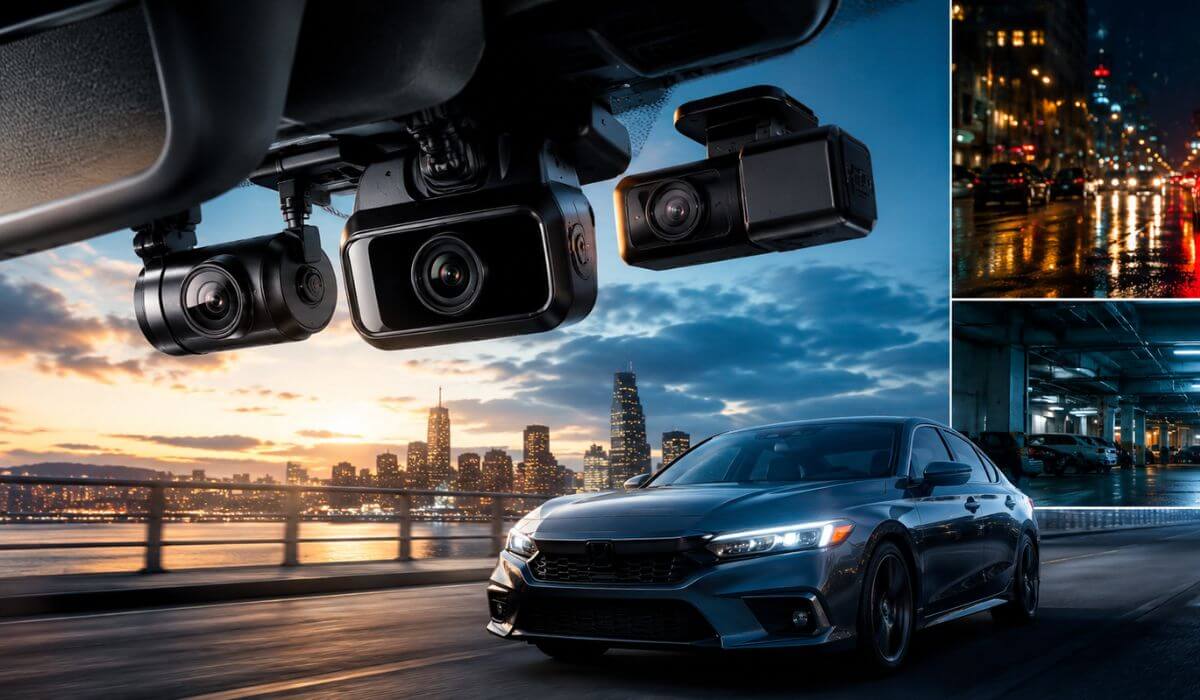
If you drive a Honda Civic, chances are you plan to keep it for a long time. That’s exactly why a dash cam makes more sense on a Civic than almost any other compact car. Whether you own an older 2016–2021 Civic or a newer 2022–2026 Civic, the right dash camera can protect you from disputed accidents, hit-and-runs, parking lot damage, and insurance headaches that often cost far more than the camera itself.
The problem is that not every dash cam works well in a Civic. The windshield angle, cabin layout, and growing number of factory safety sensors can make some cameras awkward to install or frustrating to use. After comparing the latest options, we focused on models that deliver true 4K video quality, reliable night vision, parking mode protection, and clean integration that doesn’t make your Civic look cluttered.
Some of these recommendations are designed specifically for the 11th-generation Honda Civic, while others offer flagship image quality that works exceptionally well across multiple Civic model years. The goal isn’t to find the most expensive dash cam—it’s to find the one you’ll actually be happy living with every day.
Best Honda Civic Dash Cams: Top Choices for HDR Night Vision, WiFi Control, and GPS Tracking
#1. VIOFO A229 Pro 3 Channel
Best 4K dash cam for Honda Civic owners who want flagship video quality, STARVIS 2 night performance, and complete front, cabin, and rear coverage.
#2. Fitcamx Front 4K + Rear 1080P Dash Cam
Best Honda Civic dash cam with a factory-style appearance, hidden installation, and seamless OEM integration for 2022–2026 models.
#3. Mangoal Front 4K & Rear 1080P Dash Cam
Best OEM-style dash camera for Honda Civic drivers looking for a clean factory look, built-in GPS, WiFi control, and easy installation.
#4. BlackVue DR590X Plus
Best parking mode dash cam for Honda Civic owners who prioritize long-term reliability, dependable recording, and trusted brand support.
#5. FUVYMYT Dual Channel 4K & Rear 1080P Dash Cam
Best budget-friendly Honda Civic dash cam with dual-channel recording, OEM-inspired fitment, and everyday driving protection.
Expert Tip Before You Buy
One mistake many Honda Civic owners make is focusing only on video resolution. A 4K label looks great on a product page, but what actually matters is how well the camera captures license plates at night, how reliable the parking mode is, and whether you’ll still be happy with it six months from now.
A clean installation is worth more than most people realize. A dash cam that blends into the windshield and works quietly in the background usually ends up recording thousands of miles of useful footage. A bulky camera that constantly grabs your attention often becomes something you wish you hadn’t installed.
If your Civic spends a lot of time parked outside, prioritize parking protection and image sensor quality over flashy marketing features. The footage you hope you never need is usually the footage that matters most.
How We Chose These Honda Civic Dash Cams
There are hundreds of dash cams on the market, but most were eliminated before they ever had a chance to make this list.
First, we looked at real-world usability inside a Honda Civic, not just specification sheets. The Civic has a relatively low dashboard, a steep windshield angle, and factory safety technology that can make certain cameras feel awkward or intrusive. Any model that looked oversized, blocked visibility, or created a cluttered appearance immediately fell behind.
Next, we focused on video quality that actually matters. Marketing claims are easy. Capturing a readable license plate on a dark road during bad weather is much harder. That’s one reason the VIOFO A229 Pro sits at the top of this list. Its STARVIS 2 hardware and strong HDR performance deliver the kind of footage drivers hope they never need but are grateful to have when they do.
We also gave significant weight to OEM-style integration. Many Civic owners take pride in keeping their interiors clean and factory-looking. That’s why products like Fitcamx and Mangoal ranked so highly. Both provide a much more integrated appearance than traditional windshield-mounted dash cams, making them particularly appealing for newer 2022–2026 Civic models.
Reliability was another major factor. A dash cam only has one job: record when something happens. Features don’t matter if the camera fails when you need it most. BlackVue earned its place because of its long-standing reputation for dependable operation, stable parking mode performance, and consistent recording quality over time.
Finally, we considered overall ownership experience. That includes app usability, GPS functionality, WiFi performance, included accessories, installation simplicity, parking mode support, and long-term value. Some cameras offer impressive specifications on paper but require compromises that become frustrating after a few weeks of daily use.
The result is a list that balances image quality, Honda Civic compatibility, parking protection, ease of installation, and long-term reliability. Instead of chasing the newest marketing trend, we prioritized the features that continue to matter long after the excitement of a new purchase wears off.
#1. VIOFO A229 Pro 3 Channel
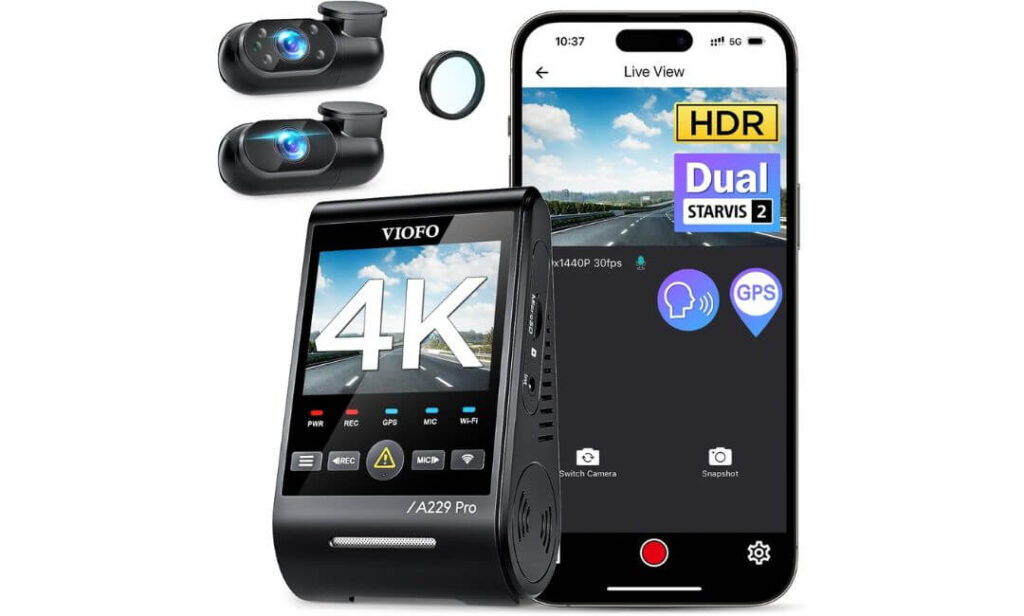
Quick Specs:
- Triple-channel coverage (Front 4K + Interior 1080P + Rear 2K)
- Dual Sony STARVIS 2 sensors for exceptional night recording
- HDR recording on all three cameras
- 5GHz WiFi with app access and fast video transfers
- Built-in GPS with speed and location logging
- Voice control with hands-free commands
- Three dedicated parking surveillance modes
- Supports up to 512GB storage
- Ideal for daily commuters, rideshare drivers, and long-term Civic owners
Sometimes a product earns its place because of one standout feature. This one earned it because almost everything feels well thought out. The first thing that stands out is the recording quality. The front camera records in true 4K, while the rear and interior cameras continue capturing useful detail instead of becoming afterthoughts. That matters when an incident happens outside the narrow field of view most dash cams focus on.
What impressed us even more was how well it handles difficult lighting. A Honda Civic is often used for commuting, late-night drives, road trips, and daily errands where lighting conditions constantly change. Thanks to the STARVIS 2 imaging hardware and HDR processing, this setup does a noticeably better job preserving detail in shadows, reducing blown-out headlights, and keeping important information visible when conditions are far from ideal. That’s the type of performance you appreciate months later when reviewing footage, not just during the first week of ownership.
The other reason it scored so highly is simple: it feels built for people who actually use their dash cams. Voice commands work when your hands are on the wheel. GPS logging is accurate. The 5GHz WiFi connection makes downloading footage less frustrating. And the parking modes provide meaningful protection instead of being included merely to fill a specification sheet. Everything works together in a way that inspires confidence.
(If your goal is simply to buy one dash cam and stop thinking about dash cams for the next several years, this is the model that consistently makes the strongest case for itself.)
Standout Strengths That Matter in Daily Driving
- Outstanding license plate clarity during day and night driving
- Three-camera coverage protects areas many dual-channel systems miss
- HDR recording across all channels, not just the front camera
- Reliable parking surveillance options for public parking lots and street parking
- Fast 5GHz WiFi connectivity makes footage retrieval significantly easier
- Accurate GPS tracking with speed and route data
- Voice controls reduce distractions while driving
One Thing Worth Knowing Before You Order
- A microSD card and hardwire kit are purchased separately, so parking mode users should factor that into the total budget.
How It Fits Into a Honda Civic Ownership Experience
Unlike OEM-style cameras that are designed around one specific dashboard layout, this system uses a universal installation approach. That means it works equally well whether you’re driving an older Civic sedan, a newer Civic Hatchback, an Si, or a Type R. The compact front unit mounts high on the windshield where it stays largely out of your line of sight.
For Civic owners who spend significant time commuting, traveling, ridesharing, or parking in busy areas, the additional interior and rear coverage creates a level of protection that many traditional front-and-rear systems simply cannot match. The installation takes more effort than an OEM-style camera, but the trade-off is substantially broader coverage.
The Insider Pro-Tip
Most buyers focus on the 4K front camera, but experienced dash cam owners usually end up valuing the rear and interior cameras just as much. A surprising number of incidents happen while reversing, parked, or when another vehicle approaches from an angle the front camera never sees.
If you’re investing in a premium system, take advantage of what you’re paying for. Pair it with a quality high-endurance memory card and enable one of the parking protection modes. That’s where this camera separates itself from cheaper alternatives and starts earning its keep long after the excitement of the purchase is gone.
#2. Fitcamx Front 4K + Rear 1080P Dash Cam
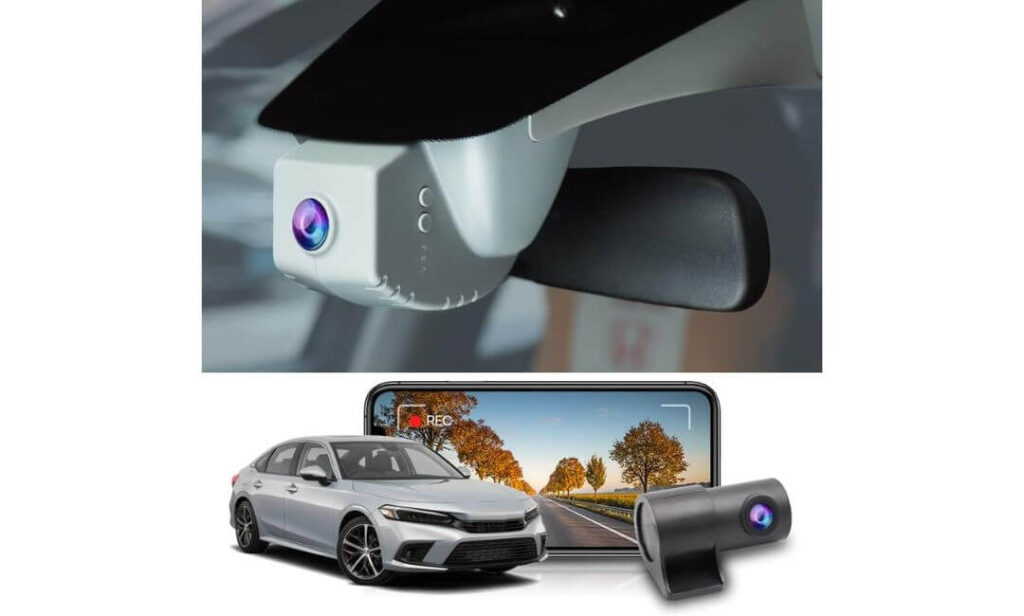
Quick Specs:
- Custom-built for Honda Civic, Civic Si, and Type R
- True OEM-style installation behind the factory mirror cover
- Front 4K + Rear 1080P recording
- 170° front and 140° rear viewing angles
- Built-in WiFi with FITCAMX mobile app
- 128GB memory card included in the box
- G-Sensor collision protection
- No visible wiring across the cabin
- Designed specifically for drivers who want factory-like integration
Here’s the reality: most dash cams look like accessories. This one looks like part of the vehicle.
The biggest reason it earned such a high position on our list is because of how naturally it integrates into the Honda Civic cabin. Instead of hanging below the mirror with exposed wiring, this setup blends directly into the factory mirror housing area. Once installed, many passengers won’t even realize a dash camera is there. For Civic owners who care about keeping a clean interior, that’s a surprisingly big advantage.
Beyond the appearance, the recording quality is exactly where it needs to be. The 4K front camera captures excellent road detail while the 1080P rear camera provides useful coverage behind the vehicle. Combined with the 170-degree front view, it covers a broad section of the road without creating the distorted “fishbowl” effect that affects some wide-angle cameras. The result feels balanced rather than over-engineered.
What ultimately makes this product stand out is convenience. The included 128GB memory card, wireless app access, automatic loop recording, and simple operation make ownership refreshingly straightforward. There is very little setup drama here. Install it, configure it once, and let it do its job.
(For many Civic owners, the best dash cam isn’t the one with the longest feature list—it’s the one that looks factory-installed every single day.)
Features That Made a Strong Impression
- Factory-style appearance that preserves the Civic’s interior design
- No dangling wires or clutter around the windshield area
- Sharp 4K front footage with dependable rear coverage
- Included 128GB memory card reduces additional startup costs
- Wireless video access through the FITCAMX mobile app
- G-Sensor protection automatically saves important collision footage
- Does not interfere with CarPlay or Bluetooth connectivity
Something Helpful to Know Before Purchasing
- This model focuses on clean OEM integration and daily recording, rather than advanced parking surveillance features. Many Civic owners actually prefer this simpler approach because it keeps installation easier and ownership more straightforward.
Designed Around the Honda Civic Cabin
Unlike universal dash cams that are adapted to fit multiple vehicles, this one was clearly designed with the Civic’s interior architecture in mind. The housing follows the factory styling around the rearview mirror area, creating a much cleaner finished appearance than traditional windshield-mounted cameras.
That OEM-style approach is especially appealing for Civic owners who dislike aftermarket accessories. Whether you’re driving a daily commuter, a Civic Si, or a Type R, the installation feels more like an extension of the vehicle than an add-on attached to it.
The Insider Pro-Tip
Most buyers initially focus on the 4K recording resolution, but the real selling point here is the installation design.
Years from now, you probably won’t be thinking about megapixels. You’ll notice that your windshield still looks clean, your interior still feels factory-finished, and the camera quietly records every drive without demanding attention. That’s exactly why OEM-style dash cams continue gaining popularity among long-term Civic owners.
If you value a cabin that looks as good as it functions, this approach makes a lot more sense than many traditional dash cam setups on the market today.
#3. Mangoal Front 4K & Rear 1080P Dash Cam
Quick Specs:
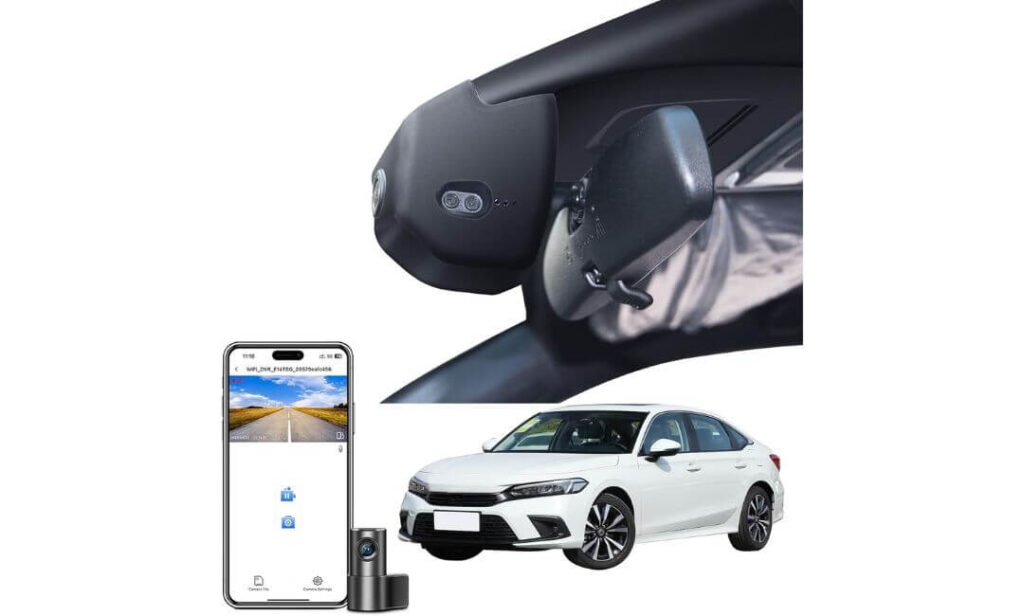
- Purpose-built for 11th-generation Honda Civic models
- OEM-style housing designed to sit behind the factory mirror area
- Front 4K + Rear 1080P recording
- Built-in GPS for route and speed tracking
- Built-in WiFi with mobile app support
- 170° front coverage with wide road visibility
- 128GB memory card included
- G-Sensor incident protection
- Parking monitoring support
- Installation hardware included in the box
There’s a point where a dash cam stops feeling like an accessory and starts feeling like part of the vehicle. That’s the impression this system leaves once installed in a Honda Civic.
What immediately separates it from many competitors is how much attention was given to the overall ownership experience. The camera tucks neatly behind the mirror area, the wiring remains largely hidden, the GPS module is already included, and even the installation hardware arrives in the box. Those details may not sound exciting on paper, but they make a noticeable difference when you’re actually setting everything up.
The recording setup is equally practical. The 4K front camera captures strong detail for everyday driving while the 1080P rear camera adds another layer of protection during lane changes, parking incidents, and rear-end collisions. Combined with built-in GPS, WiFi connectivity, and automatic impact detection, the system covers most of the features Civic owners typically end up wanting after living with a dash cam for a while.
What we appreciated most is that nothing feels unnecessarily complicated. The app is straightforward, footage transfers easily, and daily operation remains largely invisible once everything is configured. That’s often the sign of a product designed around real ownership rather than marketing slides.
(For drivers who want an OEM-style setup without giving up practical features like GPS, rear recording, and parking monitoring, this package strikes a very balanced middle ground.)
Highlights That Earned Its Spot on This List
- Clean factory-inspired installation with minimal visual clutter
- 4K front recording capable of capturing important road details
- GPS module included rather than sold separately
- Built-in WiFi for quick footage access through the mobile app
- 128GB card included, reducing additional setup costs
- Parking monitoring support for added protection when parked
- Comprehensive installation kit included in the package
Something Helpful to Know Before Purchasing
- This model is specifically designed around the 11th-generation Honda Civic platform, making it most appealing to owners who prioritize seamless factory-style integration over universal compatibility.
Tailored for the Honda Civic Cabin Experience
Unlike universal dash cams that adapt themselves to dozens of vehicles, this system was clearly designed around the proportions and layout of the modern Civic interior. The OEM-style housing helps it blend naturally into the windshield area rather than drawing attention to itself.
That becomes especially valuable over time. Civic owners who take pride in maintaining a clean cabin usually appreciate accessories that feel intentional rather than aftermarket. Here, the installation looks closer to a factory option than a traditional add-on, which is a major reason it ranked so highly in this guide.
The Insider Pro-Tip
Many buyers compare OEM-style dash cams solely on recording resolution, but the smarter comparison is to look at everything included in the package.
Between the GPS hardware, 128GB card, rear camera, installation tools, and integrated appearance, this setup removes a surprising amount of guesswork from the buying process. That’s important because the best dash cam purchase is usually the one you only have to make once.
For Honda Civic owners who value a factory-like appearance but still want modern essentials like GPS tracking, rear coverage, WiFi connectivity, and parking protection, this is one of the most complete turnkey packages currently available.
#4. BlackVue DR590X Plus
Quick Specs:
- Dual-channel Full HD recording (Front + Rear 1080P)
- Sony STARVIS sensor for stronger low-light performance
- Native parking mode support included
- Hardwire kit included in the box
- 64GB memory card included
- Built-in WiFi with BlackVue mobile app
- Voice alerts for SD card and recording issues
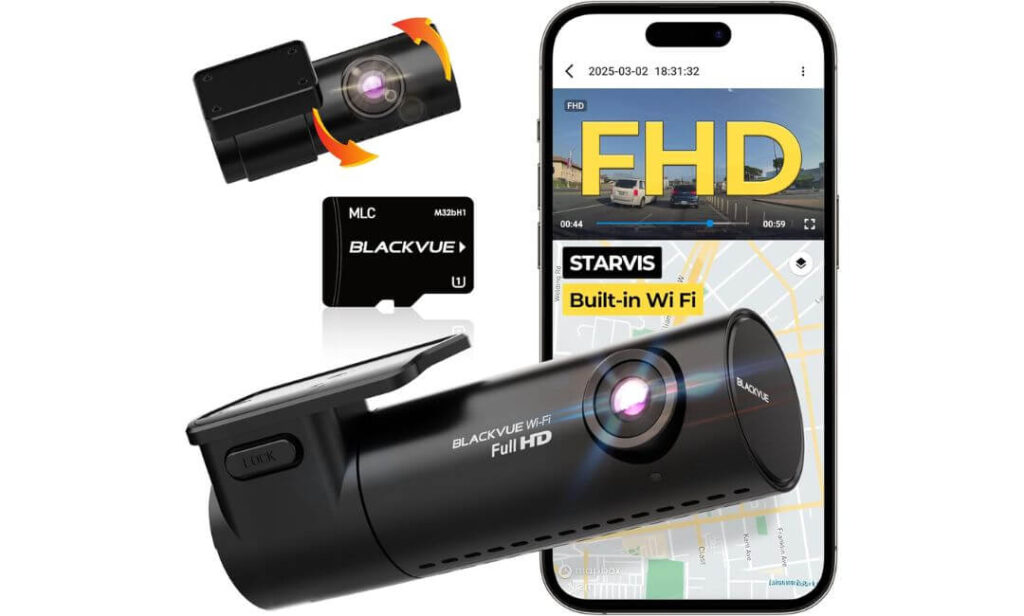
- Discreet tubular design that hides behind the mirror
- 2-year manufacturer warranty
- Built around reliability rather than chasing specifications
Sometimes the smartest purchase isn’t the one with the biggest numbers on the box.
While newer competitors focus heavily on 4K resolutions and long feature lists, this model takes a different approach. Its reputation has been built around one simple idea: record every drive, every day, without drama. That philosophy is exactly why it continues to attract loyal owners long after flashier alternatives arrive on the market.
The first thing that stands out is how discreet the camera feels once installed. The slim cylindrical housing disappears behind the rearview mirror, keeping the windshield uncluttered and preserving the clean look many Honda Civic owners prefer. More importantly, the camera simply gets on with its job. The STARVIS sensor helps maintain dependable image quality after dark, while the included WiFi connectivity makes accessing footage surprisingly painless.
Where this system really earns respect is during long-term ownership. The included hardwire kit, built-in parking mode support, SD card protection features, voice alerts, and adaptive file management are all focused on one thing: reducing the chances of missing important footage when you actually need it. That’s the kind of engineering that doesn’t always show up in comparison charts but matters tremendously over time.
(Some dash cams impress you during the first week. The best ones quietly impress you years later.)
Features That Made It Stand Out
- Proven reliability-focused design
- STARVIS low-light imaging for stronger nighttime visibility
- Included hardwire kit saves additional installation costs
- Built-in parking mode support without extra accessories
- WiFi connectivity for easy footage access
- Voice notifications warn about recording or SD card issues
- Compact housing stays largely hidden behind the mirror
- Strong long-term ownership reputation
Something Helpful to Know Before Purchasing
- This model focuses more on dependability and parking protection than ultra-high-resolution recording. Many drivers actually prefer that trade-off because reliability is ultimately what matters most in a dash cam.
Built for Everyday Honda Civic Ownership
The DR590X Plus works exceptionally well in the Civic because it doesn’t demand attention. The compact body mounts high on the windshield, stays out of the driver’s sightline, and keeps the cabin looking clean rather than cluttered.
For Civic owners who spend hours commuting, leave their vehicle parked in public areas, or simply want dependable evidence if something happens, the included parking mode hardware is a significant advantage. Everything needed to get that protection working arrives in the box, which isn’t always the case with competing systems.
The Insider Pro-Tip
A surprising number of dash cam owners eventually realize that parking protection becomes more valuable than driving footage.
Most vehicles spend far more time parked than moving. Door dings, parking lot bumps, hit-and-runs, and unexpected incidents often happen when the engine isn’t running. That’s why the included hardwire kit matters more than it might initially seem.
If your Honda Civic regularly sits in apartment parking lots, shopping centers, office garages, or on the street overnight, this setup starts making a lot more sense. It may not be the highest-resolution camera in this guide, but it remains one of the strongest choices for drivers who value dependable recording and genuine peace of mind over specification-sheet bragging rights.
#5. FUVYMYT Dual Channel 4K & Rear 1080P Dash Cam
Quick Specs:
- Custom-designed for Honda Civic models
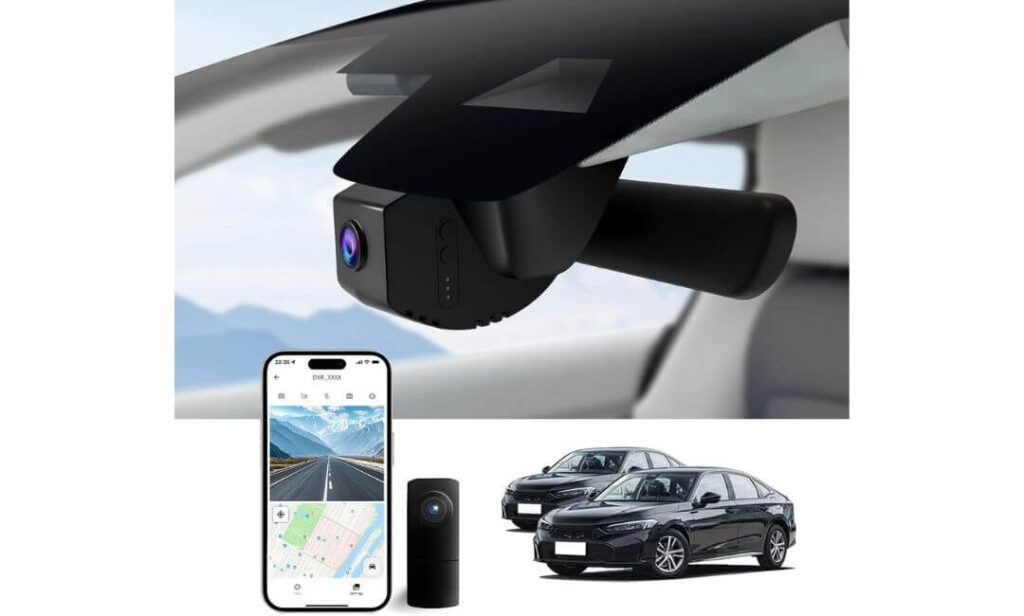
- OEM-style hidden installation
- Front 4K + Rear 1080P recording
- HDR-enhanced night recording
- Built-in WiFi with dedicated mobile app
- Collision detection with G-Sensor
- 128GB memory card included
- Supports up to 256GB storage
- Parking mode compatible with optional hardwire harness
- No windshield obstruction after installation
Not every Honda Civic owner is looking for the most advanced dash cam on the market. Some simply want a camera that looks factory-installed, records clear footage, and doesn’t turn installation into a weekend project.
That’s where this system makes a surprisingly strong case for itself.
The biggest selling point is the integration. Instead of attaching another device to the windshield, this camera replaces the housing area around the rearview mirror and creates a much cleaner finished appearance. Once installed, it blends into the interior in a way that feels intentional rather than aftermarket. For Civic owners who dislike visible gadgets hanging from the glass, that’s a genuine advantage.
Recording performance is also stronger than many buyers expect at this price level. The 4K front camera, combined with an f/1.6 aperture lens, HDR processing, and rear 1080P coverage, captures the kind of footage most drivers actually need in everyday situations. License plates, traffic conditions, and surrounding vehicles remain clear enough to provide useful evidence when it matters. Add WiFi access, app-based controls, loop recording, and automatic impact detection, and the overall package feels practical rather than complicated.
What impressed us most is that everything remains focused on the Civic ownership experience. The camera doesn’t try to be a technology showcase. Instead, it delivers the features most drivers care about while maintaining a clean OEM-style appearance that fits naturally inside the cabin.
(For many Civic owners, a dash cam is at its best when they barely notice it’s there—until the day they need the footage.)
Features That Help It Stand Out
- Factory-inspired hidden design with virtually no windshield clutter
- 4K front recording with HDR support for stronger nighttime visibility
- Rear 1080P camera adds protection behind the vehicle
- 128GB memory card included right out of the box
- Built-in WiFi for quick video access through the app
- G-Sensor event protection automatically saves important clips
- Straightforward installation process compared to many universal systems
- Supports future parking mode upgrades through an optional harness
Something Helpful to Know Before Purchasing
- The optional parking surveillance feature requires a separate hardwire harness. The good news is that the camera functions perfectly well as a daily-driving dash cam straight out of the box, so you can always add parking protection later if your needs change.
Designed Around the Honda Civic Interior
One reason this camera earned a place in this guide is because it was developed specifically for the Civic platform rather than adapted from a universal design. That focus shows up immediately in the installation and overall appearance.
The hidden OEM-style housing helps preserve the clean look of the dashboard and windshield while still providing modern features like WiFi connectivity, collision detection, loop recording, and dual-channel coverage. For drivers who value a tidy interior, that’s often more important than adding another visible device to the glass.
The Insider Pro-Tip
A lot of buyers compare OEM-style dash cams based on specifications alone, but long-term satisfaction usually comes down to something much simpler: whether the camera feels like part of the car.
That’s exactly where this model performs well. The installation is clean, the included accessories reduce extra spending, and the recording quality covers the needs of most daily drivers. Months from now, you’ll probably remember the factory-like appearance just as much as the footage quality itself.
If your goal is to add protection to your Honda Civic without changing the look and feel of the cabin, this is one of the strongest value-focused options currently available.
Best Honda Civic Dash Cam Picks Compared: From OEM-Style Designs to Premium 4K Systems
Buying Guide: What to Look for in a Honda Civic Dash Cam Before You Spend Your Money
The Honda Civic is one of those vehicles that attracts every type of driver. Some use it as a daily commuter, some drive hundreds of highway miles every week, while others own performance-focused models like the Si or Type R. Because of that, the “best” dash cam isn’t necessarily the most expensive one. It’s the one that fits the way you actually use your Civic.
A surprising number of buyers focus only on video resolution and completely overlook installation quality, parking protection, storage requirements, and long-term usability. Those factors often have a bigger impact on ownership satisfaction than a flashy specification sheet.
Before choosing a dash cam, these are the areas that deserve the closest attention.
Front and Rear Dash Cam for Honda Civic vs Single-Channel Setup
A front-only dash cam can still provide valuable evidence, especially for drivers primarily concerned about accidents that happen directly ahead. However, once you start comparing options, it becomes obvious why dual-channel systems dominate most recommendation lists.
Rear-end collisions, parking lot incidents, hit-and-runs, and lane-change accidents often happen outside the field of view of a front camera. That’s where a rear camera becomes incredibly valuable.
For most Honda Civic owners, a dual-channel setup offers the best balance between cost and protection. Models like the Fitcamx, Mangoal, BlackVue, and FUVYMYT all provide front-and-rear recording, while the VIOFO A229 Pro goes one step further with additional interior coverage.
If your Civic spends a lot of time on crowded highways, in apartment parking lots, or in busy city traffic, rear camera coverage quickly becomes more than just a nice feature.
4K Dash Cam for Honda Civic: HDR, Night Vision, Processor, and Storage
Many buyers see “4K” and assume every camera will perform the same. In reality, recording resolution is only one piece of the equation.
A good dash cam also needs a capable image sensor, strong HDR processing, and enough computing power to manage difficult lighting conditions. Bright headlights, dark roads, sunrise glare, tunnels, and rainy weather all challenge camera performance.
This is one reason why premium image sensors such as STARVIS and STARVIS 2 have become so important. They help preserve detail in situations where lower-quality cameras often struggle.
Storage matters as well. Higher-resolution footage requires significantly more space. A dual-channel or triple-channel setup recording throughout the day can fill smaller memory cards surprisingly quickly.
Before purchasing, consider:
- 4K recording quality
- HDR capability
- Night vision performance
- Sensor quality
- Supported memory card capacity
- Video compression efficiency
The goal isn’t simply recording footage. The goal is capturing footage that’s actually useful when you need to review it later.
Parking Mode Dash Cam for Honda Civic: 24/7 Protection, Motion Detection, and Time-Lapse Recording
Most vehicles spend far more time parked than they do moving.
That’s why parking mode has become one of the most valuable features available in modern dash cams.
A quality parking mode system can monitor activity around your Civic when the ignition is off. Depending on the camera, that may include:
- Motion detection recording
- Impact-triggered recording
- Buffered event capture
- Low-bitrate continuous recording
- Time-lapse surveillance
For apartment dwellers, street parkers, college students, and anyone who frequently leaves their vehicle unattended, parking protection can be every bit as important as driving footage.
It’s also worth checking whether the parking mode requires a separate hardwire kit. Some systems include everything necessary in the box, while others require additional hardware for full functionality.
WiFi Dash Cam for Honda Civic: App Access, Video Playback, and Firmware Updates
Ten years ago, reviewing dash cam footage often meant removing the memory card and sitting at a computer.
Today, built-in WiFi changes the experience entirely.
Modern WiFi-enabled dash cams allow you to:
- Preview live camera feeds
- Download footage directly to your phone
- Adjust settings wirelessly
- Update firmware
- Share important clips immediately
This becomes especially useful after an accident or unexpected event. Instead of searching for a laptop, you can access the footage directly from your smartphone.
That convenience is one reason WiFi support has become a feature many drivers refuse to give up once they’ve experienced it.
OEM Factory Fit Considerations vs Traditional Aftermarket Installs
This is an area many buyers overlook until after installation.
Traditional aftermarket dash cams typically mount to the windshield and require visible wiring during installation. While many work exceptionally well, they don’t always blend naturally into the vehicle interior.
OEM-style dash cams take a different approach.
Models such as the Fitcamx, Mangoal, and FUVYMYT are designed to integrate around the mirror housing area and create a much cleaner appearance. Once installed, they often look like factory equipment rather than aftermarket accessories.
Drivers who care about maintaining the Civic’s interior aesthetics usually appreciate this approach.
That doesn’t automatically make OEM-style cameras better. Universal premium systems like the VIOFO A229 Pro often deliver stronger overall performance. The decision comes down to whether appearance or maximum capability matters more to you.
Honda Civic Dash Cam Installation: Hidden Wiring, Fuse Taps, and DIY vs Professional Installation
Installation quality can dramatically influence your ownership experience.
A poorly routed cable can create rattles, distract the driver, or make the entire setup look unfinished. A clean installation, on the other hand, often disappears into the vehicle and becomes almost invisible.
Most Honda Civic installations fall into one of three categories:
- Simple plug-and-play installation
- Hidden cable routing through trim panels
- Hardwired installation for parking mode functionality
DIY installation works perfectly well for many owners, especially with OEM-style systems designed specifically for the Civic platform. However, drivers planning to hardwire parking mode features may prefer professional installation if they are unfamiliar with fuse taps and vehicle electrical systems.
The good news is that the Honda Civic remains one of the easier modern vehicles to install a dash cam in, thanks to its interior layout and relatively straightforward cable-routing paths.
The Bottom Line
The best Honda Civic dash cam isn’t necessarily the camera with the highest resolution or the longest feature list. It’s the camera that matches how you use your vehicle every day.
Some owners will benefit most from the image quality and advanced protection offered by the VIOFO A229 Pro. Others will value the factory-style appearance of the Fitcamx or Mangoal. Some may prioritize the proven reliability of BlackVue or the value-focused approach of FUVYMYT.
Once you identify whether your priorities are video quality, parking protection, OEM integration, app functionality, or overall value, choosing the right dash cam becomes much easier—and far more likely to be a purchase you’ll still be happy with years from now.
Compatibility and Fit: Choosing Between OEM-Style and Traditional Dash Cam Installations for a Honda Civic
One of the biggest reasons Honda Civic owners end up happy—or disappointed—with a dash cam purchase has nothing to do with video quality. It usually comes down to how well the camera fits into the vehicle once the excitement of unboxing is over.
A camera can record incredible footage, but if it leaves wires hanging across the windshield, blocks visibility, creates interior rattles, or looks completely out of place, many owners eventually regret the purchase. That’s why compatibility and installation style deserve just as much attention as recording resolution.
For Honda Civic owners, the decision typically comes down to two approaches: OEM-style integration or traditional aftermarket installation.
OEM Factory Fit Options for Select Honda Civic Models
OEM-style dash cams have become increasingly popular among Civic owners because they focus on blending into the vehicle rather than standing out.
Instead of attaching a separate camera body beneath the rearview mirror, these systems replace or integrate into the factory mirror housing area. The result is a cleaner appearance that often looks like original equipment rather than an aftermarket accessory.
Models such as the Fitcamx, Mangoal, and FUVYMYT featured in this guide follow this philosophy. Once installed, they remain largely hidden from both the driver and passengers.
This approach offers several advantages:
- Cleaner overall appearance
- Reduced windshield clutter
- Less visible wiring
- More factory-like interior presentation
- Better integration with modern Civic cabin design
For owners who take pride in maintaining the original appearance of their Civic, OEM-style systems often feel like a natural extension of the vehicle rather than an added gadget.
The trade-off is that these cameras are typically designed around specific Civic generations and trim levels. Buyers should always verify compatibility before purchasing.
Aesthetics and Cable Management During Honda Civic Dash Cam Installation
Cable management is one of the most overlooked aspects of a dash cam installation.
The difference between a professional-looking installation and an amateur-looking installation often comes down to how the wiring is routed through the vehicle.
A properly installed dash cam should feel almost invisible from the driver’s seat. Power cables should follow factory trim lines, disappear behind interior panels, and avoid crossing visible portions of the dashboard whenever possible.
Poor cable routing can create several problems:
- Visual distractions while driving
- Windshield clutter
- Interior rattles
- Premature cable wear
- Reduced overall cabin appearance
Fortunately, the Honda Civic’s interior design makes hidden cable routing relatively straightforward. Many installations route wiring through the headliner, A-pillars, weather stripping, and factory trim channels, creating a finished appearance that looks significantly cleaner than exposed wiring.
This is one reason OEM-style systems continue gaining popularity. Much of the cable management work is simplified because the camera itself is already integrated into the mirror area.
Common Mounting Locations and Important Visibility Considerations
Regardless of which dash cam you choose, mounting position matters.
The ideal location is usually high on the windshield, close to the rearview mirror. This placement provides several advantages:
- Better overall road visibility
- Reduced driver distraction
- Improved protection from direct sunlight
- Cleaner interior appearance
- Wider and more balanced field of view
Most experienced installers intentionally position the camera where it remains hidden behind or adjacent to the mirror from the driver’s perspective.
Before mounting any dash cam, it is also important to consider local regulations regarding windshield-mounted devices. Rules can vary depending on location, and visibility requirements should always take priority.
A properly positioned camera should never interfere with:
- Driver sight lines
- Rain sensor operation
- Forward-facing safety systems
- Lane-keeping cameras
- Automatic emergency braking sensors
Modern Honda Civic models contain more windshield-mounted technology than many drivers realize, making proper placement increasingly important.
Tips for Maintaining a Clean and Non-Distracting Dash Setup
One of the easiest mistakes to make is adding too much equipment to the windshield area.
The best dash cam installations often attract the least attention. When done correctly, most passengers won’t notice the camera unless you point it out.
To maintain a clean setup:
- Keep cameras mounted as high as practical
- Hide wiring behind trim panels whenever possible
- Avoid excessive accessories attached to the windshield
- Use compact mounts and low-profile hardware
- Secure all cables to prevent rattles
- Keep memory card access convenient for maintenance
- Periodically inspect cable routing for wear or movement
Another often-overlooked tip is choosing a dash cam that matches your ownership priorities.
If maintaining a factory appearance is important, an OEM-style system such as the Fitcamx, Mangoal, or FUVYMYT may be the better fit.
If maximum image quality, advanced parking protection, and broader coverage are more important, a premium traditional system like the VIOFO A229 Pro may justify the slightly more visible installation.
The Bottom Line
The most satisfying Honda Civic dash cam setups usually strike a balance between video performance, installation quality, visibility, and long-term usability.
A clean installation not only improves the appearance of the cabin, but also reduces distractions and makes the camera feel like a permanent part of the vehicle rather than a temporary accessory.
Whether you choose an OEM-style solution or a traditional premium dash cam, investing a little extra attention into compatibility, placement, and cable management will often have a bigger impact on daily satisfaction than an extra specification or feature ever could.
Installation and Setup Tips for Honda Civic Dash Cam Owners
A great dash cam can quickly become frustrating if it’s installed poorly. Surprisingly, most complaints people have about dash cams are not related to video quality, app performance, or reliability. They’re usually caused by visible wires, poor mounting positions, incorrect power connections, or skipped setup steps during installation.
The good news is that the Honda Civic is generally one of the easier modern vehicles to work with. Whether you’re installing a premium system like the VIOFO A229 Pro, a factory-style option such as the Fitcamx, Mangoal, or FUVYMYT, or a reliability-focused model like the BlackVue DR590X Plus, taking a little extra time during installation often pays off for years.
Step-by-Step Quick Start for DIY Honda Civic Dash Cam Installations
Most Honda Civic dash cam installations follow the same basic process regardless of brand.
Before mounting anything, sit in the driver’s seat and identify the area directly behind the rearview mirror. This location usually provides the best balance between visibility, recording coverage, and a clean appearance.
A typical installation process looks like this:
- Clean the windshield mounting area thoroughly.
- Test camera positioning before removing adhesive backing.
- Install the front camera high behind the mirror.
- Connect temporary power and verify camera operation.
- Route power cables through the headliner.
- Route rear camera wiring through trim panels and weather stripping.
- Secure loose cables before final assembly.
- Format the memory card.
- Configure camera settings and app connection.
- Perform a short test drive and review footage.
One common mistake is rushing the mounting position. Even a one-inch adjustment can significantly improve visibility, reduce windshield reflections, and create a cleaner overall installation.
Wire Routing Tips to Avoid Airbags, Pedals, and Heat Sources
This is one area where patience matters.
Most professional-looking installations are not the result of expensive tools. They simply involve careful cable routing.
When routing dash cam wiring inside a Honda Civic:
- Follow existing factory wiring paths whenever possible.
- Use weather stripping and trim channels to hide cables.
- Secure loose sections to prevent rattles.
- Keep wiring away from moving pedals.
- Avoid steering column components.
- Avoid HVAC ducts that generate heat.
- Leave enough slack around hatchbacks and moving panels.
The most important consideration involves side curtain airbags.
Many Civic models contain airbags running behind portions of the A-pillar trim. Dash cam cables should never interfere with airbag deployment paths. Professional installers typically route cables alongside factory wiring channels rather than directly across airbag locations.
This is particularly important for rear camera installations on systems like the VIOFO A229 Pro, BlackVue DR590X Plus, Fitcamx, Mangoal, and FUVYMYT because longer cable runs pass through multiple interior panels.
Fuse Tap Guidance for Parking Mode and Continuous Power
If you plan to use parking surveillance features, a hardwire connection becomes one of the most important parts of the installation.
Systems such as the VIOFO A229 Pro and BlackVue DR590X Plus offer advanced parking protection, while the Mangoal and FUVYMYT systems can support parking monitoring with the appropriate hardware.
A proper fuse tap installation typically allows the camera to:
- Continue monitoring while parked.
- Detect impacts.
- Capture motion-triggered events.
- Use time-lapse recording.
- Shut down automatically if battery voltage becomes too low.
Before installing a fuse tap:
- Verify fuse panel locations.
- Confirm fuse ratings.
- Use the correct fuse type.
- Follow manufacturer recommendations.
- Test voltage behavior before final assembly.
Drivers unfamiliar with vehicle electrical systems may prefer professional installation for this step. Parking mode can be extremely valuable, but only when configured correctly.
App Configuration, Firmware Updates, and Video Management
Modern dash cams offer much more than simple recording.
After installation, one of the first tasks should be connecting the camera to its companion app.
The VIOFO A229 Pro, Fitcamx, Mangoal, FUVYMYT, and BlackVue DR590X Plus all provide app-based functionality that makes ownership considerably easier.
Once connected:
- Verify live camera feeds.
- Check video playback quality.
- Configure recording resolution.
- Set parking mode preferences.
- Adjust notification settings.
- Update firmware if available.
- Configure GPS settings when applicable.
Firmware updates are often overlooked, but they frequently improve stability, app connectivity, recording performance, and overall reliability.
For owners who regularly review footage, establishing a simple backup routine is also worth considering. Important clips should be saved to a computer, cloud storage platform, or external drive before they can be overwritten by loop recording.
Critical Safety Checks Before You Consider the Job Finished
A surprising number of installation issues are discovered only after the first week of driving.
That’s why experienced installers perform a final inspection before calling the job complete.
After installation:
- Confirm the windshield view remains unobstructed.
- Verify camera stability over rough roads.
- Check rear camera alignment.
- Ensure GPS functionality is working properly.
- Test WiFi connectivity.
- Confirm footage is saving correctly.
- Verify impact detection settings.
- Check parking mode operation if installed.
- Inspect all visible cable sections.
- Review daytime and nighttime footage.
A short twenty-minute test drive often reveals small issues that are easy to correct immediately but annoying to fix later.
The Setup Mistake Most Honda Civic Owners Regret
Many buyers spend hours researching cameras and only minutes configuring them.
The reality is that proper setup often matters just as much as the camera itself.
A correctly installed VIOFO A229 Pro, Fitcamx, Mangoal, BlackVue DR590X Plus, or FUVYMYT system should feel almost invisible during daily driving. You shouldn’t notice dangling wires, blocked visibility, distracting alerts, or constant maintenance requirements.
When installation, cable management, app configuration, parking mode settings, and safety checks are all handled correctly, the dash cam simply becomes part of the vehicle. And that’s usually the sign of a setup done right.
Performance Comparison: How These 4K Honda Civic Dash Cams Actually Differ in Daily Use
Specification sheets are useful, but they rarely tell the whole story.
Most dash cams look impressive on a product page. Nearly all of them advertise high-resolution recording, wide viewing angles, smartphone apps, and various safety features. The differences become much clearer once you start comparing real-world performance in situations Honda Civic owners encounter every day.
Things like reading a license plate at night, capturing a hit-and-run in a parking lot, downloading footage quickly after an incident, or relying on parking surveillance while the vehicle sits unattended are where these products begin separating themselves.
That’s why we focused on performance areas that genuinely affect ownership experience rather than simply comparing marketing numbers.
Resolution, HDR Performance, and Nighttime Recording Quality
Resolution is usually the first specification buyers notice, but image quality is about far more than pixel count.
A well-designed 1080P camera can often outperform a poorly optimized 4K camera when lighting conditions become difficult.
Among the models featured in this guide, the VIOFO A229 Pro clearly sets the benchmark for overall image quality. Its combination of 4K recording, STARVIS 2 image sensors, HDR processing, and dedicated rear and interior cameras gives it a noticeable advantage when dealing with challenging lighting environments.
During nighttime driving, situations involving bright headlights, dark roads, reflective road signs, or rapid lighting changes tend to expose weaknesses in lower-end camera systems. The VIOFO handles these conditions exceptionally well, preserving more detail in both shadows and highlights.
The Fitcamx, Mangoal, and FUVYMYT systems all provide strong 4K front recording performance for everyday Civic drivers. Their footage remains sharp enough for routine driving situations, traffic incidents, and evidence collection. While they may not reach the same imaging level as the VIOFO under extreme conditions, they perform very well for their intended audience.
The BlackVue DR590X Plus takes a different approach. Despite recording in Full HD rather than 4K, its STARVIS sensor helps produce dependable footage with strong low-light performance. This camera relies more on sensor quality and image processing than sheer resolution.
For buyers prioritizing image quality alone:
- VIOFO A229 Pro
- Fitcamx / Mangoal
- FUVYMYT
- BlackVue DR590X Plus
The gap is not necessarily enormous for everyday driving, but it becomes more noticeable in difficult nighttime conditions.
Parking Mode Reliability and Long-Term Battery Considerations
For many Honda Civic owners, parking mode becomes more valuable than driving footage over time.
Most accidents happen while driving, but many insurance claims involve vehicles that were parked when damage occurred.
This is where meaningful differences emerge between these systems.
The BlackVue DR590X Plus remains one of the strongest options for parking surveillance because the hardware, power management, and parking mode integration were clearly designed around that use case. The included hardwire kit also reduces additional setup costs.
The VIOFO A229 Pro offers the most advanced parking functionality overall. Motion-triggered recording, buffered event capture, low-bitrate recording, and time-lapse options provide considerable flexibility depending on how the vehicle is used.
The Mangoal system offers useful parking monitoring support as well, giving owners additional protection without moving into premium pricing territory.
Meanwhile, the FUVYMYT platform supports parking monitoring through an optional hardwire harness, while the Fitcamx focuses primarily on driving footage and OEM integration rather than advanced parking surveillance.
Battery management matters just as much as recording capability.
A properly configured parking mode should:
- Monitor activity efficiently
- Avoid excessive battery drain
- Shut down safely when voltage drops
- Preserve enough power for normal vehicle starting
This becomes especially important for drivers who leave their Civic parked for extended periods.
WiFi Transfer Speeds and Mobile App Experience
The difference between a good dash cam app and a frustrating one is often underestimated.
Nobody thinks about app performance until they actually need footage.
Imagine being involved in an accident and trying to retrieve a video immediately. That’s when transfer speeds, connectivity stability, and app design suddenly become important.
The VIOFO A229 Pro leads the group thanks to its 5GHz WiFi connection, which noticeably improves transfer speeds compared to many traditional systems. Large 4K video files simply move faster.
The BlackVue ecosystem has built a strong reputation over the years for software stability, settings management, and overall user experience. Many long-term owners continue choosing BlackVue partly because of the app experience.
The Fitcamx, Mangoal, and FUVYMYT systems all provide app connectivity, live preview capabilities, and footage downloads directly to mobile devices. For most Civic owners, these apps provide everything necessary for daily use.
However, users who regularly download large video files may appreciate the faster transfer performance available from more advanced WiFi implementations.
Storage Requirements and Loop Recording Efficiency
Storage becomes increasingly important as recording quality increases.
Many first-time buyers underestimate how quickly high-resolution footage consumes memory card space.
A front-only 1080P setup places relatively light demands on storage. A triple-channel 4K system recording continuously throughout the day is a very different situation.
This is one reason the VIOFO A229 Pro supports memory cards up to 512GB. Triple-camera recording generates considerably more footage than traditional dual-channel systems.
The Fitcamx, Mangoal, and FUVYMYT models include 128GB cards, providing immediate usability without requiring additional purchases. For many drivers, that’s a meaningful advantage.
The BlackVue DR590X Plus includes a 64GB card, which remains adequate for many users because Full HD recording requires less storage than 4K video.
Regardless of which system you choose, loop recording remains one of the most important features.
A properly functioning loop recording system should:
- Automatically overwrite the oldest footage
- Protect collision recordings
- Preserve locked event files
- Continue recording without interruption
- Minimize maintenance requirements
The best systems quietly manage storage in the background so drivers never have to think about it.
What These Performance Differences Mean for Real Honda Civic Owners
When viewed strictly through a performance lens, the VIOFO A229 Pro remains the strongest overall camera in this guide. It offers the highest-end imaging hardware, the most complete coverage, advanced parking functionality, and superior flexibility.
The Fitcamx and Mangoal models occupy a particularly attractive middle ground because they combine strong recording quality with the OEM-style appearance many Honda Civic owners prefer.
The BlackVue DR590X Plus continues proving that reliability and parking protection can sometimes matter more than raw resolution numbers.
And the FUVYMYT remains a compelling value option for buyers seeking OEM integration, 4K recording, and straightforward daily operation.
The important takeaway is that no single performance category tells the whole story. The best Honda Civic dash cam is ultimately the one that balances video quality, parking protection, installation style, storage capacity, app usability, and long-term reliability in a way that matches how you actually use your vehicle.
FAQs About Honda Civic Dash Cam
Is a 4K dash cam really worth it in a Honda Civic, or is it mostly a marketing feature?
This depends on why you’re buying a dash cam in the first place.
If your goal is simply recording traffic in front of you, a good 1080P system can still do the job. But if you’re hoping to capture license plates, road signs, vehicle details, or evidence that may eventually be reviewed by an insurance company, the difference becomes much more noticeable.
The reality is that most Civic owners don’t realize the value of higher-quality footage until after an incident occurs. That’s why cameras like the VIOFO A229 Pro, Fitcamx, Mangoal, and FUVYMYT continue attracting attention. When lighting conditions become difficult, such as rain, tunnels, glare, sunrise, sunset, or nighttime highway driving, stronger image quality often becomes the difference between useful evidence and footage that’s merely “good enough.”
Should Honda Civic owners choose an OEM-style dash cam or a traditional premium system?
This is probably the most important decision in this entire buying process.
If you value a factory-like appearance and want the camera to blend naturally into the interior, OEM-style systems such as Fitcamx, Mangoal, and FUVYMYT make a lot of sense. Many passengers won’t even notice they’re installed.
However, if maximum performance is the priority, traditional premium systems often maintain an advantage.
A simple way to think about it:
- Choose OEM-style if appearance matters most.
- Choose premium universal systems if image quality matters most.
- Choose reliability-focused systems if long-term dependability matters most.
Neither approach is wrong. They’re solving different problems for different Civic owners.
How much footage should a Honda Civic owner realistically keep before loop recording overwrites it?
Many first-time buyers focus on camera specifications while completely overlooking storage strategy.
The answer depends on:
- Recording resolution
- Number of cameras
- Daily driving hours
- Parking mode usage
- Memory card capacity
A dual-channel 4K setup can generate a surprising amount of footage during a normal week. That’s one reason many experienced owners immediately upgrade to larger high-endurance memory cards.
More importantly, don’t treat your dash cam like permanent storage.
The best habit is simple:
If something unusual happens, save the clip immediately.
Every dash cam on this list uses loop recording. Eventually older footage disappears. The owners who never lose important evidence are usually the ones who develop a routine of backing up significant clips as soon as possible.
Which feature becomes more important after six months of ownership than most Honda Civic buyers expect?
Parking mode.
Not 4K recording.
Not WiFi.
Not GPS.
Parking protection.
Most Civic owners spend far more time parked than driving. The longer someone owns a dash cam, the more they realize that unexpected incidents often happen when the vehicle is sitting unattended.
Examples include:
- Parking lot impacts
- Hit-and-runs
- Shopping cart damage
- Apartment complex incidents
- Street parking accidents
- Vandalism
This is one reason cameras with stronger parking capabilities continue earning loyal followings. The footage you never planned on needing often becomes the footage you’re most grateful to have.
If I plan to keep my Honda Civic for many years, which buying mistake should I avoid?
Buying strictly based on specifications.
Many owners spend hours comparing resolutions, frame rates, and viewing angles while completely ignoring what daily ownership actually feels like.
A dash cam becomes part of your routine.
You’ll live with:
- The installation quality
- The app experience
- The parking mode behavior
- The reliability
- The storage management
- The cabin appearance
Long-term satisfaction usually comes from choosing the camera that best fits how you use your Civic, not the one with the most impressive product page.
The surprising truth is that owners who are happiest years later often didn’t buy the camera with the biggest numbers. They bought the one that quietly worked every day without creating problems. And in the dash cam world, that’s often the difference between a purchase you forget about and one you genuinely appreciate every time you drive.
Final Verdict: Which Honda Civic Dash Cam Would We Personally Choose?
After comparing installation quality, video performance, parking protection, app experience, OEM integration, and long-term usability, one thing became very clear: there isn’t a single “perfect” dash cam for every Honda Civic owner.
What works best for a daily commuter may not be the best choice for a Civic Si enthusiast. Likewise, someone who parks on crowded city streets has different priorities than an owner who mainly drives highway miles and parks in a private garage.
If ultimate image quality is your goal, the VIOFO A229 Pro stands in a league of its own. The combination of STARVIS 2 sensors, HDR processing, triple-camera coverage, and advanced parking features makes it the strongest overall performer in this guide.
If maintaining a factory-like interior matters just as much as recording quality, the Fitcamx and Mangoal solutions offer something many traditional dash cams simply can’t: they look like they belong in the car. For many Honda Civic owners, that’s a bigger advantage than an extra specification on a product page.
Meanwhile, the BlackVue DR590X Plus continues proving that reliability never goes out of style. It may not chase the highest resolutions, but it focuses on something equally important—being ready when you actually need footage.
And for drivers who want OEM styling, 4K recording, and strong everyday value without stretching the budget, the FUVYMYT remains an easy recommendation.
The truth is, the best Honda Civic dash cam is rarely the one with the longest feature list. It’s the one that fits your driving habits, your parking situation, and your expectations after the excitement of the purchase fades.
Choose the camera that solves your biggest concern—whether that’s video quality, parking protection, OEM appearance, simplicity, or value—and you’ll likely be happy with the decision for years.
Because when something unexpected finally happens on the road, nobody thinks about specifications anymore.
They simply want clear footage, reliable evidence, and the confidence that the camera did exactly what it was supposed to do. That’s ultimately what separates a good dash cam from a great one.
Also Check: