5 Best Dash Cams for Chevy Equinox in 2026: 4K STARVIS 2 Video, Triple Cameras & 24/7 Protection
The Chevy Equinox has earned its reputation as one of the most practical compact SUVs on the road, but it’s also the kind of vehicle that benefits more from a dash cam than many owners realize. Whether you drive a 2026 Equinox EV, a new-generation 2025 Equinox, or an older model from the last decade, the right dash camera can provide valuable protection during daily commutes, road trips, parking lot incidents, and insurance disputes.
What makes choosing a dash cam for the Equinox tricky is that the market has changed dramatically over the last two years. Many older recommendations still ranking online use outdated sensors and weaker parking systems. For this guide, the focus was placed on newer-generation models featuring Sony STARVIS 2 technology, reliable parking surveillance, GPS tracking, Wi-Fi connectivity, and proven video quality in real-world driving conditions. Those features matter far more than flashy marketing claims when you’re trying to capture license plates, road signs, or incidents after dark.
The five dash cams below were selected because they offer the strongest combination of 4K recording, low-light performance, long-term reliability, and everyday usability for Chevy Equinox owners. Some prioritize complete three-channel coverage, while others focus on premium image quality or smart security features, giving you options regardless of how you use your SUV.
Best Chevy Equinox Dash Cams: Top 2026 Picks With GPS, Wi-Fi & Night Vision
#1. Vantrue N4 Pro S 4K Triple-Channel Dash Cam
Best Chevy Equinox Dash Cam With Triple-Channel Coverage, HDR Night Vision & 24/7 Parking Protection
#2. VIOFO A329S 4K Front and Rear Dash Cam
Best 4K Dash Cam for Chevy Equinox Owners Seeking Premium Video Quality, Wi-Fi 6 & Advanced Parking Surveillance
#3. 70mai 4K Smart Front and Rear Dash Cam
Best Smart Dash Cam for Chevy Equinox With Remote Access, AI Motion Detection & GPS Tracking
#4. REDTIGER F7NP 4K GPS Dash Cam
Best Value Chevy Equinox Dash Camera With STARVIS 2 Night Vision, Fast Wi-Fi & Front-Rear Protection
#5. Anyski 4K Three-Channel Dash Cam System
Best Budget Dash Cam for Chevy Equinox Featuring Front, Rear & Cabin Recording With Parking Monitoring
Expert Tip
If you’re shopping for a dash cam in 2026, don’t get distracted by brands advertising 4K alone. A camera can record in 4K and still miss a license plate at night. The feature that matters most today is the image sensor, not the resolution number printed on the box. That’s why you’ll notice most of our top picks use Sony STARVIS 2 technology. In real-world driving, especially during rain, poorly lit streets, parking garages, and early morning commutes, sensor quality often makes a bigger difference than moving from 1440p to 4K. For most Chevy Equinox owners, a dash cam with a strong sensor and dependable parking protection will provide more value every day than a camera packed with features you’ll rarely use.
How We Chose These Dash Cams for the Chevy Equinox
A lot of dash cam lists simply rank whatever products are selling well at the moment. We took a different approach.
The Chevy Equinox is primarily used as a daily-driver family SUV, which means the priorities are different from those of a sports car or weekend vehicle. Most owners need a camera that can quietly do its job every day—whether that’s recording highway commutes, protecting the vehicle in a parking lot, or providing evidence if something unexpected happens.
Because of that, we started by eliminating models that still rely on older-generation sensors. Low-light performance has become one of the biggest differences between modern dash cams, especially when trying to capture license plates after sunset. Every camera that made this list offers either Sony STARVIS 2 imaging technology or a level of image quality that remains competitive with today’s best options.
Next, we looked at parking protection, because many Equinox owners leave their vehicles parked outside overnight, at work, or in public parking lots. A dash cam that only records while driving wasn’t enough to earn a spot here. Models with stronger parking surveillance systems, buffered recording, motion detection, and long-term reliability received significantly more weight during the selection process.
We also paid close attention to real-world usability. Features such as reliable Wi-Fi connectivity, GPS tracking, app performance, storage support, and video retrieval matter far more than long specification sheets. A camera may look impressive on paper, but if downloading footage becomes frustrating when you actually need it, the extra features quickly lose their value.
Another factor was coverage flexibility. Some Chevy Equinox owners want simple front-and-rear protection, while others prefer interior recording for rideshare driving, family monitoring, or complete incident documentation. That’s why this guide includes both dual-channel and three-channel options rather than forcing every buyer into the same setup.
Finally, we favored cameras that represent the current generation of dash cam technology. Products like the Vantrue N4 Pro S, VIOFO A329S, and 70mai 4K introduce newer hardware, stronger processors, improved night performance, and more advanced parking features than many long-standing recommendations still appearing in older buying guides.
The result is a shortlist built around the features that matter most in everyday ownership: clear footage, dependable parking security, strong nighttime visibility, stable performance, and long-term value. Those are the qualities that continue to matter long after the excitement of a new purchase wears off.
#1. Vantrue N4 Pro S 4K Triple-Channel Dash Cam
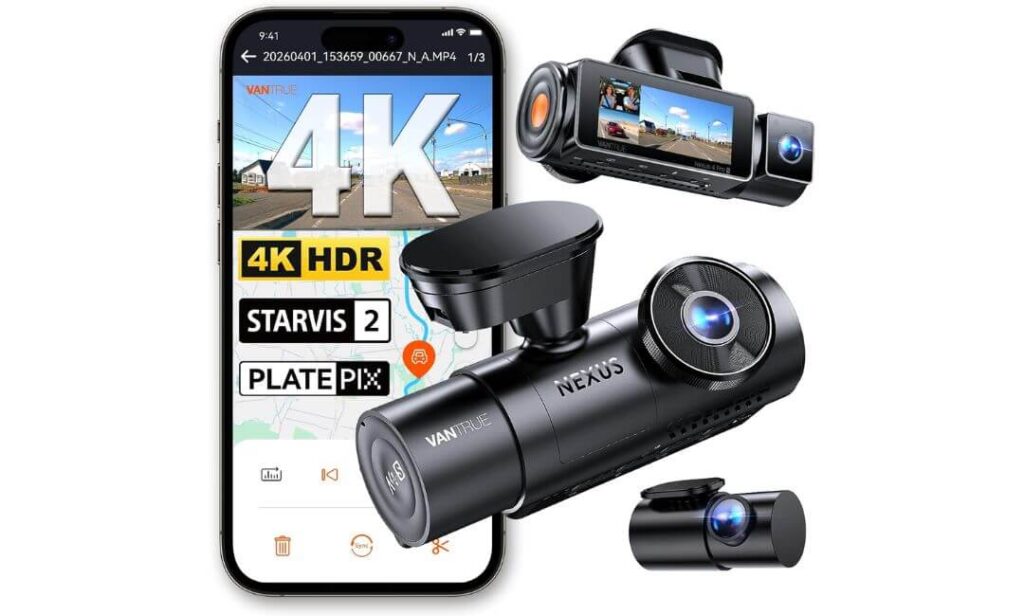
Quick Specs:
- 4K Front + 2.5K Rear + 1080P Interior Recording
- Triple Sony STARVIS 2 Sensors
- 155° Front + 160° Rear + 165° Cabin Coverage
- HDR Night Vision With Enhanced License Plate Clarity
- 24/7 Buffered Parking Surveillance
- Built-In GPS & 5GHz Wi-Fi
- Voice Control Support
- Supercapacitor for Extreme Temperatures
- Up to 1TB Storage Support
- 360° Adjustable Rear Camera
There’s usually a moment when testing a dash cam where you realize whether it’s genuinely better or simply loaded with marketing terms. This was one of those rare cases where the difference became obvious almost immediately.
Most Chevy Equinox owners aren’t looking for a camera that records only what’s directly in front of them. They want protection while driving, while parked, and during those situations nobody plans for. That’s where the combination of 4K front recording, a sharper-than-average 2.5K rear camera, and dedicated interior coverage starts making sense. Instead of leaving blind spots, the entire vehicle remains documented from multiple angles.
Night performance is where this setup separates itself from many popular alternatives. The three Sony STARVIS 2 sensors work together with HDR processing to produce footage that stays surprisingly usable after sunset. Streetlights, headlight glare, wet roads, and dark parking lots are often the situations that expose a camera’s weaknesses. Here, details remain cleaner, brighter, and easier to review when it actually matters.
Just as important, the feature set feels practical rather than gimmicky. Fast 5GHz Wi-Fi makes footage transfers less frustrating, GPS automatically logs driving data, voice commands reduce distractions, and buffered parking mode records what happened before an event rather than starting after the important moment has already passed.
(If your priority is complete coverage rather than simply recording the road ahead, this is one of the few models that genuinely feels like a full-vehicle security system rather than a traditional dash cam.)
What Stood Out During Our Evaluation
- Triple STARVIS 2 sensors deliver some of the strongest low-light performance in this category
- 2.5K rear recording captures noticeably more detail than standard 1080p rear cameras
- Buffered parking protection records events before impact or motion occurs
- Large 1TB storage support reduces the need for frequent file management
- Supercapacitor design is better suited for long-term reliability than traditional battery-based units
One Thing Worth Knowing
- A hardwire kit is required if you want to unlock the full potential of the 24/7 parking protection features.
Installation Notes for Chevy Equinox Owners
The compact front unit fits cleanly behind or beside the rearview mirror without creating a distracting presence inside the cabin. During installation, it’s important to leave adequate clearance around the factory driver-assistance camera housing mounted near the upper windshield area.
The included rear camera cable length is more than sufficient for the Equinox platform, making routing through the headliner and rear hatch area relatively straightforward compared with many larger SUVs.
The Insider Pro-Tip
If you’re debating between a standard front-and-rear system and a three-channel setup, think about how you actually use your Equinox. Families, rideshare drivers, frequent travelers, and owners who regularly leave valuables inside the vehicle often benefit more from interior coverage than they initially expect.
The biggest surprise with this model isn’t the 4K recording. It’s how often the extra camera angles become useful when reviewing an incident. Most people buy it for the front camera and end up appreciating the additional coverage months later when something unexpected happens.
#2. VIOFO A329S 4K Front and Rear Dash Cam
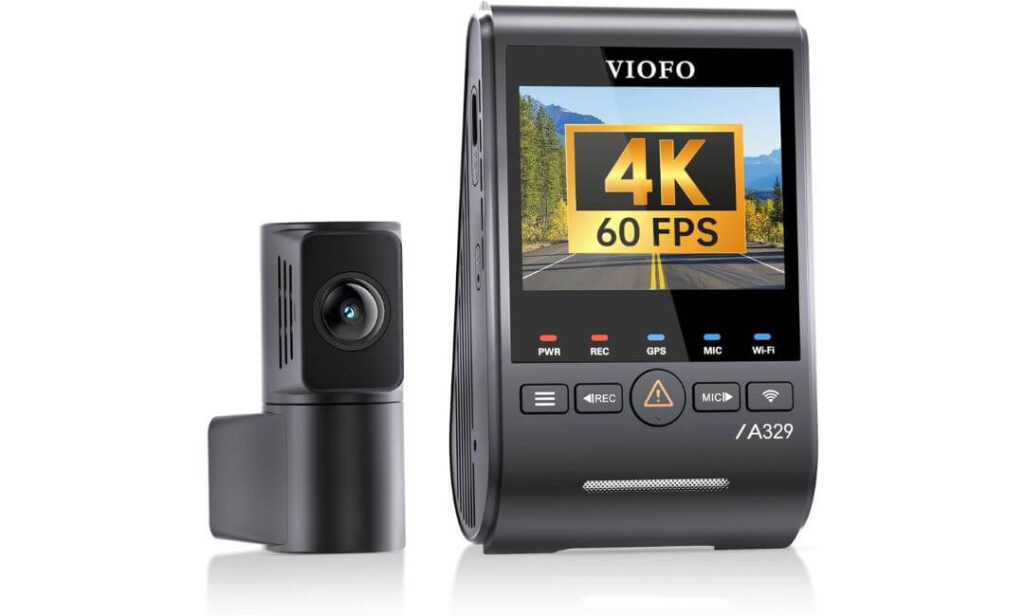
Quick Specs:
- 4K 60FPS Front Recording + 2K Rear Recording
- Dual Sony STARVIS 2 Image Sensors
- HDR Recording on Both Cameras
- Wi-Fi 6 Ultra-Fast File Transfers
- Built-In GPS With Multi-Satellite Support
- Impact Detection Parking Protection
- Up to 4TB SSD Storage Support
- Voice Control Functionality
- Included CPL Filter for Reduced Windshield Glare
- Slim Coaxial Cable Installation System
Here’s the reality: most dash cams look sharp when your vehicle is stopped at a traffic light. The real test happens when you’re moving at highway speeds and need to identify a plate several lanes away. That’s where this system starts making a strong case for itself.
The combination of 4K 60FPS front recording and Sony’s latest STARVIS 2 IMX678 sensor creates footage that feels noticeably smoother than standard 30FPS cameras. Small details remain easier to follow, especially during lane changes, busy intersections, and higher-speed driving. If image quality is your top priority, this is one of the strongest performers currently available in the consumer market.
What impressed us even more is how balanced the entire setup feels. The rear camera isn’t treated as an afterthought. Instead of basic rear coverage, you’re getting 2K STARVIS 2 recording backed by HDR processing. During difficult lighting conditions, both cameras work together to preserve details that often disappear on lower-end systems.
Storage is another area where this model quietly separates itself. Support for external SSDs up to 4TB means long-term recording without constantly worrying about overwriting important footage. For Equinox owners who take frequent road trips, drive long distances for work, or simply prefer having extensive video history available, that flexibility is difficult to ignore.
(If your goal is getting the cleanest possible footage rather than the highest number of cameras, this setup makes an exceptionally strong argument for itself.)
Standout Qualities We Appreciated
- 4K 60FPS recording captures motion with impressive smoothness
- Dual STARVIS 2 sensors perform exceptionally well after dark
- Wi-Fi 6 transfers footage dramatically faster than older systems
- 4TB SSD support is among the most generous storage capacities available
- Included CPL filter helps reduce dashboard reflections and windshield glare
One Thing Worth Knowing
- Most owners looking to unlock full-time parking protection will want to add the optional hardwire kit, allowing the system to monitor the vehicle more effectively when parked.
Chevy Equinox Installation Perspective
The slim camera design works particularly well inside the Equinox cabin because it doesn’t create the bulky appearance often associated with premium dash cams. Once mounted correctly, it blends naturally into the upper windshield area.
Its premium coaxial cable system is another underrated advantage. Cable routing remains clean, and the design helps reduce the possibility of interference with surrounding electronics and driver-assistance systems commonly found in modern Equinox models.
The Insider Pro-Tip
Many buyers focus entirely on resolution numbers, but frame rate often gets overlooked. A high-quality 4K 60FPS recording can provide noticeably better clarity during fast-moving situations than a standard 4K 30FPS camera, especially when reviewing incidents frame by frame.
For drivers who spend significant time on highways, commute in heavy traffic, or simply want the strongest front-facing footage possible, this model’s video quality is the feature most likely to impress long after the initial purchase excitement wears off.
#3. 70mai 4K Smart Front and Rear Dash Cam
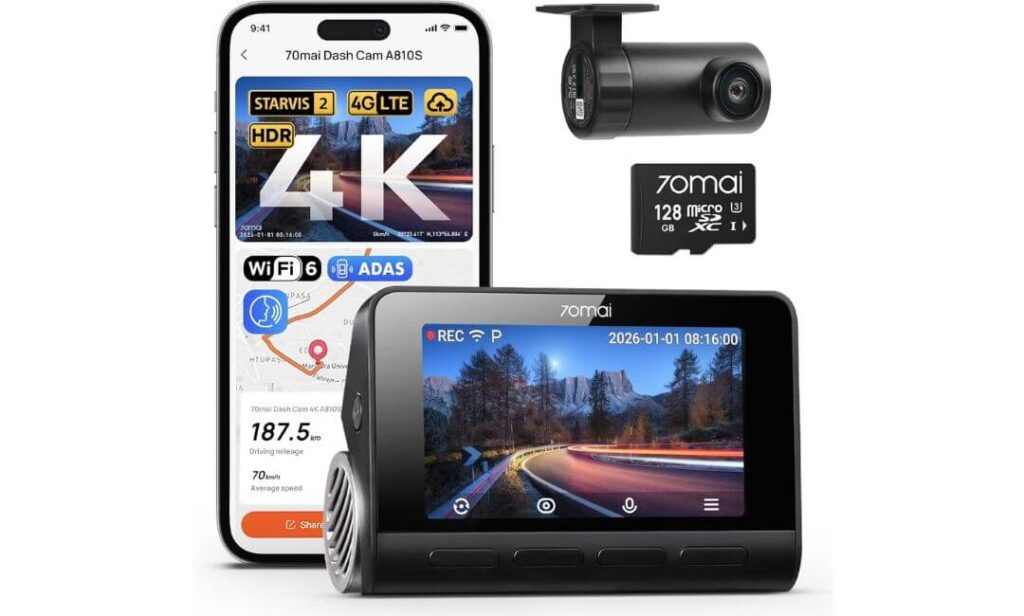
Quick Specs:
- 4K Front + 1080P Rear Recording
- Dual Sony STARVIS 2 Sensors
- Optional 4G LTE Remote Monitoring
- AI Motion Detection 2.0
- 24-Hour Parking Surveillance
- Wi-Fi 6 Connectivity
- 5-System GPS Position Tracking
- HDR Night Vision Technology
- ADAS Driver Assistance Alerts
- Hands-Free Voice Commands
Something interesting happens when you spend time with this camera. You stop thinking of it as a dash cam and start thinking of it as a vehicle security system that happens to record video.
Most models on the market focus almost entirely on image quality. This one certainly delivers there too, thanks to its 4K front camera, STARVIS 2 sensors, HDR processing, and excellent nighttime performance, but the bigger story is everything happening behind the scenes. The optional 4G LTE connectivity, remote vehicle access, live monitoring, and instant alerts create a level of awareness that’s still uncommon in this category.
For Chevy Equinox owners who regularly leave their SUV in airport parking lots, apartment complexes, office garages, or public areas, those extra capabilities become surprisingly valuable. Instead of wondering what’s happening with your vehicle while you’re away, you can actually check on it. That’s a different level of ownership experience compared with a traditional dash camera.
The image quality deserves credit as well. The front camera uses Sony’s respected IMX678 STARVIS 2 sensor, while the rear camera receives its own STARVIS 2 hardware. Combined with 70mai’s proprietary low-light processing technologies, footage remains colorful and detailed long after many cameras have shifted into grainy, washed-out recordings.
(If security matters just as much as recording quality, this is easily one of the most interesting options currently available.)
Features That Impressed Us Most
- Remote monitoring capability adds functionality few competitors currently offer
- AI Motion Detection 2.0 intelligently identifies vehicles and people
- Dual STARVIS 2 sensors deliver strong low-light performance
- Wi-Fi 6 significantly speeds up footage transfers
- 5-system GPS tracking provides highly accurate route and location data
One Thing Worth Knowing
- To access features such as remote monitoring, vehicle tracking, and real-time alerts, you’ll want the optional 4G hardwire kit, which unlocks the camera’s full connected experience.
Chevy Equinox Installation Notes
The compact design integrates neatly into the Equinox windshield area without creating a distracting appearance from the driver’s seat. Positioning the camera slightly beside the rearview mirror helps maintain proper clearance around the factory safety-assistance camera system.
Because many Equinox owners use their vehicles for commuting, family travel, and long-distance trips, the combination of rear coverage, GPS tracking, and advanced parking monitoring feels particularly well matched to how the SUV is typically used.
The Insider Pro-Tip
Many buyers compare dash cams based solely on recording resolution. In reality, the most useful footage is often the footage you receive when you’re nowhere near the vehicle.
That’s exactly where this model earns its place on the list. The recording quality is excellent, but the ability to receive alerts, monitor activity, and keep tabs on your Equinox while you’re away adds a layer of protection that standard dash cams simply cannot provide. For some owners, that convenience alone ends up becoming the feature they value most months after installation.
#4. REDTIGER F7NP 4K GPS Dash Cam
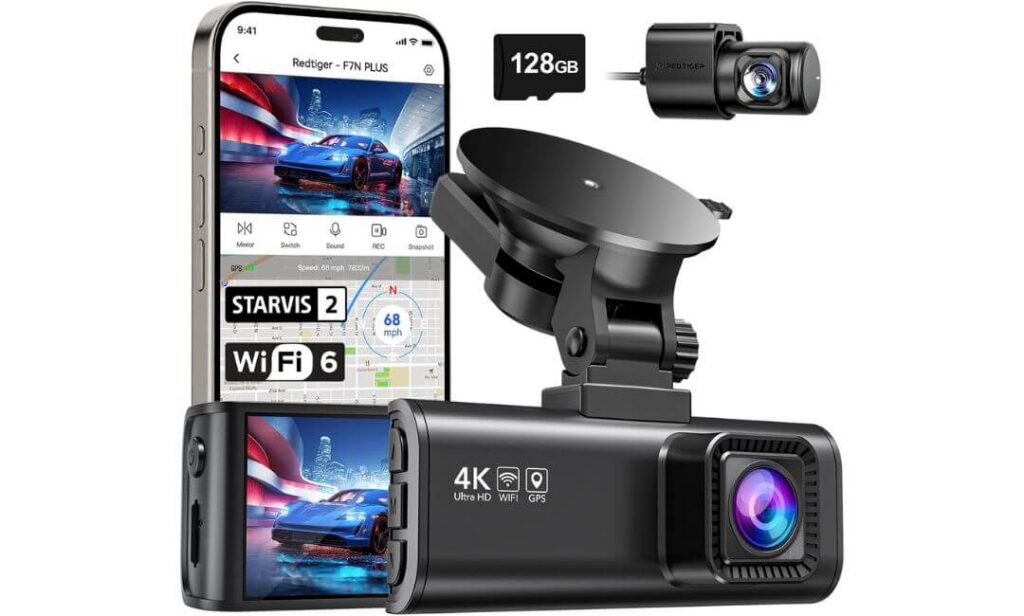
Quick Specs:
- 4K Front + 1080P Rear Recording
- Sony STARVIS 2 Image Sensor
- 170° Front Wide-Angle Coverage
- 5.8GHz Wi-Fi With Fast 20MB/s Transfers
- Built-In GPS Tracking
- WDR & HDR Night Vision Processing
- 24-Hour Parking Protection
- Included 128GB Memory Card
- Supercapacitor-Based Design
- Impact-Sensing G-Sensor Protection
Not every Equinox owner needs LTE connectivity, SSD storage, or three separate cameras. Sometimes the goal is much simpler: buy a reliable dash cam, install it once, and trust it every time you start the engine.
That’s where this model earns its place.
The first thing that stands out is how complete the package feels straight out of the box. Unlike many competitors that require immediate accessory purchases, you’re getting 4K front recording, rear coverage, GPS tracking, STARVIS 2 imaging, fast Wi-Fi, and even a 128GB memory card included. For buyers who prefer avoiding a long list of add-ons, that’s a meaningful advantage.
Video quality is another pleasant surprise. The combination of the STARVIS 2 sensor, F1.5 aperture, HDR processing, and wide-angle coverage creates footage that remains consistently sharp during daily driving. Whether you’re navigating crowded intersections, suburban traffic, or long highway stretches, details remain clear without requiring premium-level spending.
What makes it especially appealing for Equinox owners is the balance. It doesn’t try to overwhelm you with features you’ll never use. Instead, it focuses on the things that matter most—solid daytime footage, dependable nighttime recording, GPS data, parking protection, and easy video access through the smartphone app.
(For many drivers, this strikes the sweet spot between premium features and practical everyday value.)
Reasons It Earned a Place on This List
- Excellent value considering the included 128GB memory card
- STARVIS 2 sensor significantly improves low-light recording
- Fast 5.8GHz Wi-Fi makes footage transfers quick and painless
- Wide 170° field of view captures more surrounding traffic
- Supercapacitor design is better suited for long-term durability in changing temperatures
One Thing Worth Knowing
- While the included storage is generous for most drivers, users who record extremely long road trips may eventually want additional storage capacity for maximum retention time.
Chevy Equinox Compatibility Notes
This setup works particularly well in the Equinox because it provides strong front and rear protection without introducing unnecessary complexity. The windshield-mounted design stays compact, while the long rear-camera cable offers sufficient length for clean installation throughout the cabin.
Positioning it slightly beside the factory rearview mirror assembly helps maintain proper visibility and avoids interference with Chevrolet’s forward-facing driver-assistance hardware located near the upper windshield.
The Insider Pro-Tip
Many buyers underestimate how valuable an included memory card can be. In reality, one of the most common mistakes new owners make is purchasing a camera and delaying installation while waiting for additional accessories.
This model removes that problem entirely. Everything needed for recording is already in the box, which means your Equinox can be protected from day one instead of becoming another project waiting on your to-do list. For busy drivers, that convenience is often worth more than an extra feature they’ll rarely use.
#5. Anyski 4K Three-Channel Dash Cam System
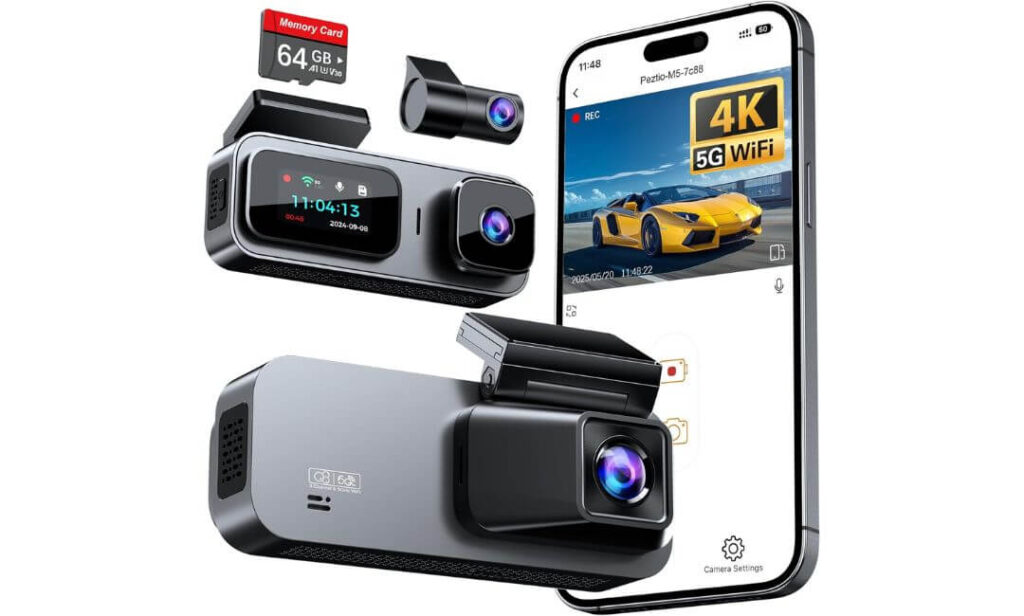
Quick Specs:
- 4K Front + 1080P Rear + 1080P Interior Recording
- Triple-Camera Coverage
- Sony IMX Image Sensor
- Built-In 5GHz Wi-Fi
- 64GB Memory Card Included
- 24-Hour Parking Monitoring
- Collision-Sensing G-Sensor
- Loop Recording Technology
- Rotating Front, Rear & Cabin Cameras
- Compact Low-Profile Design
Here’s something many buyers discover too late: spending more doesn’t always mean getting more coverage.
What makes this option interesting is how much functionality it delivers without chasing the premium-price category occupied by some of the models above. You still get 4K front recording, dedicated rear protection, and a separate cabin camera monitoring the interior. For Chevy Equinox owners transporting family members, rideshare passengers, pets, or valuable equipment, that additional camera angle can be far more useful than another specification buried on a product page.
The overall design also feels surprisingly practical. Instead of drawing attention to itself, the low-profile housing blends naturally into the windshield area. Once installed, it becomes part of the vehicle rather than a distraction hanging from the glass. The included voice notifications are another thoughtful touch, keeping drivers informed without requiring constant interaction with the camera.
Where this model earns additional points is convenience. The included 64GB memory card, built-in 5GHz Wi-Fi, smartphone app support, and flexible camera positioning mean most owners can begin recording almost immediately after installation. There are very few barriers between opening the box and having complete front, rear, and interior coverage working properly.
(For drivers who want maximum viewing angles without stepping into premium pricing territory, this package delivers considerably more than its cost might suggest.)
Highlights That Made It Stand Out
- Three-camera coverage records the road ahead, behind, and inside the vehicle
- 4K front recording delivers strong daytime detail
- Included 64GB card allows immediate use
- 5GHz Wi-Fi improves video transfers and app responsiveness
- Compact design integrates neatly into the cabin
One Thing Worth Knowing
- While image quality is very good for the category, buyers who prioritize the absolute best low-light performance may prefer one of the STARVIS 2-equipped premium models higher on this list.
Chevy Equinox Installation Perspective
The compact footprint works particularly well inside the Equinox because it avoids creating a bulky appearance near the windshield. The adjustable camera design also allows owners to fine-tune recording angles depending on cargo, passengers, or interior monitoring needs.
As with any modern Equinox installation, keeping the camera slightly offset from the factory driver-assistance camera housing near the upper windshield helps maintain proper operation of the vehicle’s safety systems while preserving a clean recording view.
The Insider Pro-Tip
Many people purchase a dash cam thinking only about accidents. Months later, they often realize the most useful footage came from somewhere else entirely—a parking lot incident, damage occurring while the vehicle was unattended, or an event inside the cabin.
That’s why three-channel coverage continues to attract so many owners. The extra camera may not seem important on day one, but when something unexpected happens outside the driver’s direct view, having footage from multiple angles can quickly become the feature you’re happiest you paid for.
Best Chevy Equinox Dash Cams Compared Side by Side
Buying Guide: How to Choose the Right Dash Cam for Your Chevy Equinox
A dash cam is one of those upgrades that feels optional right until the day you actually need it. The challenge for Chevy Equinox owners is that there are hundreds of models available, many of them claiming similar features while delivering very different real-world results.
After reviewing the options in this guide, one thing became clear: the best dash cam isn’t necessarily the one with the longest specification sheet. It’s the one that matches how you actually use your Equinox every day.
The sections below cover the features that genuinely matter and explain where it’s worth spending extra money—and where it usually isn’t.
Start With Video Quality, Not Marketing Claims
The first specification most buyers notice is resolution.
While 1080p dash cams can still provide usable footage, the difference between a modern 4K system and an older Full HD camera becomes obvious when reviewing important details. Road signs, license plates, lane markings, and vehicle descriptions are simply easier to identify.
For most Chevy Equinox owners, a 4K front camera should be considered the starting point today rather than a premium luxury feature.
That said, resolution alone doesn’t tell the whole story.
A well-designed 4K camera with a high-quality image sensor will often outperform another 4K camera using inferior hardware. That’s why models equipped with Sony STARVIS 2 sensors continue to dominate the premium category. They capture more detail in difficult lighting conditions while reducing image noise and motion blur.
If video quality is your top priority, focus on image sensor quality first and resolution second.
Why STARVIS 2 Sensors Matter More Than Most Buyers Realize
Many people spend hours comparing storage capacities, app features, and display sizes while overlooking the component responsible for image quality.
The sensor.
Sony’s STARVIS 2 technology represents one of the biggest advancements in modern dash cameras. Compared with older sensor generations, STARVIS 2 systems are better at handling:
- Dark rural roads
- Parking garages
- Rainy weather
- Headlight glare
- Bright sunlight transitions
- Nighttime license plate capture
This is one reason cameras such as the Vantrue N4 Pro S, VIOFO A329S, 70mai A810S, and REDTIGER F7NP ranked highly in our recommendations.
For daily Equinox drivers, stronger low-light performance often proves more valuable than dozens of extra features.
Choosing Between Front-Rear and Triple-Camera Coverage
Not every driver needs the same recording setup.
A traditional front and rear dash cam for Chevy Equinox owners is often the best solution for everyday commuting, family travel, and road-trip protection. It records what’s happening in front of and behind the vehicle without adding unnecessary complexity.
A three-channel system, however, introduces an additional cabin-facing camera.
This extra camera becomes useful for:
- Rideshare driving
- Monitoring teenage drivers
- Recording passenger activity
- Protecting valuables inside the vehicle
- Capturing incidents occurring through side windows
If maximum coverage is your goal, a triple-camera setup provides a level of documentation that standard dual-channel systems simply cannot match.
Parking Protection Is Often More Important Than Driving Footage
Most accidents happen while vehicles are moving.
Many frustrating incidents happen while vehicles are parked.
Shopping cart damage, hit-and-runs, vandalism, and parking lot impacts frequently occur when the owner isn’t nearby.
This is where parking mode becomes important.
Higher-quality systems typically offer features such as:
- Buffered recording
- Impact detection
- Motion detection
- Time-lapse recording
- AI vehicle detection
- AI person detection
Buffered recording deserves special attention because it captures footage from before an incident occurs. Instead of recording only the impact itself, it records the events leading up to it.
For Equinox owners who regularly park outdoors, parking protection may become the most valuable feature of the entire system.
GPS Tracking Adds More Value Than Many Drivers Expect
Some buyers initially view GPS as an unnecessary extra.
In practice, it can become extremely useful.
Built-in GPS records information such as:
- Vehicle speed
- Driving route
- Date and time
- Location data
When footage is reviewed later, this information provides valuable context and can strengthen incident documentation.
Several premium systems now support multiple satellite networks, improving accuracy and reliability during long-distance travel.
Storage Capacity and Loop Recording Explained
Every dash cam eventually fills its memory card.
That’s normal.
Modern systems use loop recording, which automatically overwrites the oldest footage when storage becomes full. This allows continuous recording without manual intervention.
Storage capacity determines how long footage remains available before being replaced.
General guidelines:
- 64GB: Suitable for lighter driving
- 128GB: Ideal for most Equinox owners
- 256GB+: Better for frequent driving
- SSD storage: Best for extended retention periods
Drivers who regularly take long trips may appreciate cameras capable of supporting large-capacity memory cards or external SSD storage.
Why a Smaller Dash Cam Is Usually Better
A dash cam should record your drive, not dominate your windshield.
Compact designs offer several advantages:
- Cleaner appearance
- Reduced driver distraction
- Easier installation
- Better visibility
- Less attention from potential thieves
Many modern hidden-style dash cams are small enough to sit discreetly near the rearview mirror while maintaining a clear view of the road.
For the Equinox specifically, compact designs also make it easier to avoid interfering with Chevrolet’s factory driver-assistance cameras and sensors.
Chevy Equinox Installation Tips Worth Knowing
Installation is generally straightforward, but placement matters.
Modern Equinox models include advanced driver-assistance systems positioned near the upper center portion of the windshield.
When installing a dash cam:
- Avoid mounting directly in front of factory cameras
- Position the unit beside the rearview mirror whenever possible
- Keep wiring away from airbag deployment areas
- Test the camera’s viewing angle before securing cables permanently
- Consider a hardwire kit if parking protection is important
A clean installation not only looks better but also improves long-term reliability.
Understanding Common Dash Cam Terms
4K Recording
Ultra-high-definition video that captures significantly more detail than standard 1080p footage.
STARVIS 2
Sony’s advanced image sensor technology designed to improve low-light performance, dynamic range, and nighttime clarity.
GPS Tracking
Records route information, speed, location, and time data alongside video footage.
Parking Mode
Allows the camera to monitor the vehicle when parked and automatically record suspicious activity or impacts.
Loop Recording
Automatically overwrites the oldest footage when storage becomes full, ensuring uninterrupted recording.
Buffered Recording
Captures footage from before an event occurs, preserving critical moments leading up to an impact or incident.
HDR and WDR
Image-processing technologies that help balance bright and dark areas of a scene, improving overall visibility.
Final Buying Advice for Equinox Owners
If you’re purchasing your first dash cam, prioritize video quality, parking protection, and reliability before anything else.
A camera with a strong image sensor, dependable recording performance, and useful parking features will provide far more long-term value than one loaded with features you’ll rarely use.
For most Chevy Equinox owners, the sweet spot is a system that combines 4K recording, STARVIS 2 imaging, GPS tracking, and reliable parking surveillance. Those four features consistently deliver the biggest real-world benefits long after the initial purchase has been made.
Real-World Situations Where a Dash Cam Can Make a Difference in a Chevy Equinox
It’s easy to think of a dash cam as something you’ll only need during a major accident. In reality, many owners discover its value during far more ordinary situations—parking lot mishaps, disputed insurance claims, unexpected road incidents, or events that occur while the vehicle is sitting unattended.
The Chevy Equinox is often used as a family vehicle, commuter SUV, road-trip companion, and daily errand runner. That means it spends a lot of time in parking lots, driveways, office complexes, school pickup lanes, and crowded traffic. The scenarios below reflect the situations where dash cam footage is most likely to prove useful.
Parking Lot Damage and Hit-and-Run Incidents
One of the most frustrating experiences for any vehicle owner is returning to their Equinox and discovering damage with no explanation.
A dented bumper, scraped door, cracked trim piece, or damaged rear hatch can happen in seconds, and in many cases there are no witnesses available to explain what happened.
This is exactly why a parking mode dash cam for Chevy Equinox owners has become such a popular upgrade.
Modern systems equipped with motion detection, impact detection, buffered recording, or AI monitoring can continue watching the vehicle after you’ve walked away. If another driver backs into your SUV, a shopping cart strikes the vehicle, or someone causes damage while parking nearby, the camera may capture footage of the incident.
Advanced models such as the Vantrue N4 Pro S and 70mai A810S take this protection even further by monitoring activity around the vehicle and preserving critical footage before and after an event occurs.
For drivers who regularly park at apartment complexes, shopping centers, airports, schools, or office buildings, parking protection is often the feature they end up appreciating the most.
Helping Simplify Insurance Claims
Insurance claims are rarely stressful because of what happened.
They’re stressful because different people remember events differently.
A dash camera provides an objective record of what occurred.
Instead of relying solely on memory, witness statements, or conflicting accounts, video footage can help establish:
- Vehicle position
- Lane placement
- Traffic signal status
- Road conditions
- Driver behavior
- Vehicle speed and movement
- Environmental conditions
This is one reason a dash camera for Equinox SUV owners has become increasingly common.
Even relatively minor incidents can become easier to explain when video evidence is available. A clear recording often removes uncertainty and provides context that photographs taken afterward simply cannot capture.
When combined with GPS information, many systems can also provide route data, location information, and speed records alongside the footage.
Everyday Situational Awareness During Daily Driving
Not every useful recording involves an accident.
Sometimes footage helps explain events that occur around the vehicle rather than directly involving it.
A quality front and rear dash cam for Chevy Equinox drivers expands visibility beyond what mirrors alone can provide. The front camera records traffic conditions ahead, while the rear camera documents what is happening behind the vehicle.
This additional perspective can prove useful during:
- Highway lane changes
- Heavy traffic conditions
- Rear-end incidents
- Road-rage encounters
- Construction zones
- Multi-vehicle accidents
- Unexpected driving behavior from surrounding traffic
For families using their Equinox as a daily commuter, the ability to review footage later can provide valuable insight into situations that happened quickly and were difficult to process in real time.
Many drivers are surprised by how often they review footage not because something went wrong, but because they want to better understand what actually happened around them.
Why Some Equinox Owners Prefer a Three-Camera Setup
Dual-camera systems remain the most popular choice, but three-channel cameras continue to gain traction among certain drivers.
Adding an interior-facing camera creates an additional layer of documentation that may prove valuable for:
- Rideshare driving
- Monitoring teenage drivers
- Recording passenger interactions
- Family travel
- Protecting personal belongings inside the vehicle
In larger SUVs such as the Equinox, the extra perspective can provide visibility that front and rear cameras alone cannot capture.
This is one reason models such as the Vantrue N4 Pro S and Anyski M5 appeal to buyers who prioritize complete coverage over a traditional front-and-rear-only configuration.
Hidden Dash Cam Considerations
Many owners prefer a camera that blends naturally into the cabin rather than drawing attention to itself.
Fortunately, most modern dash cams have become significantly smaller than earlier generations.
A properly installed hidden-style dash cam typically sits near the rearview mirror and remains largely unnoticed during normal driving. Besides creating a cleaner appearance, discreet placement can reduce distractions and make the system less obvious from outside the vehicle.
Compact designs also work particularly well in the Equinox because they leave more room around Chevrolet’s factory safety-assistance cameras and sensors located near the windshield.
For most owners, the best installation is the one that becomes almost invisible after a few days of driving.
Understanding Dash Cam Legality and Privacy Considerations
Dash cam laws vary depending on where the vehicle is operated.
In most areas, recording public roadways is generally permitted, but there can be rules regarding windshield placement, driver visibility, and audio recording.
Before installation, it’s worth reviewing:
- Local windshield obstruction regulations
- Audio recording requirements
- Privacy laws in your region
- Commercial-use recording rules if driving for work
The good news is that most dash cams designed for modern vehicles can be installed in locations that maintain a clear field of view while remaining compliant with visibility requirements.
If you’re uncertain about local regulations, reviewing your state or provincial transportation guidelines before installation is always a smart step.
The Bigger Picture
Most people purchase a dash cam expecting it to help after an accident.
What many Equinox owners discover is that its value often extends much further than that.
Parking lot incidents, insurance documentation, unexpected road events, vandalism concerns, family vehicle monitoring, and everyday peace of mind are all reasons why dash cams continue to become one of the most popular upgrades for modern SUVs.
The best systems don’t simply record drives. They create a reliable record of what actually happened when details matter most.
Installation Guide: Dash Cam Installation for Chevy Equinox Owners
One of the biggest misconceptions about dash cams is that installation is complicated.
In reality, most modern dash cams can be installed in a Chevy Equinox in less than an hour with basic tools and a little patience. The difference between a professional-looking setup and a messy one usually comes down to planning rather than technical skill.
Whether you’re installing a simple front camera, a front-and-rear system, or a three-channel setup with an interior camera, the process is largely the same. The goal is to create a clean installation that records effectively without interfering with visibility, airbags, or factory safety systems.
Quick-Start Installation Process
Before mounting anything permanently, sit in the driver’s seat and think about visibility first.
A dash cam should capture the road—not become something you’re constantly noticing while driving.
The ideal location is typically near the rearview mirror, positioned slightly to the driver’s side or passenger side depending on the camera design. This area keeps the camera high enough to provide a clear recording angle while remaining largely hidden from everyday view.
A simple installation sequence usually looks like this:
- Clean the windshield thoroughly where the camera will be mounted.
- Temporarily position the camera and verify the viewing angle through the app or display.
- Confirm the camera does not block Chevrolet Safety Assist sensors or factory cameras.
- Mount the camera permanently using the included adhesive pad or mount.
- Route power cables along the headliner.
- Continue routing cables down the A-pillar and toward the chosen power source.
- Install and test the rear camera if using a dual-channel or triple-channel system.
- Verify recording quality before securing all wiring permanently.
Taking a few extra minutes during the positioning stage can prevent hours of frustration later.
Choosing the Right Mounting Position
The Chevy Equinox includes factory driver-assistance technology located near the upper center portion of the windshield.
This area is already occupied by cameras and sensors responsible for features such as:
- Forward Collision Alert
- Automatic Emergency Braking
- Lane Keep Assist
- Following Distance Indicators
Because of this, the center windshield area should generally be avoided.
Instead, position the dash cam beside the rearview mirror where it remains clear of the factory equipment while maintaining an unobstructed recording angle.
Most of the cameras featured in this guide—including the Vantrue, VIOFO, 70mai, REDTIGER, and Anyski models—fit comfortably in this location.
Understanding Your Power Options
The power source you choose has a direct impact on which features remain available when the vehicle is parked.
Most owners choose between two installation methods.
Cigarette-Lighter Power Setup
This is the easiest option and requires no vehicle modifications.
The camera simply plugs into the vehicle’s 12V outlet and begins recording whenever the vehicle is running.
Advantages include:
- Fast installation
- No wiring modifications
- Easily transferable between vehicles
- Ideal for first-time users
Potential limitations:
- Parking mode functionality may be unavailable or limited
- The power cable may remain slightly more visible
- Continuous vehicle monitoring usually isn’t possible
For drivers primarily interested in recording while driving, this setup works perfectly well.
Hardwire Installation for Continuous Protection
A hardwire kit connects the camera directly to the vehicle’s fuse box.
This allows the camera to receive power even when the engine is turned off, enabling advanced parking surveillance features.
Benefits include:
- 24/7 parking protection
- Buffered event recording
- Motion detection functionality
- Impact monitoring
- Cleaner installation appearance
- Automatic voltage protection on quality kits
If parking mode is one of the reasons you’re buying a dash cam, hardwiring is often worth the extra effort.
Most premium cameras in this guide reach their full potential when paired with a proper hardwire installation.
Routing Rear Camera Cables Cleanly
For front-and-rear or three-channel systems, cable routing becomes the most time-consuming part of the installation.
Fortunately, the Equinox interior layout makes the process relatively straightforward.
A clean routing path typically follows:
- Headliner
- A-pillar trim
- Upper door weather stripping
- Rear passenger area
- Rear hatch section
The goal is to keep wiring completely hidden whenever possible.
Take your time here.
Neat cable routing doesn’t improve video quality, but it significantly improves the overall appearance of the installation and reduces the chance of future rattles or loose wires.
Cable Management Tips for a Factory-Like Appearance
A well-installed dash cam should look like it came with the vehicle.
Some simple practices make a significant difference:
- Hide wiring behind trim panels whenever possible
- Use included cable clips sparingly and strategically
- Leave small service loops near camera connections
- Avoid stretching cables tightly
- Secure excess wiring rather than stuffing it randomly behind panels
- Verify rear hatch movement before finalizing cable placement
The extra effort often results in an installation that remains tidy for years.
Common Installation Mistakes to Avoid
Most dash cam installation problems are surprisingly easy to prevent.
The most common issues include:
Mounting Too Low
A lower mounting position often creates windshield reflections and reduces the camera’s field of view.
Keeping the camera high near the mirror generally produces better footage.
Blocking Factory Safety Cameras
Modern Equinox models rely on windshield-mounted sensors.
Accidentally obstructing these systems can impact driver-assistance performance.
Always verify visibility before final installation.
Ignoring Memory Card Setup
Many recording problems are caused by improperly configured storage cards rather than camera hardware.
Formatting the memory card according to manufacturer recommendations before first use is always a good idea.
Skipping Firmware Updates
Several cameras featured in this guide receive periodic firmware improvements.
Checking for updates after installation can improve stability and unlock new features.
Forgetting Parking Mode Requirements
Many buyers assume parking mode works automatically.
In reality, advanced parking protection usually requires a dedicated hardwire kit.
Knowing this before installation prevents disappointment later.
Special Considerations for Hidden Dash Cam Installations
Many Chevy Equinox owners prefer a setup that blends naturally into the cabin.
The good news is that most modern dash cams are smaller and more discreet than ever before.
For a clean hidden-style installation:
- Mount the camera directly behind or beside the rearview mirror
- Use black adhesive mounts when available
- Route all wiring through trim panels
- Minimize visible cable exposure
- Disable unnecessary display illumination if supported
When installed correctly, many passengers won’t even notice a dash cam is present.
This approach not only improves aesthetics but can also reduce distractions and create a more factory-integrated appearance.
Final Installation Advice
The best dash cam in the world won’t help much if it’s installed poorly.
Take your time, verify camera angles before securing mounts permanently, and think about long-term usability rather than simply finishing the job quickly.
A properly installed system should feel invisible during everyday driving while remaining ready to capture important footage whenever it’s needed. That’s ultimately what makes a dash cam such a valuable upgrade for the Chevy Equinox in the first place.
Maintenance and Troubleshooting Tips for Long-Term Dash Cam Reliability
Buying a quality dash cam is only part of the equation.
The cameras featured in this guide are designed to operate for years, but like any piece of electronics that records continuously, they perform best when given occasional attention. Fortunately, maintaining a dash cam is far easier than most owners expect.
In fact, many of the reliability complaints people have about dash cams are often caused by memory cards, outdated firmware, installation issues, or power problems rather than the camera itself.
A few simple habits can dramatically improve long-term performance and help ensure your system is ready when you actually need it.
Keep Firmware Updated
Most modern dash cams have become significantly smarter over the last few years.
Manufacturers frequently release firmware updates that improve:
- System stability
- Wi-Fi performance
- GPS accuracy
- Parking mode functionality
- Video processing quality
- App compatibility
- Memory card handling
This is particularly true for premium models such as the Vantrue N4 Pro S, VIOFO A329S, 70mai A810S, and REDTIGER F7NP, all of which continue receiving software improvements after purchase.
Many owners install a dash cam and never think about firmware again. That’s understandable, but spending a few minutes checking for updates every few months can help maintain optimal performance.
A good rule is to check for updates during routine vehicle maintenance or seasonal inspections.
Treat the Memory Card Like a Wear Item
The memory card is arguably the hardest-working component inside the entire system.
Unlike a normal storage card that occasionally saves files, a dash cam memory card is constantly recording, deleting, and rewriting data every day.
Over time, this repeated activity creates wear.
Common signs of a memory card nearing the end of its useful life include:
- Missing video files
- Random recording interruptions
- Recording errors
- Corrupted footage
- Unexpected restarts
- Memory card warnings
To reduce these risks:
- Use high-endurance cards whenever possible
- Format the card periodically through the camera itself
- Follow the manufacturer’s storage recommendations
- Replace aging cards proactively
Many experienced dash cam owners replace memory cards every couple of years regardless of whether problems are visible.
Considering how inexpensive storage has become, this preventative approach often makes sense.
Verify GPS Data Occasionally
GPS data is one of those features that works quietly in the background until it’s suddenly important.
Route history, location information, speed records, timestamps, and travel data can all become valuable if footage ever needs to be reviewed.
Occasionally verify that:
- Speed data appears correctly
- Date and time remain accurate
- Route information is being recorded
- GPS signal acquisition remains consistent
If GPS information appears inconsistent, the issue is often related to camera placement, windshield obstructions, or software settings rather than a hardware failure.
Fortunately, most modern systems acquire satellite signals quickly and require very little intervention.
Review Sample Footage Every Few Weeks
One of the biggest mistakes dash cam owners make is assuming everything is recording correctly simply because the camera powers on.
A quick footage review every few weeks can reveal problems long before they become serious.
Things worth checking include:
- Image clarity
- Audio quality
- Date and time accuracy
- Rear camera functionality
- Parking mode recordings
- GPS information
- Memory card performance
This process typically takes less than five minutes and can provide peace of mind that the system is operating as expected.
Think of it as checking smoke detector batteries. Hopefully you’ll never need the footage, but you’ll want it working if you do.
Monitoring Battery Health When Using Parking Mode
Parking mode is one of the most useful dash cam features available today.
It’s also one of the features that requires the most attention.
When a dash cam remains active while parked, it continues drawing power from the vehicle’s electrical system. Quality hardwire kits include low-voltage protection designed to prevent excessive battery discharge, but occasional monitoring is still wise.
Pay attention to:
- Slow engine starts
- Battery warning messages
- Reduced vehicle voltage
- Unexpected parking mode shutdowns
For most Chevy Equinox owners, a properly installed hardwire kit with voltage protection creates no issues at all. However, older batteries or vehicles that sit unused for extended periods may benefit from additional monitoring.
If the vehicle regularly remains parked for weeks at a time, temporarily disabling parking mode can be a practical solution.
Solving Common Recording Problems
Most dash cam issues fall into a few predictable categories.
Camera Powers On but Doesn’t Record
This is often caused by:
- Full storage cards
- Corrupted memory cards
- Incorrect recording settings
- Outdated firmware
Formatting the card and verifying settings usually resolves the problem.
Wi-Fi Connection Problems
Wireless connectivity issues are commonly related to:
- Phone software updates
- App permissions
- Background network switching
- Interference from other wireless devices
Restarting both the camera and mobile app often restores connectivity.
Missing Rear Camera Footage
When rear recordings disappear, the most common causes include:
- Loose cable connections
- Damaged cable routing
- Improper firmware configuration
Inspecting physical connections should always be the first troubleshooting step.
GPS Not Connecting
GPS reception can occasionally be affected by:
- Windshield obstructions
- Parking garages
- Underground structures
- Heavy tree coverage
Testing the system outdoors usually confirms whether the issue is environmental or equipment-related.
Knowing When It’s Time to Upgrade
A dash cam doesn’t need to be replaced every year.
In fact, many quality systems continue performing reliably for years after installation.
That said, there are situations where upgrading becomes worthwhile.
Signs it may be time to consider a newer model include:
- Older 1080p-only recording
- Lack of parking protection features
- Missing GPS functionality
- Aging memory card support
- Poor night performance
- Limited smartphone connectivity
- No firmware support from the manufacturer
The biggest leap in recent years has been the widespread adoption of Sony STARVIS 2 sensors, improved parking surveillance systems, faster Wi-Fi technologies, and more advanced image processing.
For drivers still using older-generation cameras, upgrading can produce a surprisingly noticeable improvement in both day and night recording quality.
A Simple Maintenance Routine That Actually Works
The easiest way to keep a dash cam operating reliably is surprisingly simple:
- Check for firmware updates every few months
- Review sample footage regularly
- Format memory cards periodically
- Inspect cable connections during vehicle maintenance
- Verify parking mode operation occasionally
- Replace aging storage cards before they fail
None of these tasks require special tools or technical expertise, yet together they significantly improve long-term reliability.
A dash cam is ultimately there for the moments you hope never happen. A little preventative maintenance helps ensure it performs exactly as expected if that day ever arrives.
FAQs About Chevy Equinox Dash Cam
Which type of dash cam actually makes the most sense for a Chevy Equinox owner: dual-channel or triple-channel?
This depends less on the vehicle and more on how you use it.
For most Chevy Equinox owners, a quality front-and-rear system such as the VIOFO A329S or 70mai A810S will provide everything needed for commuting, road trips, school runs, and everyday driving. The rear camera alone dramatically improves the ability to document rear-end collisions, parking incidents, and highway traffic situations.
A triple-channel setup becomes more valuable when the interior of the vehicle matters as much as the exterior. Situations where the third camera often proves useful include:
- Rideshare driving
- Family transportation
- Monitoring teenage drivers
- Carrying valuable equipment
- Frequent urban parking
Interestingly, many buyers initially believe they need a three-camera system, only to realize later that a premium dual-channel setup would have served them perfectly. Others purchase a dual-camera system and later wish they had interior coverage. The best choice depends on whether you need to document what happens inside the Equinox as well as outside it.
Will a dash cam interfere with Chevy Equinox safety systems or factory cameras?
When installed correctly, no.
Modern Equinox models use windshield-mounted cameras and sensors for technologies such as lane-keeping assistance, collision alerts, and emergency braking. Problems generally occur only when owners place a dash cam directly in front of those factory systems.
A proper installation typically follows a simple principle: keep the dash cam close to the rearview mirror while leaving the factory camera housing unobstructed.
Most of the cameras recommended in this guide are compact enough to fit neatly beside the mirror area without affecting visibility or driver-assistance functionality. In fact, once installed correctly, many owners forget the camera is even there after a few days of driving.
Is STARVIS 2 really worth paying extra for, or is it mostly marketing?
This is one of the rare features that genuinely lives up to the hype.
Many dash cam upgrades sound impressive on paper but produce only minor real-world improvements. STARVIS 2 is different because the benefits become obvious during the exact situations where dash cams are most likely to be needed.
The biggest improvements typically appear during:
- Night driving
- Rainy weather
- Parking garages
- Rural roads
- Headlight glare situations
- Early morning and dusk conditions
The difference isn’t just a brighter image. It’s the ability to preserve useful details when conditions become challenging. License plates, lane markings, vehicle colors, and road signs often remain easier to identify compared with older sensor generations.
For drivers who spend significant time driving after sunset, STARVIS 2 is one of the upgrades most likely to justify its additional cost.
Why do some drivers upgrade from a working dash cam even when the old one still records?
Because recording video and capturing usable evidence are not always the same thing.
A five-year-old dash cam may still function perfectly, but modern systems have improved dramatically in several areas:
- Nighttime image quality
- Parking surveillance
- GPS accuracy
- Wi-Fi transfer speeds
- Storage capacity
- App reliability
- License plate recognition
One of the most common upgrade stories involves drivers reviewing footage after an incident and realizing the camera recorded everything—but not clearly enough to identify the information they actually needed.
That’s why many experienced owners eventually upgrade not because the old camera failed, but because newer technology provides a better chance of capturing useful evidence when it matters.
What’s the biggest dash cam mistake Equinox owners make after installation?
Oddly enough, it’s assuming the job is finished.
Many people install a dash cam, see the recording light turn on, and never check it again. Months later they discover the memory card stopped saving footage, the rear camera disconnected, the date reset, or parking mode was never activated correctly.
A simple five-minute check every few weeks can prevent most of these issues.
The easiest routine is:
- Review a recent recording.
- Confirm front and rear footage are working.
- Check GPS data.
- Verify date and time accuracy.
- Confirm parking recordings are being saved.
It sounds basic, but this habit alone separates drivers who merely own a dash cam from those who can actually rely on it when something unexpected happens. The most expensive camera in the world is useless if it isn’t recording properly when the moment arrives.
Final Thoughts
After spending time comparing the latest options available for the Chevy Equinox, one conclusion became difficult to ignore: the best dash cam is rarely the one with the longest feature list. It’s the one you’ll still appreciate six months from now when an unexpected situation happens and the footage is there exactly when you need it.
For most Equinox owners, the Vantrue N4 Pro S stands out because it delivers the most complete package of coverage, image quality, parking protection, and long-term flexibility. The VIOFO A329S remains the strongest choice for drivers who prioritize pure video quality, while the 70mai A810S brings connected features that few competitors currently match. The REDTIGER F7NP continues to offer one of the most balanced value propositions in the segment, and the Anyski M5 proves that comprehensive three-camera coverage doesn’t necessarily require a premium budget.
The encouraging news is that there isn’t a bad option on this list. Each model earned its place because it solves a different problem for a different type of Equinox owner.
What matters most is choosing a camera that matches how you actually use your SUV. A daily commuter has different priorities than a rideshare driver. A family vehicle parked outside overnight has different needs than an Equinox used primarily for weekend travel. The right choice is the one that fits your routine, not simply the one with the biggest specification sheet.
One final thought worth keeping in mind: most people buy a dash cam hoping they’ll never need it. That’s exactly the point. The value isn’t in the camera itself—it’s in knowing that if something unexpected happens on the road, in a parking lot, or while your vehicle is unattended, you’ll have a reliable record of what actually occurred.
And when that day comes, you’ll care far less about how much the dash cam cost than how well it did its job.
Also Check: