Best Dash Cam With Cloud Storage in 2026 for 24/7 Parking Surveillance & Live Alerts
If you’ve been searching for the best LTE dash cam, chances are you’re not just shopping for video quality — you’re trying to solve a security problem.
Maybe your car sits overnight on the street.
Maybe your office parking lot has blind spots.
Maybe you’ve already had that gut-punch moment — walking back to your vehicle and noticing a scratch, dent, or worse… with no note, no witness, no proof.
And that’s exactly where standard dash cams fail.
SD cards get stolen.
Footage gets overwritten.
Cameras get ripped off the windshield.
By the time you realize something happened — the evidence is already gone.
Cloud-connected dash cams change that equation completely.
Instead of storing footage inside the car, they push critical clips straight to the cloud — impact events, motion triggers, even live parking alerts — all accessible from your phone within seconds. It’s the difference between hoping you caught something… and actually watching it happen in real time.
For this guide, we narrowed the field to five cloud-ready systems that go beyond basic recording — models built for always-connected surveillance, remote viewing, and true 24/7 parking protection.
Two standouts immediately separated themselves from the pack:
- Nextbase iQ Smart HD — a smarter, AI-driven alternative that blends cloud upload, Emergency SOS, and live Smart Sense parking alerts into one of the most app-integrated ecosystems available.
- Thinkware U3000 PRO — arguably the most advanced cloud-capable dual system right now, pairing Sony STARVIS 2 sensors with radar-based parking detection and LTE connectivity that keeps your vehicle under constant watch.
If your priority is catching incidents while you’re away — not just while you’re driving — these are the kinds of systems that justify their price the first time you actually need the footage.
Below are the five cloud storage dash cams that deliver real remote surveillance, instant evidence backup, and the kind of peace of mind SD-card cameras simply can’t match anymore.
Best Dash Cam With Cloud Storage & Dash Cam That Uploads to Cloud — Top Picks for 24/7 Surveillance
#1. Nextbase iQ 2K Smart HD — Best AI Cloud Dash Cam With Smart Parking Alerts
#2. Thinkware U3000 PRO 4K/2K LTE — Best Dual Dash Cam With Cloud Storage & Radar Parking Mode
#3. Vantrue N5S 4-Channel 360° — Best Multi-Channel Dash Cam With Cloud-Ready Parking Recording
#4. Garmin Dash Cam X310 — Best Compact 4K Dash Cam With Connected App Backup
#5. Nexar Pro Dual — Best Dash Cam That Uploads Directly to Unlimited Cloud Storage
Expert Tip
Also Check:
- Best Dash Cams With Parking Mode
- Best Battery Powered Dash Cams for Cars
- Best Dash Cams With GPS & Speed Recording
How We Ranked the Best Dash Cam With Cloud Storage (Our Methodology)
Cloud dash cams aren’t all built the same. Some only upload short event clips over Wi-Fi, while others maintain full-time LTE connections with live streaming and real-time alerts.
To separate marketing claims from real surveillance capability, we evaluated each model on five practical, ownership-level parameters that actually matter once the camera is installed and running daily.
Cloud Connectivity Type & Upload Reliability
The first filter was simple: how the camera connects to the cloud.
We prioritized systems offering:
- Built-in LTE or add-on LTE modules
- Automatic incident uploads
- Continuous parking surveillance sync
- Stable app connectivity
Wi-Fi–only models ranked lower unless they proved consistent auto-upload performance when parked near known networks.
Parking Mode Intelligence
Since this guide focuses on 24/7 surveillance, parking performance carried heavy weight.
We looked at:
- Radar vs motion detection
- Impact detection sensitivity
- Buffered recording (pre-event capture)
- Smart false-alert filtering
Systems that could detect movement before impact — and upload instantly — scored highest.
Camera Coverage & Channel Configuration
Cloud evidence is only useful if the incident is captured clearly.
We favored setups offering:
- Dual (front + rear) coverage minimum
- Multi-channel cabin monitoring where relevant
- Wide dynamic range for night parking lots
- Interior IR recording for ride-share/fleet use
More angles = stronger incident documentation.
App Ecosystem & Remote Access Features
A cloud dash cam lives or dies by its app.
We evaluated:
- Live view streaming stability
- Clip playback speed
- Alert notification timing
- Cloud storage browsing ease
- Firmware & OTA update support
Laggy apps or delayed alerts were immediate deal-breakers.
Storage Plans, Costs & Data Retention
Finally, we looked beyond hardware into long-term ownership costs:
- Free vs paid cloud tiers
- Clip retention duration
- Unlimited vs capped storage
- Subscription value vs features
Because the real cost of a cloud dash cam isn’t just the camera — it’s the ecosystem you’re locked into afterward.
#1. Nextbase iQ 2K Smart HD
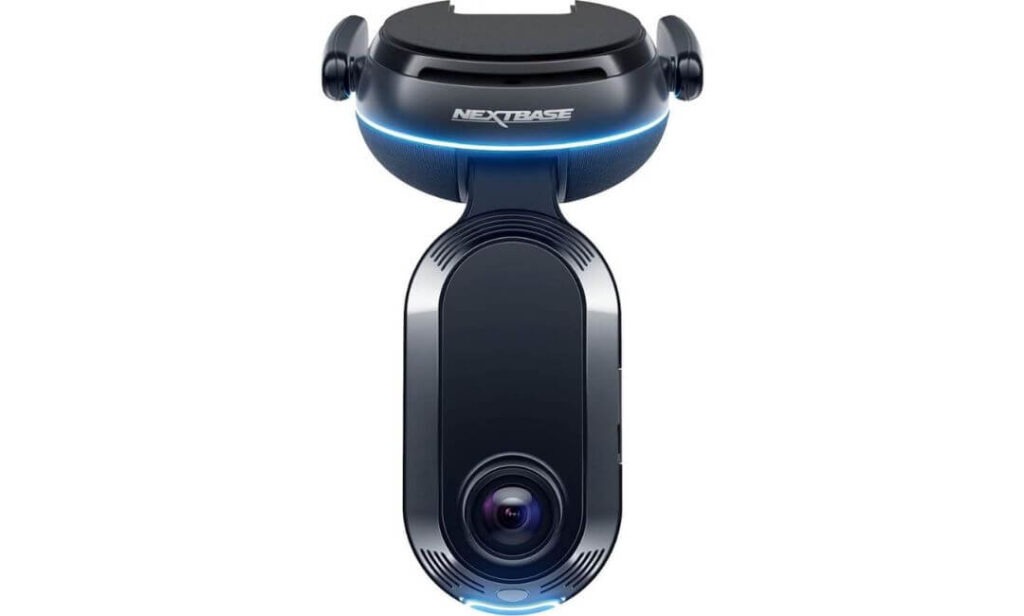
Key Specs:
- Video Resolution: 1440p Front / 1080p Rear
- Connectivity: Built-in 4G LTE + Wi-Fi
- Cloud Access: Live View + Remote Playback via iQ App
- Parking Mode: Smart Sense AI Proximity Detection
- Interior Cam: Infrared Cabin Camera
- Emergency Feature: SOS Auto Dispatch
- AI System: Roadwatch AI Speed Tracking
- Storage: 64GB MicroSD Included
- Control: Full App + Voice Commands
The first thing you notice about the Nextbase iQ isn’t the camera — it’s the ecosystem around it. This isn’t built like a traditional “record and forget” dash cam. It behaves more like a connected security system mounted on your windshield. With built-in 4G, the camera stays online even when your car is parked miles away, quietly monitoring movement and pushing alerts straight to your phone the moment something feels off.
Smart Sense parking is where it starts separating itself from basic cloud cams. Instead of waiting for an impact, the system uses spatial awareness and proximity sensing to detect someone approaching your vehicle. You’ll get a live alert before contact even happens — giving you the chance to trigger an alarm, speak through the app, or simply start recording evidence in real time. It’s surveillance, not just recording.
Then there’s the AI layer. “Roadwatch AI” can track surrounding vehicle speed within footage, which becomes extremely useful in accident disputes. Add Guardian Mode — where you can set speed or location boundaries — and this camera starts making sense not just for parking protection, but also for monitoring family drivers, valets, or fleet vehicles. It’s less about footage quality alone… and more about control.
Cloud Storage & Live Monitoring Capabilities
- Real-Time 4G Cloud Connectivity
Unlike Wi-Fi dependent models, the iQ stays connected through LTE — meaning incident clips upload even if your vehicle is parked in a remote lot with no nearby network. - Live View From Anywhere
Open the Nextbase iQ app and you can pull a live feed instantly — front, rear, or cabin — whether the car is outside your home or across the city. - Instant Threat Alerts
Motion near the vehicle triggers push notifications within seconds, allowing you to react before damage occurs. - Witness Mode Cloud Sharing
Voice-activated Witness Mode locks footage and streams it live to a trusted contact — useful in road rage or unsafe stop situations. - Automatic Emergency Uploads
If an accident occurs and you’re unresponsive, footage and location data upload automatically while emergency services are dispatched.
One Thing To Consider Before Buying
Subscription Required for Full Cloud Features
While the camera records locally out of the box, most advanced cloud functions — LTE connectivity, live view, remote alerts — require an active subscription plan. It’s worth factoring into long-term ownership cost.
Pro Tip
If parking surveillance is your main goal, hardwire the iQ instead of relying on accessory power. Continuous power unlocks full Smart Sense monitoring — otherwise, you’re only using half the system you paid for.
Best For: Drivers who want always-connected vehicle surveillance — especially street parkers, high-risk urban owners, ride-share drivers, or anyone who values live alerts and remote monitoring over basic loop recording.
#2. Thinkware U3000 PRO
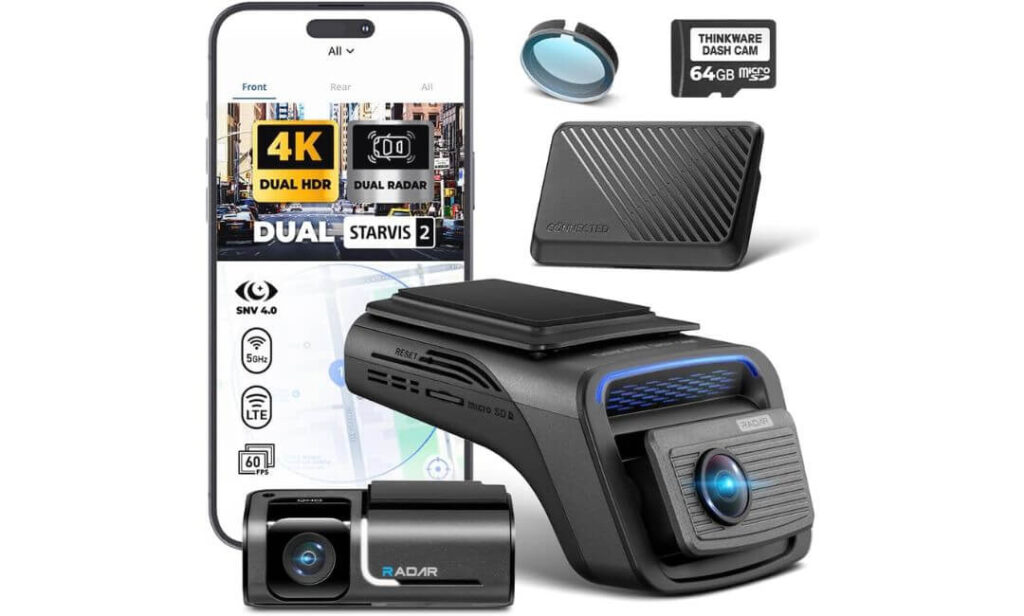
Key Specs:
- Video Resolution: 4K Front / 2K Rear
- Image Sensors: Sony STARVIS 2 (Front + Rear)
- Connectivity: LTE Module + Wi-Fi + Bluetooth
- Cloud Platform: Thinkware CONNECTED LTE
- Parking Mode: Dual Radar Detection (Front & Rear)
- Night Tech: Super Night Vision 4.0
- GPS: Built-In Tracking
- Recording Type: Buffered Event Capture
- Bundle: Includes LTE Module + 3-Year Basic Cloud Plan
If the Nextbase iQ feels like a smart security system, the Thinkware U3000 PRO feels like industrial-grade surveillance hardware — the kind of setup you install when you’re done taking chances with parking damage or hit-and-runs.
The biggest differentiator is radar parking mode. Instead of relying purely on motion or impact sensors, the U3000 uses front and rear radar to detect approaching movement before contact happens. That means buffered recording starts earlier, captures more context, and does it while consuming less battery. For overnight street parking or long airport stays, that power efficiency alone becomes a deciding factor.
Video clarity is equally serious. Sony STARVIS 2 sensors paired with HDR processing deliver extremely clean contrast at night — license plates, street lighting, shadow detail — all preserved without the grain you typically see in low-light recordings. Thinkware’s Super Night Vision 4.0 tuning leans heavily into surveillance usability rather than cinematic color, which is exactly what you want when footage becomes legal evidence.
Where the system pulls ahead in cloud capability is its bundled LTE module. With the included CONNECTED plan, you get live remote viewing, impact alerts, and real-time vehicle location tracking through the app. It’s not just about watching footage — it’s about knowing what’s happening around your vehicle while you’re nowhere near it.
Cloud Storage & LTE Surveillance Capabilities
- Always-Connected LTE Monitoring
The included LTE module keeps the dash cam online 24/7, allowing incident footage and alerts to reach your phone instantly — even when parked far from Wi-Fi. - Remote Live View Access
Open the Thinkware CONNECTED app to view front or rear camera feeds in real time whenever motion or impact is detected. - Instant Impact Notifications
If your vehicle gets hit while parked, the system pushes alerts immediately — no waiting until you return to the car. - Location Tracking & Vehicle Status
Built-in GPS combined with cloud connectivity lets you check vehicle location, routes, and movement history remotely. - Buffered Radar Event Uploads
Because radar triggers recording earlier, uploaded cloud clips include pre-impact footage — crucial for identifying vehicles or suspects.
One Thing To Consider Before Buying
LTE Features Depend on Ongoing Plan Upgrades
The included 3-year basic plan covers essential alerts and live view, but advanced cloud storage depth and extended playback may require upgrading later depending on usage.
Pro Tip
If you frequently park in high-traffic areas, angle the rear camera slightly downward during install. Radar will detect approach either way, but plate capture accuracy improves significantly with a lower rear lens pitch.
Best For: Owners who want maximum parking surveillance with minimal battery drain — especially long-term parkers, airport travelers, urban street parkers, and drivers who prioritize radar detection over standard motion sensing.
#3. Vantrue N5S
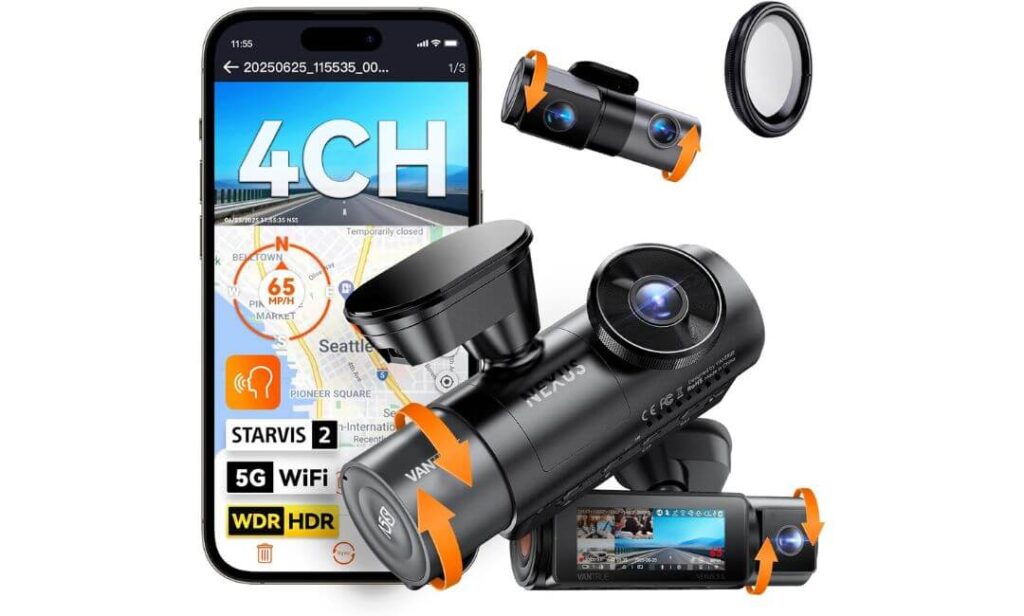
Key Specs:
- Camera Setup: 4-Channel (Front + Rear + Dual Cabin)
- Video Resolution: 2.7K Front + 1440P Rear + Dual 1080P Interior
- Sensors: Sony STARVIS 2 (All Channels)
- Field of View: Full 360° Coverage
- Connectivity: 5GHz Wi-Fi + GPS
- Parking Mode: 24/7 Buffered Motion Detection
- Night Vision: IR Cabin + HDR/WDR Processing
- Storage Support: Up to 1TB microSD
- Voice Control: Multi-Language Commands
- Processor: Dual-Core Recording Engine
If dual-channel dash cams cover accidents, the Vantrue N5S covers everything else — inside, outside, and everything happening around the vehicle while you’re gone. This is the kind of system people move to after realizing front + rear footage still leaves blind spots, especially during parking incidents or interior disputes.
The 4-channel layout records simultaneously from front road view, rear traffic, and two interior angles — capturing cabin activity, side windows, and even cargo areas. For ride-share drivers, families, or anyone carrying valuables, that interior documentation becomes just as important as external footage. And thanks to STARVIS 2 sensors across all cameras, low-light capture holds detail without dissolving into noise.
Parking surveillance is where the N5S earns its place in a cloud-focused list. Buffered 24/7 parking mode records motion and impacts with a 10-second pre-event window, meaning footage starts before contact actually happens. Paired with Wi-Fi app connectivity, clips can be reviewed, downloaded, or shared quickly without removing the card. It’s not LTE-live like some premium units — but as a cloud-ready evidence system with full-vehicle coverage, it brings something most connected cams simply don’t: perspective.
Cloud Storage & Remote Evidence Access
- Cloud-Ready Wi-Fi Footage Sync
While it relies on Wi-Fi rather than LTE, the N5S allows quick clip access, download, and sharing through the Vantrue app once connected. - 360° Incident Documentation
Uploaded or shared footage isn’t limited to front view — all four camera angles provide contextual evidence for disputes. - Buffered Event Capture Uploads
Pre-recording ensures cloud-saved clips show what happened before impact, not just the collision moment. - App-Based Video Management
Preview, trim, and export clips directly through the mobile app without pulling the SD card. - High-Capacity Local Backup Before Upload
With support up to 1TB storage, footage remains safely stored locally even before cloud transfer or sharing.
One Thing To Consider Before Buying
No Built-In LTE Connectivity
Unlike always-online cloud dash cams, remote live viewing and instant alerts require the camera to be within Wi-Fi range or manually accessed through the app later.
Pro Tip
Install the interior cabin cams slightly wider than default alignment if you’re using the N5S for ride-share or family monitoring — it captures side window activity that standard forward cabin angles miss.
Best For: Drivers who want total vehicle coverage, not just road footage — ideal for ride-share operators, family vehicles, fleet monitoring, or anyone who values 360° incident evidence alongside cloud-ready clip access.
#4. Garmin Dash Cam X310
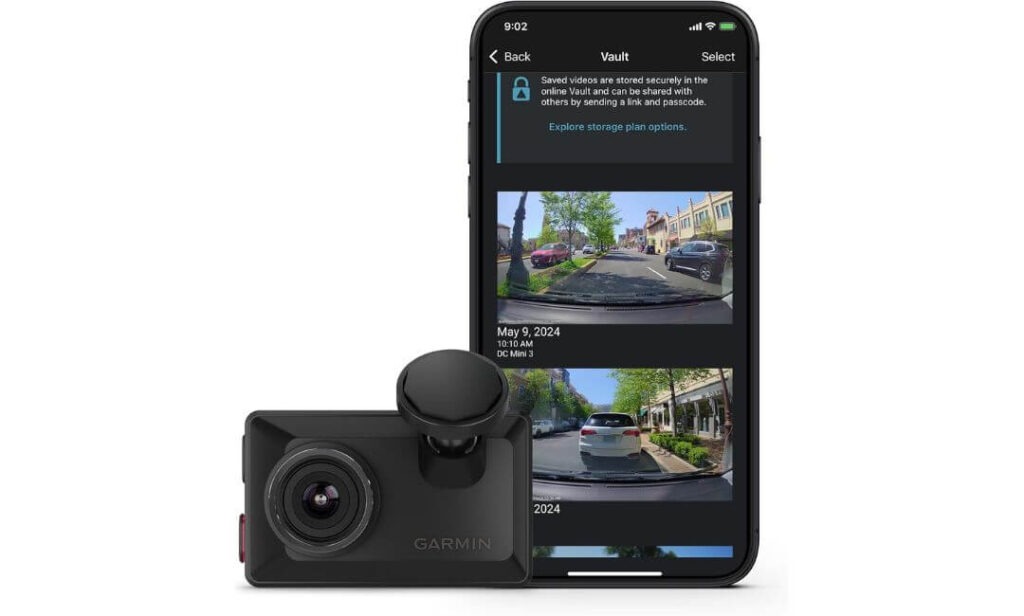
Key Specs:
- Video Resolution: 4K Ultra HD
- Field of View: 140° Wide Angle
- Connectivity: Wi-Fi + Bluetooth + USB
- Cloud Platform: Garmin Vault Cloud Storage
- Parking Mode: Parking Guard Incident Alerts
- Display: 2.4″ Touchscreen LCD
- Lens Tech: Clarity™ Polarizer (Glare Reduction)
- GPS: Built-In Location Tagging
- Voice Control: Multi-Language Commands
- Mounting: Low-Profile Magnetic Mount
Not every cloud dash cam needs to look aggressive or scream “security system” from your windshield — and that’s exactly where the Garmin X310 finds its lane. It’s compact, discreet, and easy to live with daily, but behind that small footprint sits one of the cleanest 4K recording systems in this category.
The footage coming out of the X310 leans heavily toward clarity over saturation. Garmin’s built-in Clarity™ polarizer cuts windshield glare before it even reaches the sensor — which means fewer washed-out plates, cleaner daytime contrast, and better usable evidence when sunlight usually ruins recordings. Pair that with a 140° field of view and GPS tagging, and you get footage that’s not just sharp… but context-rich.
Cloud functionality runs through Garmin’s Vault platform. Incident clips upload automatically once saved, allowing you to view, download, or share footage remotely through the Garmin Drive app. Add Parking Guard alerts and live view access (with subscription + Wi-Fi power), and the X310 quietly transforms from a commuter dash cam into a parked vehicle monitoring tool — especially useful in home garages or office lots with stable network coverage.
Cloud Storage & Remote Monitoring Features
- Garmin Vault Automatic Clip Backup
Saved incident footage uploads to secure cloud storage, making it accessible without removing the memory card. - Remote Live View Access
Through the Garmin Drive app, you can check in on your vehicle remotely when parked (active Wi-Fi + subscription required). - Parking Guard Incident Alerts
If motion or impact is detected, the system sends push notifications directly to your phone. - Instant Clip Sharing
Cloud-stored footage can be downloaded or shared instantly for insurance or legal use. - Multi-Cam Cloud Sync
Garmin’s ecosystem allows synchronized playback from up to four cameras through one app interface.
One Thing To Consider Before Buying
Cloud Access Depends on Wi-Fi Presence
Unlike LTE-enabled systems, remote viewing and uploads require the camera to be connected to an active Wi-Fi network while parked.
Pro Tip
If you plan to use Vault cloud features regularly, park within range of your home or office Wi-Fi — upload speeds and live view stability improve dramatically compared to mobile hotspot reliance.
Best For: Drivers who want premium 4K footage with light cloud backup and parking alerts — ideal for garage parkers, commuters, and users who prefer discreet hardware over full-time LTE surveillance rigs.
#5. Nexar Pro Dual
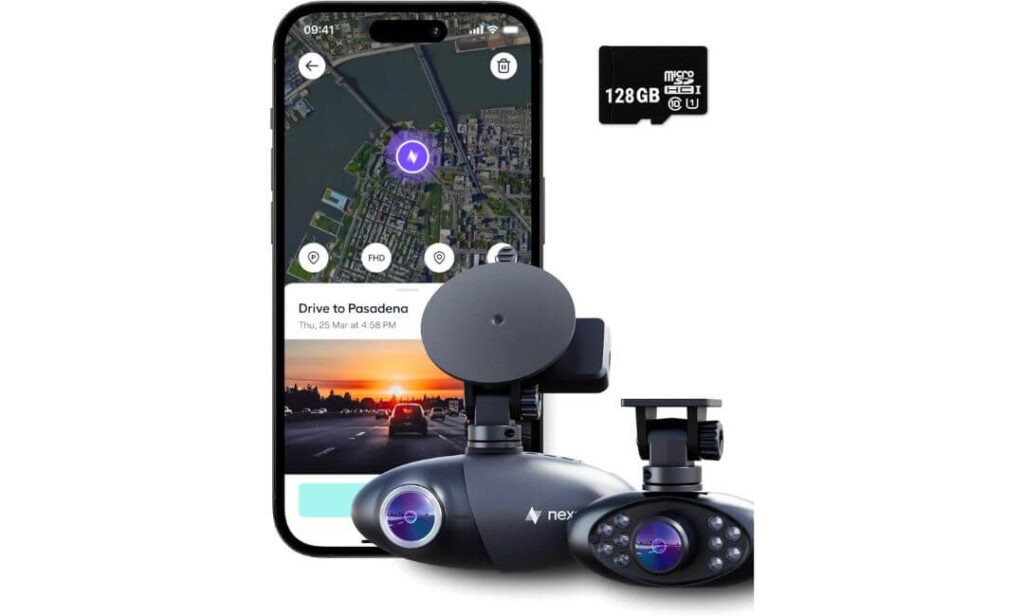
Key Specs:
- Camera Setup: Dual Channel (Front + Interior)
- Video Resolution: 1080p HD
- Field of View: 135° Wide Exterior Angle
- Connectivity: Wi-Fi + Bluetooth (App Synced)
- Cloud Storage: Unlimited (Subscription Based)
- Parking Mode: Automatic Incident Detection
- GPS: Built-In Route Tracking
- Night Vision: Interior + Exterior Low-Light Capture
- Storage Included: 256GB SD Card
- App Platform: Nexar Connected Ecosystem
Some dash cams focus on hardware power. The Nexar Pro Dual flips that philosophy — it’s built around the cloud first, camera second. From the moment it’s installed, everything revolves around the Nexar app: footage access, incident reports, parking alerts, even insurance documentation — all centralized in one ecosystem.
The dual-camera setup records both road activity and interior cabin footage simultaneously, making it especially relevant for ride-share drivers, fleet operators, or anyone carrying passengers regularly. Night vision tuning inside the cabin keeps faces and movement visible even in low-light pickups, while the exterior lens maintains consistent HD evidence capture for traffic incidents.
Where Nexar separates itself from most cloud dash cams is storage policy. Instead of capped uploads or event-only backups, Nexar offers unlimited cloud storage for incident clips and drive recordings under its subscription model. That means footage isn’t just stored — it’s archived, searchable, and accessible whenever needed. For drivers who want long-term evidence retention rather than short-term clip storage, that difference becomes significant.
Cloud Storage & Connected App Capabilities
- Unlimited Cloud Clip Storage
Incident recordings upload automatically and remain stored without storage caps under the Nexar subscription plan. - One-Tap Insurance Reports
The app can generate shareable accident summaries using GPS, video, and driving data — useful for claims processing. - Parking Incident Uploads
If the vehicle is hit or disturbed while parked, footage is saved and accessible through the cloud dashboard. - Remote Drive Recording Access
Past trips, routes, and clips can be reviewed anytime directly inside the app. - Seamless Phone Sync Uploads
Footage transfers automatically when the camera connects to your phone — no manual downloads required.
One Thing To Consider Before Buying
Phone Connection Is Required for Full Cloud Functionality
Since uploads rely on phone pairing rather than built-in LTE, real-time cloud backup only happens when the device is connected to your mobile network.
Pro Tip
If you drive daily, keep the Nexar app running in the background — it ensures automatic clip syncing so footage uploads without delay after incidents.
Best For: Drivers who want unlimited cloud evidence storage with app-first access — especially ride-share operators, fleet vehicles, and users prioritizing long-term clip archiving over live LTE monitoring.
Best Dash Cam With Cloud Storage Comparison Table (LTE, Parking Mode & Live View)
| Dash Cam | Cloud Connectivity | Parking Surveillance | Camera Coverage | Video Quality | Cloud Storage Type | Best Use Case |
|---|---|---|---|---|---|---|
|
Nextbase iQ 2K Smart HD
4G LTE Cloud |
Built-in 4G LTE with Live View & Instant Upload | Smart Sense AI Proximity Detection + Alerts | Front + Rear + Cabin | 1440p Front / 1080p Rear | Event Cloud Backup + Remote Access | Real-time parking threat monitoring |
|
Thinkware U3000 PRO
LTE Connected |
LTE Module + CONNECTED App Live View | Dual Radar Buffered Parking Mode | Front + Rear | 4K Front / 2K Rear | Event Upload + Location Tracking | Long-term street / airport parking |
|
Vantrue N5S 4-Channel
360° Coverage |
Wi-Fi App Sync Cloud Sharing | 24/7 Buffered Motion Detection | Front + Rear + Dual Cabin | 2.7K + 1440p + Dual 1080p | App Export + Local Backup | Ride-share & full vehicle monitoring |
|
Garmin Dash Cam X310
Wi-Fi Cloud |
Garmin Vault Cloud Backup | Parking Guard Alerts | Front Only | 4K Ultra HD | Clip Storage (Subscription) | Garage & office parking security |
|
Nexar Pro Dual
Unlimited Cloud |
Phone-Synced Cloud Upload | Automatic Incident Detection | Front + Interior | 1080p HD | Unlimited Clip Storage | Fleet & ride-share evidence archiving |
Buying Guide: Choosing the Right Dash Cam With Cloud Storage for Real 24/7 Surveillance
If you’ve made it this far, you already know cloud dash cams aren’t plug-and-play toys — they’re connected surveillance systems. And once you start relying on them for parking protection, theft evidence, or remote monitoring, installation quality and data infrastructure matter just as much as camera specs.
This section breaks down the stuff most buyers overlook — power management, cloud plan fine print, and network realities that directly affect how reliable your footage access will be when something actually happens.
Hardwiring vs. Battery Packs — Why Power Setup Decides Your Parking Protection
Here’s the reality: cloud dash cams drain more power than standard loop-recording units.
LTE modules, motion detection sensors, buffered recording — all of it runs in standby even when the engine is off. If you rely purely on your car battery, two things happen:
- Parking mode shuts off early to save voltage
- Or worse, your car struggles to start after long parking
That’s where dedicated dash cam battery packs come in — specifically LiFePO4 (Lithium Iron Phosphate) units built for continuous surveillance loads.
Compared to standard lithium packs, LiFePO4 systems:
- Handle extreme temperatures better
- Last longer in charge cycles
- Deliver stable voltage for LTE transmission
- Recharge faster while driving
For true 24/7 cloud monitoring — airport parking, street parking, overnight surveillance — a dedicated battery pack isn’t an accessory anymore… it’s infrastructure.
Hardwiring alone works for short parking windows. Battery packs are what unlock full-time surveillance without stressing your vehicle’s electrical system.
Data Plans Explained — Free Tiers vs. Subscription Ecosystems
Cloud dash cam marketing loves the word “cloud,” but what you actually get varies wildly depending on the plan attached to the camera.
Most brands split cloud access into two layers:
Free Tiers typically include:
- Limited event clip uploads
- Short retention windows (24–72 hrs)
- Basic push notifications
- No live view or remote streaming
Subscription Tiers unlock:
- Live camera access
- Extended clip storage
- Continuous parking uploads
- Vehicle tracking
- Emergency contact streaming
Where buyers get caught off guard is storage depth.
Some “cloud-supported” dash cams only upload 10–20 second clips — not full incidents. Others overwrite footage within days unless you manually download it.
So when comparing models, don’t just check if cloud exists — check how long footage stays there, how much uploads automatically, and whether live viewing is locked behind a paywall.
Because cloud without retention is just delayed local storage.
5G vs. 4G LTE — Does Network Speed Actually Matter?
On paper, 5G sounds like the obvious winner — faster upload speeds, lower latency, smoother streaming.
But in real-world dash cam use, especially parking surveillance, stability beats speed.
Most parking incidents happen in signal-challenged environments:
- Underground garages
- Basement offices
- Airport structures
- Residential basements
And in those spaces, 4G LTE often maintains connection more reliably than early-stage 5G bands, which struggle with penetration through concrete and steel.
For dash cams, upload size is relatively small — short event clips, not full-length movies. So the speed difference between 4G and 5G rarely changes how quickly you receive alerts.
What matters more is whether the camera can maintain a connection at all.
That’s why many premium cloud dash cams still prioritize optimized 4G LTE modules — stable, proven, and more consistent in low-signal parking environments.
Installation Reality — Why Placement Matters More for Cloud Cams
With connected dash cams, camera angle isn’t just about driving footage — it affects parking detection accuracy.
For example:
- Radar parking cams need clear forward/rear exposure
- Interior cams must avoid pillar obstruction
- LTE antennas perform better away from metallic tint strips
A poorly mounted cloud dash cam can still record… but detection timing, alert accuracy, and upload speed all suffer.
Professional installation isn’t mandatory — but strategic placement absolutely is.
Storage Architecture — Local vs. Cloud Redundancy
Even the best cloud dash cams still rely on local SD storage first.
Why that matters:
- If signal drops, footage stays locally
- If cloud upload delays, evidence still exists
- If subscription lapses, recording continues
The strongest setups always combine both — high-capacity SD storage plus cloud backup — creating redundancy instead of dependence on one system.
It’s not cloud vs. local.
It’s cloud because of local.
Installation & Troubleshooting: Setting Up Cloud Dash Cams the Right Way
Once you move into cloud-connected dash cams, installation stops being just a mount-and-plug job. You’re dealing with constant power draw, mobile data transmission, parking surveillance triggers — all systems that rely heavily on how clean the install is.
This is the part most buyers underestimate. And it’s also where long-term reliability is decided.
DIY vs. Professional Installation — Knowing When to Call an Auto-Electrician
Basic dash cams are easy. Suction mount, cigarette lighter power, done.
Cloud dash cams are different.
If you want full parking surveillance — motion alerts, buffered recording, LTE connectivity — the camera needs uninterrupted power even when the engine is off. That usually means hardwiring into the fuse box or installing a dedicated battery pack.
DIY works if you’re comfortable with:
- Fuse taps
- Voltage cutoff settings
- Trim panel routing
- Grounding points
But if any of that sounds unfamiliar, it’s smarter to bring in an auto-electrician — especially for high-end LTE systems.
A clean professional install ensures:
- Stable voltage delivery
- Hidden wiring (no cabin clutter)
- Correct parking mode activation
- No battery drain risk
Cloud dash cams are surveillance systems. Treat the install like one.
Data Privacy & Cloud Footage Encryption
A question that comes up often — and rightly so — is who can access your footage once it’s uploaded.
Most premium cloud dash cam brands secure uploaded video using AES-256 encryption — the same standard used in banking systems and enterprise data security.
What that means in practical terms:
- Footage uploads in encrypted packets
- Cloud servers store data in locked environments
- App access requires authenticated login
- Shared clips generate temporary access links
In short, your footage isn’t sitting publicly accessible on a server. It’s encrypted at upload, in storage, and during playback transmission.
That said, privacy policies still vary brand to brand — especially around data retention windows and law enforcement access requests — so it’s worth reviewing those terms if footage sensitivity matters to you.
The “Dead Zone” Problem — Parking Without Signal Coverage
Here’s a real-world scenario most spec sheets don’t talk about:
You park underground.
Basement garage.
Airport structure.
Concrete everywhere.
Signal drops to zero.
So what happens to your cloud dash cam?
Two things — depending on the system’s software design.
Basic cloud cams stop uploading entirely until signal returns. Footage records locally, but no alerts reach your phone.
More advanced systems use what’s called Cloud-Sync on Reconnect.
That means:
- Incidents record locally during signal loss
- Clips queue internally
- Once signal returns, footage uploads automatically
- Alerts send retroactively
You still get the evidence — just delayed.
For buyers parking regularly in underground structures, this feature matters more than raw LTE speed.
Because surveillance isn’t about constant signal — it’s about guaranteed evidence delivery once connection resumes.
Power Troubleshooting — Why Parking Mode Sometimes “Stops Working”
A common complaint with cloud dash cams is parking mode shutting off unexpectedly.
In most cases, the camera isn’t faulty — power supply is.
Voltage cutoff protection kicks in when:
- Car battery drops below safe threshold
- Hardwire kit is configured conservatively
- Parking duration exceeds battery capacity
Fixes usually involve:
- Adjusting voltage cutoff settings
- Installing a higher-capacity battery pack
- Shortening parking surveillance window
Understanding this early prevents misdiagnosing normal battery protection as camera failure.
Connectivity Troubleshooting — When Live View Lags or Fails
Cloud dash cams rely on mobile signal strength just like phones do.
If live view buffers or alerts arrive late, check:
- LTE signal strength in parking area
- SIM plan data limits
- Antenna placement near metallic tint
- Firmware updates within app
Many connectivity complaints trace back to signal environment — not the camera hardware itself.
Final Verdict: Which Cloud Dash Cam Actually Makes Sense for Your Use Case?
By now you’ve probably realized something — there isn’t one universal “best” cloud dash cam. Each system leans toward a different kind of driver, parking environment, and surveillance expectation.
Some prioritize always-online LTE monitoring.
Others focus on full-vehicle recording coverage.
And a few build their value around long-term cloud evidence storage.
So instead of forcing a single winner, here’s how the five stack up when matched to real ownership scenarios.
Best Overall Cloud Dash Cam for 24/7 Surveillance
If your goal is total situational awareness — live alerts, AI detection, remote viewing, emergency response — the Nextbase iQ lands in the most balanced position.
It blends LTE connectivity, smart parking sensing, and app ecosystem control in a way that feels less like a camera and more like a vehicle security system.
For drivers who want constant visibility rather than passive recording, it delivers the most rounded cloud experience.
Best LTE Dash Cam for High-Risk Parking Areas
The Thinkware U3000 PRO takes this category purely on surveillance engineering.
Radar detection, buffered capture, STARVIS 2 night tuning, and efficient LTE integration make it ideal for:
- Street parking
- Airport lots
- Overnight commercial areas
It’s built for long-duration monitoring without draining power — which matters more than flashy features in real parking scenarios.
Best 360° Coverage Cloud-Ready Dash Cam
The Vantrue N5S wins on perspective.
Four channels covering road, rear, and cabin angles eliminate blind spots most dual systems leave exposed. For ride-share drivers, families, or cargo monitoring, that coverage translates into stronger incident documentation.
It’s less about always-online alerts — more about capturing everything that happens from every angle.
Best Compact 4K Cloud Backup Dash Cam
Garmin’s X310 fits drivers who want cloud safety without turning their windshield into a surveillance rig.
It records exceptionally clean 4K footage, uploads incidents to the Vault, and delivers parking alerts — all in a discreet footprint that blends into the cabin.
Ideal for garage parkers or commuters who want backup evidence, not full-time monitoring.
Best Unlimited Cloud Storage Dash Cam
The Nexar Pro Dual plays a different game entirely — long-term footage retention.
Unlimited cloud clip storage, insurance report generation, and app-first access make it particularly appealing for:
- Ride-share drivers
- Fleet operators
- High-mileage commuters
It’s less about live surveillance and more about permanent driving evidence archives.
Quick Decision Guide (If You’re Still Deciding)
If you want live alerts before damage happens → Go LTE (Nextbase / Thinkware)
If you want radar-triggered parking detection → Thinkware U3000 PRO
If you want interior + exterior 360° coverage → Vantrue N5S
If you want compact 4K with light cloud backup → Garmin X310
If you want unlimited cloud clip storage → Nexar Pro Dual
Closing Perspective
Cloud dash cams exist for one reason — preserving evidence when you’re not around to witness the incident yourself.
And the difference between basic recording and connected surveillance shows up the moment something actually happens:
A notification instead of a surprise.
A stored clip instead of a missing file.
A plate number instead of a guess.
Choose based on how your vehicle is parked, not just how it’s driven — because most claims don’t happen on the road anymore… they happen when the engine is off.
FAQs — Cloud Storage Dash Cams & 24/7 Parking Surveillance
Do cloud dash cams record continuously or only upload incident clips?
Most cloud dash cams still record continuously to the SD card first — cloud upload usually triggers only when an event happens (impact, motion, or manual save). This keeps data usage manageable while preserving full driving footage locally. Higher-tier subscriptions may extend uploads to longer clips or parking sessions, but true 24/7 cloud streaming is rare due to bandwidth and power limits.
Will a cloud dash cam still record if there’s no signal in underground parking?
Yes — recording never stops just because signal drops. Footage stores locally on the memory card during “dead zone” parking. Advanced systems queue incident clips internally and auto-upload them once LTE or Wi-Fi reconnects. So you may receive alerts late, but the evidence itself remains intact.
How much data does an LTE cloud dash cam actually use per month?
Usage depends on parking activity and live viewing habits. Event-only uploads typically consume minimal data — often under a few GB monthly. However, frequent live view streaming or high parking alert volume can increase consumption. That’s why many brands bundle dedicated data plans optimized for video compression and clip-based uploads.
Is cloud footage more secure than SD card storage?
In most cases, yes. Cloud footage is encrypted during upload and storage — commonly using AES-256 encryption — making unauthorized access extremely difficult. Unlike SD cards, which can be stolen or damaged along with the camera, cloud clips remain preserved off-vehicle even if the hardware is removed.
Do all parking incidents get uploaded automatically?
Only if the system is powered and connected. Hardwired installs or battery packs ensure the camera stays active after ignition off. If power cuts early, parking events may record locally but fail to upload. That’s why stable power infrastructure matters just as much as cloud capability itself.
Are cloud dash cam subscriptions worth paying for long term?
If your priority is parking protection or remote monitoring, subscriptions usually justify themselves quickly. Features like live view, extended clip retention, emergency alerts, and location tracking turn the dash cam from a passive recorder into an active security system — especially valuable after a single hit-and-run or theft attempt.
Closing Thoughts
Cloud dash cams change the ownership equation in a way traditional recorders never could. Instead of discovering damage hours later, you’re notified while it’s happening. Instead of hoping footage survived on an SD card, you’re opening your phone and watching the clip already saved.
That shift — from passive recording to active surveillance — is what makes cloud systems worth considering in 2026, especially if your vehicle spends more time parked than driven.
Whether you lean toward LTE-powered live monitoring, radar-based parking detection, or unlimited cloud evidence storage, the right setup comes down to how exposed your parking environment really is — not just how sharp the video looks.
Because when something does happen, the value isn’t in having a dash cam…
it’s in having the footage already backed up before you even reach the car.