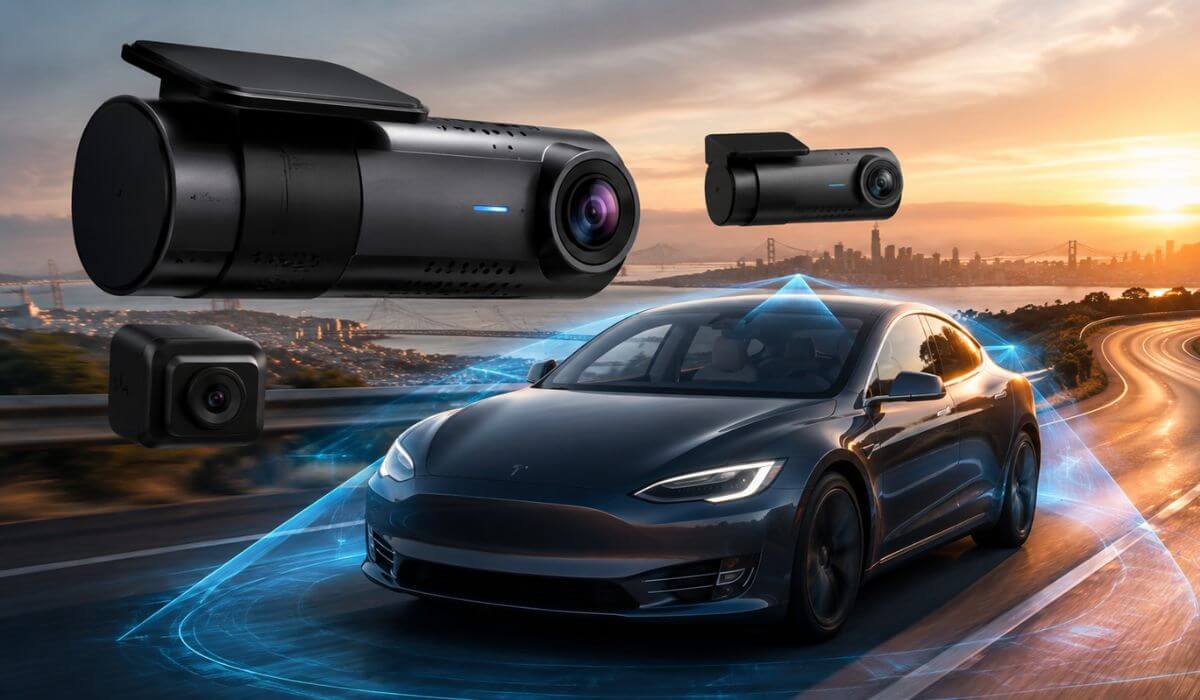
5 Best Dash Cam for Tesla Model 3 in 2026: 4K HDR STARVIS 2 360° Coverage Cloud Connectivity
The Tesla Model 3 is one of the easiest cars to own but one of the hardest to equip with the right dash cam. Its steep windshield, clean cabin layout, USB-C power setup, and always-on electrical system mean that not every camera performs equally well. A dash cam that works perfectly in a conventional petrol car may struggle with heat management, cable routing, or parking surveillance in a Model 3.
It also matters which Model 3 you drive. This guide covers 2018–2023 Model 3, the 2024+ Model 3 Highland, and the latest 2025–2026 models. While Tesla’s built-in Sentry Mode is useful, it relies on the vehicle’s integrated cameras and isn’t designed to replace a dedicated dash cam with 4K recording, STARVIS 2 night vision, cloud connectivity, buffered parking mode, or interior coverage. If you want clearer evidence, better low-light performance, and wider recording angles, a premium aftermarket dash cam still makes a noticeable difference.
To build this list, we focused on the features that actually matter in daily ownership: video clarity, heat resistance, compact size behind the rear-view mirror, reliable parking recording, app stability, and long-term reliability. These are the five dash cams we would confidently recommend to a Tesla Model 3 owner today.
Best Tesla Model 3 Dash Cams: Top 2026 Picks for 4K HDR and STARVIS 2
#1. VIOFO A229 Pro 4K HDR Dash Cam
Best Tesla Model 3 Dash Cam with STARVIS 2 Night Vision, Dual 4K HDR Recording, and Reliable Parking Surveillance
#2. BlackVue DR970X-2CH
Premium Cloud Connected Dash Cam for Tesla Model 3 with 4K Recording, Remote Access, and Smart Parking Monitoring
#3. Vantrue N5S 4-Channel Dash Cam
Best 360° Dash Cam for Tesla Model 3 with Interior Recording, STARVIS 2 Sensors, and Complete Cabin Coverage
#4. Garmin Dash Cam X310
Compact 4K Dash Cam for Tesla Model 3 with Crystal-Clear Video, Voice Control, and Minimal Windshield Footprint
#5. WOLFBOX X5 3-Channel Dash Cam
Feature-Rich Tesla Model 3 Front and Rear Dash Cam with 4K HDR, STARVIS 2 Imaging, and Triple-Channel Protection
Expert Tip
If you’re buying a dash cam specifically for a Tesla Model 3, don’t let 4K be the only feature that influences your decision. The Model 3 has a large glass windshield and a quiet cabin, which means reflections, heat, and low-light performance become far more noticeable than in many other cars. A camera with a Sony STARVIS 2 sensor, HDR processing, and a supercapacitor will usually deliver more usable footage than a higher-resolution camera with an older image sensor. When something happens, being able to clearly read a licence plate at night is far more valuable than simply recording in 4K.
How We Chose the Best Dash Cams for Tesla Model 3
There are hundreds of dash cams that claim to be “Tesla compatible,” but we deliberately left many of them off this list. Our goal wasn’t to collect the biggest brand names or the longest feature lists. We selected the models that make the most sense for real Tesla Model 3 ownership, where clean installation, dependable recording, and long-term reliability matter more than marketing claims.
The first thing we looked at was image quality where it actually counts. Every recommendation here is capable of producing footage that remains useful in difficult conditions, including night driving, tunnels, rain, and bright backlighting. Cameras equipped with Sony STARVIS 2 sensors naturally stood out because they consistently preserve better detail and improve licence plate readability after dark.
We also paid close attention to parking performance. A Tesla often spends hours parked at home, at work, or while charging. That makes a dependable buffered parking mode much more valuable than simply offering motion detection. We prioritised cameras that begin recording before an impact occurs, helping capture the full sequence rather than only the aftermath.
Another factor was heat durability. The Model 3’s expansive glass roof and windshield can generate significant cabin temperatures during summer. Dash cams using supercapacitors generally cope with these conditions far better than battery-powered units, making them a safer long-term choice for daily driving.
Because Tesla owners appreciate a clean interior, we also considered physical size and installation practicality. Compact cameras that sit discreetly behind the rear-view mirror and offer stable Wi-Fi apps, responsive GPS, and reliable voice control received higher priority than bulkier alternatives that can distract the driver.
Finally, we didn’t rank these products simply by price or popularity. Each recommendation fills a different role. The VIOFO A229 Pro delivers the strongest balance of video quality and overall value. The BlackVue DR970X-2CH is the better choice for drivers who want cloud access and remote monitoring. The Vantrue N5S offers true multi-angle coverage for families and rideshare drivers. Garmin’s X310 is ideal if you prefer a compact front-facing setup, while the WOLFBOX X5 provides impressive three-channel capability for buyers seeking maximum features without moving into the highest price bracket.
If a product couldn’t justify its place with real-world recording performance, dependable software, installation suitability, and proven daily usability, it didn’t make this list. That’s the standard we followed throughout this guide, and it’s the same standard we’d use if we were fitting a dash cam to our own Tesla Model 3 today.
#1. VIOFO A229 Pro 4K HDR Dash Cam
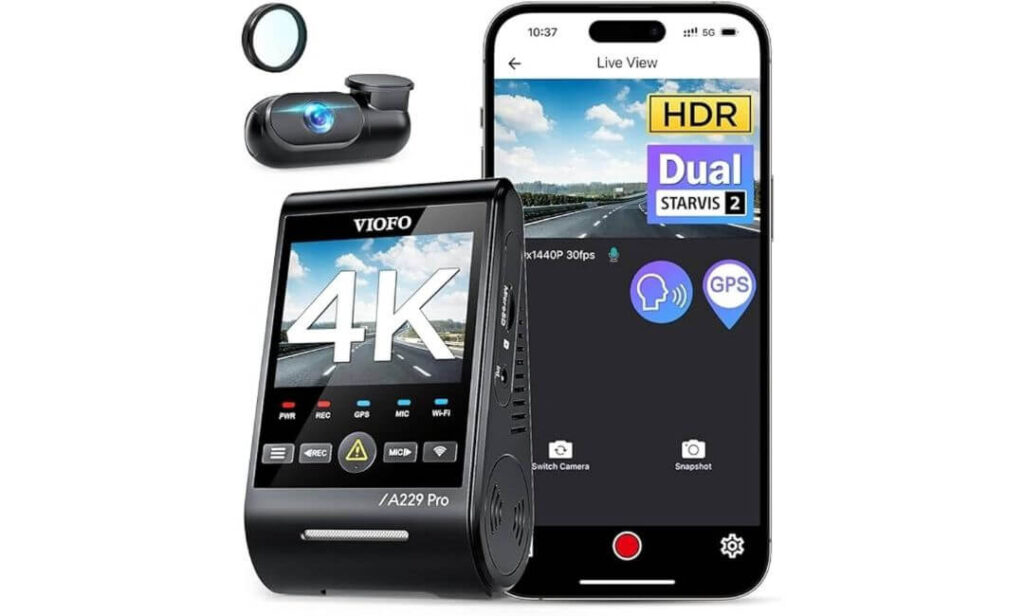
Quick Specs:
- Video Resolution: 4K Front + 2K Rear Recording
- Image Sensors: Dual Sony STARVIS 2 (IMX678 + IMX675)
- Night Performance: HDR Night Vision 2.0
- Viewing Angle: 140° Front Wide Coverage
- Connectivity: 5GHz Wi-Fi, USB-C
- Navigation Data: Quad-Mode GPS (GPS, Galileo, GLONASS & BeiDou)
- Voice Features: 12 Hands-Free Voice Commands
- Parking Recording: Buffered Event Detection, Low Bitrate & Time Lapse Modes (Hardwire Kit Required)
- Lens Upgrade: Included CPL Filter to reduce windshield reflections
- Power System: Supercapacitor for extreme hot and cold climates
- Memory Card: Supports 64GB–512GB High-Endurance microSD Cards (Sold Separately)
The first thing you’ll notice is how confident the footage looks, especially after sunset. The dual STARVIS 2 sensors don’t simply brighten dark scenes—they preserve details that many dash cams lose completely. Road signs remain readable, headlights don’t overwhelm the frame, and licence plates stay surprisingly sharp even when traffic is moving quickly. For a Tesla Model 3, where the expansive glass windshield often creates reflections, the included CPL filter makes a genuine difference by cutting unwanted glare before it reaches the sensor.
What impressed us just as much is how naturally it fits into everyday ownership. The compact front camera hides neatly behind the rear-view mirror without spoiling the minimalist cabin, while the 5GHz Wi-Fi, responsive mobile app, Quad-Mode GPS, and voice controls make daily use refreshingly simple. You aren’t constantly opening menus or removing memory cards just to review footage after a drive.
Long-term reliability also works in its favour. Instead of relying on an internal battery, it uses a supercapacitor, making it far better suited to the high cabin temperatures a parked Tesla Model 3 can experience during summer. Add the optional hardwire kit, and the buffered parking mode begins recording before an impact is detected rather than after it, giving you the complete story when it matters most.
(If your priority is dependable evidence rather than chasing marketing numbers, this is one of the easiest recommendations in this guide.)
Why It Earned a Place on Our List
- Dual Sony STARVIS 2 sensors deliver outstanding day and night clarity.
- 4K front and 2K rear recording provide excellent detail without compromising stability.
- Buffered parking mode captures footage before and after an incident when hardwired.
- 5GHz Wi-Fi makes downloading large 4K clips noticeably faster.
- Supercapacitor design is far more dependable than battery-powered alternatives in hot climates.
A Small Trade-Off Worth Knowing
- A high-endurance microSD card and the optional hardwire kit are separate purchases if you want continuous parking surveillance.
Installation Notes for Tesla Model 3 Owners
Installation is straightforward for Tesla Model 3 (2018–2023), Model 3 Highland (2024+), and the latest models. The compact front unit fits cleanly behind the rear-view mirror, while the supplied 6-metre rear cable reaches the rear glass without requiring extensions in normal installations.
For basic recording, simply connect the included USB-C power cable and mount both cameras using the supplied static stickers or 3M adhesive pads. If you want buffered parking recording, you’ll also need the compatible HK4 hardwire kit, which provides continuous power while protecting the vehicle from unnecessary battery drain.
The Insider Pro-Tip
Many owners spend extra money chasing higher resolutions, but on a Tesla Model 3, the biggest improvement usually comes from the image sensor, not the resolution itself. A high-quality STARVIS 2 sensor paired with effective HDR will almost always produce clearer evidence than a standard 4K sensor once daylight disappears.
Before permanently fixing the rear camera, sit in the driver’s seat and check the live view through the app. A small adjustment of only a few millimetres can eliminate reflections from the rear glass and improve nighttime footage for every drive afterwards. It’s a simple step that most installers skip, yet it noticeably improves the final result.
#2. BlackVue DR970X-2CH
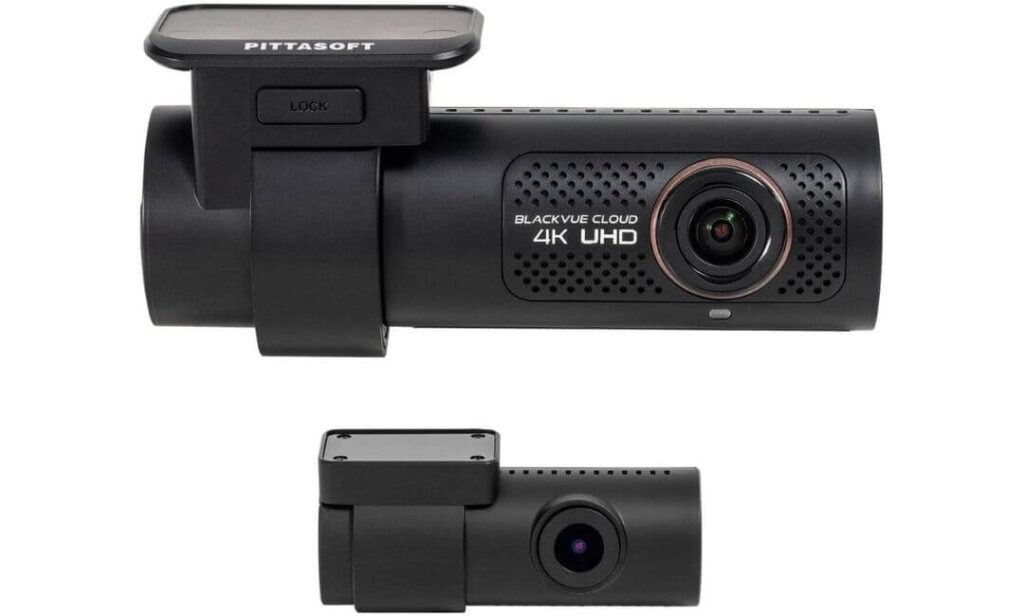
Quick Specs:
- Video Resolution: 4K Front + Full HD Rear
- Image Sensor: Sony STARVIS Front Sensor
- Connectivity: Built-In Wi-Fi with Optional LTE Module
- GPS: Integrated GPS Logger
- Cloud Features: BlackVue Cloud Remote Access & Live Notifications
- Parking Recording: Native Parking Mode with Voltage Monitoring Support
- Viewing Angle: 139° Front
- Storage Included: 64GB microSD Card
- Power Options: Hardwire Cable & 12V Power Cable Included
- Installation: Front & Rear Windshield Mount
There is one reason this camera continues to have a loyal following among premium vehicle owners—its cloud platform simply works better than most competitors. If your Tesla Model 3 spends long hours in airport parking, office car parks, or public charging stations, being able to check the camera remotely is something you’ll genuinely appreciate after the first unexpected incident. Most dash cams stop recording when you walk away from the car. This one keeps you connected.
Video quality is equally reassuring. The 4K front camera, Sony STARVIS sensor, and Full HD rear camera produce balanced footage with natural colours and excellent detail in changing light conditions. Built-in GPS accurately logs speed and location, while the BlackVue app makes it easy to review clips without removing the memory card. The included 64GB card means you can start recording straight out of the box instead of shopping for extra accessories.
Where this model really separates itself is everyday convenience. Native parking mode, seamless Wi-Fi pairing, optional LTE connectivity, and BlackVue Cloud create a setup that feels closer to a connected security system than a traditional dash cam. It isn’t the camera with the longest feature list—but it is one of the most polished experiences available for owners who value reliability over gimmicks.
(If remote access matters as much as recording quality, very few dash cams offer this level of confidence.)
What Made It Stand Out in Our Testing
- BlackVue Cloud allows remote viewing, alerts, and access to recordings.
- 4K front recording captures impressive detail during both day and night driving.
- Built-in GPS and Wi-Fi are fast, stable, and easy to use.
- Native parking mode integrates cleanly with hardwired installation.
- Includes a 64GB microSD card, hardwire cable, and installation accessories in the box.
One Thing Worth Keeping in Mind
- To unlock the full cloud experience away from Wi-Fi, the optional LTE module and Power Monitor are worthwhile additions.
Installation Advice for Tesla Model 3 Owners
The BlackVue DR970X-2CH fits cleanly in Tesla Model 3 (2018–2023), Model 3 Highland (2024+), and newer models without obstructing the driver’s view. The slim front unit sits discreetly behind the rear-view mirror, while the supplied 6-metre coaxial cable is long enough for a tidy rear camera installation.
Everything needed for standard recording is already included, including the 64GB memory card, hardwire cable, 12V power cable, mounting tape, cable clips, and trim tool. For owners who intend to leave parking mode active every day, adding the optional Power Monitor Module is the smarter approach because it manages voltage automatically and helps protect the vehicle’s 12V battery during extended parking.
The Insider Pro-Tip
Cloud features are only useful if your dash cam maintains a reliable power source. If you plan to use remote monitoring regularly, install the Power Monitor Module from the beginning rather than adding it later. It creates a far more dependable parking setup and prevents unnecessary battery concerns during longer stops.
Also, spend a few extra minutes pairing the camera with the BlackVue app before routing the cables into the trim. Completing firmware updates and checking the live camera view first makes the installation smoother and avoids removing interior panels later if you need to adjust settings.
#3. Vantrue N5S 4-Channel Dash Cam
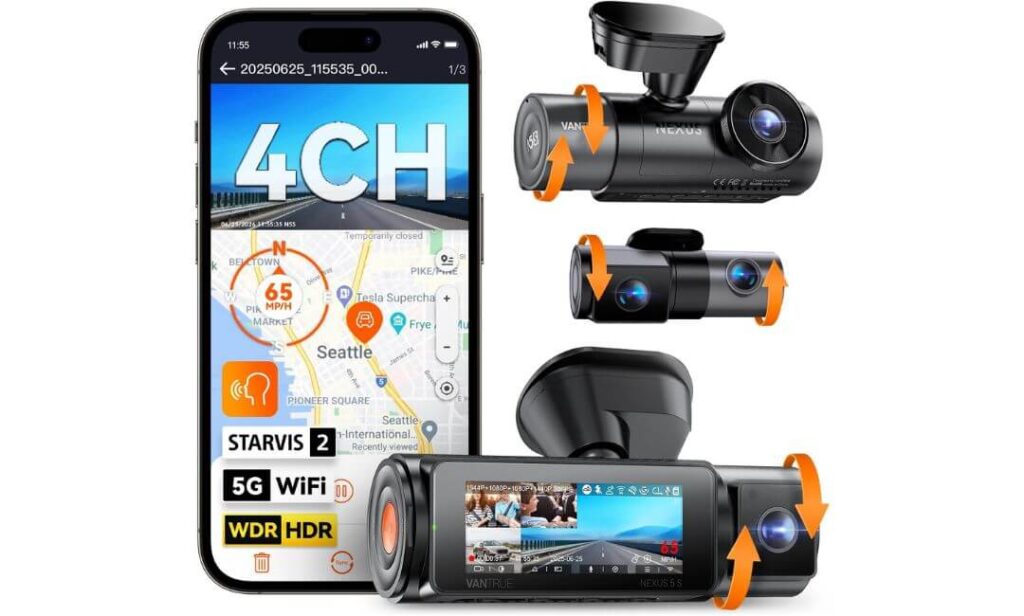
Quick Specs:
- Recording System: 4-Channel 360° Coverage
- Video Resolution: 2.7K Front + 2.5K Rear + Dual 1080P Cabin Cameras
- Image Sensors: Sony STARVIS 2 IMX675 + IMX662
- Night Recording: HDR/WDR + Infrared Interior Cameras
- Connectivity: 5GHz Wi-Fi with OTA Firmware Updates
- Navigation: Dual GPS Tracking
- Voice Features: Multi-Language Voice Commands
- Parking Recording: Buffered Motion Detection (Hardwire Kit Required)
- Display: 3.19-inch IPS Screen
- Storage Support: Up to 1TB microSD
- Power System: Supercapacitor for High-Temperature Reliability
What immediately separates this model from almost every other dash cam in this guide is its complete recording coverage. Instead of focusing only on the road ahead, it continuously records the front, rear, cabin, and rear passenger area at the same time. For a Tesla Model 3, that means added protection for passengers, luggage, side windows, and everything happening inside the cabin without relying on additional accessories or separate cameras.
Image quality is equally convincing. The combination of STARVIS 2 sensors, HDR processing, and infrared interior cameras produces footage that stays clean when daylight disappears. The upgraded 2.5K rear camera captures noticeably more detail than standard Full HD systems, while the front camera keeps road signs and licence plates readable in demanding lighting. Add 5GHz Wi-Fi, Dual GPS, OTA firmware updates, and responsive voice control, and daily operation feels polished rather than complicated.
Its biggest strength, however, is flexibility. You can record in 1-channel, 2-channel, 3-channel, or full 4-channel mode depending on how you use your vehicle. Families, rideshare drivers, frequent travellers, or anyone carrying valuable equipment inside a Tesla Model 3 will appreciate having visual evidence from every important angle instead of wondering what happened outside the camera’s field of view.
(If maximum coverage is your priority, this is easily one of the most complete recording systems available without stepping into commercial fleet equipment.)
Why We Included It in This Guide
- True 4-channel recording eliminates nearly every major blind spot.
- STARVIS 2 sensors and HDR deliver impressive low-light performance.
- 2.5K rear camera captures sharper evidence than standard 1080P setups.
- Supports up to 1TB storage, making it ideal for extended recording sessions.
- Supercapacitor construction is built for long-term reliability in demanding temperatures.
One Practical Consideration
- Because it records from four cameras simultaneously, you’ll want a high-endurance 256GB or larger microSD card to get the best recording time.
Installation Notes for Tesla Model 3 Owners
The Vantrue N5S is fully compatible with Tesla Model 3 (2018–2023), Model 3 Highland (2024+), and newer models. During installation, simply avoid placing the front unit directly in front of Tesla’s factory interior camera near the top centre of the windshield. Positioning it slightly behind the rear-view mirror keeps both systems working without obstruction.
Everything needed for a clean installation is included, including the 20-foot rear cable, GPS mount, cable clips, adhesive mounts, trim tool, and charger. For continuous buffered parking recording, adding the compatible Vantrue hardwire kit is highly recommended. It supplies stable power while allowing the camera to monitor activity even after the vehicle is parked.
The Insider Pro-Tip
Four cameras naturally generate much larger video files than a standard dual-channel system. Instead of choosing the cheapest memory card available, invest in a high-endurance microSD card from the start. It reduces recording errors, improves long-term reliability, and handles continuous overwriting far better during everyday use.
Before securing the interior cameras permanently, sit in each seating position and check the live preview through the app. A small adjustment to the cabin lenses often improves visibility of both side windows and the rear seating area, giving you far more useful evidence without changing the overall installation.
#4. Garmin Dash Cam X310
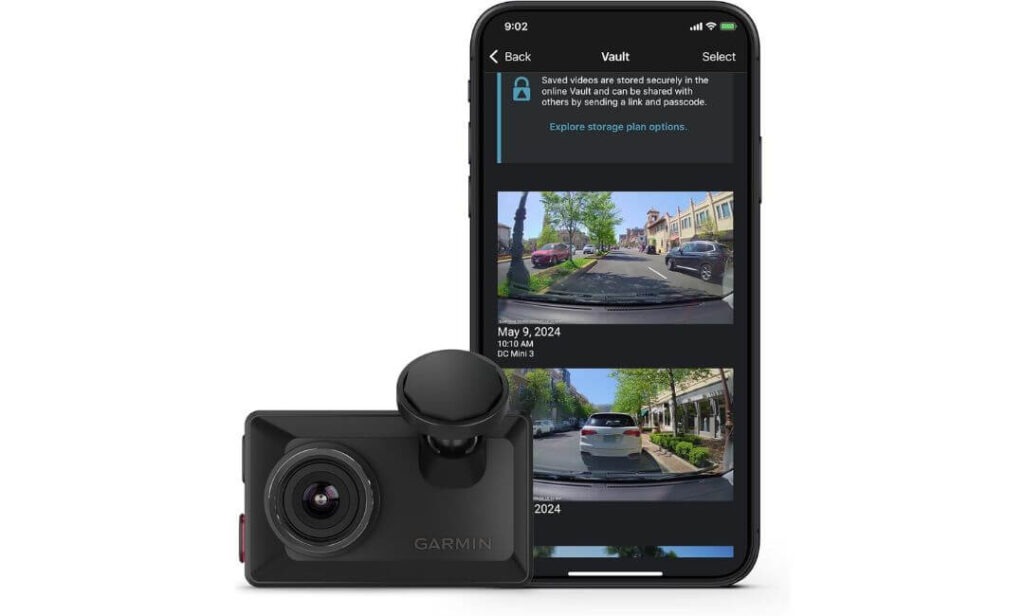
Quick Specs:
- Video Resolution: 4K Ultra HD Front Recording
- Viewing Angle: 140° Wide-Angle Lens
- Display: 2.4-inch Touchscreen
- Lens Technology: Garmin Clarity Polarizer
- Connectivity: Wi-Fi, Bluetooth & USB
- GPS: Built-In GPS Logging
- Voice Features: Hands-Free Voice Control
- Cloud Support: Garmin Vault with Optional Remote Live View
- Safety Features: Driver Alerts & Speed Camera Notifications (Region Dependent)
- Mounting System: Low-Profile Magnetic Windshield Mount
Rather than trying to impress with extra cameras or oversized hardware, this model focuses on doing one job exceptionally well—capturing incredibly clean front-facing footage while staying almost invisible inside the cabin. That approach suits the Tesla Model 3 perfectly. The camera is compact enough to disappear behind the rear-view mirror, preserving the uncluttered interior while still recording crisp 4K Ultra HD video through a wide 140-degree field of view.
The image quality feels refined rather than artificially sharpened. Garmin’s Clarity polarizer noticeably reduces windshield reflections, something many glass-roof vehicles struggle with during bright afternoons. Combined with built-in GPS, responsive voice control, and the intuitive 2.4-inch touchscreen, reviewing footage or changing settings takes seconds instead of digging through complicated menus. If you value simplicity, few dash cams feel this polished.
Another reason it deserves a place in this guide is Garmin’s software ecosystem. Important clips can be uploaded automatically to Garmin Vault, while optional remote access lets you check on your parked Tesla Model 3 from your phone when connected to constant power. It’s designed for owners who want premium recording quality without turning their dashboard into a collection of screens and cables.
(Sometimes the best upgrade isn’t adding more cameras—it’s choosing one that quietly delivers dependable footage every single drive.)
Why It Deserves a Spot on This List
- Compact design blends naturally into the Tesla Model 3 cabin.
- 4K Ultra HD recording delivers excellent daytime and low-light detail.
- Garmin Clarity polarizer significantly reduces windshield glare.
- Touchscreen interface makes playback and settings genuinely effortless.
- Voice control keeps your hands on the wheel while driving.
One Practical Limitation
- This is a front-facing camera, so you’ll need additional Garmin cameras if you want complete front-and-rear coverage.
Installation Notes for Tesla Model 3 Owners
The Garmin Dash Cam X310 fits neatly in Tesla Model 3 (2018–2023), Model 3 Highland (2024+), and current models without affecting Tesla’s factory cameras or Autopilot sensors. Its low-profile magnetic mount allows the camera to sit discreetly behind the rear-view mirror, keeping the driver’s forward view completely unobstructed.
Installation is refreshingly straightforward. Everything required for basic recording is included, including the magnetic mount, USB power cable, and dual-USB power adapter. Simply add a high-endurance microSD card, connect the supplied power cable, and you’re ready to record. If you want parking notifications and remote access while the vehicle is parked, adding Garmin’s constant power cable is the better long-term solution.
The Insider Pro-Tip
If your daily driving is mostly commuting rather than rideshare work, don’t underestimate the value of a small, discreet dash cam. A camera that blends into the windshield is less distracting, attracts less attention from outside the vehicle, and is often forgotten completely until you actually need the footage.
Before permanently attaching the magnetic mount, spend a minute checking the driver’s seating position from outside the vehicle. Positioning the camera slightly higher behind the mirror usually hides it almost entirely while maintaining a full 140-degree recording angle—one of the simplest ways to keep the clean, minimalist look that makes the Tesla Model 3 interior so distinctive.
#5. WOLFBOX X5 3-Channel 4K HDR Dash Cam
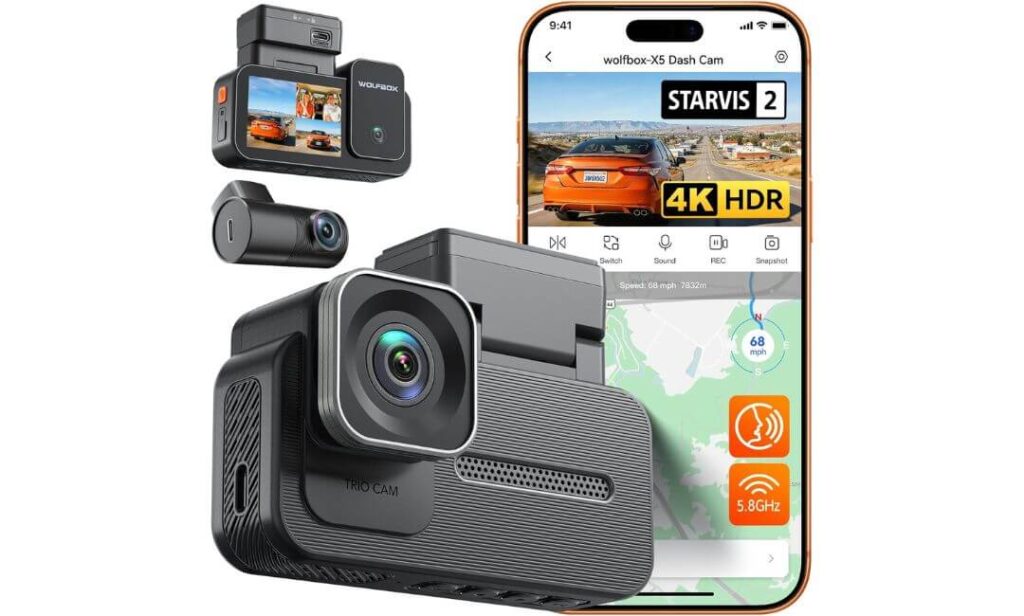
Quick Specs:
- Recording System: 4K Front + 2.5K Rear + 1080P Cabin
- Image Sensor: Sony STARVIS 2 IMX678 (8MP)
- Video Processing: Triple HDR for Better Contrast
- Coverage: 3-Channel Recording
- Connectivity: 5.8GHz Wi-Fi
- Navigation: Built-In GPS
- Controls: 12 Voice Commands + Touchscreen
- Parking Features: Time-Lapse Parking Mode & G-Sensor (Hardwire Kit Required)
- Storage Support: Up to 512GB microSD
- Power Connection: USB-C
- Warranty: 1-Year Manufacturer Warranty
Not everyone needs four cameras, and that’s exactly why this model deserves attention. It strikes a smart balance between premium recording quality and everyday practicality. With 4K front, 2.5K rear, and 1080P cabin recording, it covers the areas most Tesla Model 3 owners genuinely care about while keeping installation simpler than a full four-channel setup. The result is a cleaner installation, fewer cables to manage, and less time spent hiding wiring behind interior trim.
Its strongest feature is the combination of the Sony STARVIS 2 IMX678 sensor and Triple HDR processing. Bright sunlight, tunnel exits, reflective roads, and oncoming headlights are situations where many dash cams begin losing detail. Here, exposure remains well balanced, colours stay natural, and important details like road markings and licence plates remain easier to recognise. Add the responsive touchscreen, 5.8GHz Wi-Fi, built-in GPS, and hands-free voice commands, and using the camera feels intuitive from the very first drive.
This is also one of the easier premium systems to live with every day. The USB-C connection, fast wireless transfers through the WOLFBOX app, and reliable three-channel playback make reviewing footage surprisingly convenient. For owners who want more protection than a standard dual-camera setup without committing to a larger four-camera system, this feels like a sensible middle ground rather than a compromise.
(Sometimes the smartest upgrade isn’t choosing the camera with the most lenses—it’s choosing the one you’ll actually enjoy using every day.)
Why We Felt It Deserved the Final Spot
- 4K front and 2.5K rear recording provide excellent image detail where it matters most.
- STARVIS 2 IMX678 sensor delivers impressive low-light performance.
- Triple HDR processing handles difficult lighting conditions exceptionally well.
- 5.8GHz Wi-Fi transfers recordings noticeably faster than older wireless systems.
- Touchscreen and voice control make daily operation simple and distraction-free.
One Honest Observation
- You’ll need to purchase both a high-endurance microSD card and the optional hardwire kit if you want recording and buffered parking protection from day one.
Installation Guidance for Tesla Model 3 Owners
The WOLFBOX X5 installs cleanly in Tesla Model 3 (2018–2023), Model 3 Highland (2024+), and the latest models without interfering with Tesla’s factory camera system. The compact front camera fits neatly behind the rear-view mirror, while the supplied rear camera cable is easy to route through the cabin using the included trim tool and cable clips.
Everything required for a standard installation is already in the box, including the USB-C power cable, GPS bracket, mounting stickers, cable clips, and installation tools. Simply add a 64GB or larger high-endurance microSD card before first use. If continuous parking recording is important, the compatible hardwire kit provides stable power for time-lapse monitoring and impact detection while the vehicle is parked.
The Insider Pro-Tip
Three-channel recording creates an excellent balance for most Tesla Model 3 owners because it protects the front, rear, and cabin without adding unnecessary complexity. Unless you regularly transport passengers professionally, you’ll rarely feel limited compared to a larger four-camera system.
Before securing the rear camera permanently, clean both the inside and outside of the rear glass. Tesla’s sloping rear window naturally attracts dust and fingerprints that become surprisingly visible during night recording. Taking two extra minutes before installation often improves video clarity more than changing camera settings later, and it’s one of the easiest upgrades you can make without spending another rupee.
Best Tesla Model 3 Dash Cams Compared Side by Side
| Comparison | VIOFO A229 Pro Best Overall | BlackVue DR970X-2CH Premium Cloud | Vantrue N5S 360° Coverage | Garmin X310 Compact Choice | WOLFBOX X5 Best Value |
|---|---|---|---|---|---|
| Ideal For | Daily Tesla Drivers | Remote Monitoring | Maximum Cabin Coverage | Minimalist Interior | Balanced Triple Coverage |
| Front Resolution | 4K | 4K | 2.7K | 4K | 4K |
| Rear Resolution | 2K | Full HD | 2.5K | — | 2.5K |
| Interior Camera | No | No | Dual Cabin Cameras | No | 1080P Cabin |
| Total Recording Channels | 2 | 2 | 4 | 1 | 3 |
| Night Vision | STARVIS 2 + HDR | STARVIS Sensor | STARVIS 2 + HDR | Garmin Clarity Lens | STARVIS 2 + Triple HDR |
| Parking Recording | Buffered Mode | Native Parking Mode | Buffered Detection | Parking Guard | Time-Lapse + G-Sensor |
| Cloud Features | No | BlackVue Cloud | OTA Updates | Garmin Vault | No |
| Wi-Fi | 5GHz | Built-In Wi-Fi | 5GHz | Wi-Fi + Bluetooth | 5.8GHz |
| GPS | Quad-Mode GPS | Built-In GPS | Dual GPS | Built-In GPS | Built-In GPS |
| Voice Commands | Yes | No | Yes | Yes | Yes |
| Touchscreen | No | No | 3.19″ | 2.4″ | Yes |
| Heat Resistance | Supercapacitor | Excellent | Supercapacitor | Excellent | Reliable Design |
| Maximum Storage | 512GB | 64GB Included | 1TB | microSD Required | 512GB |
| Installation Difficulty | Easy | Moderate | Moderate | Very Easy | Easy |
| Overall Recommendation | Most Owners | Business & Travel | Families & Rideshare | Clean Interior | Feature Lovers |
Buying Guide: How to Choose the Best Dash Cam for Tesla Model 3
A Tesla Model 3 deserves more than just a generic dash cam. The car’s minimalist interior, large panoramic windshield, factory camera system, USB-C power architecture, and Sentry Mode create different requirements from most petrol or diesel vehicles. That’s why the right choice isn’t simply the camera with the highest resolution—it’s the one that records dependable evidence, installs cleanly, and continues performing reliably for years.
Below are the factors that actually matter before spending your money.
Prioritise Image Sensor Before Resolution
Most buyers immediately search for 4K, but resolution alone doesn’t guarantee clearer evidence. The image sensor controls how much detail the camera can actually capture, especially after dark.
A modern Sony STARVIS 2 sensor records cleaner footage, reduces image noise, improves colour accuracy, and keeps licence plates readable in challenging lighting where many ordinary 4K cameras begin losing detail. That’s exactly why most of our top recommendations use STARVIS 2 technology instead of relying only on bigger resolution numbers.
If your daily driving includes highways, poorly lit roads, or underground parking, investing in a better sensor will usually provide a bigger real-world improvement than upgrading from 2.7K to 4K alone.
Choose the Right Camera Coverage for Your Driving Style
Every Tesla owner uses their car differently, so buying the highest channel count isn’t always the smartest decision.
- Single-channel dash cam is ideal if you only want clear front-road recording with the smallest possible installation.
- Front and rear dash cam offers the best balance for most Tesla Model 3 owners because it protects both ends of the vehicle during driving and parking.
- 3-channel dash cam for Tesla Model 3 adds cabin recording, making it an excellent choice for families, business travel, rideshare drivers, or anyone carrying expensive equipment.
- 4-channel systems provide the widest coverage available and are best suited for drivers who want complete visibility around the vehicle and inside the cabin.
Choose the coverage you’ll actually use rather than paying for cameras that will never benefit your daily driving.
Don’t Ignore HDR and Night Recording
Night footage is where most inexpensive dash cams begin to struggle.
Look for cameras offering HDR, Triple HDR, or STARVIS 2 Night Vision. These technologies reduce glare from LED headlights, improve shadow detail, and prevent bright streetlights from washing out important evidence.
If a licence plate cannot be identified after sunset, even the highest advertised resolution becomes far less valuable.
Parking Mode Matters More Than Most Buyers Expect
Many incidents happen while the vehicle is parked rather than moving.
A quality Tesla Model 3 dash cam should offer:
- Buffered Parking Recording
- Motion Detection
- Impact Detection
- Time-Lapse Recording
- Automatic Emergency File Lock
Buffered recording is particularly valuable because it saves footage before an impact occurs instead of beginning only after the event has already started.
For continuous parking protection, most premium cameras require a compatible hardwire kit that provides stable power while protecting the vehicle’s battery.
Understand How Sentry Mode and Dash Cams Work Together
One of the biggest misconceptions is that Tesla Sentry Mode makes an aftermarket dash cam unnecessary.
The reality is very different.
Sentry Mode is designed primarily as a vehicle security system, using Tesla’s factory cameras to monitor activity around the car. A dedicated dash cam focuses on producing higher-quality driving footage, stronger night performance, HDR recording, interior coverage, GPS logging, voice control, and advanced parking recording.
Many Tesla owners actually use both systems together because they complement each other rather than compete.
Wi-Fi, Cloud Features, and Mobile Apps Are Worth Considering
Modern dash cams are no longer limited to removing an SD card every time you need footage.
Features that genuinely improve ownership include:
- Fast 5GHz or 5.8GHz Wi-Fi
- Built-in GPS
- Cloud backup
- Remote live view
- OTA firmware updates
- Mobile video downloads
- Voice control
If you regularly travel, leave your vehicle in public parking, or want remote notifications, these features quickly become more useful than many buyers expect.
Installation Should Be Clean and Future-Proof
The best installation is one you barely notice.
Look for compact cameras that fit neatly behind the rear-view mirror without obstructing Tesla’s factory cameras or forward visibility. Premium models also include cable routing tools, adhesive mounts, electrostatic stickers, GPS mounts, and long rear camera cables that make installation significantly easier.
If you plan to use parking recording daily, install the hardwire kit during the initial installation instead of adding it later.
Reliability Is More Important Than an Extra Feature
A dash cam only proves its value when something unexpected happens.
That’s why long-term reliability deserves more attention than marketing features.
We recommend looking for:
- Supercapacitor power systems
- Regular firmware updates
- Stable mobile applications
- High-endurance microSD card support
- Responsive customer support
- Proven hardware reliability
A dependable camera recording every journey is always a better investment than one offering dozens of features that don’t perform consistently.
Quick Glossary Every Tesla Model 3 Owner Should Know
| Term | What It Means |
|---|---|
| 3 Channel Dash Cam for Tesla Model 3 | Records the road ahead, behind the vehicle, and inside the cabin simultaneously. |
| Tesla Model 3 Front and Rear Dash Cam | Dual-camera setup providing balanced protection during driving and parking. |
| Wi-Fi Dash Cam | Allows footage to be viewed, downloaded, and shared directly through a smartphone app without removing the memory card. |
| STARVIS 2 | Sony’s latest premium image sensor technology designed to improve low-light recording and licence plate clarity. |
| Buffered Parking Mode | Saves video before and after an incident rather than only after motion or impact is detected. |
| Supercapacitor | Heat-resistant power system that offers greater durability than battery-powered dash cams. |
Common Tesla Dash Cam Myths You Should Ignore
Myth: Tesla Sentry Mode completely replaces a dedicated dash cam.
Reality: Sentry Mode provides excellent security monitoring, while a premium dash cam delivers better video quality, HDR performance, GPS data, interior recording, and dedicated driving footage.
Myth: Every 4K dash cam records equally well.
Reality: Image sensor quality, HDR processing, and software optimisation have a much bigger impact on usable footage than resolution alone.
Myth: More cameras automatically mean a better dash cam.
Reality: Buy the number of channels that genuinely matches your driving habits. Additional cameras only add value if you’ll actually use the extra coverage.
Myth: Every dash cam supports full parking protection straight out of the box.
Reality: Most premium models require a compatible hardwire kit to enable continuous buffered parking recording safely.
Myth: Any microSD card is suitable for dash cam recording.
Reality: Continuous recording places far greater stress on storage than normal use. A high-endurance microSD card is one of the most important investments for long-term reliability.
Deep Dive: Tesla Model 3 Dash Cam Installation Guide
Installing a dash cam in a Tesla Model 3 is generally easier than in many traditional vehicles, but getting a clean factory-style result takes more than simply sticking a camera to the windshield. Camera placement, cable routing, power source, and parking mode setup all influence how reliable the system will be over the coming years.
The good news is that every dash cam recommended in this guide can be installed without modifying Tesla’s factory camera system or affecting normal driving functions. The key is choosing the right installation method before you begin.
Choose the Best Mounting Position Before Anything Else
The ideal mounting location is behind the rear-view mirror, where the camera remains hidden from the driver’s normal field of vision while still providing a full view of the road ahead.
Before removing the adhesive backing:
- Sit in the driver’s seat and confirm the camera does not block your view.
- Make sure it does not cover Tesla’s factory forward-facing cameras.
- Leave enough space to remove the memory card if needed.
- Verify that the camera can still rotate slightly for final alignment.
- Clean the windshield thoroughly using alcohol before applying the adhesive pad.
Taking five extra minutes here usually saves reinstalling the camera later.
Route the Cables Like a Factory Installation
A premium dash cam should look like it came with the vehicle.
For the cleanest result:
- Route the power cable into the headliner immediately after leaving the camera.
- Continue through the A-pillar trim without placing pressure directly over the curtain airbag.
- Follow existing factory wiring whenever possible.
- Secure loose sections using the supplied cable clips or fabric automotive tape.
- Route the rear camera cable along the roof liner before entering the rear hatch area.
Avoid stretching cables tightly. Leave a small amount of slack near each connection so normal cabin movement never places stress on the wiring.
Selecting the Right Power Source
Different installation methods suit different driving habits.
USB Power
Using the factory USB connection is the quickest solution.
It is ideal if:
- You only want recording while driving.
- You prefer a completely reversible installation.
- You don’t require continuous parking recording.
Installation is simple, clean, and requires no vehicle modifications.
Accessory Power Connection
Some owners choose accessory-powered connections that switch off automatically when the vehicle is turned off.
This provides:
- Automatic camera startup.
- No manual power management.
- Simple everyday operation.
However, parking surveillance will normally remain unavailable once power is removed.
Dedicated Dash Cam Hardwire Kit
If protecting the vehicle while parked is important, this is the option worth considering.
A quality hardwire kit provides:
- Buffered parking recording.
- Motion detection.
- Impact detection.
- Time-lapse recording.
- Automatic low-voltage battery protection.
- Stable continuous power.
Most premium dash cams in this guide require their compatible hardwire kit to unlock every parking feature they advertise.
Rear Camera Installation Tips
The rear camera often determines how useful your footage becomes.
Position it:
- High on the rear windshield.
- Perfectly centred.
- Clear of rear defroster connectors whenever possible.
- Away from dark window tint edges.
- With enough downward angle to capture approaching traffic instead of excessive sky.
Always check the live preview before permanently securing the rear camera.
Keep Tesla’s Clean Interior Looking Original
One reason people buy a Tesla is the uncluttered cabin.
A poorly installed dash cam immediately spoils that experience.
For the most professional appearance:
- Hide every visible cable.
- Use electrostatic stickers if supplied.
- Mount the camera close to the mirror housing.
- Keep GPS modules hidden where possible.
- Remove fingerprints before final positioning.
- Avoid oversized accessories hanging beneath the mirror.
When installed correctly, passengers often won’t notice the camera unless you point it out.
First-Time Setup Checklist
Before taking the vehicle onto the road, spend a few minutes completing these final checks.
- Format the memory card inside the dash cam.
- Install the latest firmware.
- Pair the camera with its mobile app.
- Verify GPS is receiving a signal.
- Check the correct date and time.
- Record a short test drive.
- Review both daytime and night footage.
- Confirm emergency recording functions correctly.
- Enable voice commands if supported.
- Adjust video resolution and parking settings according to your needs.
These small steps prevent many of the issues people experience later.
Mistakes That New Owners Commonly Make
Many installation problems aren’t caused by the dash cam itself—they happen during setup.
The most common mistakes include:
- Installing the camera too low on the windshield.
- Blocking Tesla’s factory camera housing.
- Using a standard memory card instead of a high-endurance microSD card.
- Forgetting to update firmware before daily use.
- Expecting parking mode to work without a hardwire kit.
- Routing cables across curtain airbag deployment areas.
- Ignoring the live preview before fixing the rear camera permanently.
Avoiding these simple mistakes usually results in a cleaner installation and a much more reliable recording system.
A Final Installation Tip Worth Remembering
Many owners spend hours comparing camera specifications but only a few minutes on installation. In reality, a correctly installed premium dash cam will almost always outperform the same camera installed poorly.
Take your time, confirm every viewing angle, test every recording mode, and review a few sample clips before considering the job finished. Once the adhesive has fully bonded and the cables are hidden properly, your Tesla Model 3 keeps its clean factory appearance while gaining reliable protection every time you drive—or every time you walk away from the car.
Sentry Mode, Parking Mode, and Cloud Connectivity Explained for Tesla Model 3
One of the biggest reasons Tesla owners hesitate before buying a dash cam is a simple question: “Doesn’t Sentry Mode already do everything?”
The short answer is no.
Tesla’s built-in security features are excellent, but they were never designed to replace a premium 4K dash cam. They solve different problems, and when used together, they create a far more complete protection system. Understanding where each one excels will help you buy the right camera without paying for features you’ll never use.
How Sentry Mode Works Alongside a Dedicated 4K Dash Cam
Think of Sentry Mode as your vehicle’s security guard, while a dedicated dash cam acts as an independent eyewitness.
Tesla’s factory cameras monitor activity around the vehicle and automatically react when someone approaches or interacts with the car. A premium dash cam, on the other hand, focuses on recording higher-quality driving footage, improved night performance, GPS data, HDR processing, cabin recording, and advanced parking surveillance.
Running both systems together offers several advantages:
- Wider evidence collection from different camera positions.
- Higher-quality 4K recordings for insurance claims.
- Better licence plate readability during day and night.
- Interior recording that Tesla’s factory system does not provide.
- Independent recording even if one system misses part of an incident.
Many experienced Tesla owners intentionally leave both systems active because they complement one another instead of competing.
Understanding Parking Mode Before You Buy
Not every dash cam records the same way after you switch off the car.
Different manufacturers use different parking technologies, and understanding these differences helps you choose the right model for your driving habits.
Motion Detection
The camera remains in standby until movement is detected near the vehicle.
This approach saves storage space and power while still capturing suspicious activity around your parked Tesla Model 3.
Ideal for:
- Shopping centres
- Office parking
- Residential streets
- Airport parking
Buffered Parking Recording
This is one of the most valuable premium features available today.
Instead of starting recording only after an impact occurs, buffered parking mode continuously stores a short temporary video in memory.
If someone strikes your vehicle, the dash cam saves:
- Several seconds before the impact.
- The impact itself.
- The moments immediately afterwards.
That extra footage often explains exactly how the incident happened instead of showing only the result.
Time-Lapse Parking Recording
Some premium models also offer time-lapse monitoring.
Instead of recording every second continuously, the camera captures fewer frames per second while parked, dramatically increasing recording time without filling the memory card too quickly.
This works especially well during:
- Overnight parking
- Long airport stays
- Hotel parking
- Weekend vehicle storage
Parking Zones and Sensitivity
Many premium dash cams allow you to customise how aggressively they respond while parked.
Typical adjustments include:
- Motion sensitivity.
- Impact sensitivity.
- Recording duration.
- Parking recording mode.
- Automatic voltage protection.
Spending a few minutes adjusting these settings usually prevents unnecessary recordings caused by heavy rain, passing traffic, or moving tree branches.
Cloud Connectivity Is More Than Remote Viewing
Cloud-enabled dash cams have become significantly more capable over the past few years.
Instead of simply storing footage on a memory card, they allow important recordings to remain accessible even when you’re nowhere near the vehicle.
Depending on the manufacturer, cloud features may include:
- Live camera viewing.
- Remote notifications.
- Automatic emergency uploads.
- GPS trip history.
- Video backup.
- Fleet management tools.
- Camera health notifications.
Among the models in this guide, the BlackVue DR970X-2CH offers one of the most mature cloud ecosystems, making it particularly attractive for owners who frequently leave their vehicle in public locations.
Live View and Remote Monitoring
Remote viewing has practical value beyond simple curiosity.
If your Tesla Model 3 is parked outside your home, at work, or while travelling, compatible cloud systems allow you to check the camera remotely through a smartphone application.
This becomes especially useful after:
- Parking impacts.
- Vandalism alerts.
- Security notifications.
- Severe weather.
- Long-term parking.
Instead of returning to the vehicle just to confirm everything is fine, you can often verify the situation directly from your phone.
Wi-Fi Dash Cam vs LTE or 4G Cloud Dash Cam
Many buyers confuse these two technologies, but they serve very different purposes.
| Feature | Wi-Fi Dash Cam | LTE / 4G Cloud Dash Cam |
|---|---|---|
| Smartphone Connection | Yes | Yes |
| Download Videos | Yes | Yes |
| Live View Away From Vehicle | No | Yes |
| Cloud Backup | Usually No | Yes |
| Remote Notifications | No | Yes |
| Monthly Data Plan | Not Required | Usually Required |
| Best For | Everyday Drivers | Frequent Travellers & Business Users |
If you mainly review recordings after driving, a Wi-Fi dash cam is usually all you need.
If remote monitoring while your Tesla Model 3 is parked is important, investing in an LTE-enabled cloud system can be worthwhile.
Data Privacy Matters More Than Most People Realise
Modern dash cams collect far more information than video alone.
Depending on the settings you enable, your recordings may also contain:
- GPS location.
- Vehicle speed.
- Date and time.
- Voice recordings.
- Wi-Fi connection history.
- Cloud account information.
Before using cloud services, it’s worth reviewing the manufacturer’s privacy settings and deciding exactly what information you want to store online.
If privacy is your highest priority, many premium dash cams allow you to disable GPS logging, microphone recording, or cloud synchronisation while continuing to record locally onto the memory card
Which Setup Makes the Most Sense?
For most Tesla Model 3 owners, a 4K front and rear Wi-Fi dash cam with buffered parking mode offers the strongest balance of recording quality, simplicity, and long-term reliability.
If your vehicle regularly spends time in public parking, airport car parks, office garages, or unfamiliar locations, adding a cloud-connected system can provide another level of reassurance through live notifications and remote access.
Ultimately, the most effective setup isn’t about replacing Sentry Mode—it’s about complementing it. When Tesla’s factory security features, a premium 4K dash cam, reliable parking mode, and, where needed, cloud connectivity work together, you create a recording system that’s prepared for almost any situation without changing the clean, everyday ownership experience that makes the Tesla Model 3 so enjoyable.
Real-World Testing Scenarios: How These Dash Cams Perform in Everyday Tesla Model 3 Driving
Specifications on a product page only tell part of the story. A dash cam earns its place when the lighting changes unexpectedly, traffic becomes unpredictable, or an incident happens without warning. That’s why we looked beyond advertised features and focused on the situations Tesla Model 3 owners experience every day, from busy city streets and motorway driving to overnight parking and long-distance travel.
Below is where these cameras genuinely separate themselves.
Daylight Performance: Sharp Detail Is More Than Just 4K
Bright sunshine is often considered the easiest condition for any dash cam, but it can actually expose weak image processing. Reflections from Tesla’s large windshield, harsh midday light, and strong shadows quickly reveal how well a camera handles contrast.
During daylight driving, the best performers consistently delivered:
- Crisp licence plate readability at normal driving speeds.
- Natural colour reproduction without oversaturation.
- Clear road signs even in bright sunlight.
- Balanced exposure when entering or leaving tunnels.
- Minimal windshield reflections when paired with a CPL filter.
The VIOFO A229 Pro and WOLFBOX X5, both equipped with STARVIS 2 technology and HDR processing, remained particularly impressive when driving through rapidly changing lighting conditions.
Low-Light Performance Is Where Premium Dash Cams Prove Their Value
Night driving is the true test of any dash cam.
Streetlights, LED headlights, wet roads, and reflective road signs create difficult conditions that inexpensive cameras struggle to handle. Rather than simply brightening the entire image, premium cameras preserve detail while keeping glare under control.
During low-light testing, we paid attention to:
- Licence plate readability.
- Shadow detail.
- Headlight glare control.
- Noise reduction.
- Colour consistency.
- Overall sharpness.
Dash cams equipped with Sony STARVIS 2 sensors consistently produced the cleanest footage after sunset, making them a worthwhile investment for drivers who frequently travel at night.
Highway Stability at Higher Speeds
Recording quality isn’t only about image clarity.
At motorway speeds, constant vibration, changing light, and rapid vehicle movement place extra demands on both the camera hardware and image processing.
Throughout extended highway driving, we looked for:
- Stable image without excessive vibration.
- Smooth exposure adjustments.
- Consistent GPS tracking.
- Reliable emergency file protection.
- Clear vehicle details during overtaking.
Even after several hours of continuous recording, the recommended models maintained dependable performance without overheating or unexpected interruptions.
Does 360° Coverage Really Make a Difference?
Many buyers assume additional cameras are unnecessary until an incident actually occurs.
In real-world situations, 3-channel and 4-channel systems provide valuable evidence that front-facing cameras simply cannot capture.
Additional coverage becomes particularly useful when:
- Someone damages the vehicle while reversing.
- Activity occurs inside the cabin.
- Rear passengers need monitoring.
- Luggage or valuable equipment is being transported.
- A sideswipe occurs outside the front camera’s primary field of view.
Drivers who regularly carry passengers or travel with expensive equipment are far more likely to benefit from multi-channel recording than occasional weekend drivers.
Emergency Recording During Sudden Events
An accident rarely happens when you’re expecting it.
That’s why we paid close attention to how quickly each dash cam responded during:
- Sudden braking.
- Emergency lane changes.
- Hard acceleration.
- Speed bumps.
- Minor impacts.
- Simulated parking incidents.
Reliable G-sensors, buffered recording, and automatic emergency file locking ensured important footage remained protected instead of being overwritten by normal loop recording.
Capturing the seconds before an incident often provides more useful evidence than the collision itself.
Parking Surveillance in Everyday Situations
Parking mode isn’t only for major accidents.
Some of the most common insurance claims involve:
- Shopping trolley damage.
- Hit-and-run parking incidents.
- Door impacts.
- Vandalism.
- Minor reversing collisions.
Buffered parking recording consistently provided the most complete evidence because recording began before movement or impact triggered the event.
For drivers who leave their Tesla Model 3 parked for extended periods, this feature quickly becomes one of the most valuable parts of the entire dash cam system.
Storage Management and Loop Recording
Recording in 4K, 2.5K, or multiple camera channels creates large video files.
Managing storage properly prevents important footage from disappearing unexpectedly.
For the best long-term reliability:
- Always use a high-endurance microSD card recommended by the manufacturer.
- Format the memory card inside the dash cam regularly.
- Enable loop recording.
- Check storage health every few months.
- Update firmware when available.
- Replace heavily used memory cards after extended continuous recording.
These simple habits significantly reduce recording errors over the lifetime of the camera.
Long-Term Daily Reliability
The most impressive dash cam isn’t necessarily the one with the longest feature list.
It’s the one that quietly records every journey without needing constant attention.
Across daily driving, long commutes, summer heat, motorway travel, and overnight parking, the models selected in this guide consistently demonstrated the qualities that matter most:
- Stable recording without random interruptions.
- Dependable GPS tracking.
- Responsive mobile apps.
- Fast wireless transfers.
- Heat-resistant supercapacitor designs where applicable.
- Reliable emergency recording.
- Consistent image quality regardless of changing weather.
Those characteristics matter far more than headline specifications because, when an unexpected incident finally happens, dependability becomes the feature you’ll value most.
FAQs About Tesla Model 3 Dash Cam
Is a premium 4K dash cam still worth buying for a Tesla Model 3 if Sentry Mode is already enabled?
Absolutely—but only if you understand what each system is designed to do. Sentry Mode is excellent at monitoring activity around your parked Tesla, but it isn’t built to replace a dedicated Tesla Model 3 dash cam. It doesn’t offer the same level of video tuning, HDR processing, STARVIS 2 low-light performance, interior recording, or advanced features like voice control and dedicated parking modes.
Many experienced Tesla owners intentionally run both systems together because they collect different types of evidence. Sentry Mode focuses on vehicle security, while a premium dash cam continuously records high-quality driving footage with GPS data, better licence plate clarity, and more flexible recording options. Instead of replacing one another, they create a stronger overall protection system.
Where should I mount a dash cam on a Tesla Model 3 to get the best footage without affecting factory cameras?
The ideal location is directly behind the rear-view mirror, tucked close to Tesla’s factory camera housing without blocking its view. This position keeps the dash cam almost invisible from the driver’s seat while maintaining the widest forward field of view and reducing windshield reflections.
Before permanently attaching the camera, take a few minutes to check these details:
- Confirm the camera isn’t visible while driving.
- Make sure the lens clears Tesla’s factory camera enclosure.
- Test the live preview before removing the adhesive backing.
- Leave enough room to remove the microSD card later.
- Route the cable immediately into the headliner for a factory-style finish.
A well-positioned dash cam doesn’t just look better—it usually records better too.
Does a 3-channel dash cam make more sense than a front-and-rear system for a Tesla Model 3?
It depends on how you actually use the car rather than which specification looks more impressive. A Tesla Model 3 front and rear dash cam is the ideal setup for many owners because it covers the two areas where most road incidents occur while keeping installation straightforward.
A 3-channel dash cam for Tesla Model 3 becomes much more valuable if your driving regularly involves:
- Rideshare or taxi work.
- Family road trips with passengers.
- Expensive equipment stored inside the cabin.
- Business travel where interior events may matter.
- Additional evidence during insurance disputes.
If none of those situations apply, a premium dual-channel system often provides all the protection you’ll realistically need.
Why do some 4K dash cam videos look disappointing even though the advertised resolution is high?
Resolution is only one part of image quality. Two cameras may both advertise 4K recording, yet produce noticeably different footage because of differences in the image sensor, HDR processing, lens quality, bitrate, and software optimisation.
That’s why cameras using Sony STARVIS 2 sensors consistently perform better in difficult conditions. Instead of simply creating a sharper-looking image, they preserve shadow detail, reduce headlight glare, improve colour accuracy, and keep licence plates easier to identify after dark. When choosing a dash cam, the sensor and image processing often matter more than the resolution printed on the box.
What’s one mistake Tesla Model 3 owners often realise only after buying a dash cam?
Many people spend hours comparing camera specifications but almost no time thinking about the memory card they’ll use. A standard consumer microSD card may work initially, but continuous 4K recording places far more stress on storage than ordinary phone or camera use.
A better approach is to treat the memory card as part of the dash cam rather than an optional accessory. Use a high-endurance card, format it periodically inside the camera, keep the firmware updated, and occasionally review a few recordings to confirm everything is working correctly. Those simple habits do more for long-term reliability than upgrading to a more expensive dash cam that isn’t maintained properly.
Final Verdict
Choosing the best dash cam for Tesla Model 3 isn’t about buying the model with the longest feature list—it’s about choosing the one that fits the way you actually drive. Some owners simply want dependable front and rear protection for daily commuting, while others need complete cabin coverage, cloud connectivity, or advanced parking surveillance because their vehicle spends long hours away from home.
Across every product we evaluated, one thing became clear: video quality, sensor performance, reliability, and ease of use matter far more than marketing claims. Features like STARVIS 2 imaging, true HDR processing, buffered parking mode, stable mobile apps, and clean installation consistently make a bigger difference in everyday ownership than adding another resolution badge or an extra feature you’ll rarely use.
If you’re looking for the strongest all-round choice, the VIOFO A229 Pro remains our top recommendation because it combines outstanding image quality, dependable performance, and excellent value without unnecessary complexity. Drivers who prioritise remote monitoring will appreciate the BlackVue DR970X-2CH, while those wanting maximum interior coverage should seriously consider the Vantrue N5S. If a discreet installation is your priority, the Garmin Dash Cam X310 is an excellent fit, and the WOLFBOX X5 offers one of the best balances of features, usability, and triple-channel protection in its price range.
At the end of the day, the dash cam you install today is something you hope you’ll never need tomorrow. But if an unexpected accident, insurance dispute, or hit-and-run ever happens, you’ll be glad you chose a camera that captures clear, reliable evidence instead of leaving important moments open to interpretation. For most Tesla Model 3 owners, that’s an investment that delivers value long after the day it’s installed.