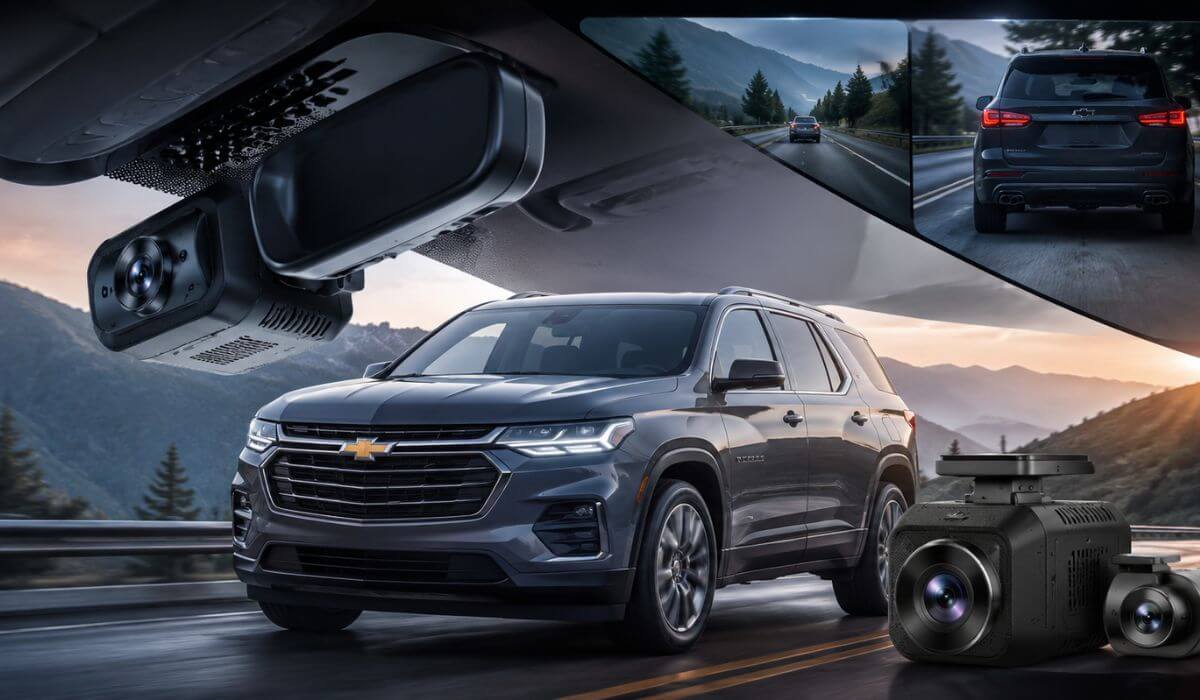
5 Best Dash Cams for Chevy Traverse in 2026: OEM Fit, 4K Clarity & Parking Protection
If you drive a Chevy Traverse, chances are your SUV spends more time hauling family, luggage, groceries, and road-trip gear than sitting parked in the garage. That’s why choosing the right dash cam isn’t just about recording accidents—it’s about protecting a vehicle that regularly carries the people and things that matter most.
The Chevy Traverse has evolved significantly over the years. Older models remain popular for their spacious three-row layout, while the redesigned 2024–2026 Traverse introduced a more modern cabin, larger digital displays, and updated driver-assistance technology. Those changes also affect dash cam compatibility, especially for owners who want a clean factory-style installation instead of a camera hanging from the windshield with wires running everywhere.
For this guide, I focused on dash cams that make the most sense for real Traverse owners. That means prioritizing OEM-style fitment, dependable 4K video quality, strong night recording, parking surveillance, WiFi connectivity, and long-term reliability. Whether you drive an older Traverse or the newest generation, these are the models most likely to deliver the protection and convenience owners actually want every day.
Best Chevy Traverse Dash Cams: Top 2026 Picks for Front-Rear Coverage, GPS & Night Vision
#1. Fitcamx 4K Dash Cam Suitable for Chevy Traverse 2024-2026
Best Chevy Traverse Dash Cam With Factory OEM Look, UHD 4K Recording & Seamless Plug-and-Play Installation
#2. VIOFO A329S 4K 60FPS Dash Cam Front and Rear
Best Front and Rear Dash Cam for Chevy Traverse Owners Seeking Premium 4K Clarity, STARVIS 2 Sensors & Advanced Parking Protection
#3. mangoal Front 4K & Rear 1080p Dash Cam for Chevy Traverse
Best Chevrolet Traverse Dash Camera for OEM-Style Integration, GPS Tracking & Daily Family Driving Security
#4. Vantrue N2X Front and Inside Dash Cam
Best Dual Dash Cam for Chevy Traverse With Interior Monitoring, HDR Night Vision & Complete Cabin Coverage
#5. FAIMEE 4K+2K+2K 3-Channel Dash Cam
Best 3-Channel Dash Camera for Chevy Traverse Drivers Wanting Front, Rear and Interior Recording on a Budget
Expert Tip: If you’re driving a newer 2024–2026 Traverse, don’t automatically assume the dash cam with the highest resolution is the best choice. In daily use, a camera that blends into the cabin, starts recording every single time, and doesn’t distract the driver often ends up being the one owners appreciate most after a year of ownership. A clean OEM-style installation usually gets used for years. A powerful camera that’s annoying to live with often doesn’t.
How We Chose These Chevy Traverse Dash Cams
There are hundreds of dash cams on the market, but most of them were never designed with a large family SUV like the Chevy Traverse in mind. Instead of chasing spec-sheet numbers, we focused on the things that actually matter once the camera has been on your windshield for months.
First, we gave extra weight to Traverse-specific fitment and OEM-style integration. That’s why products like Fitcamx and mangoal ranked so highly. Many Traverse owners want protection without turning their interior into a project full of exposed wires and aftermarket accessories. A factory-style appearance matters more in a family SUV than many reviewers acknowledge.
Second, we looked closely at real-world image quality rather than advertised resolution alone. A 4K badge sounds impressive, but what matters is whether the camera can clearly capture license plates, road signs, and surrounding traffic during difficult conditions. Models equipped with technologies such as STARVIS 2 sensors, HDR processing, and advanced night recording received additional consideration because those features directly affect footage quality when conditions are less than ideal.
We also prioritized parking protection and long-term reliability. A Chevy Traverse often spends time in school parking lots, shopping centers, airports, hotels, and crowded public spaces. A camera that only performs while driving misses a major part of the ownership experience. Dash cams with dependable parking surveillance, impact detection, and event locking earned higher positions because they continue protecting the vehicle when you’re away from it.
Another factor was how well each camera matches different types of Traverse owners. Not everyone needs the same setup. Some owners want a factory-installed appearance. Others want premium front-and-rear coverage. Some families value interior monitoring. Rather than filling this guide with nearly identical products, we selected options that solve different real-world needs.
Finally, we deliberately avoided ranking products based solely on marketing claims. Features such as WiFi connectivity, GPS logging, dual-channel recording, parking monitoring, storage flexibility, and installation convenience were weighed against how useful they are in day-to-day ownership. The result is a list built around practical value, not just specifications.
In short, every camera on this list earned its place because it offers something genuinely useful to Chevy Traverse owners—whether that’s a cleaner factory look, stronger night footage, better parking protection, wider coverage, or a combination of all four. That’s the standard we used throughout this guide, and it’s the reason these five models stood out from the dozens of alternatives we reviewed.
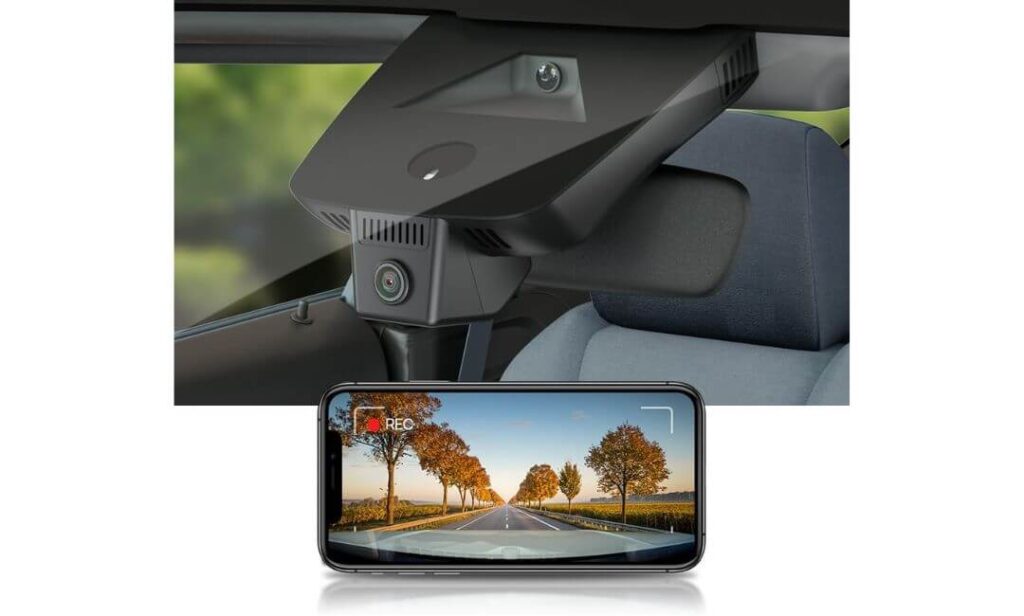
#1. Fitcamx 4K Dash Cam Suitable for Chevy Traverse 2024-2026
Quick Specs:
- Designed specifically for Chevy Traverse models with Auto-Dimming Mirror
- True OEM-style integrated housing
- Ultra HD 2160P video recording
- f/1.6 wide-aperture lens
- WDR-enhanced night recording
- Built-in WiFi with smartphone app access
- Loop recording with emergency event lock
- 64GB memory card included
- Plug-and-play mirror-powered installation
Let’s be honest—most dash cams look like something that was added after the fact. A screen stuck to the windshield, wires running across the headliner, and an overall setup that never quite feels like it belongs in the vehicle. This one takes the opposite approach.
The first thing that makes it stand out is how naturally it integrates into the mirror area. Once installed, it doesn’t draw attention to itself. That’s a huge advantage in a Chevy Traverse because the cabin already has a clean, modern design. Instead of adding visual clutter, it preserves the factory appearance while quietly recording everything happening ahead.
The recording quality backs up the design. The 2160P resolution, f/1.6 lens, and WDR processing work together to capture sharp footage during bright afternoons, rainy commutes, and late-night highway drives. Add WiFi connectivity, automatic recording, loop recording, and impact-triggered file protection, and it covers nearly everything most Traverse owners actually need on a daily basis.
(For owners who care more about a factory-quality installation than extra screens and unnecessary gadgets, this is easily one of the most convincing options currently available.)
Why It Earned A Spot In This Guide
- Looks like original equipment instead of an aftermarket add-on
- No dangling wires across the windshield
- Simple plug-and-play installation
- Clear 4K footage with strong daytime detail
- WiFi app makes downloading clips quick and easy
- Includes a memory card so recording starts immediately
One Thing Worth Knowing
- Owners without an auto-dimming rearview mirror may need an alternative power setup.
Chevy Traverse Compatibility Notes
This isn’t a universal dash cam trying to fit hundreds of vehicles. The housing was designed around the mirror area found in compatible Traverse models, which explains why the finished installation looks significantly cleaner than traditional windshield-mounted alternatives.
That vehicle-specific design also eliminates one of the biggest complaints owners have with typical dash cams—visible wiring. Once installed, the setup feels integrated rather than added on later, which is exactly what many Traverse buyers are looking for.
The Insider Pro-Tip
If your Chevy Traverse is primarily a family vehicle, appearance matters more than most review sites admit. After a few months of ownership, most drivers stop thinking about video resolution and start noticing whether the camera feels intrusive every time they get behind the wheel.
That’s where this model separates itself. The combination of OEM-style integration, dependable 4K recording, automatic operation, and a clutter-free installation creates an ownership experience that feels remarkably close to a factory-installed safety feature rather than another aftermarket accessory.
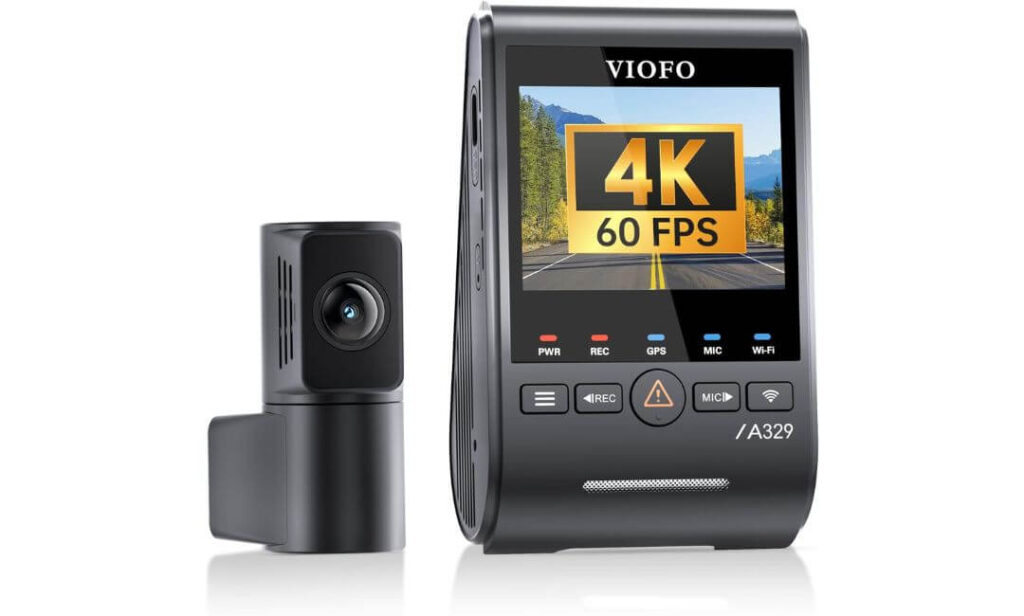
#2. VIOFO A329S 4K 60FPS Dash Cam Front and Rear
Quick Specs:
- 4K 60FPS front recording + 2K rear recording
- Dual Sony STARVIS 2 image sensors
- Wi-Fi 6 high-speed video transfers
- Built-in GPS with route and speed logging
- Voice command support
- HDR recording for front and rear cameras
- Supports up to 4TB SSD storage
- Ultra-low-power parking protection
- Included CPL filter for glare reduction
Some dash cams are designed to blend into the background. This one takes a different approach. It’s built for owners who want the absolute best footage possible when something unexpected happens. The moment you start looking at the hardware, it’s obvious this camera was engineered around recording performance first.
The biggest story here is the combination of 4K 60FPS recording and dual STARVIS 2 sensors. On a large vehicle like the Chevy Traverse, that’s a meaningful advantage. Whether you’re cruising down a highway, navigating heavy city traffic, or dealing with poor weather conditions, the footage stays impressively detailed. License plates remain easier to identify, motion blur is reduced, and nighttime recordings show noticeably more usable information than many competing systems.
What really separates it from most front-and-rear setups, though, is everything happening behind the scenes. Wi-Fi 6 technology dramatically speeds up video transfers, the built-in GPS records important trip data, voice controls allow hands-free operation, and support for up to 4TB of SSD storage eliminates the constant worry of running out of recording space during long road trips. This feels less like a basic dash cam and more like a complete recording platform built for people who spend serious time behind the wheel.
(If maximum video quality sits at the top of your priority list, few options currently match the overall capability packed into this setup.)
Reasons It Stood Out During Our Evaluation
- Outstanding daytime and nighttime recording clarity
- Dual STARVIS 2 sensors provide exceptional low-light performance
- 4K 60FPS footage captures more road detail during motion
- Wi-Fi 6 makes downloading clips surprisingly fast
- Massive storage support for extended recording periods
- Built-in GPS and voice controls add everyday convenience
One Thing Worth Knowing
- Drivers who want to unlock the full parking-monitoring potential will benefit from adding the optional hardwire kit.
How It Fits Into The Chevy Traverse Ownership Experience
Unlike vehicle-specific systems, this is a universal setup designed to work across a wide range of vehicles. Fortunately, the Chevy Traverse provides plenty of cabin space for a clean installation, allowing both the front and rear cameras to be positioned effectively without compromising visibility.
The rear camera is especially valuable in a three-row SUV. Whether you’re carrying passengers, cargo, or traveling with the rear area fully loaded, having dedicated rear coverage provides an additional layer of protection that many single-camera systems simply cannot match.
The Insider Pro-Tip
Many buyers focus entirely on resolution numbers when comparing dash cams. In reality, the sensor behind the lens often matters just as much as the resolution itself. That’s one reason the dual STARVIS 2 setup deserves attention. Better light handling, stronger dynamic range, and improved detail retention can make a huge difference when reviewing footage later.
For Chevy Traverse owners who regularly travel after dark, cover long highway distances, or simply want the strongest evidence possible if an incident occurs, the investment in better imaging hardware tends to pay off long after the purchase is forgotten. That’s where this system earns its reputation.
#3. mangoal Front 4K & Rear 1080p Dash Cam for Chevy Traverse
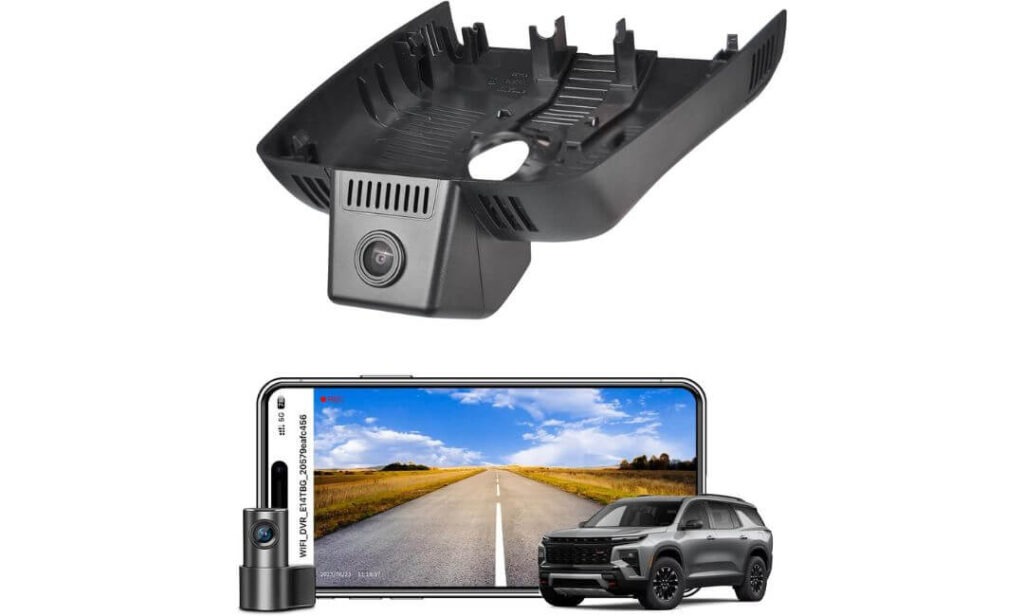
Quick Specs:
- Custom-built for 3rd Generation Chevy Traverse models
- 4K front camera with 1080P rear coverage
- OEM-style hidden installation
- Built-in WiFi with free mobile app
- Integrated GPS tracking
- 128GB memory card included
- Parking monitoring capability
- 150° front viewing angle
- Auto-dimming mirror power compatibility
- Complete installation hardware included
Oddly enough, many vehicle-specific dash cams focus so much on appearance that they forget about functionality. This one manages to do both. The moment it’s installed behind the mirror assembly, it feels like it belongs there, yet it still delivers the features most owners actually expect from a modern recording system.
What immediately impressed us is how complete the package feels right out of the box. The 4K front camera, 1080P rear camera, GPS module, 128GB memory card, mirror adapter, OBD adapter, and installation accessories are already included. That means fewer surprise purchases after checkout and a much smoother setup experience compared to many competing systems.
The recording performance also aligns well with how most Chevy Traverse owners use their vehicles. The 4K front camera captures important road detail, while the rear camera adds valuable protection in parking lots, school pickup lanes, shopping centers, and heavy traffic situations. Combined with WiFi connectivity, mobile app access, GPS data, parking monitoring support, and a factory-style appearance, it strikes an excellent balance between convenience and everyday protection.
(For drivers who want OEM-style integration without sacrificing rear coverage or everyday features, this package checks an impressive number of boxes.)
Why It Earned Its Place On This List
- Designed specifically around the Traverse interior layout
- Factory-style appearance once installed
- Front and rear recording included
- 128GB card included from day one
- Built-in GPS for location and route tracking
- WiFi app makes footage management simple
- Comprehensive installation kit reduces extra expenses
One Thing Worth Knowing
- Before ordering, it’s worth taking a quick look at your mirror setup to ensure compatibility with the required auto-dimming mirror connection.
How It Fits The Chevy Traverse Better Than Most Alternatives
This isn’t a universal camera trying to adapt itself to dozens of different SUVs. The entire design was built around the newer Traverse platform, which explains why the final installation looks so clean compared with traditional windshield-mounted solutions.
That vehicle-specific approach also helps preserve one of the Traverse’s biggest strengths—its modern cabin design. Instead of introducing extra screens, bulky mounts, or visible wiring, the camera blends naturally into the mirror area while still providing both front and rear coverage.
The Insider Pro-Tip
Many Traverse owners initially focus on video resolution, but after months of ownership, convenience often becomes the feature they appreciate most. A camera that starts automatically, stays out of sight, and requires very little attention tends to deliver a better ownership experience over time.
That’s where this setup quietly excels. The combination of OEM-style integration, rear-camera protection, GPS logging, WiFi access, and an included 128GB card creates a system that feels complete from the first day. For many families, that’s exactly the type of upgrade that gets installed once and then simply does its job every time the vehicle leaves the driveway.
#4. Vantrue N2X Front and Inside Dash Cam
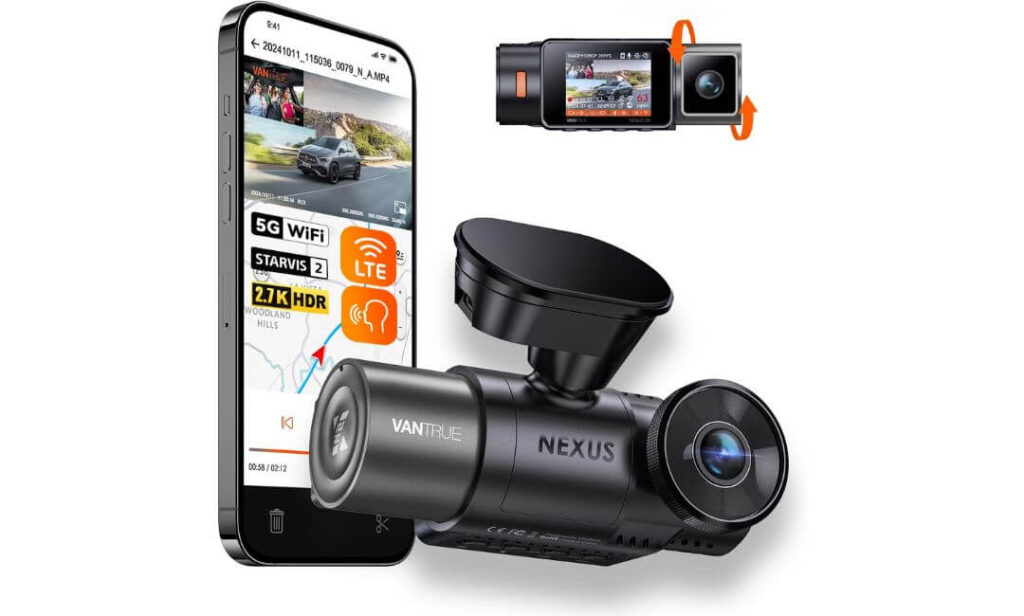
Quick Specs:
- 1944P front recording + dedicated interior camera
- Latest Sony STARVIS 2 image sensor
- Dual HDR processing
- IR cabin night vision with 4 infrared LEDs
- 5G WiFi smartphone connectivity
- Built-in GPS tracking
- Voice command support
- 24/7 parking surveillance capability
- Supports memory cards up to 512GB
- Supercapacitor design for temperature durability
Most people look at this camera and immediately focus on the road-facing lens. That’s understandable. What makes this setup different, though, is the fact that it protects what’s happening inside the vehicle just as effectively as what’s happening outside.
For many Chevy Traverse owners, that’s a meaningful benefit. This is a three-row SUV often used for family trips, carpooling, teen drivers, rideshare work, airport runs, and long-distance travel. The dedicated cabin camera creates an additional layer of visibility that traditional front-and-rear systems simply can’t provide. Combined with 1944P front recording, a 158° front field of view, and a 165° interior viewing angle, it captures a remarkably complete picture of what happens during every drive.
The technology underneath the lenses is equally impressive. The combination of STARVIS 2 imaging, dual HDR processing, and infrared cabin night vision allows the camera to retain useful detail long after the sun goes down. Add 5G WiFi, GPS tracking, voice commands, parking surveillance support, and magnetic quick-release mounting, and you end up with a system that feels purpose-built for drivers who spend significant time transporting people.
(If knowing exactly what happened both outside and inside the vehicle matters to you, few cameras on this list provide a more complete view of the story.)
Why It Earned A Place In Our Recommendations
- Dedicated cabin recording adds an extra layer of protection
- STARVIS 2 sensor delivers excellent low-light performance
- IR night vision records interior activity even in complete darkness
- 5G WiFi transfers clips quickly to your phone
- Voice controls reduce distractions while driving
- GPS logging creates valuable trip and location records
- Magnetic mount simplifies removal when needed
One Thing Worth Knowing
- Drivers who only want road-facing coverage may not fully utilize the additional interior camera capabilities.
Where It Fits Into The Chevy Traverse Lifestyle
The Traverse is often chosen because it carries more people than the average vehicle. Whether that’s family members, coworkers, sports teams, or passengers during long trips, there’s usually a lot happening inside the cabin.
That’s exactly where this system separates itself. Instead of focusing exclusively on the road ahead, it documents activity throughout the passenger compartment as well. For parents, rideshare drivers, and anyone frequently transporting passengers, that extra perspective can become surprisingly valuable over time.
The Insider Pro-Tip
Many dash cam buyers spend weeks comparing resolutions, frame rates, and storage capacities. Far fewer ask a simpler question: “What information would I wish I had after an incident?”
In a large SUV, that answer isn’t always limited to the road outside. Passenger interactions, events inside the cabin, and activity occurring during stops can sometimes be just as important as what the front camera captures. That’s the reason dual-perspective systems continue gaining popularity among experienced drivers. The footage often answers questions that a traditional dash cam never recorded in the first place.
#5. FAIMEE 4K+2K+2K 3-Channel Dash Cam
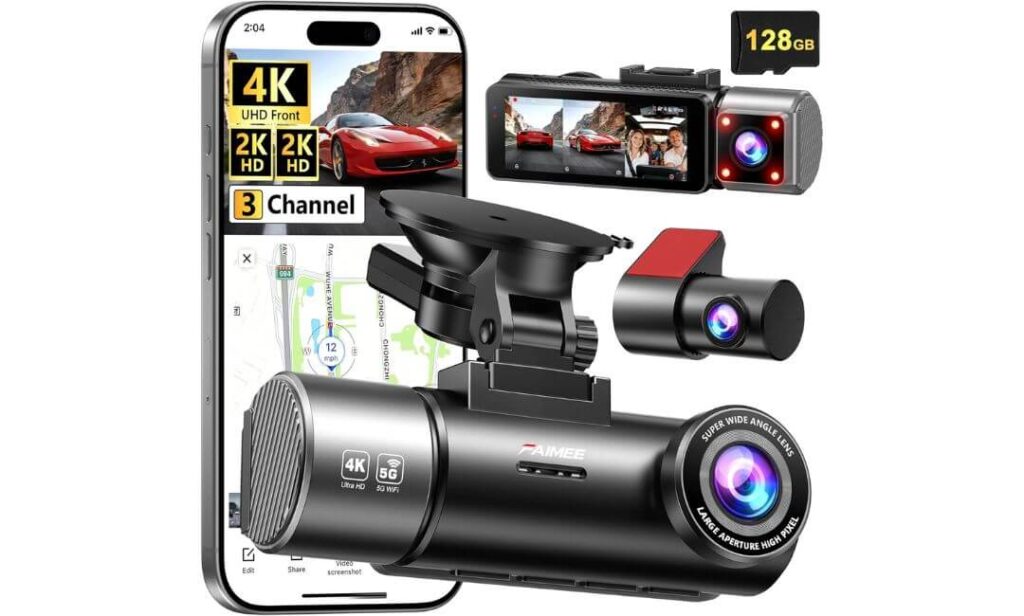
Quick Specs:
- 4K front + 2K interior + 2K rear recording
- Triple-camera protection in a single system
- 170° front wide-angle coverage
- Built-in GPS route and speed tracking
- Dual-band 5.8GHz / 2.4GHz WiFi
- F1.8 large-aperture night vision lens
- WDR image enhancement technology
- 24-hour parking monitoring support
- G-Sensor emergency file protection
- 128GB high-endurance memory card included
By the time most people reach the end of a dash cam comparison, they realize something important: no camera angle captures everything. That’s the problem this system tries to solve. Instead of focusing on a single perspective, it records the front, rear, and cabin simultaneously, creating one of the most complete coverage packages in this entire guide.
For a Chevy Traverse, that approach makes a surprising amount of sense. Large family SUVs spend their lives carrying passengers, luggage, sports equipment, pets, and everything else that comes with daily life. The combination of 4K front recording, 2K interior coverage, and 2K rear monitoring means very little happens around the vehicle without being documented. Whether you’re dealing with traffic incidents, parking lot damage, or questions about what happened during a trip, the footage usually tells the full story.
The feature list is equally practical. The 170-degree front lens helps reduce blind spots, the F1.8 aperture and WDR technology improve visibility during challenging lighting conditions, while GPS tracking and dual-band WiFi simplify footage management. Throw in an included 128GB memory card, parking monitoring support, and emergency file locking, and it becomes one of the most feature-packed systems available at this position in the rankings.
(If your goal is recording as much information as possible from as many angles as possible, this setup delivers exactly that.)
Why It Deserved The Final Spot On Our List
- Triple-camera recording captures more than most competitors
- Excellent value considering the amount of coverage provided
- Front, cabin, and rear protection in one package
- GPS logging adds useful location and route data
- 128GB card included right out of the box
- Dual-band WiFi speeds up video access and downloads
- Strong overall feature-to-price balance
One Thing Worth Knowing
- With three cameras recording at the same time, installation naturally takes a little more planning than a basic single-camera setup.
Where It Fits In The Chevy Traverse World
Not every Traverse owner needs three cameras. However, some absolutely benefit from them. Families with teenage drivers, rideshare operators, frequent road-trippers, and drivers who spend long hours behind the wheel often appreciate having additional perspectives available when reviewing footage.
That’s what makes this camera unique within this guide. Rather than specializing in OEM appearance, premium imaging hardware, or interior-focused monitoring, it focuses on something different—capturing as much surrounding information as possible from a single system.
The Insider Pro-Tip
When comparing multi-camera systems, don’t just count the number of cameras. Pay attention to whether those cameras are actually recording useful footage. Resolution, viewing angles, night performance, storage capacity, and reliability matter far more than the number printed on the box.
What makes this setup appealing for many Chevy Traverse owners is that it balances those fundamentals surprisingly well. The combination of 4K front recording, 2K cabin footage, 2K rear coverage, GPS tracking, night vision technology, and an included 128GB card creates a package that feels ready for real-world use from day one. For drivers who believe more visibility equals more peace of mind, that’s a compelling argument.
Best Dash Cams for Chevy Traverse Compared: Which One Matches Your Driving Style?
| Comparison Point |
Fitcamx 4K
OEM Favorite
|
VIOFO A329S
Video Quality King
|
mangoal 4K + Rear
Balanced OEM Pick
|
Vantrue N2X
Family & Cabin Focus
|
FAIMEE F9
Maximum Coverage
|
|---|---|---|---|---|---|
| Designed Specifically For Traverse | Purpose-Built | Universal | Purpose-Built | Universal | Universal |
| Front Camera Resolution | 4K | 4K 60FPS | 4K | 1944P / 2.5K | 4K |
| Rear Camera Included | — | 2K Rear | 1080P Rear | — | 2K Rear |
| Interior Cabin Recording | — | — | — | 1080P IR Cabin Cam | 2K Cabin Cam |
| Night Driving Performance | Very Good | Dual STARVIS 2 | Very Good | STARVIS 2 + IR Vision | WDR + F1.8 Lens |
| Factory-Look Installation | Excellent | Standard | Excellent | Standard | Standard |
| Built-In GPS | — | Yes | Yes | Yes | Yes |
| WiFi Connectivity | WiFi App | WiFi 6 | WiFi App | 5G WiFi | Dual-Band WiFi |
| Parking Protection | Optional Hardwire | Advanced Mode | Supported | 24/7 Monitoring | 24/7 Monitoring |
| Storage Flexibility | Up To 256GB | Up To 4TB SSD | Up To 256GB | Up To 512GB | 128GB Included |
| Best For | Owners Wanting A Factory Appearance | Drivers Chasing Maximum Video Quality | OEM Look With Rear Coverage | Families, Rideshare & Cabin Monitoring | Front + Rear + Cabin Coverage On A Budget |
| Overall Character | Clean & Invisible | Technology Focused | Well-Rounded | Passenger-Focused | Coverage-Focused |
Buying Guide: How To Choose The Right Dash Cam For Your Chevy Traverse
A lot of Chevy Traverse owners end up buying the wrong dash cam for one simple reason—they shop by resolution alone. On paper, nearly every product promises sharp footage, night vision, parking protection, and smartphone connectivity. In real-world ownership, however, the experience is usually determined by factors most buyers overlook during the purchase process.
The Traverse is a large three-row SUV used for everything from daily commuting and school runs to cross-country family vacations. That means the best dash cam isn’t necessarily the one with the longest feature list. It’s the one that matches how your vehicle is actually used every day.
Why 4K Recording Usually Makes Sense In A Chevy Traverse
The higher seating position of the Traverse provides a great view of the road, but it also means the dash cam is often recording traffic from greater distances. That’s where 4K recording becomes genuinely useful.
Higher-resolution footage makes it easier to identify license plates, road signs, lane markings, and vehicle details that may become important after an incident. Cameras such as the Fitcamx, VIOFO A329S, and mangoal models benefit from this advantage because they capture noticeably more detail than traditional 1080P systems.
That said, resolution alone doesn’t tell the full story. Sensor quality, HDR processing, lens quality, and low-light performance frequently have just as much impact on the final recording as the resolution number printed on the box.
When Front And Rear Coverage Becomes Worth The Extra Cost
Many first-time buyers focus entirely on what happens in front of the vehicle. Experienced owners usually realize that rear-end collisions, parking lot incidents, and hit-and-run situations are often just as common.
A dedicated rear camera creates a more complete record of events, especially in a family SUV that spends significant time in crowded parking lots, school pickup areas, shopping centers, airports, and hotel parking garages.
If rear protection is a priority, models like the VIOFO A329S and mangoal system offer a stronger overall security package than front-only alternatives.
Understanding Parking Protection Before You Buy
Parking mode is one of the most misunderstood features in the dash cam world.
Many buyers assume every dash cam automatically records around the clock. In reality, most parking-monitoring features require either a hardwire kit, an OBD connection, or another dedicated power source to operate properly when the vehicle is turned off.
The quality of parking protection also varies significantly. Some systems simply record after an impact occurs, while others offer motion detection, buffered recording, collision detection, or intelligent power-saving monitoring.
If your Traverse regularly spends time parked in public areas, parking protection deserves far more attention than most buyers give it.
The Importance Of OEM Fit And Cabin Appearance
One advantage newer Traverse models have is a modern, well-designed interior. Installing a bulky dash cam with exposed wiring can quickly disrupt that clean appearance.
This is exactly why vehicle-specific systems continue growing in popularity. Products such as Fitcamx and mangoal integrate around the mirror assembly, creating a much cleaner finished look compared with traditional windshield-mounted designs.
For many owners, a camera that blends into the vehicle often delivers a better long-term ownership experience than one that constantly draws attention to itself.
Night Recording Is More Important Than Most Specifications
Nearly every dash cam performs reasonably well on a bright afternoon. The real difference appears after sunset.
Night driving introduces glare, headlights, reflections, shadows, and rapidly changing lighting conditions. Cameras equipped with technologies such as STARVIS 2 sensors, HDR processing, wide dynamic range optimization, infrared illumination, and larger-aperture lenses generally produce footage with significantly more usable detail.
For drivers who frequently travel before sunrise, after dark, or during poor weather conditions, investing in stronger low-light performance often provides greater value than chasing higher resolution numbers.
Storage Capacity, Loop Recording And Daily Convenience
Storage limitations are one of the quickest ways to turn a great dash cam into a frustrating one.
Every camera in this guide uses loop recording, which automatically overwrites the oldest files when storage becomes full. However, available storage capacity still plays a major role in how much footage can be retained before overwriting begins.
Drivers who regularly take long trips may appreciate systems with larger storage support, while others may find included memory cards perfectly adequate for everyday driving. Features such as WiFi connectivity, GPS logging, voice commands, and smartphone apps also contribute significantly to the overall ownership experience by making footage easier to access when needed.
Compatibility, Power Sources And Installation Considerations
Before placing an order, always verify how the camera receives power.
Some Traverse-specific OEM systems are designed around vehicles equipped with an auto-dimming rearview mirror, while universal dash cams typically use a 12V power outlet, USB connection, OBD adapter, or hardwire kit.
Installation complexity varies considerably between products. A front-only camera may take only a few minutes to install, while front-and-rear or three-channel systems require additional cable routing throughout the vehicle.
Spending a few minutes confirming power requirements, mirror compatibility, mounting style, and parking-mode needs before purchasing can prevent installation surprises later and ensure the dash cam you choose works exactly as expected from day one.
OEM Fit & Installation Tips For Chevy Traverse Owners
One thing we’ve learned after evaluating dozens of dash cam setups is that the quality of the installation often matters just as much as the quality of the camera itself. Even an excellent dash cam can become annoying if wires are visible, connectors work loose, or the camera blocks part of the driver’s view.
The good news is that the Chevy Traverse is one of the easier modern SUVs to work with. Its windshield design, mirror placement, interior trim layout, and headliner construction make it possible to achieve a clean, factory-like installation when the right approach is used.
Start With The Mounting Style That Matches Your Goals
Before installing anything, decide what type of ownership experience you want.
If maintaining a factory appearance is your top priority, OEM-style systems such as the Fitcamx and mangoal units are usually the cleanest solution. These integrate around the mirror assembly and eliminate the visual clutter commonly associated with traditional dash cams.
Universal cameras such as the VIOFO A329S, Vantrue N2X, and FAIMEE F9 offer greater flexibility and often more features, but they require more attention during installation to achieve the same clean result.
The most successful installations generally share one thing in common: the camera sits high on the windshield, remains outside the driver’s primary line of sight, and does not interfere with forward visibility.
Choosing The Right Power Source For Your Driving Habits
Many installation issues begin with selecting the wrong power method.
A standard 12V outlet or cigarette lighter adapter is usually the simplest option. Installation is faster, there is no need to access the fuse box, and the system can often be removed easily if the vehicle is sold later.
However, drivers who want parking protection should think carefully before relying solely on a power outlet. Most vehicles stop supplying power to those outlets once the ignition is turned off, which means parking mode may not function as intended.
For full-time parking surveillance, a hardwire kit or dedicated OBD power solution is often the better choice. These systems allow the camera to continue monitoring while parked and typically include voltage protection features designed to help prevent excessive battery drain.
Creating A Factory-Clean Cable Routing Path
One of the biggest differences between a professional-looking installation and an amateur-looking one comes down to cable management.
On the Traverse, the cleanest routing path usually begins at the mirror area, continues through the headliner, follows the A-pillar trim, and then routes toward the selected power source. Rear-camera wiring can often be hidden along the headliner and upper trim panels before reaching the liftgate area.
The goal is simple: when sitting in the driver’s seat, the installation should feel almost invisible.
Avoid letting cables cross open dashboard surfaces, hang near airbags, or pass through areas where trim pieces may pinch or damage the wire over time. Spending an extra fifteen minutes on cable routing can dramatically improve the final result.
Understanding Fuse Taps, Ground Connections And Voltage Protection
Drivers planning to install a hardwire kit should pay close attention to power management.
A proper fuse-tap installation allows the dash cam to receive power from the vehicle’s electrical system while maintaining circuit protection. Equally important is selecting an appropriate grounding point, as poor grounding can cause intermittent operation, unexpected shutdowns, or recording issues.
Modern hardwire kits often include low-voltage cutoff protection, sometimes referred to as battery protection or watchdog functionality. This feature automatically shuts the camera down if battery voltage drops below a predetermined threshold.
For vehicles that spend long periods parked, this protection can be far more important than many buyers realize.
Installation Mistakes That Cause The Most Problems
Most dash cam complaints can be traced back to a handful of common installation mistakes.
Mounting the camera too low on the windshield often creates visibility concerns and increases dashboard reflections.
Using low-quality memory cards can result in corrupted files, recording interruptions, or missed footage during critical moments.
Failing to fully seat connectors during installation may create intermittent power loss that appears to be a camera defect.
Another common mistake is enabling parking mode without confirming that the selected power source actually supports continuous operation when the vehicle is turned off.
A few extra minutes spent verifying these details can prevent hours of troubleshooting later.
Pre-Installation Checklist For Traverse Owners
Before beginning installation, confirm the following:
- Verify compatibility with your specific Traverse model year and trim
- Confirm whether your vehicle has an auto-dimming rearview mirror if using an OEM-style system
- Decide whether parking mode is important for your needs
- Verify the intended power source before routing cables
- Ensure the memory card is installed and formatted correctly
- Inspect all included adapters, mounting hardware, and cables
- Identify a safe routing path before attaching any adhesive mounts
Post-Installation Verification Checklist
After installation is complete, perform a quick system review before considering the job finished.
- Confirm the camera powers on automatically when the vehicle starts
- Review daytime footage for image clarity and viewing angle
- Verify rear-camera alignment if equipped
- Test WiFi connectivity and mobile app functionality
- Confirm GPS tracking is operating correctly if available
- Check that emergency event locking functions as expected
- Verify parking mode operation if a hardwire or OBD connection is being used
- Ensure no cables interfere with airbags, trim panels, controls, or driver visibility
A properly installed dash cam should eventually disappear into your ownership experience. You should not have to think about it every day. The best installations are the ones that quietly do their job, preserve the appearance of the Chevy Traverse interior, and are ready when you need the footage most.
Parking Protection Deep Dive: Getting The Most From Your Chevy Traverse Dash Cam
Most buyers spend hours comparing video quality, storage capacity, and app features, yet overlook the feature they may use most often without ever realizing it—parking protection.
The reality is simple. Your Chevy Traverse will spend far more time parked than driving. Whether it’s sitting outside a school, in a crowded shopping center, at an airport parking lot, a hotel, a sports complex, or your workplace, the vehicle is often unattended for hours at a time. That’s exactly why parking mode has become one of the most valuable dash cam features available today.
A well-configured parking setup can capture hit-and-runs, door dings, vandalism attempts, suspicious activity around the vehicle, and impacts that occur long before you return to the driver’s seat.
Why Parking Protection Matters More For A Chevy Traverse
The Traverse is not a small vehicle. Its larger footprint naturally increases the chances of parking lot incidents compared to compact cars.
Parents often leave the vehicle in school pickup zones, families park in crowded shopping areas, and road-trippers frequently use hotel lots where visibility and security can vary dramatically. In many cases, the damage is discovered long after the responsible driver has already left.
This is where parking surveillance becomes incredibly valuable. Instead of relying solely on witness accounts or guessing what happened, the dash cam can provide an actual record of events surrounding the vehicle.
For many owners, the first time parking footage helps resolve an incident is the moment they realize why the feature was worth paying for.
Understanding The Different Types Of Parking Mode
Not all parking modes operate the same way.
Impact-based recording activates when the dash cam detects a physical shock or collision. This approach consumes very little power and is commonly found in many modern systems.
Motion detection recording works differently. The camera remains alert and begins recording whenever movement is detected near the vehicle. This can be useful in parking garages, apartment complexes, and public parking lots where pedestrian traffic is common.
Time-lapse recording continuously captures images at a reduced frame rate. Instead of recording every second in real time, it compresses long periods into manageable video files while significantly reducing storage consumption.
Buffered parking recording is often considered the premium option. These systems save footage from several seconds before an event occurs and continue recording afterward, creating a more complete record of what happened.
Recommended Parking Mode Settings For Most Traverse Owners
The best settings often depend on where the vehicle spends most of its time.
For daily commuting and public parking, a combination of impact detection and motion monitoring generally provides the best balance between protection and battery management.
For airport parking, hotel stays, or extended trips, time-lapse recording can be extremely useful because it allows the camera to monitor the vehicle for longer periods without filling the memory card unnecessarily.
If your dash cam supports buffered event recording, it is usually worth enabling. Capturing what happened immediately before an impact often provides context that standard impact-triggered recordings can miss.
Drivers who park inside secure garages may prefer lower-sensitivity motion settings to reduce unnecessary recordings triggered by normal activity.
Balancing Protection And Battery Health
One of the most common concerns surrounding parking mode involves battery drain.
Modern hardwire kits and advanced parking systems typically include voltage protection features designed to shut the camera down before the vehicle battery reaches unsafe levels. These protections are especially important if the Traverse remains parked for multiple days.
Choosing aggressive motion-detection settings in a busy environment can generate thousands of unnecessary recordings and increase power consumption. In many situations, moderate sensitivity levels provide better real-world performance.
The goal is not to record everything. The goal is to record the events that actually matter.
Reviewing Parking Footage Efficiently
The biggest mistake many owners make is waiting until after an incident occurs to learn how their dash cam stores parking footage.
Take a few minutes after installation to familiarize yourself with the app, event folders, GPS logs, and playback controls. Knowing where recordings are stored can save valuable time later.
Most modern systems automatically separate parking events from regular driving footage. Impact-triggered files are usually locked to prevent loop recording from overwriting them, making them easier to locate during a review.
WiFi-enabled cameras simplify the process considerably. Instead of removing the memory card, footage can often be reviewed directly from a smartphone while standing next to the vehicle.
Signs Your Parking Mode Is Working Properly
A surprisingly high number of owners assume parking protection is active when it actually isn’t.
After installation, verify that the camera successfully enters parking mode when the vehicle is turned off. Check whether event recordings are being created, confirm motion or impact alerts are triggering correctly, and review a few sample clips to ensure image quality remains acceptable.
Testing the system before you need it is always easier than discovering a problem after an incident has already occurred.
The Parking Protection Mindset Most Owners Miss
The biggest value of parking mode isn’t recording dramatic accidents. Most owners never experience those.
Its true value comes from documenting the small incidents that happen every day—shopping carts, careless door swings, low-speed bumps, parking lot scrapes, and situations where nobody leaves a note.
For a vehicle as frequently used as the Chevy Traverse, those are often the moments that matter most. A properly configured parking protection system quietly watches over the vehicle when you’re not there, and that’s exactly what makes it one of the smartest dash cam features available today.
Real-World Scenarios: Where A Dash Cam Proves Its Value In A Chevy Traverse
It’s easy to think about dash cams as something you buy for “just in case” situations. The reality is that most owners never appreciate the value of a dash cam until the day they actually need the footage.
That’s especially true with a Chevy Traverse. This isn’t a vehicle that spends its life parked in a garage. It handles school pickups, family vacations, grocery runs, sporting events, airport trips, road trips, and daily commuting. The more time a vehicle spends on the road and in public parking areas, the greater the chance that something unexpected eventually happens.
The best dash cam for Chevy Traverse owners isn’t simply the one with the highest resolution. It’s the one that captures the information you’ll wish you had when questions need answers.
When A Hit-And-Run Happens In A Parking Lot
Imagine returning to your Traverse after shopping and finding damage on the rear bumper or quarter panel.
No note. No witness. No obvious explanation.
Unfortunately, this situation happens far more often than many drivers realize. A properly configured parking mode can record the vehicle responsible, capture the direction it traveled, and sometimes even preserve a clear view of the license plate.
This is where systems equipped with parking monitoring, motion detection, impact detection, and rear camera coverage gain a major advantage. Instead of relying on assumptions, you have actual footage showing what occurred while the vehicle was unattended.
For many owners, that single recording can justify the entire cost of the dash cam.
Why Rear Coverage Matters More Than Most Buyers Expect
Rear-end collisions remain one of the most common accidents on today’s roads.
Traffic slows unexpectedly, a distracted driver reacts too late, or weather conditions create longer stopping distances. In many cases, the front camera records very little because the impact originates from behind.
That’s one reason front-and-rear systems such as the VIOFO A329S and mangoal setup continue gaining popularity among Traverse owners. The rear camera provides an additional perspective that can document exactly what happened before, during, and after the collision.
When questions arise about following distance, driver behavior, or fault determination, that additional footage often becomes extremely valuable.
Family Travel Creates Unique Recording Situations
The Chevy Traverse was built for carrying people.
Road trips, youth sports, family vacations, school transportation, and daily errands all create situations where multiple passengers are frequently inside the vehicle. In these scenarios, cabin-monitoring systems such as the Vantrue N2X and FAIMEE F9 provide visibility that traditional dash cams simply cannot offer.
While most trips are completely uneventful, interior footage can help document what occurred during an incident, clarify events involving passengers, or simply provide a more complete understanding of what happened during a journey.
For families who spend significant time on the road, that additional perspective can be surprisingly useful.
Off-Road Parking And Remote Locations
Not every Traverse spends its life in city traffic.
Many owners use these SUVs for camping trips, trailhead parking, outdoor recreation, fishing excursions, hunting trips, and weekend adventures. In these situations, the vehicle may remain parked for extended periods in isolated locations.
Parking protection becomes particularly valuable here because the vehicle is often left unattended for hours. Motion-triggered recording, impact detection, and time-lapse monitoring can help document activity around the vehicle when no one is nearby.
Although incidents are uncommon, having recorded evidence available can provide significant peace of mind when parking in unfamiliar areas.
Why 4K Video Makes A Difference In The Real World
Resolution numbers often sound like marketing language until you compare footage side by side.
A quality 4K dash cam for Chevy Traverse owners captures noticeably more visual information than lower-resolution alternatives. That additional detail can become important when reviewing road signs, lane markings, vehicle descriptions, business names, or license plates.
The advantage becomes even more noticeable on highways where vehicles are moving quickly and important details may only appear in frame for a few seconds.
Higher resolution does not guarantee perfect license plate recognition in every situation, but it significantly improves the chances of capturing useful information when conditions are favorable.
Weather, Glare, And Difficult Lighting Conditions
Many incidents don’t happen on bright sunny afternoons.
Rain, fog, darkness, glare, and rapidly changing light conditions often create the situations where footage matters most. Modern cameras equipped with technologies such as STARVIS 2 sensors, HDR processing, WDR optimization, infrared illumination, and larger-aperture lenses perform noticeably better during these challenging moments.
That’s one reason the cameras in this guide were selected so carefully. Recording quality during difficult conditions often matters more than performance during ideal conditions.
The Difference Between Remembering And Knowing
After an unexpected incident, people often rely on memory to explain what happened.
The problem is that memory becomes less reliable when stress enters the picture. Details become blurred, timelines get confused, and important information can be overlooked.
Dash cam footage changes that equation completely.
Instead of trying to remember whether the traffic light was yellow or green, whether another vehicle changed lanes unexpectedly, or whether a driver stopped after an impact, you can simply review the recording.
That’s ultimately why so many Traverse owners consider a dash cam one of the most practical upgrades available. The value isn’t found in the camera itself. The value comes from replacing uncertainty with evidence when it matters most.
FAQs About Chevy Traverse Dash Cam
Which Type Of Dash Cam Makes The Most Sense For A Chevy Traverse: OEM-Style Or Universal Premium Models?
This is probably the most important question many Traverse owners don’t ask until after they’ve already purchased a camera.
If your priority is maintaining the clean, upscale look of the cabin, OEM-style options such as the Fitcamx and mangoal systems are usually the better long-term choice. They blend into the mirror area, eliminate visible wiring, and feel much closer to a factory-installed feature. Months later, many owners barely notice they’re there.
On the other hand, if absolute recording performance matters more than appearance, premium universal systems often have the edge. Features such as dual STARVIS 2 sensors, larger storage capacity, advanced parking protection, and higher frame-rate recording can provide measurable advantages. The real answer comes down to one question: do you value a cleaner installation more, or maximum recording capability? Most buyers fall strongly into one of those two categories.
Is A Front-Only Dash Cam Enough For A Chevy Traverse, Or Is A Rear Camera Worth Paying Extra For?
For a vehicle the size of the Traverse, rear coverage is usually more valuable than many first-time buyers expect.
Large SUVs spend a lot of time in crowded parking lots, school pickup areas, airport drop-off lanes, and stop-and-go traffic. Many of the incidents owners encounter actually occur behind the vehicle rather than in front of it. Rear-end collisions, parking lot impacts, and hit-and-run damage often happen completely outside the field of view of a front camera.
If budget allows, a front-and-rear setup generally provides the best balance of protection. The difference isn’t simply having another camera—it’s having another angle when details matter most.
Does A 4K Dash Cam For Chevy Traverse Owners Really Improve License Plate Capture?
Yes, but not always in the way people expect.
Many advertisements create the impression that every license plate will appear crystal clear under every condition. Real-world driving doesn’t work that way. Vehicle speed, lighting conditions, weather, windshield glare, distance, and camera angle all influence what the footage captures.
What 4K recording does provide is a significantly larger amount of visual information. That extra detail can improve the chances of identifying:
- License plates
- Road signs
- Vehicle damage
- Lane markings
- Business names
- Vehicle descriptions
The key takeaway is that 4K improves your odds of capturing useful evidence. It doesn’t create perfect footage in every situation, but it absolutely provides more information to work with when reviewing an incident later.
Why Do Experienced Dash Cam Owners Talk More About Sensors Than Resolution?
Because once you’ve reviewed enough footage, you realize that resolution is only part of the equation.
A camera with an excellent image sensor can often produce more usable footage than a higher-resolution camera with weaker hardware. This becomes especially noticeable at night, during storms, inside parking garages, or when headlights create heavy glare.
That’s one reason technologies such as STARVIS 2, HDR processing, WDR optimization, and larger-aperture lenses receive so much attention among experienced users. These features directly affect how much usable information survives difficult lighting conditions.
When evaluating dash cams, many experienced owners rank camera sensors first and resolution second. The footage often explains why.
What’s The Biggest Dash Cam Buying Mistake Most People Realize Too Late?
Focusing entirely on specifications while ignoring how the camera will actually fit into daily life.
Many buyers compare resolutions, frame rates, and feature lists for hours, then discover the camera blocks visibility, creates cabin clutter, requires constant maintenance, or becomes frustrating to use. Others purchase a sophisticated parking mode system without realizing they also need a compatible power solution to make it work properly.
The best dash cam isn’t necessarily the one with the longest specification sheet. It’s the one that fits your driving habits.
For most Traverse owners, that means asking a few simple questions before buying:
- Do I want a factory-style appearance or maximum recording performance?
- Is rear coverage important for how I use my vehicle?
- Will I actually use parking protection?
- Do I need cabin monitoring?
- How much installation work am I comfortable with?
Answering those questions honestly usually leads to a better purchase decision than comparing specifications alone. That’s also why the five cameras in this guide were selected—they solve different problems for different types of Chevy Traverse owners rather than trying to be the same product with a different logo on the box.
Final Thoughts
After spending time comparing these options side by side, one thing became clear: there isn’t a single “perfect” dash cam for every Chevy Traverse owner.
Some drivers will appreciate the factory-integrated appearance of the Fitcamx. Others will prioritize the exceptional recording quality of the VIOFO A329S. Families who regularly travel with passengers may find the additional cabin visibility offered by the Vantrue N2X more valuable than another jump in resolution. Meanwhile, buyers looking for the broadest possible coverage may naturally gravitate toward the FAIMEE F9’s three-camera setup.
That’s exactly why this guide wasn’t built around marketing claims or specification sheets alone.
The Chevy Traverse serves many different roles. For some owners it’s a family hauler. For others it’s a daily commuter, a road-trip machine, a rideshare vehicle, or the SUV trusted for thousands of highway miles every year. The best dash cam is the one that matches how your Traverse is actually used, not the one with the longest list of features.
If maintaining a factory appearance is your top priority, the Traverse-specific OEM options remain difficult to ignore. If capturing the highest-quality footage possible matters most, the premium recording systems stand out immediately. And if complete visibility around the vehicle is the goal, dedicated rear and cabin cameras provide advantages that become obvious the first time footage is needed.
At the end of the day, most owners never buy a dash cam because they expect something bad to happen. They buy one because if something does happen, they would rather have answers than questions.
For a vehicle that often carries family, friends, luggage, and some of life’s most important passengers, that’s a surprisingly practical investment—and one that tends to make more sense with every mile the Chevy Traverse travels.
Also Check: