5 Best Dash Cams for Honda Passport in 2026: 4K HDR Recording, OEM Fit & Superior Night Vision
The Honda Passport is the kind of SUV that spends its life doing a little bit of everything. One week it’s handling a daily commute, the next it’s loaded with camping gear, tackling backroads, or covering hundreds of highway miles on a family road trip. That versatility is exactly why choosing the right dash cam matters. A Passport’s upright windshield, wide field of view, and spacious cabin can take full advantage of modern 4K camera systems, but only if you pick a model that matches how the vehicle is actually used.
That became even more important with the arrival of the redesigned 2026 Honda Passport. The new model brings updated technology, a more rugged TrailSport-focused personality, and features that encourage owners to venture farther from home. At the same time, older 2019–2025 Passports remain incredibly popular among drivers who value long-term reliability and road-trip comfort. After comparing image quality, night performance, parking protection, installation ease, smartphone connectivity, and real-world ownership experience, these are the dash cams that make the most sense for Honda Passport owners right now.
Best Honda Passport Dash Cams: Top 2026 Picks for OEM Fit, 4K Video Quality, and Smart Monitoring
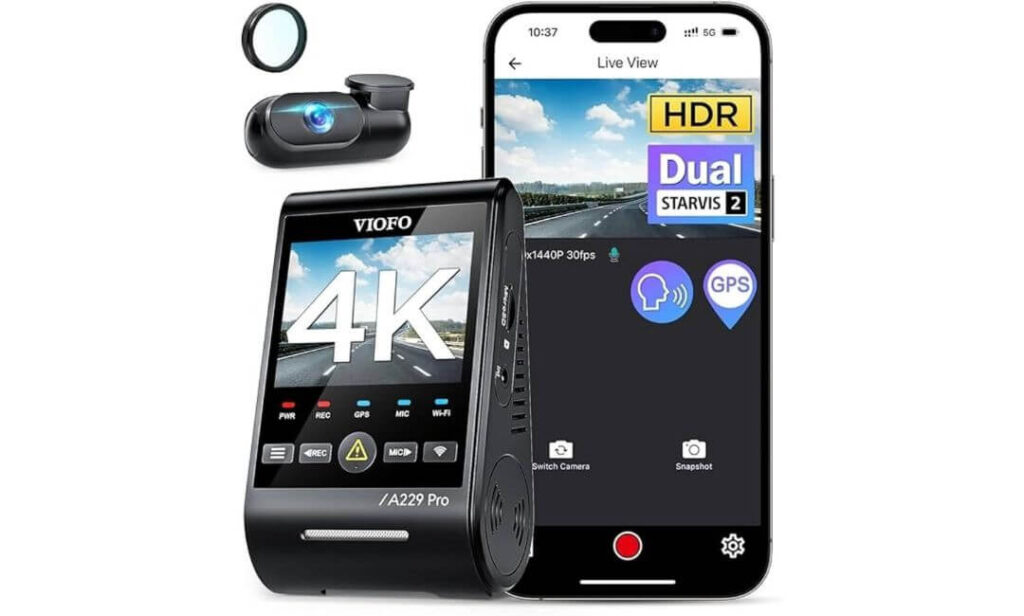
#1. VIOFO A229 Pro 4K HDR Dash Cam
Best 4K Dash Cam for Honda Passport Owners Who Want Premium Night Vision, Front and Rear Coverage, and Long-Term Reliability
#2. Fitcamx Front 4K + Rear 1080P Dash Cam
Best OEM-Style Honda Passport Dash Cam With Factory-Look Installation, Hidden Wiring, and Seamless Daily Use
#3. REDTIGER F7NP 4K Dash Cam
Best Value Dash Cam for Honda Passport Drivers Looking for STARVIS 2 Performance, GPS Tracking, and Strong Video Quality
#4. COOLCRAZY 4K STARVIS Dash Cam
Best Budget-Friendly Front and Rear Dash Cam for Honda Passport With WiFi Connectivity and Parking Mode Protection
#5. WOLFBOX i07 3-Channel Dash Cam
Best Honda Passport Dash Camera for Cabin Monitoring, Road Trips, and Drivers Who Want Front, Interior, and Rear Recording
Expert Tip for Honda Passport Owners
If you’re upgrading from an older dash cam, don’t get distracted by flashy marketing claims or ultra-high resolution numbers alone. On a vehicle like the Honda Passport, nighttime license plate readability, parking protection reliability, and heat resistance during long summer drives matter far more than an extra megapixel or two. A dash cam that captures a clear plate at midnight is infinitely more valuable than one that simply records sharper trees and road signs during daylight. That’s why several of the picks below earned their place because of their real-world consistency, not because they looked impressive on a spec sheet.
How We Chose These Dash Cams for the Honda Passport
Most “best dash cam” lists are built by sorting products by ratings, price, or popularity. That’s not how this list was put together.
The Honda Passport presents a unique set of challenges and advantages that smaller crossovers don’t. Its higher ride height creates different viewing angles. Its large windshield can expose electronics to significant heat during summer months. TrailSport owners often spend time on gravel roads, remote highways, and poorly lit routes where camera performance matters most. Because of that, every recommendation was evaluated through the lens of actual Passport ownership rather than generic dash cam shopping.
The first thing we looked at was image quality where it actually matters. Many cameras produce excellent daytime footage. Far fewer can consistently capture license plates during rain, highway speeds, or low-light conditions. Products equipped with Sony STARVIS 2 sensors, advanced HDR processing, and proven night performance naturally moved to the top of the list because those are the situations where footage becomes evidence rather than just video.
Next came parking protection, which is often overlooked until the day it’s needed. Passport owners frequently use their SUVs for travel, outdoor activities, shopping trips, and extended parking situations. We prioritized models offering dependable parking monitoring, impact detection, and continuous protection features rather than cameras that only perform while the engine is running.
We also considered installation experience and long-term ownership satisfaction. A great dash cam should feel like part of the vehicle, not an accessory you’re constantly adjusting. That’s one reason the Fitcamx earned a place in this guide. Its factory-style integration solves a problem many Passport owners care about: maintaining a clean interior without visible wiring or bulky windshield hardware.
Another factor was wireless usability. A surprising number of dash cams advertise WiFi but make footage retrieval frustrating. We favored cameras with fast wireless transfers, stable mobile apps, and GPS functionality because footage is only useful if owners can access it quickly when they need it.
Finally, we looked at who each camera serves best. Not every Honda Passport owner has the same priorities. Some want the absolute best video quality available today. Others want an OEM appearance, maximum value, or even interior cabin recording for family travel and rideshare use. Instead of filling the list with nearly identical products, we selected models that solve different real-world needs while still meeting a high standard for reliability, video performance, and everyday practicality.
The result is a shortlist of cameras that each earned their position for a specific reason—not because they were new, heavily advertised, or simply popular. For Honda Passport owners, these are the models that currently make the strongest case for their place on the windshield.
#1. VIOFO A229 Pro 4K HDR Dash Cam
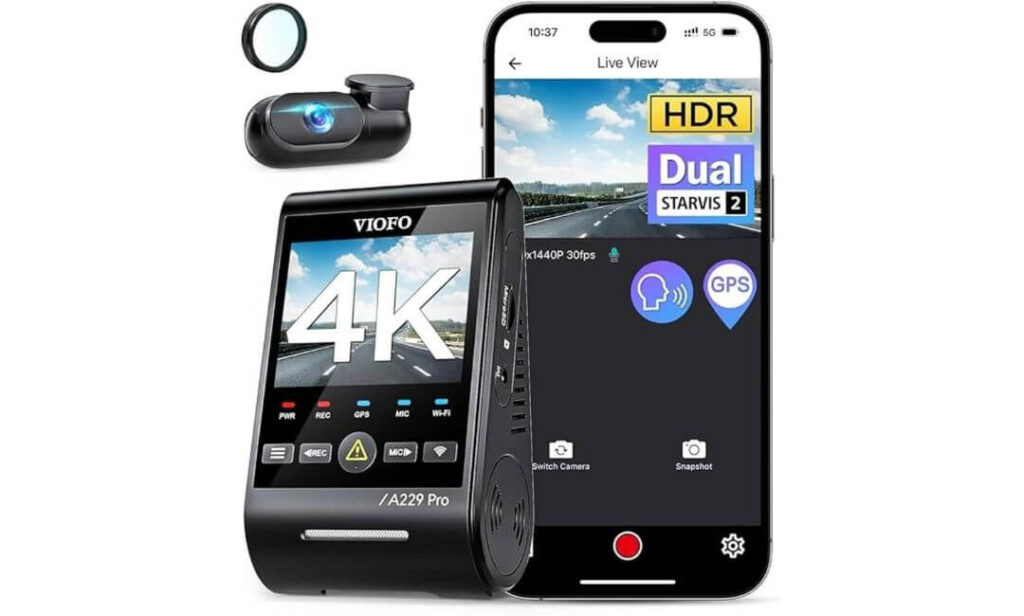
Quick Specs:
- 4K Front + 2K Rear Recording
- Dual Sony STARVIS 2 Sensors (IMX678 + IMX675)
- HDR on Both Front and Rear Cameras
- 5GHz WiFi with App Control
- Quad-Satellite GPS Tracking
- Voice Commands and Voice Alerts
- Buffered Parking Mode Support
- Included CPL Filter for Glare Reduction
- Supercapacitor Design for Extreme Temperatures
- 140° Front Viewing Angle
There’s a reason this model kept rising to the top every time we compared footage instead of marketing claims. The difference becomes obvious after sunset. While many cameras can produce sharp-looking daytime videos, this setup continues pulling usable detail from dark roads, poorly lit intersections, and rainy highway drives where cheaper sensors usually fall apart.
The real story here is the combination of the STARVIS 2 IMX678 front sensor and STARVIS 2 IMX675 rear sensor. That pairing gives it an advantage where most Passport owners actually need it: capturing license plates before they’re gone. Whether you’re driving through city traffic, interstate construction zones, or mountain roads after dark, the HDR processing works hard to keep bright headlights from washing out critical details. That’s something you appreciate the first time you review footage rather than the first time you read a spec sheet.
Another reason this model earned the top spot is that it feels built for long-term ownership rather than short-term excitement. The included CPL filter reduces windshield reflections, the supercapacitor handles extreme summer heat better than battery-powered alternatives, and the 5GHz WiFi makes transferring large 4K clips surprisingly painless. Add voice commands, accurate GPS logging, and buffered parking protection, and it starts feeling less like an accessory and more like part of the vehicle itself.
(If your goal is buying one dash cam and forgetting about upgrades for years, this is the model that makes the strongest case for itself.)
What Stood Out During Evaluation
- Outstanding nighttime plate capture compared with most dual-channel competitors
- HDR works on both cameras, not just the front lens
- STARVIS 2 hardware delivers genuinely useful low-light footage
- Fast 5GHz wireless transfers save time when footage is needed quickly
- Supercapacitor design is better suited for long-term SUV ownership
- Buffered parking recording provides more context before an incident occurs
Worth Knowing Before You Buy
- A memory card is not included, so you’ll need to add one separately.
How Well It Matches the Honda Passport
The Honda Passport’s wide windshield and elevated driving position allow this system to fully utilize its 4K front camera without creating blind spots or obstructing visibility. The included 6-meter rear cable is long enough to route cleanly through the Passport’s cabin while keeping wiring hidden behind trim panels.
For owners who regularly travel at highway speeds, take road trips, or spend time on darker rural routes, the Passport’s size and driving characteristics pair exceptionally well with the strengths of this camera. The combination simply makes sense for the way most Passport owners use their vehicles.
The Insider Pro-Tip
Many buyers focus entirely on daytime sample footage because that’s what most product pages showcase. The smarter move is judging a camera by how it handles reflective license plates at night, on wet pavement, with oncoming headlights in the frame. That’s where the strongest systems separate themselves from the average ones.
With the Honda Passport, the extra windshield height often gives cameras a better viewing angle than smaller crossovers. Pairing that advantage with a dual STARVIS 2 setup means you’re not just recording your drive—you’re maximizing the chance that the footage remains useful when it actually matters.
#2. Fitcamx Front 4K + Rear 1080P Dash Cam
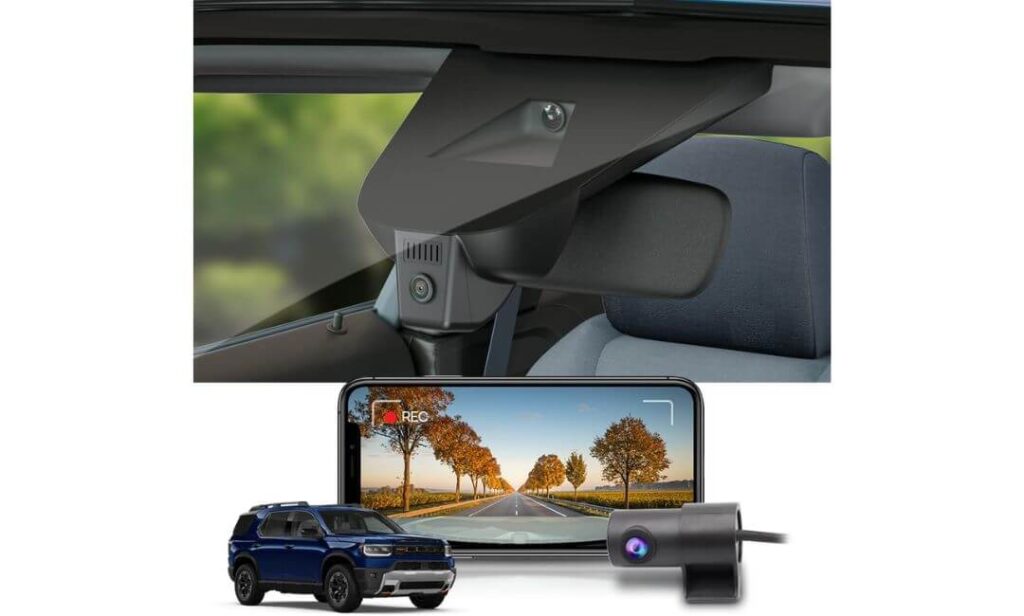
Quick Specs:
- Vehicle-Specific Design for Honda Passport
- 4K Front + 1080P Rear Recording
- Factory-Style OEM Appearance
- 170° Front + 140° Rear Viewing Angles
- Built-In WiFi with Mobile App Access
- WDR Enhanced Night Recording
- Loop Recording Technology
- Collision-Activated G-Sensor Protection
- Includes 128GB Memory Card
- Hidden Factory-Look Installation
Here’s something that rarely gets talked about in dash cam reviews: not everyone wants another gadget hanging from their windshield.
Some Honda Passport owners care just as much about keeping the cabin looking factory-original as they do about recording video. That’s where this setup immediately separates itself from almost everything else on the market. Once installed, it blends into the vehicle in a way most universal cameras simply can’t. There are no dangling power cables, no bulky display hanging below the mirror, and no aftermarket appearance distracting from an otherwise clean interior.
The recording performance backs up the design. Up front, you’re getting 4K resolution paired with a 170-degree viewing angle, while the rear camera captures 1080P footage through a 140-degree lens. Combined with WDR processing, the system does a respectable job balancing bright daylight, tunnels, parking garages, and nighttime driving conditions. More importantly, it delivers the type of coverage most Passport owners actually need without turning the dashboard into a technology showcase.
The ownership experience is another reason this camera earned such a high position on the list. WiFi connectivity works through the Fitcamx app, footage can be viewed directly from a phone, and a 128GB memory card comes included right in the box. There is no immediate need to purchase additional storage, which is refreshing at a time when many premium cameras require multiple add-on purchases before they’re fully operational.
(If your ideal dash cam is one passengers never notice, this is arguably the cleanest solution available for Passport owners.)
Highlights That Earned It a Place on This List
- Factory-style appearance looks integrated rather than added later
- No visible dangling wires across the windshield area
- Wide front and rear viewing coverage for everyday driving
- Includes a 128GB memory card from day one
- App access makes downloading footage straightforward
- Preserves the clean interior design many Passport owners appreciate
A Small Detail Worth Keeping in Mind
- This camera prioritizes OEM-style integration over advanced enthusiast features such as buffered parking recording found on some premium universal systems.
Why Honda Passport Owners May Appreciate It More Than Universal Alternatives
Unlike traditional dash cams that are designed to fit hundreds of vehicles, this one was created around the Honda Passport itself. That changes the ownership experience more than most people expect.
The biggest advantage isn’t necessarily the video quality—it’s the fact that everything feels intentional. The camera follows the design language of the vehicle, maintains a cleaner windshield area, and creates an installation that looks closer to factory equipment than aftermarket hardware. For many Passport owners, that alone is enough to justify choosing it over a more generic alternative.
The Insider Pro-Tip
Most buyers spend hours comparing image sensors, frame rates, and video resolutions. Very few ask a simpler question: “Will I still be happy looking at this camera every day two years from now?”
That’s where factory-style systems often win. A dash cam only provides value when it stays installed permanently. The easier it is to live with, the more likely it remains in place when an important event actually happens. For Honda Passport owners who value a clean cabin and OEM-level appearance, that advantage tends to become more noticeable with every mile driven.
#3. REDTIGER F7NP 4K Dash Cam
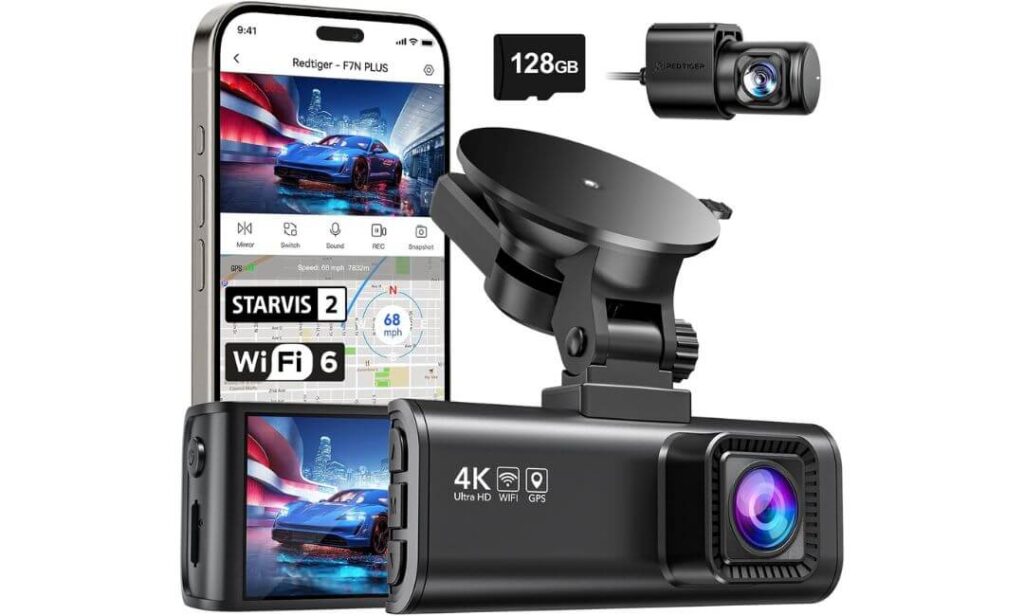
Quick Specs:
- 4K Front + 1080P Rear Recording
- Sony STARVIS 2 Imaging Sensor
- 170° Front + 140° Rear Coverage
- 5.8GHz High-Speed WiFi Connectivity
- GPS Route, Speed, and Location Logging
- HDR + WDR Enhanced Night Recording
- 24-Hour Parking Monitoring Support
- Supercapacitor Heat-Resistant Design
- Included 128GB Memory Card
- Built-In Display and Mobile App Access
Some dash cams win attention because they’re packed with premium features. Others win because they’re inexpensive. This one sits in a very interesting middle ground where the feature list feels surprisingly close to cameras costing significantly more.
The first thing that stands out is the overall balance. You’re getting 4K front recording, a STARVIS 2 sensor, HDR and WDR image processing, built-in GPS, high-speed 5.8GHz WiFi, and a 128GB memory card already included. On paper, that’s impressive. On the road, it’s even more impressive because everything works together in a way that feels refined rather than overloaded. The footage remains sharp during bright afternoon drives, while the STARVIS 2 hardware helps maintain detail when street lighting becomes less predictable.
Another reason this model earned a spot in our recommendations is how easy it is to live with day after day. The smartphone app allows fast video retrieval, downloads can reach speeds of up to 20MB/s, and the included memory card means you’re not immediately adding accessories to your shopping cart before the camera is usable. For many Honda Passport owners, that simplicity adds genuine value.
What really elevates the experience, though, is the attention paid to long-term durability. Instead of relying on a traditional lithium battery, the system uses a supercapacitor design that handles heat far better during hot summers and extended parking situations. Combined with GPS tracking, parking monitoring support, and dependable video quality, it delivers the type of ownership experience people typically expect from more expensive options.
(For buyers looking for the sweet spot between premium performance and practical value, this is one of the strongest arguments in the entire category.)
Reasons It Earned a Spot in This Guide
- STARVIS 2 sensor improves low-light performance where it matters most
- 4K front recording captures impressive daytime detail
- Fast 5.8GHz WiFi noticeably reduces waiting time for video transfers
- GPS tracking adds useful location and speed data to recordings
- Includes a 128GB memory card right out of the box
- Supercapacitor construction is ideal for long-term SUV ownership
A Small Ownership Detail to Consider
- To unlock continuous parking monitoring features, a hardwire kit is required, which is common for cameras in this category.
Why It Makes Sense for Honda Passport Drivers
The Honda Passport is often used as a road-trip vehicle, family SUV, daily commuter, and weekend adventure machine all at once. That means many owners need a dash cam capable of handling a little bit of everything rather than excelling in just one area.
This setup matches that personality surprisingly well. The wide 170-degree front field of view captures a broad perspective from the Passport’s elevated driving position, while the long rear camera cable makes installation straightforward throughout the cabin. Whether you’re navigating city traffic, interstate highways, or backroads, the camera feels well suited to the Passport’s real-world role.
The Insider Pro-Tip
A lot of buyers chase the highest resolution number they can find. Experienced dash cam owners often focus on something else: how quickly they can access footage when they actually need it.
The reality is that the best recording in the world doesn’t help much if transferring a file becomes frustrating. That’s why features like fast WiFi, reliable app support, and included storage often become more valuable after months of ownership than they seem on day one. In the Honda Passport, where road trips and longer drives are common, that convenience tends to pay for itself over time.
#4. COOLCRAZY 4K STARVIS Dash Cam
Quick Specs:
- 4K Front + 1080P Rear Recording
- Sony STARVIS Imaging Sensor
- 5GHz WiFi with Mobile App Access
- Built-In GPS Tracking
- 170° Front + 150° Rear Coverage
- HDR and WDR Night Enhancement
- Included 64GB Memory Card
- Loop Recording System
- G-Sensor Impact Detection
- 24-Hour Parking Mode Support
Every so often, a dash cam lands in that sweet spot where you start questioning whether spending significantly more actually gets you much more. That’s the feeling this model creates.
On the surface, it checks nearly every box Honda Passport owners typically ask about: 4K front recording, rear camera coverage, GPS tracking, smartphone connectivity, STARVIS imaging technology, and parking monitoring support. But what makes it stand out isn’t any single feature. It’s the fact that those features come together without feeling like major compromises were made to reach a lower price point.
The driving experience feels surprisingly mature. During daylight hours, the 4K front camera captures excellent road detail, while the wide 170-degree front lens helps take advantage of the Passport’s commanding seating position. After dark, the combination of STARVIS technology plus HDR and WDR image processing helps maintain clarity around headlights, streetlights, and reflective road signs. No budget-oriented camera completely rewrites the laws of physics at night, but this one performs far better than many drivers expect.
The ownership side is equally appealing. The included 64GB memory card, built-in GPS, and 5GHz WiFi connectivity mean most buyers can install it and start recording immediately. There are fewer add-ons, fewer extra purchases, and fewer surprises after unboxing. For many Passport owners, that simplicity becomes part of the value.
(Sometimes the smartest purchase isn’t the most expensive option—it’s the one that quietly covers everything most drivers genuinely need.)
What Helped It Earn a Place on This List
- Strong overall feature set for the price category
- STARVIS sensor improves low-light recording performance
- Wide front and rear coverage suits larger SUVs well
- GPS tracking is included instead of being sold separately
- 64GB memory card included from the start
- Fast WiFi transfers simplify video downloads and sharing
A Helpful Detail to Keep in Mind
- Drivers who frequently travel on very dark rural roads may still notice stronger nighttime performance from premium dual STARVIS 2 systems higher on this list.
Why It Works Well in the Honda Passport
The Honda Passport’s elevated driving position naturally gives dash cams a wider view of the road ahead. Pairing that with a 170-degree front lens creates broad coverage that’s particularly useful in city traffic, busy intersections, and highway driving situations.
Installation is also straightforward thanks to the long rear camera cable and universal mounting setup. Whether the Passport is being used for commuting, family trips, or weekend adventures, the overall package feels appropriately matched to the vehicle’s everyday mission.
The Insider Pro-Tip
One of the most common mistakes buyers make is paying for capabilities they’ll never actually use. Features sound impressive on a product page, but real ownership often comes down to three simple questions: Does the footage look clear? Is the camera reliable? Can I access recordings quickly when needed?
That’s where balanced products like this tend to shine. Instead of chasing headline-grabbing specifications, they focus on covering the fundamentals exceptionally well. For many Honda Passport owners, that approach ends up delivering more long-term satisfaction than constantly wondering whether a more expensive camera would have changed anything important.
#5. WOLFBOX i07 3-Channel Dash Cam
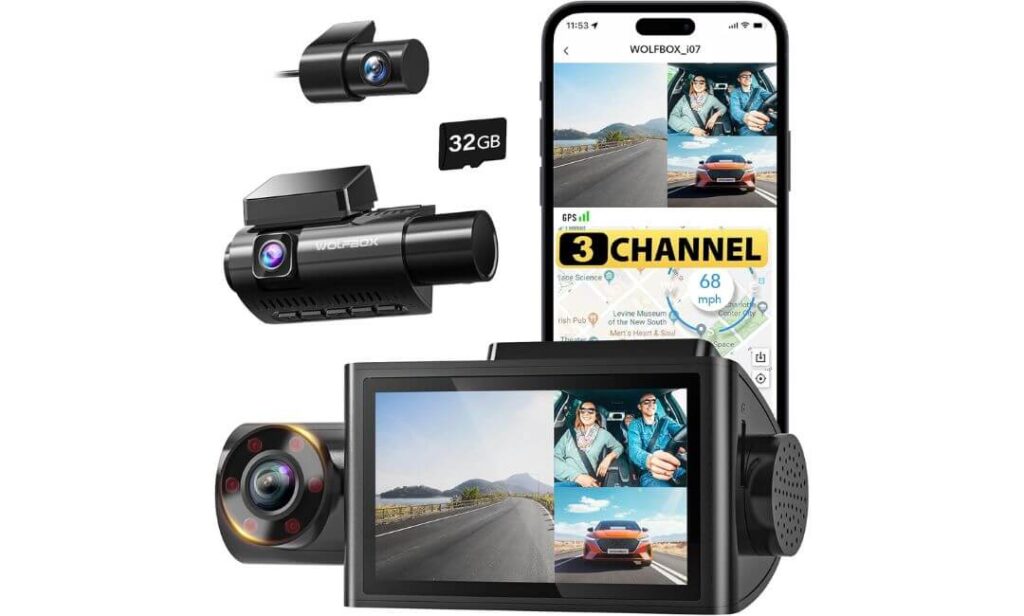
Quick Specs:
- Triple-Camera Recording System
- 4K Front + 1080P Interior + 1080P Rear Video
- 150° Front, 160° Cabin, 155° Rear Coverage
- Built-In GPS Tracking
- Built-In WiFi and Mobile App Access
- Infrared Cabin Night Vision
- 3-Inch LCD Display
- Supercapacitor Heat-Resistant Design
- Included 32GB Memory Card
- Multi-Mode Parking Protection
By the time most buyers reach the fifth recommendation on a list, they’re usually looking for something different rather than simply another version of the same product. That’s exactly where this setup earns its place.
Unlike the other cameras in this guide, this isn’t just a front-and-rear recording system. It adds a dedicated cabin camera, creating a true three-channel setup that records the road ahead, the interior of the vehicle, and what’s happening behind it simultaneously. For Honda Passport owners who regularly travel with family, transport pets, carry expensive gear, or simply want the most complete record of every trip, that extra perspective can be surprisingly valuable.
The cabin camera is where things get particularly interesting. Equipped with six infrared LEDs, it continues recording clear interior footage even when the cabin is completely dark. Whether you’re driving before sunrise, returning from a late-night road trip, or parked in a poorly lit area, the infrared system helps preserve details that standard dash cams simply can’t capture. Meanwhile, the front camera records in 4K while the rear unit handles 1080P footage, creating full-vehicle coverage from virtually every angle.
Another reason this camera stood out during evaluation is the sheer amount of visibility it provides. The 150-degree front lens, 160-degree interior lens, and 155-degree rear lens combine to create an impressive field of view. In a spacious SUV like the Honda Passport, that wide-angle approach works particularly well because it takes advantage of the vehicle’s larger cabin and expansive glass area.
(If your goal is documenting everything that happens around your vehicle—not just what’s in front of it—this is easily the most comprehensive option in the lineup.)
What Helped It Stand Out From the Rest
- Triple-camera coverage creates a more complete record of every drive
- Infrared cabin recording works effectively in near-total darkness
- Excellent option for family travel and long-distance road trips
- GPS and WiFi are built in rather than sold as upgrades
- Wide viewing angles minimize blind spots around the vehicle
- Supercapacitor design improves long-term durability
A Practical Consideration Before Purchasing
- Most Passport owners won’t need interior recording every day, which means some buyers may prefer a simpler dual-camera setup if cabin coverage isn’t important to them.
Why It Works Surprisingly Well in the Honda Passport
The Honda Passport’s roomy interior is one of the reasons this camera feels so natural in the vehicle. Smaller crossovers often limit the usefulness of interior cameras because the cabin space is compact. The Passport is different.
The larger cabin allows the interior lens to capture a broader view of passengers, cargo areas, and overall cabin activity. Combined with the long rear camera cable and straightforward installation process, the system feels particularly well suited to owners who use their Passport for family trips, outdoor adventures, or extended travel where additional coverage can provide extra peace of mind.
The Insider Pro-Tip
Most drivers assume the most important footage always comes from the front camera. In reality, some of the most useful recordings happen inside the vehicle or behind it. Road-rage incidents, parking lot disputes, unexpected passenger situations, rear-end collisions, and even cargo-related claims often involve angles traditional dash cams never capture.
That’s why three-channel systems continue gaining popularity among experienced owners. The value isn’t necessarily that you’ll need the extra footage tomorrow. The value is knowing that if something unusual happens, you’re much less likely to be left wondering what the camera missed. For Honda Passport owners who prefer maximum visibility rather than minimum hardware, that’s a compelling advantage.
Best Honda Passport Dash Cams Compared: Features, Coverage, and Real-World Value at a Glance
| Dash Cam | Recording Setup | Night Driving Strength | GPS / WiFi | Parking Protection | Included Storage | Best Match For |
|---|---|---|---|---|---|---|
|
VIOFO A229 Pro
EDITOR’S CHOICE
|
4K Front + 2K Rear Dual STARVIS 2 Sensors |
Exceptional License Plate Clarity |
5GHz WiFi Quad-Mode GPS |
Buffered Event Recording Multiple Parking Modes |
Card Required Separately | Drivers wanting the strongest all-around performance without compromises |
|
Fitcamx OEM Style
FACTORY LOOK PICK
|
4K Front + 1080P Rear | Very Good WDR Performance | WiFi App Access | Impact Recording | 128GB Included | Honda Passport owners who want a clean factory-style installation |
|
REDTIGER F7NP
BEST VALUE
|
4K Front + 1080P Rear STARVIS 2 Sensor |
Excellent for the Price |
5.8GHz WiFi Built-In GPS |
24-Hour Monitoring Support | 128GB Included | Buyers looking for premium features without paying premium money |
|
COOLCRAZY 4K STARVIS
SMART BUY
|
4K Front + 1080P Rear | Strong Everyday Visibility |
5GHz WiFi GPS Included |
Parking Mode Support | 64GB Included | Budget-conscious Passport owners wanting a complete feature set |
|
WOLFBOX i07
MOST COVERAGE
|
4K Front + Interior + Rear Triple Camera System |
IR Cabin Night Vision |
WiFi GPS Included |
Multi-Mode Parking Protection | 32GB Included | Families, road-trippers, and drivers wanting complete cabin coverage |
Honda Passport Dash Cam Installation Tips Most Owners Learn Too Late
One of the biggest mistakes Honda Passport owners make is spending hours researching the perfect dash cam, only to rush through the installation. The reality is that even the best camera on the market can become frustrating if the wiring is visible, the parking mode is configured incorrectly, or a cable interferes with an airbag deployment path. The good news is that the Passport is one of the easier midsize SUVs to install a dash cam in thanks to its spacious interior, generous trim gaps, and straightforward cable-routing options.
Choosing the Right Power Setup Before Installation
Before removing a single trim panel, decide how you want the camera to operate.
If your goal is simple driving coverage, using the included 12V power adapter is usually sufficient. The camera will start recording when the vehicle starts and shut down when the ignition is turned off.
However, many Passport owners eventually want parking protection. That’s where things become more important.
A hardwire kit allows the dash cam to receive power even when the SUV is parked. This enables features such as impact detection, buffered recording, event detection, and time-lapse monitoring depending on the camera you choose. Models such as the VIOFO A229 Pro, REDTIGER F7NP, and WOLFBOX i07 benefit significantly from hardwire installations because some of their most valuable security features only become available when constant power is supplied.
For owners who frequently leave the vehicle parked at airports, trailheads, shopping centers, or hotel parking lots, a proper hardwire setup is often worth the extra effort.
The Cleanest Cable Routing Method for Honda Passport Models
The cleanest installation typically begins near the rearview mirror area.
Start by mounting the front camera behind or slightly to the passenger side of the mirror assembly. This position minimizes driver distraction while maintaining an unobstructed view of the road.
From there, route the power cable into the headliner. The Passport provides enough clearance around the upper windshield trim that most dash cam cables can be tucked away without modification. Continue along the headliner toward the passenger-side A-pillar.
At this stage, patience matters more than force.
Instead of pushing cables deep behind trim panels blindly, gently guide them alongside factory wiring paths. Honda’s interior panels fit tightly, and forcing cables into place often creates rattles that become annoying weeks later.
For rear-camera-equipped systems, continue routing through the headliner, along the upper door weather stripping, and toward the rear hatch area. Most of the cameras featured in this guide include sufficiently long rear-camera cables for the Passport’s cabin length, making routing relatively straightforward.
Preserving Cabin Appearance Without Creating Future Problems
One reason many owners choose vehicles like the Honda Passport is because of the clean, well-designed interior. A poorly installed dash cam can quickly ruin that experience.
Avoid leaving excess cable bundled near the mirror assembly or hanging below the dashboard. Extra wire should be secured behind trim panels using automotive-grade fabric tape or cable clips designed for interior use.
If you’re installing an OEM-style system such as the Fitcamx, take extra time aligning the housing during installation. The biggest advantage of factory-style cameras is their seamless appearance, and careful alignment helps preserve that benefit.
Another small detail worth remembering is windshield cleaning. Before attaching any adhesive mount, thoroughly clean the glass with alcohol and allow it to dry completely. Many mounting failures that get blamed on the camera are actually caused by contaminants trapped between the adhesive and the windshield.
Understanding Airbag Zones Before Running Any Wire
This is the installation detail most online guides barely mention.
The Honda Passport uses curtain airbags that deploy from the roofline area. Any dash cam wiring routed incorrectly near the A-pillars or roof rails can potentially interfere with deployment during a collision.
The safest approach is to follow factory wiring channels whenever possible and avoid tightly securing cables directly across airbag deployment zones. If you’re uncertain about routing near an airbag location, consult the owner’s manual or installation diagrams before continuing.
A clean installation should never come at the expense of safety.
Hardwire Kit vs. External Battery Pack: Which Makes More Sense?
Both solutions work, but they serve different types of owners.
A hardwire kit is typically the most affordable and straightforward solution. It connects directly to the vehicle’s fuse box and supplies continuous power while monitoring battery voltage to help prevent excessive battery drain.
An external battery pack, on the other hand, stores energy separately and powers the dash cam without drawing directly from the vehicle’s starting battery during parking sessions. This option is especially attractive for Passport owners who frequently leave their SUV parked for extended periods.
For most daily drivers, a quality hardwire kit is more than sufficient. For frequent travelers or long-term parking situations, an external battery solution can provide additional peace of mind.
Installation Mistakes That Cause the Most Regret
Several installation errors appear repeatedly among first-time dash cam owners.
- Mounting the camera too low on the windshield, creating unnecessary visual obstruction.
- Routing cables without testing camera positioning first.
- Forgetting to format the memory card before use.
- Leaving excess wiring unsecured behind trim panels.
- Ignoring parking mode voltage settings after installing a hardwire kit.
- Using generic low-quality memory cards in high-resolution 4K cameras.
- Positioning rear cameras where cargo or luggage frequently blocks the lens.
None of these mistakes are difficult to avoid, but they can significantly affect long-term satisfaction.
A Final Thought Before You Start
The best dash cam installations are the ones you stop noticing after a week.
When properly installed, the camera should feel like a natural part of the Honda Passport rather than an aftermarket accessory. There should be no dangling cables, no windshield distractions, no rattles from hidden wiring, and no daily interaction required beyond occasional footage reviews.
That’s ultimately the goal. Whether you choose the VIOFO for maximum image quality, the Fitcamx for OEM integration, the REDTIGER for value, the COOLCRAZY for affordability, or the WOLFBOX for complete coverage, taking the time to install it correctly will have a bigger impact on your ownership experience than most specification differences ever will.
Understanding the Features That Actually Matter in a Honda Passport Dash Cam
One of the biggest reasons people end up disappointed with a dash cam purchase is that they shop by marketing terms instead of understanding what those terms actually mean in daily driving. Nearly every camera today advertises 4K recording, night vision, parking mode, GPS, and WiFi, but those labels alone don’t tell the full story.
The Honda Passport is a larger SUV with a high seating position, a broad windshield, and enough capability to spend time everywhere from crowded city streets to remote mountain roads. That means the features that matter most are often different from what works in a compact commuter car. Understanding the technology behind the specifications helps separate meaningful upgrades from simple marketing language.
Why 4K HDR Recording Matters More Than Resolution Numbers Alone
Most buyers immediately focus on the “4K” part of a dash cam specification sheet, and that’s understandable. Higher resolution generally means more detail.
What often gets overlooked is the HDR portion.
HDR, or High Dynamic Range, helps a camera balance bright and dark areas within the same scene. Without HDR, a dash cam might capture a perfectly exposed road while turning oncoming headlights into large white blobs. It might also preserve bright daylight conditions while losing detail in shadows beneath overpasses or parking structures.
In a Honda Passport, this becomes especially important because of the elevated driving position and large windshield area. The camera often encounters strong sunlight, reflective vehicles, bright LED headlights, and changing lighting conditions throughout a drive.
That’s one reason cameras such as the VIOFO A229 Pro stand out. They combine high-resolution recording with advanced HDR processing, allowing details to remain visible where lesser systems often struggle.
The goal isn’t simply sharper video. The goal is footage that remains usable when you actually need it.
Night Vision Performance: The Difference Between Seeing and Recording
Night vision is probably the most misunderstood feature in the dash cam industry.
Many buyers assume night vision means the image will look bright. In reality, what matters is how much useful detail the camera can preserve after dark.
The biggest factor is the image sensor itself.
Premium sensors such as Sony STARVIS and STARVIS 2 technology gather more light while reducing noise and grain. That translates into better visibility of road signs, lane markings, vehicle details, and license plates during nighttime driving.
This matters particularly for Honda Passport owners because the SUV is often used for road trips, outdoor recreation, and rural travel where lighting conditions are less predictable than in urban environments.
When comparing cameras, focus less on marketing screenshots and more on sensor quality. A well-tuned STARVIS-based system often outperforms a higher-resolution camera using a weaker sensor.
Front and Rear Dash Cam Coverage for the Honda Passport
A front-only dash cam can provide valuable evidence, but a front-and-rear system creates a much more complete record of what happens around the vehicle.
The Passport’s size makes rear coverage especially useful.
Parking lot incidents, rear-end collisions, and hit-and-run situations frequently occur behind the vehicle. Without a rear camera, that perspective simply doesn’t exist.
Another advantage is balance. A good dual-camera setup captures enough detail from both directions without compromising front image quality.
Windshield placement also matters. Because the Passport offers generous windshield space behind the rearview mirror, most cameras can be positioned high enough to remain discreet while still maintaining excellent visibility.
Adding a CPL filter, such as the one included with the VIOFO A229 Pro, can further reduce dashboard reflections and windshield glare, especially during bright daytime driving.
Parking Mode: The Feature Most Owners Appreciate After an Incident
Most accidents don’t happen while you’re driving.
Many occur when the vehicle is parked.
Shopping center parking lots, office complexes, airports, hotels, and trailhead parking areas all create opportunities for damage that occurs while no one is inside the vehicle.
That’s why parking mode has become one of the most valuable modern dash cam features.
Different systems approach it differently.
Some cameras activate when motion is detected near the vehicle. Others begin recording when an impact triggers the G-sensor. More advanced systems offer buffered recording that saves footage from before and after an event occurs.
Time-lapse recording is another useful option. Instead of continuously recording full-resolution video, the camera captures footage at lower frame rates, preserving storage space while maintaining extended coverage.
For many Passport owners, parking mode eventually becomes the feature they value most.
GPS Tracking: More Useful Than Most People Expect
GPS isn’t just about displaying a location on a map.
A good GPS-enabled dash cam records vehicle speed, travel direction, timestamps, and route information directly alongside video footage.
When reviewing footage later, this additional information can provide important context that video alone cannot.
For example, GPS data can show where an event occurred, confirm travel speed, verify route history, and simplify trip playback.
The systems featured in this guide take different approaches. Some use standard GPS logging, while others, such as the VIOFO A229 Pro, incorporate multiple satellite networks to improve positioning accuracy and stability.
For daily commuting, road trips, and documentation purposes, GPS often proves more valuable than buyers initially expect.
Why WiFi Connectivity Has Become a Must-Have Feature
There was a time when accessing dash cam footage required removing a memory card and connecting it to a computer.
Most drivers no longer want to deal with that.
Modern WiFi-enabled dash cams allow footage to be reviewed, downloaded, and shared directly from a smartphone. Settings can often be adjusted through a companion app, reducing the need to interact with the camera itself.
The best systems go further by supporting firmware updates through the app, helping improve performance and add features over time.
This is particularly valuable for Honda Passport owners who spend long hours traveling. If footage needs to be reviewed after an incident or shared quickly, direct wireless access becomes far more convenient than removing storage cards on the side of the road.
What a Driving Recorder Really Means in Everyday Ownership
The term “driving recorder” sounds technical, but in practical terms, it simply refers to a camera system that continuously documents what happens around your vehicle.
A truly effective driving recorder does more than record video.
It captures clear footage in daylight and darkness. It stores important clips automatically during incidents. It provides location and speed data when needed. It protects the vehicle while parked. It allows footage to be retrieved quickly. Most importantly, it remains reliable months and years after installation.
That’s why the best driving recorders aren’t necessarily the ones with the longest feature lists. They’re the ones that consistently deliver useful footage regardless of weather, lighting conditions, or driving environment.
For Honda Passport owners, that’s ultimately the goal. Whether you’re commuting to work, crossing multiple states on a road trip, exploring remote trails, or simply parked at a grocery store, the right dash cam should quietly document everything without demanding attention. When the moment comes that footage is needed, it should simply be there.
Real-World Honda Passport Driving Situations Where a Dash Cam Pays for Itself
It’s easy to think of a dash cam as something you install and hopefully never need. The reality is very different. Most owners who eventually become strong advocates for dash cams weren’t convinced by specifications, resolutions, or feature lists. They became believers after a single situation where having video footage saved time, protected them from liability, or answered questions that would have otherwise turned into a frustrating “your word against theirs” conversation.
The Honda Passport is particularly interesting in this discussion because it isn’t typically used for just one purpose. It serves as a commuter vehicle during the week, a family hauler on weekends, and a road-trip machine whenever adventure calls. That versatility creates situations where a quality dash cam can provide value far beyond simple accident recording.
Long Highway Drives Reveal the Difference Between Good and Great Dash Cams
Highway driving places unique demands on a dash cam.
Vehicles close distance quickly. Lane changes happen at higher speeds. Lighting conditions constantly change as drivers move through open highways, tunnels, overpasses, storms, and sunset transitions.
This is where higher-end cameras begin separating themselves from basic models.
For example, systems such as the VIOFO A229 Pro and REDTIGER F7NP combine high-resolution recording with advanced sensor technology, making it easier to preserve details that can disappear at highway speeds. A vehicle passing at 75 mph leaves very little time to capture identifying information. The ability to retain sharper detail becomes much more valuable than many buyers initially realize.
Long-distance travelers also benefit from GPS logging. Being able to review location data, travel routes, timestamps, and speed information alongside footage can provide useful context if an incident occurs hundreds of miles from home.
For Passport owners who regularly cover serious mileage, dash cams become less of an accessory and more of a travel companion quietly documenting every mile.
Daily City Commuting Creates Risks Most Drivers Never Expect
Many people assume the greatest danger comes from high-speed driving.
In reality, some of the most common insurance disputes occur during low-speed city driving.
Busy intersections, sudden lane changes, distracted drivers, parking lot exits, red-light runners, and stop-and-go traffic create countless opportunities for misunderstandings after an incident.
This is where front-and-rear coverage becomes especially valuable.
A front camera may show what happened ahead, but a rear camera often provides the missing context. If another driver claims a different sequence of events, dual-camera footage can help establish a clearer picture of what actually occurred.
The Honda Passport’s elevated seating position already provides drivers with excellent visibility. Pairing that advantage with a quality front-and-rear dash cam creates a remarkably comprehensive view of daily driving conditions.
Remote Routes and Outdoor Adventures Demand Better Low-Light Performance
One reason many people choose a Honda Passport over a traditional crossover is its willingness to leave the pavement behind.
Camping trips, mountain roads, national parks, remote trailheads, and backcountry routes often place drivers in environments where lighting conditions become far more challenging than city streets.
These are exactly the situations where sensor quality matters most.
A camera equipped with STARVIS or STARVIS 2 technology can often reveal details that lesser systems lose entirely. Wildlife crossings, roadside hazards, approaching vehicles, and unexpected road conditions become easier to document when the camera can effectively manage low-light environments.
This isn’t just about creating prettier footage. It’s about preserving useful information when visibility becomes limited and unexpected events are more likely to occur.
Why Parking Surveillance Matters More Than Most Owners Realize
Many people purchase a dash cam expecting it to help during a collision.
Then they discover its biggest benefit while the vehicle is parked.
Think about how often a Honda Passport spends time unattended. Grocery store parking lots, shopping centers, airports, hotels, office complexes, sports venues, hiking trail parking areas, and crowded downtown garages all introduce opportunities for damage.
A shopping cart rolls across the lot.
A neighboring vehicle backs into a bumper.
Someone opens a door carelessly.
A driver scrapes the vehicle and leaves without leaving information.
Without a parking surveillance system, these situations often become frustrating mysteries.
With parking monitoring enabled, many modern dash cams can record impact events, motion-triggered activity, or time-lapse footage depending on the camera and power configuration being used.
That evidence can completely change the outcome of an insurance claim.
Retail Parking Lots Are Where Dash Cam Evidence Often Becomes Most Valuable
Parking lots create some of the most disputed incidents in automotive insurance.
Unlike major collisions, many parking lot accidents happen without witnesses. Drivers return to their vehicle and discover damage with no obvious explanation of how it occurred.
This is where cameras equipped with parking mode, motion detection, and G-sensor activation become incredibly valuable.
Instead of guessing what happened, owners may have access to footage showing the sequence of events leading to the damage.
For Passport owners who frequently visit shopping centers, airports, hotels, or urban parking garages, this type of protection often becomes one of the most appreciated features after installation.
How 4K Footage Can Make Insurance Claims Significantly Easier
Not all video evidence is equally useful.
A blurry recording that fails to show vehicle details may not provide much assistance when questions arise.
Higher-quality footage changes that equation.
With 4K recording, there is often a better chance of identifying license plates, vehicle models, lane positions, traffic signals, and other details that may become important during a claim investigation.
This doesn’t mean every situation will be perfectly captured. Weather, distance, speed, and lighting always play a role. However, higher-resolution systems generally provide investigators, insurance companies, and vehicle owners with more information to work from.
That’s one reason several of the cameras featured in this guide prioritize 4K front recording. The goal isn’t simply creating sharper videos for social media. The goal is improving the likelihood that critical details remain visible when they matter most.
The Reality Most Experienced Owners Eventually Discover
The best dash cam footage is often the footage you never expected to need.
It may come from a routine commute, a family vacation, a quick stop at a grocery store, or a weekend road trip hundreds of miles from home. Most drivers never know which trip will eventually produce the recording that proves valuable.
That’s why the strongest dash cam setups are designed around consistency rather than occasional performance. Whether you’re navigating urban traffic, crossing multiple states on a road trip, exploring remote backroads, or simply leaving the Honda Passport parked overnight, the goal remains the same: reliable footage, available when you need it, without requiring constant attention from the driver.
And that’s exactly where the cameras in this guide separate themselves from the countless generic options that fill online marketplaces.
FAQs About Honda Passport Dash Cam
Does the Honda Passport actually benefit from a premium dash cam, or is a budget model enough?
This is one of those questions that sounds simple until you start looking at where a Honda Passport is typically driven. A compact commuter car that rarely leaves city streets has different recording needs than a midsize SUV that regularly handles road trips, mountain highways, camping routes, interstate travel, and long parking sessions.
The biggest difference between premium and budget cameras usually isn’t daytime image quality. It’s what happens when conditions become difficult. Night driving, heavy rain, reflective headlights, fast-moving traffic, and poorly lit parking lots are where premium sensors and HDR processing begin to justify their price.
For most Passport owners, the upgrade is often worthwhile because this vehicle tends to spend more time in the kinds of environments where camera performance actually matters. That’s why cameras using technologies such as STARVIS 2 consistently appear at the top of enthusiast recommendation lists.
For a Honda Passport, is OEM-style integration more important than having the highest video quality available?
It depends on what bothers you more over the next several years.
Some owners become frustrated every time they see dangling wires, large displays, or aftermarket hardware attached to the windshield. Others care almost exclusively about capturing the best possible footage regardless of how the installation looks.
The interesting part is that many Passport owners eventually discover that they value cabin appearance more than they expected.
If maintaining a factory-like interior is a top priority, an OEM-style solution such as the Fitcamx often feels more satisfying long-term because it blends into the vehicle naturally. If maximum image quality remains the primary goal, cameras like the VIOFO A229 Pro still hold a measurable advantage.
Neither approach is wrong. They’re simply solving different ownership priorities.
Is a rear camera really necessary on a Honda Passport, or is a front camera enough?
A front camera is dramatically better than having no camera at all.
That said, many experienced dash cam owners eventually reach the same conclusion: the rear camera becomes far more valuable than they originally expected.
Think about situations such as:
- Rear-end collisions
- Parking lot impacts
- Hit-and-run incidents
- Aggressive tailgating
- Highway merging disputes
- Damage while stopped in traffic
A front camera cannot capture what happens behind the vehicle. A rear camera fills that gap.
Because the Honda Passport is frequently used for family travel, commuting, and longer road trips, rear coverage often provides context that would otherwise be missing from an incident investigation.
Why do so many experienced owners focus on image sensors instead of resolution numbers?
Because resolution alone doesn’t tell the full story.
A poorly optimized 4K camera can produce footage that’s technically sharper yet less useful than a lower-resolution system equipped with a superior sensor.
When enthusiasts talk about STARVIS or STARVIS 2 technology, they’re usually discussing the camera’s ability to gather light efficiently and maintain detail under difficult conditions.
This directly affects:
- Nighttime plate readability
- Shadow detail
- Headlight control
- Rain performance
- Low-light clarity
- Motion handling
That’s why two cameras with identical 4K specifications can produce dramatically different real-world results. The sensor often influences image quality more than the resolution number printed on the box.
If I only buy one feature, what is the single most valuable dash cam upgrade for long-term ownership?
Surprisingly, it probably isn’t 4K recording.
For many Honda Passport owners, the most valuable long-term upgrade is actually a properly configured parking mode system.
Most people spend far more time parked than driving. Shopping centers, office parking lots, hotels, airports, trailheads, restaurants, and residential streets all create opportunities for damage when nobody is inside the vehicle.
A quality parking mode setup can continue protecting the SUV long after the engine is turned off.
Years from now, most owners won’t remember whether their camera recorded at a particular bitrate or frame rate. What they will remember is whether the camera captured the incident that would have otherwise gone unexplained. That’s why parking protection consistently becomes one of the most appreciated features after months or years of ownership.
Final Thoughts
After spending time comparing specifications, installation methods, real-world footage quality, parking protection capabilities, and long-term ownership factors, one thing became clear: the best dash cam for a Honda Passport isn’t necessarily the one with the longest feature list.
It’s the one that fits the way you actually use your SUV.
A Passport that spends most of its time covering interstate miles has different priorities than one navigating crowded city traffic every day. Some owners will appreciate the factory-like integration of the Fitcamx. Others will value the exceptional nighttime performance of the VIOFO A229 Pro. Many buyers will find the REDTIGER F7NP hits the sweet spot between performance and value, while the WOLFBOX i07 offers a level of coverage few traditional dash cams can match.
What matters most is choosing a system you’ll trust years from now, not just during the first week after installation.
The reality is that most dash cams spend their lives quietly recording moments that never become important. Then one day, often without warning, a single clip becomes the difference between guessing and knowing. A parking lot incident, a disputed collision, a hit-and-run, or simply a situation where facts matter more than opinions. That’s when the value of a quality dash cam becomes obvious.
For Honda Passport owners, the cameras featured in this guide stand out because they address the realities of how this SUV is actually used—long road trips, daily commuting, outdoor adventures, family travel, and everything in between. They weren’t selected because they looked impressive on a specification sheet. They earned their place because they solve real problems, provide dependable footage, and offer the kind of ownership experience that remains satisfying long after the purchase is forgotten.
If you’re investing in a dash cam for the Passport, think beyond today’s features and focus on tomorrow’s confidence. The best choice is the one you’ll never have to think about—until the day you’re glad it’s there.
Also Check: