5 Best Dash Cams for Honda HR-V in 2026: 4K HDR Clarity, OEM Fit & 24/7 Parking Protection
The Honda HR-V is one of those vehicles that spends more time in the real world than in a garage. It handles daily commutes, school runs, shopping trips, crowded parking lots, and long highway drives without drama. That’s exactly why choosing the right dash cam matters. A compact SUV like the HR-V benefits from a camera that can deal with windshield glare, capture license plates at night, and continue protecting the vehicle when it’s parked.
For this guide, I focused on the dash cams that make the most sense for modern HR-V owners, especially 2023–2026 third-generation models. Some owners want the absolute best video quality for evidence, while others prefer an OEM-style installation that looks like it came from the factory. The picks below were selected based on real-world features that matter in everyday ownership: 4K recording, STARVIS 2 sensors, reliable parking protection, GPS tracking, clean installation, and long-term usability.
If you’re looking for a Honda HR-V dash cam that won’t feel outdated a year from now, these are the models worth considering before you spend your money.
Best Honda HR-V Dash Cams: Top 2026 Picks for Front-Rear Coverage, GPS & WiFi Connectivity
#1. VIOFO A229 Pro 4K HDR Dash Cam
Best Honda HR-V Dash Cam for Maximum Video Quality, STARVIS 2 Night Vision & Front-Rear Evidence Recording
#2. Vantrue N4S 3 Channel Dash Cam
Best Front and Rear Dash Cam for Honda HR-V With Interior Coverage, Plate Capture Technology & Advanced Parking Surveillance
#3. Mangoal Front 4K & Rear 1080P Dash Cam
Best Dash Cam for Honda HR-V 2023–2026 With OEM Factory Integration, Hidden Installation & GPS Connectivity
#4. Fitcamx Front 4K + Rear 1080P Dash Cam
Best Honda HR-V Driving Recorder for Clean Factory Appearance, Simple Installation & Daily Driving Protection
#5. FUVYMYT Single Channel 4K Dash Cam
Best Budget 4K Dash Cam for Honda HR-V With OEM-Style Design, App Control & Easy DIY Installation
Expert Tip: One mistake I see Honda HR-V owners make all the time is shopping for resolution instead of usable evidence. A dash cam can advertise 4K on the box and still struggle to read a license plate in rain, glare, or low light. In everyday driving, the features that usually matter most are sensor quality, HDR performance, parking mode reliability, and overall installation quality. A camera that captures a plate clearly at 10 p.m. in a dim parking lot is far more valuable than one that simply records bigger video files.
How We Chose These Honda HR-V Dash Cams
The goal of this guide wasn’t to find the most expensive dash cam or the longest feature list. It was to identify the cameras that make the most sense for the way a Honda HR-V is actually used.
The first thing we looked at was video evidence quality. If a camera cannot reliably capture road details, license plates, traffic signals, and surrounding vehicles during both day and night driving, it doesn’t belong on a recommendation list. That’s one reason models such as the VIOFO A229 Pro and Vantrue N4S ranked so highly. Their sensor technology and HDR capabilities are designed for real-world driving conditions rather than marketing screenshots.
Next, we evaluated coverage. Some HR-V owners only need forward recording, while others want protection from multiple angles. That’s why this list includes everything from dedicated front-and-rear systems to advanced three-channel options capable of monitoring the road ahead, behind, and inside the cabin. Different drivers have different priorities, and the best choice depends on how the vehicle is used every day.
We also paid close attention to parking protection, because many incidents happen when the driver isn’t even inside the vehicle. A camera with dependable parking surveillance can provide valuable evidence in hit-and-run situations, parking lot damage claims, and overnight incidents. For many owners, this feature becomes more important than recording while driving.
For newer 2023–2026 Honda HR-V models, installation matters just as much as image quality. Large cameras, hanging wires, and bulky windshield mounts can quickly ruin an otherwise clean interior. That’s why OEM-style options such as Mangoal, Fitcamx, and FUVYMYT earned places on this list. Their factory-inspired designs integrate naturally with the HR-V cabin and look far more intentional than a typical aftermarket setup.
Finally, we considered something many reviews ignore: long-term ownership experience. Features such as Wi-Fi connectivity, GPS logging, stable app support, memory card capacity, ease of installation, and day-to-day usability often determine whether a dash cam remains useful after six months or ends up unplugged in a glovebox.
In other words, these picks weren’t chosen because they looked impressive on a specification sheet. They were chosen because each one solves a specific need for Honda HR-V owners—whether that’s the best possible image quality, complete vehicle coverage, factory-style integration, easier installation, or stronger value for the money. That’s why every model on this list earned its place for a different reason rather than being included simply to fill space.
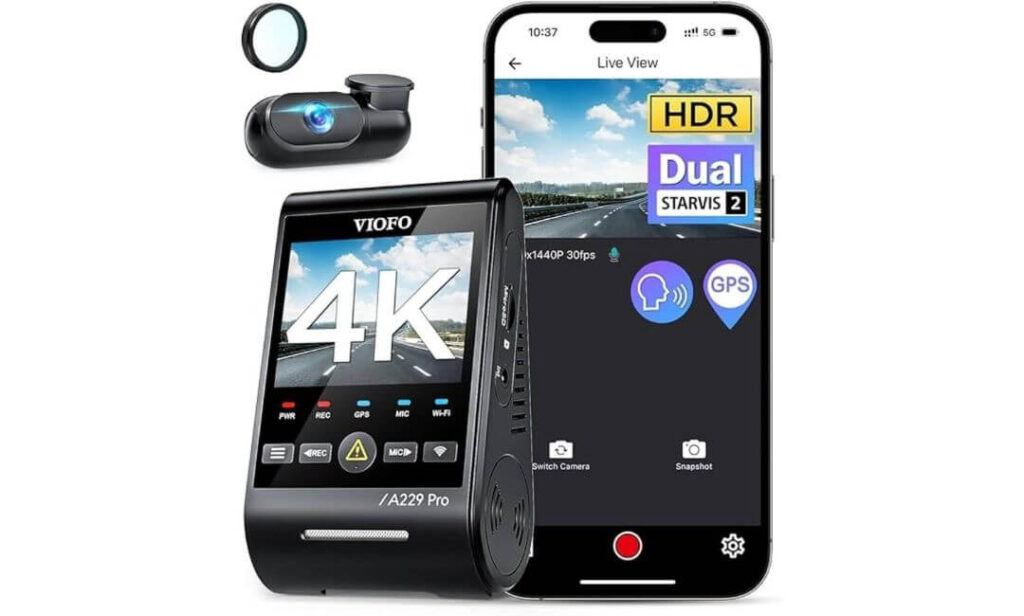
#1. VIOFO A229 Pro 4K HDR Dash Cam
Quick Specs:
- 4K Front + 2K Rear recording for sharper evidence when details matter
- Dual Sony STARVIS 2 sensors (IMX678 front, IMX675 rear)
- HDR recording on both cameras for difficult lighting conditions
- Advanced 24-hour parking protection with buffered recording
- Ultra-fast 5GHz WiFi app connectivity
- Built-in Quad-Mode GPS tracking
- Voice command support for hands-free operation
- Included CPL filter to reduce dashboard reflections
- Supercapacitor design for better heat resistance and durability
- Front and rear coverage with a long rear camera cable for larger SUVs
Sometimes a dash cam looks impressive on paper but doesn’t feel special once it’s installed. This one was different. The first thing that stands out is how much detail the dual STARVIS 2 sensors can pull from challenging conditions. Bright headlights, dark backroads, rainy evenings, and parking garage shadows are exactly where many cameras start losing important details. This setup keeps producing footage that remains usable when you actually need it.
The combination of 4K front recording, 2K rear recording, HDR processing, and Night Vision 2.0 creates a level of consistency that’s difficult to find in most dual-channel systems. Instead of relying on inflated resolution numbers, it focuses on preserving important details such as road signs, vehicle movements, lane positions, and license plates. That’s the difference between having a video and having evidence.
What impressed us most is how complete the overall package feels. Voice controls, fast 5GHz WiFi, buffered parking protection, GPS tracking, a CPL filter, and supercapacitor-based durability all work together without feeling like marketing extras. Every feature serves a real purpose during ownership rather than simply filling out a specification sheet.
(If your goal is to install one camera and stop thinking about upgrades for years, this is the kind of setup that makes that possible.)
What Stood Out During Our Evaluation
- Outstanding low-light clarity thanks to dual STARVIS 2 sensors
- Front and rear HDR recording helps balance harsh lighting conditions
- Buffered parking mode captures moments before and after incidents
- Voice controls are genuinely useful while driving
- Fast wireless transfers through 5GHz WiFi
- GPS data adds valuable context to recorded footage
- Supercapacitor design handles temperature extremes better than battery-based systems
One Thing Worth Knowing
- A hardwire kit is required to unlock the full potential of its advanced parking protection features.
How It Fits the Honda HR-V Ownership Experience
The Honda HR-V is often used as a daily commuter, family vehicle, and weekend road-trip SUV all at the same time. That means a dash cam has to perform consistently across city traffic, highways, parking lots, and long-distance travel. This setup matches that requirement exceptionally well because it prioritizes image quality rather than gimmicks.
The included rear camera coverage also works particularly well in the HR-V’s compact SUV layout. Combined with GPS tracking and parking protection, it delivers the kind of all-around security most owners are actually looking for when they start shopping for a premium dash cam.
The Insider Pro-Tip
Many buyers focus entirely on resolution numbers. In reality, the reason this model performs so well isn’t just 4K recording—it’s the combination of STARVIS 2 sensors, HDR processing, and image tuning working together. That’s where the real difference comes from.
If your budget allows for only one premium upgrade, prioritize image quality before anything else. Features can be added later, but clear evidence after an incident is something you only get one chance to capture.
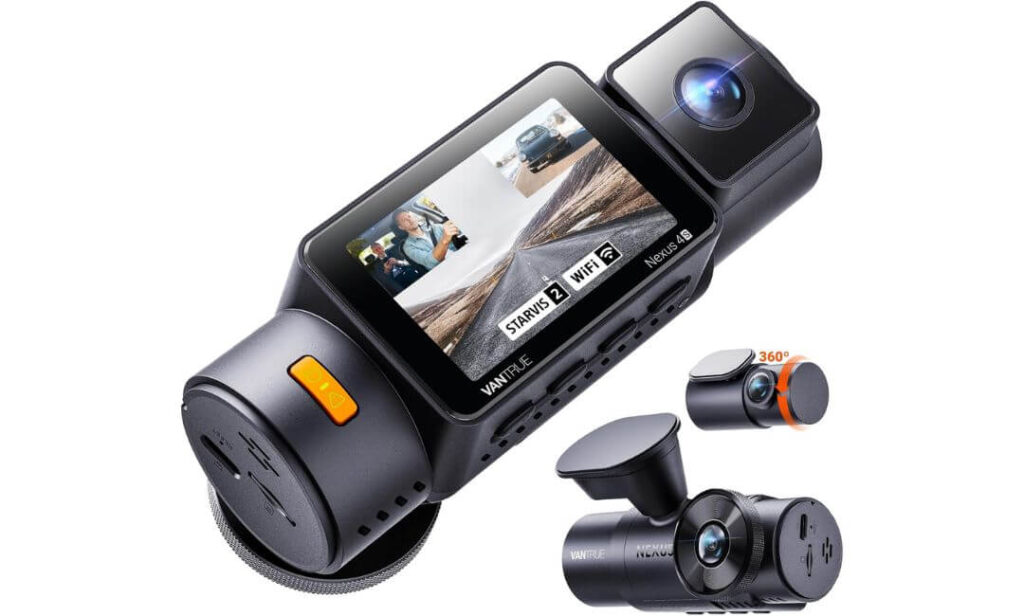
#2. Vantrue N4S 3 Channel Dash Cam
Quick Specs:
- Triple-camera coverage with 2.7K front + 1440P cabin + 1440P rear recording
- Three Sony STARVIS 2 sensors for improved low-light performance
- Wide-angle coverage across front, interior, and rear views
- Advanced PlatePix technology designed to improve plate readability
- Triple HDR processing for challenging lighting conditions
- Four customizable parking protection modes
- Fast 5GHz WiFi with app connectivity
- Quad-mode GPS positioning for accurate trip logging
- Supports microSD cards up to 1TB
- Heat-resistant supercapacitor design for long-term reliability
Here’s something many buyers don’t realize until after an incident: the missing angle is often the most important one. A front camera may show what happened ahead, and a rear camera may capture what happened behind, but neither explains what occurred inside the vehicle. That’s where this setup separates itself from almost everything else in its class.
Instead of focusing solely on resolution numbers, this system focuses on coverage. With dedicated front, cabin, and rear cameras recording simultaneously, it creates a complete picture of what happened before, during, and after an event. For rideshare drivers, parents with teenage drivers, frequent road-trippers, or anyone carrying passengers regularly, that additional perspective can be incredibly valuable.
The hardware backing it up is equally impressive. Triple STARVIS 2 sensors, HDR processing on all channels, PlatePix image enhancement, quad-GPS positioning, and high-capacity storage support combine to create a package that feels purpose-built for drivers who spend serious time on the road. Unlike many three-channel systems that sacrifice image quality for extra coverage, this one manages to deliver both.
(If maximum visibility matters more to you than having the highest front-camera resolution alone, this is one of the most complete recording systems currently available.)
What Earned Its Spot on This List
- True three-channel protection covering front, cabin, and rear simultaneously
- STARVIS 2 technology delivers impressive low-light performance
- PlatePix enhancement helps preserve critical details
- Triple HDR recording handles difficult lighting transitions well
- Rotating rear camera adds flexibility for different situations
- Large 1TB storage support for extended recording periods
- Fast WiFi transfers make reviewing footage far easier
One Thing Worth Knowing
- Because it records from three cameras at the same time, storage usage is naturally higher than a traditional dual-camera setup, making a larger memory card a smart addition.
Why It Makes Sense for Honda HR-V Owners
The Honda HR-V is often used as a family vehicle, commuter SUV, road-trip companion, and daily errand runner all at once. That versatility makes broader camera coverage surprisingly valuable. Whether the vehicle spends most of its time in city traffic, school pickup lines, parking garages, or long-distance highway driving, having multiple recording angles can provide significantly more context when reviewing footage.
The included long rear cable also works well with the HR-V’s cabin layout, while the rotating rear camera adds flexibility that many competing systems simply don’t offer. Owners who regularly travel with passengers, pets, sports equipment, or luggage may appreciate that extra adaptability more than they expect.
The Insider Pro-Tip
Most people shop for a dash cam by comparing resolution numbers. Experienced owners usually end up caring more about what the camera actually captured when something unexpected happened.
That’s the real strength here. The third camera isn’t a gimmick—it fills a blind spot that many drivers don’t realize exists until after an incident. For drivers who spend a lot of time behind the wheel, complete coverage often proves more valuable than chasing another few pixels of resolution.
#3. Mangoal Front 4K & Rear 1080P Dash Cam
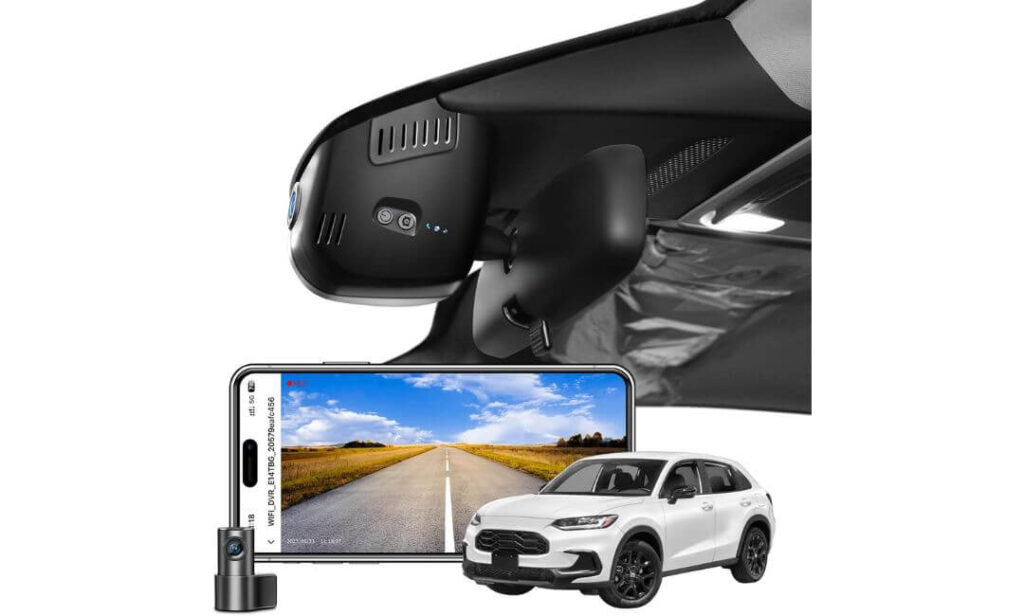
Quick Specs:
- Custom-designed specifically for Honda HR-V Gen3 models
- Hidden OEM-style integration behind the rearview mirror
- 4K front recording with 1080P rear camera coverage
- Sony IMX335 image sensor with f/1.8 aperture lens
- Built-in WiFi and smartphone app connectivity
- GPS module included in the package
- Parking monitoring capability
- G-Sensor automatic incident detection
- 128GB memory card included
- Supercapacitor-powered design for long-term reliability
Let’s be honest. Most dash cams look exactly like aftermarket accessories. Wires hanging near the windshield, bulky mounts, extra screens, and hardware that never quite blends into the interior. This one takes a completely different approach.
Rather than trying to become the most feature-packed camera on the windshield, it focuses on becoming almost invisible. Designed specifically around the Honda HR-V interior, it integrates behind the rearview mirror in a way that feels remarkably close to factory equipment. From the driver’s seat, the installation looks clean, intentional, and far more premium than a traditional universal dash cam setup.
That clean appearance doesn’t come at the expense of functionality. The combination of 4K front recording, rear camera coverage, Sony IMX335 imaging hardware, GPS tracking, WiFi connectivity, parking monitoring, and automatic impact detection creates a package that covers the essentials extremely well. It feels less like an accessory and more like a feature the vehicle should have included from day one.
(For owners who care as much about interior appearance as video quality, this is easily one of the most satisfying installations on this entire list.)
What Helped It Earn a Place Here
- OEM-style appearance that blends naturally into the cabin
- Designed specifically around the Honda HR-V platform
- Sharp 4K front footage with reliable day-to-day clarity
- Included GPS module for trip and location data
- Built-in WiFi simplifies video access
- Rear camera coverage adds extra protection
- 128GB card included so setup can begin immediately
One Thing Worth Knowing
- This system focuses more on seamless factory-style integration than advanced enthusiast-level imaging features, which is exactly what many HR-V owners are looking for.
Why It Fits the Honda HR-V So Well
Some products work in a vehicle. Others feel like they belong there. This falls into the second category.
The biggest advantage isn’t a specification listed on a product page—it’s how naturally the system integrates into the cabin. Owners who dislike visible wires, hanging screens, or cluttered windshields will appreciate the cleaner installation approach immediately. Once installed, it simply becomes part of the vehicle’s daily routine.
The included GPS module, rear camera, WiFi connectivity, parking monitoring functions, and included 128GB card also remove much of the usual setup hassle. Instead of purchasing multiple accessories separately, most owners can get everything running with minimal effort from the start.
The Insider Pro-Tip
When owners talk about loving a dash cam years later, they’re rarely talking about a specification sheet. They’re talking about the fact that they forgot it was even there.
That’s the hidden advantage of a well-integrated OEM-style system. A camera that records reliably while staying out of sight often creates a better ownership experience than a larger, more noticeable setup with a longer list of features. For many Honda HR-V owners, that balance is exactly why this option stands out.
#4. Fitcamx Front 4K + Rear 1080P Dash Cam
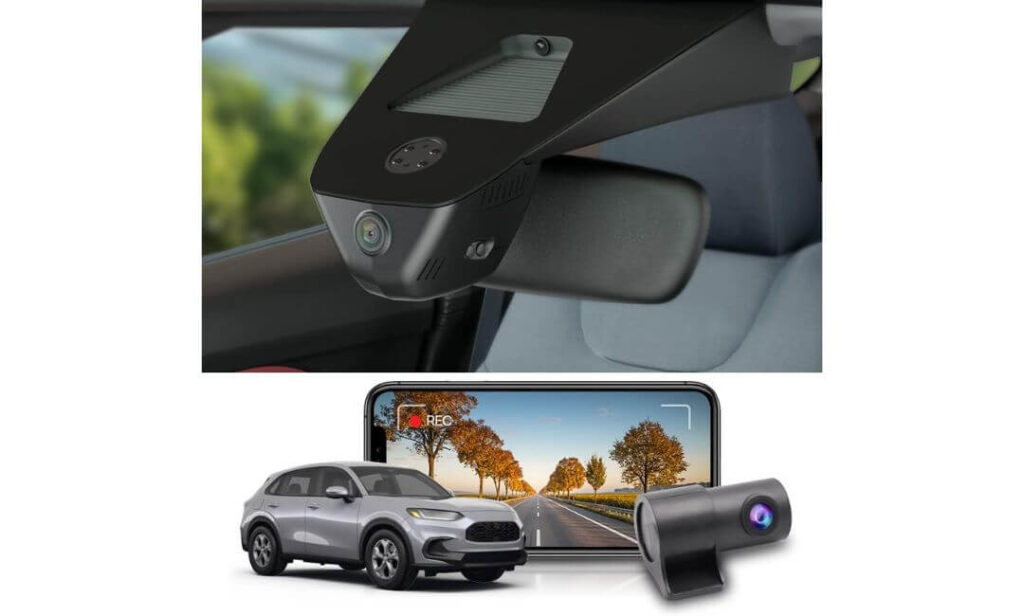
Quick Specs:
- Designed specifically for Honda HR-V Sport, LX, and EX-L models
- Factory-style integrated housing with hidden installation
- 4K front recording + 1080P rear recording
- Wide-angle lens with f/1.6 aperture
- WDR technology for improved nighttime visibility
- Built-in WiFi and Fitcamx mobile app
- G-Sensor collision protection
- Includes a pre-installed 128GB memory card
- Direct connection through the vehicle’s existing wiring
- Durable ABS and PC construction
Not every buyer wants to spend an afternoon routing cables through trim panels or figuring out where to hide extra hardware. Some people simply want a dash cam that looks factory-installed, records reliably, and disappears into the background once the job is done. That’s exactly where this system shines.
Instead of feeling like an aftermarket accessory, it feels like an extension of the vehicle itself. The custom-designed housing integrates neatly around the mirror area, creating one of the cleanest installations available for Honda HR-V owners. Once installed, most passengers won’t even realize a dash cam is there unless you point it out.
The recording hardware remains strong enough to justify its position on this list. Between the 4K front camera, rear 1080P coverage, wide-angle optics, WDR image processing, WiFi connectivity, and impact-triggered event protection, it covers the essentials most drivers actually use. It focuses less on adding every possible feature and more on making everyday ownership simple and frustration-free.
(For owners who value a clean factory appearance above all else, this may be the easiest camera on this list to live with every single day.)
What Made It Easy to Recommend
- One of the cleanest OEM-style installations available
- Direct integration with the vehicle’s existing wiring
- Sharp 4K front footage for everyday evidence collection
- WDR processing helps manage difficult lighting conditions
- Included rear camera adds valuable extra coverage
- WiFi app access keeps footage easy to review
- Comes ready to use with an included 128GB card
One Thing Worth Knowing
- This model prioritizes simplicity and factory-style integration over advanced parking surveillance features, which many owners may never need in the first place.
Why It Works So Naturally in the Honda HR-V
The HR-V has a modern, uncluttered cabin design, and this camera complements that philosophy perfectly. Rather than introducing extra screens, dangling wires, or bulky mounts, it preserves the clean appearance many owners appreciate about the vehicle.
For drivers who want reliable recording without turning their windshield into a technology showcase, this balance makes a lot of sense. The combination of dual-camera coverage, integrated installation, smartphone access, and included storage creates a setup that feels straightforward from day one.
The Insider Pro-Tip
One of the most overlooked factors in long-term dash cam satisfaction is visibility. If a camera constantly catches your eye, blocks part of the windshield, or reminds you it’s there every day, it eventually becomes annoying.
That’s why integrated systems continue to gain popularity. The best dash cam isn’t always the one with the longest specification sheet—sometimes it’s the one you barely notice while it quietly records everything that matters.
#5. FUVYMYT 4K & 1080P Dash Cam
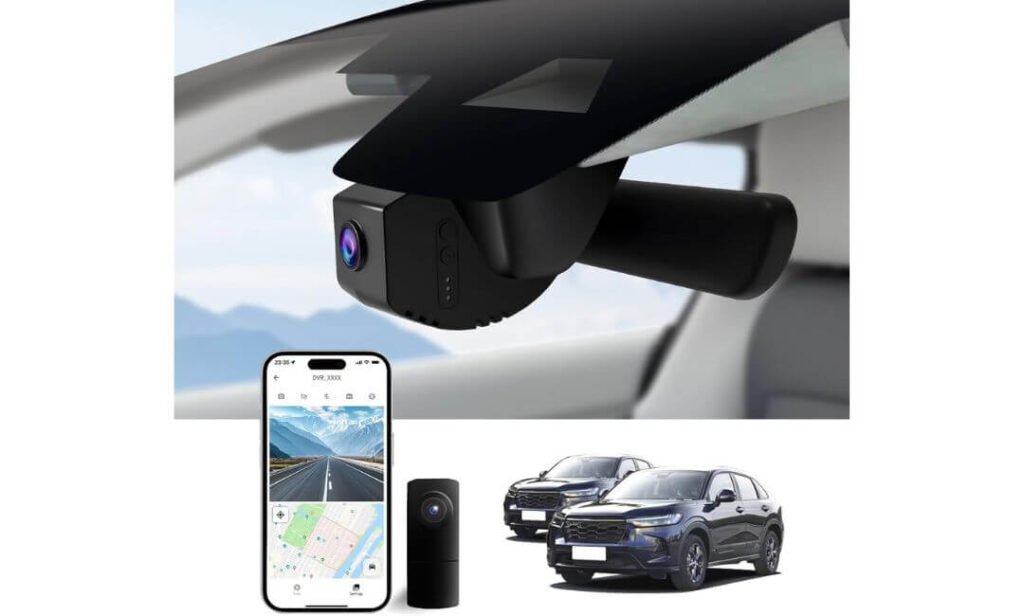
Quick Specs:
- Custom-designed specifically for Honda HR-V Gen3 models
- OEM-style hidden installation
- 4K front recording with 1080P rear coverage
- f/1.6 aperture lens with HDR support
- WiFi connectivity with dedicated mobile app
- G-Sensor impact detection
- Loop recording for continuous coverage
- 128GB memory card included
- Supports storage expansion up to 256GB
- Installation designed without complex rewiring
There’s a point where adding more features stops improving the ownership experience. Many Honda HR-V owners simply want dependable recording, a clean installation, and the confidence that important footage will be there if it’s ever needed. That’s exactly where this system makes its strongest case.
Rather than chasing premium enthusiast features, it focuses on the fundamentals. The combination of 4K front recording, HDR image processing, an f/1.6 lens, rear camera coverage, WiFi connectivity, collision detection, and included storage creates a setup that covers the priorities most drivers care about without becoming complicated to use.
The installation experience deserves attention as well. Because the system was designed specifically around the HR-V platform, it maintains the factory appearance many owners prefer. Once installed, it blends naturally into the cabin instead of looking like an accessory that was added later.
(For owners who want straightforward protection without overthinking the decision, this package checks an impressive number of boxes.)
What We Appreciated Most
- OEM-style appearance designed specifically for the HR-V
- Crisp 4K front footage with useful HDR support
- Included rear camera adds extra security
- 128GB card included from the start
- Simple WiFi access through the companion app
- G-Sensor protection helps preserve important footage
- Easy installation compared with many universal alternatives
One Thing Worth Knowing
- Drivers looking for advanced enthusiast-level features such as multi-mode parking surveillance may want to explore higher-end options, but many owners will find the included feature set more than sufficient.
Why It Fits the Honda HR-V So Naturally
One of the biggest advantages here is that the camera feels designed for the vehicle rather than merely compatible with it. The OEM-style housing complements the HR-V’s interior design, helping preserve visibility while maintaining a cleaner overall appearance.
For daily commuting, shopping trips, family transportation, and weekend travel, the combination of front-and-rear recording, HDR capability, WiFi access, collision protection, and included storage provides a practical balance between convenience and security. Most owners can install it, connect the app, and begin recording almost immediately.
The Insider Pro-Tip
A lot of buyers assume they need the most expensive dash cam available. In reality, the best dash cam is often the one that gets installed properly, records consistently every day, and remains easy to use months later.
That’s where solutions like this tend to surprise people. By focusing on the features most drivers actually use—clear video, easy access to footage, dependable recording, and a clean factory-style appearance—it delivers the kind of ownership experience many people are looking for from the beginning.
Best Honda HR-V Dash Camera Options Side by Side: Features, Protection & Installation Compared
| Dash Cam | Video Quality | Coverage | Parking Protection | Installation Style | Best For | Our Take |
|---|---|---|---|---|---|---|
|
VIOFO A229 Pro
Editor’s Choice
|
4K Front 2K Rear Dual STARVIS 2 |
Front + Rear | Advanced Buffered Protection | Universal Premium Setup | Drivers wanting the strongest overall mix of image quality, evidence capture and reliability | The most complete all-around package in this guide. |
|
Vantrue N4S
Maximum Coverage
|
2.7K Front 1440P Interior 1440P Rear Triple STARVIS 2 |
Front + Cabin + Rear | Multiple Parking Modes | Universal Multi-Camera Setup | Families, rideshare drivers and owners who want every angle recorded | The most comprehensive visibility and coverage on the list. |
|
Mangoal 4K + Rear 1080P
Best OEM Integration
|
4K Front 1080P Rear |
Front + Rear | Parking Monitoring | Factory-Style Hidden Design | Owners who want the cleanest factory-looking installation possible | Feels closest to a genuine OEM feature. |
|
Fitcamx 4K + Rear 1080P
Easiest Installation
|
4K Front 1080P Rear WDR Support |
Front + Rear | Basic Impact Protection | Plug-and-Play OEM Style | Drivers who prioritize simplicity and a clutter-free interior | One of the easiest systems to install and forget. |
|
FUVYMYT 4K + 1080P
Best Budget OEM Pick
|
4K Front 1080P Rear HDR Support |
Front + Rear | Impact Detection | OEM-Style Hidden Installation | Budget-focused HR-V owners wanting factory-style integration | Strong value without sacrificing the essentials. |
Buying Guide: How to Choose the Best Dash Cam for a Honda HR-V
The Honda HR-V sits in an interesting position. It’s small enough to be easy to drive in crowded cities, yet large enough for family trips, highway travel, shopping runs, and daily commuting. That means the ideal dash cam isn’t necessarily the one with the longest feature list. The right choice is the one that matches how your HR-V is actually used every day.
After reviewing dozens of models over the years, one thing becomes clear very quickly: most buyers either overpay for features they’ll never use or save money in the wrong places and regret it later. The goal should be finding the right balance between video quality, coverage, installation, and long-term reliability.
Start With Video Quality Before Anything Else
Many buyers immediately compare prices, storage capacities, or app features. In reality, the first question should be much simpler:
Can the camera capture useful evidence when conditions are difficult?
A dash cam’s primary job is recording information that can help explain what happened during an incident. If the footage cannot clearly show vehicle movements, traffic conditions, road signs, or license plates, the rest of the feature list becomes far less important.
For most Honda HR-V owners, 4K front recording represents the sweet spot. It provides significantly more detail than older 1080P cameras while remaining practical for daily use. Cameras such as the VIOFO A229 Pro, Mangoal, Fitcamx, and FUVYMYT all benefit from higher-resolution front recording.
Equally important is image processing. Features such as HDR (High Dynamic Range) help maintain visibility when driving into sunlight, exiting tunnels, or dealing with bright headlights at night. A good HDR system often improves real-world footage more than an increase in resolution alone.
Decide Whether You Need Front Only, Front and Rear, or Full Coverage
Not every driver needs the same level of coverage.
For many HR-V owners, a front-and-rear setup provides the best balance between protection and simplicity. It records what happens ahead of the vehicle while also documenting rear-end collisions, parking lot incidents, and traffic approaching from behind.
However, some drivers may benefit from an additional interior-facing camera. Rideshare drivers, parents with young drivers, frequent carpoolers, and owners who spend long hours on the road often appreciate having a complete record of everything happening inside and outside the vehicle.
That’s why the Vantrue N4S stands out in this guide. Its three-channel design records the front, rear, and cabin simultaneously, creating a more complete record than a traditional dual-camera system.
Don’t Ignore Parking Protection
A surprising number of vehicle incidents occur when the engine isn’t even running.
Parking lot damage, hit-and-runs, vandalism, and overnight incidents can leave owners with very few answers if the vehicle isn’t being monitored. That’s where parking surveillance becomes valuable.
Higher-end systems often offer multiple parking modes, including:
- Motion-triggered recording
- Buffered event recording
- Time-lapse recording
- Low-bitrate continuous monitoring
Buffered recording deserves special attention because it captures footage from before and after an event occurs. This often provides critical context that standard motion detection can miss.
If parking protection is a major priority, the VIOFO A229 Pro and Vantrue N4S offer some of the strongest solutions in this guide.
Night Performance Matters More Than Most Buyers Expect
Almost every dash cam looks impressive during daylight.
The real difference appears after sunset.
Nighttime driving introduces challenges such as headlight glare, reflective signs, poor street lighting, wet roads, and high-contrast environments. Cameras equipped with premium sensors often maintain better clarity in these situations.
Technologies such as Sony STARVIS 2 sensors, HDR processing, and wide-aperture lenses help preserve detail when lighting conditions become difficult. This is one of the biggest reasons premium models often justify their higher price points.
When evaluating a dash cam, don’t focus only on daytime sample footage. Night recording quality usually tells you far more about the camera’s real capabilities.
GPS and WiFi Are More Useful Than They Sound
Many buyers initially view GPS and WiFi as optional extras.
After using a dash cam for a few months, those same features often become some of the most appreciated.
GPS can record:
- Vehicle speed
- Driving route
- Time and date information
- Location data
This additional information can provide valuable context when reviewing footage.
WiFi allows drivers to transfer clips directly to a smartphone without removing the memory card. It sounds like a small convenience until the day you need footage quickly.
Every model near the top of this guide includes WiFi connectivity because it genuinely improves the ownership experience.
Think About Installation Before You Buy
A dash cam can have excellent specifications and still become frustrating if installation is complicated.
Honda HR-V owners generally fall into two categories.
The first group prioritizes maximum performance and doesn’t mind installing visible hardware. Universal premium systems such as the VIOFO A229 Pro and Vantrue N4S fit this category.
The second group wants the camera to look like factory equipment. For these owners, OEM-style solutions often make more sense.
Products such as Mangoal, Fitcamx, and FUVYMYT integrate directly into the HR-V interior design and maintain a much cleaner appearance after installation. Many owners prefer this approach because it preserves the uncluttered look of the cabin.
Make Sure the Dash Cam Matches Your HR-V Trim
Not all Honda HR-V models are configured exactly the same.
Before purchasing an OEM-style dash cam, verify compatibility with your specific trim level and generation. Sport, LX, and EX-L models can have slight differences in mirror housings, trim pieces, or mounting areas depending on production year.
A camera designed specifically for the third-generation HR-V will typically provide a cleaner fit than a universal solution adapted to multiple vehicles.
Checking compatibility before purchase prevents installation surprises and usually results in a better final appearance.
Understanding Common Dash Cam Terms
4K Dash Cam
A camera capable of recording ultra-high-definition footage, providing greater detail than standard 1080P systems. Higher resolution can improve readability of road signs, vehicle details, and license plates.
HDR (High Dynamic Range)
Image processing technology that balances bright and dark areas within a scene. HDR helps maintain visibility when driving into sunlight, facing headlights, or traveling through areas with rapidly changing lighting conditions.
Dual-Channel Dash Cam
A system that records both the front and rear of the vehicle simultaneously. This is the most popular configuration among Honda HR-V owners.
Three-Channel Dash Cam
A setup that records the front, rear, and vehicle interior at the same time. This provides the most complete coverage available.
Parking Mode
A monitoring feature that continues protecting the vehicle while parked. Depending on the system, recording may activate automatically when motion, vibration, or impacts are detected.
WiFi Dash Cam
A camera capable of connecting directly to a smartphone application for viewing, downloading, and managing footage without removing the memory card.
Night Vision
A combination of image sensor technology, lens quality, and software processing designed to improve recording performance in low-light conditions.
The Final Buying Advice Most Owners Actually Need
If you’re still undecided, focus on how you use your Honda HR-V rather than comparing specification sheets.
Choose the VIOFO if your priority is maximum image quality.
Choose the Vantrue if complete vehicle coverage matters most.
Choose Mangoal or Fitcamx if maintaining a factory appearance is your top concern.
Choose FUVYMYT if you want a clean OEM-style installation while keeping spending under control.
The best dash cam isn’t necessarily the most expensive one. It’s the camera that fits your driving habits, records consistently when you need it, and provides confidence every time you start the vehicle.
Installation & Setup Guide: Getting a Dash Cam Installed Properly in a Honda HR-V
One thing that surprises many Honda HR-V owners is how much installation quality affects the overall experience. The difference between a dash cam that feels factory-installed and one that constantly catches your eye often comes down to a few small installation decisions.
The good news is that the HR-V is one of the easier compact SUVs to work with. Its windshield design, mirror placement, interior trim panels, and hatch layout provide several clean routing options for both front-only and front-and-rear camera systems.
Whether you’re installing a premium dual-channel camera such as the VIOFO A229 Pro, a three-channel system like the Vantrue N4S, or an OEM-style solution such as Mangoal, Fitcamx, or FUVYMYT, the goal should always be the same: clean visibility, hidden wiring, reliable power, and easy access to footage when needed.
Choosing the Best Mounting Position
The mounting location determines both video quality and daily usability.
For most Honda HR-V owners, the ideal position is directly behind or slightly beside the rearview mirror. This area provides several advantages:
- Maximum forward visibility
- Reduced windshield obstruction
- Better protection from direct sunlight
- Less driver distraction
- Cleaner appearance from inside the cabin
The camera should sit high enough that it remains outside the driver’s primary field of view while still maintaining a clear view of the road ahead.
Avoid mounting the camera too low on the windshield. While installation may seem easier, lower placements often create unnecessary distractions and make the camera more noticeable from both inside and outside the vehicle.
OEM-style systems such as Mangoal, Fitcamx, and FUVYMYT are designed specifically around this mounting philosophy, which is one reason they look so integrated after installation.
Planning the Wiring Before You Start
One of the biggest mistakes first-time installers make is mounting the camera before deciding where the wiring will go.
Before removing any adhesive backing, spend a few minutes planning the cable path.
For front-only installations, the cable is typically routed:
- Across the headliner
- Down the passenger-side A-pillar
- Behind interior trim panels
- Toward the power source
For front-and-rear systems, the rear cable usually continues:
- Across the headliner
- Along the roofline
- Through upper trim sections
- Toward the rear hatch glass
Taking a few extra minutes during this planning stage often results in a significantly cleaner installation.
Installing Front and Rear Cameras
The front camera should always be installed first.
After confirming the viewing angle, power the camera temporarily and verify that the horizon appears level. A slightly crooked camera may not seem important initially, but it becomes very noticeable when reviewing footage later.
For rear cameras, placement near the upper center portion of the rear glass usually produces the best results. This position minimizes obstructions while providing a wide view of approaching traffic.
When routing the rear cable, avoid pulling it tightly. Leaving a small amount of slack helps accommodate movement from opening and closing the rear hatch over time.
Most of the front-and-rear systems featured in this guide include sufficiently long rear camera cables for the Honda HR-V’s cabin layout, making routing relatively straightforward.
Keeping Cables Hidden Like a Factory Installation
A clean installation is rarely about expensive tools.
Instead, it usually comes down to patience and attention to detail.
The easiest way to hide dash cam wiring is by following existing interior trim lines. Honda already designed the cabin with numerous panel gaps and concealed channels that can help hide cables naturally.
Focus on these areas:
- Headliner edges
- A-pillar trim
- Door weather stripping
- Roof trim sections
- Rear hatch trim panels
Most owners are surprised by how effectively cables disappear once routed through these locations.
Avoid allowing wires to cross open sections of the dashboard or windshield whenever possible. Even a high-end dash cam can look unfinished if the installation appears messy.
Selecting the Right Power Source
There are generally two approaches to powering a dash cam.
The first is using the vehicle’s power outlet or USB connection. This approach is simple, requires minimal installation effort, and works perfectly for many drivers.
The second option involves using a dedicated hardwire kit.
Hardwiring offers several benefits:
- Cleaner installation
- Automatic power management
- Parking mode compatibility
- No visible power cables near the dashboard
Owners planning to use advanced parking surveillance features should strongly consider hardwiring because many parking modes require continuous power when the vehicle is turned off.
Models such as the VIOFO A229 Pro and Vantrue N4S benefit significantly from hardwire installations when parking protection is a priority.
Setting Up the Mobile App Correctly
Many modern dash cams include WiFi connectivity, but a surprising number of users never take full advantage of it.
The setup process is usually straightforward:
- Install the manufacturer’s mobile application.
- Power on the dash cam.
- Enable the camera’s WiFi network.
- Connect the smartphone to the dash cam.
- Complete the initial pairing process.
- Verify live video access.
Once connected, the app typically allows:
- Video playback
- File downloads
- Camera settings adjustments
- Firmware updates
- GPS data review
- Video sharing
A properly configured app often eliminates the need to remove the memory card for everyday footage access.
Why Firmware Updates Matter More Than Most People Realize
Many owners install a dash cam and never think about software updates again.
That’s a mistake.
Manufacturers frequently release firmware updates that improve:
- Video stability
- GPS performance
- App compatibility
- WiFi connectivity
- Recording reliability
- Parking mode behavior
Before finalizing your setup, check whether a newer firmware version is available.
The process usually takes only a few minutes and can significantly improve long-term performance.
Final Installation Check Before You Hit the Road
Before considering the installation complete, perform a quick inspection.
Verify the following:
- Front camera angle is level
- Rear camera view is unobstructed
- GPS signal is functioning properly
- WiFi connection works consistently
- Memory card records correctly
- All cables are fully secured
- Parking mode functions as expected
- Footage can be reviewed from the mobile app
This final review takes only a few minutes but can prevent frustrating discoveries later.
The Installation Advice Most Owners Wish They Heard Earlier
The cleanest-looking installation usually wins in the long run.
Many drivers spend weeks comparing image sensors, resolutions, and feature lists, then rush through installation in less than thirty minutes. In reality, the installation is something you’ll see every single day, while many advanced features may rarely be used.
Take the extra time to hide cables properly, position the camera carefully, update the firmware, and configure the app correctly. A well-installed dash cam not only looks better, but it also tends to feel more reliable and more valuable throughout years of ownership.
Real-World Situations Where a Dash Cam Can Pay for Itself
Most people don’t buy a dash cam because they expect something bad to happen tomorrow.
They buy one because nobody knows what will happen next week, next month, or during the next drive home from work.
The reality is that a dash cam spends most of its life quietly recording routine trips. School drop-offs, grocery runs, highway commutes, family vacations, and weekend errands all look ordinary until the day something unexpected happens. That’s when recorded footage suddenly becomes far more valuable than any specification listed on a product page.
The cameras featured in this guide were selected not simply because they record video, but because they can provide useful evidence in situations Honda HR-V owners commonly encounter.
When Insurance Companies Want More Than a Story
After a collision, everyone usually has a version of what happened.
The challenge begins when those versions don’t match.
A driver claims they had a green light. Another insists they entered the intersection first. Someone argues they were cut off. Another says they never changed lanes.
Without video evidence, many claims become a battle of opinions.
A quality dash cam changes that conversation immediately.
Instead of relying on memory, stress, or conflicting statements, recorded footage can show:
- Traffic light conditions
- Vehicle positions
- Lane movements
- Road signs
- Driving behavior
- Environmental conditions
- Time and location information
This becomes especially valuable when GPS data and timestamps are included alongside the video footage.
In many situations, a short recording can answer questions that might otherwise take weeks of investigation.
Hit-and-Run Incidents Are More Common Than Most Drivers Realize
Ask long-time vehicle owners about their biggest frustrations, and hit-and-run damage appears surprisingly often.
A vehicle gets bumped in a parking lot.
A driver backs into a parked car and leaves.
Someone clips a bumper while exiting a parking space.
The owner returns to find damage with no explanation.
Without a dash cam, there may be very little information available.
With a properly configured parking surveillance system, the situation can look very different.
Advanced systems such as the VIOFO A229 Pro and Vantrue N4S can automatically begin recording when movement or impacts are detected. In some cases, buffered recording even captures footage before the event occurs, providing additional context that may otherwise be lost.
That capability alone is one reason many owners eventually decide parking protection is worth having.
Parking Lots Create More Problems Than Highways
Most drivers worry about major accidents on busy roads.
Ironically, parking lots often generate a surprising number of incidents.
Low-speed impacts, shopping cart damage, careless door openings, distracted reversing, and tight parking spaces create countless opportunities for minor accidents.
Because speeds are low, drivers sometimes assume responsibility is obvious.
Unfortunately, that’s not always true.
A dash cam can help document:
- Vehicle movement
- Parking position
- Impact timing
- Nearby traffic activity
- Driver actions before contact
Even a seemingly minor incident can become easier to resolve when video evidence exists.
Traffic Disputes Often Happen in Seconds
One reason dash cams have become so popular is that traffic disputes develop incredibly quickly.
A vehicle suddenly changes lanes.
A driver brakes unexpectedly.
Someone ignores a yield sign.
Another driver enters an intersection aggressively.
The entire situation may last only a few seconds.
Yet those few seconds often determine fault, responsibility, and insurance outcomes.
A properly positioned dash cam records events continuously, helping preserve details that may be forgotten almost immediately after the incident occurs.
The goal isn’t proving someone wrong.
The goal is preserving an accurate record of what actually happened.
Night Driving Is Where Better Dash Cams Separate Themselves
Daytime footage is relatively easy for most cameras.
Night driving tells a very different story.
Headlights, streetlights, reflections, wet roads, poorly illuminated intersections, construction zones, and oncoming traffic all create challenges for image sensors.
This is exactly why models using technologies such as STARVIS 2 sensors, HDR processing, wide-aperture lenses, and advanced image tuning consistently perform better after dark.
In real-world driving, improved night performance can help capture:
- License plates
- Vehicle colors
- Road hazards
- Pedestrian activity
- Lane markings
- Traffic signal visibility
These details may seem small until they’re suddenly important.
Unexpected Road Hazards Happen Faster Than You Think
Not every valuable dash cam clip involves another driver.
Sometimes the footage records events nobody could reasonably predict.
Examples include:
- Falling debris
- Unsecured cargo
- Road construction hazards
- Sudden animal crossings
- Tire failures from other vehicles
- Objects entering the roadway
In these situations, footage helps explain why a driver reacted the way they did.
Without video, an evasive maneuver may look questionable.
With video, the reason often becomes immediately obvious.
Learning From Near-Misses Can Be Just as Valuable
One benefit that rarely gets discussed is reviewing situations where an accident didn’t happen.
Many experienced drivers occasionally review footage after a close call.
Not because they need evidence.
Because they want perspective.
Watching a near-miss can reveal:
- Following distance issues
- Blind spot habits
- Lane positioning
- Traffic awareness
- Reaction timing
Sometimes the footage confirms the driver handled the situation well.
Other times it highlights opportunities to become safer behind the wheel.
That kind of feedback is difficult to get any other way.
Family Vehicles Often Benefit the Most
The Honda HR-V is commonly used as a family vehicle.
That means it often transports children, spouses, relatives, friends, and valuable belongings.
When multiple people regularly use the same vehicle, having recorded footage can provide additional peace of mind.
Parents may appreciate knowing driving events are documented.
Owners may feel more comfortable lending the vehicle.
Passengers may feel reassured during longer trips.
The value isn’t always tied to accidents. Sometimes it’s simply knowing there is an independent record available if questions ever arise.
The Reality Most Dash Cam Owners Eventually Discover
The interesting thing about dash cams is that most owners hope they never need them.
In a perfect world, every drive ends uneventfully, every parking lot remains incident-free, and every insurance claim is straightforward.
But that’s not always how the real world works.
The reason people continue investing in better cameras isn’t because they expect problems every day. It’s because when something eventually does happen, they would rather have clear evidence than rely on memory, assumptions, or someone else’s version of events.
That’s ultimately why the best dash cams for the Honda HR-V aren’t just recording devices. They’re tools that help preserve facts when facts matter most.
Maintenance & Troubleshooting: Keeping Your Honda HR-V Dash Cam Reliable for Years
Buying a quality dash cam is only part of the equation.
What many owners don’t realize is that even the best dash cam can develop problems if basic maintenance is ignored. Interestingly, most dash cam issues are not caused by camera hardware failures. They usually come from memory cards, outdated firmware, incorrect settings, poor power connections, or simple installation mistakes.
The good news is that preventing these problems requires very little time. A few small maintenance habits can dramatically improve reliability and help ensure your dash cam is recording properly when you actually need it.
Why the Memory Card Deserves More Attention Than the Camera Itself
If there is one component that causes more dash cam problems than anything else, it’s the microSD card.
Most dash cams record continuously every time the vehicle is driven. Unlike a memory card used occasionally in a camera or smartphone, a dash cam card experiences constant writing and rewriting. Over time, this creates wear.
Common warning signs include:
- Random recording interruptions
- Missing video files
- Frequent memory card errors
- Corrupted footage
- Unexpected camera restarts
- Recording failures despite the camera powering on
This is why many premium manufacturers recommend high-endurance microSD cards designed specifically for continuous recording.
For owners using cameras such as the VIOFO A229 Pro or Vantrue N4S, investing in a quality memory card often provides more long-term benefit than upgrading almost any other accessory.
Get Into the Habit of Formatting the Card Regularly
One of the simplest maintenance steps is also one of the most overlooked.
Even when everything appears to be functioning normally, periodic formatting helps maintain card performance and reduces the risk of corrupted files.
A good rule is to:
- Format monthly for heavy drivers
- Format every few months for occasional drivers
- Always back up important footage before formatting
Most modern dash cams include a formatting option directly within the camera menu or companion mobile app.
The process usually takes less than a minute but can prevent many recording issues later.
Firmware Updates Are More Important Than Most People Think
Many owners install their dash cam once and never think about software updates again.
That approach often leaves performance improvements on the table.
Manufacturers regularly release firmware updates to improve:
- Recording stability
- GPS accuracy
- Mobile app performance
- WiFi connectivity
- Parking mode behavior
- Compatibility with newer memory cards
- Bug fixes and reliability improvements
Even a camera that appears to be working normally may benefit from firmware updates released after purchase.
Checking for updates every few months is generally enough for most users.
Keeping WiFi and Mobile App Connectivity Running Smoothly
Modern dash cams have become significantly easier to use thanks to smartphone apps.
However, app-related complaints are often caused by connection misunderstandings rather than actual hardware problems.
A few things to remember:
- Dash cam WiFi is designed for video transfer, not internet access.
- Some phones automatically disconnect from networks without internet connectivity.
- Cellular data can occasionally interfere with camera connections.
- Bluetooth settings may affect certain app pairing processes.
If the app refuses to connect:
- Disconnect from other WiFi networks.
- Disable mobile data temporarily.
- Restart the camera.
- Restart the app.
- Reconnect to the dash cam’s WiFi network.
- Confirm the camera firmware is current.
Most connection issues are resolved within a few minutes using these steps.
Understanding Common Recording Problems
One of the most frustrating situations occurs when owners assume the camera is recording but later discover missing footage.
Fortunately, there are usually warning signs beforehand.
Potential causes include:
- Faulty memory card
- Incorrect recording settings
- Power interruptions
- Loose connections
- Storage capacity issues
- Outdated firmware
The best prevention strategy is simple.
Periodically review recent footage.
A quick thirty-second check every few weeks confirms the camera is still recording properly and can reveal problems before they become serious.
What to Do if the Camera Randomly Restarts
Unexpected restarts can seem alarming, but they are often easier to diagnose than people expect.
Start by checking:
- Memory card health
- Power cable condition
- USB connections
- Hardwire kit connections
- Firmware version
- Camera operating temperature
In many cases, replacing an aging memory card solves the issue immediately.
That’s one reason experienced dash cam owners often keep a spare card available.
Preventing Heat-Related Problems
The Honda HR-V’s windshield area can become extremely hot during summer months.
Fortunately, most of the cameras featured in this guide use supercapacitor designs rather than traditional batteries, which generally tolerate temperature fluctuations more effectively.
Even so, a few habits help:
- Use a windshield sunshade when parked
- Keep the interior ventilated when possible
- Avoid blocking camera ventilation areas
- Periodically inspect mounting points
These simple steps can contribute to longer equipment life over time.
Troubleshooting GPS Issues
GPS functionality is incredibly useful, but signal acquisition can occasionally take longer than expected.
If GPS data appears inconsistent:
- Ensure the camera has a clear view of the sky
- Verify the GPS module is properly connected
- Allow several minutes for initial satellite acquisition
- Update camera firmware if available
Most GPS-related concerns resolve themselves once the system completes its initial connection process.
Solving Installation Problems After the Camera Is Mounted
Some issues don’t appear until after installation is complete.
Examples include:
- Camera vibration
- Uneven video horizon
- Excessive windshield reflections
- Cable rattles
- Rear camera alignment problems
The solution is usually minor adjustment rather than complete reinstallation.
Taking a few extra minutes to fine-tune camera positioning can significantly improve footage quality and day-to-day satisfaction.
Signs Your Dash Cam Is Working Exactly as It Should
Many owners spend time worrying about potential problems and overlook the indicators that everything is functioning correctly.
A healthy dash cam should:
- Start recording automatically
- Save files consistently
- Maintain stable power
- Connect to the mobile app reliably
- Record clear video day and night
- Store footage without errors
- Maintain accurate timestamps
- Capture GPS data when equipped
If these areas are functioning normally, the system is likely operating exactly as intended.
The Maintenance Habit That Matters Most
If there’s one piece of advice experienced dash cam owners consistently give, it’s this:
Don’t wait until an accident happens to check your footage.
A dash cam only provides value if it records successfully when the moment arrives. Spending two minutes every few weeks reviewing recent clips, checking storage health, confirming app connectivity, and verifying camera operation can provide far more peace of mind than any feature upgrade ever will.
The cameras in this guide are all capable of delivering years of dependable service. The difference between a dash cam that lasts and one that becomes unreliable often comes down to a few simple maintenance habits performed consistently over time.
FAQs About Honda HR-V Dash Cam
Which type of dash cam makes the most sense for a Honda HR-V owner: maximum video quality or maximum camera coverage?
This is one of those questions where the answer depends entirely on how the vehicle is used.
If your Honda HR-V spends most of its time commuting, highway driving, and family transportation, a premium dual-camera system with exceptional image quality is often the smarter investment. Cameras such as the VIOFO A229 Pro focus heavily on evidence quality, license plate readability, HDR performance, and low-light clarity.
However, if your HR-V regularly carries passengers, teenagers learning to drive, clients, coworkers, or rideshare customers, complete coverage can become more valuable than extra resolution. That’s where a three-channel system such as the Vantrue N4S changes the conversation because it documents what happened in front of the vehicle, behind it, and inside the cabin at the same time.
The surprising truth is that most owners don’t regret buying a better camera. They usually regret discovering after an incident that the one angle they needed wasn’t recorded.
Do OEM-style Honda HR-V dash cams actually record as well as traditional windshield-mounted cameras?
Many buyers assume factory-style dash cams sacrifice performance for appearance.
That was often true years ago, but modern OEM-style systems have improved significantly.
The bigger difference today is usually not image quality but feature philosophy. OEM-integrated options such as Mangoal, Fitcamx, and FUVYMYT prioritize:
- Cleaner installation
- Better cabin aesthetics
- Reduced windshield clutter
- Easier day-to-day ownership
Meanwhile, enthusiast-focused models often prioritize:
- Larger sensors
- More advanced parking protection
- Higher-end HDR processing
- Expanded customization
For many HR-V owners, the best camera isn’t necessarily the one with the strongest specifications. It’s the one that records consistently while blending naturally into the vehicle every day.
Is parking mode genuinely worth paying extra for, or is it mostly a feature people rarely use?
This question usually gets answered after a parking lot incident.
Before that happens, many drivers consider parking mode optional. Afterward, opinions tend to change quickly.
Think about how much time your Honda HR-V spends parked compared to being driven. Office parking lots, shopping centers, airports, hotels, apartment complexes, and residential streets often expose the vehicle to far more risk than actual driving time.
A quality parking surveillance system can help document:
- Hit-and-run damage
- Parking lot collisions
- Vandalism
- Suspicious activity around the vehicle
- Overnight incidents
The irony is that parking mode often becomes valuable during the one moment you least expect it. That’s why many experienced owners eventually consider it one of the most important features rather than an optional extra.
Why do some 4K dash cams produce dramatically better footage than other 4K dash cams?
This is probably the most misunderstood topic in the dash cam industry.
Many buyers focus entirely on resolution numbers because they are easy to compare. The reality is that resolution tells only part of the story.
A dash cam’s real-world performance depends on several factors working together:
- Image sensor quality
- HDR processing
- Lens design
- Aperture size
- Image tuning
- Exposure control
- Night optimization
That’s why two cameras can both advertise 4K recording while producing noticeably different footage in rain, darkness, glare, or heavy traffic.
The best dash cams capture usable details when conditions become difficult. That’s what separates premium systems from average ones far more than a number printed on the product box.
What’s the biggest mistake first-time dash cam buyers make when shopping for a Honda HR-V?
Surprisingly, it’s not choosing the wrong camera.
It’s choosing a camera based on a future version of themselves rather than their actual driving habits.
Many buyers convince themselves they need every premium feature available. Others go too far in the opposite direction and purchase the cheapest option possible. Both approaches often lead to disappointment.
A better strategy is asking a few honest questions:
- Do I park outdoors regularly?
- Do I drive frequently at night?
- Do I want a factory-style appearance?
- Do I care about front-only recording or full vehicle coverage?
- Am I willing to hardwire a camera for parking protection?
The answers usually narrow the decision quickly.
The best Honda HR-V dash cam isn’t the most expensive model or the one with the longest specification sheet. It’s the camera that fits your actual driving routine so well that you stop thinking about it—until the day you’re grateful it’s there.
Final Thoughts
After spending time comparing specifications, installation styles, parking features, video quality, and day-to-day usability, one thing becomes clear: there is no single “best” dash cam for every Honda HR-V owner.
The right choice depends on what matters most once the vehicle leaves the driveway.
Some owners will prioritize the strongest possible video evidence and night performance. Others will care more about maintaining a clean factory appearance. Some will want complete front, rear, and cabin coverage, while others simply want dependable recording that works quietly in the background every day.
That’s exactly why the cameras in this guide earned their place. Each one solves a different problem exceptionally well rather than trying to be everything for everyone.
If maximum image quality is your priority, the VIOFO A229 Pro remains the benchmark. If comprehensive coverage matters most, the Vantrue N4S stands in a class of its own. For owners who value factory-style integration, Mangoal and Fitcamx offer some of the cleanest solutions available. And for buyers looking to balance functionality and value, FUVYMYT delivers far more capability than many people expect.
The interesting thing about a dash cam is that you rarely appreciate it on an ordinary day. Most drives will end exactly as planned. The footage will never be reviewed, the recordings will never be shared, and the camera will quietly continue doing its job.
But on the day something unexpected happens—a parking lot incident, a disputed lane change, a hit-and-run, or an insurance claim—that small device on the windshield suddenly becomes one of the most valuable pieces of equipment in the entire vehicle.
That’s why the goal isn’t simply buying a dash cam.
The goal is choosing one you’ll trust when the answer matters more than opinions, assumptions, or memory.
For most Honda HR-V owners, any of the options featured in this guide can provide that confidence. The only remaining question is which one fits the way you drive.
Also Check: