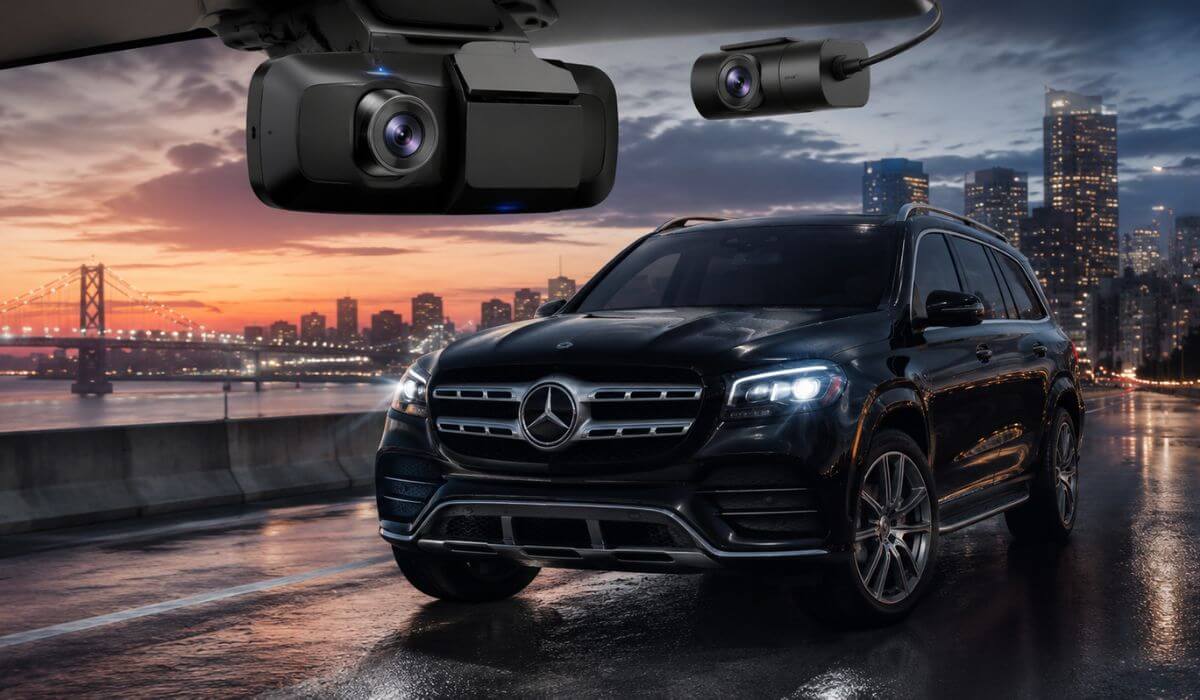
5 Best Dash Cams for Mercedes GLS in 2026: OEM Fit, 4K Clarity, STARVIS 2 & HDR Recording
Choosing a dash cam for a Mercedes GLS isn’t the same as buying one for an average SUV. The GLS has a large windshield, advanced driver-assistance cameras behind the rear-view mirror, and a premium interior where exposed cables or bulky mounts can look out of place. Whether you drive a 2020–2023 GLS 450/580, a Mercedes-AMG GLS 63, or the refreshed 2024–2026 models, the right dash cam should deliver clean installation, dependable 4K footage, and reliable parking surveillance without interfering with the vehicle’s factory systems.
For this guide, we didn’t focus on spec sheets alone. We prioritized dash cams that suit the Mercedes GLS in real-world ownership—OEM-style options for owners who want a factory appearance, along with premium universal models that consistently produce sharp daytime footage, readable number plates after dark, stable app connectivity, and long-term reliability. If you’re investing in a luxury SUV, the recording quality, installation experience, and software matter just as much as the resolution.
Best Mercedes GLS Dash Cams: Top 2026 Picks With STARVIS 2 & HDR
#1. Fitcamx Front 4K + Rear 1080P Dash Cam
Best Mercedes GLS dash cam for 2020–2026 models with a true OEM fit, discreet factory-style installation, built-in WiFi, and dependable 4K front recording without visible wiring.
#2. VIOFO A229 Pro 3 Channel Dash Cam
Best 4K dash cam for Mercedes GLS owners who want STARVIS 2 imaging, triple-camera coverage, HDR recording, GPS, and outstanding low-light performance.
#3. BlackVue Elite 10 Dual 4K Dash Cam
Best premium Mercedes-Benz GLS dash camera featuring dual 4K recording, dual STARVIS 2 sensors, cloud-ready connectivity, and one of the strongest parking surveillance systems available.
#4. Vantrue New N4 Pro S 3 Channel Dash Cam
Best front and rear dash cam for Mercedes GLS with an additional interior camera, 4K recording, infrared cabin vision, and expandable storage for long-distance drivers.
#5. ONESTOPGUARD Mercedes-Benz OEM Dash Cam
Best OEM-style dash cam for Mercedes GLS buyers looking for factory-like integration, HDR recording, simple plug-and-play installation, and excellent everyday value.
Expert Tip
If you own a Mercedes GLS, don’t choose a dash cam just because it records in 4K. On a full-size luxury SUV, camera placement, sensor quality, and installation have a much bigger impact on what you’ll actually capture. A poorly positioned camera can still miss number plates at night, while a well-mounted camera with a quality image sensor can record far more usable evidence. That’s why factory-style integration and proven image processing mattered more in our recommendations than simply chasing the highest resolution on the box.
How We Chose the Best Dash Cams for Mercedes GLS
The Mercedes GLS deserves more than a generic dash cam recommendation. It’s a premium SUV with a wide windshield, sophisticated safety technology, and an interior designed to look clean and uncluttered. We built this list with that ownership experience in mind rather than relying on marketing claims or feature checklists.
Our first priority was Mercedes GLS compatibility. OEM-style models were only included if they were specifically designed for the 2020–2026 GLS platform, ensuring a factory-style appearance without loose wiring or awkward windshield mounts. For universal models, we selected products that have an established reputation for working reliably in large luxury SUVs where viewing angles and windshield coverage are especially important.
Next came real recording performance. Every recommendation offers genuine high-resolution recording, but we looked beyond the 4K badge. We gave preference to cameras using Sony STARVIS 2 sensors, strong HDR processing, and image quality that stays readable during rain, tunnels, harsh sunlight, and night driving—situations where cheaper cameras often struggle to capture useful details.
We also evaluated long-term ownership, not just first impressions. App stability, GPS accuracy, parking surveillance, firmware support, storage compatibility, and overall build quality all influenced our rankings. A dash cam is something most owners hope they’ll never need, so when the moment does come, it has to record reliably without constant maintenance or connection issues.
Finally, we balanced different Mercedes GLS owners’ priorities instead of naming one product for everyone. Some buyers want a seamless OEM dash cam for Mercedes GLS that looks factory-installed. Others value triple-channel coverage, premium cloud features, or the best possible night recording. That’s why every product on this list has a clearly defined purpose, so you can choose the one that matches how you actually use your GLS rather than paying for features you’ll never need.
#1. Fitcamx Front 4K + Rear 1080P Dash Cam
Quick Specs:
- Best for: Mercedes GLS owners wanting a true factory-installed appearance
- Vehicle Compatibility: Mercedes-Benz GLS (X167) 2020–2026 (Model D cover)
- Recording: Front 4K (2160P) + Rear 1080P
- Lens: 170° front and 140° rear wide-angle coverage
- Image Enhancements: f/1.6 aperture with WDR for clearer night footage
- Connectivity: Built-in WiFi with FITCAMX mobile app
- Storage: 128GB microSD included, expandable up to 256GB
- Safety Features: Loop recording, G-Sensor emergency file protection
- Installation: No wire cutting, no fuse-box tapping, OEM mirror housing replacement
- Parking Mode: Not supported
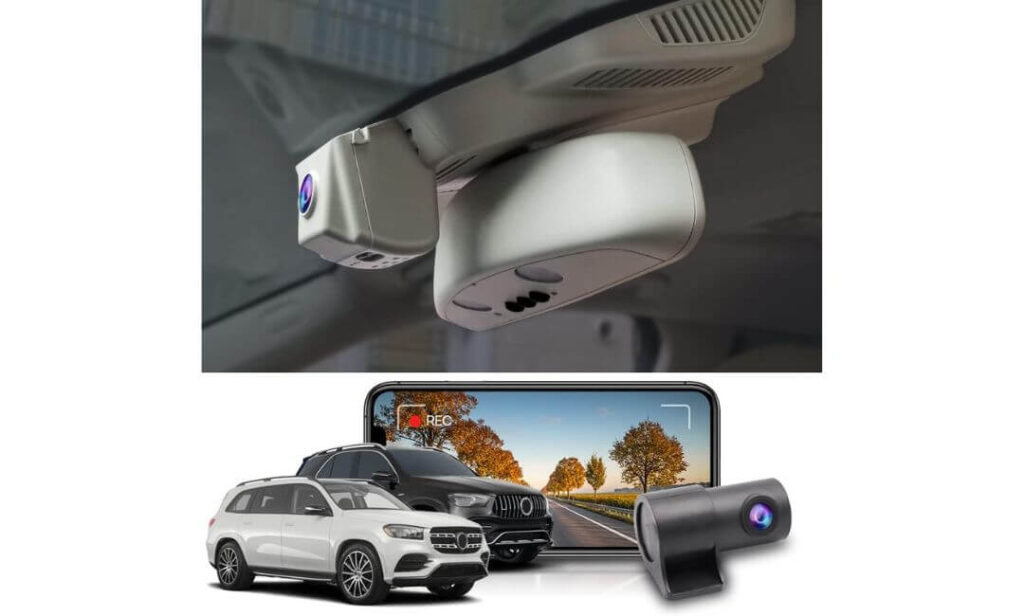
This is the dash cam we would recommend to most Mercedes GLS owners because it respects what makes the SUV special in the first place. Instead of hanging another gadget from the windshield, it replaces the factory mirror cover and blends into the cabin so naturally that most passengers won’t even notice it’s there. If keeping the interior clean matters to you, very few cameras deliver this level of integration.
Recording quality is equally reassuring. The 4K front camera, paired with a 1080P rear camera, captures everyday driving with impressive clarity, while the f/1.6 lens and WDR processing help preserve important details during night drives, underground parking garages, and difficult lighting conditions. The 170° front and 140° rear viewing angles also reduce blind spots without creating the stretched “fisheye” effect that many budget cameras suffer from.
Daily use is refreshingly simple. The camera starts recording automatically every time the GLS starts, while built-in WiFi lets you transfer clips directly to your phone whenever you need them. Loop recording keeps storage under control, and the G-Sensor automatically locks important footage after an impact so it isn’t overwritten.
(If your priority is a factory appearance rather than the maximum number of recording channels, this is one of the cleanest OEM-style upgrades available for the Mercedes GLS.)
Why It Earned Our Top Recommendation
- Looks like genuine Mercedes factory equipment instead of an aftermarket accessory.
- No fuse-box wiring or cable routing, making installation much cleaner than most universal dash cams.
- 4K front recording delivers sharp daytime footage with dependable detail.
- WDR and the bright f/1.6 lens noticeably improve recording quality in challenging light.
- 128GB memory card is included, so it’s ready to record immediately.
- FITCAMX app makes downloading important clips quick without removing the memory card.
A Small Thing Worth Knowing
- It doesn’t include a dedicated parking mode, so owners wanting continuous surveillance while parked may prefer a hardwired premium alternative.
Mercedes GLS Compatibility & Installation
This model is built specifically for the Mercedes-Benz GLS (X167) and is designed to fit 2020–2026 vehicles using the Model D mirror cover. Before ordering, compare your existing mirror housing with the product images because Mercedes used different cover designs across certain trims and equipment packages.
Installation is beginner-friendly compared to traditional dash cams. Since it replaces the mirror cover and connects using the factory power source, there’s no need to cut wires, tap into the fuse box, or run long cables across the headliner. Basic trim removal tools are included, and taking a few minutes to confirm the correct mirror cover version before installation will save time later.
The Insider Pro-Tip
If you’re buying a Mercedes GLS because you appreciate refined engineering, choose accessories that preserve that experience. An OEM-style dash cam keeps the windshield uncluttered, avoids distracting cables, and feels like it belongs in the vehicle from day one.
Also, don’t overlook the mirror cover version. Spending a minute confirming the correct Model D housing before ordering is far more important than comparing feature lists. A perfect factory fit will improve both the installation experience and the final result every time.
#2. VIOFO A229 Pro 3 Channel Dash Cam
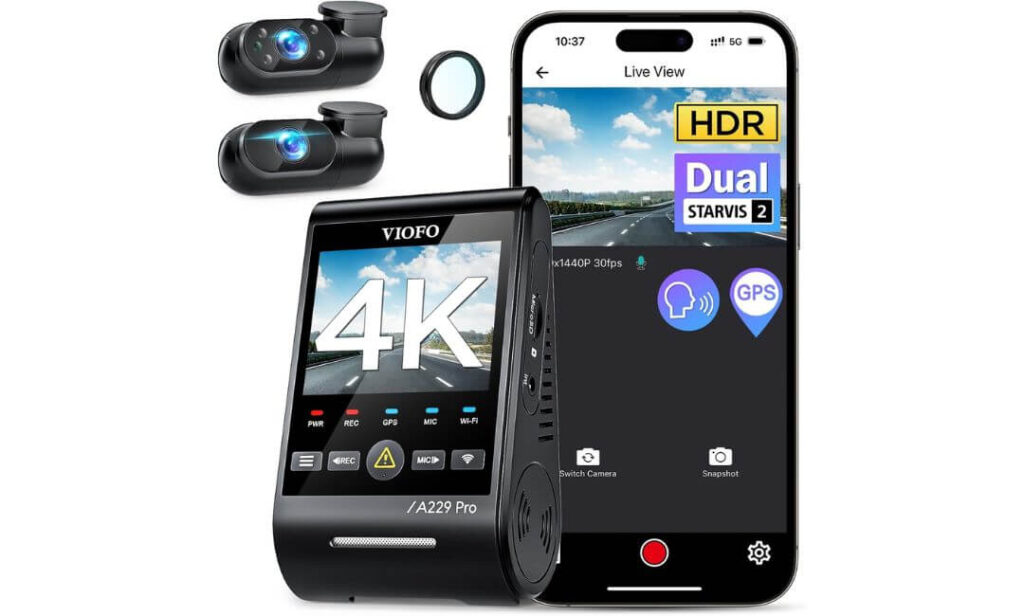
Quick Specs:
- Best for: Mercedes GLS owners who want maximum recording coverage
- Vehicle Compatibility: Universal fit for all Mercedes GLS models
- Recording: 4K Front + 2K Rear + 1080P Interior
- Image Sensors: Dual Sony STARVIS 2 (IMX678 + IMX675)
- HDR: Available on all three cameras
- Night Recording: Infrared cabin camera with automatic IR LEDs
- Connectivity: Ultra-fast 5GHz WiFi, Quad-Mode GPS, Voice Control
- Parking Surveillance: Buffered event recording, Low Bitrate & Time-Lapse modes (HK4 hardwire kit required)
- Storage: Supports high-endurance microSD cards up to 512GB
- Extra: CPL filter included to reduce windshield reflections
There are dash cams that simply record, and then there are dash cams built to capture everything that matters. This one falls firmly into the second category. For Mercedes GLS owners who regularly drive with family, transport clients, or simply want complete visibility around the vehicle, the three-camera layout provides a level of coverage that very few systems can match.
Its biggest strength isn’t just the 4K front camera—it’s the combination of dual Sony STARVIS 2 sensors, HDR on every channel, and a 2K rear camera that stays remarkably detailed after sunset. Number plates remain easier to read during night driving, bright headlights are handled more naturally, and the interior camera automatically switches to infrared recording in dark conditions without requiring any manual adjustment.
Living with it every day also feels polished. The 5GHz WiFi transfers clips noticeably faster than older systems, voice commands let you save important footage without taking your hands off the wheel, and the upgraded Quad-Mode GPS records accurate speed and location data. Add the included CPL filter, and windshield reflections are reduced before they ever reach your recordings.
(If your priority is capturing the most complete evidence possible instead of achieving a factory-installed appearance, this is one of the strongest all-around recording systems available for the Mercedes GLS.)
Why This One Stands Out
- Triple-camera recording covers the front, cabin, and rear simultaneously.
- Dual Sony STARVIS 2 sensors produce exceptional low-light image quality.
- HDR works across all three cameras, improving detail in difficult lighting.
- 5GHz WiFi and voice control make everyday operation genuinely convenient.
- Buffered parking recording captures moments before and after an incident when paired with the optional hardwire kit.
- Included CPL filter helps minimize dashboard reflections for cleaner footage.
One Thing to Keep in Mind
- To unlock all parking surveillance features, you’ll need the optional HK4 hardwire kit, and you’ll also need to purchase a compatible high-endurance microSD card separately.
Mercedes GLS Installation & Compatibility
The A229 Pro is a universal windshield-mounted dash cam, making it fully compatible with the Mercedes GLS regardless of trim or engine. Unlike OEM-style systems, it mounts using high-quality adhesive brackets and connects through the vehicle’s 12V power supply.
For the cleanest installation, it’s worth routing the rear camera cable behind the headliner and interior trim panels. If you also want buffered parking surveillance, plan to install the optional hardwire kit during the initial setup instead of adding it later.
The Insider Pro-Tip
If your Mercedes GLS spends a lot of time on highways, family road trips, airport transfers, or long-distance travel, recording more angles is often more valuable than simply buying the highest-resolution front camera. Incidents rarely happen from only one direction.
One more recommendation that experienced dash cam owners often overlook: pair this camera with a high-endurance microSD card from the beginning. Continuous 4K and multi-channel recording is demanding, and reliable storage is just as important as the camera itself when you actually need the footage.
#3. BlackVue Elite 10 Dual 4K Dash Cam
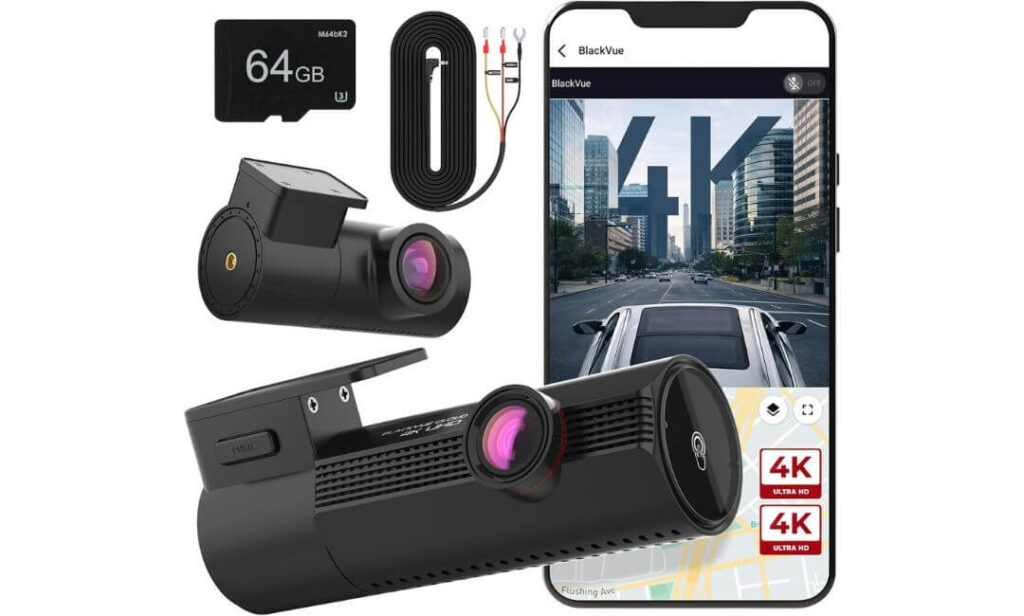
Quick Specs:
- Best for: Mercedes GLS owners who want flagship video quality with premium cloud features
- Vehicle Compatibility: Universal fit for all Mercedes GLS models
- Recording: True 4K Front + True 4K Rear
- Image Sensors: Dual Sony STARVIS 2
- Image Processing: Advanced 4K HDR with BlackVue image tuning
- Connectivity: Dual-band 2.4GHz & 5GHz WiFi, GPS, BlackVue App
- Cloud Features: 5GB free cloud storage with event backup support
- Parking Surveillance: Ultra-low power parking mode with hardwire cable included
- Storage: 64GB microSD included, expandable up to 1TB
- Extra: Boots in under one second after ignition
What separates this dash cam from most premium competitors isn’t simply that it records in dual 4K—it’s how consistently those recordings stay usable when driving conditions become difficult. On a large SUV like the Mercedes GLS, where higher seating positions create constantly changing lighting, the combination of dual STARVIS 2 sensors and BlackVue’s refined HDR processing produces footage that remains remarkably balanced without excessive glare or shadow loss.
Its overall driving experience also feels exceptionally polished. The camera powers on in less than one second, so recording begins almost immediately after the engine starts instead of missing the first few moments of a journey. During long highway drives, bright afternoon sunlight, tunnels, and night traffic, the advanced 4K HDR processing keeps road signs, lane markings, and surrounding vehicles looking natural while preserving the finer details that cheaper image processors often wash out.
Beyond image quality, this system is clearly designed for long-term ownership. The included hardwire cable, 64GB microSD card, built-in GPS, dual-band WiFi, and 5GB of complimentary cloud storage mean very little needs to be purchased separately before installation. For Mercedes GLS owners who appreciate premium technology that simply works every day, this package feels complete from the moment it’s installed.
(If you’re looking for a flagship recording system with premium software, cloud support, and some of the cleanest dual 4K footage currently available, this is one of the strongest choices for the Mercedes GLS.)
Why It Deserves a Place on This List
- True 4K recording on both front and rear cameras delivers exceptional detail from every angle.
- Dual Sony STARVIS 2 sensors significantly improve night-time clarity and reduce image noise.
- BlackVue HDR image tuning handles tunnels, direct sunlight, and headlight glare exceptionally well.
- Hardwire kit and 64GB memory card are included, reducing additional setup costs.
- Cloud connectivity, GPS, and dual-band WiFi create one of the most refined user experiences in this category.
- Supports microSD cards up to 1TB for extended recording without frequent file management.
One Thing Worth Considering
- It delivers its best value to owners who will actually use the cloud ecosystem and premium software features, rather than simply needing a basic recorder.
Mercedes GLS Installation & Compatibility
The Elite 10 uses a universal windshield-mounted design, making it compatible with every Mercedes GLS model regardless of trim level. Since it isn’t an OEM-integrated camera, the front unit mounts neatly behind the rear-view mirror while the rear camera connects using the supplied cable routed through the headliner.
Because the hardwire cable is already included, owners planning to use parking surveillance can complete the installation in one session instead of purchasing additional power accessories later. Taking the time to hide the wiring properly delivers a much cleaner factory-like finish inside the GLS cabin.
The Insider Pro-Tip
If your Mercedes GLS spends hours on motorways or frequently travels after dark, don’t judge image quality by resolution alone. The software behind the camera often determines whether critical details remain readable, and that’s where BlackVue has built its reputation over many years of development.
Another small advantage many buyers overlook is the included installation bundle. With the memory card and hardwire kit already in the box, you avoid the compatibility guesswork that often comes with building a premium dash cam system piece by piece.
#4. Vantrue New N4 Pro S 3 Channel Dash Cam
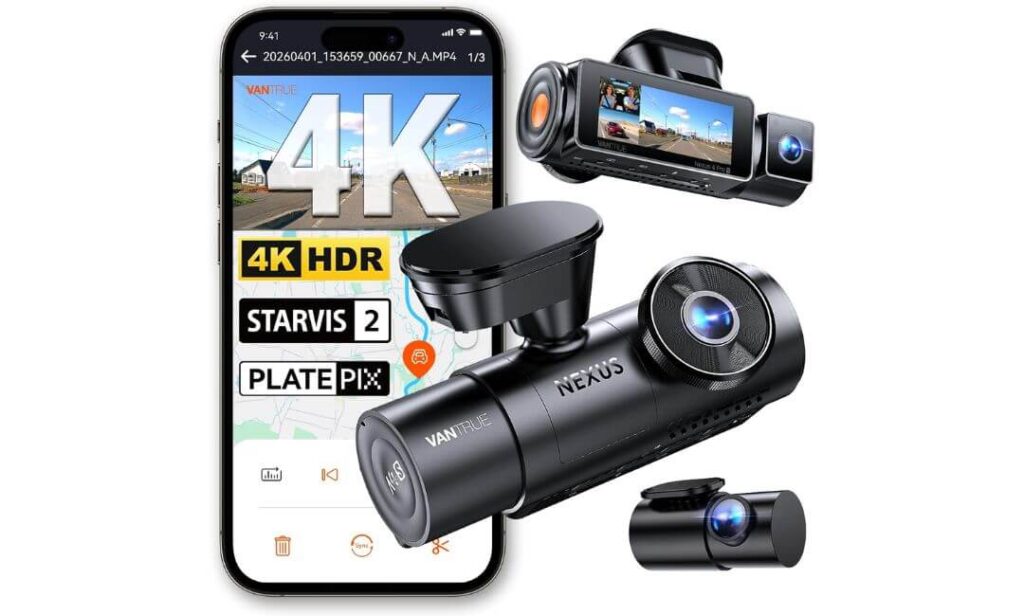
Quick Specs:
- Best for: Mercedes GLS owners who want flexible multi-camera recording with premium night performance
- Vehicle Compatibility: Universal fit for all Mercedes GLS models
- Recording: 4K Front + 2.5K Rear + 1080P Interior
- Image Sensors: Triple Sony STARVIS 2
- Night Technology: Triple HDR with PlatePix license plate enhancement
- Coverage: Up to 165° wide-angle recording with rotating rear camera
- Connectivity: 5GHz WiFi, GPS, Voice Control, OTA firmware updates
- Parking Surveillance: Buffered parking recording (hardwire kit required)
- Storage: Supports high-endurance microSD cards up to 1TB
- Power System: Heat-resistant Super Capacitor
Few dash cams give you the freedom to decide how you want to record every drive. That’s exactly where this model feels different. Instead of forcing one recording setup, it lets Mercedes GLS owners switch between triple-channel coverage for complete monitoring or dual-camera 4K + 2.5K recording when maximum road detail is the priority. That flexibility becomes surprisingly valuable over years of ownership.
Image quality is backed by three Sony STARVIS 2 sensors, but the real advantage appears after dark. Combined with Triple HDR and PlatePix processing, the camera does an excellent job maintaining readable vehicle details while reducing harsh glare from headlights and reflective road signs. The 2.5K rotating rear camera also offers more installation flexibility than fixed designs, making it easier to position perfectly inside a larger SUV like the Mercedes GLS.
The overall ownership experience feels well thought out. 5GHz WiFi transfers footage quickly, built-in GPS logs every journey accurately, and voice control lets you protect important recordings without reaching for the screen. Instead of relying on a traditional battery, the super capacitor is better suited to vehicles exposed to hot summer temperatures, while OTA firmware updates continue improving the camera long after installation.
(If you want one dash cam that can adapt to different driving situations without sacrificing recording quality, this is one of the most versatile options available for the Mercedes GLS.)
Why It Earned a Spot in Our Lineup
- Triple Sony STARVIS 2 sensors deliver excellent clarity across every camera.
- 4K front and 2.5K rear recording provide outstanding road detail.
- PlatePix and Triple HDR noticeably improve licence plate readability at night.
- Rotating rear camera makes installation more flexible inside a full-size SUV.
- Super capacitor design offers greater durability in demanding weather conditions.
- Supports up to 1TB of storage, making it ideal for long trips and continuous recording.
One Practical Consideration
- To activate the full range of buffered parking surveillance, you’ll need the optional hardwire kit and a compatible high-endurance microSD card.
Mercedes GLS Compatibility & Installation
The N4 Pro S is a universal windshield-mounted dash cam, so it works across every Mercedes GLS model without requiring vehicle-specific electronics. The supplied 20-foot rear camera cable is long enough to route neatly through the headliner of a large luxury SUV, allowing for a clean installation from front to rear.
Because this system records from three separate cameras, taking extra time with cable routing makes a noticeable difference. Securing the interior and rear camera wiring behind trim panels not only improves the final appearance but also helps preserve the refined cabin environment that Mercedes GLS owners expect.
The Insider Pro-Tip
Many buyers focus only on front camera resolution, but in day-to-day driving, the quality of the rear camera often determines how useful your footage becomes after an incident. That’s one reason the dedicated 2.5K STARVIS 2 rear camera makes this model stand out from many competing triple-channel systems.
If you regularly switch between family trips, solo commuting, and long-distance travel, don’t overlook the ability to change recording modes. Running 4K front + 2.5K rear when an interior camera isn’t needed reduces system load while still delivering outstanding road coverage, giving you more flexibility without compromising recording quality.
#5. ONESTOPGUARD Mercedes-Benz OEM Dash Cam
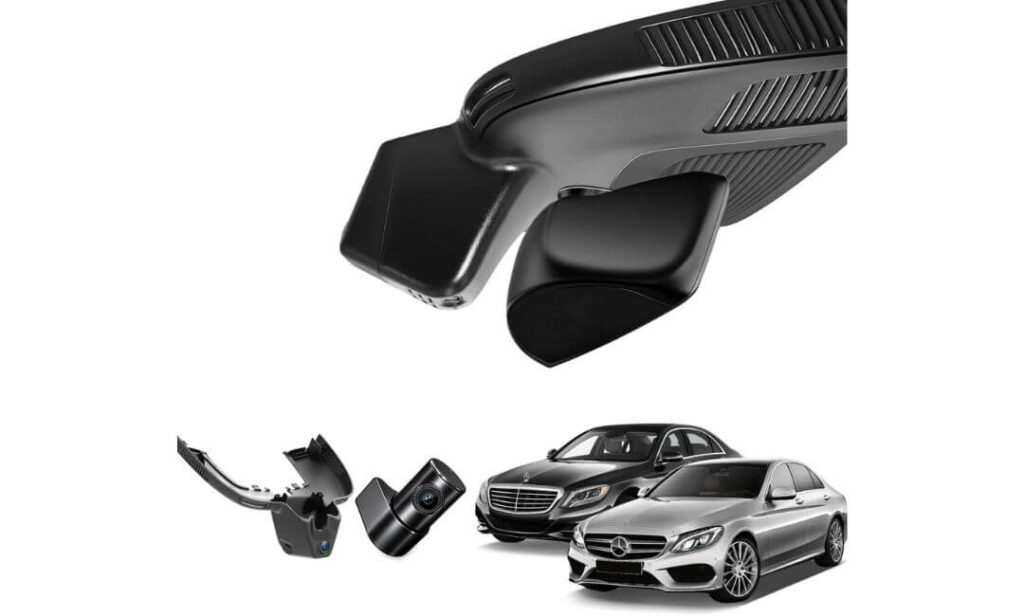
Quick Specs:
- Best for: Mercedes GLS owners looking for an affordable factory-style installation
- Vehicle Compatibility: Mercedes-Benz GLS (X167) & GLE (W167/C167/V167) (with vent-hole overhead console)
- Recording: 4K Front + 1080P Rear
- Image Processing: HDR for improved day and night recording
- Installation: OEM overhead console replacement with original-style connector
- Connectivity: Built-in WiFi with mobile app support
- Storage: 128GB microSD included
- Safety Features: G-Sensor, Loop Recording, Intelligent Battery Protection
- Parking Surveillance: Time-lapse parking mode (hardwire connection required)
- Windshield View: Completely hidden installation with no visible wires
Not every Mercedes GLS owner wants a windshield full of accessories. Sometimes the best upgrade is the one you barely notice after it’s installed. That’s exactly where this system earns its place. Designed specifically for the GLS X167 platform, it replaces the factory overhead console area instead of relying on adhesive mounts, preserving the clean cabin design Mercedes is known for.
Its 4K HDR front camera captures impressive road detail while the 1080P rear camera keeps an eye on traffic behind the vehicle. Because the camera sits in a factory-style location near the mirror housing, the viewing angle feels natural and unobstructed without creating additional distractions inside the cabin. The built-in WiFi also makes it easy to review and download important recordings directly from your phone whenever needed.
One feature many owners will appreciate is how straightforward the installation process is. The supplied harness connects to the vehicle’s original wiring without cutting cables or modifying factory electronics, helping preserve the premium feel of the Mercedes GLS while avoiding the clutter normally associated with aftermarket dash cams. For buyers who value simplicity just as much as recording quality, that makes a genuine difference.
(If your goal is achieving a factory-looking installation without paying flagship prices, this is one of the strongest OEM-style alternatives available for the Mercedes GLS.)
Why We Included It in This Guide
- Purpose-built for the Mercedes GLS, delivering a clean factory-style appearance.
- No suction cups or exposed wiring, helping preserve the luxury interior.
- 4K HDR front recording provides clear everyday driving footage.
- Original-style plug-and-play connection avoids wire cutting or vehicle coding.
- 128GB memory card is included, allowing immediate use after installation.
- Built-in battery protection helps reduce unnecessary battery drain during parking surveillance.
One Detail to Verify Before Ordering
- This version is designed for GLS models equipped with the vent-hole overhead console, so compare your factory mirror housing carefully before purchasing to ensure the correct fit.
Mercedes GLS Compatibility & Installation
This dash cam is engineered specifically for the Mercedes-Benz GLS (X167) and fits 2020–2026 models equipped with the matching overhead console design. Since Mercedes used more than one mirror cover configuration, confirming the correct vent-hole layout before ordering is the most important step.
Installation is one of its biggest advantages. The camera mounts inside the factory overhead console area using the supplied vehicle-specific harness, eliminating the need for windshield brackets, visible power cables, or permanent modifications. If you intend to use parking surveillance regularly, completing the hardwire connection during installation provides the cleanest long-term setup.
The Insider Pro-Tip
Many buyers compare OEM-style dash cams only by recording resolution, but the quality of the installation often determines whether you’ll still enjoy using it years later. A camera that blends naturally into the Mercedes GLS interior is far less likely to become an annoyance every time you get behind the wheel.
Before placing your order, spend a minute checking your overhead console shape and vent-hole configuration against the product photos. It’s a simple step, but it’s also the difference between a true factory-style fit and ordering the wrong version for your vehicle.
Best Mercedes GLS Dash Cam Comparison: Features, OEM Fit & Expert Picks
| Dash Cam | Recording Quality | Installation Style | Standout Technology | Parking Features | Ideal Mercedes GLS Owner |
|---|---|---|---|---|---|
|
Fitcamx Front 4K + Rear 1080P
Best Overall OEM Choice
|
4K Front 1080P Rear WDR + f/1.6 Lens |
True OEM Integration No visible wiring Factory mirror housing |
Factory appearance WiFi App 128GB Included Plug & Play |
No dedicated parking mode | Owners who want the cleanest factory-looking upgrade without changing the premium cabin feel. |
|
VIOFO A229 Pro 3CH
Best Triple Coverage
|
4K Front 2K Rear 1080P Interior |
Universal Windshield Mount |
Dual STARVIS 2 HDR on all cameras 5GHz WiFi Voice Control |
Buffered Parking Mode (Hardwire Kit Required) |
Drivers wanting maximum evidence from every direction during daily driving or family trips. |
|
BlackVue Elite 10
Best Premium Technology
|
True Dual 4K Front + Rear HDR |
Universal Windshield Mount |
Dual STARVIS 2 Cloud Features GPS Ultra Fast Boot |
Ultra Low Power Parking Hardwire Included |
Mercedes GLS owners who value premium software, cloud connectivity and flagship image quality. |
|
Vantrue N4 Pro S
Best Flexible Recording
|
4K Front 2.5K Rear 1080P Interior |
Universal Windshield Mount |
Triple STARVIS 2 PlatePix Tech Triple HDR Super Capacitor |
Buffered Parking Mode (Hardwire Kit Required) |
Owners who frequently switch between commuting, family travel and long-distance driving. |
|
ONESTOPGUARD OEM Dash Cam
Best Budget OEM Fit
|
4K Front 1080P Rear HDR |
OEM Overhead Console Hidden Installation |
Factory Connector WiFi App 128GB Included |
Time-Lapse Parking Battery Protection |
Buyers looking for an affordable OEM-style solution with a clean Mercedes factory appearance. |
Buying Guide: How to Choose the Right Dash Cam for Your Mercedes GLS
A Mercedes GLS deserves more than a generic dash cam. It’s a full-size luxury SUV with a premium cabin, advanced driver assistance systems, and a large windshield that changes how a camera performs compared to smaller vehicles. The right model should complement the vehicle rather than become another accessory stuck to the glass. Before buying, these are the factors that genuinely matter.
OEM Fit vs Aftermarket Dash Cams for Mercedes GLS
This is usually the first decision every GLS owner should make.
An OEM-style dash cam for Mercedes GLS replaces or integrates into the factory mirror housing or overhead console, creating a clean appearance with virtually no visible wiring. If maintaining the luxury interior is important to you, this style feels much closer to factory equipment and usually requires less attention after installation.
A universal aftermarket dash cam offers greater flexibility and often includes features like multiple cameras, cloud connectivity, or interior recording. The trade-off is that you’ll normally see a windshield-mounted camera and spend more time routing cables through the headliner and interior trim.
Neither approach is automatically better. It depends on whether your priority is factory appearance or maximum recording capability.
Why 4K, HDR and STARVIS 2 Matter More Than Advertised Resolution
Many buyers stop reading once they see “4K” on the product page. In reality, image processing is often more important than resolution alone.
A quality 4K dash cam for Mercedes GLS should also include HDR to balance bright sunlight, tunnel exits, and oncoming headlights. Cameras equipped with Sony STARVIS 2 sensors generally perform far better in difficult lighting, helping preserve number plates, road signs, and surrounding traffic after sunset.
The goal isn’t simply sharper footage. It’s producing recordings that remain useful if they’re ever needed for insurance or legal purposes.
Choose the Right Camera Coverage for Your Driving Style
Not every GLS owner needs the same recording setup.
A front-only camera is suitable for drivers who mainly want road coverage and prefer the cleanest installation.
A front and rear dash cam for Mercedes GLS offers significantly better protection against rear-end collisions, parking incidents, and highway accidents where vehicles approach from behind.
If you regularly travel with family, transport clients, or use the third-row seating, a triple-channel system with an interior camera can provide another layer of recorded evidence without affecting everyday driving.
Field of View Should Be Wide, Not Excessive
A wider viewing angle captures more surroundings, but extremely wide lenses can introduce distortion around the edges.
For a vehicle the size of the Mercedes GLS, a front camera around 160°–170° combined with a rear camera between 140°–160° generally provides excellent road coverage while keeping vehicles and licence plates looking natural instead of stretched.
Good positioning is just as important as lens width. Even the best camera performs poorly if it’s installed too high, too low, or blocked by factory sensors.
Parking Mode Is Worth Paying Attention To
Parking surveillance is one of the most valuable features on a modern dash cam, especially for a luxury SUV that often spends time in public parking areas.
Some cameras begin recording only after detecting an impact, while more advanced systems capture several seconds before and after an incident using buffered recording. Others offer low-bitrate or time-lapse recording to monitor the vehicle for longer periods while using less storage.
If parking protection is important, confirm whether the dash cam requires a hardwire kit, because many advanced systems need a permanent power connection to unlock their full capabilities.
WiFi, Mobile Apps and Firmware Support Make Everyday Ownership Easier
A dash cam shouldn’t become frustrating every time you need a recording.
Reliable WiFi connectivity allows quick video downloads without removing the memory card, while a well-designed mobile app simplifies setup, firmware updates, and camera configuration. Faster 5GHz WiFi is especially useful when transferring large 4K recordings to your phone.
Manufacturers that continue releasing firmware improvements often deliver a better ownership experience over the long term than brands that never update their software.
Built-In GPS Adds Valuable Context
GPS does more than display your location.
It records vehicle speed, travel direction, route history, timestamps, and precise location, creating footage that provides far more context if you’re reviewing an accident later. Many insurance claims become easier to understand when video evidence is supported by accurate GPS information.
For drivers who regularly travel long distances, GPS is a feature that’s easy to appreciate after the first unexpected incident.
Storage, Loop Recording and Memory Card Compatibility
Recording in 4K generates large video files, especially when using two or three cameras simultaneously.
Look for dash cams that support high-endurance microSD cards with capacities suited to your driving habits. Reliable loop recording ensures the oldest files are automatically replaced while protected event recordings remain safely locked.
Whenever possible, use memory cards recommended by the manufacturer, as they’re typically tested for continuous recording rather than occasional smartphone use.
Consider the Installation Before You Buy
Installation is often overlooked until the box arrives.
OEM-style cameras usually connect through vehicle-specific harnesses and preserve the clean factory appearance of the Mercedes GLS. Universal models generally require routing cables along the windshield, A-pillars, headliner, and rear hatch before reaching the rear camera.
If you plan to enable parking surveillance, installing the hardwire kit during the initial installation is usually cleaner and more efficient than upgrading the system later.
Look Beyond Daytime Video Quality
Nearly every modern dash cam looks impressive on a bright afternoon.
The real difference appears during heavy rain, underground parking garages, fog, sunrise, sunset, and night driving. Cameras with HDR, larger image sensors, quality lenses, and advanced image processing consistently produce clearer evidence when visibility becomes challenging.
For a vehicle like the Mercedes GLS, investing in dependable low-light performance usually provides more long-term value than simply chasing higher recording resolutions on a specification sheet.
Mercedes GLS Dash Cam Installation Basics
Installing a dash cam in a Mercedes GLS isn’t difficult, but it does require more planning than it would in a smaller vehicle. The GLS features a large windshield, multiple driver-assistance sensors around the rear-view mirror, side-curtain airbags, and premium interior trim that deserves careful handling. A clean installation not only improves appearance but also ensures the camera records from the correct angle without interfering with factory safety systems.
Whether you choose an OEM-style dash cam or a universal aftermarket model, taking the time to install it correctly will have a bigger impact on your overall experience than most buyers realize.
Installing an OEM-Style Dash Cam the Right Way
An OEM dash cam for Mercedes GLS is designed to blend into the factory interior instead of hanging from the windshield. These systems typically replace the mirror housing or overhead console cover and use a vehicle-specific wiring harness that connects to the factory power source.
Before installation, compare your existing mirror cover or overhead console with the manufacturer’s compatibility photos. Mercedes has used different housing designs across certain GLS trims, so confirming the correct version before opening the trim panels can prevent unnecessary work.
Use the supplied trim removal tools instead of metal screwdrivers whenever possible. Plastic tools reduce the chance of marking the soft interior panels, which is especially important in a luxury SUV.
If the camera uses the factory connector, avoid modifying the wiring or cutting cables. Keeping the installation reversible helps preserve the original electrical system and makes future servicing much easier.
Installing a Universal Aftermarket Dash Cam
Universal dash cams require a little more patience but offer greater flexibility in features and camera configurations.
Start by positioning the front camera directly behind or just beside the rear-view mirror, ensuring it doesn’t block the driver’s view or interfere with the forward-facing cameras and sensors used by Mercedes driver assistance systems. The camera should remain inside the area swept by the windshield wipers for the clearest recordings during rain.
For dual- and triple-channel systems, route the rear camera cable through the headliner, down the rear pillars, and into the tailgate using the factory trim channels wherever possible. Interior camera cables should also follow existing trim lines to maintain a clean appearance and reduce the chance of snagging during everyday use.
Taking an extra thirty minutes to hide every cable usually produces a result that looks significantly more professional than a rushed installation.
Choosing the Best Power Source
The power connection you choose determines which features your dash cam can actually use.
The simplest option is the 12V accessory socket, which is quick to install and works well if you only need recording while driving. However, the camera will normally switch off once the ignition is turned off.
If you want parking mode, buffered event recording, or time-lapse monitoring, a hardwire kit connected through a dedicated fuse tap is usually the preferred solution. Most quality hardwire kits include low-voltage protection that automatically disconnects power before the vehicle battery reaches an unsafe level.
Some Mercedes GLS owners also prefer an OBD-II power adapter because it avoids altering the fuse box while still providing continuous power for compatible dash cams. It’s often a practical compromise for drivers who want easier installation without giving up parking surveillance.
Route Cables Safely and Protect Factory Safety Systems
Professional-looking cable management is about more than appearance.
The Mercedes GLS is equipped with side-curtain airbags running behind the A-pillars and roof lining. Dash cam wiring should never be routed directly across an airbag deployment path or secured in a way that could interfere with its operation.
Instead, follow existing factory wiring channels whenever possible and secure loose cables with soft fabric tape or quality cable clips. This prevents rattles, reduces long-term wear, and keeps wiring away from moving trim pieces or weather seals.
Avoid leaving excess cable coiled behind the mirror housing. A neatly routed installation not only looks better but also makes future maintenance far easier.
Check Vehicle Features Before Finishing the Installation
Before reinstalling all interior trim, verify that every vehicle function still operates exactly as expected.
Confirm that the rain sensor, automatic headlights, lane-assist cameras, and other driver-assistance features around the mirror housing remain unobstructed. Check that the rear camera view isn’t blocked by the tailgate trim and that the front lens has a clear view through the windshield.
If your dash cam includes WiFi, GPS, voice control, or parking surveillance, configure these features before replacing all trim panels. It’s much easier to adjust cable routing or reconnect accessories while everything is still accessible.
Finally, start the Mercedes GLS several times, allow the camera to complete its recording cycle, and review a sample clip from every installed camera. A five-minute functional check at the end of the installation is often the difference between discovering a small issue immediately and finding it weeks later when the footage is actually needed.
How to Evaluate These Five Mercedes GLS Dash Cams Before You Buy
Every dash cam in this guide earned its place for a different reason. Some focus on factory-style integration, while others deliver the best possible recording quality or advanced parking protection. Instead of comparing feature lists line by line, think about how each camera will perform in your own Mercedes GLS over months or even years of daily driving.
The checklist below is the same approach we recommend when narrowing down the right option for a premium SUV.
Compare Real 4K Performance, Not Just the Resolution Number
Almost every premium dash cam advertises 4K recording, but the recording itself is what matters.
Pay attention to how clearly each camera captures licence plates, lane markings, traffic signs, and distant vehicles while driving at normal road speeds. A high-quality image sensor combined with strong image processing will usually outperform a cheaper camera that simply advertises a higher resolution.
Among the models in this guide, cameras equipped with Sony STARVIS 2 sensors consistently deliver better detail, lower image noise, and stronger overall clarity during both daytime and night driving. For Mercedes GLS owners who frequently drive after dark, this is often a more meaningful upgrade than adding extra cameras.
Judge HDR by Difficult Driving Conditions
HDR is one of the easiest features to underestimate until you actually need it.
When comparing these dash cams, think about situations such as direct afternoon sunlight, underground parking exits, tunnels, heavy rain, bright LED headlights, and reflective road signs. These are the conditions where weaker cameras often lose important details.
A well-implemented HDR system should balance bright and dark areas naturally instead of producing overly bright skies or excessively dark vehicles. Better HDR generally results in clearer evidence during the moments that matter most.
Decide Whether You Really Need One, Two or Three Cameras
The best recording setup depends entirely on how you use your Mercedes GLS.
If your priority is maintaining a clean cabin while recording the road ahead, an OEM-style front and rear system may be the ideal balance between appearance and protection.
Drivers who frequently travel with family, carry passengers, or simply want complete documentation of every journey should seriously consider a triple-channel dash cam. The additional interior camera can provide valuable evidence that a traditional front-and-rear setup cannot capture.
Also compare each camera’s parking mode, especially if your GLS regularly spends time in shopping centres, airports, hotels, or public parking garages. Buffered event recording generally provides more useful evidence than cameras that only begin recording after detecting an impact.
Think About Installation Before Looking at Features
The easiest dash cam to live with is often the one that looks like it came with the vehicle.
If preserving the premium appearance of your Mercedes GLS is a priority, OEM-fit dash cams offer cleaner integration with virtually no visible wiring. They are particularly appealing to owners who prefer a factory-installed look without accessories attached to the windshield.
Universal aftermarket systems usually provide more advanced technology, but they also require more cable routing and installation time. Neither option is wrong, but understanding this trade-off before purchasing often prevents disappointment later.
Compare the Everyday User Experience
Owning a dash cam should feel effortless after the first installation.
Evaluate how quickly each camera connects to its mobile app, how responsive the WiFi connection feels, and whether downloading recordings is simple enough to do when you actually need them. Cameras with 5GHz WiFi generally transfer large 4K files much faster than older wireless systems.
Built-in GPS is equally important. Accurate speed, location, direction of travel, and timestamps add valuable context to recorded footage and often make incident reviews much easier.
A camera with reliable software is usually a better long-term investment than one that simply offers the longest specification sheet.
Consider Long-Term Reliability, Not Just New Features
A dash cam spends most of its life exposed to sunlight, heat, vibration, and continuous recording.
Look for models that use super capacitors instead of conventional batteries, offer effective temperature protection, and receive regular firmware updates from the manufacturer. These features often have a greater impact on long-term reliability than adding another recording mode you’ll rarely use.
Warranty support also deserves attention. Manufacturers with responsive customer service and a history of supporting existing products generally provide a better ownership experience over several years.
Match the Dash Cam to Your Ownership Priorities
There isn’t a single “best” dash cam for every Mercedes GLS owner.
If your priority is factory integration, an OEM-style model makes the most sense. If you want the highest image quality, focus on cameras with STARVIS 2 sensors and advanced HDR. Drivers who value complete recording coverage should lean toward triple-channel systems, while technology-focused owners may benefit more from premium software, cloud connectivity, and advanced parking surveillance.
Choosing a dash cam based on how you actually drive your Mercedes GLS—not simply on the longest list of features—is the approach that delivers the most satisfying ownership experience over time.
FAQs About Mercedes GLS Dash Cam
Will an OEM-style dash cam affect the factory cameras or driver assistance systems in a Mercedes GLS?
Not if you choose the correct model and install it properly. OEM-style dash cams designed specifically for the Mercedes GLS (X167) are engineered to fit around the factory mirror housing without blocking the forward-facing cameras used for features like Active Brake Assist, Lane Keeping Assist, or Traffic Sign Assist.
The important part is installation, not just compatibility. Before securing the camera permanently, confirm that the factory camera module, rain sensor, and sensor housing all have an unobstructed view through the windshield. A properly positioned OEM dash cam should look like part of the vehicle rather than something added afterward.
Is a triple-channel dash cam actually worth buying for a Mercedes GLS, or is front and rear recording enough?
It depends more on how you use the vehicle than on the price of the camera.
A front and rear dash cam is usually enough if your Mercedes GLS is mainly used for personal commuting and family travel. However, a triple-channel system becomes a smarter investment if you:
- Frequently carry passengers.
- Use the third-row seating.
- Drive for business or executive transport.
- Want complete evidence during side-impact or cabin-related incidents.
The interior camera isn’t something you’ll use every day, but when it’s needed, there’s no way to recreate footage that was never recorded.
Which feature has the biggest impact on night-time recording quality in a Mercedes GLS?
Many buyers assume it’s 4K resolution, but that’s only one part of the equation.
The biggest improvements usually come from the combination of Sony STARVIS 2 sensors, effective HDR processing, and a quality lens. These three components determine how well the camera handles headlights, reflections, rain-soaked roads, underground parking garages, and poorly lit streets.
That’s why two cameras advertising “4K” can produce completely different results after dark. Image processing and sensor quality are often what separate useful evidence from footage that looks impressive only in daylight.
How much storage should I realistically use for a dual- or triple-channel dash cam?
Storage depends on your driving habits more than the camera itself.
If you drive only short daily trips, 128GB is often enough for reliable loop recording. For longer journeys or continuous multi-camera recording, moving to 256GB or 512GB provides more flexibility and reduces how often older footage is overwritten.
Just as important as capacity is the type of card. Always use a high-endurance microSD card recommended by the dash cam manufacturer. Continuous 4K recording writes thousands of files every week, and standard consumer memory cards typically wear out much faster under that workload.
Should I install a Mercedes GLS dash cam myself or have it professionally installed?
That depends on the type of dash cam you choose.
An OEM-style plug-and-play model is often manageable for owners who are comfortable removing interior trim carefully and following installation instructions. Universal systems with rear cameras and hardwire kits require considerably more cable routing through the headliner, A-pillars, rear hatch, and fuse box.
Professional installation is usually worth considering if you plan to enable advanced parking surveillance or simply want the cleanest possible finish. A properly routed installation not only looks better but also helps avoid loose wiring, trim damage, and interference with the Mercedes GLS’s curtain airbags or factory safety equipment.
Final Thoughts
The best dash cam for a Mercedes GLS isn’t necessarily the one with the longest feature list—it’s the one that fits the way you actually use your SUV.
If preserving the factory appearance is your top priority, an OEM-style Mercedes GLS dash cam will always feel like the most natural upgrade. If your focus is capturing the clearest possible evidence in every driving condition, cameras equipped with STARVIS 2 sensors, dependable HDR processing, and reliable parking surveillance offer a meaningful advantage that becomes obvious over years of ownership, not just on the first drive.
Every recommendation in this guide was selected with a different type of Mercedes GLS owner in mind. Some prioritize seamless installation, others want complete three-channel coverage, while many simply want dependable footage they can trust if an unexpected incident occurs. There isn’t a universal winner for every driver, which is why understanding your own priorities is far more valuable than chasing specifications alone.
One final recommendation: once your dash cam is installed, spend a few minutes reviewing daytime and night-time sample recordings, confirm the camera angle, update the firmware if available, and use a quality high-endurance memory card. Those small steps have a much bigger impact on long-term reliability than most buyers realize, and they’ll ensure your Mercedes GLS is always recording when it matters most.
Also Check: