5 Best Dash Cams for Mercedes C-Class in 2026: 4K 60FPS STARVIS 2 & OEM Fit Picks
If you drive a Mercedes-Benz C-Class, you already know it isn’t just another compact luxury sedan. Whether it’s a 2022–2026 W206 C300/C43, a 2015–2021 W205, or an older W204, visibility, cabin refinement, and factory styling matter just as much as recording quality. A dash cam that works perfectly in a pickup or budget hatchback can feel completely out of place in a C-Class because of its steep windshield angle, driver-assistance sensors, and premium interior.
That’s exactly why we didn’t build this list around best-sellers alone. We looked at what actually matters for C-Class owners: true 4K clarity for reading number plates, reliable HDR performance after dark, discreet installation, stable parking surveillance, fast wireless transfers, and long-term reliability in everyday driving. We also considered options that suit owners who prefer an OEM-style hidden setup as well as those who want maximum coverage with multi-channel recording.
Whether you own a daily-driven C300, a performance-focused C43, or simply want extra protection for your investment, the dash cams below offer the strongest combination of image quality, ease of ownership, and compatibility without compromising the clean look that makes the Mercedes C-Class stand out.
Best Mercedes C-Class Dash Cams: Top 2026 Picks for Front & Rear Protection
#1. VIOFO A329S 4K 60FPS Dash Cam Front and Rear
Best 4K Dash Cam for Mercedes C-Class with Dual STARVIS 2 Sensors, WiFi 6, SSD Storage and Outstanding Night Recording
#2. Vantrue N5S 4 Channel 360 Degree Dash Cam
Best Mercedes C-Class Dash Camera for Complete 360° Coverage, Cabin Recording, Dual GPS and Advanced Parking Monitoring
#3. Garmin Dash Cam X310
Premium Compact Dash Cam for Mercedes-Benz C-Class with Ultra HD 4K Video, Voice Control, Built-in Polarizer and GPS
#4. Fitcamx Front 4K + Rear 1080P Dash Cam for Mercedes-Benz C-Class
Best OEM Fit Dash Cam for Mercedes C-Class with Factory-Style Installation, Dual Recording and Clean Interior Appearance
#5. KENWOOD DRV-A610WDP Dash Cam
Reliable Front and Rear Dash Cam for Mercedes C-Class with 4K Recording, GPS, WiFi Connectivity and Everyday Driving Security
Expert Tip From Our Research
If there’s one mistake we see C-Class owners make, it’s chasing the highest video resolution without thinking about where and how they actually drive. A 4K label alone doesn’t guarantee clear footage. What consistently makes the difference is a combination of sensor quality, HDR tuning, lens performance, and stable exposure control—especially on poorly lit roads, underground parking garages, and rainy nights where luxury cars often struggle with glare from LED headlights.
That’s why this guide doesn’t recommend five versions of the same dash cam. Every model here fills a different role. If you want the best image quality, one choice stands out. If your priority is complete 360° coverage, there’s a better option. If keeping the cabin looking factory-original matters most, we’ve included a dash cam built specifically for that purpose. Matching the camera to your driving habits will always give you a better ownership experience than simply buying the most expensive model.
How We Chose the Best Dash Cams for Mercedes C-Class
Choosing a dash cam for the Mercedes C-Class isn’t the same as choosing one for an ordinary family car. The C-Class has a low seating position, a sharply raked windshield, advanced driver-assistance hardware around the mirror housing, and a premium interior where bulky cameras and loose wiring immediately look out of place. Every recommendation in this guide was selected with those characteristics in mind.
Our first priority was real-world video performance, not marketing claims. We gave preference to cameras using Sony STARVIS 2 sensors, high-bitrate 4K recording, reliable HDR processing, and image tuning that can consistently capture licence plates in difficult lighting. A camera that looks impressive on a product page but struggles at dawn, dusk, or during heavy rain didn’t make this list.
Next, we looked at installation compatibility. Some C-Class owners want a discreet, factory-style appearance, while others are comfortable installing a premium multi-channel system for maximum coverage. That’s why this guide includes both OEM-style solutions like Fitcamx and feature-rich models such as VIOFO and Vantrue instead of forcing every owner toward the same setup.
We also considered the features owners continue to appreciate long after installation. Reliable parking mode, stable GPS tracking, fast Wi-Fi transfers, voice control, expandable storage, SSD support where available, and long-term software support all played an important role. These are the features that make living with a dash cam easier every day—not just during the first week after purchase.
Finally, we deliberately avoided filling this list with products that look similar on paper. Every recommendation earned its place because it offers a clear advantage for a different type of Mercedes C-Class owner—whether that’s best overall image quality, complete cabin coverage, premium compact design, factory-style integration, or dependable everyday value. If two products delivered nearly the same experience, we kept the stronger one and left the other out. That’s the approach we believe gives readers the most honest buying advice.
#1. VIOFO A329S 4K 60FPS Dash Cam Front and Rear
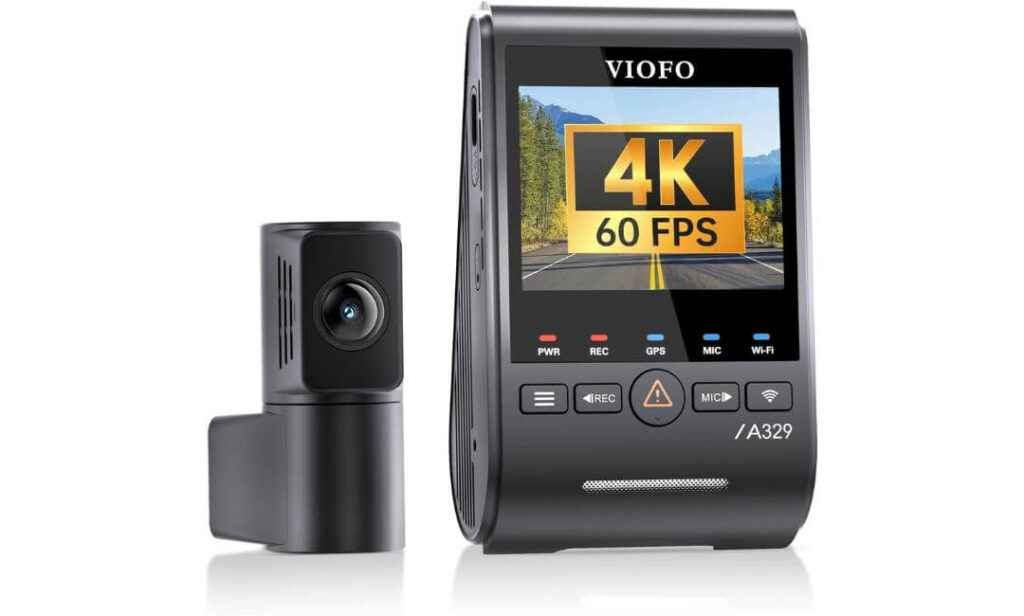
Quick Specs:
- 4K 60FPS front + 2K rear recording with HDR support
- Sony STARVIS 2 IMX678 (front) + IMX675 (rear) image sensors
- Wi-Fi 6 for ultra-fast video transfers
- Built-in GPS with GPS, Galileo, GLONASS and BeiDou support
- Impact-detection power-saving parking mode (requires hardwire kit)
- Supports up to 4TB external SSD or 512GB microSD
- Voice control for hands-free operation
- Included CPL filter to reduce windshield reflections
- Slim coaxial cable for a cleaner hidden installation inside the Mercedes C-Class
The first thing you’ll notice isn’t the 4K badge—it’s how clean and stable the footage stays when lighting becomes difficult. The Mercedes C-Class has a sharply sloped windshield, bright LED headlamps, and plenty of reflective interior trim. Those conditions expose weak cameras very quickly. This model handles them exceptionally well thanks to its dual STARVIS 2 sensors, producing footage that remains detailed without making night scenes look artificially bright or overly processed.
Where this camera really earns its place is during everyday ownership. Wi-Fi 6 makes transferring large 4K files surprisingly quick, the included CPL filter helps cut dashboard reflections that luxury interiors often create, and support for up to 4TB SSD storage means long trips don’t constantly overwrite older recordings. These aren’t flashy specifications—they’re the kind of features owners appreciate months after installation.
Installation also feels well thought out. The thin coaxial rear cable routes cleanly through the C-Class cabin without adding unnecessary bulk around the headliner, while the compact windshield unit doesn’t dominate the mirror area. Add built-in GPS, voice control and an efficient parking mode, and it becomes a package that’s designed for people who actually drive their cars every day rather than simply comparing specification sheets.
(If your priority is dependable video evidence instead of the longest feature list, this is the camera we’d confidently install in our own Mercedes C-Class.)
What Made This One Stand Above the Rest
- Excellent 4K 60FPS daytime clarity with impressive licence plate readability.
- Dual STARVIS 2 sensors deliver one of the strongest low-light performances in this category.
- Wi-Fi 6 dramatically reduces waiting time when downloading large recordings.
- 4TB SSD compatibility makes it ideal for frequent drivers and extended road trips.
- Slim installation hardware suits the premium cabin layout of the Mercedes C-Class.
- Included CPL filter noticeably reduces windshield glare during sunny drives.
One Thing Worth Knowing Before You Buy
- To unlock parking surveillance, you’ll need to install the optional hardwire kit, which isn’t included in the box.
Mercedes C-Class Compatibility & Installation Notes
This dash cam works exceptionally well across Mercedes-Benz C-Class W206 (2022+) models and is equally suitable for earlier W205 generations. Its compact front unit fits neatly behind the rear-view mirror without making the windshield look cluttered, while the slim rear cable is easy to conceal beneath the factory interior trim.
For the cleanest installation, most owners will also want a Mercedes-compatible hardwire kit if parking mode is important. Using a fuse tap allows the camera to receive constant power while maintaining battery protection, giving you parking surveillance without leaving loose cables hanging around the cabin.
The Insider Pro-Tip
Many buyers focus entirely on resolution, but in a Mercedes C-Class, the better long-term investment is image consistency. A camera that controls glare, keeps number plates readable at night and transfers footage quickly after an incident will prove far more valuable than one that simply advertises the biggest resolution figure.
One more small detail is easy to overlook: install the front camera slightly to the passenger side of the mirror housing rather than directly underneath it. It keeps the driver’s view cleaner, works better with the C-Class windshield angle, and leaves enough space around the factory sensor cluster for a neater, more factory-like finish. It’s the kind of installation detail experienced owners appreciate every single day.
#2. Vantrue N5S 4 Channel 360 Degree Dash Cam
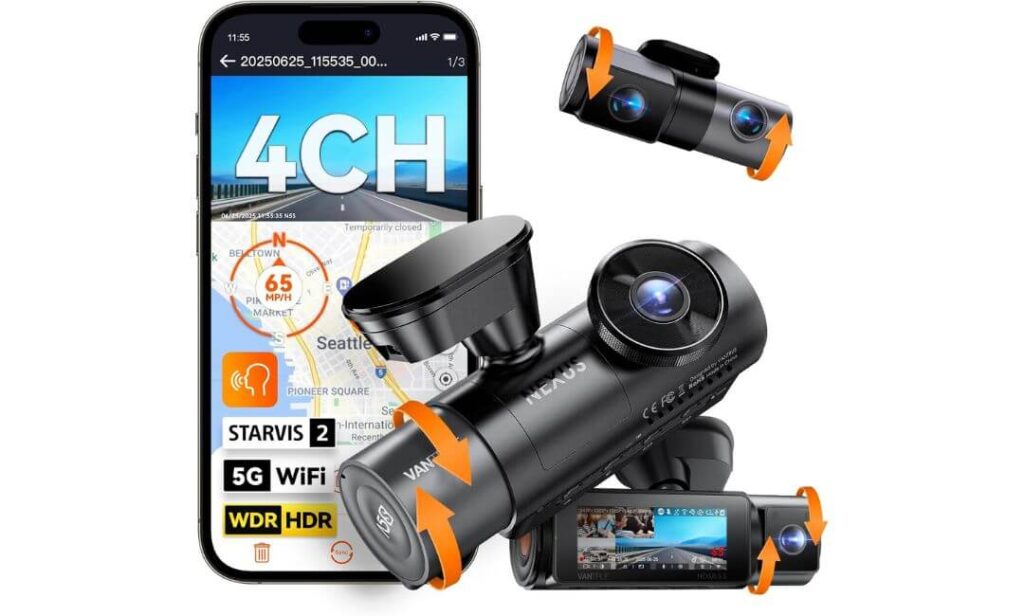
Quick Specs:
- 4-channel recording (2.7K front + 1440P rear + dual 1080P interior cameras)
- Four Sony STARVIS 2 image sensors with HDR/WDR processing
- 5GHz Wi-Fi with Vantrue mobile app
- Dual GPS for highly accurate route and speed tracking
- Buffered parking mode with 10-second pre-recording (hardwire kit required)
- Supports up to 1TB microSD
- Voice control with multiple language support
- Supercapacitor for improved heat resistance and durability
- Adjustable cameras for flexible installation in different cabin layouts
Some dash cams are built to record what’s in front of you. This one is built to record everything that could matter. If your Mercedes C-Class regularly carries family, clients, friends, expensive equipment or even pets, having footage from every direction changes the kind of evidence you can rely on after an incident. That’s where this four-camera setup immediately separates itself from traditional front-and-rear systems.
Its biggest strength isn’t simply having four lenses—it’s that all four cameras use STARVIS 2 technology. Combined with HDR processing, the system handles underground parking, tunnels, city streets and poorly lit roads far better than most multi-channel cameras. The upgraded 1440P rear camera also captures noticeably more detail than typical Full HD rear units, while the interior cameras remain usable even after dark thanks to integrated infrared illumination.
The overall ownership experience also feels well planned. 5GHz Wi-Fi makes reviewing footage much quicker than older wireless systems, dual GPS records highly accurate driving data, and buffered parking mode saves the moments leading up to an impact instead of only recording after it happens. For C-Class owners who want complete documentation instead of partial evidence, this is one of the most capable all-around systems currently available.
(If protecting every corner of your Mercedes matters more than chasing the highest front-camera resolution, this setup simply covers more situations than almost anything else in its class.)
Why This Model Earned Its Spot
- True 360° recording removes blind spots around the vehicle and inside the cabin.
- Four STARVIS 2 sensors deliver excellent night-time consistency across every camera.
- The upgraded 1440P rear camera captures sharper rear footage than many rivals.
- Buffered parking mode records what happened before an impact, not just after it.
- Supercapacitor design is better suited for long-term reliability in hot and cold climates.
- Flexible camera positioning works well with different Mercedes C-Class seating and cabin layouts.
One Small Thing to Keep in Mind
- To use buffered parking surveillance, you’ll need the optional hardwire kit, and a high-quality microSD card is recommended for the best long-term reliability.
Mercedes C-Class Installation & Everyday Compatibility
This system is fully compatible with both Mercedes-Benz C-Class W206 and earlier W205 models. The front camera mounts neatly behind the rear-view mirror, while the adjustable cabin and rear cameras make it easy to tailor the viewing angles to your own interior layout without creating an untidy appearance.
Because this is a four-camera system, installation naturally takes more time than a standard dual-channel dash cam. Planning the cable routing behind the headliner and door trim before securing the adhesive mounts will produce a much cleaner, factory-like finish and help avoid unnecessary adjustments later.
The Insider Pro-Tip
Most buyers choose a four-channel dash cam because they want more cameras. Experienced owners choose one because they want more context. During insurance claims, parking incidents or unexpected disputes, knowing what happened inside the cabin, behind the vehicle and alongside it often answers questions that a front camera never can.
If you’re installing this in a Mercedes C-Class, spend a few extra minutes adjusting the interior cameras before permanently fixing the cables. A slight change in angle can capture both side windows and rear seating much more effectively, giving you better coverage without adding another camera later. That’s a small installation detail that pays off every time the system records something important.
#3. Garmin Dash Cam X310
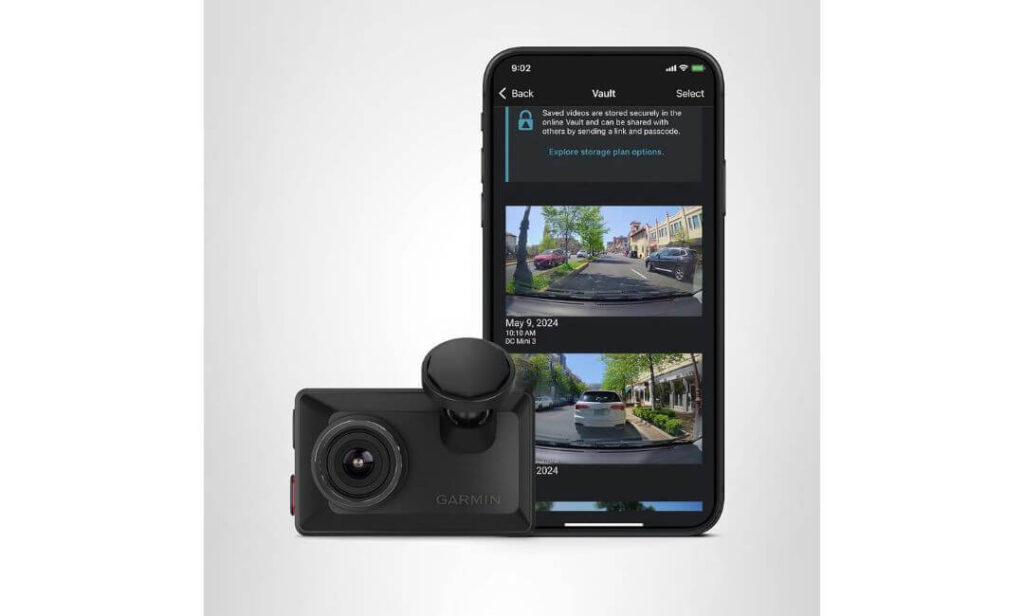
Quick Specs:
- 4K Ultra HD video recording
- 140° wide-angle lens with excellent road coverage
- Built-in Garmin Clarity™ Polarizer to reduce windshield reflections
- 2.4-inch touchscreen for quick playback and settings
- Built-in GPS with speed, location and time stamping
- Voice control for hands-free operation
- Automatic incident recording with secure file saving
- Magnetic low-profile mount for quick installation and removal
- Supports Garmin Drive app, cloud storage and multi-camera synchronization
What immediately stands out here isn’t the specification sheet—it’s how little attention the camera demands once it’s installed. The Mercedes C-Class already has one of the cleanest dashboard layouts in its segment, and this compact unit complements that design instead of distracting from it. Mounted behind the rear-view mirror, it almost disappears from the driver’s line of sight while continuing to capture crisp 4K footage throughout every journey.
The image quality is equally well balanced. The 140-degree viewing angle captures multiple lanes without introducing the heavy edge distortion that wider lenses sometimes create. Garmin’s Clarity™ Polarizer is another feature that’s easy to overlook until you drive on bright afternoons. It noticeably cuts reflections from the windshield and dashboard, helping preserve contrast and making important details easier to distinguish in challenging lighting. Combined with built-in GPS, automatic event recording and responsive voice control, it delivers a polished everyday experience rather than simply adding another screen to your windshield.
This camera is also ideal for owners who value simplicity. The magnetic mount allows the unit to be removed in seconds without disturbing its alignment, while the touchscreen makes reviewing footage far easier than relying entirely on a smartphone app. It doesn’t try to be the biggest or most feature-packed dash cam available—it focuses on delivering a premium, refined experience that feels right at home inside a Mercedes-Benz.
(For drivers who prefer elegant design, dependable 4K footage and minimal visual clutter, this is one of the cleanest dash cam solutions available.)
Why It Deserves a Place in This Guide
- Compact footprint suits the premium interior of the Mercedes C-Class exceptionally well.
- 4K Ultra HD recording delivers sharp daytime footage with impressive overall detail.
- Garmin Clarity™ Polarizer significantly reduces dashboard and windshield glare.
- Magnetic mounting system makes removal and reinstallation quick and hassle-free.
- Voice commands and touchscreen controls create a smooth everyday user experience.
- Garmin’s software ecosystem offers useful cloud backup and multi-camera expansion options.
One Thing Worth Considering
- Some advanced cloud features, including remote access and Parking Guard notifications, require an active Wi-Fi connection and a Garmin Vault subscription.
Mercedes C-Class Installation & Daily Compatibility
The Garmin X310 works seamlessly with Mercedes-Benz C-Class W206 and earlier W205 models. Its slim body fits neatly behind the factory mirror assembly without interfering with the vehicle’s clean cabin design, while the magnetic mount makes positioning straightforward during installation.
If you plan to use Parking Guard or remote monitoring features, you’ll also need a constant power source through a compatible hardwire solution. Taking the time to route the power cable behind the headliner and A-pillar trim helps maintain the factory appearance that C-Class owners usually prefer.
The Insider Pro-Tip
There’s a reason many luxury-car owners eventually move toward smaller dash cams—they’re easier to forget. A compact camera that’s permanently installed, never blocks your view and quietly records every drive is far more valuable than a larger unit packed with features you rarely use.
One installation detail makes a surprising difference in the Mercedes C-Class: leave a small gap between the camera and the rain/light sensor housing instead of mounting them flush together. It keeps touchscreen access comfortable, improves airflow around the camera during hot weather and makes future maintenance far easier without affecting the driver’s view. It’s a tiny adjustment that experienced installers almost always make.
#4. Fitcamx Front 4K + Rear 1080P Dash Cam for Mercedes-Benz C-Class
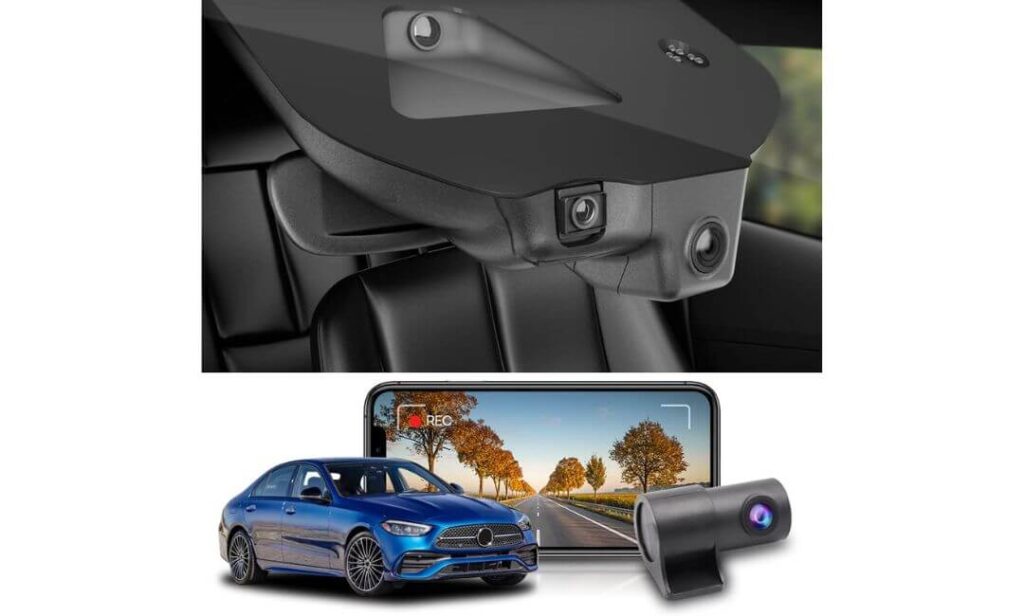
Quick Specs:
- Designed specifically for Mercedes-Benz C-Class (W206 C300) with OEM-style housing
- 2160P front + 1080P rear dual-channel recording
- 170° front viewing angle for wider road coverage
- Built-in Wi-Fi with FITCAMX mobile app
- 128GB memory card included in the box
- Rearview mirror replacement-style installation
- WDR technology for balanced daytime and night recording
- Loop recording and G-Sensor for automatic event protection
- Works reliably in temperatures from -20°C to 85°C
Sometimes the best dash cam is the one people don’t even notice. That’s exactly why this model earned a place in this guide. Instead of hanging beneath the windshield like a traditional camera, it integrates around the factory mirror housing, preserving the clean interior design that Mercedes owners appreciate. Once installed correctly, most passengers won’t even realize an aftermarket dash cam has been fitted.
Its appeal goes far beyond appearance. The 2160P front camera captures sharp everyday driving footage, while the 1080P rear camera adds valuable protection when reversing, parking or dealing with rear-end incidents. WDR processing helps maintain balanced exposure during sunrise, sunset and night driving, and the included 128GB memory card means the system is ready to start recording immediately without requiring additional purchases. Built-in Wi-Fi also makes downloading important clips straightforward whenever you need them.
This isn’t the dash cam with the longest feature list or the highest recording resolution in the comparison—and it doesn’t try to be. Its strength is delivering a solution that feels genuinely engineered for the Mercedes C-Class. If maintaining the original cabin appearance matters just as much as recording the road ahead, very few aftermarket options achieve that balance this well.
(For many Mercedes owners, preserving the factory look is just as important as recording the drive. This is one of the rare systems that genuinely delivers both.)
Why It Earned Our Recommendation
- OEM-style design blends naturally with the Mercedes C-Class interior.
- No bulky camera hanging below the mirror or distracting from the driver’s view.
- 4K front and Full HD rear recording provide dependable everyday coverage.
- 128GB memory card included, allowing immediate use after installation.
- Rearview mirror-mounted design creates one of the cleanest installations in this comparison.
- Wi-Fi app connectivity makes viewing and downloading footage quick and convenient.
One Small Thing to Know Before Ordering
- Before purchasing, it’s worth confirming your mirror cover design and interior trim colour, as Fitcamx offers vehicle-specific housings for the best factory-style fit.
Mercedes C-Class Fitment & Installation Notes
Unlike universal windshield-mounted dash cams, this model is engineered specifically for the Mercedes-Benz C-Class W206 platform, including compatible C300 Sedan, Coupe and Cabriolet variants. Because it replaces the mirror housing trim rather than sticking to the windshield, the finished installation looks exceptionally clean and integrated.
Installation is straightforward for anyone comfortable removing interior trim, but taking a few minutes to verify the mirror cover shape before ordering will ensure the housing matches your vehicle perfectly. The included trim tool and pre-supplied 128GB memory card also help simplify the installation process from the very beginning.
The Insider Pro-Tip
Owners often compare this model to larger universal dash cams based purely on recording specifications. In reality, that’s missing its biggest advantage. The value here isn’t just the camera—it’s the fact that it becomes part of the vehicle rather than an accessory attached to it. That subtle difference completely changes how the interior feels every single day.
If you own a Mercedes C-Class and dislike visible wiring, suction mounts or bulky screens near the windshield, this style of installation is difficult to beat. Just make sure you match the mirror housing and trim colour before ordering, because a perfectly matched housing is what creates the seamless factory appearance that makes this system stand out.
#5. KENWOOD DRV-A610WDP Front and Rear Dash Cam
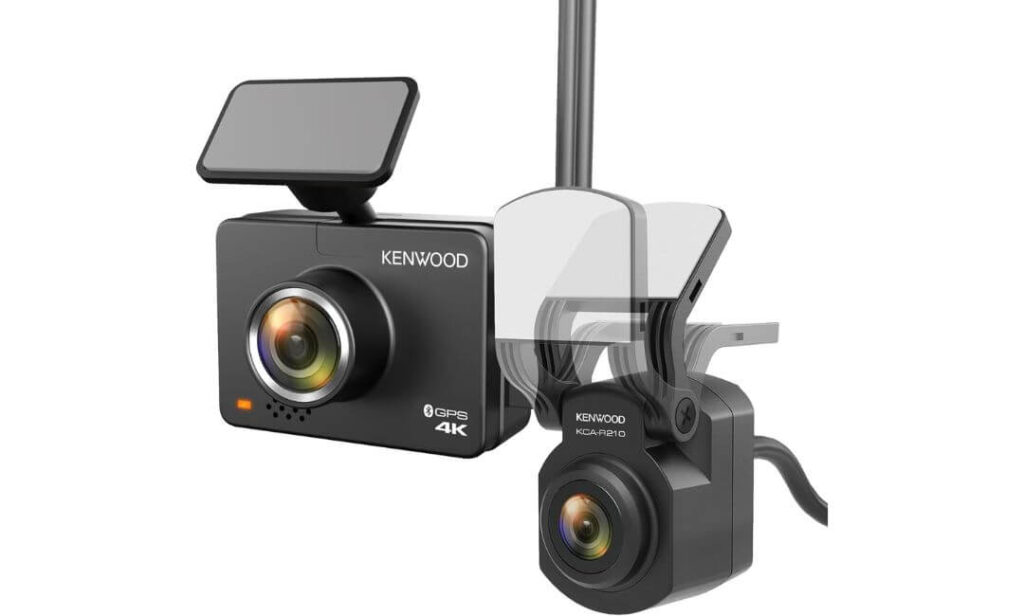
Quick Specs:
- 4K front + 2K rear dual-channel recording
- Sony IMX415 image sensor with WDR processing
- Built-in GPS with speed and location logging
- Bluetooth + Wi-Fi connectivity via KENWOOD Dash Cam Manager
- Built-in G-Sensor with automatic event protection
- Motion detection and parking mode support (hardwire kit required)
- 64GB microSD card included
- Supports memory cards up to 256GB
- IP67-rated rear camera for dependable long-term durability
Not every Mercedes C-Class owner is looking for the most advanced dash cam on the market. Many simply want a camera that records consistently, stays reliable over the years and comes from a brand with a strong reputation in automotive electronics. That’s exactly where this KENWOOD system fits. It doesn’t rely on flashy marketing—it focuses on delivering dependable performance every time you start the engine.
The recording hardware is equally reassuring. An 8.3MP 4K front camera paired with a 2K rear camera captures noticeably more detail than traditional Full HD systems, while the Sony IMX415 sensor and WDR processing help maintain balanced exposure in difficult lighting. Built-in GPS, Bluetooth and Wi-Fi make it easy to review journeys, adjust settings and transfer important recordings without removing the memory card. The included 64GB microSD card also means you can install it and begin recording immediately.
Another reason this system made our shortlist is its straightforward ownership experience. Loop recording, collision detection and optional parking surveillance all work quietly in the background without demanding constant attention. For Mercedes C-Class owners who prefer proven automotive technology over experimental features, it delivers exactly the kind of confidence a daily driver deserves.
(Sometimes the smartest purchase isn’t the newest dash cam—it’s the one you’ll still trust years from now when you actually need the footage.)
Why We Included It in This Guide
- Balanced 4K front and 2K rear recording provides strong everyday evidence.
- The Sony IMX415 sensor delivers dependable image quality across changing light conditions.
- GPS, Bluetooth and Wi-Fi create a smooth day-to-day ownership experience.
- 64GB memory card included, so there’s nothing extra to buy before installation.
- IP67-rated rear camera offers added durability in varying weather conditions.
- Built by a brand with decades of experience in automotive electronics.
One Small Thing Worth Knowing
- To activate parking surveillance, you’ll need the optional KENWOOD hardwire kit, which is sold separately.
Mercedes C-Class Compatibility & Installation Notes
This dual-camera system works well with both Mercedes-Benz C-Class W206 and earlier W205 models. The front camera mounts neatly behind the rear-view mirror, while the long rear cable makes routing to the rear glass straightforward without placing unnecessary strain on the connectors.
For the cleanest installation, avoid positioning the front unit too close to the factory rain/light sensor housing. Routing the cables behind the headliner and A-pillar trim helps preserve the premium interior appearance while keeping everything securely hidden.
The Insider Pro-Tip
When buying a dash cam, it’s easy to focus only on headline specifications. In real-world driving, consistent recording stability, dependable GPS data and reliable file protection after an impact often prove far more valuable than chasing the highest numbers on a product box. Those are the qualities that make footage genuinely useful when you need it most.
One final installation tip: format the included memory card inside the dash cam before your first drive and update the firmware through the KENWOOD app. It only takes a few minutes, but it helps ensure smoother recording performance and gives you access to the latest improvements from day one.
Best Mercedes C-Class Dash Cam Comparison: Features, Specs and Our Top Picks
| Dash Cam | Video Quality | Standout Features | Ideal Mercedes C-Class Owner | Why It Made Our List |
|---|---|---|---|---|
|
Editor’s Choice VIOFO A329S
|
4K 60FPS Front 2K Rear Dual STARVIS 2 HDR |
Wi-Fi 6 4TB SSD Support Voice Control Built-in GPS CPL Filter |
Drivers who want the sharpest footage, premium night clarity and long-term storage without compromising everyday usability. | The strongest overall balance of image quality, hardware, installation quality and future-proof features. |
|
Maximum Coverage Vantrue N5S
|
2.7K Front 1440P Rear Dual Interior Cameras 4× STARVIS 2 |
360° Recording 5GHz Wi-Fi Dual GPS Buffered Parking Mode 1TB Support |
Owners carrying family, passengers, pets or valuable equipment who want complete cabin and exterior recording. | Offers the widest recording coverage of every camera in this comparison while maintaining excellent night performance. |
|
Premium Compact Garmin X310
|
4K Ultra HD 140° Lens |
Clarity Polarizer Touchscreen Voice Control GPS Cloud Integration |
Mercedes owners who value discreet installation, premium design and an effortless everyday experience. | Compact dimensions and polished software make it feel perfectly suited to a luxury cabin. |
|
Factory Style Fitcamx OEM Dash Cam
|
2160P Front 1080P Rear |
OEM Housing Wi-Fi App 170° View 128GB Included |
Owners who want factory-style integration without visible wiring or a bulky windshield-mounted camera. | Nothing else on this list blends into the Mercedes C-Class interior quite as naturally. |
|
Trusted Performer KENWOOD DRV-A610WDP
|
4K Front 2K Rear Sony IMX415 |
GPS Bluetooth Wi-Fi 64GB Card Included IP67 Rear Camera |
Drivers looking for dependable recording from an established automotive electronics brand. | Reliable dual-channel performance with practical features that work well for everyday driving. |
Buying Guide: How to Choose the Right Dash Cam for Your Mercedes C-Class
Buying a dash cam for a Mercedes C-Class is different from buying one for a typical family car. The C-Class combines a premium interior, a steeply raked windshield, advanced driver-assistance sensors around the rear-view mirror, and excellent cabin visibility. A camera that works well in another vehicle may not be the best choice here.
The good news is that today’s premium dash cams offer far more than simple video recording. Features like 4K resolution, STARVIS 2 sensors, Wi-Fi connectivity, factory-style integration, buffered parking mode, and GPS can make a significant difference when you actually need footage after an incident.
The sections below explain what matters most before you spend your money.
Front and Rear vs. Multi-Channel Dash Cams: Which One Makes More Sense?
Most Mercedes C-Class owners will be perfectly served by a quality front and rear dash cam. This setup records what’s happening ahead of the vehicle while also protecting you from rear-end collisions, parking incidents and insurance disputes involving vehicles approaching from behind.
A multi-channel dash cam, such as a four-camera system, expands that protection even further by recording the cabin and additional viewing angles. This can be especially useful if you regularly travel with passengers, transport valuable equipment, use your C-Class for business, or simply want complete documentation of everything happening around the vehicle.
The trade-off is straightforward. Multi-channel systems require additional cable routing, take slightly longer to install and naturally cost more. However, they provide context that a standard two-camera setup simply cannot capture. If complete coverage is your priority, they’re well worth considering.
Why a 4K Dash Cam Makes a Difference in the Mercedes C-Class
Many buyers assume every 4K dash cam performs the same. In reality, recording resolution is only part of the story.
The Mercedes C-Class is often driven on highways where traffic moves quickly, and many incidents happen at speed. A high-quality 4K front camera captures significantly more detail than standard Full HD recording, making it easier to identify registration plates, road signs, traffic signals and surrounding vehicles when reviewing footage later.
Equally important is recording stability. A well-designed 4K camera with proper image processing maintains better detail during motion, reducing blur that often appears when vehicles pass at higher speeds.
For most owners, investing in a genuine 4K front camera is one of the smartest upgrades they can make.
Why STARVIS 2 Sensors Matter More Than Resolution Alone
One of the biggest misconceptions surrounding dash cams is that higher resolution automatically means better footage.
In practice, sensor quality has an even greater impact.
Modern Sony STARVIS 2 sensors capture more usable light, improve dynamic range and reduce image noise during night driving. This becomes particularly valuable when leaving underground parking garages, driving through poorly lit streets or encountering bright LED headlights that often overwhelm lower-quality cameras.
Another important advantage is improved HDR performance. Instead of turning dark areas into black shadows or allowing bright headlights to wash out the scene, STARVIS 2 maintains a more balanced image where important details remain visible.
If you frequently drive after sunset, sensor quality should be one of your highest priorities.
Why an OEM Fit Dash Cam Appeals to Mercedes Owners
One reason many owners hesitate to install a dash cam is concern about spoiling the clean interior.
Fortunately, that’s no longer necessary.
OEM-style dash cams replace or integrate around the factory mirror housing, creating an appearance that’s remarkably close to original equipment. There are no bulky suction mounts hanging below the mirror, fewer visible wires, and the finished installation feels like it belongs in the vehicle rather than being added afterwards.
For owners who value cabin aesthetics as much as recording quality, an OEM-style solution is often the most satisfying long-term investment.
Single-Channel vs. Front and Rear Dash Cameras
A single-channel dash cam focuses entirely on the road ahead. It’s generally easier to install, costs less and works well for drivers who mainly want evidence of forward-facing incidents.
A front and rear system, however, offers significantly better protection.
Rear-end collisions, parking impacts, hit-and-run damage and incidents while reversing are all situations where a second camera can provide evidence that a front-only system simply cannot record.
Considering the value of a Mercedes C-Class, most owners will find that a dual-camera setup offers considerably greater peace of mind for a relatively small increase in cost.
Why Wi-Fi Connectivity Is Worth Having
Years ago, retrieving dash cam footage usually meant removing the memory card and connecting it to a computer.
Today’s premium Wi-Fi dash cams make the process much easier.
Using a dedicated mobile app, you can review recordings, download important clips, adjust settings, update firmware and share evidence directly from your smartphone without removing the camera from the windshield.
Newer systems equipped with Wi-Fi 6 also transfer large 4K video files much faster, which becomes especially useful after an accident when every minute counts.
For most drivers, Wi-Fi isn’t simply a convenience feature anymore—it’s something you’ll appreciate every time you need access to your recordings.
Installation Tips That Mercedes C-Class Owners Should Know
Regardless of which dash cam you choose, careful installation makes a noticeable difference.
Position the front camera behind or slightly beside the rear-view mirror, keeping it clear of the rain sensor, light sensor and any factory driver-assistance cameras. This preserves your forward visibility while maintaining a cleaner appearance.
If you plan to use parking mode, install a compatible hardwire kit with low-voltage battery protection. This allows the dash cam to monitor your vehicle while parked without placing unnecessary strain on the battery.
Finally, take time to hide the wiring behind the headliner and A-pillar trim. A properly installed dash cam should feel like part of the Mercedes itself, not an accessory added as an afterthought.
Installation and Setup: Mercedes C-Class Dash Cam Installation Guide
A premium dash cam deserves a premium installation. Even the best camera can become frustrating if cables are left exposed, the windshield view is blocked, or parking mode isn’t configured correctly. Fortunately, the Mercedes C-Class is one of the easier luxury sedans to install a dash cam in because its interior trim fits tightly, the headliner provides enough space for cable routing, and the factory mirror area offers excellent mounting locations when planned properly.
Whether you’ve chosen a universal windshield-mounted camera or an OEM-style system, taking an extra hour during installation will usually make the setup look factory-installed for years to come.
Step-by-Step Installation for a Factory-Clean Finish
Before removing any trim, sit in the driver’s seat and determine exactly where the front camera should be positioned. The ideal location is behind or slightly to the passenger side of the rear-view mirror, allowing the camera to remain hidden from the driver’s normal field of vision while maintaining a clear view of the road.
Clean the windshield thoroughly using an alcohol wipe before attaching the adhesive mount. Even a small amount of dust or interior dressing can reduce long-term adhesion.
Once the front camera is installed, route the power cable along the headliner, continue down the A-pillar trim, then follow the factory wiring path toward your chosen power source. If you’re installing a rear camera, continue routing the cable beneath the headliner to the rear window, securing it behind existing trim instead of allowing it to hang loosely across the cabin.
Before reinstalling every trim panel, connect the system and verify that the front camera, rear camera, GPS, Wi-Fi and memory card are all functioning correctly. Testing everything first can save considerable time if an adjustment is needed later.
OEM Fit Dash Cams vs. Traditional Windshield-Mounted Systems
An OEM-style dash cam offers the cleanest finished appearance because it replaces or integrates with the factory mirror housing. There are virtually no visible wires, no additional screen hanging below the windshield and very little evidence that an aftermarket camera has been installed.
A traditional windshield-mounted dash cam provides more flexibility. Upgrading to a different model in the future is easier, positioning can be adjusted more freely and transferring the camera to another vehicle requires very little effort.
Neither approach is objectively better. If maintaining the original Mercedes interior is your highest priority, an OEM-style installation feels almost factory-built. If flexibility and future upgrades matter more, a premium universal dash cam remains an excellent choice.
Choosing the Right Power Source
The simplest installation uses the supplied 12V cigarette lighter adapter. It’s quick, requires no electrical modifications and works well for drivers who only want recording while driving.
If you intend to use parking mode, a hardwire kit connected to the fuse box is usually the better solution. It supplies constant power when the vehicle is parked while incorporating low-voltage battery protection that automatically shuts the camera down before excessive battery discharge occurs.
Some owners consider powering a dash cam through the OBD-II port. While this approach can reduce installation time, it occupies the diagnostic connector and generally produces a less integrated appearance than a properly hardwired installation. For a Mercedes C-Class, a fuse-box installation usually delivers the cleanest and most reliable long-term result.
Cable Management Tips for the Mercedes C-Class
The interior of the Mercedes C-Class is designed with tightly fitted trim, making careful cable routing particularly important.
Run the front power cable inside the headliner rather than allowing it to cross the windshield. Follow the factory wiring path down the A-pillar, taking care not to interfere with the curtain airbag or existing harnesses.
For rear camera installations, continue beneath the headliner toward the rear window, securing the cable with cloth automotive tape wherever additional stability is needed. Along the lower cabin, cables can be routed beneath the door sill trim to remain completely hidden without affecting passenger comfort.
If you choose OBD-II power, ensure the cable is secured well away from the driver’s footwell so it cannot interfere with pedals or routine maintenance.
The goal isn’t simply hiding wires—it’s making the installation appear as though it left the Mercedes factory that way.
Common Installation Mistakes and How to Avoid Them
One of the most common mistakes is mounting the camera directly in front of the rain sensor, light sensor or factory driver-assistance cameras. Doing so can reduce visibility, complicate maintenance and create an unnecessarily cluttered appearance.
Another frequent issue is leaving excess cable bundled behind the mirror housing. Instead, distribute any extra length behind the headliner where it remains hidden and doesn’t create pressure against trim panels.
Many owners also forget to format the memory card inside the dash cam before first use, update the camera firmware and confirm the correct date, time and GPS settings. Spending a few minutes completing these steps improves recording reliability and ensures incident footage contains accurate information.
Finally, don’t rush the adhesive installation. Once a premium dash cam is mounted correctly, it should remain securely in place through years of heat, cold and daily driving. Taking the time to position it carefully the first time almost always produces the best long-term result.
Parking Mode and Surveillance: Getting the Most from a Mercedes C-Class Parking Mode Dash Cam
For many Mercedes C-Class owners, the most valuable recording doesn’t happen while driving—it happens after the engine is switched off. Parking lots, apartment garages, shopping centres and roadside parking spaces are where many scratches, hit-and-runs and minor collisions occur. Without a properly configured parking mode, those incidents often go completely unrecorded.
Modern premium dash cams are designed to continue protecting your vehicle long after you’ve locked the doors. However, getting the best results requires understanding how different parking modes work and choosing settings that match where you normally park.
How Parking Mode Actually Works
Parking mode activates automatically after the vehicle is turned off, provided the dash cam has a continuous power source through a compatible hardwire kit or approved external battery solution.
Most premium dash cams offer several recording methods.
Motion Detection records only when movement is detected near the vehicle. This helps conserve storage space while still capturing people walking close to the car, suspicious activity or vehicles approaching from nearby parking spaces.
Impact Detection keeps the camera in a low-power standby state until the built-in G-sensor detects a vibration or collision. Once triggered, the camera immediately saves protected footage that won’t be overwritten during normal loop recording.
Buffered Parking Mode is considered one of the most useful systems available today. Instead of recording only after an event occurs, the camera continuously maintains a temporary memory buffer. When an impact or motion event is detected, it saves footage from before, during and after the incident, providing valuable context that standard motion recording often misses.
Some cameras also include Time-Lapse Recording, which captures individual frames at fixed intervals instead of recording full-speed video continuously. This dramatically reduces storage usage while still documenting everything happening around the vehicle during extended parking periods.
Choosing the Right Parking Setup for Your Driving Routine
Your parking environment should influence how you configure your dash cam.
If your Mercedes C-Class spends most nights inside a private garage, motion activity is usually limited. Buffered parking mode combined with impact detection is often the best balance between battery protection and reliable evidence collection.
Drivers who regularly park in busy apartment complexes, shopping centres, airports or city streets may benefit from buffered motion detection or continuous low-bitrate recording, especially in areas with heavy pedestrian traffic or frequent vehicle movement.
For office parking structures where cars remain parked throughout the workday, a low-power parking mode with battery voltage protection generally provides the most practical long-term solution. It offers dependable surveillance without placing unnecessary strain on the vehicle’s electrical system.
Matching the recording mode to your actual parking habits almost always delivers better results than simply selecting the highest recording option available.
Battery Protection and Power Management
One of the biggest concerns among Mercedes owners is whether parking mode can drain the battery.
The answer depends largely on the power system being used.
When connected through a quality hardwire kit with built-in low-voltage protection, the dash cam continuously monitors battery voltage. If the battery drops below the predefined safety threshold, power is automatically disconnected to help preserve enough charge for the next engine start.
Some owners who require extended parking surveillance choose an external dash cam battery pack instead. These dedicated battery systems charge while driving and power the camera independently when parked, reducing reliance on the vehicle’s starter battery.
If your C-Class is driven daily, a properly configured hardwire installation is typically sufficient. Vehicles that remain parked for several days at a time may benefit from an external battery solution, particularly when using multi-channel dash cams with higher power requirements.
Storage Capacity and Loop Recording
Parking mode naturally increases the amount of recorded footage, making storage capacity an important consideration.
Fortunately, modern dash cams use loop recording, meaning the oldest non-protected footage is automatically overwritten when storage becomes full. Important incident recordings triggered by the G-sensor or parking events are stored separately to prevent accidental deletion.
Higher-resolution systems recording 4K front, dual-channel or multi-channel video consume storage more quickly than standard Full HD cameras. Choosing a high-endurance memory card—or, where supported, an external SSD—allows the camera to retain significantly more footage before older files begin cycling out.
It’s also good practice to format the storage device inside the dash cam every few weeks, particularly if parking mode is used regularly. This simple maintenance step helps maintain recording stability and reduces the chance of file system errors over time.
Small Setup Changes That Make a Big Difference
Many owners focus entirely on camera specifications while overlooking the recording settings themselves.
Adjusting parking sensitivity to match your environment can dramatically reduce unnecessary recordings triggered by passing traffic, heavy rain or nearby pedestrians. At the same time, enabling HDR where available improves licence plate visibility around bright headlights and garage entrances during night-time parking.
Finally, don’t assume the factory settings are always ideal. Spend a few days observing how your dash cam behaves in the places where you actually park. A few small adjustments to sensitivity, recording mode and storage configuration often produce far better real-world results than simply leaving every option at its default setting.
Connectivity and Apps: Choosing the Best Mercedes C-Class WiFi Dash Camera
A modern dash cam is no longer just a camera attached to the windshield. The software behind it plays an equally important role. Whether you’re downloading footage after an accident, updating firmware, reviewing GPS data or adjusting recording settings, a well-designed mobile app can make daily ownership significantly easier.
This is one of the reasons we gave preference to dash cams with mature software ecosystems rather than simply focusing on recording resolution. A camera with excellent hardware but an unreliable app often becomes frustrating over time, while a stable wireless experience encourages owners to actually use the features they’re paying for.
Why Built-In WiFi Makes Everyday Ownership Easier
Years ago, retrieving footage usually meant removing the memory card, finding a computer and searching through folders to locate the correct recording.
Today’s premium WiFi dash cams simplify that process considerably.
Once connected through the manufacturer’s mobile app, you can preview live footage, download important recordings, change camera settings, update firmware and manage storage directly from your smartphone. If an incident occurs while you’re away from home, having immediate access to video can save valuable time when dealing with insurance providers or law enforcement.
Some newer systems, including those equipped with Wi-Fi 6, also transfer large 4K recordings substantially faster than earlier wireless generations. For high-resolution front and rear cameras, that speed improvement becomes surprisingly noticeable.
Features Worth Looking for in a Dash Cam App
Not every mobile app offers the same level of functionality. Some simply allow video downloads, while others become the central control system for the entire dash cam.
The most useful applications generally include:
- Live View, allowing you to see exactly what each camera is recording during installation or troubleshooting.
- GPS Playback, displaying speed, route history and location information alongside recorded footage.
- Wireless Firmware Updates, making it easy to install performance improvements and new features without connecting the camera to a computer.
- Video Playback and Clip Management, helping you quickly locate, review and export important recordings.
- Camera Configuration, including resolution, HDR, parking mode sensitivity, audio settings and recording preferences.
- Cloud Services, where supported, for automatic backup of protected incident recordings and optional remote access.
These features don’t just improve convenience—they also reduce the chances of missing important evidence because of incorrect camera settings or outdated firmware.
Firmware Updates Matter More Than Most Buyers Realise
Many people install a dash cam and never think about software again.
That can be a mistake.
Manufacturers regularly release firmware updates that improve recording stability, GPS accuracy, WiFi performance, HDR tuning, parking mode behaviour and overall reliability. Occasionally, new features are added long after the camera is released.
Checking for firmware updates every few months is a simple habit that helps ensure your dash cam continues performing at its best throughout its lifespan.
Understanding Cloud Storage and Remote Access
Some premium dash cams now offer optional cloud-based services alongside traditional local recording.
Cloud storage can automatically upload protected event clips whenever the camera has access to a suitable WiFi connection. This creates an additional backup in case the memory card becomes damaged or the camera itself is stolen following an incident.
Certain systems also support remote live viewing, allowing owners to check on their parked Mercedes C-Class from almost anywhere using a compatible smartphone.
These services can be valuable, but it’s worth remembering that many require continuous power, an active WiFi connection and, in some cases, a paid subscription. Before choosing a camera based on cloud features alone, confirm exactly what is included and which functions require ongoing fees.
Protecting Your Data and Privacy
Because dash cams continuously record video, protecting that information is just as important as capturing it.
Choose manufacturers that provide official apps, regular software updates and secure firmware support rather than relying on unknown third-party applications. Keeping the camera’s firmware current helps reduce compatibility issues while improving overall security.
If your dash cam supports WiFi, it’s also good practice to change the default wireless password during initial setup. This simple step helps prevent unauthorized access whenever the camera’s WiFi network is active.
Whenever you sell or replace a dash cam, perform a factory reset and format the storage device before removing it from the vehicle. Doing so ensures previous recordings, saved locations and personal settings aren’t left behind for the next owner.
Small Connectivity Features That Make a Big Difference
The most useful dash cam isn’t always the one with the longest specification sheet—it’s the one you’ll actually interact with confidently when something unexpected happens.
Fast wireless transfers, intuitive playback controls, dependable GPS mapping and simple firmware updates may seem like small conveniences today. After an accident or insurance claim, however, they often become the features you’ll appreciate the most.
For Mercedes C-Class owners, choosing a dash cam with reliable software support and a polished mobile app is every bit as important as selecting the right camera hardware. The best ownership experience comes from a system where the recording quality and the connected features work together seamlessly.
FAQs About Mercedes C-Class Dash Cam
Is a 4K front camera enough for a Mercedes C-Class, or is a dual-channel system the smarter investment?
If you only want evidence of what happens directly in front of your Mercedes C-Class, a quality 4K front camera is perfectly capable of capturing sharp licence plates, road signs and traffic events. For some owners, that’s all they need.
However, once you consider how many incidents happen while reversing, parked or during rear-end collisions, a front and rear setup quickly becomes the better long-term investment. The difference isn’t just having another camera—it’s having another perspective when the other driver’s version of events doesn’t match yours. That’s exactly why most premium insurance evidence today comes from dual-channel systems rather than single-camera setups.
Will a dash cam interfere with the Mercedes C-Class rain sensor, driver-assistance cameras or adaptive safety systems?
Not if it’s installed correctly.
The important part isn’t the dash cam itself—it’s where you mount it. The ideal position is behind or slightly to the passenger side of the rear-view mirror, leaving the factory rain sensor, light sensor and driver-assistance cameras completely unobstructed.
Professional installers normally follow three simple rules:
- Keep the camera outside the factory sensor housing.
- Hide cables behind the headliner instead of crossing the windshield.
- Test every ADAS feature before completing the installation.
When those steps are followed, a properly installed dash cam should coexist with the vehicle’s factory systems without affecting their normal operation.
Which storage setup makes the most sense for a Mercedes C-Class that’s driven every day?
Many buyers immediately purchase the largest memory card they can find, but capacity alone isn’t the most important factor.
A better approach is choosing high-endurance storage that’s designed for continuous recording. Dash cams constantly overwrite data, so endurance matters far more than maximum advertised speed.
For daily driving, here’s what generally works best:
- 256GB high-endurance microSD for most dual-channel systems.
- 512GB if you regularly drive long distances.
- External SSD storage, where supported, for drivers who want to retain weeks of 4K footage without frequent overwriting.
The storage device is one of the hardest-working parts of the entire system. Choosing a reliable card often improves long-term recording stability more than upgrading to a slightly higher-resolution camera.
Is buffered parking mode really worth paying extra for, or is motion detection enough?
This is one feature that’s often underestimated until the day it’s actually needed.
Traditional motion detection begins recording after movement is detected. Buffered parking mode is different because it continuously keeps a temporary recording in memory. When an impact or suspicious movement occurs, it saves footage from before, during and after the event.
That extra context can answer questions standard parking mode simply cannot.
For example, buffered recording may capture:
- The vehicle approaching before impact.
- The exact direction it travelled.
- A licence plate before the collision occurs.
- Someone walking around your Mercedes C-Class before attempting damage or theft.
If your vehicle regularly spends time in apartment parking, shopping centres or busy streets, buffered parking mode is one of the features you’ll appreciate most when something unexpected happens.
If I plan to keep my Mercedes C-Class for several years, what matters more than headline specifications?
The specification sheet usually isn’t what determines long-term satisfaction.
Owners who are happiest with their dash cams generally focus on consistency rather than marketing numbers. After living with the camera for a year or two, these are the features they continue to value every day:
- Stable firmware that receives regular updates.
- Reliable Wi-Fi that connects quickly every time.
- Accurate GPS records without random dropouts.
- High-quality HDR performance during difficult lighting.
- A clean installation that still looks factory-fitted years later.
- Storage that records reliably without corrupted files.
The best dash cam isn’t necessarily the one with the longest feature list. It’s the one that quietly records every journey, saves the footage when you need it most and becomes something you almost forget is there—right up until the moment it proves its value.
Final Thoughts
Choosing the right dash cam for a Mercedes C-Class isn’t about buying the model with the longest feature list—it’s about finding the one that fits the way you actually drive. Throughout this guide, we’ve deliberately focused on cameras that excel in different areas rather than recommending five products that all do the same job. Whether your priority is true 4K image quality, complete 360° coverage, a factory-style installation, premium software, or dependable long-term reliability, there’s an option here that genuinely stands out for that purpose.
One thing became clear during our research: image quality alone doesn’t define a great dash cam anymore. Sensor performance, parking mode, storage reliability, installation quality and software support all play an equally important role in the ownership experience. That’s why every recommendation in this guide was chosen for a specific reason—not simply because it was popular or recently released.
If we had to recommend just one all-around choice for most Mercedes C-Class owners, the VIOFO A329S delivers the strongest balance of 4K 60FPS recording, dual STARVIS 2 sensors, Wi-Fi 6, excellent night performance and future-ready storage support. Owners who value a clean factory appearance will likely appreciate the Fitcamx, while drivers wanting maximum coverage should take a close look at the Vantrue N5S.
Whatever you choose, don’t overlook the installation. A properly positioned camera, high-endurance storage card, quality hardwire kit and sensible parking mode settings will often make a bigger difference over the next five years than chasing one extra specification on the product page.
A Mercedes C-Class is an investment that’s built to last. Pairing it with a dash cam that records consistently, integrates cleanly and quietly protects every journey is one of the simplest upgrades you can make—and one you’ll only fully appreciate the day you actually need the footage.
Also Check:


