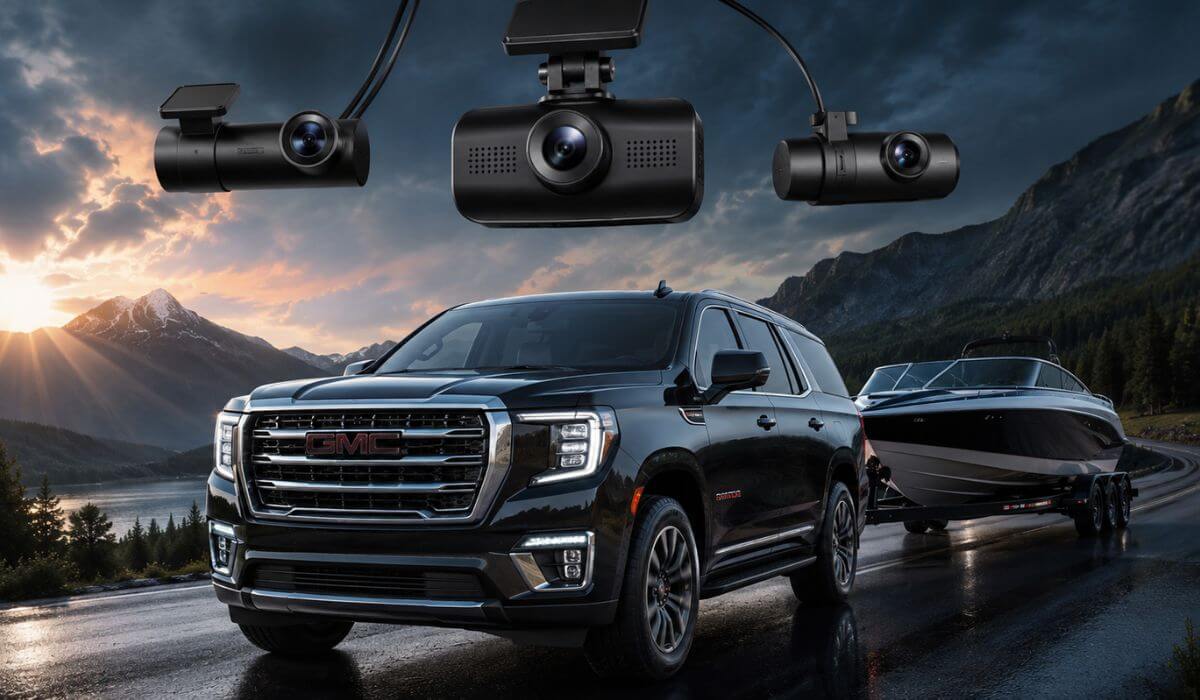
5 Best Dash Cams for GMC Yukon in 2026: 4K Triple STARVIS 2 WiFi 6 & OEM Fit Picks
When you spend time behind the wheel of a GMC Yukon, you quickly realise it isn’t driven like a compact SUV. Whether it’s the standard Yukon or the longer Yukon XL, you’re managing a full-size vehicle with wider blind spots, a taller seating position, and often carrying family, passengers, or valuable cargo. That’s exactly why a dash cam should do more than simply record the road ahead—it should capture what happens around the entire vehicle when it matters most.
The newest Yukon models, especially 2023–2026 trims including SLE, SLT, AT4, Denali, and Denali Ultimate, feature advanced driver-assistance systems and a clean, tech-focused dashboard, so choosing the wrong dash cam can interfere with sensors or leave visible wiring. Older models from 2015–2022 have more installation flexibility, making them compatible with a wider range of premium front, rear, and three-channel cameras. In both cases, image quality, parking surveillance, heat resistance, and reliable power management matter far more than flashy marketing claims.
For this guide, we didn’t rank cameras by brand popularity alone. We focused on real-world video performance, long-term reliability, parking mode efficiency, app stability, storage support, installation practicality, and overall value specifically for GMC Yukon owners. Every recommendation below was selected because it offers a genuine advantage for a large SUV—not simply because it looks good on a specification sheet.
Best GMC Yukon Dash Cam: Top 2026 Picks for Front Rear and 3-Channel Recording
#1. VIOFO A329S 4K 3-Channel Dash Cam
Best GMC Yukon dash cam with 4K triple STARVIS 2 recording, ultra-wide cabin coverage, SSD storage support, and flagship-level parking surveillance for owners who want the highest overall protection.
#2. Vantrue N4 Pro S 4K 3-Channel Dash Cam
Premium 4K dash camera for GMC Yukon featuring triple STARVIS 2 sensors, outstanding HDR performance, infrared cabin recording, and dependable buffered parking mode for everyday driving.
#3. Mangoal Front 4K & Rear 1080P OEM Dash Cam
Best OEM dash cam for GMC Yukon and Yukon XL (2023–2026) with a factory-style integrated design, discreet installation, built-in GPS, and clean OEM appearance without hanging cables.
#4. ROVE R2-4K Dash Cam
Best-value front dash camera for GMC Yukon with sharp 4K recording, Wi-Fi 6, built-in GPS, and a user-friendly app for drivers who prefer a premium single-camera setup.
#5. TERUNSOUl 4K 3-Channel Dash Cam
Affordable front and rear dash cam for GMC Yukon with three-camera coverage, built-in GPS, Wi-Fi connectivity, included 128GB memory card, and practical everyday protection for budget-conscious buyers.
Expert Tip
If you’re buying a dash cam for a GMC Yukon, don’t get distracted by “4K” printed on the box. On a full-size SUV, camera placement, sensor quality, HDR tuning, and parking mode reliability make a much bigger difference than resolution alone. A premium sensor can clearly capture a licence plate during rain, glare, or low-light conditions where a cheaper 4K camera often produces blurry footage. If your Yukon regularly carries family, travels long distances, or stays parked outdoors, investing in a camera with high-quality image processing and dependable parking recording will usually provide more value over the next five years than chasing the lowest price today.
How We Chose These Dash Cameras for the GMC Yukon
Choosing a dash cam for a GMC Yukon isn’t the same as choosing one for a compact sedan. The Yukon’s larger windshield, higher driving position, longer body, and wider rear visibility area create different recording needs, so we evaluated every recommendation from the perspective of what actually works in a full-size SUV—not simply what has the highest specifications on paper.
Our first priority was real video performance. Cameras with proven sensors like Sony STARVIS 2 naturally ranked higher because they consistently deliver cleaner footage at night, handle headlights better, and preserve more detail during difficult lighting. That’s far more useful than a camera that advertises high resolution but struggles when it matters most.
We also looked closely at coverage. For many Yukon owners, a single front camera isn’t enough. That’s why premium three-channel systems received higher rankings—they monitor the road ahead, the cabin, and the rear of the vehicle at the same time. For drivers who prefer a cleaner installation without extra wiring, we also included a genuine OEM-style option that blends naturally into the factory interior while still offering dependable front and rear recording.
Another factor was long-term ownership. Features like buffered parking mode, stable GPS tracking, fast Wi-Fi connectivity, reliable mobile apps, capacitor-based durability, and support for large-capacity storage all influence how useful a dash cam remains after months or years of daily use. A camera that’s frustrating to access or unreliable during parking incidents simply doesn’t deserve a place on this list.
Finally, we balanced premium performance with practical value. Not every Yukon owner needs the most expensive model, but every recommendation here had to justify its place with a clear advantage—whether that’s superior image quality, factory-style integration, wider recording coverage, or stronger overall value. If a product couldn’t offer a meaningful benefit for a GMC Yukon, it didn’t make our shortlist, regardless of brand recognition or marketing claims.
#1. VIOFO A329S 4K 3-Channel Dash Cam
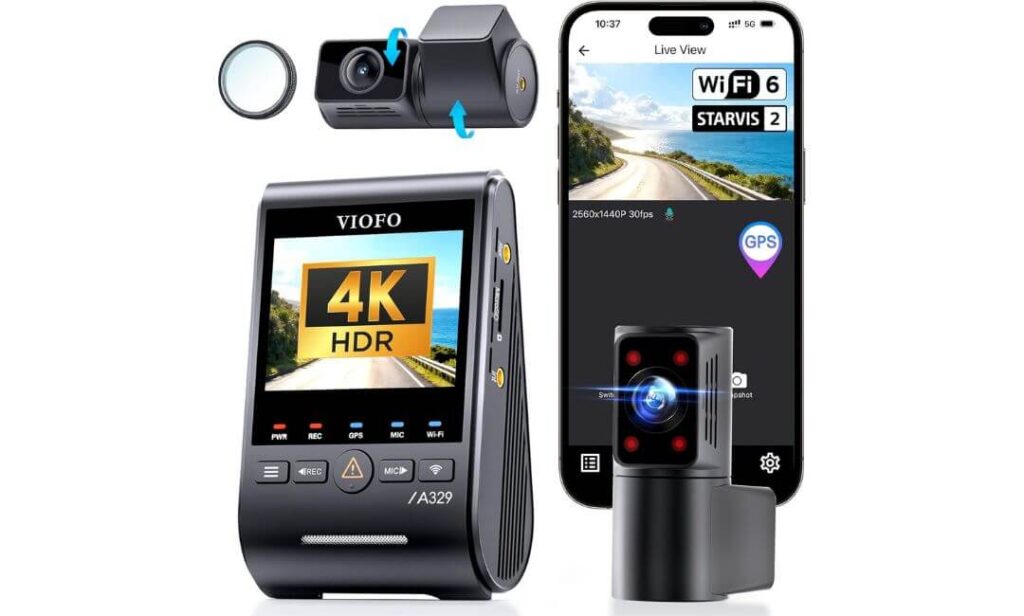
Quick Specs:
- Video Coverage: 4K Front + 2K Rear + 2K Cabin with a 210° ultra-wide fisheye interior camera
- Image Sensors: Sony STARVIS 2 IMX678 (Front) + Dual Sony STARVIS 2 IMX675 (Rear & Cabin)
- Best For: GMC Yukon and Yukon XL owners who want complete front, rear, and interior recording without compromise
- Night Performance: Triple-channel HDR delivers excellent licence plate clarity in low light, rain, and headlight glare
- Connectivity: Built-in Wi-Fi 6 transfers 4K footage much faster than older Wi-Fi systems
- GPS Tracking: Records speed, route, date, and location using GPS, BeiDou, Galileo, and GLONASS satellites
- Parking Recording: Power-saving impact detection parking mode helps reduce battery drain (hardwire kit sold separately)
- Storage Capacity: Supports up to 4TB external SSD or 512GB microSD for extended recording
- Installation: Ultra-slim coaxial cables make routing easier behind the Yukon’s trim panels for a cleaner factory-style finish
- Smart Features: Voice control, built-in GPS, included CPL filter, and fast app-based video management
The first thing you’ll notice after installing this setup in a GMC Yukon is how naturally it fits the way a full-size SUV is actually driven. The higher seating position, longer body, and larger cabin create more areas worth recording than a typical crossover. Instead of focusing only on the road ahead, this setup captures the front, rear, and almost the entire interior without leaving major blind spots. The 210° cabin camera is especially useful for families, rideshare drivers, or anyone carrying passengers and valuable cargo.
Where this model separates itself is the hardware behind the lenses. The Sony STARVIS 2 IMX678 front sensor works alongside dual IMX675 STARVIS 2 sensors for the rear and cabin, producing balanced footage in bright sunlight, tunnels, rainy highways, and poorly lit parking garages. Combined with triple HDR, it does an excellent job preserving fine details such as licence plates and road signs instead of blowing out highlights or crushing shadows. This is exactly the kind of consistency you want from a premium GMC Yukon dash cam, especially when footage may become important evidence.
Another reason it earned our top recommendation is that it feels built for long-term ownership rather than short-term convenience. Wi-Fi 6 dramatically speeds up video transfers, support for up to 4TB SSD storage reduces the need to overwrite files during long trips, and the slim coaxial cables make installation much cleaner around the Yukon’s large dashboard and headliner. Small details like the included CPL filter, voice controls, and multi-satellite GPS tracking further improve everyday usability without adding unnecessary complexity. (If you’re investing in a premium full-size SUV, choosing a dash cam with equally premium hardware simply makes more sense than replacing an entry-level model a year later.)
Why It Earned Our Top Recommendation
- Triple Sony STARVIS 2 sensors deliver consistently impressive day and night footage.
- True three-channel recording protects the front, rear, and cabin simultaneously.
- 210° interior lens covers significantly more of the Yukon cabin than conventional cabin cameras.
- 4TB SSD support is one of the biggest advantages for drivers who spend long hours on the road.
- Wi-Fi 6 and voice controls make everyday use faster and far more convenient than older-generation dash cams.
One Thing Worth Knowing Before You Buy
- To use the full parking mode, you’ll need VIOFO’s compatible hardwire kit, which is purchased separately.
GMC Yukon Compatibility & Installation Notes
This camera is an excellent fit for GMC Yukon and Yukon XL models across multiple generations. The compact front unit sits neatly behind the rear-view mirror, while the slim coaxial cables are much easier to hide inside the Yukon’s A-pillars and headliner than traditional thicker cables.
If you plan to use parking mode every day, it’s worth installing the optional hardwire kit during the initial installation. It creates a cleaner finish, unlocks advanced parking features, and means you won’t need to revisit the wiring later.
The Insider Pro-Tip
Many buyers compare dash cams by looking only at resolution, but that’s rarely what separates average footage from reliable evidence. On a vehicle as large as the GMC Yukon, sensor quality, HDR tuning, lens coverage, and stable parking recording matter far more because they’re the features you’ll actually notice during night driving and unexpected incidents.
If your budget allows for one premium upgrade, choose the camera with the better imaging hardware, not simply the bigger resolution number. Years later, when you need to identify a licence plate or review an incident, that’s the decision you’ll be glad you made.
#2. Vantrue N4 Pro S 4K 3-Channel Dash Cam
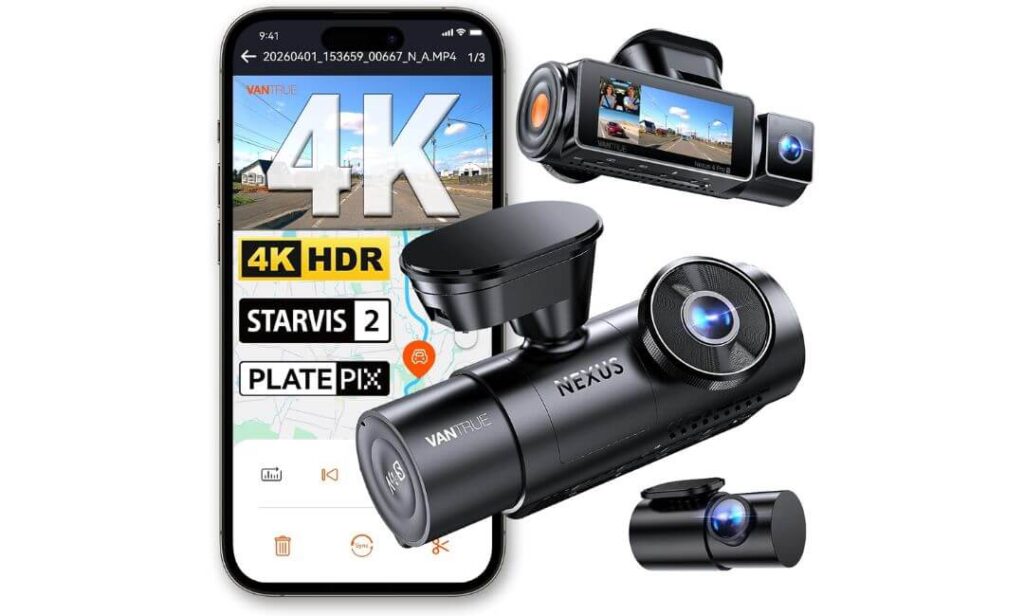
Quick Specs:
- Video Coverage: 4K Front + 2.5K Rear + 1080P Cabin recording
- Image Sensors: Triple Sony STARVIS 2, including the flagship IMX678 front sensor
- Best For: GMC Yukon owners who want premium three-channel protection with excellent parking surveillance
- Night Performance: Triple HDR, PlatePix processing, and IR cabin LEDs for clearer footage after dark
- Connectivity: Built-in 5GHz Wi-Fi, GPS, and voice control
- Parking Recording: Buffered motion and impact detection captures footage before and after an incident (hardwire kit required)
- Storage Capacity: Supports up to 1TB microSD
- Heat Resistance: Reliable supercapacitor design for year-round use in demanding climates
- Installation: Includes a 20-foot rear camera cable, making it well suited for the Yukon’s longer cabin
- Extra Features: OTA firmware updates, app control, loop recording, G-sensor, and flexible rear camera rotation
One feature immediately stands out on this setup, and it isn’t just the 4K front recording. The combination of a 2.5K STARVIS 2 rear camera, a 1080P IR interior camera, and wide viewing angles creates excellent all-around coverage for a large SUV like the GMC Yukon. Whether you’re carrying passengers on the third row, loading the cargo area for a road trip, or simply commuting every day, the three-camera layout provides reassuring visibility without making the installation feel overly complicated.
Video quality is where this model really earns its premium reputation. The Sony IMX678 STARVIS 2 front sensor, supported by triple HDR and Vantrue’s PlatePix image processing, keeps footage balanced when driving through bright sunlight, tunnels, heavy rain, or poorly lit streets. The IR-equipped cabin camera continues recording clearly after dark without becoming distracting to passengers, while the 2.5K rear camera preserves noticeably more detail than the standard 1080P rear cameras found on many competing systems.
Daily usability is just as impressive. The built-in 5GHz Wi-Fi transfers recordings quickly to your phone, voice commands allow hands-free operation, and the 20-foot rear cable reaches the back of a GMC Yukon without needing extension cables. Add the supercapacitor, buffered parking mode, GPS logging, and support for up to 1TB storage, and you end up with a dash cam that feels designed for years of dependable ownership rather than occasional use. (If your Yukon spends long hours parked in public places or regularly carries family, this is the kind of hardware that quietly proves its value when you need footage most.)
Why It Stands Out for Everyday Yukon Driving
- Triple STARVIS 2 sensors deliver dependable image quality in both daylight and low-light conditions.
- 2.5K rear recording captures more useful detail than many standard rear cameras.
- Buffered parking mode saves the moments before and after an impact instead of recording only after the event begins.
- 20-foot rear camera cable is a practical advantage for the Yukon’s longer cabin and cargo area.
- Supercapacitor construction offers better durability in extreme summer and winter temperatures than battery-powered alternatives.
One Thing Worth Knowing Before You Buy
- An SD card isn’t included, and you’ll also need the compatible hardwire kit to enable all advanced parking mode functions.
GMC Yukon Compatibility & Installation Notes
This model works exceptionally well with both GMC Yukon and Yukon XL models thanks to its generous 20-foot rear camera cable, which comfortably reaches the rear glass without requiring additional extensions. The compact windshield unit also mounts neatly behind the rear-view mirror without obstructing the driver’s view.
For owners planning a professional installation, routing the rear cable through the headliner and factory trim produces a much cleaner finish while allowing the GPS, parking mode, and voice-control features to work exactly as intended.
The Insider Pro-Tip
Many premium dash cams advertise similar specifications, but very few combine high-quality sensors, strong parking protection, fast wireless transfers, and reliable heat resistance into one package. That’s exactly why this model consistently feels more refined during everyday ownership than its specification sheet alone suggests.
If you expect your GMC Yukon to handle school runs, long family holidays, highway travel, and overnight parking, choosing a camera with buffered recording, a supercapacitor, and a higher-resolution rear camera will make a far bigger difference over time than simply paying for another 4K badge.
#3. Mangoal Front 4K & Rear 1080P OEM Dash Cam
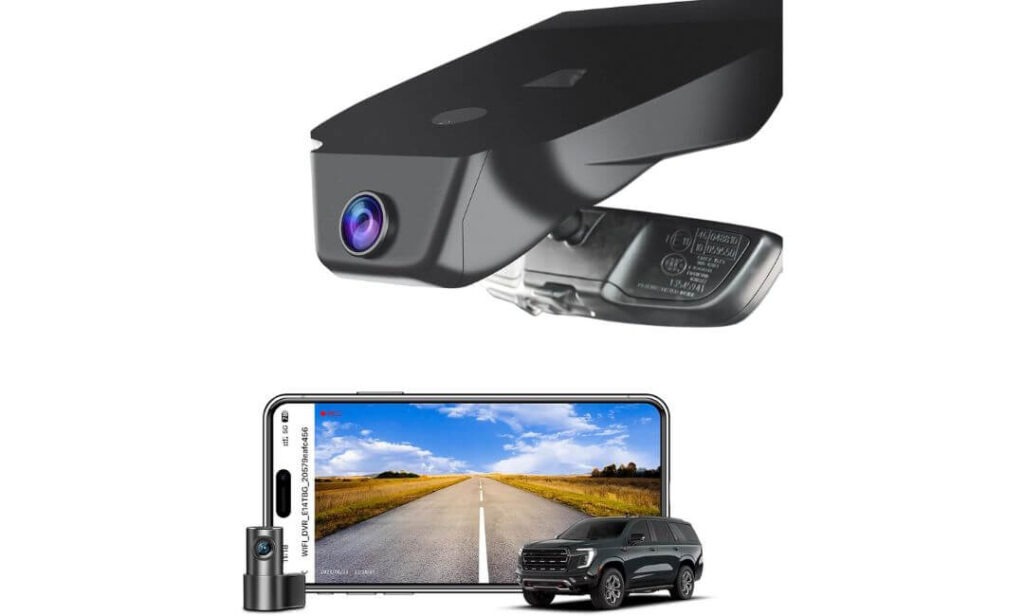
Quick Specs:
- Video Coverage: 4K Front + 1080P Rear recording
- Image Sensor: Sony STARVIS IMX335 for improved low-light clarity
- Best For: Owners who want a factory-style GMC Yukon dash cam instead of a universal windshield-mounted camera
- Vehicle Compatibility: Specifically designed for GMC Yukon & Yukon XL (2023–2026) including SLE, SLT, AT4, Denali, and Denali Ultimate
- Connectivity: Built-in Wi-Fi, GPS, and mobile app support
- Storage: 128GB microSD card included right out of the box
- Installation: OEM-style housing mounts neatly behind the rear-view mirror with no visible hanging cables
- Power Supply: Includes OBD adapter and auto-dimming mirror adapter for an easier installation
- Safety Features: Parking monitor, G-sensor, loop recording, motion detection, built-in supercapacitor
- Ideal Driver: Yukon owners who value a clean factory appearance just as much as reliable recording
What makes this camera different isn’t the resolution—it’s how naturally it becomes part of the GMC Yukon. Once installed, it blends behind the factory mirror housing instead of hanging below the windshield like a traditional dash cam. If you appreciate the premium interior of a Denali or Denali Ultimate, that OEM-style integration preserves the clean dashboard design while still providing dependable front and rear protection.
Video quality is equally reassuring for everyday driving. The 4K front camera captures road signs, traffic signals, and licence plates with strong detail, while the 1080P rear camera keeps an eye on the longer rear section of the Yukon. Powering the system is the trusted Sony STARVIS IMX335 sensor, which delivers balanced footage with reduced noise during early mornings, evening commutes, underground parking garages, and rainy weather. Combined with Wi-Fi, GPS, and the companion mobile app, reviewing footage is straightforward without removing the memory card each time.
Another advantage is how complete the package feels before installation even begins. Unlike many universal dash cams, this kit already includes a 128GB memory card, OBD power adapter, auto-dimming mirror adapter, rear camera wiring, and installation tools. That means fewer extra purchases and a smoother installation process for owners who want a solution that looks like it belonged in the Yukon from day one. (If maintaining the original appearance of your interior matters as much as recording quality, very few options feel this well integrated.)
Why It Fits the Yukon So Well
- Purpose-built for GMC Yukon and Yukon XL, not adapted from a generic universal design.
- Factory-style installation keeps the windshield clean without visible dangling cables.
- 128GB memory card included, allowing you to start recording immediately.
- OBD and auto-dimming adapters simplify installation compared with many aftermarket alternatives.
- Excellent balance between OEM appearance, practical features, and dependable everyday recording.
One Thing Worth Knowing Before You Buy
- This model is vehicle-specific, so it’s important to confirm your mirror/sensor cover design before ordering to ensure you select the correct version.
GMC Yukon Compatibility & Installation Notes
This camera is engineered specifically for 2023–2026 GMC Yukon and Yukon XL models, including SLE, SLT, AT4, Denali, and Denali Ultimate trims. Because it replaces the factory mirror cover area, the finished installation looks significantly cleaner than a conventional windshield-mounted dash cam.
Before ordering, compare your existing rear-view mirror sensor housing with the manufacturer’s compatibility images. Taking a quick photo of the factory cover is often the easiest way to confirm fitment and helps avoid ordering the wrong version.
The Insider Pro-Tip
If your goal is to make your GMC Yukon look exactly as it did when it left the factory, an OEM-style dash cam is usually a better investment than attaching a larger universal camera with exposed wiring. The cleaner installation not only looks better but is also less likely to attract attention from outside the vehicle.
For many Yukon owners, the biggest benefit isn’t just recording in 4K—it’s having a dash cam that quietly does its job every day without changing the premium character of the cabin. That’s exactly where this model stands out.
#4. ROVE R2-4K Dash Cam
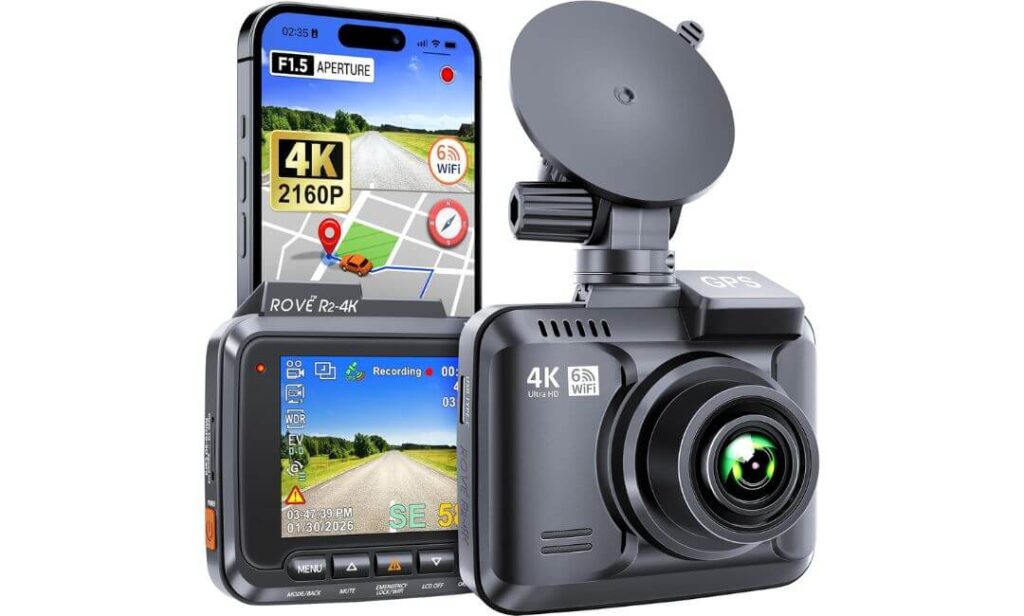
Quick Specs:
- Video Coverage: True 4K UHD (2160P) front recording
- Image Sensor: 8MP Sony IMX415 sensor with F1.5 aperture and 6-glass lens
- Best For: GMC Yukon owners who want premium front-facing video quality without paying for a multi-camera system
- Night Performance: Super Night Vision with excellent low-light detail and reduced motion blur
- Connectivity: Built-in Wi-Fi 6 with fast app-based video downloads
- GPS Tracking: Integrated GPS records route, speed, and driving location
- Viewing Angle: Wide 150° field of view for better lane coverage
- Storage Capacity: Supports up to 512GB microSD (card sold separately)
- Durability: Supercapacitor design with OTA firmware updates for long-term reliability
- Ideal Driver: Daily commuters, highway travellers, and owners who simply want outstanding front-road evidence
Sometimes, the smartest choice isn’t adding more cameras—it’s choosing one that records the road exceptionally well. That’s exactly where this model shines. For many GMC Yukon owners, especially those who spend most of their time on highways or long-distance trips, a dependable 4K front camera with strong imaging hardware delivers more practical value than an average three-camera setup. The 8MP Sony IMX415 sensor, paired with a bright F1.5 lens, consistently captures crisp road details without making the camera unnecessarily complicated to use.
The real strength here is image consistency. During sunrise, sunset, heavy rain, or poorly lit roads, the Super Night Vision system helps preserve important details that often disappear on entry-level dash cams. The 150° wide-angle lens comfortably covers multiple lanes without creating excessive fisheye distortion, while the built-in GPS quietly records route and speed information in the background whenever you drive. For a full-size SUV like the Yukon, that’s often all many drivers genuinely need for reliable evidence.
Living with this camera every day is refreshingly straightforward. Wi-Fi 6 makes transferring 4K clips to your phone noticeably quicker, OTA firmware updates keep the system current without complicated software downloads, and the supercapacitor handles demanding summer temperatures better than battery-powered alternatives. The result is a dash cam that focuses on doing one job extremely well—capturing the road ahead with dependable clarity every single time. (If your priority is premium front-facing footage instead of managing multiple cameras, this remains one of the strongest values available.)
Why It Earned a Place on Our List
- Sony IMX415 sensor delivers sharp, detailed 4K footage with strong low-light performance.
- Wi-Fi 6 speeds up video transfers, making footage easier to access after every drive.
- Built-in GPS automatically records speed and location for additional incident evidence.
- Supercapacitor construction improves long-term durability in demanding weather conditions.
- Excellent balance of video quality, simplicity, and everyday reliability for Yukon owners who don’t require cabin recording.
One Thing Worth Knowing Before You Buy
- This is a front-facing dash cam only, so drivers wanting rear or cabin recording will need to consider a multi-channel alternative.
GMC Yukon Compatibility & Installation Notes
The compact design mounts neatly behind the GMC Yukon’s rear-view mirror and works well across multiple model years. Its small footprint keeps the driver’s forward view clear while still providing an excellent recording angle across the windshield.
Since the package doesn’t include a microSD card, it’s worth purchasing a high-endurance U3 card during installation so the camera is ready for continuous 4K recording from day one.
The Insider Pro-Tip
Not every driver benefits from three cameras. If almost all of your driving happens on open highways, rural roads, or daily commuting routes, investing in a higher-quality front sensor usually delivers better long-term value than buying additional cameras you’ll rarely use.
A clean 4K recording with a premium Sony sensor, dependable GPS, and reliable heat resistance will often provide stronger evidence when it matters than a lower-quality multi-camera system. That’s exactly why this model continues to be an easy recommendation for many GMC Yukon owners.
#5. TERUNSOUl 4K 3-Channel Dash Cam
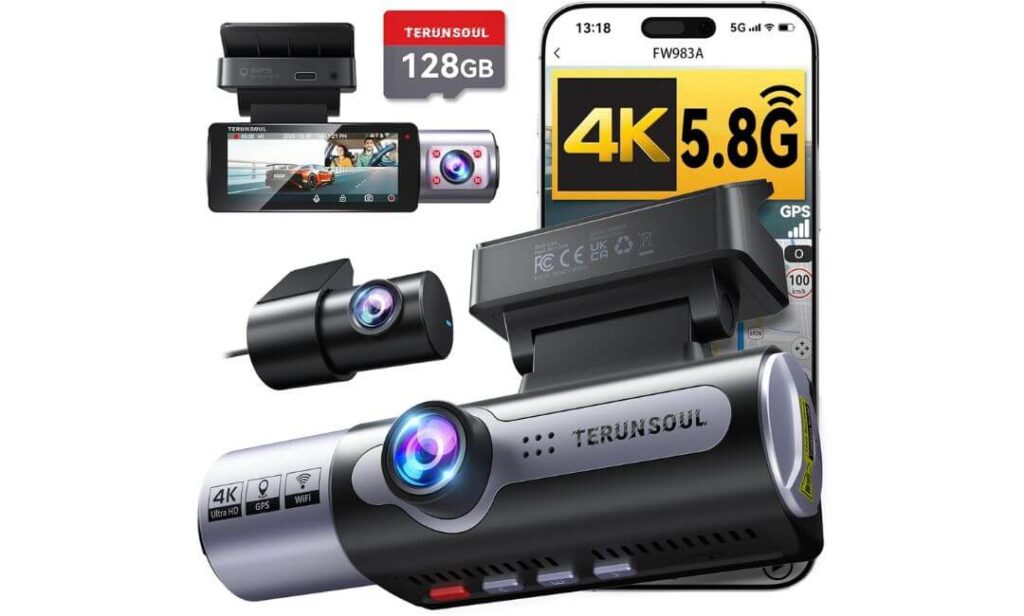
Quick Specs:
- Video Coverage: 4K Front + 1080P Rear + 1080P Cabin recording
- Viewing Angles: 170° front + 165° rear + 165° cabin for wide all-around coverage
- Best For: GMC Yukon owners looking for a feature-rich 3-channel dash cam at an affordable price
- Night Performance: Starlight-grade lens, F1.6 aperture, and HDR for improved low-light recording
- Connectivity: Dual-band 5.8GHz & 2.4GHz Wi-Fi, built-in GPS, and companion mobile app
- Storage: 128GB high-speed microSD card included in the box
- Safety Features: Collision sensor, loop recording, GPS route tracking, parking mode support
- Display: Large 3.16-inch IPS screen for easy playback and menu navigation
- Installation: Includes rear camera cable, GPS mount, cable clips, trim tool, and installation accessories
- Ideal Driver: Families, rideshare drivers, and budget-conscious Yukon owners wanting complete vehicle coverage
Rather than chasing premium branding, this dash cam focuses on delivering the features most GMC Yukon owners actually use every day. You get simultaneous 4K front, 1080P rear, and 1080P cabin recording, giving your SUV broad coverage from nearly every important angle. The 170° front lens and 165° rear and cabin cameras work particularly well in a large vehicle where wider visibility can make a noticeable difference during busy traffic, parking manoeuvres, or long family trips.
For everyday driving, it covers the essentials surprisingly well. The starlight-grade lens, F1.6 aperture, and HDR processing improve visibility after sunset, while the built-in GPS automatically records route, speed, and location information alongside every video. The dual-band 5.8GHz Wi-Fi provides faster wireless transfers than older Wi-Fi systems, making it much easier to review or share footage directly from your phone without removing the memory card.
Another reason this camera deserves attention is the value it offers straight out of the box. A 128GB memory card is already included, along with the rear camera cable, GPS mount, trim tools, cable clips, and other installation accessories that many competing brands sell separately. Add in the collision sensor, loop recording, large 3.16-inch IPS display, and dependable everyday performance, and it becomes an easy recommendation for Yukon owners who want comprehensive protection without stretching their budget. (For many drivers, having a complete recording system on day one is far more practical than buying extra accessories later.)
Why It Delivers Excellent Everyday Value
- True three-channel recording captures the front, rear, and cabin simultaneously.
- 128GB memory card included, reducing your initial setup cost.
- Dual-band 5.8GHz Wi-Fi makes transferring footage faster and more convenient.
- Wide-angle cameras are well suited to the larger dimensions of the GMC Yukon.
- Complete installation kit means fewer additional purchases before installation.
One Thing Worth Knowing Before You Buy
- To enable continuous parking mode, you’ll need the compatible hardwire kit, which is sold separately.
GMC Yukon Compatibility & Installation Notes
The supplied 6.5-metre rear camera cable provides enough length for both GMC Yukon and Yukon XL models, making rear camera routing straightforward through the headliner and factory trim. The front camera also fits comfortably behind the rear-view mirror without occupying excessive windshield space.
Because the package already includes a 128GB memory card, GPS mount, trim tools, and mounting accessories, most owners can complete the installation without purchasing additional recording essentials.
The Insider Pro-Tip
A budget-friendly dash cam shouldn’t force you to compromise on the features you’ll rely on most. If a camera already includes three-channel recording, GPS, Wi-Fi, HDR, and a quality memory card, you’re often getting far better real-world value than paying extra for a bigger brand name alone.
For many GMC Yukon owners, this is the type of setup that simply works from the first drive. Install it properly, add the optional hardwire kit if you want parking surveillance, and you’ll have dependable coverage that feels much more expensive than its price suggests.
Best GMC Yukon Dash Cam Comparison
| Dash Cam | Best For | Video Setup | Image Hardware | Parking Security | Storage | Connectivity | Installation | Overall Verdict |
|---|---|---|---|---|---|---|---|---|
|
VIOFO A329S Editor’s Choice |
Maximum protection for large Yukon cabins | 4K + 2K + 2K 3-Channel |
Triple Sony STARVIS 2 IMX678 + Dual IMX675 |
Power-saving impact recording | Up to 4TB SSD 512GB microSD |
Wi-Fi 6 GPS Voice Control |
Hidden coaxial wiring Excellent OEM-style finish |
Best overall choice for image quality, coverage, future-proof storage and everyday reliability. |
|
Vantrue N4 Pro S Premium Pick |
Drivers wanting flagship parking protection | 4K + 2.5K +1080P | Triple Sony STARVIS 2 PlatePix HDR |
Buffered recording before impact | Up to 1TB | 5GHz Wi-Fi GPS Voice Control |
Long rear cable suits Yukon XL perfectly | Excellent blend of premium recording, strong night performance and dependable ownership. |
|
Mangoal OEM Factory Fit |
Owners wanting a clean factory appearance | 4K +1080P | Sony STARVIS IMX335 | Parking monitor | 128GB Included | Wi-Fi GPS |
True OEM integration behind mirror | The closest experience to having a factory-installed dash cam. |
|
ROVE R2-4K Best Value |
Drivers focused on premium front recording | Single 4K Camera | 8MP Sony IMX415 F1.5 Lens |
Parking mode supported | Up to 512GB | Wi-Fi 6 GPS |
Fast, simple and compact setup | Outstanding front video quality without paying for extra cameras. |
|
TERUNSOUl 4K Budget Pick |
Affordable full-vehicle recording | 4K +1080P +1080P | HDR F1.6 Starlight Lens |
Collision detection | 128GB Included | 5.8GHz Wi-Fi GPS |
Complete accessory kit included | Feature-rich package that offers excellent value for everyday Yukon drivers. |
GMC Yukon Dash Cam Buyer’s Guide: What Actually Matters Before You Buy
A GMC Yukon isn’t just another SUV, and that changes what you should expect from a dash cam. Its higher driving position, longer body, larger windshield, and generous cargo area create recording challenges that many entry-level cameras simply weren’t designed to handle. That’s why choosing a dash cam based only on resolution or price often leads to disappointment later.
Below are the factors we believe genuinely matter after comparing today’s best options for the Yukon rather than simply repeating manufacturer specifications.
Choose Image Quality Before Resolution
Many buyers immediately look for 4K, but resolution alone doesn’t guarantee better evidence. The camera’s image sensor, HDR processing, lens quality, and software all play a much bigger role when you’re trying to read a licence plate during rain, heavy traffic, or low-light conditions.
If your budget allows, prioritise a dash cam with Sony STARVIS 2 sensors or another proven premium imaging system. These sensors generally produce cleaner footage with less motion blur and better contrast than many standard 4K cameras using older hardware.
Consider How Much of the Yukon You Want to Protect
Not every driver needs the same camera configuration.
- Front-only cameras work well for commuters who mainly want evidence of road incidents.
- Front and rear systems provide stronger protection against rear-end collisions and parking incidents.
- Three-channel dash cams record the road ahead, the cabin, and the rear simultaneously, making them an excellent choice for families, rideshare drivers, road trips, or anyone regularly carrying passengers and valuable equipment.
Because the GMC Yukon is a large SUV, wider recording coverage usually provides more practical value than it does in a smaller vehicle.
Parking Mode Is Worth Paying For
Many insurance claims happen while a vehicle is parked rather than moving. That’s why a dependable parking mode deserves more attention than many buyers give it.
Features such as buffered recording, impact detection, motion detection, and power-saving surveillance can capture what happened before and after an incident instead of recording only after the collision has already occurred.
For drivers who leave their Yukon overnight in public parking areas, airports, hotels, or shopping centres, this can become one of the most valuable features the camera offers.
GPS and Wi-Fi Make Everyday Ownership Easier
A dash cam shouldn’t become difficult to use after installation.
Built-in GPS automatically records your location, speed, direction of travel, and timestamps alongside every video, adding useful evidence whenever footage is reviewed.
Meanwhile, Wi-Fi 6 or fast dual-band Wi-Fi allows large 4K files to transfer much more quickly to your smartphone, making it easier to save important clips without removing the memory card from the camera.
Don’t Ignore Storage Capacity
Higher-quality video also means larger files.
If you frequently drive long distances, tow trailers, travel on holiday, or use your Yukon for work, choosing a camera that supports high-capacity microSD cards or even external SSD storage reduces how often important recordings are overwritten.
It’s also worth using high-endurance memory cards designed specifically for continuous dash cam recording instead of ordinary consumer microSD cards.
Reliability Matters More Than Extra Features
A dash cam only has value if it’s recording when you actually need it.
Look for features such as supercapacitor power systems, stable mobile apps, regular firmware updates, dependable GPS performance, and brands with a strong reputation for long-term reliability. These are the details that usually separate cameras people recommend after years of ownership from those they replace after a few months.
Understanding OEM Fit for the GMC Yukon
An OEM-style dash cam is designed to blend into the factory interior rather than hanging beneath the windshield on a traditional suction mount.
For many GMC Yukon owners, this creates several practical advantages:
- Cleaner factory appearance with no exposed wiring.
- Less distraction while driving.
- Reduced visibility from outside the vehicle.
- Better integration around the rear-view mirror and factory sensors.
- A more premium finish that complements trims such as Denali and Denali Ultimate.
If maintaining the original appearance of your Yukon is important, an OEM-style system is often worth the additional investment.
Budget vs Premium: Which One Makes the Most Sense?
The most expensive dash cam isn’t automatically the best choice.
If you mainly drive to work and want dependable front-facing evidence, a premium single-channel 4K camera may provide everything you need.
If your Yukon regularly carries family members, children, pets, passengers, or expensive cargo, investing in a high-quality three-channel system usually offers far greater long-term value because it records everything happening around the vehicle instead of just the road ahead.
The goal isn’t buying the camera with the longest feature list—it’s choosing the one that matches how your GMC Yukon is actually driven every day.
GMC Yukon Dash Cam Installation Guide: Get the Best Performance from Day One
Installing a dash cam in a GMC Yukon is relatively straightforward, but a thoughtful installation makes a noticeable difference in video quality, reliability, and everyday usability. A poorly positioned camera, exposed wiring, or incorrect power connection can reduce recording performance even if you’ve invested in a premium model.
These are the installation practices we recommend specifically for the Yukon after considering its larger cabin, taller windshield, and factory electronics.
Choose the Right Power Source Before You Start
How you power the dash cam determines which features will actually work.
For most owners, there are three practical options:
- 12V accessory socket, ideal for drivers who simply want recording while driving. Installation is quick, but advanced parking mode usually won’t function after the vehicle is switched off.
- Hardwire kit, the best solution if you want buffered parking mode, impact recording, or continuous surveillance. A quality hardwire kit connects directly to the fuse box and includes low-voltage protection to help prevent unnecessary battery drain.
- OBD-II power adapter, a good middle ground for owners who want parking protection without modifying factory wiring. Many premium dash cams now support compatible OBD power accessories that install in just a few minutes.
If you’re investing in a premium camera, it’s usually worth completing the installation with the appropriate power solution instead of relying only on the supplied charging cable.
Route Cables Like a Factory Installation
One of the biggest differences between an average installation and a professional-looking one is cable management.
The GMC Yukon’s generous headliner space makes it relatively easy to hide wiring behind the roof trim, down the A-pillar, and along factory interior panels before reaching the rear camera.
When routing cables:
- Leave enough slack near the camera so adjustment remains easy.
- Avoid stretching cables tightly around moving trim pieces.
- Keep wiring away from curtain airbag deployment areas.
- Use the supplied trim tool instead of metal screwdrivers whenever possible.
- Secure loose wiring with cable clips or fabric tape to prevent rattles over time.
A clean installation not only improves appearance but also reduces the likelihood of future cable wear.
Position the Cameras for the Best Recording Angle
Even the best dash cam cannot compensate for poor placement.
The front camera should normally sit just behind or slightly below the rear-view mirror where it remains within the wiper sweep while staying outside the driver’s primary field of vision. This position reduces windshield glare and provides a more balanced view of the road ahead.
For the rear camera, mount it as high as practical on the rear glass while keeping the lens clear of rear defroster lines, stickers, and cargo that could block the view. If you’re installing a cabin camera, make sure it has an unobstructed view of both front and rear seating areas without being pointed directly at the roof liner.
Before permanently securing the mounts, preview the live image through the companion app to confirm that all three cameras are level and correctly aligned.
Prepare the Windshield Before Mounting
A surprisingly common cause of cameras falling off is poor surface preparation rather than weak adhesive.
Clean the mounting area thoroughly using alcohol wipes, allow the glass to dry completely, and avoid touching the adhesive pad before installation. Applying the mount to a clean surface improves long-term adhesion, especially during hot summer weather.
After installation, allow the adhesive to cure before driving whenever possible. This helps the mount achieve its strongest bond.
Protect the Camera from Heat and Daily Wear
Although premium dash cams are designed for automotive environments, the inside of a parked GMC Yukon can become extremely hot during summer.
Choosing a model equipped with a supercapacitor instead of a traditional lithium battery generally improves long-term reliability under repeated heat cycles.
It also helps to:
- Park in shaded areas whenever practical.
- Use a windshield sunshade during prolonged parking.
- Keep the windshield clean to minimise glare.
- Periodically inspect adhesive mounts and cable routing.
Small maintenance checks every few months often prevent larger problems later.
Complete the Firmware and App Setup Immediately
Many owners install the camera but never complete the software setup, missing out on features they already paid for.
After installation:
- Update the firmware if a newer version is available.
- Pair the camera with its official mobile app.
- Confirm that Wi-Fi 6 or dual-band Wi-Fi connects correctly.
- Set the correct time zone, video resolution, parking mode preferences, and GPS options.
- Format the memory card inside the camera before regular use.
Taking ten minutes to complete these steps usually results in more stable performance and fewer recording issues over the long term.
Test Everything Before Considering the Installation Finished
Before replacing trim panels or tidying the final cable sections, perform a complete recording test.
Drive for several minutes, review the footage from every installed camera, confirm GPS data is recording correctly, check that Wi-Fi transfers work smoothly, and verify that the rear camera image is level.
If you’ve installed a hardwire kit, also test the parking mode after switching the vehicle off. Confirming everything immediately is much easier than reopening the entire installation later.
A properly installed dash cam should feel like part of the GMC Yukon, not an aftermarket accessory. When the wiring is hidden, the cameras are positioned correctly, and the software is configured properly, the system simply works every time you start the engine—and that’s exactly how a premium dash cam should perform.
GMC Yukon Dash Cam Setup, Everyday Use, and Long-Term Maintenance
Buying a premium dash cam is only part of the equation. The way it’s configured, powered, and maintained has just as much impact on the footage you’ll rely on later. A few small setup decisions can improve video quality, extend storage life, and make sure important recordings are available when you actually need them.
The recommendations below are based on how a GMC Yukon is typically driven, parked, and used over the long term rather than generic dash cam advice.
Is 4K Really Worth It for a GMC Yukon?
For most GMC Yukon owners, the answer is yes.
A full-size SUV sits higher off the ground and often covers more distance from surrounding vehicles than a smaller crossover. Because of that driving position, the front camera frequently needs to capture licence plates, road signs, and traffic further ahead.
A quality 4K front camera provides noticeably more detail when reviewing footage after an incident, especially on highways where vehicles are moving at higher speeds.
That said, 1080P still works well for many rear and cabin cameras. Those cameras usually record objects much closer to the vehicle, making higher resolutions less critical than they are for the front lens.
The combination we recommend for most Yukon owners is 4K front recording with either 2K or 1080P rear and cabin cameras, which offers an excellent balance between image quality and storage efficiency.
How to Confirm Parking Mode Is Actually Working
Many owners assume parking mode is active simply because they installed a hardwire kit. It’s always worth confirming.
After installation:
- Verify that parking mode has been enabled inside the camera settings.
- Confirm the hardwire kit is connected to both constant and switched power if required by your model.
- Turn the Yukon off and lock the vehicle.
- Wait several minutes until the dash cam changes into parking mode.
- Create a gentle vibration near the vehicle or trigger motion, then review the recording to confirm it was captured correctly.
Testing this once takes only a few minutes and avoids discovering later that an important incident wasn’t recorded.
What to Do If GPS or Camera Functions Stop Working
Modern dash cams rarely fail without warning. Most issues are caused by simple setup problems rather than hardware faults.
If you notice missing GPS information, interrupted recordings, or app connection problems:
- Restart the camera completely.
- Check for available firmware updates.
- Reformat the memory card inside the camera rather than on a computer.
- Confirm GPS reception after driving into an open outdoor area.
- Verify that Wi-Fi has disconnected from any previous phone pairing before reconnecting.
- Inspect cable connections if the rear or cabin camera unexpectedly disappears.
Many temporary issues disappear after updating firmware and formatting the memory card correctly.
How Long Will Your Recordings Be Saved?
Storage time depends on four main factors:
- Video resolution.
- Number of cameras recording simultaneously.
- Memory card or SSD capacity.
- Daily driving time.
A single 4K front camera generally stores footage much longer than a three-channel recording system, simply because fewer files are being created.
If you regularly travel long distances, choosing a camera that supports 512GB microSD or large-capacity SSD storage significantly increases the amount of footage available before older recordings begin to overwrite.
Whenever an accident or unusual event occurs, save the file immediately instead of relying on loop recording to preserve it automatically.
Build a Simple Backup Routine
Even the best dash cam shouldn’t become the only place where important evidence exists.
Whenever footage matters:
- Download it to your phone through the official app.
- Save another copy on your computer.
- Upload an additional backup to secure cloud storage if possible.
- Keep the original recording on the memory card until any insurance or legal matter has been resolved.
Maintaining multiple copies protects valuable evidence from accidental deletion or storage failure.
Protect the Vehicle Battery While Using Parking Mode
Parking mode is one of the most useful dash cam features, but it should also be configured responsibly.
Premium hardwire kits normally include low-voltage protection, automatically shutting the camera down before the vehicle battery reaches an unsafe level.
If your GMC Yukon remains parked for several days without being driven:
- Select a power-saving parking mode instead of continuous recording.
- Check battery voltage settings inside the hardwire kit if adjustable.
- Start the vehicle periodically during extended storage.
- Avoid unnecessary accessories that continue drawing power while parked.
These simple habits help maintain both reliable dash cam recording and healthy battery performance.
Keep the Camera Performing Like New
Dash cams require very little maintenance, but regular attention improves long-term reliability.
Every few weeks:
- Clean the camera lenses with a soft microfiber cloth.
- Check that the mounting bracket remains secure.
- Inspect cable routing around the headliner and rear hatch.
- Format the memory card inside the camera every month or two.
- Install firmware updates when released by the manufacturer.
- Review a few recent recordings to confirm every camera is still functioning normally.
A dash cam is only valuable when it’s recording properly. Spending a few minutes on routine maintenance is far easier than discovering missing footage after an accident.
For most GMC Yukon owners, the goal isn’t simply installing a camera—it’s having a recording system that works quietly and consistently every time the vehicle leaves the driveway. Proper setup, regular maintenance, and occasional testing are what turn a good dash cam into dependable evidence when it matters most.
FAQs About GMC Yukon Dash Cam
Is a three-channel dash cam actually worth it for a GMC Yukon, or is it overkill?
For many GMC Yukon owners, a three-channel system isn’t about recording more video—it’s about covering areas that a large SUV naturally leaves exposed. The Yukon’s long cabin, higher seating position, and generous cargo area create blind spots that a front-only camera simply cannot capture.
If your Yukon is mainly used for school runs, family travel, airport pickups, road trips, or transporting valuable equipment, a three-channel setup usually provides far more useful evidence than adding a slightly sharper front camera alone. Drivers who spend most of their time commuting alone may find a premium single-front camera sufficient, but for multi-purpose Yukon ownership, wider coverage often proves more valuable in real-world situations.
Where is the best mounting position for a GMC Yukon dash cam to avoid blocking factory safety systems?
The safest location is usually behind the rear-view mirror, where the camera remains inside the windshield’s wiped area without obstructing the driver’s forward view. However, modern Yukon models include cameras and driver-assistance sensors near the mirror housing, so placement should always leave those systems completely unobstructed.
Before permanently attaching the mount:
- Preview the live image through the mobile app.
- Confirm the hood occupies only a small portion of the frame.
- Make sure the lens isn’t blocked by the mirror housing.
- Verify that rain sensors and ADAS cameras remain completely clear.
Taking five extra minutes during installation usually prevents years of compromised footage.
Can a dash cam drain the battery if my GMC Yukon stays parked for several days?
It can—but only if the parking mode is configured incorrectly or installed without proper battery protection.
Most premium hardwire kits include low-voltage cutoff protection, which automatically shuts the dash cam down before the battery reaches an unsafe level. If your Yukon regularly sits unused for several days, it’s usually better to enable a power-saving parking mode rather than continuous recording. That approach still protects the vehicle while placing much less demand on the battery.
How can I tell whether my dash cam is genuinely recording reliable evidence instead of just producing good-looking videos?
The easiest test isn’t recording beautiful daytime scenery—it’s checking how the camera performs during the situations where evidence actually matters.
Review footage from different driving conditions, including:
- Night-time roads with oncoming headlights.
- Rain or wet roads.
- Underground parking garages.
- Highway speeds.
- Bright morning or evening sunlight.
If licence plates remain readable, exposure stays balanced, and GPS information records consistently across those conditions, your dash cam is performing exactly as it should. That’s a much more meaningful benchmark than resolution numbers printed on the packaging.
How often should I maintain my GMC Yukon dash cam to keep it recording reliably for years?
A dash cam doesn’t require much attention, but ignoring it completely isn’t a good idea either. A quick monthly inspection often prevents the small issues that eventually lead to missing footage.
A simple maintenance routine includes:
- Cleaning every camera lens with a microfiber cloth.
- Formatting the memory card inside the camera every month or two.
- Checking for firmware updates.
- Reviewing a recent recording from each camera.
- Confirming GPS and Wi-Fi are still working correctly.
- Inspecting mounts and cable routing for movement or wear.
Most recording failures happen because owners assume the camera is still working without ever checking it. Spending just a few minutes every month provides far more confidence than discovering after an incident that the camera silently stopped recording weeks earlier.
Final Thoughts
Finding the best dash cam for a GMC Yukon isn’t about choosing the model with the longest specification sheet—it’s about selecting one that matches how your SUV is actually driven. A full-size vehicle deserves a camera that can keep up with its size, whether that’s capturing clear highway footage, protecting the cabin during family trips, or recording unexpected incidents while parked.
After comparing today’s strongest options, the VIOFO A329S remains our top recommendation for drivers who want the most complete protection without compromise. If a factory-style installation is your priority, the Mangoal OEM Dash Cam is difficult to overlook, while the Vantrue N4 Pro S stands out for owners who place extra value on advanced parking surveillance and premium night performance. Drivers looking to balance performance with price will also find the ROVE R2-4K and TERUNSOUl 4K 3-Channel to be genuinely worthwhile choices rather than simply budget alternatives.
Whichever model you choose, take the time to install it properly, pair it with a reliable high-endurance memory card, keep the firmware updated, and test the recordings occasionally. Those simple habits matter far more than chasing another specification on the box.
A dash cam is one of the few accessories you’ll hopefully never need—but if the day comes when you do, you’ll appreciate having clear, reliable footage instead of unanswered questions. That’s ultimately why investing in the right dash cam for your GMC Yukon is about confidence on every drive, not just another upgrade for your SUV.
Also Check: