5 Best Dash Cams for Tesla Model Y in 2026: 4K 60FPS STARVIS 2 WiFi 6 SSD Ready
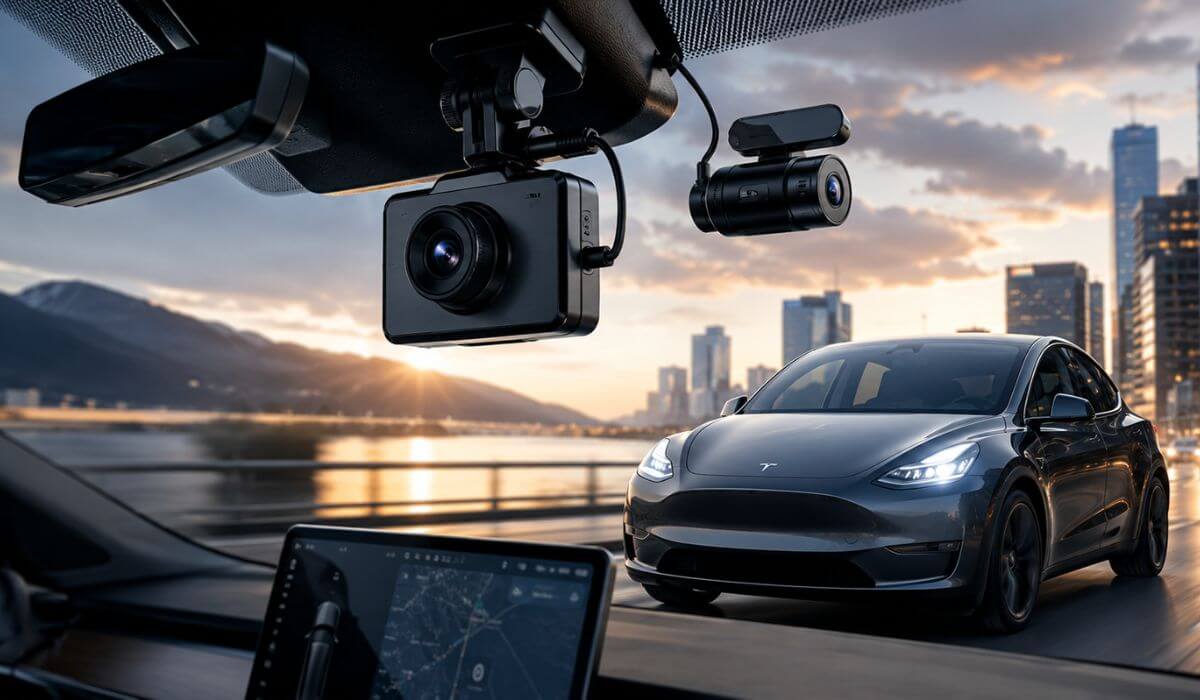
The Tesla Model Y has changed more than most people realize. Whether you own an early 2020–2024 model or the refreshed 2025–2026 Model Y (Juniper), the cabin is quieter, acceleration is instant, and the wide windshield gives dash cams a perfect field of view. But it also means poor image quality, weak heat management, or unreliable parking recording become much more noticeable than they do in a typical petrol SUV.
After comparing the latest flagship models, we focused on what actually matters for Model Y owners: clean 4K footage, STARVIS 2 low-light performance, efficient parking mode that won’t place unnecessary load on the 12V system, stable Wi-Fi 6 transfers, compact installation behind the mirror, and dependable long-term recording. We also considered storage support, app reliability, and overall value instead of chasing features that look impressive on a spec sheet but add little in daily driving.
If you’re looking for a Tesla Model Y dash cam that simply works every time you start the car and captures clear evidence when you need it most, these are the models we’d confidently install in our own vehicle today.
Best Tesla Model Y Dash Cam: Top 2026 Picks for Front and Rear Recording
#1. VIOFO A329S 4K 60FPS Dash Cam Front and Rear
Best Tesla Model Y Dash Cam with 4K 60FPS Recording, Dual STARVIS 2 Sensors and Wi-Fi 6
#2. BlackVue DR970X Box Plus
Premium 4K Dash Cam for Tesla Model Y with Hidden Recording Box, STARVIS 2 HDR and Clean Factory-Style Installation
#3. ROVE R2-4K Dual PRO Dash Cam Front and Rear
Best Value Tesla Model Y Dash Camera Featuring Dual STARVIS 2 Sensors, 4K + 2K Recording and Fast Wi-Fi 6
#4. Vantrue N4 Pro S 4K 3 Channel Dash Cam
Best Three-Channel Dash Cam for Tesla Model Y with Front Cabin Rear Coverage, Triple STARVIS 2 and Voice Control
#5. IIWEY N7 PRO 4K 4-Channel Dash Cam
Best Tesla Model Y Dash Cam with 360° Coverage Offering Four Cameras, Wi-Fi 6, GPS and Surround Recording
Expert Tip
If your Tesla Model Y already has Sentry Mode, don’t assume you can skip buying a dash cam. Sentry Mode is excellent for monitoring the car while it’s parked, but it isn’t designed to replace a dedicated camera with higher bitrate recording, better night-time clarity, longer loop recording, and wider coverage. The two systems actually work best together. Sentry Mode helps protect the vehicle, while a quality dash cam gives you clearer evidence of what really happened before, during, and after an incident. That’s why every recommendation below focuses on cameras that complement the Model Y instead of duplicating features you already have.
How We Chose the Best Dash Cams for Tesla Model Y
A long specification sheet doesn’t automatically make a dash cam worth installing in a Tesla Model Y. We shortlisted these models only after comparing the features that genuinely affect day-to-day ownership, especially in an electric SUV with a quiet cabin, large windshield, and advanced onboard electronics.
Image quality came first. Every camera we selected records in true 4K or high-resolution dual-channel formats, and the top recommendations use Sony STARVIS 2 sensors because they consistently produce cleaner night footage, better HDR performance, and sharper licence plate detail under headlights, rain, and low-light conditions. We deliberately left out cameras that inflate resolution numbers but struggle when lighting becomes difficult.
Parking recording was the next priority. Tesla owners often leave their vehicles parked for extended periods, so we looked beyond marketing claims and focused on power-efficient parking modes, stable event recording, and reliable hardwire support. A camera that wakes up correctly and saves important footage is far more valuable than one packed with features that rarely work as expected.
We also paid close attention to installation quality. The Model Y has an open windshield design, and bulky cameras or messy wiring quickly become distracting. The models in this guide offer compact mounting options, discreet cable routing, and clean factory-style placement that blends naturally into the cabin without blocking visibility.
Storage and long-term reliability were another deciding factor. Cameras supporting large-capacity microSD cards or SSD storage were given preference because high-bitrate 4K recording fills memory quickly. We also favoured brands with a stronger reputation for firmware stability, dependable heat management, and consistent recording, since a dash cam is only useful if it captures footage every single time you drive.
Finally, we considered overall value instead of price alone. Some premium models earned their place because of exceptional reliability and image quality, while others were included because they deliver nearly the same real-world performance for significantly less money. If a product didn’t provide a clear advantage for Tesla Model Y owners, it didn’t make this list—regardless of how popular or heavily advertised it was.
#1. VIOFO A329S 4K 60FPS Dash Cam Front and Rear
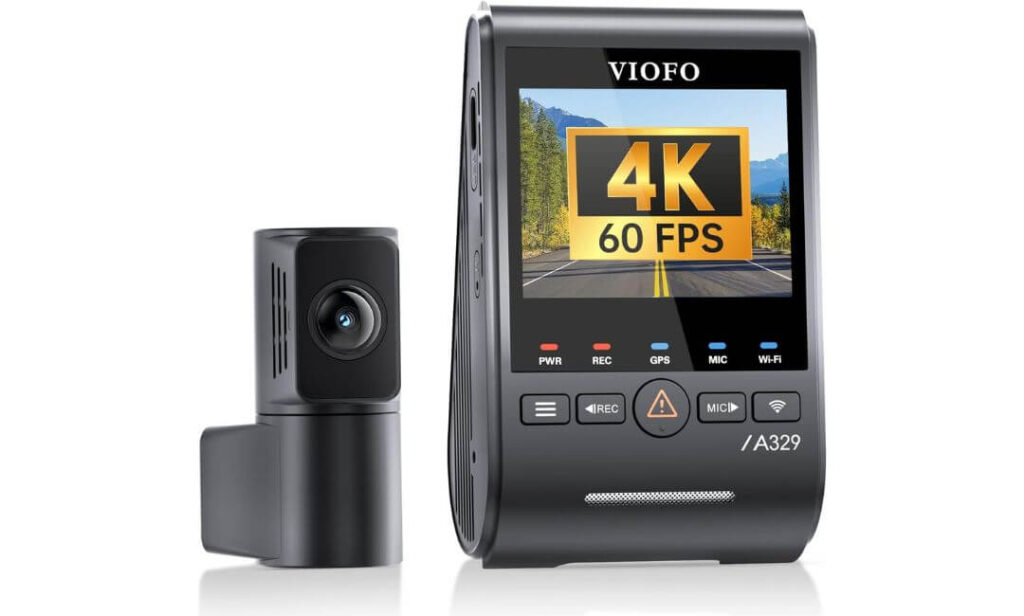
Quick Specs:
- Video Quality: 4K 60FPS Front + 2K Rear
- Image Sensors: Dual Sony STARVIS 2 (IMX678 + IMX675)
- HDR Recording: Dual-channel HDR
- Storage: Supports 4TB SSD or 512GB microSD
- Connectivity: Wi-Fi 6 (up to 30MB/s), USB Type-C
- Navigation: Built-in GPS (GPS, Galileo, GLONASS, BeiDou)
- Parking Mode: Low-power impact detection (HK6 hardwire kit required)
- Voice Control: Hands-free commands
- Cable Design: Ultra-slim 2.8mm coaxial cable
- Included Extras: CPL Filter, GPS Module, Trim Tool
The first thing you’ll notice isn’t the 4K badge—it’s how clean and stable the footage looks when the road gets difficult. The large windshield on the Tesla Model Y lets this camera capture a wide, natural view, while the 4K 60FPS front recording keeps moving vehicles and number plates noticeably sharper than many standard 30FPS cameras. That extra smoothness becomes surprisingly valuable during motorway driving, lane changes and fast-moving traffic.
Where this model genuinely separates itself is after sunset. The combination of Dual STARVIS 2 sensors, HDR processing and the included CPL filter reduces glare from LED headlights, reflections from the panoramic glass roof and harsh street lighting. Instead of producing overly bright or overly dark footage, it delivers balanced video that preserves the details you actually need if an incident occurs.
Daily ownership is equally well thought out. Wi-Fi 6 transfers large 4K clips in seconds, voice control keeps your hands on the wheel, and support for external SSD storage up to 4TB means you can record for weeks without constantly worrying about overwriting older footage. The slim coaxial cable also makes the installation look far cleaner than most traditional rear-camera wiring.
(What impressed us most wasn’t one headline feature—it was how naturally every part of the system works together once it’s installed.)
Why This Model Stood Out During Our Evaluation
- True 4K 60FPS captures smoother, more readable evidence at motorway speeds.
- Dual STARVIS 2 sensors deliver excellent low-light performance without excessive image noise.
- 4TB SSD compatibility is ideal for drivers who prefer extended recording history.
- Ultra-slim coaxial cable creates a cleaner installation behind the Model Y’s large windshield.
- Wi-Fi 6 dramatically reduces waiting time when downloading high-resolution footage.
A Small Consideration Before Buying
- The power-saving parking mode requires the optional HK6 hardwire kit, so you’ll need an additional installation step if you want continuous parked protection.
Tesla Model Y Installation Notes
Installation is refreshingly straightforward thanks to the compact front camera and the 2.8mm coaxial rear cable, which is thin enough to route discreetly through the Model Y’s interior trim without creating bulky cable runs. It also avoids interfering with Tesla’s factory camera systems when positioned correctly behind the rear-view mirror.
If you mainly want recording while driving, the supplied adhesive mount is all most owners will need. However, if you want automatic impact detection while parked, fitting the optional HK6 hardwire kit is worthwhile. It provides continuous power while keeping energy consumption low enough for everyday EV ownership.
The Insider Pro-Tip
Many Tesla owners focus entirely on video resolution, but storage speed and recording reliability matter just as much. A camera that records flawlessly every single drive is far more valuable than one with impressive specifications that occasionally misses footage.
If you choose this model, pair it with a high-endurance memory card or an external SSD, enable HDR for daily driving, and spend a few minutes adjusting the camera angle before your first journey. Those small setup decisions often make the difference between “usable footage” and crystal-clear evidence when you actually need it.
#2. BlackVue DR970X Box Plus
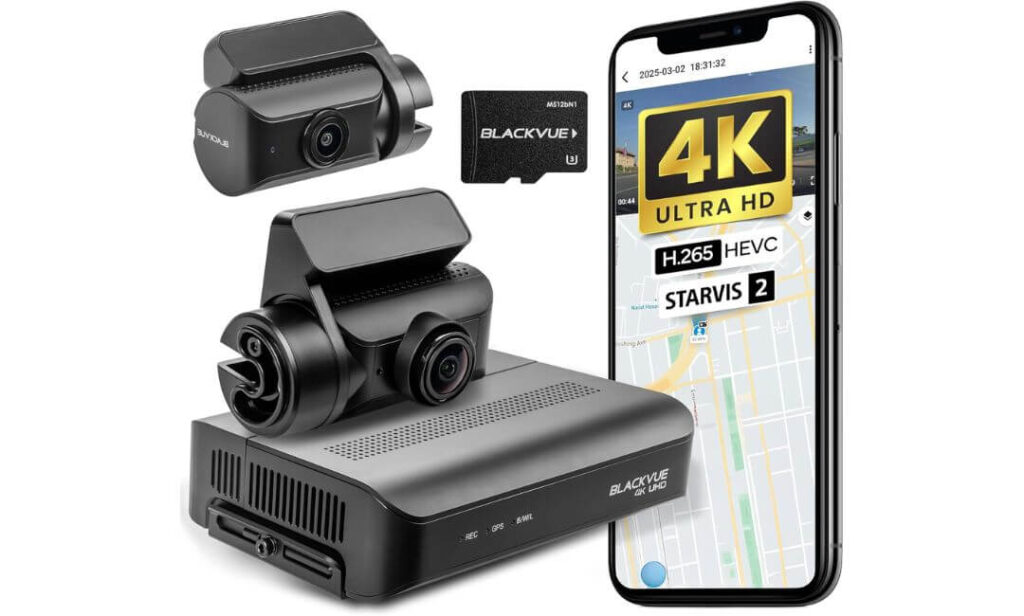
Quick Specs:
- Video Quality: 4K UHD Front + Full HD Rear
- Image Sensor: Sony STARVIS 2 Front Sensor
- Recording Design: Separate Secure Recording Box
- Storage Included: 128GB microSD Card
- Connectivity: 5GHz Wi-Fi, Optional LTE Cloud
- Navigation: Built-in GPS
- Parking Mode: Automatic with Battery Voltage Protection
- Power Options: Hardwire Cable and 12V Adapter Included
- Mobile App: Password-free Pairing & Cloud Ready
- Warranty: 2-Year Manufacturer Warranty
Unlike almost every traditional dash cam, this system moves the recording hardware away from the windshield. The compact front camera only handles video capture, while the processing unit and memory card stay safely hidden inside a separate recording box. In a Tesla Model Y, that creates a cleaner cabin, keeps valuable footage more secure, and gives the windshield a factory-installed appearance rather than an aftermarket look.
The design offers another practical benefit many owners overlook. Because the processor isn’t sitting behind the windshield baking in direct sunlight, heat is managed far more effectively. Combined with the STARVIS 2 front sensor, 4K recording remains consistently detailed during bright afternoons while still preserving strong low-light performance after dark. Add the fast 5GHz Wi-Fi, built-in GPS and optional cloud connectivity, and accessing footage becomes surprisingly straightforward wherever you are.
BlackVue has also paid attention to the ownership experience rather than only chasing specifications. The package already includes a 128GB memory card, hardwiring cable, cigarette lighter adapter and installation accessories, so you aren’t immediately shopping for extra parts before you can start using the camera. For many Model Y owners, that’s a welcome difference.
(This isn’t simply designed to record your drive—it feels like a system built to become part of the vehicle.)
Why It Earned a Place in Our Recommendations
- Separate recording box keeps the memory card hidden and significantly improves security.
- Compact front camera blends naturally behind the Tesla Model Y mirror assembly.
- STARVIS 2 4K recording delivers excellent daytime detail and dependable night performance.
- Battery protection automatically prevents unnecessary drain while using parking mode.
- Everything needed for installation is included in the box, including the hardwire cable.
One Thing Worth Knowing
- The premium design and separate recording unit mean installation is slightly more involved than a standard two-piece dash cam, especially if you want the cleanest possible cable routing.
Tesla Model Y Installation and Compatibility
This system fits the Tesla Model Y particularly well because the front camera itself is extremely compact. Once mounted behind the rear-view mirror, it stays largely out of the driver’s line of sight, while the recording box can be tucked neatly inside the glove compartment or beneath a seat for a much cleaner finish.
For basic driving footage, the included 12V power adapter gets you up and running in minutes. If you want automatic parking recording with battery protection, use the included hardwire cable. The built-in voltage cutoff helps protect the vehicle’s 12V battery by shutting the system down before battery levels become too low.
The Insider Pro-Tip
One of the biggest advantages of this model isn’t listed in bold on the retail box. The hidden recording unit makes it far less obvious that valuable footage is being stored inside the vehicle. In the unfortunate event of theft or vandalism, that’s a genuine advantage over cameras with an exposed memory card mounted on the windshield.
Before finalising the installation, spend a few extra minutes deciding where to place the recording box. Choosing a cool, easily accessible location will make future firmware updates, memory card checks and maintenance far more convenient without affecting the clean appearance of your Tesla Model Y.
#3. ROVE R2-4K Dual PRO Dash Cam Front and Rear
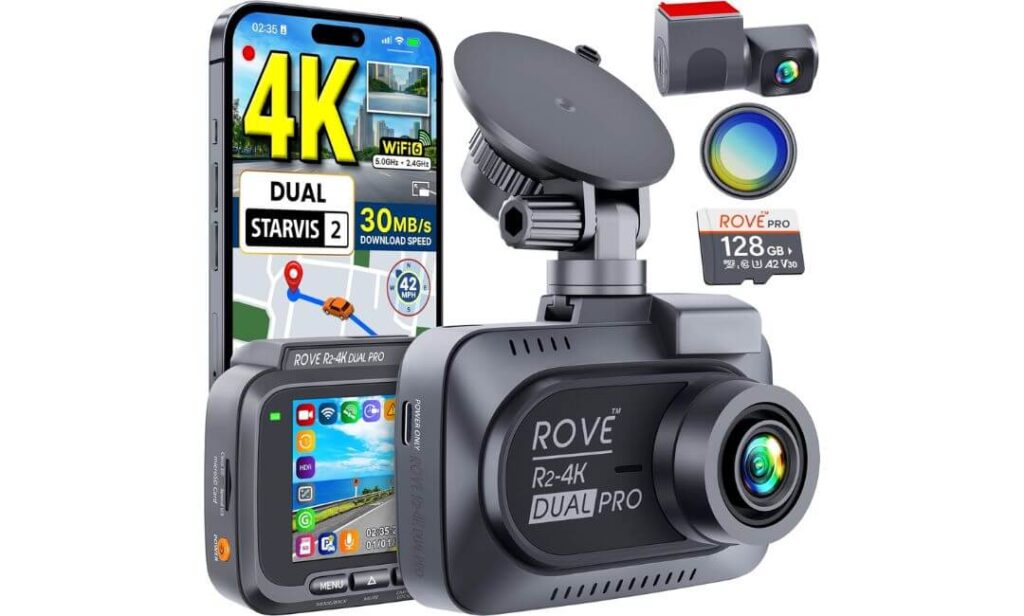
Quick Specs:
- Video Quality: 4K Front + 2K Rear
- Image Sensors: Dual Sony STARVIS 2 (IMX678 + IMX675)
- Lens Aperture: F1.7 Front / F1.55 Rear
- Viewing Angle: 150° Front + 140° Rear
- Connectivity: Dual-Band Wi-Fi 6 (up to 30MB/s)
- Navigation: Built-in Quad-Mode GPS
- Storage: 128GB Card Included, Supports up to 1TB
- Display: 3-inch IPS Screen
- Parking Mode: Motion, Collision & Time-Lapse (Hardwire Kit Required)
- Included Extras: CPL Filter, USB-C Cable, Installation Kit
Some dash cams impress on paper and disappoint once they’re mounted. This one does the opposite. From the moment you review your first drive, the 4K front and 2K rear recording immediately stand out for their sharpness, while the combination of Sony STARVIS 2 IMX678 and IMX675 sensors keeps footage clean when driving through tunnels, heavy rain or poorly lit roads. For a Tesla Model Y owner who drives daily, that’s the kind of consistency that matters far more than inflated marketing claims.
Another reason it earned a place in this guide is how complete the package feels. Instead of making you purchase accessories separately, you already get a 128GB high-endurance memory card, a CPL filter to reduce windshield reflections, quality USB-C cables and installation tools inside the box. Add the Wi-Fi 6 connection, fast 30MB/s downloads and reliable Quad-Mode GPS, and everyday use becomes refreshingly simple rather than frustrating.
The camera is also built around a supercapacitor instead of a lithium battery, which is particularly reassuring inside a Tesla Model Y where cabin temperatures can climb significantly during summer. Combined with support for 1TB storage and three intelligent parking recording options, it delivers the kind of long-term usability most owners actually appreciate after months of ownership.
(It doesn’t try to be the most expensive camera on the market—it simply delivers more than most people expect once it’s installed.)
Why It Earned a Place on Our Shortlist
- Dual STARVIS 2 sensors produce consistently detailed footage in daylight and challenging night conditions.
- Supercapacitor design is better suited for the heat cycles experienced inside electric vehicles.
- Free 128GB memory card and CPL filter reduce the need for additional purchases.
- Wi-Fi 6 makes transferring large 4K recordings quick and hassle-free.
- Quad-Mode GPS records speed, route and location with every journey for stronger evidence.
One Small Trade-Off
- To unlock the full parking monitoring features, you’ll need the optional ROVE Hardwire Kit, which is sold separately.
Tesla Model Y Installation Notes
The compact front camera fits neatly behind the Tesla Model Y’s rear-view mirror, helping maintain a clear forward view without interfering with the vehicle’s factory cameras. The supplied USB-C power cable makes basic installation straightforward, while the rear camera cable routes cleanly through the interior trim for a tidy finish.
If parked protection is important, adding the optional hardwire kit is well worth considering. It activates motion detection, collision recording and time-lapse monitoring, allowing the camera to continue protecting the vehicle even after you’ve walked away, while keeping the installation looking clean and factory-like.
The Insider Pro-Tip
Many buyers compare cameras using only resolution numbers, but the sensor behind the lens tells the real story. A well-tuned STARVIS 2 sensor paired with quality HDR processing often captures more usable evidence than a higher-resolution camera with weaker low-light performance.
Once installed, spend a few minutes positioning the camera so the horizon sits close to the centre of the frame and fit the included CPL filter before your first drive. On the Tesla Model Y’s large windshield, that small adjustment noticeably reduces dashboard reflections and produces cleaner footage in bright daylight without any extra effort.
#4. Vantrue N4 Pro S 4K 3 Channel Dash Cam
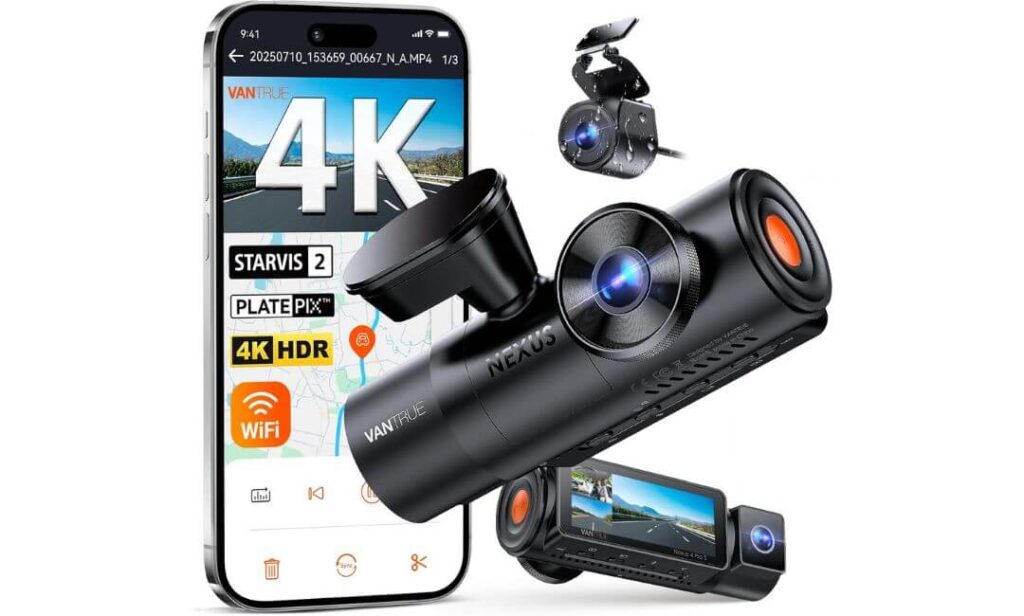
Quick Specs:
- Video Quality: 4K Front + 1080P Cabin + 2.5K Rear
- Image Sensors: Triple Sony STARVIS 2
- Rear Camera: 2.5K IP67 Weatherproof
- Night Performance: HDR + IR Night Vision + PlatePix
- Connectivity: Dual-Band 5GHz Wi-Fi
- Navigation: Built-in GPS
- Storage: Supports up to 1TB microSD
- Parking Mode: Buffered Motion Detection & Impact Recording (Hardwire Kit Required)
- Hardware: Supercapacitor Design
- Software: OTA Firmware Updates & App Control
There’s a reason this is the only three-channel model in our recommendations. If your Tesla Model Y regularly carries family, passengers, valuable equipment or you simply prefer complete coverage, very few cameras deliver the same level of confidence. Recording the road ahead, the cabin and everything behind the vehicle at the same time provides evidence that a traditional dual-camera setup simply can’t match.
Vantrue didn’t stop at adding another lens. Every recording channel benefits from Sony STARVIS 2 technology, while the upgraded 2.5K IP67 rear camera captures noticeably sharper detail than the Full HD rear cameras found on many competitors. Combine that with HDR processing, PlatePix technology and IR night vision, and the camera remains impressively readable when driving after dark, entering underground parking or facing bright LED headlights.
What also impressed us is the flexibility. If interior recording isn’t needed, you can switch to 4K front + 2.5K rear mode, allowing the camera to dedicate more processing power to the road while running cooler during long journeys. Add OTA firmware updates, 5GHz Wi-Fi, GPS and support for 1TB storage, and it feels designed for owners planning to keep their dash cam for years rather than replacing it every season.
(Rather than adding more cameras for marketing purposes, this system makes every recording angle genuinely useful.)
Why We Included It in This Guide
- Triple STARVIS 2 sensors deliver excellent image quality across every recording channel.
- 2.5K waterproof rear camera captures more detail than typical Full HD rear cameras.
- PlatePix and HDR improve licence plate readability in difficult lighting conditions.
- Flexible recording modes let you prioritise cabin coverage or maximise road recording quality.
- Supercapacitor hardware is better suited to the temperature changes experienced inside a Tesla Model Y.
One Practical Consideration
- If you don’t need interior recording, a quality dual-channel camera may offer a simpler installation with fewer cables to route.
Tesla Model Y Installation Notes
Despite offering three cameras, installation remains surprisingly manageable. The compact front unit mounts neatly behind the rear-view mirror, while the included 20-foot rear cable is long enough to route cleanly through the Tesla Model Y’s interior trim without stretching or adding unnecessary tension. The weather-sealed IP67 rear camera also provides extra confidence in changing climates.
For everyday driving, the supplied power cable is all most owners need. If you want buffered parking recording and automatic motion detection, pairing it with the optional Vantrue hardwire kit unlocks the camera’s full security features while maintaining a clean, factory-style installation.
The Insider Pro-Tip
Many buyers assume three-channel recording automatically means lower image quality, but that’s no longer true when the hardware is designed correctly. The biggest advantage here isn’t simply having an interior camera—it’s the ability to switch between triple-channel and 4K front + 2.5K rear recording depending on how you actually use your Tesla Model Y.
If cabin footage isn’t important for your daily commute, run the dedicated front-and-rear mode most of the time. You’ll benefit from higher recording efficiency, reduced heat generation and longer recording sessions, while still having the flexibility to enable the interior camera whenever your driving situation changes.
#5. IIWEY N7 PRO 4K STARVIS 4-Channel Dash Cam
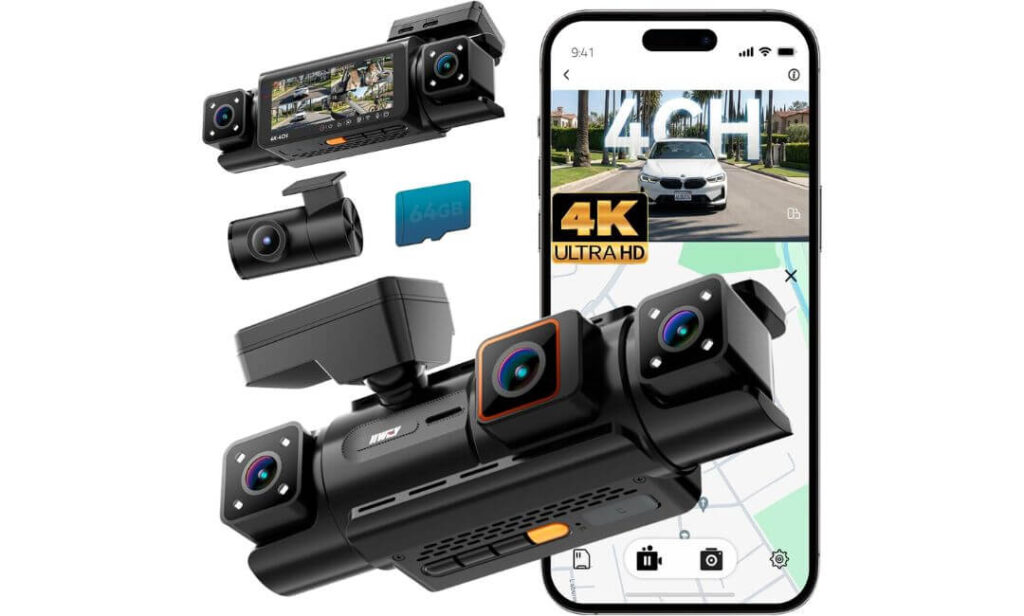
Quick Specs:
- Video Quality: 4K Front + Triple 1080P Recording
- Coverage: 4-Channel (Front, Rear & Dual Interior Cameras)
- Viewing Angle: 160° Wide Front View
- Night Vision: HDR + 8 IR LEDs
- Connectivity: Wi-Fi 6 with Free Mobile App
- Navigation: Built-in GPS
- Storage: 64GB Card Included
- Parking Mode: AI Time-Lapse (Hardwire Kit Required)
- Hardware: Supercapacitor Design
- Display: 3.18-inch IPS Screen
Most dash cams focus on what happens in front of the vehicle. This one takes a completely different approach. Along with crisp 4K front recording, it continuously captures the rear plus two separate interior views, creating coverage that comes remarkably close to a full 360-degree recording environment. For Tesla Model Y owners carrying passengers, transporting expensive equipment or simply wanting every possible angle documented, that’s a level of protection very few dash cams can offer.
Image quality also deserves credit. The 4K front camera, HDR processing and 8 built-in infrared LEDs work together to keep important details visible after dark without flooding the cabin with distracting reflections. During daytime driving, the wide 160-degree field of view helps cover multiple lanes naturally, while the dual interior cameras continue recording activity inside the cabin even in complete darkness.
Daily usability remains straightforward despite the additional cameras. The included 64GB memory card gets you recording immediately, Wi-Fi 6 makes downloading footage quick through the free app, and the supercapacitor design handles the high cabin temperatures often experienced inside a parked Tesla Model Y far better than traditional battery-powered alternatives.
(If your priority is recording every possible angle rather than only the road ahead, this setup offers something genuinely different from the rest of the list.)
Why It Deserved the Final Spot in Our Recommendations
- Four-camera recording system captures angles that dual-channel models simply cannot.
- HDR with 8 IR LEDs produces much clearer cabin footage during night driving.
- Supercapacitor hardware is better suited for long-term reliability in hot climates.
- Included 64GB memory card lets you start recording immediately without extra purchases.
- Wi-Fi 6 and built-in GPS make accessing and organising recorded footage much easier.
One Practical Thing to Keep in Mind
- Because this is a four-channel system, installation takes a little more planning than a standard front-and-rear dash cam, especially when routing the additional interior camera wiring neatly.
Tesla Model Y Installation Notes
The compact front unit fits comfortably behind the rear-view mirror, while the rear camera routes through the tailgate trim in the usual way. The two integrated interior cameras require no additional mounting, helping keep the installation cleaner than many other multi-camera systems.
One important detail is power. This camera works best with the original charger supplied in the box, and USB-C to USB-C cables are not supported. If you want continuous parking surveillance, installing the optional hardwire kit is the better long-term solution for a clean installation and uninterrupted recording while the vehicle is parked.
The Insider Pro-Tip
Four cameras only add value if they capture footage you can actually use. Before permanently mounting this system, sit in the driver’s seat and check that both interior cameras cover the areas you genuinely want recorded, rather than simply pointing toward empty headliner or seat backs.
For most Tesla Model Y owners, positioning the front camera slightly higher behind the mirror while keeping the interior lenses level produces the most balanced recording layout. It preserves a clean driving view, improves cabin coverage and gives you the strongest evidence should an insurance claim ever depend on footage from more than one angle.
Best Tesla Model Y Dash Cam Side-by-Side Feature Comparison
| Comparison Points |
Best Overall VIOFO A329S |
Premium Pick BlackVue DR970X Box Plus |
Best Value ROVE R2-4K Dual PRO |
3-Channel Choice Vantrue N4 Pro S |
Maximum Coverage IIWEY N7 PRO |
|---|---|---|---|---|---|
| Best For | Balanced everyday Tesla ownership | Factory-style premium installation | Maximum value for money | Road + Cabin recording | Near 360° evidence capture |
| Recording Setup | 4K + 2K Dual | 4K + Full HD Dual | 4K + 2K Dual | 4K + Cabin + 2.5K Rear | 4K + Triple 1080P |
| Low-Light Performance | Outstanding | Excellent | Outstanding | Outstanding | Very Good |
| Sony STARVIS 2 | Dual Sensors | Front Sensor | Dual Sensors | Triple Sensors | Front Optimised |
| Parking Recording | Power Saving Impact Mode | Battery Protected Parking | Motion + Impact + Time-Lapse | Buffered Motion Recording | AI Time-Lapse Monitoring |
| Wireless Speed | Wi-Fi 6 | 5GHz Wi-Fi | Wi-Fi 6 | 5GHz Wi-Fi | Wi-Fi 6 |
| GPS Tracking | Built-in | Built-in | Quad-Mode GPS | Built-in | Built-in |
| Storage Support | Up to 4TB SSD | 128GB Included | Up to 1TB | Up to 1TB | 64GB Included |
| Heat Resistance | Excellent | Separate Recording Box | Supercapacitor | Supercapacitor | Supercapacitor |
| Installation Experience | Clean Hidden Cable Routing | Most Factory-Like Finish | Simple DIY Friendly | Moderate (3 Cameras) | Advanced (4 Cameras) |
| Who Should Buy It | Most Tesla Model Y owners | Premium long-term users | Value-focused buyers | Families & rideshare drivers | Drivers wanting every angle recorded |
| Overall Verdict | Best Overall Choice | Best Premium Investment | Best Performance Per Dollar | Best Multi-Camera Setup | Best Maximum Coverage |
Buying Guide: How to Choose the Best Dash Cam for Tesla Model Y
A Tesla Model Y already comes with advanced cameras and Sentry Mode, but that doesn’t automatically mean you have the same level of protection as a dedicated dash cam. Tesla’s built-in system is excellent for monitoring the vehicle, yet many owners eventually realise they need higher-quality footage, continuous loop recording, faster video access, better night performance, and more flexible parking protection than the factory setup provides.
The right dash cam isn’t simply the one with the highest resolution. It’s the one that consistently records clear footage every time you drive, handles heat inside an EV cabin, stores video reliably, and makes retrieving important clips effortless after an incident. Below are the factors we believe deserve your attention before spending your money.
What Features Actually Matter for a Tesla Model Y
When comparing different dash cams, focus on features that improve real-world ownership rather than long marketing checklists.
- True 4K Front Recording captures road signs, licence plates and surrounding traffic with noticeably higher detail.
- 60FPS Recording produces smoother footage at motorway speeds and improves the chances of freezing a readable frame.
- Sony STARVIS 2 Sensors remain one of the biggest upgrades for night driving, delivering cleaner images with less glare and improved HDR performance.
- Front and Rear Recording protects both ends of the vehicle and provides stronger evidence during rear-end collisions or parking incidents.
- Built-in GPS records speed, location and route information alongside every video.
- Wi-Fi 6 or Fast 5GHz Wi-Fi allows large 4K files to transfer quickly without removing the memory card.
- Reliable Parking Mode should detect impacts accurately while using power efficiently, especially in an electric vehicle.
- Loop Recording ensures the camera never stops recording by automatically replacing the oldest unlocked footage.
- Impact Detection immediately locks important clips so they aren’t overwritten after a collision.
- Stable Mobile App should make downloading videos and adjusting settings simple instead of frustrating.
These are the features you’ll continue appreciating months after installation, long after the excitement of buying a new dash cam has faded.
Choosing Between Dual, Triple and Four-Channel Recording
Not every Tesla Model Y owner needs the same recording setup.
A dual-channel system is the best choice for most drivers. It records both the front and rear of the vehicle, keeps installation relatively simple and offers the best balance between image quality, storage efficiency and overall cost.
A three-channel dash cam adds cabin recording, making it a strong option for rideshare drivers, families or anyone who regularly carries passengers and wants additional evidence inside the vehicle.
A four-channel system is designed for owners who want the highest level of coverage possible. Along with front and rear recording, it captures multiple interior angles, helping reduce blind spots and providing more complete footage if an incident involves passengers or activity around the cabin.
Selecting the Right Storage Capacity
High-resolution recording creates large video files, so storage matters more than many buyers expect.
A 128GB card is suitable for everyday commuting and regular driving.
A 256GB or 512GB card is a better choice if you frequently travel long distances or rely heavily on parking mode.
If your dash cam supports external SSD storage, it becomes one of the best long-term solutions for Tesla owners who want extended recording history without constantly overwriting older footage.
Always use high-endurance storage designed specifically for continuous recording rather than standard consumer memory cards.
Choosing the Best Installation Method
A clean installation not only looks better but also improves long-term reliability.
Mount the front camera high behind the rear-view mirror so it remains outside your normal driving view while still capturing the road clearly.
Route the rear camera cable through the factory trim panels whenever possible to protect the wiring and maintain a factory-style appearance.
If you only need recording while driving, the supplied power cable is usually sufficient.
If you want automatic parking recording, install the manufacturer’s recommended hardwire kit. This provides continuous power while allowing intelligent voltage protection to help safeguard the vehicle’s 12V battery.
Tesla Sentry Mode vs Dedicated Dash Cam
This is one of the most common questions among Tesla owners.
Sentry Mode is designed primarily to monitor the vehicle while it’s parked. It integrates perfectly with Tesla’s cameras and provides useful security features, but it also has limitations. Video quality, storage flexibility, retrieval speed and continuous recording aren’t always comparable to a premium standalone dash cam.
A dedicated dash cam focuses entirely on recording. It typically delivers higher video quality, better HDR performance, stronger night vision, dedicated loop recording, advanced parking modes, larger storage options, built-in GPS, faster wireless transfers and easier access to footage after an incident.
The best approach isn’t choosing one over the other.
Many experienced Tesla owners use Sentry Mode for factory-integrated vehicle security while relying on a dedicated front and rear dash cam for higher-quality evidence during daily driving and parking. Together, they provide a more complete layer of protection than either system can offer on its own.
Tesla Model Y Dash Cam Installation Guide: A Practical Walkthrough Before You Start
Installing a dash cam in a Tesla Model Y is usually much easier than many first-time owners expect, but taking a little extra time during installation makes a noticeable difference later. A clean cable route, the correct power source, proper camera alignment and reliable storage all contribute to footage you can trust when it matters most. Rushing the installation often leads to loose cables, poor viewing angles or parking mode problems that could have been avoided with a better setup.
The good news is that every dash cam recommended in this guide is suitable for the Tesla Model Y’s cabin layout. The process remains broadly similar whether you choose a dual-channel, three-channel or four-channel system.
Prepare Everything Before Mounting the Camera
Before removing any adhesive backing, decide exactly how you plan to power the camera.
For drivers who only want recording while driving, using the supplied vehicle power adapter is the quickest and simplest solution. Installation usually takes less than twenty minutes and requires no permanent modification.
If continuous parking protection is important, install the manufacturer’s recommended hardwire kit. This connects directly to the vehicle’s constant power circuit and allows advanced parking features such as motion detection, impact recording and buffered recording to operate correctly. Most premium hardwire kits also include low-voltage protection, automatically switching the camera off before the auxiliary battery reaches an unsafe level.
Before beginning, gather everything you’ll need:
- Dash cam and rear camera
- Manufacturer-approved power cable or hardwire kit
- Plastic trim removal tool
- Cable clips (if supplied)
- Microfibre cloth
- Isopropyl alcohol for cleaning glass
- High-endurance microSD card or SSD (if not included)
Always clean the windshield thoroughly before attaching the mount. Even a small amount of dust or interior glass coating can reduce adhesive strength over time.
Understanding Power Source Options
Choosing the correct power source affects both convenience and long-term reliability.
A plug-and-play installation is ideal if your priority is recording while driving. It avoids electrical work and can easily be removed if needed.
A hardwired installation is the better choice for owners who expect full parking surveillance. It provides uninterrupted power, enables intelligent parking modes and creates a much cleaner appearance by hiding all wiring behind the interior trim.
Whichever method you choose, avoid using low-quality adapters or unofficial splitters. Stable voltage is essential for uninterrupted recording, particularly when recording high-bitrate 4K footage.
Will Installing a Dash Cam Affect the Tesla Warranty?
This is one of the most common concerns among Tesla owners.
Simply installing a dash cam does not automatically void the vehicle warranty. However, damage caused by incorrect installation, poor-quality wiring or modifications to factory electrical systems may not be covered.
Using quality installation accessories, following the manufacturer’s instructions and avoiding unnecessary interference with factory wiring helps minimise risk. If you’re unsure about hardwiring, professional installation is usually a worthwhile investment.
Routing the Cables the Right Way
A tidy installation isn’t just about appearance.
Routing the cables correctly reduces vibration, prevents unnecessary wear and avoids interfering with airbags or interior trim.
The cleanest approach is to:
- Route the front camera cable behind the headliner.
- Continue through the A-pillar trim without obstructing curtain airbags.
- Follow the factory wiring path wherever possible.
- Secure loose sections using supplied clips or fabric tape.
- Avoid pinching cables beneath trim panels or weather seals.
Taking an extra fifteen minutes here usually produces a result that looks almost factory-installed.
Positioning the Front Camera Correctly
Camera placement directly affects the quality of recorded footage.
Mount the front camera high on the windshield, directly behind or slightly to the passenger side of the rear-view mirror. This position keeps the camera outside your normal line of sight while allowing the lens to capture the widest possible section of road.
After mounting, check that the horizon sits close to the centre of the frame.
Avoid aiming the camera too high toward the sky or too low toward the bonnet, as both reduce usable evidence during an incident.
Installing the Rear Camera
The rear camera deserves just as much attention as the front.
Route the rear cable along the headliner before continuing through the upper trim toward the tailgate. Leave enough slack near moving sections so the cable isn’t stretched every time the rear hatch opens and closes.
Once installed, confirm that the rear camera remains level and centred.
A small adjustment during installation can dramatically improve the usefulness of recorded footage.
Choosing Reliable Storage for Long-Term Recording
High-resolution dash cams generate an enormous amount of data.
Using a standard consumer memory card may work initially, but continuous recording places far greater stress on storage than normal photography or smartphone use.
Choose a high-endurance microSD card from a trusted manufacturer or, if your camera supports it, use an external SSD for maximum recording capacity and durability.
SSD-compatible models offer several practical advantages:
- Longer recording history.
- Faster access to large video files.
- Better support for high-bitrate 4K recording.
- Reduced need to overwrite important footage during long journeys.
This becomes particularly valuable if you frequently rely on parking mode.
Setting Up Parking Mode and Loop Recording
After installation, spend a few minutes configuring the camera rather than relying on factory defaults.
Enable loop recording so older, unlocked clips are automatically replaced when storage becomes full.
Adjust the G-sensor sensitivity carefully. If it’s set too high, speed bumps and potholes may constantly trigger emergency recordings. If it’s set too low, genuine impacts could go unnoticed.
For parking protection, select the recording mode that best matches your driving habits:
- Motion Detection for busy urban parking.
- Buffered Recording for maximum evidence before an impact.
- Time-Lapse Recording for long-term surveillance with lower storage usage.
Finding the right balance improves both battery efficiency and recording reliability.
Connecting the Mobile App
Modern premium dash cams are designed to work alongside a smartphone.
Once the camera powers on:
- Connect using the manufacturer’s official app.
- Update firmware if a newer version is available.
- Set the correct time zone.
- Enable GPS recording if required.
- Format the storage card inside the camera.
- Confirm that both front and rear cameras are recording correctly.
Testing everything before your first journey is much easier than discovering a configuration problem after an accident.
Legal and Privacy Considerations
Dash cam regulations differ between countries and regions, so it’s worth understanding the local requirements before recording.
In many areas, recording public roads for personal safety is permitted, but privacy rules may apply when sharing footage online or recording conversations inside the vehicle.
If you enable interior recording, inform passengers whenever local regulations require consent. Similarly, avoid mounting the camera where it could obstruct your forward visibility, as this may conflict with local road safety rules.
Following both the manufacturer’s installation guidance and your local traffic regulations helps ensure your dash cam protects you without creating unnecessary legal complications later.
Sentry Mode vs Dedicated Dash Cam: Why Many Tesla Model Y Owners Use Both
One of the biggest misconceptions among new Tesla Model Y owners is believing that Sentry Mode completely replaces a dedicated dash cam. In reality, the two systems are designed with different priorities. Sentry Mode focuses on protecting the vehicle using Tesla’s factory cameras and onboard software, while a dedicated dash cam is built solely to capture the highest-quality driving and parking evidence possible.
After spending time with both systems, it becomes clear they aren’t competing products—they solve different problems. The strongest setup isn’t choosing one instead of the other. It’s allowing each system to do what it does best.
How Sentry Mode and a Dedicated Dash Cam Actually Differ
At first glance, both record video, but that’s where most of the similarities end.
Sentry Mode is closely integrated with the Tesla ecosystem. It monitors the vehicle while parked, reacts to nearby activity, stores event clips on Tesla-compatible storage and works seamlessly with the vehicle’s security features.
A dedicated dash cam, however, is purpose-built for continuous recording. It prioritises higher image quality, larger sensors, advanced HDR processing, better night visibility, dedicated parking modes, GPS logging, faster wireless transfers and long-term recording reliability.
Rather than asking which one is better, it’s more useful to ask what type of protection you actually need.
Alert Behaviour and Event Detection
Tesla’s Sentry Mode actively watches the environment around the vehicle.
When it detects activity that meets its trigger conditions, it can record the event and notify the owner through Tesla’s connected services where available. Its behaviour is designed around protecting the vehicle itself.
A dedicated dash cam follows a different philosophy.
Instead of waiting for a specific vehicle security event, it continuously records the road ahead and, depending on the model, the rear of the vehicle and even the cabin. If an impact occurs, the built-in G-sensor immediately locks the footage to prevent it from being overwritten. Many premium models also include buffered parking recording, meaning they save several seconds before the impact as well as after it.
That extra context often becomes extremely valuable when reviewing exactly how an incident began.
What Happens While Sentry Mode Is Active
When Sentry Mode is enabled, Tesla continues monitoring the vehicle through its own camera network.
A dedicated dash cam works independently alongside it.
That means both systems can be recording simultaneously, but each captures different information using separate hardware and software.
The advantage becomes obvious during real-world incidents.
While Tesla documents vehicle activity through its factory cameras, a premium dash cam records with larger imaging sensors, higher bitrates, dedicated HDR processing and independent GPS data. This often produces clearer licence plates, cleaner night footage and more detailed road evidence than relying on factory cameras alone.
What Happens When Sentry Mode Is Turned Off
There are situations where owners choose not to leave Sentry Mode running continuously, whether to reduce auxiliary battery usage, because of parking location preferences or personal settings.
A dedicated dash cam equipped with hardwired parking mode can continue protecting the vehicle independently.
Depending on the camera, it may support:
- Motion detection.
- Buffered impact recording.
- Intelligent time-lapse recording.
- Low-voltage battery protection.
- Automatic event locking.
This means important footage can still be recorded even when Tesla’s own security features are not actively monitoring the vehicle.
How Dual-Channel Dash Cams Complement Tesla’s Technology
One reason we recommend front-and-rear dash cams for most Tesla Model Y owners is that they add another layer of documentation without interfering with Tesla’s own systems.
The dash cam records its own high-quality video while simultaneously storing:
- GPS location.
- Driving speed.
- Direction of travel.
- Time and date.
- Continuous loop recordings.
This information remains completely independent of Tesla’s internal recording system.
If footage is ever needed for insurance, accident reconstruction or personal review, having evidence from two separate recording systems can provide greater confidence than relying on a single source.
When Using Both Makes the Most Sense
For many owners, combining the two systems offers the most balanced approach.
Allow Sentry Mode to perform the tasks it was specifically designed for—vehicle monitoring, security alerts and Tesla ecosystem integration.
Let a dedicated dash cam handle continuous 4K recording, superior low-light performance, GPS tracking, extended storage, faster video access and advanced parking surveillance.
Together, they create a far more complete safety setup than either system can deliver alone. Rather than replacing one another, they complement each other’s strengths, giving Tesla Model Y owners broader coverage, clearer evidence and greater peace of mind every time the vehicle is driven or left parked.
Dash Cam Troubleshooting Guide for Tesla Model Y: Fix the Most Common Problems Before Replacing Your Camera
Even the best Tesla Model Y dash cam can occasionally run into problems. In most cases, the issue isn’t a faulty camera at all—it’s usually related to storage, power delivery, firmware, incorrect settings or installation. We’ve seen owners replace perfectly good dash cams when a simple adjustment would have solved the problem in minutes.
Before assuming the hardware has failed, work through the checks below. They cover the issues most commonly reported by Tesla owners using premium front and rear dash cams.
Dash Cam Is Powered On but No Video Is Being Recorded
If the display turns on but no footage is being saved, the storage device should be your first suspect.
Check the following:
- Confirm the microSD card or SSD is fully inserted.
- Format the storage directly inside the dash cam rather than on a computer.
- Make sure you’re using a high-endurance memory card designed for continuous recording.
- Check whether emergency recordings have filled the protected folder.
- Verify that loop recording is enabled in the camera settings.
- Confirm both the front and rear cameras appear in the live preview.
If recording still doesn’t begin, restart the camera after formatting the storage. Many recording issues disappear after a clean format and reboot.
Footage Is Corrupted or Random Files Won’t Play
Corrupted recordings are often caused by storage problems rather than camera failure.
Start by checking:
- The age of the memory card.
- Whether the card meets the manufacturer’s recommended speed rating.
- Available free storage.
- Firmware version.
- Safe operating temperature.
If your dash cam supports external SSD storage, it may provide better long-term reliability for continuous 4K recording than lower-capacity memory cards that experience frequent overwrite cycles.
When corruption appears repeatedly—even after formatting—replace the storage device before assuming the dash cam itself is defective.
Wi-Fi Won’t Connect to the Mobile App
Wireless connection problems are surprisingly common, especially immediately after installation.
Try these steps:
- Enable Wi-Fi directly from the dash cam menu.
- Forget the existing network on your phone before reconnecting.
- Stay close to the camera during the first pairing.
- Close other dash cam apps running in the background.
- Install the latest firmware.
- Restart both the camera and your smartphone.
Many premium cameras now support Wi-Fi 6 or fast 5GHz wireless, but connection stability still depends on correct pairing rather than wireless speed alone.
Parking Mode Isn’t Activating
Parking mode problems almost always come back to power supply.
Check whether:
- The correct hardwire kit has been installed.
- Constant power is reaching the camera.
- Battery protection voltage isn’t set too aggressively.
- Parking mode has actually been enabled inside the settings.
- Motion sensitivity and impact sensitivity are correctly adjusted.
If the dash cam switches off immediately after parking, verify that it isn’t still using a standard driving power cable instead of a dedicated hardwire connection.
GPS Data or Speed Information Is Missing
If recorded videos don’t display location or speed information:
- Confirm GPS recording is enabled.
- Wait several minutes after powering on for the first satellite lock.
- Make sure the GPS module has a clear view through the windshield.
- Avoid mounting GPS hardware beneath metallic accessories that may reduce signal quality.
Once the initial satellite lock is established, future connections usually happen much faster.
Rear Camera Is Not Detected
If the rear camera disappears from the recording menu:
- Check that both cable connectors are fully seated.
- Inspect the rear cable for pinching near trim panels.
- Confirm the cable wasn’t stretched excessively around the tailgate.
- Restart the dash cam after reconnecting the rear camera.
In many cases, a loose connector—not a failed camera—is responsible.
A Simple Reset Can Solve More Problems Than You Think
If multiple features stop working at the same time, perform a complete system reset before replacing any hardware.
A sensible reset procedure is:
- Back up important recordings.
- Format the storage inside the camera.
- Install the latest firmware.
- Restore factory settings.
- Configure the camera again from scratch.
- Test recording before permanently closing the trim panels.
This process eliminates many software and configuration issues that develop over time.
When It’s Time to Contact the Manufacturer
If you’ve confirmed the storage is healthy, the power supply is stable, firmware is current and the camera still fails to operate normally, it’s time to contact the manufacturer’s support team.
Prepare the following information before opening a support request:
- Camera model and serial number.
- Current firmware version.
- Memory card or SSD model.
- Photos of the installation.
- A short sample video showing the issue.
- A clear description of when the problem occurs.
Providing complete information usually leads to much faster troubleshooting and avoids unnecessary back-and-forth communication.
When Replacement Is the Better Option
A replacement becomes the sensible choice if the camera repeatedly fails after proper troubleshooting, suffers from recurring hardware faults, frequently loses recordings, overheats despite correct installation or no longer receives firmware support from the manufacturer.
A premium dash cam is ultimately a safety device. If you can’t trust it to record consistently every time you drive your Tesla Model Y, replacing it is often a better decision than continuing to rely on equipment with questionable reliability.
Real-World Testing Notes: How These Dash Cams Actually Perform in Everyday Tesla Model Y Driving
Specifications tell you what a dash cam should do. Real-world driving tells you what it actually does. For this guide, we looked beyond resolution numbers and focused on the details owners notice after weeks of daily use—how quickly each camera starts recording, how it handles changing light, whether parking mode remains dependable, how practical the app feels, and whether the camera stays reliable during long drives and hot summer afternoons.
Rather than chasing laboratory numbers, these observations reflect the kind of situations a typical Tesla Model Y owner experiences every day.
VIOFO A329S – Consistently the Most Balanced Performer
During extended motorway driving, the 4K 60FPS recording immediately stands out. Fast-moving traffic remains smooth, lane markings stay well defined, and licence plates are generally easier to pause and read compared with standard 30FPS cameras. The Dual STARVIS 2 sensors also handle tunnels, shaded roads and sudden sunlight transitions with very little exposure hunting.
Power consumption remained predictable when using the recommended hardwire kit. The camera entered its low-power parking mode reliably after the vehicle was parked, making it one of the more EV-friendly options for owners who regularly leave their Model Y parked for extended periods.
BlackVue DR970X Box Plus – The Cleanest Daily Ownership Experience
The biggest advantage isn’t visible in the footage—it’s visible inside the cabin. Because the processing hardware sits inside the separate recording box, the windshield remains noticeably cleaner and the compact front camera almost disappears behind the rear-view mirror.
During warmer weather, relocating the recording hardware away from direct sunlight appears to help maintain stable operating temperatures. Parking mode transitions were smooth, and battery protection operated exactly as expected when connected through the supplied hardwire cable, giving confidence during longer parking sessions.
ROVE R2-4K Dual PRO – Strong Value Without Feeling Like a Budget Camera
The combination of Dual STARVIS 2 sensors, fast Wi-Fi 6 and the included 128GB memory card makes this camera particularly easy to live with from day one. Downloading recordings after a drive is quick, while the Quad-Mode GPS consistently logs accurate journey information without requiring additional setup.
Its supercapacitor design is especially reassuring during hot weather. Even after several hours parked in direct sunlight, startup remained quick and recording began almost immediately after powering on.
Vantrue N4 Pro S – The Best Choice When Cabin Recording Matters
If interior recording is genuinely important, this camera feels purpose-built for the task. The dedicated cabin camera continues producing useful footage after dark thanks to the combination of STARVIS 2 sensors, HDR processing and integrated infrared lighting, while the upgraded 2.5K rear camera provides noticeably stronger detail than many traditional Full HD rear cameras.
Running three cameras naturally creates a slightly higher workload than a dual-channel system, but the camera remained stable during longer journeys. Switching to Front + Rear mode when cabin recording wasn’t required also helped reduce processing load and extend available recording time.
IIWEY N7 PRO – Coverage That Very Few Dash Cams Can Match
The biggest strength here is simple: coverage. Having four recording angles dramatically reduces blind spots and provides a much more complete record of what happens around the vehicle. For owners carrying passengers or valuable equipment, that additional perspective can become extremely valuable during insurance claims.
The supercapacitor hardware handled warm cabin temperatures well, while the included 64GB card proved sufficient for initial setup. As expected with a four-channel camera, storage fills more quickly than dual-channel models, so upgrading to a larger high-endurance card becomes worthwhile for regular daily use.
Power Consumption and Long-Term EV Ownership
One question Tesla owners frequently ask is whether a dedicated dash cam places excessive demand on the vehicle’s electrical system.
In normal driving, all five recommendations operated without causing any noticeable issues. The more significant difference appears when using continuous parking mode. Cameras equipped with intelligent low-voltage protection and efficient parking recording place far less unnecessary demand on the auxiliary battery than systems left recording at full power continuously.
Using the manufacturer’s recommended hardwire kit, selecting the correct parking mode and avoiding unnecessarily aggressive motion sensitivity all contribute to better long-term reliability.
Performance Across Different Weather Conditions
Modern flagship dash cams are expected to perform throughout the year, not just in ideal weather.
Across varying daytime temperatures, heavy rain, low-light urban streets and bright afternoon sunlight, the models equipped with STARVIS 2 sensors consistently produced the most balanced footage. Headlight glare remained better controlled, darker scenes preserved more usable detail, and rapid lighting changes were handled with fewer exposure fluctuations.
The models using supercapacitor technology also inspire greater confidence for long-term ownership because they tolerate repeated temperature extremes more effectively than traditional lithium battery-based designs.
Taken together, these real-world observations reinforce why each camera earned its place in this guide. Every recommendation offers a different balance of features, but all of them provide dependable recording quality and practical everyday usability for Tesla Model Y owners looking for more than just impressive specifications.
FAQs About Tesla Model Y Dash Cam
Is a dedicated dash cam still worth buying if my Tesla Model Y already has Sentry Mode?
Yes—and this is probably the biggest misunderstanding among new Tesla Model Y owners. Sentry Mode and a dedicated dash cam are built for different jobs. Sentry Mode is excellent at monitoring your parked vehicle and integrating with Tesla’s ecosystem, but it isn’t designed to replace a premium front and rear dash cam with larger imaging sensors, higher bitrates, dedicated HDR processing and advanced parking recording.
Where a dedicated dash cam really earns its place is during everyday driving. Cameras such as the VIOFO A329S and BlackVue DR970X Box Plus provide independent video evidence, built-in GPS, loop recording, superior night performance and faster access to footage through their own apps.
If you want the strongest protection, don’t think of it as choosing one over the other. Use Sentry Mode for Tesla’s built-in security features and a premium dash cam for high-quality driving evidence. They complement each other remarkably well instead of competing.
Where is the safest place to mount a dash cam on a Tesla Model Y without affecting factory cameras?
The best location is high on the windshield, directly behind or slightly to the passenger side of the rear-view mirror. This position keeps the camera outside your normal driving view while giving it a clear, unobstructed perspective of the road.
Avoid placing the camera too low or close to Tesla’s factory camera housing. A proper installation should:
- Keep the driver’s forward visibility clear.
- Avoid blocking Tesla’s forward-facing cameras.
- Leave enough room to access the memory card if needed.
- Allow the rear camera cable to route cleanly behind the headliner.
When installed correctly, a third-party dash cam operates independently and should not interfere with Tesla’s camera system.
Which storage option is actually better for a Tesla Model Y: a high-endurance microSD card or an external SSD?
The answer depends on how you use your vehicle—not just on storage capacity.
A high-endurance microSD card is more than sufficient for most daily commuters, especially if you regularly review and manage recordings. However, if you drive long distances, frequently rely on parking mode or record in high-bitrate 4K, an SSD-compatible dash cam offers several practical advantages.
An external SSD generally provides:
- Longer recording history before overwriting older footage.
- Better sustained performance during continuous 4K recording.
- Faster file transfers when reviewing large video libraries.
- Reduced wear compared with constantly rewriting a smaller memory card.
For occasional driving, a quality high-endurance card remains an excellent choice. For heavier use, SSD support offers greater long-term convenience.
Why do some Tesla Model Y owners experience parking mode problems even after installing a premium dash cam?
In most cases, the camera isn’t the problem—the installation is.
Parking mode depends on several components working together correctly. If even one part of the setup is incorrect, the feature may not operate as expected.
The most common causes include:
- Using a standard driving power cable instead of the recommended hardwire kit.
- Battery protection voltage being set too aggressively.
- Motion or impact sensitivity configured incorrectly.
- An ageing or unsuitable memory card.
- Firmware that hasn’t been updated.
Before assuming your dash cam is defective, verify each of these settings. Many “faulty” parking mode issues are resolved with proper configuration rather than replacing the camera.
If I only plan to buy one dash cam for my Tesla Model Y, which feature should I never compromise on?
If we had to choose just one feature, it wouldn’t actually be 4K resolution—it would be sensor quality.
A camera equipped with a modern Sony STARVIS 2 sensor consistently produces cleaner night footage, better HDR performance and more readable licence plates than many higher-resolution cameras using older imaging hardware. That’s exactly why every top recommendation in this guide prioritises image sensor performance over marketing specifications.
Resolution attracts attention, but the sensor determines whether the footage is genuinely useful when you need to identify a vehicle, read a number plate or provide evidence after an accident. If your budget forces a compromise, choose the better sensor first—you’ll appreciate that decision every time driving conditions become challenging.
Final Verdict
Finding the best dash cam for Tesla Model Y isn’t about buying the most expensive model or the one with the longest feature list. It’s about choosing a camera that matches how you actually use your vehicle. A daily commuter, a road-trip enthusiast and someone who regularly leaves their Model Y parked for hours will all have slightly different priorities.
After comparing image quality, parking performance, storage flexibility, installation, app experience and long-term reliability, the VIOFO A329S 4K 60FPS stands out as the strongest all-round recommendation. Its combination of Dual Sony STARVIS 2 sensors, true 4K 60FPS recording, Wi-Fi 6, SSD support and dependable parking mode delivers the balance most Tesla Model Y owners are looking for without paying premium-brand prices.
That said, every camera in this guide fills a different role. The BlackVue DR970X Box Plus is ideal if you want a discreet factory-style installation, the ROVE R2-4K Dual PRO offers outstanding value for everyday driving, the Vantrue N4 Pro S is the clear choice if cabin recording matters, while the IIWEY N7 PRO provides the widest overall coverage with its four-camera setup.
One final piece of advice is worth remembering. No dash cam can recreate footage it never captured. Spending a little more on a reliable camera, using a quality high-endurance memory card or SSD, installing it properly and checking recordings occasionally will protect you far better than relying on impressive specifications alone.
If you’re investing in a Tesla Model Y, it makes sense to protect that investment with a dash cam you can trust every time you drive—not just when something goes wrong.
Also Check: