
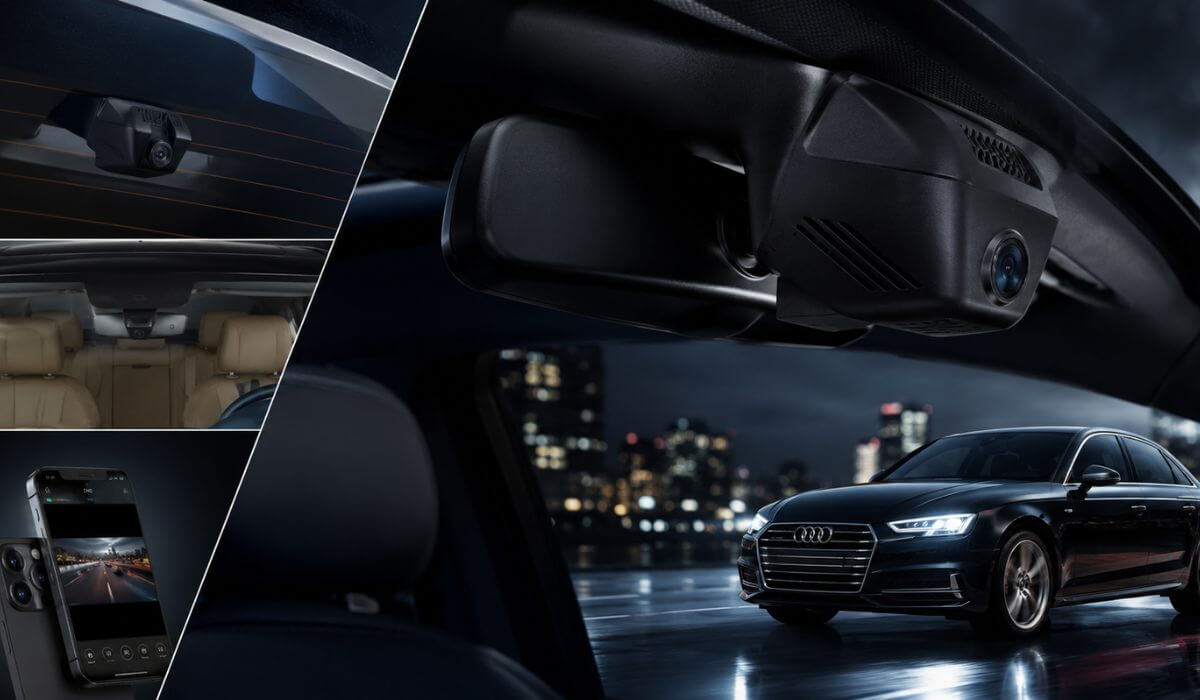
5 Best Dash Cams for Audi A4 in 2026: Clean OEM Install With Sharp 4K Recording
If you drive an Audi A4, you probably care as much about keeping the cabin looking factory-original as you do about protecting the car itself. A generic dash cam with dangling cables can ruin that clean interior in minutes. That’s why this guide focuses on OEM-style dash cams designed to blend into the A4’s factory trim, giving you protection without changing the look of the dashboard.
For this list, we didn’t simply pick the most-reviewed products. Many of these Audi-specific dash cams are relatively new, so review counts alone don’t tell the full story. Instead, we compared OEM fitment, 4K video quality, front and rear coverage, WiFi app stability, included storage, installation design, and overall hardware value across models compatible with 2019-2026 Audi A4 while also remaining suitable for many owners upgrading from older generations who want a factory-style installation.
If your priority is a dash cam that looks like Audi installed it from day one while delivering clear footage when you actually need it, these are the options that stand out for the right reasons.
Best Audi A4 Dash Cams: Top 2026 4K Recording & Parking Mode Picks
#1. Fitcamx 4K Dash Cam
Best Audi A4 dash cam with OEM factory-style installation, crisp 4K recording, dependable parking mode, and seamless integration for 2019-2026 models.
#2. Mangoal Front 4K & Rear 1080P Dash Cam
Best front and rear dash cam for Audi A4 featuring built-in GPS, factory-look housing, dual-channel recording, and excellent everyday usability.
#3. Leadfan 4K + 1080P Dash Cam
Best value 4K dash cam for Audi A4 with OEM styling, WiFi connectivity, dual-camera recording, and a generous 128GB memory card included.
#4. KBSYNT Front 4K & Rear 1080P Dash Cam
Reliable Audi A4 dash camera offering an OEM-style fit, smooth loop recording, WiFi app control, and clean factory integration.
#5. kutaitai Front 4K + Rear 1080P Dash Cam
Affordable dash camera for Audi A4 with OEM-inspired installation, front and rear recording, WiFi support, and hassle-free everyday protection.
Expert Tip: If you’re buying an OEM-style dash cam for an Audi A4, don’t focus on 4K resolution alone. The real difference after a few months comes from how well the camera integrates with the car. A stable app, secure factory-style mounting, clean cable routing, and reliable loop recording will matter every single day, while an extra feature you’ll never use won’t. A dash cam should become part of the car—not something you notice every time you get behind the wheel.
How We Chose These Dash Cams for the Audi A4
There are dozens of universal dash cams that technically fit an Audi A4, but that wasn’t our goal. We intentionally focused on OEM-style models engineered around Audi’s interior design, because most A4 owners want protection without sacrificing the premium factory appearance.
Our first priority was fitment quality. Every product on this list is designed to integrate cleanly with compatible 2019-2026 Audi A4 models instead of relying on bulky windshield mounts or exposed wiring. A factory-style installation doesn’t just look better—it also reduces distractions and helps the camera remain securely positioned over time.
Next, we compared the recording hardware, not just the advertised resolution. We looked for models offering true 4K front recording, dependable 1080p rear coverage, consistent daytime clarity, and footage that’s more useful when reviewing real driving incidents instead of simply looking impressive on a product page.
We also paid close attention to the overall ownership experience. That includes WiFi connection stability, mobile app usability, loop recording reliability, included storage capacity, GPS availability where offered, and the quality of the installation kit. These are the details that determine whether a dash cam remains convenient to use months after installation.
Because several of these Audi-specific cameras are relatively new to the market, we didn’t rank them by review count alone. New products often haven’t accumulated years of feedback yet, even when the underlying hardware is solid. Instead, we evaluated the feature set, factory integration, hardware configuration, included accessories, and overall value to identify the models that make the most sense for Audi A4 owners today.
Finally, we ranked each recommendation based on a simple question: Would this be a dash cam we’d confidently install in our own Audi A4 and leave there for years? If the answer wasn’t yes, it didn’t make this list. That approach is why you’ll find fewer products here—but each one earned its place for practical reasons rather than marketing claims.
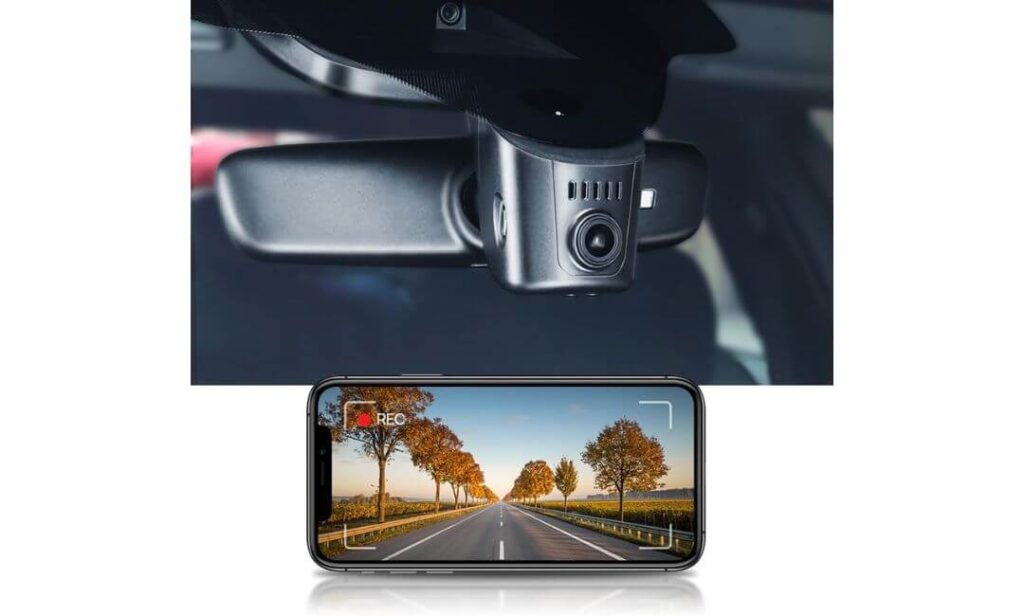
#1. Fitcamx 4K Dash Cam
Quick Specs:
- Designed For: Audi A4 with OEM-style mirror cover integration
- Video Resolution: 2160P Ultra HD front recording
- Viewing Angle: 170° wide field of view
- Lens: f/1.6 aperture for improved low-light clarity
- Connectivity: Built-in WiFi with mobile app support
- Recording System: Loop recording with automatic overwrite
- Impact Protection: G-Sensor automatically locks important footage
- Parking Features: Parking mode compatible (hardwire kit recommended)
- Storage: 64GB memory card included, supports up to 256GB
- Installation Style: Factory-look OEM housing with hidden wiring
From the moment you open the box, it’s clear this camera was built with a different goal than most aftermarket dash cams. Instead of adding another gadget to your windshield, it blends into the Audi A4 like a factory-installed component. That alone makes a noticeable difference every time you get behind the wheel because the clean cabin design remains exactly as Audi intended.
The recording hardware is equally well thought out. A 2160P Ultra HD front camera, 170-degree viewing angle, f/1.6 lens, and WDR image processing work together to capture a broad view of the road while keeping exposure balanced during bright sunlight, underground parking garages, and evening commutes. The built-in WiFi lets you review or download footage directly to your phone without removing the memory card, making everyday use much more convenient.
It also covers the essentials that owners actually rely on over time. Loop recording keeps recording automatically, the G-Sensor protects important collision footage from being overwritten, and the included 64GB card means you can install it and start recording immediately. Support for parking mode adds another layer of security when the car is unattended, making it a practical choice for both daily commuting and long-term ownership.
(If your goal is to protect your Audi without compromising its factory interior, this is one of the cleanest OEM-style solutions currently available.)
Why It Earned a Place on Our List
- Factory-style installation preserves the premium look of the Audi A4 interior.
- 2160P Ultra HD recording delivers detailed footage for everyday driving.
- 170° wide-angle lens captures more of the road without excessive distortion.
- Built-in WiFi and app support make downloading clips quick and convenient.
- Loop recording, G-Sensor, and parking mode cover the features most owners actually use.
A Small Consideration Before You Buy
- Installation is straightforward for most owners, but carefully routing the rear camera cable and confirming your mirror cover matches the correct version before ordering will save time during installation.
Audi A4 Compatibility & Installation Notes
This camera is designed around an OEM mirror housing, making it a much better fit than universal windshield-mounted dash cams. Once installed correctly, it looks integrated instead of added later, which is exactly what many Audi owners prefer.
Before ordering, compare your rearview mirror sensor cover with the product images to confirm compatibility. For the best parking mode performance, plan on adding a compatible hardwire kit, especially if you want the camera to monitor the vehicle while parked.
The Insider Pro-Tip
If you’re choosing between several OEM-style dash cams that all advertise 4K recording, don’t let resolution be the deciding factor. Fitment quality, app stability, and installation design will have a much bigger impact on your ownership experience than an extra specification on the product page.
A camera that integrates cleanly, stays securely mounted, and lets you access footage without frustration is the one you’ll appreciate years from now. That’s exactly why this model ranks at the top of our list.
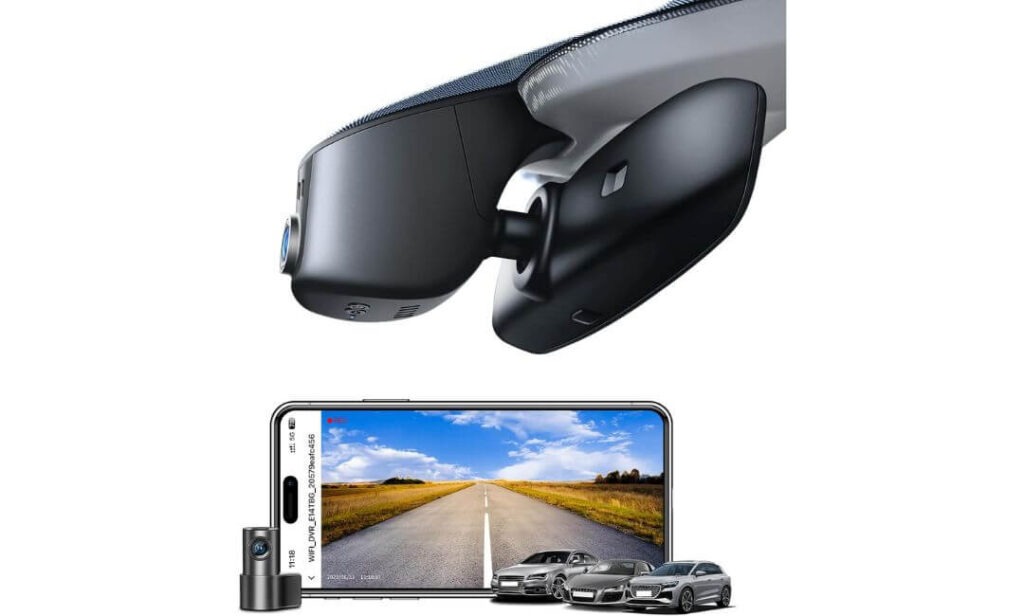
#2. Mangoal Front 4K & Rear 1080P Dash Cam
Quick Specs:
- Designed For: Audi A4 with OEM-style mirror integration
- Video Resolution: 4K front + 1080P rear dual-channel recording
- Image Sensor: Sony STARVIS IMX335
- Viewing Angle: 150° front and 140° rear
- Navigation Data: Built-in GPS module
- Connectivity: Built-in WiFi with mobile app support
- Recording Features: Loop recording, G-Sensor, and motion detection
- Parking Features: Parking monitor support
- Storage: 128GB microSD card included, expandable up to 256GB
- Power Design: Supercapacitor for improved heat resistance and long-term reliability
One feature immediately separates this camera from many OEM-style alternatives—the addition of a rear camera and built-in GPS without sacrificing the clean factory appearance. Once installed behind the rearview mirror, it feels like part of the original cabin rather than an aftermarket accessory, while the included rear camera gives you a much more complete picture of what happens around your Audi A4.
Recording performance is equally reassuring. The combination of a 4K front camera, 1080P rear camera, Sony STARVIS IMX335 sensor, and 150°/140° viewing angles captures fine road details with noticeably better low-light performance than many standard image sensors. Built-in WiFi makes reviewing footage simple, while the included GPS module automatically records route and speed information for drivers who prefer additional driving records.
Small details also make ownership easier. The package already includes a 128GB memory card, rear camera wiring, GPS module, and installation accessories, reducing the need for additional purchases. The supercapacitor design is another welcome addition because it generally handles temperature changes better than traditional battery-powered dash cams, making it a sensible choice for drivers who spend long hours on the road.
(If you want factory-style installation without giving up rear recording or GPS tracking, this is one of the most complete OEM-style packages available for the Audi A4.)
Why It Stood Out During Our Evaluation
- True dual-channel recording with 4K front and 1080P rear video.
- Sony STARVIS IMX335 sensor improves clarity during night driving.
- Integrated GPS records location and driving data automatically.
- 128GB memory card is included, so it’s ready to use after installation.
- Supercapacitor design is better suited for temperature changes than battery-powered alternatives.
A Small Consideration Before Buying
- Before placing your order, compare your Audi A4’s rearview mirror sensor cover with the product photos to confirm you have the correct version. Taking a quick photo of your existing cover and checking compatibility can make installation much smoother.
Audi A4 Installation & Compatibility Notes
This model is built specifically around Audi’s factory mirror housing, so it doesn’t rely on suction cups or exposed power cables. When matched with the correct mirror cover version, the finished installation looks clean and blends naturally into the interior.
The installation kit includes the rear camera cable, GPS module, rain sensor adapter, and trim tools, but routing the rear camera wire through the headliner and weather seals still requires a little patience. Taking your time usually delivers the cleanest factory-style result.
The Insider Pro-Tip
Many buyers focus only on 4K resolution, but for a dual-channel system, the combination of GPS, rear recording, and a quality image sensor often makes a bigger difference during real-world ownership.
If you plan to keep your Audi A4 for years, choosing a camera that records both directions while blending into the factory interior is usually a smarter long-term decision than simply buying the highest advertised resolution.
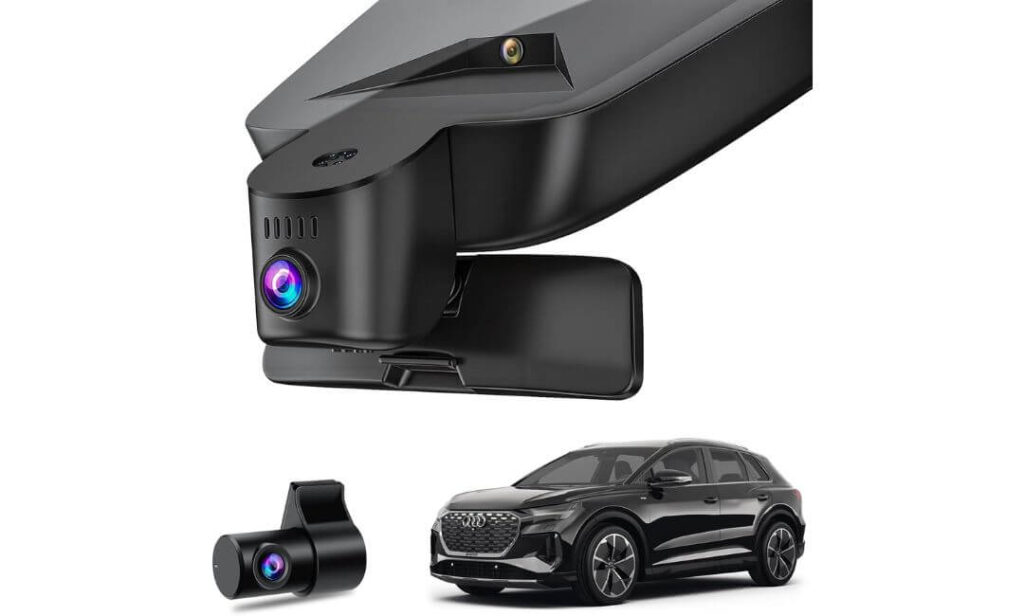
#3. Leadfan 4K + 1080P Dash Cam
Quick Specs:
- Designed For: Audi A4 with OEM-style hidden installation
- Video Resolution: 4K front + 1080P rear dual-channel recording
- Viewing Angle: 170° front and 145° rear
- Optics: f/1.6 aperture, 6-layer optical lens, HDR & WDR
- Night Performance: Full-color starlight night vision
- Connectivity: Built-in WiFi with Viidure App
- Recording Features: Loop recording with automatic file overwrite
- Safety Features: G-Sensor with collision file protection
- Parking Features: Time-lapse and impact detection parking modes (hardwire kit required)
- Storage: 128GB memory card included, supports up to 256GB
What impressed us most wasn’t a single specification—it was how well everything works together for everyday driving. This camera combines a factory-style hidden installation, dual-channel recording, and thoughtful hardware into a package that feels purpose-built for the Audi A4 rather than adapted from a universal dash cam. Once installed, the clean OEM appearance blends naturally into the cabin without distracting from the interior design.
The recording system is where this model earns its place. A 4K front camera, 1080P rear camera, 170° front viewing angle, 145° rear coverage, f/1.6 large aperture, 6-layer optical lens, and HDR/WDR processing work together to produce consistently detailed footage throughout the day while improving visibility after dark with full-color starlight night vision. Built-in WiFi and the Viidure mobile app make reviewing or saving footage straightforward whenever an important clip needs to be accessed.
Ownership is equally uncomplicated. The included 128GB memory card means you can start recording immediately, while loop recording continuously manages storage without manual intervention. The G-Sensor automatically protects impact footage, and the parking functions provide additional peace of mind when the vehicle is unattended. It’s a balanced setup that focuses on the features drivers actually rely on rather than adding specifications that rarely get used.
(For Audi A4 owners who want a factory-look dash cam with wide coverage, dependable night recording, and a complete feature set straight out of the box, this is one of the strongest value-focused options available.)
Why It Earned Our Recommendation
- OEM-style hidden installation keeps the Audi A4 interior looking original.
- 4K front and 1080P rear recording provide complete driving coverage.
- Full-color starlight night vision improves clarity after sunset.
- 170° front and 145° rear viewing angles help reduce blind spots.
- 128GB memory card and Viidure WiFi app make everyday use simple from day one.
A Small Consideration Before Buying
Before ordering, take a moment to compare your rearview mirror sensor cover with the product images to ensure you select the correct version. If you plan to use the parking functions regularly, adding the recommended ACC hardwire kit will allow those features to work as intended.
Audi A4 Installation & Compatibility Notes
This dash cam is designed around Audi’s factory mirror housing, allowing the main unit to sit neatly behind the rearview mirror instead of occupying windshield space. The result is a much cleaner installation than traditional universal dash cameras.
The package already includes the rear camera, wiring, trim tool, rain-sensor power adapter, and memory card. Routing the rear cable through the headliner carefully is the part that takes the most time, but doing so delivers a much more professional factory-style finish.
The Insider Pro-Tip
The best OEM-style dash cams are the ones you almost forget are there. If the camera disappears into the factory mirror housing, connects to your phone without frustration, and records every drive automatically, you’re far more likely to keep using it for years.
That’s why we value overall integration and daily usability just as much as headline specifications. A camera that quietly does its job every single drive is ultimately the one that delivers the greatest long-term value.
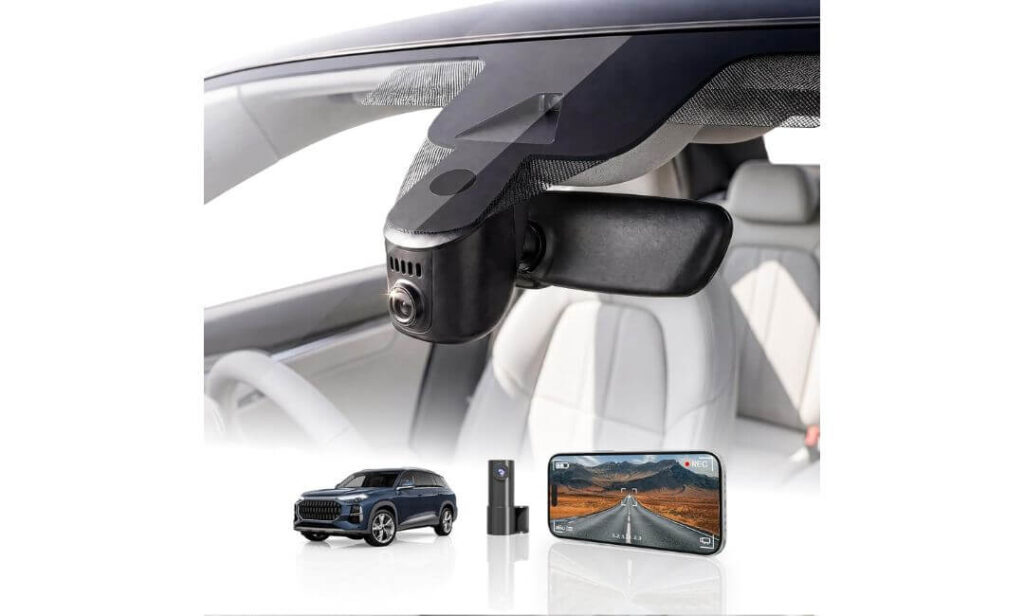
#4. KBSYNT Front 4K & Rear 1080P Dash Cam
Quick Specs:
- Designed For: Audi A4 with OEM-style hidden mirror integration
- Video Resolution: 2160P 4K front + 1080P rear recording
- Lens: f/1.6 aperture with CMOS image sensor
- Viewing Angle: 170° ultra-wide front coverage
- Night Performance: HDR-enhanced night vision
- Connectivity: Built-in WiFi with dedicated mobile app
- Recording Features: Loop recording and G-Sensor collision protection
- Parking Features: Parking monitoring compatible (hardwire harness required)
- Storage: 128GB memory card included, expandable up to 256GB
- Installation: Plug-and-play OEM design with hidden wiring
Rather than trying to impress with flashy marketing, this dash cam focuses on the things Audi A4 owners notice every day. The factory-style housing sits neatly behind the rearview mirror, keeping the windshield free from bulky mounts and visible cables. Once installed correctly, it blends into the cabin so naturally that most passengers won’t even realize a dash camera is there.
Image quality is backed by hardware that suits everyday driving. The 2160P 4K front camera, 1080P rear recording, f/1.6 lens, CMOS sensor, 170° viewing angle, and HDR processing work together to capture clear footage across changing lighting conditions. Whether you’re driving into direct sunlight or returning home after dark, the camera adjusts exposure to maintain balanced, usable video instead of overly bright or overly dark recordings.
The ownership experience is equally practical. Built-in WiFi allows footage to be viewed directly through the mobile app, while loop recording manages storage automatically without requiring regular maintenance. The included 128GB memory card means there’s nothing extra to buy before installation, and the G-Sensor protects important recordings if an impact is detected. It’s a straightforward package built around features drivers genuinely use.
(If your priority is a clean factory appearance, dependable daily recording, and a simple installation without unnecessary complexity, this is an easy camera to recommend.)
Why It Made Our Shortlist
- OEM-style hidden installation preserves the original Audi A4 interior.
- 4K front and 1080P rear recording provide balanced everyday coverage.
- HDR processing helps maintain clearer footage in difficult lighting.
- Built-in WiFi makes downloading and reviewing recordings quick.
- 128GB memory card is included for immediate use without additional purchases.
A Small Consideration Before Buying
Before ordering, check whether your Audi A4 has a factory camera behind the rearview mirror. This model is intended for vehicles without that original camera, so confirming compatibility beforehand helps ensure a smooth installation.
Audi A4 Installation & Compatibility Notes
This camera is designed to mount directly into the mirror housing area, creating a much cleaner appearance than universal windshield-mounted alternatives. The included trim tool and Y-type adapter also simplify the installation process for most owners.
If you plan to enable parking monitoring, you’ll need the optional hardwire harness. Taking a few extra minutes to route the cables neatly through the headliner will help achieve the factory-style finish this camera is designed to deliver.
The Insider Pro-Tip
The easiest way to tell whether an OEM-style dash cam is worth buying isn’t by looking at the specification sheet—it’s by imagining the cabin six months after installation.
If the camera still feels like part of the car, connects quickly to the app, records automatically every drive, and never blocks your view, you’ve chosen the right product. That’s exactly the kind of ownership experience we looked for when selecting this recommendation.
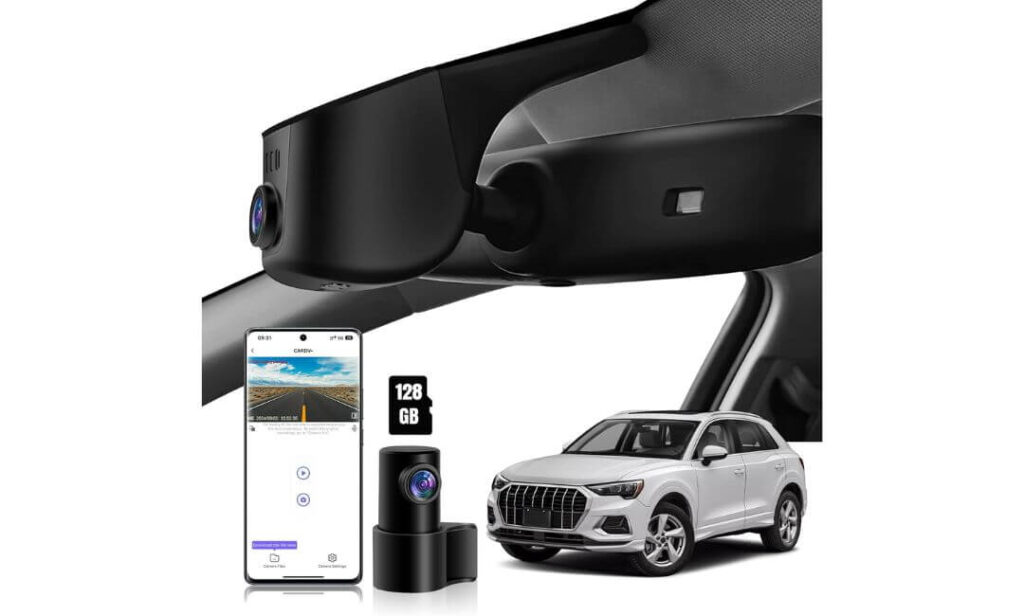
#5. kutaitai Front 4K + Rear 1080P Dash Cam
Quick Specs:
- Designed For: Audi A4 with OEM-style mirror housing installation
- Video Resolution: 2160P 4K front + 1080P rear recording
- Processor: Advanced Novatek chipset
- Lens: f/1.8 aperture
- Viewing Angle: 170° front and 140° rear
- Connectivity: Built-in WiFi with Android & iOS app support
- Recording Features: Loop recording with G-Sensor emergency protection
- Parking Features: Impact detection and time-lapse parking mode (ACC cable included)
- Storage: 128GB memory card included
- Installation Kit: Lane Assist power adapter, ACC fuse cable, and trim tool included
Sometimes the most practical choice isn’t the one with the longest feature list—it’s the one that arrives with nearly everything needed for a clean installation. This camera follows that philosophy by combining an OEM-style design, dual-channel recording, and an unusually complete installation package, making it appealing for Audi A4 owners who prefer doing the job properly the first time.
The camera itself delivers the essentials that matter on the road. A 2160P 4K front camera, 1080P rear camera, Novatek processor, f/1.8 lens, and 170° front with 140° rear coverage provide detailed recordings while capturing a broad view around the vehicle. Built-in WiFi and the companion mobile app allow quick access to recordings without removing the memory card, making it easy to review or save important footage after a drive.
What also stands out is the attention given to installation and long-term use. The package includes a 128GB memory card, Lane Assist power adapter, ACC fuse cable, rear camera wiring, and trim tools, so very little needs to be purchased separately. Loop recording, G-Sensor protection, and selectable parking monitoring modes complete a setup that feels well prepared for everyday driving rather than occasional use.
(If you value a complete installation package almost as much as the camera itself, this model offers one of the most convenient OEM-style solutions for the Audi A4.)
Why It Deserves a Place on This List
- OEM-style hidden installation complements the original Audi A4 interior.
- 4K front and 1080P rear recording provide dependable all-around coverage.
- Novatek chipset and f/1.8 lens support clear everyday recording.
- ACC fuse cable and Lane Assist adapter are included for easier installation.
- Built-in WiFi, 128GB memory card, and parking functions make it ready to use immediately.
A Small Consideration Before Buying
Before placing your order, compare your rearview mirror sensor cover with the product photos to confirm you’re selecting the correct Model A version. Spending a minute verifying compatibility can save considerable installation time later.
Audi A4 Installation & Compatibility Notes
This dash cam is designed to fit neatly behind the factory rearview mirror, creating a much cleaner appearance than universal windshield-mounted alternatives. Since the required ACC fuse cable and power adapter are already included, enabling the parking features is more straightforward than with many competing models.
During installation, take extra care when routing the rear camera cable through the headliner and rear trim panels. A tidy cable route is what gives an OEM-style dash cam its factory-installed appearance.
The Insider Pro-Tip
When comparing OEM-style dash cams, don’t overlook what’s included inside the box. A camera may advertise similar recording specifications, but having the correct power adapters, installation hardware, and memory card included can save both time and additional expense.
For many Audi A4 owners, a smoother installation often leads to a cleaner result—and that’s exactly what makes an integrated dash cam feel like it truly belongs in the car.
Best Audi A4 Dash Cam Comparison: Features Side by Side
| Comparison Point | Fitcamx | Mangoal | Leadfan | KBSYNT | kutaitai |
|---|---|---|---|---|---|
| Our Verdict | Editor’s Choice | Best Overall Features | Best Value Pick | Reliable Alternative | Complete Installation Kit |
| Factory Integration | Excellent OEM finish | Excellent OEM finish | Excellent OEM finish | Very clean OEM fit | Factory-style appearance |
| Video Recording | 4K Front | 4K Front + 1080P Rear | 4K Front + 1080P Rear | 4K Front + 1080P Rear | 4K Front + 1080P Rear |
| Night Performance | WDR + f/1.6 Lens | STARVIS IMX335 Sensor | Starlight Vision + HDR/WDR | HDR + f/1.6 Lens | Novatek Chip + f/1.8 Lens |
| Rear Camera | — | Included | Included | Included | Included |
| WiFi & Mobile App | Built-in | Built-in | Viidure App | Dedicated App | Android & iOS App |
| GPS Support | — | Included | — | — | — |
| Parking Functions | Parking Mode | Parking Monitor | Time-Lapse + Impact Detection | Parking Monitoring | Impact + Time-Lapse Mode |
| Memory Card | 64GB Included | 128GB Included | 128GB Included | 128GB Included | 128GB Included |
| Maximum Storage | 256GB | 256GB | 256GB | 256GB | 256GB |
| Installation Difficulty | Easy–Moderate | Moderate | Moderate | Easy–Moderate | Easy–Moderate |
| Best Suited For | Drivers wanting the cleanest factory appearance | Owners wanting GPS with dual-channel recording | Balanced value with premium recording features | Simple OEM installation and dependable daily use | Buyers wanting a complete installation package |
| Overall Recommendation | Premium Choice | Feature-Rich Choice | Smart Value | Dependable Daily Option | Well-Equipped Budget Alternative |
Why the Audi A4 Is One of the Best Cars for an OEM Dash Cam Upgrade
The Audi A4 has always been one of those cars where small details matter. The dashboard design, clean sightlines, and premium cabin materials are part of what makes the driving experience feel refined. That’s also why a traditional windshield-mounted dash cam often feels out of place. A well-designed OEM-style dash cam preserves everything owners appreciate about the interior while adding meaningful protection every time the car leaves the driveway.
Unlike many vehicles that require visible wiring across the headliner or A-pillar, the Audi A4’s mirror housing and sensor area allow compatible OEM dash cams to integrate far more naturally. When installed correctly, they look like original equipment instead of an aftermarket accessory, which is exactly the approach we prioritized throughout this guide.
Factory-Style Integration Makes a Bigger Difference Than Most Owners Expect
One of the biggest advantages of choosing an Audi-specific dash cam is the installation itself. Cameras designed around the factory mirror housing eliminate the bulky suction mounts and dangling power cables that are common with universal models. The result is a cleaner windshield, an uncluttered driving position, and an interior that still looks like Audi designed it that way.
A properly integrated camera is also less likely to attract unwanted attention from outside the vehicle. Since most of the hardware remains hidden behind the rearview mirror, it stays discreet while continuing to record every journey.
Dual-Channel Recording Adds Protection Beyond the Front Windshield
Premium sedans like the Audi A4 spend a considerable amount of time parked in office garages, shopping centres, apartment complexes, and public parking lots. That’s where a front and rear dash cam becomes much more valuable than a front-only system.
Rear recording provides additional evidence during rear-end collisions, parking incidents, and hit-and-run damage, while front footage captures the events leading up to an incident. Having both camera angles often creates a much clearer picture of what actually happened than relying on a single recording.
Parking Features Are Worth Considering Before You Install
Parking mode is one of those features many owners overlook until they actually need it. Whether someone reverses into your parked Audi A4 or causes damage while opening a door in a tight parking space, the ability to capture activity while the vehicle is unattended can become extremely valuable.
Several cameras in this guide support impact-triggered recording or time-lapse monitoring. To use these features reliably, most owners should plan on installing a compatible hardwire or ACC power kit, allowing the camera to receive controlled power even after the ignition has been switched off.
Choosing the Right Power Setup Matters More Than the Camera Itself
The dash cam is only one part of the installation. Equally important is how it’s powered. An OEM-style installation usually draws power from the factory rain sensor or uses a dedicated adapter designed specifically for the mirror assembly, reducing the need for cutting wires or modifying the vehicle.
If you intend to use extended parking monitoring, selecting the correct hardwire solution with low-voltage protection helps prevent unnecessary battery drain while allowing the camera to operate safely during extended parking periods.
Heat Resistance and Long-Term Reliability Should Never Be Overlooked
A dash cam spends its life attached to the windshield, one of the hottest areas inside any vehicle during summer. For that reason, components such as supercapacitors, quality image sensors, reliable memory cards, and stable firmware deserve just as much attention as video resolution.
Reliable hardware is what keeps a camera recording consistently after months or even years of daily exposure to changing temperatures, vibration, and long driving hours.
Don’t Ignore Firmware and Mobile App Support
Recording quality is only part of the ownership experience. Retrieving footage should be just as straightforward. Cameras with stable WiFi connectivity and regularly maintained mobile apps make reviewing recordings, downloading important clips, and adjusting settings considerably easier.
Keeping the firmware updated also improves long-term stability, compatibility, and overall performance. While it’s not something you’ll do every week, manufacturers that continue supporting their products generally provide a better ownership experience over time.
Our Final Take
After comparing the available options, one thing became clear: the best dash cam for an Audi A4 isn’t necessarily the one advertising the highest resolution. It’s the one that combines clean OEM integration, dependable recording hardware, stable daily operation, and an installation that feels as though it came from the factory.
That’s exactly why every recommendation in this guide was selected. Rather than chasing long specification lists, we focused on the features Audi A4 owners are most likely to appreciate every day, from discreet installation and dependable video quality to practical parking protection and hassle-free ownership.
Buying Guide: How to Choose the Best Dash Cam for Your Audi A4
Buying a dash cam for an Audi A4 isn’t just about selecting the highest video resolution or the cheapest price. A premium sedan deserves a camera that works reliably every day, blends naturally into the cabin, and captures footage you’ll actually be able to use if something happens. After evaluating the cameras featured in this guide, these are the factors that matter most before making your decision.
Resolution Is Important, but Image Processing Matters Even More
Most buyers immediately look for 4K recording, and for good reason. A true 2160P front camera captures finer details like licence plates, road markings, and traffic signs more consistently than lower-resolution alternatives. However, resolution alone doesn’t guarantee better footage.
Image sensors, lens quality, HDR processing, aperture size, and bitrate all influence the final recording. Cameras equipped with features such as STARVIS sensors, HDR or WDR processing, and f/1.6 to f/1.8 lenses generally perform better after sunset, inside parking structures, and during difficult lighting transitions. If you regularly drive at night, these features deserve just as much attention as the advertised resolution.
Decide Whether You Need Front Recording or Full Dual-Channel Coverage
A front camera records everything ahead of your Audi A4 and is often sufficient for drivers who mainly want protection while driving. However, adding a rear camera creates a much more complete record of every journey.
A front and rear dash cam becomes particularly valuable during rear-end collisions, parking incidents, and situations where another driver approaches from behind. While dual-channel systems usually require a little more installation time because of the rear cable, the additional coverage often outweighs the extra effort.
Understand How Parking Mode Actually Works
Parking mode isn’t identical across every dash cam. Some cameras only begin recording after an impact is detected, while others support time-lapse recording, motion detection, or buffered recording that captures footage from a few seconds before an event occurs.
These features also affect power consumption. Continuous monitoring naturally uses more energy than impact-only recording, which is why many OEM-style cameras recommend using a hardwire or ACC power kit with low-voltage protection. If protecting your Audi while it’s parked is a priority, choosing the correct power setup is just as important as choosing the camera itself.
Don’t Overlook GPS and Recording Bitrate
Built-in GPS isn’t only useful for tracking your location. It can also record speed, driving routes, and timestamps, providing additional context if footage is ever needed for insurance or incident reviews.
Bitrate is another specification that often receives less attention than it deserves. Higher bitrate recordings preserve more image detail, especially during fast-moving traffic or poor weather, although they also require more storage space. A balanced combination of image quality and efficient compression generally delivers the best long-term results.
Choose the Right Memory Card for Long-Term Reliability
Dash cams continuously write and overwrite video files, making the memory card one of the hardest-working components in the entire system. Using a standard microSD card designed for occasional file storage can reduce long-term reliability.
Whenever possible, choose a high-endurance microSD card designed specifically for continuous recording. If you’re replacing the included card in the future, A2-rated cards generally offer faster application performance, while A1-rated cards remain perfectly suitable for reliable video recording. Capacity also matters—128GB or 256GB provides noticeably longer recording history before older files are overwritten.
OEM Integration Delivers More Than Better Looks
One of the biggest advantages of the cameras featured in this guide is their OEM-style installation. Instead of attaching a camera to the windshield with exposed wiring, these models integrate around the rearview mirror housing, preserving the clean design of the Audi A4 interior.
Even if you choose a universal dash cam instead, spending time routing cables through the headliner and trim panels will improve both appearance and long-term reliability. A clean installation reduces distractions and protects the wiring from unnecessary wear.
Confirm Compatibility Before Ordering
Not every Audi A4 uses the same rearview mirror housing or sensor cover. Some vehicles include additional cameras or driver-assistance hardware that can affect compatibility with OEM-style dash cams.
Before placing an order, compare your mirror housing with the manufacturer’s compatibility images or contact the seller if you’re uncertain. Taking a quick photo of the sensor cover beforehand is often the easiest way to avoid ordering the wrong version and ensures the camera fits exactly as intended.
Think About Ownership, Not Just Specifications
The best dash cam is rarely the one with the longest specification sheet. After weeks and months of ownership, you’ll notice things like app stability, firmware reliability, video transfer speed, ease of accessing recordings, and whether the camera simply works every time you start the engine.
That’s exactly why our recommendations prioritize the complete ownership experience instead of focusing only on headline specifications. For most Audi A4 owners, a camera that integrates cleanly, records consistently, and requires very little attention over the years will provide far greater value than one that looks better only on paper.
How to Achieve a Clean OEM Install on Your Audi A4
A great dash cam can still look out of place if the installation isn’t done properly. The difference between a factory-looking setup and one that feels aftermarket usually comes down to cable routing, power management, and mounting position—not the camera itself. The Audi A4 is actually one of the easier premium sedans to achieve a clean OEM-style installation because of its well-designed mirror housing and interior trim layout. Spending a little extra time during installation will usually reward you with a setup that looks almost identical to factory equipment.
Start by Planning the Cable Route Before Installing Anything
The biggest mistake many first-time installers make is mounting the camera first and worrying about the cables afterwards. A much better approach is to plan the complete cable path before removing a single trim panel.
For most Audi A4 installations, the cleanest route starts behind the rearview mirror housing, continues along the headliner, follows the A-pillar trim, and then reaches the chosen power source beneath the dashboard. If you’re installing a rear camera, continue the cable along the roof liner, through the upper door weather seals, and towards the rear window. This keeps the wiring almost completely hidden without interfering with normal cabin use.
Whenever removing trim panels, use a plastic trim tool rather than metal tools to reduce the chance of marking interior surfaces.
Choose the Right Power Source for the Features You Need
The best power solution depends on how you plan to use the camera.
If you only want recording while driving, many OEM-style dash cams designed for the Audi A4 can obtain power directly from the compatible mirror or rain sensor adapter supplied with the kit, making installation relatively straightforward.
For drivers who want parking mode, a hardwire kit with low-voltage protection is generally the better choice because it allows the camera to receive controlled power after the ignition is switched off while helping prevent excessive battery discharge.
An OBD-II power adapter can also be a practical alternative for owners who prefer not to modify the fuse box. While it may leave a slightly more visible cable depending on routing, it remains one of the simplest reversible installation methods.
Position the Camera Before Tightening Everything Down
Small adjustments make a noticeable difference to the final result. The camera should sit high enough behind the rearview mirror that it remains outside the driver’s normal field of vision while still maintaining a clear, unobstructed view of the road.
Before securing the mounting position permanently, sit in the driver’s seat and confirm that the housing doesn’t interfere with the rain sensor, forward-facing cameras, or any driver-assistance systems. Spending two extra minutes checking alignment now is much easier than removing everything later.
Keep Cable Management as Clean as the Factory Intended
One of the easiest ways to identify a poor installation is visible wiring hanging near the windshield or dashboard.
Route every cable behind factory trim wherever possible, avoid placing wires across airbag deployment paths inside the A-pillar, and leave a small amount of slack near connection points so movement of interior panels doesn’t place unnecessary tension on the wiring. A clean cable route not only improves appearance but also reduces the likelihood of future rattles or damaged connectors.
Complete the Camera Setup Before Your First Drive
After the hardware is installed, spend a few minutes configuring the camera properly instead of relying on factory defaults.
Connect the mobile app, confirm the latest firmware is installed if an update is available, format the memory card inside the camera, verify the correct date and time, adjust recording resolution, enable parking features if required, and check that both the front and rear cameras are recording normally. A short test drive followed by reviewing the footage helps confirm everything is working before you depend on the camera in real-world situations.
Common Installation Mistakes That Are Easy to Avoid
Most installation problems are surprisingly simple to prevent with a little preparation.
- Ordering the wrong mirror housing version without comparing the sensor cover beforehand.
- Forgetting that parking mode usually requires a compatible hardwire or ACC power connection.
- Routing cables across airbag deployment areas inside the A-pillar.
- Skipping a memory card format before first use, which can occasionally lead to recording issues.
- Leaving excessive cable slack behind trim panels, increasing the chance of rattles over time.
- Positioning the camera too low on the windshield, where it becomes visible during normal driving.
A Professional Installer’s Perspective
The best OEM-style dash cam installation is the one you barely notice after a week of ownership. If the camera blends naturally into the mirror housing, the wiring remains completely hidden, the mobile app connects reliably, and every drive is recorded automatically without requiring attention, then the installation has been done correctly.
That’s ultimately the goal of every recommendation in this guide—not simply adding another accessory to the Audi A4, but integrating a camera so cleanly that it feels like it was part of the car from the day it left the factory.
Real-World Dash Cam Performance: What Actually Matters After Installation
Most dash cams look impressive on a product page, but the real difference only becomes obvious after weeks or months of daily driving. That’s when recording quality, GPS accuracy, storage reliability, and long-term stability become far more important than marketing specifications. If you’re investing in an OEM-style dash cam for your Audi A4, here’s what you should pay attention to once it’s installed.
Don’t Judge 4K Footage by Resolution Alone
A camera can record in 4K and still produce footage that’s difficult to use if the image processing isn’t well balanced. When reviewing your recordings, look beyond overall sharpness.
Good footage should allow you to identify licence plates, road signs, lane markings, traffic signals, and surrounding vehicles without excessive motion blur. During night driving, pay attention to how well the camera controls glare from LED headlights, reflective road signs, and wet pavement. A camera with effective HDR or WDR processing, a quality image sensor, and a fast lens will usually preserve far more usable detail than one relying on resolution alone.
One useful habit is to review a few recordings after installation during bright daylight, sunset, and complete darkness. This quickly confirms whether the camera is positioned correctly and whether the exposure settings suit your normal driving conditions.
Use GPS and Timestamps to Build Better Evidence
Video footage is often strongest when supported by additional driving data. Cameras equipped with GPS can automatically record your driving route, vehicle speed, and location alongside the video, while timestamps document the exact date and time of every recording.
Although GPS information isn’t required for every situation, it can provide valuable context when reviewing an incident or explaining the sequence of events. If your chosen dash cam includes GPS, make sure the date, time, and satellite connection are configured correctly during the initial setup so every recording remains accurate from the beginning.
Review Important Footage Before You Need It
Many drivers only discover a problem after they actually need their recordings. A much better approach is to create a simple routine.
Every few weeks, open the mobile app or remove the memory card and review several recent clips. Confirm that both the front and rear cameras are recording correctly, audio works if enabled, timestamps remain accurate, and playback is smooth. Finding a loose cable or faulty memory card during a routine check is far better than discovering it after an accident.
High-Endurance Memory Cards Deserve More Attention Than Most Owners Give Them
The memory card works harder than almost any other component inside a dash cam because it records continuously every time you drive. Over time, repeated writing and overwriting naturally wear the storage cells.
Using a high-endurance microSD card, formatting it inside the camera at regular intervals, and replacing it once it reaches the end of its service life helps maintain reliable recording performance. Even premium dash cams depend on a healthy memory card to capture important footage consistently.
Keep Firmware Updated, but Avoid Unnecessary Changes
Firmware updates often improve system stability, compatibility, recording reliability, and mobile app performance. If the manufacturer releases an update that addresses known issues or introduces meaningful improvements, it’s generally worth installing.
However, avoid updating firmware immediately before a long road trip or an important journey. Instead, perform updates when you have time to test the camera afterwards, ensuring every feature continues working exactly as expected.
Heat Management Plays a Bigger Role Than Many Drivers Realise
Dash cams spend much of their life attached to the windshield, one of the hottest locations inside any vehicle during summer. While quality hardware is designed for demanding conditions, reducing unnecessary heat exposure still helps maximise long-term reliability.
Whenever possible, use a reflective windshield sunshade during extended parking, ensure ventilation around the camera isn’t blocked, and avoid covering the unit with accessories or decorations. Cameras using supercapacitors generally tolerate repeated heat cycles better than traditional rechargeable batteries, making them particularly well suited for year-round use.
Small Maintenance Habits Can Extend the Life of Your Dash Cam
Routine maintenance takes only a few minutes but helps ensure the camera continues performing exactly as intended.
- Clean the front and rear camera lenses regularly using a soft microfiber cloth.
- Check that the mounting position remains secure after driving on rough roads.
- Verify the camera still has a clear field of view after windshield cleaning or servicing.
- Review sample recordings occasionally to confirm image quality hasn’t changed.
- Replace the memory card if you begin seeing recording errors, corrupted files, or unexpected interruptions.
Our Practical Recommendation
The most valuable dash cam isn’t the one that produces the most impressive demonstration video—it’s the one that records reliably every single day without requiring constant attention.
If your Audi A4 dash cam consistently captures clear footage, saves important events correctly, maintains accurate timestamps, and continues operating smoothly through changing weather and daily driving, then it’s doing exactly what it was designed to do. Those long-term qualities are ultimately far more valuable than specifications that only look good on the product page.
FAQs About Audi A4 Dash Cam
Can an OEM-style dash cam interfere with the Audi A4’s rain sensor or driver assistance systems?
Not when you buy the correct version for your specific mirror housing. The issue isn’t usually the dash cam itself—it’s ordering the wrong housing or mounting it incorrectly. That’s why several manufacturers ask buyers to compare the rearview mirror sensor cover before purchasing.
If you’re unsure, take a clear photo of the mirror housing and compare it with the product images before ordering. That simple step can prevent fitment problems and helps ensure the camera sits where it was designed to without affecting nearby factory components.
Is a front-only dash cam enough for an Audi A4, or is a front and rear system worth the extra installation?
For many Audi A4 owners, the rear camera becomes valuable sooner than expected. Rear-end collisions, parking lot incidents, and hit-and-run damage often happen outside the front camera’s field of view.
If you regularly drive in busy traffic or leave your Audi parked in public places, a dual-camera system provides a much more complete record of events. The additional installation time is usually a one-time investment, while the extra coverage remains useful throughout the life of the vehicle.
Why do two 4K dash cams often produce noticeably different footage even when the specifications look almost identical?
This is one of the most misunderstood parts of buying a dash cam. Resolution is only one piece of the recording system. Image sensors, bitrate, HDR tuning, lens quality, firmware optimisation, and video compression all influence the final result.
When comparing footage, pay attention to details that actually matter in real driving situations rather than zooming into a parked vehicle.
Look for:
- Can you still read licence plates while both vehicles are moving?
- Does the camera control headlight glare at night?
- Are road signs still readable during sunrise or sunset?
- Does the footage remain detailed after digital zoom?
Those differences usually reveal more about a dash cam than the advertised resolution ever will.
How often should I replace the memory card in an Audi A4 dash cam if it records every day?
Unlike a normal SD card used for photos, a dash cam memory card is constantly recording and rewriting data. Even high-quality cards gradually wear over time because of continuous recording.
A good habit is to:
- Format the card inside the dash cam every few weeks.
- Check several recent recordings each month.
- Replace the card if recording errors begin appearing or files become corrupted.
- Choose a high-endurance microSD card when upgrading storage.
Many recording problems blamed on the camera actually originate from a memory card that has simply reached the end of its service life.
If I plan to keep my Audi A4 for several years, what feature should I prioritise over everything else?
Surprisingly, it isn’t 4K resolution.
For long-term ownership, the feature that usually delivers the best experience is overall integration. A dash cam that fits the mirror housing correctly, starts recording automatically, transfers footage reliably through the app, and remains stable through changing weather is far more valuable than one with a longer specification sheet but inconsistent everyday performance.
After reviewing dozens of OEM-style options, one pattern became obvious: the cameras owners are happiest with aren’t necessarily the ones advertising the biggest numbers—they’re the ones that quietly record every journey, require very little attention, and continue working reliably years after installation. That’s the standard we used when selecting every recommendation in this guide.
Final Thoughts
Choosing the best dash cam for an Audi A4 isn’t about chasing the highest resolution or the longest feature list. It’s about finding a camera that complements the car rather than changing it. The best OEM-style dash cams disappear into the mirror housing, start recording automatically every time you drive, and provide dependable footage without drawing attention to themselves.
Throughout this guide, we intentionally focused on products that balance factory-style integration, real-world video quality, reliable daily operation, and straightforward installation. While many of these Audi-specific models are still relatively new, their hardware design, installation approach, and overall feature set make them strong options for owners who want protection without compromising the premium feel of the A4’s interior.
If maintaining the original appearance of your Audi matters as much as protecting it, Fitcamx remains our top recommendation thanks to its clean OEM integration and dependable everyday performance. Drivers who want additional features like GPS and dual-channel recording should take a closer look at Mangoal, while Leadfan, KBSYNT, and kutaitai each offer compelling alternatives depending on your priorities and budget.
The best dash cam is ultimately the one you install correctly, keep maintained, and never have to think about until the day you actually need the footage. When that moment comes, clear video, reliable recording, and a properly integrated installation matter far more than any specification printed on the box. That’s exactly what guided every recommendation in this article.
Also Check:


