
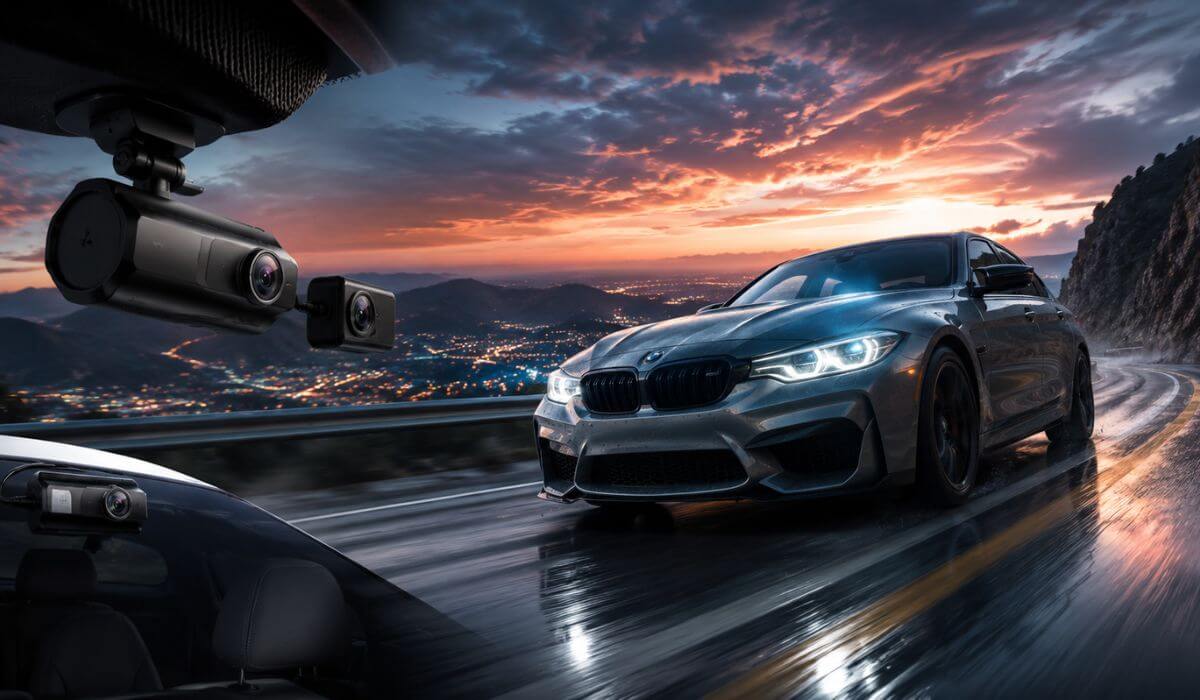
5 Best Dash Cams for BMW M3 in 2026: 4K HDR Clarity, STARVIS 2 Vision & WiFi 6 Speed
The BMW M3 has always been a driver’s car, whether it’s an E46, E90/E92, F80, or the latest G80. Its quick acceleration, sharp handling, and everyday usability mean a basic dash cam simply isn’t enough. At highway speeds or on a favourite back road, details disappear in seconds, so clear footage, dependable recording, and strong low-light performance matter far more than flashy features.
This guide is built specifically for BMW M3 models from 2001 to 2026. Every recommendation was selected with real ownership in mind, including compact designs that don’t obstruct visibility, high-bitrate 4K recording, STARVIS 2 sensors for cleaner night footage, reliable parking surveillance, and fast wireless access when you need to review or download clips. These are also well-suited for the M3’s performance-focused driving, where reading licence plates and capturing fast-moving traffic accurately is essential.
Rather than filling this list with dozens of similar cameras, we narrowed it down to five models that consistently stand out for video quality, reliability, ease of use, and long-term value. Whether your M3 is a daily driver, weekend canyon carver, or occasional track-day machine, these dash cams offer the features most owners actually benefit from.
Best BMW M3 Dash Cams: Top 2026 Picks for 4K HDR & STARVIS 2
#1. BlackVue DR970X-2CH Plus II
Best BMW M3 Dash Cam with Premium 4K Recording, STARVIS 2 Imaging, Cloud Connectivity & Smart Parking Surveillance
#2. VIOFO A229 Pro
Best 4K Dash Camera for BMW M3 with Dual STARVIS 2 Sensors, HDR Night Clarity & Fast 5GHz WiFi
#3. ROVE R2-4K Dual PRO
=Best Value BMW M3 Front and Rear Dash Cam featuring Dual STARVIS 2 Cameras, WiFi 6 & Ultra-Fast File Transfers
#4. Vantrue N5S 4 Channel
Best 360° Dash Cam for BMW M3 with Four-Camera Coverage, Voice Control & Complete Interior and Exterior Recording
#5. REDTIGER VC70
Best Budget 4K Dash Cam for BMW M3 offering STARVIS 2 Night Vision, Dual HDR Recording & WiFi 6 Connectivity
Expert Tip
If you drive a BMW M3 the way it was engineered to be driven, don’t choose a dash cam based only on resolution. Video processing, HDR tuning, sensor quality, and bitrate have a much bigger impact on whether a licence plate is readable when cars are closing quickly or lighting conditions change. A well-tuned 4K STARVIS 2 camera will usually deliver more useful evidence than a higher-resolution camera with weaker image processing. That’s exactly why every recommendation below prioritises consistent real-world footage over long feature lists.
How We Chose the Best Dash Cams for BMW M3
A BMW M3 places different demands on a dash cam than an average commuter car. During our research, we focused on the features that genuinely improve everyday ownership instead of simply comparing specification sheets. Every model in this guide had to prove its value in the areas that matter most to M3 drivers.
Image quality came before everything else
A performance car can cover a lot of distance in a very short time. We prioritised dash cams capable of delivering sharp 4K recording, strong HDR performance, and Sony STARVIS 2 sensors, because these technologies provide the best chance of capturing licence plates, road signs, and surrounding traffic clearly in both daylight and challenging night conditions.
Reliable recording mattered more than extra features
A dash cam is only useful if it records every drive without fail. We favoured models with a strong reputation for stable firmware, dependable loop recording, fast startup, and consistent memory card performance, reducing the chance of missed footage when you actually need it.
We looked for features that complement the BMW M3
The M3 has excellent visibility and a premium cabin, so bulky cameras were not a priority. We selected compact models with clean windshield placement, discreet installation, responsive mobile apps, fast WiFi transfers, GPS logging, and voice control, making them easier to live with every day without distracting from the driving experience.
Night performance received special attention
Many incidents happen after sunset or in poorly lit parking areas. Cameras with advanced HDR processing, larger image sensors, and superior low-light tuning consistently produced cleaner footage with less glare from headlights, reflections, and street lighting, which is why these technologies were heavily weighted in our recommendations.
Parking protection had to be practical
Most M3 owners care about protecting their vehicle when it is left unattended. We gave preference to dash cams that support buffered parking recording, intelligent motion detection, and reliable hardwire compatibility, providing continuous protection without unnecessary complexity.
We compared overall ownership value, not just specifications
Rather than recommending the most expensive models, we balanced video quality, software experience, long-term reliability, included accessories, warranty support, and overall value for money. Every dash cam in this guide earned its place because it delivers a combination of features that genuinely suits the BMW M3, not because it simply advertises the biggest numbers on the box.
#1. BlackVue DR970X-2CH Plus II
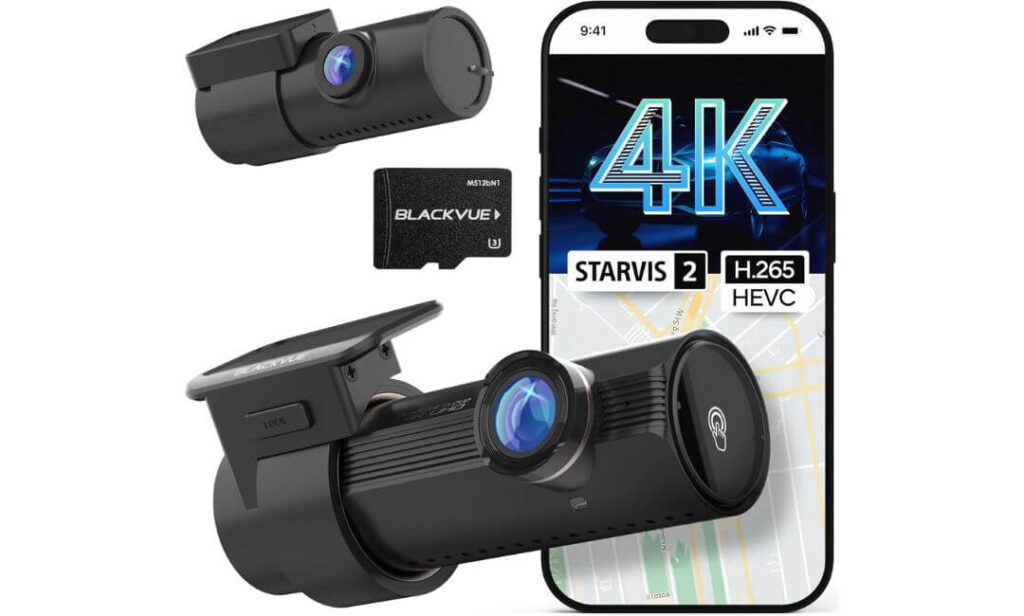
Quick Specs:
- Video Resolution: 4K UHD front + Full HD rear
- Image Sensor: Sony STARVIS 2 with HDR
- Viewing Angle: 146° wide front lens
- Storage Capacity: Supports up to 1TB microSD
- Wireless Features: Wi-Fi, BlackVue Cloud & mobile playback
- Recording Format: H.265 / H.264 video encoding
- Parking Recording: Smart Parking Mode (hardwire kit required)
- Power Design: USB-C connection with supercapacitor
- Boot Time: Fast startup recording after ignition
- Ideal For: BMW M3 daily driving, highway trips and enthusiastic weekend drives
Some dash cams look impressive on paper, while others continue delivering when lighting changes, traffic speeds increase, and you actually need usable footage. This one belongs in the second category. Its 4K front camera, paired with a Sony STARVIS 2 sensor and advanced HDR processing, produces footage that stays clean and detailed in bright sunlight, tunnels, rain, and night driving. For a performance car like the BMW M3, that extra image quality can make the difference between recognising a licence plate and ending up with a blurry recording.
The overall ownership experience is just as strong as the video quality. Recording starts quickly after you switch on the ignition, the USB-C connection helps create a cleaner installation, and the supercapacitor is better suited to the heat that builds up inside parked vehicles than battery-powered alternatives. Fast Wi-Fi playback means you can review footage on your phone within minutes instead of removing the memory card every time.
Where this camera really separates itself is long-term usability. Support for up to 1TB of storage, optional BlackVue Cloud services, and dependable parking recording make it feel like a system designed to stay with the car for years rather than just another accessory. (If you’re planning to use Parking Mode regularly, adding the optional hardwire kit is worthwhile because it enables automatic parking surveillance without relying on manual operation.)
What Stood Out During Our Research
- Outstanding 4K image quality with excellent licence plate clarity.
- Sony STARVIS 2 sensor delivers cleaner low-light recording.
- Fast boot time helps minimise missed footage after startup.
- Reliable BlackVue Cloud ecosystem for remote viewing and alerts.
- Heat-resistant supercapacitor is better suited to year-round BMW M3 ownership.
One Small Consideration
- The hardwire kit is sold separately, so you’ll need it if you want Smart Parking Mode to work automatically.
BMW M3 Compatibility & Installation Notes
This is a universal windshield-mounted dash cam, making it compatible with BMW M3 models from 2001 onwards, including the E46, E90/E92, F80, and G80. Its compact cylindrical design sits neatly behind the rear-view mirror, helping preserve the clean forward visibility the M3 is known for.
For the cleanest result, route the rear camera cable through the factory headliner and trim panels, then pair the dash cam with a hardwire kit if you want automatic Parking Mode. Most owners can achieve an OEM-style installation without modifying the vehicle.
The Insider Pro-Tip
Many buyers focus only on 4K resolution, but that’s only part of the story. Image processing, HDR tuning, and the quality of the sensor have a much bigger impact on whether important details stay readable at speed. That’s why this model consistently performs well in real-world driving instead of only looking good on a specification sheet.
If you’re planning to keep your BMW M3 for years, it’s usually better to invest in a dash cam with proven software stability, dependable recording, and long-term firmware support than one that simply offers more features on paper. When something unexpected happens, reliability is the feature you’ll appreciate most.
#2. VIOFO A229 Pro
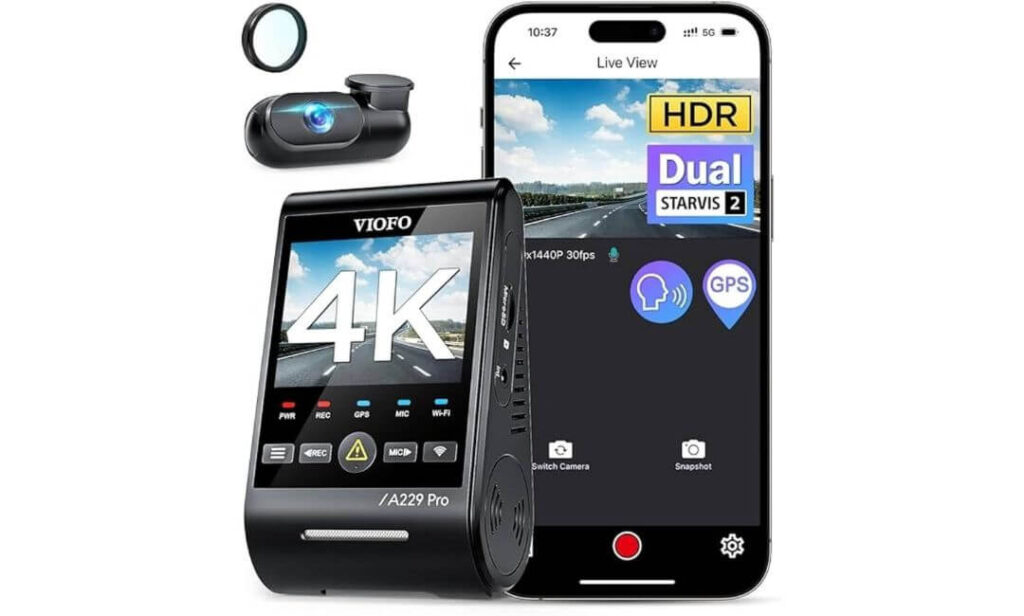
Quick Specs:
- Video Resolution: 4K front + 2K rear recording
- Image Sensors: Dual Sony STARVIS 2 (IMX678 + IMX675)
- Night Performance: Dual HDR with Night Vision 2.0
- GPS: Quad-mode GPS (GPS, Galileo, GLONASS & BeiDou)
- Wireless Connectivity: 5GHz Wi-Fi with VIOFO App
- Voice Control: 12 hands-free voice commands
- Parking Recording: Buffered parking mode with three recording options (HK4 hardwire kit required)
- Lens Filter: CPL filter included to reduce windshield reflections
- Power Design: Heat-resistant supercapacitor
- Storage Support: Up to 512GB microSD
- Best Suited For: BMW M3 owners wanting premium video quality without stepping into flagship pricing
Finding a dash cam that consistently delivers sharp footage in both daylight and darkness isn’t easy, especially when it’s installed in a car that’s capable of covering ground as quickly as the BMW M3. This model earns its place because it pairs dual Sony STARVIS 2 sensors with 4K front and 2K rear recording, producing remarkably clean footage without relying on artificial sharpening. Whether you’re driving into direct sunlight or through poorly lit roads, the dual HDR system keeps highlights and shadows balanced, making licence plates far easier to recognise.
Another reason it impressed us is how polished the overall experience feels. The 5GHz Wi-Fi connection transfers recordings much faster than older wireless systems, while the quad-mode GPS module records accurate location and speed data using four satellite networks instead of one. Add in the included CPL filter, responsive voice commands, and straightforward mobile app, and everyday use becomes refreshingly simple rather than frustrating.
For drivers who leave their BMW M3 parked outside, the camera also offers three parking recording modes, including buffered event recording that captures footage before and after an incident. Combined with its supercapacitor design, which tolerates heat much better than battery-powered alternatives, it feels built for long-term ownership instead of short-term convenience. (For the full parking recording experience, you’ll need the optional HK4 hardwire kit, as it isn’t included in the box.)
Why We Recommend It
- Excellent 4K + 2K recording with outstanding detail retention.
- Dual STARVIS 2 sensors improve clarity in difficult lighting.
- Front and rear HDR performs exceptionally well after dark.
- Fast 5GHz Wi-Fi makes downloading large videos noticeably quicker.
- Quad-mode GPS delivers highly accurate trip and speed information.
A Small Consideration Before Buying
- A microSD card and HK4 hardwire kit are sold separately, so you’ll want to budget for those if you plan to use continuous parking recording.
BMW M3 Installation & Compatibility
The VIOFO A229 Pro uses a universal windshield mount, making it compatible with BMW M3 models from the E46 through the latest G80 generation. Its compact camera body hides neatly behind the rear-view mirror, helping maintain the driver’s forward visibility without adding unnecessary distractions inside the cabin.
Installation is straightforward using the supplied trim tool and rear cable, but for the cleanest OEM-style finish, routing the wiring through the headliner and interior trim is worth the extra time. If Parking Mode is important to you, adding the HK4 hardwire kit is the best way to unlock all three parking recording modes automatically.
The Insider Pro-Tip
Many dash cams advertise high resolution, but sensor quality and HDR processing are what determine whether fast-moving details remain readable when you’re actually driving. The combination of IMX678, IMX675, and well-tuned HDR is one of the biggest reasons this camera has built such a strong reputation among enthusiasts.
If your BMW M3 regularly sees spirited weekend drives or long highway journeys, don’t overlook the included CPL filter. It noticeably reduces dashboard reflections on sunny days, helping the camera capture cleaner footage without any extra setup—a small feature that often makes a bigger difference than buyers expect.
#3. ROVE R2-4K Dual PRO
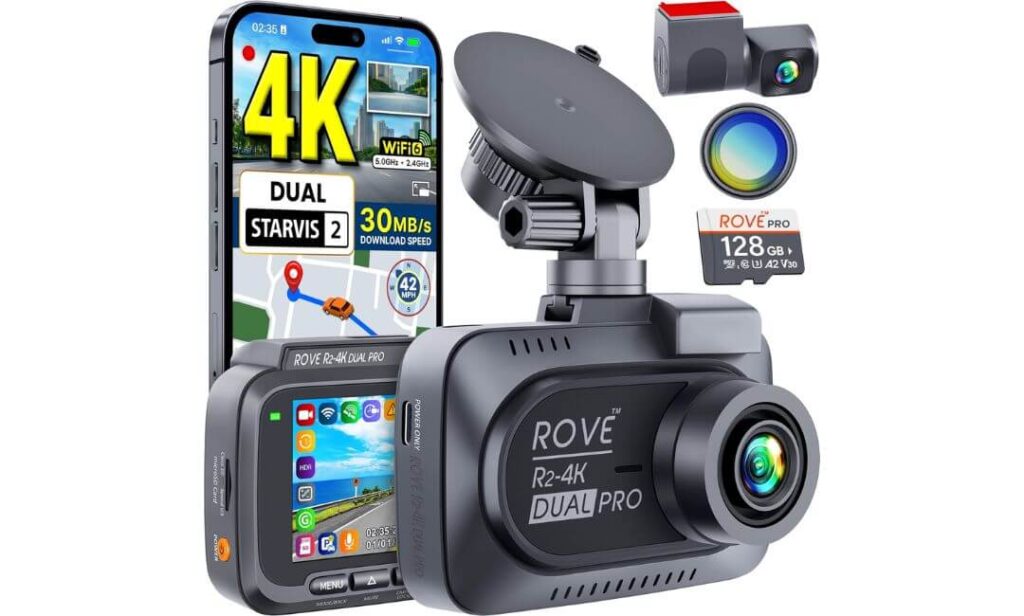
Quick Specs:
- Video Resolution: 4K front + 2K rear recording
- Image Sensors: Dual Sony STARVIS 2 (IMX678 + IMX675)
- Lens Aperture: F1.7 front + F1.55 rear
- Viewing Angle: 150° front + 140° rear
- Wireless Connectivity: Dual-Band WiFi 6 up to 30MB/s
- GPS: Built-in Quad-Mode GPS
- Storage: 128GB microSD card included, supports up to 1TB
- Included Accessories: CPL filter, suction mount & adhesive mount
- Parking Recording: Three intelligent parking modes (hardwire kit required)
- Power Design: Heat-resistant supercapacitor
- Best Suited For: BMW M3 owners looking for a complete premium package straight out of the box
One thing became obvious while comparing premium dash cams for the BMW M3—some require several extra purchases before they’re truly complete. This model feels different because many of the accessories enthusiasts usually buy separately are already included. You get a 128GB high-endurance memory card, a CPL filter, dual mounting options, and hardware that is ready for serious daily driving from the first installation.
The recording performance also lives up to expectations. With 4K front, 2K rear, dual Sony STARVIS 2 sensors, HDR imaging, and bright F1.7/F1.55 lenses, it captures impressive detail in situations where many cameras begin losing clarity. Fast-moving traffic, changing light, tunnels, and rainy roads are handled confidently, while the 150° front and 140° rear viewing angles provide wide coverage without making vehicles appear unnaturally distant.
Daily usability is another strong point. Dual-band WiFi 6 transfers large 4K recordings quickly, the Quad-Mode GPS accurately records speed and route information, and the three parking recording modes add extra protection when the car is left unattended. (If you plan to use Parking Mode every day, you’ll still need the optional hardwire kit, as it isn’t supplied with the camera.)
Why We Think It’s Worth Considering
- Complete package with 128GB memory card and CPL filter included.
- Excellent 4K + 2K recording using dual STARVIS 2 sensors.
- Fast WiFi 6 transfers reduce waiting when downloading videos.
- Bright F1.7 and F1.55 lenses improve low-light image quality.
- Wide viewing angles capture more of the road without excessive distortion.
A Small Consideration Before Buying
- Some owners have reported occasional random shutdowns, although firmware updates have addressed issues for many users. Keeping the camera updated is recommended.
BMW M3 Installation & Compatibility
The ROVE R2-4K Dual PRO is fully compatible with BMW M3 generations from the E46 to the current G80 thanks to its universal windshield mounting system. Both the included suction mount and adhesive mount work well, allowing you to choose the installation style that best suits your preference.
The supplied rear camera cable is long enough for a clean OEM-style installation through the headliner and interior trim. If you want continuous parking surveillance, adding the optional hardwire kit is the easiest way to enable all parking recording functions without relying on the vehicle’s accessory socket.
The Insider Pro-Tip
One feature that often gets overlooked is everything included inside the box. By the time many owners purchase a high-endurance memory card and a CPL filter separately for other dash cams, they’ve already added noticeable extra cost. Having both included here means you’re ready to record high-quality footage immediately.
Another advantage is the combination of WiFi 6 and the included 128GB card. Large 4K files can be transferred quickly without constantly removing the memory card, making it much easier to review or save important footage after a drive.
#4. Vantrue N5S 4 Channel
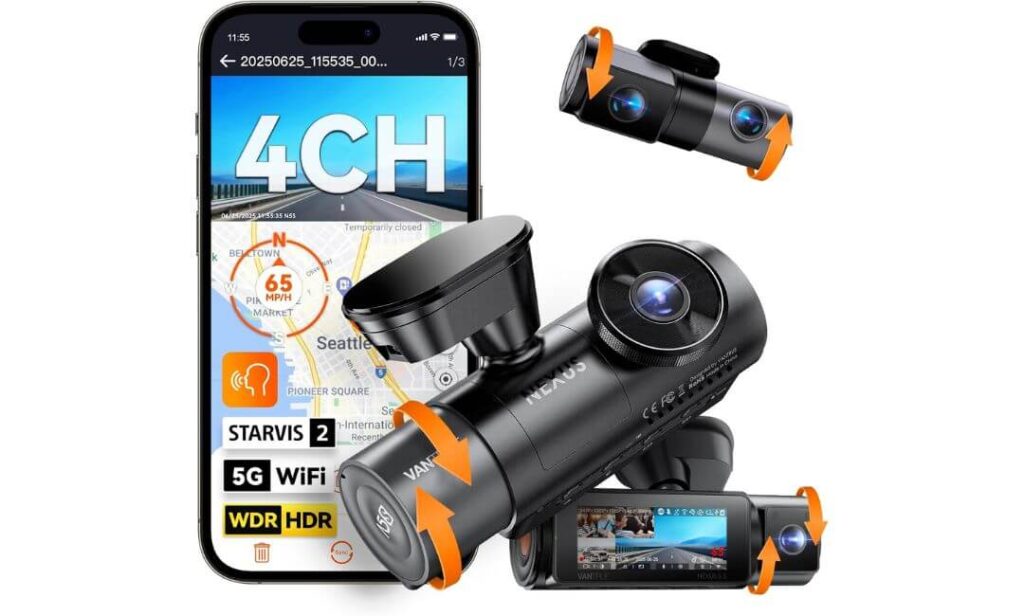
Quick Specs:
- Recording System: 4-channel recording with 360° coverage
- Video Resolution: 2.7K front + 1440P rear + dual 1080P interior
- Image Sensors: STARVIS 2 technology with HDR/WDR processing
- Wireless Connectivity: 5GHz Wi-Fi with Vantrue App
- GPS: Dual GPS positioning
- Voice Control: Multi-language hands-free commands
- Parking Recording: Buffered Parking Mode with 10-second pre-recording (hardwire kit required)
- Storage Support: Up to 1TB microSD
- Power Design: Heat-resistant supercapacitor
- Best Suited For: BMW M3 owners wanting complete cabin, rear and exterior coverage
Most premium dash cams focus on what happens in front of and behind the vehicle. This one takes a different approach. With four separate cameras, it captures the road ahead, what’s happening behind, and activity inside the cabin at the same time. If your BMW M3 regularly carries passengers, valuable equipment, or spends long hours parked in public places, that extra coverage can provide evidence that a traditional dual-camera system simply cannot.
Its hardware is equally impressive. The 2.7K front camera, upgraded 1440P rear camera, STARVIS 2 technology, HDR/WDR processing, and infrared-assisted interior recording work together to maintain clear footage in changing light conditions. Whether you’re driving through bright afternoon traffic, entering underground parking, or travelling after dark, the camera does an excellent job of preserving important details without excessive glare or heavy image noise.
Everyday usability has also been well thought out. 5GHz Wi-Fi, dual GPS tracking, voice commands, OTA firmware updates, and support for up to 1TB of storage make it suitable for drivers who spend long hours behind the wheel. The buffered parking system records moments before and after an incident, creating a much more complete record if something happens while your BMW M3 is parked. (For automatic Parking Mode operation, the optional hardwire kit is still required.)
Why We Included It
- True 4-channel recording covers areas most dash cams cannot see.
- STARVIS 2 technology delivers excellent low-light performance.
- Buffered Parking Mode records before and after detected events.
- Large 1TB storage support is ideal for extended multi-camera recording.
- Voice control and OTA updates make long-term ownership more convenient.
A Small Consideration Before Buying
- To get the best experience, it’s worth using a high-endurance microSD card and the optional hardwire kit, especially if you plan to use all four cameras with Parking Mode regularly.
BMW M3 Installation & Compatibility
The Vantrue N5S is fully compatible with BMW M3 models from the E46 through the latest G80, using a universal adhesive windshield mount. Despite offering four recording channels, the camera remains compact enough to sit neatly behind the rear-view mirror without affecting the driving position.
Installation naturally takes a little longer than a traditional two-channel system because additional interior cameras and the rear camera need to be positioned correctly. The included installation tool, long rear cable, and adjustable camera mounts make achieving a clean OEM-style installation much easier than expected.
The Insider Pro-Tip
If your BMW M3 is frequently parked in busy public areas, a 4-channel system offers an advantage that specification sheets rarely explain. Incidents don’t always happen directly in front of or behind the vehicle. Side-window activity, cabin movement, or someone reaching into the car can become just as important when reviewing footage later.
This isn’t the right choice for everyone, but if maximum coverage is your priority rather than the highest front-camera resolution, very few dash cams currently provide the same level of all-around recording while still offering modern features like STARVIS 2, buffered parking recording, dual GPS, and fast wireless connectivity.
#5. REDTIGER VC70
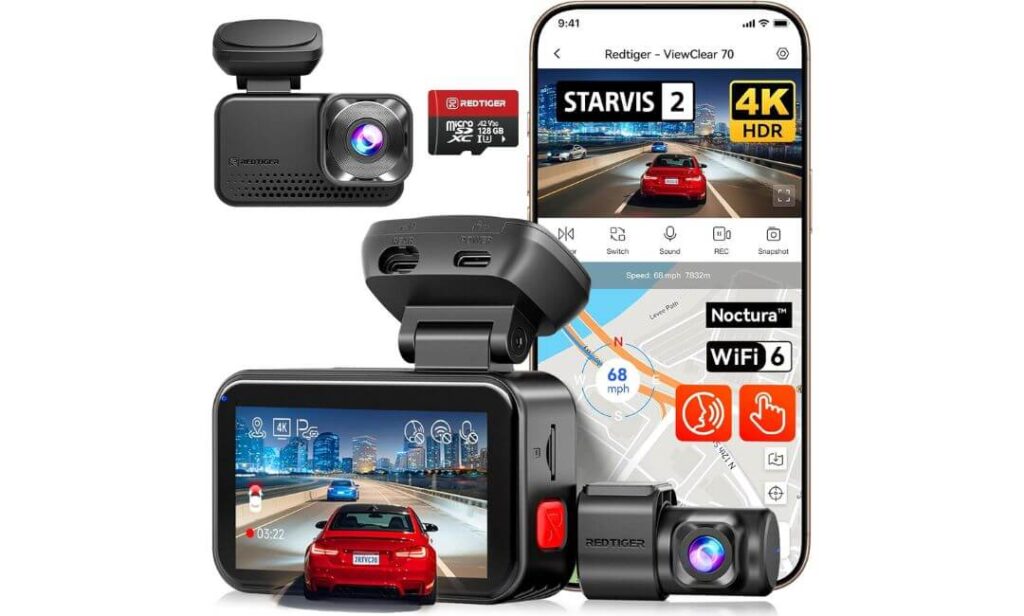
Quick Specs:
- Video Resolution: 4K front + 2.5K rear
- Image Sensor: Sony STARVIS 2 IMX678 (8MP)
- Night Recording: Dual HDR with Hyper Night Clarity
- Wireless Connectivity: 5.8GHz WiFi 6 up to 30MB/s
- GPS: Built-in GPS with route and speed logging
- Controls: Touchscreen and voice commands
- Storage: 128GB microSD card included, supports up to 512GB
- Parking Recording: Collision detection and time-lapse (hardwire kit required)
- Power Design: Heat-resistant supercapacitor
- Best Suited For: BMW M3 owners looking for premium features without paying flagship prices
Sometimes the best value isn’t the camera with the longest feature list—it’s the one that delivers the features most drivers actually use every day. That’s exactly where the REDTIGER VC70 fits. It combines 4K front recording, a sharper 2.5K rear camera, the proven Sony STARVIS 2 IMX678 sensor, and Dual HDR processing into a package that consistently produces clean footage during daytime drives, late-night commutes, and changing weather conditions.
What makes it particularly appealing for BMW M3 owners is how complete it feels straight out of the box. The included 128GB memory card means recording can begin immediately, while 5.8GHz WiFi 6 allows fast transfers directly to your phone without waiting around for large 4K files to copy. The addition of a touchscreen, responsive voice commands, and built-in GPS gives the camera a polished feel that’s easy to appreciate during daily use.
Parking protection is equally practical. Collision recording, true-colour time-lapse, and loop recording work together to help preserve important footage while the car is unattended. Combined with the supercapacitor, which is better suited to temperature extremes than battery-powered designs, it offers reassuring reliability for year-round BMW M3 ownership. (If you want automatic parking recording, you’ll still need the optional hardwire kit because it isn’t included.)
Why We Recommend It
- Sharp 4K + 2.5K recording with excellent overall detail.
- Sony STARVIS 2 sensor delivers strong low-light performance.
- 128GB memory card included, so it’s ready to use immediately.
- Fast WiFi 6 transfers make reviewing videos quick and convenient.
- Touchscreen interface feels intuitive and easy to navigate.
A Small Consideration Before Buying
- The optional hardwire kit is required to unlock continuous Parking Mode, so it’s worth adding if parked-vehicle protection is important to you.
BMW M3 Installation & Compatibility
The REDTIGER VC70 uses a universal adhesive windshield mount, making it compatible with BMW M3 models from the E46 through the latest G80 generation. Its compact design fits neatly behind the rear-view mirror, preserving forward visibility while maintaining a clean, factory-like appearance.
Installation is beginner-friendly thanks to the included memory card, long rear camera cable, and removable mounting bracket. If you’re aiming for a cleaner OEM-style finish, routing the wiring through the headliner and trim panels will produce the best results while keeping cables out of sight.
The Insider Pro-Tip
If you’re comparing this camera with more expensive models, don’t focus only on resolution. The combination of the STARVIS 2 sensor, Dual HDR, and 2.5K rear recording is what gives this dash cam its real advantage in everyday driving, especially when lighting changes quickly or traffic is moving at speed.
Another detail that’s easy to overlook is the included 128GB memory card. Many premium dash cams require buying storage separately before they’re ready to use. Having a tested card already included means you can install the camera, configure it, and start recording your first BMW M3 drive without any additional purchases.
Best BMW M3 Dash Cam Comparison: Side-by-Side Features and Performance
| Comparison Point |
Editor’s Choice BlackVue DR970X-2CH Plus II |
Premium Value VIOFO A229 Pro |
Best Value ROVE R2-4K Dual PRO |
360° Coverage Vantrue N5S |
Budget Premium REDTIGER VC70 |
|---|---|---|---|---|---|
| Ideal BMW M3 Owner | Drivers wanting the most refined premium experience | Drivers prioritising image quality and HDR performance | Buyers wanting the best package with useful accessories | Owners needing complete cabin and exterior coverage | Drivers wanting premium features at a lower price |
| Front / Rear Recording | 4K + 1080P | 4K + 2K | 4K + 2K | 2.7K + 1440P + Dual 1080P | 4K + 2.5K |
| Image Sensor | STARVIS 2 | Dual STARVIS 2 | Dual STARVIS 2 | STARVIS 2 Multi-Camera | STARVIS 2 IMX678 |
| Night Driving Performance | ★★★★★ | ★★★★★ | ★★★★★ | ★★★★☆ | ★★★★☆ |
| HDR Performance | Excellent | Excellent (Front & Rear) | Excellent | HDR + WDR | Dual HDR |
| Parking Recording | Smart Parking Mode | 3 Parking Modes | 3 Intelligent Modes | Buffered Parking Recording | Collision + Time-Lapse |
| Wireless Features | Wi-Fi + Cloud | 5GHz Wi-Fi | Wi-Fi 6 | 5GHz Wi-Fi | 5.8GHz Wi-Fi 6 |
| GPS | Optional Cloud GPS | Quad-Mode GPS | Quad-Mode GPS | Dual GPS | Built-in GPS |
| Voice Commands | — | 12 Commands | Voice Guidance | Multi-language Voice Control | Voice Control |
| Storage Support | Up to 1TB | Up to 512GB | Up to 1TB | Up to 1TB | Up to 512GB |
| Included Extras | Premium ecosystem | CPL Filter | 128GB Card + CPL | Complete installation kit | 128GB Card |
| Heat Resistance | Supercapacitor | Supercapacitor | Supercapacitor | Supercapacitor | Supercapacitor |
| Installation Difficulty | Easy | Easy | Easy | Moderate (4 Cameras) | Easy |
| Overall Recommendation | Best Overall BMW M3 Choice | Best Video Quality per Dollar | Best Complete Package | Best 360° Protection | Best Affordable Premium Pick |
Buying Guide: How to Choose the Best Dash Cam for Your BMW M3
Choosing a dash cam for the BMW M3 isn’t simply about buying the model with the highest resolution. Every generation of the M3, from the E46 and E90/E92 to the F80 and G80, is built to deliver quick acceleration, confident braking, and precise handling. Those same characteristics also place greater demands on a dash cam, especially when capturing fast-moving traffic, changing light conditions, or incidents that happen in a fraction of a second.
The five recommendations in this guide were selected with real BMW M3 ownership in mind. Instead of focusing only on marketing claims, we prioritised image quality, proven sensor technology, reliable recording, parking protection, installation quality, and long-term ownership experience. Before making your decision, these are the features that deserve the closest attention.
Resolution and HDR Should Be Your First Priority
A high-quality 4K dash cam for the BMW M3 offers a noticeable advantage over older 1080P cameras because it captures finer details, including licence plates, lane markings, and surrounding traffic. However, resolution alone doesn’t guarantee better footage.
Look for cameras that combine 4K recording with HDR processing. HDR helps control bright sunlight, reflections from wet roads, tunnels, underground car parks, and oncoming headlights. During everyday driving, this often makes a bigger difference than simply increasing resolution.
If your budget only allows one premium feature, prioritise better HDR performance over extra software features.
Choose STARVIS 2 Instead of Older Image Sensors
The image sensor is the heart of every dash cam. Modern Sony STARVIS 2 sensors deliver noticeably cleaner recordings than previous-generation sensors, especially after sunset or during poor weather.
Compared with older technology, STARVIS 2 offers:
- Better low-light sensitivity.
- Reduced image noise.
- Improved licence plate readability.
- Cleaner footage during rain and fog.
- Better performance when driving from bright daylight into darker areas.
Every camera in our recommendations uses STARVIS 2 technology because it consistently provides stronger real-world results.
Front and Rear Coverage Is Worth Having
A BMW M3 front and rear dash cam provides significantly better protection than a front-only setup. While the front camera captures what happens ahead, the rear camera records rear-end collisions, tailgating incidents, and parking accidents that would otherwise go undocumented.
Drivers who frequently travel on busy motorways or leave their M3 parked in public areas will benefit most from a dual-camera system.
If interior monitoring or maximum vehicle coverage is important, a four-channel system like the Vantrue N5S can provide additional recording angles.
Night Vision Makes a Bigger Difference Than Most Buyers Expect
Many insurance claims happen after sunset, when weaker cameras struggle with glare and motion blur.
A quality night vision dash cam for the BMW M3 should include:
- Sony STARVIS 2 sensor.
- HDR or Dual HDR processing.
- Wide-aperture lenses.
- Reliable image processing rather than artificial sharpening.
These features work together to improve licence plate visibility while reducing glare from LED headlights and street lighting.
Storage Capacity and Loop Recording
Higher video quality also means larger file sizes.
For a BMW M3, we recommend choosing a dash cam that supports at least 512GB, while 1TB support is even better for drivers who record long journeys or use Parking Mode regularly.
Loop recording automatically overwrites the oldest unlocked files once storage becomes full, ensuring continuous recording without requiring manual file management.
Wi-Fi, GPS and Mobile App Quality
Modern premium dash cams should do more than simply save videos.
A good WiFi GPS dash cam for the BMW M3 should provide:
- Fast wireless video downloads.
- Stable smartphone app.
- Built-in GPS route logging.
- Accurate speed and location data.
- Firmware updates through the app whenever available.
These features make reviewing footage considerably easier after an incident.
Parking Mode Is Essential for Daily Drivers
If your BMW M3 spends time parked outside, Parking Mode quickly becomes one of the most valuable features.
A reliable BMW M3 parking mode dash cam should support:
- Buffered recording.
- Motion detection.
- Impact detection.
- Time-lapse recording where available.
- Intelligent power management with a hardwire kit.
Most premium cameras require a separate hardwire kit to activate automatic Parking Mode, so it’s worth including this in your overall budget.
A Clean OEM-Style Installation Is Worth the Extra Time
A quality OEM-style dash cam for the BMW M3 should sit neatly behind the rear-view mirror without interfering with visibility.
For the cleanest installation:
- Route cables through the headliner.
- Hide wiring behind the A-pillar trim.
- Secure the rear cable beneath factory interior panels.
- Use a dedicated hardwire kit instead of a visible power cable whenever possible.
The finished installation should look like it came from the factory rather than being added afterwards.
Deciding Between Premium and Value Options
Not every BMW M3 owner needs the most expensive dash cam.
Premium models such as the BlackVue DR970X-2CH Plus II offer outstanding software, Cloud connectivity, and an excellent long-term ownership experience.
The VIOFO A229 Pro delivers exceptional image quality at a lower price, while the ROVE R2-4K Dual PRO offers one of the strongest value packages thanks to its included accessories.
If maximum recording coverage matters more than outright resolution, the Vantrue N5S is an excellent choice, while the REDTIGER VC70 provides many premium features at a more accessible price.
DIY Installation or Professional Installation?
Most BMW M3 owners with basic trim removal tools can install a front and rear dash cam themselves in one to three hours.
However, if you plan to hardwire the camera for automatic Parking Mode or simply want the cleanest factory-style finish, professional installation is often worthwhile. A properly routed installation not only looks better but also reduces the chance of loose wiring, cabin rattles, or accidental cable damage over time.
Installation and Setup Tips for Your BMW M3 Dash Cam
A premium dash cam can only perform at its best when it’s installed correctly. Even the sharpest 4K camera can lose important details if it’s mounted too low, pointed at the wrong angle, or powered through an unstable connection. The good news is that every dash cam recommended in this guide is compatible with the BMW M3 and can be installed cleanly without changing the vehicle’s factory interior.
Whether you own an E46, E90/E92, F80, or G80, taking a little extra time during installation will improve video quality, reduce distractions, and make features such as Parking Mode and GPS work exactly as intended.
Position the Front and Rear Cameras Correctly
The front camera should sit high on the windshield, directly behind or slightly beside the rear-view mirror. This location provides the widest forward visibility while keeping the camera outside the driver’s normal line of sight. Avoid mounting it too low on the glass, as the dashboard will occupy more of the frame and reduce the amount of road being recorded.
For the rear camera, install it at the centre of the rear windshield and keep it level with the horizon. This provides balanced coverage of both lanes behind the vehicle and improves licence plate readability. Before securing the adhesive permanently, check the live view in the companion app to confirm both cameras are perfectly aligned.
Route the Cables Like a Factory Installation
One of the biggest differences between an average installation and an OEM-style finish is cable management.
For the cleanest BMW M3 dash cam installation, tuck the power cable into the headliner, continue behind the A-pillar trim, then route it beneath the dashboard to the power source. The rear camera cable should follow the roof lining, pass behind the B and C pillars, and finish neatly at the rear window.
Keeping every cable hidden not only improves appearance but also protects the wiring from accidental damage while preventing unwanted cabin rattles over time.
Choose the Right Power Source
Most dash cams can be powered in two different ways, and each serves a different purpose.
Using the 12V accessory socket is the quickest installation method. The camera powers on with the ignition and shuts down automatically when the vehicle is turned off. This is ideal for drivers who simply want recording while driving.
A hardwire kit provides a more integrated solution. It connects directly to the vehicle’s fuse box through a fuse tap, enabling automatic Parking Mode, low-voltage battery protection, and a cleaner installation without visible power cables. Every dash cam recommended in this guide supports hardwire installation, although the required hardwire kit is typically sold separately.
Create an OEM-Style Finish
A well-installed dash cam should look like it belongs in the car.
Position the front camera so it remains hidden behind the rear-view mirror from the driver’s seat. Leave a small service loop near each camera rather than pulling every cable completely tight, as this reduces strain on the connectors over time. Use the supplied cable clips only where necessary, allowing the factory trim panels to hide most of the wiring naturally.
If your chosen camera includes GPS within the mounting bracket, avoid placing it directly beneath metallic window tint or aftermarket accessories that could reduce signal quality.
Configure Parking Mode and GPS Properly
Parking Mode is one of the most valuable features available on a modern dash cam, but it only performs correctly when configured carefully.
After connecting the hardwire kit, choose the recording mode that matches how your BMW M3 is used. Buffered event recording is generally the best choice because it saves footage from both before and after an incident. Time-lapse recording is better suited to longer parking periods, while motion detection works well in quieter locations with minimal traffic.
If your dash cam records GPS information, wait until the camera has established a stable satellite connection before beginning your first drive. This ensures route data, speed information, and timestamps remain accurate.
Complete the Initial Setup Before Your First Drive
Many owners install the camera and immediately begin driving without checking the settings. Spending a few extra minutes on the initial setup can prevent problems later.
After installation:
- Format the memory card inside the dash cam before first use.
- Pair the camera with its smartphone app and confirm the live view works correctly.
- Install the latest firmware update if one is available.
- Set the correct time zone, date, and recording preferences.
- Adjust G-sensor sensitivity so normal braking does not constantly lock recordings.
- Confirm both front and rear cameras are level by reviewing a short test recording.
Final Installation Advice
The best dash cam installation is the one you forget is there. Once everything is positioned correctly, the camera should start automatically, record without interruption, and remain almost invisible during everyday driving. A clean OEM-style installation, combined with a quality hardwire kit and properly configured settings, allows your BMW M3 dash cam to provide reliable protection every time you start the engine or leave the car parked.
Real-World BMW M3 Driving Scenarios Where the Right Dash Cam Makes a Difference
A premium dash cam isn’t just there to record accidents. In a BMW M3, it becomes part of your everyday driving experience, protecting the car whether it’s parked outside a restaurant, cruising on the motorway, or heading home after dark. The features we prioritised throughout this guide—4K recording, STARVIS 2 sensors, HDR, reliable Parking Mode, GPS, and fast Wi-Fi—are the same features that make the biggest difference in real-world situations.
Protecting Your BMW M3 While It’s Parked
For many owners, the biggest concern isn’t what happens while driving—it’s what happens after walking away from the car.
A quality BMW M3 parking mode dash cam continues monitoring the vehicle after the ignition is switched off. If another driver reverses into your bumper, someone opens a door into the side of the car, or suspicious movement is detected nearby, the camera automatically saves the event before it can be overwritten.
Buffered Parking Mode is particularly valuable because it records several seconds before the impact as well as after it happens. That extra footage often provides the context needed to understand exactly how an incident occurred.
If your M3 is regularly parked in apartment garages, shopping centres, office parking lots, or public streets, Parking Mode quickly becomes one of the most valuable features you’ll own.
Highway Driving Demands Better Video Quality
The BMW M3 is designed to cover long distances comfortably while maintaining impressive performance. Higher speeds also mean important details appear and disappear much faster than they do in ordinary traffic.
A BMW M3 front and rear dash cam records both directions simultaneously, providing a complete picture if another vehicle changes lanes unexpectedly, brakes aggressively, or causes a rear-end collision.
This is where cameras with 4K recording, STARVIS 2 sensors, and effective HDR processing begin separating themselves from entry-level alternatives. Better image quality increases the likelihood of capturing readable licence plates, vehicle details, and road signs when events happen unexpectedly.
Everyday City Driving Creates Different Challenges
Urban driving places different demands on a dash cam than motorway driving.
Busy junctions, cyclists, pedestrians, delivery vehicles, buses, and vehicles entering from side streets create situations where incidents can develop within seconds. Wide viewing angles combined with reliable HDR help preserve details when moving between shaded streets, reflective buildings, and direct sunlight.
Drivers who spend most of their time in city traffic will also appreciate responsive Wi-Fi connectivity, allowing footage to be reviewed immediately without removing the memory card.
Night Driving Is Where Premium Sensors Earn Their Reputation
Driving after sunset is one of the biggest reasons enthusiasts choose cameras equipped with STARVIS 2 technology.
A high-quality night vision dash cam for the BMW M3 handles situations that typically challenge cheaper cameras, including:
- Bright LED headlights from approaching traffic.
- Reflections from wet roads.
- Underground parking garages.
- Poorly lit suburban streets.
- Fast transitions between dark and brightly illuminated areas.
Instead of producing excessive glare or heavy image noise, premium image sensors combined with HDR preserve significantly more usable detail when visibility becomes difficult.
Long Road Trips and Weekend Drives
Many BMW M3 owners enjoy road trips, scenic routes, and weekend drives where hours of continuous recording are common.
Large storage support, efficient video compression, reliable loop recording, and stable firmware become increasingly important during longer journeys. Cameras supporting 512GB or 1TB microSD cards reduce the need for frequent formatting while ensuring older footage is automatically replaced only after available space has been used.
Fast Wi-Fi also becomes far more convenient when reviewing large 4K recordings without removing the card from the camera.
When You Need Footage the Most
The value of a dash cam is measured long before an accident happens. Reliable recording, consistent image quality, dependable Parking Mode, and accurate GPS data all work together to ensure that if something unexpected does occur, the footage is already there.
That’s why every recommendation in this guide focuses on proven recording performance rather than simply listing the longest specification sheet. For a performance car like the BMW M3, dependable evidence is always more valuable than features that look impressive but add little in everyday driving.
FAQs About BMW M3 Dash Cam
Is a premium 4K dash cam really worth it for a BMW M3, or is a cheaper 1080P model enough?
That depends on how you use your BMW M3. During everyday commuting, a 1080P dash cam can record general traffic reasonably well. However, the M3 is capable of covering distance much faster than the average sedan, which means road signs, number plates, and surrounding vehicles move through the frame far more quickly.
A quality 4K dash cam with a modern STARVIS 2 sensor gives you a much better chance of capturing usable evidence when it actually matters. The biggest improvements usually come from:
- Better licence plate readability.
- Cleaner footage at motorway speeds.
- Improved HDR during changing light.
- Better low-light performance after sunset.
The difference isn’t always obvious until you compare real footage side by side, but when an incident happens, those extra details can become incredibly valuable.
Will installing a dash cam affect my BMW M3’s battery if I leave Parking Mode enabled?
Not if it’s installed correctly.
Modern premium dash cams are designed to work with dedicated hardwire kits that include low-voltage battery protection. Once the battery reaches the preset voltage threshold, power is automatically disconnected before the vehicle battery is drained to an unsafe level.
If you regularly leave your BMW M3 parked for several days at a time, consider these settings:
- Buffered Parking Mode for daily parking.
- Time-lapse mode for extended parking.
- Appropriate battery cut-off voltage.
- Firmware updated to the latest version.
Correct power management has a much bigger impact on battery health than the dash cam itself.
Why do many BMW M3 owners specifically look for STARVIS 2 sensors instead of simply choosing the highest resolution?
Resolution tells you how many pixels are being recorded. The image sensor determines how well those pixels are captured.
That’s why many experienced enthusiasts now prioritise sensor quality over resolution numbers. STARVIS 2 sensors collect more light, reduce image noise, improve HDR performance, and preserve more detail when lighting conditions become difficult.
For a performance car like the BMW M3, that’s often more important than chasing increasingly higher resolutions because real-world footage depends on how accurately the sensor processes the scene rather than how many pixels are listed on the specification sheet.
If I only drive my BMW M3 on weekends, should I still invest in a front and rear dash cam?
In most cases, yes.
Weekend-driven performance cars often spend more time parked in public places, scenic locations, restaurants, hotels, and event venues than daily commuters. Many insurance claims involving enthusiast vehicles happen while the owner isn’t even inside the car.
A front and rear system provides additional protection by recording:
- Rear-end impacts.
- Parking accidents.
- Hit-and-run incidents.
- Aggressive drivers approaching from behind.
- Important events occurring outside the driver’s field of view.
For most BMW M3 owners, the rear camera becomes valuable far more often than they initially expect.
What usually separates a dash cam that lasts for years from one that owners replace after a short time?
Interestingly, it usually isn’t the camera resolution.
Long-term satisfaction depends far more on consistent reliability than on headline specifications. Cameras with stable firmware, high-quality supercapacitors, dependable mobile apps, regular software updates, and proven recording consistency tend to remain reliable long after newer models appear on the market.
When comparing premium dash cams, look beyond the specification sheet and ask a simpler question: Will this camera reliably record every drive without me having to think about it? If the answer is yes, you’ve probably found a dash cam that suits the BMW M3 just as well in three years as it does on the day you install it.
Final Thoughts
The right dash cam for a BMW M3 isn’t necessarily the one with the longest specification sheet. It’s the one you’ll trust without thinking about it every time you press the start button. Clear footage, dependable recording, strong night performance, and reliable Parking Mode will always matter more than features you’ll rarely use.
After comparing today’s leading options, the BlackVue DR970X-2CH Plus II stands out as the strongest overall choice for BMW M3 owners thanks to its premium video quality, polished software experience, and long-term reliability. If maximum image quality per dollar is your priority, the VIOFO A229 Pro remains one of the smartest buys available. The ROVE R2-4K Dual PRO offers exceptional value with a generous accessory package, the Vantrue N5S is the clear choice for drivers wanting true 360-degree coverage, and the REDTIGER VC70 delivers an impressive balance of performance and affordability.
No matter which model you choose, taking the time to install it properly, keeping the firmware updated, using a high-endurance memory card, and enabling Parking Mode with a hardwire kit will have a bigger impact on your overall experience than chasing the newest feature every year.
A BMW M3 is built to reward confident driving. Your dash cam should quietly do the same—record every journey, capture the moments you never expect to need, and give you dependable evidence whenever the unexpected happens. That’s the kind of upgrade you only appreciate when it matters most, and the reason a well-chosen dash cam is one of the smartest additions you can make to your M3.
Also Check:


