
5 Best Home Chargers for Rivian in 2026: 48A NACS, 11.5kW & Smart Charging
If you drive a Rivian R1T or R1S every day, the right home charger comes down to more than the biggest amperage number on the box. A 48A Level 2 charger can provide up to 11.5kW, but the actual charging rate depends on the vehicle, electrical installation, available circuit capacity and charging conditions. Rivian’s NACS wall charger is rated at 48A and 11.5kW and is listed for 2026+ Rivian vehicles.
Older Rivian owners need to pay close attention to the connector before buying. 2022–2025 R1T and R1S models use a CCS1 charge port, while Rivian’s current NACS wall charger is intended for 2026+ vehicles. Rivian also offers a J1772 wall charger for earlier R1 models, so checking the actual charge port and model year is more important than simply relying on a product listing that says “Rivian compatible.”
This guide focuses on NACS/J3400 home chargers, practical Level 2 charging performance, cable reach, installation requirements, safety certifications and smart energy features. The result is a selection built around real home-charging needs—from permanent 48A setups with load management to more flexible 40A plug-in options—so the charger fits the garage, electrical system and everyday Rivian routine rather than simply looking impressive on paper.
Best Rivian Home Charger: Top 2026 Picks for 48A Level 2 Charging and Smart Features
From 48A 11.5kW NACS charging to flexible 40A plug-in setups, these Rivian home chargers balance charging power, smart features, installation needs and everyday usability.
#1. Wallbox Pulsar Plus 48A with NACS Connector and Smart Power Meter
Best NACS Home Charger for Rivian with 48A, 11.5kW Level 2 Charging, 240V Power, Wi-Fi, Bluetooth, Smart Load Management and Energy Monitoring
#2. Lectron Tesla NACS Level 2 EV Charger 48A 240V
Best 48 Amp Home Charger for Rivian with 11.5kW Level 2 Output, J3400 NACS Connection, 240V Power, 23-Foot Cable and Hardwired Setup
#3. IYILO Level 2 EV Charger for Tesla 48A/11.5kW
Smart Rivian Home Charging Station with 48A, 11.5kW Level 2 Charging, NACS J3400 Connector, Adjustable Current and 240V Power
#4. Primecom NACS EV Charger Mobile Connector 40A
Portable Level 2 Home Charger for Rivian with 40A, 9.6kW 240V Charging, NACS Connector, Adjustable Output and Up to 50-Foot Cable
#5. Taranasa Level 2 Tesla Charger 40A 240V
240V NACS Home Charger for Rivian with 40A Level 2 Charging, Adjustable 8A–40A Output, NEMA 14-50 Plug, LCD Display and 20-Foot Cable
Expert Tip
The biggest mistake with a Rivian home charger is choosing by amp rating alone. A 48A charger sounds impressive, but that number only tells part of the story. Your actual charging experience depends on the Rivian model year, charge-port type, electrical circuit, installation method and the charger’s sustained output.
For a newer NACS-equipped Rivian, I would look first for a properly matched NACS/J3400 connection, then check whether the charger can genuinely support the vehicle’s available AC charging capacity. A charger with an 11.5kW/48A ceiling gives you useful headroom, but there is no benefit in paying for higher output that your vehicle or home circuit cannot use. For an older R1T or R1S, do not buy a NACS charger simply because the listing says “Rivian compatible”—verify the connector on your actual vehicle first. That one check can save you from buying the wrong charger and dealing with an unnecessary return or adapter.
How We Choose These Rivian Home Chargers
We did not build this list by simply searching for five chargers with the highest amperage. The connector, real charging capability, installation requirements and everyday usability all matter, particularly when the products being compared are newer models with a smaller amount of long-term owner feedback.
1. We checked the connector before looking at the numbers
For this roundup, NACS/J3400 compatibility is a central requirement. That matters because Rivian’s charging hardware has changed across model years. A charger can have excellent 48A specifications and still be the wrong purchase if its connector does not match the vehicle.
That is why we separated connector compatibility from the marketing language used in product listings. We also kept the distinction between 2026+ NACS-equipped Rivians and earlier R1T/R1S models rather than treating every Rivian as identical.
2. We looked for useful power, not just a big amp number
The top chargers in this list include 48A/11.5kW options, while the 40A models provide up to roughly 9.6kW at 240V. That difference is meaningful, but it is not automatically a reason to reject a 40A charger.
A 40A unit can make more sense for an owner who wants a NEMA 14-50 installation, adjustable current settings or a very long cable. Meanwhile, a 48A hardwired charger can make more sense when the goal is getting closer to the maximum practical Level 2 charging capability supported by the setup.
3. We considered how the charger will actually be installed
This is where product specifications become much more important than a headline like “fast charging.”
The Lectron 48A unit is hardwired only, while the Taranasa 40A model uses a NEMA 14-50 plug. Those are completely different installation experiences. The Primecom stands out for its unusually long cable options, which can solve a very real garage problem when the vehicle cannot park directly beside the electrical connection.
So we did not treat every charger as interchangeable. Installation flexibility and cable reach were part of the selection, because they can matter just as much as another few amps on paper.
4. Smart features had to provide a practical reason to exist
Smart charging features are useful when they actually help you control or understand your charging rather than simply adding another feature to the product page.
The Wallbox Pulsar Plus earns attention here because its smart ecosystem and energy-monitoring capabilities make the charger more useful beyond simply supplying electricity. Features such as connectivity, energy tracking and load-management capability can be valuable for an owner who wants more control over home charging.
We therefore treated smart functionality as a use-case advantage, not an automatic ranking boost.
5. We paid attention to certification and electrical specifications
A home EV charger is not a casual accessory. It is connected to a high-power electrical circuit for potentially long charging sessions, so specifications such as 240V operation, UL/ETL certification and installation requirements matter.
That is why the list does not simply favour the charger with the longest feature list. We looked for products that provide enough technical information to understand what you are buying, how it connects and what electrical setup it expects.
6. We matched each charger to a different type of Rivian owner
This is the part that makes the list more useful than five nearly identical product recommendations.
Wallbox is here for the owner who values a polished smart-charging experience alongside 48A output. Lectron is aimed at someone comfortable with a hardwired installation and wanting 48A NACS charging. IYILO brings another 48A/11.5kW option into the comparison. Primecom makes sense when cable reach and portability are unusually important. And Taranasa gives buyers a 40A NACS option with adjustable current and a NEMA 14-50 connection.
In other words, we did not select five products just to fill five positions. Each one has a reason to be here.
7. We kept the model-year issue front and centre
This is perhaps the most important part of the entire selection.
Rivian’s own charging information distinguishes between its earlier 2022–2025 R1T/R1S vehicles and newer NACS-equipped vehicles. That means the phrase “charger for Rivian” by itself is not enough information to make a purchase decision.
Before ordering any charger from this list, look at the physical charge port on your Rivian and confirm the electrical requirements of your home installation. If those two things match the charger’s specifications, the rest of the comparison—charging speed, cable length, smart controls, portability and installation style—becomes much easier to judge.
That is the standard we used here: not the charger with the loudest marketing claim, but the charger that makes sense for the way a Rivian owner will actually charge at home.
#1. Wallbox Pulsar Plus 48A with NACS Connector and Smart Power Meter
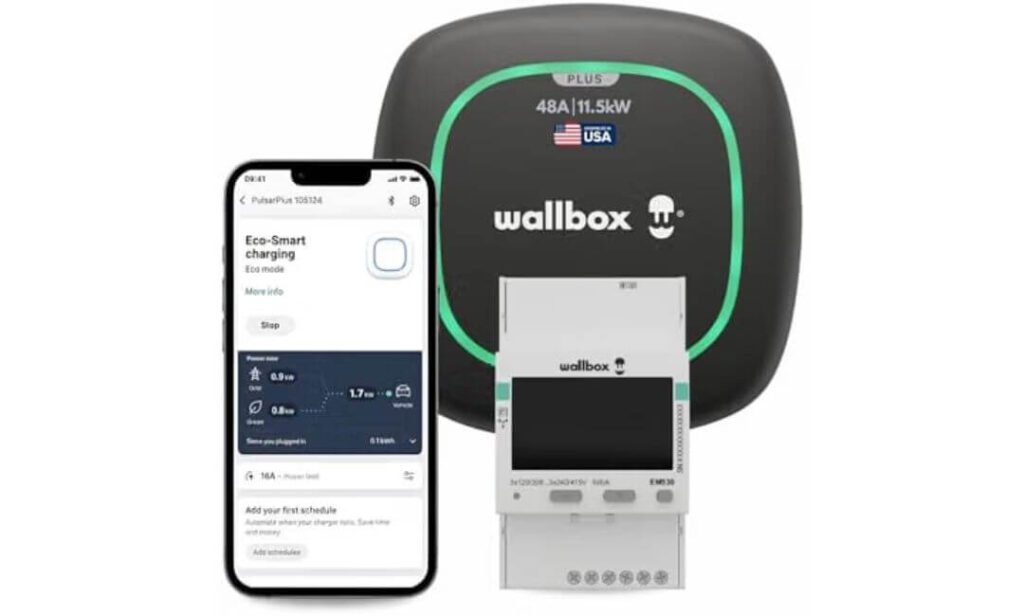
Quick Specs:
- Charging output: 48A / 11.5kW Level 2 charging
- Connector: NACS
- Power: 240V
- Connection: Hardwired installation
- Smart controls: Wi-Fi + Bluetooth
- Load management: Automatically adjusts available charging power
- Solar charging: Full-Green and Eco modes
- Best fit: Homeowners wanting smart, high-output NACS charging
If you are putting a charger on the wall for a Rivian that you expect to use for years, the interesting part here isn’t simply the 48-amp rating. It is what happens around that rating. The unit can deliver up to 11.5kW, while its dynamic load management can adjust charging power when other appliances are demanding electricity. That is a much more useful feature in a real home than another impressive number printed on a product box.
The native NACS connector is another major reason this model belongs near the top of this roundup for compatible Rivian vehicles. There is no need to turn the installation into a collection of adapters and extra pieces simply to connect the charger. For owners of newer NACS-equipped Rivians, that makes the setup considerably cleaner. Owners of earlier R1T or R1S models should still verify their vehicle’s actual charge-port configuration before ordering.
Then there is the smart side of the charger. Wi-Fi and Bluetooth let you monitor, schedule and control charging through the Wallbox app, while the solar modes give homeowners with rooftop solar another way to use excess generation. The Full-Green mode is aimed at solar-only charging, while Eco Mode can combine available solar power with the grid. That’s the kind of feature that becomes genuinely useful after the charger has been installed—not just something that looks good in a specification list.
What we like about it
- 48A / 11.5kW output gives a Rivian a strong Level 2 home-charging setup without chasing unnecessarily extreme power ratings.
- Native NACS connection makes the installation cleaner for compatible newer Rivian vehicles.
- Dynamic load management is a genuinely practical feature when your home’s electrical demand changes during charging.
- Solar charging modes make this especially interesting for homeowners already using, or planning to use, rooftop solar.
- Wi-Fi and Bluetooth control add useful scheduling and energy-monitoring options instead of leaving the charger as a simple plug-and-forget box.
One thing to know before installation
The main consideration is that this is a hardwired charger, so it is not the casual plug-in choice you can move between outlets. You’ll want a suitable 240V circuit and a qualified electrician to confirm that your home’s electrical service can support the installation. For a permanent Rivian charging setup, though, that fixed installation can also be exactly what you want.
Why this charger stands out for Rivian home charging
What makes this model particularly compelling is the balance between charging capacity and home-energy control. You get 48A/11.5kW Level 2 capability, but you also get load management, connected controls and solar-focused charging modes. In other words, it isn’t relying on charging speed alone to justify its place here.
There is also a practical distinction worth keeping in mind: the NACS connector makes this a natural match for compatible newer Rivian vehicles, while older R1T/R1S owners should verify their vehicle’s connector before buying. That small check matters more than any “universal” compatibility claim you may see in a marketplace listing.
The Insider Pro-Tip
If your Rivian is going to live at home most nights, don’t think of this as simply a 48A charger. Think about the electrical system behind it. The real advantage is being able to charge at a useful 11.5kW rate while the charger can intelligently respond to what the rest of the house is doing. That can make a much bigger difference to everyday ownership than a higher headline amperage ever would.
And if you have solar—or genuinely plan to install it—the solar modes are the feature I would pay the closest attention to. You are not buying the charger only for today’s charging session; you’re choosing the hardware that will sit between your Rivian, your home’s electrical system and potentially your solar generation for years. That makes the Wallbox’s combination of NACS connectivity, load management and energy controls particularly meaningful.
#2. Lectron Tesla NACS Level 2 EV Charger 48A 240V
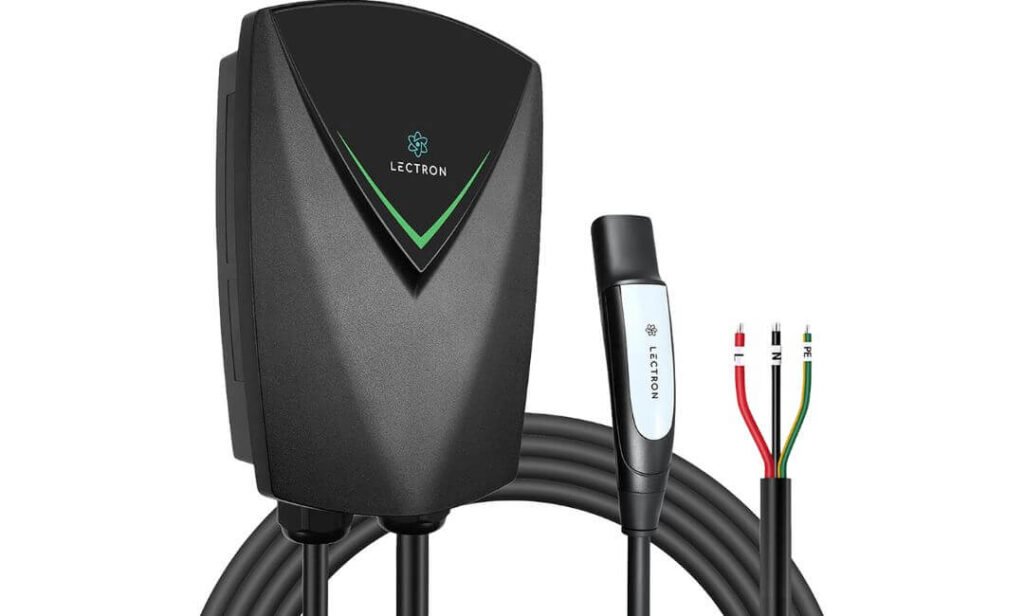
Quick Specs:
- Charging output: Up to 48A / 11.5kW
- Connector: NACS / J3400
- Power: 240V
- Installation: Hardwired only
- Cable: 23 feet
- Protection: IP66 weather resistance
- Certification: UL 2594, UL 2231, UL 2251 and ETL listed
- Safety protection: Overcurrent, overheating, voltage and ground-fault protection
- Warranty: 3 years
- Best fit: Rivian owners wanting a high-output hardwired charger with a long cable
A home charger can have a long specification sheet and still be awkward once it goes on the garage wall. This one gets the important part right first: 48A at 240V, giving it an 11.5kW Level 2 ceiling for a properly installed circuit. That is the kind of output that makes overnight charging feel routine rather than something you have to plan around.
The NACS/J3400 connector also keeps the setup clean for a compatible Rivian. There is no separate adapter sitting between the charger and vehicle, and the 23-foot cable gives you considerably more freedom when the charging point isn’t perfectly positioned beside the vehicle. For a larger R1T, that extra reach can be surprisingly useful when parking isn’t always identical.
Then there is the part I would pay close attention to if the charger will be mounted outside. The IP66 enclosure is designed for exposure to dust and water, while the ETL-listed safety certifications cover the charger and its charging components. Built-in protection against overheating, overcurrent, voltage faults and ground faults adds another layer of reassurance when you’re leaving a high-power charger connected for hours at a time.
What we like about it
- 48A / 11.5kW output gives it the charging capacity most Rivian owners looking for a permanent Level 2 setup actually want.
- 23-foot cable provides useful reach without forcing you to park in exactly the same position every night.
- IP66 weather resistance makes it suitable for installations where the charger isn’t protected by a fully enclosed garage.
- ETL-listed safety certifications give the electrical side of the product more substance than a generic “safe charging” claim.
- Three-year limited warranty adds useful ownership coverage for a charger intended to stay on the wall for years.
A practical installation detail to know
This is a hardwired-only charger, so it is not the right choice if you specifically want a NEMA 14-50 plug that can be unplugged or moved later. You will need an appropriate 240V dedicated circuit and professional electrical installation.
For a permanent home setup, though, that is not necessarily a drawback. The hardwired configuration is well suited to a charger intended to deliver 48A continuously, and it keeps the installation clean and purpose-built rather than treating the charger like a portable appliance.
Where the Lectron fits in a Rivian home-charging setup
The strongest argument for this unit is its combination of high-output charging, long reach and outdoor-ready construction. It doesn’t try to win the comparison with a huge collection of smart-home features. Instead, it concentrates on the things that matter when you plug in after a long day and expect the vehicle to charge reliably while you sleep.
That makes it particularly interesting for someone who already knows they want a permanent NACS Level 2 installation. The 23-foot cable, IP66 protection and 48A capability give it a very practical character, while the safety certifications and three-year warranty help round out the ownership proposition.
The Insider Pro-Tip
The 23-foot cable is easy to overlook when comparing chargers on a specification sheet, but cable placement can make or break a garage installation. Before your electrician mounts the unit, park the Rivian exactly where you normally leave it and check the distance from the proposed wall position to the charge port. A little planning here can prevent the daily annoyance of stretching or repositioning a heavy cable.
And because this is hardwired 48A equipment, don’t judge the installation by the charger alone. Have the electrician confirm the available electrical capacity, breaker requirements and cable run before mounting it. Once that part is done correctly, the appeal of this charger is straightforward: plug in, walk away and let the 11.5kW Level 2 system do the overnight work.
#3. IYILO Level 2 EV Charger 48A/11.5kW
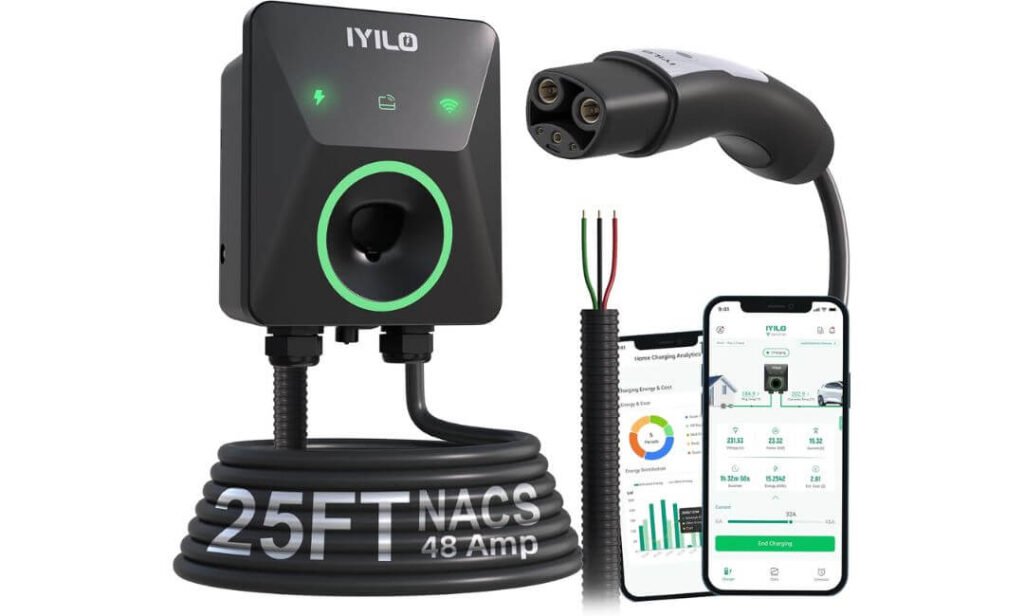
Quick Specs:
- Charging output: Up to 48A / 11.5kW
- Connector: NACS / J3400
- Power: 240V
- Current adjustment: 6A–48A in 1A increments
- Installation: Hardwired
- Cable: 25-foot heavy-duty cable
- Smart control: 2.4GHz Wi-Fi app
- Temperature protection: NTC sensor inside the NACS connector
- Power management: Power sharing and dynamic load balancing with compatible energy-meter setup
- Certifications: UL 2594, ETL, Energy Star and CSA
- Warranty: 3 years
- Best fit: Rivian owners wanting detailed charging control and built-in connector temperature monitoring
The interesting thing about this charger isn’t just that it reaches 48A and 11.5kW. It gives you unusually fine control over how that power is delivered. The current can be adjusted from 6A all the way to 48A in 1A increments, which is useful when you know your home’s electrical capacity is limited or you simply don’t need maximum output every night. That makes the charger much more adaptable than a unit that only gives you one fixed charging level.
The feature I would pay particular attention to is the temperature sensor built directly into the NACS connector. The charger continuously monitors connector temperature, and according to the manufacturer, if it reaches 221°F (105°C), the system can reduce charging power or stop charging. For a charger that may run for several hours while nobody is standing beside the vehicle, having that additional layer of monitoring is meaningful. It is not something you necessarily notice during normal charging—which is exactly how a good protection feature should feel.
The smart controls also go beyond simply starting and stopping a charge. Through the app, you can schedule charging, monitor energy consumption and costs, manage users and use RFID access, while OTA updates can keep the charger’s software current. The 25-foot cable gives it plenty of reach for larger garages, and power-sharing support adds another useful angle for households that may eventually have more than one EV.
What we like about it
- 48A / 11.5kW capability gives it the output expected from a serious home Level 2 installation.
- 1A current adjustment from 6A to 48A makes it easier to match charging power to your home’s electrical setup.
- NACS connector temperature monitoring adds a useful safety layer directly where the vehicle and charger meet.
- 25-foot cable gives generous reach without requiring the vehicle to be positioned right beside the wall unit.
- Power sharing and load-management capability make it more interesting for multi-EV households than a basic single-purpose charger.
One installation detail worth knowing
This is a hardwired charger, and its maximum 48A output requires an appropriately sized electrical circuit and professional installation. The manufacturer specifies a 60A breaker for full-power operation, so your electrician should confirm the home’s panel capacity, wiring and local requirements before installation.
The adjustable current is useful here because you don’t necessarily have to operate the charger at its maximum setting every time. If your electrical setup calls for a lower charging current, the ability to make small 1A adjustments gives you considerably more control than simply choosing between two or three preset levels.
Why the IYILO fits a Rivian-focused charging setup
For this roundup, the appeal of the IYILO is really about control and monitoring. The 48A/11.5kW output puts it firmly in the high-output Level 2 category, but the adjustable current, connector temperature monitoring, app controls and power-sharing capability give it a more hands-on character.
It is also a useful choice for someone thinking beyond today’s single vehicle. Power sharing can help households with multiple EVs manage available electrical capacity, while the energy-monitoring tools can make it easier to understand exactly when and how much electricity the vehicle is consuming. Just remember that features such as dynamic load balancing depend on the compatible energy-meter configuration.
The Insider Pro-Tip
If you are the kind of owner who wants to know what the charger is doing rather than simply assume it is working, this is where the IYILO becomes interesting. The ability to see charging information in the app and monitor connector temperature gives you a level of visibility that a basic wall charger simply does not provide.
I would also take advantage of the adjustable current rather than automatically leaving it at 48A. If your Rivian sits at home overnight for eight or ten hours, you may not need maximum output every evening. Set the charging level around your actual routine and electrical capacity, and let the charger work steadily in the background. That is a much smarter way to use a high-output home charger than chasing the biggest number every time.
#4. Primecom NACS EV Charger Mobile Connector 40A
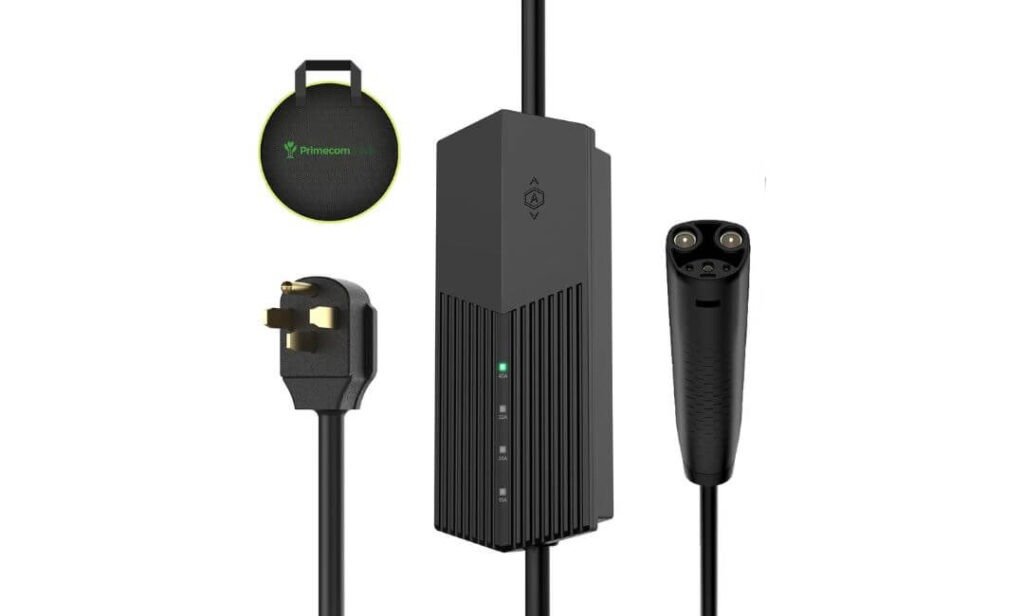
Quick Specs:
- Charging output: Up to 40A / 9.6kW
- Connector: NACS
- Input: 240V AC
- Connection: Plug-in
- Outlet options: 14-50P, 10-50P and 6-50P
- Cable options: 30, 40 or 50 feet
- Charging indicators: 15A, 23A, 32A and 40A
- Portability: Carrying bag included
- Mounting: Built-in wall-hanging points
- Best fit: Rivian owners who want home charging without committing to a hardwired installation
Not every Rivian owner needs a charger permanently bolted to the wall. Sometimes the better setup is simply the one you can plug in when you need it, unplug when you don’t, and take with you when life changes. That is exactly where this Primecom unit takes a different approach from the first three chargers in our list.
Its 40A output at 240V works out to 9.6kW, which is plenty of charging power for an overnight routine. You also get selectable charging levels of 15A, 23A, 32A and 40A, so you aren’t forced to run maximum current every time. That flexibility is useful when you’re sharing an electrical circuit or using different outlets at different locations.
The real headline here, however, is the cable choice. You can select 30, 40 or 50 feet, and that last option can completely change where you are able to park relative to the outlet. Add the carrying bag, wall-hanging points and plug-in design, and this becomes less like a conventional fixed wall charger and more like a serious home-and-travel charging tool.
What we like about it
- 40A / 9.6kW output is more than capable of supporting a regular overnight charging routine.
- 30-, 40- and 50-foot cable choices give you unusual freedom when the outlet and vehicle cannot sit close together.
- Plug-in installation avoids the commitment and labour involved with a permanent hardwired setup.
- Multiple outlet options provide flexibility when the appropriate 240V receptacle is already available.
- Portable design with carrying bag makes sense for owners who split time between properties or want charging equipment they can take along.
The practical advantage over a fixed charger
The biggest difference here is not charging speed—it is freedom of placement. A hardwired 48A charger has to live where the electrician installs it. This one can move with you, provided you have a suitable outlet at the destination.
That makes the 50-foot version particularly interesting for unusual garage layouts, detached garages or situations where the electrical outlet is simply nowhere near where the Rivian naturally parks. The built-in wall-hanging points also mean you can still keep it looking tidy at home rather than treating a portable charger like something that has to stay on the floor.
Why the Primecom makes sense for flexible Rivian charging
This is the charger to consider when portability matters as much as permanent installation. You give up some maximum output compared with the 48A/11.5kW options above, but you gain something those chargers cannot easily provide: the ability to take the charging setup with you.
The 40A/9.6kW output remains substantial for overnight home charging, while the selectable current levels let you adapt the charger to the outlet and situation. For an owner who rents, moves between homes, travels frequently or simply doesn’t want an electrician involved, that trade-off can be entirely reasonable.
The Insider Pro-Tip
Before choosing the 50-foot cable just because it sounds useful, measure your actual parking route. A longer cable is valuable when you genuinely need the reach, but it also means more cable to manage and store. If 30 feet comfortably reaches your Rivian’s charge port, there is little reason to carry another 20 feet around every day.
The bigger advantage is the plug-in design. If your home already has a properly installed compatible 240V receptacle, you can avoid turning a simple charging requirement into a permanent electrical project. Just make sure the outlet, circuit and receptacle are properly rated for the charging current you intend to use. That is where this charger earns its place: less commitment, plenty of power and exceptional cable flexibility.
#5. Taranasa Level 2 EV Charger 40A 240V with NACS Connector
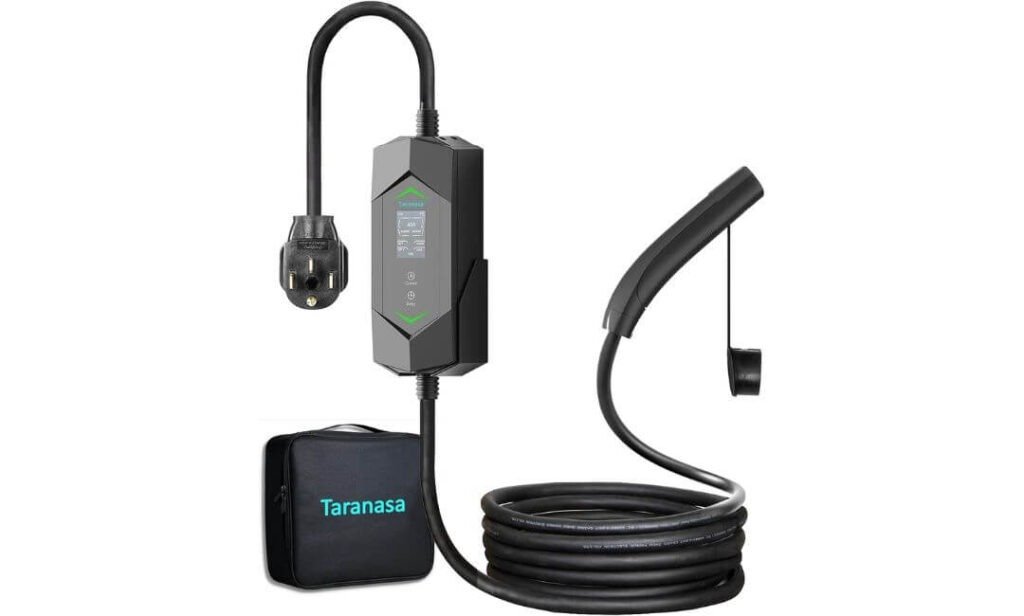
Quick Specs:
- Charging output: Up to 40A / 9.6kW
- Connector: NACS / J3400
- Power: 240V
- Current adjustment: 8A–40A
- Connection: NEMA 14-50 plug
- Cable: 20 feet
- Display: 2.4-inch LCD screen
- Weather rating: IP65
- Operating temperature: -22°F to 122°F
- Certifications: ETL, UL, FCC and RoHS
- Best fit: Rivian owners wanting a portable plug-in charger with simple on-device controls
Sometimes a home EV charger does not need to be complicated. If your goal is to park the Rivian, plug it in and see exactly what is happening without opening an app, this Taranasa takes a refreshingly straightforward approach. It delivers up to 40A at 240V, or 9.6kW, while letting you adjust the current anywhere from 8A to 40A directly from the charger.
The 2.4-inch LCD screen is probably the feature you notice most in daily use. Instead of relying entirely on a phone application, you can see charging information and adjust the current right on the unit. That can be particularly handy when different vehicles or electrical situations call for different charging levels.
It is also much less permanent than the hardwired chargers higher on this list. The NEMA 14-50 plug and 20-foot cable make it a practical choice for a garage that already has the appropriate outlet, while the IP65 rating and operating range of -22°F to 122°F give it the flexibility to handle indoor or outdoor charging in a wide range of conditions.
What we like about it
- 40A / 9.6kW charging provides plenty of output for a normal overnight Rivian charging routine.
- 8A–40A adjustment gives you control when maximum current isn’t necessary or your electrical setup calls for less.
- 2.4-inch LCD display keeps important charging information visible without depending on an app.
- NEMA 14-50 plug and 20-foot cable make it easier to install and reposition than a hardwired unit.
- IP65 weather resistance gives it useful protection for garage or suitable outdoor installations.
Why this plug-in charger is worth considering for a Rivian
The biggest appeal here is simplicity without giving up useful charging power. At 40A/9.6kW, it sits below the 48A chargers in this roundup, but that difference may not matter much to an owner who charges overnight and has the vehicle sitting at home for several hours.
The plug-in format also changes the installation equation. Instead of committing to a hardwired charger, you can use a properly installed NEMA 14-50 outlet and keep the charger portable. That makes it particularly practical for owners who may move homes, share charging equipment between locations or simply prefer not to make the wall unit a permanent part of the electrical installation.
The Insider Pro-Tip
Don’t overlook the adjustable 8A–40A range. If your Rivian spends most nights in the garage, there is no prize for running maximum current every single time. Choose the highest level that makes sense for your circuit and charging schedule, then let the vehicle charge while you sleep.
And before buying, check one simple thing: you need a properly rated NEMA 14-50 outlet, not merely a socket that happens to look the same. Have the receptacle and circuit checked if you’re unsure. Once that foundation is right, this charger offers a very straightforward ownership experience—plug in, check the screen, set the current and leave the Rivian to charge.
Best Rivian Home Charger Comparison for Smart Charging
| Home Charger | Rivian Charging Output | Connector & Setup | Cable Reach | Smart & Energy Controls | Protection & Certification | Best Real-World Fit |
|---|---|---|---|---|---|---|
| Wallbox Pulsar Plus 48A with NACS Smart-home focused |
48A / 11.5kW 240V Level 2 High-output permanent charging |
NACS / J3400 Hardwired Designed for a permanent installation |
24 ft Practical reach for most garage layouts |
Wi-Fi
Bluetooth
Load Management
Solar Modes
Full-Green and Eco charging options |
Smart electrical control Designed to adjust charging demand as household loads change |
For owners who want more than charging speed. Particularly compelling when smart controls or solar integration matter. |
| Lectron NEXUS 48A NACS Level 2 EV Charger High-output hardwired |
48A / 11.5kW 240V Level 2 Built for continuous high-power home charging |
NACS / J3400 Hardwired only Professional installation required |
23 ft Useful reach for larger parking positions |
Simple Charging
Cable Holster
Focuses more on core charging than app-based energy management |
IP66 UL 2594 / UL 2231 / UL 2251 ETL listed with built-in electrical protection |
For owners prioritising robust hardware. A strong match when 48A output, weather resistance and cable reach matter most. |
| IYILO Level 2 EV Charger 48A/11.5kW Control-heavy option |
48A / 11.5kW 240V Level 2 Current adjustable from 6A–48A |
NACS / J3400 Hardwired 60A breaker specified for maximum output |
25 ft Generous reach for larger garages |
2.4GHz Wi-Fi
Scheduling
RFID
Power Sharing
Energy tracking and cost monitoring through the app |
NTC connector sensor UL 2594 / ETL / Energy Star / CSA Can reduce or stop charging if connector temperature rises excessively |
For owners who want granular control. Especially useful when charging behaviour, electrical capacity and energy costs need closer management. |
| Primecom NACS EV Charger Mobile Connector 40A Portable charging |
40A / 9.6kW 240V Level 2 Selectable 15A / 23A / 32A / 40A |
NACS Plug-in 14-50P, 10-50P or 6-50P options |
30 / 40 / 50 ft Exceptional flexibility for difficult outlet locations |
LED Indicators
Portable
Wall Hanger
No app required for basic charging control |
Portable hardware Designed around flexible plug-in use rather than permanent installation |
For owners who value flexibility. The standout choice when moving the charger between locations or needing exceptional cable reach. |
| Taranasa Level 2 EV Charger 40A 240V Simple plug-in setup |
40A / 9.6kW 240V Level 2 Adjustable from 8A–40A |
NACS / J3400 NEMA 14-50 plug Portable wall-mounted design |
20 ft Suitable for most conventional garage layouts |
2.4″ LCD
Current Adjustment
Simple Controls
Charging information available directly on the unit |
IP65 ETL / UL / FCC / RoHS Rated for indoor or suitable outdoor use |
For owners who prefer simplicity. A practical option when an appropriate NEMA 14-50 outlet is already available. |
Buying Guide: How to Choose a Home Charger That Actually Fits Your Rivian
Buying a home EV charger for a Rivian is less about finding the biggest number on the product page and more about making the charger, vehicle and home’s electrical system work together properly. A charger can advertise 48A and 11.5kW, but that does not automatically mean your vehicle will receive that exact output in every situation.
The first thing to establish is your Rivian’s model year and physical charge port. Rivian has used different charging connectors across its R1 lineup, so the phrase “Rivian-compatible” is not enough by itself. For a newer NACS-equipped vehicle, a native NACS/J3400 charger gives you the cleanest connection. If you have an earlier R1T or R1S with a different charge port, check the vehicle requirements before ordering a NACS-only unit.
Start With the Connector, Not the Amperage
For this particular type of charger, NACS/J3400 compatibility is the first filter.
A native NACS charger connects directly to a compatible Rivian without adding an adapter between the EVSE and vehicle. That can mean a cleaner installation and one less component to keep track of every night.
Before purchasing, check:
- Your Rivian’s actual charge-port type
- Whether the charger specifically supports NACS/J3400
- Whether the manufacturer lists compatibility with your vehicle generation
- Whether any adapter is required
- Whether the connector is intended for indoor, outdoor or both types of installation
Do not rely solely on a marketplace title saying “works with Rivian.” Connector compatibility should be confirmed from the vehicle and manufacturer’s specifications, particularly when you’re buying for a newer model.
48A Is Useful, But 11.5kW Is the Number to Understand
A 48A Level 2 charger at 240V can provide up to approximately 11.5kW under the appropriate electrical conditions. That is why 48A appears frequently in premium home-charging equipment.
But there is an important distinction between the charger’s maximum capability and what your Rivian will actually receive.
Think of it this way:
| Charger rating | Approx. maximum AC output at 240V | What it means |
|---|---|---|
| 32A | 7.7kW | Moderate Level 2 charging |
| 40A | 9.6kW | Strong overnight home charging |
| 48A | 11.5kW | Higher-output Level 2 charging |
A 40A charger is not automatically a poor choice. If your Rivian sits at home overnight, 9.6kW can be more than sufficient for many daily driving routines. The reason to step up to 48A is mainly to gain more charging capacity when your vehicle and electrical installation can actually make use of it.
The important point is simple: buy for your charging routine, not just the largest number on the box.
Check the 240V Electrical Supply Before You Buy
A Level 2 home charger is only as good as the electrical circuit feeding it.
The products in this roundup range from 40A plug-in equipment to 48A hardwired units, and those are not interchangeable installation requirements. A 48A continuous charging load generally requires a properly sized dedicated circuit and suitable electrical equipment.
Before installation, have a qualified electrician verify:
- Available capacity in the home’s electrical service
- Required breaker size
- Appropriate wire size and installation method
- Whether the existing panel can support the additional load
- Receptacle condition and rating for plug-in equipment
- Local electrical-code requirements
- Cable routing and charger mounting location
This is also where adjustable-current charging becomes useful. A unit capable of changing its output can be set below maximum when the home’s electrical setup or charging routine does not call for full power.
Never increase the charging current simply because the charger allows it. The circuit and installation need to be designed for the selected continuous load.
Decide Between Hardwired and Plug-In Charging
This is one of the biggest practical differences between the chargers we reviewed.
Hardwired charging makes sense when you want a permanent installation and are comfortable having an electrician install a dedicated circuit directly to the EVSE. The 48A models in this list follow that approach.
A NEMA 14-50 plug-in charger gives you more flexibility if a properly installed receptacle already exists or you want equipment that can be disconnected later.
| Installation | Best suited to | Main advantage | What to consider |
|---|---|---|---|
| Hardwired | Permanent home charging | Clean, dedicated installation | Requires electrical installation |
| NEMA 14-50 | Flexible home setup | Easy to disconnect or replace | Requires correctly rated receptacle and circuit |
| Portable plug-in | Multiple locations | Can travel with the vehicle | Outlet availability varies by location |
There is no universal winner here. If your Rivian has a dedicated parking space and you intend to charge there for years, permanent installation can make practical sense. If you rent, move between properties or already have a suitable outlet, portability becomes much more valuable.
Cable Length Matters More Than It Looks
A charger can have excellent electrical specifications and still be frustrating if the cable barely reaches the vehicle.
For a normal garage, 20–25 feet is often a useful range, while longer options can be valuable when the outlet is positioned farther away. One of the chargers in this roundup even offers 30-, 40- and 50-foot cable choices, which creates a very different ownership experience from a fixed short cable.
Before buying, measure:
- The distance from the proposed charger location to the Rivian’s charge port.
- The route the cable will actually take around the vehicle.
- Where the connector will rest when charging is finished.
- Whether the cable needs to reach the vehicle from either side of the parking space.
Do not measure in a straight line from wall to car. Measure the real cable path, including the height of the charger and the position where the vehicle normally parks.
Smart Features Should Solve a Real Problem
Wi-Fi, apps and energy dashboards can be useful, but they should not be the reason you choose a charger by themselves.
For a Rivian owner, useful smart functions include:
- Charging schedules, particularly when electricity rates vary by time.
- Energy monitoring, so you can see how much electricity each session consumes.
- Cost tracking, where supported.
- Remote start and stop controls.
- Current adjustment, when the electrical setup requires something below maximum output.
- Load management, particularly in homes with several large electrical loads.
- Power sharing, if more than one EV may eventually use the same electrical circuit.
The Wallbox and IYILO options in this comparison take the smart-home approach more seriously, while the simpler plug-in choices concentrate on straightforward charging. Neither approach is inherently wrong. The better match depends on whether you actually want to manage charging from a phone or simply plug in and walk away.
Look Closely at Load Management for a Busy Home
This is an underrated feature when installing a powerful EV charger.
Your Rivian may not be the only thing drawing electricity at night. An electric dryer, HVAC system, water heater, oven or another EV can all increase household demand.
Dynamic load management can help a compatible charging system adjust its power according to available electrical capacity. That can be particularly useful when upgrading the home’s electrical service is expensive or inconvenient.
Power-sharing systems can also be valuable for households with multiple EVs, but don’t assume that two chargers can simply be connected to one circuit at their maximum output. The specific charger’s power-sharing architecture and the home’s electrical design determine what is actually possible.
Weather Protection Matters for Outdoor Installation
If the charger will be installed outside, look beyond the word “weatherproof.”
An IP rating provides useful information about protection against dust and water. The Lectron option, for example, carries an IP66 rating, while the Taranasa unit is listed as IP65.
You should also consider:
- Temperature range
- Cable flexibility
- Connector storage
- Exposure to direct rain and sunlight
- Wall-mounting location
- Protection from accidental vehicle contact
- Local installation requirements
A charger designed for outdoor use still needs to be installed correctly. The enclosure rating does not make an improperly installed electrical circuit safe.
Safety Certifications Deserve More Attention Than Marketing Claims
For a high-power device that can operate for hours at a time, certification information is worth checking before purchase.
Look for clearly stated certifications and testing information, such as UL, ETL, Energy Star or CSA, where applicable. Also look for practical protection features including:
- Overcurrent protection
- Ground-fault protection
- Overvoltage or voltage-fault protection
- Over-temperature protection
- Connector temperature monitoring, where provided
The IYILO’s NTC temperature sensor inside the NACS connector is an example of a feature that goes beyond simply saying “temperature protection.” It monitors the connector itself and can reduce or stop charging if the specified temperature threshold is reached.
That is the type of technical detail worth paying attention to because it tells you how a protection feature actually works, rather than simply listing it as a marketing phrase.
Don’t Ignore Cable Management
A 20- or 25-foot cable is useful only if you have somewhere sensible to put it.
Look for:
- A dedicated connector holster
- Wall-hanging points
- A cable-management system
- A mounting position that keeps the connector away from the ground
- Enough clearance to avoid sharp bends
This sounds minor until you are handling a heavy charging cable every night. Good cable management keeps the connector cleaner, reduces unnecessary strain and makes the whole installation feel much more finished.
Match the Charger to Your Actual Rivian Routine
Before choosing, ask yourself a few practical questions:
Do you drive heavily every day?
A higher-output 48A/11.5kW unit gives you more charging capacity when the vehicle supports it.
Does the Rivian stay home overnight?
A 40A/9.6kW charger may already provide plenty of time to replenish the energy used during a normal day.
Do you already have a suitable 240V outlet?
A plug-in option can be considerably simpler than starting a new hardwired installation.
Do you have solar?
Solar-aware charging and energy-management features become much more relevant.
Could you own two EVs?
Power sharing or load management may be worth prioritising.
Is the charger going outdoors?
Pay closer attention to IP rating, temperature range, cable durability and installation location.
Do you move or travel frequently?
A portable NACS charger with a suitable plug configuration may make more sense than a permanently mounted unit.
The Buying Decision Comes Down to Compatibility First
There is a natural temptation to compare chargers by 48A versus 40A, but that should come later.
The sensible order is:
1. Confirm the Rivian’s connector → 2. Check the vehicle’s charging capability → 3. Verify your home’s electrical capacity → 4. Choose hardwired or plug-in → 5. Compare cable reach → 6. Consider smart features → 7. Check safety certifications and warranty.
Once those basics line up, the smaller differences between chargers become much easier to judge.
For this roundup, that is why the products are not all built around the same idea. Some concentrate on 48A/11.5kW output, some put more emphasis on smart energy management, and others make portability and cable reach the priority. The right choice is ultimately the one whose connector, electrical requirements and daily charging behaviour match your particular Rivian and home.
Smart Charging and Energy Management for Rivian at Home
A good home charger does more than move electricity into the battery. Once you are charging a Rivian regularly, when the vehicle charges and how the charger manages household electricity can matter just as much as its maximum amperage. Smart charging is especially useful when electricity prices change during the day, your home has several large electrical loads, or you simply want charging to happen automatically while you sleep.
The important point is that “smart” should mean something practical. A charger with an app is not automatically better. For a Rivian owner, the useful features are the ones that help you schedule charging, control current, monitor energy use and prevent unnecessary electrical demand.
Time-of-Use Scheduling Can Make Overnight Charging More Practical
If your utility uses time-of-use pricing, electricity can cost less during certain hours, often overnight. Instead of starting a charging session as soon as you plug the Rivian in, a smart charger can wait until your preferred charging window.
For example, you might arrive home at 7 PM, connect the vehicle, and schedule charging to begin later in the evening. The charger can then do the work while you are sleeping rather than immediately adding a large electrical load to the house.
This is particularly useful with a Rivian electric SUV charger because an R1S may sit unused for many hours overnight. There is usually little practical reason to begin charging the moment you arrive if a cheaper electricity period starts later.
A useful schedule should let you control:
- Start and stop times
- Charging days
- Current limits, where supported
- Charging history
- Energy consumed during individual sessions
- Electricity cost information, where the app supports utility-rate settings
The important part is to set the schedule around your actual utility rate structure, not simply assume that “nighttime” is always cheaper.
App Control Is Useful When It Gives You Information You Can Act On
An app becomes worthwhile when it gives you visibility that you would otherwise have to guess.
Depending on the charger, you may be able to see:
- Current charging amperage
- Charging energy in kWh
- Charging duration
- Estimated electricity cost
- Charging history
- Vehicle charging status
- Scheduled charging sessions
- Remote start or stop controls
The Wallbox and IYILO models in this comparison are particularly relevant for owners who want this type of control. Wallbox adds Wi-Fi and Bluetooth connectivity, while IYILO provides app-based scheduling and energy information.
There is also a good reason not to become obsessed with the app. If you normally plug in every evening and charge automatically overnight, you may rarely need to open it. The best smart feature is often the one you configure once and then barely think about again.
Load Management Is More Important Than Chasing Maximum Amperage
This is where smart charging becomes a genuine home-energy feature rather than a convenience feature.
Imagine your Rivian is charging at night while the home is also running an electric water heater, HVAC system, dryer and other high-demand appliances. A charger operating at its maximum available current can add a significant load to the electrical system.
A compatible load-management system can monitor available capacity and adjust charging demand rather than simply continuing at the highest possible rate.
That matters because you don’t necessarily need maximum charging power every night.
If your Rivian is parked for eight hours, charging at a slightly lower current may still replenish everything you need before morning. In that situation, deliberately reducing the charging load can be more sensible than forcing the electrical system to operate at its limit.
How to Get Fast Rivian Home Charging Without Overloading the Circuit
Fast home charging starts with the electrical installation, not the charger settings.
A 48A Level 2 charger can provide up to 11.5kW at 240V, but the circuit, breaker, wiring, EVSE and vehicle all have to support the intended operating level.
For a safe installation:
- Have the electrical panel evaluated before choosing maximum charging current.
- Use a properly sized dedicated circuit for the charger.
- Have a qualified electrician confirm the breaker and conductor requirements.
- Follow the charger’s installation instructions rather than selecting a breaker based only on the advertised amperage.
- Use load management if the home has limited available electrical capacity.
- Reduce the charging current when the installation requires it rather than repeatedly pushing the circuit to its limit.
- Keep the charger and connector properly installed, mounted and protected.
The IYILO is a useful example of why adjustable current can be valuable. Its output can be adjusted from 6A to 48A in 1A increments, allowing the charging load to be matched more precisely to the electrical setup.
The important distinction is this: fast charging does not mean maximum amperage at all times. It means getting the charging performance you need while keeping the electrical system within its designed limits.
Power Sharing Makes Sense for Homes With More Than One EV
A second EV changes the charging equation.
If a household eventually has two electric vehicles, installing two chargers that both attempt to draw maximum current from the same limited electrical supply can create an unnecessary problem.
Some smart charging systems support power sharing, allowing available electrical capacity to be divided between chargers. IYILO, for example, lists power-sharing capability, while dynamic load balancing can be used with its compatible energy-meter setup.
That can be useful for a household with a Rivian R1T or R1S plus another EV. Instead of demanding maximum output from both vehicles simultaneously, the charging system can manage available power according to the setup.
For most families, the goal isn’t to have two vehicles charging at full speed at exactly the same moment. The goal is to have both vehicles ready when they are needed.
Solar Charging Changes the Equation Again
If your home has solar panels, smart charging can become considerably more interesting.
A charger with solar-management features can potentially use available solar generation for vehicle charging rather than automatically relying entirely on grid electricity.
The Wallbox Pulsar Plus is particularly notable here because it offers:
- Full-Green mode, designed around using available solar energy.
- Eco mode, which can combine solar and grid electricity.
- Energy-management features through its connected system.
The actual financial benefit depends on your solar production, utility rates, net-metering or export arrangement and when the Rivian is plugged in. So it would be misleading to promise that solar charging will automatically reduce everyone’s bill.
The practical advantage is simpler: if your home is producing useful electricity and the vehicle is sitting there ready to charge, intelligent energy management gives you more control over where that electricity goes.
Keep the Rivian R1T and R1S Charging Profile in Mind
The charger is only one side of the system. Your Rivian R1T or R1S also determines how much AC power the vehicle can actually accept.
That means a charger capable of 48A does not force the Rivian to consume 48A. The vehicle manages its own charging behaviour within the limits of the vehicle, charger and electrical installation.
This is why it is important to check:
- Your exact Rivian model and model year
- The vehicle’s physical charge-port type
- The vehicle’s AC charging capability
- Whether the charger uses the correct NACS/J3400 connection
- Your home’s available electrical capacity
- The charger’s configured current
- Any adapter requirements for your particular vehicle
Do not assume that a charger marketed for one Rivian generation automatically applies to another. Connector compatibility and charging capability should be verified for the actual vehicle sitting in your driveway.
The Smart Setup We Would Look For
For a Rivian that charges at home every night, the most useful combination is fairly straightforward:
Native NACS/J3400 compatibility
A direct connection for a compatible NACS-equipped Rivian keeps the setup simple.
11.5kW-class Level 2 capability
A 48A charger gives useful headroom when the vehicle and electrical installation support it.
Adjustable current
This lets you choose an appropriate charging level instead of treating maximum output as the only option.
Time-of-use scheduling
Useful when your utility offers cheaper electricity during specific periods.
Load management
Helpful when the home has limited electrical capacity or several large appliances.
Energy monitoring
Useful for understanding how much the Rivian actually costs to charge.
Reliable protection
Overcurrent, ground-fault and temperature protection are far more important than another flashy app feature.
One Final Reality Check Before Turning Everything Up
If you want the fastest practical Rivian home charging, don’t start by changing the charger to its maximum current. Start with the electrical system.
A properly installed 48A/11.5kW Level 2 charger, matched to the Rivian’s charging capability and supported by an appropriately designed circuit, can provide excellent overnight charging. Smart scheduling and load management then allow you to use that capability intelligently rather than simply running maximum electrical demand whenever the vehicle is plugged in.
That is ultimately what smart charging should accomplish: the Rivian is ready when you need it, the home isn’t unnecessarily stressed while it charges, and you have control over when and how the electricity is used.
Installation Tips and Compatibility Details to Get Rivian Home Charging Right
A good charger can still become a bad home-charging setup if the electrical installation is treated as an afterthought. With a 240V Level 2 charger, the important question is not simply whether the charger says 40A or 48A. You need to know whether the home’s electrical service, branch circuit, protection, mounting location and charging equipment are all appropriate for the intended load.
This is also where a little planning saves money. Decide where the Rivian normally parks, where the charger should sit, how the cable will reach the charge port, and whether you want a permanent hardwired installation or a plug-in setup before the electrician starts running wire.
Check the Electrical Panel Before Buying the Charger
A 48A charger can require substantially more electrical capacity than an ordinary household outlet. At 240V, 48A represents about 11.5kW of charging power, so the installation needs to be designed around a substantial continuous electrical load.
Have a qualified electrician evaluate:
- The home’s main service capacity
- Available space in the electrical panel
- Existing household loads
- Required breaker size
- Conductor size and wiring method
- Distance between the panel and charger
- Whether the installation needs an electrical-service upgrade
- Local electrical-code requirements
Do not look at an empty breaker position and assume the panel automatically has enough capacity. An available slot tells you where a breaker could potentially go; it does not tell you whether the service can safely support another large continuous load.
48A and 11.5kW Are Installation Numbers, Not Just Marketing Numbers
The relationship is straightforward:
240V × 48A ≈ 11.5kW
But continuous EV charging is different from briefly running a household appliance. The circuit needs to be designed for the charger’s intended continuous load according to applicable electrical requirements.
That is why the electrician should determine the appropriate breaker, conductors and protective equipment based on the specific charger installation instructions and local code.
For example, if you choose a 48A hardwired charger, don’t simply tell an electrician, “I need a 60A breaker,” and assume the job is finished. The complete installation needs to be evaluated, including the panel, wiring distance, conductor requirements, equipment rating and local rules.
Hardwired and NEMA 14-50 Installations Are Different
The chargers in this roundup fall into two broad installation styles.
Hardwired models connect directly to the dedicated electrical circuit. This approach suits a permanent charging location and is used by the 48A models featured here.
NEMA 14-50 plug-in models connect through a properly installed receptacle. This provides more flexibility if you want the charger to be removable later.
The important thing is not to confuse a standard-looking receptacle with a properly designed EV-charging circuit. A high-current EV charger should be connected to equipment that is specifically suitable for the intended continuous load.
If you are installing a new NEMA 14-50 receptacle, have the electrician select the appropriate receptacle, wiring and protective equipment rather than treating it like an ordinary household outlet.
Cable Length Should Match the Actual Parking Position
Cable length is one of those things that looks minor until the charger is installed.
A 20-foot cable may be perfect for a compact garage where the electrical connection is beside the vehicle. A 23- or 25-foot cable gives more freedom when the charger is mounted farther along the wall. The Primecom’s 30-, 40- and 50-foot options are useful when the outlet or charger location is unusually far from where the Rivian parks.
Before choosing the length, actually measure the route:
- Mark where the Rivian normally parks.
- Mark where the charger would ideally be mounted.
- Measure the cable path between those points.
- Allow enough length to reach the charge port without stretching.
- Check where the cable will hang when the vehicle is unplugged.
- Make sure the cable will not cross a walking path or vehicle tyre route.
The goal is not simply to buy the longest cable available. The right length is the one that reaches comfortably while remaining easy to store.
Keep the Connector Off the Ground
The charging connector deserves its own storage point.
A wall-mounted holster or dedicated connector holder keeps the NACS handle away from:
- Garage floors
- Standing water
- Dirt and grit
- Vehicle tyres
- Areas where someone could step on the cable
This becomes even more important with longer cables. A 40- or 50-foot cable can be extremely useful, but it also creates more cable to manage when charging is finished.
If the charger includes a holder, install it somewhere that allows the cable to hang naturally rather than creating a tight bend at the connector.
Outdoor and Patio Installations Need More Than an “IP” Rating
Some of the chargers in this roundup are designed for indoor and outdoor use, with ratings such as IP65 or IP66.
That is useful information, but an IP rating does not mean you can install the charger anywhere without considering its surroundings.
For an outdoor Rivian home charging station, think about:
- Direct rain exposure
- Drainage and standing water
- Sunlight and heat
- Snow or ice accumulation
- Physical impact
- Cable routing
- Connector storage
- Mounting surface
- Local electrical requirements
A sheltered wall is generally easier to manage than a completely exposed location. If the charger is installed on a patio or exterior wall, the electrician should determine the appropriate mounting and electrical protection for that environment.
GFCI and Ground-Fault Protection Matter
EV charging involves a substantial electrical load for an extended period, so ground-fault protection is an important part of the installation.
The exact protection method depends on the charger, circuit design and applicable electrical code. Some EVSE equipment incorporates its own ground-fault protection, while the installation may have additional requirements.
Do not add or remove protective devices based on a generic online recommendation. Follow the charger’s installation documentation and local electrical requirements, and have the electrician confirm what protection is required for the particular installation.
Handle the NACS Connector Like Charging Equipment, Not a Regular Plug
The NACS connector may look simple, but it is the part that repeatedly connects and disconnects the vehicle from a high-power charging system.
A few habits are worth keeping:
- Keep the connector clean and dry.
- Do not drag the connector along the ground.
- Avoid dropping the handle.
- Do not force the connector into the vehicle.
- Keep the cable away from sharp edges.
- Do not use a visibly damaged connector or cable.
- Store the handle in its holder when charging is finished.
If you notice unusual heating, repeated charging interruptions, visible damage or a connector that does not seat correctly, stop using the equipment and have it inspected rather than continuing to charge and hoping the problem disappears.
The IYILO’s connector temperature monitoring is an interesting example of additional protection because it specifically monitors temperature at the NACS connection rather than relying only on general charger monitoring.
Don’t Hide the Charger Behind the Vehicle
Mounting position matters for everyday convenience.
A good installation should allow you to:
- Reach the Rivian’s charge port without stretching the cable.
- See the charger status easily.
- Remove and replace the connector comfortably.
- Store the cable without creating loops across the floor.
- Access the equipment for maintenance if necessary.
Mounting the charger too close to the floor can make cable management awkward. Mounting it too high can make the connector unnecessarily difficult to handle.
The manufacturer’s mounting instructions should take priority over a generic “ideal height” found online.
Warranty Is Only Useful If You Keep the Installation Documented
The chargers in this comparison offer different warranty coverage, including three-year coverage on several of the models.
Keep the following after installation:
- Purchase receipt
- Charger model and serial information
- Installation documentation
- Electrical inspection records, where applicable
- Photos of the completed installation
- Warranty registration confirmation, if required
This may seem excessive for a wall charger, but it gives you a clean record if you ever need technical support or warranty service.
Also check what the warranty actually covers. A manufacturer’s warranty on the charger does not necessarily mean it covers electrical installation costs, electrician labour or damage caused by an improperly installed circuit.
What to Confirm With Your Electrician
Before the installation is considered finished, it is worth asking the electrician to confirm:
| Installation point | What you want confirmed |
|---|---|
| Electrical service | Enough capacity for the additional EV load |
| Circuit | Dedicated and appropriately designed for the charger |
| Breaker | Correct rating for the selected charging current and installation |
| Wiring | Correct conductor type, size and installation method |
| Charger | Mounted according to manufacturer instructions |
| Receptacle | Properly rated if using a plug-in model |
| Protection | Required ground-fault and other protective measures |
| Cable | Safely routed without sharp bends or trip hazards |
| Outdoor setup | Suitable for the mounting environment |
| Testing | Charger and circuit operate correctly after installation |
A Final Compatibility Check Before You Switch It On
Before the first charging session, verify three things together: the Rivian’s connector, the charger’s connector and the home’s electrical configuration.
A NACS/J3400 charger is a natural choice for a compatible NACS-equipped Rivian, but the charger should never be selected solely because an online listing uses the word “Rivian.” Check the actual vehicle configuration and manufacturer’s compatibility information.
Then confirm that the charger has been installed for the intended current. If you are using a 48A unit, make sure the electrical installation was specifically designed for that operating level. If you are using a 40A plug-in charger, confirm that the receptacle and circuit are appropriate for continuous EV charging.
The safest Rivian charging setup is not necessarily the one with the highest amperage. It is the one where the vehicle, charger, circuit, protection and installation are all correctly matched. Once those pieces are right, the charger can quietly do its job every night without becoming another thing you have to worry about.
FAQs About Rivian Home Charger
Can a Rivian R1T or R1S actually make full use of a 48A 11.5kW home charger?
For a compatible vehicle and properly designed 240V installation, a 48A / 11.5kW Level 2 charger gives a Rivian a high-output home-charging setup. But the charger rating is a ceiling, not a promise that the vehicle will pull exactly 48A during every charging session. The Rivian controls how much AC power it accepts based on its own charging system and the conditions of the session.
That is why buying an 11.5kW charger does not automatically mean you will charge 11.5kW every minute. The vehicle, EVSE and electrical circuit have to agree on what is available. If your R1T or R1S is sitting at home for eight or ten hours, even a 40A/9.6kW charger can provide substantial overnight energy.
The smarter way to look at 48A is as useful headroom. If your vehicle and electrical installation can support it, you have more charging capacity available when you need to recover a larger amount of energy between drives.
Is a native NACS charger really better for a newer Rivian R1T or R1S than using an adapter?
For a NACS-equipped Rivian, a native NACS/J3400 home charger gives you a direct connection between the EVSE and the vehicle. There is no separate charging adapter sitting between the two during everyday home charging, which makes the setup simpler and removes one additional component from the routine.
That does not mean an adapter-based setup is automatically unsafe or unusable. The important question is whether the particular adapter and charging equipment are approved and correctly matched for the vehicle and charging application.
Before buying, check the actual charge port on your R1T or R1S rather than relying on the model name in a marketplace listing. Rivian’s connector strategy has changed across model years, so “NACS charger for Rivian” is not enough information by itself.
If my Rivian is plugged in every night, should I always charge at 48A to get the fastest home charging?
Not necessarily. This is one of those cases where maximum charging power and sensible charging power are two different things.
If your Rivian is parked for most of the night, you may have plenty of time to replenish the energy used during the day without operating the charger at its maximum setting. A 40A charger delivering up to 9.6kW can already provide strong overnight charging, while a 48A unit can provide up to 11.5kW when the vehicle and installation support that level.
There is also a household consideration. If your home is simultaneously running large electrical loads, reducing charging current can be a perfectly sensible choice. Some chargers in this roundup provide fine-grained current adjustment, while others offer load-management features.
A good rule is to charge at the highest level that your electrical installation is designed to support and that your daily routine actually benefits from, rather than treating 48A as a number that must always be used.
What should I check if a 48A Rivian home charger keeps reducing power or stopping during charging?
Don’t immediately assume the charger is defective. A reduction in charging power can be the result of electrical load management, connector temperature, vehicle charging behaviour, circuit limitations or a protective response.
Start by checking the charger and app, if available, for an error or power-reduction message. Then look at whether other high-demand appliances are operating at the same time. A smart charger with dynamic load management may intentionally reduce EV charging when the house is approaching its available electrical capacity.
If the charger reports an abnormal temperature, fault condition or repeated interruption, stop treating it as a software annoyance and investigate the electrical side. Check:
- Whether the charger is configured for the correct current.
- Whether the circuit and breaker match the installation.
- Whether the connector is seated properly.
- Whether there is visible damage or unusual heating.
- Whether the problem occurs consistently or only when other appliances are running.
Repeated power reduction is information, not something to defeat. A charger protecting the electrical system or connector is doing exactly what a protection system is supposed to do.
Is a smart Rivian home charger worth paying more for if I mainly charge overnight?
It depends on how you use your home, not how impressive the app looks.
If you plug the Rivian in every evening and simply want the battery replenished by morning, a basic reliable Level 2 charger may already cover the essential job. Paying extra for Wi-Fi does not magically make electricity cheaper.
Smart features become more valuable when you can actually use them. For example, time-of-use scheduling can move charging into a lower-cost electricity period, while energy monitoring can show how much each charging session is adding to your household consumption. Load management becomes even more useful when the home has several large electrical loads or more than one EV.
For a solar-equipped home, the equation changes again. A charger with solar-aware charging modes can make better use of available generation when the vehicle is connected during productive solar hours.
So the real question isn’t, “Does this charger have an app?” It is: Will the smart feature change how you charge, manage your electricity or use your home energy system? If the answer is yes, the extra capability can have a practical reason to exist.
Final Thoughts: The Right Rivian Charger Is the One That Fits Your Home
Choosing a home charger for a Rivian is easy if you only look at the headline number. 48A, 11.5kW, NACS, Level 2—the specifications look simple enough. The reality is that those numbers only become useful when they match the vehicle, electrical circuit and the way you actually use the truck or SUV.
That is why this comparison does not treat every charger as the same product with a different badge. The Wallbox Pulsar Plus brings together high-output NACS charging, load management and solar-focused controls. Lectron takes a more straightforward hardwired approach with 48A output, a long cable and strong weather protection. IYILO stands out for its adjustable current, connector-temperature monitoring and deeper energy-management features. Primecom changes the equation with portability and exceptionally long cable options, while Taranasa keeps things simple with 40A charging, a NEMA 14-50 connection and an easy-to-read LCD.
The most important lesson from all five is that faster is not automatically better. If your Rivian spends every night in the garage, a properly installed 40A charger may already give you everything your routine requires. If you want higher charging capacity, have the electrical service to support it and prefer a permanent installation, a 48A/11.5kW setup gives you more headroom. If your home has solar, multiple EVs or time-of-use electricity rates, smart energy features can become more valuable than another few amps.
Before you order, take one final look at your Rivian’s actual charge port, model year, available electrical capacity and parking position. Then choose the charger that fits those facts—not the one with the longest feature list.
Because once the installation is done, the best home charger is supposed to become almost invisible. You park, connect the Rivian, go inside, and let the system quietly put the miles back while you get on with your life. That is what good home charging should feel like.
Also Check:


