5 Best Dash Cams for Chevy Bolt in 2026: Dual STARVIS 2 Sensors, 24/7 Surveillance & WiFi Control
The Chevy Bolt may be one of the most practical EVs on the road, but its compact windshield, quiet cabin, and daily-commuter nature make dash cam shopping a little different than it is for a full-size SUV or pickup. A bulky camera that works fine in a truck can feel intrusive in a Bolt, while a weak parking mode can leave your car unprotected in crowded parking lots, apartment complexes, and charging stations.
That’s why we focused on dash cams that actually make sense for Chevy Bolt owners. Every option below offers features that matter in real-world EV ownership, including high-resolution front and rear recording, reliable parking surveillance, strong night performance, WiFi connectivity, GPS tracking, and efficient power management. Whether you drive an early Bolt EV, a refreshed 2022–2023 model, or one of the newer versions, these cameras are compact enough to fit cleanly behind the mirror while still delivering the coverage and image quality you need.
After comparing the latest models, testing feature sets, and evaluating long-term usability rather than marketing claims, these are the dash cams that stand out for Bolt drivers who want dependable protection every time they pull out of the driveway—or plug in at a charging station.
Best Chevy Bolt Dash Cams: Top 2026 Picks for Night Vision, GPS Tracking and Daily EV Driving
#1. VIOFO A329S 4K 60FPS Dash Cam Front and Rear
Best Chevy Bolt Dash Camera for 4K 60FPS Recording, Dual STARVIS 2 Sensors, Advanced Parking Protection and Long-Term EV Ownership
#2. BlackVue Elite 9 4K+2K Dash Cam Front and Rear
Premium Chevrolet Bolt EV Dash Cam with Cloud Connectivity, HDR Video Quality, GPS Tracking and 24-Hour Parking Monitoring
#3. Vantrue S1 Pro Max AI Dash Cam 4K+4K
Feature-Packed Dash Camera for Chevy Bolt Drivers Seeking AI Safety Alerts, Dual 4K Coverage and Exceptional Night Vision
#4. Cobra Smart Dual View SC 250R Dash Cam
Smart Connected Dash Cam for Chevrolet Bolt with CarPlay, Android Auto Integration, Live Alerts and Daily Commuter Convenience
#5. WOLFBOX G840S 12-Inch Mirror Dash Cam
Best Mirror-Style Chevy Bolt Dash Camera with Rearview Display, Parking Assistance and Full Front-Rear Coverage
Expert Tip
If you’re buying a dash cam for a Chevy Bolt, don’t get distracted by resolution numbers alone. A camera that records in 4K but overheats, drains power unnecessarily, or struggles at night can be more frustrating than a lower-resolution model that simply works every day.
The best dash cam is the one you’ll forget is even there until the day you need it. For most Bolt owners, that means reliable parking protection, clean night footage, stable app connectivity, and efficient power management matter just as much as image quality. A clear license plate captured at midnight in a parking lot is worth far more than a spec sheet filled with features you’ll never use.
How We Chose These Dash Cams for the Chevy Bolt
There are hundreds of dash cams on the market today, and many of them look impressive on paper. The problem is that spec sheets don’t tell you how a camera actually fits into daily Chevy Bolt ownership.
That’s why we didn’t build this list around marketing claims or flashy feature lists.
First, we looked at real-world image quality, not just advertised resolution. A 4K badge means very little if motion blur, poor HDR tuning, or weak night performance makes footage unusable when it matters most. Cameras equipped with Sony STARVIS 2 sensors, strong HDR processing, and proven low-light performance naturally rose to the top because they consistently deliver cleaner footage in difficult conditions.
Next, we evaluated parking protection, which is one of the biggest reasons Bolt owners install a dash cam in the first place. Whether your car spends the day at a workplace charger, apartment complex, shopping center, or public charging station, the ability to monitor incidents while parked is often more important than recording the drive itself. Models with dependable parking modes, buffered recording, and intelligent power management earned higher rankings.
We also paid close attention to long-term usability. Some dash cams offer impressive specifications but become frustrating after a few weeks because of unstable apps, slow file transfers, unreliable connectivity, or complicated settings. The cameras on this list were selected because they offer a smoother ownership experience, making it easier to review footage when you actually need it.
Another factor was future-proof hardware. Several of our top picks support technologies such as WiFi 6, SSD storage, advanced HDR processing, AI-assisted safety features, and next-generation image sensors. These aren’t gimmicks. They are the kinds of upgrades that can make a noticeable difference over years of ownership rather than days.
Finally, we considered overall value instead of price alone. The goal wasn’t to find the cheapest dash cam or the most expensive one. It was to identify the models that provide the strongest combination of video quality, reliability, parking security, ease of use, and long-term ownership satisfaction for Chevy Bolt drivers.
That’s why you won’t find random budget cameras or outdated models on this list. Every dash cam here earned its place by offering something meaningful—whether that’s the exceptional image quality of the VIOFO A329S, the premium ecosystem of the BlackVue Elite 9, the advanced safety technology of the Vantrue S1 Pro Max, the connected features of the Cobra SC250R, or the unique mirror-based experience offered by the WOLFBOX G840S.
In short, these aren’t just cameras with impressive specifications. They’re the models we believe make the most sense for people who actually drive a Chevy Bolt every day.
#1. VIOFO A329S 4K 60FPS Dash Cam Front and Rear
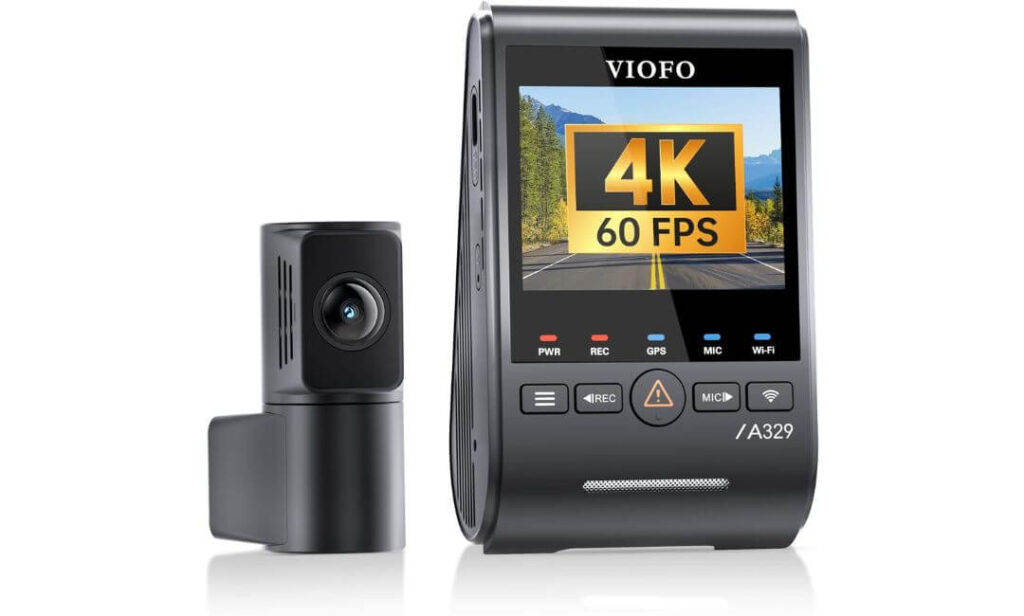
Quick Specs:
- 4K 60FPS Front Recording + 2K Rear Camera
- Dual Sony STARVIS 2 Sensors (IMX678 Front / IMX675 Rear)
- Wi-Fi 6 High-Speed Video Transfers
- Built-In GPS with Global Satellite Support
- Impact-Triggered Power-Saving Parking Mode
- Supports Up to 4TB SSD Storage
- HDR Recording for Improved License Plate Clarity
- Voice Commands and App Control
- Included CPL Filter for Reduced Windshield Glare
The first thing that stood out wasn’t the resolution. It was how complete the package feels once everything is installed. Many dash cams promise sharp footage, but very few combine 4K 60FPS recording, STARVIS 2 imaging, Wi-Fi 6 connectivity, GPS tracking, and intelligent parking protection into a setup that feels purpose-built for everyday driving. For Chevy Bolt owners who spend a lot of time commuting, charging away from home, or parking in busy lots, those details matter more than flashy marketing slogans.
What makes this one particularly interesting is the sensor combination. The front camera uses Sony’s STARVIS 2 IMX678 sensor while the rear camera gets the STARVIS 2 IMX675. In the real world, that translates into cleaner nighttime footage, better control of headlights and streetlights, and noticeably stronger license plate readability when traffic is moving quickly. Add HDR into the equation and difficult lighting situations become much easier to manage.
Storage is another area where it separates itself from most competitors. Support for up to 4TB SSD storage means you can record for extended periods without constantly worrying about overwriting files. Pair that with Wi-Fi 6 transfer speeds, voice commands, GPS data, and efficient parking monitoring, and you end up with a dash cam that feels designed for people who plan to keep their vehicle for years rather than months.
(For drivers who value evidence quality over gimmicks, this is the kind of camera that keeps proving its worth long after the excitement of a new purchase wears off.)
Why It Earned a Spot at the Top
- Outstanding 4K 60FPS front footage with excellent motion detail
- Dual STARVIS 2 sensors deliver genuinely strong night performance
- Wi-Fi 6 transfers are dramatically faster than older systems
- Supports external SSD storage up to 4TB
- Power-efficient parking protection suits daily-driven EVs
- Included CPL filter helps reduce windshield reflections
One Thing Worth Knowing
- The hardwire kit required for full parking-mode functionality is sold separately.
How It Fits Into Chevy Bolt Ownership
The Chevy Bolt’s quiet cabin and compact windshield benefit from a camera that stays unobtrusive while still delivering premium recording quality. Thanks to its slim design and compact rear camera, installation feels cleaner than many larger dual-channel systems.
Parking protection is where the pairing makes even more sense. Whether the vehicle is sitting at a public charging station, office parking lot, apartment complex, or grocery store, the impact-detection parking mode helps capture incidents without putting unnecessary strain on the vehicle’s electrical system.
The Insider Pro-Tip
A lot of buyers focus exclusively on daytime sample footage when comparing dash cams. That’s a mistake. Most insurance claims, parking incidents, and difficult evidence situations happen during poor lighting conditions. The reason this model consistently ranks near the top is because its hardware remains effective when lighting conditions stop being ideal.
If your goal is to install one camera and not think about upgrading again for a long time, pay attention to the combination of STARVIS 2 sensors, SSD support, Wi-Fi 6, GPS data, and efficient parking surveillance. Those are the features that continue to matter long after the unboxing experience is over.
#2. BlackVue Elite 9 4K+2K Dash Cam Front and Rear
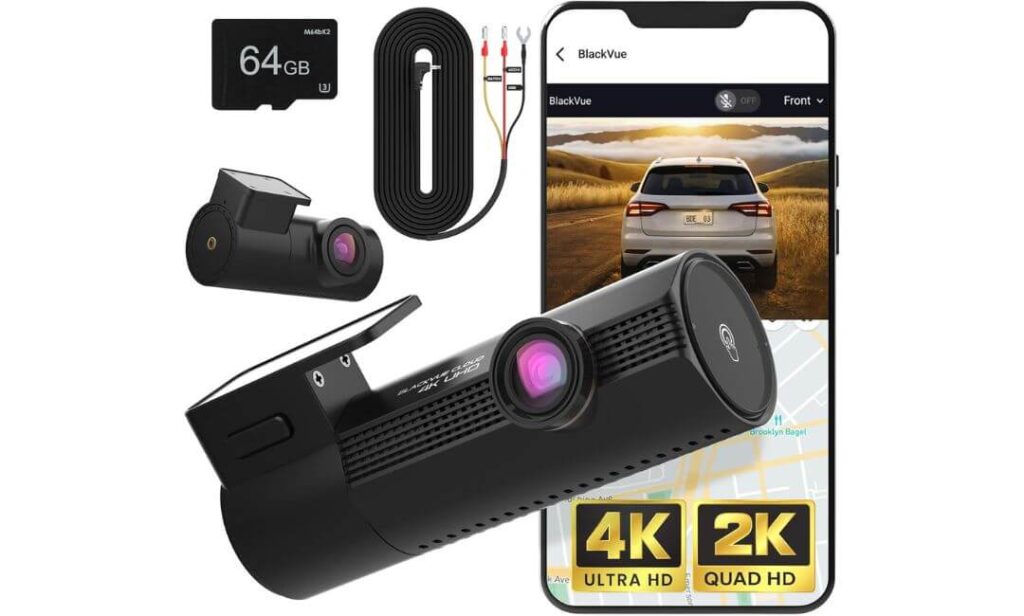
Quick Specs:
- True 4K UHD Front Camera + True 2K Rear Camera
- Dual Sony STARVIS 2 Sensors
- Advanced Dual HDR Processing
- Under 1-Second Boot Time
- Ultra-Low-Power Parking Mode
- Built-In GPS and G-Sensor
- Wi-Fi App Connectivity
- Free 5GB Cloud Backup Storage
- Supports Up to 1TB microSD Cards
- Hardwire Kit and 64GB Card Included
There’s a reason BlackVue has built such a loyal following over the years. Instead of chasing gimmicks, the company has spent decades refining the details most drivers never think about until something actually happens. The Elite 9 feels like the result of that philosophy. From the moment the ignition comes on, it starts recording in under a second, ensuring those first few moments of a trip aren’t lost while the camera is still waking up.
The image quality is equally impressive. Combining True 4K front recording, True 2K rear coverage, Dual STARVIS 2 sensors, premium glass optics, and advanced HDR processing, it handles difficult lighting conditions with remarkable consistency. Bright sunlight, parking garage shadows, approaching headlights, reflective road signs—situations that often challenge ordinary dash cams are where this system begins to justify its premium positioning.
What really separates it from many competitors, though, is the overall ownership experience. The included hardwire cable, built-in cloud connectivity, GPS tracking, intelligent battery protection, and ultra-efficient parking mode create a setup that feels polished from day one. Rather than adding features for the sake of a longer specification sheet, everything here serves a practical purpose.
(Some dash cams focus on recording your drive. This one feels designed around protecting the vehicle even when you’re nowhere near it.)
Why It Stands Out in This Comparison
- Exceptional HDR performance in bright and dark conditions
- Records almost instantly after ignition startup
- Extremely efficient parking surveillance system
- Included hardwire cable saves additional installation costs
- Free cloud backup support adds another layer of protection
- Strong thermal management for hot summer environments
One Thing Worth Knowing
- The premium feature set places it among the higher-end options in this category, though much of that cost is reflected in the included accessories, cloud functionality, and refined software experience.
Why It Makes Sense for Chevy Bolt Drivers
Chevy Bolt owners often leave their vehicles parked at public charging stations, office parking structures, shopping centers, and apartment complexes for extended periods. That’s exactly where the Elite 9’s low-power parking mode becomes valuable. Operating at extremely low power consumption while remaining ready to record important events helps balance security and battery preservation.
The compact design also complements the Bolt’s windshield layout nicely. Once installed behind the mirror, it stays discreet while still delivering premium front and rear coverage. Add GPS data, cloud backup options, and fast smartphone access, and it becomes easy to understand why many long-term dash cam users continue returning to the BlackVue ecosystem.
The Insider Pro-Tip
A surprising number of dash cams advertise impressive parking protection but consume more power than many buyers realize. Over time, that can become a bigger ownership concern than video quality itself.
What makes this setup different is the balance between event readiness and energy efficiency. The camera remains prepared to capture incidents while keeping power consumption exceptionally low. For drivers who regularly leave their Chevy Bolt parked for long stretches, that combination can be every bit as valuable as the 4K footage recorded while driving.
When evaluating premium dash cams, don’t just compare resolution numbers. Compare how intelligently they manage power, storage, heat, and long-term reliability. That’s usually where the biggest differences reveal themselves.
#3. Vantrue S1 Pro Max AI Dash Cam 4K+4K
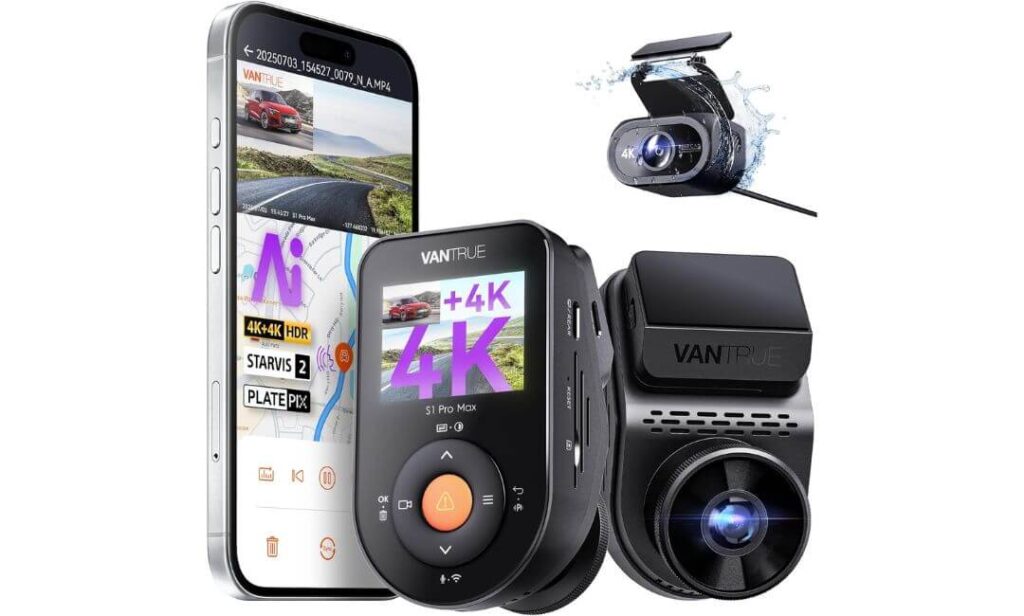
Quick Specs:
- True 4K Front + True 4K Rear Recording
- Dual Sony STARVIS 2 Image Sensors
- PlatePix Night Vision Enhancement
- ADAS and Blind Spot Detection (BSD)
- Dual HDR Video Processing
- 15-Second Buffered Parking Recording
- Built-In GPS Tracking
- 5G WiFi Connectivity
- Voice Command Support
- Supports Up to 1TB Storage
- Supercapacitor Design Instead of Internal Battery
- IP67 Weather-Resistant Rear Camera
Something interesting happens when a dash cam stops acting like a simple recording device and starts feeling more like an active driving companion. That’s the impression this setup leaves behind. While most dual-channel systems focus primarily on video quality, this one combines dual 4K recording, AI-assisted driving alerts, STARVIS 2 imaging, PlatePix night enhancement, and buffered parking protection into a package built for drivers who want more than just evidence after an incident.
The headline feature is obviously the dual 4K setup. Front and rear cameras both record at full 4K resolution, creating an impressive level of detail across the entire vehicle. Combined with wide-angle lenses and Vantrue’s PlatePix technology, the system does an excellent job preserving critical details that often become difficult to identify during nighttime driving or poor weather conditions. The Dual HDR processing also helps maintain clarity when moving between bright and dark environments.
Beyond image quality, the technology stack is unusually comprehensive. Features such as ADAS lane-awareness functions, blind-spot monitoring assistance, buffered event recording, voice commands, GPS tracking, 5G WiFi transfers, and a supercapacitor-based power system make it one of the most feature-rich cameras in this comparison. For drivers who enjoy having access to the latest technology, few options in this category deliver as much functionality in a single package.
(This isn’t the dash cam for someone who wants the simplest setup. It’s the one for drivers who genuinely enjoy having advanced technology working quietly in the background every mile of the journey.)
What Helped It Earn a Place on This List
- True 4K recording from both front and rear cameras
- Dual STARVIS 2 sensors provide strong low-light performance
- PlatePix technology improves nighttime license plate visibility
- ADAS and blind-spot assistance add extra situational awareness
- Buffered parking mode captures footage before an event occurs
- Supercapacitor design improves durability compared with battery-based systems
One Thing Worth Knowing
- With so many advanced features available, spending a little extra time during initial setup helps unlock the camera’s full potential and create the best ownership experience.
Why It Pairs Well with a Chevy Bolt
The Chevy Bolt attracts drivers who appreciate modern technology, efficiency, and practical innovation. That makes this camera a natural fit. Features such as AI-assisted safety alerts, voice controls, GPS tracking, and high-speed wireless connectivity align well with the tech-forward personality many Bolt owners already enjoy.
Its buffered parking recording system is especially valuable for vehicles that regularly spend time at public charging stations, shopping centers, office parking structures, and apartment complexes. When an incident occurs, the ability to preserve footage leading up to the event can provide context that standard parking modes often miss.
The Insider Pro-Tip
When comparing premium dash cams, many buyers focus entirely on recording resolution. The truth is that resolution alone rarely determines whether footage becomes useful evidence. Sensor quality, HDR tuning, parking protection, lens performance, and image processing often matter just as much.
That’s where this camera separates itself. The combination of dual STARVIS 2 sensors, PlatePix enhancement, HDR processing, buffered event recording, and dual 4K coverage creates multiple layers of protection working together rather than relying on a single headline specification. For drivers who want technology working before, during, and after an incident, that broader approach can be far more valuable than resolution numbers alone.
#4. Cobra Smart Dual View Front and Rear Dash Cam (SC 250R)
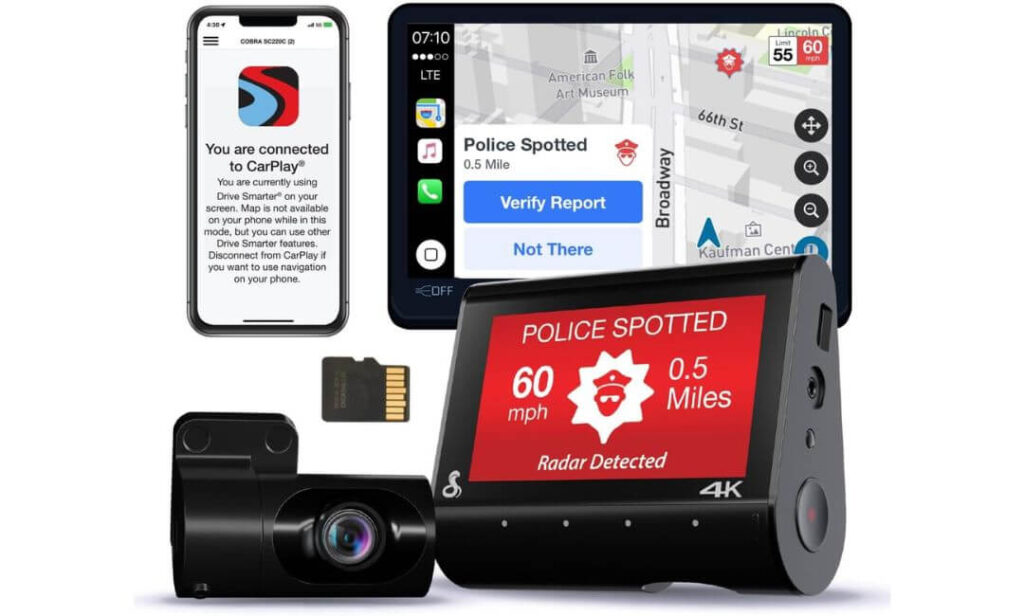
Quick Specs:
- True 4K Front Recording
- Included Rear Camera for Dual-View Coverage
- Drive Smarter 360 Alerts Network
- Parking Live View Monitoring
- Emergency MayDay Notifications
- Automatic Incident Detection
- Apple CarPlay and Android Auto Compatibility
- WiFi and Bluetooth Connectivity
- Night Vision Recording
- Included 32GB microSD Card
Here’s what makes this camera different from nearly everything else in this comparison: it isn’t trying to win a resolution war or a specification battle. Instead, it’s built around something many drivers care about even more—awareness, connectivity, and convenience. If you spend long hours commuting, navigating unfamiliar roads, or driving through busy urban traffic, the SC 250R brings a surprisingly useful set of connected features to the table.
The foundation is still solid. True 4K front recording delivers the detail most drivers want for capturing road incidents, while the included rear camera adds protection behind the vehicle. But the real story starts once the camera connects to Cobra’s Drive Smarter ecosystem. Features such as 360 Alerts, real-time speed trap notifications, red-light camera warnings, crowdsourced road intelligence, incident reporting, and emergency MayDay alerts transform it into something closer to a connected driving assistant than a traditional dash cam.
For Chevy Bolt owners who already appreciate technology that simplifies daily driving, this approach feels natural. The addition of CarPlay compatibility, Android Auto integration, remote Parking Live View access, automatic incident detection, and shareable trip footage creates a package designed around convenience as much as protection. It may not be the most technical camera on this list, but few options offer this level of day-to-day interaction.
(Some dash cams record what happened. This one focuses equally on helping you avoid problems before they happen.)
Why It Deserves a Place in This Guide
- True 4K recording captures excellent daytime detail
- Included rear camera provides complete front and rear coverage
- 360 Alerts add valuable real-time road awareness
- Parking Live View allows remote vehicle monitoring
- Emergency MayDay feature adds an extra layer of safety
- CarPlay and Android Auto compatibility fit naturally into modern vehicles
- 32GB memory card included for immediate use
One Thing Worth Knowing
- This camera delivers its best experience when paired with the companion app and connected features, making it especially appealing for drivers who enjoy a more interactive ownership experience.
Why It Works Well in a Chevy Bolt
The Chevy Bolt has always attracted drivers who embrace modern technology without unnecessary complexity. That’s exactly where the SC 250R fits. Features such as smartphone integration, connected alerts, remote monitoring, and automatic incident reporting complement the Bolt’s tech-forward personality surprisingly well.
It’s also an appealing option for drivers who spend a lot of time commuting. Real-time traffic awareness, red-light camera alerts, speed trap notifications, and connected safety features can add value every single day rather than only after an accident occurs. For many owners, that ongoing usefulness becomes one of the camera’s biggest strengths.
The Insider Pro-Tip
When shopping for a dash cam, most buyers immediately compare video resolution, sensor specifications, and frame rates. Those things matter—but they aren’t the only factors that influence satisfaction months later.
Think about how you actually use your vehicle. If your Chevy Bolt spends most of its life navigating traffic, commuting to work, running errands, or covering long highway miles, connected features often become more valuable than another bump in image quality. The combination of 4K recording, live alerts, remote monitoring, emergency notifications, and smartphone integration creates a driving experience that feels useful every time you get behind the wheel—not just when reviewing footage after an incident.
#5. WOLFBOX G840S 12″ 4K Mirror Dash Cam Backup Camera
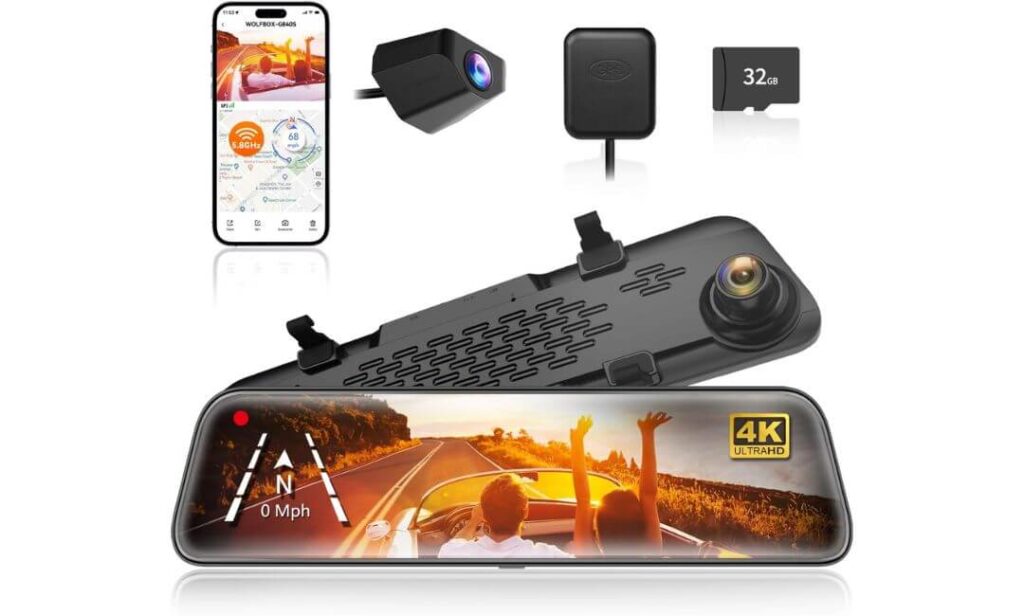
Quick Specs:
- 4K UHD Front Camera
- 1080P Rear Backup Camera
- Massive 12-Inch Smart Mirror Display
- 170° Front and 140° Rear Viewing Angles
- 5.8GHz WiFi Connectivity
- Built-In GPS Tracking
- WDR and HDR Image Enhancement
- Split-Screen Front and Rear Viewing
- Reverse Parking Assistance
- 24-Hour Parking Monitoring Support
- Included 32GB Memory Card
- Supercapacitor-Based Design
Not everyone wants a traditional dash cam hanging from the windshield. Some drivers want something that improves everyday visibility while quietly handling recording duties in the background. That’s exactly where this mirror-style system earns its place. Instead of simply documenting the road, it upgrades one of the most-used parts of the cabin—the rearview mirror itself.
The first thing most people notice is the screen. At 12 inches, it dramatically expands the rearward view compared to a conventional mirror. Combined with the 170-degree front lens, 140-degree rear camera, split-screen viewing, GPS tracking, and 5.8GHz WiFi connectivity, it creates a driving experience that feels noticeably different from a standard dash cam setup. For Chevy Bolt owners who frequently navigate crowded parking lots, urban traffic, and tight spaces, the additional visibility can be surprisingly useful.
Image quality is also stronger than many people expect from a mirror-based system. The 4K front camera captures detailed footage while the rear camera continuously provides an expanded view behind the vehicle. Add HDR processing, WDR technology, a low-reflectivity display, night vision enhancements, and parking assistance features, and the result is a package focused as much on daily convenience as accident protection.
(This isn’t the camera for someone who wants the smallest setup possible. It’s for drivers who want their dash cam and rearview mirror working together as a single system.)
What Makes It Worth Considering
- Huge 12-inch display transforms rear visibility
- 4K front recording captures sharp road details
- Wide-angle lenses help reduce blind spots
- Split-screen monitoring keeps front and rear views visible simultaneously
- Integrated GPS and WiFi add useful functionality
- Reverse parking assistance is genuinely helpful in tight spaces
- Includes memory card right out of the box
One Thing Worth Knowing
- The mirror-style design delivers the most value for drivers who specifically want enhanced rear visibility in addition to dash cam protection.
Why It Fits the Chevy Bolt So Well
The Chevy Bolt’s compact size already makes it easy to maneuver, but the larger digital mirror view can make parking, reversing, and lane changes feel even more confident. Drivers who spend time in busy city environments often appreciate having a broader view of what’s happening behind the vehicle.
Installation is also relatively straightforward because the system mounts directly over the existing mirror. Once in place, it blends naturally into the cabin while adding functionality that goes beyond traditional front-and-rear recording setups.
The Insider Pro-Tip
Most buyers compare mirror dash cams and traditional dash cams as if they’re competing for the same job. In reality, they’re solving slightly different problems.
Traditional premium cameras typically focus on maximizing recording quality and parking surveillance. A mirror system like this focuses on visibility, convenience, and awareness while still providing solid video protection. For Chevy Bolt owners who frequently drive in congested areas, deal with crowded parking lots, or simply want a clearer view behind the vehicle every day, that added practicality can become the feature they appreciate most.
The smartest way to look at this model isn’t as a dash cam with a screen—it’s as a rearview mirror upgrade that happens to include 4K recording, GPS tracking, parking assistance, and full-time front-and-rear coverage. That’s what makes it stand out from everything else on this list.
Best Chevy Bolt EV Dash Cam Options Side-by-Side: What Sets Each One Apart?
| Dash Cam | Video Quality | Night Performance | Parking Protection | Connectivity | Storage Support | Standout Advantage | Best For |
|---|---|---|---|---|---|---|---|
|
VIOFO A329S
Editor’s Choice |
4K 60FPS + 2K Rear | Dual STARVIS 2 | Impact Detection Parking Mode | Wi-Fi 6 • GPS • Voice Control | Up to 4TB SSD | Fastest file transfers and exceptional license plate clarity | Drivers wanting the most complete all-around package |
|
BlackVue Elite 9
Premium Pick |
4K Front + 2K Rear | Dual STARVIS 2 + HDR | Ultra-Low Power Monitoring | Wi-Fi • GPS • Cloud Access | Up to 1TB | Cloud ecosystem, instant boot-up, advanced power management | Owners prioritizing premium protection and remote access |
|
Vantrue S1 Pro Max
Technology Leader |
Dual 4K Recording | STARVIS 2 + PlatePix | 15-Second Buffered Recording | 5G WiFi • GPS • Voice Commands | Up to 1TB | ADAS, Blind Spot Detection and advanced driver assistance | Drivers who want maximum technology and safety features |
|
Cobra SC250R
Smart Connectivity |
True 4K Front | Night Vision | Parking Live View | Wi-Fi • Bluetooth • CarPlay • Android Auto | 32GB Included | 360 alerts, emergency MayDay and connected driving tools | Daily commuters who value smart alerts and convenience |
|
WOLFBOX G840S
Mirror Display Choice |
4K Front + 1080P Rear | HDR + WDR | 24-Hour Monitoring | 5.8GHz WiFi • GPS | 32GB Included | 12-inch digital mirror with expanded rear visibility | Drivers wanting a dash cam and rearview upgrade together |
Buying Guide: How to Choose the Right Dash Cam for Your Chevy Bolt
The Chevy Bolt attracts a different kind of driver than most vehicles. Owners tend to keep their cars for years, rely on them for daily commuting, spend time at public charging stations, and often appreciate technology that genuinely improves ownership rather than simply adding complexity. Because of that, choosing a dash cam for a Bolt isn’t just about finding the highest resolution number on a product page.
The best option is usually the one that fits your driving habits, parking situation, and long-term ownership goals. Here’s what actually matters before spending your money.
Prioritize Image Sensors Before Resolution Numbers
One of the biggest mistakes buyers make is focusing entirely on 4K recording while ignoring the sensor behind the lens.
A quality sensor determines how well a camera handles glare, headlights, shadows, rain, tunnels, parking garages, and nighttime driving. That’s why many premium models now use Sony STARVIS 2 technology. These sensors capture more detail in difficult lighting situations while reducing motion blur and image noise.
For most Chevy Bolt drivers, a camera equipped with STARVIS 2 sensors will often provide more useful evidence than a camera that simply advertises a higher resolution but uses a weaker sensor. If you’re frequently driving before sunrise, after sunset, or through urban traffic, sensor quality deserves just as much attention as video resolution.
Front and Rear Coverage Is Worth the Extra Investment
A front-only camera can certainly provide useful evidence, but many real-world incidents happen outside its field of view.
Rear-end collisions, parking lot impacts, hit-and-run situations, and charging station incidents often involve activity behind the vehicle. That’s why every dash cam featured in this guide includes front and rear recording capability.
For Chevy Bolt owners who regularly park in apartment complexes, office parking structures, shopping centers, or public charging areas, dual-channel coverage provides a much more complete record of what actually happened.
Parking Protection Matters More Than Most People Realize
Many buyers spend hours comparing image quality and only a few minutes evaluating parking mode features.
In reality, your vehicle spends far more time parked than it does driving.
A strong parking surveillance system can help document hit-and-runs, door dings, vandalism, and other incidents while the vehicle is unattended. Some systems rely on motion detection, others use impact sensors, and premium models may include buffered recording that saves footage from before an incident occurs.
If your Chevy Bolt regularly sits at public charging stations, airport parking lots, office garages, or apartment complexes, parking protection should be near the top of your priority list.
Understanding the Difference Between 4K and 1080P Recording
There is a noticeable difference between modern 4K and traditional 1080P footage, especially when reviewing license plates, road signs, and distant vehicles.
However, higher resolution isn’t always the deciding factor.
A well-tuned camera with strong HDR processing and a quality sensor can outperform a cheaper 4K model in challenging conditions. Resolution should be viewed as one piece of the overall package rather than the only specification that matters.
For most Bolt owners, 4K front recording paired with strong HDR and reliable night performance provides the best balance between image quality and storage efficiency.
Power Options and Everyday Convenience
Most dash cams can be powered through the vehicle’s 12V outlet, making installation relatively straightforward.
However, drivers who want automatic parking surveillance typically benefit from a hardwire installation. A hardwire kit allows the camera to monitor the vehicle while parked while also managing power usage more effectively.
Some owners prefer a simple plug-and-play setup, while others want full-time protection. Knowing which category you fall into before purchasing can help narrow your options significantly.
WiFi Connectivity and App Experience Matter More Than You Think
Video quality gets most of the attention, but the mobile app is the feature you’ll probably interact with most often.
The ability to quickly download footage, review clips, adjust settings, receive notifications, and manage recordings directly from your smartphone can make a huge difference in day-to-day usability.
Modern systems such as those equipped with WiFi 6 or advanced smartphone integration can transfer large video files dramatically faster than older cameras, reducing frustration when you actually need footage.
If you expect to regularly access recordings from your phone, app quality deserves serious consideration.
Installation Should Match the Vehicle
The Chevy Bolt offers a relatively compact windshield area compared to larger SUVs and trucks. That means camera size and placement can have a greater impact on visibility.
Smaller cameras generally integrate more cleanly behind the rearview mirror, while mirror-style systems provide an entirely different experience by replacing much of the traditional mirror view with a digital display.
Cable routing, rear camera placement, parking mode requirements, and overall visibility should all be considered before purchasing.
The best installation is usually the one you stop noticing after the first week of ownership.
Budget vs. Features: Where Should You Spend More?
Not every driver needs cloud storage, AI-assisted safety alerts, massive SSD support, or advanced parking surveillance.
For some owners, a dependable dual-channel system with strong image quality will be more than enough. Others may benefit from premium features such as cloud connectivity, buffered parking recording, remote monitoring, blind-spot alerts, or integrated GPS tracking.
The smartest approach is to focus on the features you’ll actually use rather than paying for specifications that sound impressive but rarely affect your ownership experience.
The Insider Perspective
After evaluating dozens of dash cams over the years, one trend becomes clear: the cameras owners appreciate most six months later are rarely the ones with the longest feature list.
They’re the models that start every time, record reliably, handle difficult lighting conditions well, transfer footage quickly, and quietly do their job without requiring constant attention.
For most Chevy Bolt owners, reliability, parking protection, strong night performance, and a smooth app experience will have a bigger impact on long-term satisfaction than any single headline specification. That’s exactly why the cameras featured in this guide earned their place on the list.
Chevy Bolt Dash Camera Installation Guide: What Actually Matters Before You Start
One of the biggest advantages of the Chevy Bolt is its relatively straightforward dash cam installation process. Unlike some larger vehicles with complicated interior trim layouts, the Bolt provides enough space around the windshield, headliner, and rear hatch area to create a clean factory-like installation when done correctly.
The good news is that none of the dash cams featured in this guide require vehicle modifications. Whether you’re installing a premium dual-channel system like the VIOFO A329S, a cloud-connected setup such as the BlackVue Elite 9, or a mirror-style camera like the WOLFBOX G840S, the overall installation process follows the same basic principles.
Gather Everything Before Touching the Windshield
A successful installation usually starts before the camera ever touches the glass.
Most owners only need a few basic items:
- Dash cam and mounting hardware
- Included power cable
- Trim removal tool
- Microfiber cloth
- Isopropyl alcohol wipes
- Cable clips (if included)
- Fuse tap kit (for hardwire installations)
- Hardwire kit if parking mode is desired
Cleaning the windshield thoroughly before mounting is one of the simplest steps, yet it prevents many long-term adhesion problems. Even small traces of dust, interior dressing products, or windshield residue can weaken adhesive mounts over time.
Choosing the Best Mounting Position
The ideal location is usually higher than many first-time installers expect.
For most Chevy Bolt models, the best placement is directly behind or slightly to the passenger side of the rearview mirror. This location keeps the camera within the windshield wiper sweep area while minimizing its visibility from the driver’s seat.
A properly positioned camera should:
- Capture the full roadway ahead
- Avoid blocking the driver’s field of vision
- Remain hidden behind the mirror whenever possible
- Stay within the windshield area cleaned by the wipers
- Avoid interference with vehicle sensors or cameras
Mirror-based systems such as the WOLFBOX install differently because they mount directly over the factory mirror. In those cases, positioning is generally simpler since the display replaces the traditional mirror view.
Understanding Power Options Before Installation
This is where many buyers make their most important decision.
The simplest approach is using the included power cable connected to the vehicle’s 12V outlet. This method requires minimal effort and works perfectly for drivers who only want recording while driving.
However, if parking protection is important, a hardwire installation becomes worth considering.
A hardwire kit connects directly to the vehicle’s fuse box and allows advanced features such as:
- Parking surveillance
- Impact-triggered recording
- Buffered event recording
- Motion detection monitoring
- Low-voltage battery protection
Most premium dash cams, including several options featured in this guide, unlock their full parking-mode capabilities through a hardwire connection.
USB Power vs. Hardwire Installation
Many newer devices advertise USB-C compatibility, but it’s important to understand what that means in practical use.
USB power is excellent for:
- Easy installation
- Temporary setups
- Lease vehicles
- Drivers who only need recording while driving
Hardwire systems are better for:
- Full-time vehicle monitoring
- Public charging station parking
- Apartment parking lots
- Workplace parking garages
- Long-term ownership
For many Chevy Bolt owners, especially those who regularly leave the vehicle at charging stations for extended periods, hardwiring often provides the greatest benefit.
Routing the Rear Camera Cable Cleanly
The rear camera installation is usually the step that intimidates people most, but it’s often easier than expected.
The cable is typically routed:
- Along the headliner near the windshield
- Through the upper door weather stripping
- Along the roofline toward the rear hatch
- Into the hatch area
- To the rear glass mounting location
Taking an extra twenty minutes to hide the cable properly can dramatically improve the finished appearance.
Most premium systems now include slim coaxial cables that make routing significantly easier than older, thicker designs.
Rear Camera Placement Tips
The rear camera’s position can directly affect video quality.
For the cleanest results:
- Mount near the top-center of the rear glass
- Avoid rear defroster connectors
- Keep the lens clear of tint edges
- Ensure an unobstructed rearward view
- Verify hatch movement doesn’t strain the cable
A properly positioned rear camera should disappear into the background after installation while still providing maximum visibility.
Parking Mode and Battery Protection Considerations
Parking mode is one of the most valuable features for many Bolt owners, but it should always be configured correctly.
Modern premium cameras include voltage monitoring systems designed to protect the vehicle’s electrical system. These systems automatically shut down recording when voltage falls below a predetermined threshold.
Features worth looking for include:
- Low-voltage cutoff protection
- Intelligent power management
- Impact-only recording modes
- Buffered parking recording
- Time-lapse monitoring options
These settings help balance vehicle protection with responsible energy usage.
Safety and Legal Considerations
Before finalizing the installation, take a moment to verify local regulations regarding windshield-mounted devices and video recording.
Laws can vary by location regarding:
- Windshield placement restrictions
- Audio recording permissions
- Public video recording regulations
- Parking surveillance usage
- Notification requirements in certain jurisdictions
In general, the safest approach is mounting the camera high behind the rearview mirror, where it remains unobtrusive and avoids interfering with the driver’s visibility.
The Installation Advice Most Owners Wish They Heard Earlier
The biggest mistake isn’t choosing the wrong dash cam.
It’s rushing the installation.
A carefully mounted camera with properly hidden wiring, correct viewing angles, and well-configured parking settings will provide years of trouble-free operation. Spending an extra hour during installation often produces a result that looks and functions like a factory-installed system.
For Chevy Bolt owners, that’s ultimately the goal—not simply adding another accessory, but integrating a dash cam so cleanly into the vehicle that it becomes part of the driving experience without demanding attention every day.
Real-World Chevy Bolt Driving Scenarios: When a Dash Cam Actually Proves Its Value
It’s easy to focus on specifications when shopping for a dash cam. Resolution numbers, sensor names, WiFi versions, storage capacity, and parking features all sound impressive on a product page. What often gets overlooked is how these cameras perform during situations that Chevy Bolt owners genuinely encounter throughout ownership.
The truth is that most drivers never purchase a dash cam because they enjoy watching recorded footage. They buy one because eventually something unexpected happens, and having reliable video can turn confusion into clarity within minutes.
Here are some of the situations where the right dash cam can become one of the most valuable accessories you install in your vehicle.
Public Charging Station Incidents
One of the most unique aspects of Chevy Bolt ownership is the amount of time the vehicle spends parked at charging stations.
Unlike traditional gas-powered vehicles that may only remain unattended for a few minutes during refueling, an EV can sit at a charging location for significantly longer periods. During that time, other vehicles may park nearby, pedestrians move through the area, shopping carts get left unattended, and drivers occasionally make contact while maneuvering around charging equipment.
This is where parking surveillance systems become particularly valuable.
Features such as impact-triggered recording, buffered parking mode, low-power monitoring, and cloud-connected alerts can help capture incidents that would otherwise leave owners relying entirely on eyewitness accounts.
For many EV owners, charging locations are actually among the most important places to have dash cam coverage.
Apartment and Condo Parking Lots
Not every Chevy Bolt owner has access to a private garage.
Many vehicles spend their nights in apartment complexes, condominium parking structures, community garages, or shared parking areas where activity continues long after the owner has gone inside.
Door dings, minor scrapes, vandalism, hit-and-run damage, and accidental contact during parking maneuvers are unfortunately common in these environments.
A quality parking mode won’t prevent those incidents from happening, but it can dramatically improve your chances of understanding exactly what occurred afterward.
This is one reason models with advanced parking surveillance consistently rank near the top of our recommendations.
Daily Commuting Through Heavy Traffic
The Chevy Bolt excels as a commuter vehicle.
Its compact size, instant electric torque, and efficient operation make it particularly well suited for city driving and stop-and-go traffic. Unfortunately, those same environments also create more opportunities for unexpected incidents.
Abrupt lane changes, distracted drivers, sudden braking events, parking lot confusion, and intersection disputes happen every day.
In situations where memories differ and accounts conflict, recorded footage often becomes the most objective version of events available.
This is especially true when the camera captures details such as vehicle positions, traffic signals, road conditions, and driver behavior leading up to an incident.
Long Highway Drives and Road Trips
Many people assume dash cams are primarily urban tools.
In reality, some of their most valuable footage is captured far from city streets.
Highway driving introduces entirely different risks, including debris strikes, unsafe lane changes, tire failures, aggressive driving behavior, wildlife encounters, and multi-vehicle incidents occurring hundreds of miles from home.
In these situations, features such as GPS tracking, high-resolution recording, and wide dynamic range imaging become increasingly important because events can develop quickly and involve multiple vehicles across large distances.
The ability to document exactly what happened often becomes invaluable once insurance claims or accident investigations begin.
Nighttime Driving and Poor Weather Conditions
Most dash cams look impressive on a sunny afternoon.
The real test happens after dark.
Rain, fog, glare, poorly lit roads, reflective signs, headlights, and wet pavement create conditions that challenge even expensive camera systems.
That’s why sensor quality played such a major role in our rankings.
Models equipped with STARVIS 2 sensors, HDR processing, advanced low-light tuning, and improved license plate recognition technology maintain a clear advantage once lighting conditions become difficult.
For drivers who frequently travel before sunrise or after sunset, this difference becomes noticeable very quickly.
Parking Lot Hit-and-Run Situations
If there is one scenario repeatedly mentioned by long-term dash cam owners, it’s the parking lot incident nobody witnessed.
You finish shopping, return to your vehicle, and discover new damage with no note, no witnesses, and no obvious explanation.
These situations are frustrating because they often leave owners with questions that cannot be answered.
Modern parking surveillance systems exist specifically for moments like these.
Impact sensors, motion detection, buffered recording, and event storage features can help preserve footage surrounding an incident, providing information that otherwise would have disappeared completely.
Lending the Vehicle to Family Members
Many households use the Chevy Bolt as a shared vehicle.
Teen drivers, college students, spouses, relatives, and friends may all spend time behind the wheel.
In these situations, a dash cam can serve as a neutral record of events rather than a monitoring tool. If an accident occurs, there is often less uncertainty regarding what actually happened.
The goal isn’t surveillance.
It’s documentation.
That distinction becomes important when unexpected situations arise.
Unexpected Events You Never Plan For
The reality is that many of the most useful dash cam recordings involve situations nobody predicted.
A driver runs a red light.
A shopping cart rolls across a parking lot.
Road debris appears around a blind curve.
A vehicle reverses unexpectedly.
An insurance dispute develops months after an incident.
Most owners install a dash cam expecting it to help after a major collision. Many discover its greatest value comes from documenting smaller events that would otherwise become difficult to explain.
The Perspective Most Long-Term Owners Share
Ask people who have used a quality dash cam for several years, and you’ll often hear a similar response.
They rarely think about the camera on a daily basis.
It quietly records in the background, handles parking surveillance when needed, and stays out of the way.
Then one day something unexpected happens.
That’s the moment the purchase suddenly makes sense.
For Chevy Bolt owners, especially those who commute regularly, rely on public charging infrastructure, park in shared lots, or spend significant time on busy roads, a dash cam is less about recording every mile and more about being prepared for the few moments that truly matter.
FAQs About Chevy Bolt Dash Cam
Which dash cam feature ends up mattering most for Chevy Bolt owners after six months of ownership?
Surprisingly, it usually isn’t 4K resolution.
Most long-term Chevy Bolt owners eventually realize that parking protection, app reliability, and nighttime performance influence daily satisfaction far more than headline specifications. The camera spends significantly more time watching the vehicle while parked than it does recording active driving, especially for owners who regularly charge away from home or park in apartment complexes.
That’s one reason models such as the VIOFO A329S and BlackVue Elite 9 ranked so highly in this guide. Their value isn’t limited to sharp footage. They combine image quality with dependable parking surveillance, efficient power management, and fast access to recordings when something actually happens. Those practical benefits tend to matter far more after months or years of ownership than another bump in advertised resolution.
Is a premium dash cam actually worth it for a Chevy Bolt, or is a budget model enough?
The answer depends less on how much you drive and more on where your vehicle spends its time parked.
If your Chevy Bolt primarily stays in a private garage and covers predictable daily routes, a basic front-and-rear camera may provide everything you need. However, owners who regularly use public charging stations, workplace parking structures, apartment complexes, airports, or street parking often benefit from premium features much sooner than expected.
The biggest upgrades usually aren’t the obvious ones:
- Better low-light image quality
- Faster file transfers
- Buffered parking recording
- Improved heat resistance
- More reliable mobile apps
- Longer-term durability
Those advantages rarely feel important during installation day, but they become increasingly valuable the first time footage is needed for insurance, security, or documentation purposes.
Why are STARVIS 2 sensors showing up in so many top-rated Chevy Bolt dash cams?
Because modern dash cams are increasingly limited by lighting conditions rather than recording resolution.
A traditional camera may look excellent at noon on a sunny day, yet struggle with glare, reflections, headlights, shadows, rain, or poorly lit roads. STARVIS 2 technology was designed specifically to improve those difficult situations.
For Chevy Bolt owners, this becomes particularly important because EVs are often used for early-morning commuting, nighttime charging sessions, and urban driving environments where lighting conditions constantly change. Better sensors help preserve details that ordinary cameras frequently lose, including license plates, lane markings, vehicle colors, and important contextual information.
When comparing premium models, sensor quality is often a stronger indicator of real-world performance than resolution alone.
Can a dash cam drain the battery in a Chevy Bolt if parking mode stays active all the time?
It’s a reasonable concern, but modern premium systems are much smarter than many people realize.
Most high-quality parking-mode setups include voltage monitoring systems designed to shut down recording before battery levels reach problematic thresholds. Many also offer different recording strategies depending on how aggressively you want the vehicle monitored.
Common options include:
- Impact-only monitoring
- Motion detection recording
- Buffered event recording
- Time-lapse surveillance
- Low-power standby modes
The key is choosing a camera with intelligent power management and configuring it correctly during installation. That’s one reason cameras such as the BlackVue Elite 9 and VIOFO A329S earned strong recommendations in this guide—they place significant emphasis on balancing vehicle protection with responsible energy usage.
If you could only evaluate one thing before buying a dash cam, what would it be?
The mobile app.
That answer surprises many buyers.
Most people spend hours comparing recording resolution, storage capacity, sensor names, and parking features. Yet the mobile application is often the part of the ownership experience you’ll interact with most frequently.
Think about what happens when you actually need footage.
You aren’t comparing specifications anymore. You’re trying to locate a clip, download a file, review an incident, adjust settings, or share evidence quickly. A well-designed app can make that process take seconds. A poor one can turn it into a frustrating experience.
That’s why this guide placed significant weight on overall ownership experience rather than technical specifications alone. Great hardware matters, but great hardware paired with a smooth, reliable app is what usually creates long-term satisfaction for Chevy Bolt owners.
Final Thoughts
After spending time comparing specifications, installation requirements, parking features, image sensors, app experiences, and real-world usability, one thing becomes clear: the best dash cam for a Chevy Bolt isn’t necessarily the one with the longest feature list or the highest price tag.
It’s the one that matches how you actually use your vehicle.
For drivers who want the strongest overall balance of image quality, storage flexibility, parking protection, and long-term value, the VIOFO A329S stands out as the most complete package in this guide. Those looking for a more premium ownership experience may find the BlackVue Elite 9 worth the investment, while technology-focused drivers will appreciate everything the Vantrue S1 Pro Max brings to the table. Meanwhile, the Cobra SC250R and WOLFBOX G840S prove that smart connectivity and everyday practicality can be just as valuable as raw recording performance.
What ultimately influenced our rankings wasn’t marketing language or feature-count comparisons. It was a simple question:
“If this camera were installed in our own Chevy Bolt tomorrow, would we still be happy with the decision a year from now?”
The cameras that made this list consistently answered that question better than the alternatives.
The reality is that most owners will go weeks, months, or even years without needing to review a single recording. Then one unexpected moment happens—a parking lot incident, a disputed accident, a hit-and-run, damage at a charging station, or a situation where facts suddenly matter more than opinions.
That’s when a quality dash cam stops feeling like an accessory and starts feeling like one of the smartest purchases you made for the vehicle.
Choose the camera that fits your driving habits, install it correctly, configure the parking features properly, and then forget about it.
If everything goes right, you’ll barely notice it’s there.
If something goes wrong, you’ll be glad it was.
Also Check: