
5 Best Dash Cams for Volvo XC90 in 2026: STARVIS 2 Night Vision and OEM Design
If you drive a Volvo XC90, you already know it isn’t just another three-row SUV. Whether you own an early first-generation model or a 2023–2026 XC90 B5, B6, or T8 Recharge, the cabin is built around clean Scandinavian design, advanced driver-assistance systems, and premium technology. That also means choosing a dash cam isn’t as simple as buying the first 4K model you see online. A bulky camera, exposed wiring, or poor compatibility can quickly ruin the look of the interior and even interfere with sensors mounted around the windshield.
For this guide, we focused on what actually matters to XC90 owners. We looked at OEM-style integration for 2023–2026 models, video quality in low light, parking surveillance, GPS accuracy, WiFi reliability, heat resistance, and overall long-term usability—not just headline specs. We also considered that many newer Volvo-specific dash cams are relatively new to the market, so we didn’t rely on review counts alone. Instead, we evaluated the hardware, installation design, feature set, and brand reputation to identify the options most likely to deliver a dependable ownership experience.
If you own an older XC90 (2003–2022), universal premium dash cams remain the better choice because they offer greater flexibility and advanced features. For 2023–2026 models, however, OEM-fit systems provide one major advantage: they blend into the factory interior without compromising recording quality. That’s exactly why the recommendations below include both premium universal cameras and Volvo-specific OEM solutions, so you can choose the one that best matches your XC90 and the way you drive.
Best Volvo XC90 Dash Cams: Top 2026 Picks for OEM Fit and 4K Recording
#1. Vantrue N5 4-Channel WiFi 360° Dash Cam
Best Volvo XC90 dash cam with STARVIS 2, true 360° recording, flagship night vision, and premium multi-channel coverage for drivers who want maximum protection and class-leading video quality.
#2. Mangoal Front 4K & Rear 1080P Dash Cam
Best OEM-style dash cam for Volvo XC90, offering a factory-look installation, sharp 4K front recording, hidden wiring, and seamless integration that perfectly matches the premium interior.
#3. Fitcamx Front 4K + Rear 1080P Dash Cam
Best factory-look dash camera for Volvo XC90 with plug-and-play installation, reliable WiFi connectivity, crisp dual-channel recording, and a clean OEM appearance that blends into the cabin.
#4. FUVYMYT Dual Channel 4K & 1080P Dash Cam
Reliable 4K front and rear dash cam for Volvo XC90, featuring OEM-inspired integration, straightforward installation, dependable everyday recording, and excellent value for daily driving.
#5. KBSYNT Front 4K & Rear 1080P Dash Cam
Best budget Volvo XC90 dash cam with an OEM-style fit, built-in WiFi, essential dual-channel recording, and practical features for owners looking for an affordable factory-style upgrade.
Expert Tip
If you’re buying a dash cam for a Volvo XC90, don’t get distracted by the biggest resolution number on the box. In real ownership, how the camera fits your vehicle matters just as much as how it records. A factory-style installation keeps the windshield clean, preserves the premium cabin, and is far less likely to develop rattles or loose wiring over time. If you regularly park in public places or drive after dark, prioritize image sensor quality, HDR performance, and reliable parking recording over extra features you’ll rarely use. A dash cam is something you hope you’ll never need—but when you do, it has to capture the moment clearly without you thinking about it.
How We Chose the Best Dash Cams for Volvo XC90
The Volvo XC90 isn’t an entry-level SUV, so we didn’t build this list around the cheapest cameras or products with the highest review counts. Many Volvo-specific dash cams are relatively new, which means judging them only by the number of online reviews would leave out some genuinely well-engineered options. Instead, we focused on the things that actually influence the ownership experience over months and years.
Our first priority was compatibility. We looked at how naturally each camera fits the XC90, whether it offers a true OEM-style installation or works cleanly as a premium universal solution, and whether the design avoids blocking the vehicle’s factory cameras, rain sensors, or driver-assistance hardware. A dash cam should feel like part of the vehicle—not an accessory hanging from the windshield.
We also evaluated real recording hardware, not just marketing claims. Cameras with stronger image sensors, better HDR processing, dependable night performance, higher bitrate recording, accurate GPS logging, stable WiFi connectivity, and reliable parking features ranked higher because these are the features that make the biggest difference when footage actually needs to be used.
Another factor was brand confidence and long-term usability. Established manufacturers such as Vantrue, along with respected OEM-style brands like Mangoal and Fitcamx, have a stronger track record for firmware support, app stability, and consistent build quality than many generic alternatives. Where newer brands were included, they earned their place because their hardware, installation quality, and overall value compared well against more established competitors—not because of marketing promises.
Finally, we considered what Volvo XC90 owners genuinely expect from a premium SUV. Clean factory integration, dependable daily recording, discreet installation, straightforward setup, and footage you can rely on in poor lighting all carried more weight than gimmicky features. Every recommendation in this guide was selected because it offers a balanced combination of video quality, compatibility, ease of ownership, and long-term value for XC90 drivers.
#1. Vantrue N5 4-Channel WiFi 360° Dash Cam
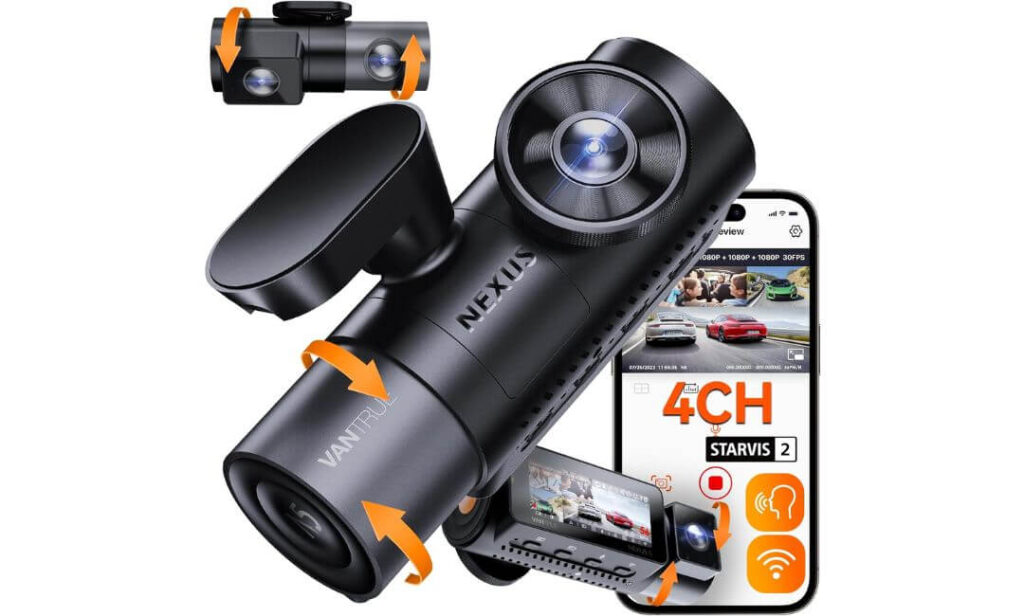
Quick Specs:
- Best For: Complete 360° protection with front, rear, and dual cabin recording
- Video Resolution: 2.7K Front + 1080p Rear + 1080p Front Cabin + 1080p Rear Cabin
- Coverage: 158° Front | 165° Rear | 160° Front Cabin | 160° Rear Cabin
- Image Sensor: Sony STARVIS 2 for exceptional low-light clarity
- Night Vision: Infrared cabin cameras for clear interior recording after dark
- Connectivity: 5GHz WiFi, built-in GPS, Vantrue App, OTA firmware updates
- Parking Features: Buffered parking mode (hardwire kit required)
- Storage: Supports up to 512GB microSD
- Heat Resistance: Supercapacitor for long-term reliability in hot and cold climates
- Ideal For: Owners who want maximum video coverage rather than an OEM-style hidden installation
The biggest reason this camera earned the top spot isn’t because it has four lenses—it’s because each one serves a purpose. Instead of only recording what happens in front of your vehicle, it also watches the rear, cabin, and side areas that are often missed during parking incidents or side impacts. For families, rideshare drivers, or anyone who carries valuable gear, that extra coverage can make a genuine difference when reviewing footage later.
Video quality is another area where it stands out. The Sony STARVIS 2 sensor handles difficult lighting surprisingly well, helping preserve details on road signs and moving vehicles when daylight starts fading. The IR cabin cameras continue recording clearly even when the interior is completely dark, while 5GHz WiFi, built-in GPS, and voice commands make everyday use feel effortless rather than complicated.
One thing worth knowing before you buy is that this isn’t designed to disappear into your dashboard like an OEM camera. It’s a premium universal dash cam, so you’ll see it mounted on the windshield. In return, you get significantly more recording angles, stronger hardware, and features that most factory-style systems simply don’t offer.
(If capturing every angle matters more than hiding the camera, this is the strongest all-around option in this guide.)
Why It Earned Our Top Recommendation
- STARVIS 2 sensor delivers noticeably cleaner footage after sunset and in poor weather.
- True four-channel recording covers the front, rear, cabin, and side areas with minimal blind spots.
- Buffered parking mode records the moments before and after an incident when paired with the optional hardwire kit.
- 5GHz WiFi, GPS, and OTA updates make ownership smoother over the long term.
- Supercapacitor power design offers better durability than battery-powered dash cams in extreme temperatures.
Things to Know Before Buying
- To use 24-hour buffered parking recording, you’ll need to purchase and install the Vantrue hardwire kit separately.
Compatibility and Installation Notes
This camera works well with older and newer Volvo XC90 models because it uses a universal mounting system instead of vehicle-specific trim pieces. That makes it a practical choice if you plan to keep the camera for future vehicles as well.
Installation takes a little more planning than an OEM-style dash cam since you’ll need to route cables neatly to the rear camera and position the cabin cameras correctly. If you want parking mode, plan to install the optional hardwire kit at the same time for the cleanest setup.
The Insider Pro-Tip
Don’t install the front camera as high as possible just because it looks cleaner. Leave enough space so the lens has a clear view below the rear-view mirror and isn’t partially blocked by the black dotted shading at the top of the windshield. That small adjustment often improves daytime sharpness and reduces nighttime glare more than most people expect.
If you’re investing in a premium multi-channel dash cam like this, pair it with a high-endurance microSD card instead of a standard memory card. Continuous recording puts far more stress on storage than occasional video recording, and using the right card will keep the system recording reliably long after cheaper cards begin to fail.
#2. Mangoal Front 4K & Rear 1080P Dash Cam
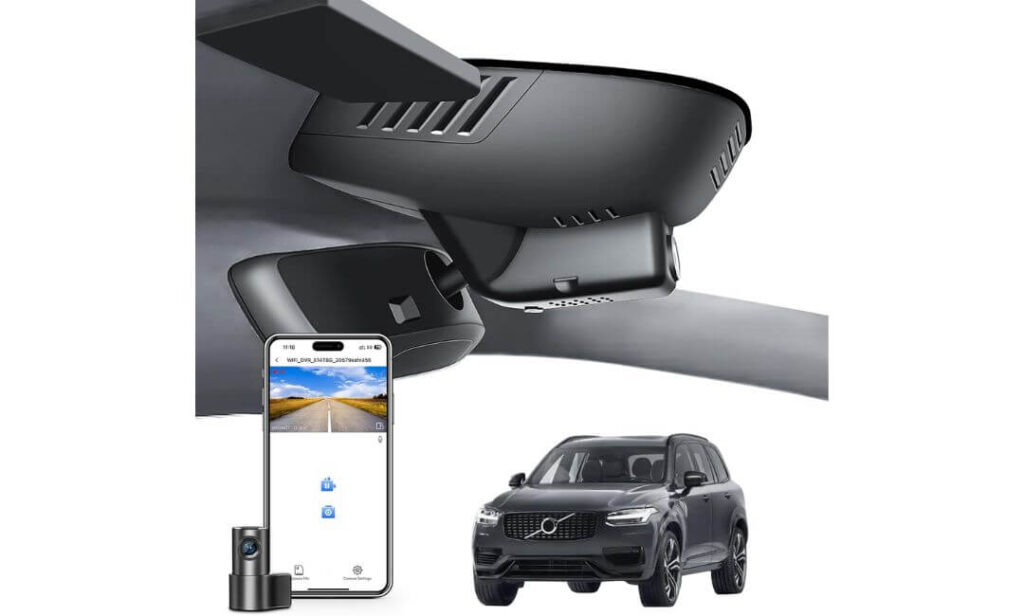
Quick Specs:
- Best For: Owners who want a true OEM-style dash cam with a factory-installed appearance
- Video Resolution: 4K Front + 1080p Rear
- Image Sensor: Sony STARVIS IMX335 for improved low-light recording
- Viewing Angle: 150° Front | 140° Rear
- Design: Custom-built to replace the factory sensor cover for a clean integrated look
- Connectivity: Built-in WiFi, smartphone app, and GPS
- Safety Features: Loop recording, G-Sensor, parking monitoring
- Power: Supercapacitor for improved durability in extreme temperatures
- Storage: Includes a 128GB microSD card
- Installation: Plug-and-play OEM-style installation using the factory mirror housing
- Ideal For: Drivers who want premium recording without changing the original cabin appearance
The first thing you’ll notice isn’t the video quality—it’s the fact that you barely notice the camera at all. Instead of hanging below the mirror with visible cables, this model blends into the factory sensor housing, making it look like it left the assembly line that way. For owners who value the clean Scandinavian interior, that’s a much bigger advantage than most specification sheets suggest.
The recording hardware is equally convincing. A 4K front camera, 1080p rear camera, and Sony STARVIS IMX335 sensor work together to produce crisp daytime footage while maintaining better clarity during early mornings, tunnels, rain, and night driving. Built-in WiFi, GPS, loop recording, and collision detection make everyday use straightforward, while the included 128GB memory card means you can start recording immediately after installation.
What makes this recommendation different is the balance it strikes. It doesn’t try to compete with universal multi-camera systems by adding unnecessary lenses. Instead, it focuses on delivering a factory-quality installation, dependable recording, and features that genuinely improve daily ownership without changing the character of the vehicle.
(If keeping the interior looking completely original matters as much as recording quality, this is one of the most convincing OEM-style options available.)
Why It Stands Out in This Guide
- Factory-style installation that integrates neatly behind the rear-view mirror.
- Sony STARVIS IMX335 sensor improves detail in low-light driving conditions.
- Sharp 4K front recording paired with a 1080p rear camera for balanced coverage.
- Built-in WiFi, GPS, and smartphone app make footage easy to access and manage.
- Includes a 128GB microSD card, so there’s nothing extra to buy before using it.
Things to Know Before Buying
- This camera is designed specifically for Volvo XC90 Model B. Before ordering, compare your factory sensor cover with the product images—or send a photo to Mangoal support if you’re unsure—to ensure you receive the correct version.
Installation and Vehicle Compatibility
This is designed specifically for Volvo XC90 B5, B6, and T8 Model B vehicles and fits directly into the factory mirror area rather than using a traditional universal windshield mount. The result is a cleaner installation with no dangling power cable across the windshield.
Most owners can complete the installation themselves using the included trim tool and detailed instructions. If your XC90 has an auto-dimming mirror, the supplied power adapter connects directly to the factory system, helping maintain the original appearance without complicated rewiring.
The Insider Pro-Tip
Before installing the replacement sensor cover, gently test-fit every clip without forcing it into place. OEM-style housings are designed to fit precisely, and confirming the alignment first helps prevent unnecessary pressure on the plastic clips during installation.
Once everything is installed, spend a minute adjusting the camera angle through the mobile app instead of relying only on the physical position. A small adjustment can improve how much of the road and lane edges are captured, giving you footage that’s far more useful if you ever need it as evidence later.
#3. Fitcamx Front 4K + Rear 1080P Dash Cam
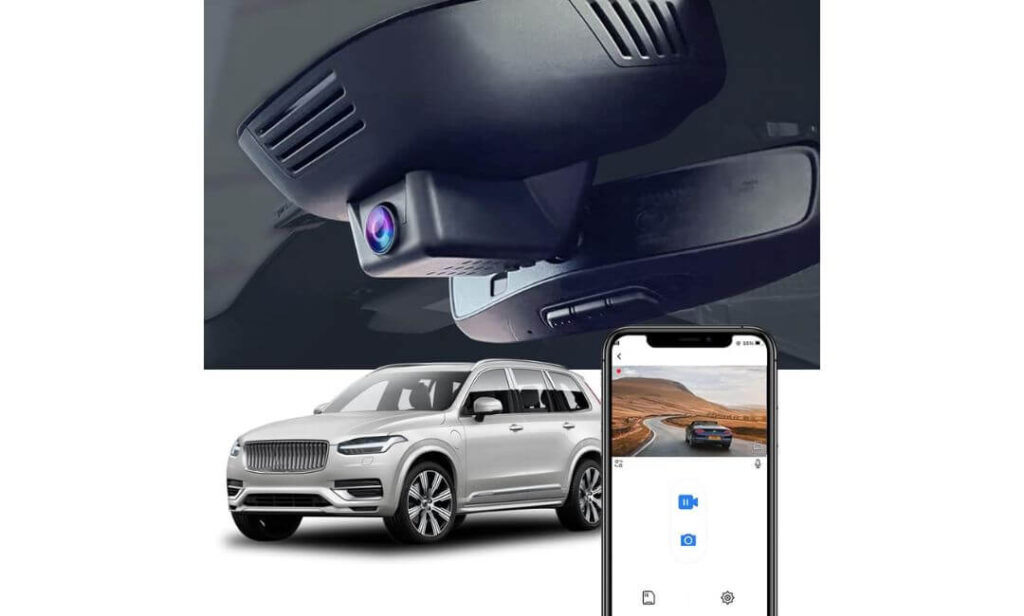
Quick Specs:
- Best For: Drivers who want a factory-look dash cam with a simple plug-and-play installation
- Video Resolution: 4K Front (2160p) + 1080p Rear
- Lens Setup: 170° Front | 140° Rear wide-angle coverage
- Optics: f/1.6 aperture with WDR for improved low-light recording
- Connectivity: Built-in WiFi with the FITCAMX mobile app
- Safety Features: Loop recording and G-Sensor event locking
- Build Quality: Heat-resistant ABS + PC housing
- Storage: 128GB microSD included, expandable up to 256GB
- Parking Mode: Not supported
- Installation: OEM-style replacement housing with no exposed wiring
- Ideal For: Owners who prefer a clean factory appearance with dependable dual-channel recording
What immediately stands out here is how effortless everything feels once it’s installed. There’s no bulky camera hanging below the mirror and no loose cable stretching across the windshield. It simply blends into the original interior, which is exactly what many premium SUV owners are looking for. Unless someone knows where to look, they’ll probably assume it came fitted from the factory.
Recording quality is equally well balanced for everyday driving. The 4K front camera, 1080p rear camera, 170° front viewing angle, and f/1.6 lens work together to capture a wide view of the road while WDR helps control bright headlights and changing light conditions. Built-in WiFi makes it easy to review footage on your phone, and because a 128GB memory card is already included, there’s very little left to set up after installation.
Rather than trying to offer every feature available, this camera focuses on the essentials that owners actually use every day. Reliable recording, simple operation, and an OEM-style finish make it an easy recommendation for drivers who want technology that quietly does its job without changing the look of the cabin.
(Sometimes the best upgrade is the one that looks like it was never added in the first place.)
Why We Recommend It
- OEM-style housing preserves the clean factory interior without visible wiring.
- 4K front and 1080p rear recording deliver dependable everyday coverage.
- 170° front lens, f/1.6 aperture, and WDR improve visibility in mixed lighting conditions.
- Built-in WiFi allows quick access to recordings through the FITCAMX app.
- Includes a 128GB memory card, making it ready to use straight out of the box.
Things to Know Before Buying
- This model is designed for Volvo XC90 Model B vehicles and does not include a parking mode, so if around-the-clock parking surveillance is your top priority, keep that in mind before making your decision.
Installation and Vehicle Compatibility
This dash cam is engineered specifically for Volvo XC90 B5, B6, and T8 Model B models, using a replacement housing that integrates around the factory mirror area instead of attaching to the windshield like a universal camera.
Installation is straightforward because there are no long power cables running across the headliner or dashboard. Before ordering, it’s still worth comparing your factory sensor cover with the product images to ensure you select the correct version for your vehicle.
The Insider Pro-Tip
Before securing the rear camera permanently, temporarily connect it and check the live view through the app. A slight adjustment to the angle now can eliminate blind spots that aren’t obvious until you review footage later.
If your goal is a dash cam that feels like part of the vehicle rather than an aftermarket accessory, OEM integration is often worth more in daily ownership than adding features you’ll rarely use. Clean installation, reliable recording, and hassle-free operation are what you’ll appreciate every single time you drive.
#4. FUVYMYT Dual Channel 4K & 1080P Dash Cam
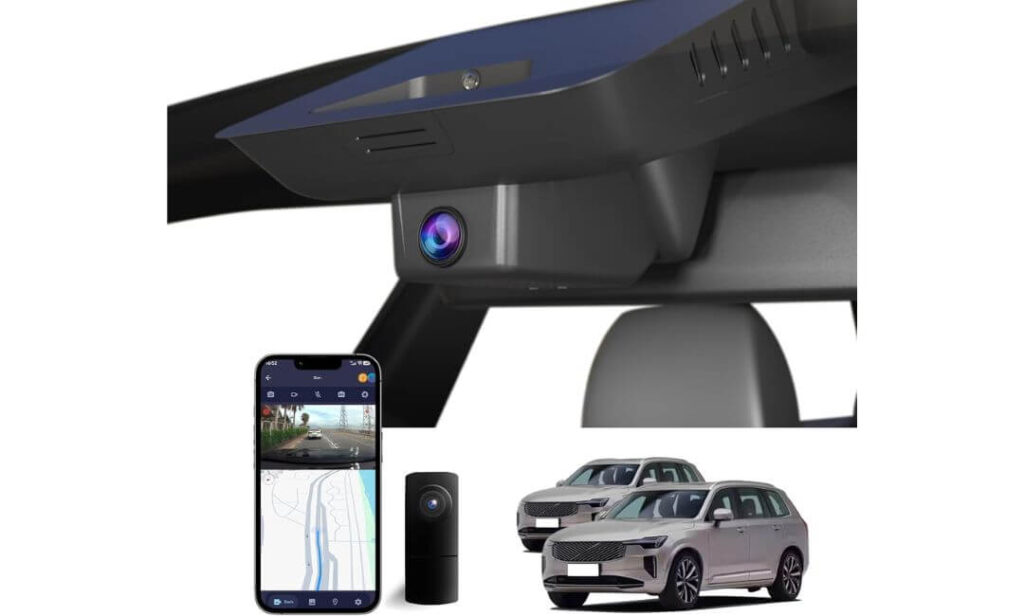
Quick Specs:
- Best For: Owners looking for an OEM-style 4K dash cam at a more affordable price
- Video Resolution: 4K Front (2160P) + 1080p Rear
- Optics: f/1.6 lens with HDR-enhanced night recording
- Viewing Angle: 145° Front
- Connectivity: Built-in WiFi with the dedicated FUVYMYT app
- Safety Features: Loop recording, G-Sensor event locking
- Parking Recording: Available with an optional hardwire kit
- Storage: 128GB microSD included, expandable up to 256GB
- Installation: Plug-and-play OEM-style mirror housing with no windshield wiring
- Ideal For: Drivers who want factory-style integration without paying premium-brand pricing
What makes this camera worth considering isn’t a flashy feature list—it’s how much attention has been given to keeping the installation clean and uncomplicated. Once fitted behind the mirror, it blends naturally into the cabin instead of looking like an aftermarket accessory. If maintaining the original appearance matters to you, this approach makes a bigger difference than most buyers expect.
Recording performance is solid where it counts. The 4K front camera, 1080p rear camera, f/1.6 lens, and HDR processing work together to improve visibility during changing light conditions, whether you’re driving into bright sunlight or heading home after dark. Built-in WiFi lets you review clips directly from your phone, while the included 128GB memory card means the system is ready to record from day one.
This isn’t trying to compete with flagship multi-camera systems. Instead, it focuses on delivering the essentials—clean factory integration, dependable recording quality, straightforward installation, and everyday reliability. For many owners, that’s exactly the balance they’re looking for.
(A dash cam becomes far more valuable when it quietly records every drive without changing the character of the interior.)
Why It Earned a Place in Our Lineup
- OEM-style design keeps the windshield free from visible cables and bulky mounts.
- 4K front and 1080p rear recording provide clear dual-channel coverage.
- HDR and the f/1.6 lens help improve detail in difficult lighting conditions.
- Built-in WiFi allows quick access to recordings through the dedicated mobile app.
- 128GB memory card and installation accessories are included in the box.
Things to Know Before Buying
- Before ordering, check the area behind your rear-view mirror. This model is designed for vehicles with the smaller sensor housing shown in the product images. If your vehicle has a larger cover, you’ll need a different version for proper fit.
Installation and Vehicle Compatibility
This dash cam is built specifically for compatible Volvo XC90 Model B vehicles and installs using an OEM-style housing rather than a standard windshield mount. Because it uses the factory mirror area, the finished result looks significantly cleaner than most universal dash cams.
Installation is designed to be plug-and-play, with no major rewiring required. If you want 24-hour parking monitoring, you’ll also need the optional hardwire kit, which can be added during installation without changing the clean factory appearance.
The Insider Pro-Tip
Before snapping the housing fully into place, connect the camera and verify the live image through the mobile app. It’s much easier to make small alignment adjustments before everything is locked together, especially for the rear camera.
If your priority is preserving the premium look of the cabin while still getting dependable 4K recording, an OEM-style system like this often delivers a better ownership experience than a universal camera with more features but a less refined installation.
#5. KBSYNT Front 4K & Rear 1080P Dash Cam
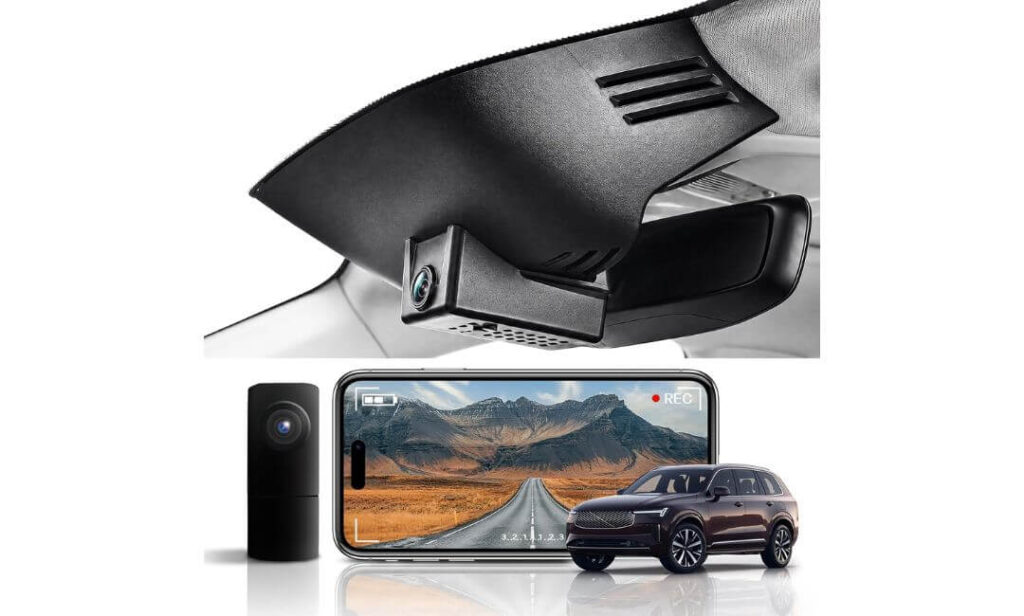
Quick Specs:
- Best For: Budget-conscious owners who still want a factory-style dash cam
- Video Resolution: 4K Front (2160P) + 1080p Rear
- Lens: f/1.6 aperture with HDR-enhanced recording
- Viewing Angle: 170° Front
- Connectivity: Built-in WiFi with mobile app support
- Safety Features: Loop recording, G-Sensor, optional parking monitoring
- Storage: 64GB card included, supports up to 256GB
- Power System: Built-in supercapacitor for improved durability
- Installation: Plug-and-play OEM-style housing with hidden wiring
- Ideal For: Drivers who want a clean factory appearance without stretching the budget
Some dash cams win with premium branding. This one earns its place by keeping things simple where it matters most. It integrates neatly behind the rear-view mirror, avoids exposed wiring, and preserves the clean look of the cabin without requiring a complicated installation. For many owners, that’s exactly what an OEM-style upgrade should do.
The hardware also delivers more than you’d expect at this price point. A 4K front camera, 1080p rear camera, 170° viewing angle, f/1.6 lens, and HDR processing work together to capture everyday driving with good detail in both daylight and lower-light conditions. Built-in WiFi makes transferring clips straightforward, while the supercapacitor adds an extra layer of reliability during hot summers and freezing winters compared with battery-powered designs.
Rather than chasing unnecessary extras, this model focuses on dependable daily performance. It records automatically when you start driving, protects important clips after an impact with the G-Sensor, and keeps recording continuously through loop recording. For drivers who simply want reliable evidence without spending flagship money, it makes a sensible final recommendation.
(Not every great dash cam has to be the most expensive—sometimes the smartest choice is the one that quietly covers the essentials every single day.)
Why It Made Our Final Shortlist
- OEM-style housing keeps the interior looking clean and factory-finished.
- 4K front and 1080p rear recording provide dependable dual-camera coverage.
- 170° wide-angle lens, HDR, and f/1.6 optics improve visibility across a broad section of the road.
- Built-in WiFi makes downloading and reviewing footage quick and convenient.
- Supercapacitor design improves long-term durability in demanding weather conditions.
Things to Know Before Buying
- Before placing your order, compare the sensor housing behind your rear-view mirror with the product images. This version is designed for vehicles with the smaller mirror sensor housing, and confirming compatibility first helps ensure a smooth installation.
Installation and Vehicle Compatibility
This camera is designed specifically for compatible Volvo XC90 Model B vehicles and replaces the factory mirror housing instead of attaching to the windshield with a traditional mount. The result is a much cleaner appearance that feels integrated into the vehicle rather than added afterward.
Installation is genuinely straightforward for most owners because no major rewiring is required. If you plan to use 24-hour parking monitoring, you’ll need the optional hardwire harness, which is installed separately and allows the camera to monitor the vehicle while parked.
The Insider Pro-Tip
Before reinstalling the mirror trim, check that the rear camera cable has enough slack where it passes into the headliner. A cable that’s pulled too tightly can become difficult to adjust later if you ever need to fine-tune the rear camera angle.
If your priority is getting a discreet OEM-style dash cam with solid recording quality instead of paying extra for features you’ll rarely use, this model offers one of the strongest value propositions in this guide. It focuses on the fundamentals that matter most in everyday driving while keeping the cabin looking exactly as Volvo intended.
Best Volvo XC90 Dash Cam Comparison Table: Compare Features Side by Side
| Comparison Point |
Editor’s Choice Vantrue N5
|
Best OEM Fit Mangoal
|
Best Factory Look Fitcamx
|
Best Value FUVYMYT
|
Budget Pick KBSYNT
|
|---|---|---|---|---|---|
| Best For | Maximum all-around protection | Factory-integrated premium setup | Clean OEM appearance | Value-focused OEM upgrade | Affordable factory-style solution |
| Video Resolution | 2.7K + 1080P ×3 | 4K + 1080P | 4K + 1080P | 4K + 1080P | 4K + 1080P |
| Camera Coverage | Front • Rear • Dual Cabin | Front • Rear | Front • Rear | Front • Rear | Front • Rear |
| Night Recording | STARVIS 2 + IR Cabin Cameras | STARVIS IMX335 + HDR | WDR + f/1.6 Lens | HDR + f/1.6 Lens | HDR + f/1.6 Lens |
| Factory OEM Appearance | Universal Mount | Excellent | Excellent | Excellent | Excellent |
| Visible Wiring | Minimal | Hidden | Hidden | Hidden | Hidden |
| WiFi App | 5GHz WiFi | Built-in WiFi | Built-in WiFi | Built-in WiFi | Built-in WiFi |
| GPS | Included | Included | — | — | — |
| Voice Control | Yes | — | — | — | — |
| Parking Recording | Buffered (Hardwire Required) |
Supported | Not Available | Supported (Hardwire Required) |
Supported (Hardwire Required) |
| Memory Card | Up to 512GB | 128GB Included | 128GB Included | 128GB Included | 64GB Included |
| Installation | Universal Windshield Mount | Plug & Play OEM Housing | Plug & Play OEM Housing | Plug & Play OEM Housing | Plug & Play OEM Housing |
| Ideal Buyer | Drivers wanting flagship security and maximum recording angles | Owners who want the cleanest factory-style finish | Drivers prioritising OEM looks and simple daily use | Buyers seeking strong value without sacrificing quality | Owners wanting OEM styling on a tighter budget |
| Overall Recommendation | ★★★★★ Best Overall | ★★★★★ Best OEM Choice | ★★★★☆ Great Everyday Pick | ★★★★☆ Smart Value | ★★★★☆ Budget Friendly |
Buying Guide: What Really Matters When Choosing the Best Dash Cam for Your Volvo XC90
A premium SUV deserves more than a generic dash cam picked solely because it records in 4K. The Volvo XC90 combines advanced driver-assistance technology, a clean Scandinavian interior, and sophisticated safety systems, so the right camera should complement those strengths rather than compromise them. Before you decide, focus on the factors below—they’ll have a much bigger impact on your ownership experience than marketing claims or long feature lists.
Choose a Dash Cam That Matches Your XC90’s Interior and Mounting Design
The first decision isn’t resolution—it’s compatibility. If you own a newer XC90 with the factory sensor housing behind the rear-view mirror, an OEM-style dash cam offers the cleanest installation by replacing or integrating with that housing. It keeps the windshield uncluttered, hides the wiring, and preserves the premium look of the cabin.
Universal dash cams remain an excellent choice if you want advanced features such as four-channel recording, voice control, or wider compatibility across multiple vehicles. They’re also ideal if you may transfer the camera to another car in the future. The best option depends on whether you value factory integration or maximum recording capability.
Prioritize Recording Quality Over Resolution Numbers
Almost every modern dash cam advertises 4K recording, but resolution alone doesn’t determine how useful the footage will be. A quality image sensor, efficient HDR processing, lens clarity, and stable exposure matter just as much.
Features such as Sony STARVIS 2, STARVIS image sensors, HDR, WDR, and fast optics help produce cleaner footage during rain, tunnels, sunrise, nighttime driving, and difficult lighting conditions. These improvements often make the difference between simply recording an incident and actually reading a licence plate when you need the footage most.
Decide Whether Dual-Channel or Multi-Channel Recording Fits Your Driving Style
Not every driver needs the same camera configuration.
A front-only dash cam is suitable for basic evidence during daily commuting, but most XC90 owners will benefit more from a front and rear dash cam because rear-end collisions, reversing incidents, and parking damage are just as common as frontal impacts.
If you regularly travel with children, pets, expensive equipment, or work as a rideshare driver, a multi-channel system that also records the cabin can provide an additional layer of protection that standard dual-camera setups cannot offer.
Look Beyond Parking Mode Marketing
Parking protection isn’t identical across every dash cam.
Some cameras only begin recording after detecting an impact, while others offer buffered parking mode, saving several seconds before and after an event. Buffered recording usually provides much stronger evidence because it captures what happened immediately before the incident instead of only the aftermath.
Also remember that many parking functions require a dedicated hardwire kit, so always check what’s included before purchasing.
Factory-Look Installation Makes a Bigger Difference Than Most Buyers Expect
One reason OEM-style cameras have become increasingly popular is because they don’t feel like aftermarket accessories. Hidden wiring, integrated mirror housings, and discreet placement preserve the original appearance of the XC90 while reducing distractions inside the cabin.
A cleaner installation also means fewer loose cables, less chance of accidental movement, and a setup that’s easier to live with over the long term.
Consider Daily Convenience, Not Just Recording Features
You’ll interact with your dash cam long after the initial installation, so everyday usability deserves attention.
Built-in WiFi, reliable mobile apps, GPS logging, automatic loop recording, firmware updates, and quick video downloads make ownership considerably more enjoyable. These features save time whenever you need to review, download, or share footage after a journey or unexpected incident.
Think About Long-Term Reliability Instead of Short-Term Specifications
A dash cam records every time you drive, often in direct sunlight and extreme temperatures. Components such as supercapacitors, stable firmware, dependable memory card support, and consistent app performance contribute far more to long-term reliability than an extra feature you’ll rarely use.
Choosing a well-built system from a reputable manufacturer often results in fewer connection issues, more reliable recordings, and a better ownership experience over several years.
Installation Planning Before You Place Your Order
Before buying an OEM-style dash cam, inspect the sensor housing behind your rear-view mirror and compare it carefully with the product’s compatibility images. Even within the same vehicle generation, different mirror assemblies can affect compatibility.
If you’re planning to enable 24-hour parking recording, purchase the correct hardwire kit during the initial installation. Completing everything at once saves time, avoids removing trim panels twice, and results in a cleaner, more professional installation.
The Bottom Line
The best dash cam for a Volvo XC90 isn’t simply the one with the highest resolution or the longest feature list. It’s the one that integrates properly with your vehicle, records consistently in challenging conditions, remains reliable throughout years of daily driving, and provides footage you can genuinely trust if you ever need it. Focusing on compatibility, image quality, installation, and long-term dependability will almost always lead to a better purchase than choosing based on specifications alone.
Volvo XC90 Dash Cam Installation Guide: Expert Tips for a Clean, Reliable, and Factory-Looking Setup
Installing a dash cam in a Volvo XC90 is about more than attaching a camera to the windshield. Modern XC90 models include driver-assistance cameras, rain sensors, airbags, and carefully designed interior trim, so taking a little extra time during installation helps ensure the system works reliably without affecting the vehicle’s appearance or safety features. Whether you’re fitting a universal dash cam or an OEM-style unit, following the right approach from the beginning usually leads to a cleaner installation and fewer problems later.
Step-by-Step Installation for a Front-Only Dash Cam
Start by cleaning the inside of the windshield using an alcohol-based glass cleaner so the adhesive mount bonds properly. Before removing the protective film from the adhesive pad, temporarily position the camera behind the rear-view mirror and sit in the driver’s seat to confirm it doesn’t block your forward view.
Once you’re satisfied with the position, secure the camera and route the power cable along the headliner instead of allowing it to hang below the mirror. Continue routing the cable behind the A-pillar trim and weather stripping until it reaches your chosen power source. Take your time while tucking the cable into the trim because forcing it into place can create pressure points or visible gaps in the interior panels.
Before completing the installation, switch on the camera, review the live preview through the mobile app or display, and make small adjustments until the horizon is level and both lane markings are visible evenly across the frame.
Installing a Front and Rear Dash Cam Properly
Adding a rear camera requires a little more patience, but the result is significantly better overall protection.
After mounting the front camera, run the rear camera cable along the headliner toward the back of the vehicle instead of routing it across the floor. Continue through the upper weather stripping and carefully guide the cable into the tailgate area, making sure there is enough slack wherever the wiring passes through moving sections of the liftgate.
Mount the rear camera high on the rear glass where it provides a clear view without interfering with rear visibility. Before permanently securing the adhesive mount, confirm that the live image is level and that the camera isn’t capturing excessive reflections from the rear headrests or cargo area.
Once both cameras are installed, review daytime and nighttime footage to confirm that each camera is positioned correctly before considering the installation complete.
Choosing the Right Power Source for Your Driving Needs
The way you power your dash cam affects both convenience and available features.
A 12V cigarette lighter connection is the quickest installation method and works well for drivers who simply want recording while driving. It requires no modifications and can usually be completed within minutes.
An OBD-II power adapter provides a cleaner installation while avoiding permanent wiring changes. It’s an excellent option for owners who want a tidier cabin without performing a traditional hardwire installation.
A hardwire kit offers the cleanest OEM-style result and is the preferred choice if you want features such as buffered parking recording or continuous parking surveillance. Most premium dash cams require a dedicated hardwire kit to unlock these functions, so it’s worth installing one during the initial setup rather than upgrading later.
Cable Routing That Preserves the Premium XC90 Interior
Good cable management is often what separates a professional-looking installation from one that feels obviously aftermarket.
Always follow the factory wiring paths whenever possible, keeping cables tucked behind the headliner, weather seals, and interior trim. Avoid routing cables across visible dashboard surfaces or allowing them to hang near the mirror, as this not only affects appearance but can also become distracting while driving.
If you’re installing a rear camera, leave a small amount of additional cable near the tailgate hinge. This extra flexibility helps reduce stress on the cable each time the liftgate is opened and closed, improving long-term durability.
Using fabric automotive tape or the supplied cable clips can also help prevent movement and eliminate unwanted rattles over time.
Position the Camera Without Interfering With Volvo Safety Systems
The XC90 uses cameras and sensors around the rear-view mirror to support several driver-assistance technologies. Your dash cam should never obstruct these components.
The safest location is usually directly behind or slightly beside the rear-view mirror, where the camera remains hidden from the driver’s normal field of view while maintaining a clear view of the road ahead.
After installation, verify that rain sensors, automatic headlights, lane-assistance functions, and other driver-assistance features continue operating normally.
Important Safety and Legal Considerations
Before installing any dash cam, check the windshield visibility regulations that apply in your region. Although dash cams are widely accepted in many areas, placement rules can vary.
If your camera records audio inside the vehicle, review your local privacy laws before enabling microphone recording, especially if passengers are regularly carried.
Whenever you share recorded footage publicly, consider removing visible registration numbers, home addresses, or other personal information unless disclosure is necessary.
Final Installation Advice From Our Team
The biggest installation mistake isn’t choosing the wrong camera—it’s rushing the process. Spend an extra fifteen minutes checking camera angles, securing every cable properly, and confirming all vehicle systems operate normally before replacing the final trim panels.
A carefully installed dash cam will not only look better every day you own the vehicle, but it will also provide more reliable footage, fewer connection problems, and a much better ownership experience over the long term.
Why STARVIS 2 Makes a Real Difference in a Volvo XC90 Dash Cam
When comparing dash cams, it’s easy to focus on 4K resolution because it’s the specification that’s advertised most often. In reality, the image sensor has a much greater influence on how useful your recordings will be. A camera with an excellent sensor can often produce clearer, more reliable footage than a higher-resolution model using a lower-quality sensor. That’s exactly why STARVIS 2 has become one of the most important technologies in premium dash cams.
Rather than simply making videos look brighter, STARVIS 2 is designed to capture more usable detail in difficult lighting conditions—the moments when drivers are most likely to rely on their dash cam for evidence.
Better Night Vision Without Artificial Brightness
Night driving creates challenges that ordinary cameras struggle to handle. Headlights, street lamps, reflective road signs, and dark surroundings all appear in the same frame, forcing the camera to balance extreme differences in light.
A STARVIS 2 dash cam for Volvo XC90 captures these scenes with greater precision by improving light sensitivity while reducing image noise. Instead of artificially brightening the entire picture, it preserves finer details, producing footage that appears cleaner and more natural.
This becomes particularly valuable on rural roads, poorly lit residential streets, underground parking garages, and long motorway journeys after sunset, where identifying vehicles can be far more important than simply recording their presence.
Improved Dynamic Range in Challenging Lighting
One of the biggest advantages of STARVIS 2 is its ability to handle rapidly changing light.
Imagine leaving a dark parking structure and immediately entering bright afternoon sunlight, or driving through a series of tunnels where lighting conditions change every few seconds. Cameras with limited dynamic range often overexpose bright areas or lose important details in darker sections of the image.
STARVIS 2 helps maintain a more balanced exposure throughout the entire frame, allowing road markings, surrounding traffic, and roadside objects to remain visible even as lighting changes dramatically.
Better Licence Plate Recognition When It Matters Most
The most important recording isn’t always the sharpest-looking one—it’s the one that captures the information you actually need.
During fast-moving traffic, sudden lane changes, or hit-and-run incidents, vehicles may only appear in frame for a fraction of a second. STARVIS 2 improves the camera’s ability to preserve contrast and reduce motion-related image degradation, increasing the chances of reading registration plates, company logos, or other identifying details.
While no dash cam can guarantee perfectly readable plates in every situation, especially at high speeds or in severe weather, a higher-quality image sensor gives you a noticeably stronger starting point.
Real Volvo XC90 Driving Situations Where STARVIS 2 Stands Out
The Volvo XC90 is often used for long-distance travel, family journeys, business driving, and motorway commuting. These driving conditions regularly expose a dash cam to changing environments throughout the day.
During early morning commutes, STARVIS 2 helps balance low sunlight without washing out the road ahead.
In heavy rain, improved light sensitivity and contrast make lane markings, vehicles, and roadside objects easier to distinguish.
While driving through tunnels, the sensor adapts more smoothly as lighting changes, reducing sudden brightness shifts that can hide important details.
At dusk, when daylight fades but street lighting hasn’t fully taken over, STARVIS 2 continues producing balanced footage instead of the grainy recordings often seen with entry-level cameras.
Even inside multi-storey car parks or underground garages, where lighting is uneven and shadows are common, the additional sensitivity helps preserve clearer footage around parked vehicles and pedestrians.
Why STARVIS 2 Is Worth Prioritising Over Extra Features
Many buyers compare dash cams based on WiFi speed, screen size, or the number of additional functions included. While those features improve convenience, they don’t directly improve the evidence your camera records.
A better image sensor influences every journey you take. Every daytime drive, every rainy evening, every motorway trip, and every parking incident benefits from improved image quality. That’s why cameras equipped with STARVIS 2 consistently appear near the top of our recommendations whenever image quality is one of the deciding factors.
Our Recommendation for Volvo XC90 Owners
If most of your driving happens during daylight in predictable conditions, a standard 4K dash cam may be perfectly adequate. However, if you regularly drive after sunset, travel long distances, commute throughout the year, or simply want the highest possible recording quality when conditions become challenging, investing in a STARVIS 2 dash cam for Volvo XC90 is one of the smartest upgrades you can make.
Resolution may attract attention on a product page, but image sensor quality determines how useful your footage will be when it matters most. That’s precisely why STARVIS 2 remains one of the strongest indicators of a genuinely premium dash cam.
Parking Mode Explained: Choosing a Dash Cam That Protects Your Volvo XC90 Even When You’re Away
Most collisions don’t happen while you’re driving. Parking lot door dings, hit-and-runs, shopping trolley damage, attempted break-ins, and vandalism often occur when the vehicle is unattended. That’s why parking mode has become one of the most valuable features in a modern parking mode dash cam for Volvo XC90. However, not every parking mode works the same way, and understanding those differences can help you choose a system that genuinely protects your vehicle rather than simply advertising the feature.
Understanding How Parking Mode Works in a Volvo XC90
Once the ignition is switched off, a compatible dash cam can automatically transition from driving mode into parking surveillance. Depending on the camera and power configuration, it remains ready to record suspicious activity around the vehicle without requiring any input from the driver.
Most premium systems achieve this through a dedicated hardwire kit, which supplies controlled power while also monitoring battery voltage. If the battery reaches a preset safety threshold, the hardwire kit disconnects power automatically to help prevent excessive battery discharge. This allows the camera to provide surveillance while respecting the XC90’s electrical system.
Some cameras also support external battery packs or alternative power solutions, but for most owners, a properly installed hardwire kit provides the cleanest and most reliable long-term setup.
Motion Detection, Impact Recording, and Time-Lapse Explained
Modern parking protection is far more intelligent than continuous recording.
Motion detection activates recording when movement is detected near the vehicle, making it useful in driveways, office car parks, hotel parking areas, and shopping centres where passing vehicles or pedestrians may approach your XC90.
Impact detection relies on the built-in G-sensor. If another vehicle bumps your SUV or someone attempts to force entry, the dash cam automatically locks the recording so it cannot be overwritten during normal loop recording.
Some premium dash cams also offer buffered parking mode, which records several seconds before and after the trigger event. This is particularly valuable because it captures how an incident began instead of only showing the aftermath.
Another option available on selected models is time-lapse recording, which captures frames at lower intervals to monitor the vehicle over extended parking periods while reducing storage usage. This approach is ideal for airport parking, business trips, or leaving the vehicle unused for several days.
Choosing the Right Parking Mode for Your Driving Routine
Different driving habits benefit from different parking features.
If your XC90 spends most nights in a secure private garage, standard impact detection may be sufficient.
If you frequently park on public streets, outside workplaces, shopping centres, apartment complexes, hotels, or transport hubs, buffered parking recording and motion detection provide significantly stronger protection because they capture activity before and during an incident.
For owners who regularly leave their vehicle parked for extended periods, time-lapse recording offers an effective balance between surveillance coverage and storage efficiency.
How Important Files Stay Protected
A dash cam is only useful if the critical recording is still available when you need it.
Premium systems use loop recording to overwrite ordinary footage automatically once storage becomes full. However, recordings triggered by the G-sensor or manually saved by the driver are stored separately as protected event files. These files are excluded from normal overwrite cycles, helping preserve important evidence after a collision or attempted theft.
Many current dash cams also allow you to review, download, and back up recordings directly through a mobile app using built-in WiFi. Transferring important clips immediately after an incident adds another layer of protection and makes sharing footage with insurers or authorities much easier.
Battery Protection Is Just as Important as Surveillance
Continuous recording should never come at the expense of your vehicle’s ability to start.
High-quality hardwire kits include low-voltage protection, automatically disconnecting power before the battery reaches an unsafe level. This is especially important for vehicles equipped with sophisticated electrical systems, where maintaining stable battery health is essential.
When purchasing a parking-mode dash cam for your Volvo XC90, verify that the camera supports voltage monitoring or use the manufacturer’s recommended hardwire kit rather than a generic alternative.
Getting the Most from Parking Mode
A parking mode system performs best when paired with proper installation and sensible settings.
Position the front camera high behind the rear-view mirror for the widest forward coverage, ensure the rear camera has a clear view through the rear glass, and adjust motion sensitivity carefully. Excessively high sensitivity can generate unnecessary recordings from heavy rain or passing traffic, while sensitivity that’s too low may miss genuine incidents.
It’s also worth checking recordings occasionally through the companion app to confirm that firmware, storage, and camera angles continue working exactly as intended.
Why Parking Mode Is Worth the Investment
For many owners, parking surveillance becomes the feature they appreciate most—not because they use it every day, but because it’s already working when something unexpected happens.
A well-designed parking mode system quietly monitors your vehicle, protects important recordings automatically, and provides evidence that may otherwise never exist. Combined with dependable installation, reliable power management, and secure file protection, it transforms a dash cam from a simple driving accessory into a genuine security system for your Volvo XC90.
FAQs About Volvo XC90 Dash Cam
Is an OEM-style dash cam actually better than a premium universal dash cam for a Volvo XC90?
It depends on what you value most. If your priority is preserving the premium interior, an OEM-style dash cam is difficult to beat because it integrates around the factory mirror housing, hides the wiring, and looks like original equipment. For many Volvo XC90 owners, that’s a major advantage since the cabin was designed with a very clean, minimalist layout.
A premium universal camera, however, often delivers more advanced hardware and features. Models like the Vantrue N5 offer benefits that most OEM-style cameras currently don’t, including:
- Multi-channel recording beyond just front and rear.
- STARVIS 2 imaging for superior low-light performance.
- Advanced buffered parking recording.
- Voice control and larger storage support.
If appearance is your highest priority, choose OEM integration. If recording capability comes first, a premium universal dash cam remains the stronger long-term investment.
Will installing a dash cam affect the cameras and driver-assistance systems on my Volvo XC90?
A correctly installed dash cam should not interfere with your XC90’s factory safety technologies. The important part is placement, not simply the camera itself. Modern XC90 models rely on sensors and cameras mounted around the rear-view mirror for several driver-assistance functions, so these areas must remain unobstructed.
Before finalising the installation, verify that:
- The dash cam doesn’t block the forward-facing sensor area.
- Rain-sensing wipers continue working normally.
- Lane-support and collision-assistance systems operate without warnings.
- The camera has an unobstructed forward view instead of pointing through tinted or dotted windshield sections.
Taking a few extra minutes during installation is often the difference between a professional result and one that creates unnecessary issues later.
Is STARVIS 2 really noticeable during everyday driving, or is it mostly a marketing feature?
The biggest improvement isn’t that videos look brighter—it’s that they retain more usable detail when lighting becomes difficult. That’s a significant difference because most important recordings don’t happen on perfectly sunny afternoons.
STARVIS 2 is especially valuable in situations such as:
- Driving into or out of tunnels.
- Heavy rain with oncoming headlights.
- Underground parking garages.
- Rural roads with limited street lighting.
- Early morning and dusk when light changes rapidly.
These are exactly the situations where lower-quality sensors tend to introduce motion blur, excessive noise, or overexposed highlights. While no sensor can overcome every challenging condition, STARVIS 2 consistently produces footage that’s easier to review when details matter.
What’s the smartest way to set up parking mode without putting unnecessary strain on the battery?
The best approach is using the manufacturer’s recommended hardwire kit with built-in low-voltage protection rather than relying on generic wiring accessories. This allows the dash cam to monitor the vehicle while automatically disconnecting before the battery reaches an unsafe level.
You should also match the recording mode to how the vehicle is used. Continuous surveillance isn’t always necessary.
For example:
- Daily commuting: Motion detection with buffered recording is usually the most practical option.
- Long-term airport parking: Time-lapse recording reduces storage usage while maintaining coverage.
- Street parking overnight: Buffered motion detection provides the strongest evidence if another vehicle makes contact.
Choosing the right recording mode often improves both battery life and storage efficiency.
Which upgrade has the biggest impact on long-term dash cam performance after installation?
Most people assume it’s buying a higher-resolution camera, but in everyday ownership the biggest difference usually comes from the memory card and firmware maintenance.
A high-endurance microSD card designed for continuous recording will generally outlast a standard consumer card by a significant margin, reducing the risk of corrupted files or recording failures. At the same time, keeping firmware updated can improve WiFi stability, recording reliability, compatibility, and overall system performance as manufacturers continue refining their software.
Many experienced dash cam owners eventually realise that long-term reliability depends on three things working together:
- A dependable image sensor.
- Stable firmware.
- A high-quality endurance memory card.
Those three factors often contribute more to a satisfying ownership experience than simply choosing the camera with the longest feature list.
Final Thoughts
Choosing the best dash cam for your Volvo XC90 isn’t about buying the model with the longest specification sheet—it’s about choosing one that fits the way you actually drive. A camera should integrate naturally with the vehicle, record consistently in changing conditions, and be ready when an unexpected moment leaves you with only a few seconds of evidence.
Throughout this guide, we focused on the factors that genuinely matter after months and years of ownership: OEM integration, recording quality, low-light performance, installation, parking protection, software reliability, and long-term dependability. Those are the details that continue to make a difference long after the excitement of opening the box has faded.
If your priority is the highest level of recording performance, the Vantrue N5 stands out with its STARVIS 2 sensor, four-channel coverage, and premium feature set. If maintaining the clean, factory appearance of the XC90 is more important, the Mangoal and Fitcamx OEM-style systems deliver an installation that feels perfectly at home inside Volvo’s minimalist interior. Meanwhile, FUVYMYT and KBSYNT prove that you don’t always need to spend the most to get dependable everyday protection.
The right dash cam is the one you’ll rarely think about while driving—but one you’ll be grateful was recording if the unexpected ever happens. Investing a little extra time to choose the right model today is often worth far more than trying to recover missing evidence later.
Whichever option you choose, install it carefully, use a high-endurance memory card, keep the firmware updated, and occasionally review your recordings. A dash cam is only valuable if it’s ready to capture the one journey that matters most.
Also Check:


