
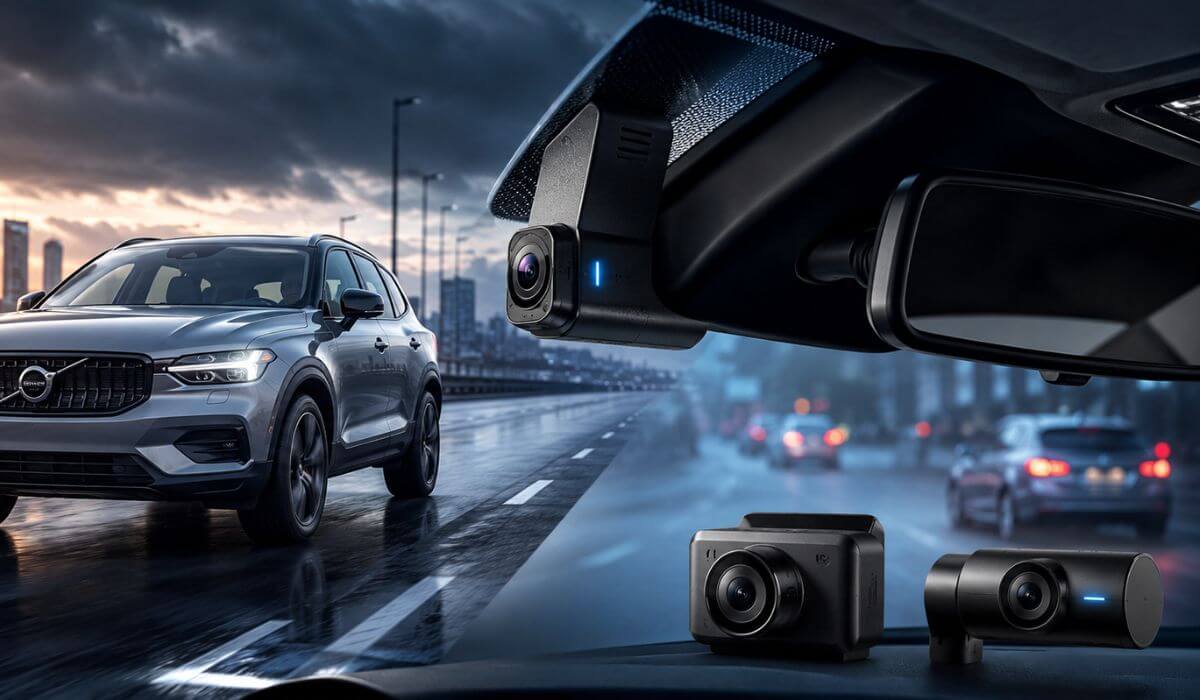
5 Best Dash Cams for Volvo XC40 in 2026: OEM Fit 4K Recording & STARVIS 2 Clarity
If you drive a Volvo XC40, you already know it isn’t just another compact SUV. Whether you own an early 2019–2022 XC40, a refreshed 2023–2026 model, or the XC40 Recharge, the cabin layout, upright windshield, and premium interior mean a dash cam should do more than record video—it should fit cleanly, stay reliable in changing temperatures, and never become a distraction. A poorly chosen camera can block the driver’s view, create windscreen reflections, or leave important details unreadable when you actually need the footage.
That is exactly how this list was put together. We didn’t chase long feature lists or marketing claims. Instead, we looked at the things that matter in real ownership: OEM-style installation, 4K recording quality, Sony STARVIS 2 sensors for low-light clarity, stable parking surveillance, fast Wi-Fi transfers, and long-term reliability. These are the features that make a noticeable difference when you’re driving in rain, on dark roads, or parked overnight.
If your goal is to buy a Volvo XC40 dash cam once and not think about replacing it a year later, these are the five models worth considering. Each recommendation suits a different type of XC40 owner—from those who want a factory-look installation to drivers who prefer maximum video coverage with front, rear, and cabin recording.
Best Volvo XC40 Dash Cams: Top 2026 Picks with GPS WiFi and Parking Mode
#1. Fitcamx Front 4K + Rear 1080P Dash Cam
Best OEM Dash Cam for Volvo XC40 with Factory-Fit Installation, Dual Recording & Built-in WiFi
#2. VIOFO A329S 4K 3-Channel Dash Cam
Best 4K Volvo XC40 Dash Camera with STARVIS 2 Sensors, WiFi 6 & Triple-Channel Coverage
#3. Vantrue New N4S 3-Channel Dash Cam
Best Volvo XC40 Dash Cam for Night Driving, Interior Recording & Reliable Parking Mode
#4. ROVE R2-4K Dual PRO Dash Cam
Best Value Front and Rear Dash Cam for Volvo XC40 with Dual STARVIS 2 Sensors & WiFi 6
#5. REDTIGER F7N Touch Dash Cam
Best Affordable 4K Dash Camera for Volvo XC40 with Touchscreen, GPS & Voice Control
Expert Tip
If you’re buying a dash cam for a Volvo XC40, don’t choose one just because it records in 4K. The placement of the camera matters just as much as the resolution. The XC40 has a clean, upright windshield with factory driver-assistance cameras already mounted near the rear-view mirror. A dash cam that sits too low or uses a bulky mount can create unnecessary distractions and spoil the clean cabin design Volvo is known for.
That is why OEM-style fitment, high-quality image sensors, and stable software were given more importance than gimmicks. Clear footage on a dark road, dependable parking recording, and a camera you’ll barely notice after installation are far more valuable than features you’ll never use. In everyday ownership, the best dash cam is the one that quietly does its job every single drive.
How We Chose the Best Dash Cams for Volvo XC40
Every dash cam in this guide was selected with one question in mind: Would we confidently install it in our own Volvo XC40 and leave it there for years? If the answer wasn’t a clear yes, it didn’t make the list.
We started with video quality, because sharp footage is what matters after an incident. Cameras using Sony STARVIS 2 sensors naturally moved to the top because they consistently deliver better detail at night, improved dynamic range, and more readable licence plates in difficult lighting. Simply advertising “4K” wasn’t enough—overall image processing had to be equally reliable.
Next came compatibility with the XC40 itself. The Fitcamx earned its place because it preserves the factory appearance instead of leaving cables hanging across a premium interior. Universal models were only included if they could be installed neatly without interfering with the vehicle’s visibility or everyday usability.
We also looked closely at the features owners actually benefit from over time. Reliable parking mode, fast Wi-Fi transfers, accurate GPS logging, stable mobile apps, and dependable recording performance carried far more weight than flashy touchscreens or marketing extras. A dash cam is something most owners forget about until they need the footage—so consistency mattered more than novelty.
Storage support was another deciding factor. Models that handle high-capacity memory cards or SSD storage without frequent recording errors are simply better suited for long-term ownership, especially if you drive daily or rely on parking surveillance.
Finally, we avoided recommending products based only on early ratings or promotional claims. Instead, we compared hardware quality, sensor technology, manufacturer reputation, installation practicality, and the overall value each model brings to different XC40 owners. That’s why this list includes a mix of OEM-style, dual-channel, and three-channel options—because the right choice depends on how you actually use your Volvo, not on whichever camera has the longest feature list.
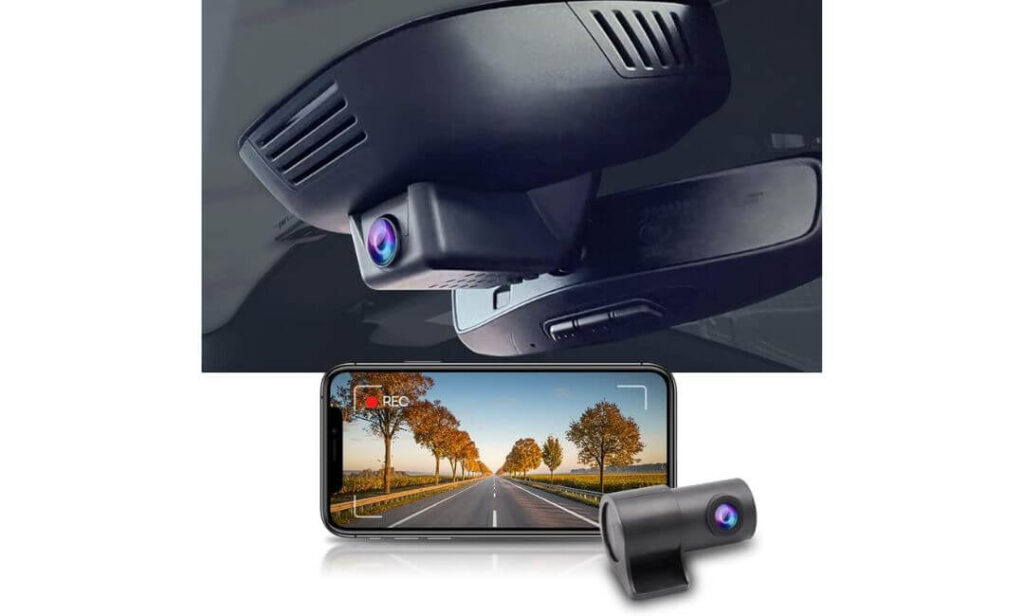
#1. Fitcamx Front 4K + Rear 1080P Dash Cam
Quick Specs:
- Best For: Volvo XC40 owners who want a factory-style dash cam that blends into the interior.
- Vehicle Compatibility: Volvo XC40 & XC40 Recharge (Model B) (2021+ models – compare your overhead console cover before ordering.)
- Video Resolution: 4K Front + 1080P Rear
- Field of View: 170° Front + 140° Rear
- Night Performance: f/1.6 lens with WDR for improved low-light recording.
- Installation Type: OEM replacement housing with no exposed wires.
- Wireless Connectivity: Built-in WiFi with the FITCAMX mobile app.
- Storage: 128GB microSD card included, expandable up to 256GB.
- Recording Features: Loop Recording, G-Sensor, Automatic Start & Stop.
- Parking Mode: Not Supported
- Operating Temperature: -20°C to 85°C
- Ideal Choice For: Drivers who prefer a clean factory look over bulky universal dash cams.
The first thing you’ll notice isn’t the video quality—it’s how perfectly this camera disappears into the Volvo XC40. Instead of sticking another gadget to the windshield, it replaces the factory mirror cover with an OEM-style housing that looks like it came from Volvo itself. That matters more than most people realise because the XC40’s clean Scandinavian interior is one of the reasons people buy this SUV in the first place.
Once you start driving, the hardware backs up the design. The 4K front camera captures excellent daytime detail, while the 1080P rear camera provides valuable coverage during rear-end incidents and busy city traffic. Thanks to the f/1.6 aperture, WDR technology, and wide 170° front plus 140° rear viewing angles, footage remains clear in changing light conditions without looking overly processed. Built-in WiFi also makes downloading clips quick through the FITCAMX app instead of removing the memory card every time.
What really makes this model easy to recommend is that it focuses on the essentials rather than flashy features. It starts recording automatically when you drive, protects important clips using the G-Sensor, continuously records with loop recording, and arrives with a 128GB memory card already installed. For most XC40 owners, that’s exactly the type of reliability they want—fit it once, forget it’s there, and trust it when something unexpected happens.
(If your goal is to keep the premium look of your Volvo XC40 while adding dependable front and rear recording, this is one of the most natural-looking options currently available.)
Why It Made Our Recommendation List
- Looks factory-installed instead of feeling like an aftermarket accessory.
- Excellent 4K front video captures sharp road details.
- Rear camera included, giving complete front and rear coverage.
- Built-in WiFi makes reviewing and downloading footage simple.
- Comes with a 128GB memory card, so it’s ready to use straight out of the box.
One Thing to Know Before Buying
- Parking mode isn’t available, so if you need continuous surveillance while the vehicle is parked, another model in this guide may suit you better.
Volvo XC40 Compatibility Notes
This version is designed specifically for Volvo XC40 and XC40 Recharge Model B vehicles. Before placing your order, compare the shape of your overhead console with the product images. Volvo has used different mirror cover designs across production years, so confirming the correct version is important for achieving the seamless OEM finish.
Installation is much cleaner than a traditional universal dash cam because it replaces the existing mirror housing rather than attaching to the windshield with a suction mount. Most owners can complete the installation with basic trim tools, although taking extra care while removing the original cover helps protect the retaining clips and ensures a snug factory-style fit.
The Insider Pro-Tip
A factory-style dash cam only looks OEM if it’s installed correctly. Before clipping the new housing into place, test the camera angle using the mobile app and confirm the rear camera is level with the tailgate fully closed. Spending a few extra minutes during installation usually delivers noticeably better footage than trying to adjust everything after the trim is back together.
If you rarely leave your XC40 parked in public for long periods, the lack of parking mode is unlikely to be a deal-breaker. In return, you get one of the cleanest-looking dash cam installations available for the XC40—something you’ll appreciate every single day, not just when reviewing footage.
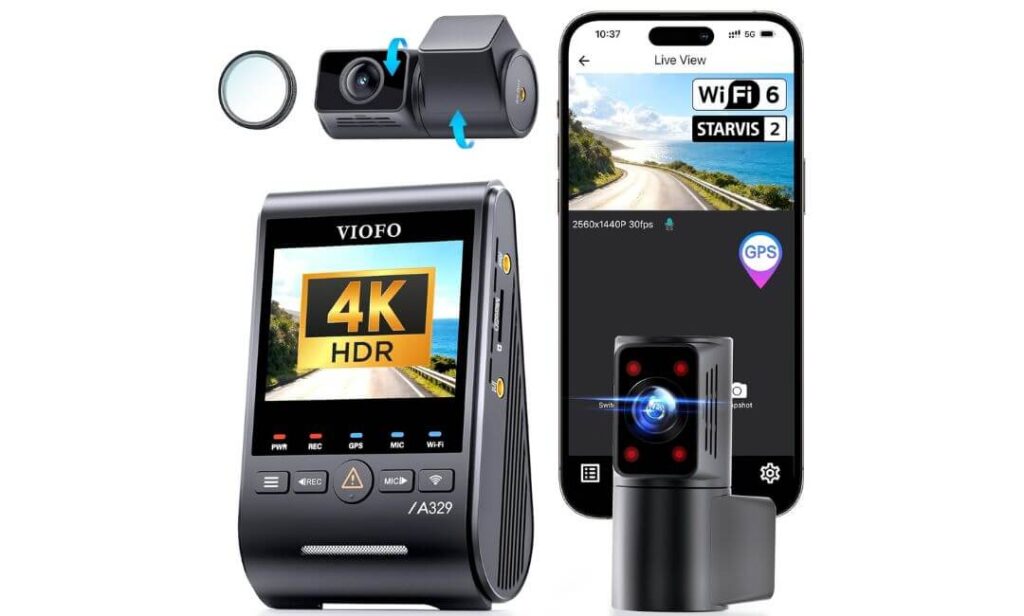
#2. VIOFO A329S 4K 3-Channel Dash Cam
Quick Specs:
- Best For: Volvo XC40 owners who want maximum recording coverage without compromising video quality.
- Vehicle Compatibility: Universal fit for Volvo XC40 (2019+) and XC40 Recharge (Install at least 20mm away from Volvo’s front camera module.)
- Video Resolution: 4K Front + 2K Cabin + 2K Rear
- Image Sensors: Sony STARVIS 2 IMX678 (Front) + Dual IMX675 (Cabin & Rear)
- Cabin Coverage: 210° Ultra-Wide Fisheye Lens
- HDR Recording: Three-channel HDR for improved licence plate clarity.
- Parking Recording: Power Saving Parking Mode (Hardwire kit required.)
- Wireless Connectivity: Wi-Fi 6 with transfer speeds up to 30MB/s
- GPS: Built-in GPS with support for GPS, Galileo, BeiDou & GLONASS
- Storage: Supports 512GB microSD or up to 4TB external SSD
- Voice Control: Hands-free voice commands with spoken status alerts.
- Bonus Included: CPL filter for reduced windshield reflections.
The moment you look beyond the specification sheet, it becomes obvious why this camera sits near the top of our recommendations. Rather than focusing on one outstanding feature, it improves almost every area that matters in everyday driving. For a Volvo XC40, where visibility, technology, and safety already set a high standard, this feels like a dash cam designed to match the vehicle instead of simply recording from it.
Its hardware is genuinely impressive. The 4K front camera uses Sony’s flagship STARVIS 2 IMX678, while both the 2K rear and 2K interior cameras use IMX675 STARVIS 2 sensors. Combined with three-channel HDR, the footage remains remarkably balanced when driving from bright sunlight into darker roads or underground parking. The 210° cabin camera also covers almost the entire interior, making it an excellent choice for families, ride-share drivers, or anyone who simply wants the most complete recording possible.
What impressed us just as much was everything that happens after recording. Wi-Fi 6 makes large 4K files surprisingly quick to download, built-in GPS automatically records journey data, and support for up to 4TB SSD storage is something very few dash cams currently offer. Add the included CPL filter, voice control, and low-power parking mode, and you end up with a camera that feels built for years of ownership rather than occasional use.
(If you want the most advanced recording package in this guide instead of the most discreet installation, this is the model we’d confidently choose.)
Why It Earned a Place in This Guide
- Triple STARVIS 2 sensors deliver exceptional day and night recording.
- 4K + 2K + 2K recording captures every important angle around the vehicle.
- Wi-Fi 6 dramatically reduces the time needed to transfer footage.
- Supports external SSD storage up to 4TB, making it ideal for long-term recording.
- Built-in voice control, GPS, HDR, and CPL filter add genuine everyday value.
One Thing to Know Before Buying
- To unlock parking mode, you’ll need the optional HK4 or HK6 hardwire kit, which is sold separately.
Volvo XC40 Installation Notes
Although this is a universal dash cam, it fits the Volvo XC40 very well when installed correctly. The most important step is positioning the front camera outside the viewing area of Volvo’s factory driver-assistance camera and leaving approximately 20mm of clearance to avoid affecting systems such as Lane Keeping Aid or Traffic Sign Information.
The supplied slim coaxial cables also make installation cleaner than many universal systems. They are easier to conceal behind the XC40’s trim panels while reducing the chance of interference with other in-car electronics, resulting in a tidy finish despite the additional rear and cabin cameras.
The Insider Pro-Tip
If you’re investing in a premium three-channel system, don’t limit it with a small memory card. This camera is one of the few models that genuinely benefits from high-capacity storage, especially if you drive every day or record long journeys. The extra space means fewer overwritten files and a much better chance of keeping important footage when you actually need it.
Before routing the front camera permanently, sit in the driver’s seat and confirm that the housing doesn’t overlap the factory camera module behind the windshield. A careful five-minute alignment during installation is far easier than repositioning the system once every cable has been tucked behind the trim.
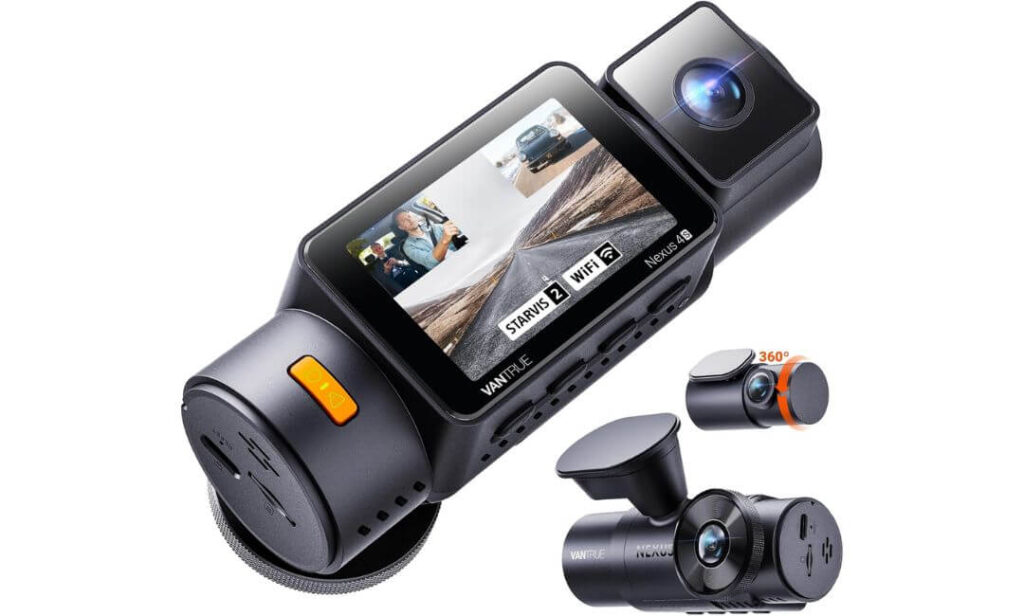
#3. Vantrue New N4S 3-Channel Dash Cam
Quick Specs:
- Best For: Volvo XC40 owners who want premium night vision with flexible three-channel coverage.
- Vehicle Compatibility: Universal fit for Volvo XC40 (2019+) and XC40 Recharge (Install outside Volvo’s factory camera viewing area with at least 20mm clearance.)
- Video Resolution: 1944P Front + 1440P Interior + 1440P Rear
- Image Technology: Triple Sony STARVIS 2 sensors with HDR.
- Special Feature: PlatePix™ Technology for sharper licence plate capture.
- Viewing Angles: 158° Front + 165° Cabin + 160° Rear
- Parking Recording: Four intelligent parking modes (Hardwire kit required.)
- Connectivity: High-speed 5GHz WiFi with OTA firmware updates.
- GPS: Built-in Quad GPS with GPS & BeiDou positioning.
- Storage: Supports up to 1TB microSD (card sold separately).
- Unique Advantage: Rotating rear camera for cargo, pets, or rear traffic monitoring.
- Power Source: Supercapacitor design for improved reliability in extreme temperatures.
There are dash cams that simply record what happens, and then there are models that are clearly engineered for people who expect more from their equipment. The Vantrue N4S falls firmly into the second category. It doesn’t rely on one headline feature to stand out—it quietly improves the small details that make a noticeable difference every time you drive your Volvo XC40, especially after sunset.
Its triple-camera system combines 1944P front recording with 1440P interior and 1440P rear video, all powered by Sony STARVIS 2 sensors. Add HDR and PlatePix™ Technology, and the result is footage with noticeably better licence plate readability when headlights, tunnels, or poor weather would normally wash out important details. The rotating rear camera is another thoughtful touch, allowing you to monitor rear traffic one day and luggage or pets the next without changing cameras.
Beyond image quality, this camera feels built for long-term ownership. The supercapacitor power system handles extreme temperatures more confidently than traditional lithium batteries, while 5GHz WiFi, Quad GPS, OTA firmware updates, and support for 1TB storage keep it practical long after the first installation. It isn’t trying to impress with gimmicks—it focuses on dependable hardware that continues to perform every day.
(If regular night driving is part of your routine, few cameras in this price range offer this combination of image quality, flexibility, and long-term reliability.)
Why It Stood Out During Our Evaluation
- Triple STARVIS 2 sensors deliver consistently impressive low-light performance.
- PlatePix™ Technology noticeably improves licence plate readability.
- Four intelligent parking modes offer more flexibility than most competitors.
- Rotating rear camera adds useful versatility for families, cargo, or pets.
- Supercapacitor design is better suited to long-term use in changing climates.
One Thing to Know Before Buying
- To use the advanced parking functions, you’ll need Vantrue’s optional hardwire kit, which is purchased separately.
Volvo XC40 Installation Notes
The Vantrue N4S works well inside the Volvo XC40, but correct placement is especially important because Volvo’s driver-assistance camera sits behind the windshield near the rear-view mirror. Position the dash cam outside that viewing area and leave approximately 20mm of clearance so it doesn’t interfere with safety systems such as Lane Keeping Aid or Traffic Sign Information.
Installation itself is refreshingly straightforward. The magnetic GPS mount, static cling film, and included cable clips make routing the front, rear, and cabin cameras much cleaner than many three-channel systems. Spending a little extra time hiding the cables behind the XC40’s trim helps preserve the premium interior while keeping every camera securely positioned.
The Insider Pro-Tip
If most of your driving happens before sunrise, after dark, or during winter evenings, don’t judge a dash cam by daytime sample footage alone. The real difference appears when lighting becomes difficult—and that’s exactly where the STARVIS 2 sensors, HDR, and PlatePix™ Technology begin to justify their price.
Before securing the rear camera permanently, decide how you’ll actually use it. If you often travel with pets, sports equipment, or luggage, angle it slightly inward from the start. That small adjustment can make this camera considerably more useful than a fixed rear-only setup without sacrificing normal rear traffic coverage.
#4. ROVE R2-4K Dual PRO Dash Cam
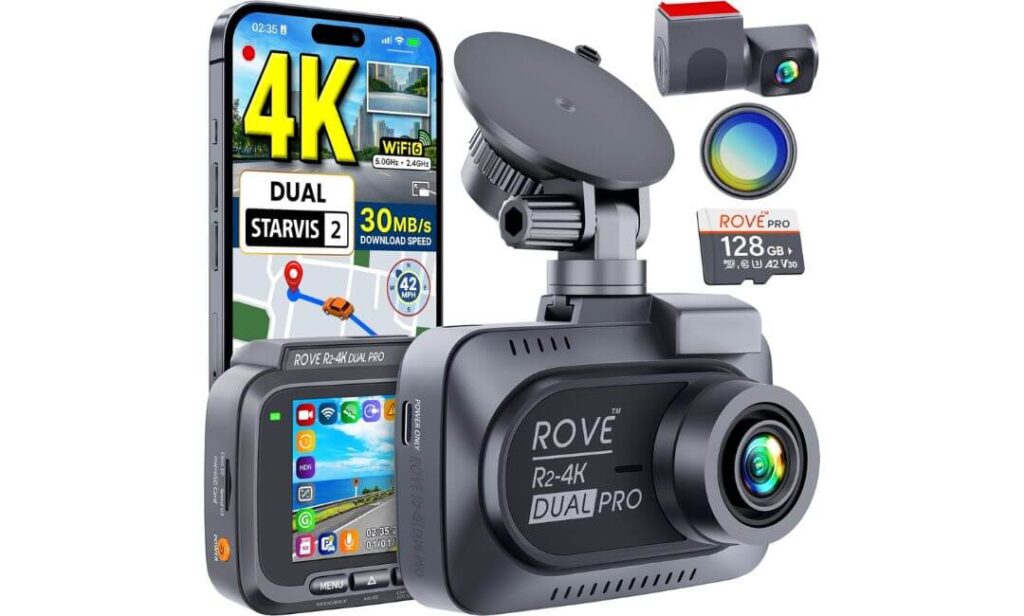
Quick Specs:
- Best For: Volvo XC40 drivers who want premium dual-channel recording with excellent value.
- Vehicle Compatibility: Universal fit for Volvo XC40 (2019+) and XC40 Recharge (Install at least 20mm away from Volvo’s front camera module.)
- Video Resolution: 4K Front + 2K Rear
- Image Sensors: Sony STARVIS 2 IMX678 (Front) + IMX675 (Rear)
- Lens Aperture: F1.7 Front + F1.55 Rear
- Viewing Angles: 150° Front + 140° Rear
- Wireless Connectivity: Dual-Band Wi-Fi 6 with download speeds up to 30MB/s
- GPS: Built-in Quad GPS with GPS, BeiDou, Galileo & GLONASS
- Storage: 128GB microSD card included, expandable up to 1TB
- Parking Recording: Three intelligent parking modes (Hardwire kit required.)
- Included Extras: CPL Filter, 128GB Card & Windshield Mount
- Power System: Supercapacitor for improved durability in extreme temperatures.
There is something refreshing about a dash cam that focuses on getting the fundamentals absolutely right. Instead of adding features you’ll rarely use, the ROVE R2-4K Dual PRO concentrates on the areas that genuinely matter every time you drive your Volvo XC40—clear video, dependable hardware, fast file transfers, and a complete package that’s ready to install straight from the box.
The recording hardware leaves very little to criticise. A 4K front camera paired with a 2K rear camera, powered by Sony STARVIS 2 IMX678 and IMX675 sensors, captures sharp detail in daylight while remaining impressively clean after dark. The combination of HDR, F1.7 and F1.55 wide-aperture lenses, and 150° plus 140° viewing angles helps preserve road signs and licence plates even when lighting conditions change rapidly. The included CPL filter also reduces windshield reflections, something many drivers don’t realise they need until they compare the footage.
Where this camera quietly separates itself from many rivals is overall ownership. It already includes a 128GB memory card, supports storage up to 1TB, offers Wi-Fi 6, built-in Quad GPS, OTA firmware updates, and a reliable supercapacitor instead of a traditional battery. Everything feels designed to minimise future upgrades, making it one of the easiest premium dual-camera systems to recommend.
(If you don’t need an interior camera but still want flagship image quality and modern hardware, this strikes one of the strongest balances in the entire guide.)
Why It Deserves Its Place
- Dual STARVIS 2 sensors deliver consistently sharp front and rear footage.
- 4K + 2K recording provides excellent image quality without unnecessary complexity.
- 128GB memory card and CPL filter are included from day one.
- Wi-Fi 6 and Quad GPS add genuine everyday convenience.
- Supercapacitor design improves long-term durability in demanding weather conditions.
One Thing to Know Before Buying
- The advanced 24-hour parking features require ROVE’s optional hardwire kit, which is sold separately.
Volvo XC40 Installation Notes
The ROVE R2-4K Dual PRO fits the Volvo XC40 well because the compact front camera allows flexible positioning on the windshield. During installation, make sure the camera sits outside the field of view of Volvo’s factory driver-assistance camera and maintains approximately 20mm of clearance from the housing to avoid affecting systems such as Lane Keeping Aid or Traffic Sign Recognition.
Installation is also helped by the generous cable kit included in the box. The supplied rear cable, trim tool, cable clips, and electrostatic films make routing the wiring behind the XC40’s interior panels much cleaner, helping preserve the premium look of the cabin while keeping both cameras securely connected.
The Insider Pro-Tip
One of the biggest advantages of this camera isn’t listed on the front of the box. Because it already includes a high-quality 128GB card and a CPL filter, you avoid two upgrades that many premium dash cam owners end up buying separately after installation. That saves money while ensuring the camera performs at its best from the first drive.
Before securing the front mount permanently, spend a few minutes checking for windshield reflections during midday sunlight. A slight adjustment in camera angle, combined with the included CPL filter, often produces noticeably cleaner footage than relying on automatic exposure alone.
#5. REDTIGER F7N TOUCH Dash Cam
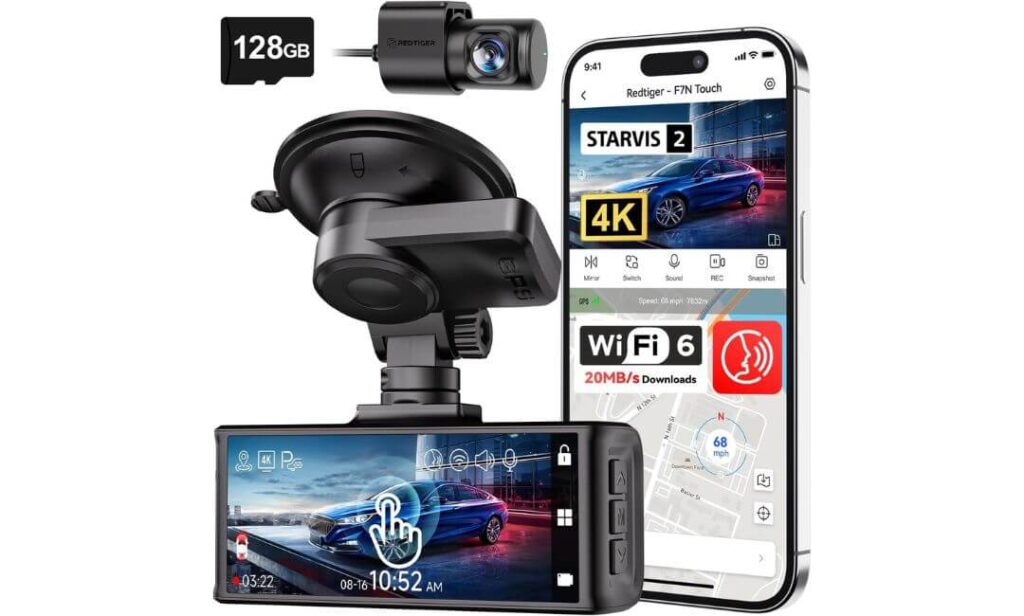
Quick Specs:
- Best For: Volvo XC40 owners looking for a feature-packed dual dash cam without spending flagship money.
- Vehicle Compatibility: Universal fit for Volvo XC40 (2019+) and XC40 Recharge (Install at least 20mm away from Volvo’s factory camera housing.)
- Video Resolution: 4K Front + 1080P Rear
- Image Technology: Sony STARVIS 2 front sensor with HDR & WDR.
- Viewing Angles: 170° Front + 140° Rear
- Display: 3.18-inch Touchscreen with physical control buttons.
- Wireless Connectivity: Built-in 5GHz WiFi with download speeds up to 20MB/s
- GPS: Built-in GPS for route, speed, and location tracking.
- Storage: 128GB microSD card included
- Parking Recording: G-Sensor & Time-Lapse Parking Mode (Hardwire kit required.)
- Smart Features: Voice Control, OTA Firmware Updates & Supercapacitor.
- Ideal Choice For: Drivers who want modern features straight out of the box without buying extra accessories.
Sometimes the smartest purchase isn’t the one with the longest specification sheet—it’s the one that delivers the features you’ll actually use every day. That’s exactly where the REDTIGER F7N TOUCH earns its place. For Volvo XC40 owners who want premium convenience without stepping into flagship pricing, it offers a surprisingly complete package from the moment you open the box.
Recording quality is confidently handled by a 4K front camera supported by a Sony STARVIS 2 sensor, while the 1080P rear camera, HDR, and WDR work together to improve visibility in changing light conditions. The 170° front and 140° rear viewing angles capture a broad view of the road, and the included 128GB memory card means you can start recording immediately instead of shopping for extra accessories before installation.
The everyday experience is where this camera feels more polished than expected. The responsive 3.18-inch touchscreen, voice commands, built-in GPS, 5GHz WiFi, OTA firmware updates, and reliable supercapacitor all contribute to a dash cam that’s genuinely enjoyable to use. It doesn’t overwhelm you with complicated menus—it simply makes the important functions easier to access when you need them.
(For many XC40 owners, this offers one of the strongest combinations of price, convenience, and everyday usability in the entire guide.)
Why We Included It in This Guide
- 4K front recording delivers detailed footage with STARVIS 2 image quality.
- Touchscreen and voice control make operation simple while driving.
- 128GB memory card is already included in the package.
- Built-in GPS and 5GHz WiFi improve both convenience and video management.
- OTA firmware updates help keep the camera current without complicated manual updates.
One Thing to Know Before Buying
- The 24-hour parking functions require REDTIGER’s optional hardwire kit, which isn’t included in the box.
Volvo XC40 Installation Notes
The compact suction mount gives this camera plenty of flexibility inside the Volvo XC40, making it easier to position than larger universal dash cams. Even so, it’s important to mount it outside the viewing area of Volvo’s factory forward-facing camera while maintaining approximately 20mm of clearance to avoid interfering with driver assistance features.
Installation is straightforward using the supplied rear cable, trim tool, and cable clips. Taking a little extra time to hide the wiring behind the XC40’s headliner and interior trim helps achieve a much cleaner result while keeping the premium cabin looking uncluttered.
The Insider Pro-Tip
If you enjoy technology that’s easy to interact with, this camera offers something many competitors overlook—a genuinely practical user experience. The combination of touchscreen controls, voice commands, and physical buttons means you’re never forced to rely on a single way of operating the camera, especially when wearing gloves or driving in poor weather.
After installation, spend a few minutes testing both touchscreen responsiveness and voice commands before your first journey. Knowing exactly how to save an important clip without taking your eyes off the road is far more valuable than discovering those controls after an incident has already happened.
Best Volvo XC40 Dash Cam Models Compared Side by Side
| Comparison Point |
Editor’s Choice Fitcamx |
Best Premium VIOFO A329S |
Best Night Vision Vantrue N4S |
Best Value ROVE R2-4K Dual PRO |
Feature Rich Pick REDTIGER F7N Touch |
|---|---|---|---|---|---|
| Best Suited For | Factory-style Volvo installation Looks like original equipment | Maximum protection Front + Rear + Cabin coverage | Frequent night driving Excellent low-light clarity | Balanced everyday ownership Strong value for money | Feature lovers Touchscreen & voice control |
| Video Setup | 4K + 1080P | 4K + 2K + 2K | 1944P + 1440P + 1440P | 4K + 2K | 4K + 1080P |
| Camera Coverage | Front & Rear | Front, Cabin & Rear | Front, Cabin & Rear | Front & Rear | Front & Rear |
| Night Recording | Very Good | Excellent | Excellent | Excellent | Very Good |
| Image Sensor | WDR Optimised | Triple STARVIS 2 | Triple STARVIS 2 | Dual STARVIS 2 | STARVIS 2 Front |
| OEM Appearance | ★★★★★ | Universal | Universal | Universal | Universal |
| Parking Recording | Not Available | Power Saving Mode | 4 Smart Modes | 3 Smart Modes | Motion & Time-Lapse |
| Wi-Fi Performance | Built-in WiFi | Wi-Fi 6 | 5GHz WiFi | Wi-Fi 6 | 5GHz WiFi |
| GPS | — | Built-in | Quad GPS | Quad GPS | Built-in |
| Maximum Storage | 256GB | 4TB SSD / 512GB | 1TB | 1TB | 128GB Included |
| Included Extras | 128GB Card | CPL Filter | Magnetic GPS Mount | 128GB Card + CPL | 128GB Card |
| Installation Style | Factory replacement housing | Windshield mount | Windshield mount | Windshield mount | Windshield mount |
| Ideal Volvo XC40 Owner | Drivers who want the cleanest OEM finish | Drivers wanting flagship recording quality and full vehicle coverage | Night commuters, families and rideshare users | Owners wanting premium hardware without overspending | Drivers wanting modern smart features with easy operation |
| Our Overall Verdict | Best OEM Choice | Best Overall Premium | Best Night Performer | Best Value Pick | Best Smart Features |
Buying Guide: How to Choose the Right Dash Cam for Your Volvo XC40 Without Regretting It Later
Buying a dash cam for the Volvo XC40 isn’t as simple as choosing the highest resolution or the lowest price. The XC40 is a premium SUV with advanced driver-assistance systems, a clean Scandinavian interior, and a factory camera module already positioned behind the windshield. That means the right dash cam should not only capture excellent footage but also fit the vehicle properly, work reliably in all weather conditions, and integrate without affecting safety features.
Many buyers focus only on “4K recording” and ignore everything else. In reality, image sensors, parking recording, installation quality, storage support, software stability, and long-term reliability have a much bigger impact on everyday ownership. A dash cam is something you’ll hopefully never need—but when you do, every small detail suddenly becomes important.
The recommendations in this guide were selected with those real-world priorities in mind rather than marketing claims or feature lists.
Decide Whether You Need OEM Integration or a Universal Dash Cam
This is usually the first decision every XC40 owner should make.
If keeping the interior looking factory-original is your priority, an OEM dash cam for Volvo XC40 is the best option. These models replace the original trim around the rear-view mirror, hide the wiring, and blend naturally with the dashboard. Most passengers won’t even notice the camera is installed.
Universal dash cams offer much greater flexibility. They often include better sensors, faster processors, GPS, parking recording, interior cameras, larger storage support, and future firmware updates. The trade-off is that they require more careful installation and visible windshield mounting.
Neither option is automatically better—the right choice depends on whether you value factory appearance or maximum recording capability.
Don’t Judge a Dash Cam by Resolution Alone
A 4K dash cam for Volvo XC40 sounds impressive, but resolution only tells part of the story.
The quality of the image sensor determines how much useful information the camera actually records. Premium sensors such as Sony STARVIS 2 produce cleaner footage, reduce motion blur, improve dynamic range, and capture licence plates more consistently at night or during heavy rain.
Other hardware also plays a significant role, including:
- Lens aperture for better low-light performance.
- HDR or WDR processing to balance bright headlights and dark roads.
- Stable image processing with fewer compression artefacts.
- Reliable heat management during long drives.
A well-tuned camera with premium sensors often outperforms a cheaper “4K” model using lower-quality hardware.
Choose the Right Camera Coverage for How You Actually Drive
Not every XC40 owner needs three cameras.
A front-only setup is suitable for drivers who mainly want evidence during everyday commuting.
A front and rear dash cam for Volvo XC40 provides much better protection against rear-end collisions, parking incidents, and highway driving. For most owners, this represents the best balance between coverage, cost, and installation complexity.
Three-channel systems add an interior camera that records the cabin as well. These are especially useful for ride-share drivers, families travelling with children, or owners who simply want the highest possible level of recording coverage.
Choosing extra cameras only makes sense if you’ll genuinely benefit from them.
Why Parking Mode Is More Important Than Many Buyers Realise
A surprising number of vehicle incidents happen while the engine isn’t running.
Modern parking modes can detect movement, impacts, or unusual activity around the vehicle and automatically begin recording. Depending on the camera, this may include collision detection, motion detection, low-bitrate recording, or time-lapse surveillance.
Keep in mind that most advanced parking functions require a dedicated hardwire kit, allowing the camera to receive power safely while the vehicle is parked without draining the battery unnecessarily.
If your XC40 regularly spends time in public car parks, apartment complexes, airports, or city streets, parking recording quickly becomes one of the most valuable features you’ll own.
GPS, Loop Recording and Mobile Apps Are Worth Having
These features rarely receive much attention until they’re genuinely needed.
Built-in GPS records your route, speed, location, and time alongside the video footage, making incident reconstruction significantly easier.
Loop recording continuously replaces the oldest unlocked files, ensuring the camera never stops recording simply because the memory card becomes full.
A well-designed mobile app allows you to preview live footage, download important clips, update firmware, and adjust settings without removing the memory card every time. Cameras with Wi-Fi 6 noticeably reduce transfer times when working with large 4K files.
These features improve ownership every single day—not just after an accident.
Storage Capacity Matters More Than Most People Expect
Higher video quality also means larger video files.
If you’re recording in 4K with rear or interior cameras, a small memory card fills surprisingly quickly. That’s why cameras supporting 512GB, 1TB, or even external SSD storage are particularly attractive for drivers covering long motorway journeys or using parking recording regularly.
It’s also worth choosing high-endurance memory cards designed specifically for continuous recording instead of ordinary consumer microSD cards.
Installation Is Just as Important as the Camera Itself
Even the best dash cam performs poorly if it’s installed incorrectly.
The Volvo XC40 uses forward-facing cameras and driver-assistance systems positioned behind the rear-view mirror. Any aftermarket dash cam should be installed outside the viewing area of the factory camera module, while maintaining sufficient clearance to avoid interfering with safety technologies.
Cable routing deserves equal attention. A neatly hidden installation not only looks more professional but also reduces the chance of loose wiring, cabin rattles, or accidental damage over time.
OEM-style models simplify this process considerably, while universal cameras require a little more planning during installation.
DIY Installation or Professional Installation?
Most universal dash cams can be installed at home using the supplied trim tools, cable clips, and adhesive mounts. If you’re comfortable removing interior trim panels carefully, the process is usually straightforward and can be completed in a couple of hours.
However, if you’re planning to install a hardwire kit, route cables through multiple trim sections, or simply want the cleanest possible finish, professional installation is often money well spent. An experienced installer will usually hide every cable, position the camera correctly around Volvo’s safety systems, and ensure parking mode functions exactly as intended.
For many XC40 owners, paying once for a tidy installation is easier than revisiting loose cables or incorrect mounting later.
OEM vs Aftermarket: Which Dash Cam Makes More Sense for Your Volvo XC40?
One of the biggest decisions you’ll make isn’t choosing between brands—it’s deciding whether an OEM dash cam for Volvo XC40 is a better fit than a traditional aftermarket model. Both have clear advantages, but they serve different types of owners.
If your priority is preserving the clean Scandinavian design of the XC40, an OEM-style solution will usually feel like the natural choice. If your goal is getting the latest imaging technology, advanced parking features, and maximum recording coverage, a premium aftermarket system often offers far greater flexibility.
Neither approach is universally better. The right option depends on how you use your XC40 every day, how long you plan to keep it, and which features genuinely matter to you.
What Makes an OEM Dash Cam Different?
An OEM dash cam for Volvo XC40 is designed to blend into the vehicle rather than stand out. Instead of attaching a bulky camera below the rear-view mirror, most OEM-style systems replace or integrate into the factory trim surrounding the mirror assembly.
The result is a much cleaner installation with:
- Hidden wiring instead of visible power cables.
- No suction cups attached to the windshield.
- Better preservation of the XC40’s premium interior.
- Minimal obstruction to the driver’s forward view.
- A finish that appears factory-installed.
For many XC40 owners, the visual difference alone is enough to justify choosing an OEM-style camera.
Why Premium Aftermarket Dash Cams Still Have an Advantage
Factory-style installation is attractive, but it often comes with compromises.
Premium aftermarket dash cams usually receive newer processors, larger image sensors, faster wireless connectivity, and more frequent firmware improvements. Features such as Sony STARVIS 2 sensors, three-channel recording, Wi-Fi 6, voice control, high-capacity SSD support, and advanced parking recording typically appear in aftermarket models long before similar technology reaches OEM-style alternatives.
They also give buyers much more freedom to choose exactly the combination of features that matches their driving habits instead of accepting a single factory-oriented design.
For drivers who prioritise recording performance above appearance, aftermarket cameras often provide significantly better long-term value.
How to Identify a Genuine OEM-Style Dash Cam for Volvo XC40
Not every product advertised as “OEM” actually delivers a factory-style installation.
Before buying, look for features such as:
- A replacement housing designed specifically for the Volvo XC40 mirror assembly.
- Hidden wiring that routes directly through the factory trim.
- No additional brackets or large suction mounts visible from inside the cabin.
- Product photos showing the installed camera integrated into the original mirror cover.
- Compatibility listed for your exact XC40 trim or mirror housing version.
If the camera still hangs below the mirror using an adhesive or suction mount, it should be considered a universal aftermarket dash cam, regardless of how it’s marketed.
Always Verify Compatibility Before Ordering
Compatibility involves much more than matching the model name.
Volvo has made small changes to mirror covers, overhead consoles, and interior trim during different production years. Some OEM-style dash cams are also divided into Model A and Model B versions based on the shape of the original mirror housing.
Before placing an order, compare:
- Your model year.
- XC40 or XC40 Recharge variant.
- Shape of the overhead mirror cover.
- Product compatibility notes.
- Installation photos provided by the manufacturer.
Spending a few minutes checking these details is far easier than discovering the replacement housing doesn’t fit once installation has already begun.
Factory Integration Matters More Than Appearance Alone
A well-integrated dash cam doesn’t simply look better—it usually functions better over time.
Proper integration reduces the chance of loose wiring, cabin rattles, accidental cable damage, and interference with everyday driving. It also helps maintain the uncluttered interior that many owners specifically chose the Volvo XC40 for.
When evaluating factory integration, pay attention to:
- Cable routing behind existing trim panels.
- Clearance around Volvo’s forward-facing safety camera.
- Ease of accessing the memory card when required.
- Whether the camera blocks the driver’s view.
- Future maintenance if firmware updates or memory card replacement are needed.
The goal isn’t simply making the camera invisible—it’s ensuring the installation continues to feel factory-quality years after it has been fitted.
Our Practical Recommendation
If preserving the original appearance of your Volvo XC40 is your highest priority, an OEM-style dash cam like the Fitcamx is difficult to beat because it integrates naturally with the interior and requires very little visual compromise.
If your priority is recording quality, advanced parking protection, STARVIS 2 sensors, Wi-Fi 6, larger storage capacity, or three-channel coverage, a premium aftermarket model such as the VIOFO, Vantrue, or ROVE will generally provide more capable hardware and greater flexibility.
The best choice ultimately comes down to a simple question: Would you rather your dash cam disappear into the interior, or outperform almost everything else on the road? Both approaches are valid—you simply need to choose the one that matches how you actually use your XC40.
Volvo XC40 Parking Mode Dash Cam Guide: What It Really Does and How to Use It Safely
For many Volvo XC40 owners, the most valuable recording doesn’t happen while driving—it happens after the engine is switched off. A surprising number of insurance claims involve hit-and-run damage, shopping trolley impacts, attempted break-ins, or vehicles being struck while parked. That’s exactly where a Volvo XC40 parking mode dash cam becomes useful.
However, parking mode isn’t simply a setting you switch on inside the camera menu. It depends on how the camera receives power, how intelligently it manages energy, and whether it’s installed correctly for your XC40. Understanding those differences before buying can save both frustration and unnecessary battery problems later.
How Parking Mode Actually Works
A normal dash cam records only while the vehicle is running. Once the ignition turns off, recording usually stops.
Parking mode changes that behaviour by allowing the camera to remain in a low-power standby state after you leave the vehicle. Depending on the dash cam model, it can automatically begin recording whenever it detects:
- A physical impact or collision.
- Motion close to the vehicle.
- Changes in vibration.
- Continuous low-bitrate recording.
- Time-lapse recording over extended periods.
Rather than recording hours of unnecessary footage, smarter parking systems only capture meaningful events, helping preserve both storage space and vehicle battery life.
Why Parking Recording Makes Sense for Volvo XC40 Owners
The Volvo XC40 is frequently used as an everyday family SUV, commuter vehicle, and city runabout. That often means spending long periods parked in shopping centres, office car parks, apartment buildings, airports, hotels, and busy streets.
In these situations, parking mode can provide evidence of incidents that would otherwise be impossible to explain, including:
- Another driver reversing into your parked XC40.
- Hit-and-run damage.
- Deliberate vandalism.
- Attempted theft.
- Suspicious activity around the vehicle.
- Damage caused while the owner is away.
Without parking recording, those events often go completely undocumented.
Choosing the Right Type of Parking Mode
Not every dash cam offers the same level of protection.
Basic systems normally activate only after detecting a collision through the built-in G-Sensor.
More advanced models may include:
- Motion Detection.
- Impact Detection.
- Time-Lapse Recording.
- Low Bitrate Continuous Recording.
- Buffered Event Recording that captures several seconds before and after an incident.
- Intelligent Power Saving Modes that reduce battery consumption.
If your XC40 spends extended periods parked outside, these advanced modes generally provide noticeably better protection than simple impact recording alone.
How to Enable Parking Mode Safely in a Volvo XC40
Simply plugging a dash cam into the 12V socket is usually not enough.
Most advanced parking features require a dedicated hardwire kit connected to a permanent power source inside the vehicle. A quality hardwire kit continuously monitors battery voltage and automatically disconnects the camera if the battery drops below a safe level, preventing excessive discharge.
For the cleanest and safest installation:
- Mount the camera outside the viewing area of Volvo’s factory forward-facing camera.
- Maintain suitable clearance around the mirror housing.
- Route all wiring behind the headliner and A-pillar trim.
- Secure every cable properly to prevent rattles.
- Configure the correct battery cut-off voltage during installation.
Following these steps helps preserve both camera performance and the XC40’s factory safety systems.
Understanding Battery and Power Management
Battery management is one of the most misunderstood aspects of parking mode.
The dash cam itself uses relatively little electricity. The real difference comes from how efficiently it manages power while waiting for an event.
Premium models often include:
- Intelligent sleep modes.
- Ultra-low-power standby operation.
- Automatic voltage monitoring.
- Adjustable recording sensitivity.
- Efficient event-triggered recording.
These features allow the camera to remain ready without placing unnecessary demand on the vehicle’s battery.
If your XC40 is regularly left parked for several days at a time, reducing parking recording sensitivity or temporarily disabling continuous recording can help preserve battery capacity.
Heat Management Is Just as Important as Battery Protection
Dash cams spend their lives attached directly to the windshield—one of the hottest places inside any vehicle during summer.
Choosing a camera with a supercapacitor rather than a traditional lithium battery generally improves long-term reliability because supercapacitors tolerate repeated heat cycles much better. They are also less likely to suffer from swelling or premature degradation after years of exposure to sunlight.
Proper airflow around the camera and avoiding direct obstruction of ventilation areas can also help maintain consistent recording performance during extremely hot weather.
Our Recommendation for Everyday XC40 Ownership
If your Volvo XC40 is usually parked inside a private garage, advanced parking recording may not be essential. However, if you regularly leave the vehicle in public spaces, office car parks, railway stations, airports, or city streets, parking mode quickly becomes one of the most valuable features you’ll ever use.
The key is not simply buying a dash cam that advertises parking mode, but choosing one with intelligent power management, reliable event detection, and installing it correctly with an appropriate hardwire kit. Done properly, it provides continuous peace of mind without compromising your XC40’s battery health or factory safety systems.
Volvo XC40 Dash Cam Installation Guide: How to Achieve a Clean Factory-Style Finish
Installing a Volvo XC40 dash cam is much more than attaching a camera to the windshield. A proper installation protects the vehicle’s premium interior, keeps cables completely hidden, avoids interference with Volvo’s driver-assistance systems, and ensures every feature works exactly as intended. Even the best dash cam can become frustrating if it’s mounted in the wrong place or wired carelessly.
The good news is that the XC40’s cabin layout makes it possible to achieve an installation that looks remarkably close to factory quality. Whether you choose an OEM-style camera or a premium aftermarket model, taking a little extra time during installation usually pays off every time you drive.
Prepare Everything Before You Start
Before removing any trim panels or mounting the camera, make sure you have everything ready. Stopping halfway through the installation often leads to rushed cable routing and unnecessary mistakes.
It’s worth having:
- Plastic trim removal tools instead of metal screwdrivers.
- Microfibre cloth and glass cleaner.
- Cable clips or adhesive cable holders if required.
- Hardwire kit if parking mode will be enabled.
- High-endurance microSD card if one isn’t included.
- Small torch for routing cables behind trim panels.
Cleaning the windshield before mounting the camera is equally important because even small dust particles can reduce adhesive strength over time.
Choose the Correct Mounting Position First
The mounting location deserves more attention than any other part of the installation.
The Volvo XC40 uses a forward-facing factory camera behind the rear-view mirror to operate several driver-assistance systems. Your dash cam should always be positioned outside the viewing area of this module, leaving adequate clearance so it doesn’t interfere with features such as Lane Keeping Aid, Traffic Sign Information, or other camera-based safety functions.
At the same time, the dash cam should remain high enough on the windshield to minimise obstruction while still providing a clear view of the road ahead.
Spending a few extra minutes testing the viewing angle before removing the adhesive backing usually prevents having to reposition the camera later.
DIY Installation or Professional Installation?
Most XC40 owners can successfully install a dash cam themselves, especially if they’re using a standard front and rear camera package.
A DIY installation is ideal if you:
- Are comfortable removing interior trim carefully.
- Plan to power the camera through the 12V outlet or USB connection.
- Don’t mind spending time routing cables neatly.
- Want to save installation costs.
Professional installation becomes worthwhile when:
- Adding a hardwire kit for parking mode.
- Installing three-channel systems with cabin cameras.
- Routing cables through multiple trim sections.
- Wanting the cleanest possible OEM-style finish.
- Preferring someone familiar with Volvo interior panels.
A skilled installer will usually complete the work more quickly while keeping every cable almost completely invisible.
Route the Wiring Like the Factory Intended
Visible cables are often what separates an average installation from a professional-looking one.
For the cleanest result, route the power cable behind:
- The headliner.
- The A-pillar trim.
- Factory weather stripping where appropriate.
- Interior side trim panels.
- Carpet edges if running rear camera wiring.
- Existing cable channels whenever possible.
Avoid stretching cables tightly or forcing connectors through narrow openings. Allowing a small amount of natural cable movement reduces long-term stress on both the wiring and the connectors.
The goal is simple: when the installation is finished, the dash cam should be the only visible part of the system.
Installing Rear Cameras Properly
Rear camera installation deserves the same attention as the front camera.
Position the rear unit where it provides an unobstructed view through the rear window without interfering with the tailgate operation. Make sure the cable has enough flexibility around the tailgate hinge area so repeated opening and closing doesn’t place unnecessary strain on the wiring.
Before securing every cable permanently, check the live rear camera image to confirm the horizon is level and the full width of the road is visible.
A small adjustment during installation often produces noticeably better footage for years to come.
Safety, Electrical Connections and Warranty Considerations
Modern Volvos contain numerous electronic systems, so it’s important not to rush electrical connections.
If you’re installing a hardwire kit:
- Use the correct fuse taps.
- Confirm battery and ignition power sources carefully.
- Set an appropriate battery voltage cut-off.
- Secure all wiring away from airbags and moving trim components.
Never route cables across airbag deployment zones or pinch wiring beneath trim panels.
If you’re unsure about vehicle electrics, professional installation is usually the safer option than experimenting with the fuse box.
Final Checks Before You Finish
Before considering the installation complete, verify that every important function works correctly.
Check that:
- The front and rear cameras record properly.
- GPS acquires a signal.
- Wi-Fi connects successfully.
- Date and time are correct.
- Memory card records without errors.
- The camera doesn’t obstruct the driver’s view.
- Parking mode activates correctly if installed.
- No trim panels or weather seals have been left loose.
Completing these checks immediately after installation is much easier than troubleshooting problems several weeks later.
A Small Installation Detail That Makes a Big Difference
One mistake many owners make is aiming the camera too high to capture more of the sky. In reality, the road is what matters. A slightly lower camera angle usually captures approaching vehicles, lane markings, number plates, and road signs far more effectively while reducing unnecessary glare from bright sunlight.
The best dash cam installation is the one you’ll almost forget is there. Hidden wiring, correct camera placement, stable recording, and proper integration with the Volvo XC40’s interior are what turn a good camera into a genuinely reliable safety upgrade.
FAQs About Volvo XC40 Dash Cam
Can a dash cam interfere with the Volvo XC40’s safety cameras or driver assistance systems?
Yes, it can—but only if it’s installed incorrectly. The Volvo XC40 uses a forward-facing camera behind the rear-view mirror for features such as Lane Keeping Aid, Traffic Sign Information, and other camera-based safety functions. A dash cam mounted directly in front of this module or too close to it can obstruct its field of view or create unnecessary reflections.
The safest approach is to mount the dash cam outside the factory camera’s viewing area while leaving adequate clearance around the housing. Before permanently fixing the mount, it’s worth checking that all driver-assistance features continue operating normally.
A good installation should always prioritise:
- Clear visibility for the factory camera.
- Hidden cable routing.
- No obstruction to the driver’s forward view.
- Stable mounting that won’t shift over time.
Taking a few extra minutes during installation is usually far easier than troubleshooting warning messages later.
Is an OEM dash cam for the Volvo XC40 always a better choice than a premium aftermarket model?
Not necessarily—and this is where many buyers make the wrong decision.
If your highest priority is preserving the XC40’s factory appearance, an OEM-style dash cam is difficult to beat. It integrates neatly into the mirror housing, keeps the windshield uncluttered, and looks like original equipment.
However, premium aftermarket cameras usually move ahead much faster when it comes to technology. Features such as Sony STARVIS 2 sensors, Wi-Fi 6, three-channel recording, voice control, larger storage support, and more advanced parking modes often appear on aftermarket models first.
In practical terms, the decision comes down to one question: Do you value factory integration more, or do you want the latest recording technology? Neither answer is wrong—it simply depends on how you use your Volvo XC40 every day.
Why do two 4K dash cams sometimes produce completely different footage at night?
Resolution is only one part of image quality.
A camera can record in 4K and still struggle to capture readable licence plates after dark if it uses an average image sensor or weak image processing. That’s why professional comparisons focus on the complete imaging system rather than resolution alone.
The biggest factors affecting real-world footage include:
- Image sensor quality, especially Sony STARVIS 2 technology.
- Lens aperture and light sensitivity.
- HDR or WDR image processing.
- Motion blur control.
- Windshield glare reduction using CPL filters.
- Software tuning from the manufacturer.
This is also why some premium 2.7K or 1944P cameras can outperform cheaper 4K models once the sun goes down.
Should I use a hardwire kit for my Volvo XC40, or is the 12V socket enough?
It depends on how you expect the dash cam to work.
If you simply want recording while driving, powering the camera from the 12V outlet is perfectly adequate and keeps installation straightforward.
A hardwire kit becomes worthwhile when you want features that rely on continuous power after the engine has been switched off, such as advanced parking recording, buffered event capture, motion detection, or intelligent low-power surveillance. Modern hardwire kits also include voltage protection that disconnects the camera before the vehicle battery drops below a safe level.
For many XC40 owners, the decision is simple:
- Driving footage only: 12V power is usually enough.
- Driving plus parked protection: A quality hardwire kit is the better long-term solution.
If I plan to keep my Volvo XC40 for several years, which dash cam features are actually worth paying extra for?
The features that matter on the first day aren’t always the ones you’ll appreciate most after three or four years of ownership.
Long-term value usually comes from the things you rarely notice until they’re missing: dependable image sensors, stable firmware, reliable parking recording, high-capacity storage support, quality heat management, and fast wireless transfers when you need footage immediately after an incident.
When looking beyond marketing claims, the upgrades that consistently prove worthwhile are:
- STARVIS 2 image sensors for dependable night recording.
- Wi-Fi 6 or fast 5GHz WiFi for quicker video transfers.
- Supercapacitor power systems instead of standard lithium batteries.
- GPS logging for route and speed verification.
- Support for larger memory cards or SSD storage to reduce constant overwriting.
- Regular firmware updates from manufacturers with a good long-term reputation.
These aren’t the flashiest specifications on the box, but they’re the ones most owners continue appreciating years after the camera has been installed.
Final Verdict
Choosing the best dash cam for your Volvo XC40 isn’t about finding the model with the longest feature list—it’s about finding one that suits the way you actually drive. A clean OEM installation, dependable recording, strong night performance, and hardware you can trust years from now will always matter more than features you’ll rarely use.
If preserving the original look of your XC40 is your top priority, the Fitcamx remains the strongest choice thanks to its factory-style integration and hassle-free installation. If your focus is maximum recording quality, larger storage support, and the latest imaging technology, the VIOFO A329S is difficult to overlook. Drivers who spend a lot of time on the road after dark will appreciate the Vantrue N4S, while the ROVE R2-4K Dual PRO offers one of the best balances between premium hardware and everyday value. For buyers wanting plenty of modern features without stretching the budget too far, the REDTIGER F7N TOUCH is an easy recommendation.
Whichever model you choose, don’t overlook the installation itself. A correctly mounted camera, neatly hidden wiring, and proper positioning around the Volvo’s factory safety systems will make a far bigger difference than many owners expect. When installed properly, a quality dash cam quickly becomes one of those upgrades you stop thinking about—until the day it captures the exact footage you need.
The cameras featured in this guide weren’t selected because they simply advertise impressive specifications. They earned their place by offering the combination of recording quality, reliable hardware, practical features, installation suitability, and long-term ownership value that genuinely complements the Volvo XC40. Buy the one that matches your driving habits, install it carefully, and you’ll have a system you can rely on every time you head out on the road.
Also Check:


