Best Single DIN Head Units (2026): Car Stereo With CarPlay and Android Auto
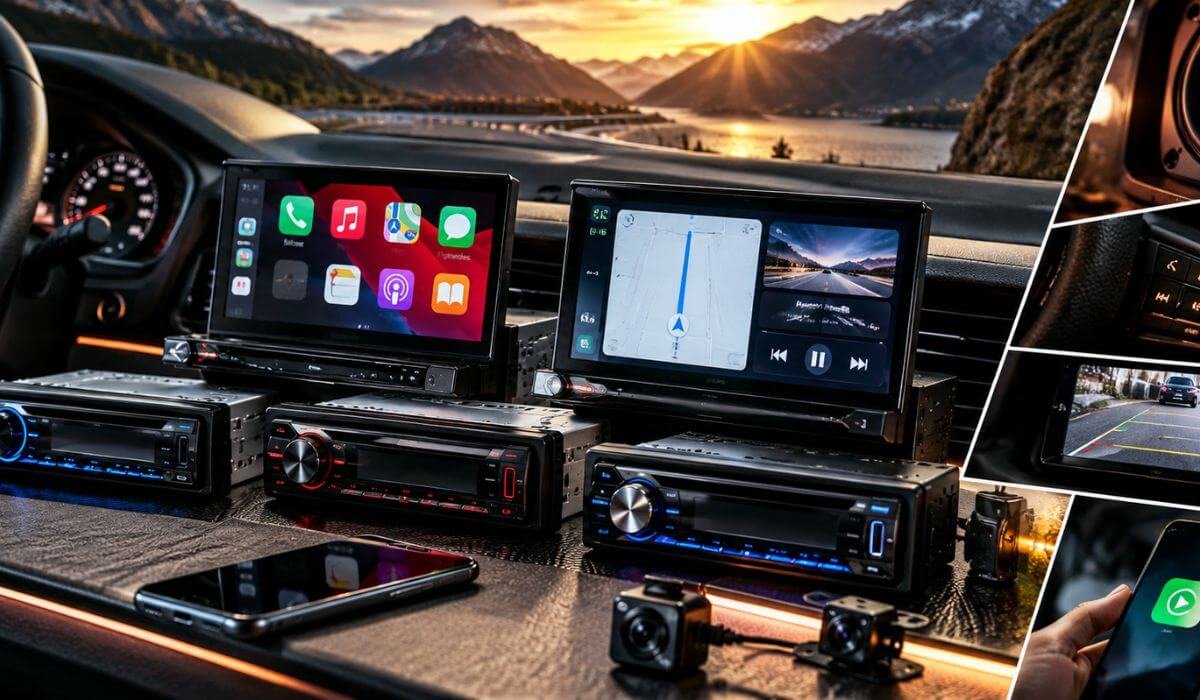
If you are replacing the factory radio in an older truck, SUV, sedan, or a newer vehicle that still uses a single-DIN opening, do not choose your head unit by screen size alone. A single-DIN opening is roughly 2 inches tall and 7 inches wide, but what you can install in that space varies dramatically. You might use a compact Bluetooth receiver, or step up to a single-DIN chassis carrying a large floating display with Apple CarPlay and Android Auto.
That distinction is important because the best-looking receiver on paper is not always the best fit for your car. Traditional single-DIN models such as the Kenwood and Clarion keep the dashboard simple, while the Sony and Pioneer models here use a single-DIN-style chassis with a much larger floating screen. Before buying, look beyond the opening itself and check dash depth, screen clearance, mounting hardware, wiring interfaces, steering-wheel controls, factory amplifiers, and backup-camera compatibility. A clean installation can make a bigger difference than an extra feature you may never use.
We chose these models around the things that actually matter once you start driving: CarPlay and Android Auto reliability, screen usability, Bluetooth, camera support, audio tuning, preamp connectivity, physical fitment, and upgrade potential for an amplifier or subwoofer. The result is a mix of modern floating-screen receivers and straightforward single-DIN stereos, giving you options for different vehicles, audio systems, budgets, and installation requirements.
Best Single DIN Head Units (2026): Car Stereo With Advanced Audio Features & Preamp Outputs
#1. Sony XAV-AX8100
Best Single DIN Head Unit With Apple CarPlay, Android Auto, Large Floating Touchscreen and Advanced Audio Controls for Amplifier Upgrades
#2. Pioneer DMH-WT6000NEX
Best Premium Single DIN Car Stereo With 10.1-Inch HD Floating Touchscreen, Wireless CarPlay, Android Auto and Dual-Camera Support
#3. Pioneer DMH-WT3800NEX
Best Single DIN Touchscreen Stereo With 9-Inch Floating Display, Wireless Apple CarPlay, Android Auto and Flexible Audio Connectivity
#4. JVC KD-X560BT
Best Single DIN Car Stereo With Bluetooth, USB Connectivity, Rear Camera Support, 5V Preamp Outputs and Advanced Audio Tuning
#5. Kenwood KMM-BT332U
Best Single DIN Radio With Bluetooth, USB, Two-Phone Connectivity, Built-In Alexa and Detailed Audio Tuning for Factory or Amplified Systems
#6. Clarion FZ309
Good Single DIN Car Stereo With Bluetooth, USB, AUX, Detachable Face and Simple Physical Controls for Straightforward Audio Upgrades
Expert Tip
A single-DIN radio does not automatically mean a small screen. That is the part many buying guides blur. The chassis size and the screen size are two different things. The Sony XAV-AX8100 and Pioneer floating-screen receivers can use a single-DIN installation footprint while putting a much larger display above the dash.
Before ordering, measure the opening and check the mounting depth, dash clearance, wiring harness, steering-wheel controls and factory amplifier setup. On older vehicles, the right installation interface can make the difference between a clean upgrade and a frustrating one. If your priority is simply reliable Bluetooth and music playback, there is no reason to pay for a 10-inch screen. If you regularly use navigation, CarPlay or a backup camera, however, the larger floating displays can be worth the extra money.
How We Chose These Single DIN Head Units
We did not rank these receivers by screen size, wattage numbers or how impressive the specification sheet looks. A single-DIN buyer can have completely different priorities depending on the vehicle, so we looked at what each receiver actually brings to the dash and where it makes the most sense.
First, we separated the chassis from the display. This matters with the Sony and Pioneer models. Their large 9-inch and 10.1-inch screens do not mean they require a conventional double-DIN opening in the same way as a large built-in receiver. Their floating designs give owners of vehicles with limited dash space another route to modern multimedia features. That is why they compete in this list even though their screens are much larger than traditional single-DIN stereos.
Phone integration was another major filter. Apple CarPlay and Android Auto can completely change how useful a head unit feels after the initial installation. The Sony and Pioneer models therefore sit toward the top for buyers who want navigation, calls, music and smartphone access on a larger interface. We did not treat CarPlay as an automatic reason to rank one receiver above another; the overall design and intended use still matter.
We also looked at physical usability. A huge screen sounds great until it interferes with visibility, controls or the vehicle’s existing dash layout. Conversely, a compact receiver can be the smarter purchase when you mainly want Bluetooth, USB playback and dependable radio functions. That is why the Kenwood and Clarion are included rather than filling the list with six large-screen receivers.
Connectivity and expansion were considered separately from basic playback. Rear-camera input, USB, AUX, Bluetooth, HDMI and SiriusXM compatibility can matter far more than a small difference in advertised amplifier output. For example, the JVC makes sense for someone who wants a more compact multimedia solution with camera connectivity, while the Kenwood is better suited to someone who wants a straightforward Bluetooth/USB receiver with Alexa and SiriusXM compatibility.
Finally, we considered what the buyer is actually getting for the installation. These are not six versions of the same stereo. The Sony and Pioneer units are aimed at people wanting a major visual and smartphone upgrade; the JVC sits closer to the middle; and the Kenwood and Clarion make more sense when simplicity is the point.
That is intentional. The best single-DIN head unit is not necessarily the most expensive one or the one with the biggest screen. It is the receiver whose hardware, controls and connectivity match the vehicle and the way you actually drive it. That is the standard we used to build this list.
#1. Sony XAV-AX8100
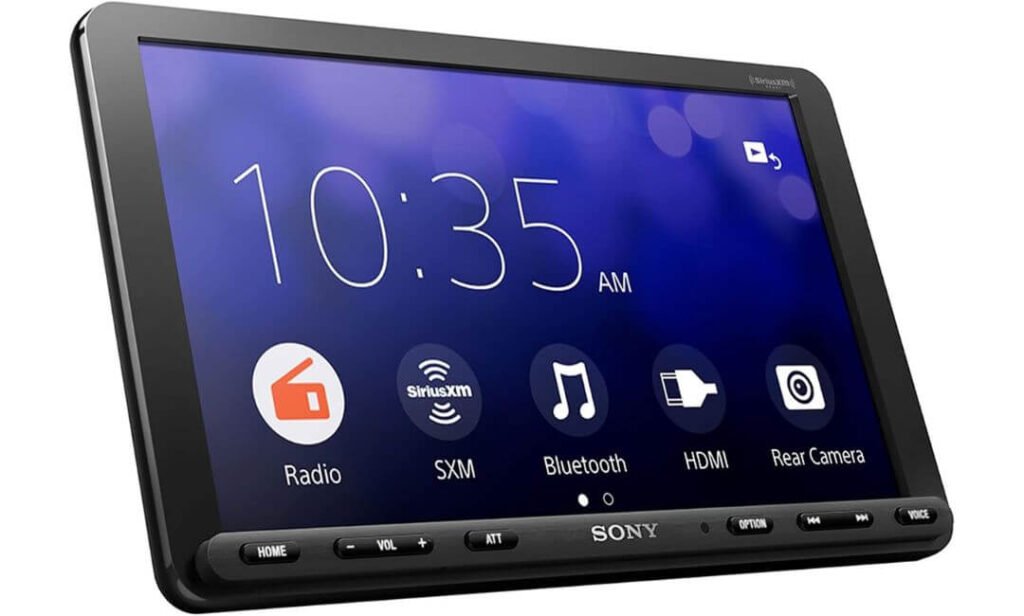
Quick Specs:
- 8.95-inch anti-glare touchscreen
- Single-DIN chassis with floating display
- 3-way adjustable mount with tilt, height and depth adjustment
- Wired Apple CarPlay and Android Auto
- HDMI input for external video sources
- 3 × 5V pre-outs for front, rear and subwoofer
- 55W ×4 maximum power output
- 10-band graphic equalizer
- Rear-camera input
- USB, Bluetooth and SiriusXM-ready
- Dynamic Stage Organizer and EXTRA BASS
Sony took an interesting route with this receiver: instead of trying to squeeze a conventional screen into a small single-DIN opening, it keeps the single-DIN chassis behind the dash and moves the 8.95-inch display out in front. That gives you a much larger interface without turning the receiver itself into a double-DIN unit. The screen can be adjusted for tilt, height and depth, which is genuinely useful when the factory dash puts the radio unusually high, low or far back. Sony rates the display at 800 × 480 and uses a resistive touch panel with an anti-glare surface.
The audio side is where this starts feeling more serious than a basic touchscreen stereo. You get three 5V pre-outs for front, rear and subwoofer channels, a 10-band EQ, Dynamic Stage Organizer and EXTRA BASS, giving you enough control to build around external amplification instead of treating the receiver as the entire sound system. The 55W ×4 rating is there for running speakers directly, while the pre-outs make more sense if you are planning a stronger amplifier or subwoofer setup.
For everyday driving, the useful stuff is equally straightforward: Apple CarPlay and Android Auto are wired, Bluetooth handles phone and audio duties, USB supports common music formats including FLAC, and the rear-camera input gives you a proper path for adding an aftermarket camera. HDMI is another unusual inclusion for a single-DIN receiver, although it is more of a specialist feature than something every driver will use. There is also Quick Wake-up, so the unit is ready shortly after the vehicle starts.
What Stands Out in Real-World Use
- The floating 8.95-inch screen is the real attraction — you get a much more modern interface without requiring a conventional double-DIN receiver.
- Three 5V pre-outs make this a particularly sensible choice for a system that may eventually add amplifiers or a subwoofer.
- The adjustable mount matters more than it sounds because screen position can make or break usability in an older dashboard.
- Wired CarPlay and Android Auto are dependable in principle, but buyers expecting wireless smartphone integration should know that this model does not provide it.
- The rear-camera input and HDMI connection give the receiver more flexibility than a basic single-DIN Bluetooth stereo.
The One Trade-Off Worth Knowing
The biggest compromise is not the sound system or the installation format; it is the screen technology and connectivity approach. The resistive panel is practical and works with an anti-glare surface, but it does not have the phone-like feel of a modern capacitive display, and CarPlay/Android Auto require a USB connection rather than wireless operation. Sony also specifies 400 cd/m² brightness, so buyers with a very sun-exposed dashboard should pay particular attention to screen placement.
Why This One Makes Sense as a Single-DIN Upgrade
What makes this receiver stand apart is the way it solves two problems at once. You can have a single-DIN installation footprint while still getting a screen large enough for maps, music controls and camera viewing without crowding the receiver itself into the dash. That is especially useful in older cars where the opening simply cannot accommodate a conventional large-screen unit.
It is also a better starting point than a basic radio if you already know where your audio system is going. The 5V front, rear and subwoofer outputs, 10-band EQ and sound-processing controls give you room to grow into external amplification rather than forcing you to replace the head unit later.
The Insider Pro-Tip
Do not buy this simply because “8.95 inches” sounds impressive. Buy it when your vehicle has a single-DIN opening but you genuinely want the usability of a much larger display. Before ordering, check the dash depth and the space above the radio because the floating screen needs room to sit comfortably in front of the factory trim.
If you are building a more serious audio system, I would pay even more attention to the three 5V pre-outs than the screen. That is the part that gives this receiver a longer useful life: start with the factory speakers, then add an amplifier and subwoofer later without immediately needing another head unit. That makes the XAV-AX8100 a particularly sensible choice for someone who wants a modern screen today but does not want to close the door on a better sound system tomorrow.
#2. Pioneer DMH-WT6000NEX
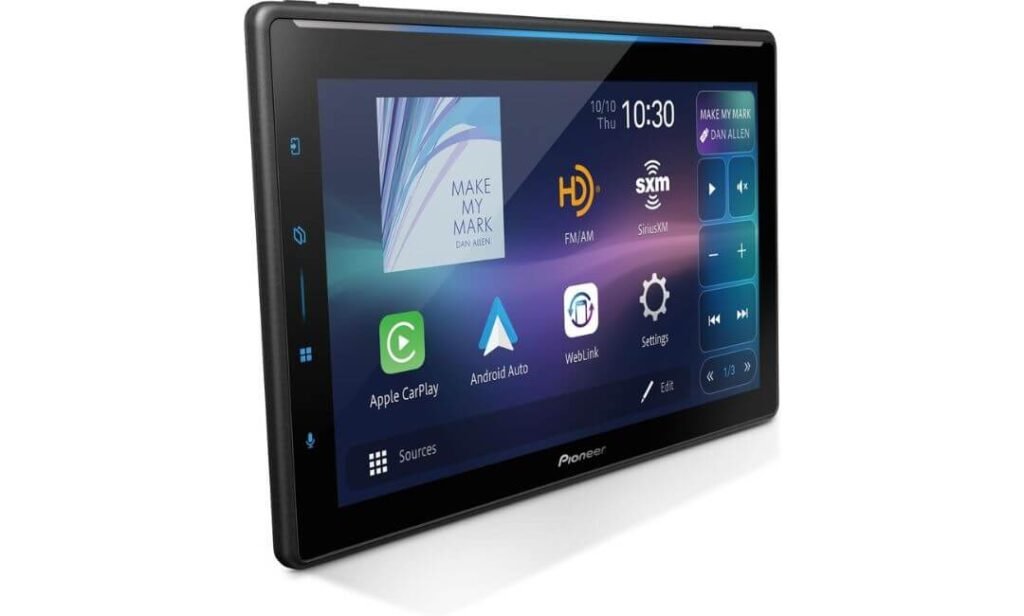
Quick Specs:
- 10.1-inch HD capacitive touchscreen
- Standard single-DIN chassis
- Adjustable floating display with tilt adjustment
- Wireless and wired Apple CarPlay
- Wireless and wired Android Auto
- Built-in Bluetooth
- Built-in HD Radio
- Amazon Alexa compatibility
- Dual camera inputs
- Customisable parking guidelines
- Split-screen multitasking
- PxLink app support
- 5V RCA preamp outputs
- SiriusXM-ready
If the goal is to make an old single-DIN dashboard feel genuinely modern, this is one of the more convincing ways to do it. The 10.1-inch HD floating display sits above the original radio position rather than trying to squeeze a large screen into the dash opening. More importantly, the screen uses capacitive touch, so it feels much closer to using a modern phone than the resistive panel found on some competing single-DIN receivers. The adjustable mounting also gives you some freedom to position the display around the shape of the dashboard rather than accepting one fixed angle.
The bigger advantage appears once you start driving. Wireless Apple CarPlay and Android Auto mean you can leave the phone in your pocket and still get navigation, music, calls and messages on the screen. The large panel also makes split-screen use much more practical when you want navigation and audio controls visible together. The built-in Bluetooth, HD Radio and Alexa compatibility round out the everyday functions without making you depend entirely on your phone.
For a more serious audio installation, the story gets better. The 5V RCA preamp outputs give you a sensible connection point for external amplification, while the dual-camera capability is useful if your vehicle could benefit from more than a basic reversing camera. Pioneer also includes customisable parking guidelines, which is a small feature until you are actually trying to judge the rear of a large SUV or pickup in a tight space.
What We Like About It
- The 10.1-inch screen genuinely changes the dash experience without requiring a conventional double-DIN receiver.
- Wireless CarPlay and Android Auto remove one of the most annoying daily habits with wired-only systems.
- Capacitive touch feels more natural for frequent navigation and menu use.
- Dual-camera support gives larger vehicles more flexibility than a basic rear-camera input.
- 5V preamp outputs make it a better foundation for an amplified speaker and subwoofer system.
The One Thing We Would Watch
The interface has more going on than a basic single-DIN stereo, so there can be a short learning curve before everything feels instinctive. That is a reasonable trade-off for the amount of functionality here, but buyers wanting nothing more than simple radio, Bluetooth and volume controls may be paying for technology they will barely use.
Where the WT6000NEX Earns Its Place
There is a reason we put this above the more conventional receivers in this list: it solves the biggest limitation of a single-DIN dashboard without pretending the limitation does not exist. You still have the compact chassis behind the dash, but the driver gets a large interface in front of it.
That combination is especially useful in a truck, SUV or older vehicle where a tiny factory radio feels completely out of place. Add wireless smartphone integration, split-screen operation and two camera inputs, and this becomes much more than a screen upgrade. It is a way of bringing a dated dashboard into the current multimedia era without automatically committing to a full double-DIN conversion.
The Insider Pro-Tip
If you are choosing between this and a smaller single-DIN receiver, do not make the decision based on screen size alone. Measure where the floating display will sit when the vehicle is in Park and while you are looking through the windshield. A 10.1-inch panel is fantastic when positioned correctly; in the wrong dashboard, it can become visually intrusive.
For a larger vehicle, though, that extra screen real estate is genuinely useful. Wireless CarPlay/Android Auto + split-screen navigation + dual-camera support gives the display a purpose beyond looking impressive. That is the combination I would pay for here—not the size of the screen by itself.
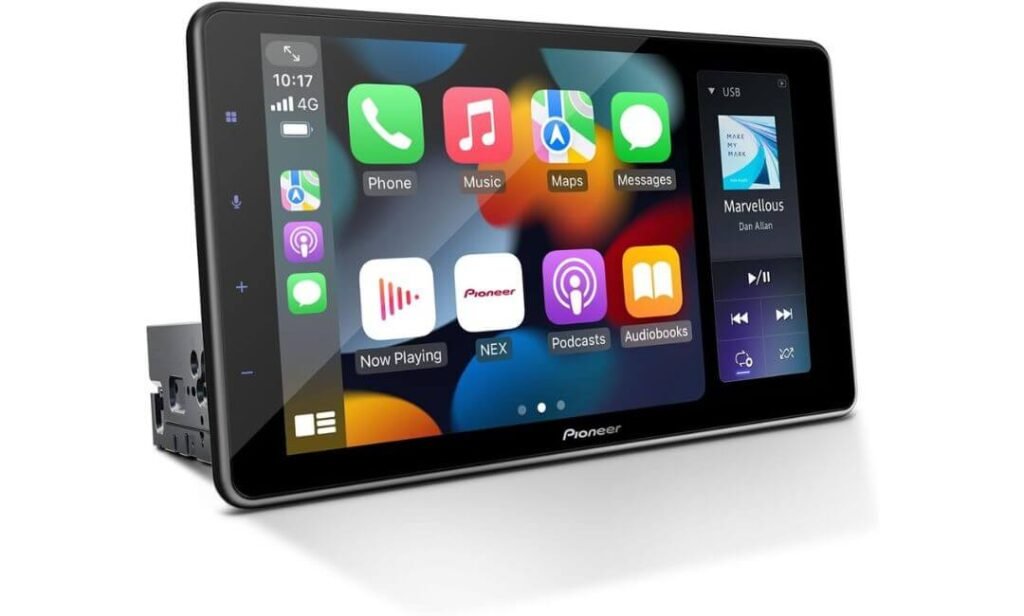
#3. Pioneer DMH-WT3800NEX
Quick Specs:
- 9-inch capacitive floating touchscreen
- Single-DIN chassis
- Wireless Apple CarPlay and Android Auto
- Split-screen display
- Automatic Light/Dark Mode
- Built-in Bluetooth
- Amazon Alexa support via Vozsis
- HD Radio
- FLAC playback
- 4V RCA preamp outputs
- Rear-camera input
- USB and AUX inputs
- SiriusXM-ready
- Steering-wheel control compatibility
This is the kind of single-DIN receiver that makes sense when you want a large screen without going all the way to the enormous 10.1-inch format. The 9-inch capacitive display sits above the dash on a floating mount, giving the interior a much more modern appearance while the receiver itself remains based around a single-DIN chassis. The capacitive panel is also a meaningful upgrade for daily use—it responds more like a smartphone than an old-style resistive car-radio screen.
One of the features I particularly like here is split-screen mode. Instead of leaving navigation to open the music controls every time you want to change something, you can keep your CarPlay or Android Auto interface visible alongside the receiver’s own controls. It sounds like a small convenience on paper, but it becomes one of those features you appreciate every day once you are actually driving.
Pioneer has also paid attention to changing lighting conditions. The automatic Light/Dark Mode can switch with the vehicle’s headlights or a preset schedule, helping the interface remain easier to read as the cabin moves from bright daytime driving into night. Add wireless CarPlay and Android Auto, Bluetooth, rear-camera support, USB, AUX and 4V RCA preamp outputs, and this becomes a well-rounded option rather than simply a large screen attached to a radio.
What We Like About It
- 9-inch capacitive screen gives you a premium interface without the physical scale of the 10.1-inch models.
- Wireless CarPlay and Android Auto keep the centre console free from a permanent phone cable.
- Split-screen mode is genuinely useful for drivers who use navigation and audio controls together.
- Automatic Light/Dark Mode is a thoughtful touch for changing daylight conditions.
- 4V preamp outputs make it suitable for a more serious amplified audio system later.
The One Thing We Would Watch
The software experience can occasionally feel less immediate than the hardware suggests, and some owners have reported wireless-phone connection quirks. Firmware updates can help, but if you expect every connection to behave exactly like a factory-installed system, that is worth keeping in mind.
Why It Works So Well in a Single-DIN Setup
The real appeal here is balance. The 9-inch screen is large enough to make maps, album artwork and camera views comfortable, but it does not dominate the dashboard as aggressively as some of the larger floating displays can. That makes it a particularly interesting middle ground for older cars, trucks and SUVs where a huge screen may look excessive.
It is also not just a screen-first product. The combination of wireless smartphone integration, HD Radio, FLAC support, rear-camera input and 4V RCA outputs means it can serve both a simple factory-speaker setup and a more involved system with external amplification. That flexibility is why it earns a higher position than a conventional Bluetooth single-DIN receiver.
The Insider Pro-Tip
If you are choosing between this and the 10.1-inch Pioneer, think about dashboard proportion rather than maximum screen size. A 9-inch floating display can look more integrated in a smaller car or older truck, while still giving you nearly all the screen functionality you actually need.
And if you are planning an amplifier or DSP later, do not overlook the 4V RCA outputs. The screen gets the attention, but the preamp section is what gives this receiver a useful future beyond the initial installation. That is the part I would consider before paying extra simply for another inch of display.
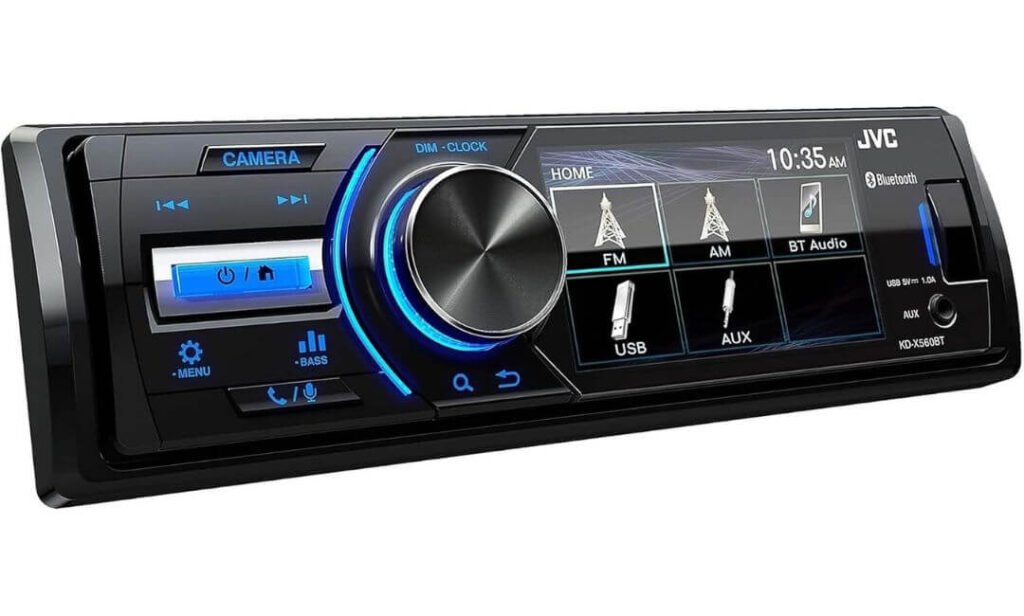
#4. JVC KD-X560BT
Quick Specs:
- Single-DIN digital media receiver
- 3-inch colour LCD display
- Wireless Apple CarPlay and Android Auto
- Bluetooth audio and hands-free calling
- USB and 3.5mm AUX
- Rear-camera input with dedicated camera button
- 3 sets of 5V RCA preamp outputs
- 13-band graphic EQ
- Time Alignment
- 45W ×4 maximum power output
- Shallow chassis
- Conformal-coated electronics
- AM/FM with RDS
- No CD drive
This JVC takes almost the opposite approach to the big floating-screen receivers above it. There is no giant touchscreen competing for space on your dashboard. Instead, you get a compact single-DIN receiver with a shallow chassis, physical controls and a small colour display. That sounds basic until you look at where this unit is actually strong: audio control, installation flexibility and durability.
The three sets of RCA preamp outputs are the standout feature for anyone building beyond a factory speaker system. They give you much more freedom when adding external amplification, while the 13-band EQ and time alignment let you do more than simply turn the bass up and down. If your goal is to build a properly tuned system with separate amplification for the speakers and subwoofer, this little receiver has considerably more going on behind the panel than its simple appearance suggests.
It is also a particularly interesting choice for vehicles that see rougher conditions. JVC uses conformal coating on the electronics to help protect the circuitry from moisture, which is why this model makes sense beyond ordinary cars. Jeeps, UTVs, boats and other exposed applications can benefit from that extra protection. The shallow chassis is another practical advantage when there is not much room behind the factory opening.
What We Like About It
- Three 5V preamp outputs give an enthusiast plenty of routing flexibility for external amps and subwoofers.
- Time Alignment and a 13-band EQ provide meaningful tuning control rather than just cosmetic sound adjustments.
- The shallow chassis can make difficult single-DIN installations considerably easier.
- Conformal-coated electronics give it an advantage for vehicles exposed to moisture or demanding environments.
- Wireless CarPlay and Android Auto bring modern phone integration without requiring a huge screen.
The One Thing We Would Watch
The 3-inch display is genuinely small compared with the floating-screen receivers above it. It is perfectly adequate for source information and basic controls, but I would not choose this specifically for frequent rear-camera viewing or if you want a large visual interface for navigation.
Why This Single DIN Receiver Earns Its Place
The interesting thing about this model is that it does not try to win the screen-size battle. It wins somewhere else. If you already know that your amplifier, DSP and speakers are going to do the heavy lifting, spending more money on a massive display may not improve the part of the system you actually care about.
Here, the useful hardware is concentrated around the source signal: three RCA outputs, 13-band EQ and time alignment. That makes it a surprisingly capable foundation for a serious audio build while keeping the physical installation simple. The wireless smartphone integration also means you are not giving up the modern essentials just because you chose a traditional single-DIN layout.
The Insider Pro-Tip
I would choose this JVC because you want a compact audio source—not because you want a cheap alternative to a floating-screen stereo. Those are two completely different buying decisions.
For an older truck, Jeep or utility vehicle where dash space is limited, the combination of a shallow chassis, moisture protection, wireless smartphone integration and three preamp outputs is unusually practical. If the screen is secondary to sound and system flexibility, this can actually be the smarter purchase than a much larger receiver.
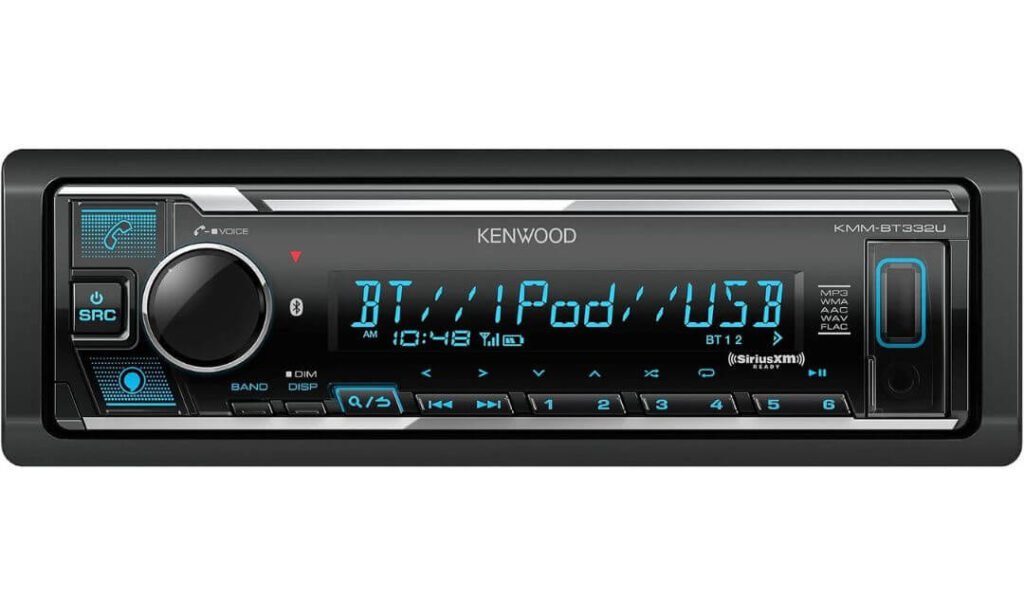
#5. Kenwood KMM-BT332U
Quick Specs:
- Single-DIN digital media receiver
- 1.5-line variable-colour LCD
- Bluetooth hands-free calling and audio streaming
- Two-phone Bluetooth connection
- Front USB with 1.5A charging
- Front AUX input
- 13-band equalizer
- Digital Time Alignment
- 6-channel 2.5V preamp outputs
- 50W ×4 maximum power output
- FLAC, WAV, MP3, WMA and AAC playback
- Amazon Alexa compatibility
- AM/FM radio
- SiriusXM-ready
- Detachable faceplate
This is the receiver I would look at when simplicity matters more than having a screen. There is no attempt to turn the dashboard into a tablet here. Instead, Kenwood puts the useful audio controls into a compact single-DIN chassis and gives you a small variable-colour LCD, physical buttons, Bluetooth, USB and AUX. For an older car where the factory stereo is simply tired or outdated, that can be exactly the right approach.
The more interesting part is what happens once you look behind the faceplate. The 13-band EQ and Digital Time Alignment give you considerably more control over the sound than its modest appearance suggests, while the six-channel preamp outputs leave room for separate front, rear and subwoofer amplification. The built-in 50W ×4 output is enough for a straightforward factory-speaker setup, but the receiver is also happy to become the source for a more serious system later.
There are some genuinely useful everyday touches too. Two phones can remain connected, the front USB port can provide 1.5A charging, and high-resolution formats including FLAC and WAV are supported. Amazon Alexa adds voice control, while the detachable faceplate is still useful for owners who prefer a traditional anti-theft feature rather than a large permanent display.
What We Like About It
- Six-channel preamp outputs give a budget installation room to grow into separate amplifiers and a subwoofer.
- 13-band EQ plus Digital Time Alignment provides real tuning control rather than basic bass and treble adjustments.
- Two-phone Bluetooth pairing is genuinely handy for households or drivers carrying personal and work phones.
- 1.5A USB charging makes the front USB port useful beyond music playback.
- Detachable faceplate remains a practical advantage for older vehicles where security is a concern.
The One Thing We Would Watch
The biggest limitation is straightforward: there is no Apple CarPlay or Android Auto. The small LCD is also intended for basic information rather than maps or album artwork, so this is not the receiver to choose if you want your dashboard to feel like a modern touchscreen cockpit.
Why This Kenwood Makes Sense as a Single-DIN Upgrade
Not every single-DIN buyer needs a floating display. Sometimes the better upgrade is simply a receiver that fits the opening, sounds good, connects to your phone and leaves the audio system easy to expand. That is where this Kenwood makes its case.
The combination of six-channel preouts, Digital Time Alignment and a 13-band EQ is particularly useful if you plan to add amplification later. You can start with the receiver and factory speakers, then add an amplifier or subwoofer without immediately replacing the source unit. For a classic car, older truck or daily driver where reliable physical controls are more valuable than a giant screen, that is a sensible way to spend the money.
The Insider Pro-Tip
I would not compare this directly with the Pioneer and Sony models by asking which one has more features. They are built around different priorities. If you want navigation and smartphone apps on the dash, move up the list. If you mainly want Bluetooth music, good audio adjustment and a clean path to future amplification, this Kenwood becomes much more interesting.
One detail I would especially pay attention to is the six-channel RCA output section. It is easy to overlook because the receiver itself looks basic, but that flexibility can save you from buying another head unit when your audio system grows. In other words, the small screen is not really the weakness here—it is simply evidence that Kenwood spent the space and budget somewhere else.
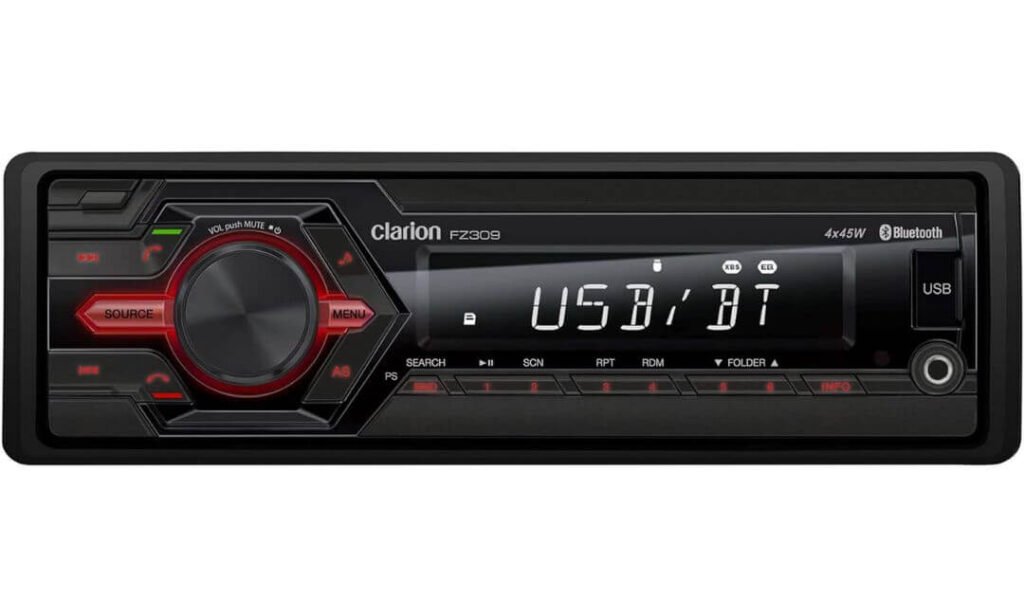
#6. Clarion FZ309
Quick Specs:
- Single-DIN media receiver
- 45W ×4 maximum power output
- 13-band equalizer
- Bluetooth audio and hands-free calling
- Front USB input with 1A charging
- Front 3.5mm AUX input
- AM/FM radio
- 2V preamp output
- Detachable front panel
- Wireless remote control included
- No CD playback
- No touchscreen
- No Apple CarPlay or Android Auto
The Clarion takes the simplest route in this group, and that is not necessarily a bad thing. There is no floating screen, no smartphone-style interface and no attempt to turn the dashboard into a multimedia centre. You get a traditional single-DIN receiver with physical controls, Bluetooth, USB, AUX and radio functions. For an older car where the original stereo has simply reached the end of its useful life, that straightforward approach can be more appealing than installing a large display.
The audio controls are better than the minimal appearance might suggest. A 13-band equalizer gives you considerably more freedom to shape the sound than a basic bass-and-treble system, while the 45W ×4 output is enough to run many factory speaker systems without immediately adding an amplifier. The 2V preamp output also leaves a path toward external amplification if you eventually want to build the system further.
Then there is the detachable face. It is an old-school feature, but for a vehicle that spends time parked outside, being able to remove the front panel and take it with you still has practical value. The front USB and AUX inputs keep the receiver useful with newer and older devices alike, while the included remote gives you another way to control the system when you do not want to reach toward the dash.
What We Like About It
- Detachable front panel is still a genuinely useful security feature for older vehicles.
- 13-band EQ gives this simple-looking receiver much more sound-shaping ability than expected.
- 45W ×4 output makes it suitable for a straightforward factory-speaker setup.
- USB, AUX and Bluetooth cover the everyday music sources without unnecessary complexity.
- Physical controls and included remote make operation simple without relying on a touchscreen.
The One Thing We Would Watch
The biggest limitation is also the easiest to understand: there is no CarPlay, Android Auto or camera input. If you want navigation, a large display or phone apps on the dashboard, this is simply not the right direction. It is designed for drivers who value a traditional receiver and straightforward audio playback.
Where This Single DIN Stereo Fits Best
The FZ309 makes the most sense when your idea of an upgrade is better control and cleaner functionality rather than a bigger screen. It can be a particularly sensible replacement for an older factory radio in a classic car, older truck or daily driver where maintaining the original-style dashboard matters.
The combination of 13-band EQ, 45W ×4 output, Bluetooth, USB, AUX and detachable faceplate gives it a clear purpose. It is not trying to compete with the Pioneer or Sony on smartphone integration; instead, it offers a much simpler ownership experience. That distinction is important because paying for features you will never use is not automatically an upgrade.
The Insider Pro-Tip
If you are looking at this because you genuinely do not need a touchscreen, I would not dismiss it just because the newer receivers look more impressive. A large floating display is valuable when you use navigation, cameras and smartphone apps; otherwise, it can become expensive dashboard decoration.
For a simple audio-focused build, the physical controls, detachable face and 13-band EQ are the features I would care about most. Just confirm your vehicle’s wiring, mounting kit and accessory requirements before ordering—especially on older vehicles where the factory radio may use a proprietary harness rather than a straightforward aftermarket connector.
Best Single DIN Head Unit in 2026 Compared for Different Car Audio Setups
Single DIN Head Unit Buying Guide: What Actually Matters Before You Order
A single-DIN receiver can look like a straightforward purchase until you get to the installation. The 7-inch-wide, roughly 2-inch-tall opening is only the starting point; what happens behind and in front of that opening varies enormously. A traditional receiver can stay almost completely inside the dash, while a floating-screen model can use the same basic chassis space but place a 9- or 10.1-inch display above the radio position.
The right choice therefore depends less on having the longest feature list and more on whether the receiver matches your vehicle, phone, audio system, camera setup and installation space.
Start With the Actual Dash Opening
Before comparing Apple CarPlay, EQ bands or screen resolution, confirm that your vehicle can accept a single-DIN receiver.
The standard opening is approximately 7 inches wide and 2 inches high, but factory dashboards are rarely that simple. You may need:
- A vehicle-specific dash installation kit
- An aftermarket wiring harness
- An antenna adapter
- A steering-wheel-control interface
- A factory-amplifier interface
- A camera retention adapter
- A fascia or trim solution
- Additional USB or microphone routing
This becomes especially important with older vehicles. A receiver can physically fit the opening and still require additional hardware to retain factory controls or an amplified sound system.
With floating-screen receivers, also measure the space in front of the dash, not just the radio cavity. The chassis may fit perfectly while the display interferes with vents, climate controls, switches or your line of sight.
Decide Whether You Actually Need a Floating Touchscreen
This is probably the biggest decision in this entire category.
A conventional single-DIN stereo keeps the dashboard relatively clean and usually gives you physical controls with a small display. That approach makes sense when you mainly want Bluetooth, USB playback, radio and better audio control.
A floating receiver takes the same basic installation concept in a different direction. The screen sits above the dash and can be dramatically larger than the opening itself. That is where the Sony and Pioneer models become interesting.
The advantage is obvious: maps, music, camera views and smartphone interfaces are much easier to see. The trade-off is equally obvious: the screen becomes a permanent part of the dashboard and needs enough physical clearance to sit comfortably.
If your car is small or has a cramped centre stack, do not assume that the largest screen is automatically the best upgrade.
Apple CarPlay and Android Auto: Wired or Wireless?
If you use your phone heavily in the car, this feature deserves more attention than the radio tuner or advertised amplifier wattage.
Apple CarPlay and Android Auto put compatible navigation, music, calling and messaging functions onto the receiver’s interface, reducing the need to handle the phone while driving.
There is an important difference between the two connection types:
| Connection | What it means in daily use |
|---|---|
| Wired CarPlay / Android Auto | Phone connects through USB; generally simple and also keeps the phone charging |
| Wireless CarPlay / Android Auto | Phone connects without a cable; cleaner for everyday short trips |
| Bluetooth only | Good for calls and audio, but does not provide the full CarPlay or Android Auto interface |
The Sony XAV-AX8100 is a good example of why you should read the actual connectivity specification rather than assume every modern touchscreen receiver is wireless. Its smartphone integration is wired, while the Pioneer floating-screen options in this list offer wireless smartphone connectivity.
That difference can matter more to you than an extra inch of display.
Look Beyond Bluetooth and Count the Connections You Will Actually Use
Bluetooth is almost expected now, but it should not be the end of your connectivity check.
Think about your actual system:
- USB for phone connection, charging or stored music
- AUX for older music players and wired sources
- Bluetooth for wireless calls and audio
- HDMI if you have a specific compatible video source
- Rear-camera input for reversing assistance
- Front or additional camera inputs if your vehicle benefits from more viewpoints
- SiriusXM compatibility if satellite radio matters to you
There is no benefit in paying for HDMI or multiple camera inputs if you know you will never use them. On the other hand, adding those capabilities later can be inconvenient or expensive, so it is worth thinking about your intended system before installation.
Do Not Ignore the Audio Section
This is where several apparently simple single-DIN receivers become much more interesting.
If you are keeping factory speakers, the internal amplifier and basic EQ may be all you need. Once you add an external amplifier, DSP or subwoofer, the preamp section becomes much more important.
Look at:
- Number of RCA output channels
- Preamp voltage
- Dedicated subwoofer output
- Equalizer adjustment
- Time alignment
- Crossover controls
- Built-in amplification
- Supported high-resolution formats
For example, the JVC’s three sets of 5V preamp outputs, 13-band EQ and time alignment make it particularly attractive for an enthusiast audio build. The Kenwood takes another route with six-channel 2.5V outputs, 13-band EQ and Digital Time Alignment.
This is a good reminder that a receiver with a smaller screen can still be the better audio component.
Understand What Preamp Outputs Mean Before Adding an Amplifier
A receiver’s advertised speaker power and its RCA preamp outputs serve different purposes.
The internal amplifier drives speakers directly. RCA preamp outputs send a lower-level audio signal to an external amplifier or DSP.
If you plan to build a system with front speakers, rear speakers and a subwoofer, having dedicated outputs can make the installation cleaner and give you greater control over how the system is configured.
You also do not need to chase the highest preamp voltage blindly. 5V is useful, particularly in a more serious audio installation, but system design, gain structure, wiring and proper tuning still matter. A high number printed on the specification sheet does not automatically make one receiver sound better.
Screen Quality Is More Than Screen Size
A 10.1-inch screen can look spectacular in a product photograph, but size alone tells you very little about how pleasant it is to use.
Pay attention to:
Touch technology: Capacitive screens generally provide the familiar smartphone-like interaction. Resistive screens can still be practical and have their own advantages, particularly in certain vehicle environments.
Viewing position: A floating display should sit where you can see and reach it without blocking important factory controls.
Daytime visibility: Bright sunlight can expose weaknesses that are impossible to judge from a showroom photograph. Anti-glare treatment, brightness and screen angle all matter.
Night use: A screen that looks impressive during the day should also be comfortable after dark. Automatic Light/Dark modes can be genuinely useful here.
Camera viewing: If you are buying a large display primarily for a backup camera, make sure the camera and receiver combination actually supports the resolution and input you expect.
Backup Camera Support Needs a Separate Check
“Camera ready” does not mean every receiver provides the same camera experience.
Check whether the receiver supports:
- Rear-camera input
- Automatic switching when Reverse is selected
- Manual camera activation
- Adjustable parking guidelines
- Multiple camera inputs
- Front or side camera support
- The video format and resolution supported by your camera
The Pioneer DMH-WT6000NEX is particularly interesting here because its dual-camera capability and adjustable parking guidelines make the large screen useful beyond navigation and entertainment.
For a large pickup or SUV, that can be considerably more valuable than another audio feature you may never touch.
Installation Is Part of the Purchase
Do not treat installation as something that happens after the buying decision. For many vehicles, it should influence the decision from the beginning.
Before ordering, confirm:
- Dash opening and receiver depth
- Floating-screen clearance, if applicable
- Vehicle-specific mounting kit
- Wiring harness compatibility
- Factory amplifier integration
- Steering-wheel-control compatibility
- Backup-camera compatibility
- Parking-brake or vehicle-safety wiring requirements
- Microphone placement
- USB cable routing
A shallow receiver such as the JVC can be useful when the space behind the dashboard is restricted. Conversely, a floating display can solve the problem of wanting a large screen without physically installing a double-DIN chassis.
If you are unfamiliar with vehicle wiring, paying for professional installation is often cheaper than troubleshooting a damaged harness, incorrect amplifier integration or a poorly positioned floating display.
Think About the Audio System You Have Now — and the One You May Build Later
Your current system should determine how much headroom you need.
Factory speakers only: Prioritise clean controls, Bluetooth, USB, phone integration and straightforward installation.
Factory speakers + subwoofer: Look for a dedicated subwoofer output, useful EQ and appropriate preamp connectivity.
External amplifier: Pay closer attention to RCA outputs, output voltage, crossover control and time alignment.
DSP + multiple amplifiers: The preamp architecture becomes one of the most important parts of the receiver. More dedicated outputs can make system routing considerably easier.
This is why the “best” model changes depending on the installation. A driver who only wants Bluetooth music has very different requirements from someone building a multi-amplifier system.
Brand, Software and Warranty Still Matter
A recognised car-audio brand does not make a product immune to problems, but it can make ownership easier when something does go wrong.
Look beyond the badge and consider:
- Availability of firmware updates
- Compatibility documentation
- Installation support
- Replacement accessories
- Microphone and mounting hardware availability
- Warranty coverage
- Whether the receiver is still actively supported
Also remember that software is now part of the head unit. Wireless CarPlay, Android Auto, Bluetooth pairing and smartphone apps can all introduce occasional compatibility issues that a traditional radio never had.
That does not make modern receivers worse. It simply means that software support is now part of what you are buying.
The Smartest Way to Narrow the List
If you are still undecided, use your actual priority rather than trying to find one receiver that wins every category:
| Your priority | What to look for |
|---|---|
| Biggest modern display | Floating 9–10.1-inch touchscreen |
| Wireless smartphone use | Wireless CarPlay + Android Auto |
| Serious audio build | Multiple high-voltage RCA outputs + EQ + time alignment |
| Tight installation space | Shallow single-DIN chassis |
| Simple Bluetooth upgrade | Physical controls + Bluetooth + USB |
| Backup-camera focused setup | Large display + suitable camera inputs |
| Older vehicle security | Detachable faceplate |
| Future amplifier upgrades | Multiple dedicated preamp outputs |
The important takeaway is simple: buy for the dashboard and system you actually have, not the specification sheet you think you should have. A premium floating-screen receiver can be an excellent upgrade, but a compact traditional single-DIN stereo can be the smarter choice when your priorities are sound control, physical simplicity and easy installation.
Installation & Fitment Tips for a Single DIN Head Unit Without the Usual Dash-Swap Surprises
Buying the receiver is only half the job. A head unit can be the correct single-DIN size and still fail to install cleanly because of the vehicle’s trim, wiring, factory amplifier, steering-wheel controls, antenna connection or limited space behind the dashboard. The safest approach is to treat fitment as part of the buying decision, not something to figure out after the box arrives.
Check the Vehicle Before Buying the Receiver
Start with the factory opening, but do not stop there.
A standard single-DIN opening is roughly 7 inches wide by 2 inches high, yet the usable space behind that opening varies significantly between vehicles. Factory radios can sit unusually deep, use proprietary brackets, or share their housing with other dashboard components.
Before ordering, check:
- Factory radio opening and mounting position
- Available depth behind the radio
- Dashboard trim shape
- Location of vents and climate controls
- Factory amplifier location, if equipped
- Antenna connection type
- Steering-wheel audio controls
- Factory backup camera
- USB ports that you want to retain
- Vehicle information or warning displays integrated into the original radio
This is especially important with the floating-screen single-DIN receivers in this list. The chassis may fit behind the dashboard while the 8.95-, 9- or 10.1-inch display needs additional room above the opening. Measure the area in front of the radio as well as the cavity behind it.
Buy the Vehicle-Specific Mounting Kit
A receiver normally does not bolt directly into every dashboard simply because it is labelled single-DIN.
A proper installation may require a vehicle-specific dash kit that provides the correct brackets, trim and mounting points. The kit should leave the receiver level and secure rather than relying on improvised brackets or gaps around the fascia.
For older vehicles, this can be surprisingly important because factory openings are not always perfectly standard even when the original radio looks like a conventional single-DIN unit.
A good mounting kit should:
- Hold the receiver firmly without movement
- Match the dashboard opening cleanly
- Maintain the correct screen position
- Prevent excessive vibration
- Avoid blocking vents or controls
- Leave enough clearance behind the receiver
With a floating display, take one additional measurement: where the screen will sit after the mounting bracket is adjusted. A receiver can fit perfectly behind the dash but still put the display too close to a vent or directly in front of another control.
Do Not Assume the Factory Wiring Will Plug Straight In
This is one of the most common installation mistakes.
An aftermarket receiver generally needs a vehicle-specific wiring harness rather than cutting the factory wiring loom. The harness allows the new stereo to connect to power, speakers and other vehicle functions while preserving the original wiring.
Depending on the vehicle, you may also need separate interfaces for:
- Steering-wheel controls
- Factory amplifier
- Factory subwoofer
- Retained accessory power
- Antenna power
- Backup camera
- USB retention
- Vehicle-specific warning or information systems
Using the correct harness is not just about convenience. It makes the installation easier to troubleshoot and allows the factory wiring to remain intact.
Steering-Wheel Controls Need Their Own Adapter
If your vehicle has volume, track, source or phone controls on the steering wheel, do not assume the new receiver will automatically recognise them.
An aftermarket steering-wheel-control interface may be required to translate the vehicle’s commands into something the head unit understands.
Compatibility can vary by receiver and vehicle, so check the specific combination before purchasing. A receiver may technically fit the dashboard while still requiring an additional interface to retain those controls.
This is particularly worth checking when moving from a factory-integrated system to an aftermarket single-DIN unit.
Measure Depth, Not Just Width and Height
Depth is the measurement that is easiest to forget and one of the most likely to cause installation trouble.
Behind the factory radio there may be:
- Wiring bundles
- HVAC components
- Factory amplifier modules
- Structural dashboard pieces
- Ducting
- Control modules
A conventional receiver with a shallow chassis can therefore be easier to install than a deeper unit, even though both are technically single-DIN.
The JVC KD-X560BT is particularly relevant here because its shallow design gives installers more room to work with. That does not guarantee fitment in every vehicle, but it can make a difficult installation considerably less complicated.
Floating Screens Need a Second Set of Measurements
Large floating screens change the fitment equation.
With a conventional single-DIN receiver, most of the hardware remains inside the dashboard. With a floating-screen design, the screen extends outward and upward, so you need to check its relationship with the surrounding interior.
Before installation, check:
Screen height: Will it block air vents, switches or factory controls?
Screen depth: Does it interfere with the dashboard or another control when adjusted?
Viewing angle: Can you see it comfortably from the driver’s seat?
Screen movement: Does the adjustment mechanism have enough clearance?
Windshield visibility: Is any part of the display intruding into your useful forward view?
The Sony XAV-AX8100’s adjustable mounting and the Pioneer floating-screen models give you more positioning flexibility, but adjustment range is not a substitute for checking the actual dashboard.
Backup Camera Installation Requires More Than a Camera Input
If you are retaining a factory camera or adding an aftermarket one, verify the entire connection path.
You may need to confirm:
- Camera video format
- Camera power requirements
- Reverse-trigger wiring
- Connector compatibility
- Image orientation
- Parking-guide compatibility
- Number of camera inputs supported
A receiver having a rear-camera input does not automatically mean a factory camera will plug directly into it.
The Pioneer DMH-WT6000NEX is a particularly flexible option when multiple camera views are useful, while the Sony and other receivers are better suited to a more conventional rear-camera setup.
Professional Installation vs DIY
A basic single-DIN replacement can be a reasonable DIY project if you are comfortable removing interior trim, identifying wiring and using a multimeter.
For a straightforward installation, you may need:
- Trim-removal tools
- Screwdrivers or socket tools
- Vehicle-specific dash kit
- Wiring harness
- Crimping or soldering equipment, depending on your chosen wiring method
- Electrical tape or heat-shrink tubing
- Multimeter
- Steering-wheel-control interface, if required
The actual radio swap may not take very long once everything is prepared. Preparation is what usually consumes the time. Finding the correct harness, adapter and mounting kit beforehand is much easier than discovering halfway through the installation that the factory amplifier or camera needs another interface.
When Professional Installation Is the Better Choice
I would strongly consider professional installation when the vehicle has a factory amplifier, integrated camera, complex steering-wheel controls, premium audio system or extensive dashboard electronics.
It is also worth paying for installation if the floating screen requires careful positioning or if you are connecting multiple amplifiers, a DSP and several cameras.
A professional installer can also check for problems that are not obvious when the radio is sitting on a workbench, such as alternator noise, incorrect amplifier turn-on behaviour, poor grounding or a screen position that looks fine while parked but is awkward from the driver’s seat.
One Installation Detail That Can Save You a Lot of Trouble
Before removing the factory receiver, photograph every connector and label the wiring.
Do not rely on memory, especially when several plugs look similar. Keep the original screws, brackets and factory radio together as well. If the vehicle is ever sold or returned to stock, those parts can become surprisingly valuable.
Most importantly, do not cut the factory wiring simply to make an aftermarket receiver fit. A proper harness is usually the cleaner solution and makes future troubleshooting much easier.
The Final Fitment Check
Before you place the order, confirm these five things:
- The vehicle has a compatible single-DIN opening.
- The receiver’s chassis depth fits behind the dash.
- The mounting kit matches the exact vehicle.
- Any required steering-wheel, amplifier, camera and antenna interfaces are available.
- A floating screen has enough clearance and can be positioned safely.
That final check is what separates a receiver that merely fits on paper from one that actually works properly once it is inside the vehicle.
Purchasing Considerations and Warranty: What to Check Before Paying for a Single DIN Head Unit
The price on the product page is only one part of what you are actually buying. With a single-DIN head unit, the return policy, warranty, seller, installation support and availability of replacement accessories can matter just as much as the receiver’s advertised features.
A $300 receiver with excellent hardware is not necessarily a better purchase than a slightly more expensive model from a seller that can actually help when the screen develops a problem, a firmware update causes an issue or an installation adapter turns out to be incompatible with your vehicle.
Check the Return Policy Before You Install Anything
I would check the return conditions before opening the box, particularly when buying online.
Car audio fitment is more complicated than buying a standard electronic device because a receiver can be completely functional and still be wrong for your vehicle. You may discover that the dash kit does not fit, the factory amplifier needs an additional interface, the floating display cannot be positioned properly, or an important factory function cannot be retained.
A useful return policy should clearly explain:
- How many days you have to return the receiver
- Whether opened or installed products can be returned
- Whether restocking fees apply
- Who pays return shipping
- Whether missing accessories affect the refund
- How defective products are handled
- Whether exchanges are available
- What condition the product must be in
Real talk: do not assume that “30-day returns” means you can install the receiver, modify the wiring and then send everything back without an issue. Read the actual terms.
Understand the Difference Between a Warranty and a Return Policy
These two protections solve different problems.
A return policy is mainly useful when the product does not work for your application, you change your mind, or you discover a fitment issue within the seller’s permitted return period.
A manufacturer warranty is generally intended for defects or failures covered by the manufacturer’s terms after purchase.
Before buying, look for the manufacturer’s stated warranty period and determine:
- Who provides warranty service
- Whether the seller or manufacturer handles the claim
- Whether proof of purchase is required
- Whether installation by a professional is required or recommended
- What parts are covered
- Whether labour is covered
- How shipping is handled during a warranty claim
- Whether refurbished or replacement units are supplied
This becomes particularly important with touchscreen and floating-display receivers, because the display mechanism, touchscreen, electronics and software introduce more potential failure points than a basic digital receiver.
Buy From a Seller You Can Actually Identify
For an expensive head unit, I prefer buying from an authorized retailer or an established car-audio dealer rather than chasing the lowest marketplace price.
The cheapest listing can look attractive until you need help with a warranty claim and discover that the seller is no longer responding, the product is an imported version, or the serial number is not eligible for local support.
Before purchasing, check:
- Whether the seller is an authorized dealer
- Whether the product is intended for your market
- Whether the seller provides a proper invoice
- Whether the manufacturer’s warranty applies to that purchase
- Whether the unit is new, refurbished or open-box
- Whether installation accessories are included
- Whether replacement accessories are available
For brands such as Sony, Pioneer, JVC, Kenwood and Clarion, the specific seller and region can matter because warranty and support arrangements are not necessarily identical everywhere.
Do Not Confuse an OEM-Friendly Installation With an OEM Head Unit
There is an important distinction between an aftermarket receiver being compatible with factory systems and it being a genuine OEM replacement.
An aftermarket head unit may work with steering-wheel controls, a factory amplifier, a backup camera or other vehicle functions through additional interfaces. That does not mean every factory feature will automatically remain operational.
If retaining the original vehicle experience is important to you, check compatibility for the exact vehicle rather than relying on phrases such as:
- “OEM integration”
- “factory compatible”
- “plug and play”
- “retains factory controls”
Those terms can mean very different things depending on the vehicle.
Check Installation Service Before Ordering the Receiver
If you are not installing the unit yourself, check whether the seller or local car-audio shop can install the exact receiver and vehicle combination.
This is especially useful for the floating-screen models in this article. Installation is not simply a matter of connecting power and speakers. The installer may need to position the screen correctly, route the microphone, connect the reverse trigger, integrate steering-wheel controls and deal with factory amplification.
A good installation quote should tell you whether it includes:
- Dash mounting hardware
- Wiring harness
- Steering-wheel-control interface
- Antenna adapter
- Factory amplifier interface
- Backup-camera integration
- Microphone installation
- USB extension
- Labour
- Testing after installation
If those items are not included, the headline installation price can be misleading.
Ask About the Cost of Installation Before Comparing Prices
Two head units with similar retail prices can end up costing very different amounts once installation is included.
A straightforward receiver with a conventional chassis may need only a dash kit and wiring harness. A large floating-screen system with factory amplifier integration, steering-wheel controls and a backup camera can require several additional components.
Before deciding between models, calculate the installed cost, not just the receiver price.
| Cost to consider | Why it matters |
|---|---|
| Head unit | Main hardware cost |
| Dash kit | Provides vehicle-specific mounting |
| Wiring harness | Connects the receiver without cutting factory wiring |
| Steering-wheel interface | Retains factory audio controls |
| Amplifier interface | Needed on some premium factory systems |
| Antenna adapter | Required on certain vehicles |
| Camera adapter | May be needed for factory cameras |
| Installation labour | Depends heavily on vehicle complexity |
| Future accessories | USB extensions, remotes or replacement parts may add cost |
This gives you a much more realistic picture of what the upgrade will cost.
Customer Support Matters More With Modern Head Units
A basic radio has relatively little software to troubleshoot. A modern multimedia receiver is different.
Once you add Apple CarPlay, Android Auto, Bluetooth, touchscreen controls, wireless connectivity, cameras and firmware updates, support becomes part of the ownership experience.
Before buying, look for evidence that the manufacturer provides:
- Firmware updates
- Installation documentation
- Wiring diagrams
- Compatibility information
- Troubleshooting instructions
- Replacement parts
- Warranty contact information
- Software or app support where applicable
A manufacturer that still provides useful documentation several years after release gives you considerably more confidence than a product with impressive specifications but almost no support information.
Check Firmware and Software Support Before Choosing a Feature-Heavy Model
This is easy to overlook when comparing specifications.
A receiver may advertise wireless CarPlay, Android Auto, Bluetooth and smartphone integration, but those functions depend partly on software. Occasional connection problems are much easier to live with when the manufacturer actively provides firmware updates and clear troubleshooting information.
For that reason, I would not choose a head unit solely because it has the longest feature list.
Reliable everyday operation is more valuable than a feature you constantly have to troubleshoot.
This is one reason the established brands in this guide deserve consideration even when a cheaper marketplace receiver appears to offer more features for the money.
Keep the Receipt and Original Accessories
Do not throw away the box, invoice, mounting hardware, adapters or manuals immediately after installation.
Keep the original accessories until you are certain the installation is working correctly. If you eventually need a warranty replacement or return, having the original packaging and documentation can make the process much easier.
I would also keep a copy of:
- Purchase invoice
- Serial number
- Warranty information
- Firmware version
- Installation receipt
- Any vehicle-specific adapter receipts
Take a photo of the serial number as well. It is a small step that can save time later.
Think About Warranty Coverage When Comparing Similar Models
If two receivers are close in price and capabilities, warranty coverage can become a legitimate deciding factor.
Do not automatically assume the longer warranty is better. Check what is actually covered and how a claim is handled.
A warranty is more useful when the manufacturer has a clear support process and replacement parts or service are realistically available. A longer period with difficult claims may be less valuable than a shorter warranty backed by strong customer support.
For an expensive floating-screen receiver, I would give warranty and support considerably more weight than I would for a basic single-DIN Bluetooth receiver.
The Smartest Way to Buy a Single DIN Head Unit
My approach would be simple: buy the receiver that fits your vehicle, matches your audio plans and comes from a seller you trust, rather than automatically choosing the one with the largest screen or longest specification sheet.
Before placing the order, run through this checklist:
- Vehicle compatibility: Does the chassis and screen physically fit?
- Factory integration: Will you retain the functions you actually use?
- Accessories: Do you need a dash kit, harness or control interface?
- Connectivity: Are wired or wireless CarPlay and Android Auto important to you?
- Audio system: Does the receiver have enough preamp outputs and tuning capability for your plans?
- Camera support: Will your existing or planned camera work with it?
- Installation: Can you install it correctly, or do you need a professional?
- Seller: Is the purchase backed by a legitimate retailer?
- Warranty: Who handles a problem six months after installation?
- Returns: What happens if the receiver simply does not work with your vehicle?
- Support: Are firmware, manuals and troubleshooting resources available?
That last part is what I would not compromise on. A head unit lives in your vehicle every day, so reliable integration and support are worth paying for. The best purchase is not necessarily the cheapest receiver or the one with the biggest touchscreen; it is the one that you can install correctly, use comfortably and still get support for when something eventually goes wrong.
FAQs About Single DIN Head Units
Is a single DIN head unit still a smart upgrade for a modern car like the Ford F-150 or Jeep Wrangler?
Yes, but the answer depends heavily on what you are trying to preserve and what you are trying to replace. A single-DIN receiver still makes sense when you want better audio control, aftermarket amplifier support, Bluetooth, CarPlay or Android Auto without committing to a large factory-style replacement screen.
The catch is that modern vehicles are increasingly integrating climate controls, vehicle settings, cameras and other functions into the factory display. In those cars, replacing the radio is no longer just a stereo upgrade. You may need additional integration hardware to keep factory functions working.
For an older truck, SUV or enthusiast vehicle with a conventional radio opening, a good single-DIN installation can actually be the cleaner solution. For a newer vehicle with heavily integrated electronics, I would check compatibility first and choose the receiver second.
Can a single DIN touchscreen head unit actually be better than a factory touchscreen?
It can, but screen size alone is a terrible reason to make the switch.
A good aftermarket receiver can give you cleaner preamp outputs, more serious EQ control, better amplifier integration, physical controls, CarPlay or Android Auto, and easier system expansion. That can matter more to an enthusiast than having a larger factory screen.
There is also a practical difference between a conventional touchscreen and a floating-screen single-DIN design. The latter can give you a much larger display without requiring a double-DIN chassis, but it introduces another fitment question: does that screen sit naturally in your dashboard?
For example, a 9- or 10.1-inch display may look spectacular in the product photographs but become annoying if it blocks a vent, sits too close to the steering wheel, catches glare or cannot be positioned at a comfortable angle.
So yes, it can be better, but I would judge the whole installation and daily usability, not the number of inches.
Why would someone choose the Sony XAV-AX8100 or Pioneer DMH-WT6000NEX instead of simply buying the biggest aftermarket screen available?
Because the biggest screen is not necessarily the best head unit for the vehicle.
The Sony XAV-AX8100 and Pioneer DMH-WT6000NEX take different approaches to the same problem: giving a single-DIN installation a much larger display. What matters is how that display interacts with the dashboard, your phone, your audio system and your driving position.
The Pioneer is particularly attractive if you want a large premium display, wireless smartphone integration and multiple camera possibilities. The Sony makes a lot of sense when adjustable floating-screen positioning and audio expansion are higher on your priority list.
The more important question is:
What will I actually use every time I drive?
If the answer is CarPlay, navigation, music, backup-camera viewing and amplifier control, then spending extra money for a screen feature you rarely use is not necessarily an upgrade.
Is wireless Apple CarPlay really worth paying extra for in a single DIN car stereo?
For a daily driver, yes, often—but not universally.
Wired CarPlay is usually perfectly usable. Plug in your phone and you get a stable connection while charging it at the same time. There is very little wrong with that arrangement.
Wireless CarPlay changes the experience because you can get in, start the vehicle and have the phone connect without reaching for a cable. That sounds minor until you do it every day.
However, there is a trade-off. Wireless smartphone integration introduces another layer of connectivity, so an occasional failed connection, delayed handshake or phone-specific compatibility problem is more frustrating than simply plugging in a cable.
I would prioritise it like this:
- Reliable CarPlay/Android Auto
- Good touchscreen response
- Useful physical controls
- Stable Bluetooth
- Wireless convenience
That order matters. Wireless is a convenience feature, not a substitute for reliable software.
How much should I care about preamp voltage when choosing a single DIN head unit for an aftermarket audio system?
More than most buyers realise, particularly if the head unit is going to become the control centre for amplifiers, a subwoofer or a DSP.
A receiver with stronger preamp outputs can provide a healthier signal to external equipment, but do not fall into the trap of assuming the highest voltage automatically means the best sound. Gain structure, noise performance, amplifier quality, installation and tuning all matter.
For someone planning a serious system, I would look at:
- Number of preamp channels
- Preamp voltage
- Independent front, rear and subwoofer control
- Equalisation capability
- Time alignment
- Crossover options
- Whether the receiver gives you enough outputs for your planned amplifier layout
This is where a basic Bluetooth receiver and a more advanced multimedia receiver stop being direct competitors. A simple unit can be excellent for a factory-speaker setup, while a receiver with multiple preamp outputs and deeper tuning can make far more sense as the foundation of a multi-amplifier system.
And here is the real truth: buying a head unit with impressive preamp specifications and then running everything through poorly tuned gains and factory wiring can erase much of that advantage. The entire signal chain matters.
Final Verdict: Choose the Single DIN Head Unit That Fits Your Car and Your Audio Plans
A single-DIN head unit is easy to judge from a product page because the specifications are right there: screen size, watts, Bluetooth, CarPlay, Android Auto, preamp voltage and camera inputs. But after looking at the options in this guide, the more useful question is not which receiver has the most features. It is which one makes the most sense once it is actually installed in your car.
The Sony XAV-AX8100 and Pioneer DMH-WT6000NEX sit at the premium end for very different reasons. The larger Pioneer is compelling if you want a genuinely large floating display, wireless smartphone integration and broader camera functionality. The Sony is a strong choice when you want a large adjustable display without giving up the audio-focused features that matter when an aftermarket amplifier or subwoofer is part of the plan.
The Pioneer DMH-WT3800NEX occupies a useful middle ground. It gives you the floating-screen experience without moving all the way into the largest display category. For many installations, that balance can be more sensible than simply buying the biggest screen available.
Then there are the traditional single-DIN receivers. The JVC KD-X560BT, Kenwood KMM-BT332U and Clarion FZ309 are not trying to compete with a 10-inch touchscreen on visual impact. Their appeal is different: compact installation, physical controls, straightforward operation and useful audio tuning. If your priority is building a better-sounding system rather than turning the dashboard into a giant display, that distinction matters.
And there is one final point I would not overlook.
Do not buy the head unit before checking the car. Confirm the dash opening, chassis depth, floating-screen clearance, wiring harness, steering-wheel interface, factory amplifier, camera compatibility and mounting hardware. A receiver that looks perfect in a specification table can become the wrong purchase once you discover that the screen cannot sit properly or half of the factory controls require additional hardware.
The best single-DIN head unit is therefore not automatically the one with the biggest screen, highest wattage or longest feature list. It is the one that fits your dashboard properly, works reliably with your phone, gives you the audio control you actually need and leaves enough room for the system you may build later.
That is the approach I would take with any of these six receivers: buy for the car you have, the audio system you realistically intend to build, and the way you will use the stereo every day—not for the specification sheet that looks most impressive online.
Also Check:


