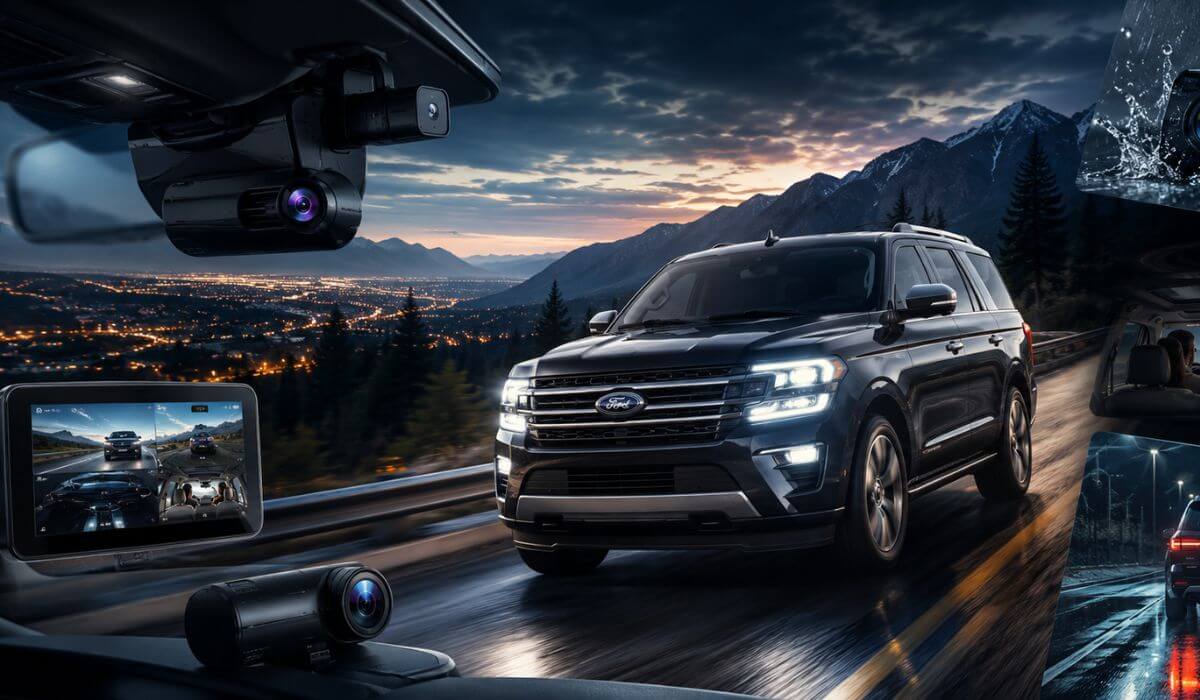
5 Best Dash Cams for Ford Expedition in 2026: 4K Recording, Triple-Channel Coverage & Smart Parking
The Ford Expedition is the kind of full-size SUV where a cheap dash cam usually becomes a regret after the first long highway drive. The windshield is massive, the seating position sits higher than most family SUVs, and if you drive an Expedition MAX, you already know how quickly the rear view disappears once luggage, camping gear, or third-row passengers come into play. That’s exactly why this list focuses on dash cams that actually work properly inside a large SUV cabin instead of random generic picks made for smaller cars.
For this guide, we focused on what real Expedition owners actually deal with every day — stable 4K recording, strong night visibility, reliable parking protection, cleaner rear-camera coverage, and hardware that can survive summer heat sitting against a huge windshield. We also looked closely at compatibility for newer 2022–2026 Ford Expedition and Expedition MAX models while making sure older models still won’t run into mounting or power issues. Most newer Expeditions can easily support advanced parking-mode setups and newer USB-C / STARVIS 2 systems without battery drain headaches when installed properly.
Another thing people rarely talk about is how difficult large SUVs can be for dash cams. A camera that looks sharp in a compact sedan can struggle badly once it’s placed higher and farther away from the road like it is in the Expedition. That’s why every recommendation below was chosen around wide viewing angles, better rear SUV visibility, stronger heat resistance, and parking surveillance that actually makes sense for a vehicle this large.
Best Ford Expedition Dash Cams: Top 2026 Picks With STARVIS 2, WiFi & Rear Coverage
#1. VIOFO A329S 4K 60FPS Front and Rear Dash Cam
Best 4K dash cam for Ford Expedition owners who want crystal-clear highway footage, premium STARVIS 2 night vision, and reliable parking protection for a full-size SUV.
#2. Vantrue N4 Pro S Triple-Channel Dash Cam
Best triple-channel dash cam for Ford Expedition drivers needing front, rear, and interior coverage for family travel, rideshare use, and overnight parking security.
#3. ROVE R2-4K Dual Dash Cam
Best value front and rear dash cam for Ford Expedition owners wanting reliable 4K recording, fast WiFi transfers, and dependable parking monitoring without overspending.
#4. Garmin Dash Cam 67W
Best compact dash cam for Ford Expedition windshields with an ultra-wide field of view, discreet installation, and simple voice-controlled recording for daily driving.
#5. Mangoal OEM Fit Front 4K & Rear 1080P Dash Cam
Best hidden dash cam for Ford Expedition owners who want a factory-style OEM look, clean installation, and seamless integration without cluttering the dashboard.
Expert Tip: One quick thing most Expedition owners realize too late: a dash cam that looks “good enough” on paper can become almost useless once it’s mounted inside a full-size SUV. The higher windshield angle, longer cabin depth, and larger rear blind areas change everything. That’s why video stability, wide-angle clarity, and a strong parking mode mattered far more in this guide than flashy marketing specs or fake “8K” claims. On a vehicle this large, a clean rear capture and reliable night footage matter more than gimmicks you’ll never use.
How We Chose These Dash Cams for the Ford Expedition
We didn’t build this list around brand hype or random best-seller rankings. Every pick here was filtered around how a dash cam actually performs inside a large body-on-frame SUV like the Ford Expedition and Expedition MAX. That matters more than most buyers think.
The first thing we looked at was real-world 4K clarity at highway speed. Expedition owners spend a lot of time on interstates, long-distance trips, and night driving. A camera that struggles to capture license plates clearly at higher SUV ride heights simply didn’t make this list. That’s one reason models like the VIOFO A329S and Vantrue N4 Pro S stood out immediately. Their newer STARVIS 2 sensors handle glare, darker highways, and oversized SUV windshields far better than older-generation cameras.
We also paid close attention to rear coverage quality, because large SUVs create problems smaller vehicles don’t. Once the third row is loaded or cargo stacks higher in the rear, visibility changes fast. Cheap rear cameras often become blurry, washed out, or nearly unusable at night in vehicles this size. The dual and triple-channel systems we selected maintained cleaner rear detail and stronger dynamic range without requiring constant tweaking.
Another major factor was parking protection reliability. Expedition owners often park farther out in larger spaces, tow trailers, travel with family gear, or leave the SUV loaded during road trips. A weak parking mode drains power fast or misses impacts completely. That’s why we prioritized buffered parking systems, low-power recording efficiency, and cameras with stable heat management instead of flashy specs that only look good in advertisements.
We also avoided random oversized screens and bulky mounts that feel terrible inside a modern Expedition cabin. Some dash cams technically record well but look completely out of place once mounted near Ford’s larger windshield area. Picks like the Garmin 67W and Mangoal OEM Fit system earned their place because they stay cleaner, more discreet, and less distracting during daily driving.
Most importantly, we looked at these cameras the same way actual Expedition owners do:
Would this still feel worth buying six months later during a summer road trip, overnight parking situation, or unexpected insurance claim?
A surprising number of dash cams fail that test. These didn’t.
#1. VIOFO A329S 4K 60FPS Front and Rear Dash Cam
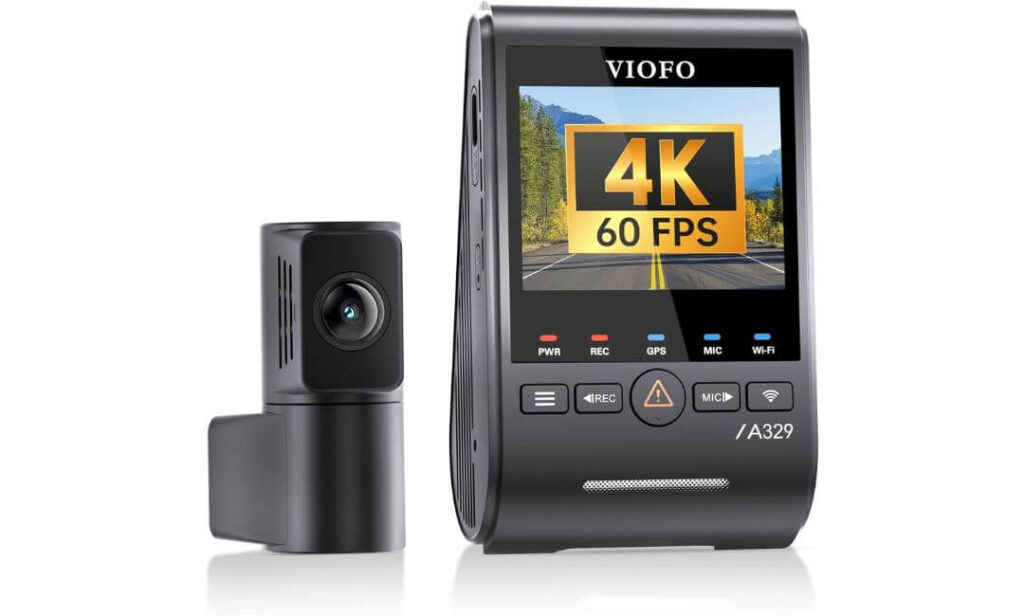
Quick Specs:
- True 4K 60FPS front recording with smoother highway plate capture
- 2K rear camera that stays sharp even through larger SUV rear glass
- Dual Sony STARVIS 2 sensors for cleaner night driving footage
- Advanced parking mode with impact detection
- Faster Wi-Fi 6 transfers for quick phone downloads
- Supports up to 4TB SSD storage for long road trips
- Slim coaxial cable setup that hides cleanly inside larger SUV cabins
- Built-in GPS tracking with voice control support
The first thing that stands out here is how unbelievably clean the footage looks once it’s mounted inside a large SUV cabin. A lot of dash cams advertise “4K,” but once they’re placed higher up in a vehicle like the Ford Expedition, the clarity usually falls apart at highway speed. This one doesn’t. The 4K 60FPS front camera captures motion with far less blur, which genuinely matters when you’re trying to read plates several car lengths ahead on fast interstates or late-night drives.
What impressed us even more was how balanced the footage stays during difficult lighting. Full-size SUVs like the Expedition create more windshield glare and deeper cabin shadows than smaller vehicles, especially during sunrise, rain, or underground parking situations. The dual STARVIS 2 sensors handle that surprisingly well. Instead of crushing dark areas or blowing out headlights, the footage stays detailed enough to keep road signs, lane markings, and surrounding vehicles visible without looking overly sharpened or fake.
The rear setup also feels properly designed for bigger family SUVs. A lot of rear cameras struggle once mounted farther back near the third-row area, but the 2K rear unit keeps enough detail to remain useful instead of becoming an afterthought. Add the ultra-low-power parking mode, fast Wi-Fi 6 transfers, hidden cable routing, and support for massive storage capacity, and this starts feeling less like a basic dash cam and more like a serious long-term setup for people who spend real time behind the wheel.
(Honestly, this is one of the few newer systems that actually feels engineered around larger SUVs instead of simply being copied from compact-car setups.)
Why This One Earned a Spot So Easily
- 4K 60FPS genuinely helps with plate readability at highway speeds
- Rear footage stays usable even in deeper SUV cabins
- STARVIS 2 night performance looks noticeably cleaner than older sensors
- Parking mode feels reliable instead of gimmicky
- Hidden coaxial wiring makes installation look far more OEM-like inside the Ford Expedition
A Small Thing Worth Knowing Before Buying
The best parking-mode experience requires the optional hardwire kit, which isn’t included in the box.
Why It Works So Well in the Ford Expedition
The Ford Expedition has a wide windshield and a longer rear cabin than most midsize crossovers, which can expose weak dash cams very quickly. This setup handles that extra cabin depth much better than expected, especially with its sharper rear camera and stronger dynamic range during night driving.
Another thing we liked is how clean the installation can look once routed properly through the Expedition’s interior panels. The thinner coaxial cable makes a noticeable difference compared to thicker traditional wiring kits that often feel messy inside family SUVs.
The Insider Pro-Tip
If you regularly drive your Ford Expedition on highways, don’t focus only on resolution numbers. Smooth frame rate matters just as much. That’s exactly why the 4K 60FPS recording here feels different in real driving compared to cheaper “4K” cameras that still look blurry once traffic speeds increase.
Also, if you plan to keep your SUV for years, prioritize systems with better sensors and stable parking protection instead of chasing flashy touchscreen gimmicks. In real ownership, clean footage during bad weather, parking incidents, and night driving ends up mattering far more than extra menus you’ll barely touch after installation.
#2. Vantrue N4 Pro S Triple-Channel Dash Cam
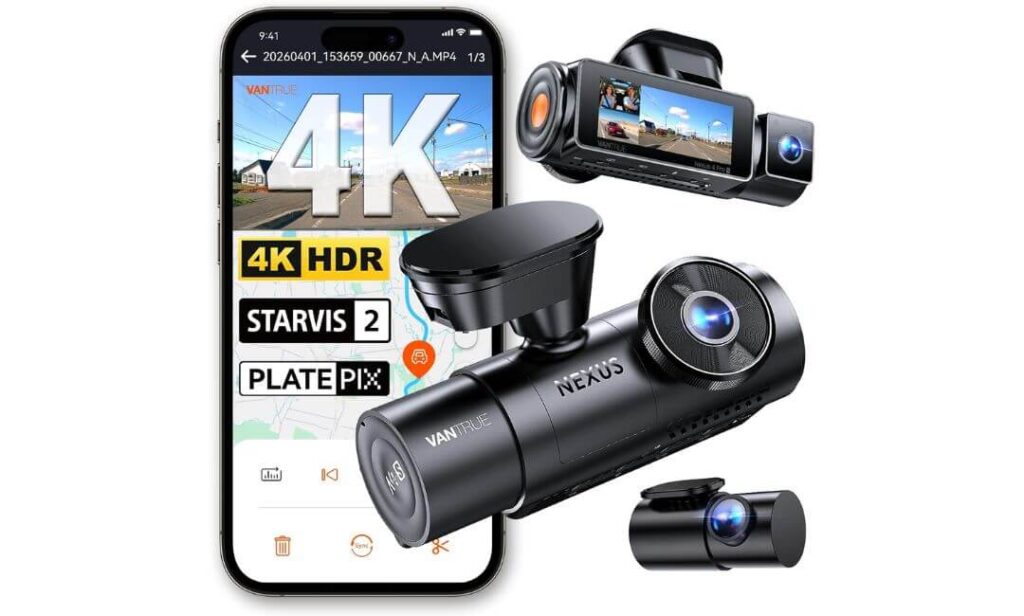
Quick Specs:
- 4K front + 2.5K rear + 1080P interior recording
- Triple Sony STARVIS 2 sensors with HDR support
- Full 3-channel coverage for road, rear cargo area, and cabin
- Advanced IR night vision for darker interiors
- Buffered parking mode with pre-impact recording
- Long 20ft rear cable designed for SUVs and larger cabins
- Built-in 5GHz WiFi + GPS tracking
- Supercapacitor setup for better heat resistance during summer driving
- Supports up to 1TB microSD storage
There’s a big difference between a dash cam that simply records the road and one that genuinely covers what happens inside and around a large SUV during real family use. That’s exactly where this setup separates itself. Inside a vehicle like the Ford Expedition, the extra cabin depth changes everything — especially once passengers, pets, third-row seating, or luggage enter the picture. Most dual-camera systems leave blind spots somewhere. This one doesn’t feel like it was built with compromises.
The biggest reason this model stands out is the way all three cameras work together without making the footage look soft or overly compressed. The 4K front camera handles highway detail extremely well, while the 2.5K rear camera keeps enough clarity to stay useful through larger rear glass and deeper cargo space. But the real surprise is the interior camera. Thanks to the built-in IR night vision and STARVIS 2 hardware, cabin footage stays visible even when the Expedition interior is almost completely dark during night parking or road trips.
Another thing that genuinely impressed us was how practical the overall system feels once installed. The longer 20-foot rear cable makes routing cleaner inside larger SUVs, and the buffered parking mode captures footage before an impact instead of only after something happens. Add the heat-resistant supercapacitor design, fast WiFi transfers, voice control, and support for massive storage sizes, and this starts feeling more like a professional surveillance setup than a typical consumer dash cam.
(Honestly, this is one of the rare triple-camera systems that still feels stable and polished once installed inside a real family SUV instead of becoming cluttered or annoying after a few weeks.)
Where This Setup Quietly Outperforms Most Others
- Full triple-channel recording without sacrificing usable quality
- Interior night footage stays surprisingly clear during dark parking conditions
- Buffered parking mode records before incidents happen
- Long rear cable makes installation easier in larger SUVs like the Ford Expedition
- Supercapacitor design handles summer windshield heat more confidently than battery-based systems
A Small Thing Worth Knowing Before Buying
You’ll need to add a quality microSD card separately, but honestly, that’s not a bad thing since it lets you choose a larger storage setup that better fits long trips and multi-camera recording.
Why It Feels Properly Matched to the Ford Expedition
The Ford Expedition is one of those SUVs where cabin depth actually matters for dash cam performance. Once third-row passengers or cargo enter the equation, weaker interior cameras can become nearly useless. This setup handles that space much more naturally thanks to the wider viewing angles and stronger low-light sensors.
It also suits people who use their Expedition for more than simple commuting. Family travel, rideshare driving, overnight parking, sports gear, camping equipment — this system feels built around real SUV life instead of only recording what’s directly in front of the hood.
The Insider Pro-Tip
If you regularly carry passengers or leave gear inside your Ford Expedition, don’t underestimate the value of a properly tuned interior camera. Most people think they only need front footage until something happens inside the cabin, near the rear seats, or around the cargo area during parking.
Also, triple-camera setups only make sense when the processor and sensors are strong enough to keep all channels usable at the same time. That’s why the combination of STARVIS 2 sensors, HDR tuning, and buffered recording matters here more than flashy marketing numbers. In real ownership, balanced footage across all three cameras ends up being far more valuable than having one sharp camera and two weak ones.
#3. ROVE R2-4K DUAL Dash Cam
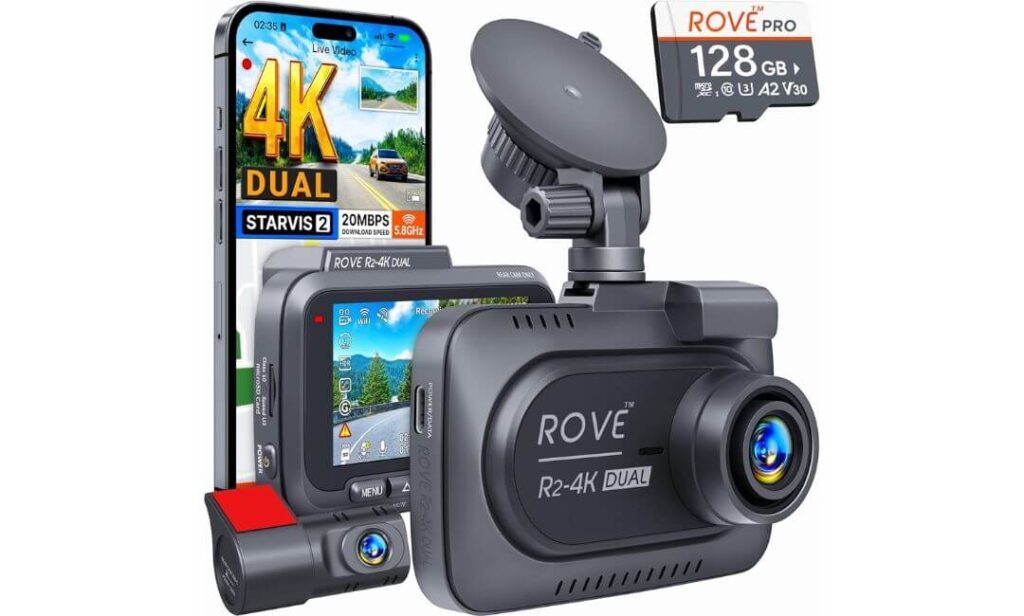
Quick Specs:
- 4K front + Full HD rear recording
- Sony STARVIS 2 sensor with brighter low-light capture
- 150° front + 140° rear viewing angles for wider SUV coverage
- Ultra-fast 5G WiFi with app downloads up to 20MB/s
- Built-in GPS speed and route tracking
- Includes a free 128GB microSD card in the box
- Heat-resistant supercapacitor design for long-term reliability
- Supports up to 1TB storage for extended recording
- Custom 24-hour parking mode with motion and impact detection
Here’s the part most people notice within the first few days of using this setup: it doesn’t feel like a “budget compromise” once it’s installed inside a larger SUV. In fact, inside something like the Ford Expedition, this system ends up feeling surprisingly complete right out of the box. The included 128GB card, long rear cable, fast WiFi, GPS tracking, and balanced dual-camera setup remove a lot of the annoying extras buyers usually have to figure out later.
What really helps this model stand out is how naturally it handles real-world driving conditions without trying too hard to look flashy. The 4K front camera stays sharp enough to capture traffic detail cleanly during daytime highway driving, while the STARVIS 2 sensor keeps nighttime footage brighter and more controlled than most systems in this price range. The rear camera also avoids that soft, muddy look many cheaper SUV setups suffer from once mounted farther back near the cargo area.
Another thing we genuinely appreciated was how practical the overall ownership experience feels. The 5G WiFi connection is fast enough that transferring clips to your phone doesn’t become frustrating, and the included GPS data adds useful context during incidents without overcomplicating things. Add the supercapacitor design, voice guidance, parking mode options, and support for massive storage sizes, and this becomes one of those rare dash cams that quietly overdelivers instead of overpromising.
(Honestly, this feels like the kind of setup most Ford Expedition owners expected from more expensive premium systems but never actually got.)
What Makes This One So Easy to Recommend
- Included 128GB card saves extra setup hassle immediately
- STARVIS 2 sensor performs far better at night than older budget cameras
- Wide viewing angles suit larger SUVs naturally
- Fast WiFi transfers actually feel fast in real use
- GPS data and parking protection add genuine long-term value
A Small Thing Worth Knowing Before Buying
For full-time parking surveillance, you’ll still want the optional hardwire kit — but the good news is the standard setup already feels very complete without forcing extra purchases immediately.
Why It Fits the Ford Expedition Surprisingly Well
The Ford Expedition needs more than just a sharp front camera because of its longer cabin shape and wider rear visibility zones. This setup handles that balance really well without becoming overly complicated or cluttered during installation.
The included 21-foot rear cable also matters more than people think. In larger SUVs, shorter cables can turn installation into a headache very quickly. Here, routing feels cleaner and more natural through the Expedition’s interior panels and rear hatch area.
The Insider Pro-Tip
One of the smartest things about this setup isn’t the resolution — it’s the overall balance. A lot of dash cams focus so heavily on one “headline feature” that everything else starts feeling cheap later. Here, the storage, WiFi speed, night clarity, GPS data, and parking options all work together in a way that actually feels thought through for daily SUV ownership.
Also, if you’re someone who hates spending extra money after buying electronics, the included 128GB card quietly becomes a bigger deal than expected. Most people underestimate how annoying it is to buy a dash cam and then realize they still need memory cards, extra wiring, adapters, or storage upgrades before they can even start using it properly.
#4. Garmin Dash Cam 67W
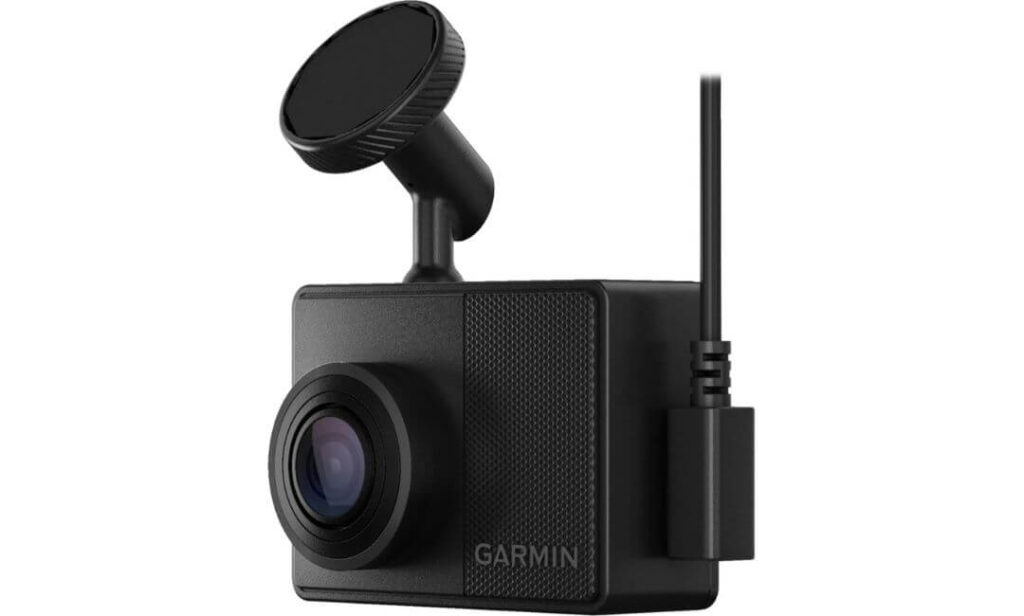
Quick Specs:
- Sharp 1440P HDR recording with strong daytime clarity
- Massive 180-degree field of view for wider traffic coverage
- Compact low-profile body that stays discreet on the windshield
- Built-in GPS location and speed tracking
- Smart Parking Guard monitoring through the Garmin app
- Voice control support for hands-free recording commands
- WiFi cloud backup with secure online video storage
- Includes 16GB microSD card inside the box
- Designed to handle high windshield heat and direct sunlight
Sometimes the best dash cam for a large SUV isn’t the one with the biggest screen or the most cameras attached to it. Sometimes it’s the one you completely forget is there — until you actually need the footage. That’s exactly the feeling this setup gives inside something like the Ford Expedition. It stays small, clean, and almost invisible once mounted properly, which honestly becomes refreshing after seeing how bulky many modern dash cams have become.
The first thing most people notice is the incredibly wide 180-degree field of view. Inside a larger SUV, that wider coverage matters more than expected because of the extra windshield width and taller driving position. Instead of focusing narrowly down the center lane, this camera captures much more surrounding traffic, side movement, parking lot activity, and merging vehicles without making the image feel stretched or distorted. Combined with Garmin’s HDR tuning, the 1440P footage stays surprisingly crisp during harsh daylight, rainy weather, and late-evening driving.
Another reason this model quietly earns trust is how polished the ownership experience feels. The app integration, voice controls, cloud uploads, Parking Guard alerts, and compact magnetic mount all feel mature instead of experimental. There’s no giant screen glowing at night, no oversized body hanging in your line of sight, and no complicated setup process that turns annoying after a week. It simply blends into the Expedition interior and keeps doing its job consistently.
(Honestly, this feels less like a gadget and more like a factory-designed safety feature once it’s installed properly.)
Where This Camera Quietly Wins People Over
- Ultra-wide 180° coverage works beautifully on larger SUV windshields
- Compact size keeps the cabin looking cleaner and less cluttered
- Garmin HDR processing handles difficult sunlight surprisingly well
- Voice controls feel genuinely useful during driving
- Parking Guard and cloud backup add extra peace of mind for daily parking situations
A Small Thing Worth Knowing Before Buying
The remote live-view and Parking Guard features work best with a stable phone connection and continuous power setup, so owners planning heavy parking surveillance should consider the optional constant-power cable for the smoothest experience.
Why It Feels So Natural Inside the Ford Expedition
The Ford Expedition already has a busy windshield area with sensors, mirrors, and driver-assist hardware, which is exactly why oversized dash cams can start feeling distracting very quickly. This setup avoids that problem almost completely because of its smaller body and cleaner mounting style.
The wider lens also suits the Expedition especially well during urban driving and parking situations where side traffic, pedestrians, and neighboring vehicles matter just as much as what’s directly ahead.
The Insider Pro-Tip
One thing experienced SUV owners eventually realize is that visibility fatigue is real. Huge screens, flashing lights, and oversized mounts can slowly become irritating during long drives even if the camera itself records well. That’s exactly why compact systems like this age so well over time — they simply stay out of the way.
Also, wider viewing angles matter more in full-size SUVs than most people think. A narrow camera may look sharper in screenshots, but in real-world driving, the ability to capture more surrounding movement during lane changes, parking lot incidents, or side impacts often becomes far more valuable than chasing ultra-high resolution numbers alone.
#5. Mangoal OEM Fit Front 4K & Rear 1080P Dash Cam
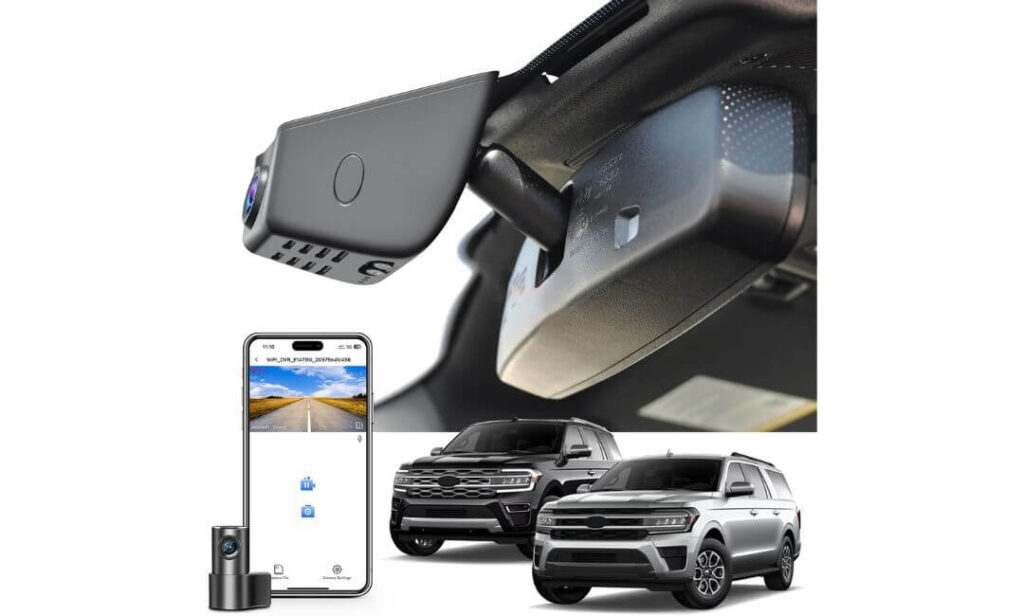
Quick Specs:
- Custom-built specifically for Ford Expedition & Expedition MAX
- Seamless OEM-style hidden installation behind the mirror
- 4K front + 1080P rear recording
- Includes 128GB microSD card inside the box
- Built-in WiFi + app connectivity
- Motion sensing, parking monitor, and G-sensor support
- Supercapacitor design for better long-term heat durability
- Uses dedicated factory-style adapters instead of exposed hanging wires
- Wide-angle front and rear coverage for larger SUVs
There’s a certain type of Expedition owner this setup instantly makes sense for. Not the person chasing giant screens or flashy specs — the person who wants their SUV to still feel premium after installation. That’s the biggest reason this model stands out. Once mounted behind the rearview mirror, it almost disappears into the factory trim like it was installed by Ford itself instead of added later from a box.
Inside a larger SUV like the Ford Expedition, that clean integration honestly matters more than most people expect. A lot of universal dash cams work technically, but they leave visible wires, bulky mounts, dangling adapters, or awkward windshield clutter that slowly ruins the cabin feel over time. This setup avoids nearly all of that. The dedicated fitment for 2018+ Expedition and Expedition MAX models gives it a much cleaner appearance than traditional windshield-mounted systems, especially on trims like King Ranch, Platinum, Limited, and Timberline where interior presentation matters more.
The actual recording quality also feels far more balanced than people usually expect from OEM-style cameras. The 4K front camera captures strong daytime detail, while the rear 1080P unit stays useful enough for parking incidents, rear traffic, and everyday driving coverage. Add the included 128GB card, built-in WiFi, app controls, parking monitoring, and factory-style power adapters, and this becomes one of the easiest “install once and forget about it” setups in the entire lineup.
(Honestly, this feels less like adding an accessory and more like unlocking a feature the Expedition should have included from the factory.)
What Makes This Setup Different From Typical Dash Cams
- OEM-style fitment keeps the windshield looking factory clean
- No messy exposed wiring hanging through the cabin
- Installation feels far simpler than universal multi-cable systems
- Included storage card means it’s usable immediately out of the box
- Blends beautifully into premium Expedition interiors without looking aftermarket
A Small Thing Worth Knowing Before Buying
This setup is designed for Expeditions equipped with the rain sensor area behind the mirror, which most modern trims already have — so it’s worth taking a quick look before ordering just to make sure you get the perfect OEM-style fitment experience.
Why It Feels So Right Inside the Ford Expedition
The Ford Expedition has one of the cleanest upscale SUV interiors in this segment, especially in higher trims. That’s exactly why bulky universal dash cams can feel strangely out of place once installed. This setup avoids that completely by sitting tucked behind the mirror instead of dominating the windshield area.
It also suits Expedition owners who prefer simplicity. No oversized screens glowing at night, no hanging power wires, and no complicated mounting process. Once installed, it quietly blends into the SUV and just keeps recording in the background like a built-in safety system.
The Insider Pro-Tip
A lot of people focus only on video specs when buying a dash cam, but long-term ownership experience matters just as much — especially in premium SUVs. A camera can record amazing footage and still become annoying if the wiring looks messy every single day you get into the vehicle.
That’s why OEM-style systems like this quietly build loyal owners over time. The clean installation, hidden placement, and factory-style integration create a completely different feeling compared to traditional suction-mounted cameras. In a vehicle like the Ford Expedition, that subtle difference ends up feeling much bigger after a few months of real use.
Best Dash Cameras for Ford Expedition Compared: 4K Recording, STARVIS 2 & OEM-Style Picks
| Dash Cam | Recording Setup | Night Driving Strength | Parking Protection | Why It Feels Different in a Large SUV | Best Match For |
|---|---|---|---|---|---|
|
VIOFO A329S
FLAGSHIP 4K SUV PICK
|
4K 60FPS Front + 2K Rear Dual STARVIS 2 sensors WiFi 6 + SSD support up to 4TB |
Excellent highway clarity at night
Handles glare, darker highways, and fast-moving traffic noticeably better than most dual-camera systems.
|
Advanced low-power impact recording
Designed for long overnight parking sessions without aggressive battery drain.
|
Feels purpose-built for bigger cabins thanks to cleaner rear visibility, smoother footage, and hidden cable routing that doesn’t ruin the interior.
|
Drivers who spend serious time on highways and want premium footage quality that still looks impressive months later.
|
|
Vantrue N4 Pro S
BEST 3-CHANNEL COVERAGE
|
4K Front + 2.5K Rear + 1080P Interior Triple STARVIS 2 sensors 20ft SUV-ready rear cable |
Outstanding interior night visibility
IR night vision and HDR tuning keep cabin footage usable even during dark overnight parking.
|
Buffered 24/7 parking monitoring
Captures footage before impacts happen instead of only recording afterward.
|
One of the few triple-camera setups that still feels stable and uncluttered inside larger family SUVs.
|
Families, rideshare drivers, pet owners, and people carrying passengers or gear regularly.
|
|
ROVE R2-4K DUAL
BEST VALUE WITHOUT FEELING CHEAP
|
4K Front + Full HD Rear STARVIS 2 sensor Free 128GB card included |
Very strong for the price range
Night footage stays cleaner than expected, especially during rainy roads and city driving.
|
24-hour motion and collision modes
Voice alerts and parking event storage add extra peace of mind during daily ownership.
|
Balances storage, WiFi speed, GPS, and dual-camera quality surprisingly well without becoming complicated.
|
SUV owners wanting a complete setup immediately without chasing extra accessories later.
|
|
Garmin Dash Cam 67W
MOST DISCREET DAILY DRIVER
|
1440P HDR Recording 180° ultra-wide lens Cloud backup support |
Consistent HDR balance
Wide-angle visibility helps more than expected during urban driving and side traffic situations.
|
Parking Guard monitoring support
Cloud-connected alerts feel polished instead of gimmicky when configured properly.
|
Blends naturally into modern SUV interiors without oversized screens or distracting mounts.
|
Drivers who want a clean minimalist setup that quietly works in the background every day.
|
|
Mangoal OEM Fit Dash Cam
FACTORY-STYLE EXPEDITION FIT
|
4K Front + 1080P Rear OEM hidden integration 128GB card included |
Balanced daily driving footage
Strong enough for normal commuting, parking situations, and highway evidence capture.
|
Motion sensing + parking monitor
Works quietly in the background without cluttering the windshield area.
|
Feels closest to a factory-installed safety feature once mounted behind the mirror.
|
Expedition owners who care just as much about cabin appearance as recording quality.
|
Buying Guide: What Actually Matters When Choosing a Dash Cam for the Ford Expedition
The Ford Expedition is not a small crossover where almost any random dash cam will work fine. Its taller windshield, deeper cabin, larger rear area, and heavier daily-use role change what actually matters in a real-world setup. A dash cam that looks impressive on a product page can still become frustrating once it’s mounted inside a full-size SUV for a few months.
That’s why choosing the right setup for the Expedition is less about chasing marketing gimmicks and more about understanding how these cameras behave during real highway driving, family trips, overnight parking, bad weather, and long-term ownership.
Video Resolution and Real Image Quality Matter More Than Marketing Numbers
A lot of people immediately search for a “4K dash cam for Ford Expedition,” and honestly, that’s the right starting point — but resolution alone doesn’t tell the full story. In a large SUV like the Expedition, the camera sits higher from the road and farther from surrounding traffic compared to smaller vehicles. That means weak sensors, poor HDR tuning, or low frame rates become obvious very quickly.
This is exactly why cameras like the VIOFO A329S stand out. Its 4K 60FPS recording captures motion much more smoothly at highway speed, which helps license plates remain readable instead of turning blurry once traffic speeds increase. Similarly, the newer STARVIS 2 sensors found in several picks above improve low-light detail and reduce glare during rain, tunnels, parking garages, and night driving.
A good Expedition dash cam should not only look sharp during daylight screenshots — it should remain usable during difficult driving situations where footage actually matters.
Wider Viewing Angles and Multi-Camera Coverage Make a Huge Difference in Large SUVs
The Expedition’s size changes how camera placement works. Narrow front cameras can miss side movement during lane changes, parking lot incidents, or merging traffic. That’s why wider field-of-view setups often work better in large SUVs than ultra-zoomed lenses focused only straight ahead.
For many owners, a simple front-and-rear system is enough. But if you regularly travel with passengers, pets, rideshare clients, sports gear, or expensive cargo, a 3-channel dash cam for Ford Expedition starts making a lot more sense.
That’s where systems like the Vantrue N4 Pro S quietly become valuable. The combination of front, rear, and interior recording gives full cabin awareness instead of leaving blind areas around the third-row seating and rear storage space.
Inside a vehicle this large, coverage balance matters just as much as raw resolution.
Parking Surveillance Becomes Far More Important Than Most Owners Expect
Most Expedition owners eventually deal with oversized parking lots, crowded family areas, hotels, road trips, airport parking, trailer hookups, or overnight outdoor parking situations. That’s exactly where a proper dash cam with parking surveillance for Ford Expedition becomes worth the investment.
But here’s the important part: not all parking modes are equally useful.
Cheaper systems often start recording too late or drain batteries aggressively. Better setups use buffered parking recording, impact detection, or low-power monitoring systems that capture footage before an incident actually happens. Cameras like the Vantrue N4 Pro S and VIOFO A329S handle this particularly well because they prioritize power efficiency alongside continuous protection.
For people planning full-time parking monitoring, using a proper hardwire kit is usually the smartest long-term setup.
Smart Features Should Actually Improve Ownership, Not Just Look Good on a Box
A surprising number of dash cams advertise flashy features that owners barely touch after installation. In real Expedition ownership, the features that matter most are usually the simple ones that save time and frustration later.
Fast WiFi transfers, stable phone connectivity, voice control, GPS logging, cloud backup, and reliable app performance genuinely improve daily use. Nobody wants to sit inside a parking lot waiting several minutes just to download a short video clip.
That’s one reason systems like the ROVE R2-4K DUAL and Garmin 67W feel more polished in daily use. Their app connectivity and quick-access controls remove a lot of the small annoyances people usually forget to think about while shopping.
The best WiFi dash cam for Ford Expedition owners is usually the one that feels invisible during normal driving but easy to access when something important happens.
Night Vision Performance Separates Premium Dash Cams From Average Ones
Night driving exposes weak dash cams faster than anything else. Large SUVs naturally create more windshield reflections, more cabin shadows, and more lighting imbalance than smaller vehicles. Add rain, headlights, or highway glare, and weaker sensors collapse quickly.
That’s why modern low-light hardware matters so much.
The newer STARVIS 2 sensors found in premium systems above deliver cleaner night footage, better dynamic range, and improved plate readability compared to older-generation sensors. This becomes especially noticeable during highway driving, dim parking structures, and rural roads where surrounding light is inconsistent.
A good night vision dash cam for Ford Expedition should still capture usable evidence when conditions become difficult — not only during perfect daytime weather.
Installation Quality Quietly Changes the Entire Ownership Experience
Most buyers underestimate how much installation affects long-term satisfaction. A dash cam can record excellent footage and still become annoying if the cabin looks messy every day afterward.
That’s exactly why OEM-style systems like the Mangoal custom-fit setup have become popular with Expedition owners. Cleaner cable routing, hidden mounting positions, and factory-style integration simply feel better inside premium SUV interiors.
Even with universal dash cams, thinner cables and longer rear wiring kits make a major difference during Ford Expedition dash cam installation, especially in MAX models where cabin length increases routing complexity.
A cleaner installation usually means a setup you’ll still enjoy using years later instead of wanting to remove after a few months.
Reliability, Heat Resistance, and Storage Capacity Matter More Over Time
Most people buy a dash cam thinking about video quality first, but long-term reliability often becomes the deciding factor later. The Expedition’s larger windshield area creates serious heat exposure during summer, especially when parked outdoors for long periods.
That’s why systems using supercapacitors generally age better than cheaper battery-powered alternatives. They handle extreme temperature swings more consistently and reduce long-term failure risk.
Storage also matters more than expected. Multi-camera systems recording in 4K can fill cards quickly during road trips or long parking sessions. Features like loop recording, emergency video locking, large-capacity microSD support, SSD compatibility, and cloud backup help prevent footage loss when it matters most.
The best dash cam setups are the ones owners stop thinking about entirely because they simply keep working every day without drama.
Installation Guide: Setting Up a Dash Cam Properly in the Ford Expedition
Installing a dash cam in the Ford Expedition is honestly easier than most people expect, especially compared to smaller vehicles with tighter cabin space. The Expedition’s larger windshield area, wide headliner gaps, and generous interior trim actually make cable routing cleaner when done properly. The important part is not rushing the process.
A lot of poor dash cam experiences don’t come from the camera itself — they come from bad installation. Loose wires, poor camera placement, weak fuse connections, and badly routed rear cables can turn even premium systems into daily annoyances. A clean setup, on the other hand, makes the camera feel almost factory-installed.
A Clean Front Camera Placement Makes a Bigger Difference Than People Think
The best mounting location for most Expedition setups is directly behind or slightly beside the rearview mirror, high on the windshield. This position gives the camera the clearest forward visibility while keeping it hidden from the driver’s normal line of sight.
Large SUVs like the Expedition create more windshield glare than compact vehicles, so mounting position genuinely affects image quality. Cameras placed too low often catch more dashboard reflection and sunlight washout, especially during morning and evening driving.
For OEM-style systems like the Mangoal setup, placement is even cleaner because the camera integrates directly near the factory mirror housing instead of hanging lower on the glass.
Before attaching anything permanently:
- Clean the windshield thoroughly with alcohol wipes
- Test camera angle using the app preview first
- Make sure the lens captures slightly more road than sky
- Avoid placing the camera directly in front of rain sensors or factory safety cameras unless the system is specifically designed for that area
A properly mounted dash cam should almost disappear visually once installed.
Routing Rear Camera Cables Through the Expedition Is Usually Simpler Than It Looks
This is the part most owners worry about unnecessarily.
The good news is that larger SUVs like the Expedition give you far more room behind trim panels and weather stripping than smaller vehicles. Most rear camera cables can be routed cleanly along:
- the headliner edge,
- A-pillar trim,
- upper door weather seals,
- rear quarter trim,
- and finally toward the liftgate glass.
Longer cables included with systems like the Vantrue N4 Pro S and ROVE R2-4K DUAL help tremendously because you’re not stretching connections tightly across the cabin.
The biggest mistake people make is pulling cables too aggressively around airbags or stuffing thick connectors forcefully behind trim pieces. A cleaner install comes from patience, not pressure.
If you want the setup to look professional:
- Tuck cables loosely instead of forcing them deep into trim
- Leave small service slack near camera connections
- Use fabric tape or clips where necessary to prevent rattling
- Keep wiring away from moving liftgate hinges whenever possible
Done correctly, almost no wiring should remain visible once installation is complete.
Choosing Between Cigarette-Lighter Power and Hardwiring
Most dash cams above can work immediately using the included 12V power adapter, which is perfectly fine for normal driving use. For many Expedition owners, this setup alone is enough.
But if you want:
- continuous parking surveillance,
- impact recording while parked,
- buffered parking mode,
- or remote cloud monitoring,
then hardwiring becomes the better long-term option.
Using a proper hardwire kit connected through a fuse tap allows the camera to receive controlled constant power without draining the battery excessively. Better kits also include low-voltage cutoff protection so the system shuts down safely before battery voltage becomes a problem.
Inside the Expedition, the fuse box layout is relatively installer-friendly compared to many smaller SUVs, which makes hardwire routing less intimidating than expected.
A good setup usually includes:
- an ACC fuse connection for ignition-switched power,
- a constant fuse for parking mode,
- and a solid ground connection attached to bare chassis metal.
For owners uncomfortable with fuse taps or electrical work, a professional install is often worth it simply for peace of mind and cleaner routing.
Why Parking Mode Installation Needs More Attention Than Regular Recording
Parking mode is where installation quality starts mattering much more.
Features like:
- buffered motion detection,
- impact-triggered recording,
- cloud alerts,
- or low-power surveillance
all depend heavily on stable power delivery. Cheap hardwire kits or poor fuse selection can create random shutdowns, battery warnings, or inconsistent recording behavior.
This is especially important in larger vehicles like the Expedition because owners often leave them parked for longer periods during travel, family trips, airports, hotels, or outdoor activities.
Systems like the VIOFO A329S and Vantrue N4 Pro S are particularly effective here because they combine smarter low-power recording modes with efficient sensor management.
The goal isn’t simply “always-on recording.”
The goal is stable, reliable protection that doesn’t become a battery headache later.
Small Installation Details That Quietly Improve Long-Term Ownership
The little details honestly matter more than people realize after several months of daily driving.
For example:
- thinner coaxial cables tend to rattle less over time,
- smaller camera bodies stay less distracting at night,
- and cleaner mirror placement reduces windshield clutter dramatically.
This is one reason OEM-style setups feel so satisfying long term. Once installed cleanly, they stop feeling like aftermarket accessories entirely.
Also, don’t ignore heat exposure. The Expedition’s massive windshield can create intense cabin temperatures during summer parking. That’s why supercapacitor-based systems generally hold up better over time than cheaper battery-powered alternatives.
A clean install should feel invisible during daily driving — not like a science project hanging from the windshield.
Important Safety and Legal Things Worth Knowing Before Installation
Before enabling audio recording, cloud uploads, or full-time parking surveillance, it’s smart to check local privacy and recording laws in your area because regulations can vary depending on state or country.
Also:
- never route wires directly across airbag deployment zones,
- avoid blocking driver-assistance cameras or rain sensors,
- and make sure the dash cam doesn’t obstruct the driver’s forward visibility.
For parking mode users, battery health matters too. If your Expedition battery is older or already weak, replacing it before running 24/7 surveillance is often smarter than troubleshooting voltage problems later.
The best dash cam setup is the one you stop noticing completely because it simply works every single day without creating extra stress, clutter, or electrical issues.
Installation Guide: How to Properly Set Up a Dash Cam in the Ford Expedition
The Ford Expedition is honestly one of the easier full-size SUVs to install a dash cam in — if you approach it the right way. The cabin is spacious, the headliner gives decent routing room, and the wider windshield creates cleaner camera placement options compared to tighter midsize SUVs. But at the same time, larger SUVs also expose bad installations faster. Loose wiring, poor rear camera positioning, weak fuse connections, or sloppy cable routing become extremely noticeable once you start driving daily.
That’s why a proper installation matters just as much as the camera itself.
Step-by-Step Setup Process for Most Ford Expedition Models
For most Expedition and Expedition MAX models, the cleanest installation starts near the rearview mirror area. This location keeps the camera hidden from the driver’s line of sight while still giving the lens a full view of the road ahead.
A proper setup usually follows this flow:
- Clean the windshield thoroughly before mounting anything permanently. Oils and heat buildup inside large SUVs can weaken adhesive mounts surprisingly fast.
- Temporarily connect the dash cam first and preview the angle through the mobile app before final placement. A slightly lower angle often captures too much hood, while a higher angle can overexpose the sky.
- Route the power cable along the top edge of the windshield near the headliner. Most Expedition trims provide enough flexibility to tuck wiring cleanly without forcing trim panels open aggressively.
- Continue routing along the passenger-side A-pillar whenever possible. This usually creates the cleanest appearance while reducing visibility of exposed wiring from the driver seat.
- For rear cameras, continue through the upper door weather stripping and rear quarter trim toward the liftgate glass. Longer cables included with systems like the Vantrue N4 Pro S and ROVE R2-4K DUAL make this process much easier inside the Expedition’s longer cabin.
- Secure any extra cable length instead of tightly bunching it behind trim pieces. Overstuffed wiring often creates rattles later during highway driving.
The goal is simple: once installed, the system should feel invisible during daily driving.
Understanding Fuse Taps, Relays, and Hardwire Power the Right Way
A lot of Expedition owners start with the included 12V power adapter first, which is perfectly fine for normal recording. But once people experience proper parking surveillance, most never want to go back.
That’s where hardwiring becomes important.
Using a quality hardwire kit with fuse taps allows the dash cam to:
- stay active during parking mode,
- monitor impacts while parked,
- support buffered recording,
- and deliver more stable power overall.
Most modern hardwire kits use three connections:
- ACC power for ignition-switched operation,
- constant battery power for parking mode,
- and chassis ground.
Inside the Expedition, the fuse box layout is generally installer-friendly compared to smaller vehicles, which helps a lot for cleaner installations.
For owners planning long-term parking surveillance, using a low-voltage cutoff module is strongly recommended. This protects the battery from excessive drain by shutting the camera down automatically if voltage drops too low.
Some advanced installers also use relay-style power management setups for cleaner voltage control, especially on multi-camera systems running 24/7 parking surveillance. This is particularly useful for triple-camera setups like the Vantrue N4 Pro S, where multiple recording channels naturally draw more continuous power.
A stable power setup always matters more than people think later.
Small Installation Details That Make the Setup Look Factory-Clean
This is where the difference between an average install and a premium-looking install really shows.
The cleanest Expedition installations usually follow a few simple habits:
- keeping cables loose instead of stretched tightly,
- hiding wiring behind weather stripping instead of stuffing it randomly,
- avoiding visible loops near the mirror area,
- and leaving enough movement slack near the rear liftgate.
OEM-style systems like the Mangoal dash cam naturally excel here because they integrate near the factory mirror housing instead of hanging lower on the windshield.
For universal systems, thinner coaxial cables — like those used on the VIOFO A329S — make a surprisingly big difference because they tuck more naturally into trim gaps and create less long-term rattling.
Another smart trick many experienced installers follow:
avoid routing wires directly across the center of side curtain airbag paths. Keeping wiring near outer trim edges creates a cleaner and safer setup.
A good dash cam install should never make the cabin feel cluttered or unfinished.
Rear Camera Placement Matters More in the Expedition Than Smaller SUVs
Large SUVs create unique rear visibility challenges because of deeper cargo areas, third-row seating, taller rear glass, and luggage movement during trips.
That’s why rear camera placement deserves more attention than most people give it.
For the best results:
- mount the rear camera high on the rear glass,
- avoid areas heavily blocked by headrests,
- and angle the lens slightly downward for balanced road coverage.
In Expedition MAX models especially, placing the camera too low can reduce rear visibility significantly once cargo space fills up.
Cameras with stronger dynamic range and better rear sensors — like the VIOFO A329S and Vantrue N4 Pro S — handle these conditions noticeably better during night driving and rainy weather.
Important Safety and Legal Things Owners Should Know Before Using Parking Mode
Parking surveillance is one of the best reasons to own a dash cam in a large SUV, but it’s also where owners should pay the closest attention to local laws and battery health.
Before enabling full-time monitoring:
- check local regulations regarding audio recording and privacy laws,
- make sure the camera does not obstruct windshield visibility,
- and avoid interfering with factory ADAS sensors, rain sensors, or lane-assist cameras.
Battery condition matters too.
If the Expedition battery is already aging or weak, aggressive 24/7 parking mode can expose problems much faster. A strong battery and proper low-voltage cutoff protection make a huge difference for long-term reliability.
Also, extreme summer heat inside large SUVs can punish lower-quality dash cams quickly. That’s exactly why the systems recommended in this guide prioritize supercapacitors, better heat management, and stable long-term recording instead of relying on cheaper battery-based designs.
The best installation is the one you eventually stop thinking about completely because the camera quietly records every drive, every parking session, and every unexpected moment without creating stress, warning lights, or cabin clutter later.
Should You Choose a Hidden Dash Cam Setup for the Ford Expedition?
For a lot of Ford Expedition owners, this becomes the real question after comparing video quality and features:
Do you want the dash cam to feel like an aftermarket gadget, or do you want it to disappear into the SUV like it belonged there from day one?
That’s exactly why hidden dash cams have become so popular in full-size SUVs recently. The Expedition already has a premium-looking interior, a large windshield area, factory driver-assistance hardware, and cleaner cabin lines than older body-on-frame SUVs. Once bulky cameras, suction mounts, hanging cables, and glowing screens enter the picture, that clean factory feel can disappear surprisingly fast.
But hidden setups are not automatically better for everyone. The right choice depends on how you actually use the vehicle every day.
Why More Expedition Owners Are Moving Toward Hidden Dash Cam Setups
Large SUVs naturally expose poor-looking installations more than compact cars do. Because the windshield sits taller and more upright, bulky dash cams become easier to notice from both inside and outside the vehicle.
That’s one reason OEM-style systems like the Mangoal integrated setup feel so different once installed. Instead of hanging below the mirror like traditional cameras, they blend into the factory sensor housing area and almost disappear visually.
For many owners, that creates several real advantages:
- cleaner cabin appearance,
- less windshield distraction,
- lower theft attention,
- fewer visible wires,
- and a more premium long-term ownership feel.
This becomes especially important on higher Expedition trims like:
- Platinum,
- King Ranch,
- Limited,
- and Timberline,
where owners usually care more about preserving the upscale interior appearance.
A hidden setup also tends to feel less mentally distracting during long highway drives because there’s no oversized screen glowing in your peripheral vision constantly.
The Trade-Offs Most People Don’t Think About Before Buying
Hidden dash cams absolutely improve cabin appearance, but there are a few realistic trade-offs owners should understand first.
Because many hidden systems prioritize compact size and discreet placement:
- some use smaller screens or no screen at all,
- accessing buttons directly can feel less convenient,
- and adjusting camera angles after installation may require more effort.
This is where larger traditional systems like the VIOFO A329S or Vantrue N4 Pro S still appeal to many Expedition owners. They offer easier direct access to settings, more flexible positioning, and sometimes stronger thermal airflow because of their more open mounting style.
Another thing worth understanding:
a hidden camera still needs proper placement and quality sensors. Simply hiding a weak camera behind the mirror does not magically improve footage quality. In large SUVs especially, poor lens positioning can actually reduce plate visibility if the viewing angle becomes too restricted.
The best hidden systems are the ones that balance discreet placement with genuinely strong recording hardware.
The Best Locations for Discreet Dash Cam Placement in the Expedition
For most Expedition owners, the ideal hidden mounting zone is:
- directly behind the rearview mirror,
- slightly passenger-side offset,
- or integrated into the rain sensor housing area.
This location keeps the camera:
- hidden from the driver,
- less noticeable from outside the vehicle,
- and better protected from direct sunlight exposure.
OEM-fit systems naturally perform best here because they’re designed around the Expedition windshield shape and factory sensor placement.
For universal cameras like the Garmin 67W, smaller body size becomes extremely valuable because the unit remains discreet without requiring custom trim integration.
One important thing many people miss:
avoid mounting the camera too high into heavily tinted windshield zones unless the manufacturer specifically supports it. Some darker tint bands can slightly reduce image brightness during nighttime recording.
The cleanest-looking setup is not always the highest-mounted one — it’s the one that preserves clear visibility while remaining visually subtle.
Why Hidden Wiring Matters Almost as Much as Hidden Cameras
A hidden dash cam loses most of its appeal if thick wires still hang visibly across the windshield.
That’s why cable management becomes such a huge part of the overall experience.
Premium-feeling Expedition installations usually:
- route cables through the headliner,
- hide wiring behind A-pillar trim,
- tuck excess cable near weather stripping,
- and avoid visible loops near the mirror area.
Systems using thinner coaxial wiring — like the VIOFO A329S — generally create cleaner final installs because the cables flex more naturally through tighter trim gaps.
The goal is simple:
someone sitting inside the Expedition should not immediately notice aftermarket wiring the moment they enter the cabin.
That factory-clean feeling becomes addictive once done properly.
Reliability Still Matters More Than Appearance in the Long Run
One mistake some buyers make is focusing so heavily on stealth installation that they forget the dash cam still needs to perform during difficult situations.
A hidden dash cam only makes sense if:
- the sensor quality stays strong at night,
- parking mode remains reliable,
- heat management is stable,
- and footage remains usable during actual incidents.
Large SUVs generate serious windshield heat during summer parking, especially darker-colored Expeditions with panoramic roofs. That’s exactly why reliable hardware matters more than ultra-cheap hidden kits with weak thermal management.
This is one reason the cameras recommended in this guide focus heavily on:
- STARVIS 2 sensors,
- supercapacitors,
- stable parking surveillance,
- and proven long-term reliability,
instead of only flashy appearance claims.
Because at the end of the day, a hidden dash cam should still do the most important thing flawlessly:
capture clear, usable evidence when something unexpected happens.
Why Triple-Channel Dash Cam Coverage Makes So Much Sense in the Ford Expedition
A lot of people think a front-facing dash cam is enough until they actually spend time driving and parking a full-size SUV like the Ford Expedition. Then reality changes very quickly.
The Expedition is not a small commuter crossover where everything happening around the vehicle stays within one camera angle. It’s longer, taller, deeper inside, and usually carries more passengers, luggage, gear, pets, or expensive equipment than the average vehicle. That changes the kind of incidents owners actually deal with.
This is exactly why triple-channel dash cams for Ford Expedition owners have started becoming far more popular recently. Once you experience having front, rear, and interior coverage working together, it becomes difficult going back to a simple single-camera setup.
Front, Rear, and Interior Recording Creates a Completely Different Level of Protection
A standard front camera only tells part of the story.
Inside a larger SUV like the Expedition, incidents can happen:
- behind the vehicle,
- beside the rear cargo area,
- inside the cabin,
- during parking,
- or around passengers and stored equipment.
That’s where systems like the Vantrue N4 Pro S become extremely valuable. Instead of recording only what happens ahead of the hood, the camera captures:
- front highway traffic,
- rear-end situations,
- and interior cabin activity simultaneously.
That extra perspective matters far more than most people realize until something unexpected actually happens.
For example:
a front camera may show sudden braking during a collision, but the interior camera can also prove:
- passenger behavior,
- seatbelt use,
- object movement,
- or whether cargo shifted during impact.
In insurance disputes, that additional context can become surprisingly important.
The Expedition’s Large Cabin Creates Blind Areas Most Drivers Forget About
The Ford Expedition has a genuinely deep interior space, especially in MAX models. Once third-row seats, luggage, camping equipment, sports gear, strollers, or pets enter the equation, visibility changes dramatically.
That’s exactly why interior recording matters more in this SUV than in many smaller vehicles.
A good interior camera helps monitor:
- rear passenger activity,
- movement around folded seats,
- cargo shifting during travel,
- interactions during rideshare or family transport,
- and even suspicious activity during overnight parking.
This becomes especially useful for owners who:
- travel frequently,
- leave expensive gear inside,
- transport kids often,
- or use the Expedition for work-related driving.
The interior camera essentially fills the visibility gap created by the Expedition’s longer cabin structure.
Hit-and-Run Situations Often Need More Than One Camera Angle
One of the biggest reasons owners upgrade to multi-channel systems is simple:
single-camera footage often misses critical context during parking incidents.
For example:
a front-only dash cam may capture impact movement during a hit-and-run but completely miss:
- the vehicle approaching from the rear,
- someone walking near the cargo area,
- or activity happening beside the SUV before impact.
Triple-channel systems improve this dramatically because multiple recording angles create overlapping evidence coverage.
That overlap becomes extremely valuable during:
- parking lot incidents,
- hotel parking damage,
- airport parking situations,
- trailer hookups,
- rear impacts,
- or vandalism near the side and rear zones.
In larger SUVs especially, more camera coverage usually means fewer unanswered questions later.
Interior Cameras Are Not Just for Rideshare Drivers Anymore
A lot of people still assume cabin cameras are only useful for Uber or Lyft drivers. That idea honestly feels outdated now.
Modern Expedition owners use these SUVs for:
- long-distance travel,
- family hauling,
- towing,
- road trips,
- work equipment transport,
- outdoor activities,
- and expensive cargo storage.
An interior camera quietly adds another layer of accountability and documentation for all of that.
Even simple situations become easier to understand later:
- Did cargo move before the impact?
- Was the rear hatch opened?
- Did something fall during emergency braking?
- Was a passenger distracting the driver?
- Did someone enter the cabin while parked?
Triple-channel recording answers questions a standard front camera simply cannot.
Storage Management Becomes Much More Important With Triple-Channel Systems
There’s one thing buyers should absolutely understand before purchasing a triple-camera setup:
storage usage increases fast.
Recording:
- front 4K footage,
- rear video,
- and interior cabin recording simultaneously
creates significantly larger file sizes compared to basic single-camera systems.
That’s exactly why larger storage support matters so much on cameras like:
- the Vantrue N4 Pro S,
- VIOFO A329S,
- and ROVE R2-4K DUAL.
Features like:
- loop recording,
- automatic overwrite protection,
- emergency video locking,
- buffered parking recording,
- and support for 512GB or 1TB cards
become extremely important during long road trips or overnight surveillance.
A cheap memory card can also create problems quickly in triple-channel systems because the camera writes massive amounts of data continuously. That’s why industrial-grade or endurance-focused cards are usually the smarter long-term choice.
Why Better Sensors Matter Even More in Triple-Camera Systems
Adding more cameras only helps if all the footage remains usable.
A weak processor or poor sensor setup can cause:
- overheating,
- compressed blurry footage,
- dropped frames,
- or weak nighttime clarity across multiple channels.
That’s why premium sensor systems — especially newer STARVIS 2 setups — matter so much here. Cameras like the Vantrue N4 Pro S handle multi-camera recording more confidently because the hardware was designed specifically around triple-channel workloads instead of simply adding extra lenses for marketing purposes.
In a vehicle as large and expensive as the Expedition, that difference becomes noticeable very quickly during real-world driving.
Because in the end, triple-channel coverage is not really about having “more cameras.”
It’s about reducing blind spots, preserving context, and creating a complete story when something unexpected happens around the SUV.
Night Vision and Low-Light Performance Matter More in the Ford Expedition Than Most People Realize
Night driving changes everything for a dash cam, especially inside a full-size SUV like the Ford Expedition. During daylight, even average cameras can look decent enough. But once the sun drops, the real difference between premium hardware and cheap marketing claims becomes painfully obvious.
The Expedition’s larger windshield, taller ride height, deeper dashboard reflections, and wider cabin layout create much harder lighting conditions than smaller vehicles. Add rain, highway glare, LED headlights, tunnels, poorly lit parking garages, or dark rural roads, and weaker dash cams start falling apart fast.
That’s exactly why night performance became one of the biggest deciding factors in this guide.
The Most Important Night Vision Features Are Usually the Ones Buyers Ignore
A lot of dash cam listings throw around phrases like:
- “super night vision,”
- “HDR support,”
- or “low-light enhancement,”
but in real-world Expedition driving, only a few technologies actually make a noticeable difference.
The first is sensor quality.
Modern STARVIS 2 sensors, like the ones used in the VIOFO A329S and Vantrue N4 Pro S, perform dramatically better during difficult lighting because they capture more usable detail while controlling glare more naturally. Instead of turning headlights into giant white explosions, they preserve road markings, lane detail, and surrounding traffic more clearly.
The second major factor is proper HDR or WDR processing.
Good HDR tuning balances:
- bright headlights,
- reflective road signs,
- dashboard glare,
- and dark roadside areas
without making footage look overly artificial or washed out.
This becomes extremely important in larger SUVs because the elevated windshield position naturally catches more light variation than lower passenger cars.
The third thing many people overlook is aperture quality and frame stability. Faster lenses and smoother frame rates help preserve moving detail during nighttime highway driving instead of creating blurry plate smears once traffic speeds increase.
That’s exactly why true 4K 60FPS recording can matter far more at night than simple “8K” marketing labels with weak sensors behind them.
Why Tunnels, Underground Garages, and Dusk Driving Expose Weak Dash Cams Immediately
The hardest lighting situations for any dash cam are not complete darkness — they’re sudden lighting transitions.
For example:
- entering tunnels during daylight,
- exiting parking garages at night,
- driving through sunset glare,
- or moving between dark roads and bright intersections.
This is where cheaper dash cams often fail badly.
Many cameras overreact to rapid brightness changes, causing:
- exposure pulsing,
- blurry motion,
- delayed brightness correction,
- or completely unreadable footage for several seconds.
Inside the Expedition, these problems become even more obvious because the taller windshield captures more sky exposure and more reflective glare simultaneously.
Cameras with better dynamic range processing handle these transitions much more smoothly. Systems like the Garmin 67W and VIOFO A329S stand out here because they recover brightness balance faster without destroying surrounding detail.
That matters more than people think because many real-world incidents happen during exactly these imperfect lighting moments.
Rear Camera Night Quality Matters More in Large SUVs
A lot of buyers focus entirely on front camera night vision and forget how challenging rear recording can become inside a large SUV.
The Expedition’s:
- taller rear glass,
- deeper cargo area,
- tinted windows,
- and longer cabin shape
naturally reduce available rear light during nighttime driving.
Weak rear cameras often become muddy, noisy, or nearly unusable after dark once mounted farther from surrounding street lighting.
This is one reason stronger rear sensors matter so much in systems like:
- the VIOFO A329S,
- and Vantrue N4 Pro S.
Their rear footage remains significantly cleaner during:
- rainy highways,
- dim parking structures,
- campground driving,
- and poorly lit suburban roads.
In a vehicle this large, rear clarity is not a bonus feature anymore — it’s part of the core safety value.
Interior Cabin Night Vision Quietly Becomes Extremely Valuable
For owners using:
- third-row seating,
- family travel setups,
- rideshare driving,
- or overnight cargo storage,
interior low-light visibility matters more than expected too.
This is where infrared-assisted interior cameras quietly become a huge advantage.
The Vantrue N4 Pro S, for example, uses IR night vision to keep cabin footage visible even when the Expedition interior is almost completely dark. That becomes genuinely useful during:
- overnight parking,
- roadside stops,
- family travel,
- or situations involving rear-seat activity after dark.
A front-only system simply cannot capture that additional context.
Small Adjustments That Dramatically Improve Night Recording Quality
One thing experienced dash cam owners learn quickly:
installation quality affects night footage almost as much as the camera itself.
For better nighttime recording:
- keep the windshield extremely clean,
- avoid fingerprints near the lens area,
- reduce dashboard reflections whenever possible,
- and mount the camera higher near the mirror instead of lower on the glass.
Using a CPL filter can also help reduce glare from:
- streetlights,
- dashboard reflections,
- wet roads,
- and opposing headlights.
That’s one reason the included CPL setup on cameras like the VIOFO A329S becomes more useful over time than many buyers initially expect.
Another important detail:
avoid heavily tinting the rear glass area directly around the rear camera whenever possible. Dark tint combined with weak rear sensors can reduce nighttime detail surprisingly fast.
Why Real Night Performance Matters More Than Fancy Marketing Claims
A lot of dash cams look amazing in edited promotional screenshots taken under perfect lighting. Real ownership feels very different.
The true test is whether the camera still captures:
- readable plates,
- lane markings,
- surrounding vehicles,
- and usable evidence
during:
- rainy highways,
- midnight parking lots,
- tunnel transitions,
- poorly lit side streets,
- and stressful driving conditions.
That’s exactly why the cameras recommended in this guide prioritize:
- stronger sensors,
- balanced HDR processing,
- stable heat management,
- and realistic nighttime performance
instead of chasing exaggerated resolution claims that collapse once lighting conditions become difficult.
Because at the end of the day, a dash cam earns its value during the worst lighting situations — not the easiest ones.
FAQs About Ford Expedition Dash Cam
Does the Ford Expedition actually need a higher-end dash cam, or is a basic 4K model enough?
Honestly, this is where a lot of Expedition owners waste money the first time around. On paper, almost every dash cam claims “4K recording,” but large SUVs expose weak cameras much faster than smaller cars do. The Expedition sits higher off the ground, has a wider windshield, deeper rear cabin, and creates more difficult lighting conditions at night. Cheap 4K cameras often look acceptable during daylight and then completely fall apart once highway speed, rain, glare, or parking lot lighting enters the picture.
That’s why sensor quality matters more than raw resolution here. A properly tuned system with newer STARVIS 2 hardware, balanced HDR, stable parking mode, and cleaner rear recording usually performs far better long term than flashy budget cameras advertising unrealistic specs. Inside the Expedition especially, smooth footage, low-light clarity, and reliable rear coverage matter more than exaggerated marketing numbers most people never verify in real driving.
Is a hidden dash cam setup better for the Ford Expedition than a traditional windshield-mounted camera?
For a lot of Expedition owners, yes — but mostly because of how the SUV itself is designed.
The Expedition has a very clean interior layout, especially on trims like:
- Platinum,
- King Ranch,
- Limited,
- and Timberline.
Large hanging cameras, visible wires, and oversized screens can start feeling surprisingly out of place after a few weeks of daily driving. That’s exactly why OEM-style systems like the Mangoal integrated setup have become popular recently. They preserve the factory appearance instead of making the cabin feel cluttered.
That said, hidden setups are not automatically “better” for everyone. Larger systems like the VIOFO A329S or Vantrue N4 Pro S still offer:
- easier screen access,
- more flexible mounting positions,
- and sometimes stronger thermal airflow during heavy recording.
The smartest approach honestly comes down to ownership style:
- if you value factory appearance and minimal distraction, hidden systems feel amazing,
- if you care more about maximum footage flexibility and advanced controls, premium visible systems still make a lot of sense.
Why do so many Ford Expedition owners end up upgrading to triple-channel dash cams later?
Because large SUVs create blind areas most people underestimate until they actually live with the vehicle.
A front-only camera may record what happens ahead, but it completely misses:
- rear passenger activity,
- cargo movement,
- rear parking incidents,
- third-row situations,
- or interior events during road trips and overnight parking.
That’s where triple-channel systems quietly become addictive once owners experience them. Cameras like the Vantrue N4 Pro S capture front, rear, and cabin activity simultaneously, which creates a much more complete picture during incidents.
This becomes especially valuable for:
- family travel,
- rideshare driving,
- pet transport,
- airport parking,
- expensive cargo,
- sports equipment,
- or long-distance trips.
A lot of people think interior cameras are only for Uber drivers until something happens around the rear seats or cargo area and suddenly that third camera becomes the most important footage they have.
Do parking mode features actually work reliably in large SUVs like the Expedition?
Yes — but only when the power setup is done correctly.
This is where many people misunderstand parking surveillance. The dash cam itself is only part of the equation. Stable parking protection depends heavily on:
- proper hardwire installation,
- battery health,
- low-voltage protection,
- and how efficiently the camera manages power draw.
Cheaper cameras often advertise 24/7 parking recording but either drain batteries aggressively or miss incidents because the trigger system reacts too slowly. Better systems use buffered parking recording, impact pre-capture, and smarter low-power monitoring modes.
That’s why cameras like:
- the VIOFO A329S,
- Vantrue N4 Pro S,
- and ROVE R2-4K DUAL
feel much more trustworthy during overnight parking situations. They balance recording quality with stable power management instead of simply running constantly until the battery suffers.
One thing many experienced owners eventually realize:
a properly installed parking mode setup becomes one of the most valuable features on the entire vehicle once you start dealing with crowded parking lots, hotels, airport garages, or overnight street parking regularly.
What’s the biggest mistake people make after buying a dash cam for the Expedition?
Most people obsess over camera resolution and completely ignore installation quality.
In real ownership, bad installation causes more frustration than slightly lower video specs ever will. Loose cables, poor rear camera placement, cheap memory cards, weak hardwire kits, windshield glare, and incorrect camera angles quietly ruin the experience over time.
A clean setup usually comes down to simple things:
- high mirror placement,
- proper cable routing,
- quality storage cards,
- stable fuse connections,
- and choosing a camera that actually suits a full-size SUV cabin.
Another huge mistake is buying a camera that looks impressive on a product page but was clearly designed around compact sedans instead of larger SUVs. The Expedition needs:
- wider viewing angles,
- stronger night sensors,
- better rear coverage,
- and cleaner heat management.
That’s honestly why so many owners eventually replace their first dash cam within a year. They realize later that large SUVs expose weaknesses much faster than smaller vehicles ever would.
Final Thoughts
The truth is, the Ford Expedition changes what a “good” dash cam actually means. This is not a tiny commuter car where almost any random camera can survive daily use. The Expedition’s size, windshield shape, deeper cabin, higher driving position, and real-world family usage expose weak cameras very quickly — especially during night driving, highway travel, parking incidents, and long road trips.
That’s exactly why every pick in this guide was chosen around real SUV ownership instead of spec-sheet marketing.
Some owners will care most about raw video quality and highway clarity, which is where the VIOFO A329S quietly separates itself. Others will want full cabin awareness and maximum protection during family travel or overnight parking, making the Vantrue N4 Pro S incredibly hard to ignore. And for people who simply want their Expedition to keep its clean factory appearance without visible clutter, the Mangoal OEM-style setup honestly feels closer to an integrated factory feature than a traditional aftermarket accessory.
The important thing is choosing a setup that still feels right six months later — not just one that looks impressive for five minutes on an Amazon listing.
Because once a dash cam is installed properly in the Expedition, it quietly becomes one of those features you stop thinking about completely… right up until the exact moment you genuinely need the footage. And when that moment comes, the difference between a cheap camera and a properly chosen system suddenly becomes very real, very fast.
Also Check: