
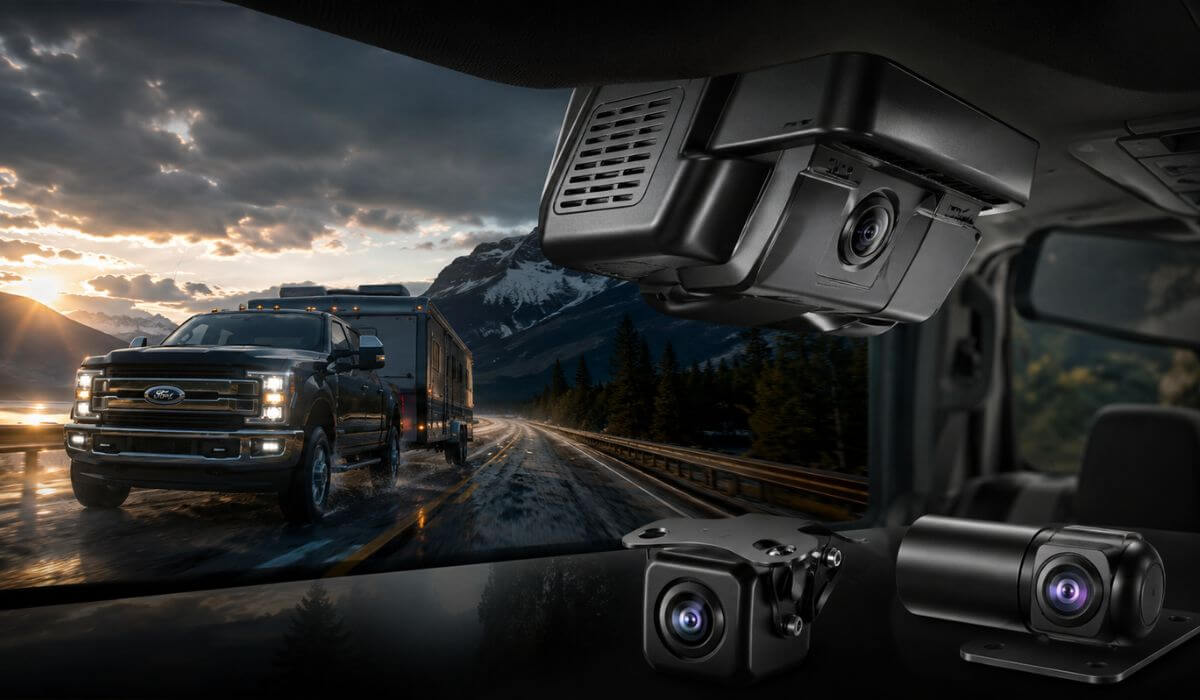
5 Best Dash Cams For Ford F250 In 2026: Factory-Fit 4K Systems With Rear Recording, GPS & OEM Look
If you drive a Ford F250 long enough, you eventually realize a regular dash cam setup usually looks out of place inside the cabin. Wires hanging near the mirror, bulky screens shaking on rough roads, weak night footage during towing runs — it starts feeling cheap fast, especially in a truck that can easily cross the $70,000–$90,000 mark in higher trims.
That’s exactly why OEM-style systems have exploded among 2020–2026 F250 Super Duty owners lately. The newer trucks already have massive windshields, higher seating positions, large tow mirrors, and advanced driver-assist hardware near the rearview mirror, so a factory-fit setup simply makes more sense than sticking a generic suction-cup recorder on the glass.
The biggest thing most owners miss? Fitment matters more than raw resolution. A dash cam designed specifically for the F250/F350 Super Duty platform usually integrates cleaner around the rain sensor housing, keeps visibility uncluttered, and draws power more reliably without creating battery drain issues during parking mode recording. That becomes especially important on trucks used for towing, job sites, overnight parking, or long highway trips.
For this guide, I focused only on systems that actually make sense for real-world F250 ownership — clean OEM-style installation, stable 4K recording, usable rear coverage, reliable app connectivity, and hardware that fits newer Super Duty trims like XLT, Lariat, King Ranch, Platinum, Tremor, and Limited without turning the cabin into a mess of dangling cables.
Best Ford F250 Dash Cams: Top 2026 Picks With OEM Fitment, GPS & Rear Recording
#1. Fitcamx Front 4K+Rear 1080P Dash Cam
Best Ford F250 dash cam setup for owners wanting a true factory-style install with reliable front and rear recording, stable parking surveillance, and clean OEM integration for 2021–2026 Super Duty trucks.
#2. WOLFBOX G900 PRO Mirror Dash Cam
Best 4K dash cam for Ford F250 towing and highway driving with premium STARVIS night vision, full mirror display, rear visibility support, GPS tracking, and high-speed WiFi connectivity.
#3. Mangoal Front 4K & Rear 1080P Dash Cam
Best front and rear dash cam for Ford F250 Super Duty owners who want OEM-style fitment, hidden wiring, GPS support, and dependable daily recording without overspending.
#4. GATGIT Front 4K Dash Cam
Best OEM-style 4K recording system for Ford trucks with HDR video, WiFi app control, GPS support, and a clean low-profile design that blends naturally into newer F250 interiors.
#5. KBSYNT Front 4K Dash Cam
Best budget-friendly dash cam for heavy-duty trucks offering simple factory-look installation, crisp UHD footage, and straightforward recording for everyday Super Duty driving.
Expert Tip
Most F250 owners spend too much time chasing “the highest resolution” and completely ignore the thing that actually matters in daily use — how the system fits inside the truck. A clean OEM-style setup with stable power delivery and reliable night recording will feel better every single day than a flashy 8K unit hanging off the windshield with wires everywhere.
On Super Duty trucks especially, the windshield sits higher and farther forward than most SUVs, which means cheap universal dash cams often create reflections, loose mounting issues, or blocked visibility near the mirror housing after a few months. That’s why the systems in this guide lean heavily toward factory-fit integration, stable parking mode support, cleaner cable routing, and proven compatibility with newer Ford mirror housings instead of chasing marketing numbers nobody actually notices on the road.
How We Chose These Dash Cam Systems For Ford F250 Owners
There are hundreds of generic dash cams online right now, but most of them were immediately removed from consideration for one simple reason: they were never truly designed around the Ford Super Duty cabin layout.
The F250 is not a compact crossover where you can stick any random recorder on the windshield and forget about it. These trucks vibrate differently, sit higher off the ground, generate more windshield glare at night, and are far more likely to be used for towing, job-site parking, long highway driving, or overnight equipment storage. That changes what actually matters in a real-world dash cam setup.
The first thing we looked at was OEM integration quality. If a system looked bulky, left exposed wiring hanging near the mirror, interfered with visibility, or ruined the clean factory interior feel of the truck, it didn’t make the list. That alone eliminated a huge number of cheap universal options.
We also paid close attention to real hardware practicality instead of just spec-sheet hype. A lot of newer dash cams advertise massive resolution numbers but still struggle with headlight glare, unstable app connections, poor heat management, or weak parking mode reliability. For F250 owners, that matters more than marketing claims because these trucks are often parked outside, driven long distances, and exposed to heavy temperature swings.
That’s why nearly every system here focuses on features that genuinely improve ownership experience:
- 4K front recording that can actually capture usable plate detail
- Stable rear recording support for towing and parking coverage
- Reliable WiFi and app connectivity without constant reconnect issues
- Integrated GPS logging for highway and work-truck use
- Cleaner fitment around the factory mirror housing
- Better low-light visibility during rain, highways, and night towing
Another thing we intentionally prioritized was compatibility with newer Super Duty trims like XLT, Lariat, King Ranch, Platinum, Tremor, and Limited models. Some universal systems technically “work,” but still fit awkwardly around Ford’s factory sensor housing or leave noticeable gaps after installation. The systems chosen here were selected specifically because they look far more natural once installed.
And finally, we avoided ranking products purely by brand popularity. Some newer systems in this category still have limited long-term feedback simply because OEM-style F250-specific dash cams are a relatively newer market segment. So instead of blindly copying review counts, the focus here was placed on fitment quality, recording hardware, installation practicality, feature balance, and real Super Duty usability.
That approach matters more for an F250 owner than flashy marketing ever will.
#1. Fitcamx Front 4K+Rear 1080P Dash Cam
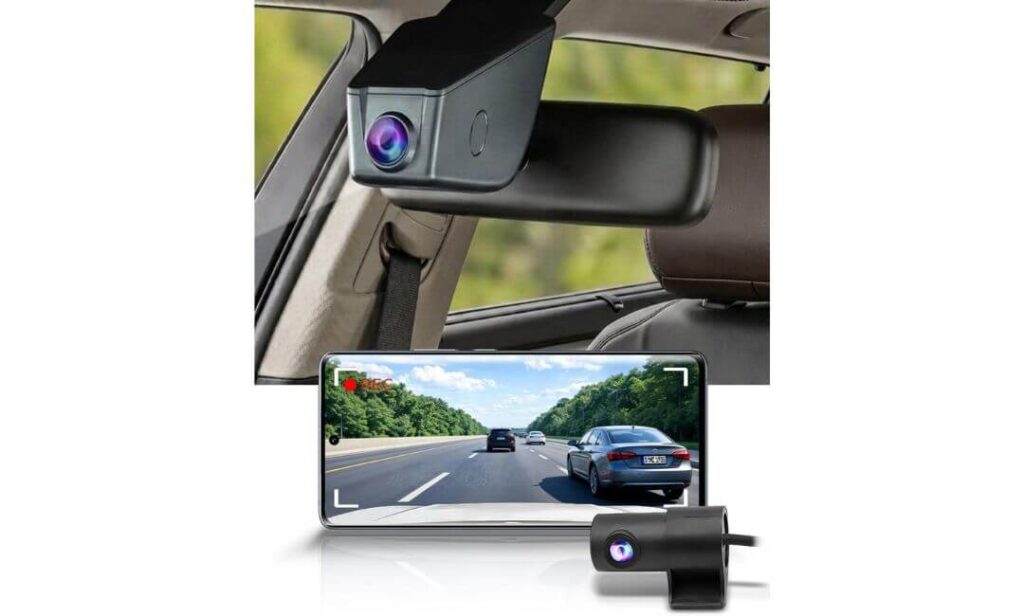
Quick Specs:
- True OEM-style housing designed for Ford Super Duty mirror area
- Front 4K UHD + Rear 1080P dual-channel recording
- 170° front and 140° rear viewing coverage
- Integrated WiFi app support with direct phone downloads
- Includes pre-installed 128GB memory card
- WDR low-light balancing for night driving and towing visibility
- Rearview mirror mount with hidden cable routing
- Stable operating range from -4°F to 185°F
- Compatible with newer F250 trims including XLT, Lariat, Tremor, Platinum, King Ranch, and Limited
- No windshield suction mount clutter, no hanging power wire setup
The first thing you notice isn’t the 4K footage — it’s the fact that you barely notice the system at all. Inside a Super Duty cabin, that matters more than most people realize. The mirror area already carries Ford’s factory hardware, sensors, wiring covers, and driver-assist equipment, so adding a bulky universal recorder usually makes the interior look cheap almost instantly. This setup avoids that problem completely.
Instead of dangling below the mirror with a visible power cord swinging around on rough roads, this system integrates directly into the factory mirror housing area, which makes it feel surprisingly close to something Ford itself could have installed from the factory. On trucks like the F250, where the windshield is massive and visibility matters during towing or highway driving, that cleaner layout genuinely changes the ownership experience.
The recording quality is also far more balanced than a lot of “spec-sheet first” systems floating around online right now. The front 4K footage captures solid daytime detail while the rear 1080P camera adds useful coverage for parking lots, trailers, job sites, and highway lane monitoring. More importantly, the WDR processing helps control harsh headlight bloom at night — something cheaper dash cams still struggle with badly on taller trucks.
Another thing that stands out after a few days of use is how little effort the whole setup requires. The included 128GB card means it’s ready immediately, WiFi transfers are simple through the app, and there’s no messy fuse-box tapping process turning a basic install into a weekend project. Even the temperature tolerance feels properly suited for real truck use instead of just commuter-car testing.
(And honestly, that “factory-installed” appearance is the exact reason many F250 owners end up keeping this one long term instead of replacing it six months later.)
What Actually Makes It Worth Considering Over Generic Dash Cams
- Factory-style integration looks dramatically cleaner inside newer Super Duty interiors
- Dual-channel recording adds useful rear visibility during towing and overnight parking
- The included 128GB card removes the usual extra setup headache
- Stable app connectivity makes quick footage access genuinely practical
- Better heat tolerance than many low-cost universal systems
- No giant screen blocking visibility near the windshield
One Thing Owners Should Know Before Buying
- The fitment is extremely specific, so checking the mirror bracket style beforehand is important for the cleanest installation experience
Real Super Duty Compatibility Notes That Actually Matter
This system makes the most sense for newer Ford Super Duty owners who care about keeping the cabin looking clean and factory-correct. Trucks like the XLT, Lariat, King Ranch, Tremor, Platinum, and Limited trims already have a premium-looking mirror area, so a universal stick-on dash cam often feels completely out of place once installed.
It’s also a much smarter option for drivers who regularly tow, park outside overnight, travel long highway distances, or leave equipment inside the truck. The rear recording support and cleaner mirror-mounted layout simply fit the way most F250 owners actually use these trucks day to day.
The Insider Pro-Tip
Most people buying a dash cam for a Super Duty focus entirely on video resolution, but long-term satisfaction usually comes down to something much simpler — whether the setup still feels clean and “factory” after months of ownership.
That’s exactly where this system separates itself. On a truck this expensive, avoiding windshield clutter, loose wires, shaky mounts, and cheap plastic hanging near the mirror honestly matters just as much as the footage itself. And once you live with a properly integrated setup for a while, it becomes very hard to go back to a generic universal dash cam again.
#2. WOLFBOX G900 PRO Mirror Dash Cam
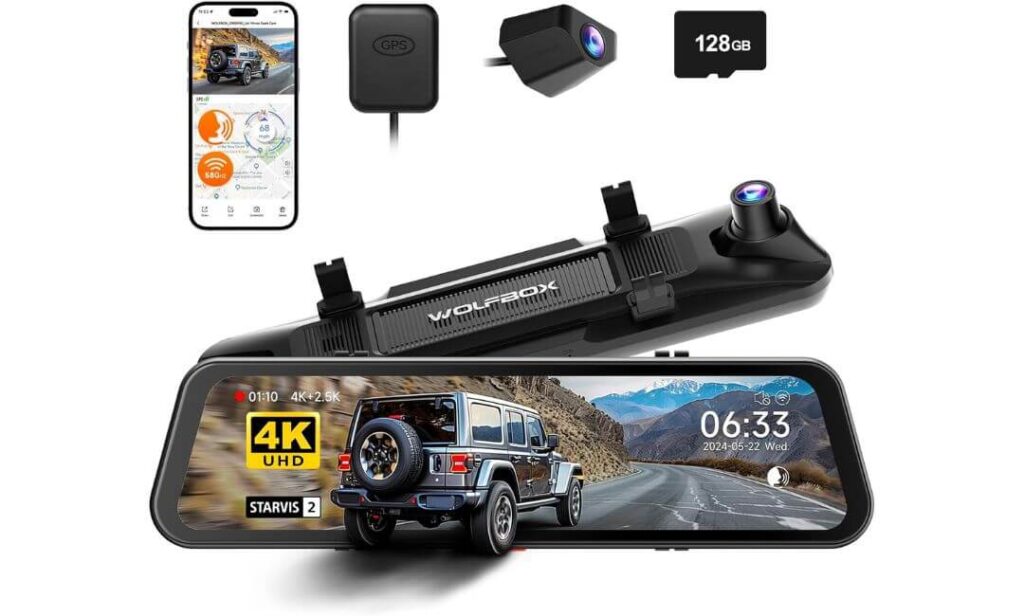
Quick Specs:
- Massive 12-inch full-screen mirror display with integrated recording system
- Front 4K + Rear 2.5K recording at 30fps
- Advanced Sony STARVIS 2 IMX678 low-light imaging sensor
- 170° wide front visibility for highway and towing coverage
- Fast 5.8GHz WiFi connectivity with app-based video access
- Built-in GPS tracking for speed and route logging
- Smart voice control support while driving
- Includes 128GB memory card in the box
- Rear camera cable long enough for full-size truck installation
- Supercapacitor-based design for improved heat durability
Some dash cams record the road. This one changes the entire driving experience the moment the screen powers on.
Inside a Super Duty cabin, the oversized mirror display immediately feels natural — especially on trucks already equipped with large digital screens and towing-focused visibility systems. Instead of adding another tiny recorder somewhere on the windshield, the entire setup replaces the standard rearview experience with a cleaner, more modern view that honestly fits the personality of a heavy-duty truck surprisingly well.
But the real reason this system stands out is the image hardware underneath all the marketing language. The STARVIS 2 IMX678 sensor is not just another spec-sheet number thrown into a product title. On dark highways, rain-soaked roads, early morning job-site drives, or trailer runs at night, the difference becomes obvious fast. Headlights stay more controlled, shadows hold more detail, and license plates remain far easier to read than most generic mirror systems in this category.
The rear 2.5K camera also deserves real credit because many “rear cameras” still look soft and borderline useless once the sun goes down. Here, the rear footage actually feels usable for daily truck life — especially when backing up near trailers, watching cargo areas, or monitoring traffic during long interstate drives. Add the voice controls, fast WiFi transfers, GPS logging, and included 128GB card, and the entire setup starts feeling closer to factory tech than aftermarket hardware.
(And honestly, once you get used to that full-screen mirror visibility during night driving, going back to a standard mirror suddenly feels strangely outdated.)
Why Drivers End Up Keeping This One Long-Term
- The 12-inch mirror display dramatically improves rear visibility on larger trucks
- STARVIS 2 sensor performance feels genuinely noticeable during night driving
- Rear 2.5K footage stays clearer than most competing rear camera systems
- Voice control support keeps hands off the screen while driving
- Fast 5.8GHz WiFi transfers save time when accessing footage
- Included GPS tracking adds useful trip and driving documentation
One Thing Owners Should Know Before Buying
- To unlock full-time parking surveillance, adding the optional hardwire kit later is worth considering for long-term truck security
Where This Setup Makes The Most Sense For Super Duty Owners
This system fits best for F250 owners who spend serious time behind the wheel — towing, highway driving, long-distance travel, rural night driving, or daily work use. The larger mirror display simply works better in bigger trucks where rear visibility naturally becomes more challenging.
It also makes a lot of sense for drivers who already enjoy modern tech inside the cabin. The voice controls, GPS logging, touch-screen interface, and full-display mirror setup feel much more premium than traditional compact dash cams once everything is installed and running.
The Insider Pro-Tip
A lot of people initially buy this system because of the huge mirror display, but after a few weeks, the thing they appreciate most usually becomes the low-light performance.
That STARVIS sensor genuinely changes how usable nighttime footage feels on a full-size truck. And on vehicles like the F250 — where highway glare, lifted ride height, trailer lighting, and bad-weather driving are part of normal life — having cleaner footage at night matters infinitely more than chasing exaggerated daytime resolution numbers.
#3. Mangoal Front 4K & Rear 1080P Dash Cam
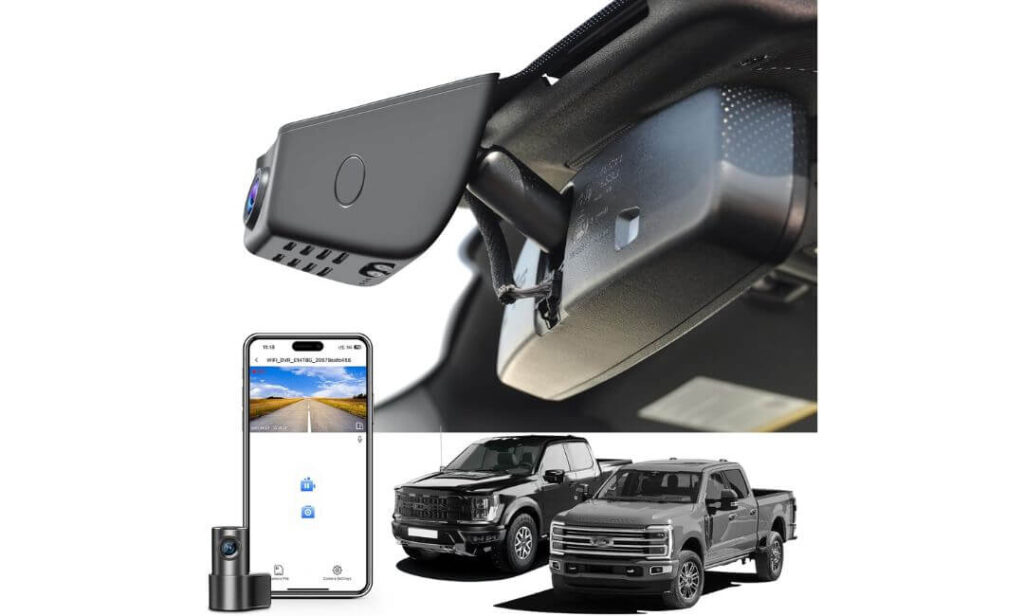
Quick Specs:
- Custom-fit OEM-style housing for Ford F250/F350/F450 Super Duty
- Front 4K UHD + Rear 1080P dual recording
- 150° front and 140° rear viewing angles
- Integrated WiFi with app-based footage access
- Built-in GPS tracking module included
- Comes preloaded with a 128GB microSD card
- Supercapacitor design for better long-term heat durability
- Motion sensing, parking monitor, and automatic incident detection
- Hidden installation layout with minimal visible wiring
- Supports larger storage expansion up to 512GB
Not every OEM-style dash cam actually pulls off the “factory-installed” illusion once mounted inside a truck. Some still look slightly off, sit awkwardly near the mirror, or leave enough visible wiring to ruin the whole point of buying an integrated system in the first place.
This one doesn’t have that problem.
The overall shape, placement, and fitment blend unusually well into the upper windshield area, especially on newer Super Duty trims where the mirror housing already carries sensors and factory electronics. Once installed, most people genuinely stop noticing it after a few drives — which honestly becomes one of the biggest compliments you can give a dash cam inside a premium truck cabin.
The recording setup also feels properly balanced for real truck use instead of just spec-sheet marketing. The front 4K footage stays detailed enough for highway driving and plate visibility while the rear 1080P camera adds useful coverage for trailers, parking lots, cargo monitoring, and lane visibility during towing. The wide-angle coverage helps reduce blind spots without creating the weird stretched “fish-eye” look some lower-end systems still suffer from badly.
Another thing that deserves credit is how complete the package feels right out of the box. GPS, WiFi, installation tools, rear camera hardware, adapter cables, and the 128GB card are already included, so owners aren’t forced into chasing extra accessories immediately after purchase. Even the installation approach feels more thought-out than most universal systems because it works with Ford’s mirror power setup instead of forcing messy cable routing across the windshield.
(And honestly, for drivers who hate clutter inside the cabin, this setup ends up feeling far more expensive than its price suggests once everything is installed cleanly.)
Why This System Makes Sense For Real Truck Owners
- OEM-style fitment blends naturally into newer Super Duty interiors
- Dual-channel recording adds practical rear coverage for towing and parking
- GPS and WiFi are already included instead of hidden behind upgrades
- Wide-angle visibility works well on larger truck cabins
- Included installation hardware saves time and extra spending
- Heat-resistant supercapacitor setup feels better suited for long-term truck use
One Thing Owners Should Know Before Buying
- Trucks without the compatible auto-dimming mirror power source may need an additional adapter for the cleanest installation setup
Where This Setup Fits Best In The Ford Super Duty Lineup
This system works especially well for F250 owners who want OEM-style integration without stepping fully into oversized mirror-display systems. It keeps the cabin looking clean and factory-like while still adding modern features like GPS tracking, WiFi transfers, parking monitoring, and rear recording support.
It’s also a very strong match for owners using their trucks for mixed daily life — commuting during the week, towing on weekends, highway driving, overnight parking, or long-distance travel where front and rear recording become genuinely useful instead of just “nice to have.”
The Insider Pro-Tip
A lot of newer dash cams try too hard to impress buyers with giant displays, flashy interfaces, or exaggerated marketing numbers. What makes this setup appealing is almost the opposite approach — it quietly integrates into the truck and simply does its job without constantly reminding you it’s there.
And for many Super Duty owners, that ends up being the better long-term experience. Because after a few months, the systems people love most usually aren’t the loudest or flashiest ones… they’re the ones that still feel clean, reliable, and effortless every single time the truck starts.
#4. GATGIT Front 4K Dash Cam
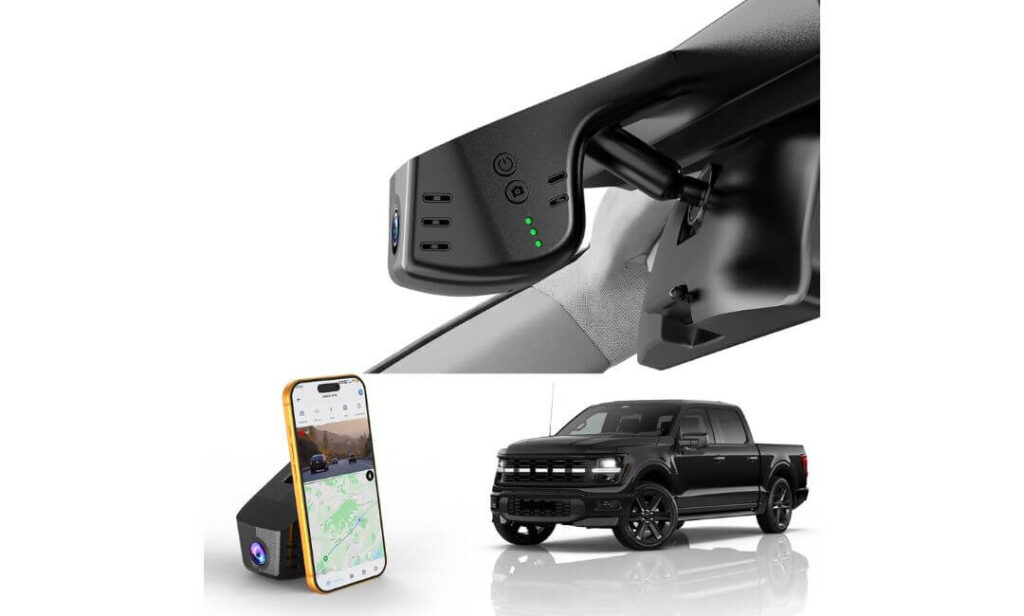
Quick Specs:
- Custom OEM-style design for Ford F250/F350/F450 Super Duty
- Ultra HD 4K recording at 3840×2160p
- HDR processing with f/1.6 wide-aperture lens
- Built-in GPS route and speed tracking
- Fast 5.8GHz WiFi with app-based video access
- Plug-and-play installation using factory connector
- Included 64GB card and card reader
- 155° wide-angle front road coverage
- G-Sensor emergency clip protection
- Supercapacitor design for improved long-term durability
There’s a certain type of F250 owner who doesn’t want giant displays hanging off the windshield, flashy animations loading every time the truck starts, or another bulky gadget making the cabin feel cluttered. This setup feels built specifically for that kind of driver.
Once installed, it blends into the upper windshield area with the kind of clean OEM-style fitment most universal dash cams never fully achieve. No suction cup wobble, no cable draped across the headliner, no awkward screen reflecting sunlight back into your face during long highway drives. It quietly integrates into the truck and simply starts working.
The video hardware itself also feels more serious than expected once you spend time with the footage. The combination of true 4K recording, HDR balancing, and the f/1.6 lens helps preserve road detail in situations where many lower-end systems completely fall apart — especially during sunrise glare, rainy roads, tunnel exits, or night traffic with aggressive LED headlights. On a taller truck like the F250, where lighting angles and windshield reflections become more noticeable, that cleaner HDR balance genuinely matters.
Another thing that deserves credit is the overall practicality of the setup. The WiFi transfer speeds are fast enough to avoid the usual frustration of waiting forever for clips to load, GPS tracking adds useful route documentation, and the included 64GB card means the system is usable immediately after installation. Even the supercapacitor design feels more confidence-inspiring for trucks spending long hours parked outside in heat or cold.
(And honestly, this ends up feeling like the type of system many truck owners wanted all along — simple, clean, factory-looking, and reliable without constantly demanding attention.)
Why This Setup Quietly Makes A Lot Of Sense For F250 Owners
- OEM-style fitment keeps the cabin looking clean and uncluttered
- HDR processing helps noticeably during difficult lighting conditions
- Fast 5.8GHz WiFi transfers save time when reviewing footage
- GPS tracking adds useful accident and trip documentation
- Plug-and-play installation avoids complicated wiring headaches
- Supercapacitor setup feels better suited for long-term truck use
One Thing Owners Should Know Before Buying
- Full 24/7 parking surveillance works best once paired with the optional hardwire kit for continuous parked monitoring
Where This One Fits Best In Real Super Duty Ownership
This system makes the most sense for drivers who want a cleaner OEM-style recording setup without moving into oversized mirror-display territory. It keeps the truck interior looking factory-correct while still delivering the important modern features most owners actually care about — stable 4K recording, GPS logging, parking support, and quick app access.
It’s also a strong fit for trucks used in mixed real-world conditions: commuting during the week, towing on weekends, highway travel, overnight parking, or work-truck duty where reliable footage matters more than flashy gimmicks.
The Insider Pro-Tip
A surprising number of truck owners eventually realize the best dash cam setups are usually the ones they stop thinking about completely after installation.
That’s where this system feels genuinely well judged. It doesn’t overload the cabin with extra screens or unnecessary distractions. Instead, it quietly captures sharp footage, handles difficult lighting better than expected, and keeps the interior looking the way a modern Super Duty cabin is supposed to look — clean, functional, and purpose-built.
#5. KBSYNT Front 4K Dash Cam
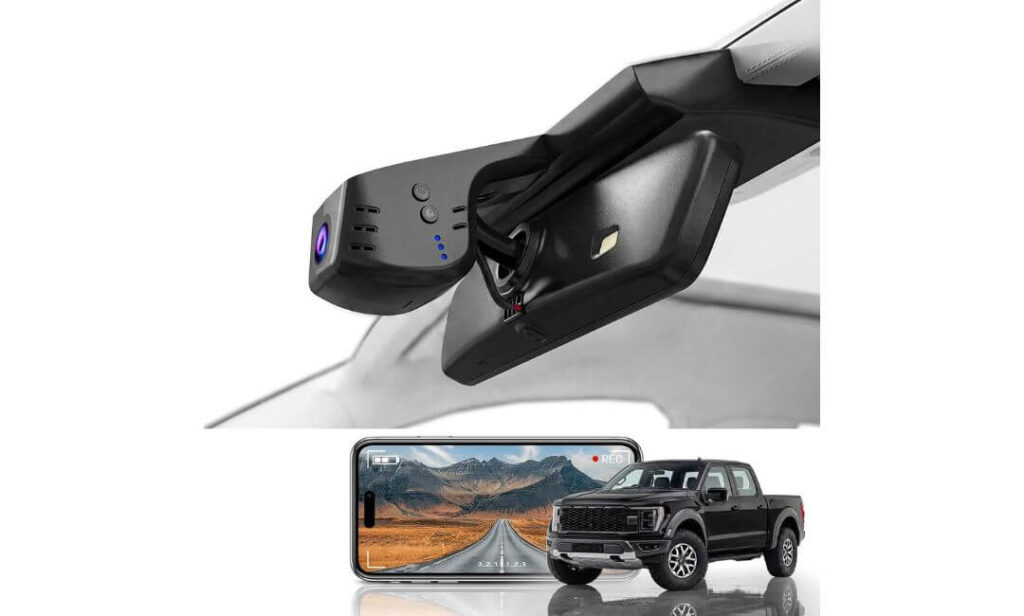
Quick Specs:
- OEM-look design built for Ford F250/F350/F450 Super Duty interiors
- Ultra HD 4K recording at 2160P/30fps
- Wide 170° front viewing coverage
- HDR-supported night visibility with f/1.6 lens
- Built-in WiFi app connectivity
- Included 64GB memory card and card reader
- Loop recording with emergency G-Sensor protection
- Plug-and-play style installation with Y-cable converter
- Supports larger storage expansion up to 256GB
- Optional 24-hour parking monitoring support
Some truck owners just want solid recording, clean fitment, and zero unnecessary drama every time they start the engine. No oversized mirror display, no distracting animations, no giant touchscreen glowing across the windshield at night. This setup leans heavily into that mindset — and honestly, that’s part of its appeal.
Once installed, the OEM-style housing blends naturally into the upper windshield area without drawing attention to itself. On newer Super Duty interiors, where the dashboard and mirror section already feel clean and structured from the factory, that low-profile integration simply fits better than most generic stick-on dash cams floating around online right now.
The actual recording quality is also more capable than many people expect at this price level. The 2160P footage stays sharp enough for daily driving detail while the HDR processing helps reduce washed-out lighting during early mornings, tunnels, rain, or nighttime traffic. The wide 170° field of view also works well on full-size trucks because it captures more surrounding traffic without constantly requiring camera repositioning.
Another thing that makes this setup surprisingly practical is how straightforward everything feels. The included memory card means it’s ready immediately, the app handles downloads without becoming overly complicated, and the overall system focuses more on stable daily usability than trying to overload the driver with unnecessary extras.
(And honestly, for many F250 owners, that simpler “install it once and forget about it” experience ends up being exactly what they wanted from the beginning.)
Why This Setup Still Earned A Spot In This Guide
- OEM-style fitment keeps the windshield area looking factory-clean
- 4K recording quality feels strong for everyday truck use
- Wide-angle visibility works well on larger Super Duty cabins
- Included 64GB card avoids immediate extra spending
- HDR support improves difficult lighting visibility noticeably
- Easy app-based footage access feels beginner-friendly
One Thing Owners Should Know Before Buying
- Drivers wanting full-time parking surveillance later may want to add the optional hardwire harness for extended parked monitoring support
Where This One Makes The Most Sense For Real-World Truck Use
This setup works especially well for F250 owners who care more about clean integration and dependable recording than flashy premium features. It keeps the truck interior looking organized while still delivering the key essentials most drivers actually need — solid 4K footage, loop recording, impact protection, and quick phone access.
It’s also a good fit for owners who don’t want installation turning into a full weekend project. The simpler OEM-style design and included accessories make it feel approachable even for buyers installing a dash cam for the first time on a Super Duty truck.
The Insider Pro-Tip
A surprising number of expensive dash cams eventually get ignored because they try too hard to feel “high-tech.” Too many menus, too many distractions, too many unnecessary features constantly demanding attention.
This one succeeds by avoiding most of that. It records clean footage, fits naturally into the truck, stays relatively simple to live with, and quietly handles the job it was built for. And for many Super Duty owners, that kind of straightforward reliability ends up feeling more valuable long term than flashy gimmicks ever do.
Best Ford F250 Super Duty Dash Cam Systems Compared
| Dash Cam System | Best For | Video Setup | OEM Integration | Key Highlights | Why It Stands Out |
|---|---|---|---|---|---|
|
Fitcamx Front 4K+Rear 1080P
Best Overall
|
Owners wanting the cleanest factory-style setup with balanced daily usability | 4K Front + 1080P Rear | Excellent factory-style mirror integration | WiFi App, WDR Night Capture, 128GB Card, Hidden Wiring | Feels closest to an OEM-installed system inside newer Super Duty cabins |
|
WOLFBOX G900 PRO Mirror
Premium Pick
|
Highway drivers, towing setups, long-distance truck owners | 4K Front + 2.5K Rear | Mirror-replacement full display design | STARVIS 2 Sensor, Voice Control, GPS, 5.8GHz WiFi, 128GB | Transforms rear visibility and nighttime driving experience dramatically |
|
Mangoal Front 4K & Rear 1080P
Smart Value
|
Drivers wanting OEM fitment with strong feature balance | 4K Front + 1080P Rear | Very clean behind-mirror integration | GPS, WiFi, Parking Support, Supercapacitor, 128GB Included | One of the most complete all-in-one OEM-style packages here |
|
GATGIT Front 4K Dash Cam
Cleanest Setup
|
Minimalist owners wanting sharp footage without extra distractions | 4K Front Recording | Factory-style hidden layout | HDR Video, GPS, Fast 5.8GHz WiFi, Supercapacitor | Simple plug-and-play setup that quietly does everything well |
|
KBSYNT Front 4K Dash Cam
Budget Friendly
|
First-time buyers wanting clean OEM-style recording | 4K Front Recording | Low-profile windshield integration | 170° Wide View, HDR Support, App Control, 64GB Included | Keeps things simple while still delivering dependable daily recording |
Buying Guide: What Actually Matters When Choosing A Dash Cam For A Ford F250
A Ford F250 is not the kind of truck where you can randomly grab the first universal dash cam online and expect a great experience. These trucks sit higher, vibrate differently on rough roads, spend more time towing, and often stay parked outside during work hours, job-site stops, or overnight trips. That changes what genuinely matters in a dash cam setup.
A system that feels perfectly fine inside a small sedan can quickly become annoying inside a Super Duty cabin — especially once loose wiring starts hanging near the windshield, glare becomes visible during night driving, or the mount begins shaking on rough roads. That’s why choosing the right setup for an F250 is less about flashy marketing and more about finding something that actually works with the truck long term.
Why Real 4K Recording Matters More In A Super Duty Truck
On a full-size truck like the F250, the driving position naturally sits higher and farther away from surrounding traffic compared to smaller vehicles. Because of that, lower-resolution footage often struggles to capture usable plate detail at highway speeds, especially during towing or multi-lane driving situations.
A proper 4K front recording system helps preserve important road details like:
- License plates during motion
- Highway signs and lane markings
- Trailer visibility during towing
- Accident evidence in poor lighting
- Side traffic movement on wider roads
But resolution alone is not enough. Lens quality, HDR balancing, sensor performance, and low-light processing matter just as much. A poorly optimized “4K” camera can still produce soft footage once headlights, rain, fog, or sunrise glare hit the windshield.
That’s one reason OEM-style systems with better image tuning often perform more consistently in real truck use than cheap high-resolution generic dash cams.
Why Night Driving Performance Is A Bigger Deal Than Most Owners Expect
Night footage is where weak dash cams usually expose themselves immediately.
The F250’s height, larger windshield angle, towing mirrors, and strong LED lighting from surrounding traffic create difficult lighting conditions that cheaper sensors struggle to handle properly. Without decent HDR processing or a capable low-light sensor, footage can become overly reflective, blurry, or completely washed out by headlights.
That’s why systems using better hardware — especially larger aperture lenses, STARVIS sensors, or properly tuned HDR balancing — make a genuine difference during:
- Rural highway driving
- Rain and fog conditions
- Trailer towing at night
- Parking lot incidents
- Dark job-site environments
In real-world truck ownership, strong nighttime footage often becomes more valuable than exaggerated daytime sharpness claims.
Rear Recording And Parking Coverage Become More Useful In Bigger Trucks
A rear camera feels optional on small commuter cars. On a Super Duty truck, it starts making a lot more sense.
Longer vehicle length, trailer setups, cargo visibility limitations, and oversized parking spaces all make rear recording genuinely useful for daily driving. It adds another layer of coverage during:
- Trailer hitching
- Parking lot incidents
- Rear-end collisions
- Cargo monitoring
- Highway lane changes
- Overnight parking situations
Parking mode support also becomes far more valuable for work trucks or vehicles regularly parked outside. Some systems require an additional hardwire or OBD kit for full-time monitoring, which is completely normal and honestly worth considering if the truck frequently sits unattended.
OEM-Style Integration Usually Feels Better Than Universal Mounts
This is the part many buyers underestimate.
Inside newer F250 trims like Lariat, King Ranch, Platinum, Tremor, and Limited models, the cabin already feels premium from the factory. A bulky suction-mounted dash cam with visible wiring can immediately make the interior feel cluttered and cheap.
OEM-style systems solve that problem by integrating around the factory mirror housing area instead of sticking awkwardly onto the windshield glass. The benefits are bigger than most people expect:
- Cleaner windshield visibility
- Less distraction during driving
- Reduced vibration on rough roads
- Better heat management positioning
- More factory-like appearance
- Easier long-term ownership experience
After living with a properly integrated setup for a while, most truck owners never want to go back to traditional windshield-mounted dash cams again.
GPS Logging And App Connectivity Matter More Than Marketing Makes It Sound
GPS support is not just about tracking routes. In real-world situations, it can provide:
- Speed documentation
- Time-stamped incident evidence
- Route verification
- Driving history support after accidents
Meanwhile, stable app connectivity becomes extremely important because nobody wants to sit inside the truck waiting forever for footage transfers. Faster 5.8GHz WiFi systems feel noticeably smoother when downloading clips directly to a phone.
And honestly, once you experience quick wireless access during an actual incident or roadside situation, it becomes difficult to settle for slower systems again.
Work-Truck Durability And Heat Resistance Are Often Ignored
Heavy-duty trucks live harder lives than average daily drivers.
Long hours in direct sunlight, freezing mornings, towing vibration, rough roads, and constant temperature swings can slowly destroy cheaper dash cams — especially systems still relying on low-grade internal batteries.
That’s why supercapacitor-based systems tend to make more sense for F250 ownership. They generally tolerate heat better, survive long-term vibration more reliably, and feel more stable during extended parking situations.
For truck owners keeping vehicles long term, durability honestly matters just as much as recording quality.
Budget Dash Cams Can Still Make Sense — If The Priorities Are Right
Not every F250 owner needs the most expensive system available.
For many drivers, a clean OEM-style install, reliable 4K recording, decent app access, and stable loop recording already cover the important stuff. Spending more only becomes worthwhile if features like rear recording, advanced parking monitoring, premium night sensors, mirror displays, or GPS tracking genuinely match how the truck is used.
That’s why the best value setups are usually the ones matching the owner’s real driving habits — not necessarily the ones with the longest feature list.
Special Features That Actually Make A Difference In A Ford F250 Dash Cam
On paper, most dash cams start sounding identical after a while — “4K recording,” “night vision,” “parking mode,” “WiFi app,” and the same recycled marketing phrases copied across dozens of listings. But once a system goes inside a real Super Duty truck and starts dealing with highway vibration, trailer movement, rough roads, rain, dust, and overnight parking, the differences become obvious very quickly.
That’s why certain features matter far more in an F250 than they would in a smaller daily driver.
Night Vision Quality Is More Important Than Raw Resolution Numbers
A lot of buyers obsess over resolution first, but nighttime performance is usually what separates a genuinely good dash cam from one that simply looks impressive in product photos.
The F250 sits high off the ground, which changes how headlights, reflective signs, trailer lighting, and highway glare hit the windshield at night. Cheap sensors often struggle badly here — footage becomes washed out, overly grainy, or too dark to capture usable details once conditions stop being perfect.
That’s where technologies like:
- HDR balancing
- WDR processing
- STARVIS low-light sensors
- Wider aperture lenses
- Better exposure tuning
start making a real difference instead of just sounding good in a spec sheet.
A properly tuned night vision system helps preserve:
- License plate clarity at night
- Road signs during highway driving
- Trailer visibility in rain or fog
- Parking lot detail under poor lighting
- Side traffic movement during lane changes
And honestly, many truck owners only realize how important good low-light processing is after the first rainy night drive or poorly lit highway trip.
Parking Mode Support Matters More On Work Trucks And Large Vehicles
Full-size trucks spend a lot of time parked in places smaller cars usually don’t.
Job sites, hotel lots, equipment yards, public parking garages, roadside stops, trailer hookups, overnight storage areas — these are exactly the situations where parking surveillance becomes genuinely valuable instead of just another checkbox feature.
A strong parking mode system usually includes:
- Motion-triggered recording
- Collision detection through G-Sensors
- Time-lapse monitoring
- Automatic emergency clip protection
- Continuous low-power recording
For F250 owners especially, parking coverage becomes more useful because these trucks naturally attract more accidental contact in tighter spaces. Wider body panels, larger mirrors, trailer equipment, and higher ride height all increase the chances of minor parking incidents or unnoticed damage.
That’s also why systems supporting hardwire kits or OBD power adapters are worth paying attention to. Full-time surveillance simply works better once the dash cam can remain powered properly while the truck is parked.
Heavy-Duty Trucks Need Dash Cams That Can Handle Real Vibration
This is something many generic dash cam reviews completely ignore.
The driving experience inside a heavy-duty truck is very different from a compact commuter car. Rough pavement, towing loads, uneven roads, trailer movement, suspension bounce, and long-distance highway vibration all put more stress on dash cam hardware over time.
Weak mounting systems usually expose themselves quickly:
- Shaky footage
- Loose mirror mounts
- Vibrating suction cups
- Random restarts
- Connection issues
- Heat-related failures
That’s why OEM-style mounting systems tend to work so well inside Super Duty trucks. They stay more stable near the mirror housing, reduce vibration movement, and generally feel better integrated during rough-road driving.
Supercapacitor-powered systems also deserve attention here because they usually tolerate heat and vibration more reliably than low-grade internal battery setups.
Rear Recording Stability Becomes Extremely Valuable During Towing
Rear cameras are often treated like “extra features” on normal vehicles. On an F250 used for towing, they become far more practical.
Trailer movement, blind spots, lane merging, highway traffic, cargo monitoring, and rear parking incidents all create situations where stable rear recording becomes genuinely useful. But the key word is stable.
A weak rear camera setup mounted on a truck dealing with trailer vibration or rough pavement can easily produce shaky, blurry footage that becomes difficult to use later. Better systems handle:
- Road vibration more smoothly
- Trailer movement more consistently
- Rear exposure balancing more effectively
- Night lighting transitions more cleanly
That’s especially important for drivers towing campers, enclosed trailers, work equipment, boats, or heavy cargo where rear visibility naturally becomes more limited.
Storage Capacity And Loop Recording Matter More Than Most Buyers Realize
A surprising number of cheap dash cams still become unreliable once the memory card fills up repeatedly over time.
Heavy-duty truck owners usually drive longer distances, spend more hours on highways, and record more footage daily than average commuters. That means storage management becomes more important very quickly.
Features worth prioritizing include:
- Reliable loop recording
- Automatic emergency clip locking
- Support for larger memory cards
- Faster file transfers through WiFi
- Stable overwrite management
Systems supporting 128GB, 256GB, or even 512GB cards generally feel much better suited for long highway drives and towing trips where recording hours add up fast.
The Best Dash Cam Setups Usually Feel Invisible After A While
Ironically, the best dash cam experiences usually come from systems owners stop noticing completely after installation.
No dangling wires. No giant suction mounts wobbling on rough roads. No constant app crashes. No cheap plastic rattling near the windshield. No distracting screens glowing during night drives.
That’s exactly why OEM-style systems continue becoming more popular among Super Duty owners. They fit the personality of the truck better — clean, functional, durable, and quietly capable without constantly demanding attention from the driver.
How To Install And Properly Set Up A Dash Cam In A Ford F250
Installing a dash cam in a Ford F250 is usually much easier than people expect — especially with newer OEM-style systems designed specifically around the Super Duty mirror housing. The biggest mistake most owners make is treating the install like a quick five-minute windshield gadget setup instead of taking a little extra time to make it feel properly integrated into the truck.
And honestly, that extra effort matters.
A clean installation not only looks dramatically better inside the cabin, but it also improves long-term reliability, reduces vibration issues, prevents loose wiring noises, and makes parking surveillance features work far more consistently over time.
Start With A Dash Cam Designed Around The Super Duty Cabin
Before touching a single wire, the first step is choosing a system that actually matches the F250’s interior layout.
Universal suction-mounted dash cams technically “work,” but many end up looking awkward inside newer Super Duty cabins — especially trims like Lariat, Platinum, Tremor, and King Ranch where the factory mirror housing already contains sensors, cameras, and driver-assistance hardware.
OEM-style systems designed specifically for:
- F250
- F350
- F450
- Super Duty mirror housings
usually install cleaner, hide wiring more effectively, and stay more stable during towing or rough-road driving.
That’s one reason the systems in this guide focus heavily on factory-fit integration instead of generic windshield-mounted setups.
Disconnect Power And Plan Cable Routing Before Mounting Anything
This is the step most rushed installs skip — and it’s usually why wires end up hanging awkwardly across the windshield later.
Before mounting the camera:
- Turn the truck fully off
- Disconnect power carefully if hardwiring
- Identify the mirror power source, OBD-II route, or fuse-box connection
- Decide exactly where cables will run before attaching hardware
For most F250 owners, there are typically three clean power options:
- Mirror power adapter connection
- OBD-II power adapter
- Traditional fuse-box hardwire kit
Mirror-powered OEM systems usually create the cleanest result because they avoid long visible wiring runs across the dashboard completely.
If parking mode recording is important, using a dedicated hardwire or OBD setup is generally the smarter long-term approach because it allows the dash cam to continue monitoring the truck safely while parked.
Mount The Front Camera Where Vibration Is Lowest
On heavy-duty trucks, camera placement matters more than many people realize.
The F250’s suspension movement, towing vibration, and rough-road bounce can expose weak mounting positions quickly. That’s why OEM-style systems mounted near the factory mirror housing tend to perform better — the location is naturally more stable and protected from excessive movement.
A properly mounted front camera should:
- Stay outside the main driver sightline
- Avoid blocking factory sensors
- Sit level with the road horizon
- Remain tightly secured during vibration
- Avoid direct windshield tint interference
The goal is simple: once installed, the setup should feel like part of the truck instead of an accessory stuck onto the glass.
Rear Camera Placement Matters More On Trucks Than Smaller Vehicles
Rear camera positioning becomes especially important on longer trucks like the F250 because towing, trailer movement, and cargo visibility all change how rear footage behaves during driving.
For the cleanest setup:
- Route rear wiring along the headliner carefully
- Keep cables away from moving trim panels
- Avoid sharp bends near door seals
- Position the rear lens level with the rear window view
A poorly mounted rear camera usually creates:
- Excessive vibration
- Blurry nighttime footage
- Constant shaking during towing
- Bad viewing angles during lane changes
Taking a little extra time here dramatically improves real-world usability later.
GPS Modules And Parking Mode Features Need Proper Setup
A surprising number of owners install the hardware correctly but never fully configure the important features afterward.
If the system includes GPS support:
- Confirm satellite lock works properly
- Check route logging inside the app
- Verify speed data is recording accurately
For parking mode setups:
- Adjust motion sensitivity carefully
- Avoid overly aggressive G-Sensor settings
- Test time-lapse functionality before relying on it overnight
Over-sensitive parking mode settings can create hundreds of unnecessary clips every day, especially on larger trucks exposed to vibration, wind, trailer movement, or nearby traffic.
The best setup is usually balanced — responsive enough to capture real incidents without constantly filling the storage card with useless recordings.
Always Test Everything Before Real Highway Or Towing Use
This is the step experienced truck owners never skip.
Before trusting the dash cam during:
- Highway driving
- Towing trips
- Overnight parking
- Long road travel
- Work-site use
take time to fully test:
- Front recording clarity
- Rear camera stability
- WiFi transfers
- GPS tracking
- Parking surveillance
- Nighttime footage quality
- Memory card recording behavior
A quick test drive during both daytime and nighttime conditions usually reveals small issues immediately — loose mounting angles, glare problems, weak rear visibility, or incorrect parking sensitivity settings.
Fixing those details early makes the entire setup feel dramatically more polished long term.
A Properly Installed Dash Cam Should Feel Invisible After A Week
That’s honestly the best sign of a good setup.
No hanging cables. No rattles. No shaky footage. No giant screen distracting you during night drives. No constant app frustration every time footage is needed.
The best F250 dash cam installations eventually feel like they were part of the truck from day one — clean, stable, quiet, and always ready when something important finally happens on the road.
Ford F250 Dash Cam Setup Tips And Best Practices Most Owners Learn Too Late
A dash cam can have incredible specs on paper and still become frustrating to live with if the setup is rushed. That happens constantly on heavy-duty trucks because many owners install the hardware quickly, hide a few wires poorly, skip the power planning stage, and then wonder why the footage shakes, parking mode fails randomly, or cables start hanging loose a few months later.
The truth is, the installation quality matters almost as much as the dash cam itself — especially inside a Ford F250 where towing vibration, rough roads, temperature swings, and long-distance driving put more stress on the system than most standard vehicles ever experience.
OEM-Style Installation Usually Creates The Best Long-Term Experience
This is one area where F250 owners consistently end up happier with OEM-style systems over generic windshield-mounted setups.
The Super Duty cabin already has a large mirror housing area filled with factory electronics, sensors, cameras, and trim panels. When a dash cam integrates naturally into that section instead of hanging awkwardly below it, the whole interior simply feels cleaner and more intentional.
For the best OEM-style result:
- Use the provided mounting brackets properly
- Follow the mirror housing alignment carefully
- Avoid placing the camera too low on the windshield
- Secure all trim covers completely after installation
- Test visibility from the driver seat before tightening everything permanently
A properly integrated setup should almost disappear visually once installed. That’s usually the sign the placement was done correctly.
Cable Management Is What Separates Clean Builds From Messy Ones
A surprising number of otherwise great dash cam installs get ruined by lazy cable routing.
Loose wires near the windshield not only look bad, they can also:
- Create rattling noises over rough roads
- Shift during heat cycles
- Interfere with visibility
- Pull tension against connectors over time
- Make the interior feel cluttered
The cleanest setups usually route cables:
- Along the headliner edge
- Behind weather stripping
- Around factory trim lines
- Inside A-pillar routing channels carefully
- Away from airbag deployment zones
Taking an extra 20–30 minutes to hide wiring properly changes the entire ownership experience later. Inside a premium Super Duty cabin, those small details genuinely matter.
Choosing The Right Power Setup Depends On How The Truck Is Used
This is one of the most overlooked parts of dash cam ownership.
Different F250 owners use their trucks very differently:
- Daily commuting
- Long-distance towing
- Construction work
- Fleet driving
- Weekend hauling
- Overnight parking
- Camping and travel setups
Because of that, the ideal power setup changes depending on the situation.
For cleaner OEM-style installations, mirror power adapters usually feel best because:
- Installation stays simpler
- Less wiring is exposed
- Cabin appearance remains factory-like
- The setup feels more integrated overall
For owners prioritizing full-time parking surveillance, hardwire kits or OBD-II adapters usually make more sense because they allow the camera to continue monitoring the truck while parked.
And for heavy towing or work-truck use, stable power delivery matters more than many people expect. Rough roads and trailer vibration can expose weak connections quickly if wiring is poorly secured.
Rear Camera Stability Matters More During Towing Than Normal Driving
Rear camera setups inside heavy-duty trucks experience much more movement than most buyers initially realize.
Trailer vibration, suspension bounce, rough pavement, and cargo movement can all create shaky rear footage if the camera is mounted carelessly. That’s why stable mounting points matter so much.
For cleaner rear footage:
- Mount the rear lens firmly against stable trim areas
- Avoid flexible plastic surfaces when possible
- Keep the camera level with the rear horizon
- Secure excess cable length carefully
- Test footage while driving over rough roads before finalizing placement
A stable rear recording setup becomes incredibly valuable during:
- Trailer towing
- Parking incidents
- Lane merging
- Cargo monitoring
- Highway driving at night
And honestly, once you tow regularly with a rear recording system installed correctly, it quickly starts feeling essential instead of optional.
Storage Capacity Makes A Bigger Difference Than Most Buyers Expect
Many truck owners underestimate how quickly footage storage fills up — especially with dual-channel 4K recording.
Long highway drives, work commutes, towing trips, parking surveillance, and overnight monitoring can generate massive amounts of video surprisingly fast. That’s why choosing the right microSD setup matters from day one.
For most F250 setups:
- 64GB works for lighter daily use
- 128GB feels safer for dual-channel systems
- 256GB or higher makes more sense for frequent towing or parking surveillance
Reliable loop recording also matters because the system needs to overwrite old clips cleanly without corrupting important footage.
And honestly, cheap low-quality memory cards create more dash cam problems than many people realize. Using higher-end endurance-rated cards is usually worth the extra money long term.
Cloud Backup And Wireless Access Become Extremely Useful After Real Incidents
Most people ignore backup options until the first time footage actually matters.
After an accident, parking incident, or road conflict, quick access to clips suddenly becomes extremely important. Systems with:
- Stable WiFi connectivity
- Fast transfer speeds
- Easy app access
- GPS route logging
- Optional cloud backup support
simply feel easier to live with during stressful situations.
That’s one reason faster 5.8GHz WiFi systems stand out so much in daily ownership. Nobody wants to sit inside a truck for twenty minutes waiting for a single clip to transfer after something important happens.
The Best Dash Cam Setups Feel Factory-Installed By The End
That’s honestly the goal.
When installed properly, a good F250 dash cam setup should:
- Blend into the cabin naturally
- Stay quiet on rough roads
- Handle vibration cleanly
- Keep wiring hidden
- Record reliably without constant adjustment
- Feel invisible during daily driving
The systems owners end up happiest with are usually the ones that stop feeling like “aftermarket gadgets” after a few weeks and simply become part of the truck itself.
FAQs About Ford F250 Dash Cam
Does An OEM-Style Dash Cam Actually Feel Better Inside A Ford F250 Compared To A Regular Universal Dash Cam?
Honestly, yes — and the difference becomes obvious much faster than most people expect.
On a smaller car, a generic windshield-mounted dash cam usually feels “fine.” But inside a Ford F250, especially trims like Lariat, Platinum, Tremor, or King Ranch, a bulky suction-mounted setup can immediately make the cabin feel cluttered. The windshield is larger, the seating position is higher, and the mirror area already contains factory electronics, which means poorly integrated cameras stand out badly once installed.
That’s why OEM-style systems feel so much more natural in Super Duty trucks. They sit tighter near the factory mirror housing, reduce visible wiring, vibrate less during towing, and simply match the personality of the truck better. After living with a clean factory-style setup for a few weeks, many owners genuinely stop noticing it completely — which is honestly the biggest compliment a dash cam can receive.
What’s The Biggest Mistake Ford F250 Owners Make When Buying A Dash Cam?
Most buyers focus too heavily on raw resolution numbers while completely ignoring installation quality and low-light performance.
A cheap “8K” dash cam with weak HDR tuning and poor mounting stability will usually perform worse in real F250 driving conditions than a properly integrated 4K system with good night processing and vibration control. And heavy-duty trucks expose weak hardware quickly because:
- The cabin vibrates more
- Windshield glare is stronger
- Night towing creates difficult lighting
- Rough roads stress mounting systems constantly
That’s why features like:
- OEM-style fitment
- HDR or WDR balancing
- Stable rear recording
- Supercapacitor durability
- Reliable parking mode support
often matter more long term than chasing exaggerated resolution marketing.
The owners happiest after six months are usually not the ones with the flashiest dash cam… they’re the ones whose setup quietly works every day without becoming annoying.
Is Rear Recording Actually Worth It On A Ford F250, Or Is Front Recording Enough?
For many Super Duty owners, rear recording ends up becoming more useful than they initially expected.
On smaller daily-driver cars, rear cameras sometimes feel optional. But on an F250 used for towing, hauling, work travel, or overnight parking, rear footage becomes incredibly valuable because visibility behind the truck naturally changes once trailers, cargo, or larger parking situations enter the picture.
A good rear recording setup helps with:
- Trailer monitoring during towing
- Rear-end collision evidence
- Cargo visibility
- Highway lane changes
- Parking lot incidents
- Overnight truck security
And there’s another thing many people don’t mention enough: rear footage often captures the “other half” of incidents that front cameras completely miss. That becomes extremely important during parking disputes or multi-vehicle highway situations where blame gets complicated quickly.
Do Dash Cams Drain The Battery On A Super Duty Truck During Parking Mode?
They can — but usually only when the setup is poorly configured.
Most modern OEM-style dash cams are designed to manage parked recording intelligently, especially when paired with proper hardwire kits or OBD power adapters that include low-voltage battery protection. The bigger issue is usually incorrect installation or overly aggressive parking sensitivity settings.
For example, if:
- Motion sensitivity is set too high
- Time-lapse recording runs continuously
- The truck parks in high-traffic areas constantly
- Cheap hardwire kits are used
the system may record far more than necessary and place unnecessary strain on the battery over time.
The good news is that Super Duty trucks typically handle dash cam parking systems better than smaller vehicles because of their stronger electrical systems. Most owners simply need balanced settings — enough surveillance to protect the truck without creating constant unnecessary recording activity.
Why Do So Many Experienced Truck Owners Prefer Simpler OEM-Style Dash Cams Over Giant Feature-Packed Systems?
Because long-term ownership changes what actually feels important.
At first, giant touchscreens, flashy menus, and endless extra features sound exciting. But after months of real truck use — towing, rough roads, bad weather, long drives, overnight parking — many owners start appreciating something much simpler:
- Stable recording
- Clean installation
- Fast footage access
- Reliable parking protection
- Good night visibility
- Quiet operation without distractions
That’s exactly why OEM-style systems keep growing in popularity among Super Duty owners. They match the truck better. They feel less like aftermarket gadgets. And over time, that cleaner factory-style experience usually becomes more satisfying than constantly interacting with complicated menus or oversized displays every single drive.
Ironically, the best dash cam setups often become the ones drivers barely think about anymore — because they simply work when needed most.
Final Thoughts
The interesting thing about shopping for a dash cam for a Ford F250 is that the “best” option usually has less to do with flashy marketing and more to do with how naturally the system fits into the truck once real life starts happening around it.
After enough highway miles, rough roads, towing trips, parking lot close calls, late-night drives, and random situations nobody plans for, most Super Duty owners stop caring about gimmicks pretty quickly. What actually matters is whether the system:
- records reliably every time the truck starts
- handles bad lighting without falling apart
- stays stable during vibration and towing
- keeps the cabin looking clean instead of cluttered
- and quietly does its job without becoming another annoying gadget on the windshield
That’s exactly why OEM-style dash cams make so much sense on newer F250 trucks. They feel closer to factory equipment than aftermarket accessories, especially once installed correctly around the mirror housing. And honestly, on trucks this expensive, that cleaner integrated experience matters more than many people realize at first.
For most owners, the safest overall choice here is still the Fitcamx because it balances OEM integration, dual recording, daily usability, and clean installation extremely well. Drivers wanting a more premium tech-heavy experience will probably appreciate the WOLFBOX mirror setup more, especially for towing and night visibility. Meanwhile, the Mangoal, GATGIT, and KBSYNT systems all make strong cases depending on whether the priority is value, simplicity, or cleaner OEM-style recording without overspending.
At the end of the day, the right dash cam for an F250 is usually the one that fits the way the truck is actually used — not the one with the loudest marketing headline.
And once you experience a properly integrated setup during a real incident, highway dispute, parking lot hit, or late-night towing situation, it becomes very hard to imagine owning a Super Duty truck without one again.
Also Check:


