
5 Best Dash Cams for Toyota Corolla in 2026: OEM Fit, 4K Video & Parking Mode Picks
If you drive a Toyota Corolla every day, you already know how exposed these cars are in parking lots, tight traffic, and late-night highway runs. The problem is, most dash cam lists online recommend generic cameras without thinking about how the Corolla’s windshield angle, mirror housing space, cabin size, or factory trim layout actually affect installation and recording quality. That becomes a headache fast—especially on 2020–2026 Corolla Sedan, Hybrid, and Hatchback models where bulky cameras can block visibility or look completely out of place.
That’s why this list focuses heavily on OEM-style dash cams, clean factory-looking setups, reliable parking protection, and stable 4K recording that actually works well inside the Corolla’s compact cabin. We also looked at things owners genuinely care about: heat management during summer parking, app stability, discreet wiring, night clarity on poorly lit roads, and whether the camera feels like a cheap add-on or something Toyota could’ve installed from the factory.
For newer Corolla models like the 2023, 2024, 2025, and 2026 Toyota Corolla, integrated fitment matters more than ever because of the tighter sensor housing near the rearview mirror and newer safety systems. At the same time, older E210 Corolla owners still want something simple that won’t drain the battery or require tearing apart half the interior just to install a front camera. So instead of stuffing this article with random Amazon best-sellers, these are the dash cams that actually make sense for real Corolla owners living with the car every day.
Best Toyota Corolla Dash Cam: Top 2026 Picks for Daily Driving & Parking Security
#1. Fitcamx Integrated 4K Dash Cam
OEM-style 4K dash cam with hidden factory look, clean plug-and-play setup, stable WiFi connectivity, and reliable parking mode protection for newer Corolla sedan, hybrid, and hatchback models
#2. mangoal Front & Rear Dash Cam
Front and rear dash cam system with integrated OEM fit, GPS support, smooth dual recording, and stronger night driving coverage for daily traffic and highway use
#3. VIOFO A329S 4K 60FPS Dash Cam
Premium 4K dash camera with ultra-clear 60FPS recording, advanced STARVIS 2 night vision, fast WiFi 6 transfers, and powerful parking surveillance for long-term reliability
#4. Vantrue N4 Pro S 3-Channel Dash Cam
Triple-channel dash cam with front, rear, and cabin recording, HDR infrared night vision, buffered parking protection, and extra interior security for rideshare or family travel
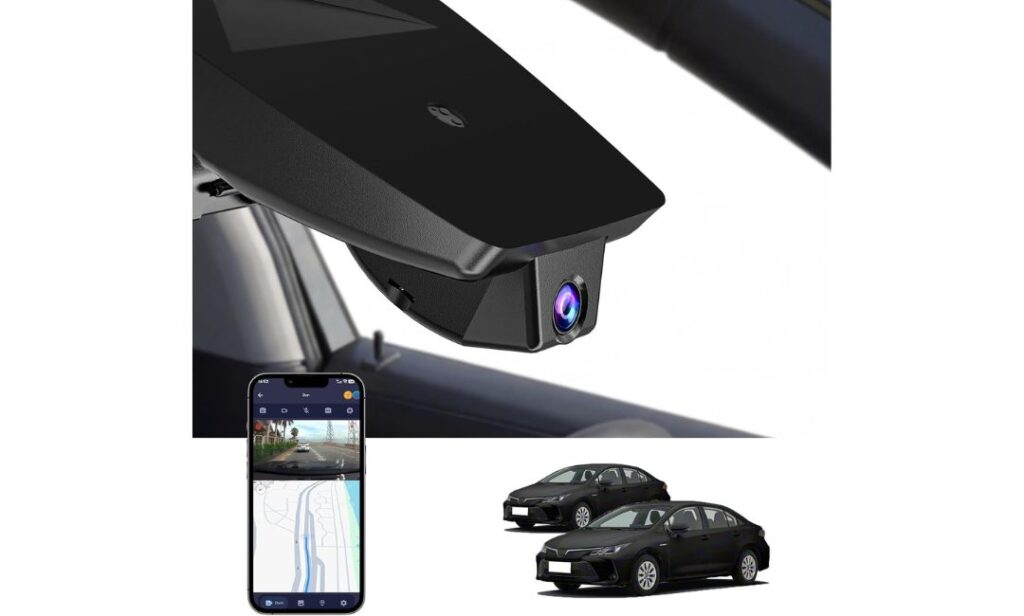
#5. FUVYMYT OEM-Style 4K Dash Cam
Budget-friendly 4K dash cam with discreet OEM-inspired fitment, simple app control, loop recording, and clean installation for drivers wanting everyday road protection
Expert Tip: If you own a newer Corolla, don’t just buy the dash cam with the highest resolution on the box. A lot of 4K cameras still struggle with heat, app lag, weak parking mode voltage protection, or oversized mounts that look terrible on the Corolla’s smaller windshield layout. A clean OEM-style fit with stable recording matters far more in real daily use than flashy specs most drivers never notice after the first week. The best dash cam is the one you stop thinking about because it quietly records every drive without blocking your view, overheating, or constantly asking you to reconnect the app.
How We Chose These Dash Cams for Toyota Corolla Owners
Most “best dash cam” lists online are built around generic Amazon rankings, not around how these cameras actually fit and perform inside a Toyota Corolla. That’s exactly what we avoided here.
We focused first on real-world fitment, especially for the 2020–2026 Corolla Sedan, Hybrid, and Hatchback models. The Corolla has a tighter windshield layout near the rearview mirror than larger SUVs, so bulky universal cameras can end up looking awkward, hanging too low, or interfering with visibility. That’s why several picks on this list use OEM-style integrated designs that blend naturally into the interior instead of looking like a cheap accessory stuck to the glass.
We also paid close attention to daily usability, because that’s where many newer dash cams still fall apart. A camera might advertise 4K recording, but if the app disconnects constantly, the footage overheats in summer traffic, or parking mode drains the battery too aggressively, none of those specs really matter after a month of ownership. That’s one reason products like the Fitcamx and mangoal stood out—they keep installation simple while maintaining a cleaner factory-style experience that Corolla owners actually appreciate long term.
For premium options like the VIOFO A329S and Vantrue N4 Pro S, we looked beyond marketing claims and focused on the hardware that genuinely affects video quality: STARVIS 2 sensors, HDR night performance, parking surveillance stability, frame-rate smoothness, and heat management during extended recording sessions. These details matter more than exaggerated resolution numbers when you’re trying to read plates clearly at night or capture an incident in fast-moving traffic.
We also didn’t ignore budget buyers. A lot of Corolla owners simply want a dependable front camera with decent app support and clean installation without spending luxury-car money. That’s why a model like the FUVYMYT still made the list. It offers a more affordable entry point while keeping the low-profile OEM-inspired look many Corolla drivers want.
Most importantly, we avoided recommending random no-name cameras loaded with inflated specs but weak long-term reliability. Every dash cam here was chosen because it solves a specific type of ownership need—whether that’s discreet factory-style integration, stronger rear coverage, premium night recording, rideshare security, or simple everyday protection for commuting and parking.
#1. Fitcamx Integrated 4K Dash Cam
Quick Specs:
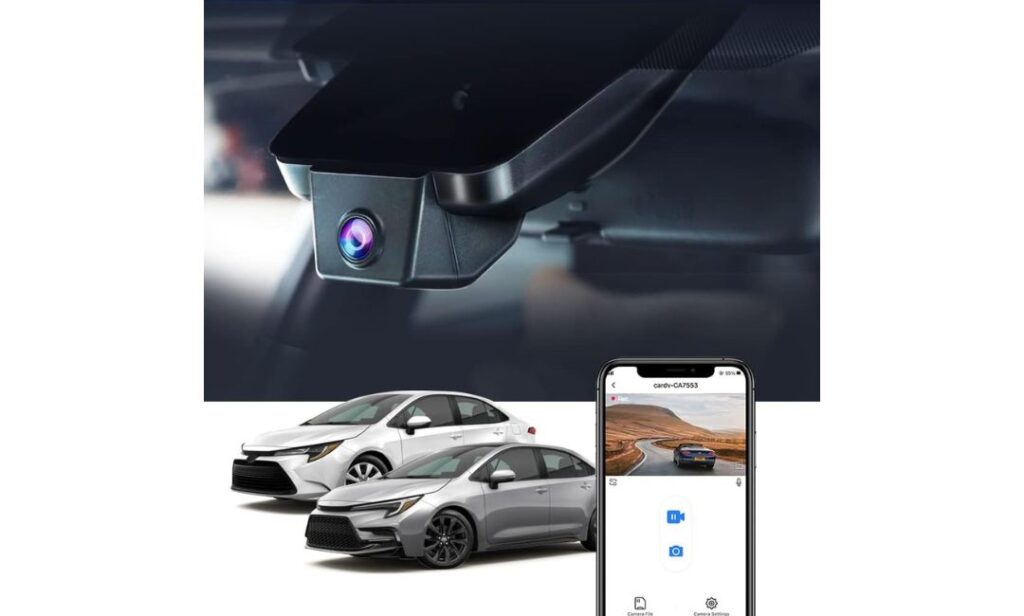
- Clean OEM-style hidden fitment for Corolla Sedan, Hybrid, and Hatchback trims
- Sharp 2160P 4K front recording with balanced night exposure
- Built-in WiFi + app access for instant video downloads on the road
- Includes a 64GB card right in the box (no extra purchase headache)
- Uses a discreet factory-style housing instead of bulky windshield mounts
- Designed for quick installation without visible hanging wires
- Stable operating range from -20°C to 85°C, which matters more than most buyers realize
- Supports loop recording and automatic impact footage locking through the built-in G-sensor
The first thing that stands out here isn’t even the 4K recording — it’s how unbelievably clean the installation looks once mounted inside the Corolla. Most dash cams end up looking like temporary gadgets stuck onto the windshield with dangling cables everywhere. This one blends directly into the factory mirror housing so naturally that passengers usually don’t notice it unless you point it out. In a compact cabin like the Corolla, that makes a much bigger difference than people expect.
What also helps is the balance between simplicity and actual everyday usability. You’re getting reliable 2160P footage, solid exposure control at night through WDR processing, built-in WiFi app access, and smooth loop recording without turning the camera into a complicated tech project. A lot of newer drivers simply want something that records quietly every single day without constantly asking for firmware tweaks, SD card warnings, or reconnecting apps. That’s where this setup feels refreshingly normal.
Another reason this one earned a top spot is because it understands what Corolla owners usually care about: preserving the clean interior feel of the car. The low-profile housing, integrated design, and fast installation experience make it feel closer to an OEM accessory than an aftermarket gadget. Even the included pry tool and pre-packed 64GB card remove small frustrations most brands still ignore.
(And honestly, that “factory-installed” look changes the entire ownership experience more than spec sheets ever will.)
Why This One Stayed on Our Recommendation List
- Hidden integrated design looks genuinely factory-installed
- 4K footage stays clear enough to catch plates during daytime traffic
- WiFi app access feels quick and simple compared to many budget dash cams
- No oversized screen hanging below the mirror area
- Installation is surprisingly beginner-friendly for first-time dash cam buyers
One Thing Worth Knowing Before Buying
- There’s no dedicated parking mode, which may matter for drivers leaving the car parked outside overnight regularly
Real-World Corolla Compatibility Notes
This setup works especially well inside the newer Corolla cabin because of how tight the windshield sensor area already is near the mirror assembly. Bigger universal cameras can feel visually cluttered inside these cars, especially on Hybrid trims where owners usually prefer a cleaner interior layout. This integrated housing solves that problem naturally.
It’s also important to know this model is designed for the regular Corolla lineup only — Sedan, Hatchback, and Hybrid trims. It does not fit the Corolla Cross, since the mirror housing and upper windshield layout are completely different between the two vehicles.
The Insider Pro-Tip
Most Corolla owners buying their first dash cam make the same mistake: they chase the highest advertised resolution instead of focusing on how the camera actually lives inside the car every day. After a few weeks, things like bulky mounts, annoying wiring, windshield vibration, and unstable apps become far more frustrating than whether the footage is technically “5K” or not.
What makes this setup different is that it quietly disappears into the driving experience. You enter the car, start driving, and forget the camera is even there — which is honestly the point of a good OEM-style dash cam. That subtle difference is exactly why integrated models like this are becoming far more popular with Corolla owners than traditional suction-mounted cameras.
#2. mangoal Front & Rear Dash Cam
Quick Specs:
- True 4K front + 1080P rear recording for full front-and-back coverage
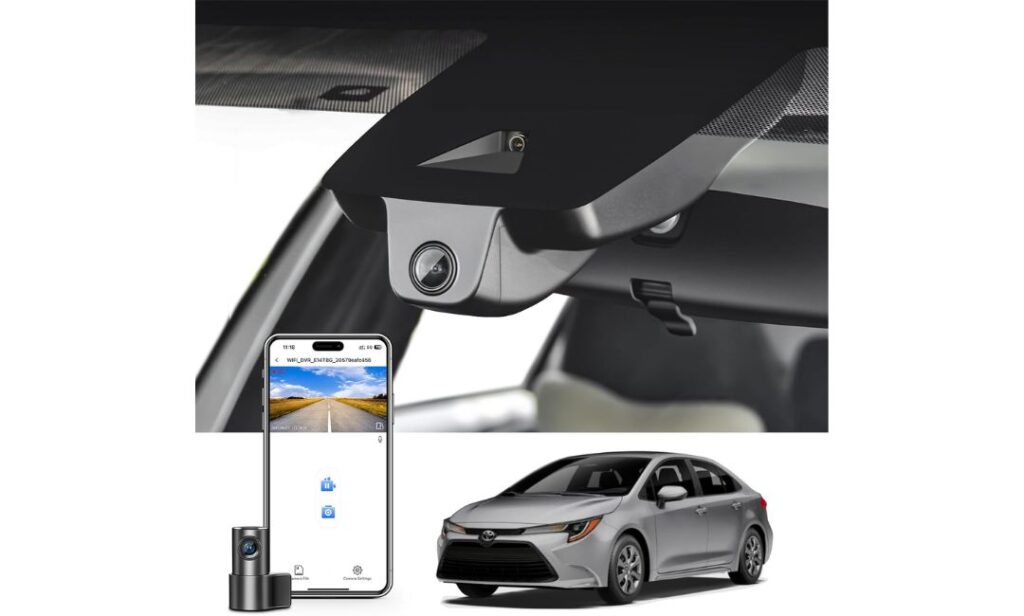
- Factory-style hidden installation behind the mirror housing
- Built-in GPS tracking for route and speed data during playback
- Includes a large 128GB microSD card out of the box
- Wide 150° front and 140° rear viewing angles help reduce blind spots
- Built-in WiFi with mobile app access for fast footage downloads
- Designed specifically for Corolla Gen12 E210 Model A trims
- Uses loop recording and collision-triggered emergency video locking
Right away, this setup feels like it was designed by someone who actually spent time inside the Corolla cabin instead of just selling another universal dash cam with “Toyota compatible” slapped onto the listing. The integrated mirror-area housing sits cleanly against the windshield, the wiring stays hidden, and the rear camera coverage adds a layer of daily confidence that single-channel systems simply can’t match once you start driving in crowded traffic or packed parking lots.
Where this system really separates itself is in overall balance. You’re getting sharp 4K front footage for plate clarity, a dedicated rear camera for hit-and-run protection, built-in GPS logging, stable app connectivity, and a cleaner OEM-style finish without turning the installation into a weekend-long project. A lot of Corolla owners upgrading from basic front-only cameras immediately notice how much safer dual-channel recording feels during lane merges, rear-end traffic situations, and overnight parking.
Another thing that genuinely helps here is that the package already feels complete before you even open the box. The included 128GB card, GPS module, rear wiring kit, and installation tools remove the usual “extra purchase” frustration many brands still create. Even better, the camera doesn’t visually overpower the Corolla’s interior once installed — which honestly matters more than people realize in smaller daily-driver cabins.
(And once you get used to having rear recording footage available, going back to a front-only camera feels surprisingly outdated.)
What Made This Dual-Camera Setup Stand Out
- Front and rear recording gives much stronger daily driving coverage
- OEM-style housing blends naturally into the factory interior
- GPS support adds useful trip and incident tracking data
- Included 128GB card saves buyers from immediate storage upgrades
- Rear footage becomes incredibly valuable in parking lot incidents and traffic claims
One Thing Worth Knowing Before Buying
- Fitment is very specific, so checking the exact mirror cover style before ordering is genuinely important for a smooth installation experience
Corolla Trim & Installation Reality Check
This setup is built specifically around the Corolla Gen12 E210 platform and works best on compatible LE, SE, XLE, XSE, and Hybrid trims using the correct “Model A” mirror housing layout. That specific fitment focus is actually part of the reason the final installation looks so much cleaner than generic dash cams.
It’s also worth noting this system does not fit older 2020–2022 layouts or the Corolla Cross. The housing shape and sensor cover design are completely different there, so matching the correct trim style before ordering matters more here than with most universal cameras.
The Insider Pro-Tip
A lot of drivers assume the rear camera is only useful after an accident. In reality, rear recording becomes valuable almost every single week once you start using it — aggressive tailgaters, parking lot bumps, sudden lane-change incidents, even random damage while the car is parked. Front-only systems leave a massive blind spot behind the vehicle that most owners don’t think about until something actually happens.
What makes this setup particularly smart for Corolla owners is that it solves that problem without making the interior feel cluttered or aftermarket-heavy. You still keep the clean factory appearance of the cabin, but now the car has full-time front and rear coverage working quietly in the background every time you drive.
#3. VIOFO A329S 4K 60FPS Dash Cam
Quick Specs:
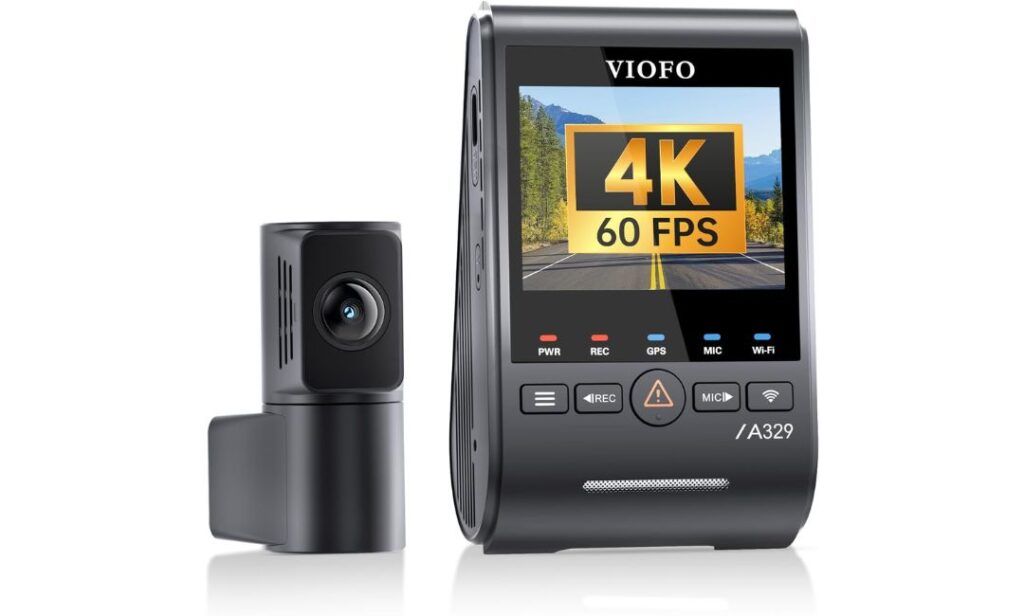
- Ultra-smooth 4K 60FPS front + 2K rear recording
- Premium Dual STARVIS 2 sensors for stronger low-light clarity
- Advanced Wi-Fi 6 connectivity with extremely fast video transfers
- Built-in GPS with app and voice control support
- Supports up to 4TB SSD storage or 512GB microSD cards
- Intelligent low-power parking monitoring with impact-triggered recording
- Slim coaxial rear cable helps cleaner hidden installation
- HDR processing improves plate visibility during night driving and fast motion
Some dash cams are built to “record.” This one feels built to catch details other cameras completely miss. The difference becomes obvious the first time you review nighttime footage on a poorly lit road or fast-moving highway. Motion blur stays controlled, headlights don’t completely wash out the frame, and license plates remain readable far more often than most standard 4K setups. That’s the advantage of pairing true 4K 60FPS recording with Sony STARVIS 2 hardware instead of relying on inflated marketing specs alone.
What also separates this system from typical Corolla-friendly dash cams is how serious the hardware feels underneath the surface. The dual STARVIS 2 sensors, Wi-Fi 6 speeds, HDR balancing, and support for massive SSD storage make this feel closer to professional-grade recording equipment than a casual commuter camera. Even the cable design matters here — VIOFO uses a slim coaxial setup that hides more cleanly behind interior trim while reducing electronic interference with other in-car systems.
This is also one of the few dual-camera systems on the list that genuinely feels prepared for long-term heavy use. Long highway drives, overnight parking sessions, extreme summer temperatures, continuous recording — this setup was clearly engineered for drivers who expect more than “basic footage.” And once you experience how fast Wi-Fi 6 transfers large 4K clips to your phone, older dash cam apps suddenly start feeling painfully outdated.
(Honestly, this is the type of camera people usually upgrade to after getting frustrated with two or three cheaper systems first.)
Why This Premium Setup Earned Its Spot
- 4K 60FPS footage looks noticeably smoother during fast-moving traffic
- STARVIS 2 sensors dramatically improve low-light plate clarity
- Wi-Fi 6 transfers feel genuinely fast instead of frustratingly slow
- SSD storage support is perfect for long drives and extended recording
- Hidden cable routing feels cleaner and more premium during installation
One Thing Worth Knowing Before Buying
- To unlock the full parking surveillance features, a separate hardwire kit needs to be added during installation
Real Corolla Ownership Perspective
Unlike the OEM-style integrated cameras earlier in this list, this setup focuses more on raw recording performance than factory-style appearance. That means you’ll notice the camera slightly more inside the cabin — but in exchange, you’re getting significantly stronger image processing, smoother frame rates, and much better nighttime detail retention.
The good news is that the Corolla’s windshield layout still works well with this system because of the slim mounting profile and thinner coaxial wiring. Rear cable length is generally enough for sedan and hybrid trims, though drivers wanting extremely clean routing may still prefer planning the cable path carefully during installation.
The Insider Pro-Tip
A lot of people think “4K is 4K.” It isn’t. Frame rate, sensor quality, HDR tuning, and motion handling change everything once the car actually starts moving. Cheap 4K cameras often look impressive in parked comparison screenshots, then fall apart during rain, glare, highway speeds, or nighttime traffic.
This setup avoids that trap completely. The combination of 60FPS recording and STARVIS 2 hardware creates footage that stays usable in real driving conditions — not just in marketing photos. That difference becomes incredibly important the moment you actually need the footage for evidence instead of entertainment.
#4. Vantrue N4 Pro S 3-Channel Dash Cam
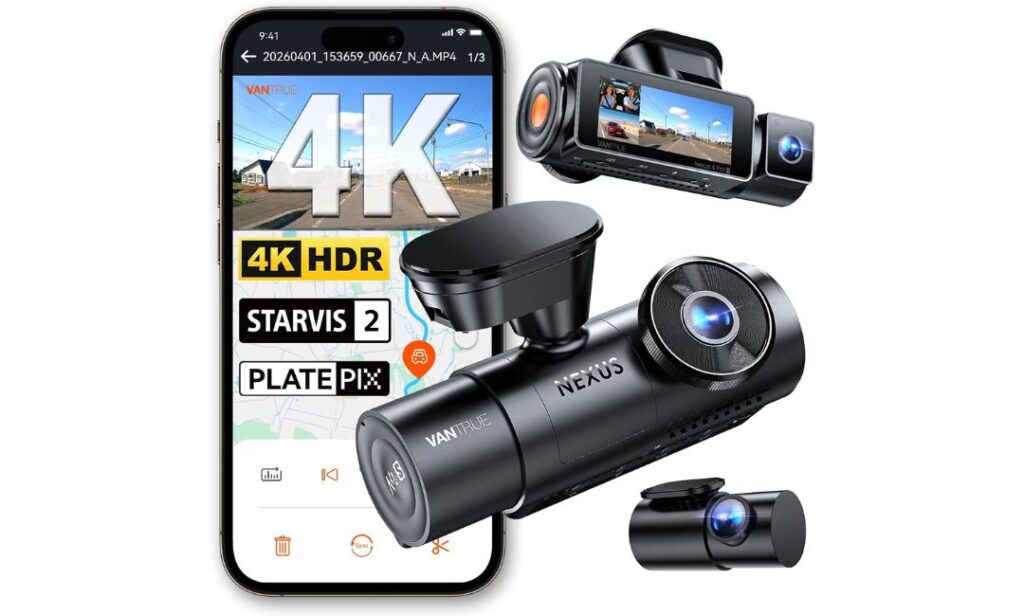
Quick Specs:
- Triple-camera setup with 4K front + 2.5K rear + 1080P interior recording
- Uses three STARVIS 2 sensors for stronger night clarity across all cameras
- Interior IR night vision helps capture cabin footage clearly after dark
- 360° adjustable rear camera adds flexible rear or cargo-area coverage
- Buffered parking mode records footage before and after motion events
- Built-in GPS, voice control, 5GHz WiFi, and OTA firmware updates
- Supports up to 1TB storage for extended multi-camera recording
- Supercapacitor design handles extreme heat better than many battery-powered systems
Here’s the truth most Corolla owners realize only after owning a regular front-and-rear setup for a while: once you start carrying passengers regularly, parking in unpredictable areas, or leaving valuables inside the car, two cameras suddenly stop feeling like enough. This system changes that completely. With full front, rear, and interior coverage running together, the car starts feeling monitored from every angle instead of only from the windshield.
What immediately separates this setup from normal multi-channel dash cams is how advanced the image processing feels during difficult lighting conditions. The combination of triple STARVIS 2 sensors, HDR balancing, and IR-assisted interior night vision gives this camera a level of nighttime consistency that cheaper “3-channel” systems simply don’t reach. Streetlights, headlights, dark cabins, reflective traffic signs — the footage stays controlled instead of turning into a blurry mess once the sun goes down.
Another thing that genuinely stands out is how intelligently the recording system is designed for long-term use. The supercapacitor handles heat better during summer parking, the buffered parking mode captures footage before impacts happen, and the massive storage support means the system can run for long periods without constantly overwriting important clips. Even the rear camera flexibility matters more than expected — especially for Corolla owners using the trunk heavily during travel or rideshare work.
(This honestly feels less like a casual dash cam and more like a full-time in-car surveillance setup that just happens to fit inside a daily driver.)
Why This System Feels Different From Typical Dash Cams
- Triple recording coverage removes major blind spots around the vehicle
- Interior IR night vision performs surprisingly well after dark
- Buffered parking mode captures events before collisions actually happen
- Supercapacitor setup handles long hot-weather sessions more reliably
- 5GHz WiFi transfers feel faster and smoother during large video downloads
One Thing Worth Knowing Before Buying
- To fully activate the 24/7 parking protection features, adding the optional hardwire kit is strongly recommended during installation
Real Corolla Installation Perspective
Even though this is a universal-style windshield-mounted system, the Corolla cabin handles it better than many drivers expect because of the compact main camera body and flexible rear setup. The included 20-foot rear cable is also more than enough for normal Corolla sedan and hybrid routing without stretching or awkward positioning.
The interior camera especially makes sense for drivers using the Corolla for rideshare work, frequent passenger trips, or overnight parking situations where cabin visibility matters. That extra layer of recording quickly becomes something many owners stop wanting to drive without.
The Insider Pro-Tip
Most drivers buy triple-channel systems thinking the interior camera is only for rideshare protection. In reality, the inside lens often becomes the most valuable camera during real-world incidents because it captures side-window activity, break-in attempts, passenger interactions, and movement inside the cabin that front-only setups completely miss.
What makes this system particularly impressive is that it doesn’t sacrifice recording quality just to add more cameras. Even with three active channels running together, the footage still feels sharp, controlled, and reliable enough to trust when something actually goes wrong — and that’s a much rarer thing in the dash cam world than most buyers realize.
#5. FUVYMYT OEM-Style 4K Dash Cam
Quick Specs:
- Clean hidden OEM-style mirror mount for Corolla Sedan, Hatchback, and Hybrid trims
- Sharp 2160P 4K front recording with HDR night enhancement
- Plug-and-play installation without major rewiring headaches
- Built-in WiFi with app-based video access and sharing
- Includes a 64GB card and card reader inside the package
- 145° viewing angle covers multiple lanes comfortably
- Loop recording and impact-triggered emergency video locking
- Supports up to 256GB storage for longer recording sessions
Sometimes the smartest dash cam purchase isn’t the most expensive one — it’s the one that quietly gives Corolla owners exactly what they actually need without adding unnecessary complexity. That’s where this setup makes a lot of sense. It focuses on the essentials that genuinely improve daily driving: clean fitment, stable 4K recording, simple installation, and reliable app access without turning the dashboard into a science project.
What immediately works in its favor is the hidden OEM-inspired layout. Inside the Corolla cabin, that subtle integrated look matters more than most buyers expect. There’s no oversized screen hanging below the mirror, no distracting windshield clutter, and no messy wires ruining the clean interior feel. Once installed, it blends naturally into the upper windshield area in a way many budget dash cams completely fail to achieve.
The recording quality also feels stronger than most entry-level OEM-style systems usually deliver. The f/1.6 aperture lens and HDR balancing help nighttime footage stay surprisingly usable during dark roads, rainy traffic, and glare-heavy intersections. Add in the included 64GB card, easy app pairing, and beginner-friendly installation process, and this becomes the kind of setup many Corolla owners can realistically install and start using the same day it arrives.
(Honestly, this feels less like a “budget compromise” and more like a simplified version of what most daily drivers actually end up wanting long term.)
Why This Setup Still Earned a Place on the List
- OEM-style mirror integration keeps the cabin looking clean
- 4K footage stays sharp enough for everyday driving evidence
- Plug-and-play setup feels approachable for first-time buyers
- Included card reader and 64GB storage add immediate convenience
- App-based video sharing and downloads stay simple to manage
One Thing Worth Knowing Before Buying
- Drivers wanting full-time 24-hour parking monitoring will need the optional hardwire power cable for continuous recording support
Real Corolla Fitment & Ownership Notes
This setup works particularly well for Corolla owners who want a factory-style appearance without spending premium flagship money. The compact mirror-mounted design feels naturally suited to the Corolla’s tighter windshield layout, especially on Hybrid and Hatchback trims where oversized universal cameras can look visually awkward.
It’s also important to note this system is designed for the regular Corolla lineup only and not the Corolla Cross. The mirror housing shape and upper windshield area differ enough between the two vehicles that proper OEM-style alignment would not work correctly there.
The Insider Pro-Tip
A surprising number of Corolla owners eventually realize they don’t actually need massive multi-camera systems or complicated professional-grade setups for daily commuting. What they really want is a dash cam they can trust every morning without thinking about it — clear footage, clean fitment, simple controls, and reliable recording every time the car moves.
That’s exactly why simpler OEM-style systems like this continue getting more popular. They remove most of the frustrations people normally associate with dash cams while still delivering the protection drivers actually buy these cameras for in the first place.
Best Toyota Corolla Dash Cameras Compared for Daily Driving, Night Vision & Clean Installation
Buying Guide: What Actually Matters Before Choosing a Dash Cam for Your Toyota Corolla
A surprising number of Corolla owners end up replacing their first dash cam within months — not because the camera stopped working, but because the setup never truly matched how they drive or how the Corolla cabin is designed. Some cameras block visibility, some overheat during summer parking, some have frustrating apps, and others simply look cheap once installed. That’s why choosing a dash cam for the Corolla is less about chasing the biggest spec sheet and more about understanding what genuinely improves the ownership experience every single day.
The good news is that modern Corolla-compatible dash cams have improved massively over the last few years. OEM-style integrated designs now exist, parking surveillance is smarter, low-light recording is far better, and installation has become dramatically cleaner than older suction-mounted setups. But knowing which features actually matter — and which ones are mostly marketing noise — makes a huge difference before spending money.
OEM Fit vs Traditional Aftermarket Dash Cams
This is honestly one of the biggest decisions Corolla owners should make first.
An OEM-style dash cam is designed to blend directly into the mirror housing area so the interior still feels factory-clean after installation. Cameras like the Fitcamx, mangoal, and FUVYMYT work especially well here because the Corolla’s windshield layout is already compact near the top center area. A bulky universal camera can quickly make the cabin feel visually cluttered.
Traditional aftermarket setups, like the VIOFO or Vantrue systems, focus more on recording performance and advanced features than hidden appearance. You’ll usually get stronger sensors, better parking surveillance, higher frame rates, and more upgrade flexibility — but the camera itself becomes slightly more visible inside the vehicle.
If keeping the cabin looking clean matters most, OEM-style integration usually feels more satisfying long term. If raw video quality and advanced monitoring matter more, premium aftermarket systems are often worth the tradeoff.
Why Video Quality Is More Than Just “4K”
A lot of buyers see “4K” and assume every dash cam records the same quality. That’s far from reality.
The real difference comes from the sensor quality, frame rate, HDR tuning, and motion handling. Cheap 4K cameras often look acceptable during the daytime, then struggle badly during rain, glare, fast-moving traffic, or poorly lit roads. That’s why features like STARVIS 2 sensors, HDR processing, WDR balancing, and 60FPS recording matter much more than marketing numbers alone.
For normal daily commuting, a stable 4K front camera is already excellent. But drivers regularly traveling at night, on highways, or through busy traffic usually notice a major difference when moving to premium setups with stronger low-light hardware.
Front-Only vs Front-and-Rear Recording
Most first-time buyers underestimate how useful rear footage becomes until something actually happens behind the car.
A front-only setup is enough for many commuters wanting basic driving evidence and simple installation. It keeps the cabin cleaner, costs less, and works perfectly fine for general road protection.
But dual-channel systems add a completely different level of security. Rear-end traffic incidents, parking lot damage, tailgaters, sudden lane-change collisions — these situations happen constantly, and a rear camera captures evidence front-only systems completely miss.
Triple-channel setups go even further by recording the cabin itself, which can be valuable for rideshare drivers, family vehicles, passenger disputes, or overnight security concerns.
Parking Mode Is More Important Than Most Drivers Expect
Many vehicle incidents happen while the car is parked, not while driving.
That’s why parking mode has become one of the most valuable modern dash cam features. But there are different levels of parking protection, and understanding the difference matters.
Basic parking systems only activate after an impact. More advanced buffered parking modes actually save footage from several seconds before the incident occurs, which creates much stronger evidence during hit-and-run situations.
Drivers parking outside regularly, leaving the car in public garages, or keeping valuables inside the cabin should pay close attention to parking features. Just remember that many advanced parking systems require a hardwire kit connected to the fuse box for continuous power.
Storage Size and Loop Recording Reality
Storage matters more once you move into higher-quality recording systems.
A simple front-only 4K camera can usually run comfortably on a 64GB or 128GB card for everyday use. But dual-channel and triple-channel systems generate much larger files, especially when recording at higher frame rates or using HDR processing.
That’s why premium cameras like the VIOFO and Vantrue support massive storage capacities. Longer storage retention means less overwriting and a better chance of preserving important footage before it disappears.
Loop recording itself is standard now, but reliable loop management still matters. Better systems overwrite footage smoothly without frequent card errors or corrupted files.
Installation Simplicity Makes a Bigger Difference Than People Think
This is something many buyers completely overlook until installation day arrives.
Some dash cams can be installed in under ten minutes with almost no visible wiring. Others require routing rear cables through trim panels, hardwiring parking kits into the fuse box, or managing thicker power cables around airbags and interior panels.
OEM-style systems usually feel easier and cleaner for beginners because they integrate directly into existing mirror areas. Larger multi-channel systems naturally require more installation effort, especially if you want hidden wiring and full-time parking monitoring.
A clean installation doesn’t just look better — it also reduces rattles, cable movement, windshield distractions, and long-term frustration.
Reliability Matters More Than Fancy Marketing Features
The truth is, most drivers stop caring about flashy feature lists after the first week.
What actually matters long term is whether the camera records reliably every single drive, survives heat, connects consistently to the app, and saves footage correctly when needed. That’s why proven sensor quality, stable firmware, capacitor-based designs, and trustworthy loop recording systems matter so much more than gimmicky extras.
A dash cam should feel invisible during ownership — always working quietly in the background without demanding constant attention.
Understanding Budget vs Premium Dash Cam Choices
Budget-friendly Corolla dash cams today are honestly much better than they used to be. A clean OEM-style 4K front camera can already provide excellent daily protection without spending flagship money.
Premium systems justify their higher pricing differently. You’re usually paying for stronger night clarity, advanced parking surveillance, smoother frame rates, better sensors, larger storage support, faster connectivity, and improved long-term reliability under heat and extended recording loads.
For many Corolla owners, the sweet spot is choosing the camera that matches how the vehicle is actually used — not necessarily the most expensive option on the page.
Quick Real-World Dash Cam Terms Explained
4K Dash Cam for Corolla
A front camera capable of recording ultra-high-definition road footage with stronger detail retention, especially useful for plate clarity and highway driving.
Parking Mode
A recording feature that monitors the vehicle while parked using motion detection, impact sensing, or buffered surveillance recording.
Dual Channel
A setup using both front and rear cameras simultaneously for broader road coverage and stronger accident evidence.
OEM Fit
A dash cam designed to blend naturally into the Corolla’s mirror housing area instead of looking like a separate aftermarket accessory.
Hidden Dash Cam for Toyota Corolla
A low-profile integrated camera system designed to reduce windshield clutter while maintaining discreet recording protection.
How to Install a Dash Cam in a Toyota Corolla Without Ruining the Interior Look
One reason so many Corolla owners delay buying a dash cam is simple: they assume installation will turn into a wiring nightmare. Hanging cables, broken trim clips, blocked sensors, battery drain warnings — people have seen enough bad installs online to become cautious. The reality is, modern Corolla-compatible dash cams are much easier to install than older systems, especially the newer OEM-style models designed around the mirror housing area.
Still, installation quality matters more than most buyers realize. A poorly positioned camera can block visibility, interfere with safety sensors, create rattles, or simply make the cabin feel cheap every time you sit inside the car. A clean install, on the other hand, makes the dash cam feel like it belonged there from the factory.
Preparing Before You Start Installation
Before touching the windshield or trim panels, take a few minutes to organize everything first. This avoids most beginner mistakes immediately.
For most Corolla dash cam installations, you’ll typically need:
- The dash cam itself with power cable
- Included trim or pry tool
- MicroSD card (if not included)
- Cleaning cloth or alcohol wipe for mounting surfaces
- Optional hardwire kit for parking mode
- Zip ties or adhesive clips for cleaner wire routing
One thing many first-time installers overlook is vehicle power behavior. Some Corolla trims keep certain power ports active briefly after shutdown, while others cut power almost immediately. That matters because parking mode behavior changes depending on whether the dash cam receives continuous power or ignition-only power.
If you plan to use advanced parking surveillance, buffered motion recording, or 24/7 monitoring, a proper hardwire connection becomes much more important than simply plugging into a power socket.
Finding the Right Mounting Position in the Corolla
The Corolla’s windshield layout is compact compared to larger SUVs or trucks, especially around the upper mirror housing area. That’s actually an advantage for hidden OEM-style cameras because they can sit tightly behind the mirror without blocking forward visibility.
For OEM-style integrated models:
- Align the housing directly against the factory sensor cover
- Make sure rain sensors or lane-assist cameras remain unobstructed
- Test mirror movement before final mounting
- Keep the lens centered toward the road, not angled toward the dashboard
For traditional windshield-mounted systems:
- Place the camera high enough to stay outside your normal driving line of sight
- Avoid mounting too low near the dashboard
- Check passenger-side visibility from the driver seat
- Leave enough room around the camera for heat ventilation and cable movement
One small adjustment makes a huge difference here. Even shifting the camera slightly higher can dramatically improve how “factory-installed” the setup feels once everything is finished.
Choosing Between Hardwire Installation and Plug-In Power
This decision changes both installation difficulty and feature availability.
A cigarette-lighter or USB plug installation is the easiest route. It works perfectly for normal daily recording and usually takes less than 15–20 minutes for front-only systems. For many Corolla owners, this setup is honestly enough.
Hardwire kits are different. They connect directly into the fuse box and unlock features like:
- Buffered parking recording
- Motion-triggered surveillance
- Voltage protection
- Continuous overnight monitoring
The tradeoff is installation complexity. You’ll need to route wiring more carefully and connect into the vehicle fuse panel properly.
The good news is that Corolla interiors are relatively installer-friendly compared to many vehicles. The trim panels usually allow clean cable routing along:
- Headliner edges
- A-pillar trim
- Door weather stripping
- Passenger-side floor trim
The goal is simple: no visible hanging wires from the driver seat.
Keeping Rear Camera Wiring Clean
Rear cameras are where installations often start looking messy if rushed.
For dual-channel and triple-channel systems, take extra time routing the rear cable through the upper headliner instead of letting it hang across side panels. Corolla sedans and hybrids usually provide enough trim flexibility to hide the cable almost completely without aggressive disassembly.
A few important things help here:
- Avoid routing cables directly across airbag deployment paths
- Leave slight cable slack near moving trunk sections
- Use soft trim pressure instead of forcing panels closed
- Test the rear camera angle before fully securing the wire path
Done correctly, the rear setup should look almost invisible from inside the cabin.
Initial Setup and First-Time Activation
Once mounted and powered, don’t immediately assume everything is fully ready.
The first step should always be formatting the microSD card inside the camera system itself. Many recording problems come from skipping this part entirely.
After formatting:
- Set correct date and time
- Adjust video resolution settings
- Enable loop recording
- Configure impact sensitivity
- Connect the mobile app and update firmware if available
For parking mode setups, verify whether the camera enters parking mode automatically after ignition shutdown. Some systems require manual app configuration before the feature activates correctly.
Also check GPS sync and WiFi stability early instead of discovering issues weeks later after important footage is needed.
Common Dash Cam Problems Corolla Owners Run Into
Most installation issues are surprisingly easy to avoid once you know what causes them.
Camera Blocking Driver Visibility
Usually caused by mounting too low below the mirror line. Raising the camera slightly higher fixes this immediately while keeping the windshield cleaner visually.
Random Power Shutdowns
Often linked to unstable power adapters, incorrect hardwire voltage settings, or weak USB ports instead of the camera itself.
GPS Not Updating Properly
Metallic windshield tint, incorrect mounting angles, or hidden GPS modules behind thicker trim sections can reduce signal stability temporarily.
Rear Camera Image Looks Tilted
This almost always comes from final cable tension pulling the camera sideways after installation. Adjusting cable slack near the rear mount usually solves it.
App Connection Problems
Many dash cams use direct WiFi connections without internet access. Phones sometimes disconnect automatically if mobile data or Bluetooth interferes during pairing.
The Real Secret to a Clean Corolla Dash Cam Setup
Most “bad” dash cam installs don’t fail because of the camera itself. They fail because the installer rushed the positioning and cable management.
The Corolla interior actually responds extremely well to low-profile dash cam setups when installed patiently. Hidden OEM-style systems blend naturally into the mirror housing, while premium multi-channel systems can still look clean if wiring stays properly routed behind trim panels.
That final result matters more than people think. A properly installed dash cam eventually disappears into the ownership experience — and that’s usually the point where drivers stop seeing it as an accessory and start treating it as essential equipment every time they get behind the wheel.
Quick Snapshot: Why Modern Corolla Dash Cams Feel Smarter Than Older Setups
A few years ago, most dash cams felt like temporary gadgets stuck onto the windshield — bulky mounts, weak night footage, unreliable apps, overheating problems, and wires hanging across the cabin. The newer generation of Corolla-compatible dash cams feels completely different. The hardware has matured, the installation quality is cleaner, and the recording performance now solves problems older systems simply couldn’t handle consistently.
What stands out most is that today’s better dash cams are no longer built only around “recording video.” They’re built around real-world daily driving situations Corolla owners actually experience every week: crowded parking lots, late-night commutes, aggressive traffic, rear-end risks, insurance claims, hit-and-runs, and unpredictable city driving where clear evidence matters instantly.
4K Recording Finally Feels Useful Instead of Just Marketing
Earlier generations of 4K dash cams often looked impressive on paper but disappointing in actual driving conditions. Bright headlights would wash out the image, motion blur ruined plate clarity, and nighttime footage became soft once traffic speeds increased.
The newer systems in this article feel noticeably more refined because the image processing itself has improved alongside the resolution. Cameras using better sensors, HDR balancing, and higher frame rates now hold details together far more consistently during:
- Highway driving
- Fast-moving traffic
- Rain and reflective glare
- Night intersections
- Parking lot incidents
That difference matters most when reviewing footage after something unexpected happens. Being able to clearly identify license plates, vehicle movement, lane positions, or surrounding traffic changes the value of the recording completely.
Night Vision Technology Has Quietly Improved More Than Most Buyers Realize
Night recording used to be the weakest part of almost every dash cam experience. That’s no longer true with higher-end modern systems.
The newer STARVIS 2 sensors, HDR processing, larger apertures, and improved exposure balancing now allow certain dash cams to retain usable detail even in difficult lighting situations where older cameras would completely fail. Dark roads, uneven street lighting, bright LED headlights, parking garages, and rainy nighttime traffic all benefit massively from these newer sensor upgrades.
What’s especially noticeable inside the Corolla is how much cleaner the footage stays during urban driving where lighting constantly changes every few seconds. Better dynamic range reduces sudden brightness blowouts while keeping darker areas more visible at the same time.
Parking Surveillance Has Become Far More Intelligent
One of the biggest changes in newer dash cam systems is how parking protection now works.
Older parking modes usually activated only after an impact already happened. Newer buffered systems work differently. They continuously monitor the environment at low power and save footage from several seconds before and after an incident occurs. That small improvement makes the footage dramatically more useful during:
- Parking lot damage
- Hit-and-run situations
- Overnight incidents
- Door dings
- Vehicle break-in attempts
Some premium systems now even balance battery protection and recording efficiency much better than older designs. Intelligent low-power parking modes, supercapacitors, impact buffering, and voltage protection all help reduce the battery-drain problems older dash cams became known for.
Compact OEM-Style Designs Fit the Corolla Better Than Ever
This honestly might be the most underrated improvement of all.
The Corolla cabin has a relatively clean and compact dashboard layout, especially around the mirror and windshield area. Large universal dash cams often look visually awkward there, almost like temporary accessories hanging in the driver’s line of sight.
Modern OEM-style integrated systems solve that problem beautifully. Cameras designed specifically around the Corolla’s mirror housing now blend directly into the upper windshield area so naturally that passengers often assume the camera came with the car itself.
That cleaner fitment changes the ownership experience in ways most buyers don’t expect at first:
- Less windshield distraction
- Cleaner outward visibility
- Reduced cabin clutter
- Better cable concealment
- More factory-like interior appearance
For many Corolla owners, that subtle integration ends up becoming just as important as the recording quality itself.
Connectivity and Everyday Usability Finally Feel Less Frustrating
Older dash cam apps were honestly painful to use. Slow downloads, unstable WiFi connections, laggy playback, and failed pairing attempts made many drivers avoid checking footage entirely.
The newer systems have improved massively here too. Faster WiFi hardware, smoother mobile apps, better firmware stability, and direct file sharing now make it much easier to:
- Download clips quickly
- Review footage roadside
- Save evidence immediately
- Share recordings with insurance providers
- Update camera settings without frustration
That matters because the easier the system feels to use, the more likely drivers are to actually benefit from having it installed in the first place.
The Real Reason These Newer Dash Cam Systems Feel Different
The biggest difference honestly isn’t one single feature. It’s the overall refinement.
Modern Corolla dash cams now feel less like aftermarket gadgets and more like integrated safety tools built around real ownership needs. Better night visibility, cleaner installations, stronger parking surveillance, stable apps, and improved reliability all combine to create a much more polished experience than older dash cam generations ever offered.
And once drivers experience a setup that quietly records every drive, protects the car while parked, and blends naturally into the interior without constant maintenance or frustration, it becomes surprisingly difficult to imagine driving without one anymore.
FAQs About Toyota Corolla Dash Cam
Does an OEM-style dash cam actually make more sense inside a Toyota Corolla than a regular windshield-mounted setup?
In most real-world Corolla ownership situations, yes — especially if the car is used daily for commuting, city parking, or long-term ownership. The Corolla cabin has a tighter windshield and mirror layout than larger SUVs, so oversized universal dash cams can start feeling visually intrusive very quickly. That becomes even more noticeable at night when glowing displays or hanging cables reflect against the windshield.
An OEM-style integrated setup changes that experience completely. The camera sits tighter against the mirror housing, visibility feels cleaner, and the interior keeps its factory-like appearance instead of looking modified. That subtle difference sounds small until you live with the car every single day.
Where traditional premium setups still win is raw recording performance and advanced surveillance flexibility. Cameras like the VIOFO or Vantrue systems simply offer stronger sensors, better parking logic, and more upgrade options. But for many Corolla owners, the cleaner OEM integration honestly ends up being the feature they appreciate most long term because it affects every drive, not just emergency situations.
Which type of dash cam footage actually matters most in a Toyota Corolla: higher resolution or stronger night processing?
This is where many buyers accidentally waste money.
A lot of people chase the highest possible resolution number thinking “8K” automatically means better evidence. In reality, footage quality depends far more on:
- Sensor quality
- HDR tuning
- Frame rate stability
- Motion handling
- Night exposure balance
- Heat management during recording
Inside the Corolla specifically, nighttime consistency matters much more than extreme resolution because compact sedans naturally deal with more headlight glare from surrounding traffic. Cheap high-resolution cameras often produce footage that technically looks sharp when paused, but becomes blurry, noisy, or overexposed once the vehicle actually starts moving.
That’s why systems using STARVIS 2 sensors or stronger HDR balancing feel dramatically more trustworthy during real driving conditions. Clear moving footage at night is infinitely more valuable than exaggerated resolution numbers on a product page.
Is parking mode genuinely useful for Toyota Corolla owners, or is it mostly a marketing feature?
Honestly, parking mode becomes one of the most valuable features surprisingly fast once people start using it correctly.
A huge percentage of vehicle damage happens while parked:
- Shopping cart hits
- Parking lot scrapes
- Hit-and-runs
- Door dings
- Break-in attempts
- Late-night impacts
Most drivers simply never see these incidents happen. Buffered parking recording changes that by capturing footage before and after movement or impacts occur.
Where buyers get confused is assuming all parking modes work the same way. They don’t. Basic systems only wake up after impact. Better systems maintain low-power monitoring continuously and preserve the moments leading into the event itself.
That difference matters enormously during insurance disputes because context is often more important than the impact alone. And once Corolla owners experience their first unexplained parking incident with usable footage available instantly, parking mode suddenly stops feeling optional.
Why do some expensive dash cams still end up feeling disappointing after installation?
Because most buyer frustration has nothing to do with recording resolution.
The biggest complaints usually come from everyday ownership annoyances:
- Weak app connectivity
- Overheating during summer parking
- Unstable loop recording
- Constant SD card errors
- Bulky windshield appearance
- Poor cable routing
- Battery drain issues
A dash cam can have incredible technical specs and still feel exhausting to live with if the software experience or physical installation feels messy every day.
That’s honestly why OEM-style systems have exploded in popularity recently. Drivers are realizing they’d rather have:
- Cleaner fitment
- Stable recording
- Simpler operation
- Reliable startup behavior
- Quiet background protection
instead of constantly interacting with an overcomplicated camera system full of features they rarely use.
The best dash cam setups are usually the ones drivers eventually stop noticing completely because everything simply works.
Do premium multi-camera systems actually change the ownership experience, or are they overkill for a Corolla?
For some drivers, they absolutely change the ownership experience more than expected.
Front-only systems protect the road ahead. Dual-channel setups protect front and rear traffic situations. But triple-camera systems create a completely different level of awareness because they also monitor:
- Passenger activity
- Side-window movement
- Cabin interactions
- Interior theft attempts
- Rideshare incidents
- Rear-seat activity during travel
That extra layer becomes incredibly valuable for certain Corolla owners very quickly — especially rideshare drivers, overnight street parkers, or people carrying passengers frequently.
What surprises many buyers is how quickly they stop thinking of a premium multi-camera system as “just a dash cam.” After a while, it starts feeling more like a permanent onboard security system quietly documenting everything around the vehicle at all times.
And honestly, once drivers get used to having that level of coverage available instantly, stepping back down to a basic single-camera setup can feel oddly incomplete.
Final Thoughts
The interesting thing about modern dash cams is that the “best” option usually has less to do with raw specs and more to do with how naturally the system fits into your actual driving life. Some Corolla owners will care most about keeping the cabin looking factory-clean with a hidden OEM-style setup. Others will want premium nighttime clarity, full parking surveillance, or complete front, rear, and cabin coverage during long commutes and crowded traffic.
That’s exactly why this list wasn’t built around random popularity rankings or inflated marketing claims. Every camera here solves a different kind of ownership need realistically — whether that’s clean installation, stronger evidence capture, easier daily usability, or long-term reliability during real-world driving conditions.
What honestly separates a good dash cam from a forgettable one is simple: trust. Trust that the footage will actually be clear when something happens. Trust that the camera will keep recording during heat, traffic, rain, or overnight parking. Trust that the setup won’t slowly become annoying after the excitement of unboxing disappears.
And once a Corolla owner experiences that kind of quiet reliability — a camera that blends into the cabin, records every drive automatically, and protects the car even while parked — it stops feeling like an accessory purchase entirely. It just becomes part of the car itself.
Also Check:


