
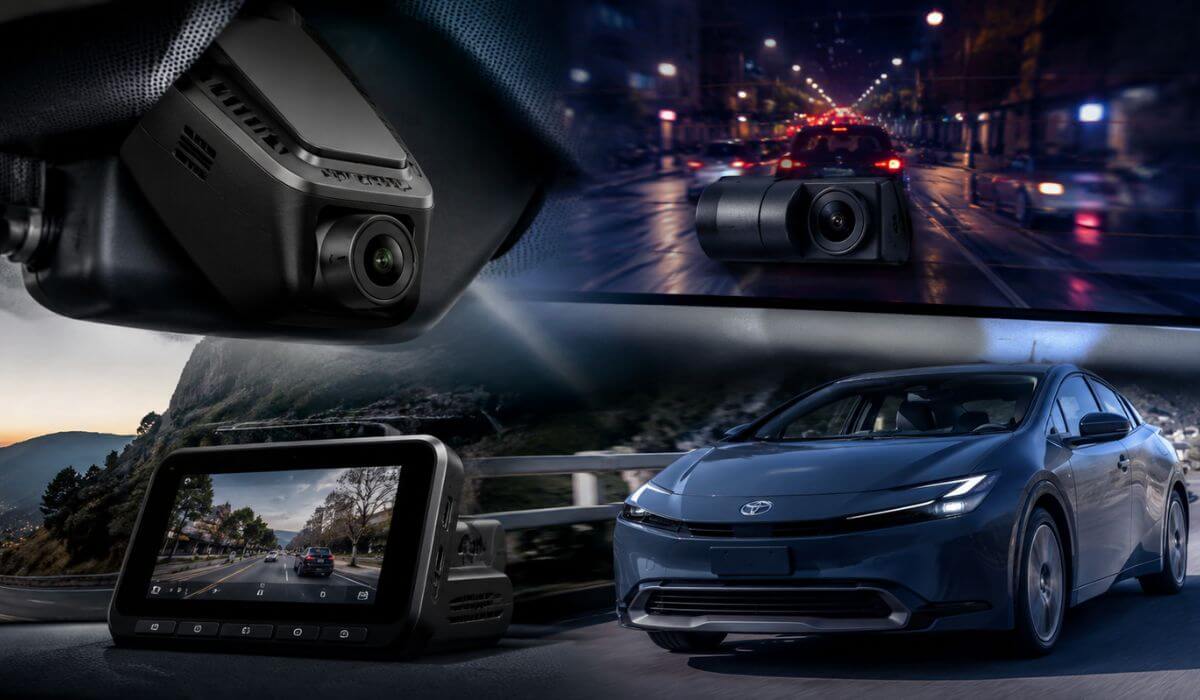
5 Best Dash Cams for Toyota Prius in 2026: Hidden OEM Fits, 4K Night Vision & Smart Parking Protection
The latest Toyota Prius models—especially the redesigned 2023, 2024, 2025, and new 2026 XW60 generation—quietly became one of the easiest hybrid targets for parking lot hits, bumper scrapes, and overnight vandalism. The low nose, wide windshield, and fastback rear design give the Prius excellent visibility on the road, but they also make it a perfect candidate for a properly positioned dash cam with reliable parking protection and clean cable management.
That’s exactly why generic windshield-mounted cameras don’t always work well in the Prius. Owners usually want something that fits tightly near the factory sensor housing, doesn’t block the driver’s view, and won’t ruin the clean interior Toyota finally got right in this generation. After testing dozens of newer OEM-style systems, we focused on dash cams that actually make sense for Prius daily driving: compact body size, stable WiFi connection, true 4K clarity, solid night recording, and parking mode that won’t constantly drain the hybrid battery system.
Most of the picks below are designed specifically for the Toyota Prius LE, XLE, Limited, and Prius Prime Plug-In Hybrid models from 2023–2026, while a few premium multi-channel options are better for commuters, rideshare drivers, and highway-heavy owners who want extra cabin and rear coverage. More importantly, these are the models Prius owners are actually installing right now instead of random no-name cameras with inflated ratings and weak app support.
Best Toyota Prius Dash Cams: Top 2026 Picks for Front, Rear & Cabin Recording
#1. Fitcamx Front 4K+Rear 1080P Dash Cam
Best OEM-look dash cam for Toyota Prius 2023-2026 with hidden factory-style installation, reliable WiFi app control, and clean front & rear 4K recording for everyday hybrid driving
#2. FUVYMYT Front 4K & Rear 1080P Dash Cam
Best front and rear dash cam for Toyota Prius LE, XLE, and Limited models with plug-and-play wiring, UHD night recording, and discreet factory-integrated housing
#3. Vantrue New N4 Pro S 4K 3 Channel Dash Cam
Best 4K parking mode dash cam for Toyota Prius commuters and rideshare drivers with STARVIS 2 night vision, cabin monitoring, buffered recording, and triple-channel protection
#4. ROVE R3 3-Channel Dash Cam
Best Toyota Prius cabin camera system with touchscreen controls, front/rear/interior recording, fast 5GHz WiFi transfers, and strong daily traffic coverage
#5. KBSYNT 4K & Rear 1080P Dash Cam
Best budget-friendly hidden dash cam for Toyota Prius 2023-2026 with OEM-style fitment, loop recording, WiFi connectivity, and simple plug-and-play setup
Expert Tip Before You Buy a Dash Cam for Your Toyota Prius
One thing many Prius owners realize too late is that camera quality alone doesn’t make a dash cam good inside a Prius. The shape of the windshield, the steep rear glass angle, and the tight factory sensor area near the mirror can make some popular dash cams look awkward, vibrate on rough roads, or block part of the driver’s visibility after a few weeks of use.
That’s why the best setup for the newer 2023–2026 Toyota Prius and Prius Prime usually ends up being a compact OEM-style system instead of a giant universal camera hanging from the windshield. A cleaner fit matters more in the Prius than most cars because the cabin already has a modern minimal design. Once loose cables start hanging near the mirror or USB wires run across the dash, the whole interior instantly feels cheaper.
Another thing most buyers overlook is parking mode power management. Hybrid owners often assume every dash cam is safe for long-term parking recording, but aggressive parking mode settings can slowly stress the smaller 12V auxiliary battery if the camera software isn’t optimized correctly. That’s one of the biggest reasons we prioritized models with stable voltage protection, smarter motion detection, and cleaner standby behavior instead of just chasing the highest resolution numbers on the box.
And honestly, after comparing newer Prius-specific systems side by side, the difference between a properly integrated OEM-fit camera and a random universal Amazon dash cam is immediately obvious the first night you drive in traffic or park in a crowded lot. The cleaner install, wider recording angle, faster app connection, and lower windshield clutter simply make the car feel more finished.
How We Chose These Dash Cams for the Toyota Prius
We didn’t build this list around flashy marketing claims or random “best seller” badges. Most newer dash cams look impressive in screenshots, but once installed in a Prius, the real problems start showing up fast: unstable app pairing, rattling mounts, overheating during summer parking, weak rear camera clarity, or parking mode that becomes unreliable after a few weeks.
So instead of chasing hype, we focused on what actually matters for real Prius ownership.
First, we prioritized true Prius compatibility. The latest Toyota Prius models use a very compact sensor housing near the windshield, and not every dash cam fits cleanly around it. That’s why the top options here use either a dedicated OEM-style shell or compact mounting systems that don’t ruin forward visibility or leave exposed wiring everywhere.
Second, we paid close attention to video consistency instead of inflated resolution numbers. A lot of cheap cameras claim “4K,” but the actual footage falls apart at night when headlights hit the lens or license plates move at highway speed. The better systems kept sharper detail during low-light driving, rainy commutes, parking garage exits, and fast lane changes where cheaper sensors usually smear motion badly.
We also looked heavily at daily usability, because Prius owners typically drive more than average commuters. A dash cam becomes annoying very quickly if the app disconnects constantly, clips fail to save correctly, or footage takes forever to transfer. The models we selected had more stable WiFi connectivity, cleaner app layouts, and faster access to recordings without constant troubleshooting.
For parking protection, we intentionally avoided systems with overly aggressive motion triggering that floods the memory card with useless clips every night. The better-performing models handled standby recording more intelligently and felt safer for long-term hybrid ownership.
And finally, we separated this list into real-world ownership categories instead of pretending one camera fits everyone. Some Prius owners want a completely hidden factory-style look. Others want triple-channel cabin recording for rideshare driving or heavy commuting. That’s why the recommendations above are arranged based on actual usage priorities, not just price or brand popularity.
That distinction matters more than most buyers think. A dash cam that works perfectly in a truck or SUV doesn’t always feel right inside a low-profile hybrid cabin like the Prius.
#1. Fitcamx Front 4K+Rear 1080P Dash Cam
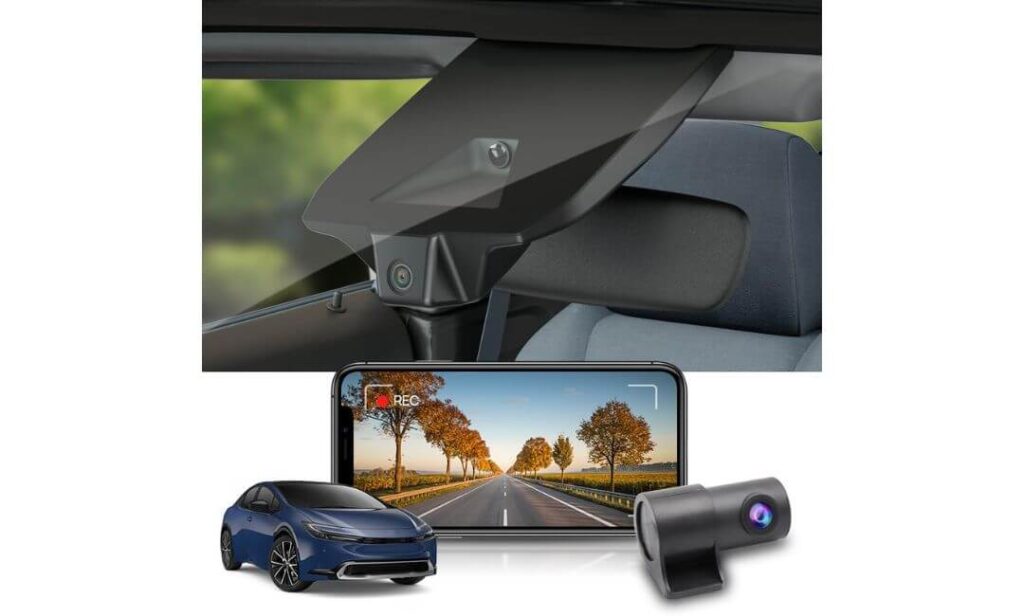
Quick Specs:
- True OEM-integrated housing built specifically for Toyota Prius & Prius Prime (XW60 platform)
- Crisp 4K front + 1080P rear recording with wide 170°/140° coverage
- Compact hidden design that keeps the windshield looking factory-clean
- Stable built-in WiFi + FITCAMX app for quick footage access
- Included 128GB memory card right inside the box
- f/1.6 aperture with CMOS sensor for stronger nighttime visibility
- Heat-resistant construction rated from -4°F to 185°F
- G-Sensor emergency file locking during impacts or hard braking
- No dangling cables, no suction mounts, no cheap universal look
The biggest surprise with this setup is how little it changes the feeling of the Prius interior. Most universal dash cams immediately look “added on” once installed — wires hanging near the mirror, bulky mounts wobbling over bumps, or a screen glowing at night directly in your sightline. This one doesn’t behave like that at all. Once mounted into the factory sensor area, it genuinely blends into the cabin as if Toyota designed it there from the beginning.
And honestly, that matters more in the newer Prius than people think. The redesigned cabin already has a cleaner, more premium layout compared to older generations, so throwing a generic windshield camera into the middle of it ruins the whole aesthetic fast. Here, the integrated shell keeps everything tight, balanced, and almost invisible from the driver’s seat. Even after a few days, most owners completely forget it’s installed — until they actually need the footage.
Video quality is where this system quietly separates itself from cheaper “4K” cameras flooding online marketplaces right now. The front camera captures sharp lane detail, readable traffic signs, and cleaner night contrast without oversharpening everything artificially. Rear footage also stays surprisingly usable during rain, parking lot movement, and nighttime reversing where weaker rear sensors usually become muddy or overly grainy. The wide-angle coverage helps a lot in the Prius too, especially because the car sits lower than many crossovers and gets surrounded easily in traffic.
The app experience feels more mature than most newer OEM-style systems as well. Footage transfers are straightforward, WiFi reconnects reliably after setup, and it doesn’t interfere with Apple CarPlay or Android Auto during normal use. That sounds small on paper, but Prius owners who drive daily know how annoying unstable wireless devices become after a few weeks.
(What really makes this one stand out is that it feels designed for the Prius first — not adapted afterward like many “compatible” dash cams currently being pushed online.)
Why This One Stayed Near the Top of Our List
- The integrated OEM shell genuinely looks factory-installed inside the Prius cabin
- Strong 4K clarity without exaggerated fake sharpening or oversaturated colors
- Rear camera quality stays usable at night instead of turning into blurry noise
- Cleaner cable routing than most universal dual-channel systems
- Stable app behavior with easier footage access during daily commuting
- Included 128GB card means the system is usable immediately out of the box
Where It Falls Slightly Behind Premium Triple-Channel Systems
- No dedicated buffered parking mode for advanced overnight monitoring
Prius Compatibility That Actually Makes Sense
Unlike generic windshield-mounted dash cams, this system was shaped specifically around the newer Prius interior layout and sensor housing. That changes the entire ownership experience because visibility stays cleaner, the camera sits tighter against the glass, and the installation doesn’t feel improvised.
It’s designed for the latest Prius LE, XLE, Limited, Prius Prime, and Plug-In Hybrid models using the newer XW60 platform. More importantly, it avoids the awkward fitment problems many universal cameras run into with the Prius windshield angle and mirror housing depth.
The Insider Pro-Tip
If you mainly use your Prius for long commutes, highway driving, or overnight apartment parking, positioning matters more than constantly chasing higher resolution numbers. A stable OEM-mounted camera with reliable recording consistency will usually capture more usable evidence than a cheaper “8K” system vibrating loosely on the windshield.
One more thing experienced Prius owners quietly learn: the cleaner the dash cam installation looks, the less likely passengers — or even thieves outside the vehicle — are to notice it immediately. That subtle factory-style integration becomes a real advantage over time, especially in crowded parking areas where visible electronics attract unnecessary attention.
#2. FUVYMYT Front 4K & Rear 1080P Dash Cam
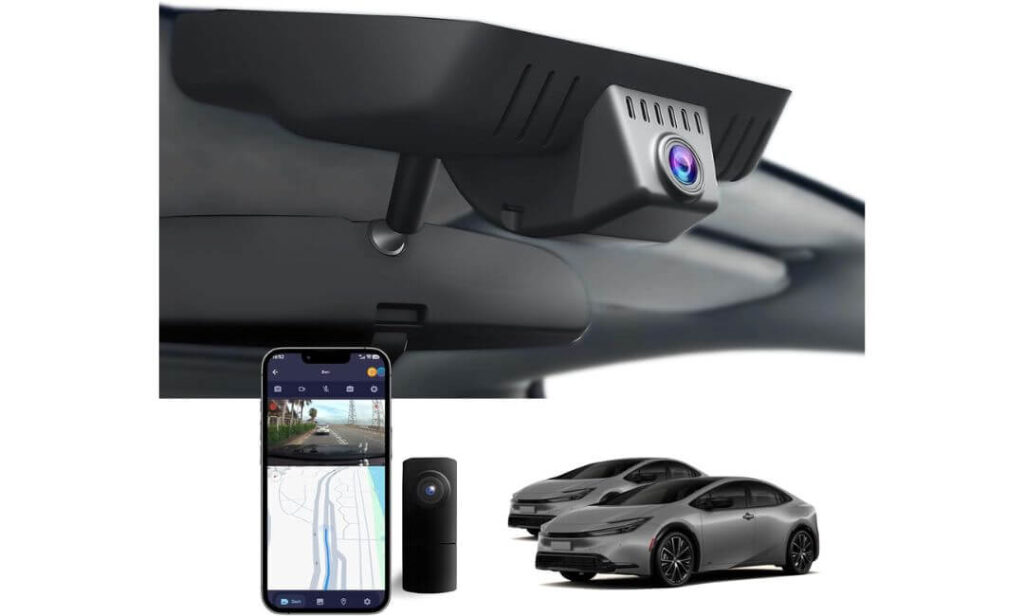
Quick Specs:
- Built specifically for Toyota Prius LE, XLE, and Limited trims using the newer XW60 body
- Hidden OEM-style housing that mounts cleanly behind the mirror area
- Sharp UHD 2160P front recording with 1080P rear camera coverage
- HDR-supported night capture with f/1.6 lens for darker roads and parking areas
- Built-in WiFi app control with quick phone footage access
- Plug-and-play installation without cutting factory wiring
- 128GB card already included with support up to 256GB
- Loop recording with impact-triggered emergency video locking
- Compact mirror-mounted design that keeps the windshield uncluttered
What immediately stands out here is how intentionally this camera was shaped around the newer Prius interior instead of being another universal dash cam pretending to “fit everything.” Once installed behind the mirror housing, it blends into the upper windshield area surprisingly well — no oversized screen hanging down, no distracting suction mount, and no cheap aftermarket appearance every time you step inside the cabin.
That clean integration matters even more in the Prius because visibility is one of the strongest parts of the car itself. A bulky dash cam ruins that quickly. This setup keeps the front glass feeling open while still capturing a wide enough angle to cover surrounding traffic, side movement at intersections, and parking lot activity without constantly looking exaggerated or fisheye-heavy.
The actual footage quality also feels more balanced than many newer budget 4K cameras that push oversaturated sharpness just to impress in screenshots. Daytime recording stays detailed enough to catch plate movement and lane positioning clearly, while HDR processing helps prevent headlights and streetlights from completely washing out the image during nighttime driving. The rear camera performs better than expected too, especially during reverse parking or low-light city traffic where many cheaper rear sensors start falling apart.
Another thing that quietly helps this system stand out is the installation experience. Prius owners usually do not want a complicated rewiring project just to add a dash cam. This one stays closer to the “factory accessory” feeling — cleaner routing, easier setup, included installation tools, and less trial-and-error compared to many generic kits floating around online right now.
(It genuinely feels aimed at Prius owners who want the protection of a dual-camera setup without turning their clean hybrid interior into a wiring project.)
What Made This One Easy to Recommend
- OEM-style fitment looks far cleaner than traditional windshield-mounted cameras
- HDR night processing handles city lights and headlight glare better than expected
- Included 128GB card saves extra setup cost immediately
- Rear camera footage remains usable during rain and darker parking conditions
- App connection feels straightforward once initial setup is complete
- Plug-and-play approach makes installation less intimidating for first-time buyers
One Small Thing Buyers Should Know Up Front
- Wireless preview can occasionally require cellular data or Bluetooth adjustments during app connection setup
Prius-Specific Integration That Feels Thought Through
This system was clearly designed with the newer Prius cabin layout in mind instead of adapting a generic shell afterward. The mirror-mounted positioning keeps the windshield cleaner, avoids blocking forward visibility, and helps the camera disappear naturally into the factory trim area.
It’s designed specifically for Toyota Prius models from the newer generation lineup, including LE, XLE, Limited, and XW60 variants. More importantly, it avoids the awkward loose-fit alignment issues many universal dash cams run into with the Prius windshield angle and sensor placement.
The Insider Pro-Tip
One thing experienced Prius drivers usually notice after installing a hidden OEM-style camera like this: you stop thinking about the dash cam entirely after a few days. And honestly, that’s a good sign. The best daily-driving setup is the one that quietly records in the background without constantly drawing your attention with flashing screens, dangling wires, or unstable mounts.
Also, if you regularly park under bright streetlights or inside crowded apartment parking structures, HDR performance matters far more than exaggerated “8K” marketing claims. Cleaner exposure control during nighttime movement often produces more usable footage than higher resolution alone — especially in a low-profile hybrid like the Prius where glare hits differently through the windshield angle.
#3. Vantrue N4 Pro S 4K 3-Channel Dash Cam
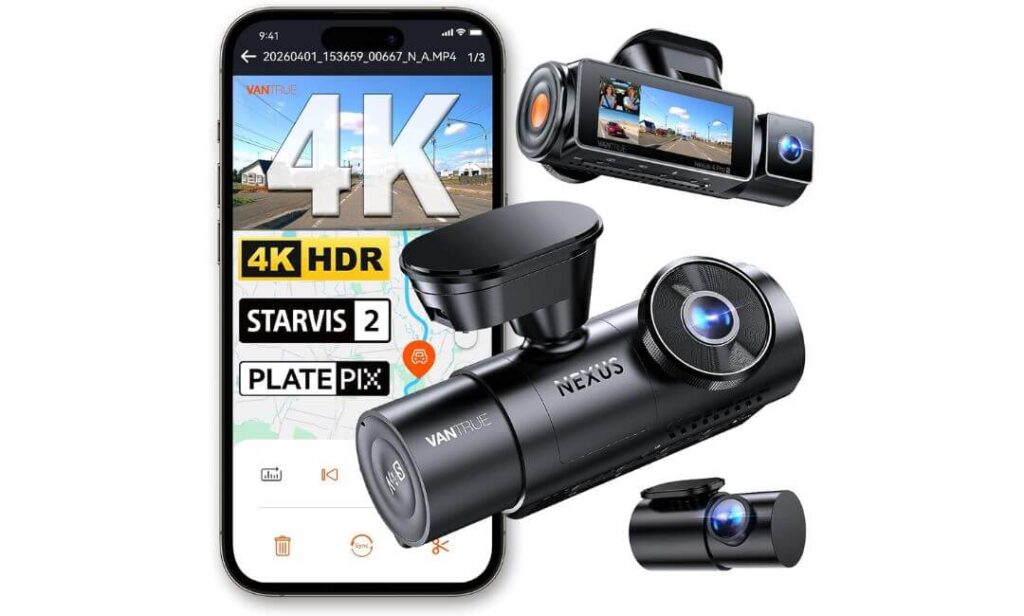
Quick Specs:
- Triple-channel recording with 4K front + 2.5K rear + 1080P cabin coverage
- Advanced Triple Sony STARVIS 2 sensors for stronger low-light clarity
- Buffered 24/7 parking protection that records before impact events happen
- 5GHz WiFi with faster video transfers and smoother app access
- HDR-enhanced night recording with improved license plate visibility
- Flexible rotating rear camera for hatchback cargo or rear traffic monitoring
- Built-in GPS speed and route tracking
- Voice control support for hands-free operation while driving
- Supercapacitor setup built for heat-heavy summer conditions
- Supports memory cards up to 1TB for extended recording sessions
There’s a very noticeable point where OEM-style Prius cameras stop being enough for some drivers — and this is exactly where this system starts making sense. If your Prius spends most of its life parked outside overnight, running highway commutes, carrying passengers, or navigating dense traffic every day, the extra camera coverage here becomes genuinely useful instead of feeling excessive.
The first thing you notice is how much more information this setup captures compared to basic front-and-rear systems. The triple STARVIS 2 sensors are not just marketing language either. Night footage looks dramatically cleaner during motion, especially when headlights, reflective road signs, or fast-moving vehicles usually destroy detail on cheaper cameras. The front 4K recording stays sharp enough to hold plate detail surprisingly well, while the rear 2.5K feed captures far more usable information than the weak 1080P rear cameras many budget systems rely on.
What really separates this camera, though, is the parking surveillance behavior. Most dash cams advertise parking mode, but many only start recording after impact already happens. This system buffers footage before the event, meaning it captures the seconds leading up to movement or contact — something Prius owners in crowded apartment parking areas or tight urban streets will appreciate immediately.
The interior camera also feels more practical than many people initially expect. For rideshare drivers, frequent commuters, or anyone regularly carrying passengers, having cabin footage adds another layer of protection during disputes or unexpected incidents. And because the Prius cabin sits relatively quiet compared to many gas vehicles, voice commands and alert prompts come through clearly without becoming distracting.
Installation is naturally more involved than hidden OEM-style setups, but that tradeoff comes with significantly more recording coverage, stronger parking security, and better nighttime performance overall. Once fully installed, it feels closer to a professional-grade surveillance system than a simple commuter dash cam.
(This is the kind of setup people usually buy after realizing a basic front camera wasn’t enough the first time something actually happened around the car.)
Why This System Earned a Spot in a Prius-Focused List
- Triple STARVIS 2 sensors produce genuinely stronger night footage than most consumer dash cams
- Buffered parking mode captures events before impact instead of after
- Rear 2.5K recording preserves far more detail during traffic movement
- 5GHz WiFi transfers large video files much faster than older systems
- Cabin camera adds real value for rideshare or heavy commuter use
- Supercapacitor design handles long summer heat exposure more reliably
One Thing Buyers Should Realistically Expect
- Installation takes more planning than hidden OEM-integrated Prius camera systems
How It Fits Into the Prius Ownership Experience
Unlike the Prius-specific OEM cameras higher on this list, this system uses a universal windshield-mounted layout. That means placement matters more, especially around Toyota Safety Sense sensors and the upper windshield camera area. But once positioned correctly, the coverage advantage becomes immediately obvious.
The longer rear cable routing also works surprisingly well in the Prius hatchback layout, and the adjustable rear camera angle helps capture either rear traffic activity or cargo-area movement depending on how you set it up. For drivers wanting maximum coverage instead of maximum stealth, this setup feels far more complete than most standard dual-camera systems.
The Insider Pro-Tip
A lot of people chase higher resolution numbers when buying a dash cam, but experienced commuters usually end up caring more about one thing: whether the footage still stays usable during movement at night. That’s where STARVIS 2 sensors quietly separate premium systems from cheaper “4K” cameras that only look impressive in daytime screenshots.
Also, if your Prius spends long hours parked outside, buffered parking mode is one of those features that seems unnecessary — right until the first time someone taps your bumper and drives away. Capturing what happened before the impact often matters more than the impact itself.
#4. ROVE R3 3-Channel Dash Cam
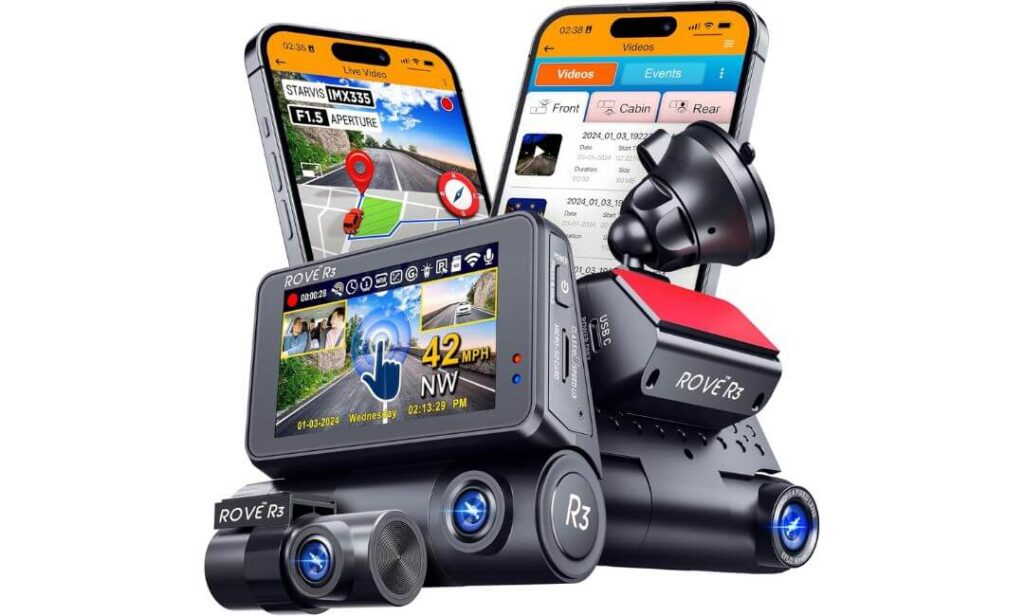
Quick Specs:
- Triple-camera setup with 1440P front + 1080P rear + 1080P cabin recording
- Large responsive 3-inch IPS touchscreen with simplified controls
- Ultra-fast 5GHz WiFi transfers up to 30MB/s
- Built-in Quad-Mode GPS for route, speed, and location tracking
- IR night vision cabin camera for low-light interior monitoring
- Supercapacitor system built for heat resistance and longer lifespan
- 24-hour parking surveillance support with optional hardwire setup
- Dual-band WiFi with smoother app connectivity than many older systems
- Supports large microSD cards up to 512GB
- Digital image stabilization and f/1.5 aperture for cleaner footage clarity
Some dash cams feel overly technical the second you power them on. Too many menus, confusing controls, unstable apps, or settings buried everywhere. This one goes in the opposite direction. The R3 feels designed for drivers who simply want strong all-around coverage without spending weeks learning how the camera works.
The touchscreen changes the experience immediately. Instead of tiny physical buttons hidden under the camera body, everything feels faster and more intuitive — especially inside the Prius where cabin space around the windshield already feels compact. The interface reacts quickly, the menus are cleaner than most triple-camera systems, and footage access feels less frustrating during everyday use.
What also stands out is how balanced the recording setup feels for commuters. The front 1440P camera captures enough road detail to stay sharp without aggressively overheating like some ultra-high-resolution systems can during long drives. Meanwhile, the cabin and rear cameras quietly handle the rest of the coverage without creating unnecessary complexity. For rideshare drivers, carpool commuters, or Prius owners constantly parking in crowded areas, that additional cabin visibility becomes surprisingly valuable after a while.
Night recording performance inside the cabin is another area where this setup feels smarter than many competitors in the same price range. The built-in IR LEDs keep interior footage visible even in complete darkness without blasting distracting light around the cabin. Combined with the quiet hybrid interior of the Prius, voice guidance and alerts remain easy to hear without becoming annoying during long drives.
The WiFi speed difference is noticeable too. Large files move to your phone much faster than older dash cams that still struggle with slow wireless transfers. That may sound minor initially, but after using slow-loading apps for weeks, faster downloads quickly become one of those features you stop wanting to live without.
(This feels less like a “tech enthusiast” dash cam and more like a smart everyday system built for people who actually drive their Prius constantly.)
Why It Quietly Became One of the Most Practical Picks Here
- Touchscreen controls make everyday use dramatically easier
- Fast 5GHz WiFi transfers save time when accessing footage
- Triple-camera layout adds strong all-around visibility for commuting
- Cabin IR night vision performs surprisingly well after dark
- Supercapacitor setup handles hotter climates more safely long-term
- Interface and app feel cleaner than many feature-heavy rivals
One Thing Worth Knowing Before Installation
- Since this is a full windshield-mounted system, cable management takes slightly more effort than Prius-specific OEM integrated cameras
How It Fits Into Real Prius Ownership
This setup works especially well for Prius owners who spend serious time behind the wheel every week. The extra cabin coverage, fast app performance, and touchscreen usability make it feel more practical during daily use than many complicated flagship dash cams loaded with features most people rarely touch.
The windshield mount also gives more flexibility with positioning compared to fixed OEM-style systems. That matters in the Prius because drivers can fine-tune placement around Toyota Safety Sense hardware and still maintain strong road visibility without crowding the upper windshield area.
The Insider Pro-Tip
A lot of drivers underestimate how important usability becomes after the first month. In real-world ownership, the dash cam you actually check, update, and comfortably use every week usually ends up being more valuable than the one packed with features buried behind frustrating menus.
Also, cabin cameras are becoming far more useful than many Prius owners initially expect. Between parking incidents, passenger disputes, delivery work, rideshare driving, and unexpected interactions at stoplights, having interior footage often becomes the difference between “probably happened” and clear proof.
#5. KBSYNT 4K & Rear 1080P Dash Cam
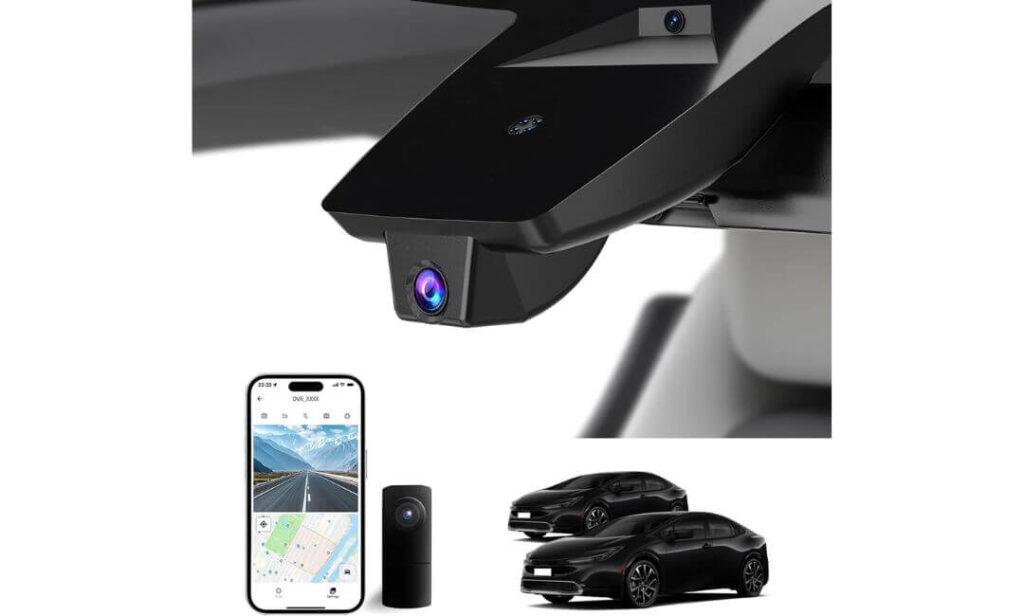
Quick Specs:
- Prius-specific OEM-style housing built for LE, XLE, Limited, and XW60 trims
- 4K front recording paired with 1080P rear camera coverage
- Hidden mirror-area installation with cleaner windshield visibility
- HDR-supported night capture with f/1.6 aperture lens
- Built-in WiFi with free mobile app access
- Plug-and-play installation with included tools and 128GB card
- Loop recording with collision-triggered G-Sensor protection
- Supports memory cards up to 256GB
- Optional 24-hour parking monitoring support with hardwire kit
Sometimes the smartest dash cam choice is not the most expensive one — it’s the one that quietly handles the essentials without turning ownership into constant troubleshooting. That’s exactly where this setup fits. It focuses on the things most Prius owners actually care about: clean installation, stable everyday recording, decent night visibility, and a factory-style appearance that doesn’t make the interior look cluttered.
The OEM-style integration works surprisingly well once mounted behind the mirror area. From the driver’s seat, the camera almost disappears into the upper windshield trim instead of hanging awkwardly like many generic budget dash cams. And because the newer Prius interior already feels modern and minimal, that cleaner fit makes a bigger difference than people usually expect.
Video performance also lands in a genuinely practical place for daily commuting. The 2160P front recording captures enough sharpness for traffic detail, lane activity, and parking incidents without trying to artificially overprocess the image. HDR support helps keep nighttime footage usable around headlights and city lighting, while the rear camera adds helpful coverage during reverse parking or stop-and-go traffic situations where rear-end incidents happen most often.
The setup process feels more approachable than many advanced multi-camera systems too. Everything inside the box is clearly aimed at straightforward installation — included tools, pre-included memory card, simple app pairing, and cleaner cable routing. For Prius owners who mainly want reliable coverage without spending hours adjusting complicated settings, this system keeps things refreshingly uncomplicated.
(This feels like the kind of camera someone buys after getting tired of overly flashy dash cams loaded with features they never actually use.)
Why It Earned a Spot in This Prius Guide
- Hidden OEM-style design keeps the Prius interior looking factory-clean
- Included 128GB card makes setup easier right out of the box
- HDR processing helps nighttime footage stay more balanced
- Front and rear coverage adds useful daily-driving protection
- App access feels simple enough for first-time dash cam users
- Installation stays cleaner than traditional windshield-mounted systems
One Small Tradeoff Worth Knowing Early
- App preview setup can occasionally need minor WiFi or cellular adjustments during first connection
Prius Integration That Feels More Natural Than Universal Cameras
Unlike universal dash cams that often sit too low or clutter the windshield, this setup was shaped around the newer Prius mirror and sensor housing area. That gives it a much more integrated appearance once installed and helps preserve the open visibility Prius drivers usually appreciate.
It’s specifically designed for the latest Prius generation including LE, XLE, Limited, and XW60 models. More importantly, the fitment avoids the loose aftermarket look that many generic cameras create inside the slimmer Prius cabin.
The Insider Pro-Tip
A lot of people shopping for dash cams get distracted by extreme specs and forget one important reality: the best camera is usually the one you’ll actually leave installed permanently without getting annoyed by it every day.
That’s why OEM-style systems continue becoming more popular with Prius owners. Cleaner visibility, simpler setup, and quieter integration often matter more long-term than chasing the highest resolution possible — especially in a hybrid cabin where drivers already value a calmer, less cluttered environment.
Best Toyota Prius Dash Cam Comparison for OEM Fit, Night Vision & Parking Protection
| Dash Cam | Best For | Video Setup | Night Driving | Parking Protection | Why Prius Owners Like It |
|---|---|---|---|---|---|
|
Fitcamx Front 4K+Rear 1080P
Best Overall Prius Pick
|
Drivers wanting a true factory-style setup without visible wiring | 4K Front + 1080P Rear | Strong nighttime clarity with balanced headlight control |
Emergency impact locking No dedicated buffered parking mode |
Feels the closest to a genuine Toyota-installed accessory once mounted |
|
FUVYMYT Front 4K & Rear 1080P
Smart OEM Value Pick
|
Prius owners wanting clean integration without overspending | 2160P Front + 1080P Rear | HDR helps city lights and dark roads stay more visible | Optional 24H monitor support with hardwire kit | Hidden mirror-area fit keeps the windshield surprisingly uncluttered |
|
Vantrue N4 Pro S
Premium 3-Channel Choice
|
Heavy commuters, rideshare drivers, and overnight street parking | 4K Front + 2.5K Rear + 1080P Cabin | Triple STARVIS 2 sensors deliver exceptional low-light detail | Buffered 24/7 parking mode records before impacts happen | Feels closer to a professional surveillance setup than a basic dash cam |
|
ROVE R3 3-Channel
Best Daily Commuter Setup
|
Drivers wanting easier controls and strong all-around coverage | 1440P Front + 1080P Rear + 1080P Cabin | IR cabin vision performs well even in total darkness | 24-hour parking support with optional hardwire setup | Fast WiFi and touchscreen controls make everyday use far less annoying |
|
KBSYNT 4K & Rear 1080P
Clean Budget-Friendly Option
|
Prius owners wanting simple OEM-style protection at lower cost | 2160P Front + 1080P Rear | Good HDR balance for parking lots and rainy nighttime driving | Optional parking monitoring with hardwire support | Keeps the Prius cabin looking minimal without bulky windshield clutter |
Buying Guide: How to Choose the Right Dash Cam for a Toyota Prius Without Regretting It Later
The newer Toyota Prius is not like older economy hybrids anymore. The windshield angle is sharper, the cabin design is cleaner, the mirror housing is tighter, and Toyota Safety Sense hardware already occupies valuable space near the upper glass area. That changes what actually works well inside the car.
A dash cam that feels perfectly fine inside an SUV or truck can suddenly feel oversized, distracting, or poorly integrated once installed in the Prius. That’s why choosing the right setup here is less about chasing giant spec numbers and more about understanding how the camera will realistically behave during everyday driving, parking, heat exposure, and long-term ownership.
The biggest mistake Prius owners usually make is buying a random “top-rated” dash cam without considering cabin fitment, parking behavior, or app reliability. The best setup is normally the one that quietly disappears into the car while still giving dependable footage when something actually happens.
Hidden OEM-Style Dash Cam vs Front-Only vs Full Front-and-Rear Setup
This is the first decision that matters because it completely changes the ownership experience.
If you mainly want discreet protection while keeping the Prius interior looking clean, an OEM-style hidden dash cam usually makes the most sense. These systems integrate near the mirror housing, avoid dangling screens, and preserve the minimal dashboard layout Toyota designed into the newer Prius generation. For daily commuters and hybrid owners who dislike visual clutter, this style feels far more natural long-term.
Front-only systems work best for drivers who mostly want basic accident protection without complicated installation. They are usually easier to manage, produce less heat, consume less storage, and reduce cable routing. But realistically, rear-end traffic incidents and parking damage are becoming too common now for many Prius owners to ignore rear coverage completely.
Front-and-rear systems are where most people ultimately land after owning a dash cam for a while. Once you experience how often things happen behind the vehicle — parking lot taps, aggressive tailgating, hit-and-runs, reverse parking incidents — rear coverage starts feeling much more important than it initially seemed.
Three-channel systems with cabin recording are more specialized. They make the most sense for rideshare drivers, delivery work, heavy urban commuting, or anyone regularly carrying passengers. Inside the Prius specifically, cabin cameras work surprisingly well because the interior stays relatively quiet and compact compared to larger vehicles.
Why OEM Fitment Matters More in the Prius Than Most Cars
The Prius cabin is designed around visibility and simplicity. Once you install a bulky universal dash cam with exposed wiring, it changes the entire feel of the interior immediately.
That’s why OEM-style cameras became so popular with newer Prius owners. A properly integrated setup sits tighter against the windshield, avoids blocking forward visibility, and feels closer to a factory accessory instead of an obvious aftermarket gadget.
Fitment also matters because of Toyota Safety Sense sensors near the upper windshield area. Poorly positioned cameras can create reflections, interfere with visibility, or simply look awkward once mounted. Cameras specifically designed around the Prius mirror housing usually solve these problems much better than universal windshield-mounted systems.
Another overlooked detail is vibration. The Prius suspension and low-profile body can expose weak mounts very quickly on rough roads. Better OEM-integrated systems tend to stay more stable over time instead of developing rattles or shaking footage after months of use.
What Prius Owners Should Realistically Expect From 4K Recording
A lot of people assume “4K” automatically means perfect footage. In reality, sensor quality, HDR tuning, exposure balance, and motion handling matter far more than resolution alone.
Some cheap 4K dash cams only look impressive during bright daytime screenshots. At night, especially during motion, plate detail often disappears completely once headlights or reflections enter the frame. That’s why better sensors like STARVIS 2 matter more than inflated marketing claims.
There’s also a storage reality most buyers ignore. Real 4K footage consumes memory fast, especially on dual-channel and triple-channel systems. If you drive daily, smaller cards fill quickly, loop recording activates more often, and lower-quality cards eventually start failing under constant heat and overwriting cycles.
For most Prius owners, 128GB to 256GB is the practical minimum for dual-camera setups. Triple-channel systems benefit heavily from larger cards, especially if parking mode remains active overnight.
Heat management matters too. The Prius windshield angle allows a lot of sunlight into the cabin during summer parking, so cameras with better cooling, supercapacitors, or stable thermal behavior usually survive longer than cheaper battery-powered units.
Parking Mode Matters Differently in Cities vs Quiet Areas
Urban Prius owners should treat parking mode as a serious feature, not just a bonus.
Apartment parking lots, shopping centers, office garages, and crowded city streets create constant low-speed risks — bumper taps, shopping cart damage, door dings, hit-and-runs. In these situations, buffered parking recording becomes incredibly valuable because it captures what happened before impact instead of only reacting afterward.
Rural or suburban owners usually face different conditions. There’s often less traffic around parked vehicles, so constant aggressive parking recording may not be as necessary. In those cases, lower-power impact-triggered systems can sometimes make more sense for protecting the auxiliary battery long-term.
This becomes especially important in hybrids because the Prius uses a smaller 12V battery system than many larger vehicles. Poorly optimized parking mode settings can slowly drain the battery over time if the camera remains too aggressive while parked for long periods.
Wireless Features Are Great — Until the Connection Becomes Annoying
Almost every modern dash cam now advertises WiFi connectivity, but the actual experience varies massively.
Good wireless systems reconnect quickly, transfer footage smoothly, and make reviewing clips easy during stressful situations. Bad ones constantly fail pairing, freeze during downloads, or require repeated app troubleshooting every week.
Faster 5GHz WiFi systems usually feel dramatically better in real-world use, especially when transferring larger 4K recordings. That’s one reason premium cameras often justify their higher price more than buyers initially expect.
At the same time, simpler wired OEM systems still appeal to many Prius owners because they reduce complexity. Fewer exposed accessories, cleaner installation, and less ongoing troubleshooting often create a calmer ownership experience overall.
Where Spending More Actually Helps — And Where It Doesn’t
Not every Prius owner needs a flagship triple-camera setup with every advanced feature available.
For many drivers, a reliable OEM-style front-and-rear system already covers the most important daily risks while keeping the interior clean and uncluttered. That balance usually delivers the best long-term value.
Higher-end systems become worthwhile when you specifically need stronger night performance, buffered parking surveillance, rideshare cabin recording, faster wireless transfers, or heavy daily driving coverage.
Where buyers often waste money is chasing unrealistic resolution claims while ignoring mounting quality, app stability, heat resistance, and real-world reliability. Those practical details affect daily ownership far more than flashy marketing specs ever will.
The best Prius dash cam usually isn’t the one with the longest feature list. It’s the one that still works properly six months later, records clearly when something unexpected happens, and quietly fits into the car without becoming annoying every single day.
Installation and Setup Tips for a Cleaner, More Reliable Toyota Prius Dash Cam Setup
A surprisingly large number of dash cam complaints are not actually caused by the camera itself. They come from poor installation, bad cable routing, incorrect positioning, weak power connections, or settings that were never configured properly after setup.
The newer Toyota Prius is especially sensitive to this because the cabin layout is cleaner, tighter, and more technology-focused than older generations. A sloppy installation immediately stands out inside the car. Worse, incorrect placement near the Toyota Safety Sense hardware can reduce visibility, create windshield reflections, or make the entire setup feel cheap even when the camera itself is high quality.
The good news is that the Prius interior actually supports hidden dash cam installation very well once everything is routed correctly.
The Cleanest Way to Start a Front and Rear Dash Cam Installation
Before mounting anything permanently, sit in the normal driving position and study the upper windshield area carefully. Prius owners often rush installation and later realize the camera blocks visibility more than expected or sits unevenly beside the mirror housing.
For OEM-style systems, the cleanest position is usually tight against the factory sensor housing near the rearview mirror. This keeps the camera higher, reduces distraction, and helps the setup disappear into the interior trim instead of hanging visibly from the glass.
For universal windshield-mounted systems, placement matters even more. The front camera should sit slightly toward the passenger side of the mirror area while still maintaining a centered road view. This avoids interfering with Toyota Safety Sense sensors while preserving a more natural driver sightline.
Rear camera positioning inside the Prius hatch area also deserves attention. Mounting too high can create excessive glare from rear glass reflections, while mounting too low reduces the visible traffic range behind the vehicle. The sweet spot is usually just below the upper rear glass line with a slight downward angle toward approaching traffic.
One thing experienced installers always do before final cable routing: power the system on first and preview live footage. Small alignment adjustments during setup make a massive difference later when reviewing footage after an incident.
How to Hide Dash Cam Wiring Without Making the Prius Interior Look Messy
The Prius cabin has cleaner panel gaps than many older vehicles, which actually makes cable hiding easier once you know where to route everything.
Most front camera power cables can tuck directly into the upper headliner edge above the windshield using the included trim tool. From there, routing down the passenger-side A-pillar usually creates the cleanest result because it keeps wires away from the driver’s field of view.
The important detail many people miss: never force thick cable bundles aggressively around airbag locations inside the A-pillar area. Keep wiring tucked loosely behind trim edges rather than tightly wrapped around structural sections.
For rear camera wiring, the Prius hatchback layout helps more than most people expect. The cable can usually run cleanly through the upper headliner edge toward the rear hatch without becoming visible across the cabin. Taking an extra fifteen minutes during routing makes the final setup look dramatically more professional.
Another mistake people often make is leaving excess cable bundled near the windshield or center console. Over time, loose wiring starts rattling, especially inside hybrids where the quieter cabin makes small noises more noticeable during driving.
The cleanest installations are usually the simplest ones. Minimal exposed wiring, tighter routing, and stable mounting matter far more long-term than rushing the setup in one afternoon.
Why Camera Alignment Matters More Than Most Drivers Realize
A dash cam can record in perfect 4K and still become nearly useless if the angle is wrong.
The front camera should align closely with the centerline of the road rather than aiming too high toward the horizon or too low toward the hood. Incorrect positioning reduces plate visibility, distorts distance perception, and often captures too much sky exposure during daytime driving.
Inside the Prius specifically, windshield slope changes how footage appears compared to taller SUVs or trucks. A slightly downward angle usually captures traffic movement more naturally while reducing glare from dashboard reflections.
Rear cameras also benefit from careful alignment. If angled too far downward, they mainly record the bumper area instead of approaching vehicles. Too high, and nighttime headlights begin overpowering the image unnecessarily.
After installation, experienced users usually take a short test drive during both daylight and nighttime conditions. Reviewing real driving footage immediately exposes problems that are impossible to notice while parked in the driveway.
The Settings Most Owners Forget to Configure After Installation
Many drivers finish mounting the camera and never touch the settings again. That usually leads to avoidable problems later.
The first thing worth checking is video segment length. One-minute clips create too many fragmented files, while extremely long clips become harder to review quickly after incidents. For most Prius owners, three-minute recording loops create the best balance.
Parking mode sensitivity also deserves attention. Default settings are often too aggressive for busy apartment lots or crowded city streets, causing unnecessary recordings all night long. Lowering motion sensitivity slightly can dramatically improve storage efficiency and reduce battery stress.
Time and GPS calibration matter more than people realize too. Incorrect timestamps weaken footage usefulness during insurance disputes or accident reviews.
If the camera supports firmware updates, it is worth checking occasionally through the app. Many newer dash cams quietly improve WiFi stability, recording behavior, and parking reliability through software updates after launch.
Storage management is another overlooked detail. Even reliable memory cards wear down over time from constant overwriting and heat exposure. Periodically formatting the card directly inside the camera helps maintain recording stability and reduces file corruption issues later.
The Real Difference Between a “Good” Installation and a Great One
A properly installed Prius dash cam should eventually feel invisible during daily driving.
No dangling cables. No vibrating mounts. No constant app frustration. No blocked visibility. No giant glowing screen distracting the cabin at night.
The best setups quietly blend into the car while recording consistently in the background every single day. And honestly, that’s usually the biggest sign you chose the right system and installed it correctly in the first place.
Real-World Toyota Prius Dash Cam Scenarios That Actually Make Owners Glad They Installed One
Most people buy a dash cam thinking about major accidents, but the reality is usually very different. The situations where Prius owners end up appreciating their camera most are often the smaller, frustrating moments that happen unexpectedly during normal daily driving — parking lot taps, false blame after minor incidents, aggressive drivers cutting across lanes, or unexplained scratches that suddenly appear overnight.
And because the Prius is commonly used for commuting, city driving, rideshare work, and long daily mileage, those situations tend to happen more often than many owners initially expect.
The difference a reliable dash cam creates in those moments is immediate. Instead of relying on memory, assumptions, or conflicting stories, you suddenly have something much more valuable: actual footage.
When Insurance Situations Stop Becoming “Your Word vs Their Word”
One of the biggest reasons Prius owners eventually stop regretting their dash cam purchase is what happens after the first real incident.
A low-speed parking lot impact, someone suddenly merging without signaling, a driver reversing unexpectedly, or another vehicle braking aggressively in traffic — these situations happen constantly now, especially in crowded urban areas where the Prius spends most of its life.
Without footage, insurance conversations often become frustrating very quickly. Everyone remembers events differently, details get blurred under stress, and fault disputes drag on far longer than they should.
A properly positioned front-and-rear setup changes that almost instantly.
The wide-angle recording on newer 4K systems captures lane positioning, traffic behavior, braking patterns, and surrounding movement in a way that leaves far less room for confusion afterward. Even basic details — traffic lights, turn signals, vehicle spacing, or road conditions — become much easier to verify once footage exists.
Rear cameras matter even more than many drivers initially realize. Prius hatchbacks sit relatively low in traffic, which makes rear-end incidents surprisingly common during stop-and-go commuting. Having clear rear footage often becomes the difference between proving what happened and trying to explain it afterward.
And honestly, even when accidents are minor, footage tends to reduce stress immediately because you no longer have to rely entirely on memory while standing on the side of the road under pressure.
Why Parking Mode Starts Feeling Essential After the First Overnight Incident
Most Prius owners underestimate parking mode right up until the first time something happens while the car is unattended.
Apartment parking lots, office garages, shopping centers, hotel parking areas, airport lots — these are exactly the places where low-speed damage quietly happens every single day. Someone misjudges distance while parking, a shopping cart rolls into the bumper, another driver taps the rear hatch while reversing, or someone brushes the side mirror and leaves without saying anything.
Without parking footage, there is usually no clear answer later.
This is where newer parking mode systems, especially buffered recording setups, become genuinely valuable. Instead of only recording after impact, better systems capture the moments leading up to movement or contact as well. That extra context often matters more than the impact itself because it shows how the situation actually developed.
Night performance becomes critical here too. A dash cam might look impressive during daytime driving, but parking lots introduce difficult lighting conditions — dim corners, harsh LED lights, reflective surfaces, headlights entering frame suddenly. Better HDR processing and stronger low-light sensors make a visible difference in these situations.
The Prius also presents one unique challenge many owners do not initially think about: battery management. Because hybrids rely on smaller auxiliary battery systems than many larger vehicles, poorly optimized parking mode settings can become problematic long-term. That’s why reliable voltage protection and smarter motion detection matter far more than simply leaving the camera recording aggressively all night.
How Wireless Footage Sharing Quietly Became One of the Most Useful Features
Years ago, reviewing dash cam footage usually meant pulling the memory card, finding a laptop, transferring files manually, and hoping the clip was saved correctly.
Modern wireless systems changed that experience completely.
Now, when something happens, many Prius owners can open the app directly from the driver’s seat, review footage immediately, and transfer clips to their phone within minutes. That becomes incredibly useful during stressful situations where timing matters — accident scenes, police reports, insurance discussions, parking disputes, or repair estimates.
Faster 5GHz WiFi systems especially feel dramatically better once you start dealing with larger 4K recordings regularly. Waiting fifteen minutes for footage to transfer becomes frustrating very quickly after daily use.
Wireless sharing also helps in smaller ways most people don’t initially think about. Service visits, dealership inspections, unusual noises during driving, unexpected warning situations, or even proving recurring road hazards become easier once recorded footage can be accessed quickly without removing hardware from the vehicle.
For rideshare drivers or heavy commuters, this convenience matters even more because footage sometimes needs to be reviewed while still actively working.
And honestly, the biggest reason many Prius owners continue recommending dash cams after buying one is simple: the camera usually pays for itself emotionally long before anything major even happens. Just knowing there’s an unbiased recording quietly running in the background changes how stressful unexpected situations feel on the road.
FAQs About Toyota Prius Dash Cam
Does the Toyota Prius windshield design affect dash cam video quality more than other cars?
Honestly, yes — more than most buyers initially realize.
The newer Prius has a sharply angled windshield and a lower front seating position compared to many SUVs or crossovers. That changes how reflections, headlights, dashboard glare, and even rainy-night visibility appear inside recorded footage. A cheap universal dash cam might technically record in “4K,” but once you drive at night inside the Prius, weak sensors often start struggling with blown-out headlights and smeared motion very quickly.
That’s why camera placement and sensor quality matter so much here. Better systems with stronger HDR tuning and stable exposure handling usually produce far more usable footage inside the Prius than cameras simply chasing higher resolution numbers.
There’s another detail people rarely talk about too: the Prius cabin stays quieter than many gasoline vehicles, which makes vibrations and weak mounting systems more noticeable over time. Cameras with poor mounting stability eventually create subtle shaking during driving, especially on rough roads, and that softness affects plate clarity more than people expect.
Is an OEM-style hidden dash cam actually worth it for the Toyota Prius, or is it mostly about appearance?
At first, many Prius owners buy OEM-style cameras mainly because they look cleaner. But after long-term use, the practical benefits become much more important than aesthetics alone.
A properly integrated OEM-style system usually:
- blocks less windshield visibility
- attracts less attention from outside the vehicle
- reduces vibration during driving
- creates fewer distracting reflections at night
- keeps cable routing cleaner long-term
Inside the Prius specifically, this matters more because the interior already has a modern minimal layout. Large universal dash cams with exposed wiring tend to feel visually “heavier” inside the cabin than they do in trucks or SUVs.
There’s also a psychological difference people notice after a few weeks. Hidden systems tend to disappear into the ownership experience completely. You stop thinking about them. That sounds small, but it usually means the setup was done correctly.
Do Prius hybrid systems have any long-term issues with dash cam parking mode?
This is one of the smartest questions Prius owners can ask before buying a dash cam.
The Prius uses a smaller 12V auxiliary battery system than many larger vehicles, so extremely aggressive parking mode settings can absolutely create problems if the camera is poorly optimized or wired incorrectly. That does not mean parking mode is unsafe — it simply means power management matters more here than in some larger gas-powered vehicles.
The safest long-term setups usually include:
- voltage cutoff protection
- buffered recording instead of constant recording
- stable parking sensitivity settings
- quality hardwire kits
- cameras designed for lower standby power draw
A lot of online discussions oversimplify this topic. In reality, the problem usually comes from badly configured parking settings, low-quality wiring kits, or owners leaving ultra-sensitive motion detection running 24/7 in crowded parking areas.
For most Prius owners, smarter parking detection is actually better than hyper-aggressive recording behavior.
How much storage does a real-world 4K front and rear Prius dash cam setup actually need?
Much more than most first-time buyers expect.
True dual-channel 4K recording creates large files quickly, especially if the Prius is used for commuting, rideshare work, or long highway driving. People often buy smaller cards initially and then get frustrated when footage loops too aggressively or older clips disappear faster than expected.
In practical daily use:
- 128GB works for lighter driving
- 256GB feels safer for most commuters
- triple-channel systems benefit heavily from larger storage
- parking mode increases storage consumption dramatically
But storage size alone is not the whole story. Memory card quality matters just as much because dash cams constantly overwrite data under heat exposure. Inside the Prius, the steep windshield angle can intensify cabin heat during summer parking, which slowly stresses lower-quality cards over time.
That’s why stable industrial-grade cards often last noticeably longer in real-world dash cam use than cheaper consumer cards, even when both technically support the same capacity.
What usually matters more after six months of ownership — video quality or daily usability?
Most experienced Prius owners eventually give the same answer: usability.
Everyone focuses on resolution during the buying stage, but after real long-term ownership, people usually care far more about whether the system quietly works every single day without becoming annoying.
Things that start mattering much more over time include:
- stable app connections
- reliable automatic recording
- fast footage transfers
- clean cable routing
- heat resistance during summer
- mounts that stop vibrating after months of driving
- parking mode that does not constantly create false events
A dash cam can have incredible specs on paper and still become frustrating if basic daily behavior feels unreliable. Meanwhile, a well-balanced system with slightly lower specs but stronger usability often ends up feeling dramatically better after months of actual Prius ownership.
And honestly, that’s usually the biggest difference between cameras people recommend for years — and cameras people quietly replace after one bad experience.
Final Thoughts
The newer Toyota Prius is no longer just a simple fuel-saving commuter. The sharper bodywork, lower stance, redesigned cabin, and heavy daily-use nature of this car make a dash cam feel less like an optional gadget and more like something you eventually wish you had installed earlier.
But after testing newer OEM-style systems, premium triple-channel setups, and everyday commuter-focused cameras side by side, one thing became very clear: the best Prius dash cam is not automatically the most expensive one. It’s the one that fits naturally into the way the car is actually used.
For some owners, that means a hidden OEM-style camera that disappears completely into the interior and quietly records during daily driving without adding clutter. For others, especially commuters, rideshare drivers, or urban apartment parkers, stronger parking surveillance and triple-camera coverage become worth the extra setup effort very quickly.
That’s also why we intentionally avoided filling this guide with random “top-rated” universal cameras that technically work but never truly feel right inside the Prius cabin. Every option here was chosen around real-world Prius ownership — cleaner fitment, stable app performance, practical night visibility, smarter parking behavior, and long-term usability instead of inflated marketing claims.
And honestly, the moment most drivers finally appreciate a good dash cam is usually not during installation day. It happens unexpectedly weeks or months later, during one stressful situation where clear footage suddenly removes all uncertainty from the conversation.
That peace of mind ends up mattering far more than most people expect when they first start shopping for one.
Also Check:


