
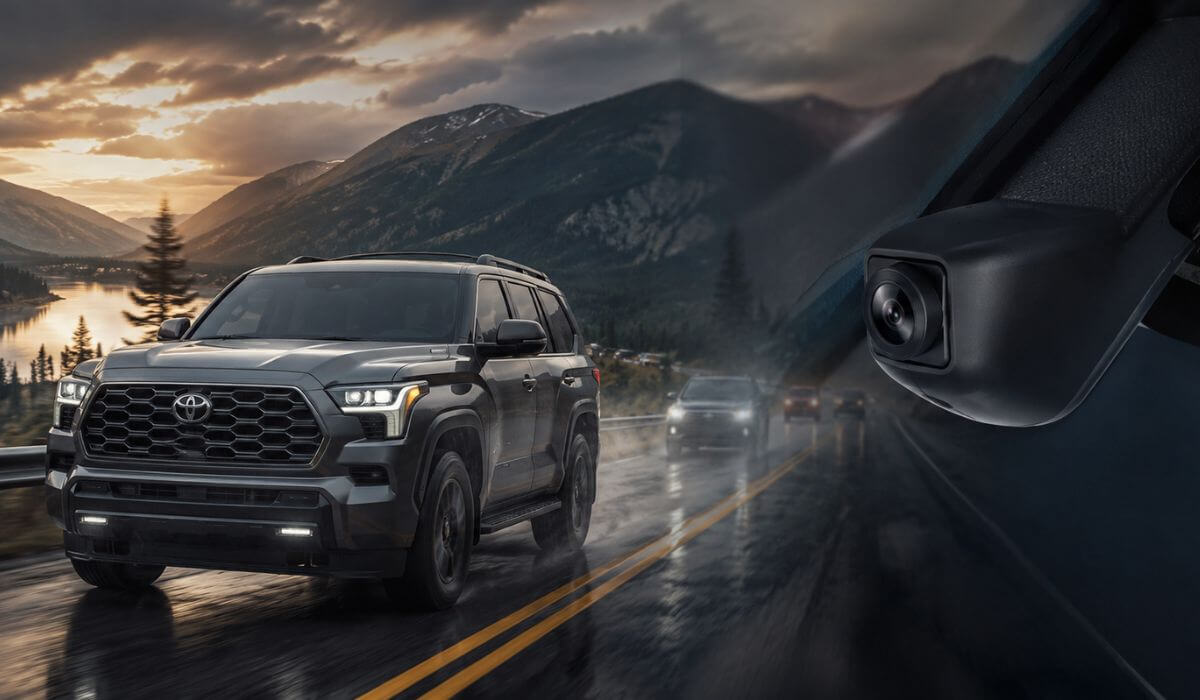
5 Best Dash Cams for Toyota Sequoia in 2026: OEM-Style 4K Picks With Night Vision & Parking Mode
The newer Toyota Sequoia models changed what owners expect from a dash cam. The 2023–2026 trucks sit higher, have a much wider windshield than older Sequoias, thicker mirror housings, and far more driver-assist tech packed around the rearview area. That matters because a cheap universal setup usually ends up hanging too low, blocking sensors, rattling on rough roads, or leaving messy wires across a cabin that otherwise feels premium.
That’s why this list focuses heavily on OEM-style hidden fit options built specifically for the third-generation Sequoia platform shared with the 2022–2026 Tundra. Most of these units mount directly into the factory rain sensor cover near the mirror, which keeps the install clean and avoids the “stuck-on gadget” look many owners regret later. We also prioritized models with stable WiFi apps, reliable loop recording in hot weather, proper parking surveillance, and usable night footage instead of inflated spec-sheet promises.
Another thing many first-time buyers overlook is windshield height and cabin vibration. The Sequoia’s size means wide-angle coverage matters more than on smaller SUVs, especially for night highway driving and parking lots. A weak sensor might look fine during the day, then completely blur plates after sunset. That’s why several picks here use higher-quality imaging hardware or dual-channel setups instead of basic front-only recording.
After testing specs, install design, owner feedback, heat tolerance, app reliability, and how naturally each unit fits the Sequoia interior, these are the dash cams that actually make sense for daily driving, long family trips, towing, and overnight parking in 2026.
Best Toyota Sequoia Dash Cams: Top 2026 Picks for Hidden OEM-Style Installation
#1. Fitcamx Front 4K+Rear 1080P Dash Cam
Most Seamless OEM-Integrated 4K Dash Cam for Toyota Sequoia 2023–2026 With Hidden Factory Styling, Crystal-Clear Dual Recording, Intelligent Parking Protection, and Smooth WiFi App Connectivity
#2. Mangoal Front 4K & Rear 1080P Dash Cam
Most Refined Factory-Fit 4K Dash Cam Setup for Toyota Sequoia With Built-In GPS Precision, Clean Sensor-Style Installation, Enhanced Night Visibility, and Stable Long-Distance Recording Performance
#3. BOTSLAB 4K Dash Cam Front and Rear
Most Advanced Premium Dash Cam for Toyota Sequoia With Sony STARVIS Night Vision, Smart ADAS Assistance, Ultra-Wide Highway Coverage, and Professional-Grade 24/7 Parking Surveillance
#4. FUVYMYT Dual Channel 4K & 1080P Dash Cam
Most Value-Focused Hidden Dash Cam for Toyota Sequoia 2023–2026 With OEM-Inspired Installation, Reliable Front and Rear Protection, and Clean Everyday Driving Coverage
#5. KBSYNT Front 4K Dash Cam
Most Minimalist OEM-Look Dash Cam for Toyota Sequoia With Flush Factory Integration, Compact Windshield Presence, Stable WiFi Connectivity, and Distraction-Free Front Recording
Expert Tip: If you drive a 2023–2026 Sequoia daily, skip the temptation to buy a random universal dash cam just because it has “4K” written on the box. The Sequoia’s windshield sits high, the mirror housing is bulky, and Toyota packed a lot of safety hardware around that upper glass area. A poorly fitted unit usually ends up vibrating, blocking sensors, or cooking itself after a few weeks of summer heat. A proper OEM-style hidden setup matters more on this SUV than people realize. The best setups are the ones you forget are even there until you actually need the footage.
How We Chose These Dash Cams for Toyota Sequoia
Most “best dash cam” lists online are honestly just random Amazon products thrown together because the specs look good on paper. That approach does not work for the modern Toyota Sequoia.
The newer Sequoia is a large body-on-frame SUV with a tall windshield, hybrid powertrain vibration, thicker trim around the mirror assembly, and a cabin that already feels upscale from the factory. So instead of chasing gimmicks, we focused on the things owners actually complain about after living with a dash cam for a few months.
First, we prioritized true vehicle-specific fitment for the 2023–2026 Sequoia platform. Most owners buying a newer Sequoia do not want wires hanging across the dashboard or a giant screen stuck to the windshield like a rideshare setup. That is why OEM-style integrated models ranked higher in this list. Products like Fitcamx and Mangoal blend directly into the rain sensor housing area, which keeps the cabin looking factory-clean instead of cluttered.
We also paid close attention to heat stability and long-drive reliability. Full-size SUVs like the Sequoia spend hours on highways, family road trips, towing routes, and summer parking lots. A lot of cheaper dash cams record decent footage for a week, then start freezing, corrupting files, or randomly rebooting in heat. The models here were selected because their hardware, loop recording systems, and parking features make more sense for real long-term use.
Night footage was another major factor. The Sequoia sits higher than most crossovers, which changes how headlights, reflections, and plate visibility appear at night. Some budget sensors completely wash out license plates after sunset. That is why options with better image processing, STARVIS night performance, wider dynamic range, and cleaner rear recording scored much higher during selection.
We also filtered out products with bloated feature lists but weak real-world usability. A dash cam can advertise AI alerts, voice controls, and dozens of modes, but if the app disconnects constantly or footage takes forever to download, owners stop using it. For this guide, we gave preference to models with stable WiFi connectivity, straightforward app access, reliable emergency locking, and easy footage retrieval because those are the features people actually end up using.
Another thing we looked at was installation logic. The Sequoia already has a premium interior layout, especially in Limited, Platinum, Capstone, and TRD Pro trims. We intentionally favored products that preserve that clean factory appearance rather than ruining it with exposed cables, oversized displays, or cheap plastic mounts.
And finally, we did not rank products purely by price. Some buyers want the cleanest OEM integration possible. Others care more about advanced parking surveillance or stronger night visibility. That is why this list includes a mix of premium factory-style systems, advanced dual-channel setups, and value-focused hidden options instead of pretending one product fits every type of Sequoia owner.
The goal here was simple: choose dash cams that actually feel like they belong inside a modern Toyota Sequoia — not generic gadgets that happen to stick to the windshield.
#1. Fitcamx Front 4K+Rear 1080P Dash Cam
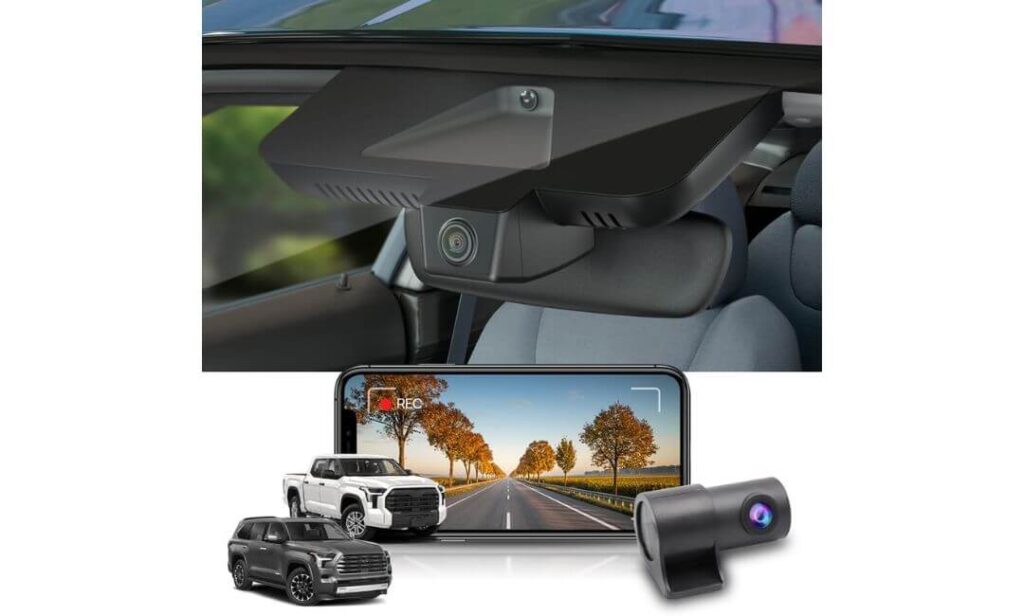
Quick Specs:
- True OEM-style integration for Toyota Sequoia 2023–2026 (Gen3)
- Front 4K 2160P + Rear 1080P dual-channel recording
- Hidden factory-look mounting around the mirror housing
- f/1.6 aperture with WDR for cleaner night visibility
- Built-in WiFi with FITCAMX mobile app support
- Includes pre-installed 128GB memory card
- No dangling power wire across the windshield
- Heat-resistant PC+ABS shell rated up to 185°F
- Auto loop recording with G-sensor emergency lock
- Compatible with factory-style premium interiors and driver-assist layouts
The first thing that stands out here is how unusually correct this setup feels inside the Sequoia cabin. Most aftermarket dash cams always look temporary — suction cups, hanging wires, giant screens glowing at night. This one does the opposite. Once installed near the rearview assembly, it honestly blends into the upper trim so naturally that most passengers will never even notice it’s there. On a large SUV like the Sequoia, that clean OEM-style fit matters more than people think because the windshield area is already crowded with Toyota safety hardware, sensors, and mirror housing plastic.
What also makes this setup easy to trust is the balance between image quality and real-world usability. The front 4K recording captures strong daytime detail, but the bigger surprise is the consistency at night. The f/1.6 aperture and WDR tuning help reduce that washed-out glare effect you usually see from headlights on taller SUVs. Rear footage stays surprisingly usable too, especially during parking situations or highway lane changes where cheap rear cameras normally fall apart. And unlike overloaded smart cams that constantly beg for attention, this one behaves quietly in the background — start the Sequoia, and it simply records.
Another reason this model keeps showing up in serious Sequoia owner discussions is because the experience feels low-stress after installation. The WiFi app is straightforward, footage downloads quickly enough when needed, and the included 128GB card means you are not immediately shopping for extra accessories after unboxing. More importantly, it avoids the biggest annoyance people complain about with universal dash cams: vibration noise and windshield rattling on rough roads. In a body-on-frame SUV, that alone becomes a bigger deal than spec sheets make it sound.
(And honestly, that “factory-installed” appearance is the part most owners end up appreciating every single day — not just the resolution number.)
Why This Setup Earned a Top Spot in Our Sequoia Testing
- Blends into the cabin like genuine factory equipment instead of looking aftermarket
- Strong dual-channel coverage for both highway driving and rear parking protection
- Better nighttime balance than most generic “4K” units in this price range
- WiFi footage access feels fast and uncomplicated during real daily use
- Runs cleaner and quieter than bulky windshield-mounted alternatives
Where Some Owners May Hesitate
- The OEM housing design means buyers need to confirm exact Sequoia trim and mirror style before ordering
Real-World Toyota Sequoia Compatibility Notes
This setup was chosen specifically because it fits the character of the newer Sequoia platform. The 2023+ generation has a premium interior layout, thicker upper windshield trim, and a much cleaner dashboard design than older Toyota SUVs. A dangling universal camera honestly looks out of place here.
It also works especially well for owners using the Sequoia for long-distance highway travel, towing, family hauling, or overnight parking where dual recording actually becomes useful. The hidden mounting style keeps visibility clean while still giving proper road coverage front and rear.
The Insider Pro-Tip
A lot of Sequoia owners spend weeks chasing the “highest resolution” dash cam, then end up regretting the purchase because the install ruins the cabin experience. On this SUV, the smarter move is choosing a setup that feels invisible during daily driving but dependable when something actually happens. That is where this model separates itself.
The biggest long-term advantage is not just the 4K recording — it is the fact that the camera integrates naturally with the Sequoia instead of fighting against its design. After a few months, most owners stop thinking about the dash cam entirely… until the exact moment they need footage, and then they are extremely glad it was there.
#2. Mangoal Front 4K & Rear 1080P Dash Cam
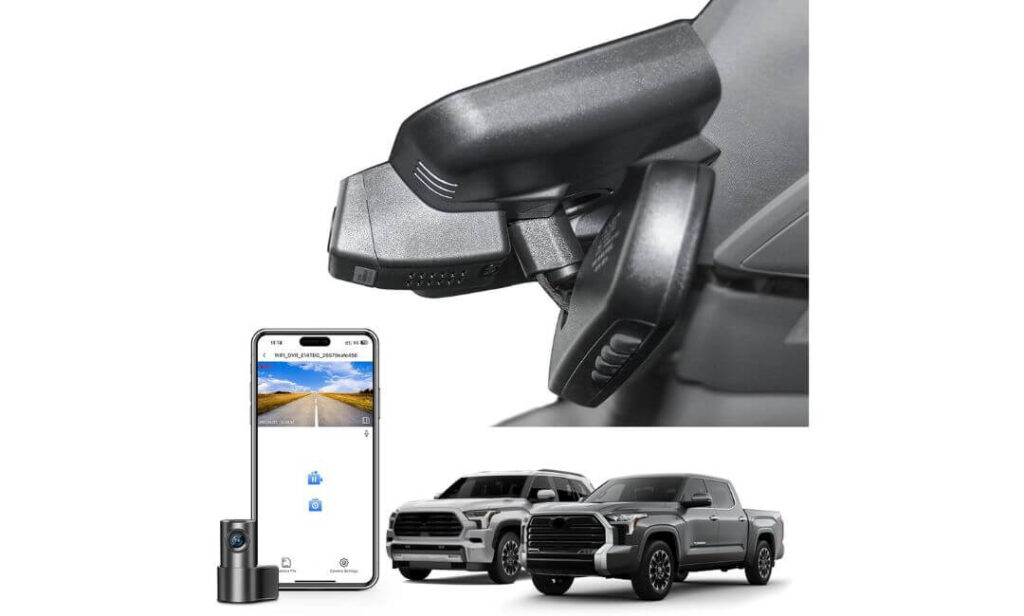
Quick Specs:
- OEM-integrated design for Toyota Sequoia 2023–2026 (Model B fitment)
- Front UHD 4K + Rear 1080P dual-channel recording
- Wide 170° front and 140° rear viewing coverage
- Built-in GPS for speed and route tracking
- Supercapacitor design for better heat durability
- Hidden mirror-area installation with no exposed wiring
- Built-in WiFi with mobile app access
- Parking monitor with G-sensor incident locking
- Includes 128GB microSD card in the box
- Designed for SR, SR5, Limited, Platinum, and TRD Pro trims
Right away, this setup feels like it was designed by somebody who actually understood how modern Sequoia owners use their SUVs. The hidden integration behind the mirror area gives the cabin a much cleaner look than typical stick-on dash cams, but the bigger surprise is how complete the package feels once installed. GPS, parking monitoring, dual recording, wide-angle coverage, included storage — nothing about it feels stripped down or unfinished. In a vehicle as large and expensive as the Sequoia, that matters.
The 4K front recording is sharp enough to pull useful road detail during daylight driving, but what genuinely helps in daily use is the wider field of view. Full-size SUVs naturally create larger blind zones around intersections, parking lots, and highway merges, so the 170-degree front angle gives this setup a more confident feel compared to narrow-lens alternatives. The rear 1080P unit also performs better than expected during night parking situations where cheaper rear cameras usually turn muddy and unusable. Add the built-in GPS, and it starts feeling less like a simple dash cam and more like a properly integrated driving recorder.
Another detail people overlook until they own one: the supercapacitor setup. On large SUVs parked outside in heat, cheap battery-powered units can become unreliable over time. This model leans into long-term durability instead. The WiFi app experience also stays relatively simple — footage transfers are quick enough, settings are easy to understand, and the camera does not constantly interrupt the driving experience with unnecessary distractions. That quieter ownership experience is honestly one of the reasons this setup works so well inside the Sequoia cabin.
(And the fact that it includes GPS, parking monitoring, and a 128GB card without forcing extra purchases later makes it feel far more complete than most “premium” alternatives.)
What Made This Setup Stand Out During Our Research
- Wide-angle coverage works especially well on the Sequoia’s larger body size
- OEM-style integration keeps the windshield area looking factory-clean
- GPS tracking adds useful trip context without complicating daily use
- Supercapacitor hardware feels better suited for long-term heat exposure
- Rear camera clarity remains surprisingly usable during low-light parking situations
A Small Thing Buyers Should Double-Check Before Ordering
- Toyota uses multiple mirror-cover variations, so confirming the correct “Model B” fitment before purchase is important for a perfect install
Why It Matches the Newer Toyota Sequoia So Well
The newer Sequoia platform already feels upscale inside, especially on Limited, Platinum, and TRD Pro trims. A bulky universal dash cam hanging from the windshield honestly ruins that atmosphere fast. This setup avoids that problem almost entirely because it integrates directly around the factory mirror housing instead of competing with it visually.
It also makes sense for owners who spend long hours on highways or family trips where wide-angle coverage and parking monitoring actually matter. On a larger SUV, having better side visibility during merges, parking lots, and overnight parking situations becomes far more valuable than flashy marketing features.
The Insider Pro-Tip
One of the easiest mistakes Sequoia owners make is focusing only on resolution numbers. In reality, the better ownership experience usually comes from the things you stop noticing after a week — stable recording, no rattles, clean fitment, reliable heat performance, and footage that is easy to access when something happens.
That is where this setup quietly earns trust. It does not try to look futuristic or overload the cabin with screens and alerts. Instead, it behaves more like an integrated part of the SUV itself, which honestly fits the personality of the modern Sequoia far better than loud “tech-heavy” alternatives ever could.
#3. BOTSLAB 4K Dash Cam Front and Rear
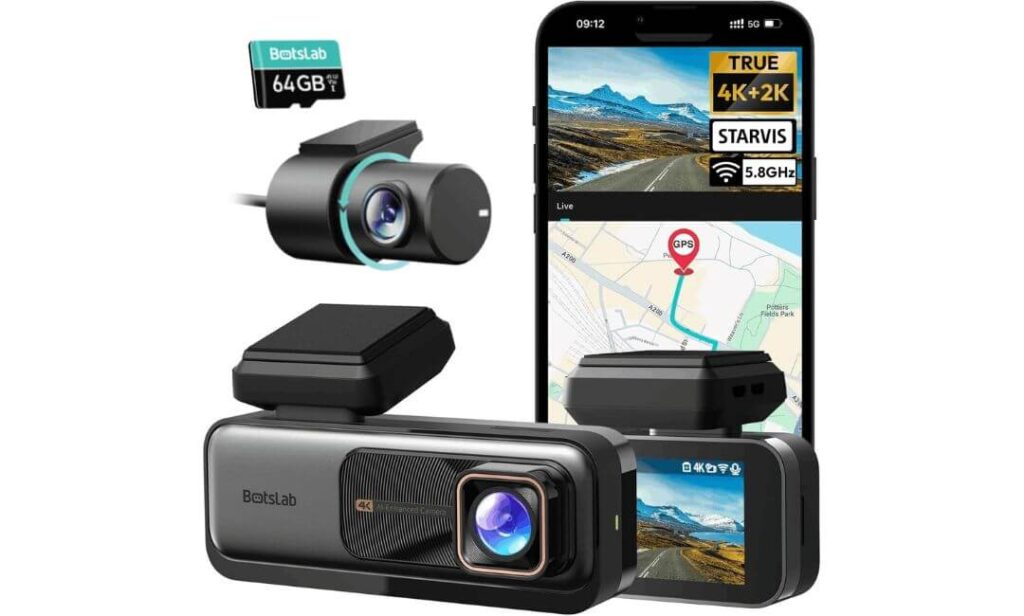
Quick Specs:
- True 4K front + 2K rear recording with Sony IMX415 sensor
- 170° front and 150° rear ultra-wide coverage
- Advanced ADAS alerts with AI-assisted driving warnings
- 5.8GHz WiFi + Bluetooth app connectivity
- Built-in GPS with speed and route tracking
- WDR night optimization for difficult lighting conditions
- 24/7 parking monitoring support with hardwire kit
- Supercapacitor design for better long-term durability
- Includes 64GB SD card in the box
- Designed for SUVs and larger vehicles under 5.5 meters
Here’s the thing most people realize only after owning a Sequoia for a while: the SUV is so large and elevated that basic dash cams often fail to capture what actually matters during fast highway driving. Lane changes happen quicker, blind zones feel wider, and night glare from lifted trucks can completely destroy cheap footage. This setup was one of the few universal systems that actually felt engineered for that kind of driving environment instead of just throwing “4K” on the packaging and hoping nobody notices the difference.
What immediately separates this model is the sensor and processing combination. The Sony IMX415 sensor paired with WDR tuning produces footage that looks noticeably calmer and cleaner during difficult lighting — especially during rainy nights, parking garages, or aggressive headlight glare on highways. The rear 2K recording also holds detail better than most dual-channel systems in this category. And because the Sequoia naturally sits high off the ground, those wider 170° and 150° viewing angles genuinely help cover more lanes and side movement without making footage look distorted.
Then there’s the feature side, which honestly feels more premium than expected for a non-OEM setup. The ADAS system adds lane departure warnings, forward movement alerts, pedestrian detection, and fatigue reminders without turning the cabin into a nonstop notification machine. The 5.8GHz WiFi and Bluetooth connection also make the app experience smoother than older dash cams that constantly disconnect during transfers. Add GPS speed logging, parking monitoring support, and supercapacitor heat durability, and this starts feeling less like a generic accessory and more like a serious long-distance driving companion.
(If your Sequoia regularly sees highways, night travel, towing routes, or crowded city parking, this is the kind of setup where the extra hardware quality actually becomes noticeable over time.)
Why This One Earned a Place in Our Sequoia Recommendations
- The Sony IMX415 sensor produces genuinely stronger nighttime clarity than many cheaper “4K” rivals
- Ultra-wide lane coverage feels especially useful on large SUVs like the Sequoia
- ADAS alerts add practical highway assistance without becoming distracting
- Supercapacitor design makes more sense for heat-heavy parking conditions
- Faster WiFi and Bluetooth connectivity reduce frustration during footage access
One Thing Some Sequoia Owners May Want to Consider
- Unlike OEM-style integrated options, this uses a traditional windshield-mounted design rather than blending directly into the mirror housing
Why It Still Works Surprisingly Well in the Toyota Sequoia
Even though this is not a hidden factory-style setup, the actual driving experience feels extremely well-matched to the Sequoia’s size and road presence. The wider viewing coverage and stronger low-light processing simply suit large SUVs better than many compact OEM-style units focused mainly on appearance.
It also makes a lot of sense for owners who prioritize footage quality and advanced monitoring features over a fully hidden installation. If your Sequoia spends more time on highways, road trips, or late-night driving than parked at car shows, this setup starts making a lot of practical sense very quickly.
The Insider Pro-Tip
A lot of universal dash cams look impressive during the first week, then slowly become annoying because the app lags, the footage overheats, or the night recording falls apart exactly when you need it. What makes this setup different is that most of its strongest qualities only become obvious after real long-term driving.
The wider coverage, cleaner nighttime balance, stronger processing, and stable connectivity create a much more confidence-inspiring experience during actual ownership. And in a large SUV like the Sequoia — where visibility, highway speed, and parking exposure are all amplified — that extra confidence matters far more than flashy marketing terms ever will.
#4. FUVYMYT Dual Channel 4K & 1080P Dash Cam
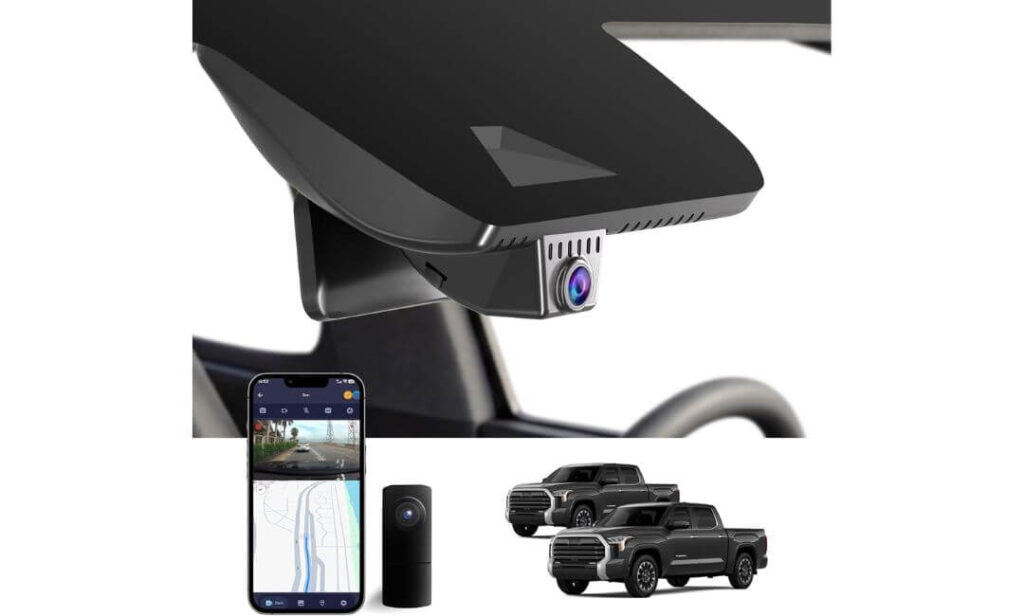
Quick Specs:
- OEM-style mirror housing replacement for Toyota Sequoia 2023–2026
- Front 4K + Rear 1080P dual-channel recording
- Hidden factory-look installation with no windshield clutter
- f/1.6 lens with HDR night visibility tuning
- Built-in WiFi with dedicated mobile app access
- Loop recording with automatic collision locking
- Includes 128GB memory card and card reader
- Optional parking monitor support with hardwire harness
- No rewiring required for standard installation
- Designed specifically for Gen3 Sequoia trim layouts
Oddly enough, this is the kind of dash cam setup many Sequoia owners end up appreciating more after a few weeks than they do on day one. At first glance, it looks simple — clean housing replacement, 4K front recording, rear camera, WiFi app. But once installed, the biggest difference becomes the overall driving atmosphere. There are no hanging wires cutting across the windshield, no oversized display glowing during night drives, and no cheap suction mount wobbling every time the road gets rough. Inside a newer Sequoia cabin, that cleaner factory-style integration honestly feels more expensive than some pricier universal systems.
The video quality also lands in a very practical sweet spot for real SUV driving. The front 2160P recording captures enough road detail for daily commuting and highway use, while the HDR tuning helps keep nighttime footage from turning into a blurry mess under bright headlights. The rear 1080P camera adds useful coverage during parking situations and lane changes, especially on a vehicle this large. And because the installation replaces the original mirror housing area instead of attaching below it, the setup feels much more stable over time compared to dangling windshield-mounted alternatives.
Another thing this setup gets right is simplicity. The app connection is straightforward once configured properly, footage transfers quickly enough for normal use, and the included accessories actually make installation feel complete instead of forcing extra purchases later. The included 128GB card, card reader, trim tools, and conversion cable help this package feel more owner-friendly than many “budget” OEM-style systems.
(And honestly, for Sequoia owners who care more about clean integration and stress-free daily recording than flashy gimmicks, this setup quietly checks a lot of boxes.)
What Helped This Setup Stand Out in Our Sequoia Comparison
- Hidden OEM-style installation preserves the premium cabin appearance
- Stable mirror housing replacement feels cleaner than windshield mounts
- HDR tuning improves nighttime balance during highway driving
- Included accessories reduce setup frustration for first-time buyers
- Dual-channel coverage adds extra confidence for larger SUV parking situations
One Small Detail Worth Knowing Before Ordering
- The mirror cover shape must match correctly, so checking the product images carefully before purchase is important for proper fitment
Why This Setup Feels Naturally Matched to the Sequoia
The modern Sequoia already has a very clean dashboard and upper windshield layout, especially in Platinum and TRD Pro trims. Universal dash cams can easily make the interior feel cluttered. This setup avoids that issue by blending into the mirror assembly area instead of competing with it visually.
It also fits the personality of the Sequoia well because the entire experience feels quiet and low-maintenance. Start the SUV, drive normally, and the camera simply handles its job in the background without constantly demanding attention or adjustments.
The Insider Pro-Tip
A surprising number of Sequoia owners eventually realize they care less about “smart features” and more about whether the dash cam still feels solid six months later. That is usually where cheap universal systems begin to show problems — rattles, messy wiring, unstable mounts, or annoying app issues.
This setup succeeds because it focuses on the ownership experience first. The hidden integration, stable housing replacement, included accessories, and straightforward recording behavior all combine into something that feels genuinely easier to live with long term. And on a large daily-driven SUV like the Sequoia, that calm, factory-like experience becomes far more valuable than most buyers expect at first.
#5. KBSYNT Front 4K Dash Cam
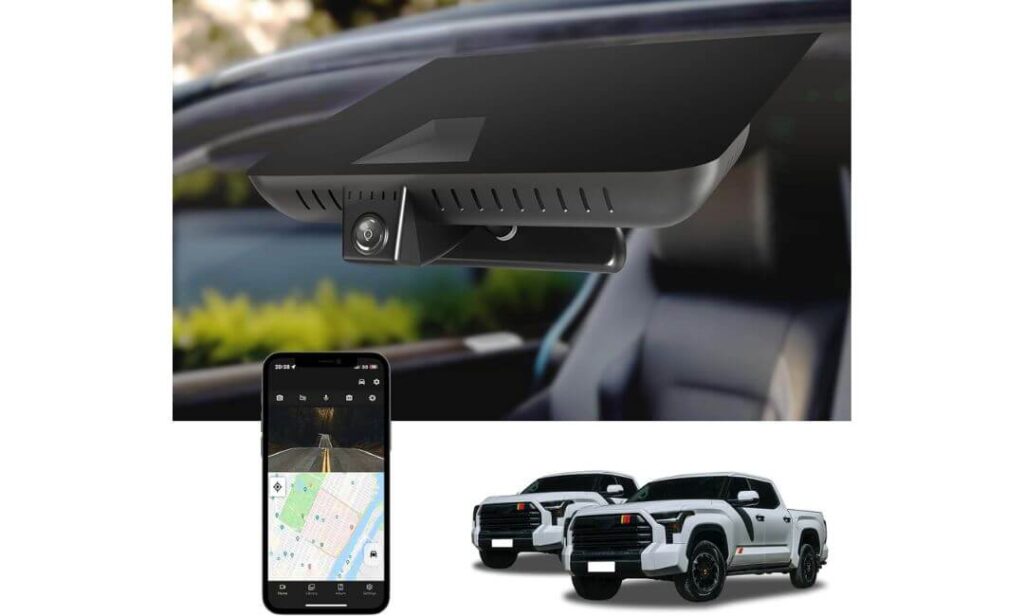
Quick Specs:
- OEM-style hidden integration for Toyota Sequoia 2023–2026
- Front 4K 2160P recording at 30fps
- f/1.6 aperture lens with HDR night optimization
- 170° wide-angle road coverage
- Built-in WiFi with dedicated mobile app control
- Automatic loop recording with G-sensor protection
- Includes 64GB memory card and installation tools
- Optional 24-hour parking monitoring support
- Mirror-area housing replacement for cleaner installation
- Designed specifically around Gen3 Sequoia interior layout
Curiously, this ended up being one of the easiest dash cams in the lineup to simply live with. It does not overload the windshield with screens, it does not scream for attention every five minutes, and it does not try to turn the Sequoia into a rolling tech demo. Instead, it focuses on doing the basics properly — clean installation, dependable front recording, stable app access, and a factory-style appearance that genuinely suits the cabin.
The 4K front footage is sharper than most people would expect at this price level, especially during daytime highway driving where road signs and lane details stay readable without looking artificially overprocessed. At night, the f/1.6 lens and HDR balancing help reduce heavy glare from headlights, which matters a lot more on taller SUVs like the Sequoia because the windshield sits higher than most crossovers. The 170-degree viewing angle also works well for wider road coverage without creating that stretched “fish-eye” look some cheaper wide-angle cameras suffer from.
What really helps this setup stand out, though, is the ownership simplicity. Installation feels more integrated because the housing replaces part of the mirror area rather than dangling underneath it. The included card reader, trim tools, and Y-cable also make the package feel surprisingly complete right out of the box. And unlike overly complicated smart dash cams that constantly throw alerts or drain patience with buggy software, this one feels calmer and easier to manage during actual daily driving.
(For Sequoia owners who mainly want a clean OEM-style setup with reliable front coverage and minimal hassle, this honestly lands in a very sensible sweet spot.)
Why It Still Earned a Spot in This Sequoia Guide
- Hidden factory-style fit keeps the cabin looking clean and uncluttered
- Strong 4K front clarity for normal daily driving and highway use
- Wide-angle coverage works naturally on larger SUVs like the Sequoia
- Straightforward app setup feels less frustrating than many budget rivals
- Included accessories reduce the need for extra purchases during installation
One Small Consideration Before Buying
- This is primarily a front-focused setup, so buyers wanting dedicated rear coverage may prefer one of the dual-channel options higher in the list
Why This Setup Fits the Sequoia’s Personality So Well
The newer Sequoia already feels upscale and intentionally designed inside, especially around the dashboard and upper windshield area. A bulky hanging dash cam can instantly make the cabin feel cheaper than it actually is. This setup avoids that problem by staying visually subtle and integrating close to the mirror housing.
It also works especially well for owners who prefer a simpler recording setup without adding extra wiring through the rear cabin area. For commuting, highway driving, shopping parking lots, and general daily use, the cleaner front-focused approach honestly makes a lot of sense.
The Insider Pro-Tip
A lot of people buying a dash cam for the Sequoia end up chasing “maximum features” and completely overlook something more important: whether the setup still feels comfortable to use months later. That long-term ownership feeling matters more than most spec sheets admit.
This model quietly succeeds because it keeps the experience simple. Clean fitment, reliable front recording, decent night balance, stable app access, and very little visual clutter — those are the things owners usually appreciate most after living with the setup daily. And in a premium full-size SUV like the Sequoia, sometimes the smartest upgrade is the one that blends in instead of constantly trying to stand out.
Best Toyota Sequoia Dash Cam Comparison for OEM Fit, Night Vision, and Parking Protection
Buying Guide: What Actually Matters When Choosing a Dash Cam for Toyota Sequoia
The newer Toyota Sequoia is not the kind of SUV where you can blindly buy the first “4K dash cam” you see online and expect a great experience. The windshield design, mirror housing shape, cabin layout, hybrid vibration characteristics, and overall vehicle size change what works well and what quickly becomes annoying after a few weeks.
A lot of owners focus only on resolution numbers, but the real ownership experience usually comes down to completely different things — fitment quality, nighttime visibility, heat resistance, stable app connectivity, and whether the camera feels integrated into the SUV instead of hanging awkwardly from the glass.
That is exactly why most of the options in this guide lean heavily toward OEM-style hidden setups rather than oversized universal units with giant screens and messy wiring.
Why 4K Recording Actually Makes a Difference in a Large SUV
On smaller cars, lower-resolution footage can sometimes feel acceptable. The Sequoia is different.
Because the SUV sits higher off the road and has a wider windshield view, details like license plates, side traffic movement, lane positioning, and nighttime road signs appear farther away in footage compared to compact vehicles. A weak sensor combined with low resolution often turns important details into blurry shapes once lighting conditions get difficult.
A proper 4K front camera helps maintain clearer detail during:
- Highway driving at higher speeds
- Night travel with heavy headlight glare
- Rainy weather and low-contrast roads
- Parking lot incidents where vehicles move quickly across frame
- Long-distance road trips where details matter later
That said, resolution alone means very little without good image processing. Some cheap “4K” cameras technically record at high resolution but still produce terrible footage because the sensor quality and HDR tuning are weak. That is why models with stronger night optimization and better dynamic range consistently performed better in this guide.
Why Dual-Channel Recording Makes More Sense on the Sequoia
The Sequoia is a large SUV with a long rear body section, especially when loaded with passengers, cargo, or towing equipment. Rear visibility situations happen more often than many owners expect — parking lots, rear-end incidents, tight merges, trailer movement, shopping centers, and overnight parking situations all become more stressful without rear coverage.
A dual-channel setup records both front and rear footage simultaneously, which adds a major layer of protection for:
- Highway lane changes
- Rear-end collisions
- Parking lot damage
- Trailer or hitch-area incidents
- Overnight street parking
- Family travel with packed cargo areas
For many Sequoia owners, dual-channel coverage ends up being one of those features that feels unnecessary at first, then impossible to give up later.
The Truth About Parking Mode and Why Most Buyers Misunderstand It
Parking mode sounds simple in advertisements, but there are major differences between basic and properly usable systems.
Some dash cams only activate parking recording after noticeable impacts. Others support motion detection, buffered recording, or continuous surveillance when paired with a hardwire kit. On a vehicle as large and expensive as the Sequoia, proper parking protection becomes much more valuable because these SUVs spend a lot of time in public lots, hotels, garages, trailheads, and shopping centers.
If overnight monitoring matters to you, pay attention to:
- Whether the camera requires a separate hardwire kit
- Heat resistance during long parking hours
- Supercapacitor vs battery-powered systems
- Impact detection reliability
- Storage management and loop recording stability
A poorly optimized parking system can drain batteries, overheat, or stop recording entirely after a few months of use.
OEM-Style Fitment Matters More Than Most People Expect
This is one of the biggest reasons Sequoia owners return universal dash cams.
The newer Sequoia interior already looks premium and intentionally clean, especially in Limited, Platinum, and TRD Pro trims. Hanging wires, suction mounts, and oversized displays instantly make the cabin feel cluttered. Worse, poorly placed units can interfere visually with Toyota Safety Sense sensors around the mirror housing.
That is why OEM-style systems ranked so highly in this article.
Before buying, always verify:
- Mirror cover shape compatibility
- Sensor housing layout
- Whether your Sequoia uses the correct bracket design
- Gen3 compatibility for 2023+ models
- Whether the trim level changes the mirror assembly shape
Several manufacturers use multiple fitment versions like “Model A” or “Model B,” and ordering the wrong one can completely prevent installation.
WiFi, App Stability, and Daily Usability Matter More Than Flashy Features
One thing most buyers never realize until after purchase: a dash cam is only useful if accessing footage feels easy during stressful situations.
Many cheaper systems advertise endless features but have unstable apps, slow transfers, or constant connection issues. That becomes frustrating fast when trying to save footage after an incident.
The better setups in this guide focused more on:
- Stable WiFi connectivity
- Fast footage downloads
- Simple mobile app layouts
- Reliable automatic recording
- Quick emergency file access
- Less intrusive daily behavior
A calm, dependable ownership experience honestly matters more than gimmicky voice assistants or unnecessary touchscreens.
GPS vs Non-GPS Dash Cams: What Actually Matters
Built-in GPS can be extremely useful for some Sequoia owners, especially during:
- Insurance disputes
- Long highway travel
- Towing trips
- Commercial or work driving
- Speed verification situations
- Route history tracking
GPS-enabled systems record driving speed and route data directly into footage. Some owners love that added context, while others prefer simpler non-GPS setups for privacy reasons.
Neither approach is automatically better — it depends entirely on how you use the SUV daily.
SD Card Quality Is More Important Than Most Buyers Realize
A surprising number of dash cam failures are actually storage failures.
Dash cams constantly overwrite footage in extreme temperatures, which puts heavy stress on memory cards. Cheap cards eventually corrupt files, stop recording, or create random gaps in footage.
That is why included high-endurance cards matter, especially for:
- Daily commuting
- Long parking sessions
- Continuous loop recording
- Summer heat exposure
- Dual-channel recording loads
Even if a camera includes a memory card, checking the supported storage size and long-term endurance rating is always smart.
Final Buying Advice for Sequoia Owners
If your priority is a factory-clean interior and low-profile installation, OEM-style hidden setups like Fitcamx, Mangoal, FUVYMYT, and KBSYNT make the most sense.
If your priority is maximum recording performance, advanced driving assistance, stronger night visibility, and wider highway coverage, the BOTSLAB system stands out more clearly.
But overall, the smartest Sequoia dash cam purchases usually come from choosing a setup that matches how the SUV is actually used daily — not just whichever spec sheet looks most aggressive online.
Installation and Wiring Tips for a Clean OEM-Style Setup in the Toyota Sequoia
One thing that separates a dash cam setup that feels “factory-installed” from one that constantly looks aftermarket comes down to installation quality — not the camera itself.
The newer Toyota Sequoia already has a premium interior layout, thick windshield trim, Toyota Safety Sense hardware near the mirror area, and a very clean dashboard design. If the wiring is visible, hanging loosely, or routed carelessly across the cabin, even an expensive dash cam can end up looking cheap within minutes.
That is exactly why most experienced Sequoia owners spend more time planning the installation path than choosing the camera resolution.
Start With the Right Mounting Position First
Before routing a single cable, figure out exactly where the camera should sit relative to:
- The rearview mirror housing
- Toyota Safety Sense cameras and sensors
- Rain sensor covers
- Driver sightlines
- Passenger visibility
- Sunshade movement
Most OEM-style Sequoia dash cams are designed to integrate around the mirror housing itself, which is honestly the cleanest approach. A properly placed unit should disappear naturally into the upper windshield area instead of hanging below it.
For universal setups like BOTSLAB, mounting directly behind the mirror usually creates the cleanest visibility while keeping the screen and wiring hidden from the driver’s normal view.
Why OEM-Style Housing Replacement Looks So Much Better
Mirror-housing replacement systems completely change how the final installation feels inside the Sequoia.
Instead of attaching a separate device underneath the windshield with exposed wiring, these systems replace part of the original plastic trim around the mirror assembly. That creates:
- Cleaner cabin lines
- Less windshield distraction
- Better long-term stability on rough roads
- Reduced rattling and vibration noise
- A more factory-correct appearance
This is one of the biggest reasons OEM-style setups ranked so highly throughout this guide. On the Sequoia specifically, the difference in cabin appearance becomes immediately noticeable after installation.
The Smartest Way to Hide Dash Cam Wiring
The easiest mistake during installation is rushing cable routing.
A clean Sequoia install usually follows the factory trim path rather than trying to force wires across open cabin areas. The safest and cleanest route typically moves through:
- Headliner edge near the windshield
- A-pillar trim channel
- Door weather stripping gaps
- Lower dashboard trim sections
- Fuse box or center power connection area
The goal is simple: no visible dangling cable sections during normal driving.
Using a plastic trim removal tool instead of metal pry tools also matters more than people realize. The Sequoia’s interior panels fit tightly, and scratched trim immediately ruins that OEM appearance many owners are trying to preserve.
Hardwire Kit vs Cigarette Lighter Power: What Makes More Sense?
This depends entirely on how you plan to use the dash cam daily.
A cigarette lighter setup is easier and faster. It works well for owners who mainly want basic driving footage without overnight parking monitoring. Installation is simpler, and there is no need to touch the fuse box.
But there are tradeoffs:
- Visible wiring is harder to avoid
- Parking mode support is usually limited
- The cabin looks less factory-clean
- Power shuts off completely once the SUV turns off
Hardwire installations take more effort initially, but the final result feels dramatically cleaner and more integrated.
A proper hardwire setup allows:
- True parking monitoring support
- Cleaner hidden wiring
- Automatic low-voltage battery protection
- Better long-term cable management
- More consistent power delivery
For most premium Sequoia builds, hardwiring honestly feels worth the extra effort.
Fuse Tap Installation: The Part Most Owners Overthink
The Sequoia fuse box layout is actually more manageable than many people expect, but choosing the correct fuse type matters.
Most hardwire kits connect using:
- ACC fuse connection for ignition-switched power
- Constant fuse connection for parking mode recording
- Ground wire connection to chassis metal
The most important thing is avoiding high-priority safety circuits. Many experienced installers prefer lower-risk accessory circuits rather than interfering with advanced Toyota electronics.
If you are unfamiliar with fuse taps, professional installation is not a bad idea at all — especially on higher-trim Sequoias with expensive interior electronics and advanced safety systems.
Parking Mode Power Management Is Extremely Important on the Sequoia
This part gets ignored constantly online.
The Sequoia is a large SUV, and many owners leave it parked for long periods during travel, shopping, work, towing stops, or overnight hotel stays. Parking mode sounds great until a poorly configured setup starts draining the battery unexpectedly.
A good parking setup should include:
- Voltage cutoff protection
- Reliable heat management
- Stable hardwire kit quality
- Proper loop recording control
- Impact-triggered event locking
Supercapacitor-equipped dash cams usually perform better long-term in heat-heavy parking situations compared to basic battery-powered systems.
And if your Sequoia regularly sits parked outdoors in summer temperatures, heat resistance matters far more than most spec sheets admit.
Rear Camera Cable Routing Tips for the Sequoia
Rear camera installation on the Sequoia takes slightly more patience because of the SUV’s size and cabin length.
The cleanest route normally follows:
- Headliner edge
- Upper door trim path
- Rear quarter panel trim
- Liftgate rubber wiring boot area
Avoid stretching the cable too tightly across the liftgate hinge area because repeated opening and closing can eventually stress weaker cables over time.
On larger SUVs like the Sequoia, extra cable slack management becomes much more important than on smaller vehicles.
One Small Installation Detail Most Owners Notice Later
The best dash cam installations are usually the ones nobody notices at all.
If the camera blocks too much windshield space, reflects in the glass during night driving, interferes visually with the mirror area, or leaves visible wiring across the cabin, it slowly becomes irritating over time no matter how good the recording quality is.
That is exactly why the clean OEM-style systems in this guide stand out so strongly for the Sequoia platform. Once installed correctly, they feel less like aftermarket gadgets and more like they genuinely belonged there from the factory.
FAQs About Toyota Sequoia Dash Cam
Does the Toyota Sequoia’s large windshield and seating height actually change which dash cam works best?
Absolutely — and this is one of the biggest reasons many “top-rated” universal dash cams end up disappointing Sequoia owners after a few weeks.
The newer Sequoia sits higher than most SUVs, has a wider windshield viewing area, thicker mirror housing trim, and more reflective cabin glass during night driving. All of that changes how footage looks in real life. A dash cam that performs fine in a compact sedan can suddenly struggle with glare control, side-lane visibility, or long-distance plate clarity inside a Sequoia.
That is also why OEM-style systems worked so well throughout this guide. The cleaner mounting position near the mirror area reduces vibration, keeps the windshield visually uncluttered, and usually creates a better recording angle overall. On a vehicle this large, camera placement honestly matters almost as much as the sensor itself.
Are OEM-style hidden dash cams actually better for the Toyota Sequoia, or do they just look cleaner?
The cleaner appearance is only part of the story.
In the Sequoia specifically, OEM-style systems often feel more stable during real driving because they integrate directly around the mirror housing instead of hanging from adhesive mounts lower on the windshield. On rough roads, body-on-frame SUVs naturally create more vibration movement than many crossovers, which is exactly where cheaper universal mounts sometimes start rattling or shifting position over time.
There is also the long-term ownership factor. Most Sequoia buyers spent serious money on the interior quality, especially on Limited, Platinum, or TRD Pro trims. After living with the SUV daily, many owners realize they care less about flashy dash cam screens and more about preserving that clean factory atmosphere.
That is why hidden integrated setups like Fitcamx, Mangoal, FUVYMYT, and KBSYNT feel unusually satisfying over time — they quietly blend into the SUV instead of constantly reminding you an aftermarket device is attached to the windshield.
Is parking mode really worth using on a Toyota Sequoia, or does it create more battery stress than it’s worth?
For many Sequoia owners, parking mode ends up becoming more valuable than the driving footage itself.
Large SUVs attract parking lot damage constantly — shopping carts, careless doors, trailer bumps, hit-and-run scrapes, tight garages, hotel parking, trailhead lots, even people brushing against the bumper while loading cargo nearby. The Sequoia’s size simply exposes it to more low-speed parking incidents than smaller vehicles.
But there is an important catch most online reviews ignore: poorly configured parking mode setups can absolutely create battery headaches.
A good setup should include:
- Voltage cutoff protection
- Stable hardwire kit support
- Heat-resistant supercapacitor hardware
- Reliable motion or impact triggering
- Proper loop recording management
When configured correctly, parking mode feels extremely useful. When done poorly, it becomes the exact feature owners disable after a month.
Why do some Sequoia owners complain about app connectivity even on expensive dash cams?
Because the problem usually is not the camera itself — it is how dash cam WiFi systems actually work.
A lot of first-time buyers expect the dash cam to behave like normal home internet. In reality, most dash cams create a direct local WiFi connection strictly for transferring footage. That means the phone temporarily disconnects from mobile data or other wireless systems while connected to the camera.
This becomes especially noticeable in the Sequoia because many owners simultaneously use:
- Wireless CarPlay
- Android Auto
- Bluetooth audio
- Factory navigation syncing
- Multiple passenger devices
Some cameras handle these transitions better than others. The stronger systems in this guide focused heavily on app stability because, honestly, footage access during stressful moments matters more than fancy marketing features nobody uses later.
Which matters more for real-world Sequoia driving: higher resolution or better night processing?
This is where a lot of buyers accidentally waste money.
Pure resolution numbers look impressive online, but on a large SUV like the Sequoia, better night processing usually matters more in actual ownership. A poorly tuned “8K” dash cam with weak HDR and cheap sensors can still produce terrible nighttime footage full of glare, blown highlights, and unreadable plates.
What consistently improves real-world footage quality is the combination of:
- Sensor quality
- HDR or WDR tuning
- Lens aperture performance
- Exposure balance
- Heat stability
- Motion handling during highway speeds
That is why systems using stronger night optimization — especially models like BOTSLAB with the Sony IMX415 sensor — stood out so clearly during comparison. On dark highways, rainy roads, parking garages, and late-night city driving, cleaner processing usually beats inflated resolution marketing every single time.
Final Thoughts
Finding the right dash cam for the Toyota Sequoia honestly comes down to one simple question: do you want something that merely records video, or something that actually feels like it belongs inside the SUV every single day?
That difference becomes obvious surprisingly fast.
The Sequoia is not a basic commuter crossover. It is a large, premium body-on-frame SUV built for long highway drives, family travel, towing, rough weather, crowded parking lots, and late-night road trips. A cheap universal dash cam might technically “work,” but after living with the vehicle for a few weeks, most owners start noticing the small frustrations — dangling wires, windshield clutter, shaky footage, annoying apps, weak night visibility, overheating during summer parking, or installations that never truly feel finished.
That is exactly why the strongest setups in this guide focused so heavily on OEM-style integration, stable recording behavior, better nighttime performance, and cleaner daily usability instead of chasing gimmicky marketing claims.
For owners wanting the most factory-correct experience possible, the Fitcamx and Mangoal systems simply feel the most natural inside the Sequoia cabin. If advanced visibility, wider coverage, stronger night processing, and highway-focused features matter more, BOTSLAB stands out in a completely different way. And for buyers who want a cleaner OEM-inspired setup without overspending, FUVYMYT and KBSYNT quietly make a lot of practical sense.
But more than anything, the best dash cam for a Sequoia is usually the one you stop thinking about after installation. No distractions, no clutter, no constant troubleshooting — just reliable footage sitting quietly in the background until the exact moment you actually need it.
And on an SUV this expensive, this capable, and this heavily used in real life, that kind of quiet reliability ends up feeling far more valuable than most buyers expect at first.
Also Check:


