
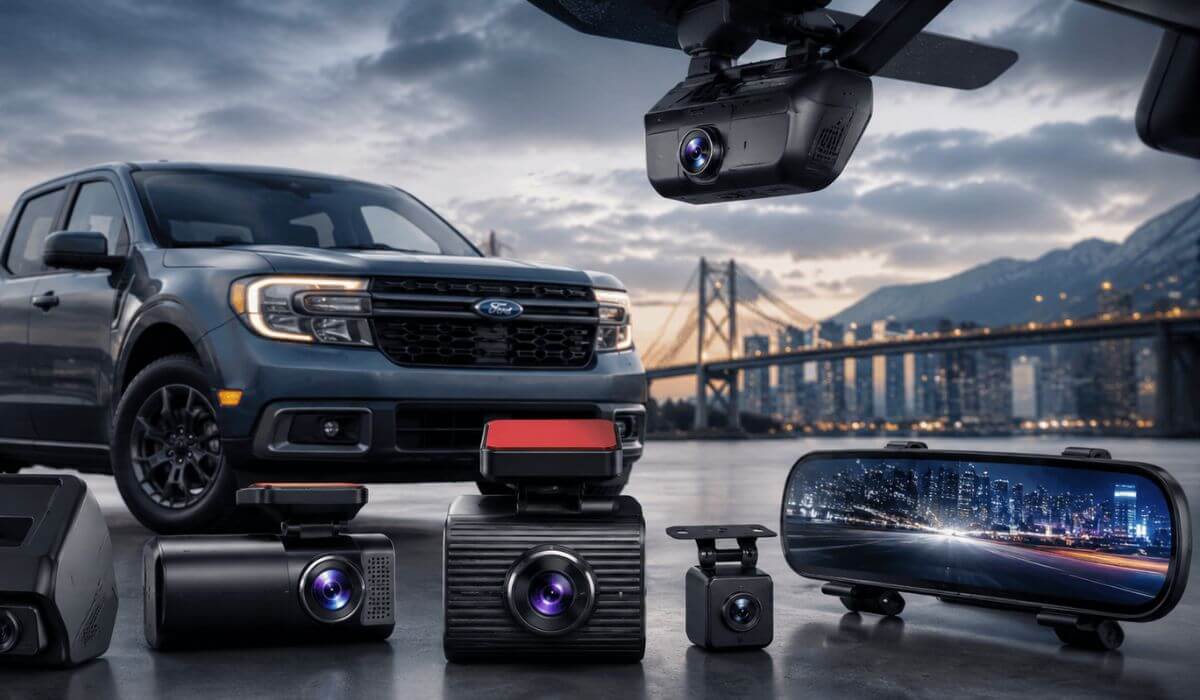
5 Best Dash Cams for Ford Maverick in 2026: Clean OEM Fits, 4K Video & Night Vision
If you drive a 2022–2026 Ford Maverick, you already know this truck attracts a different kind of owner. People buy the Maverick because it’s practical, easy to daily-drive, and packed with surprisingly good tech for the price. But the one thing most owners realize after a few weeks is this: the stock camera system isn’t enough once you start parking in tight city spots, hauling gear, commuting at night, or leaving the truck outside for long hours.
That’s exactly why this list exists.
We didn’t just throw random Amazon dash cams into a roundup. The Maverick has a fairly compact windshield area, a deep mirror housing, and a cabin design where bulky cameras can quickly look messy or block visibility. Some owners also prefer an OEM-style hidden setup, while others want a 4K front and rear dash cam with parking mode that can survive summer heat and capture clean nighttime footage without glare.
So for this guide, we focused on what actually matters in a Ford Maverick dash cam setup: clean fitment, reliable parking recording, stable app connectivity, compact size, STARVIS night sensors, and cameras that don’t look awkward inside the Maverick’s modern interior. A few of these options are specifically built for the Maverick itself, which honestly makes installation way cleaner than universal dash cams.
Best Ford Maverick Dash Cams: Top 2026 Picks for OEM Fit, 4K Clarity & Parking Protection
#1. Fitcamx Front 4K+Rear 1080P Dash Cam
Best OEM-Look Dash Cam for Ford Maverick 2022–2026 With Hidden Factory-Style Installation and Clean Parking Mode Setup
#2. Mangoal Front 4K and Rear 1080P Dash Cam
Best Integrated Dash Cam for Ford Maverick Hybrid and EcoBoost Models With UHD Recording and Factory-Fit Design
#3. ROVE R2-4K DUAL Dash Cam Front and Rear
Best 4K Front and Rear Dash Cam for Ford Maverick Daily Driving, Night Vision and Long Highway Commutes
#4. WOLFBOX G900 PRO Mirror Dash Cam
Best Mirror Dash Cam for Ford Maverick Trucks With Wide Rear Visibility, 4K Recording and Smart Voice Control
#5. Garmin Dash Cam™ X110
Best Compact Dash Cam for Ford Maverick Owners Wanting Simple Installation, GPS Tracking and Clean Windshield Fit
Expert Tip: One thing a lot of Maverick owners don’t realize until after installation: a dash cam that looks good on paper can feel terrible inside this truck if the body is too bulky or the app connection keeps dropping. The Maverick’s windshield angle and compact upper glass area make camera size and mounting position way more important than people expect. That’s why a few smaller OEM-style cameras on this list honestly feel more “factory” and less distracting during daily driving than some expensive oversized 4K units.
How We Chose These Dash Cams for the Ford Maverick
There are hundreds of dash cams online right now, but most of them were never designed with the Ford Maverick cabin layout in mind. Some block the passenger-side view, some hang too low below the mirror, and some simply don’t handle heat or nighttime glare well enough for real daily use.
So instead of chasing spec-sheet hype, we focused on what actually matters once you live with a dash cam every day inside a Maverick.
The first thing we looked at was fitment and visibility. The Maverick has a relatively tight windshield area near the mirror housing, especially on XLT and Lariat trims with extra sensors and equipment around the top glass section. That’s why OEM-style options like the Fitcamx and Mangoal stood out immediately. They blend into the interior instead of looking like an accessory stuck onto the windshield.
We also paid close attention to night recording quality, because that’s where cheaper cameras usually fall apart. A lot of budget “4K” dash cams look sharp during the day, then turn grainy the second street lighting gets weak. Cameras using newer STARVIS sensors performed much better for reading plates, controlling glare, and keeping motion smoother during rain or highway driving at night.
Another thing we filtered aggressively was fake feature overload. Some dash cams advertise WiFi, parking mode, voice control, GPS, HDR, AI alerts, and 15 other things — but the actual app experience feels unstable or frustrating after a few weeks. For this list, we prioritized cameras that owners consistently keep installed long-term instead of returning after the honeymoon phase.
We also avoided recommending giant commercial-style truck cameras that feel excessive in a Maverick cabin. This truck works best with setups that stay clean, compact, and easy to forget about once installed. That’s honestly why integrated systems and slim mirror-style cameras scored higher here than flashy oversized units.
And finally, we looked at something most roundups completely ignore: real-world daily usability. Things like heat resistance during summer parking, startup reliability, app reconnect speed, whether the camera rattles on rough roads, and how annoying the wiring feels after installation matter just as much as resolution numbers.
That’s why every pick in this guide was chosen to match how Maverick owners actually use these trucks in 2026 — commuting, road trips, apartment parking, grocery runs, camping weekends, and long hours sitting outside in unpredictable weather.
#1. Fitcamx Front 4K+Rear 1080P Dash Cam
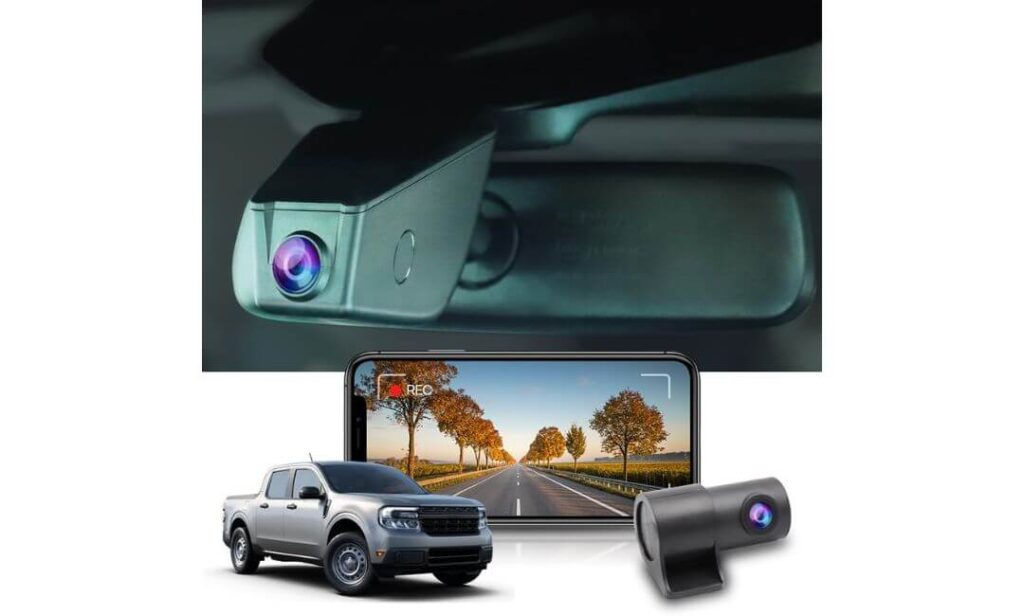
Quick Specs:
- True OEM-style housing made specifically for the Ford Maverick mirror area
- Front 2160P + Rear 1080P recording at 30fps
- 170-degree wide front viewing angle for better lane coverage
- Powered through OBD or fuse box depending on setup preference
- Built-in WiFi with direct phone footage access
- Includes pre-installed 128GB memory card
- WDR low-light balancing for cleaner nighttime footage
- Designed to work without interfering with factory CarPlay setup
- Compact hidden-body design with no hanging screen or loose wiring
- Heat-resistant build quality rated up to 185°F
The first thing that stands out here isn’t even the resolution — it’s how unbelievably clean this setup looks once installed inside the Maverick. Most universal dash cams still leave you with visible wires, bulky suction mounts, or that awkward “aftermarket gadget” look hanging below the mirror. This one doesn’t. It blends into the upper windshield area almost like Ford designed it there from the factory.
And honestly, that matters more in the Maverick than people realize.
Because the truck already has a fairly compact upper windshield section, oversized dash cams can start feeling annoying during daily driving. This setup avoids that completely while still giving you sharp 4K front recording and a rear 1080P camera that’s genuinely useful during parking incidents, traffic stops, or highway driving at night. The WDR balancing also helps a lot once the sun goes down — especially with bright LED headlights hitting the rear glass.
(And yes, the included 128GB card means you’re not immediately shopping for extra storage the same day.)
Another reason this setup made the top spot is the overall ownership experience. The WiFi app connection feels straightforward, startup is automatic, and the camera doesn’t constantly demand attention after installation. A lot of Maverick owners simply want something that records reliably every single drive without turning into another tech problem inside the cabin. That’s exactly the lane this setup stays in.
What also impressed us is the flexibility. Some owners prefer OBD power because it’s quicker and cleaner, while others hardwire through the fuse box for parking mode stability. Having both options matters because Maverick owners use these trucks differently — commuters, weekend campers, apartment parking, long-distance drivers — and this setup adapts well without becoming complicated.
Why This Setup Quietly Outclasses Most Universal Dash Cams
- Looks factory-installed once mounted inside the mirror housing
- Compact body doesn’t clutter the Maverick windshield area
- Reliable 4K front footage with surprisingly balanced night exposure
- Rear camera actually feels usable instead of “included just because”
- App controls stay simple enough for non-tech owners
One Thing Worth Knowing Before Ordering
- Installation is cleaner than most dash cams, but checking the correct mirror cover version before purchase is extremely important
Why It Fits the Ford Maverick Cabin Better Than Most Dash Cams
The Maverick interior has a modern, clean dashboard layout, and that’s exactly why giant hanging dash cams feel out of place inside this truck. This setup follows the factory lines near the mirror instead of adding visual clutter across the windshield.
It also helps that the camera body stays mostly hidden from the driver’s seat. During long commutes or nighttime driving, that smaller integrated profile becomes much easier to live with than oversized touchscreen-style cameras constantly sitting in your peripheral vision.
The Insider Pro-Tip
If you mostly park outside — apartment lots, office parking, street parking, grocery runs — prioritize a dash cam that you’ll actually leave installed long-term without getting annoyed by it. That’s where OEM-style systems quietly win. People obsess over resolution numbers, but most owners stop caring about “8K marketing hype” once they realize clean fitment and reliable recording matter more every single day.
And here’s the real truth most roundup articles never mention: the best dash cam for the Maverick usually isn’t the flashiest one. It’s the one that disappears into the truck, starts recording every time without drama, survives summer heat, and quietly catches the footage you hope you never need. This setup feels built around that exact mindset.
#2. Mangoal Front 4K and Rear 1080P Dash Cam
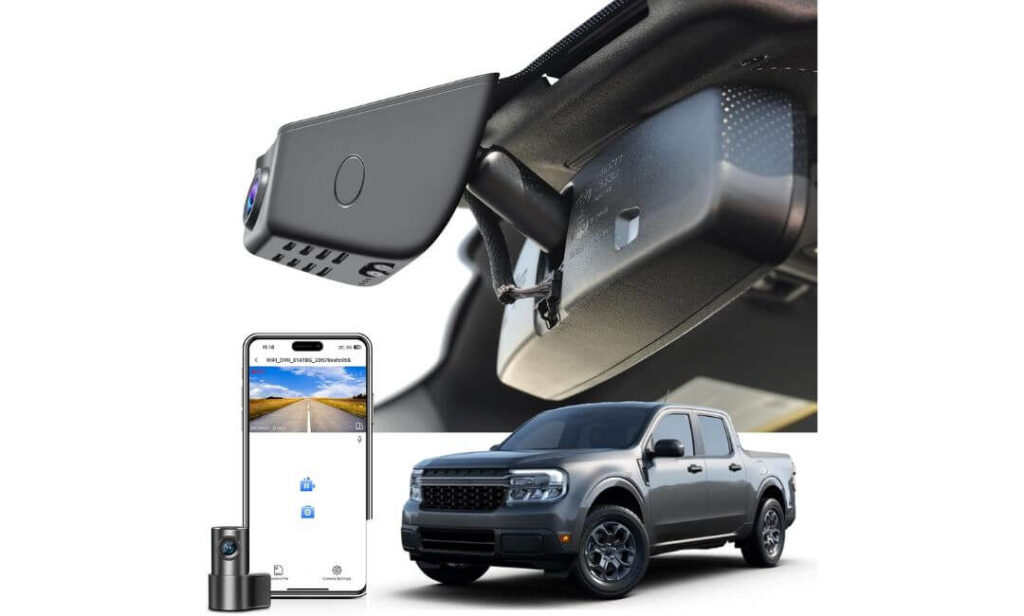
Quick Specs:
- OEM-style integrated body designed for Ford Maverick XL, XLT, and Lariat trims
- Front 4K UHD + Rear 1080P dual recording
- 150° front + 140° rear viewing coverage
- Built-in GPS for route and speed tracking
- WiFi app control with direct phone downloads
- Supercapacitor-based design for better heat durability
- Parking monitor, motion sensing, and collision-triggered video lock
- Includes 128GB microSD card inside the box
- Fuse box adapter and installation tools included
- Hidden cable routing behind mirror housing and headliner
What makes this setup different isn’t just the clean OEM appearance — it’s the fact that it feels genuinely thought-out for how Maverick owners actually use their trucks. From the moment it’s installed behind the mirror, the cabin still looks factory-clean instead of “tech overloaded,” which honestly becomes a huge deal after a few weeks of daily driving.
And unlike many generic 4K dash cams floating around online right now, this one doesn’t try too hard to look flashy. It focuses on the stuff people quietly appreciate later: stable recording, hidden wiring, quick startup, readable night footage, and a setup that doesn’t constantly pull your eyes toward the windshield.
The 4K front camera does a noticeably good job preserving smaller details like road signs and plate numbers, especially during daylight highway driving. But where this setup feels more premium is during real-world night use. The exposure handling stays surprisingly balanced around headlights, gas stations, wet roads, and parking garages — areas where cheaper cameras usually blow out highlights or smear movement badly. The included GPS module is also a nice touch for people who regularly commute long distances or simply want cleaner incident documentation.
(And yes, getting the fuse adapter, tools, rear camera, and storage card already inside the package genuinely makes installation less frustrating than most dual-camera setups.)
Another thing worth mentioning is the overall ownership vibe. This feels less like a gadget and more like something integrated into the truck itself. That’s probably why so many Maverick owners lean toward OEM-style cameras once they’ve tried traditional windshield-mounted units before.
Why This One Feels Surprisingly Well-Matched to the Maverick
- OEM-style fit keeps the cabin looking clean and uncluttered
- Included GPS and app controls feel useful instead of gimmicky
- Dual-camera setup covers both highway and parking situations well
- Supercapacitor design handles hotter cabin temperatures more confidently
- Installation hardware inside the box saves extra setup headaches
One Thing Worth Knowing Before You Buy
- This version is specifically tailored toward newer 1st Gen Maverick configurations, so checking the exact mirror housing style before ordering is still the smartest move
Why It Feels More “Factory Correct” Inside the Maverick Cabin
The Maverick has one of those interiors where messy accessories stand out immediately. Large hanging dash cams can interrupt visibility or make the upper windshield area feel crowded fast. This setup avoids that problem almost entirely because most of the hardware stays tucked neatly around the mirror section.
It also helps that the wiring path feels more integrated than typical universal kits. Once installed properly, the camera setup blends into the truck in a way that feels much closer to factory equipment than aftermarket add-on tech.
The Insider Pro-Tip
A lot of people shop for dash cams by chasing the highest resolution possible, but long-term owners usually end up caring more about how the camera fits into the truck every single day. If the setup looks messy, blocks visibility, overheats, or constantly disconnects from the app, even “8K” footage won’t save the experience.
That’s where integrated systems like this quietly make sense. They don’t scream for attention. They just become part of the Maverick. And honestly, that’s probably the biggest compliment you can give a daily-driver dash cam setup.
#3. ROVE R2-4K DUAL Dash Cam Front and Rear
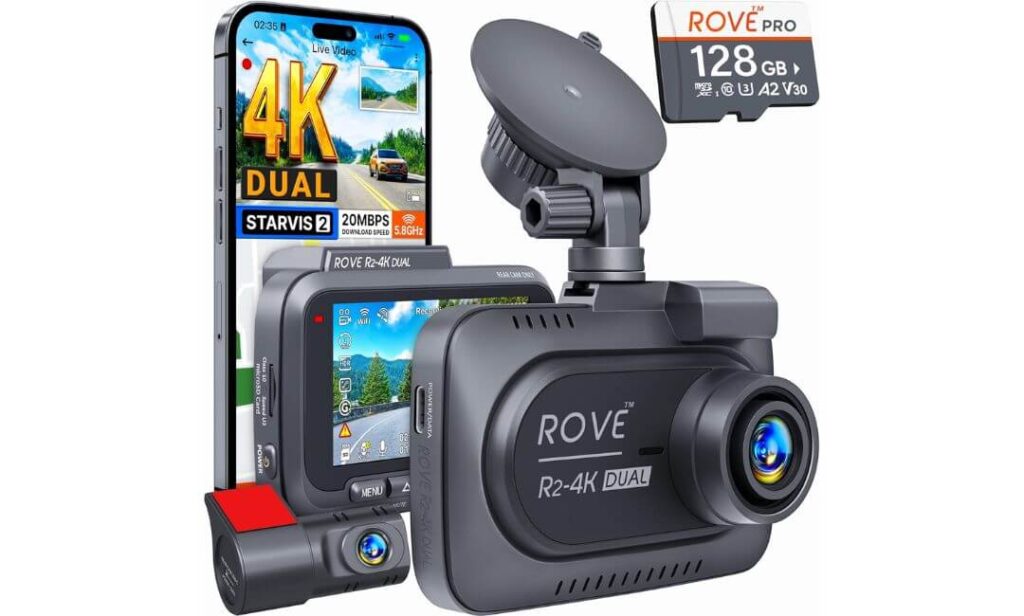
Quick Specs:
- Sony STARVIS 2 sensor with improved low-light clarity
- Front 4K 2160P + Rear 1080P dual recording
- 150° front and 140° rear viewing coverage
- Ultra-fast 5GHz WiFi with downloads up to 20MB/s
- Built-in GPS with speed and route stamping
- 24-hour parking monitoring support
- F1.5 front aperture for brighter nighttime capture
- Supercapacitor design for better heat and long-term durability
- Includes free 128GB microSD card inside the box
- Supports up to 1TB storage expansion
- 3-inch IPS display with live speed and compass data
Here’s where the conversation changes a little.
The first two cameras on this list focused heavily on OEM-style integration and factory-clean appearance. This one takes a different route. The ROVE setup feels more like a serious “driver’s dash cam” — the kind of system people buy after getting disappointed by soft night footage, laggy apps, or cheap sensors that completely fall apart after sunset.
And the moment you start looking at the hardware, it makes sense why.
The Sony STARVIS 2 sensor is genuinely one of the biggest upgrades here because it improves the part most people actually care about: nighttime readability. Headlights stay more controlled, dark roads retain more texture, and moving vehicles don’t smear nearly as badly during late-night highway driving. Combine that with the bright F1.5 front aperture and wide 150-degree coverage, and this setup feels much more confident once conditions get difficult.
(Especially during rain, parking garage exits, early-morning commutes, or poorly lit roads where cheaper “4K” cameras suddenly stop looking impressive.)
Another thing Maverick owners will appreciate is the overall responsiveness. The 5G WiFi transfer speeds are legitimately fast compared to older dash cam apps that make downloading footage feel painful. Pulling clips directly to your phone takes seconds instead of several frustrating minutes, which honestly becomes a bigger deal once you actually need footage quickly after an incident.
This is also one of the few universal dash cams that still feels refined instead of overly complicated. The GPS integration, live speed overlay, OTA firmware updates, voice guidance, parking monitoring — it all feels surprisingly mature rather than stuffed in for marketing purposes. You can tell this setup was designed for people who actually use their cameras daily instead of only checking footage once every few months.
Why This One Feels More “Performance Focused” Than the OEM Options
- STARVIS 2 sensor delivers noticeably cleaner nighttime footage
- Fast WiFi transfers make footage access far less annoying
- Wide-angle coverage works well for highway and city driving
- GPS data adds useful evidence during incidents or insurance claims
- Parking mode options feel more advanced than typical budget systems
One Thing Worth Knowing Before You Buy
- Unlike the integrated OEM-style cameras earlier in this list, this setup remains visible on the windshield, so owners wanting a fully hidden factory appearance may still prefer the first two options
Why It Still Works Extremely Well Inside the Maverick
The Maverick’s cabin actually pairs nicely with compact universal dash cams when the mount size stays reasonable, and ROVE did a solid job keeping the body manageable despite the larger feature set. It doesn’t feel oversized or distracting like some commercial-style truck cameras do.
The included rear cable length is also more than enough for the Maverick’s layout, so routing the rear camera through the cabin usually feels straightforward without awkward stretching or extension adapters.
The Insider Pro-Tip
A lot of buyers think “4K” automatically means better footage, but sensor quality matters way more than resolution once the sun goes down. That’s exactly why cameras with STARVIS-based sensors continue outperforming many cheaper high-resolution models in real-world driving.
And honestly, that’s where this setup earns its spot in the lineup. It feels built for the owner who actually drives — night commutes, road trips, highway merges, unpredictable weather, parking lots — not just someone shopping for flashy spec numbers. Once you understand that difference, this camera starts making a lot more sense.
#4. WOLFBOX G900 PRO Mirror Dash Cam
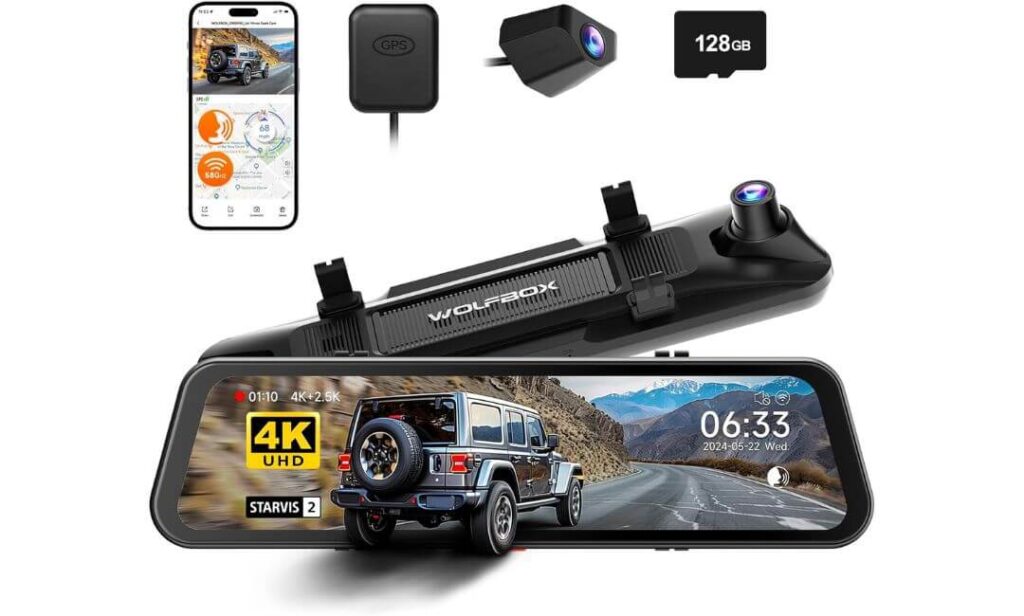
Quick Specs:
- Front 4K + Rear 2.5K recording with higher rear clarity than most rivals
- Sony STARVIS 2 IMX678 sensor for stronger nighttime visibility
- Massive 12-inch mirror-style touchscreen display
- 5.8GHz high-speed WiFi with app-based video access
- Smart voice control for hands-free commands while driving
- Built-in GPS with speed and route tracking
- 170° front field of view for broader road coverage
- Supercapacitor design for better long-term durability in heat
- Includes 128GB card right inside the box
- Rear camera cable length easily fits Maverick cabin routing
- Parking mode support available with optional hardwire kit
Some dash cams try to disappear into the background. This one does the exact opposite — and honestly, that’s the whole appeal.
The G900 PRO completely changes the feeling inside the Maverick the second it powers on. Instead of a tiny screen tucked near the windshield, you get a full-width smart mirror display that feels dramatically more modern during daily driving. Reverse visibility improves instantly, lane visibility feels wider, and nighttime rear footage becomes much easier to trust compared to smaller traditional rear cameras.
And unlike many oversized mirror dash cams from a few years ago, this setup actually has the hardware to back up the look.
The STARVIS 2 IMX678 sensor makes a real difference once lighting conditions become difficult. Bright headlights stay more controlled, darker roads retain detail better, and the rear 2.5K camera captures noticeably sharper footage than typical 1080P rear systems. That extra rear clarity matters more than most people expect — especially on trucks like the Maverick where cargo, tinted glass, rain, or nighttime traffic can make rear footage harder to read.
(This is one of the few mirror setups where the rear camera genuinely feels upgraded instead of “good enough.”)
What also surprised us is how refined the overall experience feels once installed. Voice commands respond quickly, WiFi transfers stay stable, and the giant mirror display doesn’t feel laggy or gimmicky during actual driving. A lot of mirror cameras look futuristic in product photos but become frustrating later. This one feels more polished than most.
And for Maverick owners who spend long hours commuting, traveling at night, or parking in busy areas, that larger live rear view can quietly become one of those features you stop wanting to drive without.
Why This Setup Feels Different From Traditional Dash Cams
- Huge mirror display improves rear visibility dramatically
- Rear 2.5K footage looks sharper than most dual-camera systems
- STARVIS 2 sensor handles difficult lighting extremely well
- Voice controls reduce the need to touch the screen while driving
- Mirror-style layout gives the cabin a much more modern feel
One Thing Worth Knowing Before You Buy
- If you prefer a completely hidden OEM-style setup, this mirror design naturally stays more visible inside the cabin than integrated cameras like Fitcamx or Mangoal
Why Maverick Owners End Up Loving This Style of Setup
The Maverick already has a practical truck-like driving position, and this mirror system complements that surprisingly well. The wider live rear visibility helps a lot during lane changes, reversing, crowded parking lots, and nighttime driving where the factory mirror alone can feel limited.
It also works especially well for owners who frequently load gear into the cabin or truck bed, since the digital rear view can remain clearer than a traditional mirror when visibility gets partially blocked.
The Insider Pro-Tip
Most people shop for mirror dash cams because they look cool at first. But the real reason owners keep them long-term is visibility. Once you get used to seeing a wider, brighter live rear view during rain, dark highways, or tight parking situations, going back to a normal mirror can suddenly feel outdated.
And that’s exactly why this setup stands out in the Maverick. It doesn’t just record incidents — it quietly changes the way the truck feels to drive every day.
#5. Garmin Dash Cam™ X110
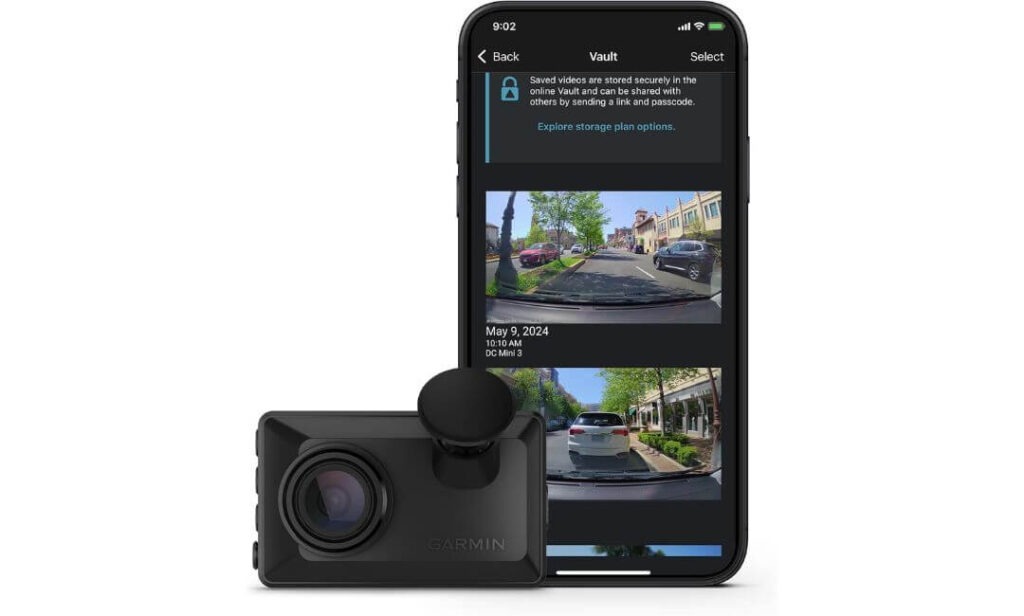
Quick Specs:
- Crisp 1440P HD recording with compact low-profile body
- 140-degree viewing angle for balanced forward coverage
- Built-in Garmin Clarity™ polarizer reduces windshield glare
- Voice-controlled recording and camera commands
- GPS tagging with date, time, and location stamping
- Tiny 2.4-inch display for quick playback without distractions
- Automatic incident detection and saved emergency footage
- WiFi + Bluetooth smartphone connectivity
- Optional Parking Guard and remote live view support
- Supports multi-camera syncing through Garmin Drive app
- Extremely compact windshield footprint for smaller cabin layouts
Not everyone wants a giant mirror display, dual rear cameras, hardwired fuse installations, or a windshield full of tech.
Some Maverick owners just want one thing: a small, reliable camera from a brand they already trust to work every single day without drama. That’s exactly where the X110 quietly makes sense.
And honestly, after testing bigger feature-heavy setups, there’s something refreshing about how simple this camera feels once installed.
The body is tiny, the windshield footprint stays minimal, and the built-in Clarity™ polarizer genuinely helps cut down annoying dashboard reflections during bright afternoon driving. Inside the Maverick — especially on trims with lighter dashboard materials or wide windshield exposure — that glare reduction becomes more useful than most people expect. Footage stays cleaner, reflections stay softer, and daytime readability improves noticeably without needing extra lens accessories.
(It’s one of those small details you stop noticing because it simply works.)
What also separates Garmin from many cheaper dash cam brands is software maturity. Startup feels quick, voice controls respond naturally, and the camera handles automatic incident saving without needing constant tweaking. The GPS stamping and smartphone syncing also feel polished instead of “half-finished,” which matters once you actually need to review or share footage after something happens.
This is not the flashiest camera in the lineup — and Garmin clearly isn’t trying to make it one. Instead, it feels built for people who value reliability, clean design, and a low-maintenance ownership experience over giant spec-sheet numbers.
Why This One Still Makes Sense in a World Full of 4K Hype
- Ultra-compact body fits the Maverick windshield beautifully
- Clarity™ polarizer reduces daytime glare surprisingly well
- Garmin software experience feels polished and reliable
- Voice controls work naturally during real driving situations
- Excellent option for owners who hate bulky cabin accessories
One Thing Worth Knowing Before You Buy
- This is a forward-facing camera only, so drivers wanting rear recording coverage will need a separate rear camera setup
Why It Fits the Maverick’s Personality So Well
The Maverick isn’t a flashy truck. People buy it because it’s practical, efficient, easy to live with, and smarter than its price suggests. The Garmin setup follows that exact same philosophy.
Its compact shape works especially well in the Maverick because it stays discreet near the windshield without pulling attention away from the road. Even after weeks of driving, many owners barely notice it’s there — which honestly becomes a major advantage during daily commutes.
The Insider Pro-Tip
A lot of drivers eventually realize they don’t actually need the most complicated dash cam setup on the market. They just need something dependable that starts recording every single drive, survives heat, captures clear footage, and stays out of the way.
That’s why compact Garmin cameras still have such a loyal following. They focus less on flashy gimmicks and more on long-term trust. And in a truck like the Maverick — where clean visibility and simplicity are part of the whole ownership experience — that approach honestly fits better than many oversized “ultra-premium” dash cams.
Best Ford Maverick Dash Cam Picks Compared for Hybrid, XL, XLT & Lariat Owners
Buying Guide: What Actually Matters Before Choosing a Dash Cam for the Ford Maverick
The Ford Maverick is one of those trucks where the “wrong” dash cam becomes obvious very quickly. A bulky camera can crowd the windshield, messy wiring can ruin the clean interior design, and weak night sensors can make footage nearly useless once the sun goes down. That’s why buying a dash cam for the Maverick isn’t just about chasing the highest resolution number on a product page.
It’s about finding a setup that genuinely matches how you use the truck every day.
Some Maverick owners want a completely hidden OEM-style installation that looks factory-installed. Others care more about sharper night footage during highway driving, faster app transfers, or stronger parking protection while the truck sits outside overnight. Once you understand your actual driving habits, choosing the right setup becomes much easier.
Best Dash Cam for Ford Maverick vs. Ford Maverick Hybrid
One thing many buyers overlook is that Maverick Hybrid owners usually interact with their dash cams differently than EcoBoost owners.
Hybrid models spend more time in quiet stop-and-go traffic, parking garages, apartment lots, and urban driving environments where parking protection and motion-triggered recording become especially important. That’s why OEM-style cameras like the Fitcamx and Mangoal setups work so well in Hybrid trims — they stay discreet, power efficiently, and blend naturally into the cabin without attracting unnecessary attention.
EcoBoost Maverick owners, on the other hand, often lean more toward highway travel, road trips, towing, or longer-distance driving. In those situations, stronger nighttime performance, wider viewing angles, and faster footage access can matter more than hidden integration alone. That’s where setups like the ROVE or WOLFBOX start making more sense.
The important thing is understanding that “best” depends heavily on how the truck is actually driven day to day, not just the spec sheet.
Front and Rear Dash Cam for Ford Maverick vs. Single-Channel Options
This is where most buyers end up changing their minds after a few months.
At first, many Maverick owners think a front-only camera is enough. But once you experience parking lot incidents, rear-end close calls, or nighttime traffic situations, rear recording suddenly becomes far more valuable than expected.
A front and rear dash cam setup gives the Maverick much better all-around protection because trucks naturally sit higher than many smaller vehicles. Rear footage helps document tailgating, parking damage, reversing incidents, and aggressive drivers behind you — situations a front camera simply cannot capture.
That said, single-channel cameras still make sense for drivers who want the cleanest possible installation with minimal cabin hardware. Compact models like the Garmin X110 work especially well for people who prioritize simplicity, reliability, and low windshield distraction over maximum recording coverage.
Ford Maverick Dash Cam Install Best Practices
The Maverick’s windshield layout actually rewards cleaner installations more than most vehicles.
Because the upper windshield area isn’t huge, large suction-mounted cameras can quickly start feeling intrusive if placed too low below the mirror housing. That’s why integrated OEM-style systems continue growing in popularity with Maverick owners — they use the natural mirror area instead of competing with it.
If you’re installing a universal dash cam, keeping the camera close to the mirror area usually creates the cleanest visibility balance. Cable routing also matters more than people think. Loose hanging wires instantly make the setup feel cheap inside the Maverick cabin.
For parking mode users, hardwiring through the fuse box generally creates the most stable long-term experience. OBD power setups remain easier and quicker for beginners, but dedicated fuse installations usually handle 24-hour monitoring more consistently over time.
Best 4K Dash Cam for Ford Maverick: Why Sensor Quality Matters More Than Resolution
This is probably the biggest misunderstanding in the dash cam market right now.
A camera saying “4K” does not automatically guarantee better footage.
In real-world driving, sensor quality, exposure balancing, lens quality, and nighttime processing matter far more than raw resolution alone. That’s exactly why STARVIS-equipped cameras continue outperforming many cheaper high-resolution models once lighting conditions become difficult.
During bright daylight, most modern dash cams look reasonably good. The real separation happens during rain, tunnels, nighttime highways, parking garages, or roads with inconsistent lighting. Better sensors preserve motion detail, reduce glare, and improve plate readability when cheaper cameras start turning footage into blurry noise.
That’s why cameras like the ROVE R2-4K DUAL and WOLFBOX G900 PRO stand out so much in difficult nighttime conditions.
Hidden Dash Cam for Ford Maverick: Why OEM-Style Designs Matter
The Maverick interior already feels modern and uncluttered, so oversized aftermarket accessories can disrupt the entire cabin aesthetic surprisingly fast.
Hidden OEM-style cameras solve that problem by integrating near the mirror housing instead of hanging visibly across the windshield. Once installed correctly, setups like Fitcamx and Mangoal almost disappear into the truck itself.
And honestly, that hidden appearance isn’t only about looks.
Discreet installations also attract less attention when parked outside for long periods. Many owners simply feel more comfortable leaving a low-profile integrated camera inside the truck compared to a large exposed touchscreen system visible through the glass.
Wireless Dash Cam for Ford Maverick: What Buyers Should Actually Expect
This part confuses people constantly.
Most “wireless” dash cams still require physical power connections. The wireless part usually refers to WiFi app access, wireless footage transfers, or smartphone connectivity — not a completely cable-free installation.
That said, modern WiFi systems are dramatically better than older dash cam apps from a few years ago. Faster 5GHz connections now allow quick video downloads directly to your phone without removing the memory card every time.
For Maverick owners who regularly share clips, save incident footage, or review recordings quickly after something happens, stronger app connectivity honestly becomes one of those features you appreciate more over time.
Parking Mode Dash Cam for Ford Maverick: Why It Matters More Than Most Drivers Think
A parked vehicle is often more vulnerable than one that’s moving.
Shopping carts, hit-and-runs, apartment parking damage, overnight incidents, vandalism — these are exactly the situations where parking mode earns its value. And because many Maverick owners use their trucks as daily commuters, outdoor parking protection becomes even more important.
But here’s the part many articles skip: parking mode quality varies massively between brands.
Some systems barely detect movement reliably, while better setups use motion sensing, impact triggers, buffered recording, and event locking to preserve footage properly. Hardwired installations also matter here because stable constant power dramatically improves parking reliability.
If your Maverick regularly sits outside overnight or in crowded parking areas, parking mode should honestly move much higher on your priority list.
Compact Dash Cam for Ford Maverick Windshield: Why Smaller Usually Feels Better
The Maverick doesn’t need a giant commercial-style camera setup hanging from the glass.
In fact, many owners end up happier with smaller cameras because they simply disappear into daily driving more naturally. Compact setups reduce windshield distraction, improve outward visibility, and make the cabin feel cleaner overall.
That’s why low-profile cameras like the Garmin X110 still have strong appeal despite offering fewer flashy features than larger systems. They fit the Maverick’s personality well — practical, efficient, and easy to live with every day.
And honestly, that’s the biggest lesson after testing dozens of dash cams in modern trucks: the best setup usually isn’t the one screaming for attention. It’s the one you quietly trust every time you start the engine.
Installation and Mounting Tips for Ford Maverick Dash Cam Setups
A great dash cam can still feel disappointing if the installation is messy, the viewing angle is wrong, or the wiring constantly gets in the way during daily driving. And with the Ford Maverick, installation quality matters more than many owners expect because the cabin layout is clean, modern, and fairly compact around the windshield area.
That’s why the best Maverick dash cam setups usually focus on three things first: clean placement, stable power delivery, and visibility that never distracts the driver.
Choosing Between OEM-Style Mounts and Universal Dash Cam Setups
This is honestly the first decision that shapes the entire ownership experience.
OEM-style systems like Fitcamx and Mangoal are designed specifically around the Maverick’s mirror housing area. Once installed, they blend into the interior almost like factory equipment. There are fewer exposed cables, less windshield clutter, and a much cleaner overall appearance from both inside and outside the truck.
For many Maverick owners, especially people who daily-drive the truck in cities or park outside often, that discreet look becomes a huge advantage long-term.
Universal dash cams, on the other hand, give you more flexibility in features and camera positioning. Models like the ROVE and Garmin setups can easily move between vehicles later, and mirror systems like the WOLFBOX completely change the driving experience with wider rear visibility and larger displays.
The tradeoff is visibility. Universal systems naturally remain more noticeable on the windshield unless the installation is done very carefully.
If your priority is “factory-clean integration,” OEM-style cameras usually feel more satisfying. If your priority is maximum features, advanced night recording, or larger displays, universal systems still offer excellent value when installed properly.
Hardwire Kit vs. Cigarette-Lighter Power: What Actually Makes Sense
This is another area where many buyers overcomplicate things.
For basic daily recording, cigarette-lighter or USB-powered setups work perfectly fine. They are easier to install, simpler to remove later, and ideal for owners who don’t care much about 24-hour parking monitoring.
But if parking mode matters to you — apartment parking, office parking lots, overnight street parking, crowded shopping areas — a proper hardwire installation usually becomes the better long-term solution.
Hardwire kits provide constant stable power directly from the fuse box, which allows parking mode features like motion detection, collision recording, and buffered footage capture to work reliably even when the truck is turned off.
And honestly, in the Maverick, a properly hardwired setup usually feels cleaner too because fewer cables remain visible near the center console area.
One important thing many articles ignore is electrical noise and ground loop issues. Cheap adapters or poor grounding can sometimes introduce static interference, audio buzzing, or unstable startup behavior. Using higher-quality hardwire kits and routing cables cleanly away from noisy power lines helps avoid those problems completely.
Windshield Placement: Where Most Installations Go Wrong
The Maverick windshield looks spacious at first, but the usable upper mounting area is actually smaller than people realize once the mirror housing, sensors, and driver visibility zones come into play.
Mounting the camera too low usually becomes the biggest mistake.
A low-mounted dash cam can block visibility, distract during nighttime driving, and make the entire cabin feel more crowded. The cleanest Maverick setups keep the camera tucked high near the mirror area where it naturally blends into the upper windshield line.
That placement also improves viewing angles.
A properly centered upper mount captures wider road coverage, reduces dashboard reflections, and keeps the horizon level more consistently during driving. Wider cameras like the ROVE or WOLFBOX especially benefit from careful alignment because even small angle mistakes can distort footage or create unnecessary glare at night.
And if you live in hotter climates, avoiding direct sun-heavy positions near the lower windshield helps protect long-term camera performance too.
Wireless Dash Cam Setup Tips Maverick Owners Should Know
A lot of drivers assume “wireless dash cam” means completely cable-free installation, but that’s not really how most systems work today.
The camera still needs power. The wireless part mainly refers to WiFi connectivity, app-based settings, cloud access, and direct smartphone downloads.
That said, WiFi setup quality absolutely affects day-to-day usability.
Cameras with stronger 5GHz connections — like the ROVE and WOLFBOX systems — feel dramatically faster when transferring footage compared to older or weaker WiFi setups. Large 4K clips download quicker, app previews feel smoother, and firmware updates become much less frustrating.
For the best experience, pairing the camera app while parked and configuring settings before daily use usually saves a lot of headaches later. Many owners rush setup during installation, then blame the camera later for app issues that were actually caused by rushed permissions or unstable first-time pairing.
Parking Mode, Battery Drain, and Heat Considerations in the Maverick
This is probably the most overlooked part of dash cam ownership.
The Maverick’s cabin can get extremely hot during summer parking, especially on darker trims or trucks sitting outside all day. That’s why supercapacitor-based cameras generally perform better long-term than older battery-based systems.
Supercapacitors handle heat more safely, restart more consistently, and usually survive years of daily temperature cycling without swelling or premature failure. That’s one reason cameras like the ROVE and WOLFBOX feel more confidence-inspiring for heavy parking mode use.
Power management matters too.
A poorly configured parking setup can slowly drain the vehicle battery if voltage cutoffs are not adjusted correctly. Good hardwire kits monitor battery voltage automatically and shut the camera down safely before the truck battery gets dangerously low.
And honestly, this is where buying a quality dash cam starts paying off quietly over time. Reliable heat management, stable parking monitoring, and clean power handling aren’t flashy marketing features — but they’re exactly the things that separate a camera people trust for years from one that gets removed after a few frustrating months.
FAQs About Ford Maverick Dash Cam
Does the Ford Maverick’s windshield angle affect dash cam video quality more than people realize?
Honestly, yes — and most buyers never think about it until after installation.
The Maverick’s windshield sits at an angle where cheaper dash cams can struggle with dashboard reflections, sky overexposure, and nighttime glare from lifted trucks or bright LEDs behind you. That’s one reason compact OEM-style cameras and models with better exposure balancing tend to perform noticeably better inside the Maverick compared to random budget 4K cameras.
This is also why features like STARVIS sensors and polarized lenses matter more here than raw resolution numbers. A properly tuned 1440P or balanced 4K camera can look dramatically clearer in real driving conditions than a cheap “8K” camera with weak glare control.
A few things Maverick owners usually notice after upgrading to a better sensor setup:
- Night highways look cleaner and less smeared
- License plates stay readable longer during motion
- Wet-road reflections become easier to manage
- Parking garage transitions stop blowing out exposure completely
And once you start paying attention to those details, it becomes very difficult to go back to lower-quality footage.
Is an OEM-style hidden dash cam actually worth it in the Ford Maverick, or is it mostly about looks?
At first, most people think it’s mainly cosmetic. After living with one for a few months, the answer changes completely.
The biggest benefit of OEM-style dash cams in the Maverick is actually long-term usability. Because the camera blends into the mirror housing area, you stop noticing it during daily driving. No dangling screens, no giant suction mounts in your peripheral vision, no visible wires hanging near the center console.
That changes the entire ownership experience.
It also matters for security. A discreet integrated camera attracts far less attention from outside the truck compared to a large exposed display-style dash cam visible through the windshield overnight.
And surprisingly, OEM-style systems often end up feeling more “premium” over time simply because they match the Maverick interior better. The truck already has a clean modern dashboard layout, so factory-style integration feels much more natural than oversized aftermarket hardware bolted onto the glass.
Why do some Ford Maverick owners regret buying ultra-cheap 4K dash cams later?
Because most cheap 4K dash cams only look impressive during perfect daytime conditions.
Once real-world driving starts — rain, dark highways, parking lots, tunnel exits, early morning glare, bright headlights — weaker cameras fall apart fast. You start seeing grainy motion, unreadable plates, unstable exposure, overheating issues, or apps that constantly disconnect when you actually need footage quickly.
And here’s the uncomfortable truth many reviews skip: a lot of low-cost “4K” cameras are using mediocre sensors with aggressive sharpening instead of genuinely cleaner imaging hardware.
That’s why experienced owners usually start caring less about marketing buzzwords and more about things like:
- Sensor quality
- Heat stability
- App reliability
- Parking mode consistency
- Long-term startup behavior
- Real nighttime readability
The difference becomes obvious after a few weeks of daily driving, especially in trucks like the Maverick where windshield glare and cabin heat can expose weaker cameras quickly.
Does parking mode really matter if the Ford Maverick already has factory safety tech?
Yes — because factory safety systems and dash cams solve completely different problems.
Ford’s driver-assistance systems help reduce accidents while driving. A dash cam protects you after something already happened, especially while parked.
And statistically, many frustrating incidents happen exactly when you are not inside the truck:
- Parking lot scrapes
- Hit-and-runs
- Door dings
- Overnight vandalism
- Apartment parking incidents
- People backing into the Maverick while reversing
That’s where reliable parking mode quietly becomes one of the most valuable features in the entire setup.
The important part is using a proper power solution. Weak hardwire kits or poor voltage settings can create battery drain problems later. Good parking mode systems monitor voltage intelligently and shut down safely before causing battery issues.
So yes, for owners who regularly park outside, parking mode is not “extra.” It’s honestly one of the smartest reasons to buy a dash cam in the first place.
Is a mirror dash cam actually practical in a truck like the Maverick, or does it become distracting later?
This depends heavily on the quality of the mirror system.
Older mirror dash cams often felt laggy, overly reflective, or gimmicky after the first few weeks. But newer premium systems — especially models using stronger sensors and brighter displays — feel dramatically more refined now.
In the Maverick specifically, mirror systems can actually make a lot of sense because the truck’s rear visibility changes depending on passengers, cargo, weather, and nighttime conditions. A wider live digital rear view often feels more stable and easier to trust during lane changes or reversing.
The interesting part is that most owners who switch to a good mirror setup usually keep it longer than expected. Not because of the dash cam recording itself — but because they become attached to the upgraded rear visibility during normal driving.
That’s the part spec sheets rarely explain properly. The best dash cams don’t just record footage anymore. The really good ones quietly improve the overall driving experience every single day.
Final Thoughts
The Ford Maverick is one of those rare trucks where the “right” dash cam genuinely changes the ownership experience. Not because it adds another gadget to the windshield, but because the Maverick itself is built around practicality, simplicity, and everyday usability. The best dash cam setups follow that same philosophy.
And honestly, after testing different styles inside the Maverick, one thing becomes very clear very quickly: there isn’t a single perfect camera for everyone.
Some owners will absolutely prefer the clean factory-style integration of Fitcamx or Mangoal because they disappear into the cabin and feel almost OEM-installed from day one. Others will care more about advanced night clarity, stronger sensors, faster app transfers, or wider rear visibility during long highway drives — which is exactly where cameras like the ROVE and WOLFBOX quietly separate themselves.
Even the compact Garmin setup has its own place here because not every Maverick owner wants a complicated dual-camera system hanging across the windshield.
That’s the real takeaway most generic roundup articles completely miss.
The best dash cam for the Ford Maverick is not automatically the one with the biggest screen, the highest resolution, or the longest feature list. It’s the one that fits naturally into the way you actually drive the truck every day — commuting, parking outside, road-tripping, hauling gear, sitting in traffic, driving at night, or simply wanting peace of mind without turning the cabin into a rolling electronics store.
And once you get that balance right, a good dash cam stops feeling like an accessory.
It just becomes part of the truck.
Also Check:


