
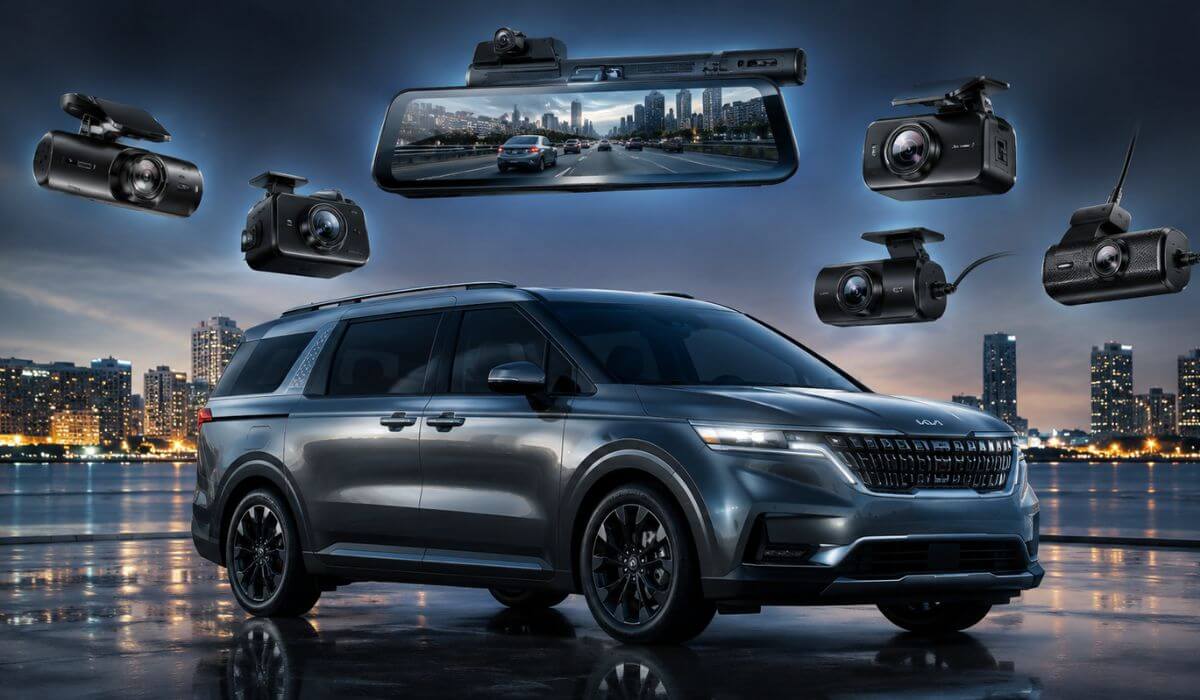
5 Best Dash Cams for Kia Carnival in 2026: 4K Clarity, OEM Fit, Triple-View Recording & Mirror Display Upgrades
The Kia Carnival is one of those vehicles that quickly exposes the difference between an average dash cam and one that’s actually built for a large family hauler. With its longer body, expansive cabin, three-row seating, and large rear cargo area, the Carnival demands wider coverage and clearer footage than what works in a typical sedan or compact SUV.
That’s especially true for 2022-2026 Kia Carnival models, where owners often use the vehicle for everything from daily family duties to interstate road trips. A camera that misses activity at the rear corners, struggles in low light, or lacks reliable parking surveillance can leave major blind spots in a vehicle this size. That’s why simply buying the most popular dash cam on Amazon isn’t always the smartest move.
After comparing the newest options currently available, we focused on the features that matter most in a Carnival: true front-and-rear coverage, wide viewing angles, strong night performance, reliable parking monitoring, cabin visibility for larger families, OEM-style integration, and long-term durability. We also prioritized models that make sense for a vehicle with the Carnival’s size and real-world usage rather than chasing specs that look impressive on a product page.
Interestingly, many websites continue recommending compact cameras that work well in smaller vehicles. For a Kia Carnival dash cam, however, factors like rear visibility, interior coverage, parking protection, and high-resolution recording across a larger footprint deserve far more attention. That’s exactly what guided the selections below.
Best Kia Carnival Dash Cams: Top Picks for 4K Recording, OEM Fit & Full-Cabin Coverage
#1. VIOFO A329S 4K 60FPS Dash Cam Front and Rear
Best 4K Front and Rear Dash Cam for Kia Carnival With STARVIS 2 Sensors and Long-Distance Recording Capability
#2. Fitcamx 4K Dash Cam Suitable for Kia Carnival 2022-2026
Best OEM-Style Kia Carnival Dash Cam for Factory-Look Installation and Clean Interior Integration
#3. REDTIGER T27 Mirror Dash Cam Front and Rear
Best Mirror Dash Cam for Kia Carnival With Enhanced Rear Visibility and Full-Screen Driving View
#4. COXPAL 3 Channel Dash Cam Front and Rear Inside
Best Triple-Channel Dash Camera for Kia Carnival With Front, Rear, and Cabin Recording Coverage
#5. Garmin Dash Cam X210 Compact 1440p Camera
Best Compact Dash Cam for Kia Carnival With Voice Controls, GPS Logging, and Hassle-Free Operation
Expert Tip
If you drive a Kia Carnival, don’t choose a dash cam the same way you would for a compact SUV or sedan. The Carnival’s long wheelbase, taller rear profile, larger blind areas, and family-focused layout create challenges that smaller vehicles simply don’t have.
A surprising number of owners focus only on front-camera resolution. In reality, the biggest difference-maker in a Carnival is often the rear camera quality, viewing angle, parking performance, and low-light clarity. A crystal-clear front camera doesn’t help much if the rear footage becomes unreadable during nighttime parking incidents or highway lane changes.
That’s one reason you’ll notice that our top picks prioritize dual-channel recording, wider coverage, STARVIS 2 imaging, cabin visibility, factory-style integration, and larger-screen viewing solutions rather than chasing marketing numbers alone. For a vehicle this size, those features tend to matter far more in day-to-day ownership.
How We Chose the Best Dash Cams for Kia Carnival
We didn’t build this list around best-seller rankings, review counts, or whichever model happened to be trending at the moment.
Instead, we started with a simple question:
What does a dash cam need to do exceptionally well inside a Kia Carnival specifically?
The answer led our entire selection process.
First, we looked at vehicle size and usage patterns. Most Carnival owners use their vehicle very differently than the average commuter car owner. School drop-offs, family vacations, airport runs, highway travel, weekend sports trips, and fully loaded passenger cabins place different demands on a recording system. That immediately pushed us toward models with stronger rear coverage, higher image quality, and more dependable parking features.
Next, we focused heavily on video quality that remains useful after an incident. Plenty of cameras advertise 4K recording, but resolution alone doesn’t tell the full story. Sensor quality, night performance, motion handling, and overall image processing often determine whether a license plate is actually readable when it matters. That’s a major reason the VIOFO A329S earned the top position with its dual STARVIS 2 sensors and premium imaging hardware.
We also wanted to include solutions for different types of Carnival owners rather than forcing everyone toward the same product.
Some owners want the absolute best image quality available today.
Some want a factory-look Kia Carnival dash cam that blends into the vehicle as if it came from the dealership.
Others care more about seeing the entire cabin, monitoring passengers, or improving rear visibility while driving and parking.
That thinking is why you’ll see purpose-built options like the Fitcamx, COXPAL, and REDTIGER T27 alongside traditional premium dash cams.
Another factor we considered was long-term ownership practicality.
Features such as Wi-Fi connectivity, GPS logging, parking surveillance, storage capacity, thermal reliability, app support, and installation simplicity can have a bigger impact on satisfaction than minor differences in resolution. A camera that records consistently for years is ultimately more valuable than one packed with features that owners stop using after the first month.
Finally, we excluded several otherwise popular models that are frequently recommended across generic “best dash cam” lists. Many of them work perfectly well in smaller vehicles, but they didn’t offer enough of an advantage for a large family-focused vehicle like the Kia Carnival to justify a recommendation here.
The result is a shortlist of dash cams that excel in at least one area that genuinely matters to Carnival owners—whether that’s premium image quality, OEM-style fitment, full-cabin recording, mirror-based visibility, or compact everyday convenience.
Every model on this list earned its place because it solves a real ownership need, not because it happened to be popular.
#1. VIOFO A329S 4K 60FPS Dash Cam Front and Rear
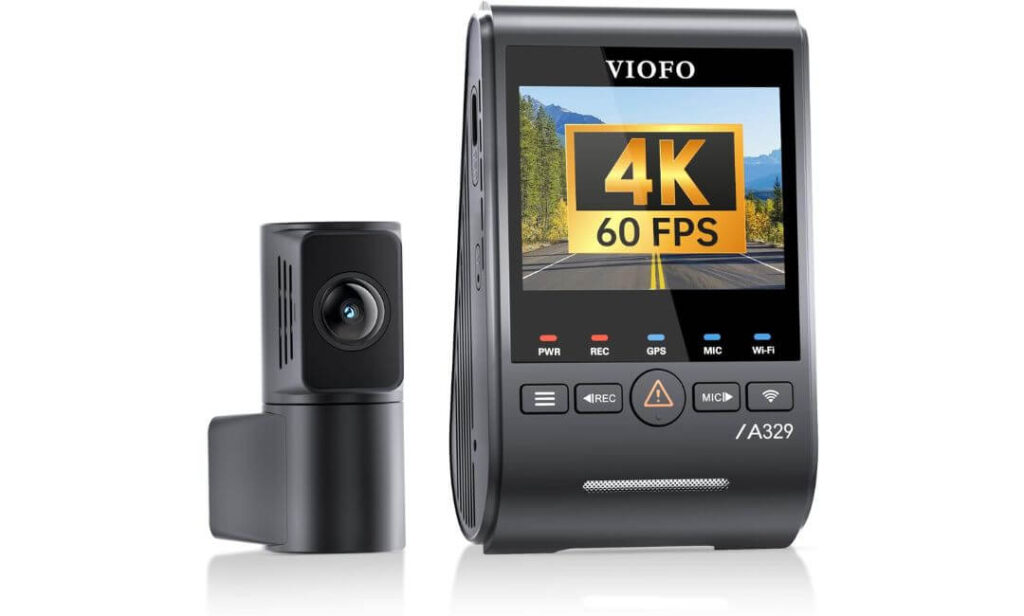
Quick Specs:
- 4K 60FPS front recording + 2K rear recording
- Dual STARVIS 2 Sensors for front and rear coverage
- Wi-Fi 6 high-speed video transfers
- Up to 4TB SSD Support for extended recording capacity
- Built-In GPS with speed and route tracking
- HDR Recording for improved plate visibility
- Voice Control for hands-free operation
- Parking Mode Support with optional hardwire kit
- Ultra-slim coaxial cable for cleaner installation
Some dash cams look impressive on a specification sheet. Others make sense the moment you think about how a Kia Carnival is actually used.
This is one of the few options that feels purpose-built for a vehicle that spends its life carrying families, luggage, sports equipment, and passengers across long highway miles. The combination of 4K 60FPS front recording and a 2K rear camera gives it a noticeable advantage when traffic gets busy, especially on multi-lane highways where details disappear quickly on lower-end cameras.
The real story, however, is the pair of STARVIS 2 image sensors. In low-light conditions, parking garages, rainy evenings, and poorly lit neighborhoods, the footage remains remarkably clean. Instead of producing grainy recordings that look good only on a product page, it captures details that remain useful when you actually need evidence.
Storage is another area where this model separates itself from typical recommendations. Support for external SSD storage up to 4TB means weeks of footage can be retained before recordings start overwriting older files. That’s particularly valuable for Carnival owners who regularly take road trips or spend significant time on the road.
(If your goal is buying one dash cam and forgetting about upgrades for years, this is the model that consistently feels closest to that experience.)
What Stood Out During Evaluation
- Exceptional image clarity during both daytime and nighttime driving
- Reliable rear camera quality, not just a strong front camera
- Massive storage flexibility compared to most competitors
- Fast Wi-Fi 6 transfers when downloading footage
- Clean installation hardware that works well in larger vehicles
One Thing Worth Knowing
- The optional hardwire kit is purchased separately if you want full parking-mode functionality.
Kia Carnival Compatibility & Installation Notes
The Kia Carnival’s longer cabin can expose weaknesses in cameras designed for smaller vehicles. Fortunately, the included 6-meter rear cable provides enough length for a clean front-to-back installation in most Carnival setups without creating wiring headaches.
Owners who want advanced parking surveillance should consider adding the optional hardwire kit during installation. It unlocks the camera’s power-saving parking functions while helping protect the vehicle battery during extended parking periods.
The Insider Pro-Tip
Most buyers focus on resolution numbers because they’re easy to compare. In reality, the feature that often determines whether footage is actually usable is the sensor behind the lens.
That’s why the dual STARVIS 2 setup matters so much here. A readable license plate at dusk, a clearer image during heavy rain, or cleaner footage inside a poorly lit parking structure can be worth far more than an extra feature buried inside a settings menu.
For a Kia Carnival owner who wants one camera that handles commuting, family travel, overnight parking, and long-distance road trips without compromise, this is the benchmark the rest of the list has to chase.
#2. Fitcamx 4K Dash Cam Suitable for Kia Carnival 2022-2026
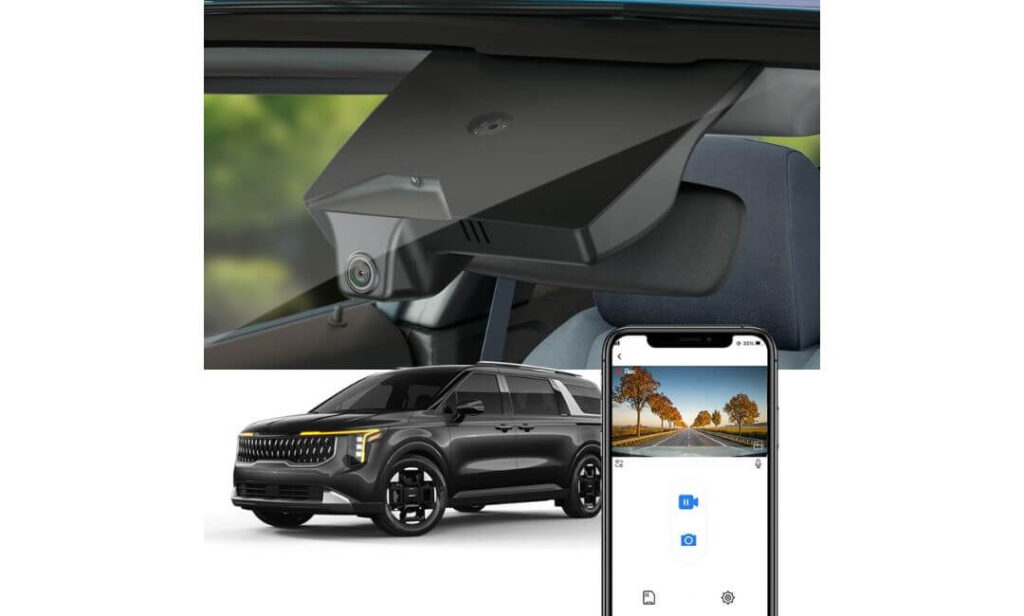
Quick Specs:
- OEM Factory-Look Design built specifically for Kia Carnival
- 2160P UHD Recording with WDR image processing
- Rearview Mirror Integration for a clean appearance
- Built-In WiFi with Fitcamx mobile app support
- Plug-and-Play Installation without windshield clutter
- f/1.6 Aperture Lens for improved low-light performance
- G-Sensor Protection for incident recording
- 64GB Memory Card Included
- Designed around R0100 Mirror Housing Compatibility
Here’s something most generic dash cam lists completely miss.
Many Kia Carnival owners don’t want another screen on the windshield. They don’t want wires hanging across the headliner. They don’t want a camera that immediately looks aftermarket every time they get inside the vehicle.
That’s exactly where this model separates itself from almost everything else on the market.
Instead of adding another device to the cabin, this unit integrates directly behind the factory rearview mirror housing. Once installed, most passengers won’t even realize a dash cam is there. The result feels less like an accessory and more like a feature Kia should have included from the factory.
The recording quality is stronger than most people expect from an OEM-style setup. With 2160P UHD resolution, a f/1.6 lens, and WDR technology, footage remains detailed enough for everyday driving situations while maintaining accurate exposure in difficult lighting conditions. Road signs, traffic signals, and surrounding vehicles stay clear without the overly processed look some budget cameras produce.
The other advantage is simplicity. The built-in WiFi connection, included 64GB card, and straightforward app access create an ownership experience that feels refreshingly uncomplicated. There are no large displays competing for attention and no bulky camera body hanging below the mirror.
(If the VIOFO feels like the enthusiast’s choice, this feels like the “I want it to look factory and just work” choice.)
What Stood Out During Evaluation
- Factory-style appearance that blends into the interior
- No windshield clutter or obvious aftermarket look
- Simple installation process compared with traditional dash cams
- Strong daytime and nighttime image quality
- Included memory card allows immediate use after installation
One Thing Worth Knowing
- Before ordering, it’s worth taking a quick look behind the rearview mirror and confirming that your original mirror housing part number ends with R0100 for a perfect fit.
Kia Carnival Integration Notes
Unlike universal dash cams, this unit was designed specifically around the Carnival’s mirror assembly. That changes the ownership experience more than most people expect.
Because the camera sits within the factory mirror area, the cabin retains its original appearance. There are no suction cups, hanging mounts, or extra screens competing for space in an already busy family vehicle.
Installation is also much more straightforward than many traditional front-camera systems. Most owners can complete the process with the included tools while maintaining a clean, factory-style finish throughout the cabin.
The Insider Pro-Tip
When owners replace vehicles, one of the most common regrets is installing accessories that permanently make the cabin feel aftermarket.
This camera solves that problem better than almost anything else in the category.
If your priority is maximum recording performance, the VIOFO remains the stronger technical package. But if your goal is preserving the clean OEM appearance of a Kia Carnival while still gaining reliable UHD recording, this is the model that consistently makes the most sense.
In many ways, the best compliment you can give this camera is that after a few days of ownership, you almost forget it’s there — right up until the moment you need the footage.
#3. REDTIGER T27 Mirror Dash Cam Front and Rear
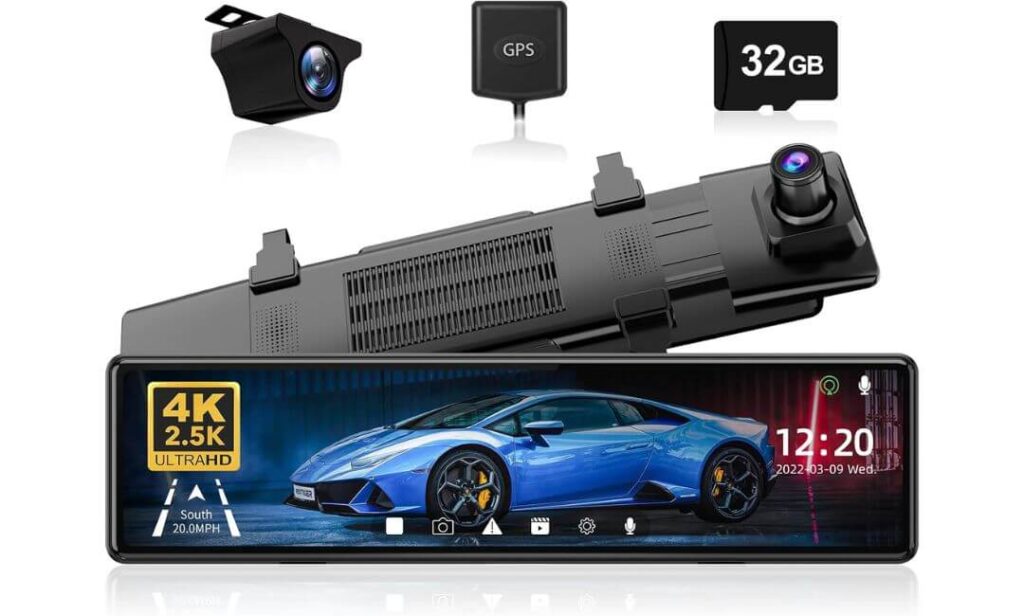
Quick Specs:
- 4K Front Camera + 2.5K Rear Camera
- 11-Inch UHD Touchscreen Mirror Display
- 170° Front View and 150° Rear View
- WDR + HDR Night Vision
- Built-In GPS Tracking
- Reverse Parking Guidelines
- Parking Monitoring Support
- G-Sensor Emergency Recording
- 21-Foot Rear Camera Cable Included
- 32GB Memory Card Included
Most dash cams ask you to look through a camera.
This one lets you look through your entire vehicle.
That’s a surprisingly important distinction in a Kia Carnival where rear visibility can become challenging once the cabin fills with passengers, child seats, luggage, or cargo. The first time you switch from a traditional mirror view to the live 11-inch streaming display, you immediately understand why mirror-style systems have developed such a loyal following.
The combination of 4K front recording and a sharper-than-average 2.5K rear camera works particularly well in larger vehicles. Instead of relying solely on the factory mirror, you’re effectively getting a wide-angle digital view behind the vehicle while simultaneously recording everything happening in front and behind you. On crowded highways and busy parking lots, that extra visibility becomes genuinely useful rather than feeling like a gimmick.
Night performance is another area where this setup shines. The combination of WDR, HDR processing, and the six-layer glass lens helps maintain visibility when headlights, reflective signs, and changing lighting conditions would normally overwhelm lesser cameras. The rear feed remains surprisingly clear after sunset, which is exactly when many large-vehicle owners start wishing for better rearward visibility.
(For some Carnival owners, the mirror display itself becomes the feature they end up appreciating more than the recording capability.)
What Stood Out During Evaluation
- Transforms rear visibility in a large family vehicle
- Large 11-inch display is easy to view at a glance
- 2.5K rear camera captures noticeably more detail than typical rear units
- GPS tracking and route data included
- Reverse-assist guidelines add everyday practicality
One Thing Worth Knowing
- Because this is a mirror-mounted system, it takes a few drives to get accustomed to using a digital rear view instead of relying solely on a traditional mirror reflection.
Kia Carnival Installation Notes
Unlike vehicle-specific cameras, this system uses a universal mirror mounting design. It straps securely over the existing mirror and works well with the Carnival’s cabin layout without requiring any permanent modifications.
The included 21-foot rear camera cable is particularly valuable for a vehicle the size of the Carnival. It provides enough length for clean routing from the front mirror assembly to the rear camera location while keeping the installation tidy and professional-looking.
The Insider Pro-Tip
Many buyers focus entirely on video quality when shopping for a dash cam.
For a large vehicle like the Kia Carnival, visibility can be just as important.
If you frequently travel with a full cabin, carry cargo behind the third row, or simply want a clearer view of what’s happening behind your vehicle, the mirror display changes the daily driving experience in ways a traditional dash cam cannot.
That’s what makes this model unique. It isn’t just recording the drive—it actively improves how you see the road while you’re driving it.
#4. COXPAL 3 Channel Dash Cam Front and Rear Inside
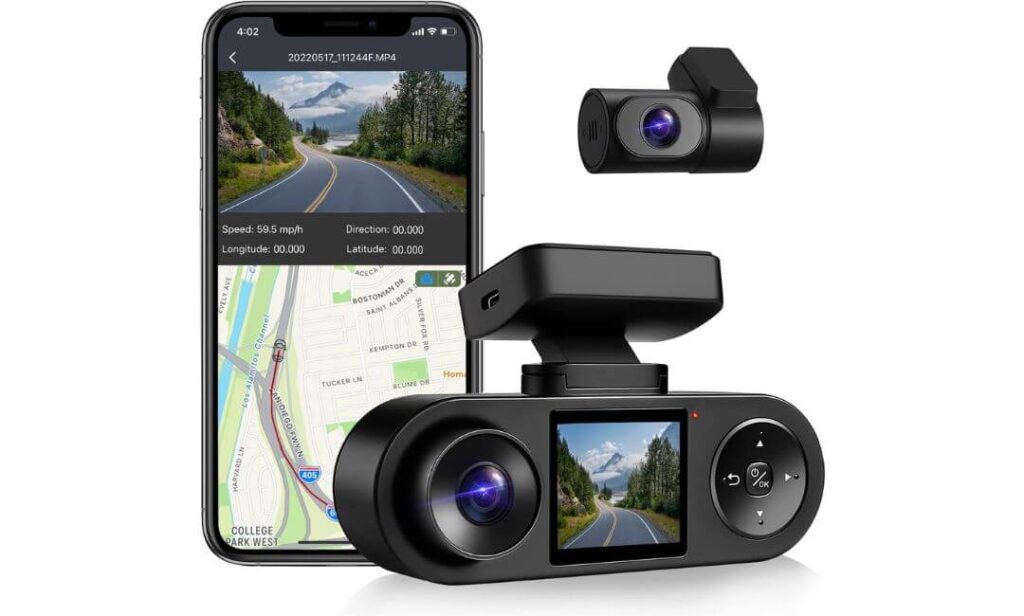
Quick Specs:
- 2K Front Camera + 1080P Interior + 1080P Rear Recording
- Three-Channel Coverage for front, cabin, and rear protection
- Infrared Night Vision with 6 IR LEDs
- Built-In GPS route and speed tracking
- WiFi Connectivity with mobile app access
- Supercapacitor Design for improved heat resistance
- Supports Up To 512GB Storage
- Smart Parking Monitoring capability
- IMX335 Front Sensor
- Wide-angle coverage across all three cameras
Here’s a reality most Kia Carnival owners discover sooner or later.
The larger the vehicle gets, the more valuable interior footage becomes.
Whether it’s kids in the rear rows, rideshare passengers, valuable cargo, pets, or simply wanting a complete record of what happened during an incident, a standard front-and-rear setup leaves a significant part of the story missing. That’s exactly why this model earned a place on this list.
What immediately stands out is the balanced approach. Instead of focusing entirely on the front camera, the system records from three separate perspectives simultaneously. The 2K front camera, dedicated interior camera, and rear camera work together to create a complete picture of what’s happening around and inside the vehicle. For a family-focused vehicle like the Kia Carnival, that’s a capability many owners end up appreciating far more than expected.
Another reason this model impressed us is reliability. Hidden beneath the housing are features most buyers never see but often benefit from years later. The use of a supercapacitor, oversized heat management components, thermal pads, and enhanced ventilation is exactly the kind of engineering that helps a dash cam survive long-term exposure to summer heat and daily use. Those details rarely appear in marketing headlines, but they’re often what separates a camera that lasts from one that doesn’t.
(If your priority is documenting everything happening around and inside the vehicle rather than chasing the highest front-camera resolution, this setup makes a compelling case for itself.)
What Stood Out During Evaluation
- True three-way recording coverage without adding multiple devices
- Infrared cabin recording remains effective after dark
- Strong heat-management design for long-term reliability
- GPS and WiFi included without additional accessories
- Flexible recording setup for family vehicles and road trips
One Thing Worth Knowing
- Owners who plan to use advanced parking surveillance features should consider adding the optional hardwire kit during installation for the best experience.
Kia Carnival Installation Notes
The Carnival’s spacious interior actually works in this camera’s favor. Routing the included rear-camera cable through the headliner and rear sections is generally straightforward, and the wide cabin provides excellent positioning options for the interior-facing camera.
Because the system records both passenger and cargo areas, it offers a level of coverage that traditional two-channel dash cams simply cannot provide. That’s particularly useful for families, frequent travelers, and drivers who regularly use all three rows of seating.
The Insider Pro-Tip
Most dash cam buyers think about accidents.
Experienced owners think about everything else.
A misplaced item, activity inside the cabin, an interaction during a parking-lot incident, or simply understanding what happened during a confusing situation often requires footage from more than one angle. That’s where a dedicated interior camera changes the value proposition entirely.
If the VIOFO is the choice for maximum recording performance and the Fitcamx is the choice for factory-style integration, this is the option for drivers who want the most complete visual record possible every time the vehicle leaves the driveway.
#5. Garmin Dash Cam X210 Compact 1440p HD Camera
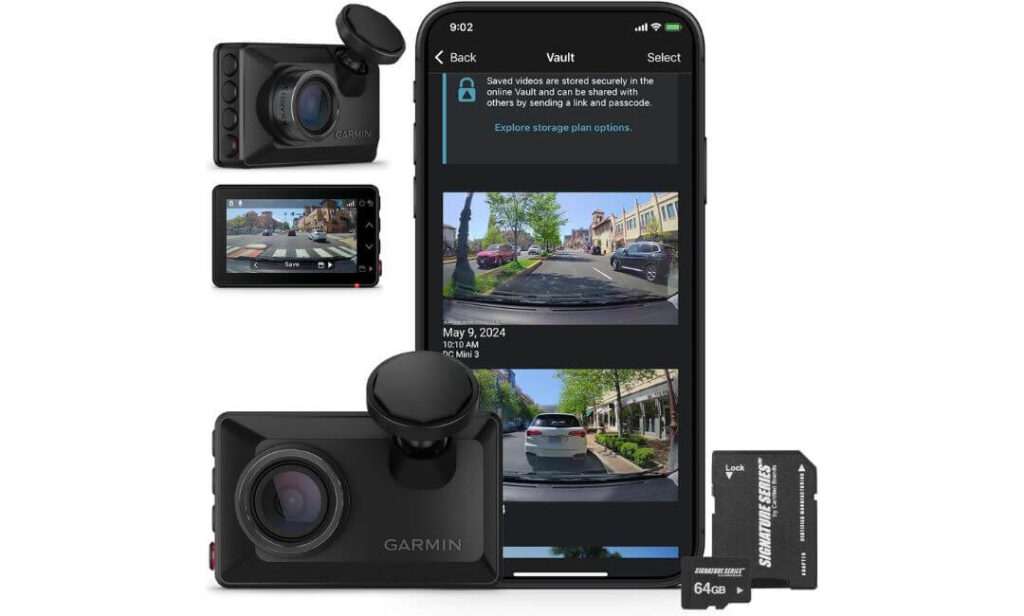
Quick Specs:
- 1440P HD Recording with enhanced image processing
- 140° Wide-Angle Lens coverage
- Garmin Clarity Polarizer for glare reduction
- Built-In GPS location and speed data
- Voice Control for hands-free operation
- 2.4-Inch LCD Display
- Automatic Incident Detection
- Parking Guard Support
- 64GB Memory Card Included
- Ultra-compact low-profile design
Oddly enough, the biggest advantage here isn’t resolution, GPS, or even Garmin’s reputation.
It’s restraint.
While many modern dash cams keep getting larger, more complicated, and increasingly dependent on apps and accessories, this camera takes the opposite approach. It focuses on the fundamentals: clear footage, reliable operation, and a design that disappears into the background once installed.
For Kia Carnival owners who don’t want a large screen hanging from the windshield or a mirror-sized display dominating the cabin, that simplicity becomes surprisingly attractive. The camera’s compact footprint is one of the smallest in this guide, allowing it to sit discreetly behind the mirror while remaining easy to access when needed.
The video quality is exactly what we’d expect from Garmin. The 1440P recording resolution, 140-degree field of view, and built-in Garmin Clarity Polarizer work together to reduce windshield reflections and improve overall image clarity. On bright afternoons, when glare can wash out important details, the polarizer often proves more valuable than many buyers initially realize.
(Sometimes the best dash cam is the one you stop thinking about after the first week of ownership because it simply keeps doing its job.)
What Stood Out During Evaluation
- Exceptionally compact design with minimal windshield footprint
- Garmin Clarity Polarizer noticeably reduces glare
- Reliable voice-control functionality
- GPS data automatically embedded into recordings
- Simple day-to-day ownership experience
One Thing Worth Knowing
- This model focuses on front-facing recording, making it an excellent choice for drivers who prioritize simplicity over multi-camera coverage.
Kia Carnival Installation Notes
The Carnival’s modern cabin layout makes installation refreshingly straightforward. Multiple power options throughout the vehicle provide flexibility, and the compact camera body allows clean placement near the mirror without affecting visibility.
Because of its small size, the camera blends naturally into the upper windshield area. Owners who prefer a clean, uncluttered interior often appreciate how little visual space it occupies compared with larger dash cam systems.
The Insider Pro-Tip
There’s a reason Garmin has built such a loyal following over the years.
The company tends to focus less on headline-grabbing specifications and more on delivering a dependable ownership experience. That philosophy is evident throughout this camera.
If your priority is maximizing coverage, the earlier models in this guide offer more capability. But if you’re the type of Kia Carnival owner who values simplicity, reliability, quick installation, and a discreet factory-like appearance, this is the camera many people end up happiest with long after the purchase excitement fades.
Sometimes the smartest upgrade isn’t the one with the longest feature list—it’s the one that quietly works every single day.
Best Dash Cameras for Kia Carnival Compared: 4K Quality, OEM Fit, and Full-Coverage Features
Buying Guide: How to Choose the Right Dash Cam for a Kia Carnival
A Kia Carnival creates a different set of requirements than most vehicles. The longer body, wider cabin, three-row seating layout, larger rear cargo area, and family-focused use cases all influence what type of dash cam makes the most sense.
That’s why choosing a dash cam for a Carnival shouldn’t start with brand names or review counts. It should start with understanding how the vehicle is actually used.
A camera that performs perfectly in a compact sedan may leave major coverage gaps in a minivan that regularly carries passengers, luggage, sports equipment, or cargo behind the third row.
Prioritize Coverage Before Chasing Resolution Numbers
Many buyers immediately focus on 4K recording, and while video quality is important, coverage usually matters more in a vehicle this size.
For example, a basic front-facing camera may record excellent footage ahead of the vehicle but completely miss activity behind the Carnival or inside the cabin. Depending on how you use your vehicle, a front-and-rear setup or even a three-channel system may provide significantly better real-world protection.
When evaluating a Kia Carnival dash cam, consider the following:
- Front-only recording for basic evidence collection
- Front and rear recording for complete driving coverage
- Three-channel recording for front, cabin, and rear monitoring
- Mirror-display systems for improved rear visibility
- OEM-style cameras that maintain a factory appearance
For most owners, dual-channel coverage offers the best balance between protection, installation simplicity, and long-term value.
Understanding Which Video Quality Actually Matters
Not all high-resolution cameras produce the same results.
The ability to read license plates, identify vehicles, and capture useful evidence often depends just as much on the image sensor, HDR processing, lens quality, and low-light performance as it does on resolution itself.
When comparing cameras, look for features such as:
- 4K front recording
- HDR or WDR image processing
- Premium image sensors
- Strong nighttime performance
- Wide dynamic range in difficult lighting conditions
This is one reason cameras equipped with advanced sensor technology often outperform higher-resolution models that rely solely on marketing numbers.
Front and Rear Dash Cam Options for Kia Carnival Owners
A larger vehicle benefits more from rear coverage than many drivers realize.
The Carnival’s extended body length creates situations where rear incidents occur outside the driver’s immediate field of view. Parking lots, highway merges, rear-end collisions, and low-speed impacts frequently happen in areas that a front-only camera simply cannot capture.
A dedicated rear camera can provide:
- Additional evidence during accidents
- Better coverage while parked
- Documentation of rear-end impacts
- Visibility around larger vehicles in traffic
- Greater confidence during long-distance travel
For many Carnival owners, a front-and-rear system represents the most practical upgrade available.
Parking Mode Can Be More Important Than Driving Footage
A significant percentage of vehicle damage occurs when the vehicle isn’t moving.
Shopping centers, airports, school parking lots, sporting events, hotels, apartment complexes, and public garages all create opportunities for incidents that happen while the Carnival is parked.
A quality parking mode dash cam for Kia Carnival ownership should offer:
- Impact-triggered recording
- Battery protection features
- Low-power monitoring
- Motion detection capability
- Reliable event storage
If parking surveillance is important to you, remember that many advanced parking features require a separate hardwire kit for full functionality.
Mirror Display Systems vs Traditional Dash Cams
Mirror-style systems have become increasingly popular among Carnival owners for a simple reason.
They solve two problems at the same time.
First, they provide front and rear recording. Second, they improve rearward visibility by displaying a live camera feed through the mirror itself.
This can be especially useful when:
- The third row is occupied
- Cargo blocks the rear window
- Large items are loaded behind passengers
- Driving in heavy traffic
- Navigating crowded parking lots
While traditional dash cams remain the most popular option overall, mirror-display systems offer advantages that are particularly relevant to larger family vehicles.
OEM-Fit Installation Considerations
Not every owner wants a visible dash cam hanging from the windshield.
Factory-style solutions have become increasingly attractive because they blend directly into the vehicle’s existing interior design. Some models mount within the mirror housing area and become almost invisible after installation.
Before purchasing an OEM-style camera, verify:
- Vehicle compatibility
- Mirror housing configuration
- Part number requirements
- Trim-level compatibility
- Installation instructions
A properly fitted OEM-style camera can provide a significantly cleaner appearance than universal windshield-mounted alternatives.
Storage Capacity and Recording Management
Storage often becomes more important as camera quality increases.
Higher-resolution recording generates larger files, and multi-camera systems consume storage even faster. A Carnival used for family travel or long road trips can fill memory cards surprisingly quickly.
Look for features such as:
- High-capacity microSD support
- SSD compatibility where available
- Loop recording functionality
- Automatic file management
- Emergency event protection
The goal is to ensure important footage remains available when needed without constant maintenance.
GPS, Connectivity, and Smart Features
Modern dash cams provide much more than video recording.
Many premium models now include:
- GPS location tracking
- Speed and route information
- Smartphone app connectivity
- WiFi video downloads
- Voice control functionality
- Emergency event protection
These features won’t necessarily improve video quality, but they can make ownership substantially more convenient over time.
Reliability Matters More Than Most Buyers Realize
A dash cam only has value if it records consistently when needed.
For that reason, reliability should always carry significant weight during the buying process.
Pay attention to:
- Heat resistance
- Internal component quality
- Firmware update history
- Warranty support
- Manufacturer reputation
- Customer service responsiveness
The best dash cam isn’t necessarily the one with the longest feature list. It’s the one that continues recording properly year after year when conditions become challenging.
For most Kia Carnival owners, the ideal choice ultimately comes down to how the vehicle is used. Some drivers will prioritize maximum image quality, others will prefer factory-style integration, and some will value complete cabin coverage above everything else.
The good news is that every model recommended in this guide excels in at least one of those areas, making it easier to match the camera to your specific needs rather than settling for a one-size-fits-all solution.
Installation and Setup Guide for Kia Carnival Dash Cams
One of the biggest misconceptions about dash cams is that installation is difficult. In reality, most modern systems can be installed in a Kia Carnival without modifying the vehicle, cutting factory wiring, or affecting daily usability.
The key is understanding where the camera should be mounted, how power should be supplied, and which setup steps matter most after installation. A premium dash cam can perform poorly if it is positioned incorrectly, while a properly installed system can provide years of reliable service with minimal maintenance.
Understanding the Best Mounting Position Before Installation
Before attaching anything to the windshield, spend a few minutes studying the upper center section of the glass around the rearview mirror.
This area is usually the ideal location because it keeps the camera hidden from the driver’s direct line of sight while still providing a clear view of the road ahead.
For most Kia Carnival owners, the goal should be achieving a factory-like appearance rather than simply finding the first available spot on the windshield.
Keep the following principles in mind:
- Mount the front camera close to the rearview mirror whenever possible
- Avoid blocking forward visibility
- Maintain clear access to rain sensors and safety cameras
- Leave room for mirror adjustment
- Ensure the lens has an unobstructed road view
OEM-style systems such as the Fitcamx simplify this process considerably because they integrate directly into the mirror housing area.
Step-by-Step Installation Basics
Regardless of which dash cam you choose, the overall installation process follows a similar pattern.
- Clean the windshield thoroughly before mounting the camera.
- Position the front camera and verify visibility from the driver’s seat.
- Route power wiring through the headliner.
- Continue cable routing along factory trim panels.
- Secure any loose wiring using included clips or adhesive mounts.
- Install the rear camera if applicable.
- Connect power and perform initial setup.
- Verify live video feeds before finalizing cable placement.
Taking extra time during cable routing usually produces the biggest improvement in overall appearance.
A clean installation often looks factory-installed, while rushed wiring tends to remain noticeable every time you enter the vehicle.
Choosing the Right Power Source
Power delivery affects both convenience and available features.
Most dash cams support two primary installation methods.
Cigarette-Lighter or USB Power
This is the simplest installation method.
Advantages include:
- Fast installation
- No fuse box access required
- Easy removal later
- Ideal for leased vehicles
Limitations include:
- Parking mode functionality may be restricted
- Visible power cable in some installations
- Continuous monitoring features may not operate when the vehicle is off
For many drivers, this setup provides everything needed for daily driving protection.
Hardwire Kit Installation
A hardwire kit connects directly to the vehicle’s electrical system through the fuse panel.
Benefits include:
- Advanced parking surveillance
- Impact detection while parked
- Cleaner cable management
- Automatic voltage protection on supported kits
- Full access to premium parking-mode features
Most of the cameras featured in this guide offer their strongest functionality when paired with an appropriate hardwire kit.
Fuse Tap Guidance for Parking Mode Users
Many Carnival owners choose a fuse-tap installation because it creates a professional result while preserving factory wiring integrity.
The basic process involves:
- Selecting an appropriate accessory fuse
- Selecting a constant-power fuse when required
- Installing the fuse tap adapter
- Grounding the hardwire kit properly
- Configuring battery protection settings
If you’re unfamiliar with automotive electrical systems, professional installation is often worth considering because it ensures parking-mode features operate correctly from day one.
Preserving the Factory Appearance During Installation
A well-installed dash cam should not draw attention to itself.
This is especially important inside a vehicle like the Kia Carnival, where the interior design already looks clean and modern.
To maintain an OEM-style appearance:
- Hide cables inside trim panels whenever possible
- Route wiring through factory pathways
- Avoid crossing airbag deployment zones
- Keep wiring away from moving interior components
- Position cameras behind or near the mirror assembly
Taking these precautions improves both appearance and long-term reliability.
Avoiding Interference With Airbags and Driver-Assistance Systems
Modern Carnival models contain numerous safety technologies near the windshield area.
These may include:
- Forward collision systems
- Lane-assist cameras
- Rain sensors
- Automatic high-beam sensors
- Airbag deployment pathways
Before securing wiring permanently, verify that cables do not interfere with any factory safety equipment.
When routing wiring along A-pillars, always ensure airbag deployment areas remain unobstructed.
This step is often overlooked but is one of the most important aspects of a professional-quality installation.
Connecting Mobile Apps and Smart Features
Most premium dash cams now include companion applications that simplify setup and footage management.
After powering the camera:
- Install the manufacturer’s app
- Connect using WiFi or Bluetooth if supported
- Update firmware when available
- Configure video quality settings
- Set recording preferences
- Verify GPS functionality
- Confirm date and time synchronization
Completing these steps immediately helps prevent problems later when footage is actually needed.
Setting Up Front, Rear, and Interior Camera Alignment
Proper alignment is one of the most overlooked parts of dash cam ownership.
A camera can record perfectly while still missing important details if the viewing angle is incorrect.
For front cameras:
- Keep the horizon near the center of the image
- Minimize excessive dashboard visibility
- Verify lane coverage on both sides
For rear cameras:
- Confirm visibility across the full rear window
- Avoid excessive sky exposure
- Check nighttime performance after installation
For triple-camera systems:
- Ensure passenger areas remain visible
- Verify interior coverage at night
- Confirm cabin details remain identifiable
A few minutes spent adjusting angles can dramatically improve recording quality.
Mirror Display Setup and Calibration
Mirror-display systems require additional setup compared to traditional dash cams.
After installation:
- Adjust brightness levels
- Configure split-screen views if available
- Set parking guidelines accurately
- Verify rear-camera orientation
- Test daytime and nighttime visibility
The objective is creating a display that improves rearward visibility without becoming distracting during daily driving.
Final Testing Before You Consider the Installation Complete
Before declaring the project finished, perform a complete functionality check.
Verify:
- Front camera recording
- Rear camera recording
- Interior camera recording if applicable
- GPS functionality
- WiFi connectivity
- Voice-control commands
- Loop recording operation
- Emergency event locking
- Parking mode activation
- Collision detection alerts
Then take a short test drive and review the footage on a larger screen.
Many installation mistakes become obvious during this final review, and correcting them immediately is far easier than discovering them months later after an important event.
A properly installed dash cam should feel like a natural part of the Kia Carnival rather than an aftermarket accessory. When positioned correctly, powered appropriately, and configured carefully, it becomes one of those upgrades you rarely think about—until the day you’re extremely glad it’s there.
Getting the Most Out of Your Kia Carnival Dash Cam
Buying a great dash cam is only half the equation.
What separates experienced owners from everyone else is how they use, maintain, and manage their recording system after installation. Even the best dash cam on the market can deliver disappointing results if storage is neglected, camera angles drift over time, or parking features are never configured correctly.
The good news is that a few simple habits can dramatically improve reliability, recording quality, and long-term usefulness.
Daily Habits That Make a Bigger Difference Than Most Owners Realize
One of the easiest mistakes to make is assuming the dash cam will take care of everything automatically forever.
While modern systems are remarkably reliable, it’s still worth developing a quick routine every few weeks.
Take a few seconds to verify:
- The camera powers on normally
- Recording indicators appear correctly
- Memory card warnings are absent
- Rear cameras remain connected
- Lens surfaces stay clean
- Date and time remain accurate
Dust, fingerprints, road film, and even interior cleaning products can gradually reduce image quality without owners noticing.
For Kia Carnival drivers who spend significant time on highways or family road trips, keeping both front and rear lenses clean often provides a larger image-quality improvement than upgrading to a more expensive camera.
Maximizing Front and Rear Camera Effectiveness
A front-and-rear dash cam system only works as well as its weakest camera.
Many owners pay attention to the front camera but rarely check the rear unit after installation.
That’s a mistake.
The rear camera frequently captures some of the most important footage, particularly during:
- Rear-end collisions
- Parking lot incidents
- Lane-change disputes
- Highway merging situations
- Hit-and-run events
Every few months, review sample footage from both cameras.
Look for:
- Proper focus
- Stable image quality
- Correct viewing angle
- Clear license plate visibility
- Functional nighttime recording
The best time to discover a problem is before you actually need the footage.
Managing 4K Recording Without Running Out of Storage
High-resolution recording creates larger files than many owners expect.
A 4K dash cam can generate a substantial amount of footage during daily driving, especially when paired with rear cameras or cabin cameras.
To avoid storage-related issues:
- Use high-endurance memory cards whenever possible
- Follow manufacturer-recommended storage limits
- Format storage media periodically
- Replace aging memory cards proactively
- Monitor available storage during long trips
Owners using systems with expanded storage capabilities, such as SSD-compatible models, can typically retain significantly more footage before older recordings begin overwriting automatically.
This becomes particularly useful during vacations, extended road trips, and multi-day travel schedules.
Understanding Loop Recording the Right Way
Some first-time buyers become concerned when older footage disappears.
In reality, that’s exactly how loop recording is supposed to work.
Dash cams continuously overwrite the oldest non-protected files once storage reaches capacity.
What matters is ensuring important recordings are protected.
Most modern cameras accomplish this through:
- Automatic collision detection
- G-sensor event locking
- Manual emergency recording buttons
- Parking incident protection
Periodically reviewing protected-event folders is a good habit because it confirms those safety systems are functioning correctly.
Using Parking Mode to Capture What Happens When You’re Away
Many drivers buy a dash cam expecting it to help during an accident.
In practice, some of the most valuable footage comes while the vehicle is parked.
Shopping centers, airports, schools, sporting venues, hotels, office complexes, and residential parking areas all expose a Kia Carnival to potential damage when nobody is inside.
To maximize parking-mode effectiveness:
- Verify hardwire kits are configured correctly
- Enable battery-protection settings
- Test impact-detection sensitivity
- Confirm parking mode activates automatically
- Check event recordings occasionally
A properly configured parking system can often capture critical details that would otherwise be impossible to recover after a hit-and-run incident.
Avoiding the Most Common Parking Mode Mistakes
The majority of parking-mode complaints stem from setup issues rather than hardware problems.
Common examples include:
- Incorrect voltage cutoff settings
- Improper fuse selection
- Disabled impact detection
- Memory cards reaching capacity
- Parking mode never activating correctly
After installation, intentionally test the system rather than assuming everything is functioning properly.
A few minutes of verification can prevent significant frustration later.
Making the Most of GPS Features
Many owners overlook GPS functionality until an incident occurs.
GPS data can provide:
- Vehicle speed information
- Route history
- Location confirmation
- Event timelines
- Additional context during insurance claims
While footage usually remains the primary evidence, GPS information often helps create a more complete picture of what actually happened.
This becomes especially valuable during disputed incidents where multiple accounts of an event exist.
Managing Footage Like Experienced Owners
One habit that separates experienced dash cam users from casual owners is proactive footage management.
Whenever something unusual occurs, even if no accident happens, consider saving the recording immediately.
Examples include:
- Near misses
- Aggressive driving incidents
- Road hazards
- Wildlife encounters
- Severe weather events
- Suspicious activity around the vehicle
Waiting until later often leads to footage being overwritten before it can be reviewed.
Understanding Cloud and Remote Access Features
Some modern dash cams now offer remote-access capabilities through companion applications and cloud-connected services.
Depending on the camera model, these features may include:
- Remote footage access
- Live camera viewing
- Parking alerts
- Cloud backups
- Event notifications
While not every system supports cloud functionality, owners who park frequently in public locations often find these features particularly valuable.
It’s important to remember that some advanced services may require:
- Constant power
- Active WiFi connections
- Smartphone integration
- Optional subscription plans
Before relying on cloud-based features, confirm the specific requirements for your chosen camera.
Long-Term Maintenance for Maximum Reliability
The best dash cams are surprisingly low-maintenance, but they’re not maintenance-free.
At least twice per year:
- Inspect all camera mounts
- Check cable routing
- Verify firmware versions
- Review storage health
- Test parking functions
- Confirm GPS operation
- Clean all lenses thoroughly
These quick inspections help ensure the system remains ready when it’s needed most.
The Reality Most Owners Learn Over Time
The value of a dash cam isn’t measured by how often you watch the footage.
It’s measured by how confidently it records when something unexpected happens.
The owners who get the most from their Kia Carnival camera systems aren’t necessarily the ones with the most expensive equipment. They’re the ones who keep their cameras properly maintained, their storage healthy, their parking features active, and their footage accessible when it matters.
Do that consistently, and your dash cam becomes less of an accessory and more of a silent witness that’s always ready when you need it.
Long-Term Maintenance, Performance Optimization, and Troubleshooting for Kia Carnival Dash Cams
A surprising number of dash cam failures have nothing to do with the camera itself.
In many cases, the actual culprit is a neglected memory card, outdated firmware, poor power delivery, or a small issue that goes unnoticed until footage is needed most. That’s why experienced dash cam owners treat maintenance as part of ownership rather than something that only matters when a problem appears.
The good news is that keeping a dash cam running reliably for years usually requires very little effort. A few preventative checks throughout the year can dramatically improve recording consistency, storage reliability, and overall system longevity.
Why Firmware Updates Matter More Than Most Owners Think
Many drivers install a dash cam, configure it once, and never open the companion app again.
Unfortunately, that means missing firmware improvements that can directly affect reliability and performance.
Manufacturers regularly release updates that may improve:
- Recording stability
- GPS accuracy
- WiFi connectivity
- Parking mode performance
- Memory card compatibility
- Voice control responsiveness
- App communication reliability
- Power management efficiency
Before updating, always review the release notes and follow the manufacturer’s instructions carefully.
For most owners, checking for updates every few months is more than sufficient.
Choosing the Right Memory Card From the Start
Memory cards are often the weakest component in any dash cam system.
Unlike ordinary storage devices, dash cams continuously write and overwrite data every day. That constant workload can quickly wear out lower-quality cards.
For long-term reliability, prioritize:
- High-endurance microSD cards
- Manufacturer-approved storage options
- Proper speed ratings
- Adequate capacity for your recording needs
- Storage designed specifically for surveillance applications
A premium dash cam paired with a poor-quality memory card frequently performs worse than a mid-range camera using proper storage.
Understanding Storage Capacity and Retention Time
One of the most common questions from Kia Carnival owners is how much storage is actually needed.
The answer depends largely on recording quality and the number of active cameras.
As a general rule:
- Front-only systems require less storage
- Front-and-rear systems consume storage faster
- Triple-channel systems generate the largest files
- 4K recording significantly increases storage demands
- Parking mode recordings add additional usage
Drivers who regularly take road trips or spend long hours behind the wheel often benefit from larger-capacity storage solutions because they preserve more historical footage before loop recording begins overwriting older files.
How to Extend Memory Card Lifespan
Even high-quality cards eventually wear out.
Fortunately, several habits can significantly extend service life.
Consider the following practices:
- Format the card periodically using the camera menu
- Avoid repeatedly removing the card unnecessarily
- Replace aging cards proactively
- Monitor for storage-related warnings
- Use storage capacities recommended by the manufacturer
Many experienced owners replace memory cards on a scheduled basis rather than waiting for failures to occur.
This preventative approach greatly reduces the risk of missing critical footage.
Troubleshooting Missing Footage and Recording Gaps
Nothing is more frustrating than discovering an important event was not recorded properly.
When footage appears incomplete, investigate the most common causes first.
Potential reasons include:
- Failing memory cards
- Corrupted storage sectors
- Improper loop recording settings
- Unexpected power interruptions
- Firmware issues
- Incorrect time synchronization
In many cases, formatting the card and verifying the latest firmware resolves the problem immediately.
If the issue persists, replacing the memory card should be one of the first troubleshooting steps.
Addressing Overheating Concerns During Summer Months
Heat is one of the biggest challenges facing any windshield-mounted electronic device.
Fortunately, quality dash cams are designed to operate in elevated temperatures. However, prolonged exposure to extreme conditions can still affect performance over time.
To help minimize heat-related stress:
- Park in shaded areas whenever possible
- Use windshield shades during extended parking
- Maintain adequate cabin ventilation
- Ensure air vents around the camera remain unobstructed
- Select cameras designed with advanced thermal management systems
Models equipped with supercapacitors often perform better in demanding temperature environments than units relying solely on traditional internal batteries.
Understanding Battery Drain and Power Consumption
Parking mode frequently receives blame for battery-related concerns, but the reality is usually more nuanced.
A properly configured hardwire installation should include voltage protection features that prevent excessive battery discharge.
If unusual battery drain occurs, inspect:
- Hardwire kit settings
- Voltage cutoff configuration
- Parking mode sensitivity
- Camera firmware version
- Vehicle battery condition
In some cases, the vehicle’s battery may already be approaching the end of its service life, making the dash cam appear responsible when it is not actually the root cause.
Solving WiFi, GPS, and App Connectivity Problems
Connectivity issues occasionally occur even with premium cameras.
Most can be resolved through a systematic approach.
Start by:
- Restarting the camera
- Updating the mobile application
- Reconnecting WiFi manually
- Confirming location permissions
- Checking firmware versions
- Clearing old device pairings
GPS reception can also be temporarily affected by underground garages, parking structures, heavily wooded areas, or dense urban environments.
Brief signal interruptions are generally normal under these conditions.
Signs It May Be Time for an Upgrade
Dash cams can remain reliable for many years, but technology continues to improve.
Certain signs may indicate it’s worth considering a newer system.
Examples include:
- Limited storage capacity
- Outdated image quality
- Poor nighttime performance
- Lack of parking mode support
- Missing rear camera coverage
- Absence of smartphone connectivity
- Reduced hardware reliability
For many Kia Carnival owners, the biggest upgrade isn’t necessarily moving to higher resolution. Instead, it often involves gaining features such as rear recording, cabin monitoring, SSD storage support, advanced parking surveillance, or factory-style integration.
When Replacement Makes More Sense Than Repair
Eventually, every electronic device reaches a point where replacement becomes the smarter option.
Warning signs include:
- Frequent recording failures
- Persistent power interruptions
- Repeated memory card errors across multiple cards
- Unresponsive controls
- Excessive overheating
- Inconsistent boot-up behavior
- Missing footage despite troubleshooting
At that stage, investing in a modern camera often provides greater value than attempting to extend the life of aging hardware.
The Maintenance Habit That Delivers the Biggest Return
If there’s one habit worth adopting, it’s this:
Review a few minutes of footage every month.
That simple check confirms recording quality, verifies storage health, identifies mounting issues, and catches potential problems long before an important event occurs.
The most reliable dash cam systems aren’t necessarily owned by technology enthusiasts. They’re usually owned by drivers who spend five minutes every month making sure everything is still working exactly as intended.
When that habit becomes routine, the odds of being disappointed by your dash cam when it matters most drop dramatically.
FAQs About Kia Carnival Dash Cam
Is a front-only dash cam enough for a Kia Carnival, or should most owners invest in a front-and-rear system?
This is one of those questions where the technically correct answer and the practical answer are completely different.
Technically, a front-facing camera is better than having no camera at all. In real-world Kia Carnival ownership, however, a front-only setup often leaves the largest blind spot completely uncovered. The Carnival’s extended body length means many incidents occur behind the vehicle rather than in front of it.
Think about where family vehicles spend their time:
- School parking lots
- Grocery store parking areas
- Airport pickup zones
- Hotel parking garages
- Highway traffic with frequent lane changes
A rear camera frequently ends up capturing the footage that actually explains what happened. That’s why most experienced owners eventually move toward dual-channel systems, even if they initially planned to use only a front-facing camera.
Why do some Kia Carnival owners choose an OEM-style dash cam over a technically superior 4K system?
Because ownership experience matters just as much as specifications.
The truth is that not every buyer wants the highest benchmark video quality available. Many Carnival owners care deeply about maintaining a clean, factory-like cabin environment. They don’t want extra screens, hanging wires, visible mounts, or accessories that immediately draw attention every time someone enters the vehicle.
An OEM-style solution often appeals to drivers who value:
- Factory appearance
- Simplified installation
- Minimal windshield clutter
- Better interior aesthetics
- Everyday convenience
For some buyers, a camera that blends seamlessly into the vehicle can be the better long-term choice, even if another model offers slightly stronger technical performance on paper.
Does a 4K dash cam actually make a difference in a Kia Carnival, or is it mostly marketing?
The answer depends entirely on the sensor behind the resolution.
A poorly optimized 4K camera can easily produce less useful footage than a well-engineered camera using a superior image sensor and stronger HDR processing. That’s why simply comparing resolution numbers rarely tells the full story.
Where quality 4K systems genuinely help is during situations involving:
- Highway speeds
- Lane changes
- Distant license plates
- Poor lighting conditions
- Complex traffic environments
The biggest difference isn’t always image sharpness. It’s often the ability to preserve details when lighting conditions become difficult and everything starts happening very quickly.
How much storage should a Kia Carnival owner realistically plan for?
Most first-time buyers underestimate storage requirements, especially once rear cameras, cabin cameras, and parking mode recording enter the equation.
The more useful question isn’t “How much storage do I need today?” It’s “How much footage do I want available when something happens next week?”
Drivers who frequently take family trips, commute long distances, or use parking surveillance regularly should prioritize larger storage capacities whenever possible.
As recording quality increases, storage becomes less of a convenience feature and more of a reliability feature. Running out of space isn’t usually the problem. The real concern is important footage being overwritten before you realize you’ll need it.
That’s one reason premium systems offering expanded storage support have become increasingly attractive for larger vehicles.
What’s the biggest dash cam mistake Kia Carnival owners make after installation?
Oddly enough, it’s assuming the job is finished.
Many owners spend hours researching cameras, carefully installing everything, and then never review a single recording afterward. Months later, when footage is finally needed, they discover a camera angle shifted, a memory card failed, or a setting was never configured correctly.
The most reliable dash cam owners tend to follow a simple routine:
- Check footage periodically
- Verify parking mode operation
- Keep firmware updated
- Inspect memory card health
- Confirm both front and rear cameras remain aligned
Those small habits take only a few minutes throughout the year, yet they dramatically reduce the chances of discovering a problem at the exact moment the footage becomes important.
In other words, the best dash cam isn’t necessarily the most expensive one. It’s the one that’s still recording exactly as expected when you finally need proof of what happened.
Final Thoughts
After spending time comparing these options specifically through the lens of Kia Carnival ownership, one thing became very clear: there isn’t a single “best” dash cam for every driver.
The right choice depends on what matters most to you once the vehicle leaves the driveway.
If your priority is extracting the highest level of image quality possible, the VIOFO A329S remains the benchmark in this group. If maintaining a factory appearance matters more than anything else, the Fitcamx delivers an ownership experience that feels remarkably close to an OEM accessory. Drivers looking for improved rear visibility may find the REDTIGER T27 changes their daily driving experience more than expected, while families wanting complete cabin coverage will appreciate what the COXPAL A11T brings to the table. And for those who simply want a dependable, compact camera that quietly does its job, the Garmin Dash Cam X210 remains a very sensible option.
What ultimately separates a good purchase from a great one isn’t choosing the camera with the longest feature list. It’s choosing the camera that fits how your Kia Carnival is actually used.
A family road-trip vehicle has different priorities than a daily commuter. A fully loaded three-row people mover has different visibility challenges than a compact crossover. And a vehicle that spends hours parked in public lots may benefit more from advanced parking surveillance than another jump in resolution.
That’s why every recommendation in this guide was selected around real ownership scenarios rather than marketing claims alone.
If you’re still undecided, ask yourself one simple question:
What is the one situation I most want my dash cam to capture?
The answer usually points directly toward the right choice.
And regardless of which model you choose, investing in a quality recording system is one of the few upgrades that can prove its value the moment something unexpected happens. Most days you’ll forget it’s there. On the day you need it, you’ll be glad you didn’t.
Also Check:


