
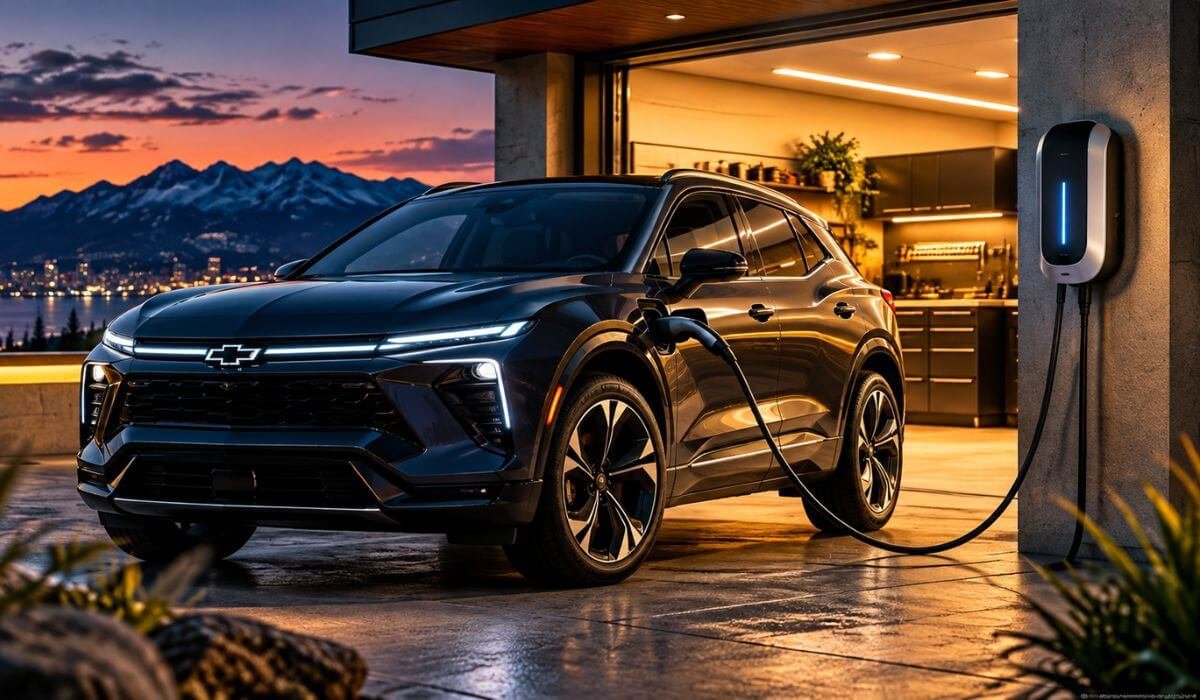
5 Best EV Chargers for Chevy Blazer in 2026: Smart WiFi, Long-Reach Cables & Easy Setup
If you own a Chevy Blazer EV, choosing the right home charger is not about picking the biggest number on the specification sheet. The better question is how well the charger matches the Blazer EV’s AC charging capability, electrical setup, cable reach, connector, and the way you actually charge at home.
The Blazer EV is a substantial electric SUV with a sizeable battery, making a properly installed Level 2 home charger a far more practical choice for regular overnight charging than relying on a standard household outlet. Charging hardware and connector details can vary by model year and configuration, so I would verify your exact Blazer EV before buying rather than assuming every version has the same charging setup.
For this guide, I looked beyond headline amperage and focused on what actually matters once the charger is mounted in your garage. Smart controls, cable length, weather protection, installation flexibility, safety and dependable power delivery can have a bigger impact on everyday ownership than another impressive number on the box. The five options below were selected around those real-world differences, helping you choose a home charger that fits both your Blazer EV and your electrical setup without paying for features or capacity you may never use.
Best Level 2 Home EV Chargers for Chevy Blazer: Top 2026 Picks With 240V Power, App Control & Flexible Setup
#1. Grizzl-E Ultimate Level 2 EV Charger
Heavy-duty Chevy Blazer EV home charger with adjustable Level 2 power, J1772 connection, 25-ft cable, WiFi control and rugged indoor/outdoor hardwired design
#2. Autel 50A Level 2 EV Charger
Smart Level 2 charger for Chevy Blazer EV with 50A 240V hardwired charging, J1772 connection, WiFi app control, adjustable current and 25-ft cable
#3. EMPORIA Level 2 EV Charger
Smart Chevy Blazer EV home charging station with 48A Level 2 power, J1772 connector, WiFi energy monitoring, scheduling and NEMA 14-50 or hardwired installation
#4. WOLFBOX Level 2 EV Charger
Feature-rich Chevy Blazer EV charger with 48A 240V hardwired charging, J1772 connection, WiFi app control, 4.3-inch display and 25-ft cable
#5. MACH 1 Level 2 EV Charger
Flexible Chevy Blazer EV charging station with 48A Level 2 power, J1772 connection, included NACS adapter, 30-ft cable and NEMA 14-50 or hardwired installation
Must Check: Best Level 2 Charger for Chevy Bolt
Expert Tip
One thing I would not do with a Chevy Blazer EV is buy a charger simply because it advertises a bigger charging figure. The vehicle can only use what its onboard charging system is designed to accept, so beyond a sensible Level 2 setup, extra capacity may not translate into faster charging for your Blazer.
What I would pay attention to instead is the stuff you actually live with: installation type, cable reach, connector fit, weather protection, smart controls and power management. A charger that works reliably every night is far more useful than one that looks impressive on a product page but gives you little practical benefit.
That is also why the five chargers below are not five versions of the same recommendation. Each one has a different reason for being here.
How We Choose the Best EV Chargers for Chevy Blazer
We did not choose these chargers by simply sorting them from the highest advertised output to the lowest. For a Chevy Blazer EV, that would be an easy way to make the list look impressive while missing what actually matters to an owner.
Our starting point was home charging compatibility. The charger needs to make sense for the Blazer EV’s AC charging setup, while the installation has to make sense for the home’s electrical system. That distinction matters because the charger’s maximum capability and the vehicle’s actual charging acceptance are not necessarily the same thing.
From there, we looked at the details that become important after the charger is installed.
1. Real-world charging fit
We considered whether each charger provides a sensible Level 2 setup for a vehicle like the Blazer EV rather than treating maximum output as the only measure of performance. The goal is useful overnight charging, not an impressive specification that you may never fully use.
2. Installation flexibility
A good charger has to work with the way your garage is actually wired. We therefore considered hardwired and plug-in options, including the electrical requirements associated with each approach. This is particularly important when comparing a 14-50 plug-in unit with a higher-powered hardwired charger.
3. Cable length matters more than people think
A charger can have excellent hardware and still be annoying if the cable barely reaches the vehicle. That is why cable length was part of our selection process. The 25-ft and 30-ft options on this list can make a meaningful difference when the charging port and wall-mounted unit are not perfectly positioned.
4. Smart features with a purpose
WiFi is not automatically a reason to recommend a charger. We looked at whether smart connectivity actually adds something useful, such as remote control, scheduling, charging management or energy information. That is why the smart chargers on this list are included for practical reasons rather than because an app sounds good on the box.
5. Indoor and outdoor practicality
The Blazer EV is an SUV that can easily end up charging outside, under a carport or in a garage. We therefore paid attention to weather resistance, enclosure design and overall installation flexibility, rather than assuming every owner has a climate-controlled garage.
6. Connector and future-use considerations
The connector is one of those details that should be checked before purchasing, not after the box arrives. We considered the connector configuration of each charger and how useful it is for a Blazer EV owner today. The MACH 1, for example, stands apart because it combines J1772 and NACS compatibility, giving it a different type of flexibility from the other options.
7. We kept the products meaningfully different
This was important. If five chargers offer essentially the same ownership experience, listing all five does not help the reader. The final selection therefore includes different strengths: rugged high-power hardware, smart home charging, energy-focused controls, straightforward hardwired charging and connector flexibility.
That is ultimately how this list was built. We are not saying that the most expensive or most powerful charger is automatically the right one for every Blazer EV owner. We are looking at what the charger actually adds to the ownership experience, what your electrical installation can support, and whether the features are useful after the initial excitement of buying the charger wears off.
For a newer EV and a relatively new generation of charging hardware, that practical approach matters even more. Product specifications can tell you what a charger can do; the better question is whether those capabilities make sense for your Chevy Blazer EV, your garage and your daily charging routine.
#1. Grizzl-E Ultimate Level 2 EV Charger
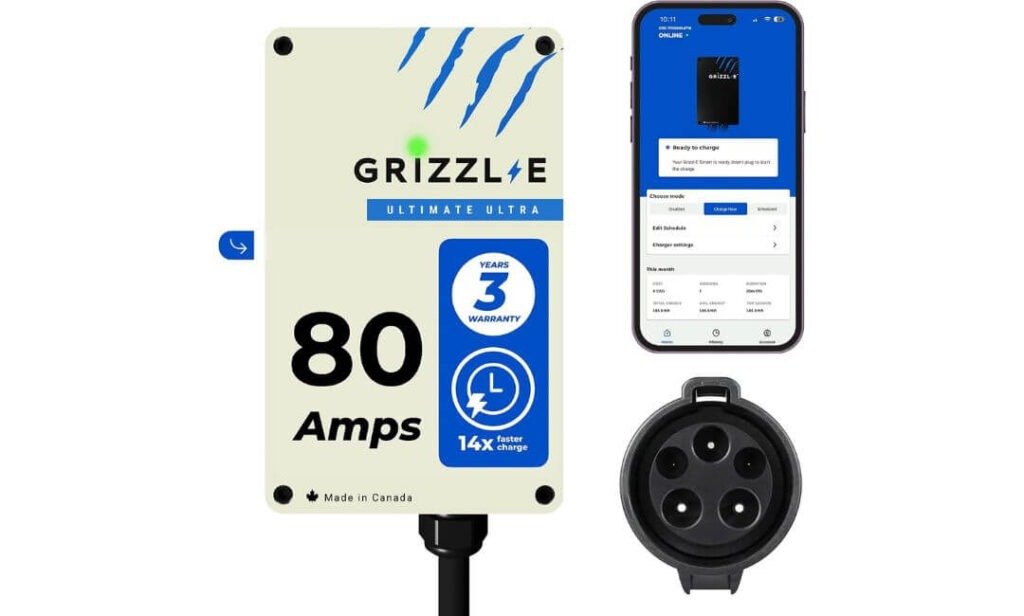
Quick Specs:
- Maximum Output: Up to 80A / 19.2 kW
- Adjustable Current: 16A–80A
- Connector: J1772
- Cable Length: 25 ft
- Installation: Hardwired only
- Electrical Flexibility: Configurable for 20A, 30A, 40A, 50A, 60A and 100A circuit setups
- Smart Control: Grizzl-E Connect WiFi
- Smart Features: Charging schedules, real-time monitoring, energy statistics and diagnostics
- Offline Charging: Continues charging without an online connection
- Enclosure: Heavy-duty metal, indoor/outdoor rated
- Safety: Built-in GFCI plus overcurrent, overvoltage, undervoltage, ground-fault and over-temperature protection
- Load Management: Intelligent power distribution for multiple chargers
- Warranty: 3 years
If your Chevy Blazer EV is going to use the same home charger night after night, the useful thing about this unit is not simply its maximum output. Its adjustable charging range gives the installation some breathing room. An electrician can configure the charging level around the circuit available at your home, rather than treating the charger as a one-setting appliance. That makes the hardware considerably more practical for different electrical setups.
The 25-foot cable is another feature that makes sense once you stop looking at the charger from a product photo. If the Blazer is parked farther from the wall, sits at an angle in a two-car garage, or occasionally needs to charge outside, cable reach becomes a daily convenience rather than a specification to ignore. The heavy-duty metal enclosure also gives the unit the flexibility to be installed indoors or outdoors.
The smart functionality is useful without being something you have to depend on. Through Grizzl-E Connect, you can monitor charging, schedule sessions and view energy information, while the charger can continue operating without an online connection. That is exactly the sort of distinction I like to see in a smart home charger: the app adds convenience, but losing WiFi does not turn the charging hardware into a problem.
(A properly built home charging setup should give you control when you want it and simply charge the car when you don’t.)
What We Like
- Adjustable charging range — You can configure the output around the electrical circuit rather than automatically running at maximum capacity.
- 25-ft charging cable — Particularly useful when the parking position is not directly beside the charger.
- WiFi plus offline operation — Smart monitoring is available, but everyday charging does not require a constant internet connection.
- Indoor/outdoor construction — The heavy-duty metal enclosure makes it suitable for more than a protected garage installation.
- Built-in protection and load management — Multiple electrical protections are combined with intelligent power distribution for installations involving more than one charger.
One Thing to Know
The important point is that this is a hardwired-only charger. There is no simple NEMA 14-50 plug-in installation, so you should plan for an electrician to install and configure the unit correctly for your home’s electrical service.
Why This Makes Sense for a Chevy Blazer EV
For the Blazer EV, the strongest part of this setup is the combination of adjustable power, long cable reach, smart monitoring and substantial electrical protection. You are not buying a charger whose usefulness depends on one particular charging configuration; the adjustable output lets the installation be matched to the home’s electrical capacity.
It is also a particularly sensible choice if the charger will be mounted in a location where 25 feet of reach, indoor/outdoor durability or future multi-EV load management could matter. Those are the details that tend to become more valuable after months of ownership, when the novelty of the charger has worn off and it simply needs to work every time you plug in.
The Insider Pro-Tip
Don’t ask your electrician to install this at its maximum setting simply because the charger can do it. Start with what your home’s electrical service can comfortably support and what the Blazer EV can actually use. The adjustable output is there for a reason, and using it properly can give you a cleaner installation without sacrificing the convenience of Level 2 home charging.
One more practical point: if the charger will be outside, think about where the 25-foot cable naturally rests when you’re finished charging. Good cable management sounds insignificant until you are doing it every evening. A sensible mounting position can make this otherwise substantial unit feel much easier to live with.
#2. Autel 50A Level 2 EV Charger
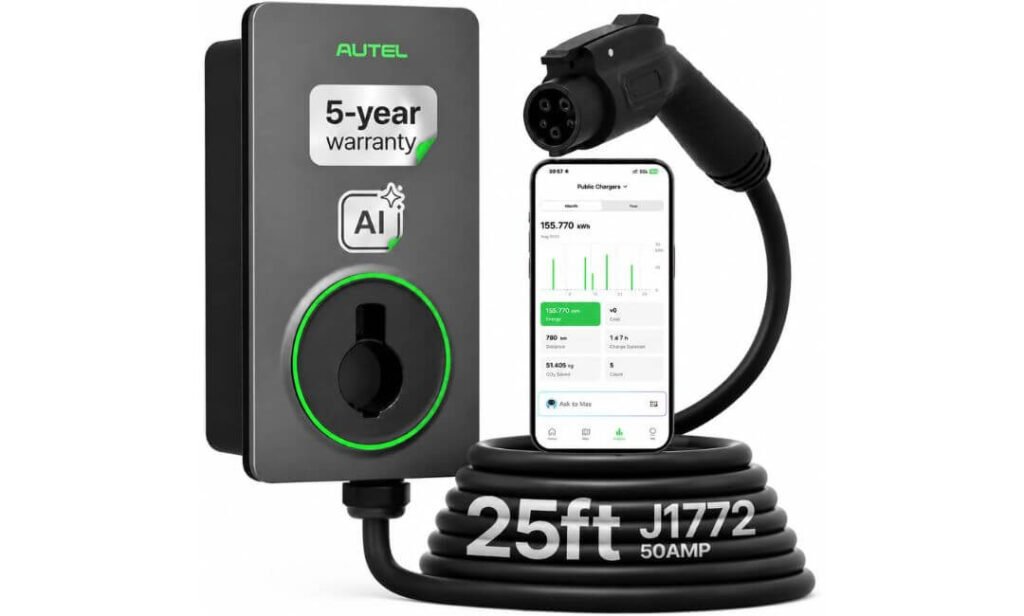
Quick Specs:
- Charging Output: Up to 50A / 12 kW
- Current Adjustment: 6A–50A through the app
- Connector: J1772
- Cable Length: 25 ft
- Installation: 240V hardwired
- Smart Control: Autel Charge app
- Charging Management: Scheduling, remote control, charging history and energy tracking
- Smart Optimization: AI-assisted charging based on time-of-use rates
- Temperature Management: Real-time temperature monitoring
- Weather Protection: IP66 / NEMA 4X
- Safety: UL and CSA certified with thermal, ground-fault and overcurrent protection
- Construction: Heavy-duty 22-lb enclosure
- Warranty: 5 years
- Support: 24/7 customer support
If the goal is to make home charging feel almost invisible in your daily routine, this is where the Autel gets interesting. The useful part isn’t simply the 50A output; it’s how much control you get around it. You can adjust charging from 6A to 50A directly through the app, which gives you a practical way to work around different household loads or deliberately charge at a lower rate overnight.
The other thing that stands out is the 25-foot cable. With a vehicle as large as the Chevy Blazer EV, parking position matters. A cable that comfortably reaches across a two-car garage or driveway can be the difference between simply plugging in and having to think about where the vehicle sits every night. The supplied information also specifically highlights flexibility in colder temperatures, which is a useful detail for owners who do not keep the charger in a warm garage.
Where this unit separates itself is on the software side. The Autel Charge app gives you charging schedules, real-time status, energy usage and cost information, while the supplied product information also lists AI-assisted charging optimization and voice-supported troubleshooting. For someone who actually wants to manage charging around electricity rates instead of just plugging in and forgetting about it, those controls have a genuine purpose.
(The real attraction here is control: set the charging behaviour once, then let the hardware and app handle the routine.)
What We Like
- 6A–50A app adjustment — Useful when you want charging speed to match the home’s electrical load rather than always running at the maximum.
- 25-ft flexible cable — Plenty of reach for less-than-perfect parking positions, with the supplied information specifically noting cold-weather flexibility.
- AI-assisted scheduling — The software can work around time-of-use electricity rates instead of leaving every charging decision to you.
- Strong weather protection — IP66/NEMA 4X construction makes this a serious option for an exposed installation.
- Five-year warranty — A useful confidence point when the charger is being treated as a long-term part of the home’s electrical setup.
One Thing to Know
This is a hardwired 240V charger, so it is not the choice for someone looking for a simple plug-in installation. You will need the electrical work planned around a dedicated circuit and have the installation completed properly by an electrician.
Why It Fits the Chevy Blazer EV
The strongest argument here is the balance between charging capability and day-to-day control. The native J1772 connection keeps the setup straightforward, while the adjustable current gives the homeowner more say over how the charger behaves on their electrical system. That makes it more than just a fast wall-mounted power source.
For a Blazer EV owner who wants the charger to do some of the thinking in the background, the combination of WiFi monitoring, scheduling, energy tracking, AI-assisted optimization and temperature management is the real appeal. You get a charger that can fit into an everyday charging routine rather than simply sitting on the wall waiting to be plugged in.
The Insider Pro-Tip
I’d set the charging schedule around your actual electricity rate before worrying about squeezing every last bit of charging speed from the unit. If your utility has cheaper overnight hours, that is where the smart controls can become genuinely useful.
And because this is a hardwired installation, decide where you want the Blazer parked most often before the electrician fixes the mounting position. Twenty-five feet gives you generous reach, but thoughtful placement makes the entire setup feel much cleaner every day.
#3. EMPORIA Level 2 EV Charger
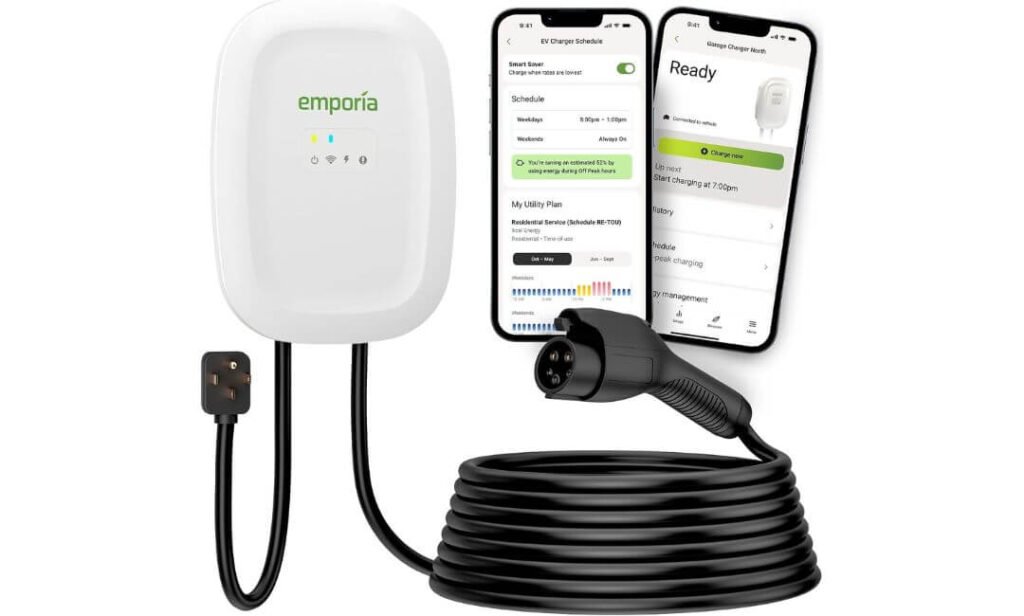
Quick Specs:
- Charging Output: Up to 48A / 11.5 kW
- Plug-In Output: Up to 40A through NEMA 14-50
- Hardwired Output: Up to 48A
- Connector: SAE J1772
- Cable Length: 25 ft
- Installation: NEMA 14-50 plug-in or 240V hardwired
- Amperage Control: 6A–40A plug-in or 6A–48A hardwired
- Smart Control: 2.4 GHz WiFi and mobile app
- Smart Features: Energy monitoring, cost tracking and charging schedules
- Weather Protection: NEMA Type 4 enclosure
- Certifications: UL Listed and ENERGY STAR certified
- Warranty: 3 years
- Weight: 16.59 lbs
If you already have a suitable NEMA 14-50 outlet, this is one of those chargers where the installation flexibility becomes the real selling point. You can use it as a plug-in unit at up to 40A, or have it hardwired for up to 48A. For a Chevy Blazer EV owner, that means you don’t necessarily have to commit to electrical work just to get useful Level 2 charging at home.
I also like the 25-foot cable here for a practical reason: the Blazer EV is not a small car, and real garages rarely have the perfect parking position every night. Extra reach gives you more freedom to park naturally instead of lining the charging port up with a wall-mounted box. The cable is also described as heavy-duty and weather-resistant, with a cable holder included for keeping things tidy.
Then there is the Emporia app, which is more useful than simply being able to start or stop charging from your phone. You can see energy consumption, charging costs and charging activity, while scheduling lets you take advantage of cheaper utility periods. The charger can also continue charging if WiFi disappears, so the smart features remain an extra layer of control rather than a requirement for basic operation.
(This is the option I’d look at closely if you want useful smart charging without locking yourself into a permanent hardwired installation.)
What We Like
- Two genuinely useful installation paths — Plug it into an existing NEMA 14-50 setup or hardwire it when you want the higher output.
- 25-ft cable — Gives the Blazer EV much more freedom around the garage or driveway.
- Real energy visibility — The app can show charging data and help you understand what the vehicle is actually costing to charge.
- NEMA Type 4 enclosure — A useful advantage if the charger will live somewhere exposed rather than inside a perfectly dry garage.
- J1772 connection — The supplied product information identifies it as a native fit for the Blazer EV setup, without requiring an adapter.
One Thing to Know
The plug-in and hardwired versions don’t deliver the same output. With NEMA 14-50, the supplied specifications list up to 40A; the higher 48A setting requires hardwiring. If you already have an appropriate outlet, the plug-in route is convenient, but don’t assume the two installation methods are interchangeable in charging performance.
Why It Fits the Chevy Blazer EV
The biggest strength here is choice. Some Blazer EV owners want a permanent wall-mounted installation, while others already have a properly installed 14-50 outlet and would rather use it. This charger accommodates both approaches without changing the basic J1772 connection or smart-charging experience.
The other reason it earns a place on this list is that the useful features are focused on ownership rather than gimmicks: 25-foot reach, adjustable current, energy tracking, cost visibility, scheduling and outdoor-ready construction. It is a particularly practical combination for someone who wants to understand and control home charging rather than simply plug in and forget about it.
The Insider Pro-Tip
If you already have a properly installed NEMA 14-50 outlet, don’t assume you need to hardwire this charger just because 48A sounds better. For many owners, the 40A plug-in configuration is already a very practical overnight setup.
I’d also use the first few weeks with the app to learn your actual charging cost and household usage before changing your routine. Once you know when your electricity is cheapest, scheduling the Blazer EV around those hours becomes much more useful than simply leaving the charger running whenever the car is parked.
#4. WOLFBOX Level 2 EV Charger
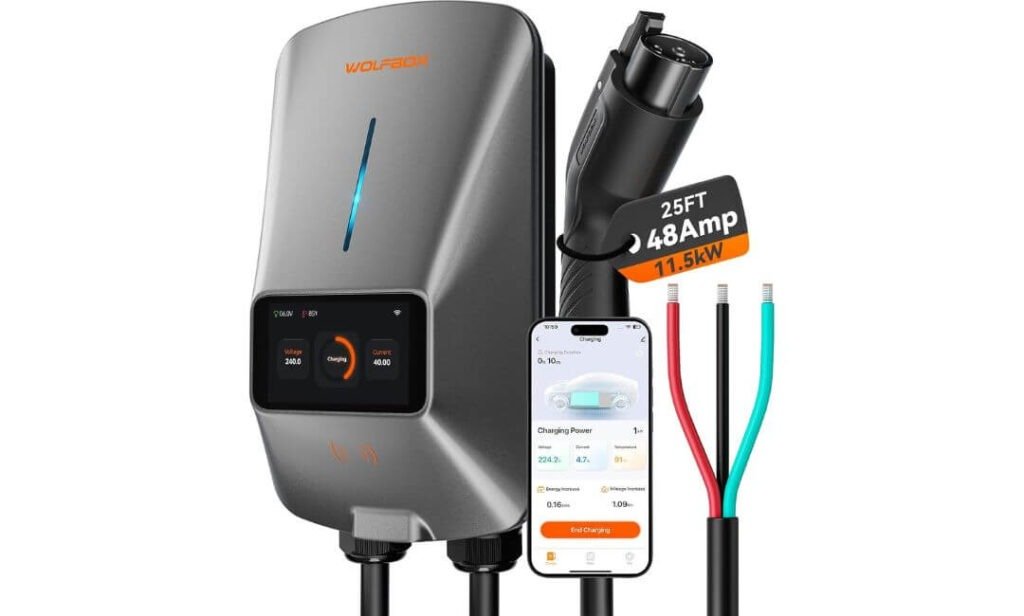
Quick Specs:
- Charging Output: Up to 48A / 11.5 kW
- Connector: SAE J1772
- Cable Length: 25 ft
- Installation: 240V hardwired
- Circuit Requirement: 60A dedicated circuit
- Display: 4.3-inch LCD charging dashboard
- Smart Control: WiFi app with real-time monitoring
- Smart Features: Scheduling, cost tracking, adjustable current and multi-user access
- Voice Control: Alexa and Google Assistant
- Security: RFID card support
- Weather Protection: NEMA 4X / IP66
- Safety: CSA certified and UL2594 compliant
- Cable Management: Wall-mounted cable holster
- Weight: 13.45 lbs
There is one feature here that immediately changes how this charger feels in everyday use: the 4.3-inch LCD screen. Instead of opening your phone every time you want to check what is happening, the charger itself shows charging rate, voltage, elapsed time, energy used and session status right on the wall. For a garage setup, that is genuinely useful information sitting exactly where you need it.
The hardware also makes sense for a larger SUV. You get a 25-foot cable, a wall-mounted holster and a weather-resistant enclosure, so you have plenty of room to work with if the Blazer EV does not always stop in exactly the same place. The supplied specifications also give this unit NEMA 4X/IP66 protection, making it suitable for indoor or outdoor mounting.
The smart side is where the unit becomes more than just a wall charger. Through the app, you can schedule charging, monitor sessions, adjust current and track charging costs, while Alexa and Google Assistant add voice control. RFID support is another thoughtful touch if more than one person uses the charger or you simply want an extra layer of control over who can start a session.
(The screen is the feature that makes this one feel different: the information you normally hunt for inside an app is already sitting in front of you.)
What We Like
- 4.3-inch LCD dashboard — A genuinely useful distinction; charging information is visible without reaching for your phone.
- 25-ft cable with holster — Plenty of practical reach while keeping the cable organised when charging is finished.
- Full smart control — Scheduling, monitoring, cost tracking and current adjustment are all built around everyday charging rather than just connectivity.
- Voice and household access — Alexa, Google Assistant and multi-user sharing make sense when several people use the same charger.
- Outdoor-ready construction — NEMA 4X/IP66 protection gives it flexibility beyond a protected garage wall.
One Thing to Know
This particular 48A version is hardwired, so you should plan around a dedicated 60A circuit and professional electrical installation. That is worth sorting out before buying because this isn’t a plug-and-play NEMA 14-50 model.
Why It Fits the Chevy Blazer EV
For a Blazer EV owner, the strongest part of this charger is not just its charging capability; it is the information you can see without doing anything. The LCD gives you an immediate view of the charging session, while the app handles the deeper stuff such as scheduling, energy information and remote management.
The combination of 25-foot reach, J1772 connection, outdoor-rated construction and smart household controls also makes it a practical choice when the charger is going to become a permanent part of the garage or driveway. It is a more feature-rich experience than a basic wall-mounted EVSE, without relying on the phone app for every small piece of information.
The Insider Pro-Tip
The LCD is more useful than it first appears. Use it as your quick visual check and the app for the decisions that actually need your phone. If you walk past the charger and can immediately see the session status and energy being used, you don’t have to keep opening an app just to satisfy your curiosity.
Also, because this is a permanent hardwired installation, choose the wall position around the Blazer EV’s normal parking position before installation. The 25-foot cable gives you plenty of freedom, but good placement makes the whole setup cleaner and easier to live with.
#5. MACH 1 Level 2 EV Charger
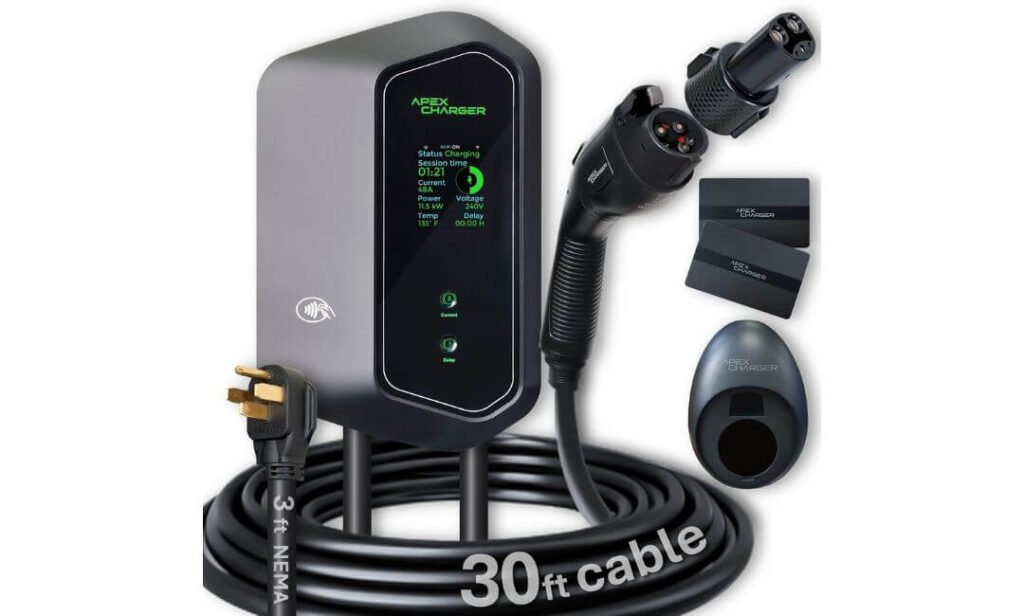
Quick Specs:
- Charging Output: Up to 48A
- Voltage: 200–240V
- Connector: J1772
- NACS Support: PRO 1 NACS adapter included
- Cable Length: 30 ft
- Installation: NEMA 14-50 plug-in or hardwired
- Plug-In Setup: 40A with 50A breaker
- Hardwired Setup: Up to 48A with 60A breaker
- Smart Connectivity: WiFi + Bluetooth
- Display: 2.4-inch LED display
- Smart Features: Mobile app, charging data and scheduling
- Security: RFID cards and anti-theft hardware
- Outdoor Use: Weather-resistant enclosure
- Cable Management: Integrated cable holder
- Support: 24-hour post-sales support
The MACH 1 takes a slightly different approach from the other chargers here. Its biggest advantage is flexibility rather than simply charging power. You get the J1772 connector for the Blazer EV along with the included PRO 1 NACS adapter, so the same charging setup can be useful across different EVs in a household. That is a meaningful consideration if your current vehicle is not necessarily going to be the only EV you own.
The 30-foot cable is another reason this one deserves a place on the list. That is longer than the 25-foot cables used by the other options above, and the difference can be surprisingly useful when the charger is mounted at the front or side of a garage. You have more freedom to position the Blazer EV without treating the charging cable like a fixed parking guide.
Installation is flexible too. With the NEMA 14-50 setup, the supplied information lists a 40A configuration with a 50A breaker, while hardwiring allows the unit to reach its 48A setting with a 60A breaker. Add WiFi, Bluetooth, RFID cards, a display and app access, and this becomes a fairly complete charging station rather than just a power box on the wall.
(The 30-foot cable and J1772-to-NACS flexibility are the two details that make this one genuinely different from the rest of the list.)
What We Like
- 30-ft cable — The longest reach in this lineup, giving you more freedom around the garage or driveway.
- J1772 plus NACS flexibility — The supplied PRO 1 adapter makes the charger useful across different connector setups.
- Two installation approaches — NEMA 14-50 for a plug-in setup or hardwiring when you want the full 48A configuration.
- Built-in information and controls — The display, app, WiFi and Bluetooth give you several ways to keep track of charging.
- Household-friendly features — Two RFID cards and multi-EV compatibility make more sense when several drivers may use the same charger.
One Thing to Know
The NACS capability comes through the included PRO 1 adapter, rather than being the charger’s native connector. For your Chevy Blazer EV, the J1772 connection is the straightforward route; the adapter is mainly valuable if you also need flexibility for another EV.
Why It Fits the Chevy Blazer EV
For a Blazer EV owner, the MACH 1’s appeal is its future flexibility. You get the J1772 connection you need today, but the included NACS adapter gives the charging station another use if a different EV enters the household later.
The 30-foot cable also makes this particularly interesting for garages where the charger cannot be mounted directly beside the vehicle’s usual parking position. Combined with plug-in or hardwired installation, WiFi/Bluetooth control and RFID access, it is a charger designed around a more flexible home setup rather than one very specific installation.
The Insider Pro-Tip
If you are choosing this specifically for the Blazer EV, don’t install the charger based on the 30-foot cable alone. First decide where the charger can be mounted most naturally, then let the extra cable length give you parking freedom rather than using it to compensate for poor placement.
And if you have two different EV connector types in the household, keep the NACS adapter as the flexibility feature—not the reason to complicate the Blazer EV’s normal charging routine. For the Blazer, use the direct J1772 connection and keep the adapter available when another vehicle actually needs it.
Best EV Charger for Chevy Blazer (2026): Compare J1772 Level 2 Home Charging Options
| What Actually Matters | Grizzl-E Ultimate Heavy-Duty Pick | Autel 50A Smart Control | EMPORIA Flexible Setup | WOLFBOX Display + App | MACH 1 Longest Reach |
|---|---|---|---|---|---|
| Charging capability | Up to 80A / 19.2kW Adjustable 16A–80A | Up to 50A / 12kW Adjustable 6A–50A | Up to 48A / 11.5kW 6A–48A hardwired | Up to 48A / 11.5kW 240V hardwired setup | Up to 48A 200–240V operation |
| Connection to Blazer EV | J1772 Direct connection | J1772 Direct connection | J1772 Direct connection | J1772 Direct connection | J1772 PRO 1 NACS adapter also included |
| Cable reach | 25 ft Good garage coverage | 25 ft Flexible cable design | 25 ft Practical everyday reach | 25 ft Includes cable holster | 30 ft Most freedom around the parking position |
| Installation flexibility | Hardwired only Configurable for multiple circuit sizes | 240V hardwired 60A breaker for full 50A output | Plug-in or hardwired NEMA 14-50 up to 40A; hardwired up to 48A | 240V hardwired 60A dedicated circuit for 48A setup | Plug-in or hardwired NEMA 14-50 at 40A or 48A hardwired |
| Smart controls | WiFi Schedules, monitoring, energy statistics and diagnostics | WiFi + app Scheduling, cost tracking and remote control | 2.4GHz WiFi Energy data, cost tracking and scheduling | WiFi + app Monitoring, scheduling and current adjustment | WiFi + Bluetooth App controls and charging data |
| At-a-glance information | App based Detailed monitoring through Grizzl-E Connect | App based Energy history and charging information | App based Real-time energy and cost information | 4.3-inch LCD Charging rate, voltage, time and energy | 2.4-inch LED Charging information directly on the unit |
| Indoor / outdoor practicality | Strong Heavy-duty metal enclosure, indoor/outdoor rated | Strong IP66 / NEMA 4X enclosure | Strong NEMA Type 4 enclosure | Strong IP66 / NEMA 4X construction | Strong Weather-resistant enclosure |
| Useful extras | Load management Intelligent power distribution across chargers | AI-assisted charging Time-of-use optimization and charging insights | Energy monitoring Useful for tracking charging cost and usage | RFID + voice control Alexa and Google Assistant support | RFID + anti-theft hardware Two RFID cards and integrated cable holder |
| Best fit in this guide | High-capacity electrical setup Choose it for rugged construction and adjustable power rather than chasing the highest number. | Smart home charging Good match if app control, scheduling and charging-cost management matter. | Flexible installation Particularly useful when you want the choice between NEMA 14-50 and hardwired installation. | Visible charging information The built-in LCD makes everyday charging information easy to see without opening an app. | Maximum parking flexibility The 30-ft cable and dual connector strategy make this the most adaptable option here. |
| Real Talk | Built for serious installations Its 80A ceiling is far more about electrical headroom and flexibility than what the Blazer EV necessarily needs. | Smart without being basic The 50A output, app controls and 25-ft cable make it a practical all-round setup. | The sensible middle ground Strong smart features with the useful advantage of plug-in or hardwired installation. | Made for easy visibility The screen is genuinely useful if you like seeing charging information at the wall. | Most flexible layout The 30-ft cable is the detail that can matter most when the garage layout is awkward. |
Buying Guide Essentials for a Chevy Blazer EV Home Charger
Choosing a home charger for the Chevy Blazer EV is less about finding the biggest amperage number and more about making sure the EVSE, electrical circuit, connector, cable reach and vehicle charging hardware all make sense together. A charger can be capable of 48A, 50A or even 80A, but that does not mean the Blazer EV will automatically charge at that rate. The vehicle’s onboard AC charging system remains the limiting factor.
For most owners, a properly installed 240V Level 2 charger is the practical home-charging solution. It can deliver substantially more power than a standard 120V household outlet, while also giving you better control over charging schedules and everyday energy use. The important part is matching the installation to the charger rather than buying based solely on the maximum output printed on the front of the box.
1. Start With the Blazer EV’s Actual Charging Hardware
Before choosing an EVSE, check the exact Blazer EV model and configuration you own. Connector and charging specifications can vary across model years and vehicle configurations, so the charger should be selected from the vehicle’s actual specifications rather than from a generic “Blazer EV charger” listing.
For the chargers in this guide, the J1772 connection is the relevant direct AC connection for the Blazer EV setup covered here. That is why the five options were evaluated around J1772 compatibility rather than simply choosing chargers because they advertise high amperage.
There is another important distinction that often gets missed in charger articles:
- EVSE: The wall-mounted equipment that safely supplies AC electricity to the vehicle.
- Onboard charger: Hardware inside the vehicle that converts incoming AC power and determines how much AC charging power the vehicle can actually accept.
- Level 2 charging: 240V-class AC charging, normally used for faster home charging.
- Charging station: A general consumer term often used for an EVSE.
- Charger unit: Another common term for the wall-mounted EVSE, even though the actual AC-to-DC charging conversion happens inside the vehicle.
That distinction matters because an 80A EVSE is not an 80A charging promise for the Blazer EV. The Grizzl-E Ultimate, for example, has an unusually high adjustable output range, but its value here is its electrical flexibility, rugged construction and configurable power rather than simply having the largest number.
2. Level 2 and 240V Are the Sweet Spot for Home Use
If the goal is regular home charging, a Level 2 240V installation is the type of setup worth concentrating on.
A basic household 120V outlet can work for very light charging, but it is generally not the setup most owners choose when the vehicle is driven regularly. Level 2 charging gives the Blazer EV access to considerably more electrical power during the hours it is parked at home.
The five chargers here take different approaches:
| Setup | What it means in practice |
|---|---|
| 120V household outlet | Lowest-power option, mainly useful when driving and charging demands are modest |
| 240V NEMA 14-50 | Convenient plug-in Level 2 approach when the electrical installation supports it |
| 240V hardwired | Permanent installation with greater flexibility for higher-current configurations |
| 40A Level 2 | A common practical home-charging configuration |
| 48A–50A Level 2 | Higher-capacity setup where the vehicle, wiring and electrical service support it |
| 80A-capable EVSE | High electrical headroom, but the vehicle still determines how much AC power it can use |
One correction worth making to many generic EV articles: there is no single 6–9 kW figure that should automatically be treated as the Blazer EV’s universal charging rate. Charging capability depends on the specific vehicle configuration and charging equipment. The correct approach is to verify the exact vehicle specification and then size the EVSE and circuit accordingly.
3. Do Not Confuse Charger Amperage With Actual Vehicle Charging Speed
This is probably the most important buying point in the entire guide.
A charger rated for 48A does not force 48A into the vehicle. The EVSE advertises the available current, while the vehicle controls how much power it accepts.
That means buying a larger EVSE can make sense for installation flexibility or future EV use, but paying extra solely because one unit says 80A instead of 48A is not automatically worthwhile for a Blazer EV owner.
A better way to evaluate the five chargers is:
- Grizzl-E Ultimate: exceptionally high adjustable capacity, useful when electrical headroom and configurable current matter.
- Autel 50A: a strong high-capacity smart setup with app-based current adjustment.
- EMPORIA: 48A maximum when hardwired, with a useful lower-current plug-in configuration.
- WOLFBOX: 48A hardwired setup with extensive monitoring and display features.
- MACH 1: 48A maximum with the added advantage of either NEMA 14-50 or hardwired installation.
The key question is therefore not “Which charger has the highest amperage?”
It is:
“Which charger gives my Blazer EV the charging power it can actually use while fitting my home’s electrical system and the way I park?”
4. Cable Length Can Matter More Than Another Few Amps
Cable reach is one of those specifications that looks minor on an Amazon listing but becomes very important after installation.
A 25-foot cable is already enough for many garages, but the ideal length depends on where the charger can be mounted relative to the vehicle’s charging port.
The MACH 1 stands out here with a 30-foot cable, while the other four options use 25-foot cables.
That extra five feet can help if:
- The electrical panel is on the opposite side of the garage.
- The charger cannot be mounted directly beside the normal parking position.
- You sometimes park nose-in and sometimes back into the garage.
- Two parking positions share one charging location.
- You want to keep the charging unit in a practical wall position rather than mounting it purely for cable reach.
There is also a downside to simply choosing the longest cable possible: extra cable creates more material to manage. A charger with an integrated cable holder or good cable-management system can therefore be easier to live with than one that simply gives you more length.
5. Smart Features Should Solve a Real Problem
WiFi is useful, but WiFi by itself is not a reason to buy one charger over another.
The useful question is what the connected features actually let you do.
Depending on the model, these chargers provide functions such as:
- Remote charging control
- Charging schedules
- Energy monitoring
- Charging history
- Cost tracking
- Adjustable amperage
- Time-of-use charging management
- Diagnostic information
- Multi-user access
- RFID access
- Voice-assistant control
The differences become more interesting when you look at how those features are presented.
The Autel focuses heavily on app-based management, scheduling, charging history and energy-cost information.
The EMPORIA is particularly useful if you care about energy monitoring and tracking charging consumption.
The WOLFBOX adds a physical LCD display alongside its app, which is useful when you want charging information visible at the unit itself.
The Grizzl-E Ultimate combines WiFi monitoring with configurable current and intelligent power distribution, giving it a different purpose from a charger that is mainly designed around app convenience.
The MACH 1 adds WiFi and Bluetooth, RFID cards and a physical display, making it more of a multi-user charging station.
Real talk: do not pay extra for a smart feature you will never use. If you normally plug in at night and unplug in the morning, a reliable charger with scheduling may be more valuable than a long list of app functions.
6. Installation Is Where the Real Buying Decision Happens
The charger is only one part of the installation. Your electrical panel, breaker, wiring, outlet or hardwired connection and available circuit capacity all have to support the selected configuration.
This is why the installation specifications of the five products are deliberately different.
| Charger | Installation approach | Higher-current configuration |
|---|---|---|
| Grizzl-E Ultimate | Hardwired only | Adjustable up to 80A, depending on circuit configuration |
| Autel 50A | 240V hardwired | Up to 50A with a 60A breaker |
| EMPORIA | NEMA 14-50 or hardwired | Up to 40A plug-in or 48A hardwired |
| WOLFBOX | 240V hardwired | 48A with a 60A circuit |
| MACH 1 | NEMA 14-50 or hardwired | 40A plug-in or 48A hardwired |
This is also why “plug-in” does not automatically mean “easier in every home.” If a suitable NEMA 14-50 outlet is not already installed, you still need the electrical work to install the appropriate circuit and outlet.
Hardwiring removes the plug connection and can support higher-current configurations on compatible units, but it is a permanent electrical installation and should be handled according to local electrical requirements by a qualified installer.
7. Understand the Breaker Relationship Before Installation
One common mistake is looking only at the charger’s advertised amperage and ignoring the circuit requirements.
For continuous EV charging, the electrical installation needs to be appropriately sized for the charger’s configured current. That is why the products specify different breaker requirements for their higher-output modes.
For example:
- A 48A hardwired configuration commonly requires a 60A circuit.
- A 40A configuration is commonly paired with a 50A circuit.
- The MACH 1 lists 40A operation through its NEMA 14-50 configuration and up to 48A when hardwired.
- The Grizzl-E Ultimate provides several configurable current levels so it can be matched to different circuit sizes.
The important point is that you should not simply install the largest breaker available to make a charger run faster. The breaker, conductors, disconnecting means where required, EVSE and electrical service all have to be appropriate for the installation.
8. Safety Certification Matters More Than Marketing Language
An EV charger is connected to a high-power electrical circuit for extended periods, often while nobody is standing next to it. Safety certifications and protection systems therefore deserve more attention than cosmetic features.
Look for recognized testing or certification and appropriate protection against electrical faults.
Across the products selected here, relevant features include:
- UL certification or listing, where specified by the manufacturer
- CSA certification, where specified
- Ground-fault protection
- Overcurrent protection
- Overvoltage and undervoltage protection
- Thermal monitoring or over-temperature protection
- Weather-resistant enclosures
- Built-in GFCI on applicable models
- Appropriate enclosure ratings for outdoor installations
The Grizzl-E Ultimate, Autel, EMPORIA and WOLFBOX all provide substantial protection and weather-resistance information in their specifications, while the MACH 1 is designed for indoor or outdoor use with a weather-resistant enclosure.
One important distinction: weather resistance is not the same thing as permission to install a charger anywhere outdoors. The location, mounting method, electrical connection, drainage, exposure and local electrical requirements still matter.
9. Outdoor Installation Changes What You Should Look For
If the charger is going outside rather than inside a garage, enclosure construction becomes much more important.
For outdoor use, look at:
- Enclosure rating
- Protection against water and dust
- Cable durability
- Temperature handling
- Mounting method
- Cable storage
- Visibility of the display
- Protection against unauthorized use
- Whether the electrical connection itself is properly protected
The Autel uses an IP66/NEMA 4X-rated enclosure, while the EMPORIA uses a NEMA Type 4 enclosure and the WOLFBOX specifies IP66/NEMA 4X construction. The Grizzl-E Ultimate uses a heavy-duty metal enclosure designed for indoor and outdoor use.
The MACH 1 also makes outdoor installation part of its intended use, with a weather-resistant enclosure and integrated cable-management hardware.
For an outdoor Blazer EV setup, I would put enclosure and installation quality ahead of a fancy app feature. The app is nice; the hardware sitting outside in the weather is what you are actually relying on every day.
10. Future-Proofing Does Not Mean Buying the Biggest Charger
Future-proofing is useful, but it is easy to misunderstand.
You do not necessarily need an 80A EVSE because you might own another EV several years from now. What matters is whether the charger gives you useful flexibility without forcing an unnecessarily expensive electrical installation today.
There are several types of future flexibility in this comparison:
Electrical flexibility:
The Grizzl-E Ultimate can be configured across a wide range of current levels, which is useful if your electrical capacity changes or if the charger is part of a multi-EV installation.
Installation flexibility:
EMPORIA and MACH 1 can be used with either a NEMA 14-50 connection or hardwired installation.
Connector flexibility:
MACH 1 includes a J1772 connector plus a PRO 1 NACS adapter, giving the unit another potential use if another EV with a different connector is added later.
Smart flexibility:
WiFi-connected models can provide scheduling, monitoring and charging data without requiring you to physically operate the unit each time.
That is a much more practical definition of future-proofing than simply buying the charger with the biggest amperage figure.
11. Choose the Charger Around Your Garage, Not Just Your Car
Two people can own the same Blazer EV and still need completely different home chargers.
For example, a garage with the electrical panel close to the parking position may work perfectly with a 25-foot cable and a hardwired charger.
Another home might have the panel on one side of the garage while the vehicle parks several feet away. In that situation, the 30-foot MACH 1 cable can be more useful than another few amps of charging capacity.
Similarly, someone who rents or expects to move may value a NEMA 14-50 configuration differently from a homeowner planning a permanent installation.
Before buying, physically think through:
- Where the Blazer EV normally parks.
- Where the electrical panel is located.
- Where the charger can realistically be mounted.
- Whether the cable reaches the charging port without being stretched.
- Whether the cable can be stored without sitting on the floor.
- Whether the installation is indoors or outdoors.
- Whether another EV may use the same charger.
- Whether your electrical service has enough capacity for the proposed circuit.
That simple exercise can eliminate a lot of unnecessary charger shopping.
12. A Simple Way to Compare the Five Chargers
| If your priority is… | Pay particular attention to… | Why |
|---|---|---|
| Rugged construction and adjustable electrical capacity | Grizzl-E Ultimate | Broad current configuration and heavy-duty enclosure |
| App control and smart charging management | Autel 50A | Strong connected features and adjustable current |
| Plug-in or hardwired installation | EMPORIA | Gives you both installation paths |
| Physical charging information | WOLFBOX | Built-in 4.3-inch LCD alongside app control |
| Maximum cable reach and connector flexibility | MACH 1 | 30-ft cable plus included NACS adapter |
This is not a ranking of which charger is universally better. Each one solves a slightly different home-charging problem, and that difference is more useful than treating five chargers with similar Level 2 specifications as interchangeable.
13. Chevy Blazer EV Charger Glossary
Chevy Blazer EV Home Charger
Usually refers to an EVSE installed at home for charging the Blazer EV. It does not necessarily mean a charger manufactured by Chevrolet or General Motors. A compatible third-party Level 2 EVSE can perform the same basic charging function when its connector, electrical requirements and certifications are appropriate.
Chevy Blazer EV Charging Station
Another common term for a home EVSE. It can refer to the complete wall-mounted charging equipment, including the cable, connector, controls and safety electronics.
240V Charger for Chevy Blazer EV
Usually means a Level 2 AC EVSE connected to a 240V-class residential circuit. This is the type of setup covered throughout this guide.
Level 2 Charger for Chevy Blazer EV
A Level 2 charger uses higher-voltage AC electrical service than a standard household 120V outlet. For home use, Level 2 is generally the category to investigate when you want practical overnight charging.
Chevy Blazer EV J1772 Charger
A J1772 EVSE uses the SAE J1772 AC connector. For the Blazer EV configuration covered by this guide, the J1772-equipped chargers provide the direct connection used for the home Level 2 setup.
NEMA 14-50 EV Charger
A charger with a NEMA 14-50 plug can connect to a properly installed 14-50 receptacle. It does not mean every NEMA 14-50 charger should automatically be operated at its maximum advertised current. The EVSE configuration, circuit rating and installation requirements determine the appropriate operating current.
Hardwired EV Charger
A hardwired EVSE is permanently connected to the electrical circuit instead of using a household-style plug. This can allow certain chargers to operate at higher configured currents and can provide a cleaner permanent installation, but it requires appropriate electrical work.
14. The Real Buying Rule for a Blazer EV
The best home charger decision starts with the vehicle and electrical installation, not the Amazon title.
Check the exact Blazer EV charging specification first. Then choose the EVSE based on:
- J1772 compatibility
- Appropriate Level 2 / 240V installation
- The vehicle’s actual AC charging capability
- Correct circuit and breaker sizing
- Cable length that matches your parking arrangement
- Smart features you will genuinely use
- Indoor or outdoor enclosure requirements
- Recognized safety certification
- Plug-in versus hardwired installation
- Whether the charger needs to serve another EV in the future
That approach also explains why the five chargers in this guide are not simply five copies of the same recommendation. The right EVSE is the one whose electrical configuration, physical design and daily controls make sense for your Blazer EV and your home. A larger number on the box is only useful when the rest of the installation can actually take advantage of it.
Real-World Scenarios: Which Chevy Blazer EV Charger Fits Your Setup?
There is no single home charger that makes sense for every Blazer EV owner. A charger that works beautifully in a detached garage can be unnecessarily complicated for someone with a compact parking space, while the priorities change again if the same charging station needs to serve more than one EV.
The useful way to choose from these five is to start with how you actually park, where the charger can be installed, how much control you want over charging, and whether the equipment needs to remain useful beyond your current vehicle.
If Your Garage Is Small or the Installation Space Is Tight
A smaller garage does not automatically require a smaller charger. What matters more is how cleanly the installation fits into the available wall space and whether you can manage the cable without creating a daily nuisance.
The EMPORIA is particularly practical here because it gives you the choice of a NEMA 14-50 plug-in installation or hardwiring. That gives you some flexibility during installation instead of locking you into one connection method from the beginning.
The MACH 1 can also make sense when the charger needs to be positioned away from the exact spot where the vehicle normally parks. Its 30-foot cable gives you more reach, which can be useful when a compact garage has an awkward charger mounting position.
For a smaller space, I would pay attention to:
- How far the charging port is from the proposed wall position.
- Whether the cable can be stored neatly after every charging session.
- Whether the charger has a practical cable holder.
- Whether a plug-in or hardwired installation makes more sense for the property.
- Whether a large display or extra controls will actually be useful in the space.
Real talk: the easiest charger to live with is not necessarily the one with the fewest specifications. It is the one you can reach, plug in and put away without fighting the cable every night.
If You Have a Larger Garage or Difficult Parking Position
A larger garage gives you more freedom, but it can also create the opposite problem: the charger may be several feet away from the vehicle’s normal parking position.
This is where cable length becomes genuinely important.
The MACH 1 has the longest cable in this comparison at 30 feet, compared with the 25-foot cables used by the other four chargers. That additional reach can make a difference when you park in different positions, have a deep garage, or cannot place the charging unit directly beside the vehicle.
The Grizzl-E Ultimate is another strong consideration for a larger permanent installation because its adjustable current range gives the electrical installation more flexibility. It is hardwired, so it makes more sense when you are planning a permanent charging location rather than looking for a simple plug-in solution.
For a larger garage, think about the entire charging path:
- Electrical panel to charger location.
- Charger location to vehicle charging port.
- Cable storage when the vehicle is not connected.
- Whether another parking position needs access to the same cable.
- Whether the cable will cross a walking path or vehicle path.
A 25-foot cable that reaches comfortably is preferable to a longer cable that becomes difficult to manage. But if your layout genuinely needs extra reach, the 30-foot MACH 1 has a practical advantage rather than a merely decorative specification.
If You Want Smart Charging Without Constantly Managing an App
Smart charging is most useful when it solves an actual problem.
If you want to schedule charging, check charging activity, monitor energy use or control the unit remotely, several options here provide those functions.
The Autel 50A is particularly focused on connected charging management, with WiFi, app controls, scheduling, charging history, energy information and adjustable current. Its smart charging features are useful for an owner who actually wants to manage when and how the vehicle charges.
The EMPORIA is another logical choice if energy information is important to you. Its connected system provides real-time energy data, cost tracking and scheduling, which can be more useful for someone who wants to understand charging consumption rather than simply start and stop sessions.
The WOLFBOX takes a slightly different approach by combining its app with a physical 4.3-inch LCD. That means you can see charging information directly at the unit instead of relying entirely on your phone.
If you are choosing a smart charger, ask yourself:
- Will I actually schedule charging?
- Do I want charging-cost information?
- Do I care about energy consumption data?
- Do multiple people need access?
- Would a physical display be useful?
- Do I need remote control, or will I normally plug in and leave the car charging?
Real talk: if you will never open the app after installation, do not let a long smart-feature list make the buying decision for you.
If Your Home Has Solar or You Closely Monitor Energy Use
Solar-equipped homes have a different reason to care about charging controls. The important question is not simply whether a charger has WiFi, but whether its available monitoring and scheduling tools fit the way you manage household electricity.
The EMPORIA deserves attention in this scenario because its feature set includes real-time energy information, cost tracking and scheduling. Those functions can help you understand when charging is taking place and how much energy the vehicle is consuming.
The Autel 50A also provides charging history, energy information and time-of-use-oriented smart charging features through its connected system.
However, there is an important distinction: having an energy-monitoring app does not automatically mean the charger provides full solar-surplus charging or whole-home energy management. Those are more specific capabilities and should not be assumed simply because a product advertises WiFi or energy statistics.
If solar is a major part of your decision, verify the exact integration features you need before installation rather than buying based on the phrase “smart charger.”
If You Want a Permanent, Heavy-Duty Installation
For a homeowner who is treating the EV charger as a long-term part of the garage’s electrical infrastructure, the Grizzl-E Ultimate has a different appeal from the more convenience-oriented options.
Its hardwired design, heavy-duty metal enclosure and adjustable current range make it suitable for an installation where electrical configuration and physical durability matter more than having a simple plug-in setup.
The high maximum output should not be interpreted as the Blazer EV automatically charging at 80A. That is not how EV charging works. The vehicle still determines how much AC power it can accept.
The value is in having adjustable electrical capacity and installation flexibility, particularly if the charging equipment may eventually serve other EVs or become part of a multi-charger setup.
This is the kind of scenario where I would choose the charger based on the electrical installation first and the app features second.
If You Want a Smart 240V Setup With Strong Everyday Convenience
The Autel 50A fits a different type of homeowner: someone who wants a permanent 240V installation but also wants plenty of control from the phone.
You get adjustable charging current, scheduling, charging history, energy tracking, remote control and time-of-use-oriented features. The 25-foot cable also gives reasonable freedom for normal garage layouts.
Its weather-resistant enclosure and thermal monitoring add another practical layer if the installation is not completely protected from the elements.
This is less about having the most unusual feature and more about having the major things an everyday smart home charger needs in one system.
If You Want Installation Flexibility More Than Maximum Output
The EMPORIA makes particular sense when you have not completely decided whether the final installation should be plug-in or hardwired.
With a NEMA 14-50 configuration, it can operate at up to 40A, while the hardwired configuration supports up to 48A. That gives you two different installation paths without changing the fundamental charging station.
This can be useful when:
- A suitable NEMA 14-50 circuit already exists.
- You prefer a removable plug-in installation.
- You are planning a permanent hardwired installation.
- You want to retain some installation flexibility.
- Energy monitoring and charging-cost information matter to you.
For a homeowner who does not need the maximum possible electrical capacity, that flexibility can be more useful than buying a much higher-rated EVSE.
If You Like Seeing Charging Information Without Opening Your Phone
The WOLFBOX is the obvious choice for someone who values information directly on the charger.
Its 4.3-inch LCD can show charging information such as charging rate, voltage, elapsed time, total energy consumption and session status. That is a small feature, but it changes the everyday experience because you can glance at the charger and see what is happening.
It also combines the physical display with WiFi, app controls, scheduling, cost tracking, adjustable amperage, RFID and voice-assistant support.
This makes it particularly suitable for an owner who wants both physical visibility and connected control rather than choosing between the two.
The hardwired 48A configuration requires the appropriate 60A circuit, so this is best treated as a planned permanent installation rather than a casual plug-and-play purchase.
If Two Different EVs May Share the Same Charger
This is where the MACH 1 becomes more interesting.
For the Blazer EV, the direct J1772 connection is the straightforward setup. But the supplied PRO 1 NACS adapter gives the same charging station another connector option for an EV that uses NACS.
That does not mean you should use the adapter unnecessarily with the Blazer EV. The useful point is household flexibility.
If one person drives the Blazer EV and another vehicle in the household uses NACS, having a charging station that can accommodate both can reduce the need for separate equipment.
The two RFID cards also make sense in a multi-user environment, where you want some control over who can access the charger.
If You Want the Longest Reach and Flexible Installation
The MACH 1 is also worth considering simply because of its physical layout.
Its 30-foot cable is the longest among the five products in this guide, and it supports both NEMA 14-50 and hardwired installation. The plug-in configuration is listed at 40A with a 50A breaker, while hardwiring allows the full 48A configuration with a 60A breaker.
That makes it a practical choice for a garage where the charging station cannot be positioned directly beside the vehicle.
It also includes a cable holder, display, WiFi, Bluetooth, RFID cards and anti-theft hardware, so the long cable does not exist in isolation; the rest of the design is built around making the station usable in a real parking environment.
If You Want the Most Straightforward Long-Term Setup
A homeowner who wants to install the charger once, route the cable neatly and mostly leave the equipment alone may not need the most elaborate connected ecosystem.
In that situation, focus on:
- Correct J1772 compatibility.
- Appropriate 240V circuit.
- Proper breaker and conductor sizing.
- Enough cable length.
- Suitable indoor or outdoor enclosure.
- Reliable safety protections.
- A mounting position that makes daily connection easy.
The Grizzl-E Ultimate and WOLFBOX both make more sense in this kind of permanent installation discussion, but for different reasons. One emphasizes rugged construction and electrical configurability, while the other adds a physical display and extensive connected controls.
If You Are Budget-Conscious
Being budget-conscious does not mean choosing the charger with the fewest features.
The smarter approach is to avoid paying for capacity or functionality that your particular installation cannot use.
For example, if your home is already set up for a suitable NEMA 14-50 installation and you do not need a permanent hardwired charger, a flexible 48A-class model such as EMPORIA or MACH 1 may make more sense than paying for a much higher-rated EVSE and upgrading the electrical installation unnecessarily.
Likewise, if you do not care about app controls, energy monitoring or voice assistants, those features should not outweigh the basics:
correct connector + appropriate electrical circuit + sufficient cable reach + proper safety certification + good installation.
That is the real budget rule.
If You Are an EV Enthusiast and Want More Than Basic Charging
For an enthusiast who enjoys monitoring charging, controlling sessions and getting more information from the equipment, the decision becomes more interesting.
The Autel 50A, EMPORIA and WOLFBOX all provide substantial connected functionality, but each takes a different route.
- Autel: more emphasis on smart charging management, scheduling and energy information.
- EMPORIA: particularly useful for energy monitoring and cost tracking.
- WOLFBOX: combines app controls with a large physical display, RFID and voice-assistant features.
If your priority is simply plugging in every night, those differences may not matter much. If you actually enjoy monitoring the charging process, they become much more relevant.
If You Expect Your Charging Needs to Change Later
Do not automatically buy the highest-output charger just because you are thinking ahead.
Instead, look at what kind of change you are preparing for.
If you may have a second EV, connector flexibility may matter more.
If you may change the electrical installation, adjustable current can matter more.
If you may move house, a plug-in installation can be more flexible.
If you expect to remain in the same home for many years, a hardwired installation may make more sense.
If the parking arrangement may change, cable length becomes more important.
That is a much more useful way to future-proof a charging setup than simply selecting the biggest amperage number.
The Bottom Line for Different Blazer EV Owners
| Your situation | What to prioritize | What stands out in this guide |
|---|---|---|
| Small or awkward garage | Cable reach, clean mounting and flexible installation | MACH 1 or EMPORIA |
| Large garage | Cable reach and permanent installation quality | MACH 1 or Grizzl-E Ultimate |
| Solar or energy-conscious home | Energy monitoring, scheduling and charging data | EMPORIA or Autel |
| Smart-home enthusiast | App controls, scheduling and remote management | Autel |
| Wants a physical display | At-a-glance charging information | WOLFBOX |
| Permanent heavy-duty installation | Hardwiring, enclosure and adjustable current | Grizzl-E Ultimate |
| Multiple EVs | Connector flexibility and user controls | MACH 1 |
| Plug-in installation preferred | NEMA 14-50 compatibility | EMPORIA or MACH 1 |
| Wants fewer unnecessary features | Correct electrical fit and dependable basics | Focus on installation first |
| Planning for future EV flexibility | Adjustable output or connector flexibility | Grizzl-E Ultimate or MACH 1 |
The main lesson is simple: choose around your real charging environment, not around the product’s most impressive specification. The Blazer EV does not need you to buy the biggest charger on the market; it needs an EVSE that is electrically appropriate, physically convenient and reliable enough to become part of your daily routine.
Chevy Blazer EV Home Charging Setup Tips: From Electrical Circuit to Safe Everyday Charging
A good home charging setup starts before the charger is mounted on the wall. For the Chevy Blazer EV, the important pieces are the vehicle connection, Level 2 EVSE, electrical circuit, installation location, cable management and safety protection. Getting those details right matters more than simply choosing a charger with the highest advertised amperage.
The five chargers in this guide are all designed around practical home Level 2 charging, but they do not all require the same installation. Some are hardwired, while others can be used with a NEMA 14-50 connection. That difference should be considered before you buy, because the charger you choose can affect the electrical work required at your home.
Start With the Electrical Service Before Buying the Charger
Before installing any Level 2 EV charger, the first thing to establish is whether your home’s electrical service can support the proposed circuit.
A Level 2 installation normally requires a 240V-class circuit, with the exact breaker, conductor sizing and maximum charging current determined by the EVSE configuration and the electrical installation. You should not select a breaker simply because it matches the charger’s maximum advertised amperage.
For example, the chargers in this guide have different electrical requirements:
- The Grizzl-E Ultimate is hardwired and offers a wide adjustable current range, allowing its configuration to be matched to different circuit capacities.
- The Autel 50A is designed for a 240V hardwired installation, with its full 50A configuration requiring the appropriate 60A circuit.
- The EMPORIA can use a NEMA 14-50 connection at up to 40A or operate at up to 48A when hardwired.
- The WOLFBOX uses a 240V hardwired setup for its 48A configuration, with the appropriate 60A circuit.
- The MACH 1 can use a NEMA 14-50 configuration at 40A or be hardwired for its 48A configuration.
Your electrician should also consider the capacity of the main electrical service, existing loads, panel condition and available breaker space. A home that already has a heavily loaded electrical panel may require additional planning before a high-current EV circuit is added.
Use a Dedicated Circuit for the EVSE
An EV charging circuit should be treated as a dedicated high-load circuit rather than something that shares power with ordinary household receptacles.
That means you should not plan to run a high-power Level 2 EVSE from a circuit that is also expected to supply a dryer, workshop equipment, refrigerator or other significant loads.
A dedicated circuit provides a much more appropriate electrical arrangement for continuous EV charging and makes it easier for the installer to size the circuit around the EVSE’s configured current.
The important relationship is:
EVSE current setting → circuit rating → conductor sizing → breaker → electrical service capacity
All of those pieces need to agree.
If the charger is configurable, that flexibility can be useful. For example, the Grizzl-E Ultimate can be configured for different current levels, while the EMPORIA and MACH 1 provide different current levels depending on whether they are plug-in or hardwired.
Level 1 Versus Level 2: Why Level 2 Makes More Sense for Most Owners
Level 1 charging uses a conventional household 120V outlet and can be useful when the vehicle is driven very little or remains parked for long periods.
The limitation is charging power.
A Level 2 installation uses a 240V-class circuit and can deliver substantially more power, making it much more suitable for regular home charging of a large electric SUV such as the Blazer EV.
Level 2 becomes particularly useful when:
- You drive the vehicle regularly.
- You return home with a meaningful amount of energy used.
- You want overnight charging to replenish the vehicle efficiently.
- You want predictable charging at home.
- You do not want to depend heavily on public charging.
- You want scheduling and other smart-charging controls.
Level 1 can still be perfectly reasonable for a low-mileage driver who has plenty of time between trips. But if home charging is going to be your primary charging routine, a properly installed Level 2 EVSE is generally the more practical setup.
Do Not Choose Level 2 Based Only on the Maximum Amp Number
This is where many home-charging guides oversimplify the decision.
A 48A EVSE does not automatically mean the Blazer EV will accept 48A. Likewise, an 80A-capable EVSE does not turn the vehicle into an 80A AC charger.
The vehicle’s onboard AC charging system determines how much power it can actually accept.
That means you should first check the exact charging specification for your Blazer EV configuration and then select the EVSE and circuit around that requirement.
A higher-rated EVSE can still have value because it may offer:
- More electrical headroom.
- Adjustable current settings.
- Compatibility with another EV later.
- Greater flexibility if your charging requirements change.
- Load-management capabilities in certain installations.
But paying extra simply to have the largest number on the charger is not automatically money well spent.
Confirm the J1772 Connection Before Installation
For the Blazer EV configuration covered by this guide, the direct AC connection is J1772, which is why the selected chargers use J1772 connections.
Before purchasing, check the exact vehicle and model year rather than assuming every Blazer EV sold in every market has identical charging hardware.
The important point is that the connector on the EVSE must match the vehicle’s AC charging connection, either directly or through an appropriate adapter where the vehicle manufacturer permits that arrangement.
The chargers in this guide provide J1772 connections for the Blazer EV:
- Grizzl-E Ultimate
- Autel 50A
- EMPORIA
- WOLFBOX
- MACH 1
The MACH 1 additionally includes a PRO 1 NACS adapter. That extra adapter is useful for connector flexibility with other compatible EVs, but it does not mean you need to use an adapter for the Blazer EV’s normal J1772 charging connection.
Decide Where the Charger Should Actually Go
The best mounting location is not necessarily the closest point to the electrical panel.
You want to find the point where the charger can remain permanently installed while the cable reaches the vehicle comfortably without creating a hazard.
Before the electrician arrives, consider:
- Where the Blazer EV normally parks.
- Where the charging port sits relative to the wall.
- Whether you park nose-in or back into the garage.
- Where the electrical panel is located.
- Whether the cable needs to reach around the front or rear of the vehicle.
- Whether another parking position needs access.
- Whether the charger will be indoors or outside.
- Where the cable will be stored between charging sessions.
A 25-foot cable is enough for many installations, but it should not be assumed to be enough for every garage. The MACH 1’s 30-foot cable can be useful when the charger needs to be mounted farther from the normal parking position.
Think About Cable Management Before You Mount Anything
A long charging cable is useful only when you have somewhere sensible to put it.
Do not leave the cable lying across the garage floor after every charging session. It can become a trip hazard, get driven over, or be damaged unnecessarily.
A good setup should give the cable a clear storage location.
Look for:
- An integrated cable holder.
- A wall-mounted cable hook where needed.
- A connector holster.
- A mounting position that keeps the cable away from walking routes.
- Enough clearance around the connector when it is not plugged into the vehicle.
The WOLFBOX includes a cable holster, while the MACH 1 incorporates a cable holder into its design. Those are small details, but they can make the difference between a charger that looks tidy every day and one that gradually becomes garage clutter.
Choose Plug-In or Hardwired Installation Carefully
There is no universal answer between NEMA 14-50 and hardwired installation.
A NEMA 14-50 EVSE can be convenient if you already have a properly installed compatible receptacle or prefer the flexibility of a plug-in setup.
A hardwired EVSE can provide a cleaner permanent installation and may allow certain models to operate at a higher configured current.
The difference is clear in this guide:
| Installation | Practical advantage | Important consideration |
|---|---|---|
| NEMA 14-50 | Convenient plug-in connection | Requires a correctly installed 14-50 circuit |
| Hardwired | Permanent, clean installation | Requires direct electrical installation |
| EMPORIA plug-in | Up to 40A configuration | NEMA 14-50 setup |
| EMPORIA hardwired | Up to 48A configuration | Appropriate higher-current circuit required |
| MACH 1 plug-in | 40A configuration | 50A breaker configuration listed |
| MACH 1 hardwired | Up to 48A | 60A breaker configuration listed |
A plug-in charger is not automatically a do-it-yourself installation. Installing the 240V circuit and receptacle is still electrical work that should be completed correctly.
Have the Electrical Installation Professionally Assessed
For a permanent Level 2 installation, a qualified electrician should assess the existing electrical system before the charger is mounted.
The assessment should consider:
- Available breaker space.
- Main service capacity.
- Existing continuous and large electrical loads.
- Panel condition.
- Required circuit rating.
- Conductor sizing and routing.
- Appropriate receptacle or hardwired connection.
- Grounding and bonding requirements.
- Charger mounting location.
- Outdoor protection if applicable.
This is particularly important with higher-current EVSEs. A charger capable of 48A or more is not something that should simply be connected to whatever circuit happens to be nearby.
Check Permit and Local Electrical Requirements
Electrical requirements vary by location, so do not assume that an installation can proceed without permits or inspection.
Depending on your local authority and the type of installation, you may need:
- An electrical permit.
- Inspection after installation.
- Specific wiring methods.
- Required disconnecting means.
- Local code-compliant outdoor installation.
- Approved equipment and installation practices.
Your electrician or local permitting authority can confirm what applies to your property.
This is one area where copying an installation setup from another homeowner’s garage is a bad idea. Their electrical service, local code and charger configuration may be completely different from yours.
Outdoor Installation Requires More Than a Weatherproof Box
If the charger will be installed outside, the physical environment becomes part of the decision.
Look for an enclosure designed for outdoor use and pay attention to its stated protection rating.
Several chargers in this guide provide strong enclosure specifications, including:
- Grizzl-E Ultimate: heavy-duty metal indoor/outdoor enclosure.
- Autel: IP66/NEMA 4X enclosure.
- EMPORIA: NEMA Type 4 enclosure.
- WOLFBOX: IP66/NEMA 4X construction.
- MACH 1: weather-resistant enclosure designed for indoor or outdoor use.
But a weather-resistant EVSE does not make every outdoor installation automatically safe.
The mounting surface, electrical connection, cable routing, exposure to standing water, drainage, sunlight and local installation requirements still matter.
Keep the Connector Off the Ground
The J1772 connector should have a proper place to rest when the vehicle is not charging.
This sounds obvious, but it is an easy detail to overlook during installation.
A connector left hanging from the charger or resting on the floor can be exposed to dirt, moisture, impact and unnecessary wear.
A proper holster or connector holder should:
- Keep the connector elevated.
- Protect the connector when not in use.
- Prevent the cable from dragging across the floor.
- Keep the handle accessible.
- Reduce unnecessary bending near the connector.
This is another reason the physical design of an EVSE matters just as much as its electrical specifications.
Pay Attention to Ground-Fault and Other Safety Protection
EV charging combines a high electrical load with long charging sessions, so built-in protection should not be treated as a marketing bonus.
Depending on the model, the chargers in this guide provide features such as:
- Ground-fault protection.
- Overcurrent protection.
- Overvoltage protection.
- Undervoltage protection.
- Thermal or over-temperature protection.
- Built-in GFCI on applicable models.
- Electrical fault monitoring.
- Weather-resistant enclosure construction.
The Grizzl-E Ultimate, for example, includes multiple electrical protection systems and built-in GFCI, while Autel specifies thermal monitoring along with electrical fault protection.
Always follow the EVSE manufacturer’s installation instructions and the applicable electrical requirements. Do not bypass, disable or modify safety protection simply to achieve a particular charging configuration.
Understand the GFCI Question
Ground-fault protection is especially important in EV charging installations.
The exact GFCI arrangement depends on the EVSE design, circuit configuration and local electrical requirements. Some chargers include built-in GFCI protection, while the electrical installation may also have additional requirements depending on the equipment and location.
This is one of those areas where a generic internet recommendation can create confusion.
Do not assume that every charger requires exactly the same protection arrangement. The electrician should follow the charger’s installation instructions and the electrical code applicable to your location.
Give the Charger Enough Physical Clearance
The EVSE should not be squeezed into a corner simply because that is where the cable happens to reach.
Leave enough room to:
- Plug and unplug the vehicle comfortably.
- Read the display where applicable.
- Operate buttons or controls.
- Remove the connector without twisting the cable.
- Store the cable properly.
- Access the unit for maintenance if necessary.
A charger mounted too close to another object may technically work but still be frustrating to use every day.
This becomes particularly relevant with units such as WOLFBOX and MACH 1 that provide physical displays and controls on the charger itself.
Perform a Final Check Before the First Charging Session
Once the electrical work is complete, do not immediately treat the installation as finished.
Before regular use, check that:
- The charger is securely mounted.
- The cable is not under unnecessary tension.
- The connector locks correctly into the vehicle.
- The cable does not cross a walking path.
- The cable holder or holster is secure.
- The charger is configured for the intended current.
- The circuit and breaker correspond to the installed configuration.
- The charger shows normal status indicators.
- There are no unusual warnings or fault messages.
- Outdoor connections are properly protected.
- The installation has passed any required inspection.
During the first few charging sessions, it is also sensible to pay attention to the equipment for anything unusual, such as unexpected fault messages, abnormal heat or a connection that does not remain secure. If something does not look right, stop using the equipment and have the installation checked rather than trying to solve an electrical problem yourself.
A Proper Home Charging Setup Should Feel Boring
That is actually the goal.
Once everything is correctly installed, you should be able to park the Blazer EV, connect the J1772 handle, and let the vehicle charge without thinking about the electrical system every night.
The best setup is not the one that constantly reminds you how much technology is inside the wall box. It is the one where the charger, circuit, vehicle and parking arrangement all work together quietly and predictably.
For most owners, that means starting with the Blazer EV’s actual AC charging capability, installing an appropriately sized dedicated 240V circuit, selecting a compatible J1772 EVSE, mounting it where the cable naturally reaches the vehicle, and having the entire electrical installation completed according to the applicable requirements.
That is far more important than chasing the biggest amperage figure on the product page.
Installation and Compatibility: Chevy Blazer EV Home Charger Installation
Installing a home charger for the Chevy Blazer EV is not simply a matter of mounting a box on the garage wall and plugging in the vehicle. The charger, circuit, breaker, wiring, connector, installation location and vehicle all need to work together.
The good news is that the process is straightforward when it is planned properly. The important part is getting the electrical configuration right before the first charging session, rather than trying to correct an installation problem after everything has already been mounted.
Step 1: Confirm the Exact Blazer EV Charging Configuration
Start with the vehicle, not the charger.
Confirm the exact model year and configuration of your Blazer EV and check its AC charging specifications. For the setup covered in this guide, the home Level 2 chargers use a J1772 connection, giving the vehicle a direct connection to the selected EVSE.
Do not assume that every Blazer EV configuration has identical charging specifications simply because the vehicles share the same model name.
Before purchasing, verify:
- The vehicle’s AC charging capability.
- The required connector.
- The maximum AC charging power the vehicle can accept.
- Whether any adapter is actually required.
- The charging specifications for your exact model year and configuration.
This prevents one of the most common mistakes in EV charger shopping: buying an EVSE based on its maximum output without first checking what the vehicle can actually use.
Step 2: Decide Between Plug-In and Hardwired Installation
Once compatibility is established, decide how the charger will connect to your home’s electrical system.
The five chargers in this guide are not identical in this respect.
EMPORIA and MACH 1 provide both plug-in and hardwired installation options, while the Grizzl-E Ultimate, Autel 50A and WOLFBOX configurations covered here are intended for hardwired installation.
A NEMA 14-50 setup can be convenient when a properly installed receptacle is available. Hardwiring can provide a cleaner permanent installation and, with compatible equipment, allow a higher configured charging current.
Do not choose between the two simply because one sounds easier.
Think about:
- Whether you already have a suitable 240V circuit.
- Whether the charger will remain in the same location for years.
- Whether you want a removable plug-in connection.
- The charger’s maximum configured current.
- The electrical capacity available at the panel.
- Local electrical requirements.
Step 3: Have the Electrical Service Assessed
Before running new wiring, have the electrical installation assessed by a qualified electrician.
The electrician should look at the main service, panel capacity, available breaker positions, existing large electrical loads and the proposed EVSE configuration.
This matters particularly with higher-current units.
For example, the MACH 1 can operate at 40A through its NEMA 14-50 configuration or up to 48A when hardwired. EMPORIA similarly provides a lower-current plug-in configuration and a higher-current hardwired configuration.
The correct question is therefore not:
“Can my panel fit this breaker?”
It is:
“Can my electrical service safely support this EV charging circuit alongside everything else in the home?”
That difference is important.
Step 4: Choose the Charger Location Before Running the Circuit
The charger location should be decided before the electrician commits to the final cable route.
Park the Blazer EV exactly as you normally would and work out where the charging connector naturally reaches.
A good location should:
- Keep the cable comfortably within reach.
- Avoid stretching the cable across the vehicle.
- Keep the connector accessible.
- Allow the cable to be stored neatly.
- Avoid pedestrian walking routes.
- Leave enough room around the charger.
- Work for your normal parking position.
A 25-foot cable will cover many garages, but not every layout. The MACH 1’s 30-foot cable can be particularly useful when the charger needs to be mounted farther from the vehicle.
Do not mount the charger simply because that is where the electrical panel happens to be. The panel determines where power comes from; it does not necessarily determine the best place to use the charger.
Step 5: Install the Appropriate Dedicated Circuit
The EVSE should be supplied by an appropriately sized dedicated circuit.
The exact circuit requirements depend on the charger configuration.
For example:
- A 40A charging configuration may use an appropriately sized 50A circuit.
- A 48A configuration may require a 60A circuit.
- The Autel 50A configuration requires the appropriate 60A circuit for its full output.
- The Grizzl-E Ultimate can be configured across multiple current levels, allowing the installation to be matched to different circuit capacities.
The breaker, conductors and EVSE configuration need to be treated as one system.
Do not increase the breaker size simply because you want a higher charging rate. The wiring and the rest of the installation must be appropriately rated as well.
Step 6: Install the NEMA 14-50 Receptacle Correctly Where Applicable
If you are using a plug-in charger, the NEMA 14-50 receptacle should be installed specifically for the EV charging application and according to the applicable electrical requirements.
This is not the same as finding an old 14-50 receptacle in the garage and assuming it is suitable.
The electrician should verify:
- Circuit rating.
- Conductor sizing.
- Grounding.
- Receptacle condition and quality.
- Proper termination.
- Appropriate protection.
- Location and mounting.
- Whether the existing circuit is actually dedicated to the EVSE.
A properly installed receptacle is particularly important because EV charging can place a substantial continuous load on the connection for several hours.
Step 7: Hardwire the EVSE When That Is the Better Fit
For a hardwired installation, the electrician connects the EVSE directly to the dedicated circuit according to the manufacturer’s installation instructions.
This eliminates the NEMA 14-50 plug and receptacle from the charging connection and can provide a clean permanent installation.
It is particularly relevant for the higher-current configurations of the chargers in this guide.
For example, the EMPORIA and MACH 1 can both reach their higher configurations when hardwired, while the Grizzl-E Ultimate is designed as a hardwired unit in the configuration covered here.
The advantage is not simply “more power.” A hardwired installation can also give you:
- A cleaner wall installation.
- No high-current plug connection to manage.
- More permanent equipment placement.
- Greater configuration flexibility on compatible EVSEs.
Step 8: Mount the Charger Securely
Once the electrical connection and location are established, mount the EVSE securely to an appropriate surface.
The mounting position should support the weight of the unit and allow the cable to hang naturally.
Avoid mounting the charger:
- Where the connector can be struck by the vehicle.
- Directly in a place where water can accumulate.
- Where the cable must bend sharply.
- Behind objects that make the controls inaccessible.
- Where the display cannot be read comfortably.
- Where the charging cable crosses a walking path.
For outdoor installations, the mounting surface and electrical connection need additional consideration because weather exposure affects the entire installation, not just the charger enclosure.
Step 9: Set the Correct Charging Current
If the EVSE provides adjustable current, configure it according to the installed circuit and the vehicle’s charging requirements.
This is especially useful with products such as the Grizzl-E Ultimate, Autel and EMPORIA, which provide current adjustment or multiple configuration options.
The charger should never be configured to exceed what the electrical installation is designed to support.
This is one of the reasons adjustable-current EVSEs can be useful. If the home’s electrical capacity changes or a different circuit configuration is required, you may have more flexibility than with a fixed-output unit.
Step 10: Connect the Charger to the Blazer EV
After the installation has been completed and checked, connect the J1772 handle to the vehicle’s AC charging port.
Make sure the connector is fully seated and that the vehicle recognizes the charging connection.
Depending on the charger, you may see:
- A charging indicator.
- Charging current.
- Voltage.
- Energy consumed.
- Charging-session information.
- A status message in the mobile application.
Do not judge charging performance from the charger’s advertised maximum output alone. The actual charging rate is determined by the interaction between the EVSE, electrical supply and vehicle.
Step 11: Complete a Controlled First Charging Session
The first session is a good opportunity to make sure everything is behaving normally.
Rather than connecting the vehicle and immediately walking away for the entire night, monitor the initial session for a reasonable period.
Check that:
- Charging starts normally.
- The connector remains securely connected.
- The EVSE reports normal operation.
- There are no fault indicators.
- The vehicle shows that it is charging.
- The cable remains properly positioned.
- There are no unusual electrical or thermal warnings.
If the charger or vehicle displays an error, stop and identify the cause rather than repeatedly resetting the system without understanding what triggered the fault.
Common Installation Mistakes to Avoid
Buying the EVSE Before Checking the Electrical Panel
This can result in choosing a high-current charger that requires electrical work you were not expecting.
Better approach: have the electrical capacity assessed first, then select the charger configuration.
Assuming a 48A Charger Means 48A Into the Vehicle
The EVSE’s maximum current is not the same thing as the vehicle’s actual AC charging acceptance.
Better approach: check the Blazer EV’s exact AC charging specification and treat the EVSE rating as available capacity, not guaranteed vehicle charging speed.
Using an Existing 14-50 Outlet Without Checking It
An old receptacle does not automatically make a suitable EV charging circuit.
Better approach: have the circuit, receptacle, wiring and protection checked before using it for continuous EV charging.
Installing the Charger Too Close to the Panel
This can produce a neat electrical installation but an inconvenient daily charging setup.
Better approach: park the vehicle first, determine cable reach, then choose the mounting position.
Ignoring Cable Storage
A cable that reaches the vehicle but has nowhere to go afterward will eventually become a nuisance.
Better approach: plan the connector holder and cable storage location at the same time as the charger mounting location.
Using an Adapter Without a Reason
The MACH 1 includes a PRO 1 NACS adapter, but the Blazer EV setup covered in this guide uses the direct J1772 connection.
Better approach: use the direct connector when it matches the vehicle, and treat the adapter as additional flexibility for compatible vehicles that actually need it.
Choosing an Outdoor Location Based Only on the Enclosure Rating
An outdoor-rated EVSE does not eliminate the need for proper electrical installation.
Better approach: consider the entire mounting location, wiring, weather exposure, drainage and local requirements.
Quick Troubleshooting When Charging Does Not Start
If the Blazer EV does not begin charging, do not immediately assume the charger is defective.
Start with the simplest checks.
The Vehicle Does Not Recognize the Charger
Check that the J1772 connector is fully inserted and latched.
If the connection is secure, check the vehicle’s charging settings and the EVSE’s status indicator.
If the charger has an app, check whether the unit is reporting a fault or whether charging has been scheduled for a later time.
The Charger Shows a Fault
Look at the EVSE’s display or mobile application for the specific fault information.
Possible causes can include:
- Ground-fault detection.
- Overcurrent protection.
- Voltage-related protection.
- Thermal protection.
- Communication problems.
- An improperly connected charging handle.
- An electrical installation issue.
Do not repeatedly reset a charger that continues to report the same electrical fault. Persistent errors deserve proper diagnosis.
Charging Starts and Then Stops
First check whether the vehicle has reached its programmed charging limit or schedule.
If the vehicle is still requesting charging, look at the EVSE for a fault condition.
Also check whether the charger has an adjustable current setting that may have been changed through the app.
If the problem repeatedly occurs at similar points in a charging session, the installation and equipment should be inspected rather than assuming it is a software issue.
WiFi Works Poorly but Charging Is Fine
This is an important distinction: a WiFi problem does not necessarily mean an electrical charging problem.
If the vehicle continues charging normally but the app cannot connect, check:
- Home WiFi signal at the charger.
- Whether the charger requires a particular WiFi band.
- App login status.
- Router connectivity.
- Whether the charger itself is reporting an offline condition.
Several of these EVSEs can continue their basic charging operation even when the connected features are unavailable, depending on the model and configuration.
The Charger Is Online but the App Shows Old Information
Give the system a moment to synchronize before assuming something is wrong.
If the charger itself is operating normally but the app information is delayed, the issue may be connectivity rather than charging hardware.
Check the charger’s physical status first. The physical charging state is more important than whether the app refreshes instantly.
When a Charging Problem Needs Professional Attention
Some issues should not be treated as an app troubleshooting exercise.
Stop using the equipment and have the installation checked if you notice:
- Repeated electrical fault messages.
- A circuit breaker repeatedly tripping.
- Signs of overheating.
- Damaged cable insulation.
- A damaged connector.
- Burning smells.
- Discoloration around a plug or receptacle.
- Loose electrical connections.
- Water intrusion.
- Persistent ground-fault warnings.
Do not open the electrical panel or charger enclosure to investigate a suspected wiring problem unless you are appropriately qualified to do so.
A charger that occasionally loses WiFi is one thing. A charger that repeatedly trips the electrical protection is something completely different.
The Compatibility Check I Would Do Before Installation
Before ordering the equipment, I would run through this checklist:
- Confirm the exact Blazer EV model year and configuration.
- Confirm the vehicle’s AC charging capability.
- Confirm the J1772 connection for the setup being installed.
- Decide between NEMA 14-50 and hardwired installation.
- Have the home’s electrical service assessed.
- Select the appropriate dedicated circuit.
- Choose a mounting location based on actual parking.
- Confirm that the cable reaches comfortably.
- Plan cable and connector storage.
- Check indoor or outdoor installation requirements.
- Verify the EVSE’s safety certifications and protection features.
- Confirm whether permits or inspection are required locally.
- Have the installation completed according to the manufacturer’s instructions and applicable electrical requirements.
The Real-World Installation Rule
A good Chevy Blazer EV charging installation should not require you to think about the electrical system every time you plug in.
The vehicle should recognize the J1772 connection, the EVSE should supply the configured power, the circuit should remain stable, and the cable should reach the vehicle without creating a daily hassle.
That is why compatibility and installation quality matter just as much as the charger itself. A high-output EVSE installed on an unsuitable circuit is not an upgrade, and an inexpensive charger with a poorly positioned cable can become frustrating even if it technically works.
Get the electrical foundation right first, mount the equipment around the way you actually park, configure the charging current correctly, and then let the Blazer EV handle the charging process as intended.
FAQs About Chevy Blazer EV Home Charging
Is an 80A home charger actually worth buying for a Chevy Blazer EV?
Not necessarily. This is one of those cases where the biggest number on the charger can make the product look better than it actually is for your vehicle.
The Grizzl-E Ultimate, for example, can be configured up to 80A, but that does not mean a Blazer EV will suddenly pull 80A from it. The vehicle’s onboard AC charging hardware decides how much power it accepts. The EVSE essentially makes a certain amount of power available; the car decides how much it can use.
An 80A-capable unit can still make sense if you want adjustable current, substantial electrical headroom, future EV flexibility or a charger that may eventually serve another vehicle. But if you are buying it purely because 80A sounds faster, I would stop and check the Blazer EV’s actual AC charging specification first.
Real talk: I would rather have a properly installed 40A or 48A setup that matches the vehicle and home than spend extra money on unused charging capacity.
Can I use a 48A or 50A Level 2 charger with the Chevy Blazer EV without actually charging at 48A or 50A?
Yes, and this is an important distinction when comparing home EVSEs.
A 48A or 50A EVSE does not force that current into the Blazer EV. The charger communicates the available charging current, while the vehicle controls how much AC power it accepts. So buying a higher-rated EVSE does not automatically increase the Blazer EV’s charging speed beyond the vehicle’s own charging capability.
This is also why I would not compare the five chargers in this guide solely by their maximum amperage:
- Autel 50A offers adjustable current through its app.
- EMPORIA can operate at up to 40A in its NEMA 14-50 configuration and up to 48A when hardwired.
- WOLFBOX provides a 48A hardwired configuration.
- MACH 1 reaches 48A when hardwired.
- Grizzl-E Ultimate offers a much wider adjustable range, but its extra capacity is primarily about electrical flexibility rather than promising the Blazer EV an 80A charging session.
For a home installation, the vehicle capability, EVSE setting and electrical circuit should all be considered together. That is the part many charger comparison pages leave out.
Does a Chevy Blazer EV need a hardwired charger, or is a NEMA 14-50 setup good enough?
A NEMA 14-50 setup can be perfectly sensible when the charger and electrical installation support it. You do not automatically need to hardwire the charger simply because the vehicle is a relatively large EV.
The difference is more about installation preference and available electrical configuration.
For example, EMPORIA and MACH 1 give you both routes. With EMPORIA, the NEMA 14-50 configuration supports up to 40A, while hardwiring allows its higher 48A configuration. MACH 1 similarly lists a 40A NEMA 14-50 setup and up to 48A when hardwired.
A plug-in installation can make sense when:
- You already have a properly installed dedicated NEMA 14-50 circuit.
- You prefer a removable connection.
- You may change the charger later.
- The lower-current configuration suits your actual charging needs.
Hardwiring can make more sense when you are creating a permanent long-term installation, particularly when the chosen EVSE’s higher-current configuration requires it.
The twist is that a NEMA 14-50 outlet is not a shortcut around electrical work. If you do not already have the correct dedicated circuit, installing the receptacle still requires proper electrical planning.
Why can a Chevy Blazer EV charge normally while the charger’s WiFi or app is showing an error?
Because the charging function and the connected smart features are not necessarily the same thing.
If the Blazer EV is charging normally but the app says the charger is offline, the first thing I would check is the physical charger rather than assuming the vehicle has stopped charging.
Look at:
- The EVSE’s physical status indicator.
- Whether the vehicle shows that charging is active.
- Whether the connector is securely latched.
- Whether the home WiFi connection is available at the charger.
- Whether the app has simply lost communication with the EVSE.
This distinction matters with smart chargers such as Autel, EMPORIA, WOLFBOX and MACH 1. Their connected features add convenience, but WiFi is not what physically supplies electricity to the vehicle.
If the car is charging normally, a temporary app problem is a very different issue from a charger repeatedly tripping a breaker or reporting a ground-fault condition.
Real ownership rule: fix connectivity problems as connectivity problems. Do not start changing electrical settings just because a phone app has stopped refreshing.
What is the one Chevy Blazer EV home-charging mistake that looks harmless but can become a daily problem?
Choosing the charger location based on the electrical panel instead of the vehicle’s parking position.
It sounds logical to mount the EVSE as close to the panel as possible because that can simplify the wiring route. But if that leaves you stretching a 25-foot cable around the front of the vehicle every night, the installation can become annoying very quickly.
Before the electrician finalizes the mounting point, park the Blazer EV exactly where it normally sits and physically think through the cable route.
You want to know:
- Where the J1772 connector reaches naturally.
- Whether the cable crosses a walking route.
- Where the cable will hang after unplugging.
- Whether you sometimes park in a different position.
- Whether another vehicle may eventually use the same charger.
This is where the MACH 1’s 30-foot cable can have a surprisingly practical advantage over another charger with similar electrical specifications. Five extra feet does not make the vehicle charge faster, but it can make a badly positioned wall charger much easier to live with.
Real talk: you use the cable every day. You do not use the maximum amperage printed on the product page as often as the marketing department would like you to think.
Final Thoughts: Choosing a Chevy Blazer EV Home Charger That Actually Makes Sense
Choosing a home charger for the Chevy Blazer EV becomes much easier once you stop treating the highest amperage, longest feature list or most expensive unit as automatically better.
The real decision is much more practical. You need an EVSE that matches the Blazer EV’s actual AC charging capability, uses the correct J1772 connection for the setup covered here, fits your home’s electrical service, reaches the vehicle comfortably and gives you the level of smart control you will genuinely use.
That is why the five chargers in this guide are deliberately different.
The Grizzl-E Ultimate makes the most sense when rugged construction, hardwired installation and adjustable electrical capacity are more important than having a simple plug-in setup. Its 80A capability is impressive, but the useful part for this vehicle is the flexibility behind that number, not the assumption that the Blazer EV will consume all of it.
The Autel 50A is aimed more at owners who want a connected charging experience, with adjustable current, scheduling, energy information and remote controls. It is the kind of setup that makes sense when you actually want your charger to give you useful information rather than simply supply electricity.
The EMPORIA sits in a particularly practical position for homeowners who want installation flexibility. Its NEMA 14-50 and hardwired configurations give you different ways to build the charging setup, while its energy monitoring and cost-tracking features can be genuinely useful if you pay attention to household electricity use.
The WOLFBOX takes a more visible approach. Its large physical display, app controls, RFID functionality and 48A hardwired configuration make it interesting for someone who wants to see what the charger is doing without relying entirely on a phone.
And then there is the MACH 1, which solves a different problem. The 30-foot cable, NEMA 14-50 or hardwired installation options, J1772 connection and included NACS adapter make it particularly useful when physical flexibility matters, especially in a garage where the charger cannot be mounted exactly where the vehicle normally parks.
The most important point, however, sits outside the product list.
Get the electrical installation right first.
A properly sized dedicated 240V circuit, suitable breaker and wiring, sensible mounting position, correct connector and good cable management will have a much bigger effect on your everyday experience than whether the charger says 48A, 50A or 80A on the box.
If you are unsure, have the electrical service assessed before ordering the EVSE. That one step can prevent the most expensive mistake in this entire process: buying a charger first and discovering later that your preferred configuration does not fit the home’s electrical setup.
And once the installation is correct, the best charger is usually the one you stop thinking about.
You park the Blazer EV, connect the J1772 cable, charging begins, and everything works without drama.
That is what a good home charging setup should feel like—not impressive on paper, but dependable every time you come home.
Also Check:


