
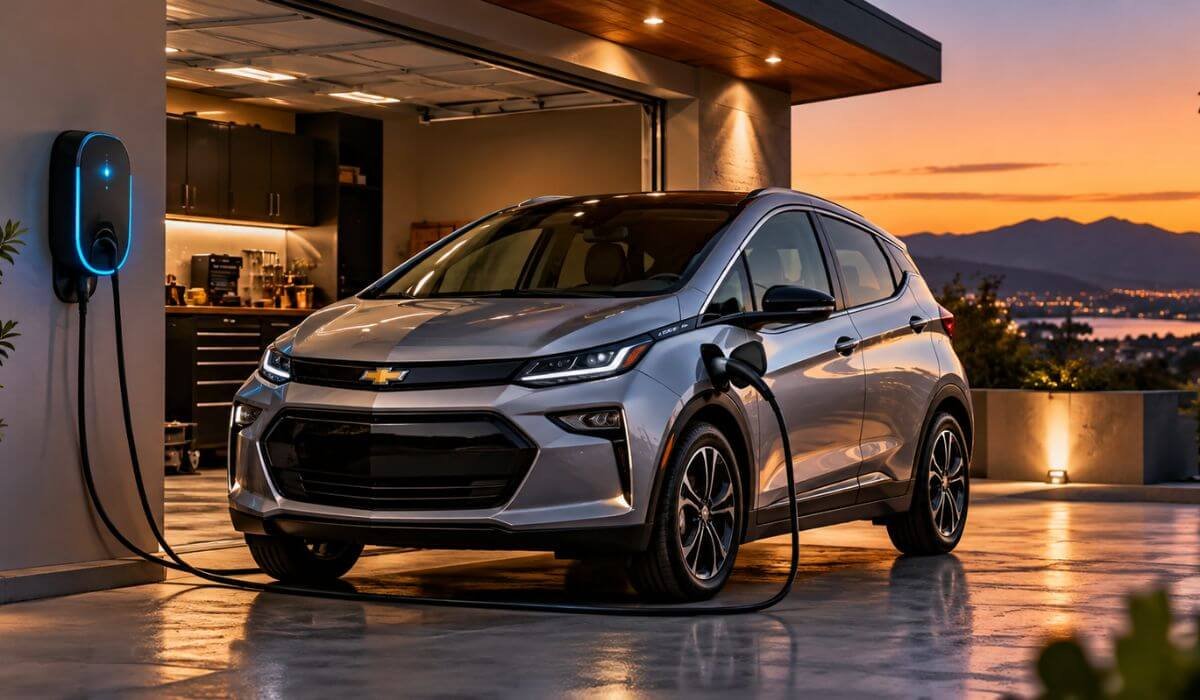
Best Level 2 Chargers for Chevy Bolt in 2026: Home Charging, WiFi Control & 25-Ft Reach
If you drive a Chevy Bolt, the right home charger is not the one with the biggest number printed on its box. It is the one that fits the car, the electrical setup in your home and the way you actually park and charge every day. The older Bolt EV and Bolt EUV use SAE J1772 for Level 2 AC charging, while the new 2027 Bolt moves to a native NACS setup and supports up to 11.5 kW on Level 2.
For the J1772 Bolt models, moving from a standard 120V outlet to a 240V Level 2 charger can make home charging feel completely different. Chevrolet notes that Level 2 charging can range from 3.8 to 19.2 kW depending on the vehicle and equipment, but the number on the charger is not the number the Bolt automatically takes. The vehicle and charging equipment communicate with each other, and the actual charging rate is limited by what both sides can safely support.
The interesting part is what happens outside the specification sheet. A 25-foot cable can matter more than a few extra amps when the charger sits on the wrong side of the garage. WiFi scheduling can be genuinely useful when electricity rates change throughout the day, while adjustable current can matter when the home’s electrical capacity is not built around maximum-output charging. That is why these picks focus on J1772 compatibility, 240V home charging, 40A-class power, cable reach, smart controls, weather protection and installation flexibility. The aim is simple: make the Bolt easier to charge every night, not just make the charger look impressive on paper.
Best Chevy Bolt Level 2 Charger: Top 2026 Picks for Home Charging
#1. ChargePoint HomeFlex Level 2 EV Charger
Best Level 2 Home Charger for Chevy Bolt for a Permanent 240V J1772 Charging Setup With WiFi Control and 23-Ft Cable Reach
#2. Sapphire Pro Level 2 EV Charger
Best Smart Level 2 Charger for Chevy Bolt With 240V NEMA 14-50 Charging, Adjustable 40A Power, WiFi Scheduling and 25-Ft Cable Reach
#3. ELEGRP Level 2 EV Charger
Best 40A Level 2 Charger for Chevy Bolt With 240V NEMA 14-50 Power, Adjustable Current Settings, 25-Ft Cable and Portable Home Charging
#4. LENZ Level 2 EV Charger
Best 9.6kW Level 2 Home Charger for Chevy Bolt With 40A 240V J1772 Charging, 24-Ft Cable, Adjustable Current and Weather-Ready Design
#5. EVIQO Level 2 EV Charger
Best 240V Level 2 Charger for Chevy Bolt With 40A J1772 Charging, WiFi Energy Tracking, Smart Scheduling, Adjustable Current and 25-Ft Cable
Expert Tip
Before buying a Level 2 charger for a Chevy Bolt, look at the charger’s actual output and connection type, not just the biggest amp number in the product title. A 50A station can be a great long-term home installation, but an older Bolt will not suddenly charge at 50A simply because the charger is rated for it. The car decides how much power it can accept.
For most Bolt owners using a J1772 model, I would pay particular attention to 240V operation, a properly sized circuit, J1772 compatibility, cable reach and installation style. A charger that fits your garage and your daily routine is far more useful than one with impressive specifications you will never actually use.
How We Choose These Level 2 Chargers
There is a reason this list does not simply put the charger with the highest amperage at number one. The best Level 2 charger for a Chevy Bolt depends on how the charger fits the car, the electrical setup and the way you charge at home.
We started with compatibility. The older Bolt EV and Bolt EUV use the J1772 connection for AC Level 2 charging, so every charger on this list was selected around that requirement. We then looked at the practical charging range rather than treating the maximum number printed on the box as the whole story.
Next came power delivery. The 40A chargers on this list offer a useful 240V home-charging setup, while the ChargePoint HomeFlex gives buyers a higher-rated 50A installation option. That does not mean the Bolt itself will use the full output of every charger. We consider that distinction important because it prevents a common mistake when shopping for EV equipment.
We also looked closely at how each charger would actually live in a home.
The ChargePoint HomeFlex earned its position because it takes a different approach from the portable NEMA 14-50 units. Its hardwired design and 50A capability make it a strong choice for someone planning a dedicated charging installation and wanting a more permanent setup.
The Sapphire Pro was selected for a different reason. Its combination of 40A output, WiFi connectivity, NEMA 14-50 plug, 25-foot cable and weather-resistant enclosure gives it a useful mix of everyday convenience and installation flexibility. It is not here simply because it has “smart” in its name; the surrounding hardware is what makes the package interesting.
For the ELEGRP, the attraction is simpler: 40A charging, 240V operation, J1772 compatibility and a 25-foot cable without turning the product into an unnecessarily complicated installation. That long cable can make a real difference in a garage where the outlet is not positioned exactly where the Bolt normally sits.
The LENZ takes the fixed-installation route with 40A and 9.6kW capability. We included it because some owners simply want a dedicated wall charging station rather than a portable unit they may move around.
The EVIQO rounds out the list with a straightforward 40A, 240V NEMA 14-50 setup. It does not need a pile of extra features to make sense for a Bolt owner who wants a conventional home Level 2 charging solution.
Most importantly, we did not treat every extra feature as a reason to move a product higher. WiFi, cable length, weather protection, installation method and maximum amperage all matter, but they matter differently depending on the owner. That is why each charger has a specific place on this list rather than pretending that one specification makes a charger universally better.
The result is a shortlist built around real home charging decisions: compatibility first, usable power second, installation practicality third, and convenience features where they genuinely add something. That is the standard we used to separate these five chargers.
#1. ChargePoint HomeFlex Level 2 EV Charger
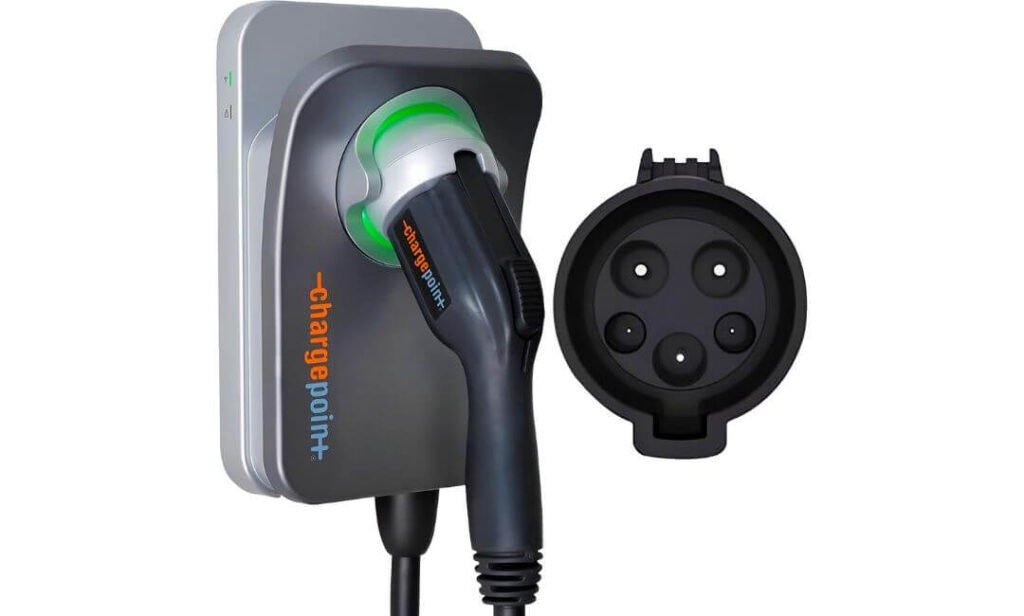
Quick Specs:
- Connector: J1772
- Installation: Hardwired
- Maximum Output: 50A
- Input: 240V AC
- Cable Length: 23 feet
- Connectivity: WiFi + ChargePoint app
- Indoor/Outdoor: Indoor or outdoor installation
- Certification: UL certified
- Warranty: 3 years
If your Chevy Bolt is charged at home every night, this is the kind of setup that starts making sense. The hardwired 240V connection keeps the installation clean, while the 50A-capable hardware gives you plenty of electrical headroom rather than buying a charger that is barely matched to the circuit. Just remember that the Bolt will only draw what its own onboard charging system allows.
The 23-foot cable is one of those details that looks minor until the charger is mounted on one side of the garage and the car ends up on the other. You have enough reach to work around different parking positions without stretching the connector or rearranging the car. The J1772 plug also makes it a natural match for the J1772-equipped Bolt models this guide is focused on.
Where this unit feels more refined is the software side. The ChargePoint app lets you schedule charging, monitor charging information and manage the station remotely, while the charger can still charge the car without depending on a constant internet connection. For someone who plugs the Bolt in at night and wants charging to fit around a utility’s cheaper hours, that is genuinely useful rather than a feature added just for a product listing.
(A 23-foot cable, adjustable charging capability and app-based scheduling make this a particularly practical choice when the charger needs to work around your garage rather than the other way around.)
What We Like About It
- 23-foot cable: Plenty of working room when the Bolt is not parked directly beside the charging point.
- Hardwired 240V setup: A clean permanent installation with no bulky portable plug connection hanging from the wall.
- Smart scheduling: Useful if you prefer the Bolt to charge during your utility’s lower-rate periods.
- Adjustable charging: Lets the installation be configured around the home’s available electrical capacity.
- Indoor or outdoor flexibility: Gives you more freedom when deciding where the charging station should live.
One Thing to Keep in Mind
The hardwired format means this is a planned electrical installation, so you will want a qualified electrician to size the circuit, breaker and wiring correctly for the charging current you intend to use.
Why This Level 2 Home Charger Fits the Chevy Bolt
The biggest strength here is balance. You get J1772 compatibility, 240V Level 2 charging, a long 23-foot cable and smart controls in one permanent setup. It is not necessary to chase the highest number on the charger; what matters is having a dependable installation that comfortably supports your Bolt’s charging needs.
The app adds another layer of convenience for owners who want to schedule charging rather than simply plug in and forget about it. Combined with the long cable and weather-capable installation, this makes the setup easy to live with day after day.
The Insider Pro-Tip
Before the electrician starts the installation, decide where you normally park the Bolt, not where the charger looks best on the wall. With 23 feet of cable available, you have more flexibility than with a short lead, and positioning the station around your actual parking pattern can make every charging session easier.
Also, don’t size the entire installation around the assumption that the Bolt must use the charger’s maximum 50A rating. The vehicle, charger and home’s electrical circuit all have their own limits. Getting those three pieces matched correctly is far more important than simply choosing the biggest amperage number.
#2. Sapphire Pro Level 2 EV Charger
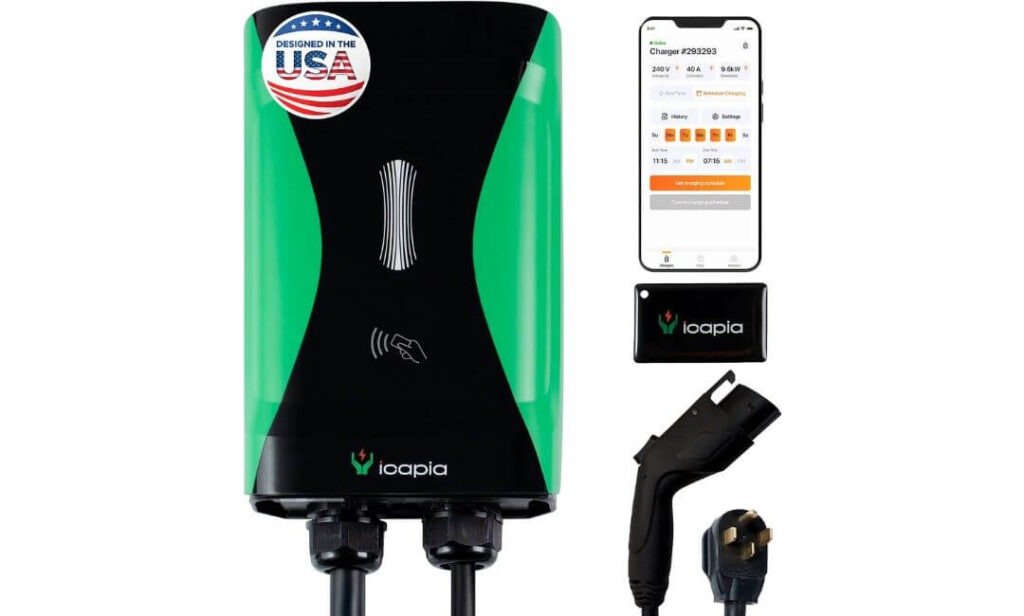
Quick Specs:
- Connector: J1772
- Plug Setup: NEMA 14-50
- Plug Output: 40A / 9.6kW
- Hardwired Output: Up to 48A / 11.5kW
- Cable Length: 25 feet
- Smart Control: WiFi + ICAPIA app
- Current Adjustment: 6A–48A
- Weather Protection: NEMA 4
- Certifications: ETL, Energy Star, FCC
- Warranty: 3 years
What makes this one interesting for a Chevy Bolt owner is that you are not locked into one installation style. The 40A NEMA 14-50 version gives you a straightforward 240V home setup, while the hardwired configuration can go up to 48A. If your garage already has a suitable 14-50 outlet, that flexibility can save you from turning a simple charger installation into a bigger electrical project.
Then there is the 25-foot cable, and this is genuinely useful rather than just another specification to skim past. It gives you enough reach to position the Bolt without having to park with the charge port practically touching the wall. Add the NEMA 4 weather-resistant enclosure, and the unit has the kind of physical flexibility that works for garages, covered driveways and other locations where the charger may see changing weather.
The smart side is where this model separates itself from a basic plug-in station. Through the ICAPIA app, you can schedule charging, monitor charging information and adjust current from 6A to 48A. There is also an included RFID charging option, which is a thoughtful fallback if you would rather tap a card than open an app every time. The ETL and Energy Star certifications, along with its stated multi-layer safety protection, add another useful layer of reassurance for a charger that is going to be connected to your car regularly.
(The real appeal here is not one headline specification; it is the combination of a 25-foot cable, flexible installation, smart control and an offline RFID option in one home charging setup.)
What We Like About It
- 40A NEMA 14-50 option: A practical way to add Level 2 charging when the right outlet is already available.
- 25-foot cable: Gives the Bolt considerably more parking flexibility around the charger.
- Adjustable 6A–48A current: Useful when you need to work within the limits of your home’s electrical setup.
- RFID access: A genuinely handy alternative to relying on the phone app for every charging session.
- NEMA 4 enclosure: Adds useful protection when the charger is installed somewhere exposed to changing conditions.
One Thing to Keep in Mind
If you choose the NEMA 14-50 version, make sure the outlet and circuit are properly sized for the charger’s 40A continuous load. The charger also has internal ground-fault protection, so the electrician should account for the specific outlet and GFCI arrangement rather than assuming every existing 14-50 outlet will behave the same way.
Why This Level 2 Home Charger Works So Well for the Chevy Bolt
For the Bolt owner who wants flexibility rather than a one-size-fits-all installation, this is where the Sapphire Pro makes a strong case. You can use the NEMA 14-50 setup for a simpler home installation, or choose hardwiring when the electrical work and installation plan make that worthwhile. The J1772 connector also matches the Bolt models covered by this guide.
The everyday details are arguably more valuable than the headline numbers. Twenty-five feet of cable, adjustable charging current, app scheduling and RFID access mean the charger can adapt to how you actually use your garage. That makes it easier to live with after the initial installation is forgotten.
The Insider Pro-Tip
If your Bolt is your everyday commuter, I would not automatically choose the hardwired configuration simply because 48A sounds better than 40A. The 40A NEMA 14-50 setup already gives you a substantial Level 2 charging solution, and the Bolt’s own charging capability ultimately determines how much power it can accept.
The smarter question is which installation makes the most sense for your home. If you already have the right 14-50 circuit, the plug-in version keeps things simple. If you are having an electrician build the charging circuit from scratch, hardwiring can give you a cleaner permanent installation. In other words, choose the setup around your electrical system and parking routine—not the biggest number printed on the charger.
#3. ELEGRP Level 2 EV Charger
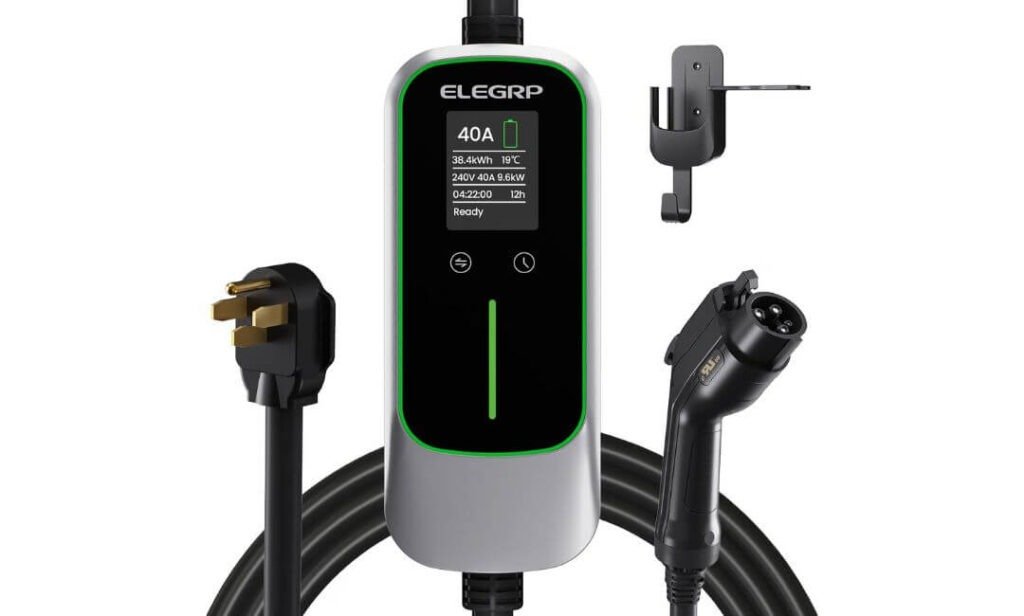
Quick Specs:
- Connector: J1772
- Output: Up to 40A / 9.6kW
- Plug: NEMA 14-50
- Cable Length: 25 feet
- Current Settings: 16A, 20A, 24A, 32A, 40A
- Charging Timer: 1–12 hours
- Weather Protection: IP67
- Safety: ETL certified with PBE protection
- Warranty: 2 years
Some home chargers are built around apps, accounts and connected features. This one takes the opposite approach. Plug it into a suitable 240V NEMA 14-50 outlet, set the current you need and let the Bolt charge. For an owner who does not care about checking charging statistics on a phone, that simplicity is actually one of its strongest qualities.
The 40A output and 9.6kW maximum rating give the Bolt a substantial step up from a standard 120V outlet, while the five selectable current levels — 16A, 20A, 24A, 32A and 40A — make the unit easier to work into different household electrical setups. The built-in 1–12-hour delay timer is another useful touch. You can tell it to wait before starting instead of needing WiFi or a separate smart-home system.
Then there is the part you notice when the charger is actually in use: the 25-foot cable. It gives you plenty of freedom around a two-car garage or driveway, and the IP67-rated enclosure is designed for indoor or outdoor use. The portable design and included carrying case also mean this does not have to stay on the wall permanently. If you have access to a suitable 240V outlet somewhere else, you can take it with you.
(For a Bolt owner who values straightforward charging, adjustable current and genuine portability over another app on the phone, this is a refreshingly uncomplicated setup.)
What We Like About It
- No WiFi dependency: Charging does not rely on an internet connection, app or cloud service.
- Five current settings: Lets you choose between 16A and 40A rather than being locked to one output.
- 25-foot cable: Useful when the Bolt cannot park directly beside the outlet.
- Portable design: The carrying case makes it practical for travel as well as home use.
- Built-in delay timer: Gives you basic off-peak scheduling without requiring smart connectivity.
One Thing to Keep in Mind
You will need a properly installed NEMA 14-50 outlet on a suitable 240V circuit to use the full plug-in setup. If you do not already have one, the outlet installation becomes the part that needs an electrician.
Why This Level 2 Home Charger Makes Sense for a Chevy Bolt
The appeal here is straightforward: 40A charging, a 25-foot cable, adjustable current and no internet dependency. There is less to configure and less to think about once it is plugged into the right outlet. That can be exactly what a Bolt owner wants from a daily home charger.
The portability adds another layer that fixed wall stations cannot offer. You can keep it mounted at home most of the time, then take it along when a suitable 240V outlet is available elsewhere. For someone who values flexibility without wanting a connected charger, that is a useful combination.
The Insider Pro-Tip
If your home already has a suitable NEMA 14-50 outlet, check its circuit and installation before simply plugging in a 40A continuous EV load. The outlet may look right physically, but EV charging is a sustained electrical load, so the circuit needs to be sized for it properly.
And don’t overlook the adjustable current control. If your home’s electrical setup calls for a lower charging rate, dropping from 40A to 32A, 24A or another available setting can be much more sensible than treating maximum output as something you always need. The Bolt will still get its overnight charge; you are simply matching the charger to the electrical setup instead of forcing the setup to match the charger.
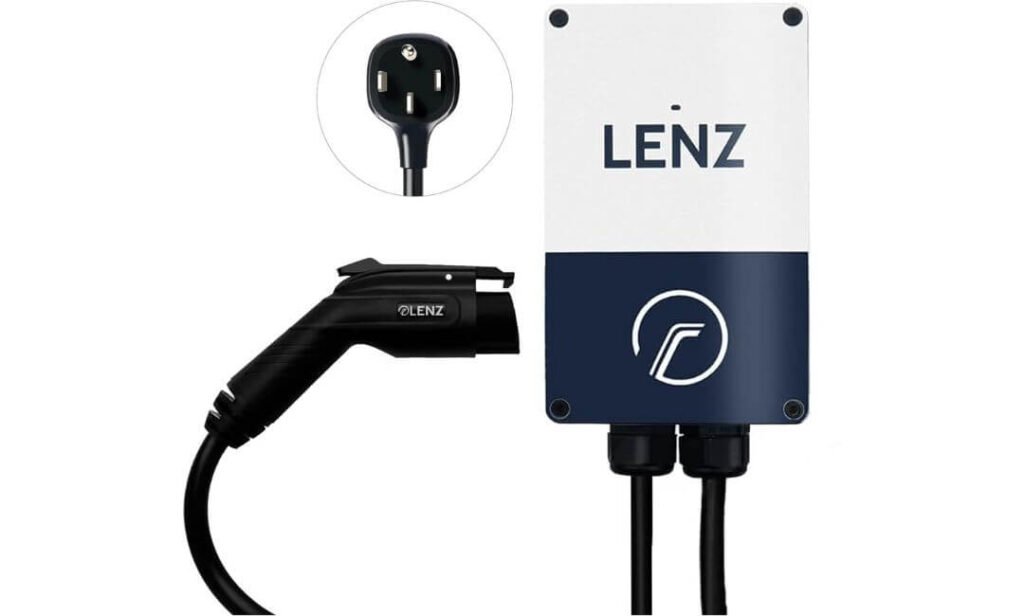
#4. LENZ Level 2 EV Charger
Quick Specs:
- Connector: J1772
- Output: Up to 40A / 9.6kW
- Input: 240V
- Connection: NEMA 14-50 plug
- Cable Length: 24 feet
- Current Adjustment: 16A–40A via DIP switch
- Enclosure: NEMA 4X / IP67
- Operating Temperature: -22°F to 122°F
- Certification: ETL Listed / UL 2594
- Warranty: 3 years
There is something refreshing about a charger that does not try to turn a simple charging session into another connected-device project. The LENZ is built around 40A, 240V Level 2 charging, with a J1772 connector that suits the Chevy Bolt models covered in this guide. There is no account to create, no WiFi connection to troubleshoot and no app you need to learn before the car can start charging.
The 9.6kW maximum output gives the charger plenty of capability for daily home charging, while the adjustable current setting lets you choose between 16A and 40A using the internal DIP switch. That is useful if your household electrical setup has other significant loads or you simply want to keep the charging rate below maximum. The 24-foot cable also gives you a generous amount of reach without making the installation feel tied to one exact parking position.
What caught my attention most is the physical design. The NEMA 4X / IP67 enclosure, corrosion-resistant construction and stated -22°F to 122°F operating range make this a charger you can install indoors or outside rather than treating it as something that must live in a perfectly sheltered garage. Add the ETL listing to UL 2594 and a three-year warranty, and the focus here is pretty clear: straightforward charging with a solid emphasis on the hardware itself.
(If your idea of a good EV charger is “I plug in tonight and it is ready in the morning,” the LENZ approach is refreshingly direct.)
What We Like About It
- No WiFi or app: Nothing needs to be connected before you can charge.
- 16A–40A adjustment: Useful for matching the charger to the home’s available electrical capacity.
- 24-foot cable: Enough reach for many garage and driveway layouts without constantly repositioning the Bolt.
- NEMA 4X / IP67 enclosure: Gives the unit useful protection against outdoor conditions.
- Three-year warranty: Adds reassurance for a charger intended for everyday use.
One Thing to Keep in Mind
This version is designed around a NEMA 14-50 connection, so if your home does not already have a suitable outlet and dedicated circuit, you will need an electrician to install the electrical connection before using the charger.
Why This Level 2 Home Charger Fits a Chevy Bolt
The LENZ makes its case through simplicity and useful hardware rather than a long list of connected features. The Bolt gets a J1772 connection, up to 40A of Level 2 charging capability, a 24-foot cable and a weather-resistant enclosure, while the owner gets a setup that does not require another app or WiFi network.
That makes it particularly appealing for someone who wants a charger to become part of the background of daily life. Set the current appropriately, plug in the Bolt and let the car handle the charging. There is very little unnecessary interaction between you and the equipment.
The Insider Pro-Tip
The useful feature here is actually the one that is easiest to overlook: adjustable current through the DIP switch. If your electrical setup is shared with other major loads, there is no reason to insist on running the charger at its maximum simply because it can. Setting an appropriate lower current can give you a comfortable overnight charge while keeping the installation aligned with the home’s electrical capacity.
And before ordering, look at the actual outlet and circuit, not just the receptacle shape. A NEMA 14-50 socket is only one part of the installation. For continuous EV charging, the circuit needs to be correctly sized for the charging load. That small check beforehand can save you a much bigger headache later.
#5. EVIQO Level 2 EV Charger
Quick Specs:
- Connector: J1772
- Output: Up to 40A / 9.6kW
- Input: 240V
- Connection: NEMA 14-50 plug
- Cable Length: 25 feet
- Current Control: 6A–40A through the app
- Smart Features: WiFi, scheduling and energy tracking
- Weather Protection: IP66 / NEMA 4
- Certifications: UL, ETL, FCC and Energy Star
- Warranty: 3 years
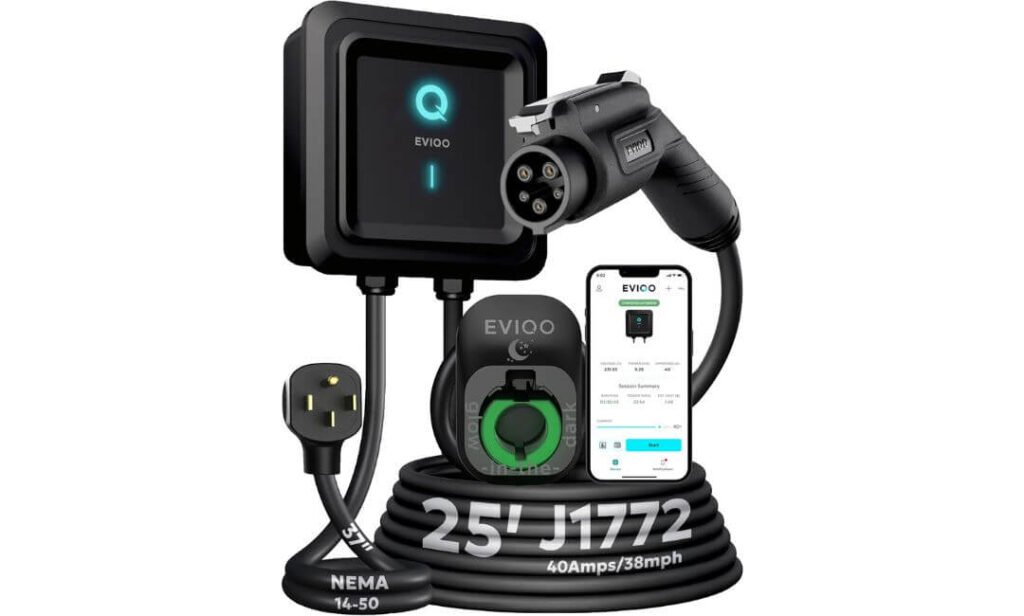
The EVIQO takes a fairly familiar 40A NEMA 14-50 formula and adds a few details that you actually notice after living with a home charger. You get 240V Level 2 charging, a 25-foot cable and J1772 connectivity, so the basic job is covered without making the installation unnecessarily complicated. If you already have the correct NEMA 14-50 outlet and dedicated circuit, the charger simply plugs in rather than requiring a hardwired installation.
The smart side is where this model becomes more interesting. The app can start or stop charging, adjust the current from 6A to 40A, create charging schedules and track energy use and cost. That is useful if you want to move charging into cheaper overnight periods without having to walk out to the garage every time. And if the WiFi connection happens to be unavailable, the unit can still charge through its normal plug-and-charge operation, so the car is not dependent on the app for basic charging.
There are also a couple of genuinely thoughtful physical touches. The 25-foot cable gives you plenty of room around a garage or driveway, while the glow-in-the-dark holster makes finding the connector at night easier than you might expect. The sealed IP66 / NEMA 4 enclosure and internal shielding give it the kind of protection that makes indoor or outdoor mounting practical, while the reset button means you can restart the unit without opening it up or going straight to the breaker.
(It is the little everyday touches — the long cable, visible holster and quick reset — that make this feel like equipment designed to be lived with, rather than something built only to look good on a specification sheet.)
What We Like About It
- 25-foot cable: Plenty of reach when the Bolt is parked away from the wall-mounted unit.
- 6A–40A adjustment: Gives you more control over the charging load from the app.
- Three charging schedules: Useful when you want charging to follow different routines during the week.
- Glow-in-the-dark holster: A surprisingly useful touch when plugging in after dark.
- Quick reset button: Lets you restart the charger without opening the enclosure or switching off the breaker.
One Thing to Keep in Mind
The charger is designed around a NEMA 14-50 outlet and 40A maximum output, so it is worth confirming the outlet and dedicated circuit are correctly installed before you plug it in.
Why This Level 2 Home Charger Fits the Chevy Bolt
The EVIQO is aimed at the Bolt owner who wants smart charging without turning the garage into a technology project. You get the familiar J1772 connection, 40A/9.6kW charger capability, long 25-foot cable and app-based scheduling, while normal charging remains simple enough to start without depending on the app.
Its physical design also gives it a useful advantage for less-than-perfect charging locations. IP66/NEMA 4 protection, a reinforced enclosure and a long cable make it easier to place the charger where the car actually needs it. The result is a fairly complete home setup without requiring a hardwired station.
The Insider Pro-Tip
If you are buying this mainly for overnight Bolt charging, there is little reason to obsess over using the full 40A setting every time. The app’s current adjustment is more useful when treated as a tool for matching charging to your home’s electrical setup and daily schedule.
One other detail worth appreciating is the reset button. If the charger ever needs a quick restart, you do not have to start disconnecting cables or reaching for the electrical panel. That sounds minor on day one. After months of using a charger, those small conveniences are exactly the things you remember.
Best Level 2 Charger for Chevy Bolt: See Which Home Charger Fits Your Setup
Why Level 2 Is the Smart Choice for Chevy Bolt
If you are charging a Chevy Bolt regularly at home, the difference between Level 1 and Level 2 becomes obvious pretty quickly. Level 1 uses a standard 120V household outlet, which is convenient because almost every home has one, but the charging rate is slow enough that a larger battery can take many hours to recover a meaningful amount of range. Level 2 moves the setup to 240V, giving the Bolt access to substantially faster AC charging without requiring you to rely on public charging every time the battery gets low.
The important point is that buying a higher-rated charger does not automatically make the Bolt charge at that charger’s maximum output. The vehicle’s onboard charger remains the limiting factor. That is why the chargers in this guide range from 40A units to a 50A-capable hardwired station, while the actual charging rate is determined by what the particular Bolt can accept.
Level 1 vs. Level 2 Charging at Home
| Level 1 | Level 2 | |
|---|---|---|
| Power source | 120V household outlet | 240V dedicated circuit |
| Typical use | Occasional or low-mileage charging | Regular daily charging |
| Charging experience | Slow range recovery | Much faster range recovery |
| Installation | Usually the simplest option | Requires suitable electrical setup |
| Best for | Drivers with very low daily mileage | Owners who depend on the Bolt every day |
| Overnight practicality | Can work, but may require longer charging windows | Much more practical for routine overnight charging |
For a Bolt that is driven every day, Level 2 is less about chasing a headline charging number and more about getting the car ready for the next morning without thinking about it. A 40A charger can provide considerably more charging capability than a standard 120V outlet, while smart models can also shift charging to a preferred time window.
What Changes in Everyday Bolt Driving
The biggest difference shows up when your driving routine is not perfectly predictable.
Maybe you used more range than expected during the day, had to make an extra trip, or simply arrived home with considerably less battery than usual. With Level 1 charging, you may need to leave the Bolt connected for a much longer period to recover that lost range. Level 2 gives you a much larger charging window overnight, which makes those unexpected days less inconvenient.
It also changes how you think about the battery. Instead of waiting until the Bolt is very low before plugging it in, you can plug in whenever you get home and let the car replenish the energy you used that day. For many owners, that is the more natural way to use an EV.
You Do Not Need the Biggest Charger to Benefit
This is where charger specifications can become misleading.
A charger rated at 50A is not automatically a better match for every Bolt than a 40A unit. The vehicle determines how much AC power it can accept, so installing a charger with additional capacity does not mean the car will suddenly charge beyond its own limit.
That is why the selection above includes different approaches:
- ChargePoint HomeFlex makes sense for someone planning a permanent hardwired installation with smart controls and substantial electrical capacity.
- Sapphire Pro gives you more installation flexibility, with a 40A plug-in configuration and a higher-rated hardwired option.
- ELEGRP focuses on portable, straightforward 40A charging with a long cable and manual controls.
- LENZ keeps the experience deliberately simple, with no WiFi or app dependency.
- EVIQO combines 40A charging with app-based scheduling, energy monitoring and a long cable.
The right choice is therefore less about finding the largest number and more about matching the charger to your Bolt, electrical system and daily routine.
How Level 2 Fits a Real Home Charging Routine
For a typical daily driver, the easiest routine is usually the least complicated one: arrive home, connect the Bolt, and let the car charge while it is parked.
If your electricity plan has different rates throughout the day, a smart charger such as the ChargePoint, Sapphire Pro or EVIQO can make scheduled charging useful. You can set a preferred charging window rather than manually deciding when to start the session every evening.
If you would rather avoid WiFi altogether, the ELEGRP and LENZ take a much simpler approach. The ELEGRP uses a physical delay timer and adjustable current settings, while the LENZ is essentially a plug-in-and-charge setup. That distinction matters because not every Bolt owner wants another connected device in the garage.
What About Battery Longevity?
It is easy to assume that faster Level 2 charging must be harder on the battery simply because more electrical power is involved. For normal AC Level 2 home charging, that is not the right way to look at it.
The more useful habit is to avoid treating every charging session as an emergency top-up. Plugging in at home and allowing the vehicle to manage its charging is a much more sensible everyday routine than repeatedly waiting until the battery is extremely low and then trying to recover a large amount of range at once.
Level 2 also gives you the practical freedom to charge smaller amounts more regularly. If you used only part of the battery during the day, you can simply replenish what you used while the car is sitting at home. That is one reason Level 2 works so well as an everyday home-charging solution.
When Level 2 Makes the Biggest Difference
Level 2 becomes particularly useful when:
- You drive the Bolt every day and need dependable overnight range recovery.
- Your daily mileage varies and you do not want to plan every trip around charging time.
- You regularly return home with a relatively low battery.
- You have access to a suitable 240V electrical circuit.
- You want to reduce your dependence on public charging for routine driving.
- You want charging to happen while the vehicle is parked, rather than waiting beside a charger.
- You want the option to use off-peak charging schedules where your utility plan makes that worthwhile.
- You need enough cable reach to accommodate different parking positions in your garage or driveway.
For most home Bolt owners, that is the real advantage of Level 2: charging becomes part of the parking routine instead of another task you have to plan around.
Chevy Bolt Level 2 Charger Installation
Installing a Level 2 charger is not simply a matter of mounting a box on the garage wall and plugging the Bolt in. The charger becomes part of your home’s electrical system, so the outlet, breaker, wiring, grounding, circuit capacity and installation location all need to be right.
Chevrolet specifically recommends having a qualified electrician inspect the home’s electrical system before using Level 2 charging. Its guidance also says Level 2 charging uses a 240V outlet or professionally installed hardwired equipment, and the vehicle automatically adjusts its charging rate to the maximum shared by the vehicle and charging equipment.
What the Installation Actually Involves
The exact work depends on whether you choose a plug-in charger, such as the ELEGRP, Sapphire Pro, LENZ or EVIQO, or a hardwired station such as the ChargePoint HomeFlex.
For a plug-in setup, the basic process is:
- Check the Bolt’s charging connector and confirm that the charger uses the correct J1772 connection for the vehicle being covered.
- Inspect the home’s electrical panel to determine whether there is enough capacity for the additional continuous charging load.
- Install or verify the correct 240V circuit for the charger.
- If using a NEMA 14-50 model, install a properly rated NEMA 14-50 receptacle on the appropriate dedicated circuit.
- Position the charger where the cable can comfortably reach the Bolt’s charge port.
- Secure the charger using its supplied mounting hardware.
- Have the electrician verify voltage, grounding, breaker sizing, connections and receptacle condition.
- Plug the charger in and complete the manufacturer’s setup procedure.
- Connect the J1772 handle to the Bolt and perform an initial charging test.
- Confirm that the charger and vehicle are communicating correctly before relying on the installation for daily charging.
For a hardwired charger, the electrician connects the charging equipment directly to the home’s electrical system instead of using a receptacle. That creates a cleaner permanent installation, but it also makes professional electrical work essential.
Chevrolet’s own installation programme follows essentially this philosophy: assess the home, determine the required electrical work, obtain applicable permits, complete the installation and then verify that the charger operates correctly.
Electrical Requirements You Should Check First
The most important part of the installation is not the charger itself. It is the electrical infrastructure feeding it.
A typical 40A plug-in charger from this guide uses a 240V NEMA 14-50 connection. Chevrolet’s published installation information for eligible Bolt home-charging installations specifies a 240V NEMA 14-50 outlet with a new 40A breaker, code-compliant wiring and a load calculation of the existing panel. Actual requirements can vary by charger, installation method and local electrical code, so the charger’s installation instructions and the electrician’s assessment should control the final setup.
For the products in this article, pay attention to these areas:
- 240V supply: Level 2 charging requires the appropriate 240V electrical supply.
- Dedicated circuit: EV charging is a continuous load, so the charging circuit should not simply be treated like an ordinary occasional-use outlet.
- Breaker sizing: The breaker must be correctly matched to the charger, wiring and permitted continuous charging load.
- Wire size: The electrician should select the conductor size based on the actual installation, equipment requirements and applicable electrical code.
- Panel capacity: Having an empty breaker position does not necessarily mean the panel has enough capacity for EV charging.
- Grounding: The circuit and receptacle need proper grounding and correct polarity.
- Receptacle quality: A loose, damaged or poorly installed NEMA 14-50 outlet should not be used for sustained EV charging.
- Local permits: Some installations require permits or inspection depending on the location and jurisdiction.
Chevrolet specifically warns that a 240V charging installation should be checked by a qualified electrician and recommends a dedicated branch circuit with a reliable ground connection.
When You Should Hire an Electrician
For the electrical work itself, hiring an electrician is the sensible route.
You should have a qualified electrician handle the job if you need to:
- Add a new 240V circuit.
- Install a NEMA 14-50 receptacle.
- Add or replace a circuit breaker.
- Run new wiring from the panel to the garage or outdoor location.
- Hardwire a Level 2 charging station.
- Upgrade the electrical panel or service.
- Route wiring through finished walls, exterior walls or underground areas.
- Determine whether the existing panel has enough capacity.
- Install weatherproof electrical equipment outdoors.
- Obtain required permits or arrange inspection.
Chevrolet’s own home-charging guidance recommends professional installation for Level 2 wall chargers and provides an installation service that includes licensed and insured electrical professionals.
What You Can Safely Do Yourself
There are still a few low-risk parts of the process that a homeowner can handle, provided the electrical infrastructure has already been professionally installed and the charger manufacturer allows it.
You can generally:
- Choose a sensible mounting position.
- Measure the distance between the charger and the Bolt’s normal parking position.
- Mount the charging unit according to its instructions where no electrical modification is required.
- Organise the charging cable and holster.
- Connect the J1772 handle to the vehicle.
- Configure app features, charging schedules and current settings.
- Check the charger display or app during the first charging session.
What you should not do casually is open the electrical panel, modify a breaker, change wiring, improvise grounding or create your own high-current connection.
Also, do not use an extension cord, power strip, splitter or improvised adapter for Level 2 charging. Chevrolet explicitly advises against these when connecting an EV to a wall outlet.
Common Installation Mistakes to Avoid
The mistakes that cause trouble are often surprisingly ordinary.
Using the wrong outlet. A NEMA 14-50 receptacle may look familiar, but that does not mean an existing outlet is automatically suitable for continuous EV charging. Have the circuit inspected rather than assuming it is ready.
Ignoring panel capacity. An available breaker slot is not the same thing as available electrical capacity. A proper load calculation matters.
Using an undersized circuit. The charger should never be installed first and the electrical capacity figured out afterwards.
Treating EV charging like an ordinary appliance. A Bolt may remain connected for hours, so the circuit needs to be designed for that sustained load.
Using extension cords. Long charging cables are useful; adding an extension cord to compensate for a short one is not the same thing.
Installing the charger too far from the parking position. A charger can have excellent specifications and still be frustrating if its cable barely reaches the charge port.
Skipping the first test. After installation, verify that the charger starts correctly, the vehicle recognises the connection and the electrical installation behaves normally before considering the job finished.
Indoor vs. Outdoor Level 2 Charger Installation
A garage is usually the easiest location because the charger has more protection from direct weather and the cable is less exposed to the elements.
That does not mean outdoor installation is automatically a problem. Several chargers in this guide are specifically designed for more demanding environments. The Sapphire Pro uses a NEMA 4-rated enclosure, while the LENZ specifies NEMA 4X/IP67 protection, and the EVIQO uses an IP66/NEMA 4 housing.
For an outdoor installation, think beyond the enclosure rating.
The charger should be positioned where the cable will not become a trip hazard, the connector will not sit in standing water, and the electrical connection is protected according to the manufacturer’s instructions and local code. Keep connectors clean and dry, and avoid mounting the equipment where vehicles could strike it.
If the charger is exposed to direct sun, rain, snow or freezing temperatures, check the manufacturer’s stated environmental limits rather than assuming that every weatherproof charger is suitable for every climate.
How Much Does Chevy Bolt Charger Installation Cost?
The cost can vary considerably because the charger itself is only one part of the project.
If you already have a properly installed 240V NEMA 14-50 outlet and suitable circuit, a plug-in charger can require relatively little additional electrical work.
If the outlet does not exist, the electrician may need to run new wiring from the panel, install the receptacle, add the appropriate breaker, make the installation weatherproof where necessary and complete any required permitting or inspection.
A more involved project can cost substantially more if the panel is far from the garage, the wiring route is difficult, the panel needs additional capacity, or an electrical upgrade is required.
As a useful real-world framework:
- Existing suitable NEMA 14-50 circuit: Minimal electrical work beyond mounting and setup.
- New 240V NEMA 14-50 installation: Often a few hundred dollars, depending heavily on wiring distance, access and local labour.
- More complex installation: Costs can rise significantly when long cable runs, difficult access, outdoor trenching or panel modifications are involved.
- Hardwired installation: Usually involves professional electrical labour and can cost more when additional circuit or panel work is required.
For context, Chevrolet’s published historical Bolt installation programme described a standard installation involving a NEMA 14-50 outlet, new breaker, code-compliant wiring, weatherproofing where required, permits and a panel load calculation. That illustrates why two homes can receive very different installation quotes even when they use the same charger.
The Installation Detail Most Bolt Owners Should Not Ignore
The easiest way to avoid problems is to choose the charger and electrical installation together.
For example, the ELEGRP, LENZ and EVIQO are built around NEMA 14-50 plug-in installations, while the ChargePoint HomeFlex is a hardwired option. The Sapphire Pro gives you both a NEMA 14-50 configuration and a hardwired path. Those are not just different ways of connecting the same box; they can lead to different electrical requirements and installation decisions.
Before buying, know where the Bolt parks, where the electrical panel is, what circuit is available, how far the cable needs to reach and whether the charger will be indoors or outdoors. Then have the electrical side verified properly.
That approach is much safer than buying the highest-rated charger first and trying to make the house fit around it.
Chevy Bolt Smart Charging: WiFi, Scheduling and Energy Control
A good home charging setup does more than send electricity to the Bolt. Once you add WiFi, scheduling and energy monitoring, the charger can fit itself around when you drive, when electricity costs less and how much power your home can comfortably provide. That is where a smart Level 2 charger becomes genuinely useful rather than simply being another connected gadget.
The important thing is not to buy a charger because the box says “smart.” For a Chevy Bolt, the useful features are the ones that reduce daily effort: charging schedules, adjustable current, energy tracking and remote control. The ChargePoint HomeFlex, Sapphire Pro and EVIQO in this guide offer different versions of that experience, while the ELEGRP and LENZ deliberately keep things simpler for owners who do not want WiFi.
When WiFi Actually Helps With Bolt Charging
WiFi becomes useful when you want the charger to make decisions around your routine instead of manually controlling every session.
With a connected charger, you can typically:
- Set a charging schedule so the Bolt charges during your preferred hours.
- Start or stop a session remotely.
- Check charging activity without walking into the garage.
- Monitor energy consumption through the manufacturer’s app.
- Adjust charging current where the charger supports it.
- Receive information about charging activity or charger status.
- Apply firmware updates remotely on supported models.
That can be especially useful when your electricity plan has time-of-use pricing. Instead of plugging the Bolt in immediately and letting it charge whenever it wants, you can configure the charger to operate during the cheaper period.
But there is an important distinction: WiFi is a convenience layer, not a requirement for Level 2 charging. If your internet connection disappears, a well-designed charger should still provide a practical way to charge the vehicle. That is one reason the offline behaviour of the products in this guide matters.
Charging Schedules Can Be More Useful Than Extra Amps
For a daily Bolt driver, a smart schedule can have more practical value than buying a charger simply because it has a higher maximum amperage.
Imagine arriving home at 6 p.m. with plenty of battery left for the evening. If your utility has cheaper electricity overnight, there is little reason to start charging immediately. A schedule can leave the Bolt connected and begin charging later, when the selected charging window starts.
The ChargePoint HomeFlex offers app-based scheduling and charging information. The Sapphire Pro adds scheduling alongside adjustable current and RFID access, while the EVIQO combines scheduling with energy and cost tracking.
That gives you three different approaches to the same basic idea: plug the car in when you get home, then let the charging system handle the timing.
Energy Reports Give You a Better Picture of Home Charging
Energy monitoring is another feature worth understanding before buying a smart charger.
A charger that reports energy consumption can help you see how much electricity your Bolt is using during charging sessions. Depending on the product and app, you may also see charging activity, estimated costs or historical information.
That is useful because EV charging can otherwise disappear into your overall household electricity bill. If you are deliberately charging during lower-cost periods, the information gives you a way to check whether the schedule is actually working the way you intended.
The Sapphire Pro and EVIQO are particularly interesting here because their smart systems provide charging information through their respective apps. ChargePoint also provides charging data through its app.
At the same time, do not treat an app’s cost figure as a perfect utility bill. Actual electricity costs depend on your utility’s tariff, taxes, fees and other charges. Use the reported figures as a management tool, not as a guaranteed invoice amount.
Remote Control: Useful, But Not Essential
Remote control sounds like a headline feature, but its value depends on how you use the car.
If you forgot to start charging, want to check whether a session has begun, or need to change a charging setting without going back to the garage, remote access can be genuinely convenient.
For someone who simply plugs the Bolt in every evening and follows the same charging routine, however, it may barely matter.
That is why I would place remote control below basic compatibility, electrical installation quality and reliable charging when choosing a home charger. A fancy app cannot compensate for a poorly planned electrical installation.
What About Solar Charging?
Solar can make the smart-charging conversation much more interesting.
If your home has solar panels, the ideal setup may be to coordinate EV charging with periods when your solar system is producing electricity. In principle, that can allow more of your home’s generated electricity to go toward charging the Bolt rather than being exported to the grid, depending on your utility arrangement and the capabilities of your energy-management system.
However, the chargers in this particular list should not automatically be described as solar-integrated chargers. WiFi connectivity and charging schedules do not, by themselves, mean that a charger can dynamically follow solar production.
A proper solar-aware setup may require additional equipment or an energy-management platform capable of measuring household generation and consumption. If solar optimisation is your main goal, check the charger’s specific integration capabilities before assuming that its WiFi app provides it.
Working With EV Electricity Plans
A smart charger becomes particularly useful when your utility offers a dedicated EV rate or time-of-use pricing.
The basic strategy is straightforward:
- Check when your electricity is cheapest.
- Determine when the Bolt normally needs to be ready.
- Set the charger to operate during that lower-cost window.
- Leave the Bolt connected when you arrive home.
- Let the charger handle the timing automatically.
- Review your energy data periodically to make sure the schedule still fits your routine.
You do not need to make charging complicated. The best schedule is usually the one you can set once and then forget about.
Also remember that utility plans differ significantly by location. A charging schedule that saves money for one Bolt owner may not do the same for another, so check your actual electricity tariff rather than assuming that overnight charging is always cheaper.
Which Smart Features Actually Matter for a Chevy Bolt?
For this particular guide, I would separate smart features into three groups.
Features worth having:
- Charging schedules, especially with time-of-use electricity.
- Adjustable current, when you need to work within your home’s electrical capacity.
- Energy and charging history, so you can understand household charging use.
- Remote status or control, if your routine benefits from it.
- Offline charging capability, so the Bolt is not left dependent on an internet connection.
Features that are nice but not essential:
- Voice-control integration.
- Extensive charging statistics.
- Automatic firmware updates.
- Multiple user-access options.
- Advanced connected-home integrations.
Features that should never outrank the basics:
- J1772 compatibility for the Bolt models covered here.
- Correct 240V electrical installation.
- Proper circuit capacity.
- Suitable cable length.
- Appropriate safety certification.
- Correct indoor or outdoor installation.
That is the important distinction. Smart features should make a good charger easier to live with; they should not be the reason you overlook the fundamentals.
What If You Prefer No WiFi?
There is nothing wrong with keeping the setup completely offline.
The ELEGRP uses adjustable physical current settings and a built-in delay timer, while the LENZ takes an even more stripped-back approach with no WiFi or app dependency. Both can make sense for a Bolt owner who would rather have a charger that simply performs its core job without another connected device to maintain.
That can actually be an advantage for some garages. There is no pairing process, no WiFi password to update and no app notification to check. You plug the car in and let the charger do its job.
So the choice is not really smart versus outdated. It is about whether connected control adds something useful to your particular charging routine.
Building a Smarter Chevy Bolt Charging Setup
The strongest home charging ecosystem is not necessarily the one with the most features. It is the one where the charger, Bolt, electrical system, utility plan and daily routine all work together.
If you want scheduled charging and energy visibility, the ChargePoint HomeFlex, Sapphire Pro and EVIQO give you that connected route. If you prefer physical controls and fewer dependencies, ELEGRP and LENZ provide a simpler experience.
And if you have solar panels, a time-of-use electricity plan or other home-energy equipment, look beyond the word “WiFi.” Check exactly what the charger can measure, schedule and integrate with. That small bit of research is what separates a genuinely useful smart charging setup from a charger that simply happens to have an app.
Chevy Bolt 25-Foot Charging Cable: Reach, Routing and Safe Cable Management
A 25-foot charging cable sounds like a simple convenience feature until you actually start using the charger every day. In a real garage, the Bolt may not park in exactly the same position every time, the charging port may be several feet away from the wall, and you may need to route the cable around the side of the vehicle rather than directly across the floor.
That is where a longer cable can make a Level 2 charger much easier to live with. The extra reach gives you more freedom when positioning the charger, but it also creates another responsibility: the cable needs to be routed, stored and protected properly.
For the Chevy Bolt, the goal is not to use all 25 feet simply because you have it. The goal is to keep enough cable available to reach the charging port comfortably while keeping the unused length safely out of the vehicle’s path.
Why a 25-Foot Cable Can Make a Difference for the Chevy Bolt
A shorter cable can work perfectly well when the charger is mounted close to where the Bolt normally parks. Problems start when the electrical panel, charger mounting position and vehicle charging port are not in the same convenient spot.
A 25-foot cable gives you more flexibility when:
- The charger is mounted on a side wall rather than directly in front of the vehicle.
- The Bolt parks nose-in or backs into the garage depending on the day.
- More than one parking position may be used.
- The electrical panel is located in a less convenient part of the garage.
- You want to keep the charger mounted in a position that makes sense for the electrical installation rather than forcing it into the perfect cable position.
- You occasionally need additional reach around the side of the vehicle.
This is why the 25-foot cable on the Sapphire Pro, ELEGRP and EVIQO is more than a specification to compare on a product page. It can change where you can realistically install the charger.
At the same time, longer does not automatically mean better. More cable means more weight, more material to manage and more opportunity for part of the cable to end up on the garage floor. Good cable management is what makes the extra reach useful.
Route the Cable Around the Garage, Not Across the Driving Line
The biggest mistake with a long EV charging cable is leaving it stretched across the area where the car drives or where people walk.
A better installation starts with the charger’s position. From there, think about the normal path between the charger and the Bolt’s charge port.
If possible, route the cable along a wall or the side of the garage rather than creating a diagonal line across the floor. The cable should only come onto the driving surface for the short distance necessary to reach the vehicle.
For example, if your Bolt normally parks nose-in, you might mount the charger along the side wall and route the cable forward along that wall. When it is time to charge, only the required length comes away from the wall.
This approach has three advantages:
- Less cable sits where the tyres can run over it.
- Less cable is exposed to people walking through the garage.
- The unused cable is easier to coil and store.
The exact route depends on the garage, so there is no universal “correct” position. The best position is the one that gives the Bolt a comfortable charging connection without turning the cable into a floor obstacle.
Do Not Leave the Extra Cable in a Tight Coil During Charging
A long cable naturally encourages owners to coil the unused portion and leave it sitting beside the charger.
For storage, that is fine when done according to the manufacturer’s guidance. During active charging, however, avoid creating a tightly packed coil of cable and then leaving it there while the Bolt is drawing power.
A better approach is to use only the amount of cable you need and keep the remaining length arranged loosely in a suitable storage position. The goal is to prevent unnecessary heat buildup, mechanical stress and accidental damage.
Also avoid sharp bends. A charging cable needs to make gentle turns rather than being folded aggressively around a bracket, corner or hook.
Use Proper Cable Hooks and Holders
A simple wall-mounted cable hook or dedicated EV cable holder can make a surprisingly big difference.
The charger itself should ideally have a proper place for the charging handle, while the cable can be supported on a separate hook, reel or management system appropriate for the product.
Useful cable-management options include:
- Wall-mounted cable hooks, for keeping excess cable off the floor.
- Dedicated EV cable hangers, designed to support the weight of a charging cable.
- Charging-handle holsters, to keep the J1772 connector protected when not in use.
- Cable management reels, where compatible with the manufacturer’s instructions and installation environment.
- Wall-mounted loops or guides, for installations where the cable needs to follow a particular route.
The important part is how the accessory supports the cable. Do not hang a heavy charging cable from the J1772 connector itself or create a sharp bend immediately behind the handle.
A good storage point supports the cable’s weight without putting unnecessary strain on the plug, connector or cable entry point.
Keep the J1772 Connector Off the Ground
This is one of those small details that becomes important over months of daily use.
The J1772 handle should have a dedicated place to sit when it is not connected to the Bolt. Leaving it on the garage floor exposes it to dust, dirt, water, accidental impacts and the possibility of someone driving over it.
A proper holster keeps the connector elevated and makes the charging routine easier:
Unplug → place the handle in the holster → manage the cable → drive away.
The process takes seconds, but it prevents the connector from becoming something that gets kicked around the garage.
Some chargers also include features intended to make the holster easier to locate in low light. The EVIQO, for example, includes a glow-in-the-dark holster, which is a small feature but makes practical sense in a darker garage.
Never Let the Cable Become a Tyre Path
The cable should not be positioned where the Bolt’s tyres will repeatedly roll over it.
An occasional accidental crossing is different from deliberately routing the cable underneath a tyre because the cable is not quite long enough.
Repeated vehicle weight can put mechanical stress on the cable and its outer jacket. It can also flatten or damage the cable over time, particularly if the same section is repeatedly exposed to pressure.
If your normal parking position requires the cable to cross underneath the vehicle, rethink the charger position or cable route instead.
A 25-foot cable should give you more installation flexibility, not encourage you to create a permanent cable path underneath the car.
Protect the Cable From Sharp Edges and Garage Hardware
Garages are full of things that can damage a charging cable without anyone noticing immediately.
Watch for:
- Metal shelving edges.
- Garage door tracks.
- Hinges.
- Sharp wall corners.
- Tool cabinets.
- Storage hooks.
- Concrete edges.
- Vehicle ramps.
- Bicycle racks.
- Other equipment stored along the wall.
If the cable needs to pass around a corner, use a smooth route and avoid forcing it tightly against a sharp edge.
Do not modify the cable by drilling through it, stapling it to a wall, pinching it under hardware or attaching fasteners directly around its jacket.
The cable is a critical part of the charging system, so treat it as electrical equipment rather than ordinary garage extension cord material.
Outdoor Cable Management Needs Extra Attention
A weather-rated charger does not mean you can store the cable however you want outside.
If your Bolt charger is mounted outdoors, keep the connector and cable positioned according to the manufacturer’s instructions. Avoid locations where water can collect around the connector, where the cable can sit in standing water, or where it can be exposed to unnecessary vehicle traffic.
For outdoor installations, also consider:
- Direct sunlight.
- Rain and snow.
- Freezing temperatures.
- Standing water.
- Mud and dirt.
- Lawn equipment.
- Children or pets.
- Vehicle movement.
The chargers in this guide have different environmental ratings, so check the individual product’s specifications rather than assuming that every Level 2 charger offers identical outdoor protection.
Do Not Add an Extension Cord to Get More Reach
This is worth saying clearly because a 25-foot cable can still feel too short in a badly positioned installation.
Do not solve a reach problem by adding a normal extension cord between the charger and the Bolt.
A Level 2 EV charger is designed to deliver substantial electrical power for extended periods. Using an inappropriate extension cord can introduce problems with conductor size, connections, heat and overall electrical safety.
If the charger cannot comfortably reach the Bolt, the better solution is to reconsider the installation position or select a charger with a cable length that suits the parking arrangement.
What to Do With the Extra 5 or 10 Feet
If your Bolt only needs 15–18 feet of a 25-foot cable, do not leave the remaining length randomly piled beside the vehicle.
Instead, create a simple storage routine:
- Disconnect the J1772 handle from the Bolt.
- Return the handle to its holster.
- Bring the cable back toward the charger.
- Make broad, loose loops rather than tight bends.
- Place the loops on a suitable cable hook or holder.
- Keep the cable completely clear of the vehicle’s tyres and walking path.
The exact storage method should follow the charger’s instructions, but the principle is simple: support the cable, protect the connector and keep the floor clear.
The 25-Foot Cable Should Influence Charger Placement
When choosing where to mount a Level 2 charger, do not start by asking, “Where does the wall look nicest?”
Start with:
Where does the Bolt actually park?
Then consider the electrical panel, cable route, door openings, walking paths and the position of the charge port.
This is particularly important with the chargers selected for this article. A 25-foot cable gives the Sapphire Pro, ELEGRP and EVIQO useful flexibility, while the 23-foot ChargePoint HomeFlex and 24-foot LENZ can still provide substantial reach depending on the garage layout.
The charger should be positioned so that the cable reaches the Bolt without being stretched tight. You want enough slack for normal movement, but not so much that half the cable becomes a permanent pile on the floor.
The Real-World Rule for Chevy Bolt Cable Management
The best cable-management setup is one you can use every night without thinking about it.
You should be able to park the Bolt, pull the cable from its holder, connect the J1772 handle and start charging without dragging a long cable across the garage. When charging is finished, the cable should have an obvious place to go.
That is why cable length, charger location and cable management should be considered together. A 25-foot cable can solve a genuine installation problem, but only if the extra reach is managed properly.
For a Chevy Bolt used as a daily driver, the ideal setup is simple: the cable reaches comfortably, stays away from tyres and walking paths, the charging handle remains protected, and the unused cable has a dedicated place to live. That is what turns a long charging cable from a specification on the box into a useful part of the home charging setup.
Chevy Bolt Level 2 Home Charger FAQs
Is a 40A Level 2 charger enough for a Chevy Bolt, or does buying a 48A or 50A charger actually make a difference?
For an older-generation Chevy Bolt, the charger’s advertised amperage and the power the car actually accepts are two different things. Chevrolet states that the vehicle and power source effectively determine the available charging rate, so installing a higher-rated EVSE does not automatically make the Bolt charge faster than its onboard AC charging system allows.
That is why I would not choose a level 2 home charger for Chevy Bolt purely by looking at the largest amp number on the box.
For the chargers in this article, a 40A-class unit can already be a very substantial home-charging solution. The more important questions are:
- Is the charger genuinely compatible with the Bolt’s charging connection?
- Is the 240V circuit correctly designed for the charger?
- Does the cable reach the car without being stretched across the garage?
- Do you actually benefit from WiFi and scheduling?
- Is the charger installed somewhere that works with your normal parking position?
There is also a model-year distinction worth knowing. Chevrolet’s 2027 Bolt is a new-generation vehicle and is rated for up to 11.5 kW AC charging, so you should not automatically apply specifications for the older Bolt EV/Bolt EUV to the new model.
In other words, buy the charger around the vehicle and electrical installation you actually have, not around the biggest number printed in the product title.
Does a 25-foot cable really make a difference with a Chevy Bolt, or is it just marketing?
It can make a surprisingly large difference, especially if the charger cannot be mounted directly in front of the Bolt.
A 25-foot cable gives you more freedom to position the charger around the garage’s electrical layout rather than forcing the electrical installation to follow the ideal parking position. That becomes useful when the panel is on one side of the garage, the Bolt parks nose-in, or you sometimes park in a slightly different position.
There is a catch, though: extra reach is only useful if you manage the extra cable properly.
A 25-foot cable should not become a permanent pile across the garage floor. Ideally:
- Mount the charger where the electrical installation makes sense.
- Route the cable along the wall where practical.
- Leave enough slack to reach the Bolt comfortably.
- Keep the unused section supported on a suitable cable hook or holder.
- Keep the J1772 handle off the floor.
- Keep the cable away from tyres, sharp edges and walking paths.
That is why I consider cable management part of the charger decision, not an afterthought. Chevrolet’s own charging hardware guidance also recommends mounting the charge cord to reduce strain on the outlet and cord.
Can I use the Bolt’s built-in charging schedule instead of paying extra for a WiFi Level 2 charger?
Yes, and this is one of the more important distinctions when comparing a level 2 charger for Chevy Bolt.
You do not necessarily need a WiFi-enabled charger just to schedule charging. Chevrolet’s vehicle systems have supported charging schedules and home-location-based charging settings on Bolt models, although the exact controls vary by model year and vehicle software. For example, the Bolt EUV owner’s manual describes home charging schedules and location-based charging settings.
That means there can be overlap between vehicle-side scheduling and charger-side scheduling.
If your only reason for buying a WiFi charger is “I want charging to start later,” check what your particular Bolt already provides before paying more for connected hardware.
A smart charger becomes more interesting when you also want:
- Charging history and energy monitoring.
- Remote charger control.
- Adjustable charging current.
- Charger-specific scheduling.
- Integration with certain utility programmes.
- Additional control over how the electrical load is managed.
Real talk: WiFi is not automatically an upgrade in charging performance. It is an upgrade in control and convenience.
If I have solar panels, should I choose the smartest Level 2 charger for my Chevy Bolt?
Not necessarily. This is where EV marketing can make things sound simpler than they really are.
A charger having WiFi, an app and energy monitoring does not automatically mean it can dynamically follow your solar production.
If your goal is to charge the Bolt primarily from excess solar generation, you need to look at the complete energy system:
- Solar inverter and monitoring system.
- Home energy-management equipment.
- Utility metering arrangement.
- Charger compatibility.
- Whether the charger can receive or act on real-time energy information.
- Whether the system can dynamically adjust charging power.
A basic WiFi charger may let you schedule charging for daylight hours, but that is different from continuously matching the Bolt’s charging power to your home’s changing solar production.
There is another practical issue: solar generation is not constant. Clouds, household loads and battery storage can change the amount of electricity available from minute to minute. A genuinely solar-aware system therefore needs more than a timer.
If solar optimisation is your priority, look for documented compatibility between the charger and your particular energy-management system rather than choosing a charger simply because its product page says “smart.”
Is it better to charge a Chevy Bolt every night, or wait until the battery gets much lower?
For most owners, there is no practical reason to turn home charging into a battery-management ritual.
A much easier routine is to plug the Bolt in when it is parked and let the vehicle’s charging controls determine when and how much it charges. Chevrolet currently recommends different charging practices depending on Bolt generation: its current guidance says most GM EVs can use an 80% daily target, while MY27 and newer Bolt models are recommended to be regularly charged to 100%.
That difference is important because “Chevy Bolt” now covers more than one generation of vehicle.
For an older Bolt, the sensible approach is to follow the charging guidance in that vehicle’s owner’s manual rather than applying advice written for the 2027 model. Likewise, you do not need to deliberately run the battery extremely low before every Level 2 session.
The real benefit of a level 2 home charger for Chevy Bolt is that you can make charging part of the parking routine. You arrive home, plug in, and the vehicle is ready for the next trip without having to think about whether you have squeezed every last mile out of the previous charge.
Final Verdict: Choosing the Right Level 2 Charger for Chevy Bolt
The best level 2 home charger for Chevy Bolt is not necessarily the one with the highest amperage, the longest list of app features, or the most impressive number on the product box. Once you look at the complete setup, the decision becomes much more practical.
The charger has to fit three things at the same time: the vehicle, the electrical system and the way you actually use your garage. That is why the five chargers in this guide are not interchangeable despite all offering Level 2 charging.
The ChargePoint HomeFlex makes the most sense when you want a more permanent, connected installation with hardwired power and a long cable. The Sapphire Pro is more flexible if you want the choice between a NEMA 14-50 setup and hardwiring, along with adjustable current and smart controls. ELEGRP keeps things straightforward for someone who wants a capable 40A plug-in charger without depending on WiFi. LENZ takes that simple approach even further, while EVIQO adds useful connected features without making the physical charger overly complicated.
There is also a bigger point worth taking away from this comparison: do not buy a Level 2 charger around an advertised maximum that your home or vehicle does not actually need. A properly installed 240V circuit, suitable J1772 connection, sensible cable length and dependable everyday operation matter far more than chasing the biggest number.
The same applies to smart features. WiFi, charging schedules and energy reports can genuinely improve the experience, particularly if you have time-of-use electricity pricing or want to understand your household charging costs. But they are conveniences, not substitutes for a correctly designed electrical installation.
And if you are deciding between a 23-foot, 24-foot or 25-foot cable, think about your actual parking position before looking at the specification sheet. Five extra feet can be more useful than another headline feature if it means you can park normally without stretching the charging cable across the garage.
Ultimately, a good Chevy Bolt home-charging setup should become almost boring. You park, plug in, and let the system do its job. The charger should deliver the power the vehicle and electrical circuit can safely use, the cable should reach without becoming a hazard, and the smart features should save you effort rather than create another thing to manage.
That is the real standard worth using when choosing a Level 2 charger for Chevy Bolt in 2026: not the biggest specification, but the setup that fits your car, your home and your everyday charging routine without unnecessary complexity.
Also Check:


