
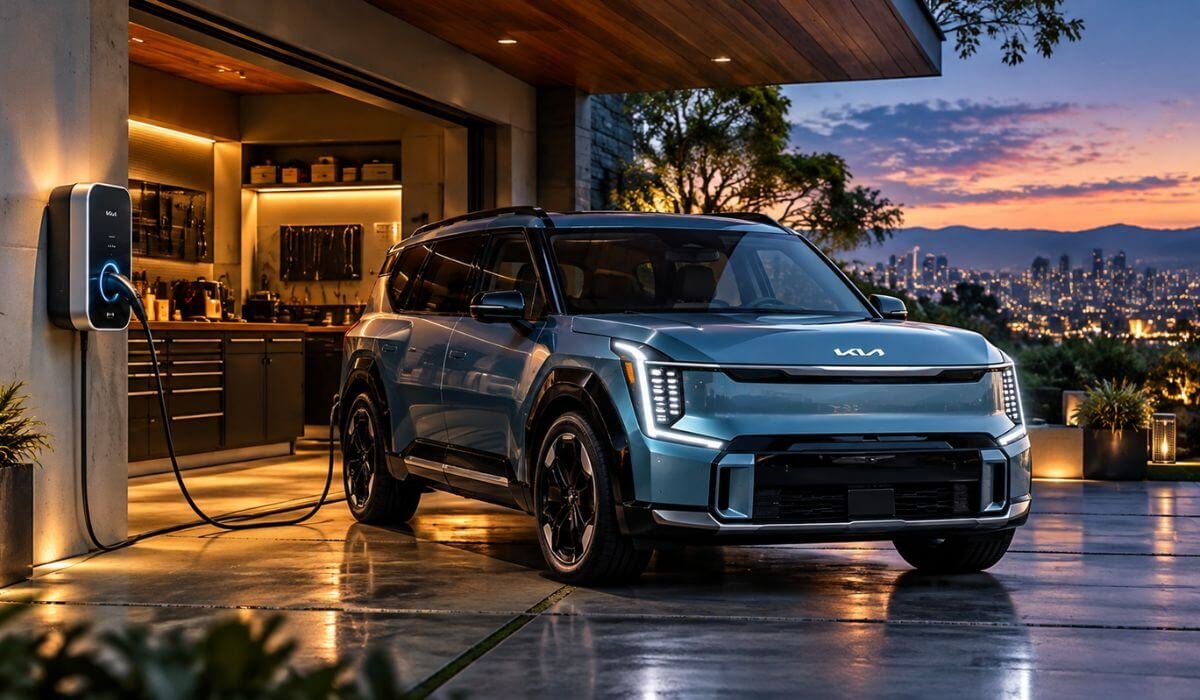
5 Best Home Chargers for Kia EV9 in 2026: 48A Power for Faster Overnight Charging
If you drive a Kia EV9, choosing a home charger is less about finding the biggest number on the box and more about getting the vehicle, electrical system and charging routine to work properly together. The EV9 is a large three-row electric SUV with a substantial battery, so a properly installed 240V Level 2 charger makes far more sense for everyday use than relying on a standard household outlet. With the right setup, you can leave home each morning with useful charge added overnight without having to plan your life around public charging stops.
The charging setup also deserves a little more thought than simply buying a 48A unit and plugging it in. Your home’s available electrical capacity, the charger’s actual output, cable reach, installation method and smart features can all affect how well the system works in real life. Connector compatibility matters too, particularly as EV9 charging hardware has changed across model years and markets. For this guide, I focused on home chargers that make practical sense for the EV9, looking closely at 48A and 240V capability, 11.5kW-class charging, hardwired installation, cable length, smart controls, load management, safety and everyday usability rather than chasing specifications for the sake of specifications.
Best Home EV Charger for Kia EV9: Top 2026 Picks for Faster Overnight Charging
#1. EMPORIA Pro Level 2 EV Charger
48A 240V Kia EV9 Home Charger With 11.5kW Hardwired Level 2 Charging, Smart Load Management and Energy Monitoring
#2. Autel Home Level 2 EV Charger
50A 240V Kia EV9 Home Charging Station With 25-Foot Cable, Adjustable Charging Power, Smart Controls and Energy Tracking
#3. WOLFBOX Level 2 EV Charger
48A J1772 Level 2 Home Charger for Kia EV9 With 240V Hardwired Power, 25-Foot Cable, Wi-Fi Control and Adjustable Current
#4. ChargePoint Home Flex Level 2 EV Charger
Smart 50A J1772 Kia EV9 Home Charger With Adjustable Power, 240V Level 2 Charging, App Control and Flexible Charging Schedules
#5. IYILO Level 2 EV Charger
48A 11.5kW 240V Kia EV9 Home Charger With Smart Monitoring, Adjustable Current, Load Management and Weather-Ready Protection
Must Check: Best Home Charger for Kia EV6
#1. EMPORIA Pro Level 2 EV Charger
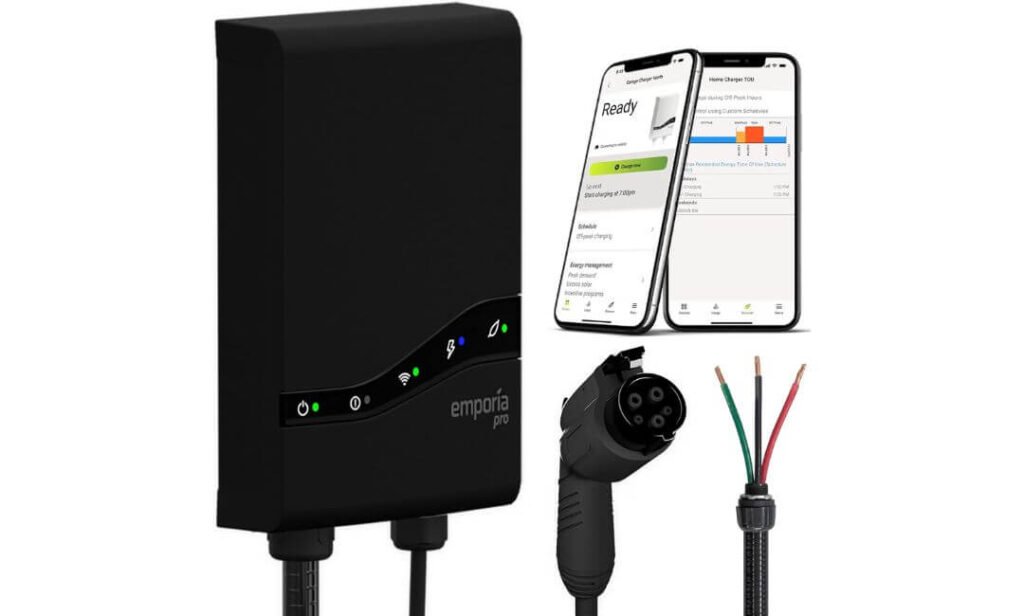
Quick Specs:
- Charging output: Up to 48A / 11.5kW hardwired
- Input: 208/240V AC
- Connector: SAE J1772
- Cable: 25 feet
- Installation: Hardwired up to 48A or NEMA 14-50 up to 40A
- Circuit: Dedicated 60A circuit for 48A charging
- Smart control: Wi-Fi app, scheduling and energy tracking
- Load management: PowerSmart with included Vue 3
- Weather rating: NEMA 4 for indoor or outdoor use
- Certifications: UL 2594 and ENERGY STAR
- Warranty: 3 years
The big reason this charger stands out for the EV9 is not simply the 48A number. Hardwired to the appropriate 60A circuit, it can deliver up to 11.5kW, while the included Vue 3 monitor lets PowerSmart watch the home’s electrical demand and adjust the charging rate when other appliances are drawing power. That’s a genuinely useful feature if your electrical service is already busy.
The 25-foot J1772 cable is another detail I would not overlook. With a large three-row SUV like the EV9, you don’t always park in exactly the same position every night. Having some extra reach can make the installation considerably less fussy, particularly when the charger is mounted toward one side of a garage. The enclosure is also NEMA 4 rated, so this isn’t restricted to an indoor-only installation.
What makes the Pro different is the energy-management side. The Vue 3 comes in the box with two 200A CT sensors, and PowerSmart uses that information to dynamically adjust the charger’s output rather than simply running at maximum current all the time. It can also work alongside the Emporia app for charging schedules, session information and energy monitoring. That makes this more than a wall-mounted EVSE; it becomes part of the home’s electrical management system.
What We Like About It
- 11.5kW hardwired output is well matched to the EV9’s home AC charging needs.
- PowerSmart is the real differentiator — useful when the house has limited available electrical capacity.
- The included Vue 3 monitor gives you visibility into the home’s total energy use, not just the car.
- A 25-foot cable gives an EV9 owner considerably more freedom when positioning the vehicle.
- NEMA 4 construction and UL/ENERGY STAR certification make it a serious permanent-installation option.
One Thing to Keep in Mind
The 48A figure requires the hardwired installation and a suitable 60A circuit. If you use the NEMA 14-50 setup, the charger is limited to 40A/9.6kW, so the installation method genuinely changes what you get from the unit. A licensed electrician should confirm your panel and wiring can support the installation you choose.
Why This Makes Sense as a Kia EV9 Home Charger
For an EV9 owner, the appeal here is the combination rather than one flashy specification. You get 48A/11.5kW charging, a long 25-foot lead, smart scheduling and whole-home load management in one system. If the charger is going into a garage where several major electrical loads already compete for capacity, PowerSmart is particularly relevant because it can adjust the EV charging load in real time instead of treating the charger as the only thing using the panel.
There is also a practical distinction between the plug-in and hardwired versions. If your goal is to get the most out of this particular charger, the hardwired configuration is the one that unlocks the full 48A/11.5kW capability. That makes it the version I’d focus on for an EV9-focused installation rather than treating both setups as interchangeable.
The Insider Pro-Tip
Before buying, look at your electrical panel and parking position together, not separately. If the panel is already carrying a heavy load and the charger will sit a long distance from it, the value of this particular setup becomes much easier to understand. Your electrician can determine whether PowerSmart load management makes sense for the installation and configure the charger around the home’s actual service capacity.
And one small detail can save you an annoying mistake: check the connector on your specific EV9 before ordering. The J1772 version here is the natural match for EV9s equipped for J1772 AC charging; newer NACS-equipped EV9 configurations require the appropriate NACS charging solution or a suitable adapter. Don’t choose the connector from the article title alone — look at the port on the vehicle you actually own.
#2. Autel Home Level 2 EV Charger
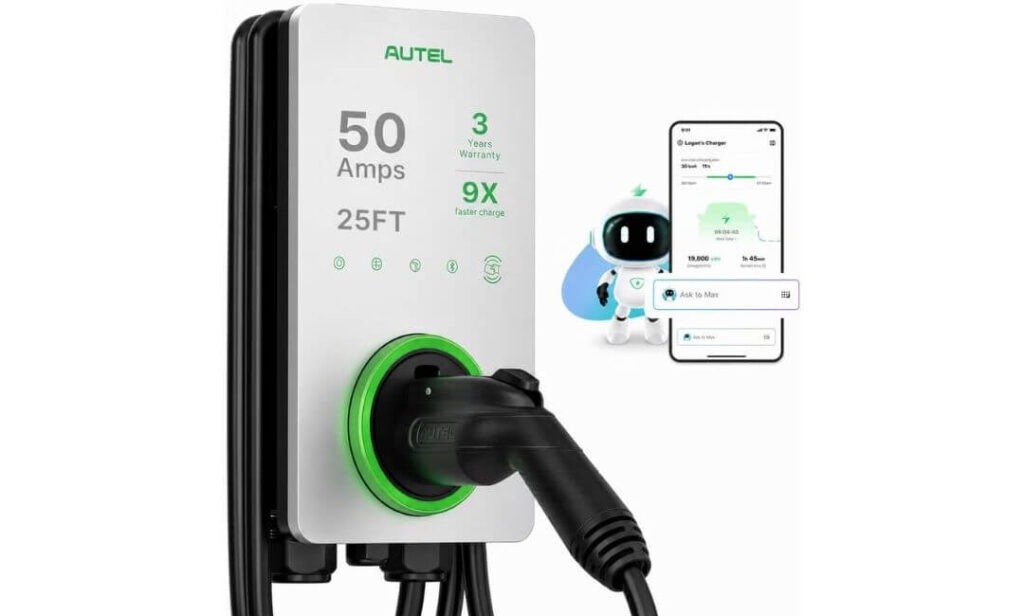
Quick Specs:
- Charging output: Up to 50A / 12kW
- Input: 240V AC
- Connector: J1772
- Cable: 25 feet
- Installation: Hardwired
- Amperage control: Adjustable from 6A to 50A
- Smart control: Wi-Fi and Bluetooth app
- Charging features: Scheduling, remote control and energy tracking
- Weather rating: NEMA 4X for indoor or outdoor installation
- Safety: Overcurrent, overvoltage, undervoltage and ground-fault protection
- Access: RFID card support
- Warranty: 3 years
For a large SUV like the EV9, the appeal of this charger starts with its 50A maximum output, but that’s not the only reason it deserves a place here. The more useful part is the ability to adjust the charging current from 6A to 50A, giving you room to match the charger to the electrical capacity available at home. If your electrician recommends a lower operating current because other major loads share the service, you can make that adjustment instead of treating maximum output as the only setting that matters.
The 25-foot cable is another feature that feels more useful once the charger is actually on the wall. An EV9 takes up a fair amount of driveway or garage space, and the charging port won’t always end up directly beside the charger. That extra reach gives you more freedom when parking and can save you from installing the unit in an awkward position simply to make the cable reach.
Then there is the hardware itself. The NEMA 4X-rated enclosure makes this suitable for indoor or outdoor installation, while the charger includes multiple layers of electrical protection. Add the Autel app, charging schedules, Bluetooth connectivity and RFID access, and this becomes a fairly complete home charging system rather than just a high-current EVSE. The 3-year warranty is another useful piece of reassurance when you’re installing a charger as a permanent part of your home.
What We Like About It
- 50A output gives the EV9 plenty of available charging capacity without making the charger unnecessarily complicated to operate.
- 6A–50A adjustment is genuinely useful when your home electrical setup needs a lower charging limit.
- The 25-foot cable makes garage positioning much easier with a large SUV.
- NEMA 4X protection gives you the flexibility to install it indoors or outside.
- RFID access and app control are useful extras if more than one person uses the charger.
One Thing to Keep in Mind
The full 50A output requires the appropriate electrical installation, so the charger should be sized and configured by a qualified electrician rather than simply installed at its maximum setting. The good part is that the adjustable amperage gives you flexibility if your home’s available capacity calls for a lower setting.
Why This Works So Well as a Kia EV9 Home Charger
The strongest part of this setup is the balance between high output and everyday flexibility. The EV9 benefits from a proper 240V Level 2 installation, while the adjustable 6A–50A range means you can configure the charger around the electrical system you actually have. You’re not forced to run at 50A simply because the charger can do it.
The 25-foot lead also deserves more attention than it usually gets in charger comparisons. With a three-row EV like the EV9, parking position can change depending on what else is in the garage. A longer cable gives you more usable charging space without requiring the vehicle to be positioned perfectly every night. That’s the sort of convenience you notice much more after installation than you do while reading a specification sheet.
The Insider Pro-Tip
If you’re choosing this charger specifically for an EV9, don’t automatically configure it at 50A just because 50A is available. Have the electrician look at the entire electrical setup first — especially if your home already has an electric dryer, range, heat pump, water heater or other large loads. The adjustable current is one of the genuinely useful features here because it lets the charger fit the house instead of making the house work around the charger.
Also, pay attention to the connector on your particular EV9 before placing the order. This listing uses a J1772 connector, making it the natural choice for EV9 configurations that use J1772 for AC charging. If you have a newer NACS-equipped EV9, you’ll need the appropriate NACS charging option or a compatible J1772-to-NACS adapter. That five-second connector check is worth doing before spending money on any home charger.
#3. WOLFBOX Level 2 EV Charger
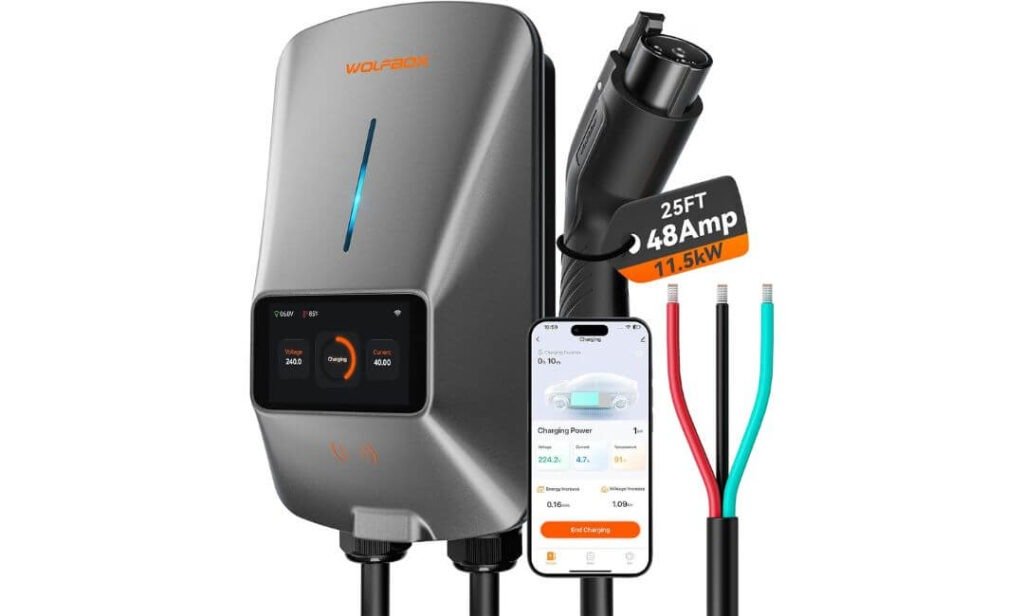
Quick Specs:
- Charging output: Up to 48A / 11.5kW
- Input: 240V AC
- Connector: SAE J1772
- Cable: 25 feet
- Installation: Hardwired up to 48A; NEMA 14-50 option at lower output
- Circuit: 60A circuit for 48A charging
- Current adjustment: Up to 48A
- Display: 4.3-inch LCD
- Smart control: Wi-Fi app, charging schedules and real-time data
- Voice control: Alexa and Google Assistant
- Weather rating: NEMA 4X
- Safety: UL 2594 and CSA certified
- Access control: RFID support
The first thing that makes this one interesting for an EV9 is how usable the charger feels at the wall. You get the expected 48A/11.5kW Level 2 capability, but there is also a 4.3-inch LCD screen showing charging rate, voltage, time and energy delivered. That’s a small feature until you walk past the charger and want to know what is happening without reaching for your phone.
The 25-foot cable is equally practical. The EV9 is a big vehicle, and real garages are rarely arranged around the perfect charging position. That extra reach gives you much more freedom when deciding where the charger should be mounted. The J1772 connection also makes this a straightforward choice for EV9 configurations using J1772 for AC charging.
What I particularly like here is that WOLFBOX hasn’t made the app the only way to use the charger. You can schedule charging, adjust the current and monitor charging information through the connected features, while the RFID functionality provides another way to control access. Add the NEMA 4X weather-resistant housing, UL 2594/CSA certification and voice-control support, and this is a fairly feature-rich setup without making the core charging job complicated.
What We Like About It
- 48A/11.5kW hardwired charging lines up well with the EV9’s home AC charging capability.
- The 4.3-inch LCD gives you useful information right on the charger.
- 25-foot cable is particularly handy with a large SUV like the EV9.
- Adjustable charging current gives your electrician more flexibility when matching the charger to the home’s electrical capacity.
- NEMA 4X protection makes indoor or outdoor installation practical.
One Thing to Keep in Mind
For the full 48A output, the hardwired version needs the appropriate electrical circuit, so this isn’t a charger I’d treat as a simple plug-and-play appliance. Have a qualified electrician confirm the panel, breaker and wiring before installation.
Why This Works So Well as a Kia EV9 Home Charger
The WOLFBOX makes sense when you want your EV9 charger to give you useful information without constantly opening an app. The LCD screen, long cable and adjustable current are features you’ll actually interact with, while the 48A output gives the EV9 the high-power Level 2 charging it is designed to use at home.
It also has a nice balance between smart features and straightforward operation. You can use Wi-Fi for scheduling and monitoring, but the charger isn’t completely dependent on the app for basic charging. For an owner who wants a charger that feels informative and flexible every day rather than simply powerful on paper, that’s a worthwhile combination.
The Insider Pro-Tip
The LCD screen is more useful than it sounds, especially during the first few days after installation. Once your electrician has configured the charger, you can quickly see whether the EV9 is actually receiving the expected current without opening an app or guessing from the vehicle display. It is a simple way to spot an installation or configuration issue early.
One more thing: don’t choose the 48A setting before checking your home’s electrical capacity. If the electrician recommends a lower current, that’s perfectly fine—the EV9 will still receive Level 2 charging, and the adjustable output lets you prioritise a stable home installation over chasing the biggest number on the charger.
#4. ChargePoint Home Flex Level 2 EV Charger
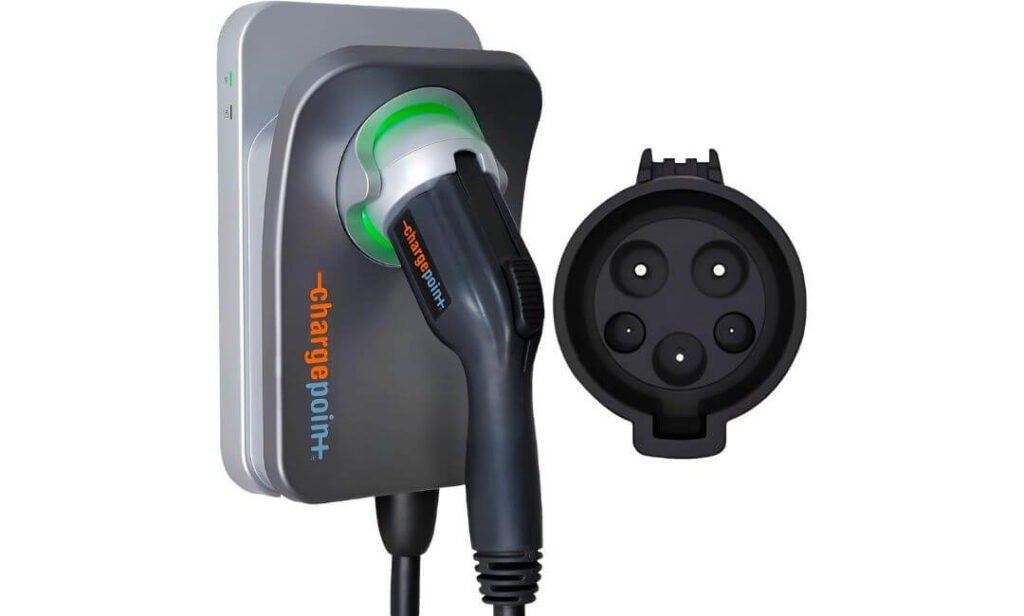
Quick Specs:
- Charging output: Up to 50A / 12kW
- Input: 240V AC
- Connector: SAE J1772
- Cable: 23 feet
- Installation: Hardwired
- Current adjustment: 16A–50A
- Smart control: Wi-Fi and ChargePoint app
- Charging features: Scheduling, reminders and charging data
- Weather rating: NEMA 3R
- Certification: UL certified and ENERGY STAR
- Support: 24/7 customer support
- Warranty: 3-year parts warranty
What makes this charger interesting for the EV9 is its adjustable charging range. You can set the output anywhere from 16A to 50A, so you’re not locked into the maximum setting if your home’s electrical capacity calls for something lower. For a permanent home installation, that flexibility is more useful than simply having a large number printed on the front of the charger.
The 23-foot cable is also a good fit for the EV9. It gives you enough reach for most garage layouts without requiring the vehicle to be parked in one exact position every night. The J1772 connector makes it a straightforward option for EV9 configurations equipped with J1772 AC charging, while newer NACS-equipped versions should be checked for connector compatibility before ordering.
The other reason to consider this one is the ChargePoint ecosystem. The Home Flex works with the ChargePoint app for charging information, reminders and scheduling, while the same account can be used to access ChargePoint’s public charging network when you’re away from home. That combination is useful for an EV9 owner who wants the home charger and public charging experience managed from one familiar app.
What We Like About It
- 16A–50A adjustment gives you useful control over the installation.
- 23-foot cable provides plenty of flexibility for a large EV like the EV9.
- ChargePoint app brings home charging controls and charging information together.
- Indoor/outdoor capability makes it easier to choose the installation location.
- The established ChargePoint ecosystem is useful if you regularly use public charging stations.
One Thing to Keep in Mind
The advertised 50A capability should not be confused with what every EV9 installation will actually deliver. Your vehicle and home’s electrical setup determine the practical charging rate, so have the electrician size the circuit and configure the charger appropriately rather than automatically choosing the maximum current.
Why This Makes Sense as a Kia EV9 Home Charger
The Home Flex is a good example of why a home charger should be judged by more than maximum output. With adjustable current, a long cable, app-based controls and a permanent installation, it gives an EV9 owner flexibility both during installation and in everyday use.
The ChargePoint network is another useful advantage if you travel regularly. Your home charger and public charging activity can sit within the same ecosystem, which means less jumping between different apps when you’re moving between overnight charging and longer EV9 road trips.
The Insider Pro-Tip
If you’re considering this specifically for an EV9, set the charging current around your home’s electrical reality, not around the charger’s maximum specification. A properly configured 40A or 48A installation can be more useful than forcing the system to operate at its highest possible setting when your electrical service has other major loads.
And check the charging port on your actual EV9 before ordering the J1772 version. Earlier J1772-equipped EV9s can use this connector directly, while NACS-equipped versions need the appropriate adapter or charging configuration. It is a small detail, but getting the connector right before installation saves you from turning a straightforward home-charger purchase into an unnecessary extra step.
#5. IYILO Level 2 EV Charger
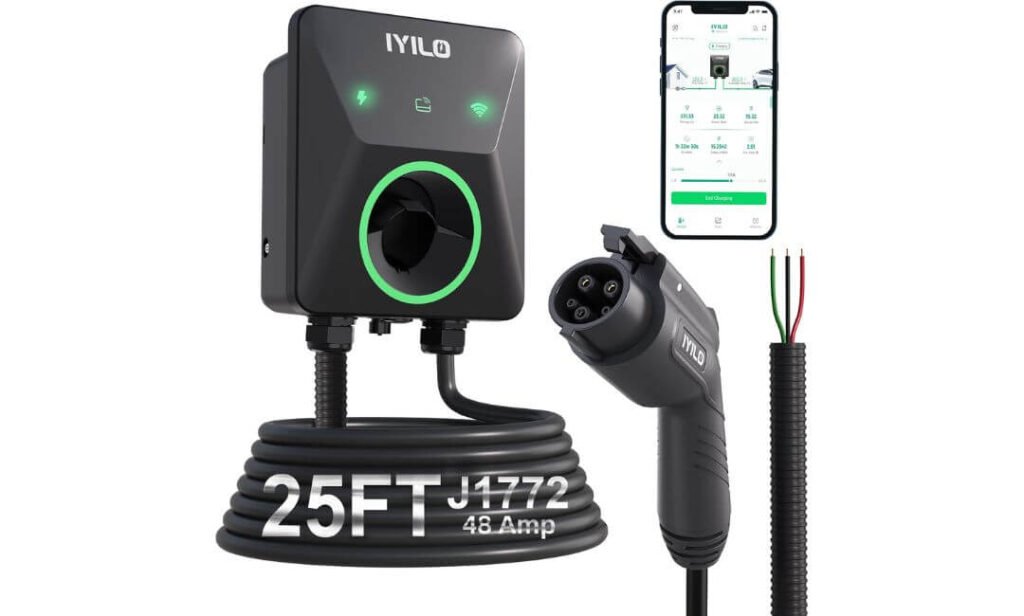
Quick Specs:
- Charging output: Up to 48A / 11.5kW
- Input: 240V AC
- Connector: SAE J1772
- Cable: 25 feet
- Installation: NEMA 14-50 up to 40A or hardwired up to 48A
- Current adjustment: 6A–48A in 1A increments
- Smart control: Wi-Fi app, scheduling and energy monitoring
- Safety feature: Connector temperature monitoring
- Power management: Power Sharing and optional dynamic load balancing
- Weather rating: NEMA 4 / IP66
- Certifications: UL 2594, ETL, ENERGY STAR and CSA
- Access control: RFID
- Warranty: 3 years
The interesting thing about this charger isn’t the 11.5kW figure alone. Several chargers in this guide can reach that level. What separates this one is the attention given to the charging connection itself. The J1772 connector includes a temperature sensor, and the system can monitor that temperature while the EV9 is charging. If the connector gets too hot, the charger can reduce or stop charging rather than simply continuing to push power through a connection that needs attention.
The 6A–48A adjustment in 1A increments is another feature that makes practical sense at home. You can set the charging current around the electrical capacity available to you instead of treating 48A as the only useful setting. The charger also supports Power Sharing, while dynamic load balancing is available when paired with the optional Energy Meter. That gives this unit some useful headroom if you’re thinking about how the charging setup will fit into the rest of your home’s electrical system.
Then there is the everyday stuff that can make a charger easier to live with. The 25-foot flexible cable gives an EV9 plenty of room around the garage, while the NEMA 4/IP66 design allows indoor or outdoor installation. The app handles scheduling, energy information and charging management, and the charger can still operate without Wi-Fi using plug-and-charge or RFID. The combination is what makes this more interesting than a basic 48A wall charger.
What We Like About It
- Connector temperature monitoring is a genuinely useful safety feature rather than just another app statistic.
- 1A current adjustment from 6A to 48A gives unusually fine control over charging power.
- The 25-foot cable works well with the EV9’s size and different parking positions.
- Power Sharing and optional load balancing give the installation more flexibility.
- NEMA 4/IP66 protection makes it suitable for a garage, driveway or other exposed location.
One Thing to Keep in Mind
Some of the more advanced energy-management features depend on the optional Energy Meter, so don’t assume every PowerSmart-style function comes with the basic charger. The standard unit still works normally without it, but the additional hardware is something to factor in if dynamic household load management is important to you.
Why This Makes Sense as a Kia EV9 Home Charger
The IYILO makes its case through fine control and safety monitoring, rather than trying to win the comparison with a bigger maximum-output number. At 48A/11.5kW, it already sits in the right range for EV9 home charging, while the adjustable current lets you tailor the charger to your home’s electrical setup.
The other advantage is the amount of information available while the car is charging. You can see energy use through the app, monitor connector temperature and use scheduled charging when appropriate. For an EV9 owner who likes knowing what the charger is actually doing instead of treating it as a black box on the wall, those details can be genuinely useful.
The Insider Pro-Tip
I’d pay particular attention to the temperature-monitoring feature during the first few charging sessions. Not because you should constantly watch it, but because it gives you useful reassurance that the connector and installation are behaving normally under load. Once everything is established, you can simply let the charger do its job.
Also, if you’re considering the hardwired 48A setup, have the electrician check the entire circuit rather than just the breaker rating. The EV9 doesn’t need you to squeeze every possible amp out of the charger; it needs a properly installed, stable Level 2 supply. If your home requires a lower current setting, the ability to adjust it in 1A increments means you can make that compromise without giving up the charger itself.
Best Home Charger for Kia EV9 (2026): Compare Power, Smart Features and Installation Needs
| Home Charger | EV9 Charging Fit | Installation | Cable & Connector | Smart Features | What Stands Out | Best For |
|---|---|---|---|---|---|---|
|
Best Overall Fit
EMPORIA Pro
Level 2 EV Charger
|
48A / 11.5kW Strong match for the EV9’s home AC charging capability. | Hardwired 60A circuit for full 48A output. |
25-ft cable J1772 Long reach for larger garage layouts. |
PowerSmart Vue 3 energy monitor App scheduling |
Whole-home load management Adjusts charging around the home’s electrical demand. | Owners who want charging + energy management in one system. |
|
Smart & Flexible
Autel Home
MaxiCharger Level 2
|
Up to 50A / 12kW High-output hardware with adjustable current. | Hardwired Electrician installation recommended. |
25-ft cable J1772 Useful reach for large vehicles and garages. |
Wi-Fi + Bluetooth App scheduling RFID access |
6A–50A adjustment Useful when the home’s available electrical capacity varies. | Owners wanting high output with flexible control. |
|
Feature Rich
WOLFBOX E48
48A Level 2 EV Charger
|
48A / 11.5kW Well suited to a full-power home Level 2 setup. | Hardwired 60A circuit for 48A operation. |
25-ft cable J1772 Easy reach around a large SUV. |
Wi-Fi app LCD display Alexa + Google Assistant RFID |
4.3-inch LCD Shows charging information directly on the unit. | Owners who like visible charging data without opening the app. |
|
Established Ecosystem
ChargePoint Home Flex
Smart Level 2 EV Charger
|
Up to 50A Adjustable output for different home electrical setups. | Hardwired Professional installation required. |
23-ft cable J1772 Good reach for most garage layouts. |
Wi-Fi app Scheduling Reminders Charging data |
16A–50A adjustment Home charging and public-network access in one ecosystem. | Owners already using ChargePoint’s charging network. |
|
Safety Focus
IYILO Level 2 EV Charger
48A / 11.5kW EV Charger
|
48A / 11.5kW Right in the EV9’s useful home-charging range. | Plug-in or hardwired 48A hardwired setup uses a suitable 60A circuit. |
25-ft cable J1772 Flexible cable with generous reach. |
Wi-Fi app 1A current adjustment RFID Load management |
Connector temperature monitoring Adds another layer of charging protection and visibility. | Owners prioritising fine control and charging safety. |
Kia EV9 Home Charger Buying Guide: What Actually Matters Before You Install One
Buying a home charger for the EV9 is not really about finding the biggest amp number or the charger with the longest feature list. The better question is how well the charger fits your EV9, your electrical panel, your parking setup and the way you actually charge at home. A 48A/11.5kW-class Level 2 charger is already enough to make overnight charging practical, so the details around installation, connector type, load management and everyday usability deserve just as much attention as charging speed.
1. Look at Amperage and Charging Speed Before Chasing Bigger Numbers
For the EV9, 48A is an important point to understand. A properly installed 48A Level 2 charger can provide up to about 11.5kW, which is right around the useful AC charging range for the vehicle.
That does not mean a 50A or 60A charger automatically charges the EV9 faster. The vehicle’s onboard AC charging system ultimately determines how much power it can accept. Once the charger can provide what the vehicle can use, going after a larger number on the charger does not necessarily translate into more range per hour.
For everyday EV9 ownership, think about it this way:
| Charger setup | Typical output | What it means for an EV9 |
|---|---|---|
| Level 1, 120V | Much lower | Slow charging, better as a backup |
| 32A Level 2 | Around 7.7kW | Useful, but slower than the EV9’s higher-power home setup |
| 40A Level 2 | Around 9.6kW | Good overnight charging |
| 48A Level 2 | Up to 11.5kW | Excellent match for the EV9’s home AC capability |
| 50A charger | Up to around 12kW capability | EV9 may still be limited by its onboard charging system |
The important distinction is between charger capability and vehicle capability. A charger rated at 50A can be perfectly fine, but you should not assume the EV9 will continuously pull the full 50A.
For most owners, the real benefit of 48A charging is not that the car suddenly charges instantly. It is that a large battery-powered SUV can be left plugged in overnight and receive a substantial amount of energy while sitting in the garage.
2. Make Sure the 240V Setup and Connector Match Your EV9
A proper 240V Level 2 installation is the foundation of this entire setup. The charger needs a suitable electrical supply rather than the ordinary 120V outlet you would use for household appliances.
There is another detail that deserves attention before you buy: the connector on your particular EV9.
J1772 has traditionally been the standard AC charging connector used by many North American EVs, including earlier EV9 configurations. Newer EV9 configurations may use NACS, so the connector should be checked against the actual vehicle before ordering a charger.
That is why I would not treat a product description saying “compatible with Kia EV9” as enough by itself. Look at the charging port on your vehicle and make sure the charger connection matches.
For J1772-equipped EV9s:
- A J1772 Level 2 charger connects directly for AC charging.
- No adapter is needed for the compatible J1772 configuration.
- The CCS portion of the vehicle’s charging port is used for DC fast charging, not for the J1772 AC connection itself.
- A newer NACS-equipped EV9 requires the appropriate NACS charging solution or a compatible adapter when using a J1772 charger.
Also remember that NEMA 14-50 and J1772 are completely different things. NEMA 14-50 refers to the electrical connection used to supply certain plug-in chargers, while J1772 refers to the connector that goes into the vehicle.
That distinction prevents a surprisingly common buying mistake.
3. Get the Electrical Installation Right Before Worrying About Charger Features
This is the part I would take most seriously.
A 48A hardwired charger is a continuous high-load appliance, so the circuit, breaker, wiring and panel capacity all need to be appropriate for the installation. You should have a qualified electrician evaluate the setup rather than assuming that an unused breaker position automatically means the panel can support the charger.
For a typical 48A hardwired installation, the charger is generally designed around a 60A circuit, subject to the manufacturer’s installation requirements and applicable electrical code.
Your electrician should look at:
- Available capacity in the main electrical service
- Breaker and panel rating
- Required conductor size
- Grounding and overcurrent protection
- Charger mounting location
- Distance between the panel and charger
- Whether the installation is indoors or outdoors
- Local electrical-code requirements
- Whether a permit or inspection is required in your area
- Existing loads such as HVAC, electric heating, dryers, ranges and water heaters
Don’t automatically assume that a panel upgrade is required either. Load management can sometimes be a better solution, depending on the home’s service and the equipment being installed.
That is where products with features such as Emporia’s PowerSmart or optional dynamic load-management equipment can become particularly relevant. Instead of treating the EV charger as an isolated appliance, these systems can take the home’s existing electrical demand into account.
4. Prioritise Real Safety Certifications Over Marketing Claims
An EV charger is connected to a high-voltage electrical circuit for hours at a time, often while the homeowner is asleep. That makes certification and protection circuitry much more important than cosmetic features.
When comparing chargers, look for recognised safety testing and certification appropriate to the market where the charger will be installed.
Some useful things to check include:
- UL 2594 certification or applicable recognised testing
- ETL certification where applicable
- ENERGY STAR certification for qualifying products
- Appropriate NEMA enclosure rating for the intended location
- Ground-fault protection
- Overcurrent protection
- Overvoltage and undervoltage protection
- Temperature monitoring where provided
- Protection against abnormal charging conditions
The enclosure rating matters too. If the charger is going inside a dry garage, the requirements are different from a unit mounted outside where it may encounter rain, snow, dust and temperature changes.
A feature such as connector temperature monitoring can also be genuinely useful. It is not something you need to stare at every time you charge, but it provides another layer of protection and gives you visibility into what is happening at the connection.
The bigger point is simple: don’t confuse a long safety-feature list with a certified product. Certification from a recognised testing organisation carries more weight than a product page saying “8-layer safety” or “advanced protection” without clear supporting information.
5. Smart Features Should Solve a Problem, Not Just Look Good
Smart charging has become common, but not every smart feature is equally useful.
For an EV9 owner, I would prioritise features that make charging cheaper, easier or easier to manage.
Useful features include:
- Charging schedules
- Off-peak charging
- Energy-use tracking
- Charging-session history
- Adjustable charging current
- Remote start and stop
- Multiple-user access
- Load management
- Firmware updates
- Reliable Wi-Fi connectivity
Scheduling is especially useful if your utility offers time-of-use electricity rates. Instead of charging immediately whenever you plug in, you can schedule charging for the hours when electricity costs less.
Energy monitoring can also answer questions that otherwise become guesswork: How much electricity did the EV9 use? How long did the session run? How much energy went into the vehicle?
But don’t pay a premium simply because a charger has a longer list of app features.
A charger that has excellent basic charging reliability and a simple app can be more useful than one with ten smart functions you never use.
And there is one practical detail worth remembering: some smart features depend on Wi-Fi, while basic charging can often continue without an internet connection. That’s a good distinction to make before installation, particularly if your garage has weak Wi-Fi coverage.
6. Check Your Home’s Electrical Load and Think About What Comes Next
Your charger is not the only thing using electricity in your house.
An EV9 charging at 48A can become one of the larger continuous electrical loads in the home. If your house also uses electric heating, central air conditioning, an electric range, dryer, water heater or another EV, the total demand matters.
This is why available electrical capacity should be considered before choosing the maximum charging current.
A simple example:
If your home has several major appliances running at the same time, a charger that automatically adjusts its output based on household demand may make more sense than simply installing the largest possible circuit and hoping the panel has enough capacity.
Future planning matters too.
Maybe you only have one EV today, but you could eventually add:
- A second EV
- Solar panels
- A home battery
- An electric heat pump
- Additional electric appliances
- Another Level 2 charger
A charger with adjustable amperage or load-management capability gives you more room to adapt.
That is one reason I wouldn’t judge the five chargers in this guide solely by maximum output. A charger that fits today’s electrical system and leaves you room to adapt can be a much more sensible installation than one that uses every available amp from day one.
7. Look at the Cable Length and Installation Location
This sounds minor until the charger is actually installed.
The EV9 is a large three-row SUV, and the position of the charging port means your parking arrangement matters. A 23- or 25-foot cable can give you considerably more flexibility than a short lead.
Before installation, think about where the EV9 normally sits:
- Does the vehicle reverse into the garage?
- Do you normally pull forward?
- Is the electrical panel on the same wall?
- Will another vehicle use the garage?
- Could the parking arrangement change later?
- Will the charger be mounted indoors or outdoors?
A longer cable isn’t automatically better for every installation, but it can prevent the charger from having to be mounted in an inconvenient location simply to reach the vehicle.
This is one of those details that doesn’t look impressive in an Amazon listing but can make a real difference every evening.
8. Compare Warranty, Support and the Company Behind the Charger
A home charger is not something most people want to replace every year.
Look beyond the initial price and check:
- Manufacturer warranty length
- Where support is provided
- Availability of replacement parts
- App support and software updates
- Installation assistance
- Public documentation
- Firmware-update process
- Whether the company has an established charging network or support infrastructure
A three-year warranty, for example, doesn’t tell you everything, but it gives you a useful baseline for comparing products.
This is also where established companies such as ChargePoint, Autel and Emporia can have an advantage in practical ownership experience because you’re not just buying a box; you’re buying the software, support and service ecosystem that comes with it.
At the same time, a lesser-known charger should not automatically be dismissed. If its certifications, specifications, installation requirements and support arrangements check out, it can still make sense for a particular EV9 owner.
The Bottom Line Before You Buy
For most Kia EV9 home-charging setups, I would start with four questions:
- Does the connector match my EV9?
- Can my home’s electrical system safely support the desired charging current?
- Will the cable reach the vehicle comfortably where I actually park?
- Are the smart and safety features useful for my particular home?
If those four pieces line up, the difference between a good charger and a great installation often comes down to the details — proper electrical work, sensible charging current, reliable load management and a cable long enough to make daily charging effortless.
The goal isn’t to buy the charger with the most impressive specification sheet. It is to install a system that you can plug into every night, leave alone, and trust to have the EV9 ready when you need it in the morning.
Kia EV9 Home Charger Installation: What to Expect Before, During and After the Electrical Work
Installing a home charger for a Kia EV9 is usually straightforward when the electrical side is planned before the charger goes on the wall. The part that deserves attention is not mounting the unit itself; it is making sure the circuit, breaker, wiring, panel capacity, charger settings and parking position all work together. A good installation should leave you with a charger that works reliably every night without forcing the rest of your home’s electrical system to operate at its limit.
Start With a Site Assessment, Not the Charger
Before buying the charger or booking the electrician, look at where the EV9 actually parks. The best mounting position is usually the one that gives the cable a comfortable path to the vehicle while keeping the charger protected and the cable away from walking paths and vehicle tyres.
An electrician should normally assess:
- The main electrical service rating and available capacity.
- The existing electrical loads in the home.
- The available space in the electrical panel.
- The distance between the panel and charger location.
- The appropriate circuit and conductor requirements for the selected charger.
- Whether the charger will be installed indoors or outdoors.
- Grounding and overcurrent protection requirements.
- The physical mounting surface.
- The location of the EV9’s charging port relative to the charger.
- Local electrical-code and permit requirements.
Don’t assume that an empty breaker position means there is enough capacity for a 48A charger. Panel space and electrical capacity are two different things. A qualified electrician can determine whether the existing service can support the planned charging load.
Decide How Much Charging Power You Actually Need
For the EV9, a properly installed 48A Level 2 charger can provide up to about 11.5kW, which is already a substantial amount of AC charging power for overnight use.
That makes the electrical plan important. If the home’s service can comfortably support the load, a 48A hardwired installation may be appropriate. If the house has several large electrical loads operating at the same time, a lower charging current or a charger with load-management capability may make more sense.
This is also where chargers such as the EMPORIA Pro and IYILO become interesting. Their load-management capabilities can be useful in homes where the available electrical capacity needs to be shared between the EV and other major appliances.
More amperage is not automatically better. The right setting is the highest level your vehicle and electrical installation can safely and practically support.
DIY vs Professional Kia EV9 Home Charger Installation
There is a big difference between mounting a charger and installing the electrical circuit that powers it.
If you already have a correctly installed, code-compliant outlet that is suitable for the charger’s specified plug-in configuration, physically mounting the unit and connecting the cable can be relatively simple.
A new 240V hardwired circuit, however, is a different job. It involves electrical-panel work, conductor sizing, breaker selection, grounding and compliance with the applicable electrical code.
For that reason, I would leave the electrical work to a qualified electrician.
A professional installation is particularly important when you’re using a 48A hardwired configuration because the charger can operate at a substantial continuous electrical load for several hours at a time.
A proper installation should account for:
- Correct breaker sizing.
- Correct conductor sizing.
- Appropriate grounding.
- Required disconnecting means where applicable.
- Charger manufacturer’s installation requirements.
- Panel and service capacity.
- Local electrical code.
- Outdoor weather protection where required.
The goal isn’t simply to make the charger turn on. The goal is to make the entire installation electrically sound under a long charging session.
Plug-In vs Hardwired Installation
Your selected charger may offer more than one installation method, and the difference is worth understanding.
A NEMA 14-50 plug-in installation can be convenient when the home’s electrical system already has a properly installed outlet designed for the required load. However, the charger’s maximum current may be lower in this configuration.
A hardwired installation can allow the charger to operate at its higher rated current when the appropriate circuit is installed.
For example, a charger rated for 48A may operate at up to 48A when hardwired to the required circuit, while its NEMA 14-50 configuration may be limited to a lower current.
Don’t choose the plug-in option simply because it looks easier. Consider:
- The charging speed you actually need.
- Existing outlet condition.
- Electrical-panel capacity.
- Cable routing.
- Future serviceability.
- Whether you want a permanent installation.
If you are installing a charger specifically for long-term EV9 ownership, a properly planned hardwired setup can be a very clean solution.
Check Permits and Local Electrical Requirements
Electrical requirements vary by location, so there is no single permit rule that applies to every EV9 owner.
Before work begins, ask the electrician whether the installation requires a permit, inspection or utility notification in your area. The electrician should also know which version of the applicable electrical code governs the installation.
This matters particularly for a new 240V circuit or hardwired EV charger. A permitted installation, where required, provides documentation that the electrical work was completed according to the applicable local requirements.
If your home is part of an HOA, condominium or managed property, there may also be additional rules regarding exterior equipment, parking spaces or electrical modifications.
Make Sure the Charger Is Mounted for the EV9 You Actually Drive
The physical position of the charger deserves more thought than it normally receives.
Before drilling into the wall, park the EV9 in its normal charging position and check the cable path.
Ideally:
- The cable should reach without being stretched.
- It should not cross a regular walking route unnecessarily.
- The connector should have a convenient resting position.
- The cable should not sit where tyres can run over it.
- The charger should remain accessible for maintenance.
- Outdoor units should be mounted in a suitable weather-protected location where appropriate.
The 23- to 25-foot cables found on the chargers in this guide give you useful flexibility, but even a long cable becomes inconvenient if the charger is mounted in the wrong place.
Test the Installation Before Calling the Job Finished
Once the electrical work is complete, don’t simply plug in the EV9 and walk away.
The electrician should verify the installation and the charger should be checked according to the manufacturer’s commissioning instructions.
Pay attention to:
- Charger power-up.
- Correct electrical supply.
- Proper grounding.
- Correct charging-current configuration.
- Successful vehicle connection.
- Stable charging session.
- Cable and connector condition.
- Any warning or fault indicators.
Start with a charging session and allow it to run long enough to confirm that the installation behaves normally under sustained load.
You don’t need to stare at the charger for hours, but the first session is a good opportunity to confirm that everything is behaving as expected.
Set Up the App and Smart Charging Features
If your charger has Wi-Fi, Bluetooth or a companion app, complete the setup after the physical installation has been verified.
Depending on the charger, you may be able to configure:
- Charging schedules.
- Off-peak charging periods.
- Maximum charging current.
- Energy monitoring.
- Charging history.
- User access.
- Notifications.
- Firmware updates.
- Load-management settings.
This is also the right time to check your home’s Wi-Fi coverage. A charger mounted at the far end of a garage may have a weaker signal than the rest of the house.
If the charger supports basic charging without Wi-Fi, make sure you understand how that mode works. Your EV9 should not become dependent on an app simply because the charger has smart features.
Check the Initial Charging Settings
After installation, confirm that the charger’s current setting matches what the electrician installed.
This is particularly important if the charger supports adjustable amperage.
For example, if the electrical installation was designed around a lower current, don’t manually change the charger to its maximum setting simply because the app allows it.
The same applies if you later change the electrical circuit. The charger setting should always match the circuit and installation requirements, not simply the highest number available in the application.
Give the Cable and Connector a Practical Check
During the first few charging sessions, pay attention to the physical connection.
The J1772 connector should seat securely, and the cable should have enough slack to reach the vehicle without being pulled tightly.
If your charger has temperature monitoring, energy monitoring or charging-current information, those features can also be useful during the initial setup period.
This isn’t about constantly monitoring the charger. It’s simply a sensible way to become familiar with how your particular installation behaves.
One Last Check Before You Start Using It Every Night
Before considering the installation finished, make sure the charger, electrical circuit and EV9 are all working together as intended.
You should know:
- Which charging current the installation is configured for.
- Whether the charger is plug-in or hardwired.
- Where the circuit breaker is located.
- How to stop charging safely if required.
- How to use the charger without the app, if supported.
- How to access the charger’s settings.
- Whether the app is successfully connected.
- What warranty and support information came with the charger.
- Who to contact if the charger develops an electrical or software fault.
Once those basics are sorted, home charging becomes pleasantly boring — which is exactly what you want. Plug in when you get home, let the EV9 charge overnight, and start the next day with the vehicle ready to go.
Kia EV9 Level 2 Home Charging Tips: How to Get the Most From Your 240V Setup
Once the EV9 has a properly installed Level 2 charger, there is not much left to think about — and that is the point. The best home-charging setup is one that quietly does its job every night without making you manage it constantly. A few sensible habits, however, can help you use the available charging power efficiently, avoid unnecessary electrical load and keep the cable and connector in good condition over the long term.
Use the Highest Practical Charging Current, Not Simply the Highest Available
If your charger and electrical installation support 48A/11.5kW, that is a useful match for the EV9’s home AC charging capability. But there is no benefit in forcing the charger to operate at its maximum current if your home’s electrical system or daily routine does not require it.
For example, if you regularly have several large appliances running during the evening, you may prefer a lower charging current or automatic load management. If the home has plenty of available capacity, a properly installed 48A setup can provide faster overnight replenishment without needing any special intervention.
The important thing is to keep the vehicle, charger and electrical circuit matched.
A few practical habits help:
- Use the charger’s highest approved current only when the electrical installation supports it.
- Don’t manually increase the current beyond the electrician’s configured limit.
- Keep the charger firmware and app updated when updates are provided.
- Avoid using unnecessary extension cords or improvised electrical connections.
- If charging performance suddenly changes, check the charger and electrical supply before assuming the EV9 is the problem.
The EV9 does not need to be charged at maximum power every night. If the vehicle only needs a modest amount of energy before the next morning, a lower setting can still accomplish the job while placing less demand on the home’s electrical system.
Schedule Charging Around Your Electricity Rates
If your utility uses time-of-use pricing, scheduling can be one of the most useful smart-charging features available.
Instead of plugging in immediately and allowing the EV9 to start charging at whatever rate applies at that moment, you can configure the charger to begin during the lower-cost period.
A simple routine might look like this:
- Plug the EV9 in when you arrive home.
- Let the charger remain connected.
- Set the charging schedule for the utility’s off-peak window.
- Allow the vehicle to charge overnight.
- Have the vehicle ready before your normal departure time.
This approach is particularly convenient because you don’t need to remember to start charging manually every evening.
However, don’t assume that every utility has the same off-peak period. Check your actual electricity tariff rather than copying a schedule from another EV owner or assuming that nighttime electricity is automatically cheaper.
If your utility does offer lower overnight rates, the combination of scheduled charging and a large Level 2 charger can make the EV9 very easy to live with.
Let Load Management Do the Heavy Lifting When Your Home Is Busy
One of the smartest things you can do with a high-power EV charger is avoid treating the electrical panel as if the EV were its only customer.
Your home may already be powering an air conditioner, electric range, dryer, water heater, heat pump or other large appliance. If several of those loads operate simultaneously, the available electrical capacity can become much more important than the charger’s maximum rating.
This is where dynamic load management can be useful.
Instead of charging at a fixed maximum current regardless of what the rest of the house is doing, a compatible system can adjust the EV charging load around the home’s electrical demand.
That can be particularly useful with chargers such as the EMPORIA Pro, where PowerSmart can monitor household consumption and adjust charging accordingly.
The practical advantage is simple:
The EV9 gets charged without asking the electrical system to ignore everything else happening in the house.
If your charger has adjustable current, you can also manually choose a lower setting when appropriate. For some homes, that may be all the load management they need.
Don’t Treat 48A as a Requirement Every Night
There is a tendency with EV chargers to think that if 48A is available, you should always use 48A.
You don’t have to.
If the EV9 has been sitting at home for several hours and only needs enough energy for the next day’s driving, there is little reason to insist on maximum charging power simply because the charger can provide it.
A lower setting can still provide plenty of energy overnight.
For example, a charger that allows adjustable current gives you the option to run at a lower level during periods of heavy household demand and return to a higher setting when more electrical capacity is available.
That flexibility is more valuable than having one fixed charging speed that you never adjust.
Keep the Charging Cable Off the Floor When Possible
Cable management is one of those things that seems unimportant until the cable becomes something you step over every night.
With the 23- or 25-foot cables used by several chargers in this guide, there can be a lot of cable left over depending on where the EV9 is parked.
Use the supplied cable holder or a suitable wall-mounted management system to keep excess cable organised.
Try to avoid:
- Leaving the cable where people regularly walk.
- Running it underneath vehicle tyres.
- Creating tight bends near the connector.
- Hanging the connector by its cable.
- Dragging the connector across concrete.
- Leaving large loops where they can collect water or dirt.
A good cable-management routine is simple: plug in, route the cable cleanly, and return the connector to its holder when you’re finished.
Give Outdoor Chargers a Little More Attention
A weather-rated charger is designed to handle outdoor conditions, but that does not mean the installation should be ignored.
If your charger is mounted outside, make sure:
- The charger is installed according to its weather-rating requirements.
- Cable connections are properly positioned.
- The connector is kept off wet or dirty surfaces.
- The charging port and connector remain reasonably clean.
- The cable is not left sitting in standing water.
- Snow, mud and debris are not allowed to accumulate around the connector.
- The wall mounting remains secure.
A charger with a NEMA 4 or NEMA 4X enclosure is designed for substantially more exposure than an indoor-only unit, but the connector and cable still deserve sensible handling.
Weather resistance is protection, not permission to treat the equipment carelessly.
Keep the J1772 Connector Clean and Properly Seated
If you’re using a J1772 charger, the connector should click securely into the vehicle’s charging port.
Before connecting, take a quick look if the connector has been sitting outside. Dirt, moisture or debris around the connection is something you don’t want to ignore.
You don’t need to clean it obsessively. Just avoid connecting a visibly dirty or damaged connector.
If your charger provides connector temperature monitoring, such as the IYILO unit in this guide, that information can also be useful during the first few charging sessions and whenever something about the charging behaviour seems unusual.
Don’t Make Charging More Complicated Than It Needs to Be
Smart chargers can show you a surprising amount of information — current, voltage, energy consumption, charging history, schedules and cost estimates.
That’s useful, but you don’t need to check those numbers every time you plug in.
Once your charger has been properly installed and configured, a good routine is simply:
Park → plug in → let the schedule handle charging → unplug when needed.
The app becomes useful when you want to change a schedule, check energy usage, adjust the charging current or investigate something unusual.
That is a much better use of smart-charging technology than constantly monitoring a normal overnight charging session.
Keep an Eye on Charging Behaviour, Not Just Charging Speed
A healthy installation should be predictable.
If the EV9 normally charges at a particular rate and suddenly starts behaving differently, don’t immediately assume that a faster charger is needed.
Look at:
- The charging current.
- The charger status.
- The vehicle’s charging settings.
- The electrical-panel condition.
- Wi-Fi or app status if smart functions are involved.
- Any warning indicators.
- The connector and cable condition.
A change in charging speed can have several explanations, including the vehicle’s battery state, temperature, charger configuration or household electrical load.
The useful habit is to notice changes rather than chase maximum numbers.
Give the Charger Room to Work Properly
Don’t cover the charger, obstruct its ventilation where the manufacturer requires airflow, or place objects directly against it.
This matters particularly in garages where chargers can end up surrounded by stored boxes, tools and household equipment.
Keep the area around the unit reasonably clear so that:
- The charger remains accessible.
- The cable can be removed easily.
- Status indicators remain visible.
- Maintenance is easier.
- The unit isn’t accidentally hit by stored items or vehicles.
It sounds basic, but a charger installed in a clear, accessible location is simply easier to live with.
The Best EV9 Charging Routine Is the One You Barely Notice
The real advantage of a good Level 2 setup is not watching the charging percentage climb. It is being able to come home, plug in and forget about it.
Set the charger around your home’s electrical capacity, use off-peak scheduling if your utility makes it worthwhile, allow load management to handle competing household demand where available, and keep the cable and connector properly stored.
Once those habits are in place, the EV9’s home charging becomes almost automatic — which is exactly what a well-designed home charging system should feel like.
FAQs About Kia EV9 Home Charging
Does the Kia EV9 Actually Benefit From a 48A Home Charger, or Is a Lower-Amperage Charger Enough?
The Kia EV9 can make good use of a high-output Level 2 home charger, particularly when you regularly drive long distances or want to replenish a significant amount of battery overnight. A 48A, 240V setup can deliver up to roughly 11.5kW under the right electrical conditions, giving the vehicle considerably more charging power than a typical 120V household outlet.
But here is the part that gets missed in most charger guides: you do not need 48A simply because the charger advertises it. If your daily driving only uses a modest portion of the battery, a lower charging current may comfortably replace that energy while placing less demand on your home’s electrical system.
For an EV9 that spends most nights at home, I would look at your actual driving pattern first. If you routinely arrive home with a substantial amount of energy used and need the vehicle ready again by morning, the extra headroom of a 48A installation makes more sense. If the vehicle is barely being driven between charging sessions, even a lower-power Level 2 setup can be perfectly practical.
Can I Install a J1772 Charger Today if My Kia EV9 Has a NACS Charging Port?
Yes, but connector compatibility needs to be checked before you buy the charger, because the charging connector on the particular EV9 matters more than the charger listing’s headline specifications.
A J1772 charger can still be relevant when an appropriate, properly rated J1772-to-NACS adapter is compatible with your vehicle and charging setup. However, an adapter is not something I would treat as an automatic solution for every EV9. Verify the connector arrangement and the adapter requirements for your specific vehicle before ordering.
There is also a practical point here that many buying guides skip: an adapter does not magically increase the charger’s output. A 48A J1772 charger remains a 48A charger. The vehicle, charger, adapter and electrical installation still have to work within their respective limits.
If your EV9 already uses NACS for AC charging, compare the convenience of using a native NACS solution with using a J1772 charger plus an appropriate adapter. The best choice is often the one that leaves you with the fewest extra pieces to handle every night, not necessarily the charger with the biggest number on the specification sheet.
Why Can a Kia EV9 Charge More Slowly Than the 48A or 11.5kW Rating on My Home Charger?
Because the 48A or 11.5kW figure is the charger’s available capability, not a promise that the EV9 will continuously draw that amount in every situation.
Actual charging power can change because of the vehicle’s battery state, temperature, charging settings, electrical limitations and the way the charger is configured. A charger may be capable of supplying 48A while the vehicle temporarily requests less.
There is another important situation in a real home: load management. If your electrical system is managing several large loads at the same time, a smart charger may reduce the EV’s charging current to keep the total household demand within the configured limit. That can look like a slower charger even though nothing is wrong.
So don’t judge a home charger by one charging session alone. If you want to understand what is happening, look at the charger or vehicle’s reported current and power and consider what other high-demand appliances were operating at the same time.
A stable 9kW charging session that safely runs whenever you need it is more useful than an advertised 11.5kW figure that your home’s electrical system cannot comfortably sustain.
Is Dynamic Load Management Worth Paying More for With a Kia EV9 Home Charger?
It can be, especially if your home already has a busy electrical panel.
Think about what happens during a normal evening: the EV9 is plugged in while the air conditioner, heat pump, electric water heater, oven, dryer or other major appliances may also be operating. A charger that simply tries to pull its maximum current regardless of household demand is not necessarily the smartest installation.
A charger with compatible load-management technology can instead respond to the home’s electrical demand and adjust EV charging when necessary.
That can be useful when:
- Your electrical service has limited spare capacity.
- Several high-power appliances operate at the same time.
- You want to avoid unnecessary electrical upgrades.
- You want the EV charger to adapt automatically rather than manually changing its current.
- You are considering adding another major electrical load later.
The catch is that load management is not a substitute for proper electrical design. The electrician still needs to assess the service, panel and circuit requirements. Also check whether the charger’s load-management system requires an additional energy meter, monitoring device or compatible hardware.
For a home with plenty of spare capacity, you may not need sophisticated load management at all. For a home where electrical demand regularly fluctuates, it can be one of the more useful features you are actually paying for.
Should I Charge the Kia EV9 Every Night at 48A, or Schedule It Differently?
There is no good reason to treat 48A charging as a mandatory nightly routine. The better approach is to charge according to how much energy the EV9 actually needs and when your electricity is cheapest, where applicable.
If your utility offers time-of-use rates, scheduling the charging session for the lower-cost period can make more sense than starting immediately after you arrive home. You can leave the EV9 connected and let the charger handle the timing.
A sensible routine is:
- Plug in when you return home.
- Let the scheduled charging window control when charging begins.
- Use the highest current that your electrical installation is designed to support.
- Allow load management to reduce charging when household demand rises, if your system supports it.
- Have the vehicle ready before your normal departure time.
And there is a final bit of real-world advice: don’t chase a full battery simply because the charger makes it easy. Your everyday charging routine should reflect your driving needs and the vehicle manufacturer’s recommendations for battery management.
For many EV9 owners, the ideal setup is not “maximum power every night.” It is a charger that quietly adds the energy needed during the cheapest and most convenient part of the night, while the home’s electrical system remains comfortably within its limits.
Final Thoughts: The Right Kia EV9 Home Charger Is About the Whole Setup
Choosing a home charger for the Kia EV9 is easy if you only compare the numbers printed on the front of the box. 48A, 11.5kW, 240V, Wi-Fi and a 25-foot cable all sound impressive, but those figures only tell part of the story. What matters in daily use is how well the charger fits your EV9, your electrical service, your parking arrangement and the way you actually drive.
For most owners, a properly installed 240V Level 2 charger is the point where EV9 ownership starts to feel effortless. You plug in at home, let the vehicle charge overnight and start the next day without planning your routine around public charging stations. A higher-output unit can be particularly useful when you regularly return home with a low battery and need substantial charging before morning.
But I would not choose a charger simply because it has the highest amperage. A well-matched 40A or 48A installation is more useful than an unnecessarily aggressive setup that pushes your home’s electrical system harder than it needs to. If your panel has limited capacity, adjustable charging or dynamic load management can be more valuable than another few amps on the specification sheet.
There is also the connector question. Before ordering, check the actual charging connector on your specific Kia EV9 rather than relying entirely on a generic model-year statement or an online product listing. J1772 and NACS compatibility can affect which charger makes the most sense, and an appropriate adapter may be part of the equation for some configurations.
What I Would Prioritise Before Buying
If I were narrowing down an EV9 home-charging setup, I would work through these points in this order:
- Electrical capacity first: Make sure the home can support the intended charging circuit.
- Vehicle compatibility second: Confirm the EV9’s actual AC charging connector and requirements.
- Charging power third: Look at 40A, 48A or another setting based on your real driving needs.
- Installation quality: Use a qualified electrician for new 240V circuits and hardwired installations.
- Cable reach: Make sure the cable comfortably reaches the EV9 without being stretched across the garage.
- Load management: Consider it seriously if your home already has several large electrical loads.
- Smart features: Pay for scheduling and energy monitoring when you will actually use them.
- Weather protection: Particularly important if the charger will live outside.
- Warranty and support: A home charger is electrical equipment you may rely on for years, so after-sales support matters.
The five chargers covered in this guide approach those priorities differently. EMPORIA puts considerable emphasis on energy management, Autel gives you a flexible high-current setup, WOLFBOX combines high output with useful on-unit controls, ChargePoint brings a mature smart-charging ecosystem, and IYILO focuses heavily on monitoring and adjustable charging. None of those differences matters if the installation itself is poorly planned.
The Real Goal Is Simple
The best EV9 home-charging setup is not the one that looks most impressive in an Amazon specification list. It is the one that charges your vehicle reliably, fits your electrical system, reaches the parking space comfortably and requires very little thought once it is installed.
Get the electrical work right, confirm connector compatibility before purchasing, configure the charging current sensibly and use scheduling or load management where they genuinely solve a problem.
Do that, and the EV9’s large battery stops being something you have to think about every day. You simply come home, plug in, and let the charger take care of the rest.
Also Check:


