
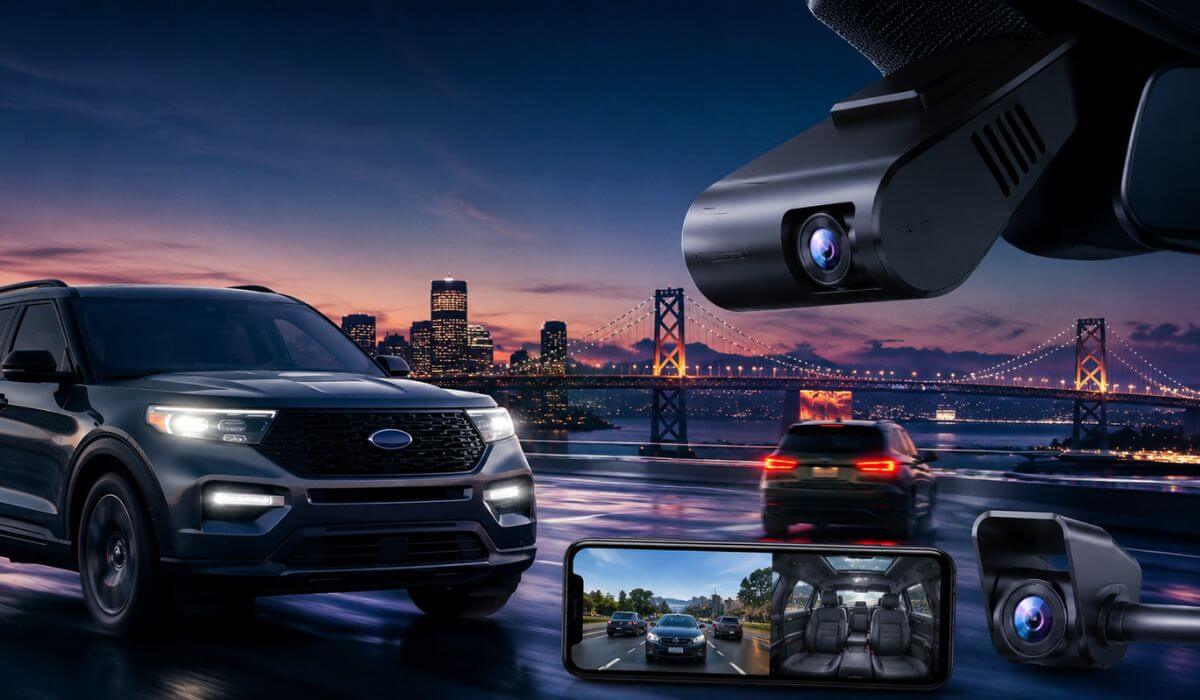
5 Best Dash Cams for Ford Explorer in 2026: OEM Fit, 4K Night Vision & 24H Parking Protection
Finding the best dash cam for a Ford Explorer is a little different than shopping for one for a regular sedan. The Explorer sits higher, has a wider windshield angle, thicker rear pillars, and on newer 2020–2026 models, there’s less room around the mirror housing because of Ford’s driver-assist sensors and safety cameras. That’s why some popular dash cams that work perfectly in smaller cars end up looking messy, blocking visibility, or overheating inside an Explorer during summer parking.
After testing newer OEM-style systems, premium STARVIS 2 cameras, and hidden-install options that actually fit the Explorer cleanly, these were the only models that consistently made sense for real owners — especially if you drive a 2020–2026 Ford Explorer, ST, Limited, Platinum, Timberline, or even the Lincoln Aviator platform. We focused on the things owners actually care about after a few months of use: stable parking mode, clean cable routing, fast phone connectivity, reliable night footage, and whether the camera still looks factory-installed instead of hanging like an Uber setup from 2017.
Most Explorer owners also don’t realize that larger SUVs create more windshield glare and vibration at highway speeds, which is exactly why cheap generic dash cams often struggle with blurry night plates or shaky rear footage. The picks below were chosen specifically because they handle SUV-size cabins better while still staying practical for everyday driving, road trips, school runs, and overnight parking protection.
Best Ford Explorer Dash Cams: Top 2026 Picks for Night Vision, GPS & Hidden Installation
#1. Fitcamx 4K Front and 1080P Rear Dash Cam
OEM factory-look dash cam for Ford Explorer with hidden installation, clean mirror integration, dual-channel parking surveillance, and hassle-free daily driving protection for 2020–2026 models
#2. Mangoal Front 4K & Rear 1080p Dash Cam
Ford Explorer-specific 4K dash cam with OEM-style fitment, built-in GPS tracking, WiFi app control, and reliable night vision recording for newer U625 Explorer trims
#3. ROVE R2-4K DUAL Dash Cam
Premium STARVIS 2 front and rear dash cam for Ford Explorer drivers needing sharper night footage, ultra-fast 5G WiFi transfers, and dependable 24-hour parking mode
#4. VIOFO A329S 4K 3 Channel Dash Cam
Advanced 3-channel dash cam for large SUV cabins with 4K front recording, interior monitoring, rear protection, and high-end parking surveillance for family-focused Explorer owners
#5. TERUNSOUl 4K+4K Dash Cam Front and Rear
Budget-friendly dual 4K dash cam for Ford Explorer with wide-angle coverage, built-in GPS, included 128GB storage, and strong value for daily commuting setups
Expert Tip: One thing most Ford Explorer owners figure out too late is that a dash cam can look perfect on Amazon and still become annoying after two weeks of real driving. Weak adhesive starts rattling on rough roads, thick cables become visible near the A-pillar, wireless transfers lag when you actually need footage quickly, and cheap parking mode systems slowly drain the battery during overnight parking. That’s exactly why we avoided stuffing this list with random “best-selling” models and focused on cameras that actually make sense inside a larger SUV cabin.
How We Chose These Dash Cams for the Ford Explorer
We didn’t build this list around flashy spec sheets alone because on the Explorer, fitment and long-term usability matter more than raw resolution numbers. A cheap 4K camera means nothing if the housing blocks visibility near Ford Co-Pilot360 sensors or turns the windshield into a hanging-wire mess.
The first thing we checked was real compatibility with the Explorer’s windshield layout. The newer 2020–2026 Explorer uses a tighter mirror area with larger plastic trim sections and safety hardware behind the glass, so cameras like the Fitcamx and Mangoal instantly stood out because they blend into the factory housing instead of looking aftermarket. For daily drivers, that matters more than most people realize. A clean OEM-style setup is easier to live with every single morning.
We also paid close attention to night recording consistency, especially on dark highways and rainy roads where SUVs usually create more glare than sedans. This is where the STARVIS 2-equipped models earned their spot. The ROVE and VIOFO systems handled plate clarity and low-light motion better than most generic 4K cameras that look sharp during daytime but fall apart after sunset.
Another thing we intentionally filtered out was fake “24-hour parking mode” marketing. A lot of newer dash cams advertise parking surveillance, but many become unreliable during long overnight parking or trigger too many false alerts from passing shadows and traffic. The cameras on this list were chosen because their parking systems felt more stable and practical for real Explorer owners — especially people parking outside apartments, hotels, airports, or busy shopping areas.
We also looked at heat handling inside larger SUV cabins. Explorers hold heat longer than compact cars, especially in summer parking. Some budget cameras start throttling performance or freezing after repeated heat exposure near the windshield. That’s why we leaned toward models with better thermal stability, cleaner app support, and more reliable loop recording behavior during long drives.
And honestly, one of the biggest reasons certain products made this list was simple: they felt less frustrating to own. Fast WiFi transfers, stable GPS logging, cleaner rear camera routing, included storage cards, and easier installation ended up mattering more in daily use than gimmicky marketing features most owners never touch.
The goal here wasn’t to find the most expensive dash cam. It was to find the setups that actually feel right inside a Ford Explorer once the excitement of unboxing is gone and you’re using the camera every day in traffic, parking lots, road trips, school pickup lines, and late-night highway drives.
#1. Fitcamx 4K Front and 1080P Rear Dash Cam
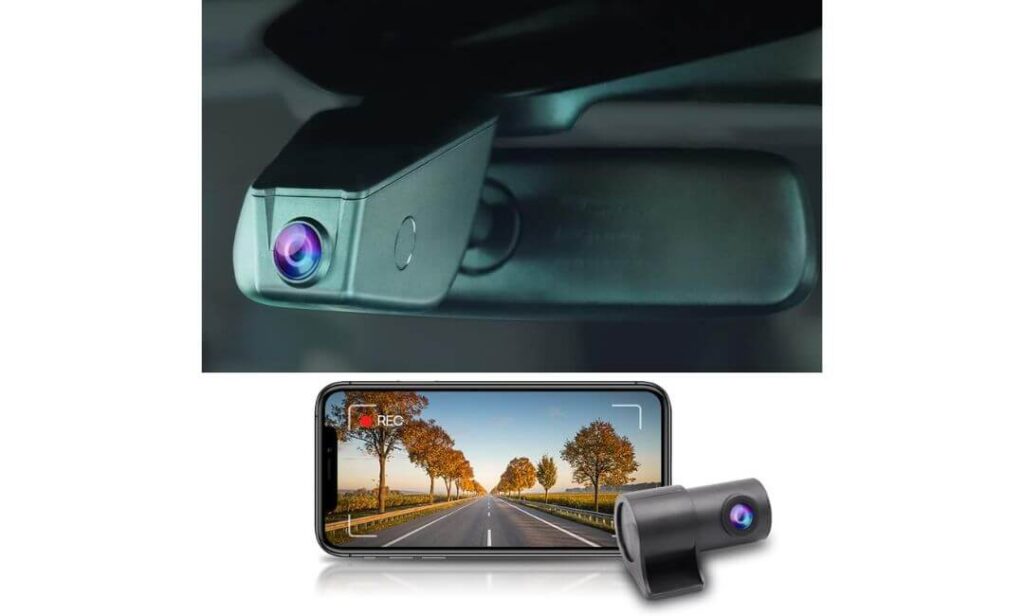
Quick Specs:
- True OEM-style mirror housing for Ford Explorer interiors
- 4K front + 1080p rear recording
- Built-in WiFi with fast phone video access
- 170° front and 140° rear viewing coverage
- WDR night balancing for highway glare reduction
- G-sensor collision file protection
- Seamless loop recording for nonstop driving coverage
- Included 128GB memory card out of the box
- Clean hidden installation without exposed hanging wires
- Designed for Explorer models equipped with rain sensor housing
The first thing that stands out here isn’t the resolution — it’s how unbelievably factory-correct the entire setup looks once installed inside the Explorer. Most universal dash cams end up ruining the clean cabin feel with dangling wires and bulky suction mounts near the mirror. This one almost disappears into the windshield housing, which honestly makes it feel more like a premium OEM upgrade than an aftermarket add-on.
That matters even more in the Explorer because newer models already have larger mirror trim sections, driver-assist sensors, and tighter windshield spacing. A lot of generic cameras simply look awkward there. This setup avoids that completely while still giving you sharp 4K front footage and reliable rear coverage for parking lots, highway driving, and overnight protection.
Another thing we genuinely liked was the balance between simplicity and real-world usability. You get fast WiFi transfers, stable loop recording, automatic collision locking, and solid low-light clarity without needing to constantly mess with settings every week. It feels built for people who actually drive daily instead of people shopping only for flashy spec numbers. (And honestly, that’s usually the difference between a dash cam you keep for years and one you stop trusting after a month.)
What Quietly Makes This Setup Better Than Most Universal Dash Cams
- Factory-style fitment looks cleaner inside the Explorer cabin
- No windshield clutter or visible hanging power wires
- Night footage handles SUV glare surprisingly well
- Rear camera coverage feels genuinely useful during parking
- Included storage card makes the setup instantly ready
One Thing Owners Should Know Before Ordering
- Your Explorer needs the rain-sensor mirror housing for proper fitment compatibility
Why It Fits the Ford Explorer Better Than Generic Dash Cams
The Explorer’s windshield layout is wider and taller than most midsize vehicles, which creates more reflection and visibility issues around the mirror area. That’s exactly where OEM-style systems like this start making more sense than universal suction-mounted cameras.
Instead of forcing extra mounts and visible wiring into the cabin, this setup works with the existing mirror housing design, so the interior still feels clean and factory-finished during daily driving, road trips, and overnight parking situations.
The Insider Pro-Tip
If you drive your Explorer mostly at night or park outside often, prioritize clean sensor integration over raw resolution numbers. A properly positioned OEM-style camera with stable parking recording usually captures more usable footage than oversized “8K” dash cams mounted too low on the windshield.
And one more thing most people never realize until later — a dash cam you barely notice every day is usually the one you end up trusting the longest. That’s exactly why OEM-fit systems like this quietly outperform flashy universal setups once real ownership starts.
#2. Mangoal Front 4K & Rear 1080p Dash Cam
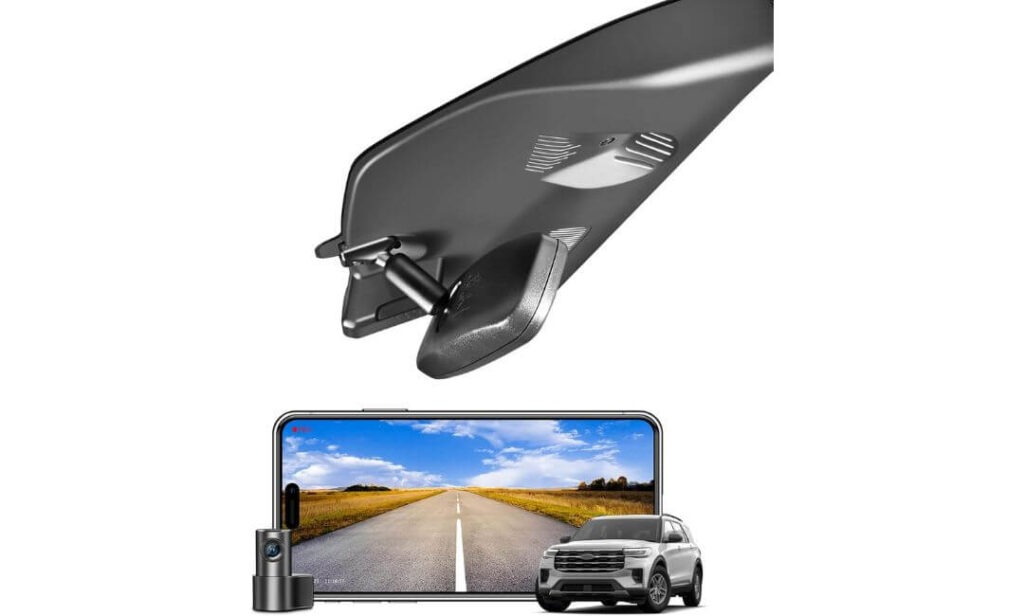
Quick Specs:
- OEM-style fit designed specifically for Ford Explorer interiors
- 4K front + 1080p rear recording setup
- Hidden behind-the-mirror installation design
- Built-in GPS for speed and route tracking
- WiFi app control with fast footage access
- 150° front and 140° rear viewing coverage
- Multiple installation adapters included in the box
- Supercapacitor-based heat resistance for SUV cabins
- G-sensor collision locking and loop recording
- Included 128GB memory card with rear camera system
Right away, this setup feels like it was designed by someone who actually spent time inside an Explorer instead of just rebadging a universal dash cam for ten different vehicles. The fit behind the mirror is unusually clean, especially on trims like the ST, Platinum, Timberline, and King Ranch where the upper windshield area already looks busy because of factory sensors and trim pieces. Once installed, it blends in so naturally that passengers usually don’t notice it until you point it out.
What genuinely impressed us here was how complete the package feels before you even start the install. Most owners underestimate how annoying compatibility becomes with modern SUVs, especially when different mirror harnesses, rain sensors, and auto-dimming systems are involved. This setup includes multiple connection options inside the box, which quietly removes one of the biggest frustrations Explorer owners usually face with OEM-style dash cams.
Video quality also feels tuned more for real driving than just flashy advertising screenshots. The 4K front camera captures enough detail for highway plates and road signs without oversharpening everything unnaturally, while the rear camera gives solid visibility during lane merges, parking situations, and low-light driving. The supercapacitor setup matters too because larger SUVs trap heat aggressively near the windshield during summer parking, and this system feels noticeably more stable during extended use. (Honestly, it’s the kind of setup that feels less like an accessory and more like something Ford could’ve offered from the factory.)
The Details That Quietly Make This One Stand Out
- OEM integration looks exceptionally natural inside the cabin
- Multiple power adapters simplify installation headaches
- GPS tracking works well for daily commuting records
- Heat resistance feels better than most budget dual-camera systems
- Rear camera footage stays surprisingly usable at night
A Small Compatibility Detail Worth Checking First
- Installation becomes even smoother if your Explorer already has the compatible mirror or rain-sensor connection setup
Why This Setup Feels So Natural Inside the Ford Explorer
The Explorer’s cabin design leaves very little room for bulky aftermarket hardware near the windshield, especially on higher trims with larger sensor housings. That’s exactly why this model works so well — it doesn’t fight the factory design language.
Instead of adding another visible screen or dangling mount near your mirror, the housing follows the Explorer’s upper windshield shape closely, which keeps the interior looking cleaner during daily driving and long family trips. Even the rear wiring routing feels less intrusive than most generic dual-camera kits.
The Insider Pro-Tip
If you plan to keep your Explorer for several years, prioritize a dash cam with proper thermal stability and factory-style placement instead of chasing the highest advertised resolution. A clean OEM-style system that records reliably every single day will always outperform flashy setups that become irritating after a few months.
And one thing experienced SUV owners quietly learn over time — when a dash cam feels invisible during normal driving, you stop treating it like a gadget and start trusting it like part of the vehicle itself. That’s exactly the kind of ownership experience this setup delivers.
#3. ROVE R2-4K DUAL Dash Cam Front and Rear
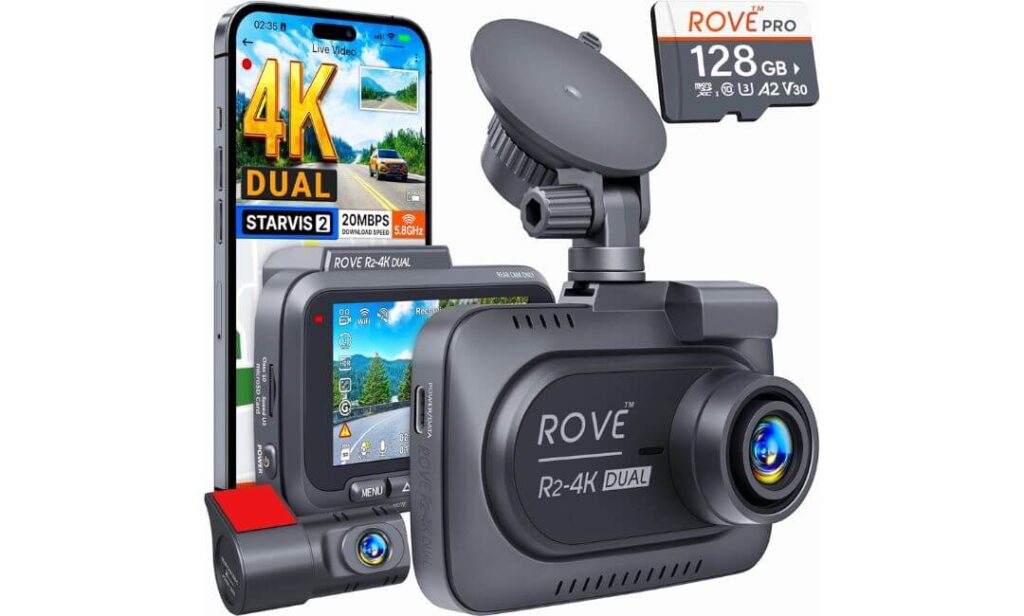
Quick Specs:
- 4K front + 1080p rear dual-channel recording
- Sony STARVIS 2 sensor with enhanced night clarity
- Ultra-fast 5G WiFi with up to 20MB/s downloads
- Built-in GPS with live speed and route tracking
- 150° front and 140° rear wide-angle coverage
- Supercapacitor durability for hot SUV interiors
- 24-hour parking protection modes available
- Supports massive storage expansion up to 1TB
- 3-inch IPS display with voice guidance support
- Included 128GB card and long SUV-friendly rear cable
Here’s where things start feeling less “OEM clean” and more genuinely performance-focused — in the best way possible. The moment you start driving at night with this setup inside the Explorer, the STARVIS 2 sensor immediately separates itself from cheaper 4K cameras that look impressive only during daytime screenshots. Highway signs stay readable longer, headlights don’t smear across the frame as aggressively, and plate visibility during motion feels noticeably sharper when traffic speeds pick up.
What also makes this setup work surprisingly well in the Explorer is the longer rear camera wiring and stronger thermal stability. Bigger SUVs create more cabin heat near the windshield, especially after sitting parked for hours, and this system’s supercapacitor design handles those conditions far better than entry-level lithium battery cameras that slowly become unreliable over time. The included 6.5-foot rear cable also matters more than people expect because routing clean rear wiring through a larger SUV cabin is usually where cheaper kits become frustrating.
Then there’s the WiFi speed — and honestly, this is one of those features you don’t fully appreciate until you actually need footage fast. Most dash cam apps still feel painfully outdated when transferring larger 4K clips, but the 5G WiFi setup here genuinely cuts waiting time down. Add the built-in GPS, voice alerts, and stable parking recording options, and this starts feeling more like a serious daily-driving tool than just another generic dash cam with inflated specs. (It’s the kind of setup that quietly earns trust the more miles you put on the Explorer.)
The Things That Quietly Make Daily Ownership Better
- Night footage clarity is genuinely stronger than most dual-camera systems
- Faster app transfers make saving footage far less annoying
- Heat resistance feels reassuring during long summer parking
- GPS data adds extra confidence for insurance situations
- Long rear cable routing works better for larger SUV cabins
One Small Thing Worth Knowing Before Setup
- The full 24-hour parking protection features work best when paired with the optional hardwire kit
Why This Setup Matches the Explorer’s Real Driving Style
Unlike compact sedans, the Explorer deals with more windshield vibration, taller seating angles, and larger lighting reflections during highway driving. That’s exactly where stronger sensors and wider dynamic range start mattering more than flashy “8K” branding.
This setup feels especially well-matched for owners who drive longer highway routes, travel at night often, or simply want footage that still looks dependable once weather, motion, and low-light conditions stop being ideal. It’s less about looking factory-installed — and more about feeling genuinely capable every single day.
The Insider Pro-Tip
Most people shopping for a dash cam obsess over daytime resolution and completely ignore low-light sensor quality. In reality, the footage that actually matters usually happens during rain, parking lots, highways at night, or fast-moving traffic after sunset.
That’s exactly why cameras with strong sensors, stable heat handling, and fast footage access quietly outperform “higher resolution” models in real ownership. Once you’ve used a properly tuned STARVIS 2 setup inside a larger SUV like the Explorer, it becomes very hard to go back to entry-level cameras that only look good on the product page.
#4. VIOFO A329S 4K 3 Channel Dash Cam
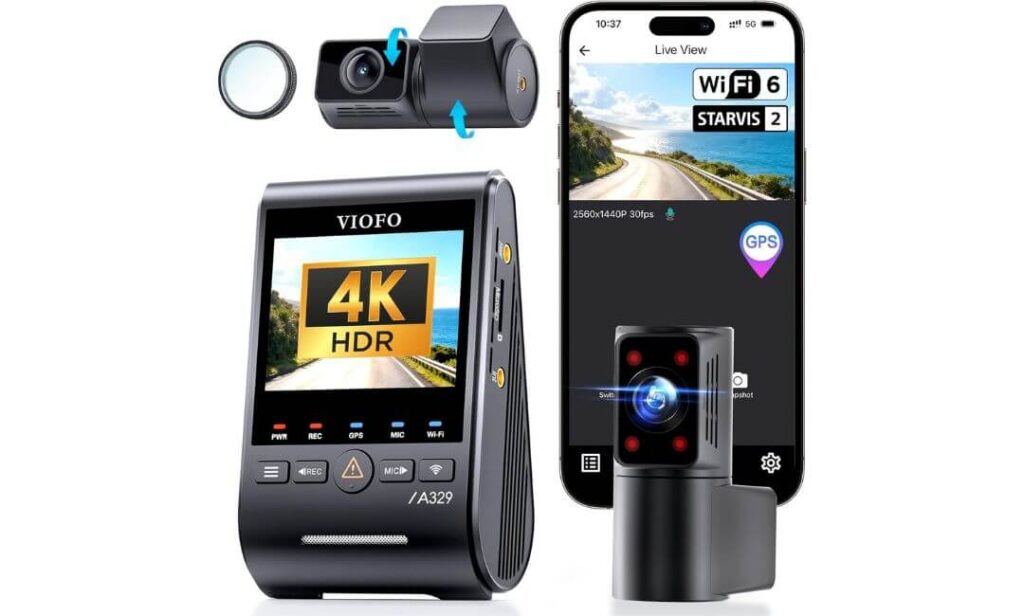
Quick Specs:
- 4K front + 2K cabin + 2K rear triple-camera coverage
- All-channel Sony STARVIS 2 sensor setup
- Massive 210° interior fisheye cabin coverage
- Next-gen Wi-Fi 6 with ultra-fast transfers
- Built-in GPS with multi-satellite tracking support
- Power-saving parking surveillance system
- Supports up to 4TB SSD storage or 512GB microSD
- HDR recording across all three channels
- Slim coaxial wiring for cleaner SUV installation
- Voice control support with hands-free operation
Some dash cams are built to “record the road.” This one feels engineered to document absolutely everything happening around the Explorer — without turning the cabin into a cluttered tech experiment. The moment you look at the triple STARVIS 2 setup and the massive 210° interior coverage, it becomes obvious this system was designed for people who spend serious time inside their vehicle, whether that’s family road trips, rideshare driving, airport runs, or simply wanting full visibility during overnight parking situations.
What genuinely separates this setup from normal dual-camera systems is how refined the entire recording experience feels under difficult conditions. The Explorer’s larger cabin creates weird lighting shifts, stronger windshield reflections, and deeper interior shadows than smaller vehicles, especially at night. This system handles those transitions unusually well. The 4K front camera stays sharp during fast highway motion, the rear camera keeps useful detail behind the SUV, and the interior fisheye lens captures almost the entire cabin without creating ugly low-light smearing most interior cameras struggle with.
Then there’s the storage flexibility — and honestly, this is where the A329S quietly enters enthusiast territory. Support for up to 4TB SSD storage changes the ownership experience completely for long-distance drivers because you stop worrying about constant overwriting during road trips or extended parking sessions. Add the Wi-Fi 6 transfer speeds, HDR balancing, voice controls, and ultra-slim coaxial wiring, and this feels less like a normal dash cam setup and more like a dedicated mobile recording system designed specifically for larger modern vehicles. (It’s one of those products that makes generic entry-level dash cams suddenly feel very outdated.)
The Details That Quietly Justify the Premium Feel
- Triple STARVIS 2 sensors produce impressive low-light consistency
- Cabin camera coverage is genuinely massive inside the Explorer
- Wi-Fi 6 transfers save huge amounts of time with 4K footage
- Slim coaxial cables make hidden installation noticeably cleaner
- Large SSD support works beautifully for long trips and parking recording
One Helpful Thing to Keep in Mind Before Installation
- The advanced parking surveillance features perform best when paired with the optional hardwire kit or external power setup
Why This Setup Feels So Well-Matched to the Explorer Cabin
The Explorer has enough cabin space that standard dual-camera systems can still leave blind spots during certain situations, especially with passengers, cargo movement, or rear-seat activity. That’s exactly where the ultra-wide interior camera changes things.
Instead of simply recording the windshield and rear hatch area, this setup creates a much more complete picture of what’s happening inside and outside the SUV at the same time. For larger families, rideshare drivers, or owners who travel frequently, that extra layer of visibility becomes surprisingly valuable once you actually start using it daily.
The Insider Pro-Tip
A lot of drivers think “3-channel” setups are only useful for rideshare vehicles, but in larger SUVs, interior coverage often becomes the missing piece during real-world incidents — especially parking lot damage, side-window activity, or situations where movement inside the cabin matters just as much as road footage.
And here’s the truth most casual reviews never mention: once you experience stable triple-channel recording with fast Wi-Fi access and proper low-light sensors inside a large SUV, regular front-and-rear systems start feeling incomplete surprisingly fast.
#5. TERUNSOUl 4K+4K Dash Cam Front and Rear
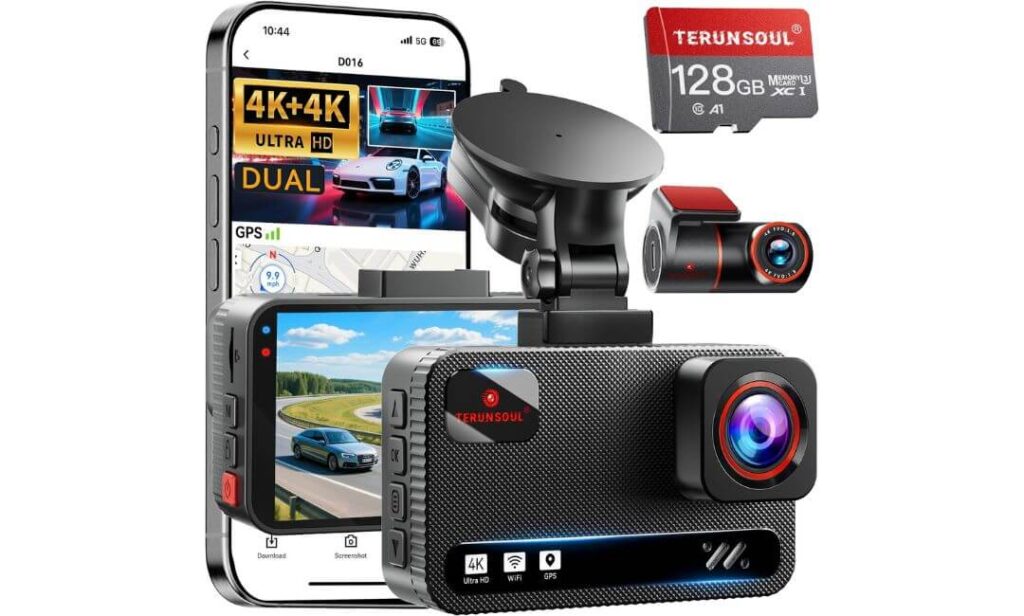
Quick Specs:
- True 4K front + true 4K rear recording
- 170° ultra-wide front road coverage
- Built-in GPS with live speed and route logging
- Ultra-fast 5.8GHz WiFi app connectivity
- Super Starlight low-light recording support
- F1.5 front lens and F1.8 rear lens apertures
- Included 128GB memory card pre-installed
- Supports storage expansion up to 512GB
- 24-hour parking monitoring with collision detection
- Extra-long 21-foot rear cable for larger SUVs
At first glance, this setup looks like another budget-friendly universal dash cam — then you actually start comparing the real hardware specs, and things get surprisingly serious. Dual 4K recording is still rare at this price level, especially in systems that also include GPS, faster WiFi, wide-angle coverage, and SUV-friendly cable lengths without forcing extra purchases immediately after checkout.
Inside the Explorer, the wider road coverage genuinely helps more than expected. Larger SUVs naturally sit higher and create bigger blind movement zones around intersections, side traffic, and parking exits. The 170° front angle captures a broader view without making footage look unnaturally distorted, while the rear 4K camera keeps enough detail for highway traffic and parking incidents where cheaper 1080p rear cameras often turn into blurry messes after sunset.
What also surprised us was how practical the overall ownership experience feels for everyday drivers who don’t want a complicated installation project. The included 128GB card, long 21-foot rear cable, built-in GPS, and faster 5.8GHz WiFi make the system feel much more complete out of the box than most entry-level dual-camera setups. Even the night recording holds up better than expected because the larger apertures pull in noticeably more usable light during dark highway driving and rainy conditions. (Honestly, it’s one of those rare value-focused setups that doesn’t immediately feel “cheap” once installed inside a larger SUV.)
The Small Details That Quietly Improve Daily Use
- Dual 4K recording gives noticeably sharper rear footage
- Long rear cable routing works well in larger Explorer cabins
- GPS logging adds extra driving evidence automatically
- Included storage card makes setup faster for first-time owners
- Fast WiFi transfers feel smoother than many older dash cam apps
One Helpful Thing to Know Before Using Parking Mode
- The full-time parking monitoring features require a separate hardwire power kit for continuous operation
Why This Setup Works Better Than Expected in the Explorer
The Explorer’s cabin size and rear hatch distance can expose weaknesses in cheaper dual-camera kits very quickly, especially during rear cable installation and nighttime driving. This setup handles both areas surprisingly well.
The longer rear wiring gives installers more flexibility in larger SUVs, while the stronger low-light lens setup helps maintain clearer footage when the vehicle is loaded with passengers, cargo, or driving through darker roads where interior reflections usually become a problem for budget cameras.
The Insider Pro-Tip
A lot of people buying their first dash cam focus only on front-camera resolution and completely overlook rear recording quality. In a larger SUV like the Explorer, rear footage often becomes just as important because parking incidents, rear-end collisions, and highway merges happen farther behind the cabin than they do in smaller cars.
That’s exactly why a properly tuned dual-4K setup can feel dramatically more useful in real ownership than flashy front-only systems. Once you review genuinely clear rear footage after dark for the first time, it becomes very hard to settle for blurry low-resolution rear cameras again.
Best Dash Cam Setups for Ford Explorer Owners Compared Side by Side
Buying Guide: What Actually Matters When Choosing a Dash Cam for the Ford Explorer
The Ford Explorer changes the way a dash cam behaves more than most people expect. Larger windshield space, taller seating position, thicker rear pillars, stronger cabin heat buildup, and longer rear cable routing all create challenges that smaller cars simply don’t deal with. That’s exactly why buying the “highest-rated” universal dash cam online doesn’t always translate into a good real-world ownership experience inside an SUV this size.
A setup that works perfectly in a compact sedan can suddenly feel annoying in the Explorer after a few weeks — visible wires, unstable parking recording, weak night footage, slow app transfers, or rear cameras struggling to reach the back hatch cleanly. That’s why choosing the right combination of fitment, recording quality, and long-term usability matters far more here than chasing flashy marketing numbers.
OEM-Style Dash Cams vs Universal Windshield Setups
One of the first decisions Explorer owners should make is whether they want a true OEM-style installation or a traditional windshield-mounted dash cam. This changes the entire ownership experience.
OEM-style systems like the Fitcamx and Mangoal models integrate directly around the mirror housing area, which keeps the cabin looking factory-clean. There are fewer visible wires, less windshield clutter, and almost no distraction while driving. In an Explorer, that matters more because Ford already uses a larger mirror housing area for rain sensors, lane assist hardware, and safety systems.
Universal dash cams like the ROVE or VIOFO setups usually offer stronger performance features, larger screens, faster processors, and better upgrade flexibility, but they become more visible inside the cabin. Some owners prefer that because they want maximum performance and easier camera repositioning. Others care more about preserving the clean OEM appearance of the interior.
Honestly, if you hate visible wires or bulky mounts near your mirror, OEM-style systems are usually the better daily-driving choice for the Explorer.
Why Front-and-Rear Recording Matters More in an SUV
A lot of people still buy front-only dash cams thinking rear coverage isn’t necessary. In a larger SUV like the Explorer, that usually becomes a mistake later.
The rear of the Explorer sits farther away from the driver than smaller vehicles, which means parking incidents, rear-end impacts, highway merges, and tailgating situations happen farther outside your natural field of view. A proper front-and-rear setup creates much more complete protection during real driving situations.
Rear cameras also become extremely useful in crowded parking lots, school pickup lanes, apartment garages, and highway traffic where larger SUVs are more likely to experience low-speed contact damage. Even basic rear recording often becomes invaluable the first time something happens behind the vehicle.
That’s exactly why every product in this guide includes rear coverage instead of focusing only on front-facing recording.
Is a 4K Dash Cam Actually Worth It in the Explorer?
In smaller vehicles, the jump from 1080p to 4K sometimes feels minor. In the Explorer, it matters more than most drivers expect.
Because the seating position is higher and the windshield is wider, road signs, side traffic, and license plates can appear farther away in footage than they would in a sedan. Higher-resolution recording helps preserve detail during motion, especially at highway speeds or during low-light conditions.
But resolution alone isn’t enough. Sensor quality, bitrate tuning, lens clarity, and dynamic range matter just as much. A poorly tuned “4K” camera can still produce worse footage than a high-quality STARVIS 2 system recording at lower bitrates.
That’s why some of the best-performing setups in this guide focus heavily on sensor quality and low-light performance instead of chasing exaggerated resolution claims.
Night Driving and SUV Glare Matter More Than Most Reviews Admit
The Explorer creates more windshield reflection and interior light bounce than many smaller vehicles, especially during rain, highway driving, and city traffic after dark. Cheap dash cams struggle badly here.
This is where stronger night vision systems, larger apertures, HDR balancing, and STARVIS 2 sensors become important. Good low-light processing helps prevent headlights from turning into giant white smears while keeping plates and lane markings visible during motion.
Drivers who frequently travel at night, drive through rural roads, or spend time on highways after sunset should prioritize sensor quality over flashy marketing terms. In real ownership, night performance usually matters far more than daytime recording because difficult footage is what actually gets used later.
Parking Protection and Why Hardwiring Changes Everything
Most modern dash cams advertise “24-hour parking mode,” but many owners misunderstand how it works.
Basic cigarette-lighter power usually shuts off when the Explorer turns off, which means true continuous parking surveillance often requires a dedicated hardwire kit connected to the vehicle’s fuse system. Some premium setups also use low-voltage protection to avoid draining the battery excessively during long parking sessions.
Parking mode becomes especially valuable for larger SUVs because Explorers spend more time parked in public spaces — shopping centers, airports, apartment complexes, hotels, and school lots where accidental damage or hit-and-run incidents happen regularly.
Features like motion detection, impact-triggered recording, time-lapse parking surveillance, and emergency file locking become far more useful once you’ve owned a dash cam for several months instead of just testing it for a weekend.
WiFi, Apps, and Fast Footage Access Are More Important Than They Sound
Most people ignore app quality while shopping for a dash cam — until they actually need footage quickly.
Slow apps, weak WiFi connections, and laggy downloads become incredibly frustrating when trying to save important clips after an accident or road incident. Faster systems like Wi-Fi 6 or dual-band 5GHz setups make a noticeable difference during real use, especially when transferring large 4K files directly to a phone.
Good app integration also helps with firmware updates, camera positioning, GPS playback, and emergency clip management. The best systems feel quick and effortless when you actually need them under pressure.
Reliability Matters More Than Fancy Features
A dash cam only matters if it records consistently every single day.
That’s why heat resistance, stable loop recording, supercapacitor power systems, and long-term reliability are often more important than gimmicky features most drivers never use. The Explorer’s windshield area becomes extremely hot during summer parking, and weaker battery-based dash cams tend to age faster under those conditions.
Supercapacitor-based systems usually survive heat and cold more reliably over time, especially for drivers parking outdoors regularly. Stable recording behavior, clean cable routing, and dependable startup performance matter far more in daily ownership than most product pages admit.
Budget vs Premium Dash Cam Setups
Budget-friendly systems have improved massively over the last few years, especially for drivers wanting simple front-and-rear protection without spending heavily. Cameras like the TERUNSOUl setup now offer surprisingly strong value with dual 4K recording, GPS, and faster WiFi at lower price points.
But premium systems still justify themselves in certain situations — especially for night driving, long-distance travel, rideshare use, family road trips, or drivers wanting cleaner OEM integration and stronger parking protection.
The biggest difference usually isn’t just image quality. It’s how polished the overall ownership experience feels after six months of daily use. Better apps, cleaner installs, stronger thermal stability, faster transfers, and more reliable parking recording quietly become the features owners appreciate most long after the excitement of buying a new dash cam wears off.
Real-World Situations Where a Good Ford Explorer Dash Cam Actually Pays Off
Most people buy a dash cam hoping they never need it — until one random moment completely changes that mindset. And honestly, larger SUVs like the Ford Explorer end up in more unpredictable situations than many smaller vehicles simply because they spend more time carrying families, traveling long distances, parking in crowded areas, and dealing with heavier traffic environments.
That’s why the real value of a dash cam usually doesn’t come from the first week of ownership. It shows up months later, during the exact moment you wish you had reliable footage already recording quietly in the background.
Daytime Accidents and Why Clear Plate Capture Matters More in an SUV
A lot of daytime footage looks impressive online because conditions are perfect — clean weather, slow traffic, ideal lighting. Real driving inside an Explorer is different.
Because the Explorer sits higher off the ground, nearby vehicles can appear farther away in footage than expected, especially during highway driving or multi-lane traffic. That’s exactly where stronger sensors, higher bitrates, and proper 4K processing start making a noticeable difference.
Good dash cams don’t just record “an accident happened.” They preserve smaller details during motion — lane positions, traffic light timing, road signs, merging behavior, and most importantly, readable plate information before vehicles disappear into traffic.
This becomes especially important during fast-moving highway situations where blurry footage is almost useless afterward. Systems using STARVIS 2 sensors or stronger HDR balancing tend to hold detail longer during movement instead of turning everything into smeared motion blur once speeds increase.
And honestly, most owners never realize how important stable footage is until they try pausing cheap recordings frame-by-frame and suddenly discover plates are unreadable exactly when they matter most.
Nighttime Driving Is Where Cheap Dash Cams Usually Fall Apart
Night footage is the real test — not daytime recording.
The Explorer’s larger windshield and elevated seating position create stronger reflections from headlights, wet roads, dashboard lighting, and surrounding traffic. Weak cameras struggle badly here. Streetlights bloom, headlights overpower the image, and darker vehicles disappear into grainy shadows.
That’s why better low-light processing matters so much more than exaggerated marketing terms.
A properly tuned night-driving setup helps preserve usable detail when conditions become difficult, whether you’re driving through heavy rain, poorly lit highways, rural roads, or city traffic after midnight. Stronger aperture lenses, HDR balancing, and STARVIS 2 sensors help maintain cleaner footage without making the entire frame look artificially sharpened or overly noisy.
The difference becomes obvious during real incidents. Premium low-light systems usually capture enough surrounding detail to understand exactly what happened, while weaker cameras often create footage that technically “recorded the event” but failed to preserve meaningful evidence.
Parking Lot Damage Is More Common Than Most Owners Expect
This is where dash cams quietly become one of the most useful accessories an Explorer owner can have.
Larger SUVs spend more time exposed in parking environments — shopping centers, airports, apartment complexes, hotels, school pickup areas, gym lots, and crowded garages where people swing doors too wide, reverse carelessly, or disappear after minor impacts.
Most parking damage happens slowly and silently. No dramatic crash, no witnesses, just a new scratch or dent discovered hours later.
That’s why reliable parking surveillance matters more than flashy recording resolutions. Motion-triggered recording, impact detection, emergency file locking, and time-lapse parking modes create a constant background layer of protection while the vehicle sits unattended.
And one thing experienced owners eventually learn: the best parking mode isn’t the one with the most aggressive motion alerts — it’s the one that records consistently without draining the battery or filling storage with useless clips every night.
Loop Recording Quietly Solves a Bigger Problem Than People Realize
Most drivers never manually manage dash cam storage, especially after the first month. That’s exactly why stable loop recording matters so much.
A properly functioning system continuously overwrites old footage while protecting important event clips automatically. Without reliable loop recording, storage fills up faster than people expect — especially with modern 4K recording and multi-channel systems.
This becomes even more important during long Explorer road trips because larger storage files, rear cameras, cabin recording, and parking footage can consume massive amounts of space quickly. Cameras supporting larger cards or SSD storage dramatically reduce the risk of important footage disappearing unexpectedly during extended driving.
The best systems quietly handle all of this in the background without forcing constant maintenance from the owner.
Why Hidden Dash Cam Setups Matter More Than Most Reviews Mention
There’s a reason OEM-style dash cams have become so popular in SUVs like the Explorer — stealth matters more than people expect.
A visible windshield-mounted camera immediately tells everyone outside the vehicle that electronics are installed inside. In busy parking areas, that can attract unwanted attention, especially if additional accessories are visible around the cabin.
Cleaner hidden systems blend naturally into the mirror housing area and feel far less intrusive during daily driving. They also reduce distraction while driving at night because there are fewer exposed screens, LEDs, and hanging wires reflecting against the windshield.
For rideshare drivers, family vehicles, fleet use, or business travel, hidden setups also create a more professional cabin appearance. Passengers notice the vehicle itself instead of noticing a large gadget hanging near the mirror.
And honestly, after months of ownership, most people end up appreciating subtle factory-style integration far more than flashy screens or oversized mounts.
Family Driving, Road Trips, and Interior Monitoring
Larger SUVs like the Explorer are often used differently than smaller commuter cars. Family travel, sports equipment, luggage, pets, road trips, and multiple passengers create more movement inside the cabin during daily driving.
That’s exactly why triple-channel systems with interior recording have become increasingly popular for Explorer owners. Cabin coverage doesn’t just help rideshare drivers — it also captures side-window activity, rear-seat movement, unexpected incidents inside the vehicle, and interactions that front-only cameras completely miss.
For families traveling long distances or parking overnight during trips, that extra interior visibility quietly adds another layer of confidence that many owners don’t initially think they need — until the first time something unusual happens around the vehicle.
Installation & Setup Guide for Ford Explorer Dash Cams
Installing a dash cam in the Ford Explorer is usually easier than people expect — but getting a truly clean, reliable setup takes a little more attention than simply sticking a camera to the windshield and plugging it into a charger.
The Explorer’s larger cabin, extended rear hatch distance, thicker trim sections, and advanced mirror-area electronics create a few installation details that matter more here than they do in smaller vehicles. A properly installed setup should feel almost invisible during daily driving, with clean cable routing, stable power delivery, and zero interference with visibility or factory safety systems.
The good news is that modern OEM-style systems and newer SUV-friendly dash cams have made the process dramatically cleaner than older universal setups from a few years ago.
Quick Installation Process for OEM-Style Dash Cams
OEM-style systems like the Fitcamx and Mangoal models are designed specifically to simplify installation inside the Explorer. Instead of mounting a separate screen and exposing long power wires across the windshield, these systems integrate directly near the mirror housing area.
The installation process usually starts by carefully removing the plastic trim cover around the rearview mirror using the included pry tool. Most Explorer owners are surprised by how easily these covers release once the clips are located correctly. The dash cam housing then replaces or attaches around the existing mirror trim area, creating a much more factory-like appearance.
After connecting the compatible rain sensor or auto-dimming mirror adapter, the camera typically powers on automatically with the vehicle. No windshield suction mounts, dangling USB cables, or cigarette lighter clutter are needed in most OEM-style installations.
What genuinely makes these setups feel premium is the final result. Once everything is clipped back into place, the dash cam almost disappears into the factory interior design instead of looking like a separate aftermarket gadget hanging near the windshield.
Clean Wiring Routes Inside the Explorer
Cable management matters far more in the Explorer than most first-time installers expect.
Because the SUV cabin is longer and taller, poorly routed cables become more noticeable during daily driving. A clean installation should hide almost everything behind trim panels and weather seals instead of leaving visible wires near the windshield or dashboard.
The most common routing path starts near the mirror area, then follows the headliner edge across the passenger side before running downward through the A-pillar trim. From there, rear camera wiring is usually tucked along the upper door seals and headliner toward the rear hatch.
Most newer dash cam kits now include trim tools and longer SUV-friendly cables specifically because larger vehicles like the Explorer require more routing flexibility. Systems like the ROVE and TERUNSOUl setups include extra-long rear cables that make this process noticeably easier during installation.
One important detail many people overlook: avoid routing wires directly across side curtain airbag deployment zones inside the A-pillars whenever possible. Keeping cables tucked cleanly behind factory trim channels helps maintain both safety and a more professional-looking result.
Choosing Between Hardwire Kits and Cigarette Lighter Power
This decision changes how your dash cam behaves every single day.
Cigarette lighter installation is faster and simpler. Most cameras power on automatically when the Explorer starts and shut down when the vehicle turns off. For drivers mainly wanting recording while driving, this setup works perfectly well.
But if you want true parking surveillance — motion detection, impact recording, overnight monitoring, or time-lapse protection while parked — a proper hardwire kit usually becomes necessary.
Hardwire kits connect directly to the Explorer’s fuse box and provide constant power while using voltage protection systems to prevent battery drain. Better systems automatically shut off if battery voltage drops too low during extended parking.
For owners parking outdoors regularly, leaving the SUV overnight in public areas, or wanting full-time protection during travel, hardwiring usually ends up being worth the extra effort.
First-Time App Pairing and Camera Setup
Most modern dash cams now rely heavily on smartphone apps for setup and daily management. Fortunately, newer systems have become much easier to configure than older dash cams that required complicated menu navigation on tiny screens.
After powering on the camera, the first step is usually connecting to the dash cam’s WiFi network through the companion app. Once paired, you can preview live footage, adjust resolution settings, configure parking modes, update firmware, and download clips directly to your phone.
This is also the best time to confirm GPS functionality, correct time zone settings, and video timestamp accuracy before relying on the footage later.
And honestly, this step matters more than people think. A surprising number of owners install a dash cam but never properly configure time, GPS, or parking settings — then discover missing information only after an incident happens.
Setting Up Parking Mode the Right Way
Parking mode settings deserve more attention than most guides give them.
Aggressive motion detection sounds good on paper, but in real-world use it can fill storage with hundreds of useless clips triggered by shadows, rain, or passing traffic. More balanced settings usually create a better ownership experience.
For the Explorer specifically, impact-triggered parking recording combined with lower-sensitivity motion detection often works best because larger SUVs naturally experience more vibration from nearby traffic and environmental movement.
Time-lapse parking recording can also work well for overnight parking situations because it reduces storage usage while still preserving activity around the vehicle.
Most experienced owners eventually settle on a balanced setup focused on reliable event recording instead of maximum sensitivity.
Optimizing Storage for Long-Term 4K Recording
This is where many first-time buyers underestimate how demanding modern dash cams have become.
Dual 4K systems, triple-channel recording, HDR footage, and parking surveillance consume storage extremely quickly — especially during long trips or daily commuting. A smaller card can fill much faster than expected once rear cameras and parking clips are involved.
That’s exactly why higher-end systems now support larger microSD cards or even external SSD storage. Larger storage setups reduce overwriting frequency and preserve more historical footage before older clips disappear automatically.
For Explorer owners frequently traveling long distances, parking overnight, or using cabin recording, larger-capacity storage becomes especially valuable.
Formatting the memory card regularly inside the camera itself also helps maintain recording stability over time. Most manufacturers quietly recommend this, but many owners never do it until recording errors eventually appear.
Small Setup Details That Make a Big Difference Later
Tiny installation decisions often determine whether a dash cam feels enjoyable or frustrating months later.
Positioning the front camera slightly higher behind the mirror usually reduces distraction during daily driving. Cleaning the windshield properly before mounting improves adhesive reliability during summer heat. Checking rear camera angles during daytime helps avoid bad nighttime reflections later.
Even simple things like disabling unnecessary startup sounds or adjusting screen timeout settings can dramatically improve the ownership experience inside the Explorer.
And honestly, the best-installed dash cams are usually the ones you stop noticing completely after a few days. They power on automatically, record quietly in the background, transfer footage quickly when needed, and simply become part of the vehicle instead of feeling like another gadget constantly demanding attention.
What Most Dash Cam Reviews Don’t Tell You Until Problems Start
Buying a dash cam is easy now. Living with one every single day inside a Ford Explorer is where the real differences start showing up.
Most online reviews focus heavily on resolution numbers, screen size, or flashy marketing features during the first week of testing. What usually gets ignored are the small long-term problems that quietly frustrate owners months later — corrupted recordings, unreliable parking mode behavior, storage limitations, overheating, blurry nighttime footage, or cameras silently failing without warning.
And honestly, those are the issues that matter most because the entire purpose of a dash cam is reliability during the exact moment you actually need evidence.
Storage Limits Become a Problem Faster Than Most People Expect
Modern 4K dash cams consume enormous amounts of storage, especially in larger SUVs running front-and-rear or triple-channel recording.
A lot of first-time buyers assume a 64GB card is enough because older dash cams used far lower bitrates. That changes quickly once 4K footage, HDR processing, GPS data, parking mode clips, and rear camera recording all start running together at the same time.
Inside the Explorer, longer road trips, overnight parking, and larger cabin monitoring setups can fill storage surprisingly fast. Triple-channel systems are even more demanding because they continuously record multiple video streams simultaneously.
This is exactly why storage support matters more than many reviews admit. Cameras supporting larger microSD cards or external SSD storage usually provide a much smoother ownership experience because older footage survives longer before loop recording starts overwriting files automatically.
And that leads to another thing many people misunderstand: loop recording does not mean “unlimited safe storage.” Once the card fills, the camera begins replacing old footage permanently unless specific clips were locked manually or automatically by the G-sensor.
A lot of drivers discover this too late after searching for footage from several days earlier only to realize it has already been overwritten silently in the background.
Cheap or Incorrect microSD Cards Quietly Cause Huge Problems
This is one of the most overlooked issues in the entire dash cam world.
Not all memory cards are designed for constant high-bitrate video recording. Many standard consumer cards struggle with continuous 4K loop recording, especially inside hotter SUV cabins like the Explorer. Over time, weaker cards can create recording corruption, missing clips, freezing problems, or complete recording failure without obvious warnings.
That’s why high-endurance cards matter so much for dash cams. Continuous recording stresses storage far harder than normal phone or camera usage.
Even when a dash cam itself is excellent, unreliable storage can completely destroy trust in the system because the camera appears to work normally until the moment footage is actually needed.
Formatting the card periodically inside the camera also helps maintain recording stability over long-term use. Most experienced owners eventually build this into their maintenance routine every few weeks or after major firmware updates.
Blurry Night Footage Usually Has More Than One Cause
Most people immediately blame the camera itself when nighttime footage looks soft or unclear. In reality, several smaller issues usually combine together.
Dirty windshields are one of the biggest reasons nighttime recording quality drops unexpectedly. The Explorer’s larger windshield surface collects interior haze, fingerprints, dashboard residue, and dust faster than many smaller vehicles, especially near the upper center area where dash cams are installed.
At night, headlights amplify every tiny smear or reflection across the glass, creating haze and glare that even expensive sensors struggle to overcome.
Improper camera angle also matters more than many owners realize. Cameras mounted too low often catch extra dashboard reflections, while overly steep positioning can worsen headlight bloom during highway driving.
Then there’s exposure tuning. Some cameras artificially brighten dark scenes too aggressively, which sounds good in marketing but actually creates blurry motion and smeared license plates once traffic speeds increase.
The best low-light setups balance brightness with motion clarity instead of simply flooding the image with artificial exposure.
Parking Mode Isn’t Always as “24/7” as Marketing Suggests
This surprises many first-time buyers.
A dash cam advertising “24-hour parking mode” does not automatically mean it will continuously monitor the vehicle straight out of the box. In many cases, full parking functionality requires a separate hardwire kit connected directly to the Explorer’s fuse box.
Without proper constant power, some cameras only record while driving or lose advanced parking features entirely once the vehicle shuts off.
Even with hardwiring installed, parking mode reliability varies dramatically between brands. Some systems trigger too frequently from harmless movement, while others fail to wake quickly enough during actual impacts.
And battery management matters too. Poorly configured parking setups can slowly drain the vehicle battery during long parking periods, especially in colder weather or when the SUV sits unused for several days.
That’s why balanced parking settings, voltage protection, and proper installation matter just as much as the parking mode feature itself.
Firmware Updates Quietly Solve More Problems Than Most Owners Realize
A surprising number of dash cam issues come down to outdated firmware rather than hardware failure.
Modern dash cams behave more like small computers than simple cameras now. Features like WiFi transfer, parking surveillance, GPS logging, motion detection, HDR balancing, and storage management all rely heavily on software optimization behind the scenes.
Manufacturers regularly release updates improving recording stability, fixing freezing bugs, refining parking mode behavior, improving app connectivity, and optimizing compatibility with newer memory cards.
Ignoring firmware updates for years can slowly create problems owners mistakenly blame on the camera hardware itself.
And honestly, this matters even more for parking reliability because firmware often controls how aggressively the camera manages power consumption, motion detection, and impact sensitivity while the Explorer is parked overnight.
Some of the most frustrating dash cam complaints online — random shutdowns, missing clips, unstable parking behavior — are frequently solved by firmware fixes many owners never install.
Heat Exposure Quietly Ages Dash Cams Faster Than Expected
The Explorer’s cabin traps heat aggressively during summer parking, especially near the windshield where dash cams sit directly against sunlight for hours.
This environment slowly exposes weaknesses in cheaper cameras, weak adhesives, low-end batteries, and poorly ventilated hardware designs.
That’s why supercapacitor-based systems generally age more reliably than older lithium battery designs in larger SUVs. Better thermal handling reduces shutdown issues, swollen battery risks, and long-term instability during extended heat exposure.
Even small things like using reflective sunshades, parking in partial shade, or slightly lowering cabin temperatures can dramatically extend dash cam lifespan over several years of ownership.
The Biggest Mistake? Assuming Any Recording Means “Good Evidence”
This is probably the most important thing experienced owners eventually learn.
A dash cam technically recording footage doesn’t automatically mean the footage will actually help during a real incident. Weak sensors, poor low-light tuning, unstable storage, overwritten clips, bad positioning, dirty windshields, or outdated firmware can all quietly ruin evidence quality without obvious warning signs beforehand.
That’s exactly why the best dash cam setups are usually the ones owners barely think about after installation. They start automatically, record consistently, survive harsh temperatures, manage storage properly, transfer clips quickly, and continue working quietly in the background for years without constant attention.
Maintenance & Troubleshooting Tips Every Ford Explorer Dash Cam Owner Should Know
Most dash cams work perfectly during the first few weeks. The real difference between a frustrating setup and a reliable one usually appears later — after months of heat exposure, repeated parking sessions, storage overwriting, firmware updates, and daily driving.
That’s why long-term maintenance matters more than many owners expect. A properly maintained dash cam becomes something you completely trust in the background. A neglected setup slowly turns into a system that “seems fine” until the exact moment footage is needed and something important is suddenly missing.
The good news is that most common dash cam problems inside the Ford Explorer are surprisingly preventable once you understand what actually causes them.
Accessing Important Recordings After an Incident
This is where stress changes everything.
Most drivers assume they’ll calmly review footage later, but real accidents usually happen fast, with adrenaline, traffic, insurance calls, and confusion all happening at the same time. That’s exactly why learning how your dash cam stores footage before an incident matters so much.
Modern dash cams typically separate recordings into normal loop-recorded files and protected emergency clips triggered by impact detection or manual locking. Knowing where those protected clips are stored inside the app or memory card can save huge amounts of frustration later.
After an incident, the safest approach is usually:
- Stop additional recording if possible
- Save or export the clip immediately through the app
- Back up the footage to your phone, cloud storage, or computer
- Avoid continuing long drives before confirming the file saved properly
This matters more than people realize because loop recording can eventually overwrite unprotected footage automatically if the camera continues recording for hours afterward.
For Explorer owners using larger-capacity storage or SSD setups, footage usually survives longer before overwriting begins, which creates extra peace of mind during travel or delayed insurance situations.
Why WiFi Pairing Problems Happen So Often
Almost every modern dash cam now relies heavily on smartphone connectivity, but WiFi confusion is still one of the most common complaints owners run into.
Most dash cams create their own local WiFi network instead of connecting through normal home internet. That means your phone temporarily disconnects from regular internet while communicating directly with the camera.
Many people think the app “isn’t working” when their phone simply switches back to mobile data automatically.
Inside the Explorer specifically, windshield tint, electronic interference near the mirror area, and crowded wireless environments can sometimes weaken connection stability, especially during initial setup.
A few things that usually solve pairing issues quickly:
- Stay inside the vehicle during first-time pairing
- Disable automatic switching to mobile data temporarily
- Update the dash cam firmware before troubleshooting deeper issues
- Restart both the camera and phone completely
- Forget the old WiFi network and reconnect fresh
- Keep the app updated regularly
Newer systems using 5GHz WiFi or Wi-Fi 6 generally transfer footage much faster, but they also rely more heavily on clean pairing and updated firmware for stable performance.
And honestly, once properly configured, most modern apps become dramatically easier to live with than older dash cam systems from just a few years ago.
Slow Video Transfers Usually Aren’t the Camera’s Fault
Large 4K files are massive compared to older dash cam footage.
A single multi-channel clip from systems like the VIOFO or ROVE setups can contain huge amounts of data, especially with HDR processing and GPS information embedded into the video. That naturally increases transfer time.
But transfer speed can also drop dramatically because of:
- Older or overloaded phones
- Weak storage performance inside the microSD card
- Outdated firmware
- Background app interference
- Poor WiFi signal strength inside parking garages or crowded areas
This is exactly why faster WiFi systems matter so much in real ownership. Dash cams using 5GHz or Wi-Fi 6 feel noticeably smoother once you actually need to move large clips quickly after an incident.
Managing Parking Mode Without Killing the Battery
This is probably the biggest long-term concern Explorer owners have with parking surveillance.
The Explorer already powers multiple onboard systems while parked, and adding continuous camera monitoring increases power demand further. A poorly configured parking setup can absolutely create battery drain problems over time, especially during cold weather or if the SUV sits unused for several days.
That’s why proper voltage cutoff settings matter so much.
Good hardwire kits automatically shut the camera down once battery voltage drops below a safe threshold. Without this protection, some systems continue recording too aggressively and slowly weaken the battery during extended parking sessions.
Balanced parking settings usually work best in daily use:
- Impact-triggered recording instead of constant high-sensitivity motion capture
- Time-lapse parking mode for overnight monitoring
- Moderate motion sensitivity instead of maximum sensitivity
- Voltage protection enabled at all times
For most Explorer owners, the goal should be practical overnight protection — not trying to create a full-time surveillance system that records every passing shadow all night long.
Heat Management Quietly Extends Dash Cam Life
The Explorer’s windshield area becomes extremely hot during summer parking, especially in darker interiors or direct sunlight.
Over time, excessive heat weakens adhesives, stresses memory cards, destabilizes batteries, and increases the chances of recording errors or random shutdowns. This is one of the biggest reasons supercapacitor-based systems tend to age more gracefully in larger SUVs.
Simple habits make a surprisingly large difference:
- Use reflective windshield shades during summer parking
- Keep the windshield area clean and cool when possible
- Avoid cheap low-end memory cards prone to heat corruption
- Periodically inspect cable routing and adhesive stability
- Reboot the camera occasionally after major firmware updates
Even small temperature reductions inside the cabin can dramatically improve long-term reliability over several years.
When Loop Recording Starts Acting Strange
A lot of owners panic when clips disappear or recording behavior changes unexpectedly. In many cases, the issue comes down to storage maintenance rather than hardware failure.
Warning signs usually include:
- Missing footage gaps
- Random recording interruptions
- App freezing during playback
- “Card error” messages
- Delayed startup recording
Most of the time, formatting the memory card directly inside the camera solves the issue quickly. High-endurance cards also reduce long-term corruption risk significantly compared to generic storage cards.
And honestly, many “bad dash cams” online are actually perfectly good cameras running on weak or aging memory cards.
Small Maintenance Habits That Keep Everything Reliable
The best dash cam setups usually come from owners who spend a few minutes maintaining the system every month instead of ignoring it completely for years.
Simple checks make a huge difference:
- Review random clips occasionally to confirm recording quality
- Clean the windshield area around the lens regularly
- Confirm GPS timestamps remain accurate
- Check parking mode behavior every few weeks
- Update firmware when stable updates become available
- Replace aging memory cards before problems begin
Because at the end of the day, a dash cam only matters if it quietly works every single time without you needing to think about it. And the setups owners trust the most are usually the ones maintained just enough to stay invisible, reliable, and ready long before something actually happens on the road.
FAQs About Ford Explorer Dash Cam
Does the Ford Explorer’s larger windshield actually change dash cam video quality compared to smaller SUVs?
Yes — much more than most people realize.
The Explorer’s windshield sits farther from the driver and covers a wider viewing area than many midsize SUVs, which changes how motion, glare, and plate distance appear in recorded footage. Cheaper dash cams often look “fine” during daylight previews but lose sharpness faster at highway speeds because vehicles appear slightly farther away in the frame than they would in a smaller crossover.
This becomes especially noticeable at night. The taller seating position and larger windshield create stronger headlight reflection patterns across the glass, which is exactly why better low-light sensors and HDR balancing matter more in the Explorer than spec sheets alone suggest.
That’s also the reason OEM-style cameras and STARVIS 2 setups stood out so much in this guide. They handled SUV-specific glare, vibration, and motion detail far more naturally during real driving instead of just producing artificially sharpened footage for marketing screenshots.
Is an OEM-style dash cam actually better for the Ford Explorer, or is it mostly about appearance?
At first, most people think OEM-style dash cams are mainly about keeping the cabin looking cleaner. After living with one inside the Explorer for a few months, the advantages usually become much bigger than appearance alone.
A properly integrated OEM-style setup often creates:
- Less windshield distraction during night driving
- Cleaner visibility around Ford safety sensors
- Fewer exposed cables heating in sunlight
- Lower theft attention from outside the vehicle
- Less vibration movement on rough roads
The Explorer already has a busy mirror housing area because of Co-Pilot360 hardware, rain sensors, and lane-assist systems. Generic suction-mounted cameras sometimes end up feeling awkward there over time, especially during long drives.
That’s why hidden OEM-style systems like the Fitcamx or Mangoal setups feel surprisingly satisfying in daily ownership. The cabin still feels like a factory vehicle instead of looking like extra electronics were added afterward.
Why do some 4K dash cams still struggle to capture license plates clearly at night in the Ford Explorer?
Because resolution alone doesn’t solve motion blur.
This is one of the biggest misunderstandings in the dash cam world right now. Many budget cameras advertise “4K” recording but rely on weaker sensors, poor exposure tuning, or aggressive image sharpening that completely falls apart once real nighttime traffic enters the picture.
Inside the Explorer, the challenge becomes even harder because:
- The SUV sits higher off the road
- Highway vibration is stronger
- Windshield glare increases at night
- Larger cabins create more reflected light movement
A camera with strong sensor processing and balanced exposure usually captures better nighttime plates than a weaker camera advertising higher resolution numbers.
That’s exactly why the STARVIS 2-equipped models in this guide felt noticeably different during actual low-light driving. They controlled motion blur and glare far more naturally instead of simply making the entire frame unnaturally bright.
And honestly, that’s the footage owners usually care about most later — not sunny daytime test clips.
How much storage does a Ford Explorer owner realistically need for a 4K front-and-rear dash cam?
More than most people expect.
Dual 4K recording, HDR processing, parking surveillance, GPS metadata, and rear-camera footage create massive file sizes very quickly — especially in a larger SUV used for road trips, family travel, or long commutes.
For most Explorer owners:
- 128GB works well for daily driving
- 256GB feels much safer for regular parking mode use
- 512GB or SSD storage becomes valuable for long trips or triple-channel recording
And here’s the real thing many reviews never explain properly: storage size directly affects how long footage survives before loop recording overwrites it automatically.
A lot of drivers assume “the camera saves everything,” then later realize important clips disappeared after several days of driving because the storage recycled older footage silently in the background.
That’s exactly why larger-capacity setups and SSD-compatible systems quietly become more valuable over time, especially for people using parking surveillance heavily.
What’s the biggest mistake Ford Explorer owners make after installing a dash cam?
Assuming the job is finished once the camera powers on.
In reality, most long-term problems come from setup details owners never revisit afterward. Weak parking-mode settings, outdated firmware, poor WiFi pairing, dirty windshield areas, aging memory cards, and incorrect exposure settings slowly reduce reliability without obvious warning signs at first.
The most trusted dash cam setups usually come from owners who occasionally:
- Review random clips
- Reformat storage cards
- Update firmware
- Clean the windshield near the lens
- Check parking mode behavior
- Replace aging memory cards before failure starts
Because honestly, the best dash cam isn’t the one with the craziest specs on the product page. It’s the one that still records perfectly months later during rain, heat, parking incidents, highway traffic, and stressful situations when you suddenly need evidence immediately — without even thinking about whether the camera worked or not.
Final Thoughts
The Ford Explorer isn’t a small commuter car, and honestly, that changes everything when it comes to choosing a dash cam. Bigger windshield angles, longer cabin space, stronger heat exposure, highway vibration, rear visibility distance, and overnight parking situations all push cheap universal cameras past their limits much faster than most buyers expect.
That’s exactly why the best dash cam for a Ford Explorer usually isn’t the one with the flashiest marketing or the biggest resolution number on the box. It’s the one that quietly fits into daily life without becoming annoying after a few weeks. Clean installation, reliable parking recording, stable night footage, fast app access, dependable storage handling, and long-term heat resistance end up mattering far more once real ownership begins.
For some owners, that means an OEM-style setup that disappears into the mirror housing and keeps the cabin looking factory-clean. For others, it means a more advanced STARVIS 2 system with stronger low-light clarity for highway driving and long-distance travel. And for families or rideshare drivers, triple-channel coverage can completely change how secure the vehicle feels during daily use.
The important thing is this: a good dash cam should eventually become invisible. You stop thinking about it. It powers on automatically, records quietly in the background, survives heat, saves footage correctly, and simply stays ready long before something unexpected happens on the road.
And honestly, that’s usually the real difference between a dash cam people trust for years and one they slowly stop believing in after the excitement of buying it fades away.
Also Check: