
5 Best Dash Cams for Subaru Legacy in 2026: EyeSight Friendly Picks With Crystal Clear Footage
The Subaru Legacy has always been one of those cars that rewards drivers who spend long hours behind the wheel. Whether you own an older 2015–2019 Legacy or a newer 2020–2026 model equipped with Subaru EyeSight, choosing the right dash cam is not as simple as buying the highest-resolution camera available. Windshield space is limited around the EyeSight system, visibility matters, and a bulky setup can create more frustration than protection.
After comparing the latest STARVIS 2-powered models, parking surveillance systems, LTE-connected options, and real-world footage quality, we focused on dash cams that fit the Legacy’s cabin layout without interfering with driver visibility. We also prioritized clear license plate capture, reliable parking protection, fast video access, and long-term durability—because a dash cam is only valuable when the footage is actually usable when you need it most.
If you’re looking for a Subaru Legacy dash cam that delivers dependable recording in heavy rain, dark highways, crowded parking lots, and everyday commuting, these are the models worth considering in 2026.
Best Subaru Legacy Dash Cam Options: Top 2026 Picks With STARVIS 2 Night Vision
#1. VIOFO A229 Pro 4K HDR Dash Cam
Best 4K dash cam for Subaru Legacy owners seeking exceptional license plate clarity, compact EyeSight-friendly installation, and dependable front and rear protection.
#2. Thinkware U3000 PRO 4K/2K 2CH Dash Cam
Premium Subaru Legacy parking mode dash cam featuring radar-assisted monitoring, LTE connectivity, and one of the most advanced surveillance systems available today.
#3. Vantrue New N4S 3 Channel Dash Cam
Top front and rear dash cam for Subaru Legacy drivers who also want interior coverage, enhanced night recording, and versatile three-channel protection.
#4. ROVE R2-4K Dual PRO Dash Cam
Outstanding WiFi dash cam for Subaru Legacy owners wanting STARVIS 2 image quality, faster file transfers, and strong value without sacrificing essential features.
#5. WOLFBOX X5 3 Channel 4K HDR Dash Cam
Feature-packed Subaru Legacy dash camera with night vision designed for drivers who prefer full cabin monitoring, voice control, and high-resolution multi-camera recording.
Expert Tip
One mistake many Subaru Legacy owners make is focusing only on resolution numbers. A 4K badge looks impressive on a product page, but in real-world driving, sensor quality, HDR performance, and camera placement matter far more. On EyeSight-equipped Legacy models, a compact camera mounted correctly behind the rearview mirror will often deliver better daily usability than a larger camera with more advertised features.
If you regularly drive at dawn, dusk, or on poorly lit highways, prioritize a dash cam with Sony STARVIS 2 sensors and HDR processing before anything else. Clear footage during difficult lighting conditions is what helps identify a plate number, not simply a higher megapixel count.
How We Chose The Best Dash Cams For Subaru Legacy
There are hundreds of dash cams on the market, but most were eliminated quickly during our research. Instead of building this list around marketing claims, we focused on how each camera would realistically fit the needs of Subaru Legacy drivers.
The first factor was EyeSight compatibility. Newer Subaru Legacy models have a camera-based driver assistance system mounted near the top center of the windshield. A dash cam that is too large, poorly designed, or difficult to position can create visibility issues and lead to an untidy installation. That is why compact models such as the VIOFO A229 Pro scored particularly well.
We also paid close attention to image sensor technology. Every camera on this list uses Sony STARVIS 2 hardware or equivalent premium imaging technology because nighttime footage is where many dash cams fail. Capturing a clear plate number under streetlights, during rain, or while facing headlight glare is far more important than producing sharp footage on a sunny afternoon.
Parking protection was another major consideration. The Subaru Legacy is often used as a daily commuter, highway cruiser, or long-distance travel sedan. For that reason, we gave extra weight to models offering advanced parking features such as radar-assisted monitoring, buffered recording, impact detection, and intelligent surveillance modes. The Thinkware U3000 PRO stood out particularly well in this area.
We also looked at long-term ownership value. Features such as GPS tracking, reliable WiFi connectivity, voice control, LTE support, memory card capacity, and stable firmware updates can make a significant difference after months or years of ownership. A dash cam should remain dependable long after the initial installation.
Finally, we favored products that solve different needs rather than repeating the same formula. Some Legacy owners want the cleanest possible dual-camera setup. Others need interior recording, faster video transfers, LTE connectivity, or maximum parking security. Each model on this list earned its place because it delivers something meaningful that the others do not.
The result is a selection built around real-world Subaru Legacy ownership, not spec-sheet comparisons. Every recommendation here offers a practical balance of recording quality, installation flexibility, reliability, and everyday usability—the factors that matter most when footage is needed after an actual incident.
#1. VIOFO A229 Pro 4K HDR Dash Cam
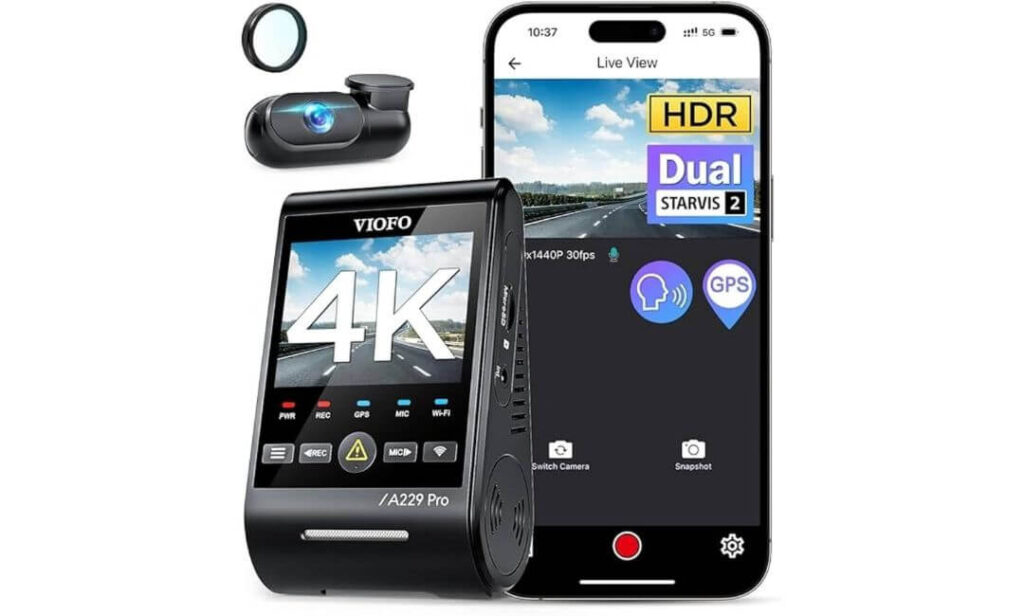
Quick Specs:
- Recording Quality: 4K Front + 2K Rear
- Image Sensors: Sony STARVIS 2 IMX678 + IMX675
- Night Performance: Dual-channel HDR Night Vision 2.0
- Connectivity: 5GHz WiFi with App Control
- Positioning: Quad-Mode GPS Logger
- Voice Features: Built-in Voice Commands
- Parking Security: Buffered Parking Recording
- Lens Enhancement: Included CPL Filter
- Power Source: Reliable Supercapacitor Design
- Storage Support: Up to 512GB microSD
- Rear Camera Cable: 6-Meter Cable Included
- Best For: Subaru Legacy owners wanting EyeSight-friendly dual-channel protection
The easiest way to describe this camera is simple. It feels like it was built by people who actually understand what drivers need after the purchase excitement wears off. Instead of loading the spec sheet with gimmicks, it focuses on image quality, dependable operation, and features that make a difference when something happens on the road.
The dual STARVIS 2 sensor setup is the biggest reason it stands out. The IMX678 front sensor captures exceptional detail during the day, while the IMX675 rear sensor keeps footage usable after sunset when many rear cameras begin to struggle. Combined with HDR on both cameras, it produces footage that remains readable in situations where glare, rain, shadows, and headlights normally create problems.
For Subaru Legacy owners specifically, the compact design is a major advantage. The front unit can be positioned neatly behind the rearview mirror without making the windshield feel cluttered. That makes installation cleaner and helps maintain proper clearance around the EyeSight camera area, which is something many Legacy owners pay close attention to.
(If your priority is dependable footage rather than flashy marketing features, this is one of the most complete packages currently available for the Subaru Legacy.)
What Impressed Us Most
- Outstanding license plate readability during day and night driving
- Compact design works exceptionally well around EyeSight-equipped windshields
- Dual HDR recording improves detail in difficult lighting conditions
- Buffered parking recording captures footage before and after an event
- Fast 5GHz WiFi transfers make video access quick and painless
One Thing To Know
- A quality hardwire kit is recommended if you plan to use parking protection every day.
Subaru Legacy Compatibility Notes
The included 6-meter rear camera cable is long enough for clean routing through the Legacy’s cabin without requiring extensions. Whether you drive an older Legacy or a newer EyeSight-equipped model, installation remains straightforward.
For the cleanest setup, mount the front camera behind the rearview mirror housing or slightly toward the passenger side of the windshield. This placement helps preserve visibility while keeping the camera discreet and out of the way.
The Insider Pro-Tip
Many drivers spend hours comparing resolution numbers and almost no time looking at the image sensor. In reality, the sensor is what determines whether a plate number remains readable during a rainy night drive or disappears into a blurry mess.
That is why this model continues to stand out. The combination of STARVIS 2 sensors, dual HDR processing, GPS tracking, and buffered parking recording creates a setup that feels genuinely complete. Months after installation, those practical advantages matter far more than a long list of features you’ll rarely use.
#2. Thinkware U3000 PRO 4K/2K 2CH Dash Cam
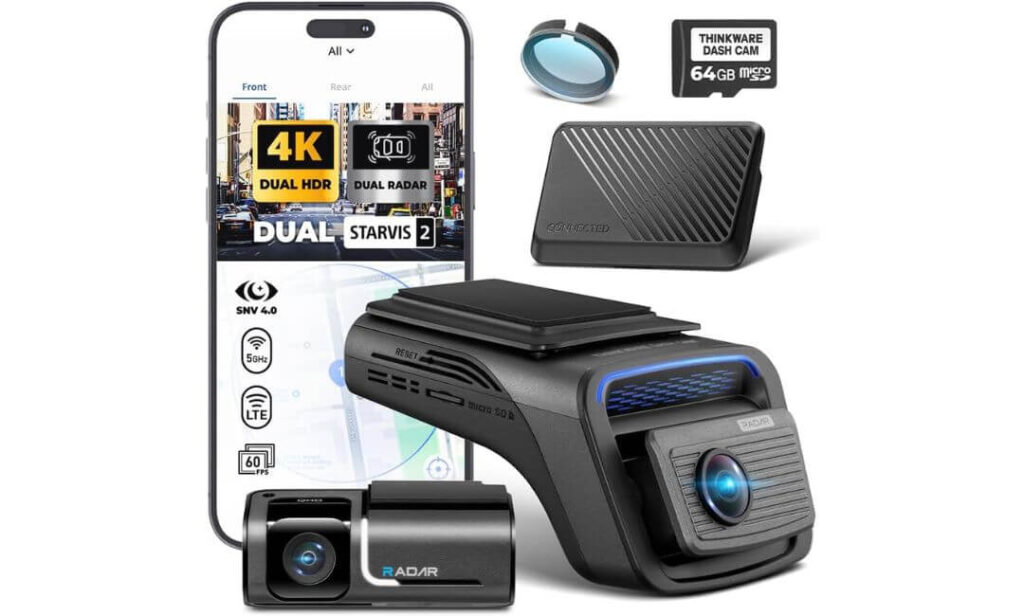
Quick Specs:
- Recording Quality: 4K Front + 2K Rear
- Image Sensors: Sony STARVIS 2
- Night Performance: Super Night Vision 4.0
- Parking Technology: Front and Rear Radar Parking Detection
- Connectivity: WiFi + Bluetooth + LTE
- Remote Features: Live View, Impact Alerts, Vehicle Tracking
- Navigation Data: Built-in GPS
- Cloud Access: Thinkware CONNECTED LTE Platform
- Power Efficiency: Reduced Battery Consumption During Parking Monitoring
- Best For: Subaru Legacy owners wanting the most advanced parking and remote-monitoring system available
Some dash cams focus on recording what happens while you are driving. This one is built around what happens after you walk away from your car.
That distinction becomes obvious the moment you look at the feature set. The combination of 4K front recording, 2K rear coverage, STARVIS 2 imaging hardware, LTE connectivity, and dual radar parking technology creates a system that feels much closer to vehicle security than a traditional dash cam. For Subaru Legacy owners who regularly leave their vehicle in public parking lots, office garages, airports, or apartment complexes, that difference can be surprisingly valuable.
The standout feature here is the dual radar parking system. Unlike many parking modes that continuously consume power while waiting for movement, the radar sensors allow the camera to monitor its surroundings more intelligently. When activity is detected, buffered recording captures footage before and after the event. The result is stronger protection with less unnecessary battery drain.
Night performance is equally impressive. Super Night Vision 4.0 works alongside the STARVIS 2 sensors to pull additional detail from darker scenes while controlling glare from headlights and street lighting. Combined with LTE connectivity, GPS tracking, remote live view, and impact notifications, this setup gives Legacy owners a level of visibility that most standard dash cams simply cannot match.
(For drivers who care as much about what happens while their vehicle is parked as when it is moving, few systems currently offer this level of capability.)
Highlights That Earned Its Premium Ranking
- Advanced front and rear radar technology improves parking surveillance efficiency
- Included LTE module provides remote monitoring without additional hardware purchases
- Real-time impact alerts and location tracking add an extra layer of security
- Excellent nighttime footage quality with Super Night Vision 4.0
- Built-in WiFi, Bluetooth, and GPS create a fully connected experience
- Premium parking protection without excessive battery consumption
Before You Install
- A high-endurance memory card and hardwire setup can help unlock the full long-term potential of its parking and connected features.
Subaru Legacy Installation Insights
The compact front unit works well inside the Subaru Legacy cabin and can be positioned discreetly below the EyeSight camera area. As with any premium dash cam, proper placement is important to maintain an unobstructed view for Subaru’s driver-assistance systems.
Drivers planning to use LTE alerts, remote viewing, and advanced parking functions regularly should strongly consider a hardwired installation. It creates a cleaner setup and allows the camera to deliver the experience it was designed for without relying solely on accessory power.
The Insider Pro-Tip
Many buyers focus on video quality first and cloud features second. In practice, the opposite often becomes true after a few months of ownership.
Most incidents happen when nobody is sitting behind the wheel. A parking lot scrape, a hit-and-run, suspicious activity near the vehicle, or an overnight impact usually occurs while the car is unattended. That is where features like radar detection, LTE connectivity, impact notifications, and remote access stop feeling like luxury extras and start feeling genuinely useful. If your Subaru Legacy spends significant time parked outside, this is one of the few cameras on the market that can continue looking after it long after you have locked the doors and walked away.
#3. Vantrue New N4S 3 Channel Dash Cam
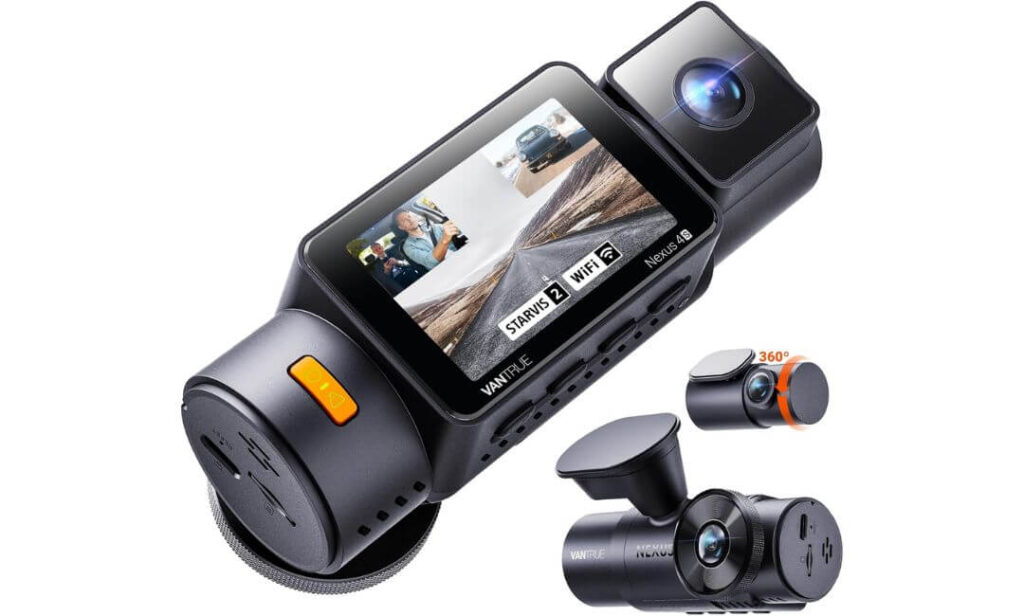
Quick Specs:
- Recording Quality: 2.7K Front + 1440P Interior + 1440P Rear
- Coverage: True 3-Channel Recording
- Image Technology: Triple STARVIS 2 Sensors
- Night Performance: Triple HDR + Night Vision 4.0
- License Plate Capture: PlatePix Technology
- Connectivity: 5GHz WiFi with App Control
- Location Tracking: Quad-Mode GPS
- Parking Security: 4 Smart Parking Modes
- Storage Capacity: Supports up to 1TB microSD
- Rear Camera Design: 360-Degree Adjustable Rear Lens
- Power System: Durable Supercapacitor Design
- Best For: Subaru Legacy owners wanting front, rear, and cabin coverage in a single system
Interestingly, most drivers never think they need an interior camera until the day they wish they had one.
That is where this system immediately feels different. Instead of focusing only on what is happening in front of or behind the vehicle, it records the entire environment around you. The front camera captures the road ahead, the rear camera watches traffic behind, and the interior lens fills the gap that traditional dual-channel systems leave uncovered. For Subaru Legacy owners carrying family members, work equipment, valuable cargo, or even pets, that additional perspective can become surprisingly useful.
The hardware backing that coverage is equally impressive. Triple STARVIS 2 sensors work alongside HDR processing on all three channels, helping the camera retain detail when driving through dark roads, parking garages, tunnels, and poor weather conditions. Vantrue’s PlatePix technology adds another layer by improving license plate readability during challenging lighting situations where many cameras begin to lose detail.
Another feature we genuinely appreciate is the flexibility of the rear camera. Unlike fixed rear units found on many competitors, the rotating design allows you to monitor rear traffic traditionally or redirect the camera toward the cabin when additional interior visibility is needed. Combined with support for up to 1TB of storage, fast 5GHz WiFi transfers, and multiple parking recording options, this system feels built for drivers who simply want to record more of what happens around their vehicle.
(If a traditional front-and-rear setup feels limiting, this is one of the most complete all-around recording solutions currently available for the Subaru Legacy.)
Features That Made It Stand Out
- Triple STARVIS 2 imaging system delivers impressive clarity across all cameras
- PlatePix technology improves license plate visibility during difficult lighting conditions
- Interior camera adds valuable evidence that standard dual-channel systems cannot provide
- Adjustable 360-degree rear camera offers greater installation flexibility
- Supports up to 1TB storage for extended recording capacity
- Fast 5GHz WiFi connectivity simplifies footage access and sharing
Worth Knowing Before Installation
- Because this is a full three-channel system, installation takes slightly more time than a traditional front-and-rear setup.
Subaru Legacy Installation Considerations
The included 20-foot rear camera cable provides more than enough length for clean routing throughout the Legacy cabin. Even with the additional interior camera, the installation remains neat when the wiring is properly tucked behind trim panels and headliner sections.
For EyeSight-equipped Subaru Legacy models, positioning the main camera behind the rearview mirror housing or slightly toward the passenger side typically delivers the cleanest result. Drivers planning to use continuous parking monitoring should also consider adding a hardwire kit during installation rather than upgrading later.
The Insider Pro-Tip
Many people compare dash cams based on resolution numbers alone. A better question is whether the camera captures the angles that matter when an incident actually happens.
That is where three-channel systems continue gaining popularity among experienced drivers. When something occurs inside the vehicle, near a side window, during a parking lot interaction, or while loading cargo, the additional camera often captures details that would otherwise be missing entirely. The footage itself may never be needed, but when it is, having that extra perspective can make a surprisingly big difference.
#4. ROVE R2-4K Dual PRO Dash Cam
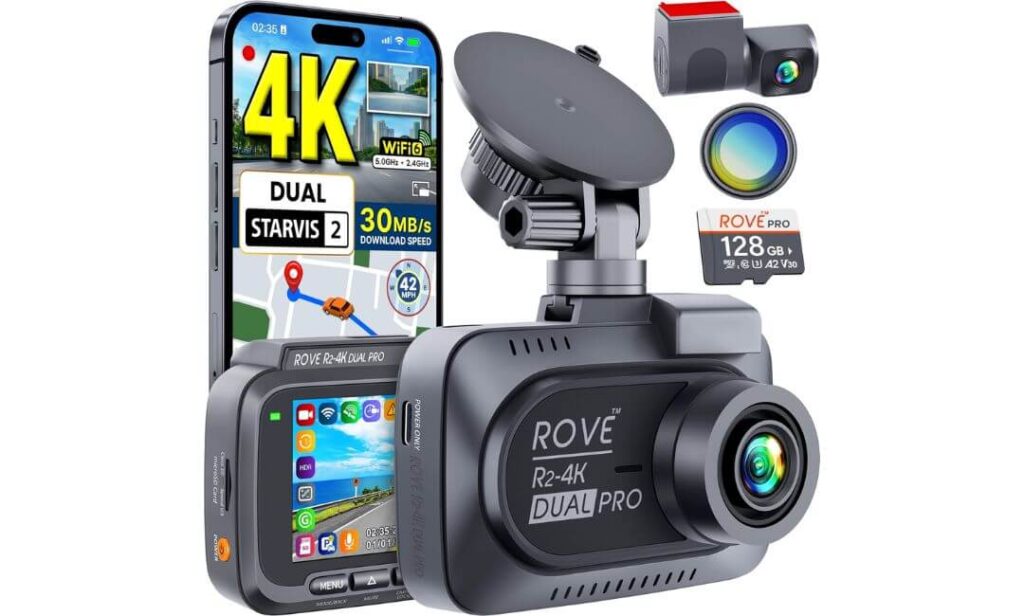
Quick Specs:
- Recording Quality: 4K Front + 2K Rear
- Image Sensors: Sony STARVIS 2 IMX678 + IMX675
- Night Performance: HDR + Super Night Vision
- Connectivity: Advanced WiFi 6
- Transfer Speed: Up to 30MB/s Wireless Downloads
- Navigation Tracking: Quad-Mode GPS
- Viewing Angle: 150° Front + 140° Rear
- Parking Features: 3 Intelligent Parking Monitoring Modes
- Included Extras: 128GB microSD Card + CPL Filter
- Storage Capacity: Up to 1TB microSD Support
- Power System: Heat-Resistant Supercapacitor
- Best For: Subaru Legacy owners looking for maximum value without sacrificing premium hardware
Surprisingly, this is the camera that many Subaru Legacy owners end up buying after comparing products far above its price range.
The reason becomes obvious once you look beyond the headline specifications. You get the same Sony STARVIS 2 sensor combination found in several premium models, including the flagship IMX678 front sensor and IMX675 rear sensor. Pair that with HDR processing, wide-aperture lenses, and excellent low-light tuning, and the result is footage that remains impressively clean during nighttime highway driving, rainy commutes, and difficult lighting transitions.
What genuinely separates this system from many competitors is the overall package. Most dash cams require additional purchases before they feel complete. Here, the manufacturer includes a high-endurance 128GB memory card and CPL filter right in the box. That may sound minor, but for many drivers it removes two of the most common hidden costs associated with setting up a new dash cam.
The WiFi 6 implementation is another feature that deserves attention. Downloading large 4K video files is often one of the most frustrating parts of dash cam ownership. Faster transfer speeds make reviewing footage significantly easier, especially when you need a video immediately after an incident. Combined with GPS logging, parking monitoring options, and support for up to 1TB of storage, this feels like a product built around long-term convenience rather than short-term marketing.
(For Subaru Legacy owners who want premium imaging performance while getting more value for every dollar spent, few cameras currently strike this balance as effectively.)
Why It Earned A Spot In Our Recommendations
- Premium STARVIS 2 dual-sensor setup delivers excellent image quality
- Included 128GB memory card and CPL filter add immediate value
- WiFi 6 technology dramatically improves video transfer speeds
- Wide viewing angles help capture more of the surrounding roadway
- Supports massive 1TB storage capacity for extended recording
- Reliable GPS route and speed logging for trip documentation
Helpful To Know Before Ordering
- Drivers planning to use parking monitoring daily should budget for a compatible hardwire kit during installation.
Subaru Legacy Installation Perspective
The included 6-meter rear camera cable provides enough length for clean installation throughout the Legacy cabin without requiring aftermarket extensions. The package also includes wiring tools and mounting accessories that help simplify the setup process.
For EyeSight-equipped Subaru Legacy models, mounting the front camera behind the mirror housing or slightly toward the passenger side typically creates the cleanest appearance while preserving proper operation of Subaru’s safety systems. The compact design makes it easier to achieve a discreet installation than many larger dash cams.
The Insider Pro-Tip
There is a common misconception that the best dash cam is always the one with the longest feature list.
In reality, many experienced owners eventually gravitate toward products that simply do the fundamentals exceptionally well. Strong image sensors, dependable HDR performance, fast footage access, accurate GPS tracking, and reliable daily operation often matter more than features that sound impressive but rarely get used. That is exactly where this camera shines. It focuses heavily on the capabilities drivers interact with every day, which is one of the main reasons it continues to offer such strong value in the Subaru Legacy segment.
#5. WOLFBOX X5 3 Channel 4K HDR Dash Cam
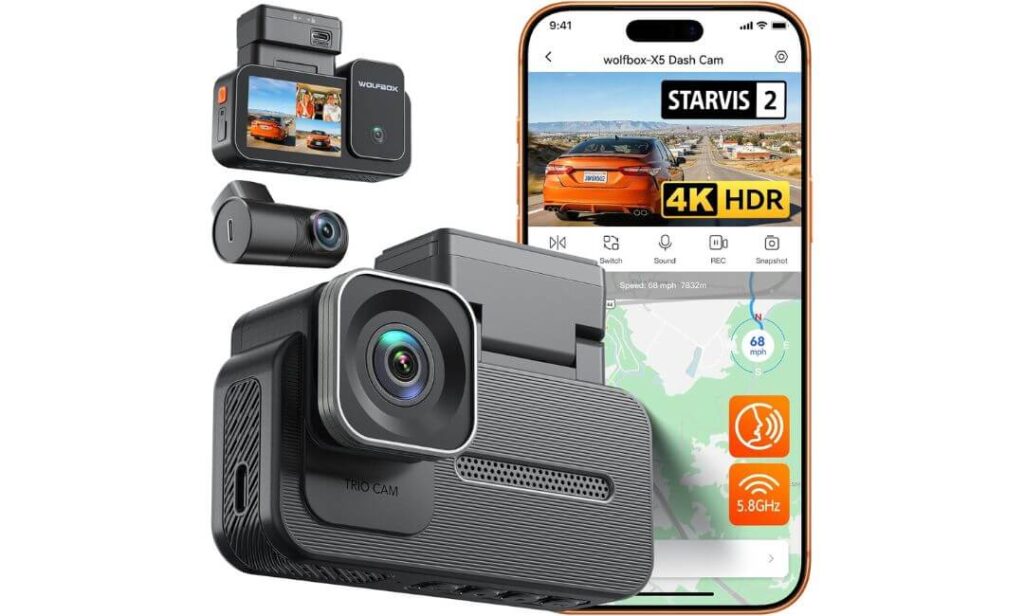
Quick Specs:
- Recording Quality: 4K Front + 2.5K Rear + 1080P Cabin
- Coverage: Full 3-Channel Recording
- Image Sensor: Sony STARVIS 2 IMX678
- Night Performance: Triple HDR Processing
- Connectivity: Built-in 5.8GHz WiFi
- Navigation Tracking: Integrated GPS Logging
- Control Options: Voice Commands + Touchscreen
- Parking Features: Impact Detection + Time-Lapse Monitoring
- Video Protection: Automatic Emergency File Lock
- Storage Support: Up to 512GB microSD
- Viewing Coverage: Near 360-Degree Visibility
- Best For: Subaru Legacy owners wanting maximum convenience and all-around visibility
Sometimes the best dash cam is simply the one you will actually enjoy using every day.
That is what immediately stood out about this system. While several cameras on this list focus heavily on technical specifications, this model balances strong image quality with a noticeably user-friendly experience. The combination of 4K front recording, upgraded 2.5K rear footage, interior cabin coverage, voice controls, touchscreen navigation, and fast wireless access creates a setup that feels approachable from the first drive.
The STARVIS 2 IMX678 sensor plays an important role here. Combined with Triple HDR processing, it helps preserve detail during situations that often challenge dash cams, including tunnel exits, strong sunlight, nighttime traffic, and direct headlight glare. The upgraded 2.5K rear camera is particularly welcome because rear footage is often overlooked despite being involved in many real-world incidents.
What also makes this camera appealing is how quickly drivers can interact with it. Voice commands allow basic actions without reaching for the screen, while the touchscreen interface simplifies playback and settings adjustments. Add 5.8GHz WiFi, GPS tracking, and three-channel recording into the mix, and the result is a package that delivers plenty of capability without feeling overly technical.
(For Subaru Legacy owners who want broad coverage, modern convenience features, and an easy day-to-day ownership experience, this package offers a compelling balance.)
Areas Where It Performs Particularly Well
- Upgraded 2.5K rear camera captures more detail than many standard rear units
- Triple HDR recording improves visibility during difficult lighting transitions
- Responsive touchscreen controls simplify operation and video review
- Built-in voice commands reduce distractions while driving
- Fast 5.8GHz WiFi connectivity speeds up footage access
- Three-camera coverage adds valuable visibility around the vehicle
Helpful To Plan For
- A memory card and hardwire kit should be added separately to unlock the full recording and parking-monitoring experience.
Subaru Legacy Installation Notes
The included mounting accessories and cable management tools make installation relatively straightforward inside the Subaru Legacy. The three-channel layout requires additional routing compared with a basic dual-camera system, but the overall process remains manageable for most owners.
For EyeSight-equipped models, positioning the front camera below the factory stereo camera zone remains the safest approach. The compact design helps maintain a clean windshield appearance while preserving proper operation of Subaru’s driver-assistance technologies.
The Insider Pro-Tip
Many dash cams impress buyers during the first week of ownership. Far fewer remain enjoyable to use six months later.
That long-term experience often comes down to convenience. Fast WiFi transfers, intuitive controls, reliable GPS logging, clear nighttime footage, and simple access to recordings tend to matter more over time than flashy specifications alone. This is where the X5 earns its place on the list. It combines modern convenience features with strong recording performance in a way that feels practical for everyday Subaru Legacy ownership rather than purely focused on benchmark numbers.
Best Subaru Legacy Dash Cam Options Compared: 4K Recording, Night Vision, and Parking Coverage
Buying Guide: How to Choose the Right Dash Cam for Your Subaru Legacy
A Subaru Legacy is not the same as a typical midsize sedan when it comes to dash cam installation and daily use. Newer models equipped with EyeSight driver-assistance technology require more careful camera placement, while long-distance commuters often need better night performance, stronger parking protection, and easier footage access than the average driver.
The good news is that modern dash cams have improved dramatically over the last few years. Features such as STARVIS 2 sensors, buffered parking recording, WiFi 6 connectivity, LTE monitoring, and advanced HDR processing now provide capabilities that were previously reserved for premium systems. The challenge is knowing which features genuinely matter for your driving habits and which ones simply look impressive on a specification sheet.
EyeSight Compatibility: The First Thing Subaru Legacy Owners Should Check
Before comparing resolution, storage capacity, or mobile apps, start with EyeSight compatibility.
Subaru’s EyeSight system relies on forward-facing cameras mounted near the rearview mirror. These cameras continuously monitor traffic conditions, lane markings, and potential hazards. Blocking or obstructing this area can reduce system performance and may trigger warnings in some situations.
When selecting a dash cam, look for compact designs that can be mounted behind the mirror housing or slightly toward the passenger side of the windshield. Models such as the VIOFO A229 Pro and Thinkware U3000 PRO work particularly well because they maintain a smaller windshield footprint.
A good rule is simple. If the dash cam installation appears visible from the driver’s normal seating position, it may not be in the ideal location.
Recording Quality: Is 4K Worth It for Subaru Legacy Drivers?
For most Legacy owners, the answer is yes.
A true 4K front camera captures significantly more detail than 1080p systems, especially when reviewing license plates, road signs, or small details during an incident. This becomes particularly important during highway driving where vehicles move quickly relative to one another.
However, resolution alone should never be the deciding factor.
A 4K camera with a weak image sensor can perform worse than a lower-resolution camera equipped with premium hardware. This is why cameras using Sony STARVIS 2 sensors consistently dominate recommendation lists. Better sensors improve detail retention, reduce image noise, and maintain stronger clarity in difficult lighting conditions.
For most Subaru Legacy owners, a combination of 4K recording and STARVIS 2 technology provides the ideal balance.
Front and Rear Dash Cam Versus Single-Camera Systems
A front-facing camera only records half the story.
Rear-end collisions remain one of the most common accident types, and without a rear camera, valuable evidence may be missing. A dual-camera setup records both directions simultaneously and provides a much clearer picture of what occurred.
Single-camera systems can still make sense for budget-conscious drivers who primarily want front-road protection. However, most Legacy owners will benefit more from a front-and-rear system because installation is relatively straightforward and the added coverage is significant.
If you frequently travel with passengers, pets, rideshare customers, or valuable cargo, a three-channel system like the Vantrue N4S or WOLFBOX X5 adds another layer of visibility.
Night Vision and Low-Light Performance
Night recording is where the biggest differences between dash cams become visible.
Many cameras produce sharp daytime footage but struggle after sunset. Headlight glare, reflections, poor weather, and dark roadways quickly expose weaknesses in lower-quality hardware.
This is why sensor quality matters more than marketing claims.
STARVIS 2 sensors, HDR processing, wide-aperture lenses, and advanced low-light tuning all contribute to better nighttime footage. Features such as PlatePix technology and Super Night Vision further improve readability when identifying vehicles after dark.
If you regularly drive during early mornings, late evenings, or rural highways, investing in stronger night performance is often more valuable than adding extra resolution.
Parking Mode Protection: What Actually Matters
Many buyers see the phrase “parking mode” and assume every system works the same way.
They do not.
Basic systems simply begin recording after an impact occurs. More advanced cameras use motion detection, buffered recording, radar detection, or multiple recording modes to capture events before and after activity occurs.
Buffered recording is particularly valuable because it preserves footage leading up to an incident instead of only recording after movement has already started.
Drivers who park outdoors, in apartment complexes, office garages, shopping centers, or airports should prioritize advanced parking protection. This is one area where the Thinkware U3000 PRO stands out due to its radar-assisted parking technology and LTE monitoring capabilities.
Power and Installation Considerations
Most dash cams can operate using either a 12V accessory socket or a hardwired power connection.
Using the included power adapter is the simplest installation method and works perfectly for everyday driving footage. However, parking protection features typically require continuous power, which means a hardwire kit becomes necessary.
A hardwire installation connects directly to the vehicle’s fuse box using fuse taps and allows the camera to remain active when the ignition is turned off.
Fortunately, the Subaru Legacy offers relatively clean cable-routing paths through the headliner, A-pillars, and interior trim panels. Many owners complete installations themselves, while others prefer professional installation for a factory-style appearance.
Connectivity Features That Improve Daily Ownership
The days of removing memory cards every time you need footage are largely over.
Modern dash cams now offer fast wireless access through mobile applications. WiFi connectivity allows drivers to review recordings, adjust settings, update firmware, and download clips directly to a smartphone.
Systems equipped with WiFi 6 or 5GHz connectivity typically provide noticeably faster transfer speeds than older WiFi implementations.
For drivers seeking additional security, LTE-enabled models provide remote access, live viewing, impact notifications, and location tracking even when the vehicle is parked.
These features are not essential for everyone, but they can be extremely useful depending on how and where the vehicle is used.
Storage Capacity and Loop Recording Explained
Dash cams continuously record video, which means storage management becomes important.
Loop recording automatically deletes the oldest footage when storage space is full and replaces it with newer recordings. Protected event recordings remain locked and cannot be overwritten automatically.
For most Subaru Legacy drivers, a 128GB or 256GB high-endurance microSD card provides an excellent starting point. Drivers using three-channel systems or extended parking recording may benefit from 512GB or even 1TB cards if supported by the camera.
Always use high-endurance memory cards specifically designed for continuous recording environments whenever possible.
Dual-Lens or Three-Lens: Which Makes More Sense?
The answer depends entirely on how you use your Legacy.
A dual-channel system remains the best choice for most drivers because it provides front and rear coverage while keeping installation simple. Models such as the VIOFO A229 Pro, Thinkware U3000 PRO, and ROVE R2-4K Dual PRO fall into this category.
Three-channel systems add an interior camera and become more valuable for rideshare drivers, families, commercial use, pet transportation, or anyone wanting maximum visibility around the vehicle.
There is no universal right answer. The best setup is the one that matches your daily driving environment.
Safety, Privacy, and Legal Considerations
Dash cams are designed to provide evidence and improve accountability, but responsible use remains important.
Always position the camera where it does not obstruct visibility. Keep firmware updated, use secure passwords for connected features, and understand local regulations regarding audio recording if passengers are regularly present inside the vehicle.
If cloud-connected features are enabled, review privacy settings within the manufacturer’s app so you understand what information is stored and how it is accessed.
Practical Installation Tips for Subaru Legacy Owners
A few simple installation choices can significantly improve your experience.
- Mount the camera behind the rearview mirror whenever possible.
- Keep the EyeSight camera zone completely unobstructed.
- Route wiring through factory trim panels rather than leaving cables exposed.
- Use a CPL filter when available to reduce dashboard reflections.
- Install a hardwire kit during the initial setup if parking protection is important.
- Format the memory card regularly to maintain recording reliability.
- Test camera angles before permanently securing mounts and wiring.
The best dash cam is not necessarily the one with the longest specification sheet. It is the one that records clear footage consistently, stays reliable through changing conditions, integrates cleanly with your Subaru Legacy, and remains easy to use long after the installation is complete.
Installation Tips and Best Practices for Subaru Legacy Owners
Even the best dash cam can become frustrating if it is installed poorly. We have seen premium cameras produce disappointing results simply because they were mounted in the wrong location, connected to the wrong power source, or installed without considering Subaru’s EyeSight system.
The good news is that the Subaru Legacy is one of the easier sedans to work with. The cabin provides clean cable-routing paths, generous trim access, and enough windshield space to create a professional-looking installation without visible wiring. Spending an extra thirty minutes during installation often makes a bigger difference than spending an extra hundred dollars on a more expensive camera.
Pre-Installation Checklist: What To Prepare Before You Begin
Before removing trim panels or mounting anything to the windshield, take a few minutes to gather everything you will need.
Start by confirming your preferred power method. If you only want recording while driving, the included power adapter is usually sufficient. If you plan to use parking surveillance features such as buffered recording, motion detection, radar monitoring, or impact recording, a hardwire kit should be purchased before installation begins.
Next, determine your mounting location. On Subaru Legacy models equipped with EyeSight, this step is particularly important. The dash cam should never block the factory stereo camera system located near the rearview mirror. Most owners achieve the cleanest result by mounting the camera directly behind the mirror housing or slightly toward the passenger side.
Before installation, verify that you have:
- Dash cam and rear camera
- Memory card installed and formatted
- Hardwire kit if parking mode will be used
- Fuse taps if hardwiring
- Trim removal tool
- Cable clips or adhesive mounts
- Microfiber cloth for windshield cleaning
- Mobile app downloaded for setup and testing
A clean windshield is equally important. Adhesive mounts perform significantly better when attached to glass that has been properly cleaned and dried beforehand.
Step-By-Step Installation Guide
The installation process itself is not particularly difficult, but taking a methodical approach helps avoid mistakes later.
Begin by sitting in the driver’s seat and identifying the final camera position. Confirm that the lens has a clear view of the road while remaining outside the EyeSight operating area.
Attach the front camera temporarily before removing adhesive backing. This allows you to verify visibility, camera angle, and screen accessibility.
For dual-channel and three-channel systems, route the rear camera cable through the headliner, along the passenger-side trim, and toward the rear window. Most Subaru Legacy models provide enough space to hide wiring completely behind factory trim pieces.
Once the front and rear cameras are installed, connect power and verify that both cameras appear within the dash cam menu before permanently securing cables.
Take a short test drive before finalizing the installation. It is much easier to adjust camera angles now than after all wiring has been hidden.
Hardwire Installation Versus Cigarette Lighter Power
Many Subaru Legacy owners struggle with this decision.
Using the included power adapter is the fastest and easiest solution. Installation takes only a few minutes, and the camera powers on automatically whenever the vehicle starts.
However, parking protection features are often unavailable or significantly limited when using accessory power alone.
A hardwired setup connects directly to the vehicle’s fuse box and provides continuous power while protecting the battery through low-voltage cut-off systems. This allows advanced features such as:
- Buffered parking recording
- Motion detection monitoring
- Impact detection recording
- Radar-assisted parking surveillance
- Time-lapse monitoring
- Remote LTE connectivity
If parking security is one of the reasons you are purchasing a dash cam, hardwiring is usually worth the additional effort.
Cable Routing Tips For A Factory-Like Appearance
Professional-looking installations rarely come from expensive equipment. They come from careful cable management.
The easiest routing path inside the Subaru Legacy typically follows the passenger side of the vehicle. This route minimizes visibility and reduces interference with driver controls.
A few practical guidelines make a significant difference:
- Keep cables tucked behind the headliner whenever possible.
- Route wires inside factory trim channels rather than across exposed surfaces.
- Avoid routing cables directly across curtain airbag deployment zones.
- Secure excess cable length behind trim panels instead of stuffing it near the windshield.
- Leave enough slack near the camera to allow future adjustments.
For three-channel systems such as the Vantrue N4S or WOLFBOX X5, plan cable routing before installation begins. This prevents unnecessary removal of interior panels later.
Avoiding EyeSight and Safety System Interference
This is the area where Subaru Legacy owners should be most careful.
EyeSight relies on unobstructed forward visibility through specific sections of the windshield. Cameras, cables, adhesive mounts, radar modules, and accessories should never be placed directly in front of the factory sensors.
After installation, sit in the driver’s seat and inspect the windshield from multiple angles. If the dash cam appears prominently within your forward field of view, consider adjusting its position.
A properly installed camera should feel almost invisible during normal driving.
When in doubt, consult Subaru’s windshield accessory placement guidelines or have the installation reviewed by a professional installer familiar with EyeSight-equipped vehicles.
Testing Everything Before Calling The Job Finished
Many installation problems are discovered only after the first incident, which is exactly when you do not want surprises.
Before considering the installation complete, perform a full system check.
Review several recorded videos from both daytime and nighttime driving. Confirm that license plates remain visible, horizons appear level, and rear camera alignment is correct.
Verify that:
- Front and rear cameras are recording properly
- GPS information appears accurately
- Date and time settings are correct
- Voice alerts function normally
- Mobile app connectivity works consistently
- Parking mode activates correctly
- Emergency event files are being locked properly
This process takes only a few minutes but can prevent major frustration later.
SD Card Formatting and Long-Term Maintenance
One of the most overlooked aspects of dash cam ownership is memory card maintenance.
Dash cams continuously write and overwrite data. Over time, memory cards can develop recording errors if they are never checked or reformatted.
Most manufacturers recommend formatting the card directly through the camera menu on a regular basis. High-endurance memory cards also tend to provide significantly better reliability than standard consumer cards.
As part of routine maintenance:
- Check footage periodically.
- Format the memory card regularly.
- Install firmware updates when available.
- Inspect camera lenses for dust and fingerprints.
- Confirm parking features are operating correctly.
A dash cam only protects you when it is actually recording. A few minutes of maintenance throughout the year helps ensure that the footage is there when you need it most.
FAQs About Subaru Legacy Dash Cam
Will a dash cam affect Subaru Legacy EyeSight performance if it is mounted correctly?
In most cases, no. The real issue is not the dash cam itself but where it is installed. Subaru EyeSight relies on a specific viewing area near the top center of the windshield. If a camera, cable, radar module, or mounting bracket enters that zone, it can potentially interfere with the system’s field of view.
What many Subaru Legacy owners discover after installation is that compact cameras usually work best because they can sit discreetly behind the rearview mirror housing. Models such as the VIOFO A229 Pro and Thinkware U3000 PRO are particularly well-suited because they maintain a smaller windshield footprint while still offering premium recording performance. A clean installation is often more important than the camera itself.
For a Subaru Legacy that spends long hours parked outside, is parking mode more important than 4K resolution?
For many owners, surprisingly yes.
Most drivers focus on what happens while the car is moving, but a significant number of insurance claims originate from parking lots, apartment complexes, office garages, and overnight incidents. If your Legacy spends eight to ten hours parked every day, parking protection may deliver more real-world value than an upgrade from 2K to 4K recording.
Features worth prioritizing include:
- Buffered event recording
- Motion detection
- Impact detection
- Radar-assisted monitoring
- Remote LTE alerts
- Battery protection systems
A camera that successfully captures a hit-and-run while parked can be far more valuable than one that simply records higher-resolution highway footage.
Why do some Subaru Legacy owners prefer STARVIS 2 sensors over cameras with higher advertised resolution?
Because image sensors determine whether footage remains usable when conditions become difficult.
A camera can advertise 4K, 5K, or even higher resolutions, but if the sensor struggles with glare, darkness, rain, or rapid lighting changes, the final footage may still be disappointing. STARVIS 2 technology has gained attention because it improves light sensitivity, dynamic range, and nighttime detail rather than simply increasing pixel count.
The practical benefit is easier license plate recognition, cleaner footage during storms, and more consistent results when driving through tunnels, parking garages, or poorly lit roads. In everyday Subaru Legacy ownership, those advantages often matter far more than chasing the highest resolution number available.
Is a three-channel dash cam actually useful for everyday driving, or is it mostly for rideshare drivers?
Most buyers assume three-channel cameras are designed primarily for rideshare vehicles, but real-world use cases have expanded considerably.
The interior camera can document situations that a traditional front-and-rear setup cannot see. This may include interactions with passengers, activity around side windows, attempted break-ins, cargo movement, or incidents involving pets and personal belongings.
For drivers who regularly transport family members, expensive equipment, work supplies, or travel gear, an interior camera often provides additional context that can become valuable later. While not essential for everyone, it is one of those features many owners appreciate more after they have lived with it for a while.
What is the most overlooked mistake people make after installing a new dash cam?
Failing to verify footage quality after installation.
Many owners complete the installation, see the camera power on, and assume everything is working correctly. Weeks or months later, they discover the camera angle was wrong, the rear lens was misaligned, the memory card developed an issue, or parking mode was never activated properly.
A simple post-installation check should always include:
- Daytime footage review
- Nighttime footage review
- GPS verification
- Parking mode testing
- Mobile app connection testing
- Memory card health check
The uncomfortable truth is that a dash cam provides no protection if the footage is unusable when you actually need it. Spending fifteen minutes verifying everything after installation is one of the smartest things any Subaru Legacy owner can do.
Final Thoughts
After spending time comparing these dash cams specifically through the lens of Subaru Legacy ownership, one thing became clear: the best choice is not necessarily the camera with the longest feature list. It is the one that fits how you actually use your car every day.
If your priority is the strongest overall balance of image quality, clean EyeSight-friendly installation, dependable parking protection, and long-term usability, the VIOFO A229 Pro remains the easiest recommendation for most Subaru Legacy owners. It delivers the kind of performance that continues to impress long after the initial purchase.
For drivers who leave their Legacy parked in public areas frequently, the Thinkware U3000 PRO brings a level of parking surveillance and remote monitoring that few competitors currently match. Meanwhile, the Vantrue N4S and WOLFBOX X5 make a compelling case for drivers who want broader coverage through three-channel recording, while the ROVE R2-4K Dual PRO stands out as one of the strongest value-focused options available today.
The reality is that a dash cam is one of those upgrades you hope you never need. Yet when an accident happens, a parking lot incident occurs, or a dispute arises over what actually took place, clear footage often becomes the difference between guessing and knowing.
That is why we prioritized cameras with proven sensor technology, strong night performance, practical parking features, reliable connectivity, and installation flexibility for the Subaru Legacy platform. Every model on this list earned its place because it offers something meaningful beyond a simple specification sheet.
Choose the one that best matches your driving habits, install it correctly, use a quality high-endurance memory card, and test it periodically. Do that, and your Subaru Legacy will have a silent witness on board every time you head out on the road.
Also Check:


