
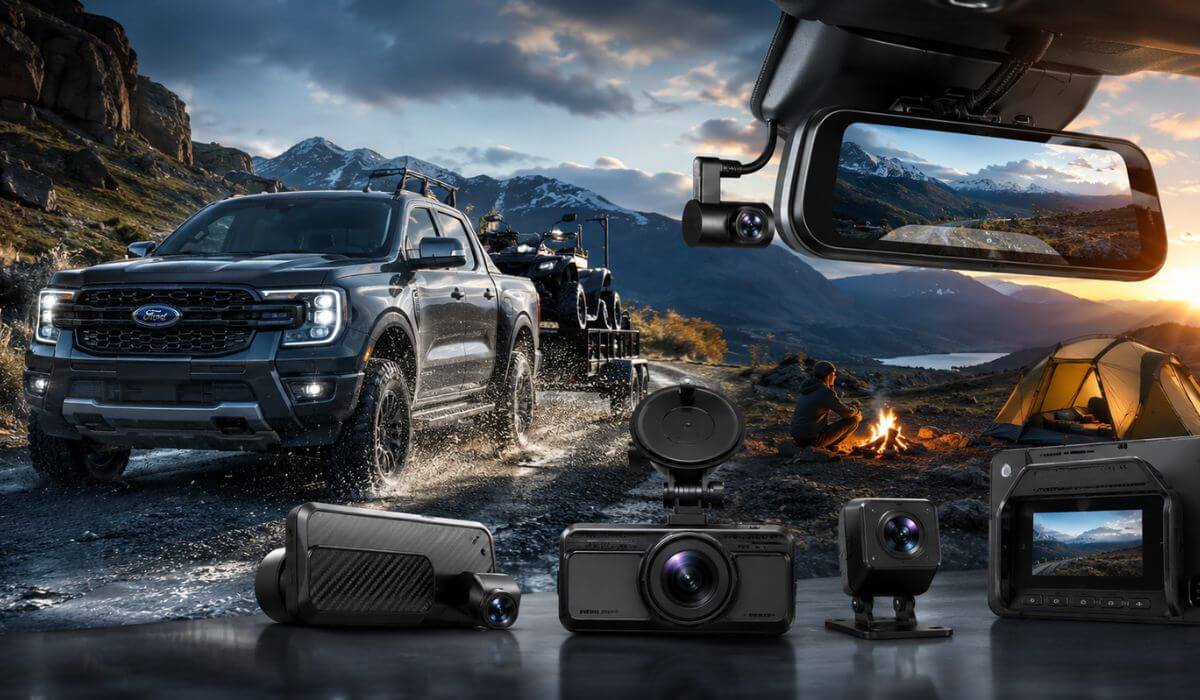
5 Best Dash Cams for Ford Ranger in 2026: 4K Night Vision Picks With STARVIS 2 and Parking Mode
If you drive a Ford Ranger every day, you already know this truck gives you a much taller driving position and a wider road view than most midsize SUVs. But that also creates a problem a lot of owners notice after installing a cheap dash cam — too much windshield glare, shaky footage on rough roads, weak night recording, and rear cameras that struggle once the truck bed starts bouncing. That’s why we didn’t build this list around random “best sellers” with inflated ratings.
For this guide, we focused on newer Ford Ranger models from 2019 to 2026, including XLT, Lariat, Wildtrak, Tremor, and Ranger Raptor trims. These trucks have enough windshield space for larger 3-inch cameras and mirror-style setups, but what actually matters is sensor quality, heat handling, stable parking mode, and how well the camera holds detail at highway speed. A lot of budget cams look fine in daylight, then completely lose license plates once the road gets dark or uneven.
That’s why every option here was chosen around real truck use — highway commuting, towing, overnight parking, off-road trips, jobsite security, and long-distance driving. We specifically looked for newer cameras with STARVIS 2 sensors, HDR recording, fast WiFi transfer speeds, reliable GPS tracking, and true front-and-rear coverage that actually suits the Ford Ranger’s cabin layout instead of feeling like a generic compact-car setup.
Best Ford Ranger Dash Cam: Top 2026 Picks With GPS, WiFi 6, and Front-Rear Coverage
#1. VIOFO A229 Plus Dash Cam Front and Rear
Best dual STARVIS 2 dash cam for Ford Ranger owners wanting cleaner night footage, better HDR balance, and reliable front and rear recording for daily truck driving
#2. WOLFBOX G900 PRO Mirror Dash Cam
Best mirror dash cam for Ford Ranger drivers needing wider rear visibility, hidden installation, and sharper 4K recording for highway and off-road use
#3. ROVE R2-4K DUAL Dash Cam Front and Rear
Best value 4K dash cam with parking mode for Ford Ranger trucks used for long commutes, outdoor parking, and weekend travel
#4. RexingUSA V1P 4K Dual Channel Dash Cam
Best plug-and-play dash camera for Ford Ranger owners wanting a simple setup with reliable front and rear protection and solid daily usability
#5. IIWEY 4K+4K Dash Cam Front and Rear
Best budget-friendly dash cam for Ford Ranger drivers looking for dual 4K recording, fast WiFi transfer speeds, and modern truck-ready features without overspending
Expert Tip Before You Buy a Dash Cam for Your Ford Ranger
One thing most Ford Ranger owners realize too late is that video quality alone means nothing if the camera cannot handle vibration, changing light, and heat inside a truck cabin. A lot of dash cams look impressive on product pages because they record in “4K,” but once you actually drive a Ranger at highway speed or on uneven roads, cheap sensors start smearing license plates, overexposing headlights, or dropping detail completely after sunset.
That’s why newer sensor tech matters more than resolution numbers now. Cameras using Sony STARVIS 2 sensors usually hold detail far better during early mornings, rain, parking garages, and dark highways where older sensors struggle badly. For a truck like the Ranger, that difference becomes obvious very quickly because the seating position and windshield angle expose the camera to harsher lighting than smaller cars.
Another thing people overlook is parking mode reliability. A Ford Ranger is often parked outside — job sites, trails, apartment lots, campgrounds, or long-term airport parking. If the dash cam overheats, drains power poorly, or constantly disconnects from WiFi, you stop using its features after the first month. That is exactly why we avoided random ultra-cheap models and focused on cameras that feel stable enough to actually live with every day.
How We Chose the Best Dash Cams for Ford Ranger Owners
We did not build this list around flashy specs or inflated review counts. Most newer dash cams released in the last year still do not have enough long-term owner feedback yet, so instead of chasing hype, we focused on the things that genuinely matter once the camera is installed inside a real Ford Ranger.
First, we looked at sensor performance, especially during low-light driving. A midsize truck like the Ranger sits higher than normal sedans, which changes how headlights, reflections, and road glare hit the camera lens at night. Some cameras record sharp daytime footage but completely lose plate clarity once roads get darker or rougher. That is why models with STARVIS 2 sensors, balanced HDR tuning, and stable bitrate recording immediately stood out during comparison.
We also paid attention to how these cameras fit actual Ranger ownership. Trucks are used differently than compact SUVs. They spend more time on highways, construction areas, outdoor parking lots, towing routes, and uneven roads. Because of that, we prioritized cameras with strong heat resistance, reliable parking surveillance, solid GPS tracking, and secure mounting systems that do not constantly shake loose or rattle after a few weeks.
Another major factor was daily usability. Some dash cams sound amazing on paper but become frustrating in real life because the app is slow, file transfers take forever, or menu systems feel outdated. That is why newer features like 5GHz WiFi, faster app downloads, voice control, and included high-endurance SD cards mattered in our selection process. If a camera makes footage difficult to access after an incident, most people eventually stop checking it altogether.
We also intentionally included different types of setups because Ford Ranger owners use their trucks differently. Some people want the cleanest possible hidden installation with a mirror-style camera like the WOLFBOX. Others care more about raw night quality and accurate HDR performance, which is where the VIOFO and ROVE models make more sense. And for buyers who simply want dependable front-and-rear protection without overspending, options like the IIWEY still deliver modern features that older budget dash cams simply did not offer a year ago.
Most importantly, we avoided recommending products that rely only on marketing numbers. Resolution claims mean very little if the processor cannot maintain detail at speed, the parking mode fails after heat exposure, or the rear camera becomes unusable at night. Every dash cam in this guide was selected because it offers a combination of real-world recording quality, stable everyday usability, and truck-friendly features that actually suit the Ford Ranger instead of just looking good in a spec sheet comparison.
#1. VIOFO A229 Plus Dash Cam Front and Rear
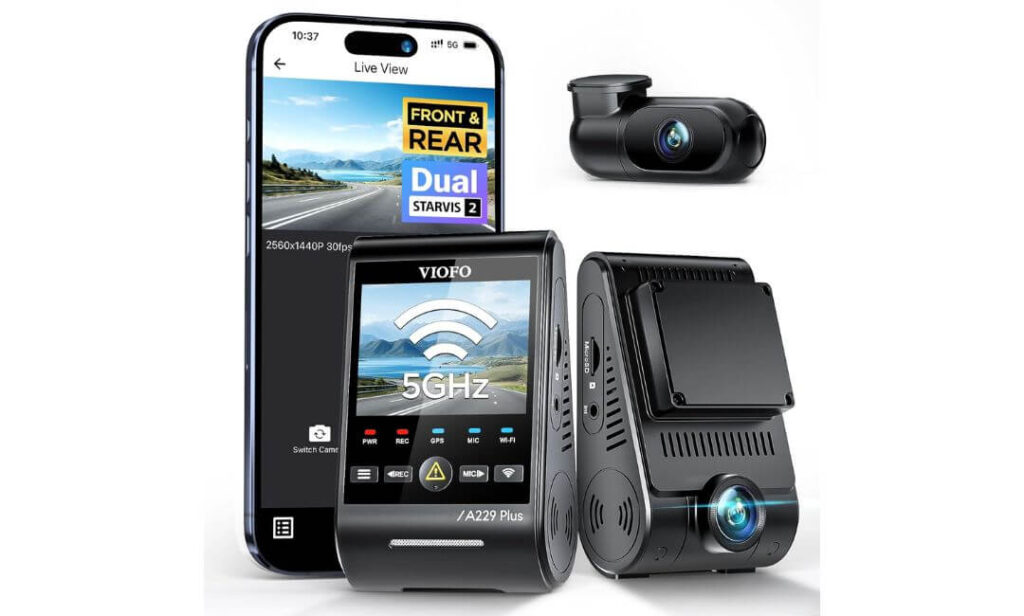
Quick Specs:
- Dual Sony STARVIS 2 IMX675 sensors front and rear
- True 1440P + 1440P HDR recording with better plate clarity at night
- Built-in 5GHz WiFi for faster video transfers to your phone
- Quad-mode GPS tracking with GPS, Galileo, GLONASS, and BEIDOU support
- Advanced 24/7 parking surveillance with buffered event recording
- Compact front and rear camera design that fits cleanly behind the Ranger windshield
- Long 6-meter rear cable that properly reaches SuperCrew and extended cab Ranger models
- Voice controls for locking footage, enabling WiFi, and switching views without touching the camera
The first thing that stands out here is not the resolution number — it is the way this camera handles ugly real-world lighting inside a truck. A Ford Ranger sits higher than most vehicles, which means cheaper dash cams often struggle with glare, reflective traffic signs, LED headlights, and fast exposure shifts once the sun goes down. This setup feels noticeably different because the dual STARVIS 2 sensors keep shadows cleaner and headlights more controlled instead of turning everything into a blurry white mess.
Another thing that makes this setup work unusually well in the Ranger is the balance between size and visibility. Some larger 4K dash cams start feeling distracting once installed near the windshield, especially in trucks with taller seating positions. This one stays surprisingly discreet while still giving you proper front-and-rear coverage. The rear camera cable is also long enough that installation does not feel like a compromise in larger Ranger cabins. That matters more than most buyers expect. (A lot of “universal” kits become frustrating halfway through installation because the rear cable barely reaches the back glass.)
Where this camera really earns trust though is daily usability. The 5GHz WiFi is genuinely fast, voice controls actually respond correctly, and the HDR recording does a much better job preserving moving license plates than most dual-camera systems in this range. Even the GPS system feels more serious than typical consumer dash cams because it supports multiple satellite networks instead of relying on basic positioning alone. For highway driving, overnight parking, or long road trips, it simply feels more stable and refined than the average Amazon “4K” camera people regret buying later. (Especially for Ranger owners who drive early mornings, backroads, or poorly lit highways where weaker sensors completely fall apart.)
Why This Setup Stood Out During Our Research
- Excellent low-light recording without aggressive overexposure from truck headlights
- HDR tuning feels more natural than most dual-channel dash cams
- Rear camera quality stays usable even during rain or rough-road vibration
- Compact design works surprisingly well in the Ford Ranger cabin
- Faster WiFi transfers make footage easier to access after incidents
- Voice commands are actually practical while driving instead of feeling gimmicky
One Thing Buyers Should Know Before Ordering
- No microSD card is included, so you will need a high-endurance card separately for long-term parking mode use
Real-World Ford Ranger Compatibility Notes
This setup works especially well in Ford Ranger trims with larger cabins because the compact front camera stays tucked neatly behind the rear-view mirror instead of blocking forward visibility. The included 6-meter rear cable also gives enough flexibility for cleaner routing through the headliner without needing awkward extension kits.
It also fits the way most Ranger owners actually use their trucks. Whether the truck spends nights outdoors, handles highway commuting, towing runs, or weekend off-road driving, the combination of HDR recording, stable parking mode, and STARVIS 2 low-light performance makes far more sense here than chasing random “8K” marketing claims that collapse once lighting conditions get difficult.
The Insider Pro-Tip
If you mostly drive your Ranger during daylight, almost any decent dash cam will look acceptable. The real difference shows up during those annoying moments nobody tests properly — wet highways at night, underground parking exits, rural roads with zero streetlights, or sudden exposure shifts after passing trucks with bright LED bars. That is exactly where stronger sensors quietly separate premium setups from average ones.
One more thing most buyers discover too late: fast app access matters more than expected. After an incident, nobody wants to sit inside a truck waiting ten minutes for footage to transfer over outdated WiFi. The faster 5GHz connection here sounds like a small feature on paper, but in real daily use, it becomes one of those details that makes the whole system feel far less frustrating to live with long term.
#2. WOLFBOX G900 PRO Mirror Dash Cam
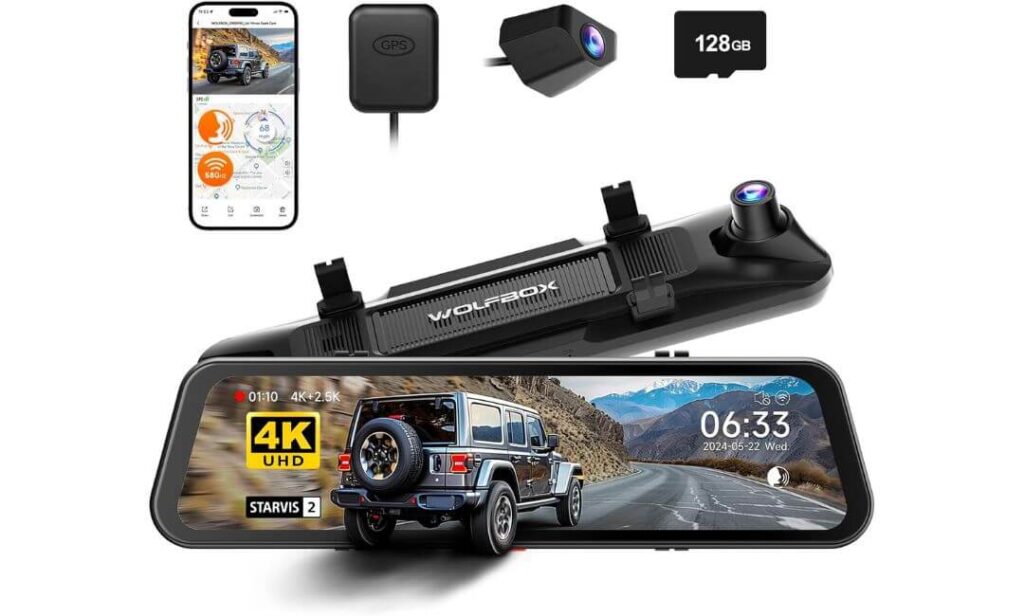
Quick Specs:
- Massive 12-inch full mirror display with front 4K and rear 2.5K recording
- Premium Sony STARVIS 2 IMX678 sensor for stronger night visibility
- Built-in 5.8GHz WiFi for noticeably faster video access and downloads
- Included 128GB memory card right inside the box
- Smart voice control with hands-free camera commands
- Wide 170-degree field of view for better lane and shoulder coverage
- Mirror-mounted design that keeps the windshield cleaner and less cluttered
- Extra-long 21.3FT rear camera cable designed for trucks and larger cabins
At first glance, this feels less like a normal dash cam and more like something Ford should have installed from the factory. The full mirror setup completely changes how the cabin looks once installed inside a Ranger. Instead of a bulky camera hanging under the windshield, you get a cleaner OEM-style appearance with a huge live rear view that becomes surprisingly addictive after a few drives.
What really makes this setup different though is visibility. Pickup trucks naturally have larger blind spots, taller rear profiles, and weaker rearward visibility once cargo, passengers, or gear start filling the cabin or bed area. That bigger 12-inch display solves a lot of that frustration instantly. The rear feed stays bright, sharp, and wide enough that highway lane changes feel more comfortable — especially during rain, night driving, or heavy traffic. Combined with the STARVIS 2 IMX678 sensor, the low-light performance looks far more refined than typical mirror cameras that usually become grainy after sunset.
There is also something refreshingly practical about the way this system is packaged. You already get a 128GB card included, the rear cable is genuinely long enough for larger Ranger cabins, and the faster 5.8GHz WiFi makes footage transfers feel modern instead of painfully outdated. Even the voice controls work better than expected because you can trigger recordings or manage settings without smearing fingerprints all over the mirror screen while driving. (For Ranger owners who hate cluttered windshields but still want full front-and-rear coverage, this setup feels unusually well thought out.)
What Made This Mirror Setup Easy to Recommend
- Huge live rear view dramatically improves rear visibility during daily driving
- Cleaner installation than traditional windshield-mounted dash cams
- Night recording stays surprisingly controlled for a mirror-based system
- Included 128GB card saves extra setup cost immediately
- Long rear cable works properly in SuperCrew Ranger layouts
- 5.8GHz WiFi transfers feel noticeably quicker than older mirror cameras
A Small Thing Worth Knowing Before You Install It
- The larger mirror display can take a couple of days to get used to if you normally prefer a traditional rearview mirror feel
Why It Fits the Ford Ranger So Well
The Ranger’s taller seating position and wider cabin actually make mirror-style systems more useful than they are in smaller vehicles. The larger display gives a broader rear perspective that feels especially helpful during highway merges, trailer towing, packed parking lots, or night driving where factory mirrors sometimes leave dark blind areas.
Installation also makes more sense here than on many compact SUVs. The included long rear cable routes cleanly through the Ranger cabin, and the mirror-mounted layout keeps the windshield area looking less crowded — something many truck owners end up appreciating far more after living with the setup for a few weeks.
The Insider Pro-Tip
Most people buy mirror dash cams expecting “a bigger screen.” What surprises them later is how much easier long-distance driving feels once they get used to the wider rear visibility. On a truck like the Ranger, that extra rear perspective quietly reduces fatigue during lane changes, reversing, or heavy nighttime traffic because you spend less time fighting blind spots.
There is another reason this setup stands out too: it feels less temporary. A lot of dash cams still look like gadgets suction-cupped onto a windshield. This one blends into the cabin in a way that feels closer to factory tech, which matters more than expected when you drive the truck every single day.
#3. ROVE R2-4K DUAL Dash Cam Front and Rear
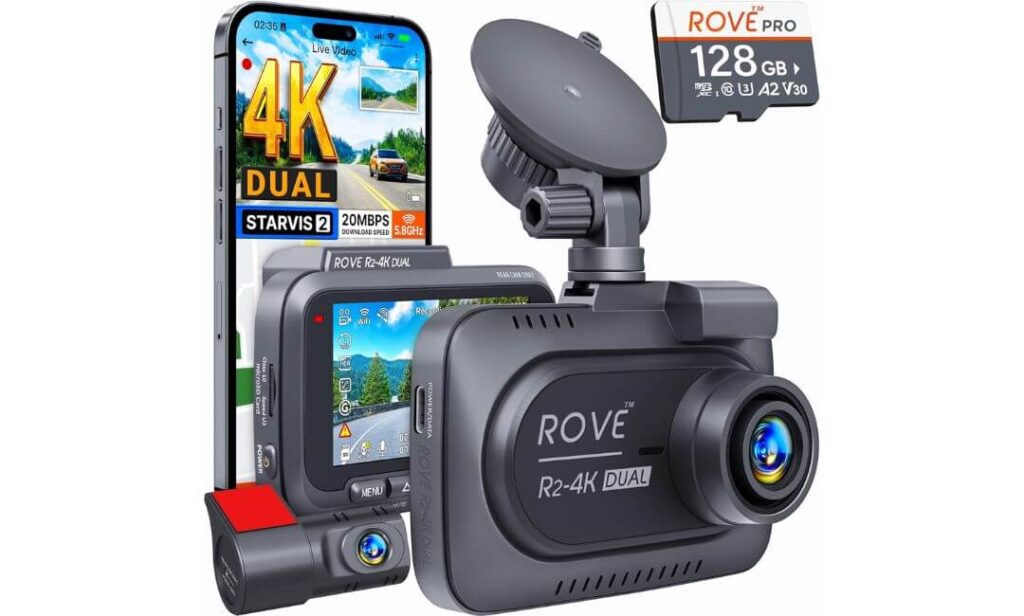
Quick Specs:
- Front 4K 2160P recording with Sony STARVIS 2 low-light sensor
- Rear 1080P camera with wide-angle coverage for highway and parking visibility
- Ultra-fast 5G WiFi with download speeds up to 20MB/s
- Built-in GPS with live speed and route tracking
- Included 128GB high-capacity memory card
- Supercapacitor design for better heat resistance inside truck cabins
- Three different 24-hour parking mode recording options
- Long 6.5-meter rear cable that properly fits larger Ranger cabin layouts
Something about this setup feels immediately practical the moment you look at what is included in the box. No exaggerated “8K ultra cinematic AI vision” nonsense — just a properly balanced dual-camera system with the features most Ford Ranger owners actually end up using every day. You get the STARVIS 2 sensor, built-in GPS, high-speed WiFi, parking mode support, a long rear cable, and even a free 128GB card without turning the purchase into a complicated add-on game afterward.
What really works here is the balance between clarity and usability. The front 4K recording looks crisp without overprocessing everything into fake sharpness, while the rear camera stays surprisingly stable during rough-road driving where many cheaper systems start vibrating or blurring badly. The wider viewing angles also make sense in a Ranger because trucks naturally deal with larger lanes, wider turns, trailers, and more blind-area movement than compact vehicles. Combined with the brighter F1.5 front aperture, nighttime highway footage stays cleaner than expected — especially around reflective signs and fast-moving headlights.
The other reason this model keeps getting recommended by truck owners is because it simply feels easy to live with long term. The 5G WiFi is genuinely quick, the app feels cleaner than most budget systems, and the supercapacitor design handles temperature swings much better than older battery-based cameras. Even small details like voice guidance and OTA firmware updates quietly make ownership smoother over time. (For Ranger owners who want modern features without paying premium flagship prices, this setup hits an unusually smart middle ground.)
Why This One Earned a Spot in the Lineup
- Excellent overall value without sacrificing core recording quality
- Included 128GB card saves extra setup cost immediately
- Fast WiFi transfers make sharing footage much less frustrating
- STARVIS 2 sensor handles nighttime highways surprisingly well
- Supercapacitor design feels safer for hotter truck interiors
- Parking mode options are more flexible than most cameras in this range
A Minor Detail Worth Keeping in Mind
- The rear camera records at 1080P instead of 2K, though the image quality still looks cleaner than many higher-resolution budget cameras
Why It Fits Ford Ranger Ownership So Naturally
This setup makes a lot of sense for Ranger owners who use their truck for everything instead of keeping it as a weekend toy. Long commutes, work sites, highway driving, road trips, overnight parking — it handles all of those situations without feeling overly complicated or delicate.
The included rear cable length also matters more than people think. Many compact-car dash cams technically “fit” trucks, but cable routing becomes frustrating halfway through installation. Here, the longer cable gives enough flexibility for cleaner headliner routing in SuperCrew Ranger models without stretching connections awkwardly near the rear glass.
The Insider Pro-Tip
A lot of buyers focus only on daytime sample footage when comparing dash cams. The smarter thing to watch instead is how stable the exposure stays when lighting suddenly changes — entering tunnels, passing LED trucks at night, or driving during rain. That is where weaker processors usually panic and destroy plate clarity. This setup stays much calmer during those moments than most budget dual-camera systems.
Another thing worth mentioning: having a fast app connection changes the ownership experience more than people expect. After a close call or parking incident, nobody wants to remove SD cards and sit at a laptop just to check footage. The faster WiFi here quietly becomes one of those features you stop thinking about — until you use an older dash cam again and instantly realize how slow everything used to feel.
#4. RexingUSA V1P 4K Dual Channel Dash Cam
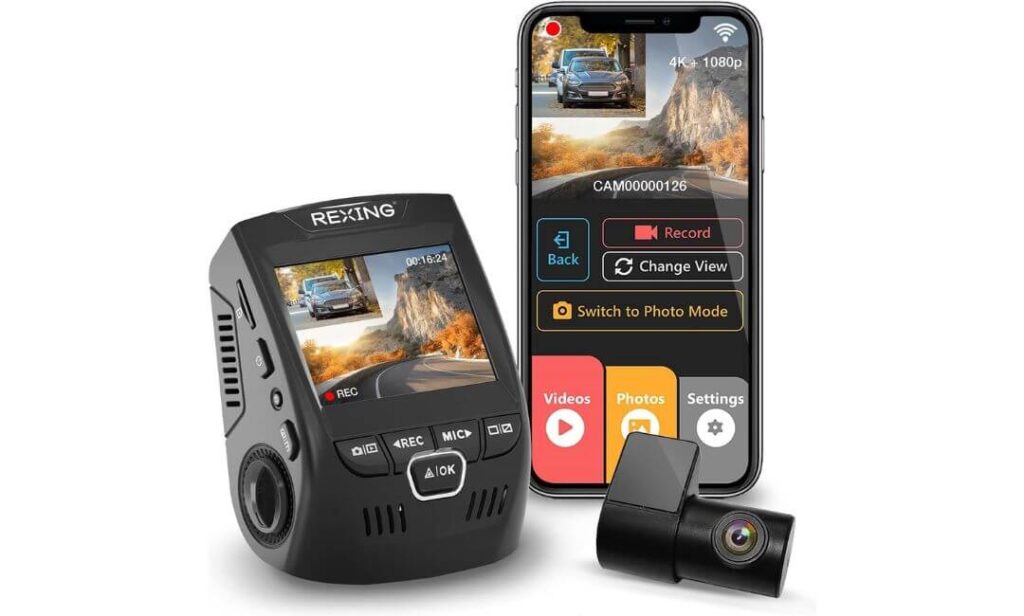
Quick Specs:
- Front true 4K recording with rear 1080P dual-channel coverage
- Ultra-wide 170-degree viewing angle for broader road visibility
- Built-in WiFi app connectivity for wireless footage access
- Reliable supercapacitor design for hot and cold truck environments
- Smart parking monitor with motion and vibration recording support
- Wide Dynamic Range (WDR) for cleaner exposure during night driving
- Long rear cable setup that works well in extended Ranger cabins
- Loop recording with automatic emergency footage locking via G-sensor
Oddly enough, this is the kind of dash cam many Ford Ranger owners end up liking more after a few months than they did on day one. It does not scream for attention with oversized screens or flashy “cinematic AI” marketing, but once installed, it quietly handles daily driving in a way that feels dependable instead of experimental. The overall setup is straightforward, stable, and refreshingly uncomplicated.
The strongest thing here is consistency. The front 4K recording captures enough detail for highways and city traffic without making colors look fake or oversharpened, while the rear camera stays useful for parking lots, tailgating traffic, and overnight street parking. The 170-degree wide-angle lens also fits the Ford Ranger surprisingly well because trucks naturally sit higher and cover more lane area than compact cars. Combined with the WDR exposure tuning, nighttime footage stays balanced during rain, tunnel exits, and bright LED traffic where weaker cameras usually wash everything out.
Another reason this setup works so naturally in a Ranger is heat durability. Truck cabins get brutally hot during summer parking, especially with large windshields and darker interiors. The built-in supercapacitor system matters more here than people think because it handles temperature swings much better than cheaper battery-powered cameras that slowly become unreliable over time. Add in the simple windshield installation, wireless app support, and solid parking monitoring features, and the whole system starts feeling like one of those “install it once and forget about it” upgrades. (Especially for Ranger owners who want dependable protection without turning the dashboard into a tech project.)
What Made This One Easy to Trust
- Stable everyday recording without overcomplicated menus or gimmicks
- Wide-angle coverage works well for larger truck lanes and highway driving
- WDR tuning handles difficult lighting transitions better than expected
- Supercapacitor design feels safer for long-term heat exposure
- Straightforward installation process for first-time dash cam buyers
- Parking monitor features feel practical instead of overly aggressive
A Helpful Thing to Know Before Installing It
- The display is smaller than some newer premium dash cams, though many drivers end up preferring the cleaner and less distracting layout after daily use
Why It Feels Naturally Suited to the Ford Ranger
Some dash cams feel designed mainly for compact sedans and then adapted for trucks later. This one does not really have that problem. The wide viewing angles, longer rear cable, and temperature-resistant design all make more sense once installed inside a midsize pickup that spends time on highways, job sites, outdoor parking lots, or rougher roads.
The simpler overall layout also works well in the Ranger cabin because it avoids clutter. You still get front-and-rear coverage, parking protection, wireless access, and reliable loop recording — just without oversized screens or bulky mirror systems taking over the windshield area.
The Insider Pro-Tip
A lot of people underestimate how important “daily reliability” becomes after the excitement of buying a new dash cam wears off. Fancy specs look great during comparisons, but what actually matters six months later is whether the camera still records correctly every time you start the truck, survives heat without random shutdowns, and lets you access footage quickly when something happens.
That is where simpler, mature systems like this quietly win people over. The feature set is modern enough to feel current, but the overall experience still feels stable and predictable — which, honestly, is exactly what most Ford Ranger owners end up wanting after dealing with glitchy budget dash cams once before.
#5. IIWEY 4K+4K Dash Cam Front and Rear
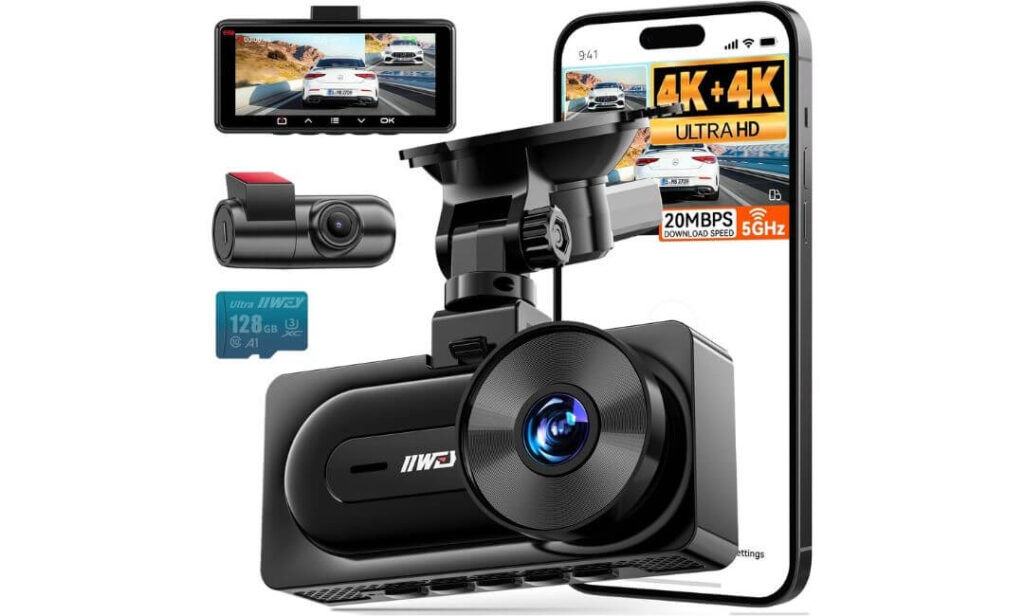
Quick Specs:
- True 4K front + 4K rear recording instead of the usual 4K + 1080P setup
- Dual STARVIS low-light sensors with HDR support for darker roads
- Ultra-fast WiFi 6 connectivity with download speeds up to 20MB/s
- Built-in GPS for route tracking, speed logging, and incident records
- Included 128GB memory card already inside the package
- Wide 170-degree viewing angle for larger road and shoulder coverage
- Smart 24/7 parking monitoring with battery protection support
- Extra-long rear cable designed to reach larger truck cabins comfortably
Here is the surprising thing about this setup: it does not behave like a typical “budget-friendly” dash cam once you actually start using it. Most affordable systems cut corners somewhere obvious — weak rear quality, slow app speeds, unreliable night footage, or frustrating parking mode behavior. This one quietly avoids a lot of those usual compromises, which is exactly why it earned a place in this lineup.
The biggest standout feature is obvious the moment you read the specs properly: true 4K recording on both the front and rear cameras. Most dual-camera systems in this price range still downgrade the rear camera heavily, which becomes painfully noticeable when someone tailgates, reverses into the truck, or hits the rear quarter panel at night. Here, both cameras stay impressively detailed, and the dual STARVIS sensors do a much better job controlling glare from LED headlights than expected. Combined with the brighter F1.6 aperture, nighttime highway footage looks cleaner and more usable than many people will assume from the price alone.
The overall ownership experience also feels more modern than older budget dash cams. The WiFi 6 connection is genuinely quick, app transfers no longer feel painfully outdated, and having the 128GB card included removes a lot of annoying setup costs immediately. Even the compact design works nicely in a Ford Ranger because it stays discreet without eating up windshield space. (For drivers who want premium-style features without jumping into flagship pricing territory, this setup punches well above what most people expect.)
Why This Budget-Friendly Setup Still Made the Cut
- Rare dual 4K + 4K recording at this price level
- Faster WiFi 6 transfers make footage access far less annoying
- STARVIS sensors improve nighttime plate visibility noticeably
- Included 128GB card adds immediate real-world value
- Compact design fits naturally in the Ranger cabin
- Long rear cable makes truck installation much easier than expected
One Small Detail Buyers Should Keep in Mind
- To unlock full 24/7 parking surveillance, the optional hardwire kit still needs to be added separately
Why It Works So Well in a Ford Ranger
This setup fits the Ranger particularly well because the truck naturally benefits from wider recording coverage and stronger rear visibility. The dual 4K setup helps more than expected on larger vehicles where rear incidents, parking lot bumps, and highway tailgating happen more frequently than they do in smaller cars.
The longer rear cable also matters here because many lower-priced dash cams technically support trucks but become frustrating during installation. With this one, cable routing through a SuperCrew or extended Ranger cabin feels much less improvised, which makes the final setup look cleaner and more factory-like once everything is tucked properly.
The Insider Pro-Tip
A lot of people assume “budget-friendly” automatically means sacrificing important features. The smarter way to look at it is this: some newer dash cams are improving faster than older premium models. Features like WiFi 6, dual 4K recording, and newer STARVIS sensors used to belong only to expensive flagship setups not very long ago.
That is what makes this model interesting. It does not try to overwhelm buyers with flashy gimmicks — it simply focuses on the things Ford Ranger owners actually notice during daily use: cleaner rear footage, quicker app access, stronger night visibility, and a setup process that does not become frustrating halfway through installation.
Best Dash Cam Setups for Ford Ranger Owners Compared Side by Side
| Dash Cam | Why It Stands Out | Recording Setup | Night Driving | Truck-Friendly Features | Best Match For |
|---|---|---|---|---|---|
|
VIOFO A229 Plus
Editor’s Favorite
|
Feels the most balanced overall for a Ford Ranger — cleaner HDR tuning, sharper night clarity, and fewer compromises during real highway driving. |
1440P + 1440P Dual STARVIS 2 HDR |
Excellent glare control and stronger license plate clarity on darker roads. | 5GHz WiFi, voice control, advanced GPS, compact install, reliable parking mode. | Drivers wanting premium image quality without going full mirror setup. |
|
WOLFBOX G900 PRO
Best Mirror Style
|
Transforms the Ranger cabin with a huge live rear view and a cleaner OEM-style feel. |
4K Front + 2.5K Rear STARVIS 2 IMX678 |
Very strong low-light visibility for a mirror-based system. | 12-inch mirror display, voice control, 5.8GHz WiFi, included 128GB card. | Ranger owners wanting wider rear visibility and a cleaner cabin setup. |
|
ROVE R2-4K DUAL
Best Value Pick
|
One of the easiest recommendations for everyday Ranger use because it balances features, reliability, and price unusually well. |
4K Front + 1080P Rear STARVIS 2 Sensor |
Bright nighttime footage with strong exposure handling during highway driving. | 20MB/s WiFi speeds, GPS tracking, included 128GB card, supercapacitor design. | Drivers wanting premium daily usability without flagship pricing. |
|
RexingUSA V1P
Simple & Reliable
|
Feels refreshingly straightforward for buyers who just want dependable front and rear coverage without extra complexity. |
4K Front + 1080P Rear WDR Processing |
Balanced exposure and stable recording during difficult light transitions. | Supercapacitor durability, wide-angle coverage, reliable parking monitor. | Owners wanting a stable “install once and forget it” setup. |
|
IIWEY Q7
Budget Surprise
|
Quietly delivers premium-style specs at a price range where most dash cams still compromise heavily on rear quality. |
True 4K + 4K Dual STARVIS HDR |
Strong nighttime clarity with surprisingly clean rear footage. | WiFi 6 speeds, GPS logging, included 128GB card, long truck-friendly cable. | Buyers wanting maximum features without overspending. |
Buying Guide: How to Choose the Best Dash Cam for Your Ford Ranger
A Ford Ranger is not the same kind of vehicle as a compact sedan or crossover, and honestly, that changes what actually matters in a dash cam. Trucks sit higher, vibrate more on uneven roads, spend more time outdoors, and usually deal with harsher lighting conditions during highway driving, towing, rain, dust, or off-road trips. That is why buying the “highest rated” dash cam online without understanding how it behaves inside a truck often leads to disappointment later.
The smarter approach is to focus on the features that genuinely improve real-world recording quality, long-term reliability, and everyday usability inside a Ranger cabin.
Why Video Resolution Alone Does Not Tell the Full Story
A lot of people immediately search for “best 4K dash cam for Ford Ranger,” but resolution numbers by themselves can be misleading. Some cheap 4K cameras still produce blurry nighttime footage because the sensor behind the lens cannot process difficult lighting properly.
What matters more is the combination of:
- Sensor quality
- HDR tuning
- Bitrate stability
- Lens aperture
- Motion handling at highway speed
That is why newer Sony STARVIS 2 sensors have become such a big deal recently. They handle glare, shadows, LED headlights, rain reflections, and dark roads far better than older sensors. In a taller truck like the Ranger, that difference becomes even more obvious because headlights hit the windshield at stronger angles than they do in smaller vehicles.
If you regularly drive early mornings, rural highways, construction areas, or poorly lit roads, investing in stronger low-light hardware matters much more than chasing exaggerated resolution marketing.
Front-Only vs Front-and-Rear Dash Cam Setups
For most Ford Ranger owners, a dual-channel setup usually makes more sense than a front-only camera.
A Ranger’s size naturally increases the chances of:
- Rear-end incidents
- Parking lot damage
- Trailer-related accidents
- Tailgating situations
- Hit-and-run bumps while parked
That is why front-and-rear systems feel more complete in trucks. The rear camera becomes especially useful during reversing, towing, overnight parking, and highway driving where aggressive traffic sits close behind the truck.
Front-only dash cams still work fine for buyers on tighter budgets, but if the truck spends a lot of time outdoors or on highways, dual recording quickly becomes worth it.
Parking Mode Is More Important in a Truck Than Most People Expect
A lot of Ford Rangers spend nights outside instead of inside garages. Job sites, apartment parking, airports, camping areas, hotel lots, trails — trucks usually face more unattended parking exposure than smaller commuter cars.
That is where a proper parking mode matters.
Better systems can:
- Detect impacts while parked
- Record buffered footage before an event happens
- Trigger motion recording automatically
- Use low-bitrate recording to save storage space
- Protect the vehicle battery from over-draining
Some insurance companies also take parked-incident footage seriously during claims because it provides timestamped evidence of what actually happened around the vehicle.
One thing many buyers overlook though: most advanced parking features require a separate hardwire kit. Plugging the camera only into the cigarette lighter usually disables full-time parking recording once the truck shuts off.
Storage Size, Bitrate, and Loop Recording Matter More Than People Think
Higher-quality video also means larger file sizes.
That becomes important quickly in a Ford Ranger because trucks often stay on the road longer — work commutes, road trips, towing runs, camping drives, or off-road weekends generate a lot more footage than short city commutes.
Here is what genuinely matters:
- High-endurance microSD cards
- Stable loop recording
- Good bitrate management
- Reliable emergency file locking
Some cheaper dash cams advertise huge resolutions but compress footage too aggressively, which destroys detail once the truck starts moving faster. A cleaner bitrate often matters more than flashy marketing specs.
For most Ranger owners, 128GB feels like the realistic starting point now, especially with dual-camera systems.
Wired vs Wireless Dash Cam Setups for Ford Ranger Owners
This part confuses a lot of buyers because “wireless dash cam” usually refers only to wireless app connectivity — not wireless power.
Almost all serious dash cams still need wired power for reliable recording.
The real choice is usually between:
- Plug-and-play cigarette lighter installation
- Full hardwired installation
Plug-and-play setups are easier and faster for beginners. Hardwired setups look cleaner, free up charging ports, and unlock proper 24/7 parking surveillance.
If the Ranger is used heavily for outdoor parking or overnight trips, hardwiring usually ends up being the better long-term decision.
Hidden Dash Cam vs Visible Dash Cam Designs
Different Ranger owners prefer completely different styles.
Some drivers want a discreet hidden setup tucked behind the mirror so the cabin still feels factory-clean. Others prefer larger displays or mirror-style systems with live rear visibility.
Compact hidden-style cameras work best for:
- Minimal windshield clutter
- Cleaner factory appearance
- Less distraction during driving
- Better theft resistance
Mirror dash cams work better for:
- Wider rear visibility
- Towing support
- Larger blind-spot awareness
- Drivers who want a more tech-focused cabin feel
Neither option is universally “better.” It depends entirely on how the truck is used daily.
Installation and Fitment Considerations for Ranger Models
The good news is most modern dash cams work well across Ford Ranger trims, including:
- XLT
- Lariat
- Tremor
- Wildtrak
- Ranger Raptor
What changes is cable routing difficulty and windshield space.
Crew cab models usually need longer rear camera cables, especially if you want a cleaner hidden installation through the headliner. Mirror-style systems also tend to feel more natural in larger Ranger cabins because the seating position already places the mirror higher in the driver’s field of view.
Another thing worth paying attention to is heat resistance. Trucks parked outdoors during summer create much hotter cabin temperatures than many buyers expect. Dash cams using supercapacitors generally survive those conditions more reliably than older battery-based systems.
Quick Real-World Tips Before You Buy
- Prioritize sensor quality and HDR performance over exaggerated resolution claims
- If the truck parks outside often, choose a camera with proper parking mode support
- Buy a high-endurance SD card even if the camera already includes one
- Faster WiFi genuinely matters after accidents or insurance claims
- Wider viewing angles help more in trucks than smaller cars
- Mirror dash cams are surprisingly useful in the Ranger because of the truck’s rear visibility limitations
- Supercapacitor-based systems usually last longer in hotter climates
- Long rear camera cables matter more than people realize in extended cab trucks
The biggest mistake Ford Ranger owners make is buying a dash cam based only on spec sheets. The better approach is choosing a setup that actually fits how the truck is used every day — highway driving, work sites, towing, road trips, overnight parking, or off-road travel. Once you match the camera to the way the truck is really driven, the right choice becomes much easier.
Ford Ranger Dash Cam Installation Guide: What Actually Makes the Setup Look Clean and Work Properly
Installing a dash cam in a Ford Ranger is usually easier than people expect, but there is a big difference between a setup that simply “works” and one that actually feels factory-clean after a few weeks of daily driving. Trucks have taller cabins, wider windshields, thicker A-pillars, and more cabin vibration than smaller vehicles, so cable routing and camera positioning matter a lot more here than they do in compact sedans.
The good news is that most modern dual-channel dash cams fit the Ranger very well, especially in SuperCrew, Wildtrak, Tremor, and Ranger Raptor trims. The key is taking a little extra time during installation so the setup stays tidy, secure, and out of your normal driving view.
The Smartest Way to Route Dash Cam Cables in a Ford Ranger
The cleanest installation usually starts near the top center of the windshield, directly behind or slightly beside the rear-view mirror. That position keeps the front camera hidden from the driver’s natural line of sight while still giving the lens a full forward view of the road.
From there, most Ranger owners route the cable:
- Across the headliner edge
- Down the passenger-side A-pillar
- Toward the fuse box or power source under the dashboard
For rear cameras, the cable normally continues:
- Along the headliner
- Above the doors
- Toward the rear glass or rear cabin area
One thing many first-time installers miss is how important it is to avoid loose cable sections near rough plastic trim. Trucks naturally vibrate more on uneven roads, and even a tiny unsecured cable can start creating annoying rattles after a few weeks.
Using trim tools instead of forcing wires by hand also makes a huge difference. Most of the cleaner-looking Ranger installations hide almost the entire cable path inside the weather stripping or headliner edges without removing major interior panels.
Choosing the Right Power Setup for Your Ford Ranger
There are three main ways Ranger owners usually power a dash cam, and each one changes how the system behaves daily.
Cigarette Lighter or USB Power
This is the fastest and easiest installation method.
It works well for:
- Casual daily driving
- Temporary setups
- Buyers who do not need 24/7 parking recording
- First-time dash cam users
The downside is that the camera usually powers off once the truck shuts down, which limits advanced parking surveillance features.
Fuse Tap Installation
This is the cleaner long-term option most enthusiasts eventually choose.
A fuse tap connects the dash cam directly to the Ranger’s fuse box and allows:
- Cleaner hidden wiring
- Automatic startup and shutdown
- Proper parking mode support
- Better cable management overall
It sounds intimidating at first, but modern hardwire kits make the process much easier than people expect. Most installations only require identifying an accessory fuse and a constant-power fuse inside the cabin fuse panel.
OBD-II Power Adapters
These are becoming more popular because they simplify hardwired-style setups without directly modifying fuse connections.
An OBD-II adapter plugs into the diagnostic port under the dashboard and can power:
- Parking mode recording
- Automatic startup functions
- Long-term monitoring setups
This option works especially well for Ranger owners who want cleaner power management without spending time inside the fuse box.
Keeping the Interior Looking Clean in Wildtrak and Ranger Raptor Models
Higher trims like the Wildtrak and Ranger Raptor already have more premium-looking interiors, which means messy cable routing becomes noticeable very quickly.
The setups that usually look best inside these trucks follow a few simple rules:
- Keep the camera tucked behind the mirror whenever possible
- Avoid visible hanging power wires near the center console
- Route rear cables above door seals instead of across pillars
- Use low-profile adhesive clips only when absolutely necessary
- Match cable paths with existing factory trim lines
Mirror-style systems like the WOLFBOX often blend especially well inside Ranger cabins because they replace visual clutter instead of adding another object below the windshield.
Compact cameras like the VIOFO also work nicely because they disappear almost completely once installed properly behind the mirror housing.
Safety and Visibility Rules Most Buyers Ignore
A dash cam should never block the driver’s main forward visibility.
That sounds obvious, but a surprising number of people mount cameras too low on the windshield because they want easier screen access. In a truck like the Ranger, that becomes even more noticeable because the seating position already places the driver higher and closer to the windshield glass.
The safest placement is usually:
- High on the windshield
- Slightly passenger-side offset
- Hidden near the mirror area
It is also important not to block:
- Rain sensors
- Lane-assist cameras
- Emergency braking sensors
- Forward collision systems
Newer Rangers with advanced driver assistance systems can become sensitive if a dash cam sits directly in front of factory cameras or radar-related hardware.
Common Ford Ranger Dash Cam Problems and Easy Fixes
Most installation issues are surprisingly minor once you know what causes them.
Camera Vibration on Rough Roads
If the footage shakes excessively:
- Recheck windshield adhesion
- Avoid textured glass areas
- Let adhesive mounts cure fully before driving
Pickup trucks naturally transmit more road vibration than sedans, so mounting strength matters more here.
Driver Assistance Warnings After Installation
If lane-assist or collision alerts start acting strangely:
- Move the dash cam slightly farther from factory windshield sensors
- Avoid blocking sensor housings behind the mirror
Even a small overlap can sometimes confuse forward-facing systems.
Rear Camera Angle Problems
A common mistake in Rangers is mounting the rear camera too high or too low on the rear glass.
The ideal position usually gives:
- A visible horizon line
- Partial truck-bed visibility
- Balanced rear-lane coverage
Too much sky exposure often causes poor nighttime balance and glare issues.
Parking Mode Battery Drain Concerns
Advanced parking recording naturally uses power while the truck is off.
A proper hardwire kit with:
- Low-voltage protection
- Adjustable battery cutoff
- Smart shutdown features
helps prevent battery drain problems during long parking periods.
Real-World Installation Advice Most Ranger Owners Appreciate Later
The cleanest dash cam setups are usually the least noticeable ones. After the excitement of installation wears off, most drivers stop caring about giant screens or flashy menus — they simply want the system to start reliably every day, stay out of the way, and capture clear footage when something actually happens.
That is why spending an extra 30 minutes on cable routing and camera positioning is usually worth it. In a Ford Ranger, a properly installed dash cam feels less like an aftermarket gadget and more like something the truck should have included from the factory in the first place.
Real-World Ford Ranger Dash Cam Scenarios: Where the Right Setup Actually Makes a Difference
A lot of dash cam reviews focus only on specs, sample clips, or menu systems, but most Ford Ranger owners care about something much simpler in real life: “Will this camera actually capture what matters when something unexpected happens?”
That is the real reason truck owners end up appreciating a good dash cam after a few months. It is not about recording scenic drives all day. It is about having clear evidence during the moments nobody plans for — chaotic city traffic, dark highways, parking lot incidents, aggressive drivers, off-road trips, or late-night rain where visibility suddenly becomes terrible.
The difference between an average dash cam and a genuinely good one usually shows up in those exact situations.
Daytime Driving in Traffic-Heavy Urban Areas
Urban driving sounds easy for dash cams until you actually look at the footage closely.
Cities create constant exposure changes:
- Reflective glass buildings
- Sudden shadows
- Bright traffic lights
- Fast lane switching
- Motorcycles cutting through traffic
- Stop-and-go congestion
A Ford Ranger also sits higher than most commuter vehicles, which changes the angle of incoming headlights and windshield reflections during daytime traffic.
That is where cleaner HDR tuning becomes noticeable very quickly. Better systems like the VIOFO A229 Plus or ROVE R2-4K DUAL keep:
- Traffic signs readable
- License plates cleaner
- Sky exposure balanced
- Dashboard reflections under control
Cheaper cameras often react too aggressively to sunlight changes and start blowing out details around white vehicles, reflective roads, or brighter intersections.
Wide-angle coverage also matters more in a Ranger during city driving because trucks naturally occupy more road space. Capturing side-lane movement, cyclists, merging traffic, and aggressive lane cutters becomes much easier with broader viewing angles around 170 degrees.
Night Driving Is Where Better Dash Cams Separate Themselves Instantly
Most dash cams look acceptable during the daytime.
Night driving is where the real differences begin.
This becomes especially important in a Ford Ranger because trucks often:
- Travel longer highway distances
- Drive through darker rural roads
- Tow trailers at night
- Spend time near construction areas
- Encounter stronger headlight glare from lifted vehicles and SUVs
Older or weaker sensors usually struggle badly once lighting conditions become uneven. Headlights turn into giant white blobs, road signs start glowing unnaturally, and plate clarity disappears once vehicles begin moving faster.
That is exactly why newer STARVIS 2 sensors matter so much in current-generation dash cams.
In real nighttime conditions, stronger low-light systems:
- Preserve lane markings better
- Reduce motion blur
- Handle rain reflections more naturally
- Maintain cleaner contrast around LED headlights
- Keep license plates readable for longer distances
Mirror systems like the WOLFBOX also become surprisingly useful during night driving because the larger rear display gives a much wider live rear perspective than a traditional mirror, especially during highway merges or darker traffic conditions.
Parking Lot Incidents Are More Common Than Most Ranger Owners Expect
A lot of drivers buy a dash cam thinking mainly about accidents while driving, then later realize the camera becomes even more valuable while the truck is parked.
Ford Rangers naturally attract more parking exposure because they often spend time:
- At job sites
- In apartment complexes
- At airports
- Near hiking trails
- In outdoor parking garages
- At shopping centers with tighter parking spaces
That creates more opportunities for:
- Hit-and-run damage
- Door dings
- Vandalism
- Shopping cart impacts
- Reverse parking bumps
- Suspicious movement around the truck at night
A proper parking mode setup changes everything here.
Buffered parking recording becomes especially important because the camera saves footage from before the impact happens, not just after motion is detected. That small detail often makes the difference between identifying a vehicle properly or missing the incident entirely.
Systems with better parking protection also help reduce false triggers caused by:
- Wind vibration
- Passing traffic
- Heavy rain
- Loud exhaust noise nearby
For Ranger owners who regularly park outdoors overnight, parking mode honestly becomes one of the most valuable features the camera offers.
Off-Road Trails and Highway Driving Push Dash Cams Much Harder Than Normal Commuting
This is where truck ownership starts separating itself from normal car use.
Off-road driving introduces:
- Constant vibration
- Dust
- Fast lighting changes
- Harsh sunlight
- Cabin movement
- Sudden impacts from uneven terrain
Meanwhile, long-distance highway driving creates:
- Higher sustained speeds
- Stronger wind vibration
- Rapid exposure shifts
- Continuous recording heat buildup
- Faster-moving license plates
That combination quietly destroys weak dash cams over time.
Better-built systems survive these conditions more comfortably because they use:
- Stronger mounting systems
- Better image stabilization behavior
- Supercapacitor power designs
- Cleaner heat management
- Higher bitrate recording
This is one reason truck owners often end up preferring dash cams with supercapacitors instead of traditional batteries. Hot cabin temperatures combined with long-distance driving can slowly reduce reliability in older battery-based setups.
The wider field of view also matters heavily during off-road driving because trails and mountain roads create sharper side-angle movement than regular city streets. Cameras with broader coverage capture:
- Side obstacles
- Trail conditions
- Oncoming traffic near narrow paths
- Unexpected wildlife movement
- Terrain transitions
far more naturally.
Why the “Best” Dash Cam Depends on How the Ranger Is Actually Used
One thing becomes obvious after living with these systems for a while: there is no single perfect dash cam for every Ranger owner.
The best setup changes depending on how the truck spends most of its time.
For example:
- Daily commuters usually appreciate cleaner HDR performance and fast app access
- Highway drivers care more about plate clarity at speed and night visibility
- Outdoor parkers benefit most from reliable parking surveillance
- Off-road owners prioritize heat resistance and stable mounting
- Drivers wanting cleaner interiors often prefer hidden or mirror-style setups
That is why matching the dash cam to real driving habits matters more than simply buying the most expensive model on the list.
Once the setup fits the way the Ranger is actually driven every week, the camera stops feeling like an accessory and starts feeling like a normal part of the truck itself.
Ford Ranger Dash Cam Installation Checklist and Quick-Start Setup Guide
Most Ford Ranger dash cam installations become frustrating for one simple reason: people rush the wiring. The actual camera setup is usually easy. The difference between a clean factory-looking installation and a messy one almost always comes down to planning the cable routing before sticking anything permanently to the windshield.
The good news is that the Ranger is actually one of the easier trucks to install a dash cam in because the cabin has enough headliner space, strong trim fitment, and wide windshield access for both compact cameras and larger mirror systems. Whether you drive an XLT, Wildtrak, Tremor, or Ranger Raptor, the overall installation logic stays mostly the same.
What to Prepare Before Starting the Installation
Before mounting anything, it helps to lay out the entire setup first instead of installing parts one piece at a time.
Most clean installations only need:
- Dash cam and rear camera kit
- High-endurance microSD card
- Trim removal tool
- Fuse tap or hardwire kit (if using parking mode)
- Electrical tape or fabric wire tape
- Small cable clips for tighter sections
- Voltage tester or fuse tester
- Microfiber cloth for windshield cleaning
One thing many people skip is cleaning the windshield properly before mounting the camera. That matters more in trucks because the windshield angle creates stronger heat exposure over time. Adhesive mounts hold much better when the glass is fully cleaned and dry before installation.
Step-by-Step Layout for a Clean Ford Ranger Dash Cam Install
The easiest way to avoid messy wiring is to install the system in the same order professional installers usually follow.
Step 1: Test Everything Before Hiding Cables
Before routing any wires:
- Plug the camera in first
- Confirm front and rear cameras both work
- Check WiFi connectivity
- Insert and format the memory card
- Verify GPS and recording settings
This sounds basic, but it prevents the nightmare scenario of routing an entire rear cable only to realize a connection issue exists afterward.
Step 2: Position the Front Camera Correctly
The ideal mounting area is usually:
- High near the rear-view mirror
- Slightly passenger-side offset
- Below tinted windshield strips
- Away from factory ADAS sensors
In a Ford Ranger, this keeps the camera hidden from the driver while still giving the lens a wide road view.
Mirror-style systems should also be centered carefully because larger displays become distracting if mounted too low.
Step 3: Route the Front Power Cable Through the Headliner
The cleanest cable path usually runs:
- Across the top headliner edge
- Down the passenger-side A-pillar
- Under the dashboard toward the power source
The passenger side is usually preferred because it reduces interference near driver-side airbags and keeps the cabin looking cleaner overall.
One important detail here: do not force the cable directly over side curtain airbag locations. Keep the wire tucked behind trim edges rather than tightly crossing airbag deployment zones.
Step 4: Route the Rear Camera Cable
For dual-channel setups:
- Continue routing along the upper headliner
- Follow door weather stripping carefully
- Move toward the rear cabin area or rear windshield
SuperCrew Ranger models generally have enough space to hide almost the entire cable run cleanly without removing major trim panels.
Longer cable kits like those included with VIOFO, WOLFBOX, ROVE, and IIWEY systems make this process noticeably easier because the cable never feels stretched or forced near the rear glass.
Step 5: Connect the Power Source
At this point, the setup usually branches into two directions:
- Simple plug-and-play power
- Full hardwired installation
Plug-and-play setups are faster, but hardwired systems look cleaner and unlock proper parking mode functionality.
Common Power and Fuse Setup Options for Ford Ranger Models
Most Ford Ranger owners end up choosing one of these three power approaches.
Cigarette Lighter Installation
Best for:
- Beginners
- Temporary setups
- Drivers who do not need parking mode
Fastest option overall, though visible wiring near the center console usually remains partially exposed.
Fuse Tap Hardwire Installation
Best for:
- Cleaner permanent installations
- Parking surveillance
- Hidden wiring setups
In most Ranger variants, the cabin fuse box is usually accessible near:
- Passenger-side kick panel
- Lower dashboard area
Common fuse choices often include:
- ACC/accessory power fuse
- Radio fuse
- Power outlet fuse
Constant-power fuse connections are usually required for full parking mode support.
Using a low-voltage protection hardwire kit is strongly recommended because it prevents battery drain during overnight parking.
OBD-II Power Adapters
Best for:
- Cleaner installs without touching fuse taps
- Easier removability
- Parking mode support without advanced wiring
The OBD-II port location in the Ranger is generally easy to access below the steering area, which makes this option surprisingly convenient for many truck owners.
Cable Management Tricks That Make the Installation Look Factory-Clean
This is honestly the part that separates average installs from setups people are genuinely proud of later.
The cleanest Ranger installations usually:
- Hide wires fully inside weather stripping
- Avoid visible dangling cables near the windshield
- Match wire routing to factory trim lines
- Use fabric tape instead of shiny plastic tape
- Leave enough slack near moving trim sections
Mirror dash cams especially benefit from cleaner cable management because the larger screen naturally draws more attention if loose wires remain visible nearby.
Compact cameras like the VIOFO or ROVE practically disappear once cables are tucked correctly behind the mirror housing.
What to Check Immediately After Installation
Before considering the setup finished, there are several things worth testing carefully.
Confirm Camera Angle Alignment
Check:
- Horizon level
- Hood visibility balance
- Rear camera alignment
- Blind spot coverage
Too much sky exposure often hurts nighttime recording quality.
Verify Parking Mode Behavior
If hardwired:
- Shut the truck off
- Confirm parking recording activates correctly
- Test motion or impact detection
A lot of buyers assume parking mode works automatically until discovering later that settings were never configured properly.
Test GPS and App Connectivity
Verify:
- GPS locks correctly
- WiFi app pairing works consistently
- Video downloads transfer properly
- Date and time settings remain accurate
Faster systems with 5GHz or WiFi 6 support usually feel noticeably smoother here.
Check for Interference With Driver Assistance Features
After installation:
- Test lane assist systems
- Confirm rain sensors behave normally
- Verify no collision-system warnings appear
If any warnings appear, the camera usually just needs slight repositioning away from the factory sensor cluster.
Real-World Advice Most Ranger Owners Appreciate Later
The biggest mistake people make is trying to finish the installation too quickly. Spending an extra hour hiding cables properly, leveling the camera carefully, and testing parking mode usually makes the setup feel dramatically more professional afterward.
Once installed correctly, a good dash cam should almost disappear into the truck. You stop noticing it daily, but the moment something happens — an accident, parking damage, aggressive driver, or unexpected incident — that clean little setup suddenly becomes one of the smartest upgrades you ever added to the Ranger.
FAQs About Ford Ranger Dash Cam
Does a Ford Ranger actually need a premium dash cam, or is a basic 4K model enough?
This honestly depends on how the Ranger is used daily. If the truck spends most of its life doing short daytime commutes inside lighter traffic, even a decent mid-range setup can work fine. But the moment the truck starts dealing with highways, outdoor parking, towing, darker roads, construction zones, or off-road driving, the weaknesses of cheaper cameras start showing up very quickly.
What most Ranger owners discover later is that “4K” alone means almost nothing anymore. The real difference comes from:
- Sensor quality
- HDR processing
- Heat resistance
- Night exposure handling
- Parking mode reliability
A basic 4K dash cam might look impressive during daylight sample videos, then completely lose license plate detail once rain, glare, vibration, or highway speed enters the picture. That is exactly why newer STARVIS 2-based systems are becoming more important for trucks specifically. The Ranger’s higher windshield angle and taller driving position naturally create harder lighting conditions than smaller cars.
Which type of dash cam setup feels best inside a Ford Ranger cabin: compact camera or mirror-style display?
This is one of those things that sounds simple online but feels completely different once installed in the truck.
Compact dash cams like the VIOFO or ROVE usually feel better for drivers who want:
- Minimal windshield clutter
- Cleaner factory appearance
- Smaller hidden hardware
- Less distraction during daily commuting
Mirror systems like the WOLFBOX become more appealing for drivers who:
- Spend long hours on highways
- Tow trailers often
- Want wider rear visibility
- Drive at night frequently
- Prefer a more tech-focused interior feel
The interesting part is that many Ranger owners who switch to a mirror system end up keeping it permanently because the wider live rear view quietly becomes addictive during lane changes and parking. On a truck, that extra rear visibility genuinely changes the driving experience more than most people expect beforehand.
Can a dash cam interfere with Ford Ranger driver assistance systems or safety features?
Yes, it absolutely can — but usually only when installed carelessly.
Modern Rangers, especially Wildtrak and higher trims, often use:
- Lane assist cameras
- Rain sensors
- Forward collision systems
- Emergency braking hardware
- Windshield-mounted sensor clusters
The problem happens when buyers place the dash cam directly in front of those systems because they want easier access to the screen or buttons.
A properly installed dash cam should sit:
- Higher near the mirror
- Slightly passenger-side offset
- Outside factory sensor zones
This is also why compact cameras often work more naturally in Rangers with advanced safety packages. They hide more cleanly behind the mirror area and reduce the chance of visibility interference or warning errors later.
Why do some Ford Ranger dash cam videos still look blurry at night even with “4K” recording?
Because resolution marketing and actual nighttime image quality are two completely different things.
The biggest issue is usually poor low-light processing. A weak image sensor can technically record in 4K while still producing terrible nighttime footage because:
- Motion blur increases
- Exposure overreacts to headlights
- Bitrate compression destroys detail
- Noise reduction smears license plates
This becomes worse in a Ford Ranger because trucks naturally vibrate more over uneven roads and sit higher against incoming headlights.
That is why better nighttime setups focus more on:
- STARVIS 2 sensors
- Larger apertures like F1.5 or F1.6
- HDR tuning
- Stable bitrate recording
- Heat-resistant processing hardware
In real-world driving, a properly tuned 1440P STARVIS 2 setup can sometimes produce cleaner nighttime footage than a cheaper “8K ultra HD” camera overloaded with aggressive software sharpening.
Is hardwiring a dash cam in a Ford Ranger actually worth the effort?
For many truck owners, yes — especially after a few months of ownership.
At first, plug-and-play setups feel easier because you simply connect power and drive away. But eventually most drivers realize hardwiring changes the experience completely:
- Cleaner cabin appearance
- No visible dangling cables
- Proper parking mode activation
- Automatic startup and shutdown
- Better long-term power stability
The biggest difference shows up during overnight parking or parking-lot incidents. A hardwired setup allows the camera to keep protecting the truck even after the ignition shuts off, which becomes incredibly valuable once the Ranger starts spending time:
- At airports
- On job sites
- In apartment parking
- At campsites
- Near trails or outdoor lots
Ironically, many buyers only start caring about parking mode after the first time someone damages the truck while it is parked. After that, proper hardwired surveillance suddenly stops feeling optional.
Final Thoughts
The truth is, most Ford Ranger owners do not start shopping for a dash cam because they are excited about owning another gadget. Usually it happens after a close call, a parking lot incident, a highway scare, or one of those moments where you suddenly realize how expensive it can become when there is no proof of what actually happened.
That is exactly why choosing the right setup matters more in a truck like the Ranger than many people expect.
A Ford Ranger naturally sees tougher conditions than smaller daily drivers. Long highway miles, rougher roads, outdoor parking, changing weather, night driving, towing, job sites, off-road trails — all of those situations quietly expose the weaknesses in cheaper dash cams very quickly. The cameras that actually feel worth living with long term are the ones that stay reliable when lighting gets ugly, temperatures rise, roads become rough, and something unexpected finally happens.
That is also why we focused this guide around real-world usability instead of inflated marketing claims. Some drivers will genuinely prefer the cleaner hidden look and stronger HDR balance of the VIOFO. Others will love the wider live visibility of the WOLFBOX mirror system during highway driving. And for buyers wanting strong everyday protection without overspending, setups like the ROVE or IIWEY make a lot more sense than older budget cameras still relying on outdated hardware.
The important thing is matching the dash cam to how the Ranger is actually used every week — not simply buying the most expensive model or the one with the loudest spec sheet.
Because once a dash cam is installed properly and quietly doing its job in the background, you stop thinking about it completely… right until the exact moment you suddenly become very glad it was there.
Also Check:


